

A demand-generation manager pulls a large scraped contact file into the CRM, launches a sequence, and starts watching the bounce dashboard instead of the reply dashboard. The problem usually isn't that the team chose the wrong email finder. It's that the team treated email discovery as a finished record, when discovery only creates a candidate.
The best way to find email addresses for leads is a controlled pipeline: identify the right person, infer the company pattern, cross-check the pattern against public evidence, verify the mailbox, document the source, and only then send. That distinction protects deliverability and makes the workflow repeatable across SDRs, markets, and campaigns.
Why Most Lead Email Searches Stall Before Outreach
A high-volume list can look productive in a spreadsheet. It may contain names, job titles, domains, and thousands of apparently usable addresses. Once those records reach an outbound system, however, several weaknesses surface at the same time: former employees remain attached to current companies, role addresses resolve to catch-all mailboxes, guessed patterns point to nonexistent users, and scraped records have no reliable provenance.
The result is a pipeline architecture problem, not merely a tool problem. SMTP rejections increase the pressure on your sending domain, unverifiable contacts stay mixed with usable ones, and a list that looked full becomes a liability at send time. A recent benchmark summary reported about 27.7% open rates, 5.1% reply rates, and roughly 1% meeting-booked rates for B2B cold email, which makes list quality especially important because a modest response window leaves little room for avoidable delivery failures (benchmark summary on business email discovery).
Discovery is not permission to send
Treat every address from a Google result, profile bio, PDF, or enrichment tool as unverified lead data. Discovery answers, “What address might belong to this person?” Verification answers, “Can this mailbox receive mail, and should this record enter outreach?”
That separation prevents a common failure mode. A rep finds one public address, applies its format to an entire company, and loads every generated variant into a sequence. The team has increased list size without establishing deliverability, relevance, or a defensible reason for contacting each person.
Practical rule: A candidate address should have to pass a gate before it can become a CRM contact.
The workflow used by disciplined sales operations teams has four phases:
- Discovery: find the correct contact and collect public clues.
- Pattern inference: identify the company's address format and generate only plausible variants.
- Verification: check syntax, domain and mailbox signals before any send.
- Outreach filtering: suppress risky, stale, duplicate, role-based, or noncompliant records.
Companies that use pattern discovery plus verification can scale more safely. Guidance on this approach recommends identifying one or two real addresses, inferring formats such as first.last@, flast@, or first@, and verifying every generated address before outreach. It also describes a target bounce rate under 5%, while broader deliverability guidance places ideal cold email deliverability around 95% to 98% and reports one large-scale inbox placement result of 95.2% (OSINT email search guidance).
Google Search Operators for Lead Emails
Google works best as a discovery layer, not as a final verification system. Start with the company domain and the person's likely role, then narrow toward pages where professionals publish contact details, such as bios, speaker pages, press releases, and downloadable documents.
Use operators in a deliberate order:
site:company.com "email" "Jane Smith"searches the company's indexed pages for a named contact and email references.site:linkedin.com "head of sales" "@company.com"can surface public profile snippets, bios, or documents that contain both a role and a domain.inurl:author "Jane Smith" "@company.com"focuses on author pages and contributor profiles.filetype:pdf "@company.com" "VP Marketing"searches presentations, conference documents, analyst material, and public business files.site:company.com -site:linkedin.com "@company.com" "marketing"removes LinkedIn results when you want company-domain pages only.
For a SaaS company with fewer than 200 employees, a practical prospecting query might be:
("VP Marketing" OR "Head of Marketing") ("SaaS" OR "software") "@company.com"
Once you have a target domain, make the query more precise:
site:example.com ("VP Marketing" OR "Head of Marketing") "@example.com"
Appending num=100 to a Google results URL can display more results on one page, which is useful when reviewing many indexed documents or reducing repeated page loads during research. It doesn't improve accuracy, but it makes manual collection faster.
High-value Google operator combinations for lead emails
| Operator Pattern | What It Surfaces | Freshness Caveat |
|---|---|---|
site:domain.com "name" "email" |
Company pages, bios, and contact references | Pages may remain indexed after a person leaves |
site:linkedin.com "role" "@domain.com" |
Public profile snippets and documents | Search snippets can omit or truncate addresses |
filetype:pdf "@domain.com" "title" |
Speaker lists, reports, presentations, and filings | Documents may contain old roles or obsolete domains |
inurl:author "name" "@domain.com" |
Author pages and contributor bios | Authors often change employers without updating old pages |
site:domain.com -site:linkedin.com "@domain.com" |
Company-controlled results without LinkedIn | Corporate pages can be selectively indexed |
The search index has a freshness ceiling. A result can lag behind a real-world role change, domain migration, or mailbox shutdown, so an address discovered through search remains a lead until verification confirms it. Public search is valuable for finding the person and the pattern, but it isn't a substitute for a mailbox check.
Mining LinkedIn, Author Pages, and Public Documents
LinkedIn is strongest for identifying the right contact, not for assuming that every profile contains a send-ready address. Use Sales Navigator or Recruiter filters to build a clean set of first name, last name, company, title, location, and profile URL fields. Export or record the permitted fields through approved workflows, then feed those identity triples into a pattern inference step rather than scraping profile pages indiscriminately.
For teams automating permitted collection, a resource such as Scrapeway's LinkedIn scraping API can help clarify what profile data an integration is designed to handle. The operational boundary matters: collect only what your process and the platform's terms allow, preserve the profile URL, and avoid treating a profile match as proof that an email remains active. A practical guide to finding emails on LinkedIn can also help reps organize the research step without collapsing it into unverified outreach.
Use public writing as identity evidence
Author pages on Medium, Substack, company blogs, and guest publications often provide stronger identity signals than a generic database row. A founder's byline may connect a full name to a personal domain, while a product leader's author bio can reveal the employer, role, or preferred contact route. Those pages are useful for confirming that the person and company belong together.
Press release repositories such as PR Newswire and Business Wire can expose executive, investor relations, media, or legal contacts. Public filings can provide similar clues for companies that disclose leadership or investor communications information. These sources are especially useful when the target is not active on social platforms.
A RevOps rep might begin with a seed list of known leaders, inspect related profiles and conference documents, then add adjacent contacts who match the same company and function. That expansion can improve account coverage, but every generated address still needs catch-all handling and domain or mailbox verification before it enters a sequence.
Email Finder Tools and Browser Extensions
Dedicated email finders and browser extensions solve different operating problems. A dedicated platform accepts names, domains, or structured lead files and returns predicted or verified addresses, often with confidence signals, exports, APIs, and CRM connections. An extension works in context: a rep opens a profile or webpage, clicks the extension, and reviews contact data while researching one account.
The right choice depends on whether your bottleneck is bulk processing or in-context research. Dedicated tools are easier to govern because operations can centralize credits, verification rules, exports, and audit fields. Extensions are convenient for one-off prospecting, but unsupervised installs can create shadow SaaS, duplicate records, inconsistent verification, and unclear ownership of harvested data.
Evaluate both categories on four practical axes:
- Coverage quality: measure verified-to-found results, not raw address volume.
- Validation depth: check whether the provider performs syntax, DNS, MX, and SMTP-level checks.
- Workflow integration: confirm that results can move into the CRM and sequencer without manual spreadsheet repair.
- Commercial control: compare seat pricing, credits, shared-plan rules, expiry or decay, and API limits.
EmailScout is one browser-based option that can find publicly available email addresses on a webpage, save results as CSV or TXT, and scan multiple URLs through its URL Explorer feature. Its LinkedIn email finder Chrome extension fits contextual prospecting, while teams still need a separate verification gate and governance policy before sending.
| Tool | Type | Verification Depth | CRM/Sequencer Integration | Pricing Model |
|---|---|---|---|---|
| EmailScout | Browser extension and URL research tool | Discovery-focused, verify before send | File export and workflow hand-off | Free and premium plans |
| Hunter | Dedicated finder, verifier, extension, and API | Lookup plus verification workflow | Integrations and API | Credit-based plans |
| Apollo | Sales database and enrichment platform | Depends on returned record and validation status | CRM and sequencing workflows | Seat and usage-based plans |
| Snov.io | Finder, verifier, CRM, and outreach platform | Lookup and verification features | Native campaign and CRM workflows | Credit-based plans |
| Lusha | Database and browser extension | Contact enrichment with validation signals | CRM integrations | Seat and credit model |
| RocketReach | Browser extension and contact database | Provider-dependent confidence and validation | Export and integrations vary | Credit or subscription model |
A tool that returns more addresses isn't automatically better. Ask how many results survive verification, how the system labels catch-all domains, and whether reps can see the source and timestamp of each record.
From Discovery to Verification Without Losing the List
Discovery should generate candidates, not create send-ready contacts. The cleanest workflow keeps the original source, inferred pattern, verification response, and final disposition attached to the same record so a failed address can be diagnosed instead of deleted.
Run the verification gate in sequence:
- Syntax check: reject malformed addresses and suspicious role patterns before external checks.
- Domain validation: confirm that the domain exists and represents the intended company.
- MX validation: confirm that the domain advertises a real mail exchanger rather than a parked or inactive destination.
- SMTP-level check: test whether the server accepts the recipient signal, while handling greylisting and catch-all behavior carefully.
- Risk filtering: remove disposable, role-based, spam-trap, duplicate, and clearly stale records.
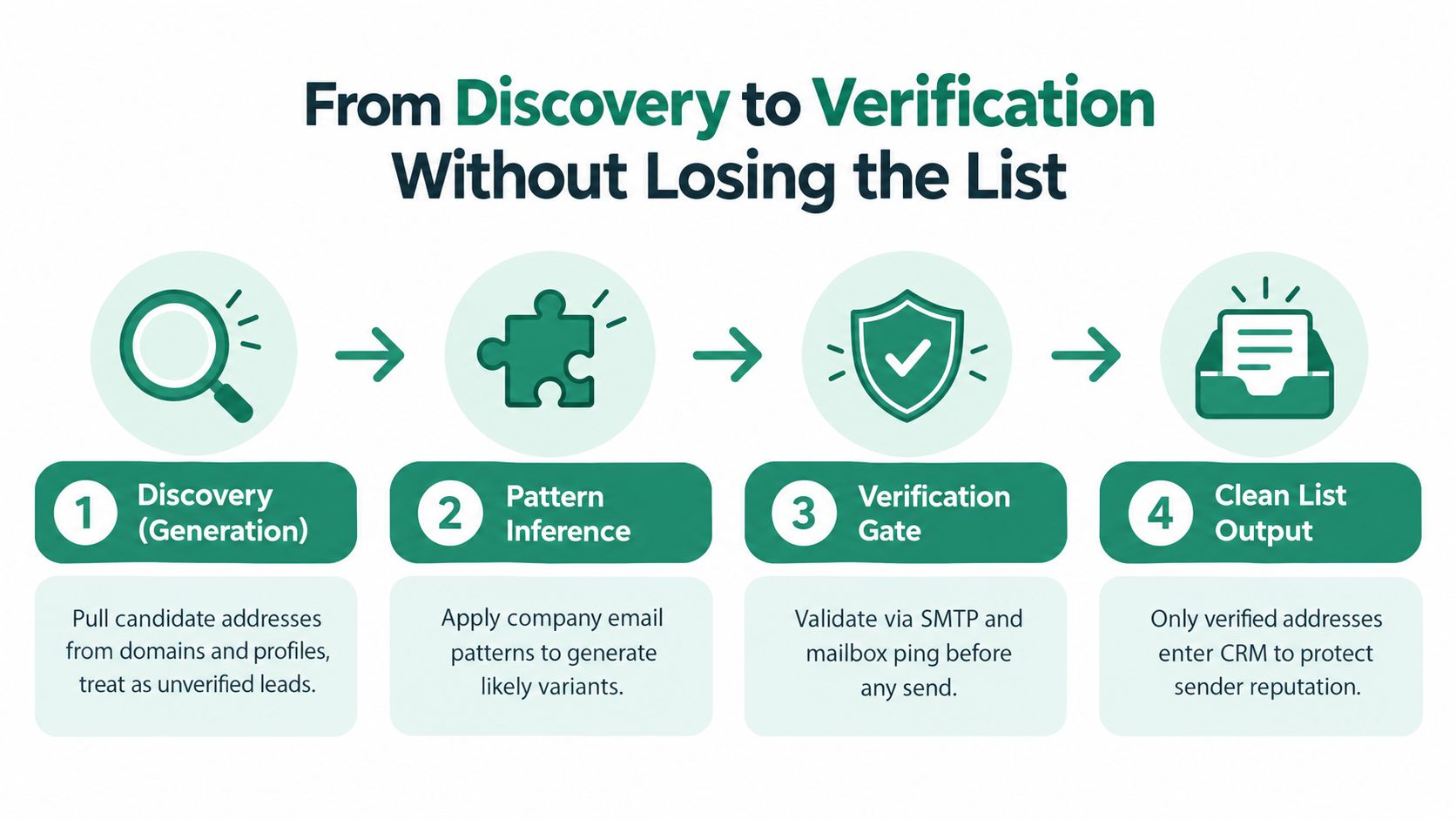
Use thresholds as operating gates
Verification targets should be explicit. Best-practice guidance frames verification as a deliverability control, with target bounce rates below 2% and top-performing verified contacts often staying under 1% hard bounce (email finder and verification guidance). Separately, waterfall enrichment guidance reports that verified lists can remain below 2% bounce, while unverified lists commonly reach 15% to 30% (waterfall enrichment benchmark).
Those figures aren't a reason to trust a vendor badge blindly. They're control points for your own process. Track bounce outcomes by source, provider, domain type, and campaign, then pause a source that consistently produces poor records.
For teams comparing methods, expert email lookup strategies can provide additional discovery ideas, but the same rule applies: a lookup result belongs in outreach only after it clears your verification policy.
Waterfall Enrichment for Hard-to-Find Addresses
A waterfall is an ordered enrichment sequence. Each provider receives only the contacts unresolved by the previous step, so you spend credits on remaining gaps rather than buying the same answer repeatedly from several databases.
A practical cascade starts with data you already own, such as CRM records, event registrations, and consented first-party lists. Next, use a broad enrichment provider for common company domains. Then apply a company pattern to unresolved names, but pass every generated variant through verification. LinkedIn and public-document research can handle the remaining difficult records, while human research is reserved for high-value accounts where an extra review is justified.
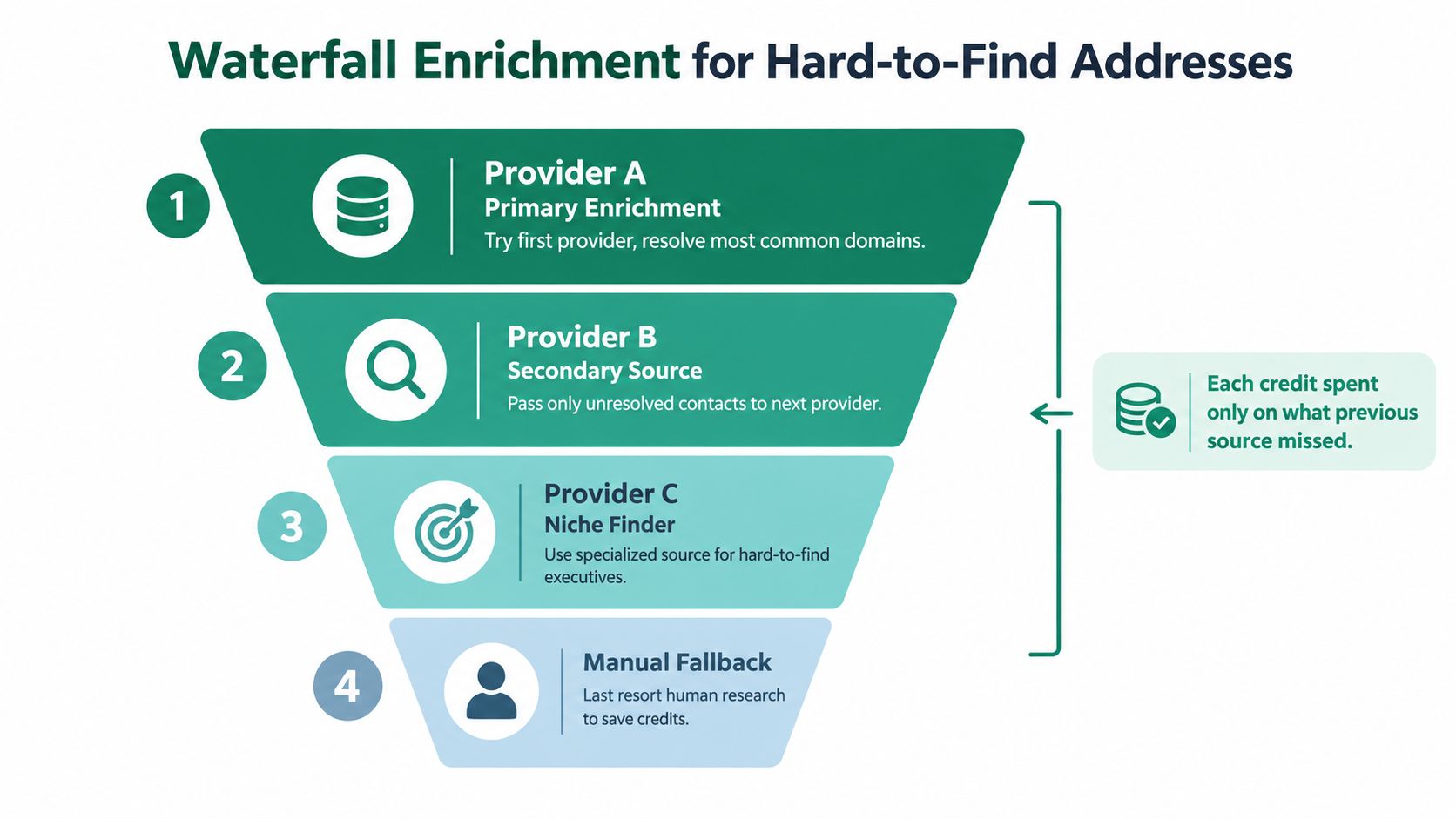
Measure marginal lift, not vendor volume
Track three fields at every stage:
- Match rate: how many unresolved contacts receive a candidate address.
- Cost per valid email: what each provider costs after verification removes unusable results.
- Marginal lift: how many new verified addresses the provider adds beyond earlier sources.
A provider can advertise broad coverage while contributing little to your specific market. The operational question is not how many records it claims to find. It's whether it produces valid contacts that earlier steps missed.
Independent guidance defines coverage as found emails divided by total leads, and quality as valid emails divided by emails found. It also describes multi-provider waterfalling as a way to recover more addresses while filtering by validation outcome, because advertised and usable rates can differ sharply (waterfall enrichment methodology).
Prune weak steps when their incremental yield no longer justifies the cost or risk. Keep a manual fallback for tier-one accounts, but don't let a rep manually research every unresolved row. Automation should handle the broad middle, while people review only the contacts where identity, relevance, or provenance needs judgment.
The waterfall becomes reliable only when verification sits between enrichment and outreach. Otherwise, the process merely spreads uncertain records across more vendors.
Compliance, Data Provenance, and Sender Reputation
Many lead-sourcing guides stop when an address appears. A sales operations workflow can't stop there because the address has a history, a legal context, and a potential effect on the sending domain.
Three risks deserve separate controls:
- Privacy and lawful basis: confirm that the intended outreach is permitted in the relevant jurisdiction and that the team has documented its basis for processing and contacting the person.
- Data provenance: record where the address came from, when it was captured, and whether it was inferred or publicly stated.
- Sender reputation: suppress records that fail verification or show signals associated with disposable, role-based, catch-all, or risky mailboxes.
A defensible record should include the source URL, capture timestamp, contact identity, company domain, discovery method, verification status, verification timestamp, and suppression reason where applicable. For personal data workflows, maintain the relevant consent or legitimate-interest signal and provide a clear way to opt out. A practical overview of data privacy regulations for email outreach can help teams turn those requirements into operating fields.
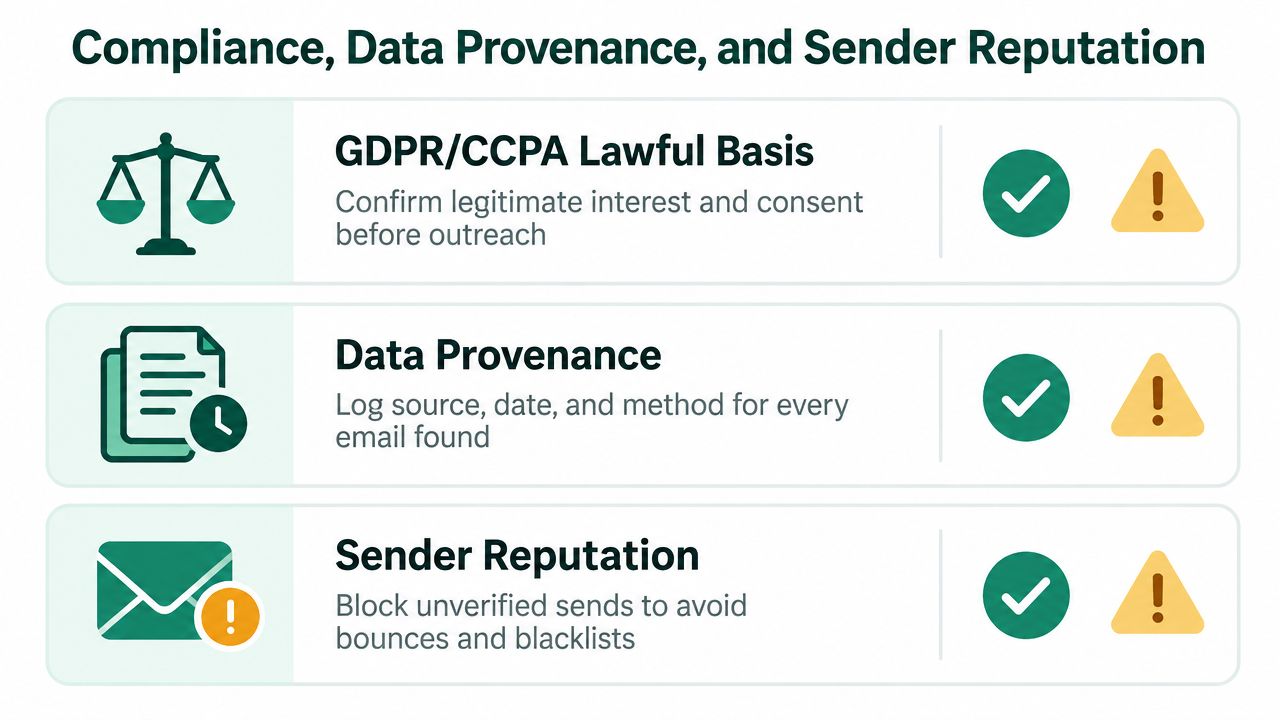
Make auditability part of the pipeline
Opaque scraped lists are difficult to defend because nobody can explain why a record exists or whether the person still holds the role. An enrichment result with an originating profile, domain evidence, timestamp, and verification outcome gives reviewers something concrete to inspect.
Compliance also supports deliverability. When a team knows the source and status of every address, it can suppress stale records, honor opt-outs across systems, and identify the provider responsible for a bad batch. That makes privacy controls a pipeline feature rather than administrative overhead.
Before a row becomes send-ready, require:
- Identity: full name, company, role, and profile or public-source reference.
- Provenance: source URL, capture date, and discovery method.
- Validation: status, check date, and risk classification.
- Permission controls: lawful-basis or consent field, suppression status, and opt-out history.
- Accountability: owner, campaign, and reason for inclusion.
A source that can't supply enough context shouldn't automatically feed a sequence, even if the address looks syntactically correct.
Putting It All Together in a Send-Ready Workflow
A sales operations team can run the process weekly if every stage has a clear input, output, and stop condition. Start with the ICP and target titles, then build a seed list from approved LinkedIn research, company pages, Google operators, public documents, and first-party sources. Store the person and account evidence before asking a tool to infer an address.
Apply enrichment in a waterfall. Send unresolved names through pattern inference and provider lookups, preserve the original candidate values, and route every result through syntax, domain, MX, SMTP, and risk checks. Records that fail should remain available for analysis, but they must not enter the send-ready segment.
A weekly operating sequence
- Define the target: document the account criteria, seniority, function, geography, and exclusion rules.
- Create candidates: collect names, roles, domains, source URLs, and timestamps.
- Enrich gaps: use providers in sequence, passing unresolved records forward rather than duplicating queries.
- Verify: assign a deliverability status and suppress risky or ambiguous addresses.
- Log provenance: attach source, method, date, lawful-basis signal, and verification evidence.
- Load outreach: import only approved records into the sequencer and monitor bounces, replies, meetings, complaints, and opt-outs.
Keep the cadence conservative enough that the team can investigate anomalies quickly. A verification-first workflow is more resilient than high-volume blasting because it protects the domain, keeps list maintenance visible, and directs sales effort toward contacts who are both relevant and reachable. The earlier benchmark summary reported modest cold-email outcomes, including roughly 1% meeting-booked rates, so sending more uncertain records isn't a substitute for better targeting and cleaner data (B2B cold email benchmark summary).
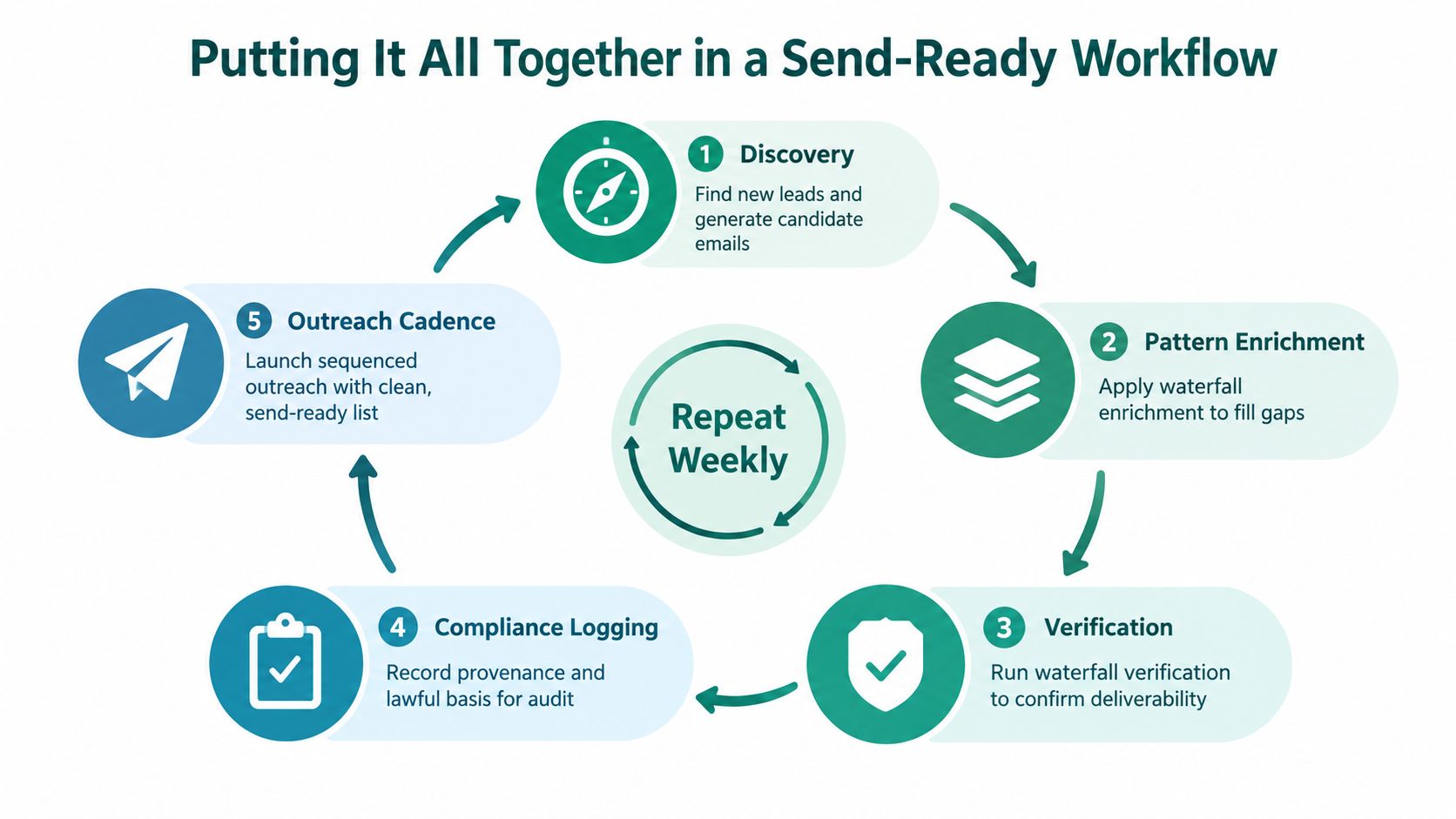
Give a new SDR a one-page checklist with the stage gates: right person identified, domain pattern supported, address verified, provenance recorded, suppression rules passed, campaign approved. Watch the transition metrics at each gate, especially unresolved volume, valid-email yield, hard bounces, complaints, replies, and meetings. That turns lead sourcing from an individual rep habit into an operating system the team can improve.
EmailScout helps sales and marketing teams discover publicly available decision-maker email addresses from webpages, save results for list building, and scan multiple URLs through its URL Explorer workflow. Use the EmailScout extension as a discovery layer, then connect its output to your own verification, provenance, and outreach controls before sending.