
You've built a carefully targeted outreach list, written a strong sequence, and queued the campaign for launch. Then the results arrive: a large batch of delivery failures, fewer replies than expected, and a sender domain that suddenly struggles to reach even people who previously engaged. The problem may not be your offer or your copy. It may be the addresses underneath the campaign.
That's why email verification is important. It protects more than a single send. It helps preserve deliverability, keeps CRM records reliable, reduces wasted sales effort, and supports the broader trust signals mailbox providers use to decide where your messages belong.
The Email That Never Made It
A sales team can spend an entire morning working from a CRM list that only appears ready. Reps personalize opening lines, enroll contacts, and create follow-up tasks. Then hard bounces expose the gaps: some addresses never existed, former employees no longer use others, and a small domain typo blocks the rest.
The missed message is the visible cost. The larger risk is contamination across the trust stack. Hard bounces are permanent delivery failures, and repeated failures give mailbox providers evidence that the sender's data is poorly maintained. That signal can affect later campaigns, even when those messages target valid contacts.
One 2026 benchmark found that 12.3% of verified addresses were invalid, or roughly one in eight addresses on a typical B2B list (2026 email deliverability benchmark). Applied to a 5,000-contact campaign, that rate would mean about 615 invalid addresses. The exact result varies by list, sending system, and provider response, but the math gives sales teams a usable warning: a modest contamination rate can create a large delivery problem.
Practical rule: Treat verification as insurance against a measurable failure mode, not a technical chore to complete when someone has spare time.
The effects reach beyond the mailbox. SDRs research contacts who cannot receive messages, managers see activity without conversations, and CRM reports mix unreachable records with genuine prospects. That makes it harder to tell whether a sequence failed because of its offer or because the audience data was contaminated. As inbox filters use more signals to judge sender trust, clean recipient data becomes one layer in the evidence your domain presents.
Verification can identify syntax errors, role addresses, disposable domains, dormant mailboxes, and other risky records before a sequence starts. It cannot make a prospect interested or guarantee inbox placement. It can, however, keep the team from spending sending capacity and sales time on addresses that were never viable, while giving the CRM a cleaner foundation for every later campaign.
What Email Verification Actually Does
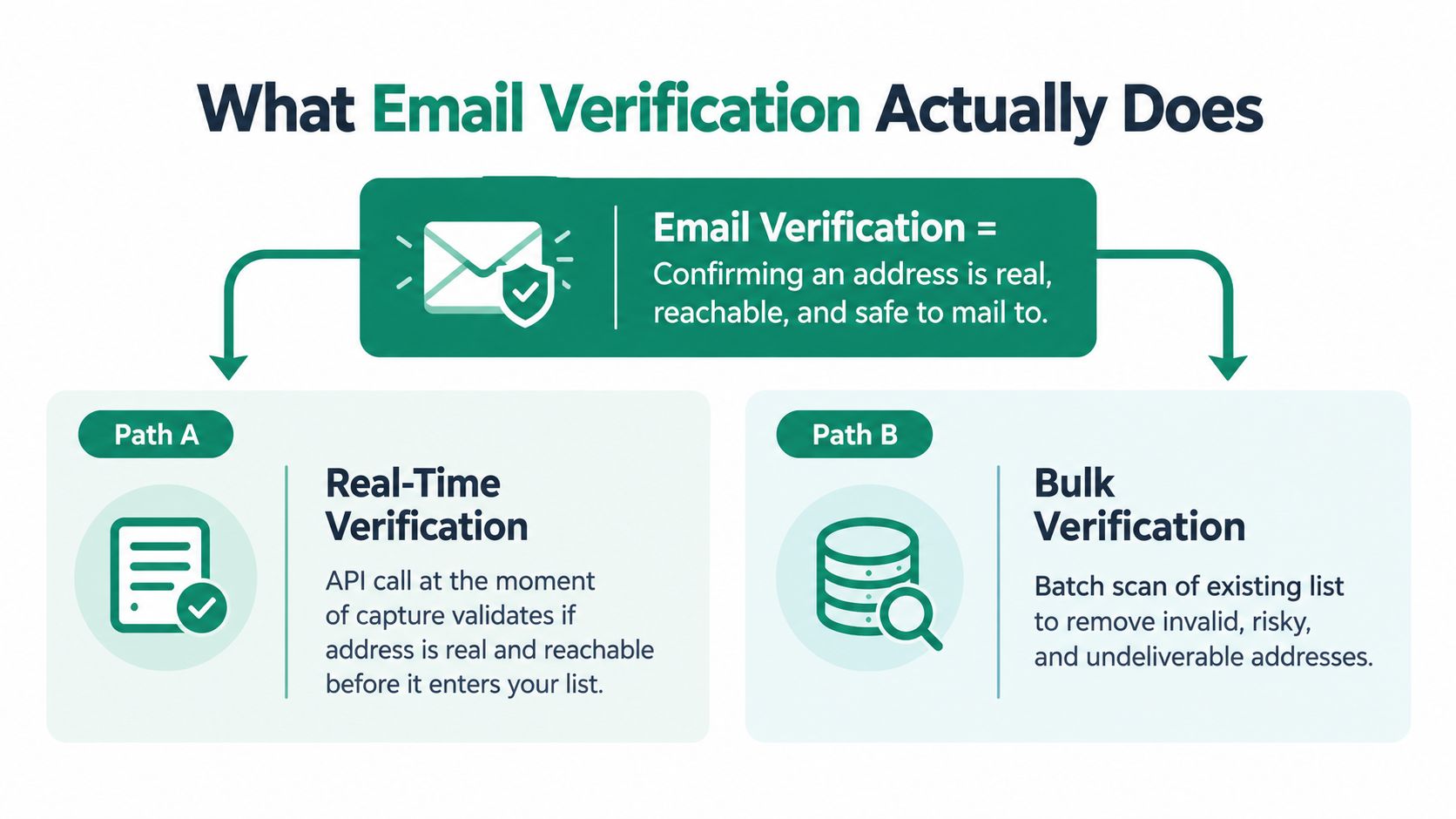
Email verification is the process of checking whether an address is real, reachable, and appropriate to mail. A verifier examines the address and its domain, then assigns a result such as valid, risky, or invalid. The purpose is to make a responsible sending decision before the address affects your campaign.
There are two common operating models. Real-time verification happens when a person submits a form, creates an account, or enters an address into a sales workflow. An API checks the address at the moment of capture, so bad data can be blocked or routed for review before it reaches the CRM. Batch verification scans an existing database or campaign list, which is useful when contacts came from an event, enrichment process, spreadsheet, or older import.
The difference is similar to venue security. Real-time verification is the bouncer checking an ID at the door. Batch verification is an audit of the guest list after people are already inside. Strong teams often use both because they address different points of risk.
The checks behind a verification result
A verifier may combine several checks rather than relying on one signal:
- Syntax validation checks whether the address follows the expected structure and flags obvious formatting errors.
- Domain validation checks whether the domain exists and can support email delivery.
- Mail-server checks assess whether the receiving system appears able to accept messages.
- Role-account detection identifies addresses such as general departmental inboxes, which may be less suitable for one-to-one sales outreach.
- Disposable-domain detection flags temporary addresses that may disappear quickly.
- Risk screening can identify patterns associated with traps, catch-alls, or uncertain delivery outcomes.
These checks answer a narrow question: can this address plausibly receive mail? They don't confirm that the contact is interested, that the person still works at the company, or that your message complies with applicable outreach rules. Verification improves the quality of the starting data. Relevance, consent where required, authentication, and message quality still belong in the rest of your sending process.
How Verification Protects Deliverability
A sales team can start with 10,000 records and still lose control of a campaign before the first message reaches an inbox. If the list contains a 12.3% invalid rate, roughly 1,230 addresses could fail immediately. That figure comes from the benchmark rate cited earlier, but the operational lesson is broader: every avoidable failure adds another negative delivery event.
Mailbox providers use bounce activity as one signal of list hygiene. Current guidance generally places a healthy total bounce rate under 2%, while higher levels can prompt concern and cleanup (email deliverability benchmarks by industry). Verification lowers that exposure before the campaign runs.
A 1-million-email dataset shows the difference clearly. Verification reduced total bounces from 11.5% to 3.0%, hard bounces from 8.4% to 1.2%, and soft bounces from 3.1% to 1.8% (email verification and bounce-rate analysis). Hard bounces indicate permanent delivery failures. Soft bounces may reflect temporary conditions, although repeated failures still require investigation.
The benefit also reaches beyond the mailbox. An unverified address can remain in the CRM, inflate contact counts, trigger repeated follow-ups, and distort campaign reporting. Verification is therefore a trust-stack layer, not a one-time cleanup. It improves the data that sales automation and AI-driven inbox filters use to judge sending patterns.
A practical comparison
| Bounce Rate | Hard Bounces | Sender Score Drop | Estimated Inbox Placement |
|---|---|---|---|
| Healthy program | Keep under 1% | No fixed estimate | Reliable delivery depends on the full trust stack |
| Warning range | Total bounces above 2% | No fixed estimate | Placement can begin to weaken |
| Critical range | Total bounces above 5% | No fixed estimate | Urgent list cleanup is usually needed |
The table avoids treating one provider formula as universal. Complaints, engagement, authentication, sending behavior, and content also affect delivery. For the controls that work alongside verification, review B2B outbound guidance from Lead Printer and this email deliverability improvement guide to build a repeatable process.
Sender Reputation and the Trust Stack
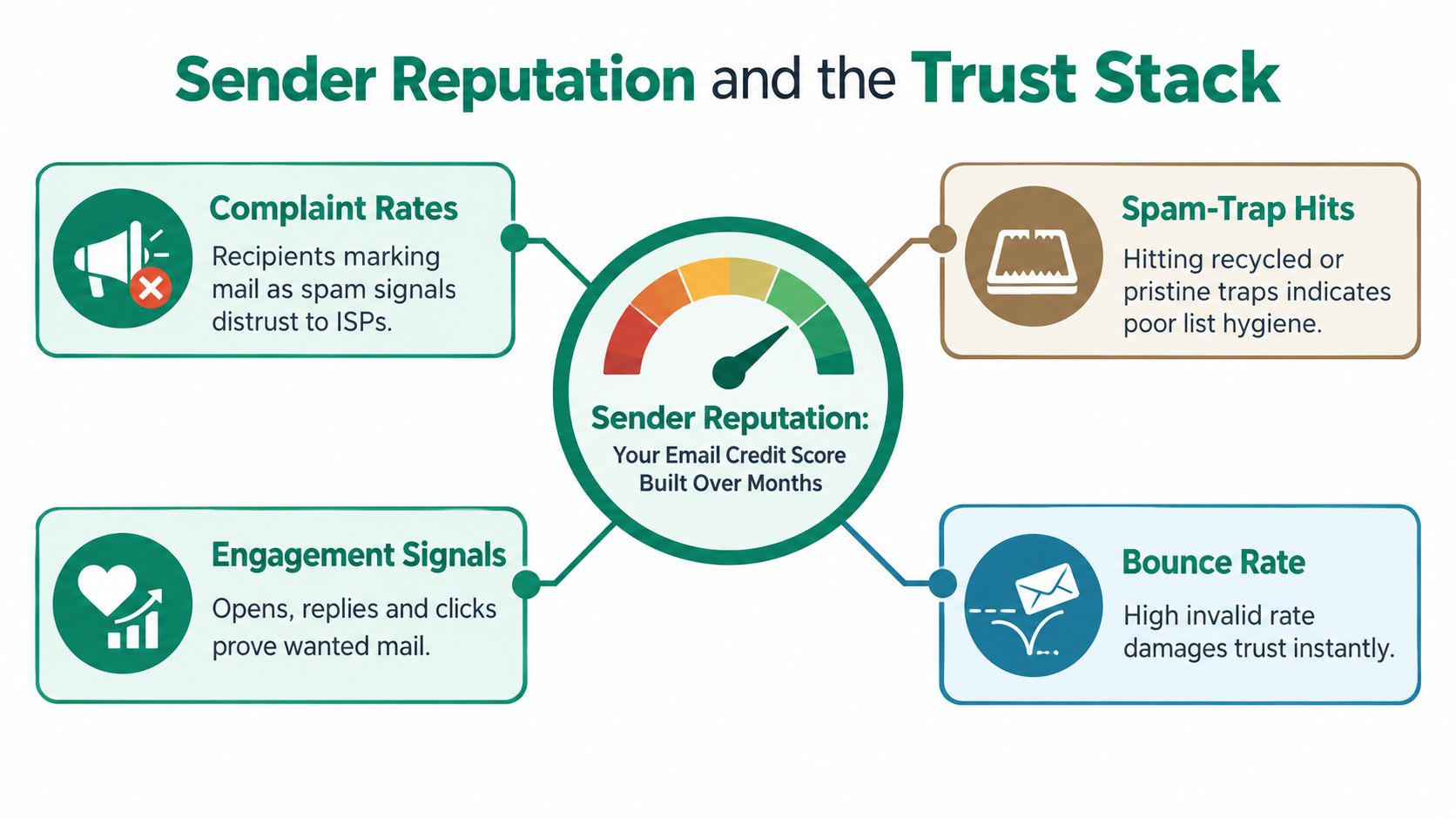
A sales sequence can contain accurate personalization and still miss the inbox. Mailbox providers judge the sending pattern behind each message, including bounce activity, spam complaints, spam-trap hits, authentication, and recipient engagement. Sender reputation works like a credit history. One clean campaign cannot erase a record of unreliable behavior.
Email verification forms the first layer of that record. It removes addresses likely to create avoidable failures before they enter the send. That protects more than one campaign. It also keeps invalid contacts from contaminating CRM counts, follow-up sequences, reporting, and the engagement signals that AI-driven inbox filters use to assess future mail.
The layers work together
The trust stack is a group of connected controls:
- List quality removes invalid and high-risk addresses before they affect bounce rates.
- Authentication uses SPF, DKIM, and DMARC to show that your sending system is authorized and aligned with your domain.
- Sending discipline gives mailbox providers a consistent pattern to evaluate.
- Content relevance helps recipients recognize the message and decide to engage.
- Engagement signals indicate whether recipients want the mail.
A verified list can still perform poorly if authentication is missing. Authenticated messages can also create problems when they are sent to a careless list. Each layer supports the others, so verification should remain part of the sending process rather than a one-time cleanup.
Reporting on the 2024-2025 period found global inbox placement at 84.6%, down from 87.3% in the prior year. A separate B2B analysis reported that only 23.6% of marketers verify lists before campaigns and that fully authenticated senders were 2.7 times more likely to reach inboxes than unauthenticated senders (2025 email deliverability report). These figures do not show that verification alone guarantees placement. They show why clean CRM data and authenticated sending must work together.
Teams building this workflow can review how to verify emails before sending to separate address validation from the other reputation controls on the operating checklist.
The Real Cost Savings Beyond the Bounce Rate
Bounce reports show failed deliveries, but they don't show every cost created by unreliable data. A sales team can lose time before the first message is sent, especially when reps research, personalize, and sequence records that should have been held for review.
The operational damage also reaches the CRM. An invalid address can be copied into account records, enrichment tables, lead-routing rules, and automated journeys. That contamination can distort segmentation and lead scoring, then make lifecycle reporting less dependable. One independent analysis describes how invalid records can disrupt lead scoring, lifecycle journeys, segmentation, attribution, and pipeline forecasting (email verification and CRM data quality).
Three costs that deserve their own line
Sales productivity suffers first. Reps may retry failed contacts, search for replacements, or assume that a quiet prospect is unresponsive. The team then measures effort rather than reachable opportunity.
Forecasting suffers next. If records with invalid contact data remain active, managers may count them as workable pipeline. That can make a segment look weak when the true issue is that the team never had a deliverable route to the buyer.
Attribution becomes harder to interpret. A campaign with many unreachable addresses can produce weak delivery and engagement signals. Marketers may then pause a promising segment or rewrite an effective message because the underlying audience data was compromised.
| Cost Category | Estimated Cost per 10k Sends | Visibility in Standard Reports |
|---|---|---|
| Failed delivery | Depends on the invalid share and sending costs | Usually visible as bounces |
| SDR research and follow-up | Depends on workflow and labor time | Often hidden |
| CRM contamination | Depends on duplication and automation | Usually spread across systems |
| Attribution distortion | Depends on reporting model | Rarely isolated |
The important distinction is between message cost and opportunity cost. Removing an invalid record can prevent a failed send, but it can also keep that record from entering a sequence, inflating a forecast, or generating misleading performance data. Verification turns list quality into an operational control across sales and marketing, not just an email platform setting.
Why Verification Alone Is No Longer Enough
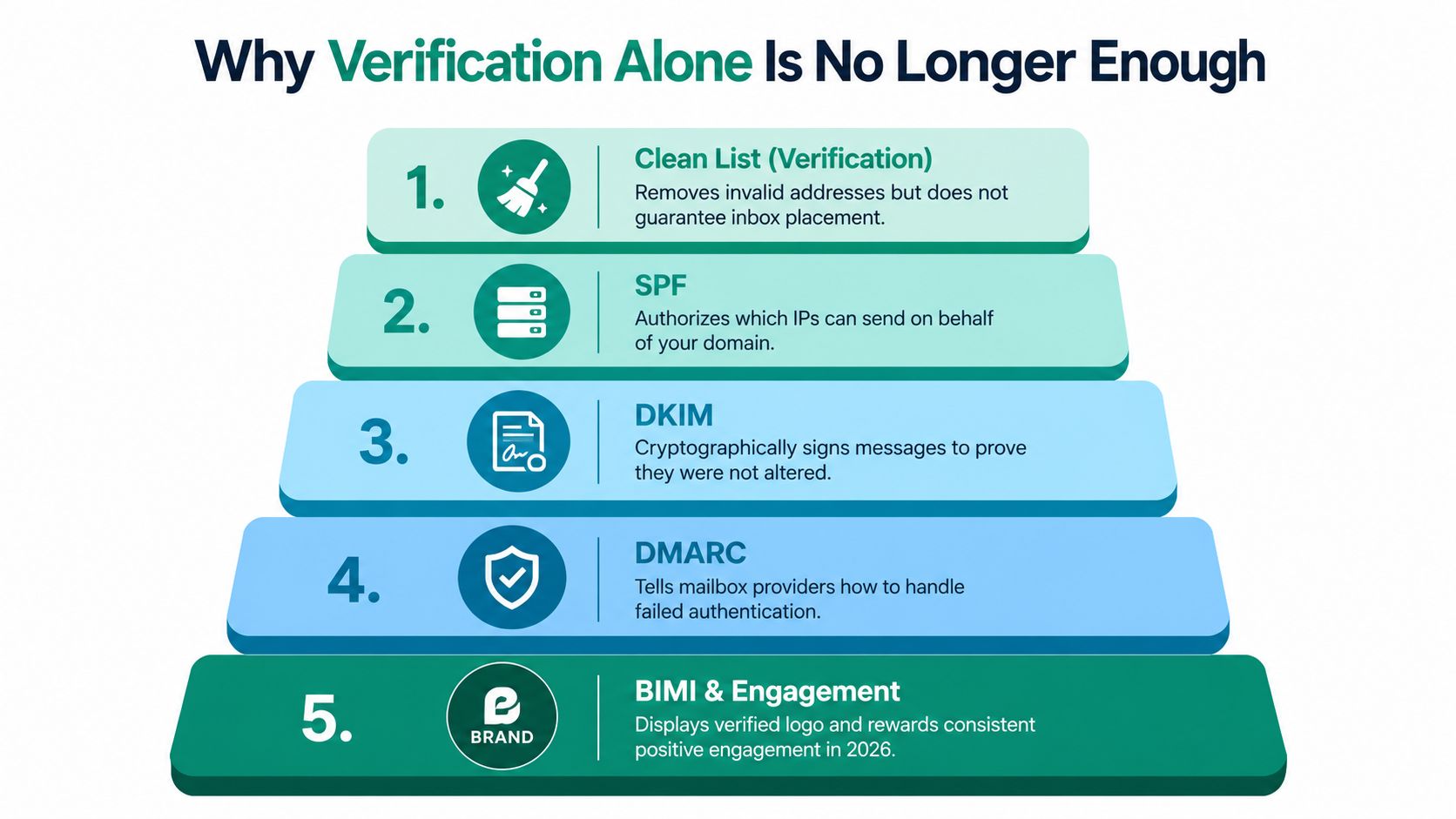
A sales rep can send to a valid address and still miss the inbox. Verification confirms that a mailbox appears reachable. It does not prove that the sender is authorized, that the message fits the sending domain, or that recipients want future mail.
That gap matters because mailbox providers combine several signals before deciding where a message belongs. Recent reporting shows that global inbox placement declined from 87.3% to 84.6% across the cited periods. The same discussion separates list quality from authentication and sender reputation (2025 email deliverability report). Verification removes one class of risk. It cannot carry the full trust stack.
The controls around the list
- SPF names the services authorized to send for your domain.
- DKIM attaches a cryptographic signature that helps providers check message integrity.
- DMARC connects authentication with domain alignment and tells receiving providers how to handle failed checks.
- Domain and infrastructure consistency build a stable sending history instead of sudden, unexplained changes.
- Engagement quality records whether recipients reply, click, delete, ignore, or report messages.
AI-assisted filtering evaluates these signals together. Providers can assess message content, sender history, and the likely recipient response rather than applying one pass-or-fail check. A valid address may still receive a message in spam when authentication is weak, engagement is poor, or the sender has a record of unwanted mail.
Verification removes disqualifying risks. It does not create trust by itself.
Use it as the foundation beneath authentication, relevant content, responsible targeting, and consistent sending. The practical question is whether every layer supports the same sending identity, from the CRM record to the recipient's inbox.
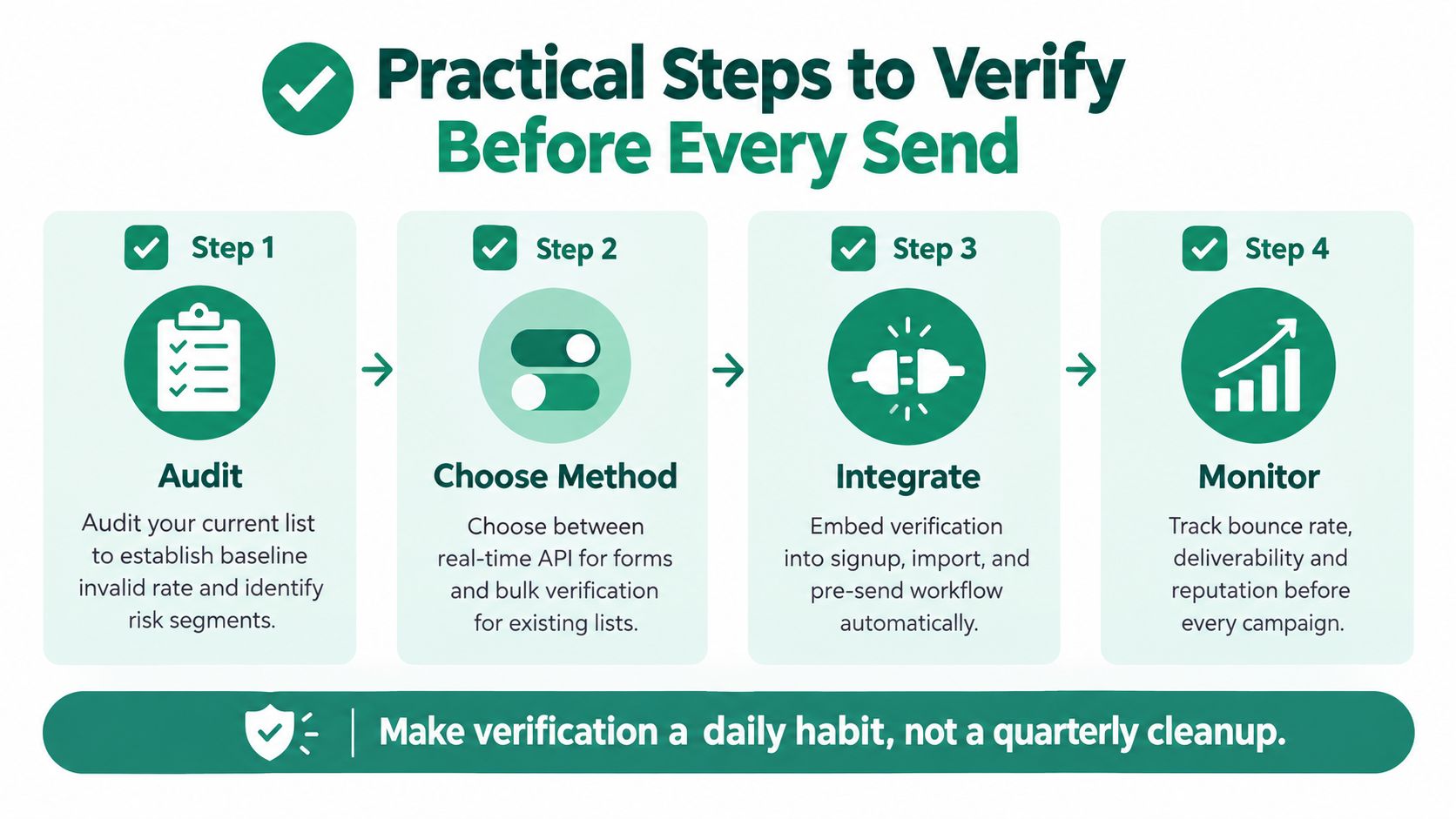
Practical Steps to Verify Before Every Send
A campaign can look ready in the CRM and still fail at the mailbox. Verification works best as a recurring trust-stack layer, built into data capture, list preparation, and sending. Start by exporting the current list, reviewing invalid and risky patterns, and grouping records by source. Forms, enrichment, events, manual entry, and imports can introduce different errors, so source-level review helps locate CRM contamination instead of treating every bounce as an isolated event.
Build the workflow around capture and sending
Apply real-time checks when new data enters the system. A form submission, spreadsheet upload, or lead-enrichment event should trigger validation before the record becomes eligible for outreach. For older databases or externally sourced contacts, run a bulk check before each campaign. You can also use this guide to verify an email address before sending and align the process with your team's acceptance rules.
A practical workflow looks like this:
- Audit the list. Review bounce history, trace risky sources, and check errors such as misspelled domains or generic inboxes. A higher bounce rate can reflect a specific acquisition problem, not only a sending problem.
- Choose the method. Use an API for immediate checks at capture, then use batch verification for existing records.
- Connect the systems. Send verification status to the CRM and sales engagement platform so invalid or risky records cannot enter a sequence automatically.
- Monitor the outcome. After each campaign, compare bounces, complaints, replies, and meetings with verification status. This connects list quality to the numbers sales can act on.
Give people a review path
Automation should not force every uncertain address into a valid-or-invalid decision. Route catch-all domains, role addresses, and conflicting records to manual review. Reps should know how to identify a typo, generic inbox, or contact added during a rushed event upload.
EmailScout can find and verify addresses while users browse LinkedIn and company websites, with labels such as valid, risky, or invalid attached to contact records. Used with batch checks and CRM controls, this workflow helps keep unreviewed addresses out of sequences. Teams still need to define acceptance rules and compare actual delivery results with the verification status.
Bringing It All Together
Email verification is important because an invalid address creates more than one failed delivery. It can waste sales time, contaminate CRM data, weaken attribution, and add another negative signal to a sender reputation that mailbox providers evaluate over time.
The practical answer is a layered system:
- Verify addresses before they enter outreach.
- Authenticate the sending domain with the appropriate trust controls.
- Separate risky records instead of treating every address as equally safe.
- Track delivery and engagement so the team can identify problems early.
- Keep verification recurring rather than relying on a single historical cleanup.
Start with your next operational review. Pull a recent bounce report, identify the main invalid-data patterns, activate real-time verification at every capture point, and run a batch check on the list planned for the next campaign. Then compare inbox placement and reply quality across the following sends. That process shows the team how list hygiene supports revenue, not just technical compliance.
Verification is an unglamorous habit, but it gives every campaign a cleaner starting point. Teams that protect their data and sender identity give their outreach a better chance to compound instead of deteriorating.
EmailScout helps sales and marketing teams discover and verify email addresses while browsing professional profiles and company websites, with status labels that can stay attached to contact records. Visit EmailScout to add real-time address checking to your prospecting workflow and reduce avoidable risk before contacts enter a sequence.