Tag: cold outreach

  • Find Contacts of Companies: A 2026 How-To Guide

    Find Contacts of Companies: A 2026 How-To Guide

    You’re probably in the same spot a lot of sales teams land in. You’ve got a list of target accounts, a sequence ready to go, and enough confidence in the offer to start outreach. Then the campaign goes live, replies barely show up, bounce notices pile in, and half the “right contacts” turn out to be wrong people, old roles, or dead inboxes.

    That usually isn’t a messaging problem first. It’s a contact quality problem.

    Finding contacts of companies isn’t hard in the abstract. The hard part is finding the right contacts, confirming they’re still reachable, organizing them so outreach stays relevant, and then following up with enough precision that the list turns into conversations instead of noise. That’s the workflow that separates random prospecting from repeatable pipeline generation.

    Why Your Contact List Is Leaking Revenue

    Most prospecting problems look like copy problems from the surface. Reps rewrite subject lines. Marketers test new angles. Founders tweak offers. But if the underlying contact data is stale, none of that fixes the underlying issue.

    A concerned young man rests his chin on his hands next to a screen showing network connections.

    B2B contact data decays at 2.1% per month, or 22.5% annually, and that decay costs organizations an average of $12.9 million each year according to Landbase’s contact data analysis. If you’re working from old exports, scraped lists, or spreadsheets that haven’t been touched in months, a meaningful chunk of that file is already compromised.

    Why this happens so fast

    People change jobs. Companies restructure. Teams merge. Startups shut down old domains and launch new ones. A title that mattered last quarter might now sit with a different person entirely.

    That’s why “more leads” often makes things worse. If your process just adds names without checking freshness, you aren’t building pipeline. You’re stacking error on top of error.

    Practical rule: A contact list is never finished. It’s either being refreshed or it’s getting worse.

    There’s a second leak many teams overlook. Bad contact data doesn’t only waste send volume. It distorts performance signals. When a rep sends to the wrong inbox, the campaign can look like weak positioning or poor timing when the actual failure happened before the first message left the outbox.

    What a reliable list actually does

    A strong list does three jobs at once:

    • Points at the right person so the message matches the job.
    • Stays current enough that outreach reaches a live inbox or phone line.
    • Supports follow-up because you can trust the data enough to keep working the account.

    If you’re serious about contacts of companies, stop thinking in terms of list building alone. Think in terms of list maintenance, list confidence, and list usability. The companies that win with outbound aren’t always the ones with the biggest databases. They’re the ones with a cleaner operating system behind their prospecting.

    Digital Detective Work Where to Manually Find Contacts

    Manual research still matters. Even if you use automation later, the fastest way to improve list quality is to understand where good contact data usually hides and what weak data looks like before you ever save it.

    A hand holding a magnifying glass over a computer screen displaying social media contact lists.

    Start with company-owned pages

    A company website gives away more than is commonly understood. The obvious pages are “About,” “Team,” “Leadership,” “Contact,” “Press,” and “Careers.” The useful part isn’t just the names. It’s the structure.

    Look for patterns such as:

    • Team hierarchy: Who appears on leadership pages versus department pages.
    • Naming conventions: Whether the company lists full names, initials, or role-only contacts.
    • Department clues: Sales, partnerships, operations, growth, and customer success often indicate who owns the problem you solve.
    • Email format hints: If a press contact or support alias is visible, you can often infer the company’s broader address pattern.

    A press release can be just as useful as a contact page. Companies often name the spokesperson, quote the executive sponsor, and include media relations details. That gives you both a decision-maker candidate and a likely email format.

    Use LinkedIn for role accuracy, not just names

    LinkedIn is strongest when you use it to validate org structure. Search by company, then filter by title keywords tied to your offer. If you sell recruiting support, “Head of Talent” beats a generic founder title at a larger company. If you sell outbound services, “VP Sales” may be better than “CEO.”

    For smaller firms, ownership gets blurrier. The founder may still own operations, hiring, and vendor decisions. For underserved segments, that matters a lot. SMBs represent 99.9% of all US firms, and generic B2B approaches fail with these diverse segments 70% of the time, which is why targeted discovery matters in these markets, as noted by Bain on underserved small business selling.

    Small companies rarely fit enterprise-style persona maps. You often need to find the person wearing the problem, not the person with the fanciest title.

    Check the overlooked sources

    If the usual pages are thin, use secondary clues:

    Source What to look for
    Company blog Author names, department leaders, guest contributors
    Webinar pages Speakers, hosts, partnership contacts
    Podcast appearances Founders and operators discussing active priorities
    Event listings Booth contacts, sponsorship leads, community managers
    WHOIS and business directories Useful mainly for smaller businesses with limited public team pages

    When I’m researching small agencies, local service businesses, or remote-first startups, I also look at partner pages and hiring pages. They tell you who the company wants to become, which often reveals who currently owns that function.

    That’s especially useful if you’re prospecting firms expanding distributed teams. In that case, a resource like hire LATAM talent can help you understand the hiring ecosystem around those businesses and the kinds of operators, founders, or talent leaders likely to be involved in buying conversations.

    Manual research works, but it doesn’t scale cleanly

    The strength of manual research is context. The weakness is speed. Once you’re checking five tabs, matching titles, and copying records into a sheet, the work starts to bottleneck.

    If you want a practical baseline process for gathering this information, EmailScout has a useful guide on finding contact info. The bigger point is simpler. Manual work is best for confirming fit and understanding the account. It’s not the fastest way to build volume.

    Automate Discovery with an Email Finder

    Once you know what a good contact looks like, the next bottleneck is extraction. Manual prospecting gives you context, but it burns time on copy-paste work that software can handle faster.

    A conceptual graphic illustrating automated email collection and real-time verification process using abstract data particles.

    An email finder changes the workflow because it lets you stay inside your research process instead of breaking it every few minutes to save data. You’re reviewing a company site, scanning a profile, opening a team page, and capturing potential contacts in the same motion.

    The real comparison is context versus throughput

    Manual research is good at answering, “Should I target this account?”

    Automated discovery is good at answering, “Can I build a working contact list from this account without wasting the next hour?”

    That difference matters. When you’re sourcing contacts of companies at scale, your best process usually combines both:

    • Use manual research to decide if the company and role are worth pursuing.
    • Use an email finder to pull likely contacts while the account context is still fresh.
    • Save records immediately so you don’t lose momentum and have to retrace your work later.

    If I’m looking at a company with a thin team page, I want a tool that can still work off the domain, related URLs, and profile context. That’s where browser-based workflows are faster than spreadsheets and static lead dumps.

    What to look for in the tool

    A useful finder isn’t just a search bar. It should fit the way prospecting happens.

    Some features matter more than others:

    • Domain-based discovery: Helpful when you know the company but not the people.
    • Page-level extraction: Useful for team pages, blog author pages, and company directories.
    • Auto-capture: Good when you’re moving through many accounts and don’t want to save each record manually.
    • Bulk URL processing: Important if you prospect from lists of company websites or specific page types.

    One option in this category is EmailScout. It’s a Chrome extension built for finding contacts while browsing, with features such as AutoSave and URL Explorer that support both single-contact research and larger pulls from company pages. If you’re comparing finder workflows, their overview of the best email finder tool is a useful starting point.

    For edge cases, I also like checking whether a person’s address appears elsewhere on the public web before adding them to a sequence. A lightweight tool like this email lookup can help with that kind of manual confirmation.

    A quick walkthrough helps if you haven’t used this style of workflow before.

    Automation should remove friction, not judgment

    The mistake is letting automation replace thinking. A finder can pull names and addresses quickly, but it won’t tell you whether the contact owns budget, feels the pain, or sits too far from the buying decision.

    Don’t automate your standards away. Automate the repetitive part, then spend the saved time on targeting and message quality.

    The best setup is simple. Research the account enough to know which roles matter. Use the finder to gather likely contacts fast. Save the promising records. Then move straight to validation before outreach.

    The Critical Step Most People Skip Verifying Your List

    A found email is not the same thing as a usable email. That’s where most prospecting workflows break.

    Teams spend time building lists, then treat discovery as the finish line. It isn’t. If you send to unverified addresses, you don’t just waste messages. You damage deliverability, pollute campaign data, and make future outreach harder.

    A flowchart showing the four-stage process of building, verifying, and engaging with a professional contact list.

    Why verification matters more than another hundred contacts

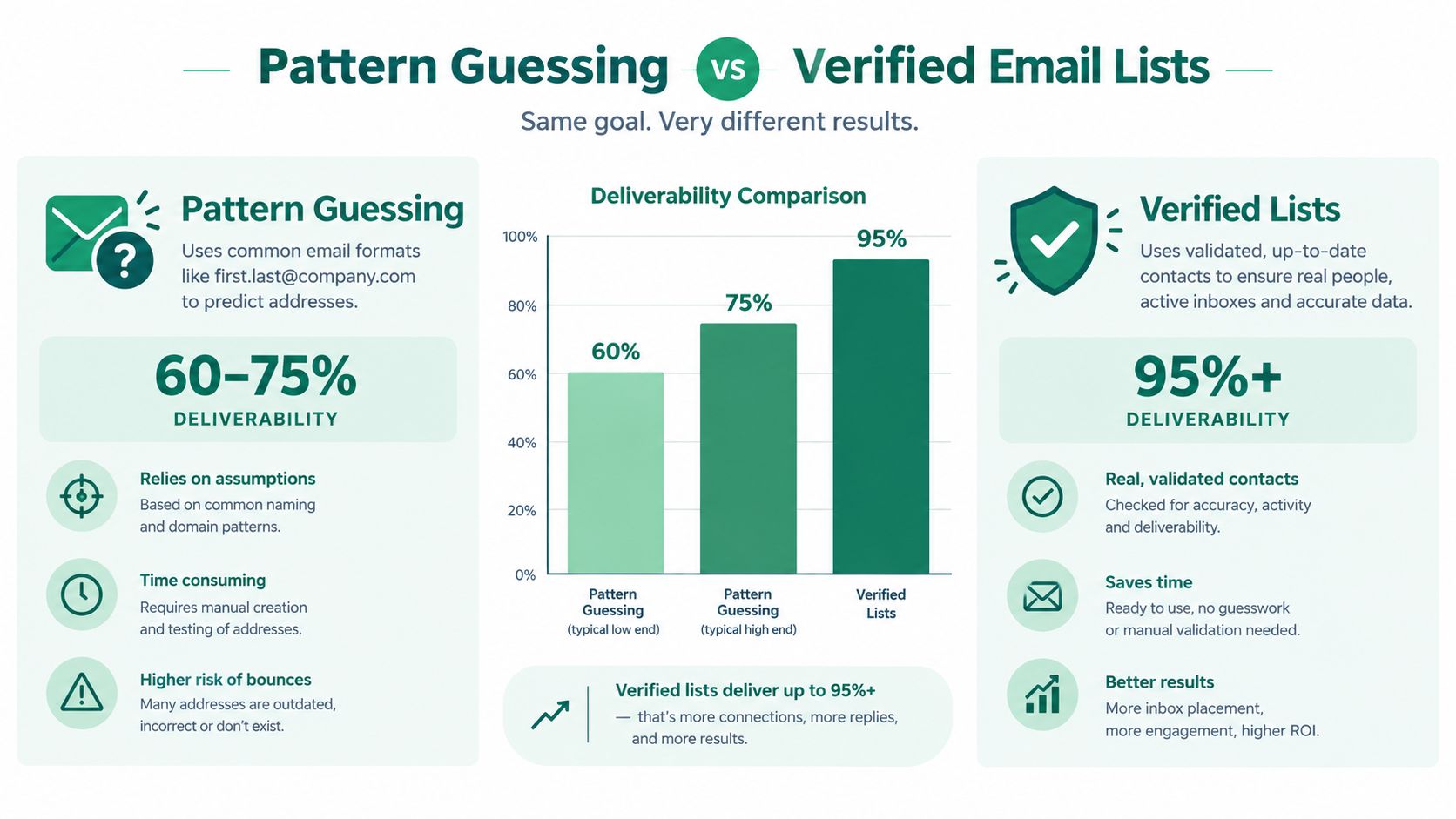
    As many as 45% of B2B emails can bounce due to invalid addresses, and combining a finder with real-time verification to achieve over 98% deliverability is essential according to Luth Research’s underserved market analysis.

    That one fact changes the economics of list building. A smaller verified list is worth more than a much larger unverified one because you can trust it.

    What verification is checking

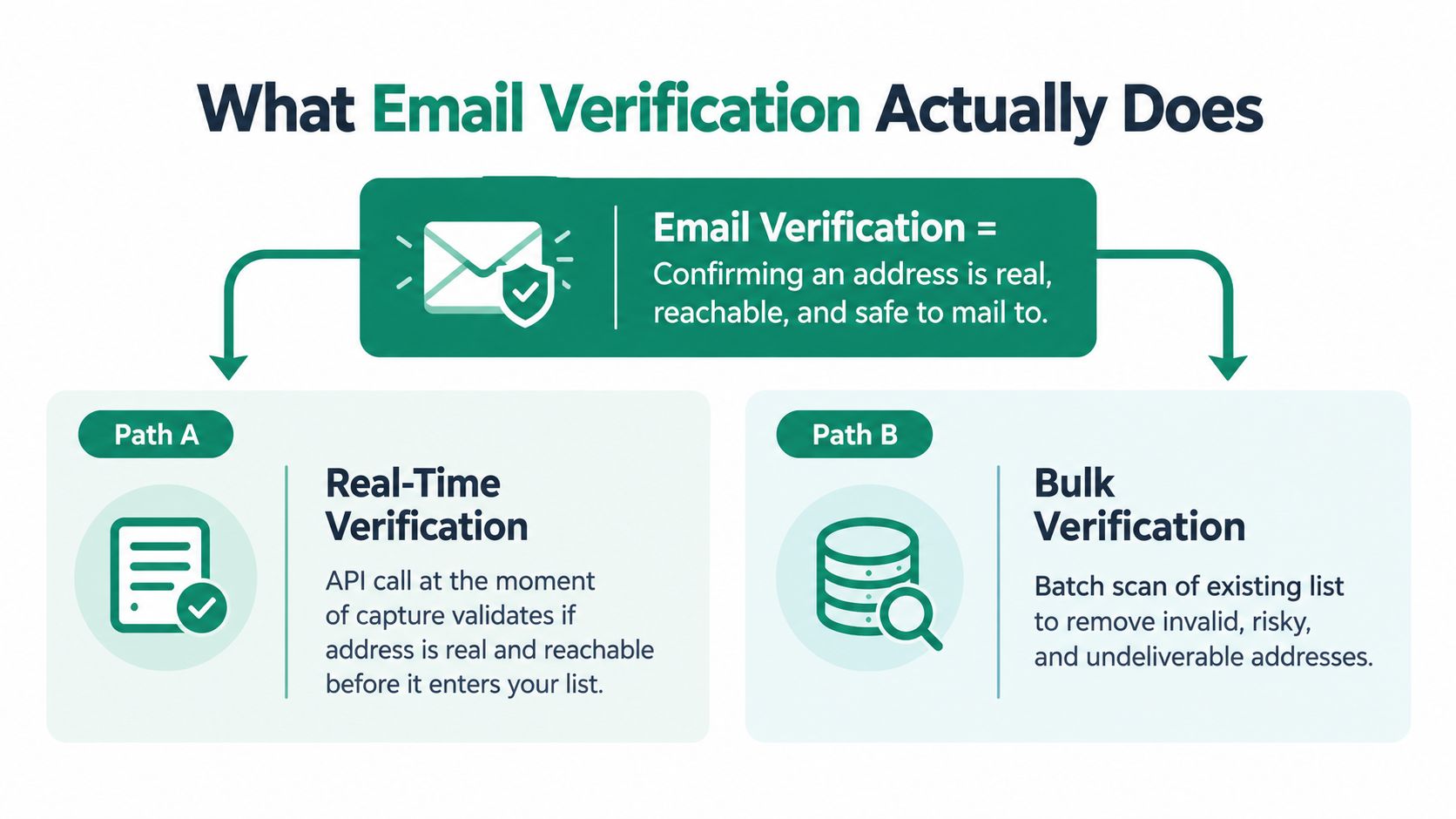
    Verification doesn’t need to feel technical to be useful. In practical terms, it answers a few simple questions:

    • Does the address look correctly formed?
    • Does the domain appear active for email use?
    • Does the mailbox show signs that it can receive mail?
    • Does anything suggest the address is risky or role-based in a way that makes outreach weaker?

    Those checks don’t guarantee a reply. They do something just as important. They stop obvious failures before they reach your sending platform.

    The difference in day-to-day workflow

    Here’s the trade-off often missed:

    Approach What happens
    Find and send immediately Faster upfront, but more bounce risk and noisier campaign data
    Find, verify, then send Slightly slower upfront, but cleaner list and more confidence in performance signals

    That second path is what professionals do because it protects the rest of the workflow. If a verified contact ignores the message, you can work on copy, timing, and follow-up. If the contact was never valid, your test was flawed from the start.

    Field note: Bad verification discipline makes good copy look bad.

    How to handle verification in practice

    Don’t treat verification as a cleanup task for later. Run it as a gate before a contact enters your active list.

    A simple operating rule works well:

    1. Discover the contact
    2. Verify before import
    3. Tag confidence level
    4. Only sequence verified records

    That process keeps your CRM or spreadsheet from filling up with junk. It also keeps reps from arguing over whether the outreach angle failed when the message never had a fair chance.

    If you want to build this step into your workflow, EmailScout’s guide to email address verification covers the practical side of validating addresses before you send.

    One more point matters. Verification is not just about avoiding bounces. It sharpens your follow-up strategy because you know the contact is real enough to justify another touch. That confidence changes behavior. Reps follow through more consistently when the list feels trustworthy.

    Organizing Contacts for Effective Outreach

    A raw contact file is not a prospecting system. It’s just inventory.

    The moment you collect contacts of companies, you need structure. Otherwise your team ends up sending the same message to founders, directors, and managers as if they all care about the same problem in the same way.

    Build around fields you’ll actually use

    Teams often overbuild or underbuild. They either dump names into a sheet with no tags, or they create a CRM maze nobody maintains. The better path is a compact structure tied directly to outreach decisions.

    At minimum, track:

    • Company and domain
    • Full name and role
    • Source page or source method
    • Status of verification
    • Primary pain point or likely use case
    • Last touch and next action

    That works in a spreadsheet. It also works in a CRM. The difference is volume and team complexity, not the logic itself. If you’re comparing setups, this guide to a contact manager system is a useful reference for thinking through how records should be maintained once they leave the research stage.

    Segment by relevance, not convenience

    The most useful segmentation isn’t alphabetical or by industry alone. It’s by why this person should hear from you now.

    Top-performing teams use contact-level intent signals in a structured way. When they score contacts based on recent activity and personalize outreach accordingly, they see 8-10% reply rates versus 2-5% for generic cold emails, as described in DemandView’s contact-level intent methodology.

    That doesn’t mean you need a complex scoring stack on day one. It means your list should tell you who deserves attention first.

    A clean structure might look like this:

    • Hot now: The account showed current buying or research behavior.
    • Good fit, no signal: Worth contacting, but not urgent.
    • Low confidence: Keep for later review, not active outreach.
    • Wrong persona: Don’t delete immediately, but don’t sequence.

    The list should help you decide faster, not just store names more neatly.

    Keep ownership clear

    If multiple people touch the same records, assign ownership. Someone should be responsible for refreshing stale entries, marking role changes, and closing the loop after replies. Without that discipline, even a well-built database turns into a parking lot of old assumptions.

    Good organization makes personalization easier because the thinking is already attached to the record. You’re not starting from zero every time you write.

    Crafting Outreach That Actually Gets Replies

    The earlier work pays off. If your contacts are well chosen, verified, and organized, writing the email becomes much simpler because you know who you’re talking to and why they’re on the list.

    Most cold outreach fails because it sounds like it was sent to a category, not a person. A founder gets the same message as a sales director. A small agency gets the same language as a large software company. The sender has data, but not relevance.

    Use a simple message formula

    You don’t need a fancy template. You need a short structure that respects the reader’s time.

    A practical formula looks like this:

    1. Reason for reaching out
    2. Specific observation about the company or role
    3. Clear value tied to that observation
    4. Small, easy next step

    That keeps the message grounded. It also forces you to use the work you did during research and segmentation.

    Here’s the difference in plain terms:

    Weak outreach Strong outreach
    Generic problem statement Specific context tied to role or company situation
    Broad service pitch One relevant outcome or use case
    Long company intro Short note focused on recipient
    Big ask for a meeting Low-friction next step

    Follow-up is where verified data earns its keep

    The average cold email campaign sees only an 8.5% response rate, but multiple well-crafted follow-ups to the same verified contact can more than double that rate, according to Nextiva’s contact center statistics.

    That matters because a lot of reps stop too early, especially when they don’t trust the list. If you know the contact is valid and relevant, follow-up becomes rational instead of hesitant.

    A solid follow-up sequence usually changes one thing each time:

    • First message: relevance
    • Second message: sharper use case
    • Third message: brief proof or practical angle
    • Fourth message: easy close-the-loop note

    A good follow-up doesn’t repeat. It advances.

    Keep personalization narrow and believable

    Personalization doesn’t mean writing a custom essay for every prospect. It means referencing something real enough that the recipient believes the email was meant for them.

    Use signals like:

    • a recent hiring push
    • a role-specific responsibility
    • a visible product motion
    • a team structure clue from the website
    • a pain point implied by the company’s market or growth stage

    Don’t overdo it. One sharp observation beats a paragraph of stitched-together research.

    The final test is simple. If you remove the company name and role, does the email collapse into generic outbound? If yes, rewrite it.


    If you want a simpler way to move from research to a usable outreach list, EmailScout helps you find company contacts while browsing, save records as you work, and build a cleaner prospecting workflow before you start sending.

  • Email Lookup on Facebook: A 2026 Guide to Finding Contacts


    You have a list of target accounts, a rep queue to fill, and a familiar problem. LinkedIn is crowded, inboxes are saturated, and the obvious contact paths have already been worked. That is usually when teams start looking at email lookup on facebook.

    The channel is bigger than most prospectors give it credit for. Facebook has 3.07 billion monthly active users, and 93% of businesses maintain a Facebook presence, which is why it keeps showing up in practical prospecting workflows despite tighter privacy settings over time (Galadon on Facebook email finder data). The mistake is treating Facebook like a direct email directory. It is not.

    What works is a layered workflow. Start with public clues on profiles, pages, and groups. Add browser-based automation when you need speed. Use light OSINT techniques when the obvious fields are blank. Then verify what you find and write outreach that sounds like it came from a person, not a list broker.

    The Manual Approach Finding Emails Hidden in Plain Sight

    Manual lookup is slow, but it teaches you where the signal lives.

    When people fail at Facebook prospecting, they usually search the profile once, see no email, and move on. A better approach is to check the places where users and businesses naturally reveal contact details in context.

    Start with the profile, not the search bar

    On a personal profile, open the About section first. Then check Contact and Basic Info.

    That is still the most direct place to find a publicly shared email, phone number, website, or employer. If the email is not there, the rest of the profile still matters because names, job titles, company names, and linked websites give you material for enrichment later.

    Use this quick sequence:

    1. Open About first: Skip the timeline and go straight to profile details.
    2. Check Contact and Basic Info: Look for email, website, Instagram, or employer domain clues.
    3. Scan featured links: Some users do not publish an email but do link a business page or booking site.
    4. Read recent public posts: Owners sometimes drop contact details in event posts, launch updates, or collaboration requests.

    Business pages are usually stronger than personal profiles

    For B2B prospecting, business pages often outperform personal accounts because companies have a reason to be reachable.

    A page may list a direct email, a general inbox like info@ or sales@, a website contact path, or a CTA that leads to another source of contact data. The page description, page intro, pinned posts, and “About” area are all worth checking.

    Focus on businesses where contactability is part of the business model. Agencies, local service companies, consultants, ecommerce sellers, and event-led businesses often leave more breadcrumbs than executive profiles do.

    Tip: If a business page has no visible email, check whether admins answer comments with contact instructions. That often exposes the preferred inbox without placing it in the page header.

    Groups are where contact intent shows up

    Groups are the part many prospectors ignore.

    In networking groups, local business communities, recruiting threads, vendor requests, and founder forums, people often post contact details because the whole point is to be reached. The signal is different from a profile. It is not “this person exists.” It is “this person wants replies.”

    Look for:

    • Networking threads: Members often introduce themselves with a business email.
    • Hiring posts: Recruiters and hiring managers may include a direct contact.
    • Vendor request discussions: Agencies and consultants sometimes reply with their work email.
    • Event or webinar posts: Hosts often leave registration or partnership contact details.

    Manual lookup is best for low-volume, high-intent work. If you are targeting a small account list, it is still useful because you can spot context that automated tools miss. But once you need dozens of contacts in a session, the cost is time. That is where extensions start to earn their place.

    Supercharge Your Search with Browser Extensions

    Manual research gives you context. Extensions give you throughput.

    The turning point in this category was the move from one-by-one searching to browser-based enrichment. By 2026, tools such as Swordfish, Hunter.io, and EmailScout were described as part of the shift toward automated Facebook email lookup, using Chrome extensions and data partnerships to speed up finding emails, with some reporting response rates 20-30% higher than other channels (Snov.io on Facebook email lookup tools).

    That does not mean every extension returns a usable address on every profile. It means the workflow stops depending on what one person chose to publish in one visible field.

    What extensions solve

    The biggest win is not “finding hidden emails by magic.” It is reducing wasted motion.

    A browser extension helps when you are doing any of the following:

    • Working through a long account list: You need to move from one page to the next without copying details into a spreadsheet every time.
    • Building lists while browsing: You want contacts captured as you review pages, groups, or company profiles.
    • Cross-referencing public clues: You have a name, page, company, or URL, but not a direct email.
    • Keeping research momentum: You do not want a separate tab-heavy process for each lead.

    The practical advantage is simple. A rep can stay inside the research flow instead of breaking it every few minutes to paste notes, open another tool, or guess formats manually.

    A workable extension workflow

    Install the extension, pin it in Chrome, and keep it visible while you browse Facebook.

    Then use a sequence like this:

    1. Open the target profile or page

      Start with the specific record you care about, not a broad keyword search. Precision matters more than volume at this stage.

    2. Check visible context first

      Confirm the person, company, role, or business category. That keeps you from enriching the wrong John Smith or the wrong local business page.

    3. Run the extension

      Here, a tool like EmailScout’s Chrome email extractor fits. It is designed to scan webpages and pull email addresses while you browse, which is useful when you are moving through Facebook pages and related public URLs.

    4. Save immediately

      If your tool supports automatic capture or saving, use it. The less manual list management you do during prospecting, the more records you finish in a session.

    5. Export for verification and outreach

      Keep found contacts in a separate working list until they pass verification. Do not mix raw finds with clean sending lists.

    What to expect from different tools

    Each tool has a different job.

    Hunter.io is often useful when a Facebook page points you to a business domain and you want domain-associated B2B contacts. Swordfish is built around broader data partnerships. EmailScout is useful inside the browser flow when you want webpage-level extraction without turning every lookup into a research project.

    The trade-off is straightforward:

    Need Better fit
    A few strategic contacts with context Manual plus extension
    Faster pass through many pages Extension-first
    Domain-based B2B enrichment Hunter.io style workflow
    Multi-source lookup from scattered public clues Extension plus later verification

    Key takeaway: Extensions do not replace judgment. They remove repetitive work so you can spend your time on matching the right contact to the right offer.

    The reps who get value from this stack use it as a filter, not as a blind scraper. They review context, capture likely contacts quickly, and move weak records out before outreach starts.

    Advanced People Search and URL Techniques

    Some of the best Facebook lookups do not happen inside Facebook.

    When a profile is thin or privacy-locked, you stop searching for the email directly and start searching for selectors. A selector is any unique clue you can carry into another system. That might be a username, a company name, a page URL, a phone number, or a Facebook ID.

    According to OSINT-focused guidance, advanced Facebook email discovery can reach 50-75% success rates by using indirect selectors, including Google dorks, Facebook User ID harvesting for reverse lookups, and image metadata analysis, with EXIF-based work providing a 20% uplift in findings in some workflows (OSINT Industries on Facebook OSINT methods).

    Use search engines to do the indexing work

    Google often surfaces fragments that Facebook itself does not make easy to find.

    Useful query patterns include:

    • site:facebook.com "contact me"
    • site:facebook.com "gmail.com" "company name"
    • site:facebook.com "your target name" "email"
    • site:facebook.com/groups "service" "@"

    These do not guarantee a find. They help you search the public layer of Facebook through a different lens.

    This works well for group posts, old business page updates, event descriptions, and comment threads that are publicly indexable.

    Turn profile clues into reverse lookups

    If a profile shows a username, business name, or linked brand, carry that data outward.

    A practical reverse workflow looks like this:

    1. Grab the unique identifier: username, business page name, or linked website.
    2. Search the identifier across public platforms: people often reuse handles and business naming patterns.
    3. Cross-check the company domain: once the business site is identified, look for matching team addresses or role-based inboxes.
    4. Validate whether the person still appears tied to that brand: old handles create false positives.

    If you have a list of profile URLs, batch work matters more than single-record cleverness. That is where tools built for URL-driven lookup become useful. For teams processing many Facebook records, EmailScout’s Facebook lookup workflow is relevant because it aligns with URL-based prospecting rather than requiring a manual search from scratch on every lead.

    Keep OSINT-lite practical

    You do not need a full investigations stack to improve hit rates.

    The useful version for sales and business development is limited, fast, and ethical:

    • Google dorks for indexed traces
    • Username and page-name reuse checks
    • Business-domain discovery from page links
    • Public image and document review when clearly relevant

    Avoid techniques that push you into invasive territory or terms-of-service problems. The goal is not to uncover private information. The goal is to connect public clues into a reliable business contact path.

    This is also where discipline matters. Advanced search can burn hours if you treat every missing email like a puzzle to solve. Use it when the account is valuable, the role matters, and lighter methods have already failed.

    Comparing Facebook Email Lookup Methods

    Effective teams do not rely on a single method. They need the right method for the right moment.

    The biggest mistake is assuming that “manual is free, so start there for everything.” Free can be expensive when it burns rep time. The opposite mistake is assuming automation makes Facebook uniformly productive. It does not.

    A 2026 Minelead study found that general Facebook lookups produced only 12% verified emails because 87% of users hide contact info, while multi-source fusion extensions such as EmailScout can reach 65% accuracy in minutes by cross-referencing groups and other public sources (Minelead on Facebook email performance).

    Infographic

    The trade-offs in plain terms

    Manual lookup gives you context and keeps you close to the source. It is useful when you care about one account, one founder, or one local business and want to read the room before sending anything.

    Browser extensions improve speed and consistency. They are the practical middle ground for most sales teams because they reduce repetitive work without requiring advanced OSINT habits.

    Advanced OSINT methods are powerful, but they demand judgment. They make sense for high-value targets, hard-to-find contacts, or research-heavy outbound where one good contact is worth the extra effort.

    Which method fits which use case

    Scenario Best approach Why
    Freelancer targeting a handful of local businesses Manual profile and page review Fast enough at small volume, strong context
    SDR building a daily working list Browser extension workflow Better speed and cleaner list creation
    Founder selling into niche accounts Manual plus selected reverse lookups Strong personalization, less wasted outreach
    BD team handling hard-to-find decision-makers Extension plus OSINT-lite Scales while still allowing deeper recovery work

    Practical rule: If the account value is low, do not over-research. If the account value is high, do not trust a single method.

    What this comparison really shows is that Facebook is not a standalone contact database. It is a signal source. The more your workflow can combine public profile data, page context, group activity, and browser-level extraction, the better your odds of turning weak surface data into a usable contact list.

    Ethics Privacy and Best Practices for Outreach

    Finding an email is not the hard part. Using it without damaging your reputation is harder.

    Facebook prospecting sits close to the line between legitimate research and creepy outreach. Teams that ignore that line get poor replies, spam complaints, and internal friction when someone asks where the contact came from.

    Use a public-data standard

    A simple operating rule helps. Use public information, avoid deceptive collection, and keep a clear business reason for the outreach.

    That matters for compliance, but it also matters for message quality. If your email depends on using a private-seeming detail from someone’s profile, it will probably feel wrong when it lands in their inbox.

    For teams reviewing broader privacy expectations around AI-assisted research and outreach, this guide to AI Privacy Compliance is a useful reference point because it frames privacy governance in practical terms rather than treating compliance as a checkbox.

    Personalization should feel observed, not surveilled

    Good Facebook-informed outreach uses light context.

    Bad outreach sounds like this: “I saw your family vacation photos and thought you might need our CRM.”

    Good outreach sounds like this: “I noticed your company page is hiring for outbound reps, so I’m reaching out because list-building usually becomes a bottleneck at that point.”

    That distinction matters. Use signals that are:

    • Business-relevant: role changes, hiring, launches, events, service expansion.
    • Public and recent: not buried years deep in a timeline.
    • Useful to the buyer: tied to a clear reason your message may matter now.

    Keep the first email restrained

    The goal of a first contact is not to prove how much you found. It is to start a credible conversation.

    A simple framework works:

    1. Open with the business reason

      Mention the trigger. A hiring post, a service launch, a public event, a business page update.

    2. Show relevance

      Tie your offer to that trigger in one sentence.

    3. Ask for the smallest next step

      A reply, a redirect, or confirmation that they own the area.

    Here is a lightweight example:

    Hi [Name], I came across your company’s Facebook page while researching [category]. I noticed you’re actively promoting [offer, event, or hiring push]. I help teams with [specific outcome]. If this sits with you, I can send a short note on how we’d approach it. If not, happy to contact the right person.

    That is enough. If they want details, they will ask.

    For a more tactical walkthrough on collecting and using public Facebook contact signals responsibly, this resource on how to find emails on Facebook is useful as a workflow reference.

    Your Top Questions on Facebook Email Lookups Answered

    Most objections to Facebook prospecting come from two extremes. Some people think it is a goldmine. Others think it is useless. Both views miss the core answer.

    Is email lookup on facebook still worth doing?

    Yes, but not as a standalone tactic.

    Facebook works best when you use it as a discovery layer for pages, groups, roles, and public context. If you expect direct emails to sit openly on most profiles, you will waste time.

    What hit rate should I expect?

    It depends on the target type and whether you verify.

    A workflow built around a tool like Snov.io has been reported to achieve 70-85% success rates on professional profiles, but only 15-20% of profiles publicly display emails directly, which is why enrichment and verification matter so much (PlusVibe on Facebook email workflows).

    That is the practical lesson. Public visibility is limited. Professional-profile workflows perform better because they use more than one clue.

    What if the profile is completely private?

    Treat the profile as a pointer, not a dead end.

    Look for the company page, linked website, group activity, public comments, or username reuse elsewhere. If none of those produce a reliable path, move on unless the account is high value enough to justify deeper research.

    Is it legal to scrape emails from Facebook?

    Legal and platform questions are not the same thing.

    The safe operating approach is to work from public information, avoid deceptive collection practices, respect platform rules, and follow the laws that apply to your outreach. If your process would be hard to explain to the contact or your legal team, it is probably the wrong process.

    How do I protect sender reputation?

    Verify before sending. Every time.

    The same benchmark cited above notes that verification is critical to minimize bounce rates when running this kind of workflow. In practice, that means raw finds should never go straight into a sequence.

    Should I use Facebook for B2C prospecting?

    Usually not as a primary email source.

    Facebook can still surface useful context for consumers, but business-focused lookups tend to produce cleaner paths because companies and professionals have stronger reasons to maintain public contact signals.


    If Facebook is part of your prospecting mix, keep the workflow simple. Check the page or profile for context, use automation when manual work stops scaling, and only move verified contacts into outreach. If you want a browser-based option for that process, EmailScout is built for finding and extracting emails while you browse, with list-building features that fit day-to-day sales and marketing research.

  • Master Warm Up Email for Perfect Deliverability in 2026

    Master Warm Up Email for Perfect Deliverability in 2026

    Ever tried to launch a cold email campaign from a brand-new account? It’s a fast track to the spam folder.

    Jumping straight into mass outreach without a warm up email strategy is like sprinting a marathon without a single day of training—you’re setting yourself up for a spectacular failure. The process is all about gradually increasing your sending volume to build a positive sender reputation with email providers. Think of it as earning their trust before you ask for their attention.

    Why You Must Warm Up Your Email Account

    A woman types on a laptop at her desk with a 'Warm Up Email' sign.

    Picture this: you've crafted the perfect outreach message, found a verified contact with EmailScout, and hit "send" feeling confident. But your email never arrives. It just vanishes into the digital abyss of a spam filter. That’s the harsh reality for anyone who skips the warm-up phase.

    Internet Service Providers (ISPs) like Google and Microsoft are naturally suspicious of new email accounts that suddenly start blasting out hundreds of messages. This sudden spike in activity is a classic spammer move, and their algorithms are built to shut it down. Without a history of normal, human-like activity, your new account is considered guilty until proven innocent.

    Warming up your email flips this dynamic by creating a track record of positive engagement signals.

    Building Trust with Email Providers

    Warming up your account is, plain and simple, a trust-building exercise. When you start with a low volume of emails and slowly increase it, you're mimicking the behavior of a real, legitimate user. This methodical approach shows ISPs you aren't a threat.

    The core principle is simple: Your sender reputation determines your inbox placement. A strong reputation means your emails land in the primary inbox, where they get seen. A poor one sends you directly to spam, making your outreach efforts completely invisible.

    Recent industry benchmarks show just how critical this has become. For teams scaling their outreach, failing to warm up a domain can cause severe inbox placement problems. In fact, a proper warm up email strategy can boost deliverability by as much as 80%. That’s a massive lift that directly impacts your campaign's success. Sudden volume spikes from new domains are a major red flag for ISPs.

    The Consequences of Skipping the Warm Up

    The risks of ignoring this process are severe and can cause long-term damage to your domain. Firing off a campaign from a "cold" domain almost always leads to a few disastrous outcomes:

    • Permanent Reputation Damage: Once your domain is flagged as spam, it's incredibly difficult to repair that reputation.
    • Abysmal Deliverability Rates: Your emails will consistently fail to reach the primary inbox, leading to near-zero open rates. Your hard work will be for nothing.
    • Account Suspension: In a worst-case scenario, providers like Google or Microsoft might suspend or permanently block your account for what they see as suspicious activity.

    Even the most persuasive message is useless if it never reaches its target. To get a better handle on this, dive into our guide on how to improve email deliverability. The bottom line is crystal clear: a proper warm-up isn't just a "best practice"—it's the absolute foundation of any successful cold email strategy.

    Laying the Groundwork for Successful Outreach

    Before you even think about sending your first warm-up email, you need to get your technical house in order. It’s tempting to skip this part and jump straight into writing messages, but that’s a huge mistake.

    Think of it this way: without the right technical setup, you’re basically showing up to a professional networking event in sweatpants. You immediately look untrustworthy to the email providers (ISPs) who act as the gatekeepers to your prospects' inboxes.

    Your Digital Handshake: SPF, DKIM, & DMARC

    The first order of business is authentication. You need to prove you are who you say you are. This involves setting up three key records for your domain that act as a digital signature, assuring providers like Google and Outlook that your emails are legit.

    • SPF (Sender Policy Framework): This is like the bouncer at a club. It’s a list of approved servers that are allowed to send emails from your domain. If an email comes from an unlisted server, it gets stopped at the door.
    • DKIM (DomainKeys Identified Mail): This adds a unique, tamper-proof seal to every email you send. It’s a cryptographic signature that verifies the message hasn't been messed with on its way to the recipient.
    • DMARC (Domain-based Message Authentication, Reporting, and Conformance): DMARC is the manager that tells the bouncer (SPF) and the security team (DKIM) what to do with suspicious emails—whether to junk them, reject them, or let them through. It also gives you reports on who’s trying to send mail from your domain.

    These aren't optional anymore; they are the absolute baseline for deliverability. Here’s what that DKIM "seal" actually looks like in an email’s technical header.

    This block of code is the proof that email filters look for. Without it, you’re a ghost in the machine—and ghosts get sent straight to spam.

    Don’t Forget the Human Touches

    Once the technical side is handled, it’s time to make sure your email account actually looks like it’s being used by a real person. An account with no profile picture or a flimsy signature is a major red flag for both email algorithms and actual human recipients.

    Your email signature is more than just contact info; it's a professional handshake. Include your full name, title, company, and a link to your website or LinkedIn profile to build instant trust.

    Seriously, take the 60 seconds to upload a professional headshot. An email from an account with a face is instantly more credible than one with a generic colored initial. These simple, human details reinforce all the technical work you just did, signaling that a real professional is behind the screen.

    Your Practical Email Warm Up Timeline

    Patience is everything when warming up a new email account. The biggest mistake you can make is going from zero to one hundred overnight—that’s a surefire way to get your domain flagged by spam filters. Think of this process as a gradual ramp-up, proving your legitimacy to email providers one week at a time.

    This timeline is all about mimicking natural human behavior. We'll balance some smart automation with the kind of organic growth that builds a rock-solid sender reputation, setting you up for long-term success.

    Weeks 1 & 2: Laying the Foundation

    Your first two weeks are purely about creating a baseline of gentle, positive activity. The goal isn’t volume. It's all about generating replies and positive interactions from high-reputation inboxes like those on Gmail and Outlook.

    During Week 1, you’ll be sending everything by hand.

    • Daily Volume: Stick to just 5-10 emails per day. Seriously, that's it.
    • Recipients: Email friends, coworkers, or even other email accounts you own. The only rule is that they must be established inboxes that will actually open and reply to your messages.
    • Message Content: Keep it conversational and simple. Asking a question is the easiest way to get a response.
      • Example: "Hey [Name], quick question – are you free for a 15-min chat next week to discuss the Q3 report? Let me know what time works."

    In Week 2, it's time to gently increase your volume and bring in some automation. This is the perfect moment to switch on a dedicated warm-up tool. These services work by sending and receiving emails within a network of safe inboxes, creating all that positive engagement for you automatically.

    • Daily Volume: Start moving up to 15-25 emails per day. This number includes your manual sends and the activity from your warm-up tool.
    • Strategy: Let the tool do most of the heavy lifting. You should still send a few manual emails to your trusted contacts to keep things looking natural.

    Weeks 3 & 4: Scaling Up and Integrating Outreach

    By week three, your account is starting to build a decent reputation. Now you can start scaling your sending volume more confidently and, more importantly, begin mixing in your actual prospects.

    You want to blend your cold outreach with the ongoing warm-up activity, which makes your sending patterns look diverse and organic to Internet Service Providers (ISPs). Data from Twilio SendGrid backs this up, showing that keeping hard bounce rates below 2% is vital for a good sender reputation.

    Pro Tip: Never turn your warm-up tool off completely. Let it run in the background even after your main campaigns are live. This constant trickle of positive engagement acts like an insurance policy for your sender reputation.

    For Week 3, you can get a little more ambitious with your numbers:

    • Daily Volume: Ramp up to 30-50 emails per day.
    • Recipient Mix: The bulk of this should still be your automated warm-up traffic. Now, you can start adding a small, hand-picked batch of 5-10 real prospects into your daily sends.

    Of course, this entire schedule assumes you've already handled the technical basics. This visual shows the three core records—SPF, DKIM, and DMARC—that must be configured before you send a single email.

    Timeline showing three steps for email authentication setup: SPF, DKIM, and DMARC in 2023.

    These records work together to prove you are who you say you are, which makes this ramp-up schedule far more effective. Once you hit Week 4 and beyond, you can continue this steady climb. A good rule of thumb is to add another 10-20 emails to your daily total each week, as long as your deliverability metrics (open, bounce, and spam rates) stay healthy.

    Selecting the Right Automation Tools

    Let's be honest: trying to warm up an email account manually is a terrible idea. It’s not just a grind; it’s also way less effective than using tools built for the job. Juggling hundreds of emails across multiple new accounts by hand is just asking for mistakes and inconsistent results.

    Modern warm-up tools take that entire headache away by automating the process. The best ones get better results, faster.

    These services connect your new email address to a massive network of real, high-reputation inboxes. From there, the tool kicks off a series of natural-looking interactions. It sends emails, gets replies, marks your messages as "important," and even pulls them out of the spam folder if they land there. This activity creates a steady stream of positive engagement signals—exactly what inbox providers like Gmail and Outlook want to see.

    Why Quality Interactions Matter More Than Volume

    The warm-up game has changed. It's no longer about just firing off a high volume of emails and hoping for the best. The real focus now is on the quality of the interactions your account is having. A few genuine replies and positive signals are worth far more than a hundred emails that get ignored.

    That’s because inbox providers have gotten much smarter. Their algorithms now put a huge emphasis on engagement when deciding if you're a trustworthy sender. In fact, 2026 research shows high-interaction signals have completely overtaken sheer sending volume as the key to building ISP trust. One SaaS company I know even cut their warm-up time from eight weeks down to five just by using a tool that focused on generating real opens, clicks, and replies right from the start.

    The new golden rule is this: a replied-to email is worth a thousand unopened ones. Tools that generate actual conversational threads provide exponentially more value than those that just count sends and opens.

    This is the perfect time to get your other tools working in sync. While one service is busy warming up your account, you can use another to start building high-quality prospect lists. For example, you can have EmailScout finding contacts and building lists in the background.

    This shows just how easy it is to find and save verified emails right from a company's website. By prepping your outreach lists while your domain gets ready, you can hit the ground running the moment your account is fully warmed up.

    The Modern Email Outreach Stack

    A complete outreach stack brings list-building, content creation, and warm-up automation together. To make your content creation for both warm-up and outreach sequences easier, you could even bring in an advanced AI writing assistant.

    When you integrate the right platforms, you create a seriously efficient system. You can see how different services fit together in our guide to the best email outreach tools to scale your campaigns. By picking the right combination, you automate the most draining parts of outreach, giving you more time to focus on strategy and building real relationships.

    Monitoring Your Sender Health and Deliverability

    Getting through the initial email warm-up is a great first step, but don't pop the champagne just yet. The real work is just beginning.

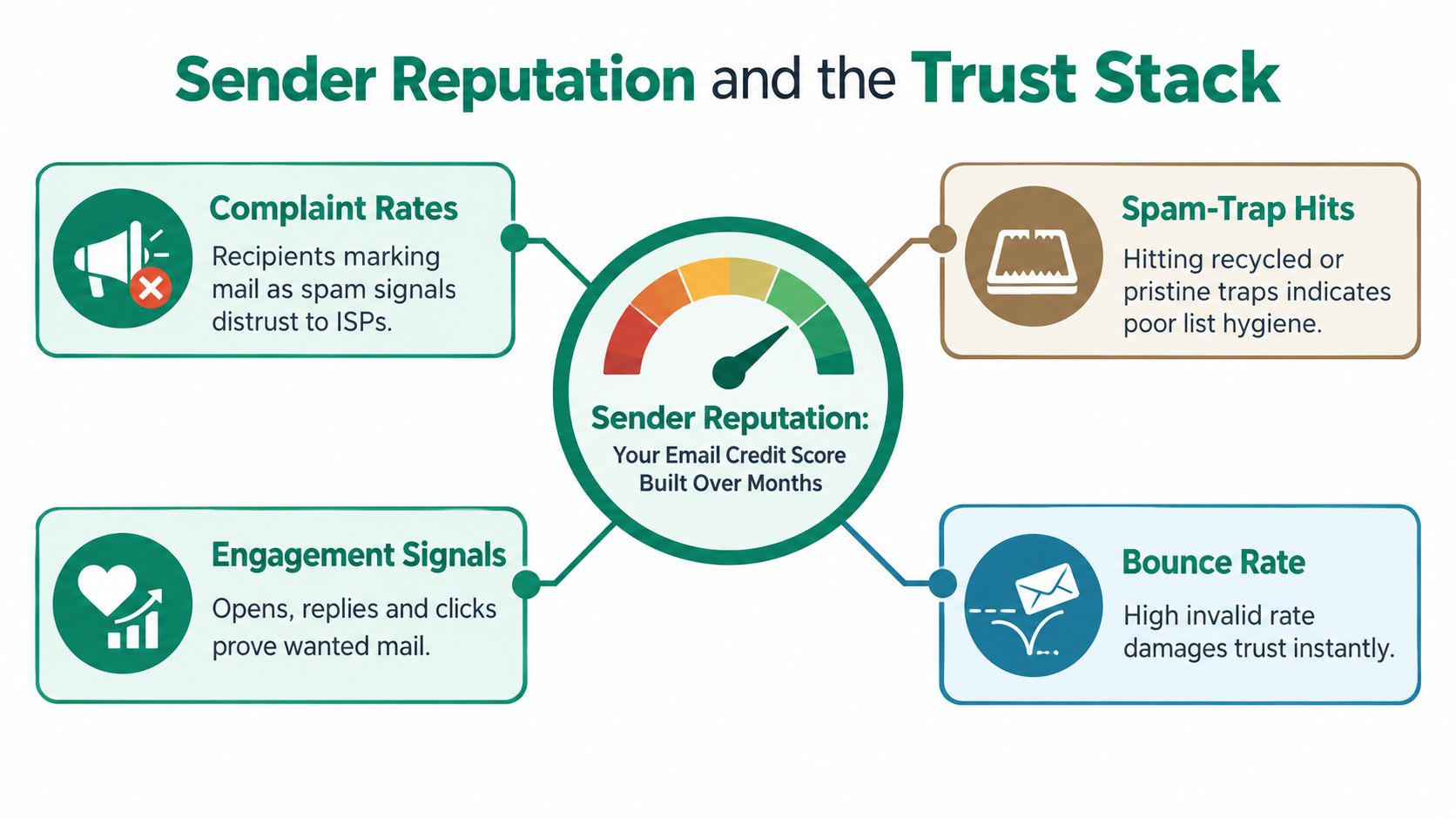
    Think of your sender reputation like a credit score. It's not a one-and-done deal. You have to actively manage it, or it'll start to sink. Staying on top of your deliverability is how you spot small issues before they blow up into campaign-killing disasters.

    Honestly, ignoring these metrics is like driving without a dashboard. You’ll have no idea you're headed for trouble until the engine is already on fire. By regularly checking your sender health, you make sure your emails actually land where they're supposed to: the primary inbox.

    The Core Four Deliverability Metrics

    You don't need to get lost in a sea of data. Just focus on what I call the "Core Four"—these are the metrics that tell you pretty much everything you need to know about how inbox providers see you.

    • Bounce Rate: This is the percentage of your emails that failed to deliver. A sudden jump in hard bounces is a massive red flag, usually pointing to a bad email list. You have to keep this number as low as possible.
    • Open Rate: With all the privacy changes, this isn't the perfect metric it once was. Still, a sudden and significant drop can be the first whisper that your emails are starting to hit the spam folder.
    • Reply Rate: This is your golden ticket. A high reply rate is a powerful positive signal to Gmail and Outlook. It tells them people are actually engaging with your emails, which gives your sender reputation a serious boost.
    • Spam Complaint Rate: This is the one that can sink you. Even a tiny handful of people flagging your email as spam can do major damage to your domain. The goal here is simple: keep it as close to 0% as you can.

    These numbers tell a story. A high bounce rate isn't just a statistic; it's a clear signal that your list hygiene needs work. If that sounds familiar, you should learn how to verify emails before you send them to get that bounce rate under control.

    Using Tools to Spot Trouble Early

    The good news is you're not flying blind. The email providers themselves give you free tools to see exactly how you're doing.

    Google Postmaster Tools is your direct line to Gmail. It gives you hard data on your domain reputation, IP reputation, spam complaint rates, and delivery errors—straight from the source. For any serious cold emailer, this is non-negotiable.

    Setting it up is a breeze, and the insights are pure gold. If you see your spam complaint rate inching up in Postmaster, you know it's time to hit pause on your campaigns and figure out what’s wrong with your targeting or messaging.

    This lets you fix problems before they do permanent damage. To build a truly resilient system, you need to combine this kind of active monitoring with proven outreach strategies. Brushing up on these 10 Email Deliverability Best Practices is a great place to start. It's how you make sure all that hard work you put into warming up your account pays off for the long haul.

    Common Warm Up Mistakes and How to Avoid Them

    A person's hand writing 'AVOID MISTAKES' on a green clipboard, next to a laptop and notepad.

    Even with the perfect timeline and the best tools, it’s surprisingly easy to stumble during the warm-up process. A few common traps can undo all your hard work, wrecking your sender reputation before you even launch your first real campaign.

    The good news? These mistakes are completely avoidable. Once you know what to look for, you can sidestep them and keep your deliverability scores climbing toward a strong, trusted domain.

    Rushing the Ramp Up

    The single biggest mistake I see is impatience. You’ve got your new domain ready, you're eager to see results, and you leap from sending 10 emails a day to 100 in just a few days. This sudden jump in volume is a massive red flag for inbox providers like Gmail and Outlook.

    Put yourself in their shoes for a second. A brand-new account that suddenly starts blasting out emails looks exactly like a spammer. Their algorithms are literally designed to catch and block this kind of behavior.

    • The Fix: Stick to a gradual, predictable increase. A safe rule of thumb is adding just 10-20 emails to your daily sending total each week. This slow-and-steady approach mimics natural human activity and builds trust, not suspicion.

    If you’re using a warm-up tool, always enable the "slow ramp" or gradual increase setting. It automates this pace, ensuring you scale volume safely without having to think about it every day.

    Sending Generic, Lifeless Messages

    Your warm-up emails have one job: generate positive engagement. And nothing tanks engagement faster than a message that screams "I am a robot." Firing off thousands of identical, bland notes like "Hello" or "Test" is a completely wasted opportunity.

    These messages don't just get ignored; they often get flagged as spam. Even when you're using an automated warm-up network, the entire point is to create interactions that look and feel real.

    • The Fix: Write short, conversational messages that are designed to get a reply. The easiest way to do this is by simply asking a direct question. Your warm up email content needs to feel like it came from a person, not a script.

    A simple message like, "Hey, just following up on our chat from last week. Do you have that report ready for review?" is infinitely better than a generic "test email." It feels authentic and practically begs for a response, creating the positive signals you're after.

    Ignoring Your Deliverability Metrics

    Another critical error is the "set it and forget it" mindset. You switch on your warm-up tool, assume everything is humming along nicely, and never check the actual performance data. That’s like flying a plane without ever looking at the instrument panel.

    You won't have a clue that there's a problem—like a high bounce rate or a spike in spam complaints—until it's way too late. By that point, your domain’s reputation might already be in the ditch.

    • The Fix: You have to actively monitor your "Core Four" metrics at least once a week: bounce rate, open rate, reply rate, and spam complaints. Use free resources like Google Postmaster Tools to get direct feedback from the source.

    If you see your bounce rate creeping over 2% or your spam complaint rate tick above 0.1%, it's time to pause everything. Hit the brakes, figure out what's wrong (is it your list? your content?), and fix it before you even think about resuming. This kind of proactive management is what separates a healthy sender from a blacklisted one.

    Frequently Asked Questions About Email Warm Up

    Warming up a new email account always brings up questions, especially when you’re eager to get your outreach started. Let’s clear up some of the most common ones we hear from users.

    Getting these details right is the difference between a successful campaign and one that lands you in the spam folder.

    How Long Should I Warm Up a New Email Account?

    The standard advice you'll see everywhere is four to six weeks. For most people, that’s a solid timeframe to build a decent sending history and show email providers you’re a legitimate user.

    However, your timeline really comes down to your ambition. If you're planning to send a high volume of emails—say, over 100 a day—you should really stretch that warm-up period to eight weeks. This longer runway helps you build a much stronger sender reputation, which you'll need to support that level of activity without getting flagged.

    Can I Do Cold Outreach While My Email Is Warming Up?

    You can, but you have to be patient. It’s best to wait until at least the third or fourth week of your warm-up schedule. By then, your account has a baseline of positive activity.

    When you do start, keep the volume incredibly low. Think 5-10 cold emails per day, mixed right in with your automated warm-up sends. As long as your deliverability stays healthy, you can slowly bump that number up week by week.

    The golden rule here is to always keep your warm-up tool running alongside your outreach. This blend of activity makes your sending patterns look much more natural and diverse to inbox providers, which is exactly what you want.

    Do I Need to Keep Warming Up My Email Account Forever?

    Yes, but think of it as shifting from "full-on training" to "light maintenance." Once your account is fully primed and you’re sending campaigns, you should keep a warm-up tool running in the background at a lower intensity.

    This ongoing activity acts as an insurance policy. It maintains a steady stream of positive engagement that protects your sender reputation from the realities of cold outreach, like a sudden drop in open rates or an accidental spam complaint.


    Ready to build powerful prospect lists while your account warms up? With EmailScout, you can find unlimited verified emails for free and automate your list-building process. Start finding the right contacts in one click with EmailScout.

  • Hunter Email Verifier Guide: hunter email verifier essentials

    Hunter Email Verifier Guide: hunter email verifier essentials

    Before we get into a tool like the Hunter Email Verifier, we need to talk about why this is a step you absolutely can't skip. Your email list is the foundation of your entire outreach strategy. If that foundation is weak, everything you build on it will eventually come crashing down.

    Email verification is how you make sure that foundation is rock-solid.

    Why Email Verification Is Your Secret Weapon

    Sending emails out to a bad list isn't just a waste of your time—it actively hurts your business. Every single time you send a message to a dead email address, it "bounces." That isn't just a failed delivery; it's a strike against you in the eyes of email providers like Gmail and Outlook.

    Think of it like this: if you keep sending mail to addresses that don't exist, the post office is going to start seeing you as a problem. Pretty soon, they'll treat all your mail with suspicion. In the digital world, that suspicion tanks your sender reputation.

    The High Cost of a Low Sender Score

    Your sender reputation is basically a credit score for your email address. ISPs (Internet Service Providers) use it to decide if you're trustworthy. A high score gets you a ticket to the main inbox. A low score, on the other hand, comes with some serious penalties.

    • Poor Deliverability: Your emails get routed straight to the spam folder, where they’re as good as invisible.
    • Account Suspension: If things get bad enough, your email provider might just suspend or even shut down your account for spammy behavior.
    • Wasted Resources: Every email sent to a bad address is a complete waste—from the time you spent writing it to the money you pay for your email tools.

    A high bounce rate is the fastest way to destroy your sender reputation. Keeping your bounce rate under 2% isn't just a suggestion; it's a hard-and-fast rule for anyone serious about email outreach.

    Protecting Your Digital Identity

    Using an email verifier is your first line of defense. Before you even think about hitting "send," the tool scans every address on your list. It checks that the format is correct and, more importantly, it pings the mail server to confirm a real mailbox exists and is ready to receive your email.

    This simple cleaning process directly impacts your campaign's bottom line. By weeding out the bad and risky addresses, you make sure your messages actually land in front of real people. It’s a core part of any real email strategy, and to get the most out of it, you should follow established email deliverability best practices.

    At the end of the day, a clean list means higher open rates, better engagement, and a much stronger ROI. For a full breakdown of the process, you can learn more about how to verify emails in our guide. This makes tools like the Hunter Email Verifier less of an expense and more of an essential investment in your success.

    How the Hunter Email Verifier Works

    So, how does the Hunter Email Verifier actually figure out if an email is good to go? Think of it this way: before you send an important package, you double-check the address to make sure it gets there. Hunter’s verification process is like a series of rapid quality checks, all designed to give you that same confidence.

    The entire system is built to give you a clear answer without ever sending a real email—a crucial step for protecting your sender reputation. It runs through several automated checks in just seconds, performing far faster and more accurately than you ever could manually.

    A Multi-Layered Verification Process

    The tool doesn't just run a single test. Instead, it uses a sequence of checks to determine an email's status, weeding out bad addresses at each stage. This multi-layered approach is what makes the final result so reliable.

    This tiered system includes a few key steps:

    • Syntax & Formatting Check: First, it makes sure the email follows the basic rules, like having an "@" symbol and a proper domain. This is a quick way to catch obvious typos.
    • Domain & MX Record Check: Next, it confirms the domain (the part after the "@") is real and has a valid Mail Exchanger (MX) record. This is like checking if the destination city and its post office actually exist.
    • SMTP Handshake: The final step is a SMTP handshake. This involves a direct, real-time conversation with the recipient's mail server to ask if a specific mailbox exists and can receive mail, all without sending a full email.

    This is all about starting with a clean list, which leads directly to better delivery rates and a protected sender reputation.

    A three-step diagram illustrating email quality optimization: clean list, high delivery, and good reputation.

    As you can see, verified emails are the foundation for any successful outreach campaign. This has become absolutely vital as more and more businesses lean on email marketing.

    The demand for tools like a hunter email verifier is exploding. The market jumped from $0.71 billion in 2025 to a projected $0.79 billion in 2026, largely because we’re all trying to manage the 376.4 billion emails sent every single day.

    Understanding the Verification Results

    After running its checks, Hunter gives you a clear status for each email. Knowing what these mean is essential for building a clean and effective outreach list.

    Valid: This email passed every check and is safe to send. These addresses give you the lowest chance of bouncing.

    Invalid: The email failed one of the core checks. It either doesn't exist or can't receive mail. You should always remove these from your lists to avoid damaging your sender score.

    Risky: This status is often applied to "accept-all" or "catch-all" domains. These servers are set up to accept mail for any address at their domain, which makes it impossible to confirm if a specific user actually exists. Sending to these emails requires a bit more caution.

    Understanding the mechanics of how verification works is the first step. For a much deeper look, check out our complete guide on email address verification.

    How to Use Hunter's Results for Maximum Impact

    Bearded man typing on computer, screen shows 'ACT ON RESULTS' dashboard with charts.

    Running your list through the Hunter Email Verifier is the easy part. The real skill is knowing what to do with the results it spits back at you. Just glancing at the dashboard isn't enough—you need a clear plan to turn that data into better deliverability and a healthier sender score.

    Think of it like sorting a big pile of mail. You've got a stack for guaranteed delivery, a stack for the shredder, and a tricky pile that needs a second look. Each status Hunter provides falls into one of these categories, and handling them the right way is what separates a rookie mistake from a professional campaign.

    Segmenting Based on Verification Status

    Your first move is to split your email list based on the three main results: Valid, Invalid, and Risky. Each group demands a completely different approach to protect your sender reputation and get the most out of your efforts.

    Here's a simple, systematic way to handle it:

    • Valid: These are your green lights. They've passed all of Hunter's checks and are safe to send. Move these contacts straight into your main outreach campaign without a second thought.

    • Invalid: These emails are a direct threat to your reputation. They are confirmed to be nonexistent or unable to receive mail. You must delete these from your CRM and email lists immediately. No second chances.

    Sending messages to even a small number of invalid addresses can flag your domain as spammy and land you on a blacklist. The rule is simple: if Hunter says it's invalid, it's gone for good.

    This strict sorting ensures your campaigns only go to high-quality addresses, which will drastically cut your bounce rate. But the real strategy comes into play with that third, tricky group.

    Handling Risky and Accept-All Emails

    The "Risky" or "Accept-All" status is where most people get tripped up. These results often come from corporate servers set up to accept mail for any address at their domain, making it impossible for a verifier to confirm if a specific person's inbox actually exists. It’s a defense mechanism on their end.

    You shouldn't automatically delete these contacts, but you can't treat them like "Valid" ones, either. Sending to a large batch of risky addresses can still lead to a high bounce rate if many of the specific mailboxes don't exist.

    Here's the smart way to manage this segment:

    1. Isolate Them: Create a totally separate list for all "Risky" and "Accept-All" emails. Never, ever mix them with your "Valid" contacts.
    2. Send a Small Test Batch: Before launching a full campaign, send your email to a small sample of this list—think 50-100 contacts. Then, watch the bounce rate like a hawk.
    3. Evaluate and Proceed with Caution: If your test batch comes back with a bounce rate under 3-4%, you can consider carefully sending to the rest. A wiser move is to put this group on a slower, lower-risk outreach cadence to avoid any sudden red flags for email providers.

    By treating each verification status with a specific game plan, you’re no longer just cleaning data. You’re making strategic decisions that directly boost your campaign's performance and protect your most critical asset: your sender reputation.

    Hunter Verification Status and Recommended Actions

    To make it even clearer, here’s a quick guide on how to act on each verification status from Hunter. Following these steps will help you maximize deliverability while keeping your sender score safe.

    Verification Status What It Means Recommended Action for Your Campaign
    Valid The email address has passed all checks. The server has confirmed the mailbox exists and is ready to receive emails. Send immediately. These are your highest-quality contacts. Add them to your primary outreach sequences.
    Invalid The email address does not exist, the domain is incorrect, or the mail server has permanently rejected it. Delete immediately. Remove this contact from all lists and your CRM to avoid damaging your sender reputation.
    Accept-all The server is configured to accept emails for any address at that domain, making it impossible to confirm if the specific mailbox exists. Also known as a "catch-all." Isolate and test. Send to a small sample first. If the bounce rate is low, proceed cautiously with a separate campaign.
    Risky The email address is likely to bounce. This could be due to a full inbox, a temporary server issue, or it being a low-quality or disposable address. Isolate and consider a low-priority send. Treat these similarly to "Accept-all" but with even more caution.
    Unknown The server is not responding or providing a clear status, so Hunter cannot determine if the email is valid or invalid. Exclude for now. It's safest to set these aside. You can try re-verifying them after a few weeks to see if the status changes.

    Ultimately, acting on this data isn’t just about avoiding bounces. It's about building a sustainable and effective outreach process that respects both your prospects and the email providers that deliver your messages.

    Practical Use Cases for the Hunter Email Verifier

    A person holds a tablet showing 'Practical Uses' with icons for data, search, and global scope.

    Alright, let's move beyond the technical "how" and into the practical "why." The real magic of the Hunter Email Verifier isn't just cleaning a list—it's about how it slots into your daily work to protect your sender reputation, save money, and open up new opportunities.

    Think of it as a strategic move. For sales teams, a CRM can quickly become a graveyard of old contacts. People switch jobs, and companies close down. Running your entire CRM through a bulk verification can breathe new life into old leads, clear out the deadwood, and make sure your database is a tool you can actually trust.

    Improving Cold Outreach Campaigns

    For anyone in marketing, your email list is everything. Launching a big cold email campaign without verifying your list first is like setting sail in a leaky boat. It’s just not a good idea.

    Let's say you've just used a tool like EmailScout to pull together a great list of prospects. Before you hit "send," loading that list into Hunter for a quick check is the smartest thing you can do. This simple pre-flight check does two massive things for you:

    • Maximizes Deliverability: You get peace of mind knowing your emails will actually land in people's inboxes from the get-go.
    • Protects Sender Score: You avoid the high bounce rates that get your domain flagged as spam, which keeps your future campaigns safe.

    An email verifier like Hunter is a powerful way to sharpen your lead generation. To make sure your outreach hits the mark, it’s smart to pair it with other great systems. You can explore some of the best sales lead generation tools to build out a complete, effective tech stack.

    This two-step "Find, then Verify" workflow is a cornerstone of modern prospecting. You generate leads at scale with one tool and then ensure their quality with a dedicated verifier like Hunter, optimizing both cost and effectiveness.

    Automating Data Hygiene and Security

    But it’s not just for sales and marketing. Developers and ops teams can tap into Hunter’s API to build verification right into their systems. A great example is adding it to a website's sign-up form. This allows you to block fake or temporary email addresses in real-time, keeping your user database clean from the start.

    Imagine a business development rep who needs to stay on top of their partner contacts. They can run periodic checks on their list. If an email comes back as "Invalid," that’s a huge clue that the person has probably left the company. This gives the rep a reason to find the new contact and keep their professional network from going stale. It’s all about proactive data management.

    Choosing the Right Verification Tool for You

    While a popular tool like the Hunter Email Verifier is a fantastic choice for many, picking the right service isn't a one-size-fits-all deal. The best tool for you comes down to your specific workflow, your budget, and the sheer scale of your outreach. It’s about looking past the big names and digging into a few key details that matter to your business.

    When you're comparing services, you need to have a clear scorecard. The most important things to look at are accuracy rates, how well it integrates with other tools, verification speed, and the pricing structure. Does the tool actually guarantee its accuracy? Can it plug right into your CRM? How fast can it chew through a list of 10,000 emails? These aren't just details—they're fundamental.

    Key Evaluation Criteria for Any Verifier

    Before you pull out your credit card, make sure any provider gives you straight answers on these core features. A good service will be upfront about what it can and can't do.

    • Guaranteed Accuracy: Look for tools that explicitly promise 95% or higher accuracy on their "Valid" and "Invalid" results. This is critical. You need to be able to trust the data you're paying for.
    • Integration Options: A verifier that seamlessly connects to the tools you already use (like Salesforce, HubSpot, or your outreach platform) will save you countless hours of exporting and importing spreadsheets.
    • Bulk Verification Speed: If you work with big lists, you need a service that can process tens of thousands of emails in minutes, not hours. Your workflow can't just grind to a halt.
    • Pricing Model: Pay close attention to how you're charged. Is it a monthly subscription with a fixed number of credits, or do you pay as you go? Do the math to figure out the real cost per verification.

    This industry is booming, which tells you just how much businesses need clean data. The global market for these tools, where the Hunter Email Verifier is a major player, is expected to hit $1.28 billion in 2026 and jump to $2.46 billion by 2035. You can find more details on this competitive space over at Business Research Insights.

    The Modern Outreach Workflow: Find, Then Verify

    For many of the sharpest sales and marketing teams I know, the most effective strategy isn't about finding one single tool that does everything. It's about building a powerful, two-step workflow using specialized tools for what they do best. I call it the "Find, then Verify" model.

    This modern approach separates the task of finding leads from the task of cleaning your list. You use one tool to find potential customers at scale, then you use another, dedicated tool to make sure that list is spotless before you even think about hitting "send."

    A perfect example of this is pairing an email finder with an email verifier.

    1. Find: First, you use an agile email finder tool like EmailScout to quickly generate a large, targeted list of leads, maybe straight from LinkedIn or company websites.
    2. Verify: Then, you export that raw list and run it through a dedicated, high-accuracy verifier like Hunter. This scrubs the list clean, gets rid of the bad addresses, and flags the risky ones for you.

    This complementary approach lets you build massive lead lists without breaking the bank, and then strategically invest in cleaning them for the best possible deliverability. It frames tools like EmailScout and Hunter not as rivals, but as essential partners in a modern, efficient tech stack. If you're just getting your feet wet, checking out some of the best free email verification tools is a great way to start.

    Frequently Asked Questions About Email Verification

    Even after you get the hang of email verification, a few questions always seem to pop up. Let's tackle some of the most common ones I hear about the Hunter Email Verifier and the process itself.

    My goal here is to give you clear, straight-to-the-point answers so you can use these tools confidently.

    How Accurate Is the Hunter Email Verifier

    The Hunter Email Verifier is known for being incredibly accurate, hitting 95% or more on the results it marks as definitively "Valid" or "Invalid." That level of precision is exactly what you need to build clean outreach lists and keep your sender reputation safe.

    Of course, no tool can promise 100% perfection. The main reason for this comes down to "catch-all" or "accept-all" servers. Some companies set up their email servers to accept mail for any address at their domain, which makes it impossible for an outside tool to know for sure if a specific person's mailbox is real.

    For these, Hunter gives you a "Risky" result along with a confidence score to help guide your decision. My advice? Always treat "Risky" emails as their own separate group. If you decide to contact them, send to a small batch first to see what your bounce rate looks like before you send to the whole segment.

    Can I Use Hunter to Verify a Free Email List

    Yes, and it's actually a very common and effective workflow. A lot of people use a free tool, like the EmailScout Chrome extension, to find a large number of email addresses from places like LinkedIn or company websites.

    Once you have your big list of prospects, you can just export it and run it through Hunter’s bulk verification to clean the whole thing in one go.

    This "Find, then Verify" process is a powerful one-two punch. You can generate a ton of potential leads for free, then just pay the small cost to make sure they're deliverable. It's a great way to maximize the ROI on your outreach.

    What Is the Difference Between Verification and Validation

    People tend to use these terms interchangeably, but there's a small difference that's actually pretty important to understand.

    • Validation is usually a quick, surface-level check, like the kind you see on a signup form. It just confirms the email looks right—it has an "@" symbol and a proper domain (e.g., name@example.com).
    • Verification is the much deeper dive that a tool like the Hunter Email Verifier performs. It not only checks the format but also confirms the domain is real and can accept mail, and then it actually pings the server to ask if that specific mailbox exists.

    For anyone cleaning an existing list for sales or marketing, verification is the step you can't skip.

    Is Verifying Email Addresses Legal

    Yes, verifying email addresses is completely legal. In fact, it's considered a best practice for good data hygiene.

    The process is non-intrusive. It never sends an actual email that lands in someone's inbox. Instead, it just has a quick, technical conversation with the mail server to ask, "Hey, does this mailbox exist?"

    Following this practice actually helps companies stay compliant with regulations like GDPR and CAN-SPAM, which require businesses to keep their data accurate. With the email verification market projected to hit $0.72 billion in 2025 and daily email sends climbing toward 376.4 billion, keeping lists clean is more critical than ever. Discover more insights about the growing email verifier market. By verifying, you're taking a responsible step to make sure you're only contacting legitimate accounts.


    Ready to build massive, clean lead lists? Use EmailScout to find unlimited prospects for free, then verify them for maximum deliverability. Get started today at https://emailscout.io.

  • What Are Outbound Sales and How Do They Drive Growth

    What Are Outbound Sales and How Do They Drive Growth

    Outbound sales is all about making the first move. Instead of waiting for customers to find you, your sales team actively seeks them out through channels like cold calls, targeted emails, and social media. It's the art of starting the conversation yourself.

    Defining Outbound Sales: The Proactive Growth Engine

    A man plans outbound sales strategy, looking at a map and using a laptop at his desk.

    Think of your business like a fishing boat. You could drop a net and wait for fish to swim into it—that's inbound. Or, you could use a fish finder to locate the most promising spots, head directly there, and cast your line. That’s outbound sales. You don't wait for opportunities; you create them.

    This strategy hinges on identifying potential customers who perfectly match your Ideal Customer Profile (ICP), even if they've never heard of you. Your team initiates every single interaction.

    The Core Philosophy of Modern Outbound

    Outbound has come a long way from the old-school, aggressive sales tactics. Today, it’s about intelligent, value-driven outreach. The goal isn't just to close a deal on the first call but to start a real conversation by showing you understand a prospect’s problems and have a solution that can genuinely help.

    At its heart, this is a "push" strategy—you’re pushing your message out to a carefully selected audience. Understanding the difference between push and pull marketing for B2B demand generation is key to building a smart, effective outbound plan.

    At its core, outbound sales is about precision and control. It gives you the power to choose exactly which markets and companies you want to pursue, rather than leaving growth entirely to chance.

    Key Outbound Activities

    While the methods can vary, they all share one thing: proactive engagement. The most common activities include:

    • Cold Calling: Picking up the phone and calling prospects to introduce your business and qualify their needs.
    • Cold Emailing: Sending personalized emails to get a foot in the door with key decision-makers.
    • Social Selling: Using platforms like LinkedIn to connect with potential clients and build relationships.

    This proactive engine is a must-have for any business serious about growth. By actively hunting for new opportunities, companies can build a predictable and scalable revenue stream that perfectly complements the leads coming in from other channels.

    The Modern Outbound Sales Process From Target to Close

    A winning outbound sales strategy isn't just a series of random acts—it's a structured, repeatable process. Think of it like building a high-performance engine. Every single part has to be perfectly tuned and work in harmony to generate real momentum. This methodical approach is what separates the top-performing teams from everyone else just spinning their wheels.

    The whole process is designed to take someone from being a complete stranger to a happy customer. It starts with laser precision—knowing exactly who to talk to—and ends with a closed deal, creating a predictable stream of revenue.

    Stage 1: Building Your Ideal Customer Profile

    Before you even think about sending an email or making a call, you have to know who you’re talking to. This is the foundation of the entire outbound process, and honestly, it’s the most important part. If you don't have a clear target, you're just shooting in the dark.

    This is where your Ideal Customer Profile (ICP) comes in. An ICP is a super-detailed description of the exact type of company that gets the most value from what you sell. It goes way beyond industry and company size, digging into things like their revenue, the tech they use, and the specific headaches they're trying to solve.

    A solid ICP is your North Star, guiding every single decision you make from here on out. To really nail this crucial first step, check out our guide on how to identify your target audience.

    Stage 2: Prospecting and List Building

    Once you know who you're looking for, it's time to actually find them. This is where you build a list of specific companies that match your ICP and pinpoint the key decision-makers inside those organizations. Data accuracy here is completely non-negotiable.

    An inaccurate list will kill your outbound campaign faster than anything else. You'll get bounced emails, call the wrong people, and waste a ton of time, all while making your brand look bad. This is exactly why tools like EmailScout are so essential—they help sales teams find verified contact info for the right people, making sure your outreach actually gets delivered.

    A successful outbound campaign is built on a foundation of high-quality data. Spending extra time here to ensure your prospect list is clean, accurate, and perfectly aligned with your ICP will pay massive dividends later in the process.

    Stage 3: Crafting and Launching Outreach Sequences

    With a solid list of prospects in hand, it's go-time. Modern outbound isn't about a single email or call; it's about using multi-channel, multi-touch sequences. That means you're engaging prospects across different platforms—like email, phone, and LinkedIn—over a specific period.

    A typical sequence might look something like this:

    1. Day 1: Send a highly personalized email that mentions a specific trigger event or company challenge.
    2. Day 3: Connect on LinkedIn with a short, non-salesy note.
    3. Day 5: Follow up with another email, this time offering something valuable like a case study or a relevant report.
    4. Day 7: Pick up the phone for a cold call to try and have a real conversation.

    The trick is to add value with every single touchpoint, not just beg for a meeting. For teams wanting to scale these efforts, it's worth understanding how outbound sales automation can manage these sequences and free up your reps' time.

    Stage 4: Qualifying and Running Discovery Calls

    When a prospect finally replies, the next goal is to qualify them. A discovery call isn't a sales pitch. It's a conversation where you dig in to understand their needs, challenges, and goals on a deeper level.

    During this call, your Sales Development Reps (SDRs) ask smart questions to figure out if the prospect actually has a problem you can solve. If the lead is a good fit, the SDR books a more in-depth meeting or demo with an Account Executive (AE). This handoff is critical because it makes sure your AEs only spend their time on opportunities that have a real shot at closing.

    Stage 5: Closing and Onboarding

    The final stage belongs to the Account Executive. They're the ones running the product demo, handling objections, negotiating the contract, and getting the deal across the finish line. This requires a deep understanding of the customer’s business and the ability to show exactly how your solution makes their life better.

    But the work doesn't stop when the contract is signed. A smooth handoff to the customer success or onboarding team is crucial. This makes sure new customers have a great first experience and are set up to get the value they were promised, turning that closed deal into a long-term, successful partnership.

    Mastering Key Outbound Channels and Strategies

    Once you’ve mapped out your outbound sales process, it’s time to get your hands dirty with the actual channels you'll use to connect with prospects. Modern outbound isn't about throwing everything at one channel; it’s about creating a coordinated effort across several touchpoints. Each one has its own rules of engagement.

    Think of your outreach channels like a carpenter's toolkit. You wouldn't use a hammer to cut a piece of wood, right? In the same way, a cold call might be perfect for one prospect, while another will respond better to a well-crafted email. The real magic happens when you know which tool to use and when.

    This simple diagram breaks down how the whole process flows, from identifying the right people to reaching out and, finally, closing the deal.

    Diagram illustrating the three key steps of an outbound sales process: target, outreach, and close.

    As you can see, great outreach starts with precise targeting, and a closed deal is the natural result of effective outreach.

    The Art of the Modern Cold Call

    Don’t believe the rumors—cold calling is far from dead. It’s just evolved. Today’s best cold calls aren't about sticking to a rigid script. They're about using a flexible framework to guide a natural, human conversation. The goal isn’t to sell on that first call; it’s simply to book a proper meeting.

    Telemarketing is still a huge global industry. The outbound telemarketing market is expected to hit USD 11,524.8 million by 2025, proving it's here to stay. Europe is leading the charge with over 30% market share, thanks to new tech making calls smarter and more effective. You can dig into the numbers in this in-depth market report on outbound telemarketing.

    Here’s a simple framework for a better cold call:

    1. The Permission Opener: Start with your name and company, then immediately ask for permission to talk. Something like, "Hi [Prospect Name], this is [Your Name] from [Your Company]. I know I'm calling you out of the blue, do you have 27 seconds for me to tell you why I called?"
    2. Quick, Value-Driven Context: Show you did your homework. "I saw your company recently expanded its logistics division, and we help businesses like yours cut shipping costs."
    3. A Problem-Focused Question: Ask an open-ended question that gets them talking. "How are you currently managing the increase in outbound freight?"
    4. A Clear Next Step: If you sense interest, don't push for the sale. Secure the next meeting. "Sounds like it might be worth a longer chat. Are you open to a 15-minute call next Tuesday?"

    Crafting Cold Emails That Actually Get Replies

    Cold email is easily the most scalable outbound channel, but it's also the most crowded. Your message is fighting for attention in an inbox flooded with hundreds of others. To have any chance, your email needs two things: personalization and value. Every single email should feel like you wrote it for one person, not a mailing list.

    Of course, the foundation of any email campaign is having the right contact info. A perfectly written email is worthless if it lands in the wrong inbox. This is where tools like the EmailScout Chrome extension become essential. It helps you find verified email addresses for key decision-makers with a single click, making sure your messages actually get delivered.

    Your subject line has one job: get the email opened. That's it. Ditch the generic, clickbait titles and focus on being specific, relevant, and a little intriguing.

    To really level up your email game, focus on these three things:

    • A Hyper-Personalized Opening Line: Prove you've done your research. Mention a recent blog post they wrote, a company milestone, or a mutual connection.
    • A Clear Value Proposition: In one or two sentences, explain how you solve a problem they probably have.
    • A Low-Friction Call-to-Action (CTA): Instead of asking for a 30-minute demo, try an interest-based question like, "Are you open to learning more about how we solved this for [Competitor]?"

    For a deeper dive, check out our complete guide on how to write cold emails that convert.

    Building Relationships with Social Selling

    Social selling, especially on a platform like LinkedIn, is the long game of outbound sales. It’s all about building credibility and starting relationships before you ever ask for anything. This approach "warms up" a cold prospect, so when you finally do reach out, you’re not a total stranger.

    But let’s be clear: effective social selling is not about spamming connection requests or sliding into DMs with a sales pitch. It's about consistently adding value for your target audience.

    Start by identifying your top accounts and following the key people there. Engage with their content—and I don't just mean "liking" their posts. Leave thoughtful comments that add to the conversation. Share articles you think they'd find interesting and offer your own perspective on industry trends. When you do this, you slowly position yourself as a trusted advisor, not just another salesperson. Then, when you finally send that direct message, they're far more likely to listen.

    Best Practices for a Winning Outbound Playbook

    Knowing the outbound process is one thing, but actually mastering it is a whole different ballgame. The real difference between teams that just spin their wheels and those that actually scale is their playbook—a core set of principles that guides every single interaction. Building a winning strategy isn't about grinding harder; it's about working smarter with a repeatable, value-first approach.

    The top sales teams don't just get lucky. They operate from a clear playbook that turns cold outreach into real conversations and, most importantly, predictable revenue.

    Embrace Hyper-Personalization at Scale

    Let's be honest—prospects are drowning in generic, templated messages. In this environment, personalization is your most powerful weapon. And I don't mean just slotting in a {first_name} tag. Real personalization shows you've done your homework and actually understand their world.

    This means finding specific triggers that make your outreach feel timely and genuinely relevant.

    • Company News: Did they just announce a funding round, a new product, or a big hire? Mention it. "Saw your recent Series B announcement on TechCrunch—congratulations. As companies scale post-funding, they often face [challenge you solve]."
    • LinkedIn Activity: Reference something they recently posted or commented on. "I really liked your take on the future of supply chain logistics in your post yesterday."
    • Job Postings: If a company is hiring for a specific role, it's a huge clue about their priorities. "Noticed you're hiring for a new data security lead, which usually means managing [problem] is a top priority."

    This kind of detail proves you see them as more than just another name on a list. It cuts through the noise and dramatically boosts your reply rates.

    Design a Multi-Touchpoint Strategy

    If you're only using one channel, you're setting yourself up to fail. Your prospects are busy, and they all have different communication preferences. A solid outbound playbook coordinates a multi-channel sequence to stay on their radar without being annoying.

    A well-designed sequence feels less like a series of cold interruptions and more like a helpful, persistent conversation happening across different platforms.

    A typical strategy might blend email, phone calls, and social selling over a few weeks. Each touchpoint should build on the last, creating one cohesive story. For example, a LinkedIn connection request can reference an email you sent a couple of days ago. This reinforces your message and makes it much more likely they'll engage. You have to meet buyers where they are.

    Master the Art of Polite Persistence

    Newsflash: most deals are not won on the first try. Or the second. Or even the third. Studies show it can take eight or more touchpoints just to get a meeting. This is where the follow-up becomes absolutely critical. But let’s be clear: persistence should never feel like pestering.

    The trick is to add value with every single follow-up. Ditch the lazy "just checking in" emails and offer them something useful instead.

    • Share a case study that’s relevant to their industry.
    • Send them a link to a new industry report you found insightful.
    • Invite them to a webinar you’re hosting on a topic they care about.

    This value-first approach immediately positions you as a helpful resource, not just another salesperson. It flips the follow-up from an "ask" to an "offer," making people far more willing to talk when the timing is right for them.

    Maintain Impeccable Data Hygiene

    Your entire outbound engine runs on data. If that data is bad, your results will be too. Inaccurate or outdated contact info is the silent killer of sales productivity. It leads to bounced emails, wasted calls, and can even get your domain blacklisted.

    Making data hygiene a priority is non-negotiable. This means regularly cleaning your CRM, verifying contact information, and ensuring everything is up to date. Using reliable data validation tools is the only way to maintain this accuracy at scale. Clean data ensures your perfectly personalized messages actually land in the right inbox, maximizing the ROI of every single outreach effort.

    Building Your Essential Outbound Sales Tech Stack

    Modern sales tech stack on a wooden desk with a laptop, tablet, and smartphone showing data.

    A great outbound strategy isn't just about hard work—it runs on the right technology. Think of your tech stack as the engine that powers everything your sales team does, transforming repetitive manual tasks into a smooth, automated process. This frees up your reps to do what they do best: build relationships and close deals.

    Without the right tools, your team is essentially flying blind. They'll waste countless hours on administrative work that software can knock out in seconds. The right combination of platforms creates a single, powerful system where data moves effortlessly from one stage to the next.

    Let's break down the three pillars of a modern outbound tech stack.

    Prospecting and Data Accuracy Tools

    This is ground zero for any outbound motion. Before you can draft an email or pick up the phone, you need one thing above all else: accurate contact information for the right people. Bad data is the fastest way to kill a campaign, leading to bounced emails, wasted calls, and a ding to your sender reputation.

    Tools in this category are your first line of defense.

    • Email Finders: You absolutely need a tool like EmailScout to uncover the verified email addresses of decision-makers. It’s the difference between your message landing in the right inbox or getting lost in the ether.
    • Data Enrichment: These platforms take your basic prospect lists and add layers of valuable context, like company size, industry, and the tech they already use. This is crucial for personalization.

    For a deeper dive, check out this guide to the best sales prospecting tools on the market.

    Sales Engagement Platforms

    Okay, so you have a clean list of prospects. Now what? You need a system to manage your outreach without driving yourself crazy. A Sales Engagement Platform (SEP) is your command center for automating and tracking multi-channel communication.

    Platforms like Outreach or Salesloft let you build and run sequences that weave together emails, calls, and social media touchpoints over a set period. They provide a clear framework for following up, ensuring no prospect ever falls through the cracks. It's this systematic approach that turns outbound from a guessing game into a predictable revenue machine.

    An SEP transforms your outbound strategy from a series of random actions into a disciplined, measurable process. It provides the automation needed for volume and the analytics required for continuous improvement.

    Customer Relationship Management Systems

    The Customer Relationship Management (CRM) system is the heart of your entire sales operation. It's the central database, the single source of truth for every single interaction you have with prospects and customers. Think Salesforce or HubSpot.

    While your SEP handles the top-of-funnel outreach, the CRM tracks the entire journey from the first touchpoint to a closed deal. Every email, call log, and meeting note lives here, giving anyone in the company a complete history of the relationship. This integration is non-negotiable—it ensures that sales, marketing, and support are all working from the same playbook.

    How to Measure Outbound Sales Success

    You can't improve what you don't measure. Running an outbound sales strategy without clear metrics is like trying to navigate a ship in the dark—you're moving, but you have no clue if you’re heading toward your destination or a rocky shore.

    To get a real pulse on how your program is doing, you have to track the numbers that actually matter. This means ditching the vanity metrics and zeroing in on the indicators that show how efficient and effective your team really is. By tracking the right data, you can spot problems early, double down on what’s working, and actually prove the ROI of your outbound efforts.

    Top of Funnel Activity Metrics

    Think of these as the early warning signs for your entire outbound campaign. They tell you right away if your targeting is on point and if your messaging is hitting home with your audience. If these numbers are tanking, nothing else down the funnel is going to work.

    Here’s what to watch:

    • Reply Rate: This is simply the percentage of prospects who actually write back to your emails. A low reply rate is a huge red flag, usually pointing to a problem with your subject lines, your personalization, or the value you're offering.
    • Meetings Booked: This is the name of the game for most top-of-funnel outreach. Tracking how many qualified meetings your SDRs are setting is a direct measure of their ability to turn a cold prospect into a warm conversation.

    Great outbound teams are obsessive about their top-of-funnel metrics. They know that even a 1% bump in reply rates can create a massive ripple effect, leading to a lot more closed deals down the line.

    Bottom of Funnel Business Metrics

    While activity metrics are crucial, these are the numbers that tie your outbound efforts directly to the bottom line. They answer the big question: Are the meetings we're booking actually turning into real business?

    These metrics paint the clearest picture of your success:

    • Conversion Rate: What percentage of those booked meetings become qualified opportunities? And of those, how many turn into closed-won deals? This is the ultimate stress test for both your lead quality and your sales process.
    • Sales Cycle Length: This tracks the average time it takes to go from that first touchpoint to a signed contract. A shorter sales cycle means you're bringing in revenue faster and more efficiently.
    • Customer Acquisition Cost (CAC): This is the total cost—salaries, tools, everything—it takes to land one new customer. A healthy outbound program must have a CAC that is way lower than the lifetime value (LTV) of the customers it acquires.

    Common Questions About Outbound Sales

    As you start to build or fine-tune your outbound sales engine, a few key questions almost always come up. Getting straight answers is the first step to sidestepping common pitfalls and building a solid foundation for growth.

    Here are the no-fluff answers to the questions we hear most often from sales teams just like yours.

    Is Outbound Sales Even Still a Thing?

    Absolutely. While inbound is fantastic, outbound remains one of the most direct ways to land high-value accounts, crack into new markets, and build a revenue stream you can actually predict.

    The secret isn't about blasting more emails or making more calls. It's about shifting from the old-school "spray and pray" tactics to a smarter, personalized approach that genuinely helps your prospect. Done right, outbound is a powerful growth lever for any B2B company.

    An outbound strategy puts you in the driver's seat. Instead of waiting for leads to hopefully find you, your team gets to decide exactly who they want to work with.

    What's the Single Biggest Hurdle in Outbound?

    The obvious challenge is cutting through the insane amount of noise to get a busy decision-maker's attention. That takes a message that’s sharp, relevant, and personal. But before you even get to write that message, you hit a much bigger, more fundamental roadblock: finding accurate contact data.

    Think about it—the most perfectly crafted email or sales script is completely useless if it never reaches the right person. This is exactly why getting reliable data is the make-or-break first step of the entire outbound process.

    How Fast Can We Expect to See Results?

    This really depends on your industry and how complex your typical sales cycle is. You should start seeing early signs of life—like positive replies and meetings getting booked—within the first few weeks of consistent, focused outreach.

    But turning that initial buzz into closed deals and a measurable ROI? That usually takes somewhere between two and six months. This is especially true in B2B, where deals often need buy-in from multiple people and the decision-making process just takes longer.


    Finding accurate contact info shouldn't be the hardest part of your job. EmailScout gives you the verified emails you need to fuel your outreach and connect with the right decision-makers in a single click. Start building better prospect lists today at https://emailscout.io.

  • 10 Email Subject Line Best Practices for 2025 That Work

    10 Email Subject Line Best Practices for 2025 That Work

    An email's success hinges on a single, short sentence: the subject line. It’s the gatekeeper to your message, the first impression, and often the sole deciding factor in whether a recipient clicks ‘open’ or ‘archive.’ In a crowded inbox, even the most brilliantly crafted email is worthless if its subject line fails to capture attention. This is why mastering email subject line best practices isn't just a minor optimization; it's a fundamental skill for anyone in sales, marketing, or business development.

    This guide moves beyond generic advice like "be creative." We provide a comprehensive roundup of 10 proven strategies that are both actionable and data-backed. You will learn the specific techniques top performers use to craft subject lines that demand to be opened. We will cover everything from leveraging psychological triggers like urgency and curiosity to the critical importance of personalization and audience segmentation.

    We will also explore the technical side, including how to avoid common spam filters, the strategic use of numbers and data, and how to build a consistent A/B testing framework. Each best practice is designed to be a practical tool you can implement immediately to drive better results. Ultimately, the effectiveness of your subject line directly correlates with your ability to significantly improve email open rates, a critical metric for any campaign's success. Let's dive into the essential rules for writing subject lines that convert.

    1. Keep It Short and Concise

    In the world of overflowing inboxes, brevity is your greatest asset. One of the most fundamental email subject line best practices is to keep your message short, scannable, and straight to the point. With over 60% of emails now opened on mobile devices, long subject lines are often truncated, leaving your core message unseen and your email unopened. Aiming for conciseness ensures your entire subject line is visible, immediately conveying its value to the recipient.

    A smartphone screen shows "Short & Clear" text, next to a keyboard, mug, and green notebook.

    The ideal length is a moving target, but data provides a clear direction. Research from platforms like Mailchimp suggests that subject lines under 50 characters consistently see higher open rates. Similarly, an analysis of HubSpot’s own campaigns revealed an average length of just 41 characters. This isn't just about fitting on a screen; it's about respecting the reader's time and cognitive load. A short subject line is easier to process, making it more likely to capture attention during a quick inbox scan.

    How to Implement This Practice

    Getting your message across in fewer words requires a disciplined approach. Focus on clarity and impact, and ruthlessly edit anything that doesn't add immediate value.

    • Front-load Keywords: Place the most important information at the very beginning. Instead of "A Quick Question About Your Upcoming Webinar," try "Question: Your Upcoming Webinar."
    • Remove Filler Words: Eliminate unnecessary words like "the," "and," "just," and "that." For example, change "Just a reminder about our meeting on Friday" to "Reminder: Meeting on Friday."
    • Use Action-Oriented Verbs: Start with a verb to create a sense of urgency and purpose. Examples include "Download your free guide" or "Register for the workshop."

    By keeping your subject lines concise, you optimize for mobile viewing and make your emails more inviting. This simple yet powerful technique is a cornerstone of effective email marketing, ensuring your message has the best possible chance of being read.

    2. Use Personalization and Dynamic Content

    In an inbox cluttered with generic messages, personalization cuts through the noise and speaks directly to the individual. This email subject line best practice involves using recipient data, such as their name, location, or past behavior, to create a tailored, one-to-one communication experience. This strategy transforms a mass email into what feels like a personal message, significantly boosting engagement and making the recipient feel seen and valued.

    A silver laptop on a wooden desk shows a webpage with a green header 'Made For You'.

    The impact of this approach is backed by compelling data. Studies consistently show that personalized subject lines can increase open rates by 26% or more. This is because a subject line like, "John, your weekly report is ready" is far more compelling than a generic "Your weekly report." It leverages the most powerful word in marketing: the recipient's name. This technique is especially crucial in sales and outreach, where building an initial connection is key. For more tips on this, you can learn more about how to write effective cold emails.

    How to Implement This Practice

    Effective personalization goes beyond just using a first name. It requires thoughtful segmentation and accurate data to create a genuinely relevant experience.

    • Move Beyond the Name: Use other data points for deeper relevance. For example, "Your Boston-area event guide" or "Did you see these items you recently viewed?"
    • Leverage Behavioral Triggers: Personalize based on actions (or inaction). Subject lines like "Sarah, complete your purchase with 20% off" or "Still thinking about the [Product Name]?" re-engage users at critical moments.
    • Ensure Data Accuracy: Double-check your data for spelling errors and proper formatting. A subject line with a typo like "Hi Jhon," can do more harm than good, immediately eroding trust.
    • Segment Your Audience: Group your contacts by demographics, purchase history, or engagement level. This allows you to send highly targeted messages, such as "A special offer for our VIP customers."

    By incorporating personalization and dynamic content, you create a powerful sense of relevance that makes your email stand out. This practice demonstrates that you understand your audience's needs and preferences, laying the foundation for a stronger, more profitable relationship.

    3. Create Urgency and Scarcity

    One of the most potent psychological triggers you can leverage in your email marketing is the fear of missing out (FOMO). Crafting subject lines that create a sense of urgency or scarcity encourages immediate action, compelling recipients to open your email now rather than letting it get buried in their inbox. This tactic works by suggesting that an opportunity is time-sensitive or limited, which can significantly boost open rates by creating perceived deadline pressure.

    Digital clock showing 11:38, laptop displaying 'LIMITED TIME', books, and plant on a wooden desk.

    This principle, popularized by psychologist Robert Cialdini, is a staple for e-commerce and flash sale brands for a reason: it works. Subject lines like Groupon's "Only 2 hours left for 50% off" or Everlane's "Flash sale ends tonight" are effective because they define a clear, approaching deadline. The key is to frame the offer as a valuable opportunity that will disappear, transforming a passive reader into an active participant. This is a core email subject line best practice for driving conversions under a tight timeline.

    How to Implement This Practice

    To effectively use urgency and scarcity, you must be authentic and specific. Vague threats don't work, but genuine, clear limitations do. Always ensure your claims are truthful to maintain trust with your audience.

    • Be Specific with Time: Use concrete time frames. Instead of "Sale ending soon," try "48 hours left to claim your discount" or "Your exclusive offer expires in 3 hours."
    • Highlight Limited Availability: If an item has low stock or an event has limited seats, state it clearly. "Only 15 spots left for the webinar" is more powerful than "Limited spots available."
    • Combine with a Clear Benefit: Urgency is more effective when paired with a strong value proposition. For example, "Final chance: Get 50% off your next order" links the deadline directly to the benefit.
    • Use Action-Oriented Language: Words like "ends," "expires," "final," and "last chance" create a clear call to action, prompting immediate engagement.

    By strategically incorporating urgency and scarcity, you can cut through the noise of a crowded inbox and motivate subscribers to act. However, use this technique judiciously to avoid creating fatigue or disbelief among your audience.

    4. Ask a Question or Create Curiosity

    Posing a question or hinting at intriguing information is one of the most powerful email subject line best practices for driving opens. This technique taps directly into the "curiosity gap," a psychological principle where a gap between what we know and what we want to know creates a powerful desire for resolution. When a recipient sees a compelling question or a mysterious statement, their natural inclination is to seek the answer, which means opening your email.

    This method moves beyond simply stating what's inside the email and instead engages the reader on an emotional level. Companies like HubSpot and Slack have mastered this, using questions to address common pain points or challenge conventional thinking. For example, HubSpot’s "Are you making these email mistakes?" creates immediate self-doubt and a desire for validation, while Slack’s "What if work actually worked?" sparks aspiration. This strategy effectively turns a passive inbox scan into an active search for an answer that your email promises to provide.

    How to Implement This Practice

    Successfully using curiosity requires a careful balance between intrigue and clarity, ensuring you don't stray into clickbait territory. The goal is to pique interest in a way that feels relevant and valuable to the recipient.

    • Ask a Relevant Question: Frame your question around a known pain point or goal of your audience. Instead of a generic "Got a minute?," try "Struggling with low open rates?"
    • Create an Information Gap: Hint at a solution or a surprising fact without giving everything away. For example, "This one change boosted our conversions by 40%" or BuzzFeed’s classic "We know your favorite pizza topping…"
    • Deliver on the Promise: The email body must answer the question or satisfy the curiosity you created. Failing to do so erodes trust and can lead to unsubscribes.

    By asking questions and strategically creating curiosity, you make your emails feel less like an advertisement and more like the beginning of an interesting conversation, significantly improving your chances of getting that coveted open.

    5. Include Numbers and Data Points

    Numbers act as "brain candy" in a cluttered inbox, instantly drawing the eye and signaling concrete, specific value. One of the most effective email subject line best practices is to incorporate numbers and data, which break up text, create a pattern interruption, and lend immediate credibility to your message. Subject lines with numbers suggest a structured, easy-to-digest format like a listicle or a data-backed insight, promising tangible information rather than vague marketing fluff.

    The psychological impact of numbers is well-documented. They stand out visually and ground abstract concepts in reality. A study by Yesware found that subject lines containing numbers saw higher open and reply rates. This tactic is used masterfully by brands like HubSpot (“47% of B2B marketers report better ROI”) and Forbes (“7 Ways to Boost Your Productivity”), who understand that specificity builds trust and curiosity. Whether it's a percentage, a numbered list, or a dollar amount, data makes your promise more believable and compelling.

    How to Implement This Practice

    Integrating numbers effectively requires more than just random insertion; it's about framing your value proposition with precision. The goal is to make your subject line more compelling and trustworthy.

    • Use Numerals, Not Words: The digit "7" stands out far more than the word "seven." Always use numerals for visual impact and to save precious character space.
    • Leverage Listicle Power: Frame your content as a numbered list. For example, "9 Tips for a Higher Open Rate" is more appealing than "How to Get a Higher Open Rate." Odd numbers often perform slightly better, as they feel less manufactured.
    • Showcase Data and Statistics: Quantify the benefit you're offering. Instead of "Increase your sales," try "Boost sales by up to 28%." This provides a concrete benchmark that captures attention and builds authority.
    • Ensure Accuracy: The data you use must be accurate and, if possible, verifiable. Citing a source or linking to a case study within your email can amplify the credibility established in the subject line.

    6. Avoid Spam Trigger Words and Phrases

    Navigating the complex world of email deliverability means understanding what gets your message flagged as spam. One of the most critical email subject line best practices is to steer clear of words and phrases that spam filters are trained to detect. These filters analyze subject lines for patterns commonly found in unsolicited, low-quality, or malicious emails, and using trigger words can send your carefully crafted message straight to the junk folder, never to be seen.

    Beyond automated filters, human perception plays a huge role. Recipients have become conditioned to recognize the language of spam. Phrases like "Act now!" or "You're a winner!" instantly erode credibility and trust. Over-the-top punctuation (!!!) and ALL CAPS text are also major red flags that signal desperation or deception. Avoiding these triggers is not just about deliverability; it's about protecting your brand reputation and ensuring your audience sees you as a professional, trustworthy source.

    How to Implement This Practice

    Successfully avoiding spam filters requires a mindful and proactive approach to your subject line writing. This involves scrutinizing your language, formatting, and even your technical email setup to build a foundation of trust with both email providers and recipients.

    • Scrub Your Language: Avoid overly promotional, high-pressure, or unbelievable claims. Instead of "Guaranteed to make you $$$," try "A new strategy for revenue growth." Replace "Limited time offer!" with "Your weekly deals are here."
    • Mind Your Formatting: Never use all caps for an entire subject line. Use exclamation points and other punctuation sparingly; one is usually enough. For example, change "SALE ENDS NOW!!!!" to "Last call: Our sale ends tonight."
    • Use Spam Checkers: Before sending a campaign, run your subject line and email content through a tool like Mail-tester.com. These services analyze your email against common spam filter rules and provide a score, highlighting potential issues.
    • Verify Authentication: While not part of the subject line itself, ensuring your domain has proper SPF, DKIM, and DMARC records is crucial. These technical verifications prove to email providers that you are a legitimate sender, making filters less likely to scrutinize your subject lines.

    7. Segment Your Audience and Tailor Accordingly

    A one-size-fits-all approach rarely works in marketing, and this is especially true for email. One of the most impactful email subject line best practices is to segment your audience and tailor your messaging to each group's specific interests, behaviors, and needs. Instead of sending a generic subject line to your entire list, segmentation allows you to craft highly relevant messages that resonate on a personal level, dramatically boosting engagement.

    The data speaks for itself. Campaigns that use segmentation have seen open rates increase by as much as 39%, with some studies showing improvements of over 100%. This is because a tailored subject line feels less like a mass broadcast and more like a direct, one-on-one conversation. For example, a SaaS company can send a subject line about new technical features to its engineer segment while sending a message focused on ROI and efficiency gains to its executive segment. This precision ensures your message lands with maximum impact.

    How to Implement This Practice

    Effective segmentation requires understanding your audience and using your data to create meaningful groups. Start small and build complexity as you gather more insights.

    • Create Buyer Personas: Develop detailed profiles for your key audience segments. For an e-commerce store, this might be the "Bargain Hunter," the "Fashion Enthusiast," and the "New Customer."
    • Leverage Behavioral Data: Segment users based on their past actions, such as purchase history, email opens, click-through rates, or website activity. A user who frequently views a specific product category should receive emails about new arrivals in that area.
    • Test Within Segments: Don't just segment your list; A/B test different subject line angles within those segments to see what resonates most. The "Bargain Hunter" might respond better to "50% Off Flash Sale" than "New Styles Just Dropped."
    • Use Geographic and Demographic Data: Tailor offers based on location, age, or job title. A retail brand could send a subject line about an in-store event to subscribers located near that specific store.

    By segmenting your audience and customizing subject lines, you move from shouting into a crowd to speaking directly to an individual. This targeted approach is a cornerstone of modern email marketing, turning a generic message into a relevant and compelling invitation.

    8. Lead with Value Proposition or Benefit

    Your recipient’s inbox is a crowded space where every email is implicitly asking, "What's in it for me?" The most effective email subject line best practices answer this question immediately. Leading with a clear value proposition or benefit shifts the focus from what you're offering to what the recipient gains. This approach cuts through the noise by communicating direct, tangible advantages, making your email feel less like a sales pitch and more like a solution.

    This strategy is rooted in classic direct response marketing and has been perfected by leading SaaS and consumer brands. Instead of just announcing a product or feature, you're highlighting the positive outcome it creates. An email from a language app is more compelling when it promises "Your daily 5-minute lesson is ready" rather than "New lessons available." The former emphasizes the ease and routine of learning, a direct benefit to a busy user. This method builds relevance and sparks curiosity by connecting with the recipient's goals or pain points from the very first word.

    How to Implement This Practice

    To craft benefit-driven subject lines, you must deeply understand your audience's needs and aspirations. Translate your product's features into tangible outcomes that matter to them.

    • Focus on the Outcome: Instead of listing what your product does, describe what your reader can achieve. Change "Our new analytics dashboard" to "Make smarter decisions with new data insights."
    • Use Power Words: Incorporate verbs and adjectives that convey a positive transformation. Words like "improve," "discover," "transform," and "unlock" can significantly boost engagement and open rates.
    • Be Specific and Measurable: Whenever possible, quantify the benefit. "Save up to 4 hours per week" is far more powerful than "Increase your productivity." This provides a concrete value that is easy for the recipient to grasp.
    • Align with Email Content: Ensure the benefit promised in the subject line is clearly and immediately delivered upon in the body of the email. A disconnect between the subject and the content can erode trust and lead to unsubscribes.

    This value-first approach is especially crucial in introductory emails where you have only one chance to make a first impression. By leading with a clear benefit, you establish immediate relevance and give the recipient a compelling reason to engage. For more tips on crafting these initial messages, you can learn more about how to write an introductory email on emailscout.io.

    9. A/B Test Subject Lines Consistently

    Even the most creative and strategically crafted subject line is still a hypothesis. To truly understand what resonates with your audience, you must move from guesswork to data-driven insights. One of the most critical email subject line best practices is to A/B test consistently. This scientific approach, also known as split testing, involves sending two variations of a subject line to small, equal segments of your audience to see which one performs better before sending the winner to the rest of the list.

    The power of A/B testing lies in its ability to provide empirical evidence about your audience's preferences. Companies like Amazon and HubSpot have built their email marketing success on relentless testing. They experiment with everything from personalization and urgency to questions versus statements, systematically improving their open rates over time. Implementing a consistent testing framework can lead to significant gains, often improving open rates by 20-50% as you learn what truly captures your audience's attention.

    How to Implement This Practice

    Effective A/B testing requires a disciplined and methodical process. By isolating variables and tracking results, you can build a powerful knowledge base about what works for your specific subscribers.

    • Isolate One Variable: To get clean results, test only one element at a time. For example, test a subject line with an emoji against one without, or test a short subject line against a longer one, but don't change both at once.
    • Ensure Statistical Significance: Your test needs a large enough sample size to be reliable. Most email service providers will calculate this for you, but aim for at least 1,000 recipients per variation to ensure your results aren't due to random chance.
    • Document Everything: Keep a detailed log of your tests, including the hypothesis, the variations tested, the results (open rate, click-through rate), and the date. This repository becomes an invaluable guide for future campaigns. For those engaged in outreach, understanding these nuances is crucial for maximizing your cold email response rate.

    By making A/B testing a standard part of your email marketing workflow, you replace assumptions with certainty. This continuous optimization loop is the key to sustainably improving your email performance and building a more engaged audience.

    10. Use Power Words and Emotional Triggers

    Certain words carry more weight than others, triggering specific psychological and emotional responses that can compel a reader to act. Tapping into this principle is one of the most effective email subject line best practices. Power words like "Exclusive," "Proven," "Secret," and "Breakthrough" cut through the noise of a crowded inbox by creating a sense of urgency, curiosity, or value that a neutral subject line simply cannot match. This approach leverages the fact that many decisions, including opening an email, are driven by emotion rather than pure logic.

    The impact of this strategy is significant. Depending on the industry, audience, and context, leveraging emotional triggers can boost open rates by a substantial margin. This technique was perfected by legendary copywriters like Gary Halbert and is now backed by neuromarketing research, which shows how specific language activates the brain's reward and curiosity centers. Brands like Buffer ("The secret to getting more done") and Dollar Shave Club ("Our blades are f***ing great") use this to create intrigue and an emotionally bold connection, respectively, proving its versatility and power.

    How to Implement This Practice

    Integrating power words and emotional triggers requires a thoughtful balance between impact and authenticity. The goal is to evoke a genuine response, not to create misleading clickbait.

    • Align with Brand Voice: Select words that match your brand's personality. A financial institution might use "Proven" or "Secure," while a creative agency might prefer "Inspired" or "Effortless."
    • Create Exclusivity or Urgency: Use words that make the reader feel special or pressed for time. Examples include "Members-only access," "Last chance," or "Your invitation."
    • Evoke Curiosity: Pique the reader's interest with words that suggest a hidden advantage or secret knowledge. Try subject lines like "The untold story of…" or "A surprising fix for…"

    By carefully selecting your language, you can transform a passive subject line into an active invitation. This strategic use of words is a cornerstone of persuasive communication, making your email feel less like an advertisement and more like an opportunity the reader can't afford to miss.

    Email Subject Lines: 10 Best Practices Comparison

    Technique Implementation complexity Resource requirements Expected outcomes Ideal use cases Key advantages
    Keep It Short and Concise Low — simple editing Minimal — copy time, mobile preview Improved mobile open rates, clearer messaging Mobile-heavy audiences, transactional emails Higher scanability, reduced cognitive load
    Use Personalization and Dynamic Content Medium–High — integration work CRM, dynamic-content engine, clean data Significant open-rate uplift (~+26%), better engagement E‑commerce, lifecycle, re‑engagement campaigns Highly relevant messaging, higher conversions
    Create Urgency and Scarcity Low–Medium — copy + timing Campaign scheduling, inventory/timer sync Short-term spikes in opens/clicks (+22–45%) Flash sales, limited offers, event reminders Drives immediate action, increases conversions
    Ask a Question or Create Curiosity Low — creative copy Creative resources, A/B testing Moderate open uplift (10–30%), increased engagement Content promotion, newsletters, awareness drives Encourages opens via curiosity, memorable
    Include Numbers and Data Points Low–Medium — verify data Access to accurate stats, research Higher opens (~+25%), perceived credibility Listicles, research summaries, performance emails Visual standout, concrete value proposition
    Avoid Spam Trigger Words and Phrases Medium — requires vigilance Spam-check tools, email auth (SPF/DKIM/DMARC) Improved deliverability, fewer spam placements All commercial/high-volume sends Better inbox placement, reputation protection
    Segment Your Audience and Tailor Accordingly High — complex setup Segmentation tools, analytics, ongoing maintenance Large open-rate gains (39–100%), higher ROI Targeted campaigns, personalized journeys Highly relevant messaging, reduced unsubscribes
    Lead with Value Proposition or Benefit Medium — research + copy Customer research, skilled copywriting Higher opens/clicks, improved conversions Product launches, onboarding, promotional offers Clear recipient-focused benefit, trust-building
    A/B Test Subject Lines Consistently Medium — requires process Testing framework, analytics, sufficient sample size Data-driven improvements, opens +20–50% over time High-volume senders, optimization teams Empirical insights, compounding optimization
    Use Power Words and Emotional Triggers Low–Medium — tone work Copy expertise, brand guidelines, testing Strong engagement lift (28–72% depending) Promotional campaigns, brand messaging Emotional impact, greater memorability

    Transform Your Emails from Ignored to Irresistible

    You've just navigated a comprehensive roadmap of email subject line best practices, moving from foundational principles like brevity and clarity to advanced tactics involving psychological triggers and data-driven testing. The journey from a generic, easily ignored email to one that demands to be opened begins and ends with the subject line. It's the single most critical element determining whether your message gets a chance or is condemned to the trash folder.

    Mastering this skill isn't about finding a single "magic" formula. Instead, it’s about building a strategic framework. The true power lies in the synthesis of these techniques. A personalized subject line is good, but a personalized subject line that also creates a sense of urgency is often better. A question that sparks curiosity is effective, but one that incorporates a specific number or data point can be irresistible.

    Your Path to Subject Line Mastery

    The difference between a mediocre and a high-performing email campaign is rarely a massive overhaul; it's the result of incremental, intelligent adjustments. The principles we've covered are your tools for making those adjustments.

    Here are the most crucial takeaways to focus on as you move forward:

    • Always Prioritize the Audience: Segmentation and personalization are non-negotiable. A perfectly crafted subject line sent to the wrong audience segment will always fail. Your primary goal is to make the recipient feel like the message was written specifically for them.
    • Clarity Trumps Cleverness: While creativity is valuable, it should never come at the expense of clarity. Your recipient must understand the core value or purpose of your email within seconds. If they have to guess, you've already lost.
    • Adopt a "Test Everything" Mindset: A/B testing isn't just a tactic; it’s a core discipline. You must move from assumption to data. Consistently test your hypotheses about what resonates with your audience, from using emojis to leading with a question versus a statement.
    • Integrate Value Immediately: Your subject line is a promise. It must clearly communicate a benefit, a solution, or a compelling piece of information. Whether it’s a time-saving tip, a special offer, or a solution to a known pain point, lead with the value you provide.

    Putting Best Practices into Action

    Theory is valuable, but execution is what drives results. Your next step is to transform this knowledge into action. Don't try to implement all ten best practices at once. Instead, choose two or three that seem most relevant to your next campaign and build from there.

    For instance, if you’re sending a sales follow-up, focus on combining personalization with a direct value proposition. If you're launching a newsletter, your primary focus might be on creating curiosity and using numbers to highlight the value inside. To maximize the impact of your campaigns and ensure your messages resonate, explore effective newsletter email ideas and templates designed to capture attention and drive conversions.

    Ultimately, writing powerful subject lines is an ongoing process of learning, testing, and refining. Each email you send is an opportunity to gather data and get better. By embracing these email subject line best practices, you are not just improving your open rates; you are building stronger relationships, driving more conversions, and ensuring that every message you send has the best possible chance to make an impact.


    A killer subject line is only as good as the email address it's sent to. Stop wasting your best copy on unverified contacts and ensure maximum deliverability with EmailScout. Find and verify the right email addresses in seconds, so you can focus on what you do best: crafting messages that convert.