
A 2025 Radicati Group forecast counted approximately 4.594 billion email users worldwide in 2025, but a large audience doesn't make a list of email addresses useful by itself. Addresses need a relevant source, a documented reason for outreach, and checks that confirm they can receive mail. Otherwise, adding more rows can mean more bounces, more complaints, and fewer delivered conversations.
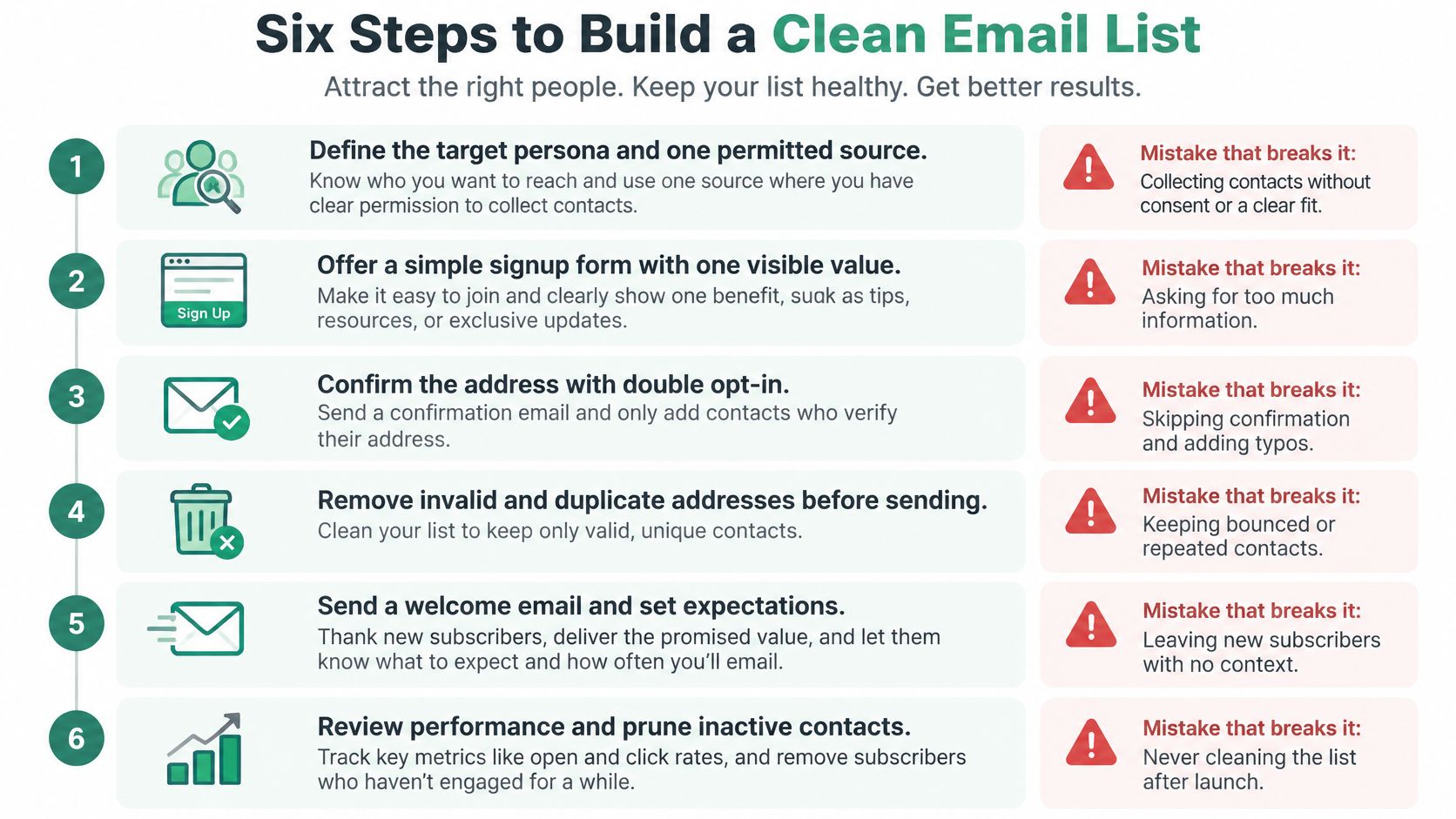
Six Steps to Build a Clean Email List
A person may hold several email addresses, and one company may use many departmental ones, so check every row as a contact, not as a person.
- Define your target and permitted use. Specify who belongs on the list and what you'll send, such as a quarterly offer for independent dental practices in Ohio. Failure point: building the list before deciding who it's for.
- Collect from identifiable, relevant contexts. Use sources that connect the address to a real person or business and a purpose that fits your outreach. Failure point: harvesting every address you spot online.
- Record provenance on every row. Store the source, collection date, role, company, and consent or lawful-basis status. Failure point: merging files without a source column.
- Validate before importing. Check syntax, domain, mailbox status, and disposable or role-based risk. Failure point: importing first and discovering errors after sending.
- Apply suppression rules across files. Remove duplicates, opt-outs, hard bounces, and complaint-prone contacts. Failure point: emailing someone because their address survived in a separate spreadsheet.
- Pilot, then monitor. Send to a small, relevant segment before expanding, and judge performance by delivery signals, not row count. Failure point: scaling because the list is large.
Email remains widely used: the Radicati Group's worldwide estimates counted 4.371 billion users in 2023, 4.481 billion in 2024, and 4.594 billion in 2025. Those are people, not individual addresses or consented prospects. One person may use personal and work accounts, while a business may publish separate addresses for sales, support, and other teams. Treating every address as a distinct, reachable prospect inflates your apparent audience and makes it harder to spot duplicates.
Start with one use case and one audience. If you're collecting addresses for a product update, don't reuse them for an unrelated sales sequence. Keep the purpose attached to the record, so anyone preparing a campaign can see what the contact is eligible to receive.
Do today: Write the six step names on one sheet, then add source and collection-date columns to your existing list.
Where Email Addresses Come From and What to Trust
| Source | Consent risk | Best use | Check before import |
|---|---|---|---|
| Your own sign-up and contact forms | Low when opt-in is explicit | Core newsletter and product update list | Confirm opt-in timestamp is stored |
| Event or webinar attendees who opted in | Low to medium | Follow-up within the purpose stated on the form | Check the registration purpose wording |
| Company contact pages and team directories | Medium | Role-based outreach to identifiable businesses | Verify the person still holds the role |
| Google search results filtered by location and domain, using the EmailScout Chrome extension | Medium, discovery only | Building a target shortlist by city or profession | Verify every address and record the query and date |
| Rented or purchased third-party lists | High | Rarely justified for direct marketing | Require evidence of consent to your sender identity |
Your own form is the clearest starting point: the person submits the address, and your system can record what they agreed to receive. Keep the opt-in timestamp and the wording they saw. A short form that explains the value and frequency of messages also makes expectations clearer from the start.
Event and webinar contacts can be appropriate for a relevant follow-up, but registration alone doesn't make every future message suitable. If someone signed up to receive event logistics, don't assume they also agreed to a general promotional newsletter. Check the form language and keep the follow-up within that stated purpose.
Company pages and team directories can help identify people in relevant roles. Their details may be public, but roles change. Verify the person still works in the position before adding them to a segment, and avoid treating a published address as blanket permission for unrelated campaigns.
Search is useful for discovery, not proof of permission. The EmailScout Chrome extension can collect addresses found on pages, while AutoSave and URL Explorer help gather addresses across browsing sessions and multiple URLs. That makes prospect research more efficient, but every record still needs a source, a collection date, and an assessment of whether the planned use is appropriate.
A third-party vendor's assurance doesn't show that a recipient agreed to hear from your business. Purchased or rented lists therefore carry the highest consent risk, and often leave you unable to explain why a contact is eligible for your campaign.
Keep two or three sources you can document. Drop any source you can't explain in one sentence.
Verify and Record Each Address Before Import
Before an address reaches your sending platform, its record should include source, collection date, verification timestamp, and verification status. Add the role, company, and consent or lawful-basis status as well. These fields let your team assess an address later instead of relying on someone's memory or an unexplained export.
Run inexpensive checks first. A syntax check costs nothing and can remove obvious errors before you pay for mailbox verification. For a hypothetical import of 1,000 rows from three sources, deduplication and syntax checks can reduce the records that need more involved checks; the actual number depends on the files.
| Check | What it catches | Action |
|---|---|---|
| Syntax | Missing @, stray spaces, domain typos | Correct if obvious, otherwise drop |
| Domain and mail server | Domains that cannot receive mail | Remove the record |
| Mailbox status | Closed or nonexistent inboxes | Suppress and do not retry |
| Disposable domains | Temporary inboxes that churn | Remove from outreach segments |
| Role-based addresses such as info@ or sales@ | Shared inboxes with low reply rates | Keep in a separate tagged segment |
| Duplicates across sources | Same person counted and emailed twice | Merge and keep the earliest source record |
Start by trimming spaces and catching a missing “@” or a clear domain typo. Correct an error only when the intended address is unambiguous. Otherwise, drop it rather than guessing and sending to the wrong person.
Next check whether the domain can receive mail, then check the mailbox itself. If a mailbox check fails, suppress the address and don't retry it. Repeated attempts don't repair a closed or nonexistent inbox, and keeping failed addresses in an active segment invites another accidental send.
Disposable addresses and role-based inboxes need different treatment. A disposable account may disappear, while an address such as info@ can reach a shared team rather than a named decision-maker. Keep role-based contacts in their own tagged segment so you can decide whether that kind of outreach fits the campaign.
Finally, deduplicate across sources. Keep the earliest provenance record and combine useful details without losing the evidence of where the address came from. For a closer look at the verification workflow, use these email verification best practices.
Set Up Consent and Authentication Before Sending
A valid address is only the start. Before sending, record why the contact may receive the message, identify your business clearly, and provide a working opt-out. UK ICO guidance requires marketing messages to identify the sender and include an opt-out; B2B marketing involving personal data must also follow applicable data-protection rules, as explained in the ICO's direct marketing guidance.
Consent records and email authentication address separate risks. Your records show the basis for contacting someone. DNS authentication helps receiving systems check whether a message is authorized by, and aligned with, your visible From domain.
| Record | What it confirms | If missing |
|---|---|---|
| SPF | Sending servers are authorized for the domain | Others can more easily send as your domain |
| DKIM | The message was signed and not altered in transit | Signature checks fail, which can contribute to filtering |
| DMARC | Policy for failed checks, plus alignment reports | Spoofing is harder to monitor; start with a monitoring policy |
SPF and DKIM are more widely deployed than DMARC, so DMARC is often the clearest gap to address. Start with a monitoring policy to see what sends as your domain before considering a stricter policy. SPF or DKIM doesn't guarantee inbox placement. Proper authentication helps protect your cold email sender reputation.
Use a controlled launch:
- Authenticate your sending domain and test alignment with the visible From domain.
- Send a small, segmented pilot to the most relevant contacts with documented permission or another applicable basis.
- Monitor hard bounces, complaints, blocks, and replies.
- Pause if negative signals rise and investigate the affected segment.
- Expand only while performance remains stable.
Keep acquisition evidence and suppression records attached to each contact. A suppression list must be checked across campaigns, and an opt-out must carry through to every list that could otherwise send to that person. The guide to permission-based email marketing explains why finding an address alone does not establish permission to use it.
Segment, Monitor and Clean on a Quarterly Schedule
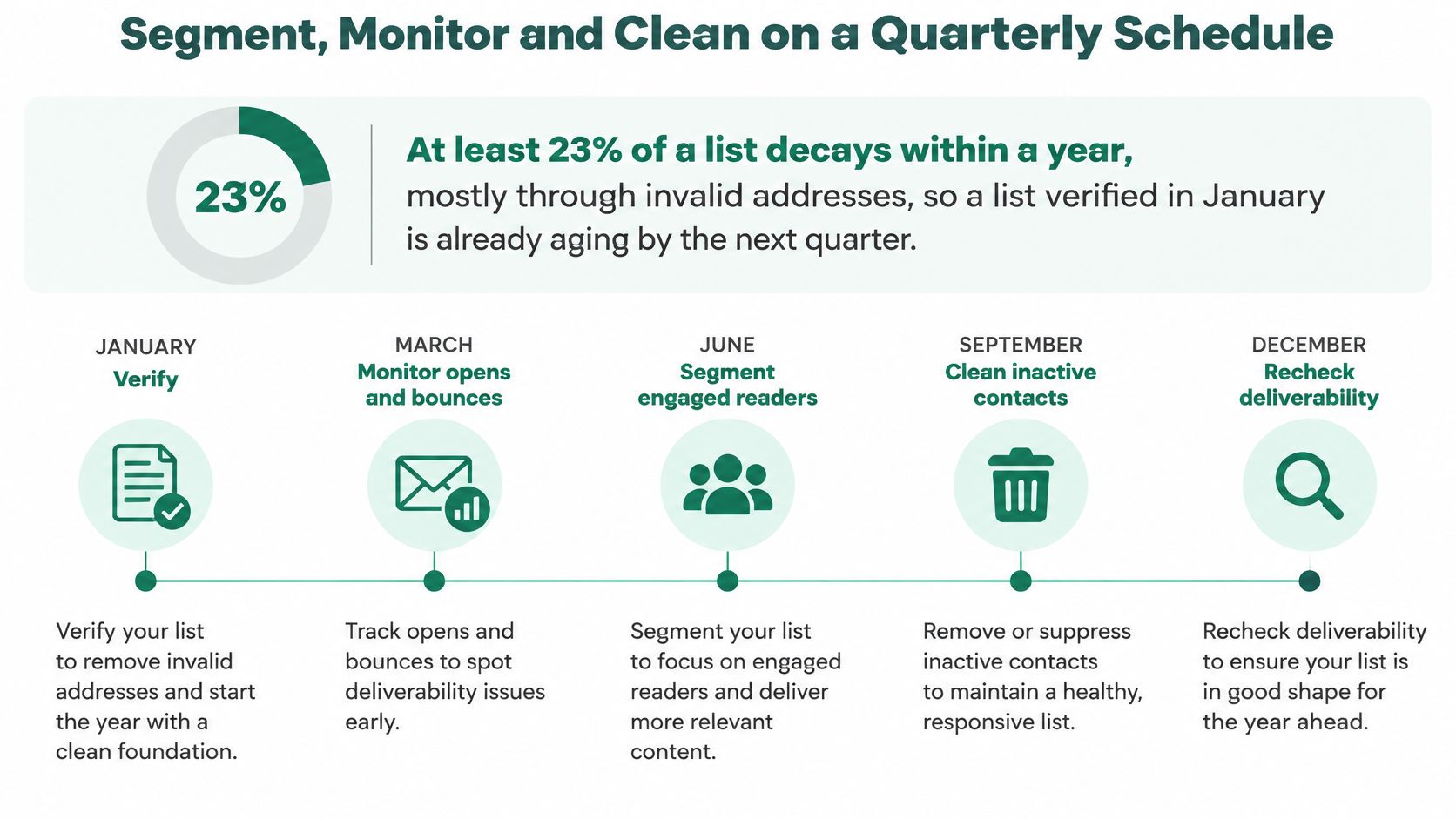
A list doesn't stay accurate just because it passed validation once. One industry analysis reports that at least 23% of an email list decays within a year, primarily through invalid addresses. A list checked in January can already include stale contacts before the year ends, so active prospecting lists need a recurring cleaning cycle, not a one-time export. The ZeroBounce analysis of email list decay supports quarterly cleaning as a practical maintenance habit.
| Metric | Guardrail | Action when exceeded |
|---|---|---|
| Total bounce rate | Below 2% | Pause the segment and re-verify its source |
| Hard-bounce rate | Below 0.5% | Suppress hard bounces immediately |
| Spam complaint rate | Set an internal threshold before sending | Pause the segment and review consent evidence |
| Unsubscribe or opt-out | Honour immediately across all campaigns | Remove from every active segment |
| Cleaning cycle for active prospecting lists | Quarterly | Run a full verification and suppression pass |
Treat bounce thresholds as operating guardrails, not guarantees of inbox placement. Suppress a hard bounce or unsubscribe as soon as it occurs. Don't retry a failed address, and recheck dormant records before a major campaign. Keep the validation timestamp on each record so the team can distinguish recently verified contacts from older ones.
Segment by role, geography, source, and engagement. If one acquisition source produces higher bounces, a source tag lets you isolate and investigate that group instead of sending it along with every other contact. After each campaign, compare bounces and complaints by source tag. Review whether the source delivered relevant contacts, whether the original purpose supports the campaign, and whether the segment should be paused or removed.
For practical segmentation, group contacts so that a weak source or poorly matched audience doesn't affect unrelated campaigns. This guide to segmenting email lists can help you define groups around useful attributes rather than treating the entire database as one audience.
Stop the segment that crosses a guardrail, not the whole program. Investigate its source, consent evidence, and record quality before you resume sending to that group.
Confirm the List Is Ready Before Your First Campaign
A bigger list isn't automatically a better list. The list is ready only when each row has a source, collection date, consent status, and verification timestamp; suppression records are applied across campaigns; and you can separate contacts by market and role.
That discipline matters because reaching the inbox isn't guaranteed even for legitimate marketing email. The 2025 Validity benchmark reports that roughly one in six legitimate marketing emails fails to reach the inbox globally. It also reports 75.6% inbox placement for Microsoft, the weakest figure in the benchmark; Gmail, which serves nearly half of consumer mailboxes worldwide, saw an almost 5% decline in deliverability. US inbox placement was six percentage points below selected countries that commonly require double opt-in, according to the 2025 Validity benchmark report.
So how should you validate and segment a globally sourced email list without damaging sender reputation? Treat discovery as the first step, then verify addresses, keep disposable and role-based contacts in separate segments, and group audiences by market with consent requirements in mind. Judge readiness by bounces, complaints, unsubscribes, and inbox placement, not by the number of rows. An unlimited-address promise can backfire: a larger, less-qualified list may create more risk and fewer delivered conversations.
Name the one verified, consented segment you'll send to first in your pilot this week.
Use EmailScout to discover addresses on relevant webpages and organize prospects for review. Pair address discovery with verification, source records, and clear consent checks before importing contacts into a campaign.