A 2025 Radicati Group forecast counted approximately 4.594 billion email users worldwide in 2025, but a large audience doesn't make a list of email addresses useful by itself. Addresses need a relevant source, a documented reason for outreach, and checks that confirm they can receive mail. Otherwise, adding more rows can mean more bounces, more complaints, and fewer delivered conversations.
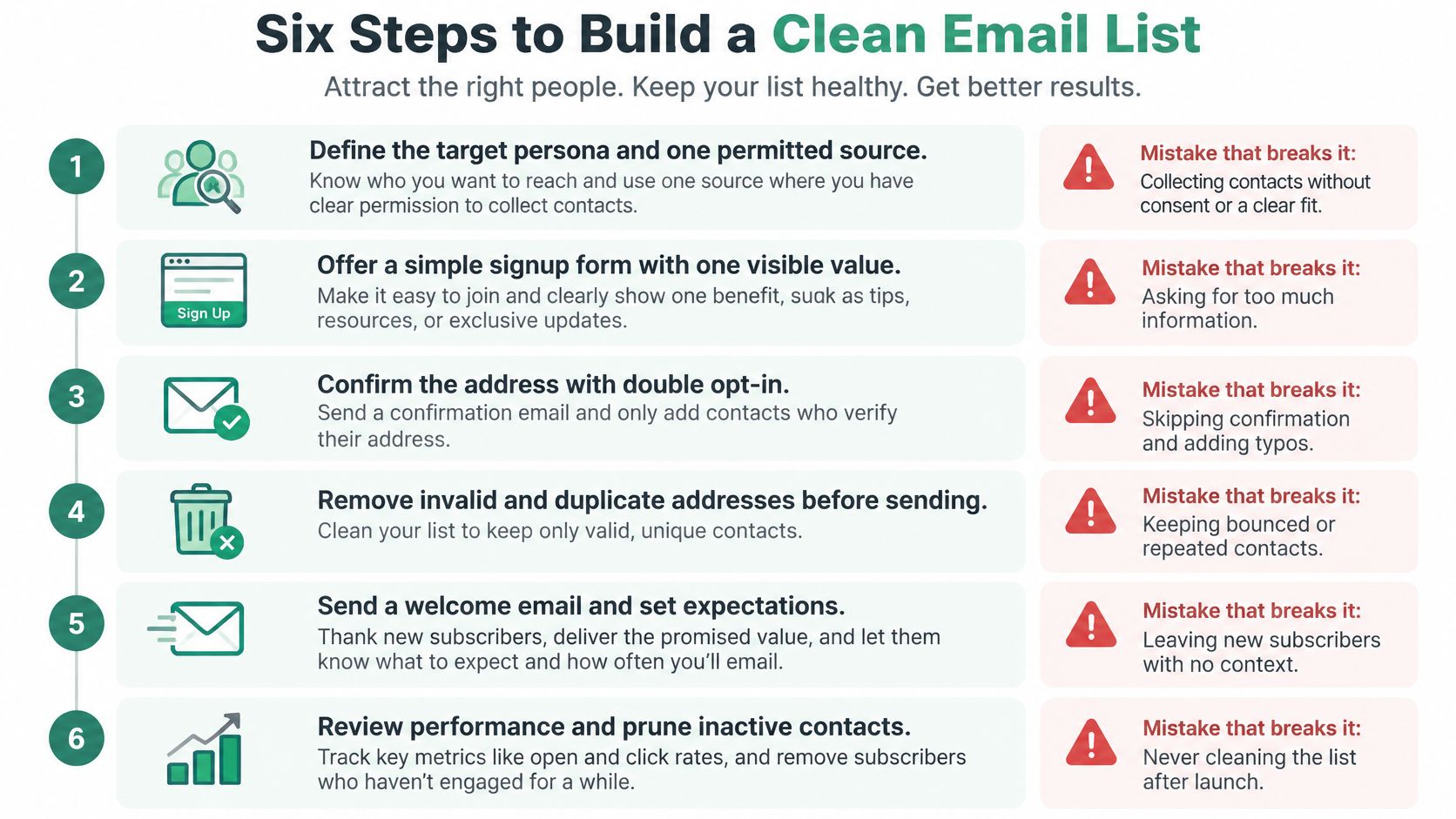
Six Steps to Build a Clean Email List
A person may hold several email addresses, and one company may use many departmental ones, so check every row as a contact, not as a person.
Define your target and permitted use. Specify who belongs on the list and what you'll send, such as a quarterly offer for independent dental practices in Ohio. Failure point: building the list before deciding who it's for.
Collect from identifiable, relevant contexts. Use sources that connect the address to a real person or business and a purpose that fits your outreach. Failure point: harvesting every address you spot online.
Record provenance on every row. Store the source, collection date, role, company, and consent or lawful-basis status. Failure point: merging files without a source column.
Validate before importing. Check syntax, domain, mailbox status, and disposable or role-based risk. Failure point: importing first and discovering errors after sending.
Apply suppression rules across files. Remove duplicates, opt-outs, hard bounces, and complaint-prone contacts. Failure point: emailing someone because their address survived in a separate spreadsheet.
Pilot, then monitor. Send to a small, relevant segment before expanding, and judge performance by delivery signals, not row count. Failure point: scaling because the list is large.
Email remains widely used: the Radicati Group's worldwide estimates counted 4.371 billion users in 2023, 4.481 billion in 2024, and 4.594 billion in 2025. Those are people, not individual addresses or consented prospects. One person may use personal and work accounts, while a business may publish separate addresses for sales, support, and other teams. Treating every address as a distinct, reachable prospect inflates your apparent audience and makes it harder to spot duplicates.
Start with one use case and one audience. If you're collecting addresses for a product update, don't reuse them for an unrelated sales sequence. Keep the purpose attached to the record, so anyone preparing a campaign can see what the contact is eligible to receive.
Do today: Write the six step names on one sheet, then add source and collection-date columns to your existing list.
Where Email Addresses Come From and What to Trust
Source
Consent risk
Best use
Check before import
Your own sign-up and contact forms
Low when opt-in is explicit
Core newsletter and product update list
Confirm opt-in timestamp is stored
Event or webinar attendees who opted in
Low to medium
Follow-up within the purpose stated on the form
Check the registration purpose wording
Company contact pages and team directories
Medium
Role-based outreach to identifiable businesses
Verify the person still holds the role
Google search results filtered by location and domain, using the EmailScout Chrome extension
Medium, discovery only
Building a target shortlist by city or profession
Verify every address and record the query and date
Rented or purchased third-party lists
High
Rarely justified for direct marketing
Require evidence of consent to your sender identity
Your own form is the clearest starting point: the person submits the address, and your system can record what they agreed to receive. Keep the opt-in timestamp and the wording they saw. A short form that explains the value and frequency of messages also makes expectations clearer from the start.
Event and webinar contacts can be appropriate for a relevant follow-up, but registration alone doesn't make every future message suitable. If someone signed up to receive event logistics, don't assume they also agreed to a general promotional newsletter. Check the form language and keep the follow-up within that stated purpose.
Company pages and team directories can help identify people in relevant roles. Their details may be public, but roles change. Verify the person still works in the position before adding them to a segment, and avoid treating a published address as blanket permission for unrelated campaigns.
Search is useful for discovery, not proof of permission. The EmailScout Chrome extension can collect addresses found on pages, while AutoSave and URL Explorer help gather addresses across browsing sessions and multiple URLs. That makes prospect research more efficient, but every record still needs a source, a collection date, and an assessment of whether the planned use is appropriate.
A third-party vendor's assurance doesn't show that a recipient agreed to hear from your business. Purchased or rented lists therefore carry the highest consent risk, and often leave you unable to explain why a contact is eligible for your campaign.
Keep two or three sources you can document. Drop any source you can't explain in one sentence.
Verify and Record Each Address Before Import
Before an address reaches your sending platform, its record should include source, collection date, verification timestamp, and verification status. Add the role, company, and consent or lawful-basis status as well. These fields let your team assess an address later instead of relying on someone's memory or an unexplained export.
Run inexpensive checks first. A syntax check costs nothing and can remove obvious errors before you pay for mailbox verification. For a hypothetical import of 1,000 rows from three sources, deduplication and syntax checks can reduce the records that need more involved checks; the actual number depends on the files.
Check
What it catches
Action
Syntax
Missing @, stray spaces, domain typos
Correct if obvious, otherwise drop
Domain and mail server
Domains that cannot receive mail
Remove the record
Mailbox status
Closed or nonexistent inboxes
Suppress and do not retry
Disposable domains
Temporary inboxes that churn
Remove from outreach segments
Role-based addresses such as info@ or sales@
Shared inboxes with low reply rates
Keep in a separate tagged segment
Duplicates across sources
Same person counted and emailed twice
Merge and keep the earliest source record
Start by trimming spaces and catching a missing “@” or a clear domain typo. Correct an error only when the intended address is unambiguous. Otherwise, drop it rather than guessing and sending to the wrong person.
Next check whether the domain can receive mail, then check the mailbox itself. If a mailbox check fails, suppress the address and don't retry it. Repeated attempts don't repair a closed or nonexistent inbox, and keeping failed addresses in an active segment invites another accidental send.
Disposable addresses and role-based inboxes need different treatment. A disposable account may disappear, while an address such as info@ can reach a shared team rather than a named decision-maker. Keep role-based contacts in their own tagged segment so you can decide whether that kind of outreach fits the campaign.
Finally, deduplicate across sources. Keep the earliest provenance record and combine useful details without losing the evidence of where the address came from. For a closer look at the verification workflow, use these email verification best practices.
Set Up Consent and Authentication Before Sending
A valid address is only the start. Before sending, record why the contact may receive the message, identify your business clearly, and provide a working opt-out. UK ICO guidance requires marketing messages to identify the sender and include an opt-out; B2B marketing involving personal data must also follow applicable data-protection rules, as explained in the ICO's direct marketing guidance.
Consent records and email authentication address separate risks. Your records show the basis for contacting someone. DNS authentication helps receiving systems check whether a message is authorized by, and aligned with, your visible From domain.
Record
What it confirms
If missing
SPF
Sending servers are authorized for the domain
Others can more easily send as your domain
DKIM
The message was signed and not altered in transit
Signature checks fail, which can contribute to filtering
DMARC
Policy for failed checks, plus alignment reports
Spoofing is harder to monitor; start with a monitoring policy
SPF and DKIM are more widely deployed than DMARC, so DMARC is often the clearest gap to address. Start with a monitoring policy to see what sends as your domain before considering a stricter policy. SPF or DKIM doesn't guarantee inbox placement. Proper authentication helps protect your cold email sender reputation.
Use a controlled launch:
Authenticate your sending domain and test alignment with the visible From domain.
Send a small, segmented pilot to the most relevant contacts with documented permission or another applicable basis.
Monitor hard bounces, complaints, blocks, and replies.
Pause if negative signals rise and investigate the affected segment.
Expand only while performance remains stable.
Keep acquisition evidence and suppression records attached to each contact. A suppression list must be checked across campaigns, and an opt-out must carry through to every list that could otherwise send to that person. The guide to permission-based email marketing explains why finding an address alone does not establish permission to use it.
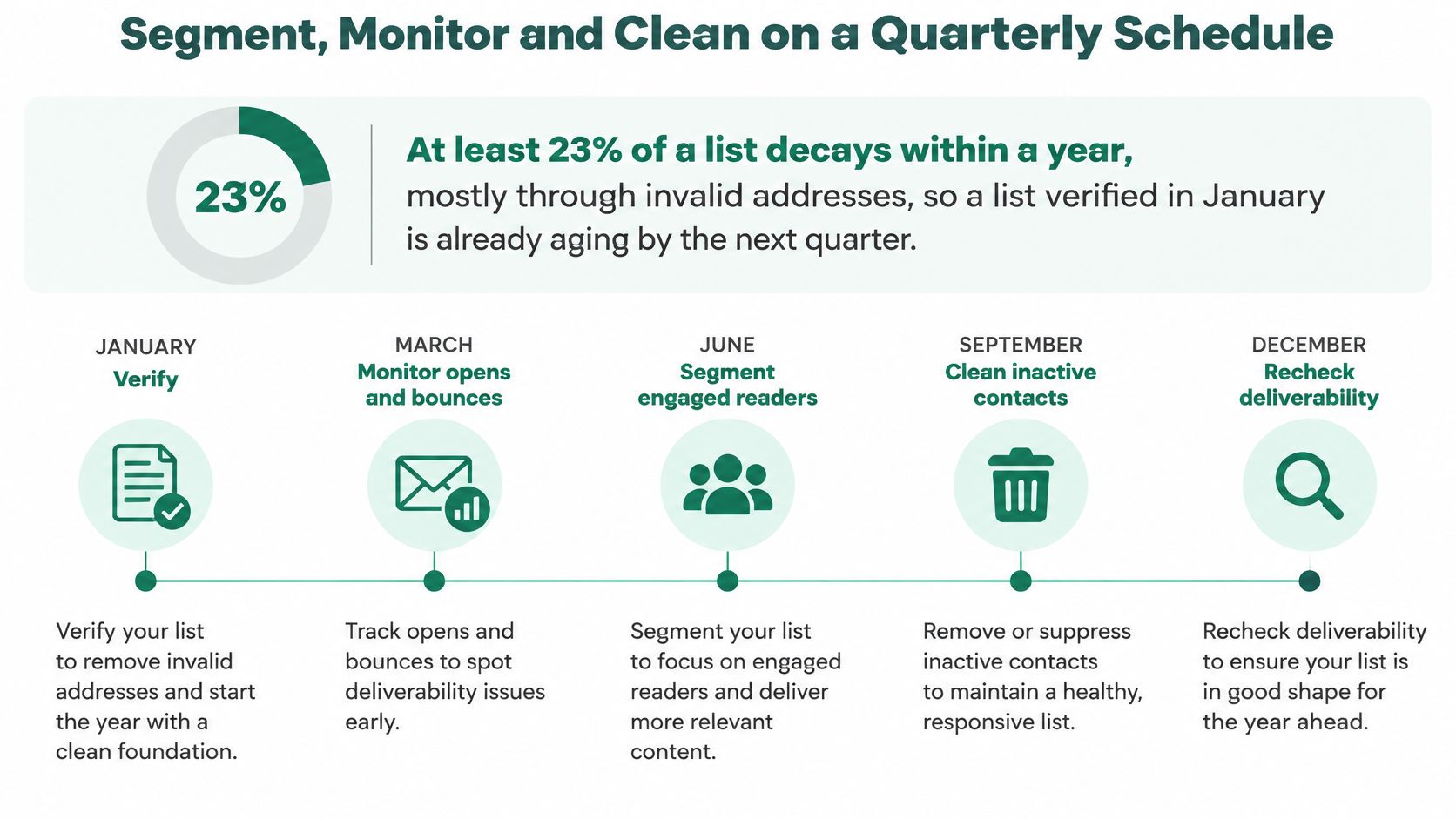
Segment, Monitor and Clean on a Quarterly Schedule
A list doesn't stay accurate just because it passed validation once. One industry analysis reports that at least 23% of an email list decays within a year, primarily through invalid addresses. A list checked in January can already include stale contacts before the year ends, so active prospecting lists need a recurring cleaning cycle, not a one-time export. The ZeroBounce analysis of email list decay supports quarterly cleaning as a practical maintenance habit.
Metric
Guardrail
Action when exceeded
Total bounce rate
Below 2%
Pause the segment and re-verify its source
Hard-bounce rate
Below 0.5%
Suppress hard bounces immediately
Spam complaint rate
Set an internal threshold before sending
Pause the segment and review consent evidence
Unsubscribe or opt-out
Honour immediately across all campaigns
Remove from every active segment
Cleaning cycle for active prospecting lists
Quarterly
Run a full verification and suppression pass
Treat bounce thresholds as operating guardrails, not guarantees of inbox placement. Suppress a hard bounce or unsubscribe as soon as it occurs. Don't retry a failed address, and recheck dormant records before a major campaign. Keep the validation timestamp on each record so the team can distinguish recently verified contacts from older ones.
Segment by role, geography, source, and engagement. If one acquisition source produces higher bounces, a source tag lets you isolate and investigate that group instead of sending it along with every other contact. After each campaign, compare bounces and complaints by source tag. Review whether the source delivered relevant contacts, whether the original purpose supports the campaign, and whether the segment should be paused or removed.
For practical segmentation, group contacts so that a weak source or poorly matched audience doesn't affect unrelated campaigns. This guide to segmenting email lists can help you define groups around useful attributes rather than treating the entire database as one audience.
Stop the segment that crosses a guardrail, not the whole program. Investigate its source, consent evidence, and record quality before you resume sending to that group.
Confirm the List Is Ready Before Your First Campaign
A bigger list isn't automatically a better list. The list is ready only when each row has a source, collection date, consent status, and verification timestamp; suppression records are applied across campaigns; and you can separate contacts by market and role.
That discipline matters because reaching the inbox isn't guaranteed even for legitimate marketing email. The 2025 Validity benchmark reports that roughly one in six legitimate marketing emails fails to reach the inbox globally. It also reports 75.6% inbox placement for Microsoft, the weakest figure in the benchmark; Gmail, which serves nearly half of consumer mailboxes worldwide, saw an almost 5% decline in deliverability. US inbox placement was six percentage points below selected countries that commonly require double opt-in, according to the 2025 Validity benchmark report.
So how should you validate and segment a globally sourced email list without damaging sender reputation? Treat discovery as the first step, then verify addresses, keep disposable and role-based contacts in separate segments, and group audiences by market with consent requirements in mind. Judge readiness by bounces, complaints, unsubscribes, and inbox placement, not by the number of rows. An unlimited-address promise can backfire: a larger, less-qualified list may create more risk and fewer delivered conversations.
Name the one verified, consented segment you'll send to first in your pilot this week.
Use EmailScout to discover addresses on relevant webpages and organize prospects for review. Pair address discovery with verification, source records, and clear consent checks before importing contacts into a campaign.
Email list management is broader than storing subscribers and sending newsletters. Teams need to capture contacts, record consent, segment audiences, automate follow-up, protect deliverability, and connect marketing activity with sales workflows. The popular advice to “pick the best email platform” misses the operational question: which system should own each list decision?
An all-in-one platform such as Mailchimp or Brevo can handle capture, campaigns, and basic audience controls. A CRM-connected system such as HubSpot or ActiveCampaign adds lifecycle context and sales handoffs. SendGrid is closer to delivery infrastructure, while ZeroBounce focuses on verification and hygiene. EmailScout belongs earlier in the workflow, as a contact-discovery and list-building layer that can feed a cleaner, more targeted system.
Email audiences are already massive and still growing. Industry summaries estimate 4.3 billion email users worldwide in 2023, rising to 4.6 billion by 2025, while email marketing is reported to generate an average $36 for every $1 spent, and $45 in retail, e-commerce, and consumer goods (industry email list management overview). That scale makes list quality, consent, and suppression practical revenue concerns, not administrative details.
Key takeaways
Match the tool to the workflow: Choose a campaign platform for newsletters, a CRM-connected system for sales-assisted journeys, and a verification tool when risky imports threaten delivery.
Separate discovery from sending: EmailScout can help find and collect relevant public addresses, but those contacts still need targeting, verification, consent review, and organized outreach.
Check suppression before templates: A polished editor can't compensate for accidental re-mailing, stale segments, or inconsistent unsubscribe handling.
Price the operating model: Some tools scale with contacts, others with send volume, profiles, or verification usage.
If you're comparing email with other owned channels, this guide on which channel drives more revenue provides additional context. The shortlist below treats these products as different pieces of a working sales and marketing stack, rather than pretending they're interchangeable.
1. Mailchimp
Mailchimp fits teams that want a complete email marketing platform for capturing subscribers, managing audiences, and launching campaigns from one approachable workspace. Its audience dashboard supports tags, segments, signup forms, and consent capture, allowing a small marketing team to turn a new form submission into a targeted campaign without designing a complex data model.
The platform combines a visual automation builder with prebuilt customer journeys. Ecommerce, CRM, advertising, and other integrations can connect email activity with events outside Mailchimp. Send-time optimization and A/B testing provide useful campaign controls, although effective segmentation still depends on clear audience rules.
EmailScout can sit upstream as a contact-discovery layer, helping teams identify relevant contacts before they enter a more targeted workflow. Review consent, verify addresses, and apply targeting rules before importing those records into Mailchimp.
Practical rule: Mailchimp suits teams that need reliable campaign execution and straightforward audience management. Teams whose sales interactions require deep account-level logic should look elsewhere.
Usability is the main advantage. Non-technical users can usually build forms, templates, segments, and automations without engineering support. The broad integration ecosystem and extensive documentation also reduce setup and training effort.
The trade-off becomes clearer as the audience and sending program grow more complicated. Pricing and plan limits can rise with audience size and send volume, while the free tier is more restricted than some teams expect. Establish naming conventions, consent fields, suppression rules, and inactive-contact policies before the audience becomes difficult to govern. Startups and SMBs running newsletters, lead nurturing, and basic ecommerce follow-up get a broad operating base. Advanced sales handoffs may require a CRM alongside Mailchimp or a more automation-focused system.
2. Brevo
Brevo positions email within a broader multi-channel contact system. Teams can manage email, SMS, chat, and WhatsApp alongside contact records, forms, landing pages, and consent data. This model suits campaigns where one audience receives different touchpoints instead of email alone.
Its contact database supports advanced segmentation, while built-in forms and landing pages give teams control over how new records enter the system. Consent tracking and data-request tools help organizations maintain clearer records of permissions and contact preferences. Marketing automation supports nurture sequences, and transactional email is available through SMTP and API options.
EmailScout can serve upstream as a contact-discovery layer, helping teams identify relevant contacts before they enter a targeted workflow. Review permission, verify addresses, and apply audience rules before importing those records into Brevo.
Brevo's volume-oriented pricing can work well for businesses with many stored contacts and less frequent sending. Send volume may matter more than address-book size for that operating model. Before choosing a plan, model campaign frequency, SMS usage, automation needs, and transactional traffic.
The interface is accessible, though larger enterprise teams may find template and reporting depth lighter than in bigger marketing suites. Some advanced capabilities also require a higher-tier plan. Complex B2B programs may need a CRM-connected platform for lead scoring, opportunity context, and detailed account workflows.
Brevo is strongest when you need multi-channel reach, consent visibility, and volume-based economics in a single platform. Define consent fields, audience rules, channel ownership, and transactional sending requirements before launch so the contact database remains usable as activity grows.
3. ActiveCampaign
ActiveCampaign fits teams that manage contacts through behavior rather than newsletter membership alone. Each record can combine tags, custom fields, event history, site activity, lead scores, and sales status. That context supports journeys that respond to prospect activity and places ActiveCampaign in the CRM-connected automation category, rather than treating it as a basic sending tool.
The visual automation builder handles drip sequences, lead scoring, sales alerts, CRM tasks, and branching follow-up paths in one environment. Dynamic content and detailed segmentation can tailor messages to lifecycle stage, engagement, or stated interests. A practical workflow might send educational content after a form submission, raise a lead score after repeated engagement, and notify an assigned sales representative once the agreed handoff conditions are met.
Where the sales handoff works
ActiveCampaign works well for sales-assisted funnels because marketing activity can trigger action without manual list exports. The contact record carries the relevant history, while the automation can create a CRM task or route the prospect to the appropriate owner.
Teams can also place EmailScout upstream as a contact-discovery layer, then review permission, verify addresses, and apply audience rules before importing suitable records into a targeted ActiveCampaign workflow. This separation keeps discovery, consent review, and behavioral nurture as distinct operating steps.
The setup requires discipline. Document the data model, standardize tag usage, assign ownership for each automation, and define what happens when a contact changes stage. Without those controls, overlapping journeys and contradictory messages can make segments difficult to trust.
Contact bands and send overages may raise costs as the database expands. The learning curve is also steeper than Mailchimp or MailerLite. ActiveCampaign is worth the setup when behavioral automation and marketing-to-sales coordination justify documented workflows and ongoing maintenance. If the team cannot maintain that logic, complexity adds overhead without proportionate value.
4. HubSpot Marketing Hub
HubSpot Marketing Hub places email management inside a broader CRM record. Smart lists, static lists, and detailed segments can use CRM fields, lifecycle stages, deal information, and engagement history. That shared structure helps teams avoid the disconnected databases that cause audience definitions and contact status to drift.
The email builder can personalize messages with CRM data, while workflows support nurturing, lead scoring, and lifecycle management. Reporting connects campaign activity with funnel context, allowing teams to review how contacts progress from acquisition to sales conversations and later stages. HubSpot fits sales-assisted marketing teams particularly well when representatives already work in the CRM and need campaign history in the same contact record.
Segmentation needs governance
HubSpot provides the controls to build detailed audiences, but teams still need clear operating rules. Define lifecycle values, ownership fields, consent properties, and suppression rules before creating a large workflow library. Use EmailScout as a contact-discovery layer upstream, then review permission, verify addresses, and apply audience rules before importing suitable records. Teams can also use this practical guide to segment email lists when turning business rules into usable audiences.
A governance review should cover enrollment criteria, list ownership, exclusion logic, and changes to contact status. Without that review, different teams can define the same audience in conflicting ways, causing duplicate sends or inappropriate follow-up.
The main trade-off is economic and operational scale. Marketing-contact costs can rise as the database grows, and the suite may be excessive for a small organization that only needs newsletters and basic forms. Its flexibility also creates maintenance work. Someone must audit workflows and keep CRM fields consistent.
HubSpot is a strong fit when shared lifecycle data matters more than a lightweight sending experience. It is not automatically the right email list manager for every team. If sales operates in another system and email needs are simple, a dedicated ESP may be easier to run and cheaper to maintain.
5. MailerLite
MailerLite is a lightweight complete email marketing platform for teams that need subscriber management, groups, segments, forms, landing pages, popups, and straightforward automations. Its clean interface supports list growth without requiring the data architecture of a CRM-connected system.
The platform fits newsletters, lead magnets, onboarding emails, and smaller ecommerce programs. A/B testing and basic ecommerce features support controlled experimentation, while subscriber hygiene tools help identify contacts for review. Paid plans include round-the-clock support, which can help small teams without a dedicated email operations specialist.
EmailScout can sit upstream as a contact-discovery layer, helping teams identify relevant prospects before they build a focused audience in MailerLite. Review permission, verify addresses, and apply clear audience rules before importing records. MailerLite then handles the campaign workflow, while a separate delivery infrastructure provider or verification service can cover needs outside its core role.
A good value model has boundaries
MailerLite bases pricing on active subscribers, giving teams a relatively clear way to forecast costs. That model works best when inactive records are removed from the billable audience through a defined re-engagement and cleanup process.
Its limits appear as requirements become more complex. Advanced analytics, deeper ecommerce workflows, and some integrations are less extensive than those available from larger platforms. No-code middleware may be needed for less common applications, creating extra work for field mapping and consent checks.
MailerLite is a strong choice when simplicity, quick adoption, and predictable audience management are priorities. Set up groups around durable business distinctions, keep the data model small, and name automations clearly. Use a separate verification service for questionable imports. Teams that require elaborate behavioral logic or extensive CRM coordination should evaluate platforms built for those workflows.
6. Klaviyo
Klaviyo is designed around ecommerce events. Product views, purchases, cart activity, browsing behavior, catalog data, and customer properties can feed segments and automated flows. For Shopify, BigCommerce, and direct-to-consumer brands, that connection makes the email list more useful than a simple collection of addresses.
Its segmentation engine supports detailed customer logic, including AI-assisted segment building. Flows can react to purchase behavior and other events, while revenue attribution helps marketers connect messages with commercial outcomes. Templates and AI content tools speed up production, but the core advantage is the quality and timeliness of the commerce data entering the platform.
A retailer can use that data to separate first-time buyers from repeat customers, identify people who viewed a category without purchasing, or suppress recent purchasers from an irrelevant promotion. Those decisions are more valuable than generic demographic tags because they reflect the customer's relationship with the store.
Good personalization starts with dependable events, not more fields.
Klaviyo can be expensive for large profile databases or high send volumes, and its depth creates a learning curve for teams without an ecommerce operating model. A B2B company with long sales cycles may find that many of the platform's strongest features don't map cleanly to its workflow. Teams should also review how profiles are merged, how consent is synchronized from the store, and how suppressed contacts are handled across connected channels.
Choose Klaviyo when purchase behavior drives segmentation and attribution. Don't choose it merely because it offers advanced features. If the source data is incomplete or inconsistent, the platform will produce complex segments that look intelligent but make unreliable decisions.
7. Campaign Monitor
Campaign Monitor fits agencies and brand teams that prioritize polished production alongside basic list organization. Its visual editor and branded templates help maintain consistent layouts across client accounts, departments, or recurring newsletters. Lists and segments are easy to manage, although teams still need clear naming and ownership rules to prevent duplicates.
Its plans list more than 250 integrations, offering connections to forms, CRMs, ecommerce services, and other marketing tools (Campaign Monitor). That makes it useful as the campaign execution layer in a broader stack, rather than a replacement for a CRM or a dedicated delivery infrastructure provider. Teams can also choose monthly or pay-per-campaign billing, which suits agencies and organizations with uneven sending schedules.
Best for controlled campaign execution
Campaign Monitor works well when a team needs reliable, attractive email production for known audiences without adopting a full marketing automation suite. Its interface is approachable, and repeatable templates help one group manage multiple branded newsletters. EmailScout can sit earlier in the workflow as a contact-discovery layer, helping teams identify relevant prospects before they add qualified contacts to a permission-based email process.
The trade-off is automation depth. Journeys handle common sequences, but they provide less behavioral complexity than ActiveCampaign and less CRM context than HubSpot. Budget-focused teams should also compare audience-based pricing against expected send volume before migrating.
Use Campaign Monitor when the main operational challenge is producing consistent campaigns for known audiences. Before importing contacts, define duplicate-prevention rules, confirm consent status, and decide where suppression records live. Test those rules with a small import before sending, because clean execution depends more on contact governance than on another template or visual effect.
8. Constant Contact
Constant Contact fits small organizations, nonprofits, local businesses, and teams that need straightforward campaign management more than intricate automation. Its contact tools support segmentation by fields and behavior, while the drag-and-drop editor lets staff create emails without design or HTML experience.
Email is only one part of the platform. Social posting, advertising, event management, and integrations can connect registrations, fundraising, commerce, and customer records to contact workflows. Its plan materials list more than 300 integrations, according to Constant Contact. That breadth suits organizations running newsletters alongside events or community programs.
A local organization could collect registrations, send event updates, and group contacts by interest or participation. A nonprofit could also keep communications manageable for staff who do not work in marketing full time. EmailScout can support the earlier contact-discovery stage, helping teams identify relevant prospects before adding qualified, permission-based contacts to the platform.
Where it stops short
Automation and segmentation are less advanced than in behavior-focused platforms. Teams that require complex lead scoring, dynamic content, or multi-stage sales journeys may outgrow Constant Contact. Smaller lists may also cost more than they would with lightweight alternatives, so compare pricing against expected usage before switching.
Set up contact governance early. Separate event registrants from general subscribers, record permission context, and define suppression procedures before multiple staff members import spreadsheets. Choose Constant Contact when live phone support, event-management tools, and local-business workflows matter more than deep automation or CRM integration.
9. Twilio SendGrid Marketing Campaigns
Twilio SendGrid Marketing Campaigns serves as the delivery infrastructure choice in this roundup. It combines contact management, segments, suppression lists, campaign editing, scheduling, testing, and basic automation with SendGrid's sending infrastructure. Teams get a marketer-facing interface alongside API access for developers.
Its operational role becomes clearer in mixed workflows. Marketing staff can build scheduled campaigns in the interface while applications send transactional or event-triggered messages through the API. That split suits companies where reliable, high-volume delivery matters more than a broad set of marketing features. EmailScout can support the contact-discovery layer before qualified, permission-based records enter the sending workflow.
A sending platform should make suppression visible wherever messages originate.
The editor is more utilitarian than the polished interfaces in Mailchimp or HubSpot. Advanced automation, CRM-level contact context, and wider lifecycle features are limited, so lead scoring, sales coordination, and advanced personalization may require separate systems. This division works when those systems already exist and SendGrid has a defined delivery responsibility.
Before connecting an API, map unsubscribe, bounce, complaint, and suppression events to the same policy used for interface campaigns. SendGrid cannot correct poor data practices or an unapproved prospecting process. Document which system owns consent and which events block future sends. A practical email deliverability improvement workflow should connect sender setup, list quality, suppression, and monitoring.
SendGrid is best for developer-driven or high-volume sending where delivery infrastructure decides the purchase. Plan for a separate CRM and verification service when those functions are required.
10. ZeroBounce
ZeroBounce is a specialist verification and list hygiene service. It sits beside an ESP, CRM, or prospecting workflow rather than replacing it. Teams can submit lists in bulk or verify addresses through an API, then use results about invalid addresses, spam traps, disposable mailboxes, role accounts, abuse risks, and catch-all uncertainty to decide which records need removal, review, or approval.
Verification adds operational evidence before import or sending. It can reduce avoidable bounces and keep risky addresses out of send-critical segments, while teams still need to confirm permission, relevance, and outreach suitability through their own process. In CRM-connected workflows, map each result to a clear field or status so sales and marketing apply the same rule.
Use it at the handoff
ZeroBounce fits several control points:
Before an import: Verify a CSV before it enters Mailchimp, HubSpot, or another campaign system.
During capture: Use the API to review addresses submitted through forms or applications.
Before a major send: Check older or externally sourced records before adding them to an active audience.
After collection: Use available activity and engagement signals to separate promising records from contacts requiring review.
The service adds a cost layer, and SMTP checks can be inconclusive for some mailbox providers. Verification also needs to work alongside a suppression policy. An unsubscribed address must remain suppressed even if a later check labels it deliverable.
ZeroBounce offers pay-as-you-go and subscription options, giving teams flexibility when verification volume changes. Choose it when list hygiene is the immediate risk, then connect results to clear pass, review, and suppress states. For prospecting teams, email address verification can support the contact-discovery layer before qualified, permission-based records enter a campaign workflow.
Industry‑leading sending infrastructure & API flexibility
Scales for high volume; usage/tiered pricing
ZeroBounce
Bulk & API verification, disposable/spam trap detection, integrations
Any ESP user needing list hygiene, marketers
Reduces bounces and protects sender reputation
Pay‑as‑you‑go or subscription per verification
Build a List You Can Trust
The right email list management tool depends on where your team makes contact decisions. A lightweight platform is appropriate when the priority is simple capture, newsletters, and basic automation. A CRM-connected system is better when marketing and sales need shared lifecycle data, lead scoring, and deal context. An ecommerce-focused platform earns its place when purchase behavior drives segmentation, flows, and revenue attribution.
Choose delivery-first infrastructure when applications and APIs generate a significant part of the sending workload. Choose a verification service when old imports, questionable addresses, or bounce exposure create the immediate risk. In many cases, the best architecture combines categories. A team might discover contacts through EmailScout, verify imported addresses with ZeroBounce, store approved records in a CRM, and send campaigns through an ESP.
Compliance and suppression deserve a higher position in the buying process than they usually receive. Recent guidance on email list management tools emphasizes import validation, multi-level suppression, consent records, removal reasons, and the need to ensure suppression survives bulk re-imports. Those controls protect more than deliverability. They preserve an auditable record of why a contact can or can't be reached.
AI personalization adds another decision point. It can help teams create segments and tailor content, but automation doesn't make stale data reliable. Modern guidance highlights the need to store consent source, method, and timestamp, support deletion requests, and keep dynamic segments current (compliance and personalization considerations). Before enabling more automation, verify that your data model and suppression logic can explain every recipient decision.
A practical implementation sequence looks like this:
Define consent and field standards: Decide which fields are mandatory, how permission is recorded, and which values represent lifecycle status.
Connect capture sources: Map forms, CRM records, ecommerce events, and discovery workflows into one controlled intake process.
Map segments to workflows: Build audiences around useful actions and stages, not an uncontrolled collection of campaign tags.
Verify imported contacts: Review externally sourced or aging records before they reach an active send segment.
Test suppression rules: Confirm that unsubscribes, complaints, hard bounces, and policy exclusions remain suppressed after exports, re-imports, and API updates.
Review engagement before scaling: Separate active, stale, and untested contacts before increasing campaign frequency or audience size.
List decay makes this maintenance continuous. One 2026 report summarized by independent publishers estimates that email lists decay by about 23% annually, so nearly one in four contacts may become outdated within twelve months due to inactivity, changes, or unsubscribes (email list management data and hygiene context). The exact rate will vary by audience, but the operational lesson is consistent: a list isn't finished when someone joins it.
EmailScout can support the discovery layer by extracting publicly available email addresses from webpages and exporting collected contacts as CSV or TXT files. Its AutoSave feature captures addresses while browsing, while URL Explorer can scan up to 1,500 URLs for email addresses, according to the publisher's product information. Those features can help sales and marketing teams collect relevant decision-maker contacts more efficiently, but discovery is only the beginning. Teams still need to define the audience, organize records, verify addresses, document outreach grounds, and apply appropriate consent and suppression controls before sending.
A dependable stack makes those handoffs explicit. It doesn't treat every discovered address as campaign-ready, every CRM contact as opted in, or every valid mailbox as a relevant prospect. The broader email deliverability guidance from The Social Search reinforces the practical point: sender trust depends on disciplined collection, targeting, permission, and ongoing list maintenance.
EmailScout helps sales and marketing teams discover publicly available decision-maker email addresses, save contacts while browsing with AutoSave, and collect emails from multiple webpages with URL Explorer. Use EmailScout to build a more targeted contact intake workflow, then verify, organize, and govern those contacts before they enter your email platform.
Many teams are told to clean an email list before a major campaign, then move on. That advice is convenient, familiar, and incomplete. Email data quality isn't a one-time cleanup task. It's an operating discipline that determines who can be reached, whether messages reach the inbox, and how much confidence sales and marketing teams can place in their pipeline numbers.
A valid-looking address can still be dormant, disposable, role-based, duplicated, or irrelevant to the person you're trying to reach. Treating those records as interchangeable creates hidden costs long before a campaign report shows a problem. The practical shift is to validate data when it enters the CRM, monitor it while it ages, and suppress risk before every send.
Redefining Email Data Quality for Modern Outreach
A clean list isn't a list without spelling mistakes. It's a database in which each address is valid, reachable, permission-aware, relevant, and connected to useful context. That definition changes how revenue teams manage contacts. Syntax checks matter, but they're only the first filter. A reliable process also examines the domain, signals that a mailbox exists, consent status, engagement history, duplicates, and whether the contact still fits the intended segment.
Email addresses decay because people change jobs, abandon inboxes, move between domains, or leave behind accounts that remain stored in a CRM. ZeroBounce's 2026 Email List Decay Report says at least 23% of an email list degrades within one year. The same report found that only 62% of all emails submitted in 2025 were valid, which means active verification still encounters a substantial amount of unusable data.
Quality has multiple dimensions
A useful operating model separates four questions:
Can the address receive mail? Check syntax, domain validity, and mailbox existence signals.
Should the team send to it? Apply consent, unsubscribe, suppression, and policy rules.
Does the contact belong in this audience? Confirm role, company, geography, lifecycle stage, and buying relevance.
Can performance be interpreted correctly? Remove duplicates and preserve consistent contact and campaign history.
This is especially important for prospecting teams building lists from public sources. A resource such as a curated early-stage investor list may help identify relevant companies and people, but discovery is not validation. Every imported record still needs a quality check before it enters an outreach sequence.
Operational rule: Enrichment adds context. Validation decides whether the address is safe to use.
A periodic scrub can remove obvious defects, but it can't prevent new bad records from entering through forms, imports, integrations, or manual entry. The stronger approach places controls at capture, then uses monitoring and revalidation to manage the database as a changing system rather than a static asset.
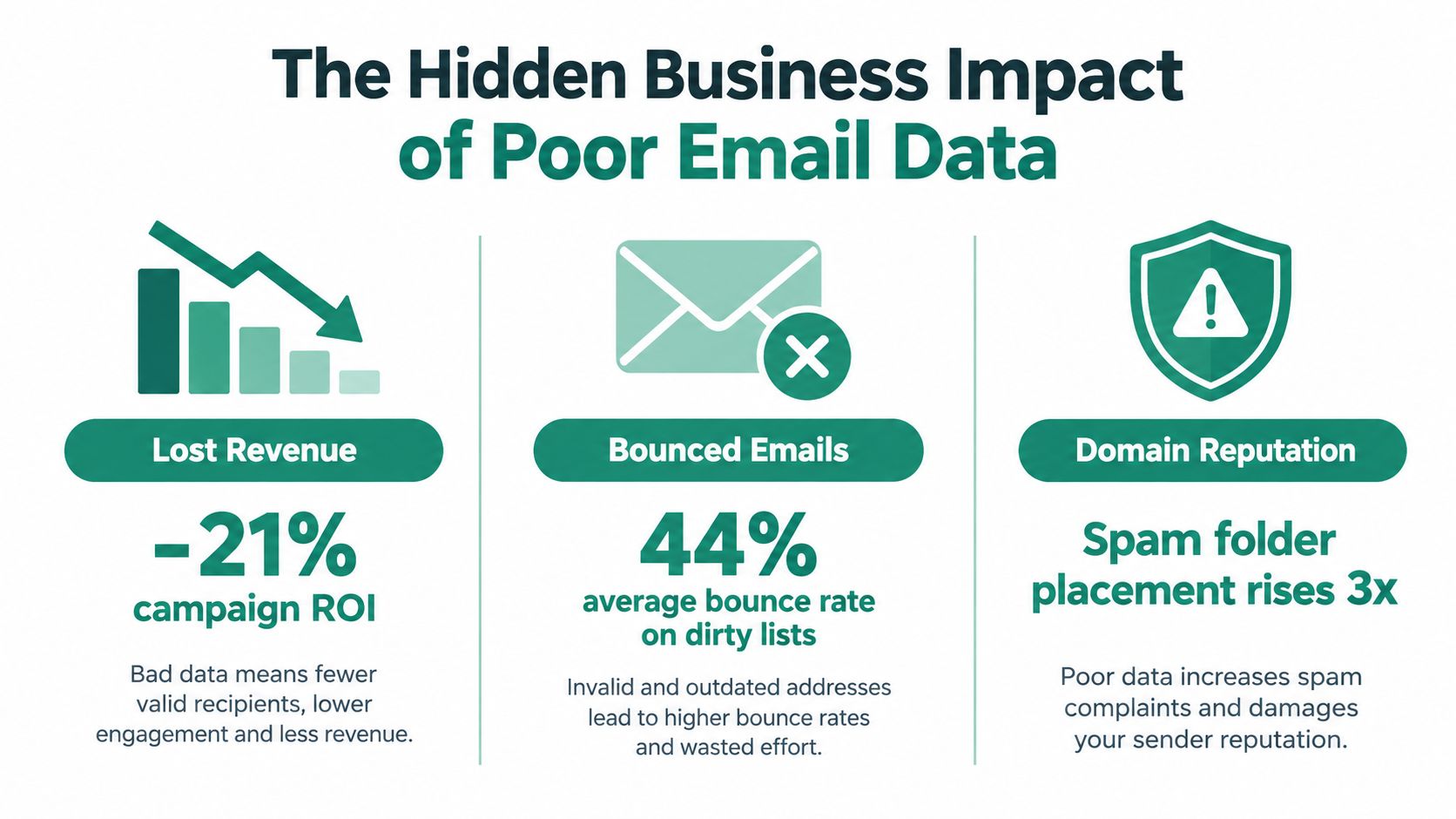
The Hidden Business Impact of Poor Email Data
Poor email data creates a chain reaction. A stale or invalid address produces a failed delivery, the campaign records weaker engagement, and the sending system receives less evidence that the audience is healthy. If the pattern continues, spam filtering can affect future messages, including mail addressed to contacts who are genuinely interested.
The commercial impact is documented in Kickbox's email deliverability report. In a 2025 survey of 421 U.S. businesses, 64.6% said deliverability issues directly harmed revenue or customer retention, while 60.3% named spam filtering as the main barrier to inbox placement. Those findings put deliverability in the revenue owner's language. The problem isn't limited to bounced addresses. It can interrupt renewal conversations, reduce campaign reach, and hide qualified demand inside unreliable reporting.
Why bad records distort decisions
A high bounce rate makes a campaign look like an acquisition or messaging failure when the underlying issue is list construction. Duplicate contacts can inflate audience size and make reach appear stronger than it is. Inactive recipients can also dilute engagement signals, causing teams to compare segments that don't have the same underlying data quality.
The reputational cost is harder to see because it arrives later. When a domain develops a history of poor sending behavior, future campaigns may reach fewer inboxes even after the team improves the copy. Recovery then requires restraint, investigation, and disciplined sending, not another large upload.
The cost reaches beyond marketing
Sales teams lose time researching contacts who no longer hold a role. Customer teams send product updates to outdated addresses. Revenue operations teams reconcile conflicting records instead of trusting attribution. Finance and leadership then review pipeline and retention reports built on contact data that was never fit for the decision.
The business case for hygiene is therefore broader than reducing bounces. Reliable email data protects reach, reporting quality, seller productivity, and customer continuity at the same time. A team that can connect validation outcomes to delivery, engagement, replies, opportunities, and retention has a stronger basis for investment than one that reports cleaning activity alone.
Key Metrics and Common Data Problems
A practical measurement system starts with failure types, not vanity metrics. Track hard bounces separately from soft bounces, record complaints, monitor engagement decay, and review suppression activity by source. A hard bounce usually indicates a permanent delivery problem, while a soft bounce may reflect a temporary mailbox or server condition. The action differs, so combining them hides the decision you need to make.
Use below 2% hard bounces as a quality target. Multiple industry sources align around that threshold, and a study cited by Simplelists' email cleaning guidance reported that verification reduced hard bounces from 8.4% to 1.2% and total bounces from 11.5% to 3.0%. The figures illustrate why validation before sending is more useful than trying to repair reputation after a campaign fails.
Diagnose the record before choosing the action
Data Problem
Deliverability Impact
Recommended Action
Syntax error
The address can't be delivered reliably
Reject or correct it at capture
Invalid or inactive domain
Mail may fail permanently
Suppress and investigate the source
Disposable address
Temporary inboxes create weak continuity
Exclude from durable prospecting or lifecycle segments
Catch-all server
Mailbox existence is uncertain
Treat as risk, segment, and test cautiously
Role-based address
Shared inboxes may produce weak personal relevance
Route to a suitable business segment or verify ownership
Duplicate record
Repeated sends distort engagement and complaints
Merge records and preserve the authoritative history
Soft bounce
Delivery may recover, but repeated failures signal risk
Retry under a defined policy, then suppress persistent failures
Unsubscribed or complained-about contact
Sending violates preference and reputation controls
Keep on a global suppression list
Teams should also inspect the source of each problem. If one form creates malformed addresses, a database cleanup won't solve the intake defect. If one vendor contributes catch-all or disposable domains, procurement and enrichment rules need attention.
For teams that need a practical explanation of the validation layer, EmailScout's guide to email validation provides useful terminology for separating address format checks from broader deliverability signals. The key is to make the metric actionable. Assign an owner, define the threshold, and connect the threshold to a workflow that rejects, quarantines, retries, or suppresses the record.
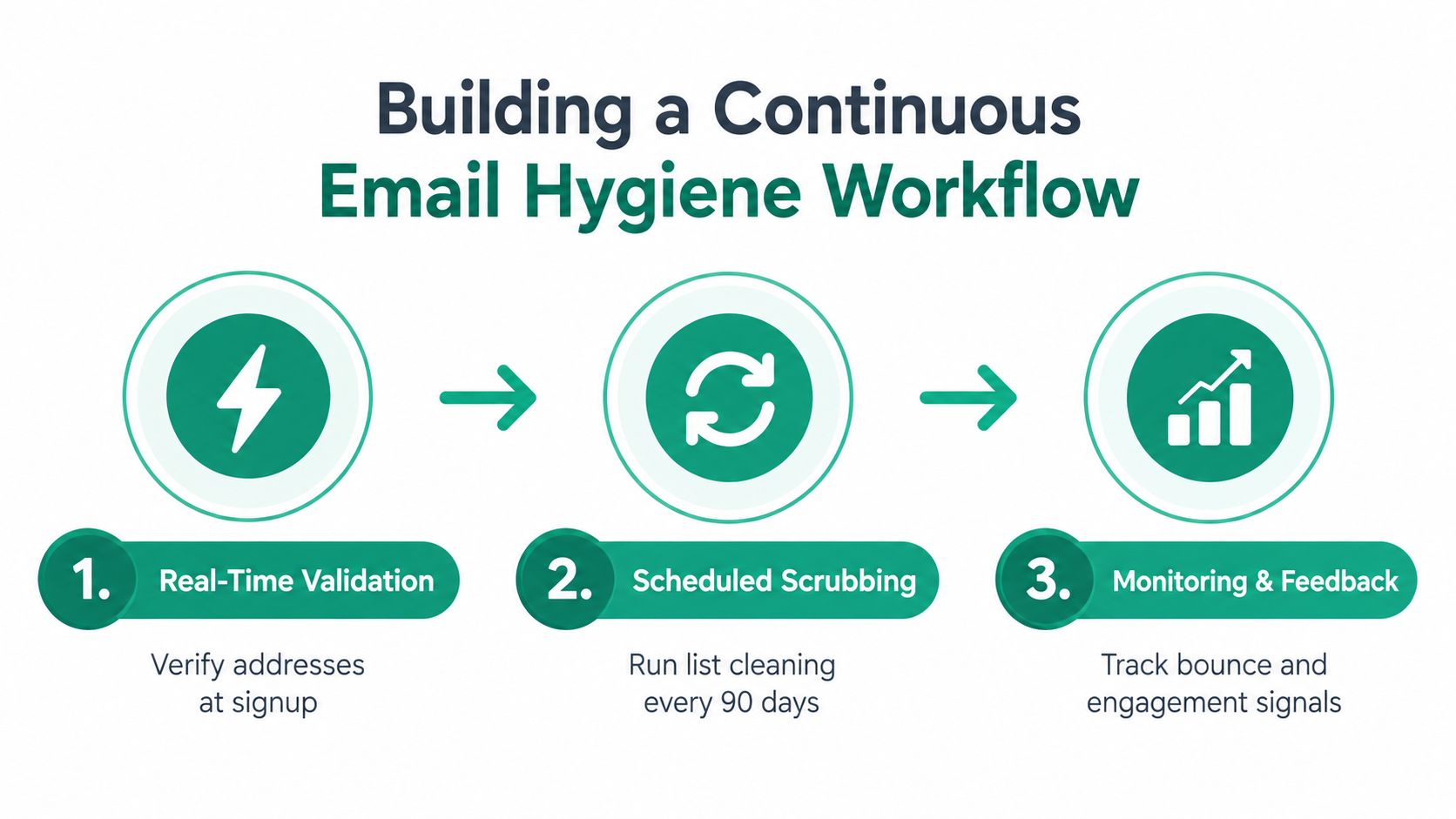
Building a Continuous Email Hygiene Workflow
A durable workflow has three control points: capture, maintenance, and feedback. Each point handles a different type of risk. Capture prevents obvious defects from entering. Maintenance manages decay in older records. Feedback turns campaign outcomes into better acquisition and segmentation rules.
Start at the point of capture
Apply validation to signup forms, lead imports, enrichment jobs, event lists, and CRM creation. Store the result alongside the address, including the validation timestamp and the reason for rejection or quarantine. That record helps operations teams distinguish a bad address from a temporary technical response and prevents repeated manual investigation.
Next, create an explicit decision path:
Accept addresses that pass required checks and policy rules.
Quarantine uncertain records, such as catch-all results, until a responsible owner reviews them.
Suppress invalid, unsubscribed, complained-about, and repeatedly failing contacts immediately.
Recheck older records before they return to active outreach.
A quarterly review can be useful for legacy data, but it shouldn't be the only control. Mailgun's deliverability research found that only 33% of senders clean lists at least monthly, while 56% rely on dedicated deliverability monitoring tools. That gap suggests many teams still treat hygiene as an occasional project rather than a monitored operating process.
Make monitoring part of campaign operations
Before a send, review the list by source, age, segment, validation status, and recent engagement. Afterward, feed bounce classifications and complaint events back into the CRM. Don't wait for a dashboard to become alarming. A rising failure rate in one acquisition channel is an early warning that deserves intervention before the next campaign.
For teams evaluating list maintenance processes, EmailScout's email list cleaning guide can sit alongside verification APIs, CRM rules, suppression services, and ESP reporting. No single tool replaces ownership. The workflow works when systems enforce the same rules consistently.
Practical Use Cases for Sales and Marketing Teams
A sales development team usually feels poor data first through wasted research and failed sequences. Suppose an SDR team imports contacts from several prospecting sources for an account-based campaign. If the team sends immediately, it mixes personal addresses, role accounts, duplicates, dormant mailboxes, and contacts who have changed employers. The first operational improvement isn't a cleverer sequence. It's a pre-send gate that validates each address, removes duplicates, checks suppression status, and routes uncertain records for review.
Sales workflows need risk separation
Don't treat every prospect as equally safe to send. Separate contacts by validation confidence, source, role, and account priority. A high-value account may justify manual confirmation for an uncertain address, while a low-priority record can remain quarantined until better evidence appears.
The same logic applies to list building. Tools that discover addresses from websites or search results can accelerate research, but they don't remove the need for validation. EmailScout, for example, is a Chrome extension that can discover and validate professional email addresses in a single click, giving a sales or marketing operator a way to review contact quality during research rather than after a bulk import.
Marketing teams face a different problem. Their audiences often include subscribers with long periods of low engagement, old event contacts, and customers whose communication preferences have changed. Instead of repeatedly mailing the entire database, marketers can segment low-engagement contacts, apply a re-engagement policy, and suppress people who don't meet the campaign's permission and activity requirements.
Campaign design should reflect data confidence
A launch sequence needs more than a creative review. Marketing should know which records are newly captured, which have been revalidated, which are uncertain, and which were excluded. That classification makes performance analysis more honest. If a segment underperforms, the team can separate an audience problem from a data problem.
The trade-off is reach versus reputation. Sending to every stored address may increase the apparent audience, but it also increases exposure to invalid and irrelevant records. A smaller, better-controlled audience often gives revenue teams cleaner feedback and a safer foundation for future sends.
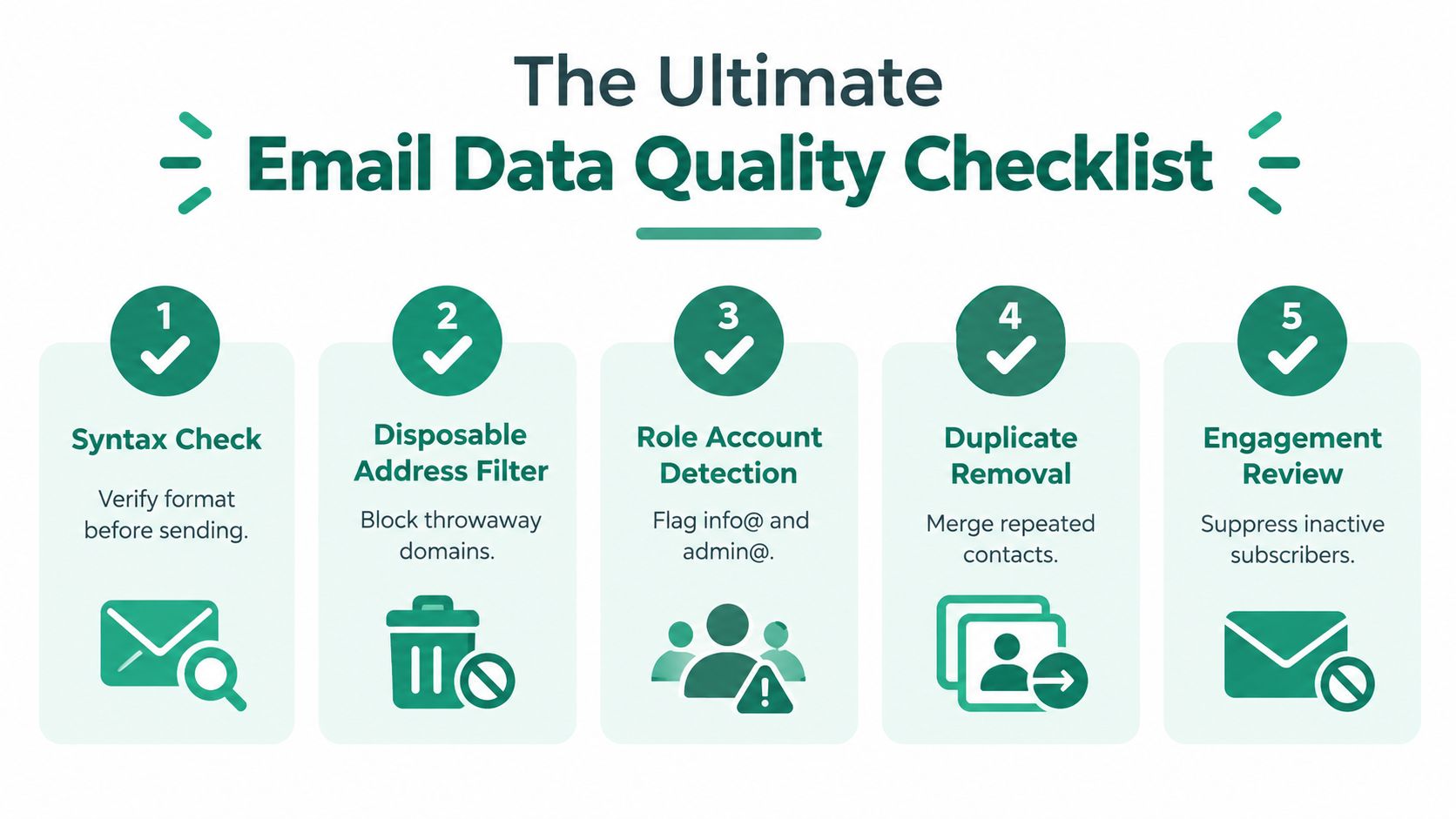
The Ultimate Email Data Quality Checklist
Use this checklist before a major campaign, a new outbound sequence, or a large CRM import. The point isn't to create paperwork. It's to make quality controls repeatable enough that a rushed launch can't bypass them.
1. Confirm the audience definition
Write down who belongs in the segment and who doesn't. Check role, company status, geography, lifecycle stage, consent, and ownership. If the team can't describe the inclusion rules, it can't reliably judge whether an address is relevant.
2. Validate addresses before activation
Run syntax, domain, and mailbox-related checks. Record the validation result and date. Reject malformed records, quarantine uncertain results, and make sure older addresses are rechecked before they re-enter an active sequence.
3. Apply suppression and deduplication
Compare the campaign file with global unsubscribes, complaints, hard-bounce history, internal exclusions, and known risky contacts. Merge duplicate records before sending, while preserving the most complete profile and the correct communication history.
4. Inspect infrastructure and permissions
Confirm that the sending identity is authenticated and that the campaign honors consent and preference rules. EmailScout's explanation of SPF, DKIM, and DMARC is a useful reference for teams reviewing the role of authentication in sender control. Authentication won't make bad data safe, but missing or inconsistent controls can make diagnosis harder.
5. Review the results and update the system
After sending, classify hard bounces, soft bounces, complaints, unsubscribes, replies, and meaningful engagement. Push those outcomes back to the CRM and acquisition source. A result that stays only in the ESP dashboard will be forgotten by the next list builder.
Pre-send test: Ask one person to approve the audience and another to challenge the exclusions. Independent review catches assumptions that automated checks won't understand.
The checklist should produce decisions, not just a completed document. If a source repeatedly adds invalid or low-relevance records, change the source rules. If a segment produces persistent soft bounces, define a retry and suppression policy. If engagement falls while delivery appears stable, review relevance and recency rather than declaring the list healthy.
Securing Your Sender Reputation Long Term
Sender reputation improves when teams make good data behavior routine. That means assigning ownership for validation rules, documenting suppression logic, reviewing acquisition sources, and giving SDRs, marketers, and operations specialists the same definition of an eligible contact.
Start with a baseline audit. Export active contacts, classify the main defects, group results by source and segment, and compare the findings with bounce, complaint, unsubscribe, and reply data. The first goal isn't to clean everything. It's to identify the failure point that creates the greatest exposure, then fix the intake or workflow that keeps reproducing it.
Governance keeps the fix in place
A durable program includes:
Clear ownership: Someone must be accountable for the rule, the exception process, and the review schedule.
Source controls: Every import, form, integration, and enrichment path needs validation before activation.
Suppression discipline: Unsubscribes, complaints, permanent failures, and internal exclusions must propagate across sending systems.
Feedback loops: Campaign outcomes should improve segmentation and source decisions, not remain isolated in reporting.
Regular review: Teams should inspect data health continuously and run deeper checks on aging or high-value records.
The most common failure is outsourcing responsibility to a cleaning vendor. Verification can identify risk, but it can't decide whether a contact is relevant, permitted, or strategically valuable. Revenue teams still need policies that connect technical results to business action.
Treat email data quality as a revenue control, not a database maintenance ticket. Better records protect inbox access, make campaign performance easier to interpret, and help sellers spend time on contacts who can move a conversation forward.
EmailScout helps sales and marketing teams discover and validate professional email addresses during prospect research, so new contacts can enter outreach with stronger data controls. Visit EmailScout to review how its extension can support cleaner list building and more disciplined email workflows.
You've got the CRM export open, the old list is full of missing emails, and someone on the team is asking whether an email append service can “fill the gaps” before next week's send. That's usually the right moment to slow down, because the question isn't how many rows a vendor can match. It's how many appended addresses will survive verification, pass your compliance rules, and still be worth mailing after the file leaves the vendor.
An append project looks simple on the surface. You hand over a CSV, a provider matches records against its identity graph, and a new file comes back with more email addresses than you started with. In practice, the output is smaller, riskier, and more operationally sensitive than the pitch suggests, which is why the best teams treat append as a verification-and-compliance decision, not a list-size trick. For a broader framing of how enrichment should be measured, the benchmark thinking in data enrichment KPIs and strategy is a useful companion.
What an Email Append Service Actually Does
A marketer uploads a 40,000-row customer file and expects a near-clean return. What usually comes back is closer to 12,000-20,000 usable addresses after matching and verification, not because the vendor failed, but because the category never promises a one-for-one recovery rate. That gap is the first thing to understand about an email append service, it's about restoring reach to records you already own, not creating a new audience from scratch.
At its simplest, append adds missing email addresses to existing records that already contain some other identifier, such as a name, postal address, company, or domain. The vendor tries to reconnect the offline record to an online identity, then returns an address where confidence is high enough to use. That means the headline match rate and the final usable output are different numbers, and buyers who treat them as the same thing usually overestimate what they bought.
Practical rule: if a vendor talks only about “matches” and never about verification or deliverability, you're looking at a file-count story, not an outreach-ready result.
The cleanest way to think about append is as identity resolution. The service takes what you already know, normalizes it, searches a third-party graph, and tries to recover the missing contact path. That's why append is useful for dormant CRM data, trade-show scans, and legacy customer files, but weak as a substitute for permission-based growth. It can reopen a channel, but it can't manufacture permission or interest.
How the Matching Process Works Step by Step
A real append workflow usually has four stages, and each one affects whether the final address is usable. The asset above shows the flow well, but the details matter more than the visuals.
First comes normalization. The vendor standardizes messy input, so “John Doe,” “J. Doe,” and “J. D.” are treated as variants of the same underlying person where possible. Inconsistent casing, suffixes, company abbreviations, and free-text fields can otherwise send the file down the wrong path before matching even begins.
Then comes entity matching. The vendor compares your row against its identity graph using keys such as name, company, postal address, and sometimes phone. Stronger combinations raise confidence, while weak identifiers create false matches, which is why a file with only a company name is much harder to recover than a file with name plus domain. The database behind the service is the key asset here, because append can only recover people already represented in that graph.
Next is email attachment. Once the vendor believes it has identified the right person, it attaches the stored email address to that row. Stale data can sneak in at this stage, especially if the underlying identity record is older than the person's current mailbox or job status.
Finally comes verification. A modern workflow checks syntax, domain validity, and mailbox acceptance before the file is used in outreach. That step is not optional, because it's what cuts down bounce risk and keeps the returned list from looking better on paper than it is in a sending system.
The basic lesson is simple. Append is not a lookup service. It's a chain of normalization, identity resolution, attachment, and verification, and the file is only as reliable as the weakest link.
Match Rates, Deliverability, and Engagement Numbers
A file can look useful on paper and still fail in production. That is why I judge append by three numbers, match rate, deliverability, and engagement. Vendors usually lead with the first one because it is the easiest to sell, but the second and third decide whether the appended data supports revenue.
Match rate is the share of records a vendor can confidently connect to an email address. Public industry summaries often place append in the 30-60% range, and cleaner B2B files can sit in the 40-60% band when the identifiers are strong (tomba.io). That benchmark comes from relatively complete files, not from scraped lists, partial CRM exports, or aged records. In practice, the number drops fast when a file lacks company, domain, postal data, or other strong identifiers.
Verification trims that number further. After the append step, only a portion of matched records survive syntax, domain, and mailbox checks, which means a high match rate does not automatically produce a sendable file (atdata.com). I have seen teams celebrate a match rate that looked strong in a vendor report, then lose a meaningful share of those records during verification because the mailbox was inactive, the domain was unreliable, or the address could not accept mail.
Deliverability is the next filter, and it is the one that protects sender reputation. A returned address still needs to pass mailability checks before it belongs in an outreach stream. If you want a practical way to separate inbox placement problems from list-quality problems, a guide on how to check if emails are going to spam is more useful than relying on vendor output alone. For pre-send cleanup, email address verification is the step that keeps bad records from entering the sending system in the first place.
Engagement is the last reality check. Appended contacts often perform worse than organic subscribers, and some industry references say they can engage at lower rates than opt-in files (email append glossary). That does not make append a bad channel. It means you should treat it as a recovery and enrichment tactic, then watch response closely instead of assuming matched data will behave like hand-raised leads.
The trade-off is straightforward. Append can recover reach you do not have, but each layer of recovery, matching, verification, and inbox placement removes more records from the original promise. A matched contact that does not verify, or verifies and still does not engage, is not a success. It is a more expensive way to find the same data-quality problem later.
B2B Versus Consumer Email Append
A B2B list and a consumer file can both be appended, but they behave differently enough that they should be treated as separate buys. The practical differences are the identifiers you have, the match rate you can expect, the economics, and the amount of compliance risk you are accepting.
B2B append works best when the file includes full name, company, and domain. That combination gives the vendor enough structure to match against identity-resolution databases instead of filling gaps with assumptions, and clean files commonly sit in the 40-60% range. Consumer append depends more on postal or household records, so results are more sensitive to how current and complete the underlying file already is. That is one reason why match rates that look similar in a vendor deck can fall apart once you test them against older or scraped records.
Dimension
B2B Append
Consumer Append
Identifier strength
Full name, company, domain
Postal or household records, weaker business context
Expected match rate
40-60% on clean files
Clean opt-in files can reach 40-60%, while weaker scraped or aged data often drops to 20-35%
Minimum order size
Some vendors cite minimums around $700
Similar minimums can apply in larger-volume markets
Typical pricing
Roughly $0.01-$0.10 per match in major markets, depending on file quality and volume
Historic quotes have ranged from about $0.15-$0.55 per record at different volume levels
That table is useful, but it only tells part of the story. B2B append is usually the more defensible buy when the source file is structured and the target is a known contact. Consumer append can still work, but it is more exposed to data decay and permission problems, so the bar for file hygiene and suppression handling is higher. For a plain-English reminder of why permission quality matters, the email marketing ROI guide is a useful counterweight to list-growth hype, and a closer look at data privacy regulations helps frame the compliance side before you buy.
Compliance and Consent Risks You Cannot Ignore
An append project can look clean on the acquisition side and still fail on consent. The first question is whether the appended address fits your permission model, your market rules, and the way your sending system handles suppression.
The safest posture is to append for existing or past supporters, then carry opt-outs and suppression records across the full file. Neutral guidance for nonprofits makes that boundary explicit, and it warns against emailing people who opted out (npoinfo.com). In commercial programs, the legal basis may differ by geography, but the operational rule stays the same, do not append into a file that cannot respect prior opt-outs.
Mailbox providers also expect more from bulk senders now. Google and Yahoo tightened their requirements, and analysts noted that only about 0.8% of emails sent carried the required List-Unsubscribe header (email marketing ROI guide). That gap matters because it shows how far many teams still are from current mailbox expectations. If your process cannot handle suppression and unsubscribe routing cleanly, appended contacts will create more operational friction than revenue.
For a plain-English framing of permission and channel quality, the email marketing ROI guide is a useful counterweight to list-growth hype. For a broader policy pass, the data privacy regulations reference is worth checking before you route appended data into a live campaign.
Appended contacts carry more risk than organic opt-ins because they did not hand you the address directly. In GDPR, PECR, and CASL environments, that difference affects lawful basis, source documentation, purpose limitation, and suppression handling. The practical move is to treat appended records as a separate audience with separate reporting, not as a normal part of the house file.
If your compliance story is vague, your deliverability story usually gets worse a few sends later.
A Practical Implementation Checklist
A useful append project starts before any records leave your system. If the file is messy, the match rate looks better on paper than it will in the ESP, and the cleanup work just shifts downstream.
Start with file hygiene. Remove duplicate rows, standardize names and company fields, and suppress anyone who has already opted out or is stale enough to be a poor mailing candidate. Strong inputs give the vendor less room to guess, and that usually means fewer false positives, fewer bad sends, and less cleanup after the fact.
Then stage the append in small batches instead of pushing the full file at once. In practice, that means using a controlled slice of the house file, watching the first send results, and only then deciding whether to continue. The point is to catch bounce or complaint drift while the exposure is still limited, not after the whole domain has already felt the effect.
Operational rule: finish the ramp-up before your busiest send window starts so you are not learning deliverability lessons during peak season. Teams that leave the ramp too late usually find out about weak matches when inbox placement matters most. A practical planning note on phased rollout and append timing is also covered in this data enrichment services overview.
Pair the appended output with verification before upload, not after the first bounce report. That means checking the mailability of the returned records, tagging them inside the CRM, and separating them into their own segment so their performance does not get blended into the house file. On a real program, that separation is what tells you whether append improved reachable audience quality or just increased list volume.
A simple weekly workflow looks like this:
Clean the source file first: Standardize names, company fields, and suppression records before any vendor lookup.
Append in controlled slices: Keep batches small enough that you can stop quickly if quality slips.
Verify before sending: Filter out malformed, stale, or mailbox-invalid records before they reach the sender.
Segment appended contacts separately: Track complaints and bounces on their own trend line.
Ramp before the season starts: Give the file time to settle before peak demand.
How to Evaluate and Choose an Email Append Vendor
The vendor you choose should do more than claim a high match rate. In practice, the better choice is the one that can explain how it matches records, how it verifies them, and where its process stops short of turning matched data into records you can send.
Start with reference database coverage. Providers often describe databases that span hundreds of millions to billions of consumer or business records (prospeo.io). Size helps, but only if it covers the people you need to reach. A large database still misses narrow industries, local markets, and niche business segments, so ask how the vendor handles coverage gaps instead of accepting a broad claim at face value.
Then look at the verification stack. Syntax checks, domain-level validation, and mailbox-level SMTP verification each catch different problems before the record reaches your ESP. That difference matters, because a file that only looks matched can still fail once it hits production.
The commercial details need the same scrutiny. Pricing in this category is often framed as a low per-match cost, but the actual number depends on data quality, volume, and how much verification is included. Some vendors also set minimum order thresholds that may not fit a small test file. If a provider will not explain its pricing logic, its minimums, or what happens to records that fail verification, you are looking at opacity, not a workable service.
For a broader view of how append fits into enrichment workflows, see this data enrichment services overview. Before you sign anything, ask every vendor the same questions:
What identifiers do you match on?
What share of matched records survive verification?
How do you handle opt-outs and suppression files?
What minimum order applies to my file size?
Can you run a sample on my data before I commit?
A vendor that will run a small test on your own rows gives you something more useful than a sales deck. You see how the file behaves on your actual data, which is the only test that matters.
When Email Append Is the Right Move and When to Skip It
Use an email append service when you already own a strong first-party file, the identifiers are clean, and the campaign goal is to reach known customers or known prospects through a missing channel. It's also the right move when your team can verify the return, suppress bad records, and ramp sends slowly enough to protect reputation.
Skip append when the source is scraped, aged, or too thin to support confident matching. Skip it when you need net-new prospecting volume, because append doesn't create new leads, it just tries to reconnect existing ones. And skip it when your compliance posture can't absorb a higher-risk audience, especially if you can't separate appended contacts from organic subscribers in reporting.
The simplest decision rule is this. If the file is structured, permission-aware, and operationally controlled, append can extend reach. If the file is weak, legally ambiguous, or expected to carry your entire growth motion, build the list organically instead.
EmailScout helps teams work from the opposite direction when append isn't the cleanest option, by finding and enriching contact data from known signals rather than guessing from a stale file. If you're deciding between appending a legacy list and rebuilding outreach from better inputs, visit EmailScout and compare how its enrichment workflow fits your process.