Tag: bounce rate

  • Why Email Verification Is Important for Better Outreach

    Why Email Verification Is Important for Better Outreach

    You've built a carefully targeted outreach list, written a strong sequence, and queued the campaign for launch. Then the results arrive: a large batch of delivery failures, fewer replies than expected, and a sender domain that suddenly struggles to reach even people who previously engaged. The problem may not be your offer or your copy. It may be the addresses underneath the campaign.

    That's why email verification is important. It protects more than a single send. It helps preserve deliverability, keeps CRM records reliable, reduces wasted sales effort, and supports the broader trust signals mailbox providers use to decide where your messages belong.

    The Email That Never Made It

    A sales team can spend an entire morning working from a CRM list that only appears ready. Reps personalize opening lines, enroll contacts, and create follow-up tasks. Then hard bounces expose the gaps: some addresses never existed, former employees no longer use others, and a small domain typo blocks the rest.

    The missed message is the visible cost. The larger risk is contamination across the trust stack. Hard bounces are permanent delivery failures, and repeated failures give mailbox providers evidence that the sender's data is poorly maintained. That signal can affect later campaigns, even when those messages target valid contacts.

    One 2026 benchmark found that 12.3% of verified addresses were invalid, or roughly one in eight addresses on a typical B2B list (2026 email deliverability benchmark). Applied to a 5,000-contact campaign, that rate would mean about 615 invalid addresses. The exact result varies by list, sending system, and provider response, but the math gives sales teams a usable warning: a modest contamination rate can create a large delivery problem.

    Practical rule: Treat verification as insurance against a measurable failure mode, not a technical chore to complete when someone has spare time.

    The effects reach beyond the mailbox. SDRs research contacts who cannot receive messages, managers see activity without conversations, and CRM reports mix unreachable records with genuine prospects. That makes it harder to tell whether a sequence failed because of its offer or because the audience data was contaminated. As inbox filters use more signals to judge sender trust, clean recipient data becomes one layer in the evidence your domain presents.

    Verification can identify syntax errors, role addresses, disposable domains, dormant mailboxes, and other risky records before a sequence starts. It cannot make a prospect interested or guarantee inbox placement. It can, however, keep the team from spending sending capacity and sales time on addresses that were never viable, while giving the CRM a cleaner foundation for every later campaign.

    What Email Verification Actually Does

    Email verification is the process of checking whether an address is real, reachable, and appropriate to mail. A verifier examines the address and its domain, then assigns a result such as valid, risky, or invalid. The purpose is to make a responsible sending decision before the address affects your campaign.

    There are two common operating models. Real-time verification happens when a person submits a form, creates an account, or enters an address into a sales workflow. An API checks the address at the moment of capture, so bad data can be blocked or routed for review before it reaches the CRM. Batch verification scans an existing database or campaign list, which is useful when contacts came from an event, enrichment process, spreadsheet, or older import.

    The difference is similar to venue security. Real-time verification is the bouncer checking an ID at the door. Batch verification is an audit of the guest list after people are already inside. Strong teams often use both because they address different points of risk.
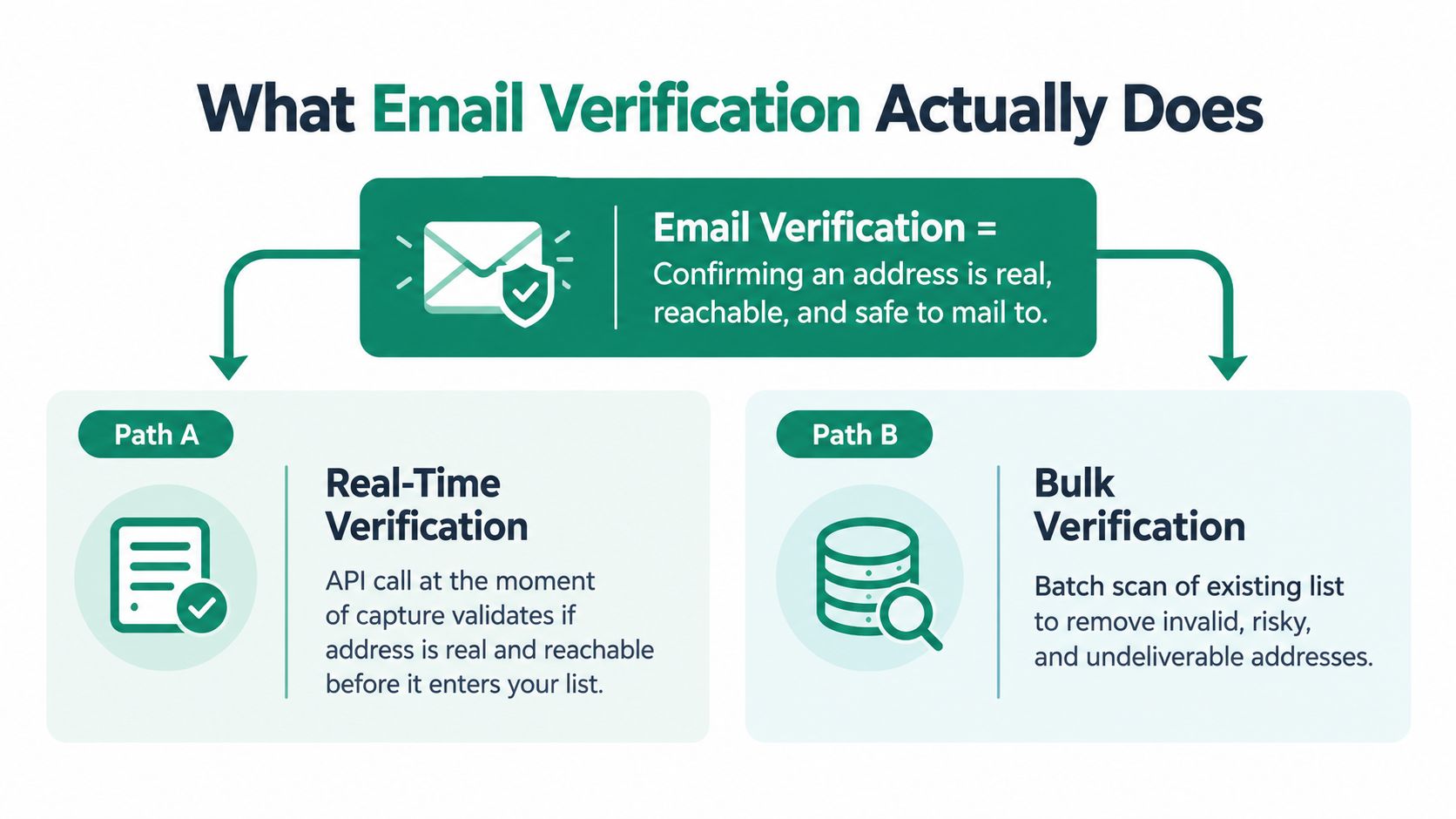
    A diagram explaining that email verification confirms addresses are real, reachable, and safe using real-time or bulk methods.

    The checks behind a verification result

    A verifier may combine several checks rather than relying on one signal:

    • Syntax validation checks whether the address follows the expected structure and flags obvious formatting errors.
    • Domain validation checks whether the domain exists and can support email delivery.
    • Mail-server checks assess whether the receiving system appears able to accept messages.
    • Role-account detection identifies addresses such as general departmental inboxes, which may be less suitable for one-to-one sales outreach.
    • Disposable-domain detection flags temporary addresses that may disappear quickly.
    • Risk screening can identify patterns associated with traps, catch-alls, or uncertain delivery outcomes.

    These checks answer a narrow question: can this address plausibly receive mail? They don't confirm that the contact is interested, that the person still works at the company, or that your message complies with applicable outreach rules. Verification improves the quality of the starting data. Relevance, consent where required, authentication, and message quality still belong in the rest of your sending process.

    How Verification Protects Deliverability

    A sales team can start with 10,000 records and still lose control of a campaign before the first message reaches an inbox. If the list contains a 12.3% invalid rate, roughly 1,230 addresses could fail immediately. That figure comes from the benchmark rate cited earlier, but the operational lesson is broader: every avoidable failure adds another negative delivery event.

    Mailbox providers use bounce activity as one signal of list hygiene. Current guidance generally places a healthy total bounce rate under 2%, while higher levels can prompt concern and cleanup (email deliverability benchmarks by industry). Verification lowers that exposure before the campaign runs.

    A 1-million-email dataset shows the difference clearly. Verification reduced total bounces from 11.5% to 3.0%, hard bounces from 8.4% to 1.2%, and soft bounces from 3.1% to 1.8% (email verification and bounce-rate analysis). Hard bounces indicate permanent delivery failures. Soft bounces may reflect temporary conditions, although repeated failures still require investigation.

    The benefit also reaches beyond the mailbox. An unverified address can remain in the CRM, inflate contact counts, trigger repeated follow-ups, and distort campaign reporting. Verification is therefore a trust-stack layer, not a one-time cleanup. It improves the data that sales automation and AI-driven inbox filters use to judge sending patterns.

    A practical comparison

    Bounce Rate Hard Bounces Sender Score Drop Estimated Inbox Placement
    Healthy program Keep under 1% No fixed estimate Reliable delivery depends on the full trust stack
    Warning range Total bounces above 2% No fixed estimate Placement can begin to weaken
    Critical range Total bounces above 5% No fixed estimate Urgent list cleanup is usually needed

    The table avoids treating one provider formula as universal. Complaints, engagement, authentication, sending behavior, and content also affect delivery. For the controls that work alongside verification, review B2B outbound guidance from Lead Printer and this email deliverability improvement guide to build a repeatable process.

    Sender Reputation and the Trust Stack

    A sales sequence can contain accurate personalization and still miss the inbox. Mailbox providers judge the sending pattern behind each message, including bounce activity, spam complaints, spam-trap hits, authentication, and recipient engagement. Sender reputation works like a credit history. One clean campaign cannot erase a record of unreliable behavior.

    Email verification forms the first layer of that record. It removes addresses likely to create avoidable failures before they enter the send. That protects more than one campaign. It also keeps invalid contacts from contaminating CRM counts, follow-up sequences, reporting, and the engagement signals that AI-driven inbox filters use to assess future mail.
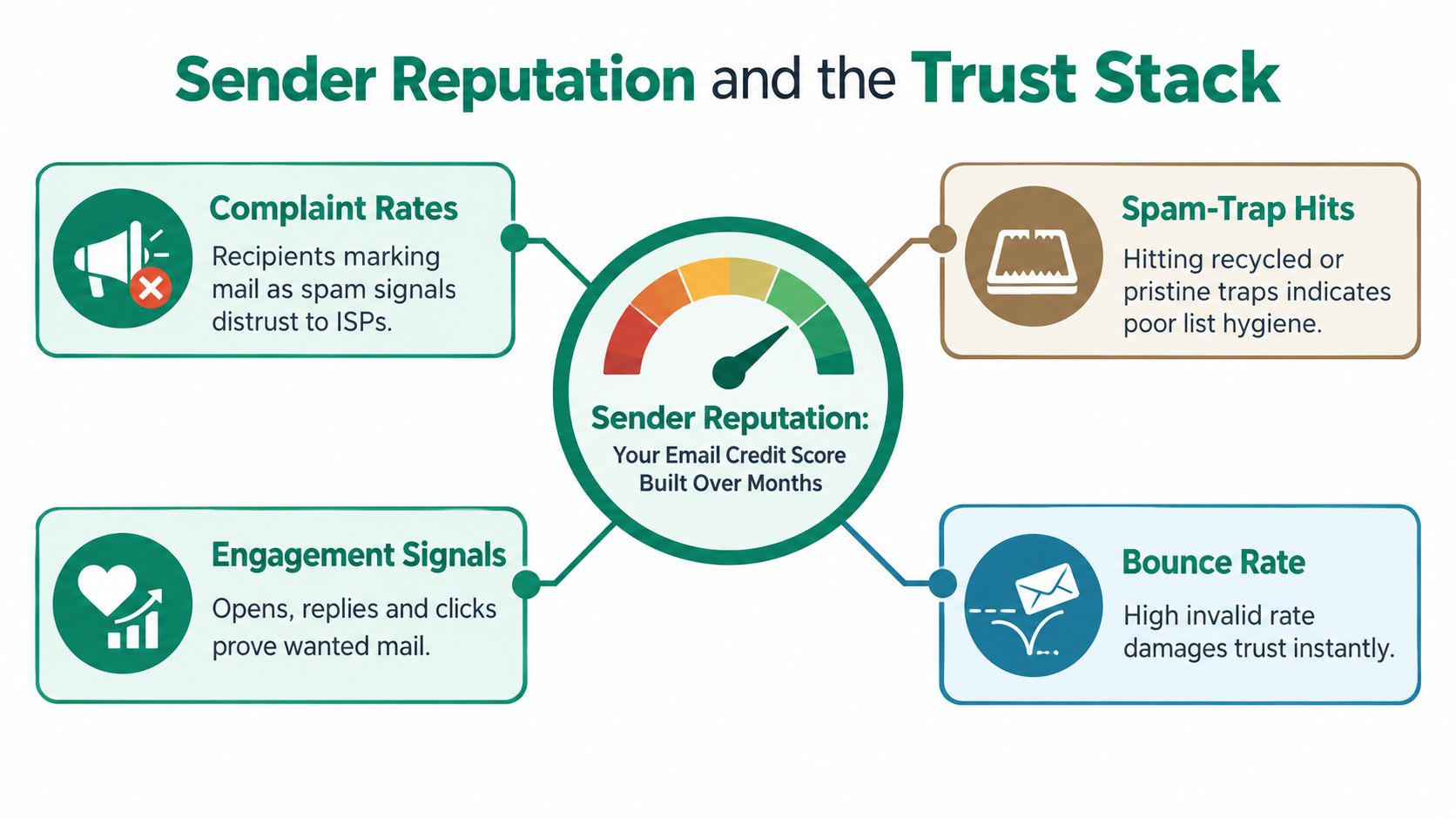
    A diagram illustrating the factors that determine sender reputation including complaint rates, spam-trap hits, engagement signals, and bounce rates.

    The layers work together

    The trust stack is a group of connected controls:

    • List quality removes invalid and high-risk addresses before they affect bounce rates.
    • Authentication uses SPF, DKIM, and DMARC to show that your sending system is authorized and aligned with your domain.
    • Sending discipline gives mailbox providers a consistent pattern to evaluate.
    • Content relevance helps recipients recognize the message and decide to engage.
    • Engagement signals indicate whether recipients want the mail.

    A verified list can still perform poorly if authentication is missing. Authenticated messages can also create problems when they are sent to a careless list. Each layer supports the others, so verification should remain part of the sending process rather than a one-time cleanup.

    Reporting on the 2024-2025 period found global inbox placement at 84.6%, down from 87.3% in the prior year. A separate B2B analysis reported that only 23.6% of marketers verify lists before campaigns and that fully authenticated senders were 2.7 times more likely to reach inboxes than unauthenticated senders (2025 email deliverability report). These figures do not show that verification alone guarantees placement. They show why clean CRM data and authenticated sending must work together.

    Teams building this workflow can review how to verify emails before sending to separate address validation from the other reputation controls on the operating checklist.

    The Real Cost Savings Beyond the Bounce Rate

    Bounce reports show failed deliveries, but they don't show every cost created by unreliable data. A sales team can lose time before the first message is sent, especially when reps research, personalize, and sequence records that should have been held for review.

    The operational damage also reaches the CRM. An invalid address can be copied into account records, enrichment tables, lead-routing rules, and automated journeys. That contamination can distort segmentation and lead scoring, then make lifecycle reporting less dependable. One independent analysis describes how invalid records can disrupt lead scoring, lifecycle journeys, segmentation, attribution, and pipeline forecasting (email verification and CRM data quality).

    Three costs that deserve their own line

    Sales productivity suffers first. Reps may retry failed contacts, search for replacements, or assume that a quiet prospect is unresponsive. The team then measures effort rather than reachable opportunity.

    Forecasting suffers next. If records with invalid contact data remain active, managers may count them as workable pipeline. That can make a segment look weak when the true issue is that the team never had a deliverable route to the buyer.

    Attribution becomes harder to interpret. A campaign with many unreachable addresses can produce weak delivery and engagement signals. Marketers may then pause a promising segment or rewrite an effective message because the underlying audience data was compromised.

    Cost Category Estimated Cost per 10k Sends Visibility in Standard Reports
    Failed delivery Depends on the invalid share and sending costs Usually visible as bounces
    SDR research and follow-up Depends on workflow and labor time Often hidden
    CRM contamination Depends on duplication and automation Usually spread across systems
    Attribution distortion Depends on reporting model Rarely isolated

    The important distinction is between message cost and opportunity cost. Removing an invalid record can prevent a failed send, but it can also keep that record from entering a sequence, inflating a forecast, or generating misleading performance data. Verification turns list quality into an operational control across sales and marketing, not just an email platform setting.

    Why Verification Alone Is No Longer Enough

    A sales rep can send to a valid address and still miss the inbox. Verification confirms that a mailbox appears reachable. It does not prove that the sender is authorized, that the message fits the sending domain, or that recipients want future mail.

    That gap matters because mailbox providers combine several signals before deciding where a message belongs. Recent reporting shows that global inbox placement declined from 87.3% to 84.6% across the cited periods. The same discussion separates list quality from authentication and sender reputation (2025 email deliverability report). Verification removes one class of risk. It cannot carry the full trust stack.
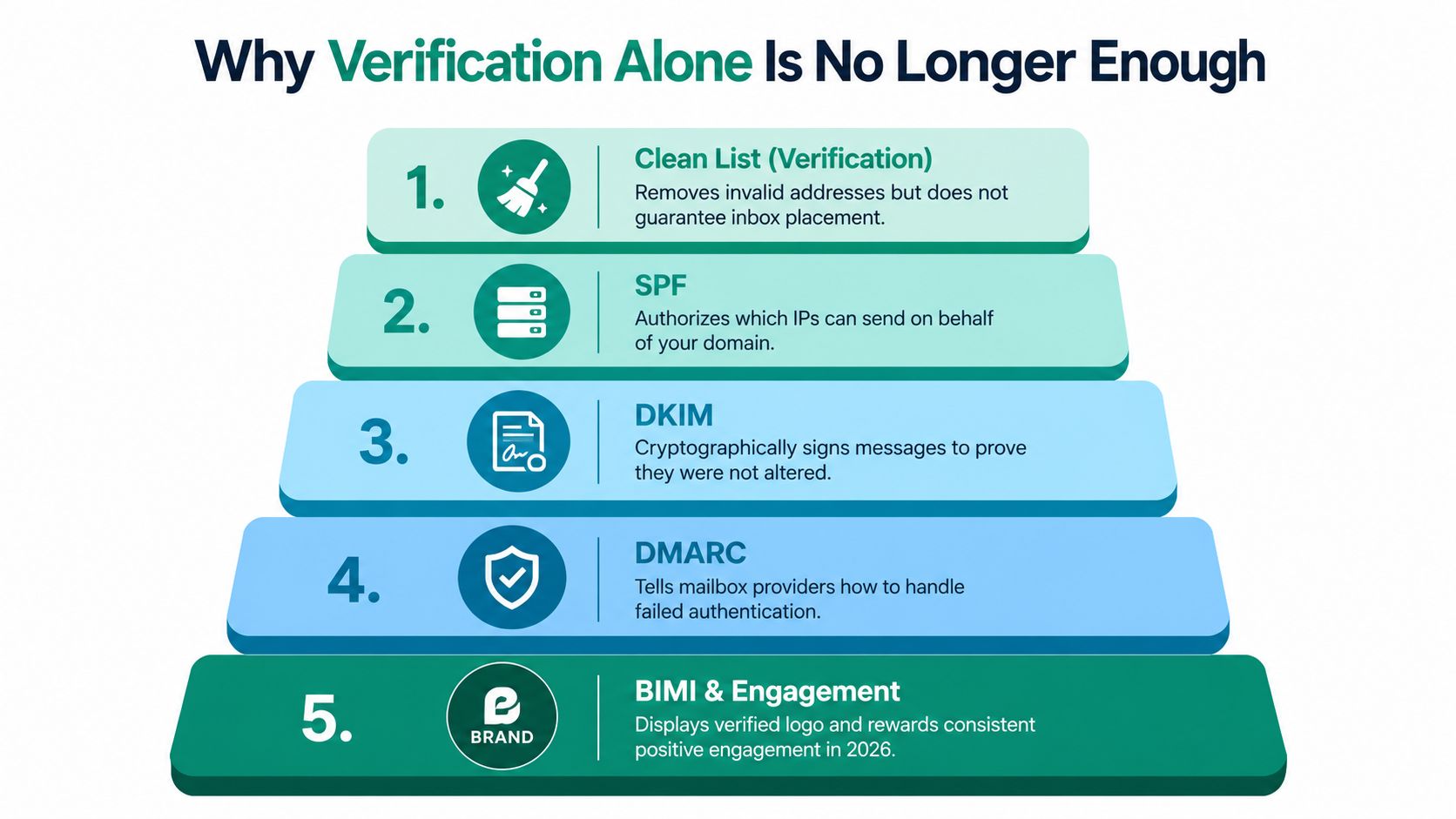
    A five-step hierarchy pyramid infographic explaining why email list verification is insufficient for modern inbox placement.

    The controls around the list

    • SPF names the services authorized to send for your domain.
    • DKIM attaches a cryptographic signature that helps providers check message integrity.
    • DMARC connects authentication with domain alignment and tells receiving providers how to handle failed checks.
    • Domain and infrastructure consistency build a stable sending history instead of sudden, unexplained changes.
    • Engagement quality records whether recipients reply, click, delete, ignore, or report messages.

    AI-assisted filtering evaluates these signals together. Providers can assess message content, sender history, and the likely recipient response rather than applying one pass-or-fail check. A valid address may still receive a message in spam when authentication is weak, engagement is poor, or the sender has a record of unwanted mail.

    Verification removes disqualifying risks. It does not create trust by itself.

    Use it as the foundation beneath authentication, relevant content, responsible targeting, and consistent sending. The practical question is whether every layer supports the same sending identity, from the CRM record to the recipient's inbox.

    Practical Steps to Verify Before Every Send

    A campaign can look ready in the CRM and still fail at the mailbox. Verification works best as a recurring trust-stack layer, built into data capture, list preparation, and sending. Start by exporting the current list, reviewing invalid and risky patterns, and grouping records by source. Forms, enrichment, events, manual entry, and imports can introduce different errors, so source-level review helps locate CRM contamination instead of treating every bounce as an isolated event.

    Build the workflow around capture and sending

    Apply real-time checks when new data enters the system. A form submission, spreadsheet upload, or lead-enrichment event should trigger validation before the record becomes eligible for outreach. For older databases or externally sourced contacts, run a bulk check before each campaign. You can also use this guide to verify an email address before sending and align the process with your team's acceptance rules.

    A practical workflow looks like this:

    1. Audit the list. Review bounce history, trace risky sources, and check errors such as misspelled domains or generic inboxes. A higher bounce rate can reflect a specific acquisition problem, not only a sending problem.
    2. Choose the method. Use an API for immediate checks at capture, then use batch verification for existing records.
    3. Connect the systems. Send verification status to the CRM and sales engagement platform so invalid or risky records cannot enter a sequence automatically.
    4. Monitor the outcome. After each campaign, compare bounces, complaints, replies, and meetings with verification status. This connects list quality to the numbers sales can act on.
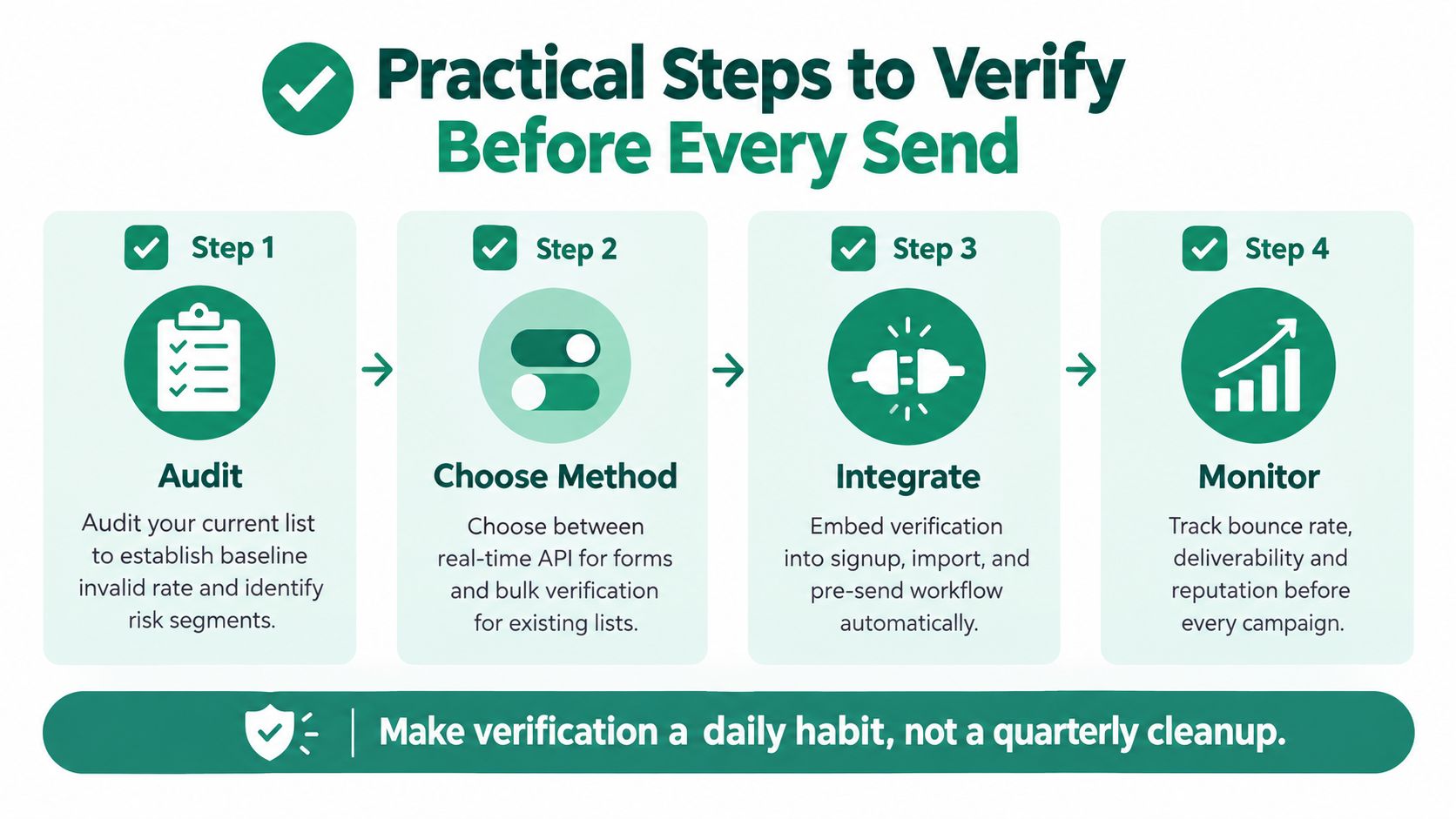
    An infographic showing four practical steps to verify email lists before sending marketing campaigns.

    Give people a review path

    Automation should not force every uncertain address into a valid-or-invalid decision. Route catch-all domains, role addresses, and conflicting records to manual review. Reps should know how to identify a typo, generic inbox, or contact added during a rushed event upload.

    EmailScout can find and verify addresses while users browse LinkedIn and company websites, with labels such as valid, risky, or invalid attached to contact records. Used with batch checks and CRM controls, this workflow helps keep unreviewed addresses out of sequences. Teams still need to define acceptance rules and compare actual delivery results with the verification status.

    Bringing It All Together

    Email verification is important because an invalid address creates more than one failed delivery. It can waste sales time, contaminate CRM data, weaken attribution, and add another negative signal to a sender reputation that mailbox providers evaluate over time.

    The practical answer is a layered system:

    • Verify addresses before they enter outreach.
    • Authenticate the sending domain with the appropriate trust controls.
    • Separate risky records instead of treating every address as equally safe.
    • Track delivery and engagement so the team can identify problems early.
    • Keep verification recurring rather than relying on a single historical cleanup.

    Start with your next operational review. Pull a recent bounce report, identify the main invalid-data patterns, activate real-time verification at every capture point, and run a batch check on the list planned for the next campaign. Then compare inbox placement and reply quality across the following sends. That process shows the team how list hygiene supports revenue, not just technical compliance.

    Verification is an unglamorous habit, but it gives every campaign a cleaner starting point. Teams that protect their data and sender identity give their outreach a better chance to compound instead of deteriorating.


    EmailScout helps sales and marketing teams discover and verify email addresses while browsing professional profiles and company websites, with status labels that can stay attached to contact records. Visit EmailScout to add real-time address checking to your prospecting workflow and reduce avoidable risk before contacts enter a sequence.
  • Email Verifier Hunter An Essential Guide

    Email Verifier Hunter An Essential Guide

    Think of it like this: you spend hours crafting the perfect pitch, hit "send" on your campaign, and wait for the replies to roll in. But a huge chunk of those emails immediately bounce back. You've just wasted your time, and worse, you've damaged your reputation without even knowing it.

    This is exactly what happens when you work with an unverified email list. It’s a silent killer for any sales or marketing outreach.

    Why Bad Data Is Silently Killing Your Outreach

    Sending emails to a bad list isn't just a small stumble; it's a direct hit to your sender reputation. It's crucial to understand the true value of your customer data and why keeping it clean is so important. Every single email that bounces back is a red flag to providers like Gmail and Outlook, telling them your sending habits are spammy.

    Your sender reputation is basically a credit score for your email domain. Each hard bounce—an email sent to an address that doesn’t exist—acts like a missed payment, dragging your score down. Once your score drops, even your perfectly good emails are far more likely to get dumped in the spam folder, never to be seen by your prospects.

    The Rising Stakes of Email Deliverability

    The penalties for a bad sender score are only getting harsher. Email providers are constantly tightening their filters, which means keeping a clean list has gone from a "nice-to-have" to a "must-do" for survival. This is where an email verifier hunter tool comes in as your first line of defense, weeding out the bad contacts before they can cause any harm.

    Taking this step ensures your messages actually land in front of real people. It prevents your hard work from vanishing into a digital black hole. For a closer look at the basics, check out our guide on what email address verification entails.

    A high bounce rate is the most obvious sign of bad data. It's the digital version of getting a stack of letters returned to you, all stamped 'address unknown.' It screams to email providers that you aren't a sender they can trust.

    The True Cost of an Unverified Email List

    Letting your email list hygiene slide comes with real, measurable costs that are much bigger than just wasted effort. The numbers don't lie. Globally, marketers using unverified lists can see bounce rates as high as 29%. A verifier tool like Hunter can slash that number, protecting your sender score at a time when spam filters are more aggressive than ever.

    The table below breaks down the real-world impact of skipping this critical step.

    Problem Area Consequence of Unverified Emails Benefit of Verification
    Sender Reputation Your domain gets flagged as spammy, damaging deliverability. Protects your score, ensuring emails reach the inbox.
    Campaign ROI Skewed metrics and wasted budget on non-existent leads. Accurate data leads to a clear and measurable return.
    Team Productivity Sales and marketing teams waste time on dead-end contacts. Focuses efforts on real, engaged prospects.
    Brand Image Looks unprofessional and can lead to being blacklisted. Maintains a professional reputation with ISPs and recipients.

    As you can see, this isn't just about deliverability. It's about the overall health of your entire outreach strategy. A clean list means your analytics are reliable, your campaign ROI is real, and your brand looks professional.

    Ultimately, running your contacts through a verification tool is a non-negotiable first step for any serious campaign that aims for real connections and even better results.

    How an Email Verifier Like Hunter Actually Works

    So, what really happens when you plug an email into a verifier? It’s not just a simple on/off check. Think of it more like a multi-stage investigation that happens in a split second, all designed to figure out if an email address is a safe and active destination for your message.

    This whole process is about protecting your sender reputation. It weeds out the bad contacts before they can trigger a hard bounce and tank your deliverability. Without it, you’re looking at a rapid decay in your outreach effectiveness.

    Flowchart showing the outreach decay process: unverified lists, high bounce rates, leading to bad reputation.

    As you can see, starting with an unverified list is a fast track to high bounce rates, which wrecks your sender reputation and kills your chances of ever reaching the inbox. Let’s break down the steps a verifier takes to stop this from happening.

    Step 1: Syntax and Format Validation

    The very first check is also the most basic. The tool simply looks at the email's structure to make sure it follows standard formatting rules. It’s like a quick glance to see if an address looks like an address.

    • Is the "@" symbol there? An email has to have one.
    • Are there any illegal characters? Things like spaces or double dots get flagged immediately.
    • Does the domain name look right? It checks for a proper top-level domain, like .com, .org, or .net.

    This is the front line of defense. It catches all the obvious typos and formatting mistakes that are a surprisingly common source of bounces, ensuring only structurally sound emails move on.

    Step 2: Mail Exchanger (MX) Record Check

    Once an email passes the syntax test, the verifier performs an MX record check. These records are part of a domain's public DNS settings, and they tell the internet which servers are set up to accept email for that domain.

    Think of it this way: the syntax check confirmed the address was written correctly, and the MX record check confirms the recipient's "post office" actually exists and is open for business. If there are no MX records, the domain isn’t set up to receive email at all, and any message sent there is guaranteed to fail.

    Step 3: SMTP Server Communication

    This is where the real magic happens. After confirming the mail server exists, the tool initiates a "handshake" with it using the Simple Mail Transfer Protocol (SMTP). This is the universal language all servers use to send and receive emails.

    The verifier starts to simulate sending an email, essentially asking the server, "Hey, do you have a mailbox for this specific user?" The server’s response gives us the final verdict on the email's status.

    The key here is that a good verifier does this without ever sending an actual email. It’s a polite question that stops just short of delivery, gathering intelligence without cluttering the recipient's inbox or setting off spam alerts.

    This final check gives us one of four outcomes:

    1. Valid: The server gives a thumbs-up, confirming the mailbox exists and is ready to receive mail. This is a green light.
    2. Invalid: The server explicitly says the mailbox doesn't exist. Sending to this address would cause a hard bounce.
    3. Accept-All (or Catch-All): The server is configured to accept mail for any address at that domain, so it's impossible to confirm if a specific user exists. This is a yellow light that requires careful consideration.
    4. Unknown: The server either didn't respond or blocked the verification attempt.

    For those tricky "accept-all" addresses, Hunter provides a proprietary confidence score. This score uses other data signals to estimate how likely the email is to be deliverable, helping you make a calculated decision on whether it's worth the risk.

    Analyzing The Performance Of Hunter's Email Verifier

    An email verifier is only as good as its results. It’s not enough for a tool to say it works—it needs to deliver measurable outcomes that protect your sender reputation and make your campaigns successful. This means we have to look past the marketing claims and get into the nitty-gritty of its accuracy and real-world value.

    Hunter's Email Verifier is a big name in the space, but how does it actually perform? The tool runs on a multi-layered verification process that aims to give you a clear "yes" or "no" on an email's deliverability. Let's break down how it stacks up on the metrics that truly matter.

    Dissecting Hunter's Accuracy And User Results

    Hunter touts a high accuracy rate, which is the most critical promise for anyone trying to keep their bounce rates down. The entire point of a verifier is to confidently weed out the bad emails before they can do any damage.

    The verifier, which is part of Hunter's all-in-one platform, claims a 99% accuracy rate. More importantly, real-world users back this up, often reporting their bounce rates dropping below 1% after cleaning lists with Hunter. Of course, this assumes their own sender reputation and server setup are in good shape to begin with. You can find additional information on verifier performance benchmarks to see how different tools compare.

    That low bounce rate is the ultimate proof of an effective verifier. It means your sales and marketing teams can send their campaigns with confidence, knowing the messages are actually getting to real people.

    The core value of an email verifier isn't just finding valid emails; it's the prevention of bounces. Every invalid email it catches is a direct hit saved against your sender reputation, preserving your ability to land in the primary inbox.

    Understanding The Pricing Model And Value

    At first glance, paying for email verification can feel like just another business expense. A better way to frame it is as a crucial investment in your entire outreach operation. Hunter's pricing is built into its main platform, where you use credits to pay for verifications.

    Here’s how to think about the return on that investment:

    • Protecting Your Domain: Getting suspended by your email provider because of high bounce rates can stop your outreach cold. That one event will cost you far more in lost deals than the price of verification ever could.
    • Maximizing Campaign ROI: When you know your emails are reaching real inboxes, you get accurate engagement metrics. Your open, click, and reply rates actually mean something, giving you a clear picture of your campaign's true ROI.
    • Improving Team Efficiency: Your sales and marketing folks can spend their time writing great emails and talking to real leads instead of cleaning up bad data and managing bounce notifications.

    The cost of a solid email verifier hunter tool is tiny compared to the financial and reputational damage of a burned sender score. If you're exploring the landscape, our overview of different email validation software solutions is a great place to start.

    Integration And Workflow Efficiency

    One of Hunter's biggest performance advantages is how smoothly it works with its other tools, especially the Email Finder. This creates a killer workflow where you don’t just find leads—you verify them in the same breath.

    When your team uses the Email Finder, the addresses it spits out often come pre-verified with a status like "Valid" or the riskier "Accept-all." This completely removes the tedious step of exporting a list from one tool and importing it into another just for verification.

    This built-in process lets your team:

    1. Find a prospect's email and immediately see if it's safe to send to.
    2. Add valid leads directly to an outreach sequence without skipping a beat.
    3. Make smart calls on "Accept-all" emails by using Hunter's confidence score to gauge the risk.

    For teams working at scale, this integrated workflow is a massive time-saver. It cuts down on manual work and makes sure your data quality is high right from the start, which is a huge boost to productivity.

    Practical Workflows For Your Sales And Marketing Teams

    Three colleagues collaborate around a tablet displaying lists, with a 'List Hygiene' banner overlay.

    Knowing what email verification is and actually putting it to work are two different things. Let's get practical and look at some real-world playbooks your sales and marketing teams can start using today.

    The whole point is to build simple, repeatable habits that keep your email lists clean for every campaign you run. This isn't just about dodging a few bounces—it’s about laying a solid groundwork for outreach that actually starts conversations. For teams looking to really scale their efforts, using good workflow automation software can tie these processes together perfectly.

    The Sales Team Prospecting Playbook

    For anyone in sales, time is money. Every minute you waste chasing a dead lead is a minute you could have spent talking to a real prospect. This workflow embeds verification right into your prospecting routine, so you know every contact is deliverable before they ever enter your pipeline.

    Here’s a simple, step-by-step process for a sales development representative (SDR):

    1. Build Your Targeted List: Fire up tools like LinkedIn Sales Navigator or search industry databases to pull together a list of prospects who fit your ideal customer profile. Grab their names, titles, and company domains.
    2. Find the Emails: Now, run that list through an email finder tool. This gives you a raw list of potential email addresses. Don't hit send just yet.
    3. Run Bulk Verification: This is the most important step. Upload that entire list to a bulk email verifier before it ever touches your CRM or outreach platform.
    4. Segment and Import: Once the results are in, immediately toss out any address flagged as Invalid. Import the Valid emails straight into your sales sequence.
    5. Handle the Risky Ones: For contacts marked as Accept-All, move them to a separate, lower-priority list. You might decide to email them later, but keep them out of your main cold outreach campaigns to protect your sender reputation.

    The Marketing Team List Hygiene Process

    If you're a marketer, your email list is one of your biggest assets. Whether it's a newsletter, product updates, or an automated drip campaign, that list needs regular care. People change jobs, and email addresses go stale.

    This process is all about keeping your existing subscriber database healthy, which keeps your engagement up and your bounce rate down.

    A clean marketing list is a direct reflection of an engaged audience. B2B data decays at a rate of over 20% per year, meaning a fifth of your list could become useless in just twelve months if left unchecked.

    Here's how marketers can keep their lists in great shape:

    • Quarterly or Bi-Annual Check-Up: Set a calendar reminder to export and verify your entire subscriber list at least twice a year. Run it through a bulk email verifier hunter service.
    • Remove Invalids Immediately: Any email that comes back as Invalid needs to go. Period. There's no benefit to keeping a bad address on your list.
    • Create a Re-Engagement Segment: For subscribers who haven't opened or clicked an email in over six months, move them to a re-engagement campaign. If they still don't bite, it's time to let them go. This kind of proactive cleanup is key. You can find more strategies for this in our guide on how to send mass email individually to give it a personal touch.

    By putting these simple workflows in place, both sales and marketing can operate with confidence, knowing their messages are actually reaching real people. This alignment doesn't just boost your deliverability—it builds a smarter, more data-driven culture across the whole company.

    How Hunter Stacks Up Against Other Verifiers

    Three poker cards: two Ace of Clubs and one Ace of Diamonds, on a green felt table.

    While Hunter’s all-in-one platform is a beast, it’s definitely not the only player at the table. The email verification market is packed with solid tools, and each one brings something a little different to the game. Picking the right email verifier hunter tool really comes down to your team’s specific needs, your workflow, and of course, your budget.

    It’s easy to just call them all "verifiers," but that’s not the whole story. Think of them as different partners for your outreach strategy. Some are built for pure speed, chewing through massive lists in minutes. Others are masters of deep integration, and some obsess over squeezing out every last drop of accuracy. Knowing these differences is what separates a good choice from a great one.

    The Key Factors for Picking a Verifier

    When you put Hunter head-to-head with its competitors, a few key things always come up. It's not about finding the single "best" tool, but the one that clicks with what you’re trying to do.

    • Accuracy: This is the big one. How good is the tool at catching bad emails and keeping your bounce rate low?
    • Speed: How fast can it process a big list? If you're running high-volume campaigns, this can be a deal-breaker.
    • Integrations: How well does it play with your CRM, outreach software, and other marketing tools?
    • Pricing: Is it a credit-based system, a monthly subscription, or pay-as-you-go? The cost can swing wildly depending on how you use it.

    A startup, for instance, might lean towards a pay-as-you-go model to keep costs under control. An enterprise sales team, on the other hand, might pay a premium for a seamless Salesforce connection. Hunter’s main draw is its bundled approach—you get finding, verifying, and outreach all in one spot. But if you just need a standalone verifier, other tools might be a smarter financial move.

    Hunter vs. The Specialists

    Hunter’s ace in the hole is its integration. The verifier is built right into the Email Finder, so many of the contacts you find are already checked. For a sales team building lists from the ground up, this saves a ton of time.

    But what if you need a specialist?

    Take a tool like ZeroBounce, which is known for its incredible accuracy and detailed reports that even flag potential spam traps. For a marketer whose main job is cleaning up a huge, existing database, that level of detail is gold and might outweigh Hunter's all-in-one convenience.

    The choice between an all-in-one like Hunter and a specialist verifier really comes down to your workflow. Are you looking for one tool to manage the whole lead gen process, or do you need a best-in-class specialist for just one critical step?

    Then you have a different kind of alternative like EmailScout. While it’s primarily an email finder, its free plan offers unlimited email discovery. This is a game-changer for teams on a shoestring budget. You could build your list for free with EmailScout, then pop it into a dedicated bulk verifier. It’s a multi-tool approach that can be incredibly cost-effective.

    At the end of the day, the right tool depends entirely on your strategy. The table below breaks down a few common scenarios to help you figure out what's best for you.

    Your Primary Goal Hunter's Strength When An Alternative Might Be Better
    Integrated Sales Prospecting Finds and verifies emails in one seamless workflow. If you already have a finding tool you love and just need a powerful, standalone verifier.
    Deep List Hygiene Provides reliable verification for ongoing list cleaning. If you require advanced features like spam trap detection or A.I.-driven scoring.
    Maximum Affordability Offers verification credits within a larger plan. If you need pay-as-you-go pricing or want to pair a free finder with a low-cost verifier.

    There’s no magic bullet or single "best" tool. By lining up what you need against what each email verifier hunter solution does best, you can build a tech stack that actually helps you hit your goals and get real results.

    Frequently Asked Questions About Email Verification

    Even with a solid grasp of email verification, you probably still have a few questions. This section tackles the most common ones we hear about tools like an email verifier from Hunter and keeping your lists clean. Think of it as your quick-reference guide for clearing up any final doubts.

    What Is The Difference Between An Email Finder And An Email Verifier?

    Many people use these terms interchangeably, but they’re two completely different tools that serve unique purposes in your outreach. It’s like the difference between a detective and a quality inspector.

    An email finder is your detective. Its job is to hunt down potential email addresses for a specific person or company by digging through public data and analyzing company naming patterns. In short, it builds your prospect list from scratch.

    An email verifier, on the other hand, is your quality control inspector. It takes the list your detective found and puts every single email through a series of checks to see if it’s real, active, and can actually receive messages. This is the tool that makes sure your leads are reachable.

    Think of it this way: An email finder gives you a phone number. An email verifier dials that number to see if anyone actually answers. Both are crucial, but they do very different jobs.

    Using a finder gets you the raw materials. Using a verifier turns those materials into something you can use with confidence, protecting your sender reputation while you’re at it.

    Why Can’t I Just Send Emails And See Which Ones Bounce?

    This might seem like a simple shortcut, but it's an incredibly risky move that can permanently damage your sender reputation. Email service providers like Gmail and Outlook are always watching sender behavior, and a high bounce rate is a major red flag.

    When a lot of your emails fail to deliver, it tells these providers you’re probably a spammer or are using a low-quality list. They’ll respond by filtering more of your future emails—even the legitimate ones—straight to the spam folder. Your deliverability tanks, and your entire outreach effort falls flat.

    Using a tool like an email verifier from Hunter is a proactive step. It cleans your list before you hit send, which helps you:

    • Protect Your Sender Score: By keeping bounces to a minimum, you maintain a healthy reputation with email providers.
    • Ensure Inbox Placement: Clean lists make it far more likely your messages land in the primary inbox, not spam.
    • Improve Campaign ROI: Your metrics become more accurate and your return on investment gets better when you’re only sending to real contacts.

    Ultimately, verifying first is the difference between being a responsible sender and one that providers don't trust.

    What Does An "Accept-All" or "Catch-All" Status Mean?

    An "Accept-All" (or "catch-all") status is one of the trickier results you’ll see from a verifier. It means a company’s mail server is set up to accept email for any address at that domain, whether the specific mailbox exists or not.

    This configuration makes it impossible for a standard verifier to confirm if the address is valid through a typical SMTP check. The server just tells the verifier, "Sure, I'll take it," without actually confirming if a real person is on the other end.

    Because you can't be sure, sending to these addresses is risky. Some will deliver without a problem, but others will trigger a hard bounce later, which can still hurt your sender reputation. Tools like Hunter often give you a confidence score with the "Accept-All" status to help you weigh the risk.

    The best practice is to be cautious. If you’re running a critical cold outreach campaign where a low bounce rate is a top priority, it's often best to skip them entirely.

    How Often Should I Verify My Email List?

    The right verification schedule really depends on how you use your list. There’s no single answer, but there are clear best practices for different situations.

    For sales and cold outreach, the rule is simple: verify every new list before you send the first email. No exceptions. The risk of ruining your sender reputation from the start is just too high.

    For existing marketing and newsletter lists, a good habit is to re-verify your entire database every six to twelve months. B2B data decay is a real problem—people switch jobs, companies get acquired, and email addresses go dark at a rate of over 20% per year.

    Regularly cleaning your list does a few important things:

    • It gets rid of dead emails that would cause bounces.
    • It keeps your engagement metrics accurate.
    • It ensures you’re talking to an active and interested audience.

    By sticking to a simple verification schedule, you’ll maintain a high-quality list that works as an asset for your business instead of a liability for your sender score.


    Ready to stop guessing and start connecting? EmailScout helps you find unlimited verified emails for free, ensuring your outreach always hits the mark. Build cleaner lists and get better results today by visiting https://emailscout.io.