Tag: lead generation

  • How to Get Email Addresses for Marketing: Tips & Strategies

    How to Get Email Addresses for Marketing: Tips & Strategies

    Before we even get into how to find email addresses for marketing, we need to talk about why a high-quality list is the most important asset you can build. It's not like social media followers. An email list is a direct line of communication that you completely own, insulating you from the chaos of algorithm changes. Building a list of people who are genuinely interested is the real foundation for long-term, sustainable growth.

    Why a Quality Email List Is Your Greatest Asset

    A person typing on a laptop with a lightbulb icon above it, symbolizing marketing ideas.

    Too many marketers get hung up on the size of their email list. The truth is, the real power is in its quality. I'd take a small, engaged list of 1,000 true fans over a bloated list of 100,000 uninterested contacts any day of the week. The goal here is to shift your thinking from just collecting addresses to building a real business asset that gets predictable results.

    A good list isn't just a database. It's a direct connection to your most loyal customers and prospects. This is an audience you own, making you immune to the whims of social media platforms where your reach can get cut off overnight. With email, you control the conversation.

    The Unmatched ROI of Email Marketing

    When it comes to return on investment, nothing really touches email marketing. It’s not just effective; it’s brutally efficient. On average, the ROI for email marketing is estimated at $36 for every $1 spent—a staggering 3,600% return. You can read more insights about this powerful statistic and see why it's a non-negotiable for smart marketers.

    This massive financial impact comes down to a few simple things:

    • Direct Communication: You can send personalized messages straight to someone's inbox, cutting through the noise of crowded social feeds.
    • Audience Ownership: You aren't just renting an audience from a third-party platform. Your list is a tangible asset that only grows more valuable over time.
    • High Engagement: These people have literally asked to hear from you, which means they're far more receptive to your content and offers.

    From Collection to Connection: A Real-World Example

    Let's imagine a small e-commerce brand that sells artisanal coffee. Instead of buying some generic list, they focused on building a quality one by offering a simple discount code to first-time visitors on their site. Over a year, they grew their list to just 2,500 subscribers.

    That number might not sound huge, but the list was filled with genuine coffee lovers. When the holiday season rolled around, they launched a targeted campaign for some exclusive gift bundles. The result? That small, dedicated list drove 40% of their total holiday sales.

    This scenario proves a critical point: you don't need a massive following to achieve significant results. A well-curated list of people who actually want to hear from you is far more valuable than a vast, indifferent crowd.

    This quality-over-quantity mindset is the guiding principle for every ethical strategy we’ll cover. It's all about building relationships, not just filling a database. Each verified, interested contact is a potential long-term customer and brand advocate. This approach transforms email collection from a chore into a core business-building activity. As we get into the specific methods, just remember: the goal is to attract the right people, not just more people.

    Alright, let's get down to the real work—sourcing email addresses the right way, without any shortcuts or shady tactics. The best strategies don't involve quick fixes. Instead, they’re built on two solid pillars: drawing in interested people with valuable content and doing respectful, targeted outreach.

    Forget about buying email lists. Seriously. It's a dead-end street that wrecks your sender reputation and breaks trust before you even start. A contact you bought has no idea who you are and never asked to hear from you, which is a fast track to getting marked as spam. We're going to build a list of genuinely interested people, one at a time.

    Attract Prospects With High-Value Resources

    Honestly, the most powerful way to get emails is to have people give them to you. This happens when you offer something so valuable that an email address feels like a fair trade. This is the heart of inbound marketing.

    Think about your ideal customer. What keeps them up at night? What information would make their job ridiculously easier? The answer to that is your next "lead magnet"—an irresistible resource they get in exchange for their email.

    This doesn't have to be some massive undertaking. Check out these proven ideas:

    • A Niche Industry Report: Pull together some original data or break down existing research into a report that offers insights they can't get elsewhere. For a cybersecurity firm, this could be a "State of Small Business Data Breaches" report.
    • An Exclusive Webinar: Host a live training session that teaches your audience how to solve one specific, nagging problem. A project management software company could host a webinar on "Running Agile Sprints With a Remote Team."
    • A Comprehensive Checklist or Template: Give them a practical tool they can use immediately. A content marketing agency might offer a downloadable "100-Point SEO Audit Checklist."

    When you offer real value first, you start the relationship off on the right foot. You’re not just another company selling something; you're a helpful resource, which makes every future email you send that much more effective.

    The infographic below gives a great visual breakdown of the key metrics for the ethical email collection methods we're talking about.
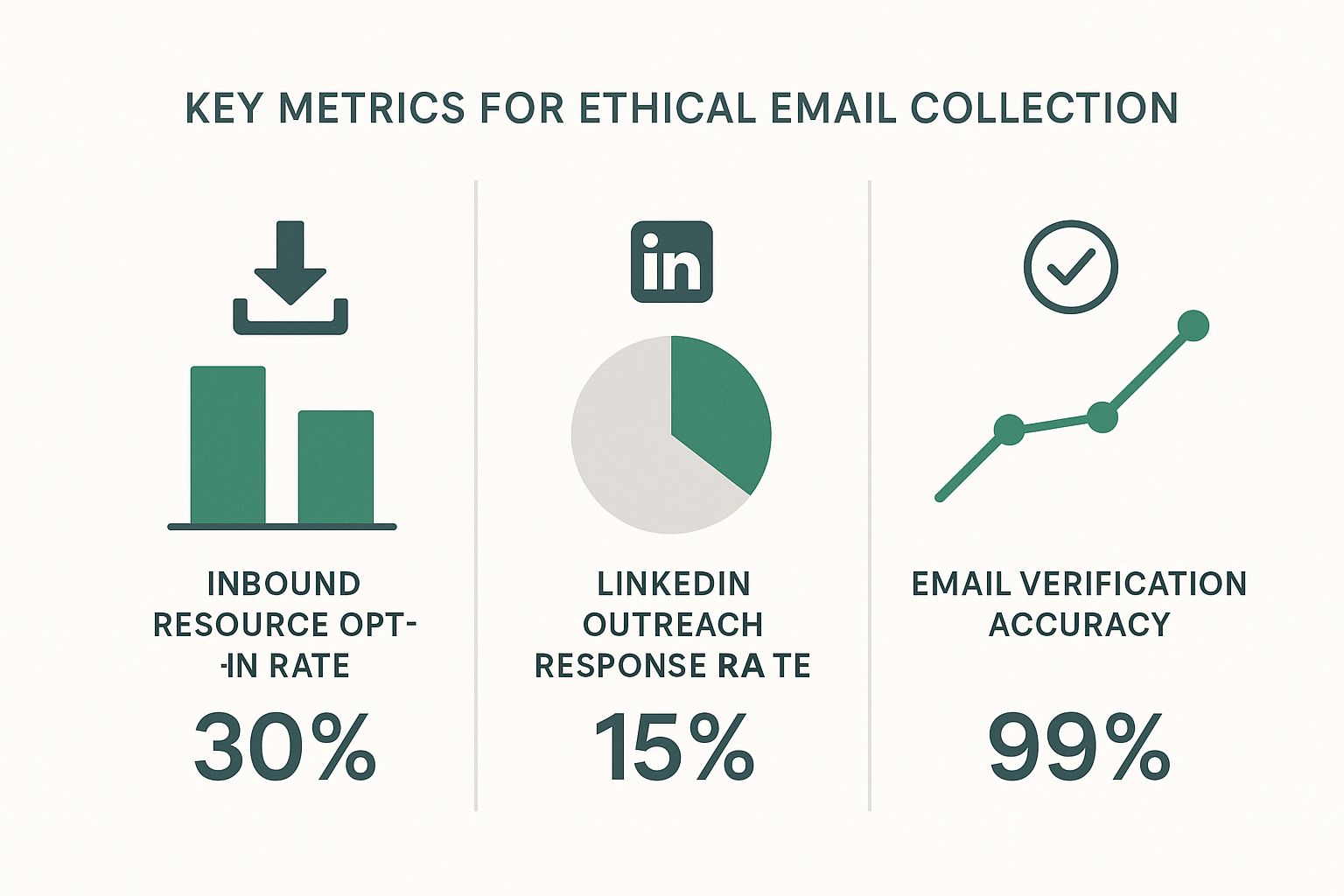
    Infographic about how to get email addresses for marketing

    As you can see, while inbound methods naturally pull in higher engagement, combining them with targeted outreach and solid verification creates a really powerful system for building your list.

    To give you a clearer picture, here's how different methods stack up against each other.

    Comparing Email Acquisition Methods

    Method Best For Effort Level Quality of Leads
    Inbound Lead Magnets Building a warm, engaged audience over time. Medium to High High
    Outbound Prospecting Targeting specific, high-value accounts and decision-makers. Medium Varies (High if targeted well)
    Networking Events Making personal connections and gathering direct contacts. High Very High
    Purchasing Lists (Not Recommended) Quick acquisition, but with major risks. Low Very Low

    Ultimately, a balanced approach using a mix of inbound and outbound tactics will give you the most sustainable results.

    Pivot to Proactive Outbound Prospecting

    While inbound marketing is busy building you a strong foundation, proactive outbound prospecting lets you go after specific accounts and decision-makers with surgical precision. The whole key is to be strategic and respectful, not spammy. For this, there's no better place to start than LinkedIn.

    Let's say you're a B2B SaaS company selling an analytics tool for project managers. Your goal is to connect with VPs of Operations at mid-sized tech companies. Instead of blasting out generic connection requests, you need a much sharper approach.

    Start by using LinkedIn's search filters to zero in on people who fit your ideal customer profile. You can filter by job title, industry, company size, and location to build a hyper-relevant list of prospects. This initial homework is non-negotiable—it ensures you’re only talking to people who can actually benefit from what you offer.

    Once you find a promising prospect on LinkedIn, you hit the next hurdle: finding their professional email address. This is where manual guesswork falls flat and a dedicated tool becomes a lifesaver.

    Use Smart Tools for Targeted Email Discovery

    Trying to find someone's email by hand is a massive time-sink, and you're often just guessing. A much better way is to use a specialized tool like the EmailScout Chrome extension. It plugs right into your browser, letting you find a verified email address with a single click, directly from a person's LinkedIn profile.

    Let's go back to our scenario. You've found a VP of Operations on LinkedIn who looks like a perfect fit. With the EmailScout extension installed, you just go to their profile, click the icon, and it instantly finds and shows their verified corporate email.

    This is a total game-changer for outbound sales and marketing. It takes all the friction and guesswork out of the equation, turning a manual scavenger hunt into a smooth, repeatable workflow. You end up spending less time digging and more time connecting.

    The process is incredibly simple:

    1. Identify Prospects: Use LinkedIn Sales Navigator or regular search to build your target list.
    2. Visit Their Profile: Head over to the individual's LinkedIn page.
    3. Find the Email: Click the EmailScout extension to instantly uncover their verified email.
    4. Save and Organize: Add the new contact and their email to your outreach list or CRM.

    For anyone who wants to go even deeper, our guide on how to build an email list covers additional strategies and best practices that complement this workflow.

    By combining the broad appeal of inbound with the precision of smart outbound prospecting, you create a balanced, powerful system to get email addresses for your marketing. This dual approach keeps your pipeline full with both warm, self-identified leads and hand-picked, high-value prospects, giving your campaigns all the fuel they need to succeed.

    Automate Email Discovery with Smart Tools

    Let’s be honest: manually searching for email addresses is one of the fastest ways to burn through your day. Digging through websites, sifting through social profiles, and running endless Google searches for a single contact is tedious and just doesn't scale. This is where you learn to work smarter, not harder, by bringing smart automation into your workflow.
    A person at a desk using a laptop with icons representing email automation.

    Think about a real-world scenario. You just got back from a big industry trade show. It was a huge success, and you have a spreadsheet with the names and companies of 100 promising leads. The old-school approach would mean blocking off the next few days for a mind-numbing scavenger hunt online.

    But instead of facing that manual grind, you can turn a multi-day project into a task that takes just a few minutes. This is exactly how you get email addresses for marketing at scale without sacrificing quality.

    From Manual Grind to Automated Enrichment

    The modern approach is to use a bulk email finder, a tool designed for this exact challenge. With a service like EmailScout, you can take that raw list of prospects and automatically enrich it with verified, accurate contact information.

    The process is refreshingly simple. Just format your spreadsheet into a CSV file with columns for the first name, last name, and company domain. Then, upload it directly into the tool’s Bulk Finder feature.

    In a matter of minutes, the system gets to work on your entire list. It systematically searches for and pins down the correct email addresses for each person, turning your basic spreadsheet into a powerful outreach list, ready to go.

    Understanding Confidence Scores for Smarter Outreach

    Once the tool processes your list, it doesn't just dump a bunch of emails on you. A critical feature you'll notice is a confidence score next to each result. This little number is a game-changer for prioritizing your outreach.

    Here’s a quick breakdown of what these scores usually mean:

    • High Confidence (e.g., 90-99%): The tool is almost certain this is the correct, deliverable email. These are your top-tier contacts to hit up first.
    • Medium Confidence (e.g., 60-89%): There's a solid chance this email is correct, but it might be a catch-all address or based on a common pattern that couldn't be 100% verified.
    • Low Confidence (e.g., below 60%): These are educated guesses. Approach these with caution to avoid hurting your sender reputation with a high bounce rate.

    By paying attention to these scores, you can segment your outreach intelligently. Kick off your campaign with the high-confidence contacts to get the best initial engagement and deliverability. For the lower-scoring ones, you might decide a little extra manual research is worth it before you hit send.

    This strategic prioritization is what separates efficient marketers from busy ones. Instead of treating every contact the same, you're using data to focus your energy where it will have the biggest impact, ensuring your first wave of emails reaches the right inboxes.

    Integrating Tools into a Seamless Workflow

    The real magic happens when you integrate these tools into your larger sales and marketing process. Finding the emails is just one piece of the puzzle. The next step is getting rid of the friction caused by manual data entry.

    Modern email finders like EmailScout are built to connect with the platforms you already use. This means you can often send the enriched data straight to your Customer Relationship Management (CRM) or email marketing platform.

    This creates a seamless lead generation machine:

    1. Acquire Leads: Gather company names and decision-makers from events, LinkedIn, or other sources.
    2. Enrich Data: Use a bulk finder to automatically discover verified email addresses.
    3. Sync Contacts: Push the enriched, high-confidence contacts directly into your CRM.
    4. Launch Campaigns: Immediately enroll these new contacts into your targeted outreach sequences.

    This closed-loop system pretty much eliminates the risk of human error from copy-pasting data and dramatically shrinks the time from lead identification to first contact. You're not just finding emails faster; you're acting on them faster, too. For a detailed comparison of different options, our guide on the best email finder tools offers a comprehensive look at the top solutions available.

    Ultimately, automating email discovery is about building a system that can grow with you. It frees you from the repetitive tasks, so you can focus on crafting compelling messages and building relationships—the work that truly drives results.

    Verify Emails to Protect Your Sender Reputation

    Sending an email campaign to a list you haven't cleaned is a massive gamble. Think of it like shipping expensive products without double-checking the delivery addresses first—it's wasteful, costly, and ultimately damages your brand's reputation with postal services.

    In the email world, those "postal services" are Internet Service Providers (ISPs) like Gmail and Outlook.

    When you fire off emails to invalid or dead addresses, they bounce back. A high bounce rate is one of the biggest red flags for ISPs. It signals that you might be a spammer using sloppy list-building habits, which can absolutely tank your sender reputation and future deliverability.

    The Anatomy of Email Verification

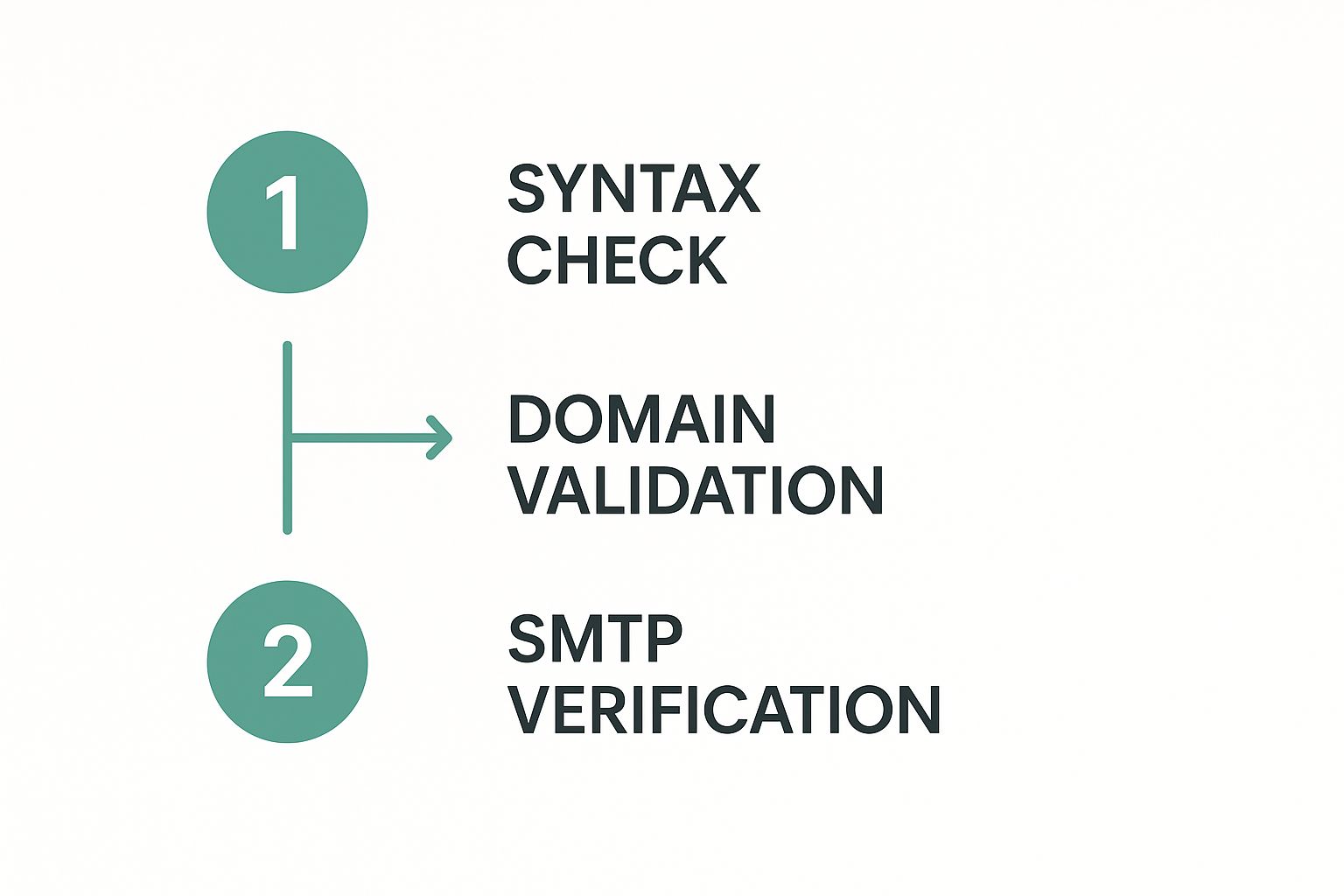
    So what’s actually going on when you verify an email address? It’s not just a quick check to see if the format looks right. A proper verification process is a sequence of technical checks running behind the scenes to confirm an inbox is real, active, and ready to receive mail.

    A solid verification tool will run through a few key steps:

    • Syntax Check: This is the first, most basic pass. It just makes sure the email follows the standard name@example.com format and doesn't have any weird characters or obvious typos.
    • Domain Validation: Next, the tool checks if the domain (example.com) is even real and has active mail servers set up to receive email. No point in going further if the domain itself is a dud.
    • SMTP Ping: This is where the magic happens. The system basically starts a "handshake" with the recipient's mail server without actually sending an email. This "ping" confirms whether that specific user account actually exists on that server.

    This multi-layered process is what separates a clean, effective list from one that’s going to get your domain flagged.

    A Practical Walkthrough with an Email Verifier

    Let’s make this real. Say you have a list of 500 contacts you pulled together from a networking event and some LinkedIn prospecting. Before you even dream of loading them into your campaign software, you need to run them through a verifier.

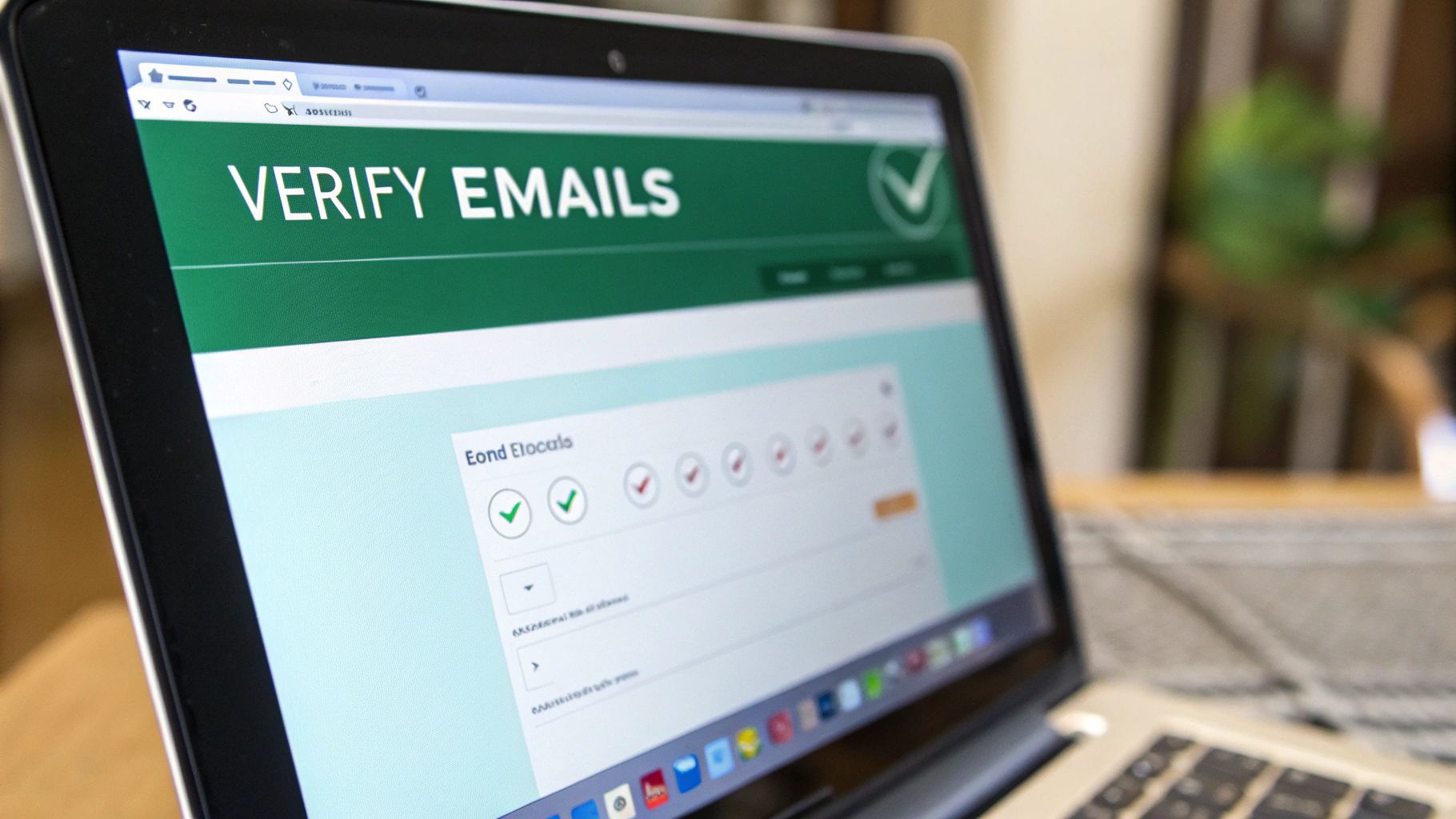
    Using a tool like EmailScout's verifier makes this painless. You just upload your list, usually as a CSV file. The platform then churns through each contact, running all the checks we just talked about.

    The output you get back isn't just a simple "valid" or "invalid" stamp. You get much richer feedback, like "deliverable," "risky" (maybe it's a catch-all server), or "undeliverable." This is the kind of detail that lets you make smart decisions instead of just guessing.

    If you really want to get into the weeds on this, our complete guide on email address verification breaks down every single step and why it matters for your campaigns.

    The Real-World Impact of Verification

    Cleaning your list isn't just some technical busywork; it has a direct, measurable impact on how your campaigns perform.

    I know of a B2B software startup that was getting killed on their cold outreach. Their initial campaigns had a painful bounce rate of around 12%, and their open rates were limping along below 20%. It was a mess.

    Frustrated, they made one simple change: they made pre-send verification mandatory for every list. No exceptions. They started running every batch of new contacts through a verifier before hitting send.

    The results were almost immediate:

    1. Bounce Rate Plummeted: Their bounce rate dropped from a scary 12% to less than 1% on their very next campaign.
    2. Open Rates Soared: With their sender reputation on the mend, their open rates jumped by 15% in just two months.
    3. Engagement Spiked: Because their emails were actually landing in real inboxes, they saw a huge lift in replies and demo requests.

    That small shift in their process turned their email outreach from a frustrating waste of time into a predictable way to get leads. Making pre-send verification a non-negotiable step is one of the most powerful things you can do to protect your most valuable digital asset: your sender reputation.

    Organize and Segment Contacts for High Impact Campaigns

    A flowchart showing email contacts being segmented into different campaign groups.

    Getting a list of fresh emails is a great start, but it's just raw potential. The real power comes from organizing that list. If you just blast the same generic message to everyone, you’re setting yourself up for low open rates and a flood of unsubscribes.

    The secret to making your marketing actually work is segmentation. It’s a simple concept: you slice your main email list into smaller, more focused groups based on what you know about them. This lets you stop sending one-size-fits-all emails and start delivering personalized content that actually connects with each group. It’s how you turn a list of names into a real source of revenue.

    Moving Beyond Basic Segmentation

    Good segmentation is way more than just sorting by location. To create campaigns that really land, you have to group your contacts by data that reflects who they are professionally, what they care about, and how they found you in the first place. The more detail you have, the more personal you can get.

    Here are a few powerful ways I like to segment contact lists:

    • By Job Title: You wouldn't talk to a CEO the same way you'd talk to a Marketing Manager. Grouping by title lets you adjust your tone and focus on the specific problems and goals that matter to their role.
    • By Industry: A software company selling to both healthcare and finance needs completely different messaging for each. When you segment by industry, you can use case studies, jargon, and examples that resonate with them.
    • By Company Size: A 10-person startup has wildly different needs than a 1,000-employee corporation. This simple filter helps you frame your offer as the perfect solution for their scale.
    • By Lead Source: Think about where you got the contact. Someone who signed up for your webinar is a much warmer lead than a cold prospect from LinkedIn. Tagging them by source helps you decide how direct or gentle your follow-up should be.

    For example, a digital marketing agency could create a segment of contacts from e-commerce companies. To that group, they might send a case study on boosting online sales with SEO. At the same time, they could send a completely different offer about local lead generation to another segment of brick-and-mortar businesses.

    Prioritizing List Hygiene and Compliance

    As you organize your list, you absolutely have to keep it clean and legal. This isn't optional.

    List hygiene is just the process of regularly clearing out dead-weight—inactive subscribers and bad email addresses. Cleaning your list keeps your bounce rate low, which protects your sender reputation and makes sure your emails actually get delivered.

    Equally important is playing by the rules. Following email marketing laws isn't just about avoiding hefty fines; it’s about building trust with your audience.

    Key Compliance Checkpoints

    • CAN-SPAM Act (U.S.): This law means you must include your physical address in every email, have a clear unsubscribe link, and honor opt-out requests immediately.
    • GDPR (EU): If you have contacts in the European Union, the General Data Protection Regulation demands you get clear, explicit consent before sending them marketing emails. You also need to be able to prove they opted in.

    Make these practices part of your workflow from day one. An organized, clean, and compliant list is the bedrock of every successful email campaign you’ll ever run.

    Common Questions About Finding Email Addresses

    As you start pulling together email lists for your marketing campaigns, you're bound to run into a few tricky questions. Figuring out the legal and strategic details is key to building an outreach process that actually works without getting you blacklisted.

    Let's clear up some of the most common concerns right now.

    Is It Legal to Email People I Find Online?

    This is the big one, and the short answer is: it depends. The crucial factor is who you're emailing—another business (B2B) or a regular consumer (B2C).

    For B2B outreach, regulations like the CAN-SPAM Act in the U.S. often operate under the idea of “legitimate interest.” In simple terms, this means you can generally email a business contact if your product or service is truly relevant to what they do for a living.

    But this isn't a free-for-all. Your outreach still has to play by some non-negotiable rules:

    • Offer Real Value: Don't just send a lazy sales pitch. Your message needs to offer a genuine solution or a useful insight.
    • Be Upfront: Make it crystal clear who you are and what your company does. No mystery games.
    • Provide a Clear Opt-Out: Every single email must have an obvious, one-click way for them to say "no thanks" and unsubscribe.

    How Many Follow-Up Emails Are Too Many?

    This is where a lot of people go wrong. Bombarding someone with follow-ups is the fastest way to get your emails sent straight to the spam folder.

    A good rule of thumb for cold outreach is a sequence of 3-4 emails spaced out over a few weeks. Anything beyond that usually just annoys people and can start to tarnish your brand's reputation.

    The real secret is making every follow-up different. Instead of just saying "Hey, just checking in," bring something new to the table each time—a relevant case study, a helpful article, or a new idea they hadn't considered.

    What Is a Realistic Bounce Rate for a Cold Campaign?

    When you're running a cold campaign with a list you've sourced and verified yourself, you should aim for a bounce rate under 5%. This is a healthy target that tells you your list quality is solid.

    If you see your bounce rate climbing over 5%, that's a red flag. It’s a loud-and-clear signal that something is wrong with your list's accuracy or your verification process is broken. You need to fix it immediately to protect your sender reputation.


    Ready to build a high-quality, verified email list the smart way? EmailScout gives you the tools to find, verify, and organize contacts for your marketing campaigns, all with a single click. Start finding unlimited emails for free at https://emailscout.io.


  • How to Find Email by LinkedIn The Smart Way

    How to Find Email by LinkedIn The Smart Way

    Let's be honest: generic cold outreach is a complete waste of time. If you really want to connect with someone, you need to find their email directly from their LinkedIn profile. This one simple move turns a shot-in-the-dark message into a targeted, personal conversation. It's how you get out of the spam folder and start building actual professional relationships.

    Why Finding Emails on LinkedIn Is a Game Changer

    LinkedIn is so much more than a digital resume cabinet. It's a living, breathing ecosystem of professional activity, making it an absolute goldmine for smart prospecting.

    The sheer scale of the platform is staggering. In 2025, LinkedIn is home to over 1.2 billion registered members and saw 1.77 billion website visits in a single month. This isn't just about big numbers; it shows how deeply engaged its user base is. As Sprout Social's LinkedIn statistics confirm, it's the undisputed hub for professional networking.

    This constant activity is the perfect backdrop for your outreach. When you find an email through LinkedIn, you're not just grabbing a contact detail—you're getting critical context.

    The Power of Contextual Outreach

    Imagine sending an email where you can reference a recent article they shared, a project they just completed, or a connection you both have in common. All of a sudden, your message isn't "cold" anymore. It's relevant, timely, and personal.

    This kind of contextual approach has a ridiculously higher chance of getting a response compared to a generic template blasted out to a faceless list. The difference is that your personalization is grounded in real, professional information you found right on their profile.

    The real value isn't just the email address itself, but the context you gain from their profile. This context is what turns a cold email into a warm conversation starter.

    Building Relationships Beyond the Platform

    While LinkedIn messages have their place, they can feel a bit transactional and easily get buried in a sea of notifications. Email is a more direct and professional channel for a real conversation.

    It gives you the space for a more detailed message and quietly signals that you've done your homework. It’s a subtle but powerful way to show you’re genuinely interested.

    Here’s exactly why this strategy works so well:

    • Hyper-Targeted Communication: You can tailor your message based on their specific role, accomplishments, and professional interests you see on their profile.
    • Increased Credibility: Referencing their LinkedIn activity shows you’ve invested time in understanding who they are, which builds immediate trust.
    • Ethical Foundation: This is about quality, not quantity. You're not spamming; you're starting meaningful conversations with the right people for the right reasons.

    Ultimately, using LinkedIn to find emails is a strategic shift. It's about building a foundation for real professional relationships, one thoughtful, context-aware email at a time.

    Your Pre-Search Checklist for Success

    A professional preparing a checklist for a successful project launch, symbolizing readiness for LinkedIn outreach.

    Before you jump in and start hunting for emails, taking a few minutes to prepare can make a massive difference in your results. I’ve seen it time and again: diving into LinkedIn without a clear plan is like sailing without a map. You might find something, but it's rarely what you were actually looking for.

    The most effective outreach always starts with knowing exactly who you're trying to reach. A little bit of prep work here will save you hours of wasted effort and lead to much stronger connections.

    Define Your Ideal Customer Profile

    First things first, you need to lock down your Ideal Customer Profile (ICP). This is way more than just a job title. It's about getting into the nitty-gritty of who gets the most value from what you offer. Without a clear ICP, you’ll burn through credits and time chasing leads who are a poor fit from the start.

    Think about details like:

    • Industry: Which specific sectors are crying out for your solution?
    • Company Size: Are you targeting scrappy startups with 10 employees or enterprise giants with 10,000?
    • Job Title & Seniority: Who's the real decision-maker? A VP of Marketing, a CTO, or a hands-on project manager?
    • Geography: Is your focus local, national, or global?

    Nailing your ICP makes every search sharp and purposeful. It keeps you from getting sidetracked by profiles that seem interesting but don't actually move the needle for your business goals. For those aiming to build large, targeted lists, our guide on how to scrape thousands of LinkedIn contacts from Google search pairs perfectly with a well-defined ICP.

    Polish Your Own LinkedIn Profile

    Think about it: what’s the first thing someone does when they get a cold email from a stranger? They look you up. A half-baked or unprofessional LinkedIn profile can sink your credibility before they even think about hitting "reply."

    Your LinkedIn profile is your digital first impression. Make sure it represents you as a credible, professional, and trustworthy contact. A strong profile supports your outreach efforts and encourages replies.

    Give your own profile a quick audit. Does it have these essentials?

    • Professional Headshot: A clear, friendly photo is non-negotiable. No exceptions.
    • Compelling Headline: Don't just list your job title. Explain the value you bring to the table.
    • Complete "About" Section: This is your chance to tell a story. Highlight your expertise and how you solve problems for people.

    Get Your Toolkit Ready

    Alright, last step before the fun begins. Let's get your primary tool installed and ready to go. The EmailScout Chrome extension is the engine that will power your search, so you'll want it locked and loaded. The good news is it takes less than a minute.

    Just head over to the Chrome Web Store, search for EmailScout, and click "Add to Chrome." Once it's installed, I highly recommend pinning the extension to your browser's toolbar for easy access. That one simple click turns your browser into a serious prospecting machine, ready to find an email from any LinkedIn profile you land on.

    Using EmailScout to Find Emails on LinkedIn

    Alright, you've done the prep work. Now it’s time to put the theory into practice and see just how easy it is to pull an email address right from a LinkedIn profile using a tool built for the job.

    We'll walk through the entire process, starting with snagging a single email and then scaling up to build entire prospect lists without breaking a sweat.

    What I love about using a browser extension like EmailScout is how it slips right into my existing workflow. I don't have to jump over to another tab or manually copy-paste names into a different tool. The contact info I need pops up exactly where I need it, right when I need it.

    Finding an Email on a Single Profile

    Let's kick things off with a classic scenario. You’ve found a key decision-maker you need to talk to—let's say it's the VP of Marketing at a company on your target list. You land on their LinkedIn profile, and your mission is to get their direct professional email to start a real conversation.

    Once EmailScout is installed, this part is almost laughably simple. A small EmailScout button appears directly on their profile page. All it takes is one click.

    The extension immediately gets to work, checking its data sources to find and verify the correct email. In just a few seconds, a verified email appears, ready for you to copy or save.

    Here’s exactly what that looks like in action:

    Screenshot from https://www.emailscout.com/linkedin-email-finder

    As you can see, the tool just becomes part of the LinkedIn interface. It shows you the verified email with a single click, completely killing the guesswork and tedious manual searches.

    This one-click process completely changes the game for prospecting speed. What could have easily eaten up several minutes of searching and guessing email patterns now takes less than five seconds. That means you get to spend your time where it counts: writing a killer outreach message.

    Scaling Up with Bulk Email Finding

    Finding one email is great, but what happens when you need to build a list of 50 or 100 prospects? Clicking into each profile one-by-one would be a nightmare. This is where the bulk-finding feature, used directly on a LinkedIn search results page, becomes an absolute game-changer.

    Imagine you’ve just used LinkedIn’s search filters to build a perfect, hyper-targeted list of leads. Maybe you searched for "Software Engineers" in "Austin, Texas" working at companies with 50-200 employees. Instead of opening every single profile, EmailScout lets you extract the emails from the entire search results page in one go.

    The ability to find emails in bulk directly from a search page is what separates casual prospecting from scalable lead generation. It allows you to build targeted lists in minutes, not hours.

    To get this done, you just run your search on LinkedIn and then click the EmailScout extension icon. It scans all the visible profiles on that page, finding and verifying their emails simultaneously. I've found this feature to be incredibly powerful for:

    • Sales Teams: Quickly building a pipeline of qualified leads for a new campaign.
    • Marketers: Creating a custom audience for a targeted webinar or content promotion.
    • Recruiters: Sourcing a whole slate of potential candidates for a specific role.

    The whole process is built for efficiency. While the tool does its thing in the background, you can keep refining your search or start prepping your outreach sequence. Once it’s done, you have a clean, ready-to-use list of verified emails. This is how you find email addresses on LinkedIn at scale and turn a simple search into a powerful lead-gen asset.

    Comparing Manual Methods to Automated Tools

    So, when it comes to grabbing an email from a LinkedIn profile, you really have two ways to go about it. You can either put on your detective hat and do the legwork yourself, or you can let a specialized tool handle the heavy lifting. Both can get you an email address, but the time, effort, and quality of what you find are worlds apart.

    The Old-School Manual Hunt

    Let's start with the classic, hands-on approach. This usually means clicking into someone's profile, heading straight for the "Contact Info" section, and crossing your fingers. More often than not, it's empty.

    When that fails, you're left playing the guessing game. You start testing common email patterns like first.last@company.com or maybe f.last@company.com. While this method costs nothing but your time, it's a real shot in the dark. It’s a low-odds gamble that gets incredibly frustrating, especially with bigger companies that have unpredictable email formats.

    The Speed and Scale of Automation

    This is where automated tools like EmailScout completely change the game. Instead of a manual treasure hunt that might lead nowhere, you get a direct answer in a single click. These tools tap into massive databases and use smart algorithms to pinpoint the correct professional email address in just a few seconds.

    The biggest win here is scale. Finding ten emails manually could easily eat up an hour of your day. With an automated tool, you could pull a hundred verified emails in a fraction of that time, right from a LinkedIn search results page.

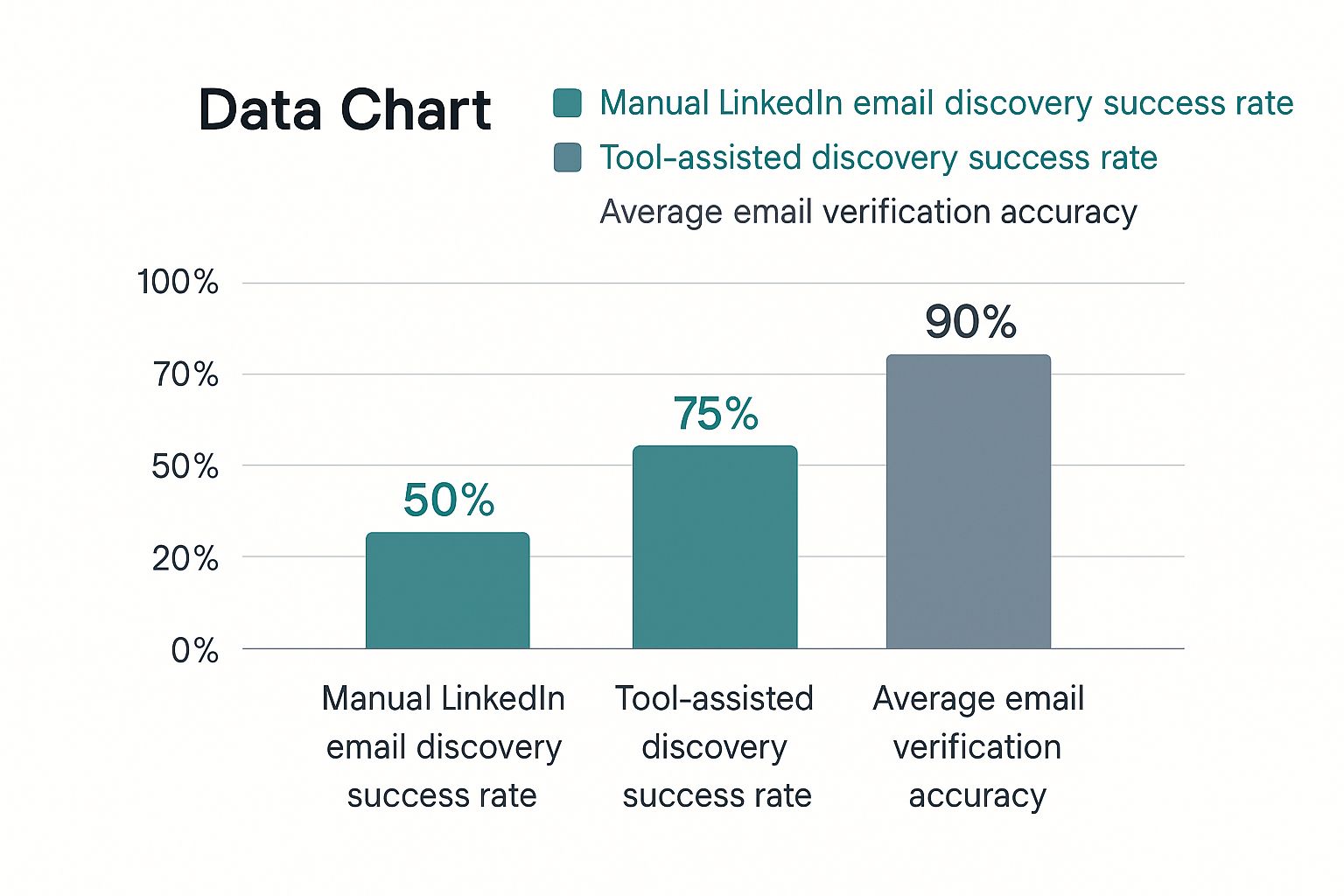
    This infographic lays out the performance gap pretty clearly.

    Infographic comparing the success and accuracy rates of manual vs. tool-assisted LinkedIn email discovery.

    The numbers don't lie. Automation gives you a massive edge, not just in finding an email but in knowing it's actually accurate—which is everything for protecting your sender reputation.

    Why Accuracy is Non-Negotiable

    This is where the two methods really diverge. A manually guessed email is exactly that: a guess. Sending emails to bad addresses racks up your bounce rate, which is a huge red flag for email providers. Do it too often, and your domain's reputation gets torched, landing your future emails in the spam folder.

    Good automated tools, on the other hand, almost always include a verification step. They don't just find a possible email; they confirm it's active and ready to receive messages. This isn't a small detail—it's a critical distinction.

    A quick comparison makes the choice pretty clear.

    Email Finding Methods: Manual vs. Automated

    Factor Manual Methods Automated Tool (EmailScout)
    Speed Slow and tedious; minutes per contact Nearly instant; seconds per contact
    Accuracy Low; based on guesswork and patterns High; uses verification to confirm deliverability
    Scalability Very limited; not practical for large lists Excellent; can find hundreds of emails quickly
    Effort High; requires focused, repetitive work Minimal; often just a single click
    Bounce Rate High risk of bounces, damaging sender score Low risk of bounces, protecting sender score
    Cost Free (in terms of money, not time) Typically requires a subscription, but with high ROI

    Ultimately, using a tool like EmailScout isn't just about saving time; it's about protecting your outreach efforts from the damage that bad data can cause.

    For a single, must-have contact, a manual search might be worth a shot. But if you're serious about building a sales pipeline or running any kind of outreach at scale, an automated tool is essential. If you’re looking at your options, our breakdown of the best free email finder tools is a great place to start. The right tool turns a time-wasting chore into a real strategic advantage.

    Ethical Outreach and Best Practices

    A professional writing a personalized outreach email on a laptop, with a focus on ethical practices and building trust.

    Okay, so you've got the email address. That's the easy part. The real work begins now, and how you use that contact information is what separates a genuine professional from a run-of-the-mill spammer.

    Getting someone's email from their LinkedIn profile is a powerful tool, but it comes with responsibility. Your entire outreach strategy has to be built on a solid foundation of respect, genuine value, and—this is a big one—compliance.

    That means you have to respect privacy and follow the rules of the road, like GDPR and CAN-SPAM. Think of these less as legal hoops to jump through and more as a playbook for building trust. The core principle is simple: don't ever add someone to a marketing list without their explicit permission.

    Crafting Your First Message

    That first email is your one and only shot to make a good impression. If you send a generic, copy-pasted message, you’re practically guaranteeing a one-way trip to their trash folder. Your goal is to show you've actually done your homework.

    Here are a few things that are absolutely non-negotiable:

    • Get Personal (The Right Way): Reference something specific, like an article they just published, a recent promotion you saw, or a connection you have in common. This shows you see them as a person, not just another name on a list.
    • Offer Clear Value: Don't beat around the bush. Tell them what's in it for them, right away. How can you solve a problem they have or help them hit a goal?
    • Keep It Short and Sweet: Nobody has time for a novel. Get straight to the point in a clear, concise, and professional way.

    When you do this, your message stops being an annoying interruption and starts feeling like a welcome opportunity. It's about starting a real conversation, not just firing off a sales pitch.

    Navigating Data Privacy and Reputation

    One of the biggest hurdles in finding emails from LinkedIn is the massive gap between the number of users on the platform and how few of them make their contact info public. In places with strict data protection laws, getting too aggressive with your tactics can seriously damage your reputation. Ethical networking isn't just nice—it's critical for long-term success.

    Protecting your sender reputation is just as crucial as finding the email itself. High bounce rates from unverified addresses can get your domain flagged as spam, making all future outreach efforts invisible.

    This is exactly why you must verify every single email before you hit send. A tool that automatically confirms an address is deliverable is your best friend here. It protects your reputation and makes sure your carefully crafted message actually lands in their inbox.

    For a deeper dive, check out our guide on how to validate an email address. At the end of the day, building trust and protecting your reputation isn't just good ethics—it’s the secret to getting better response rates and building relationships that actually mean something.

    Answering Your Top Questions About Finding Emails on LinkedIn

    Even with a great tool in your corner, you've probably got a few questions. That's a good thing. Let's walk through the most common ones people ask when they start hunting for emails on LinkedIn, so you can move forward feeling completely confident.

    Honestly, knowing the rules of the road is just as important as finding the email itself. Getting these details straight from the beginning ensures your outreach is both effective and professional.

    Is It Actually Legal to Use Emails I Find on LinkedIn?

    This is the big one, and the short answer is yes, as long as you're smart about it. Finding a business email address that’s publicly available isn’t the issue. Where people get into trouble is how they use it.

    Your responsibilities kick in the moment you hit send. You have to comply with regulations like GDPR and CAN-SPAM. This means your outreach must be targeted, professional, and relevant to the person you're contacting. Most importantly, you always have to give them a crystal-clear way to opt out. Never, ever add someone to a marketing newsletter without their direct permission.

    The legality of using a found email really comes down to ethical outreach. Your goal should be to start a one-on-one professional conversation, not to dump someone into a mass-marketing funnel.

    How Accurate Are Tools Like EmailScout, Really?

    Accuracy is everything. Firing off emails to bad addresses racks up your bounce rate, and that’s a fast way to wreck your domain's sending reputation. Before you know it, all your messages are landing in the spam folder.

    Email finders definitely vary in quality, but the top-tier solutions like EmailScout live and die by their accuracy. They don't just take a wild guess based on name patterns. Instead, they cross-reference a ton of different data sources and run real-time verification checks to make sure an email is active before they give it to you. While no tool on earth can promise 100% accuracy on every single search, a quality tool gives you a success rate that blows manual guesswork out of the water and keeps your sender score safe.

    What if I Just Can't Find an Email for Someone?

    It's going to happen. Sometimes an email just isn't out there to be found. But when you hit a dead end, don't just throw in the towel. You've got a few other solid plays you can run.

    • Engage directly on LinkedIn. Send a personalized connection request. If they accept, follow up with a genuine, non-salesy message to build a little rapport before you suggest taking the chat over to email.
    • Look for a colleague. See if you can find the email for someone else in their department. A polite note asking to be pointed in the right direction often works wonders.
    • Use your mutual connections. This is the gold standard. If you know someone in common, ask for a warm introduction. It’s hands-down the most powerful way to get a response.

    Ready to stop guessing and start making real connections? EmailScout lets you find verified email addresses directly from any LinkedIn profile in just one click. Try EmailScout for free today and see what a difference it makes.

  • 6 Powerful Cold Email Example Templates for 2025

    6 Powerful Cold Email Example Templates for 2025

    In a world of overflowing inboxes, the line between a deleted email and a game-changing opportunity is razor-thin. Standard, generic outreach is dead. To succeed, you need more than just a template; you need a strategy. This guide breaks down six battle-tested cold email frameworks designed to cut through the noise and command attention.

    We will move beyond just showing you a cold email example; we'll dissect the psychology behind why they work. Each section offers a deep strategic analysis and actionable takeaways you can apply immediately to your own campaigns. Forget the frustration of sending emails into the void. The difference between a 0.5% reply rate and a 15% reply rate isn't luck, it's the framework.

    This article is your playbook for turning cold outreach into a predictable source of leads and partnerships. You will learn how to structure your message for maximum impact by exploring proven models, including:

    • The Problem-Agitation-Solution (PAS) Formula: Tapping into a prospect's core pain points.
    • The Mutual Connection Referral: Leveraging shared relationships for instant credibility.
    • The Before-After-Bridge (BAB) Method: Painting a clear picture of transformation.
    • The Value-First Teaching Email: Offering immediate insight to build trust.
    • The Personalized Compliment Approach: Using genuine praise to open doors.
    • The Social Proof and Curiosity Email: Creating intrigue with powerful results.

    By the end, you'll have a complete set of tools to craft compelling emails that don't just get opened, they get replies and start meaningful conversations. Let's transform your outreach from a shot in the dark to a predictable pipeline of opportunities.

    1. The Problem-Agitation-Solution (PAS) Cold Email

    The Problem-Agitation-Solution (PAS) framework is a classic copywriting formula that translates with powerful effect into cold email outreach. Instead of leading with your product or service, this approach focuses entirely on the recipient's world. It works by first identifying a highly relevant pain point, then amplifying the negative consequences of that problem, and finally, presenting your solution as the most logical and effective resolution.

    This method is highly effective because it taps into a fundamental psychological trigger: humans are more motivated to avoid pain than to gain pleasure. By first establishing common ground around a shared problem, you build instant rapport and demonstrate that you understand their challenges. This makes your eventual pitch feel less like a sales attempt and more like a helpful suggestion.

    The Strategic Breakdown of PAS

    The PAS framework is more than a simple template; it's a strategic sequence designed to guide a prospect from a state of passive awareness to active interest. It’s a perfect cold email example for audiences who may not be actively searching for a solution but are definitely experiencing the symptoms of a problem.

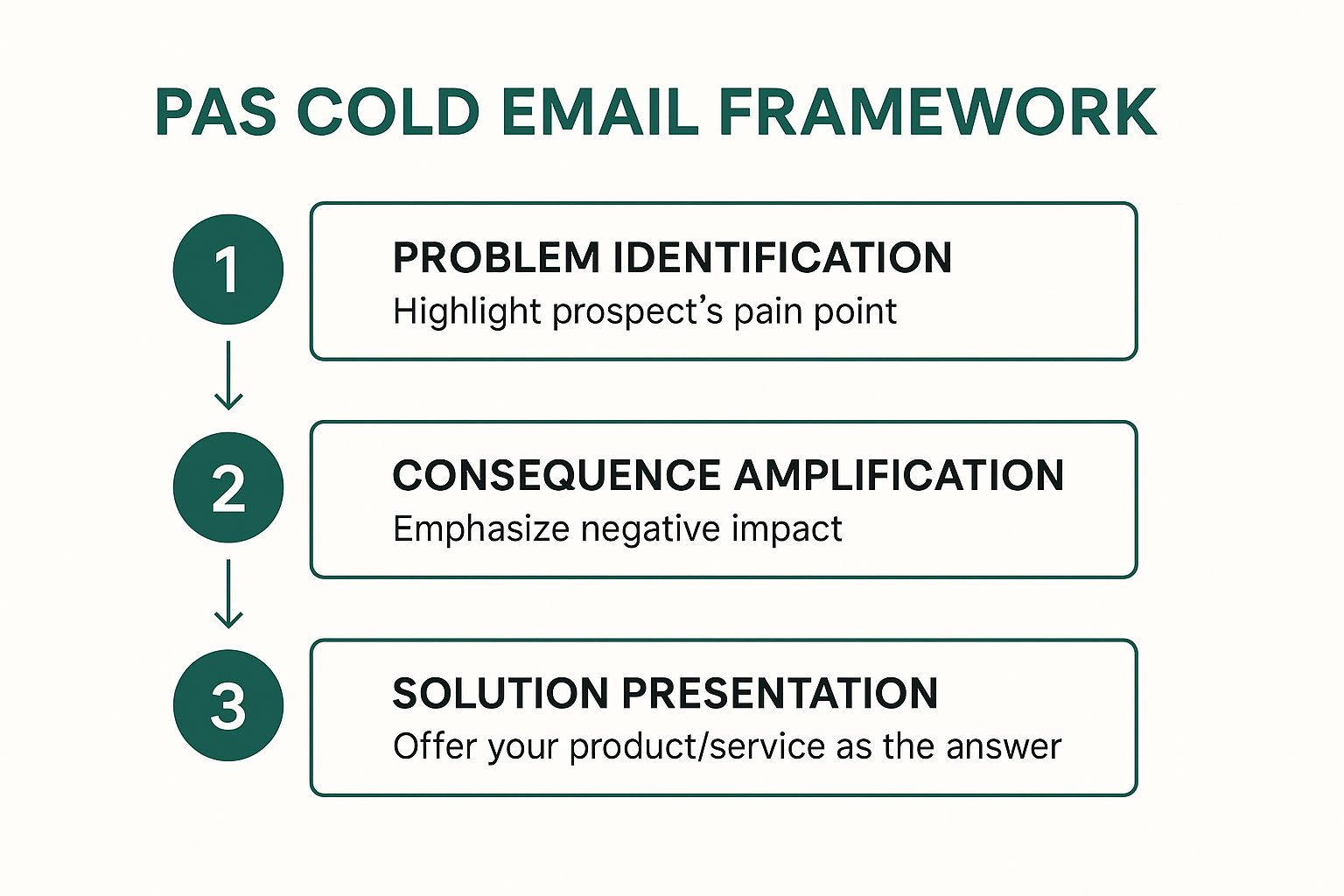
    • Problem: Start by clearly and concisely stating a specific problem you know your target audience faces. This requires diligent research. For instance, instead of saying "trouble with marketing," a more effective problem statement would be, "Noticing that your e-commerce brand's Cost Per Acquisition on Meta ads has increased by over 30% this quarter?"
    • Agitate: This is where you gently twist the knife. The goal is to connect the problem to real-world, negative business outcomes. This step highlights the consequences of inaction. For example, "This often leads to squeezed profit margins and forces a choice between cutting ad spend or sacrificing profitability, both of which stall growth."
    • Solution: Now, you introduce your product or service as the clear, simple answer. The focus should be on the outcome, not the features. Instead of listing software capabilities, say, "Our clients use our AI-powered ad tool to cut their CPA by an average of 40% in the first 60 days, letting them scale their ad spend profitably."

    Visualizing the PAS Framework

    The power of this framework lies in its logical, step-by-step flow, which guides the prospect's thinking from problem to solution. The following infographic illustrates this simple yet highly effective three-step process.

    Infographic showing key data about The Problem-Agitation-Solution (PAS) Cold Email

    This visualization highlights how each stage builds upon the last, creating a compelling narrative that naturally positions your offer as the hero of the story.

    When to Use the PAS Model

    This model is exceptionally powerful when you have a deep understanding of your ideal customer's pain points. It is particularly well-suited for:

    • Targeting niche industries: When you can identify a specific, pervasive challenge within a particular vertical (e.g., supply chain inefficiencies for manufacturers).
    • Introducing disruptive solutions: If your product solves a problem people have accepted as "the cost of doing business," PAS can reframe it as an urgent, solvable issue.
    • Audiences with clear performance metrics: Roles like HR managers (employee retention rates), marketing heads (ad performance), or operations leaders (efficiency metrics) are perfect for this data-driven approach.

    By focusing on the prospect's pain first, the PAS framework ensures your email earns their attention and positions your solution as an indispensable asset rather than just another product.

    2. The Mutual Connection Referral Email

    The Mutual Connection Referral Email is one of the most effective ways to bypass the "cold" in cold outreach. This approach leverages a shared professional relationship, a mutual acquaintance, or a common background to immediately establish a foundation of trust and credibility. Instead of appearing as a random stranger in the inbox, you arrive with an implicit endorsement from a trusted source, which dramatically increases your chances of getting a positive response.

    This method works because it taps into the power of social proof and referral psychology. A recommendation, even a soft one, from someone the recipient knows and respects, instantly lowers their guard. It’s a powerful strategy that transforms a standard outreach into a warm introduction, making your message feel more like a friendly tip and less like a sales pitch. This makes it an incredibly powerful cold email example for breaking into well-guarded networks.

    The Mutual Connection Referral Email

    The Strategic Breakdown of a Referral Email

    A referral email's success hinges on its ability to quickly and clearly establish the mutual connection and transition smoothly into your reason for reaching out. It's less about a formula and more about leveraging a human connection authentically. This approach is a cornerstone of effective networking and is central to many modern sales prospecting techniques. You can learn more about how this fits into a broader outreach strategy and explore other sales prospecting techniques on emailscout.io.

    • The Opener: Lead immediately with the mutual connection's name in the subject line or the first sentence. For example: "Subject: Introduction via [Mutual Connection's Name]" or "Hi [Prospect Name], [Mutual Connection's Name] suggested I get in touch."
    • Contextualize the Connection: Briefly explain your relationship with the mutual connection. This adds another layer of credibility. A simple line like, "I've been working with Jane on her marketing strategy for the past year," is much more effective than just name-dropping.
    • The Ask: State your purpose clearly and concisely. Since you've already established trust, you can be more direct. For example, "She mentioned you were looking to improve your team's project management workflow, and I had a few ideas I thought would be helpful."

    Visualizing the Referral Framework

    The power of this framework comes from its simplicity and its reliance on a trusted third party to bridge the gap. The following infographic breaks down the core components that make this approach so effective.

    Infographic showing key data about The Mutual Connection Referral Email

    This visualization shows how the mutual connection acts as a critical bridge, turning a cold outreach into a warm, trusted introduction from the very first line.

    When to Use the Referral Model

    This model is your go-to strategy whenever a mutual connection exists, no matter how distant it may seem. It is especially powerful for:

    • High-Value Targets: When trying to reach C-level executives or key decision-makers who have strong gatekeepers and crowded inboxes.
    • B2B Partnerships and Sales: Ideal for forging strategic alliances or selling high-ticket services where trust is a primary decision-making factor.
    • Networking and Career Advancement: Leveraging alumni networks or past colleagues is a classic and highly effective way to open doors for new opportunities.

    Before using this method, always ask your mutual connection for permission to use their name. This not only shows professional courtesy but also gives them a heads-up, strengthening the referral if the prospect decides to verify.

    3. The Before-After-Bridge (BAB) Email

    The Before-After-Bridge (BAB) framework is a powerful storytelling technique that leverages the prospect's aspirations. Instead of focusing solely on pain points, this model paints a vivid picture of two distinct worlds: the prospect's current, less-than-ideal reality (Before) and their desired, successful future (After). Your product or service is then introduced as the simple, direct path connecting these two states (the Bridge).

    This method excels because it taps into the human desire for transformation and progress. By articulating a future state that aligns with the prospect's goals, you shift the conversation from fixing a problem to achieving an ambition. This makes your outreach feel less like a sales pitch and more like a partnership in their success.

    Infographic showing key data about The Before-After-Bridge (BAB) Email

    The Strategic Breakdown of BAB

    The BAB framework guides a prospect on a journey from their current challenges to a future of desired outcomes. It's a fantastic cold email example for services or products that deliver a clear and measurable transformation, making it ideal for inspiring action rather than just solving an immediate issue.

    • Before: Start by describing their current situation in a way that shows you understand their world. Use language and metrics they recognize. For example, "Right now, your team likely spends 10+ hours a week manually reconciling project data across Asana, Slack, and your CRM."
    • After: Paint a picture of what their world could look like. This should be specific, aspirational, and focused on tangible benefits. For instance, "Imagine a world where all that data is automatically synced into a single dashboard, giving you a real-time view of project profitability and freeing up your team to focus on high-value tasks."
    • Bridge: This is where you concisely introduce your solution as the vehicle for this transformation. The key is to present it as the logical link between Before and After. For example, "That's exactly what our integration platform does. We connect your tools in under an hour, creating the unified workflow you're looking for."

    Visualizing the BAB Framework

    The strength of this framework is its clear, linear narrative that appeals to a prospect's ambition. It creates a compelling story where the prospect is the hero and your solution is the tool that enables their triumph. The following infographic illustrates this simple yet highly effective three-step process.

    The Before-After-Bridge (BAB) Email

    This visualization highlights how the framework creates a gap between the prospect's current reality and their potential future, positioning your offer as the essential "bridge" they need to cross it.

    When to Use the BAB Model

    The BAB model is most effective when your solution provides a clear, demonstrable transformation. It's especially well-suited for:

    • Consulting and Coaching Services: When you are selling expertise that leads to personal or business transformation (e.g., a fitness coach helping executives improve their health).
    • SaaS and Technology Products: If your software automates a manual process or provides new capabilities that unlock significant efficiency gains (e.g., workflow optimization).
    • High-Value B2B Services: For offerings that help businesses scale, increase revenue, or fundamentally change how they operate (e.g., a marketing agency promising to double lead generation).

    By focusing on the aspirational 'After' state, the BAB framework turns a simple outreach into an inspiring vision, compelling prospects to learn how you can help them achieve their goals.

    4. The Value-First Teaching Email

    The Value-First Teaching Email flips the traditional sales model on its head. Instead of asking for a meeting or a sale, this approach focuses on providing genuine, actionable value to the recipient with no immediate expectation of reciprocation. It operates on the principle of generosity, establishing your credibility and authority by teaching the prospect something useful about their own industry or challenges.

    This method is highly effective because it immediately changes the dynamic from a sales pitch to a professional consultation. By offering a valuable insight, a new statistic, or a helpful tip, you demonstrate your expertise and build trust before ever mentioning your product or service. The goal is to make the recipient think, "This person really knows what they're talking about."

    The Strategic Breakdown of Value-First

    The Value-First Teaching email is a long-term play, designed to build a relationship and position you as a go-to resource. This cold email example is perfect for winning over skeptical or high-value prospects who are tired of generic sales pitches. It’s about giving before you ask.

    • Lead with an Insight: Start by sharing a valuable piece of information. This could be a new industry trend, a surprising statistic from a recent report, or a common mistake you see others in their role making. For example, "Saw a recent report that B2B SaaS companies using interactive demos in their outreach are seeing a 2x increase in meeting booked rates."
    • Connect it to Their World: Briefly explain why this insight matters specifically to them. Make the connection clear and direct. For example, "Given your role leading sales development at [Company Name], I thought this might be a relevant tactic for hitting your Q4 targets."
    • Offer Without an Ask: The key is to provide the value freely. Instead of asking for a meeting, you simply offer the information. The call-to-action is subtle, often just your name and title, implying that you are the source of this valuable knowledge. A simple closing like, "Hope this helps," is often all that's needed.

    Visualizing the Value-First Framework

    The power of this framework lies in its selfless, educational approach, which builds a foundation of trust and authority before any sales conversation begins.

    This visualization shows how leading with genuine value creates a positive impression, differentiating you from the competition and making future outreach more welcome.

    When to Use the Value-First Model

    This model is a powerful strategy when you are playing the long game and want to establish a reputation as a trusted advisor, not just a vendor. It is particularly well-suited for:

    • Targeting senior executives: High-level decision-makers value their time and appreciate concise, high-impact insights over a hard sell.
    • Complex or high-ticket sales: When the sales cycle is long and requires significant trust and education, this approach lays the perfect groundwork.
    • Highly competitive markets: In a crowded inbox, providing pure value is the best way to stand out and earn the recipient's attention for future conversations.

    By prioritizing the prospect's education over your own sales agenda, the Value-First Teaching email builds a strong foundation of trust that can lead to more meaningful and successful business relationships.

    5. The Personalized Compliment and Insight Email

    The Personalized Compliment and Insight approach is a sophisticated cold email strategy that pivots on genuine, well-researched admiration. Instead of starting with a problem or your product, this method opens with a specific and authentic compliment about the prospect's recent work, an award, a company milestone, or even a insightful piece of content they published. This immediately disarms the recipient, creates a positive emotional connection, and proves you’ve invested time in understanding their world.

    This technique is effective because it moves beyond generic flattery. It demonstrates a high level of personalization and respect, making the recipient more receptive to the subsequent insight or value proposition. By leading with a sincere compliment, you shift the dynamic from a cold pitch to a peer-to-peer conversation, signaling that you are a thoughtful professional, not just another automated sender.

    The Strategic Breakdown of the Compliment and Insight

    This framework is less of a rigid formula and more of an art form, requiring diligent research and a knack for connecting dots. It's an excellent cold email example for high-value targets where a standard template would fall flat. The goal is to build rapport first, then seamlessly bridge that goodwill to a relevant business conversation.

    • Personalized Compliment: Start with a specific, timely, and genuine compliment. Vague praise like "I love your work" is ineffective. Instead, be detailed: "I was impressed with your recent keynote on AI in supply chain management at the XYZ conference, especially your point about predictive analytics reducing spoilage by 15%."
    • Insightful Bridge: This is the crucial transition. You must connect their achievement to a relevant observation or opportunity that you have unique insight into. For example, "Your point on predictive analytics is spot-on. We've seen companies that implement this struggle with data integration from legacy systems, which often caps the potential savings."
    • Solution (The Soft Pitch): Introduce your value proposition not as a hard sell, but as a logical extension of the insight you just shared. Frame it as a way to enhance their success. For example, "We developed a lightweight API that helps companies like yours sync legacy data in real-time, unlocking that full 15% in savings you mentioned."

    Visualizing the Compliment and Insight Framework

    The power of this framework lies in its human-centric, relationship-first approach, which builds a foundation of trust before any business is discussed. The following graphic illustrates how this personalized strategy unfolds.

    The Personalized Compliment and Insight Email

    This visualization shows how a genuine compliment serves as the entry point, leading to a relevant insight that naturally positions your offer as a valuable next step in the prospect's journey. For a deeper dive into the nuances of crafting such messages, you can learn more about how to write effective cold emails on emailscout.io.

    When to Use the Compliment and Insight Model

    This model is a high-effort, high-reward strategy that is best reserved for your most important prospects. It excels in situations such as:

    • Account-Based Marketing (ABM): When targeting key decision-makers at high-value accounts, this level of personalization is almost mandatory to break through the noise.
    • Executive Outreach: C-level executives receive hundreds of emails. A well-researched compliment about a recent funding round, acquisition, or feature in a major publication will stand out.
    • Building Strategic Partnerships: When the goal is collaboration rather than a direct sale, leading with admiration for a potential partner's work sets a collaborative and respectful tone.

    By prioritizing authentic praise and relevant insight, this email strategy shows you're not just trying to sell something; you're trying to build a meaningful business relationship based on mutual respect and value.

    6. The Social Proof and Curiosity Email

    The Social Proof and Curiosity email is a credibility-driven approach that leverages impressive results, customer success stories, or notable client names to build immediate trust. It then pivots to create powerful curiosity, making the prospect wonder how they could achieve similar outcomes. This method combines the psychological principles of social validation and intrigue, proving your value before you even make a direct pitch.

    This technique is effective because it shortcuts the trust-building process. Instead of asking a prospect to believe your claims, you're showing them tangible proof of your success with companies just like theirs. By leading with a specific, impressive result, you frame the conversation around proven value, which dramatically increases the likelihood of getting a response.

    The Strategic Breakdown of Social Proof and Curiosity

    This framework is more than just name-dropping; it’s a strategic sequence designed to make a prospect feel like they are missing out on a proven advantage. This cold email example is ideal for prospects who are motivated by competitive success and tangible, data-backed results.

    • Social Proof: Start with your most compelling, relevant piece of social proof. This should be a specific, metric-driven result achieved for a similar company. For example, "We recently helped [Competitor or Similar Company Name] increase their qualified lead flow by 250% in Q2."
    • Connect and Personalize: Briefly connect this success to the prospect's world. Show them you've done your research and understand their position. A simple line like, "Given your role leading growth at [Prospect's Company], I thought this might be on your radar," works perfectly.
    • Create Curiosity: This is the crucial step. Instead of explaining how you did it, you create a knowledge gap that entices them to reply. Frame the "how" as a unique process or insight. For example, "We accomplished this using a unique 3-step outreach system we developed for B2B SaaS firms."
    • Call to Action (CTA): The CTA should be a low-friction offer to close the curiosity gap. Avoid asking for a 30-minute demo. Instead, offer to share the specific strategy, "Happy to share the one-page strategy brief we used if you're interested."

    Visualizing the Social Proof and Curiosity Framework

    The power of this framework lies in its sequence: prove your value first, then make the prospect curious about the secret behind that value. The following infographic illustrates this effective two-part process.

    This visualization highlights how a strong foundation of proof makes the curiosity-driven CTA almost irresistible, directly impacting your cold email response rate.

    When to Use the Social Proof and Curiosity Model

    This model is exceptionally powerful when you have a library of strong case studies and quantifiable results. It is particularly well-suited for:

    • Competitive Markets: When targeting companies in a competitive industry, showcasing results you achieved for one of their rivals is a powerful motivator.
    • B2B SaaS and Agencies: If you have clear, metric-based results (e.g., increased revenue, reduced costs, improved efficiency), this model provides a perfect showcase.
    • Consulting Services: Consultants can use this to reference successful transformation projects at similar companies, establishing immediate authority and relevance.

    By leading with undeniable proof and then creating an information gap, this email strategy shifts the dynamic from a cold pitch to a valuable insider opportunity.

    Cold Email Strategies Comparison Table

    Email Type Implementation Complexity Resource Requirements Expected Outcomes Ideal Use Cases Key Advantages
    PAS Cold Email Medium Requires problem research 15-25% response rate B2B sales with known industry problems Creates emotional urgency, proven high conversion
    Mutual Connection Referral Email Low to Medium Needs extensive network mapping 30-50% response rate High-value prospects needing trust High open rates, builds immediate credibility
    Before-After-Bridge (BAB) Email Medium Requires understanding goals 18-28% response rate Growth-focused prospects Inspires action via positive future vision
    Value-First Teaching Email High Significant expertise needed 8-15% immediate; higher long-term Complex B2B sales requiring authority Builds trust, positions as thought leader
    Personalized Compliment & Insight Email High Intensive research per prospect 25-40% response rate High-value accounts justifying personalization Creates positive emotional response, highly personal
    Social Proof and Curiosity Email Medium Requires client data and permission 20-35% response rate Prospects benefiting from demonstrated results Builds credibility quickly, drives curiosity

    From Templates to Triumphs: Your Next Steps in Cold Email Mastery

    We have journeyed through a strategic arsenal of six distinct cold email frameworks, moving from the classic Problem-Agitation-Solution model to the curiosity-piquing Social Proof approach. Each cold email example we deconstructed serves not as a rigid script to be copied, but as a flexible blueprint designed for adaptation. The core lesson is this: the most successful outreach is never a one-size-fits-all affair. It’s a calculated, empathetic, and value-driven communication tailored to a specific individual.

    The true power of these templates is unleashed when you stop seeing them as templates and start viewing them as strategic conversation starters. The underlying principles of personalization, value, and relevance are the constants that bridge the gap between your inbox and your prospect's attention.

    Synthesizing the Strategies: From Theory to Action

    The journey from a blank draft to a booked meeting hinges on your ability to internalize the core lessons from each cold email example and apply them dynamically. Let's distill the most critical, cross-functional takeaways that will elevate your entire outreach strategy.

    • Empathy is Your Engine: Every effective framework, from PAS to the Personalized Compliment, is rooted in understanding the prospect's world. Before writing a single word, you must have a clear hypothesis about their challenges, goals, or recent achievements.
    • Value is Your Currency: Whether you're teaching a new concept (Value-First), offering a solution (BAB), or providing social validation (Social Proof), your email must give something of value before you ask for something in return. This builds trust and earns you the right to their time.
    • Specificity is Your Superpower: Vague compliments and generic problem statements are the hallmarks of spam. The difference between an ignored email and a celebrated one often comes down to a single, specific, and well-researched detail that proves you've done your homework.

    Mastering these concepts transforms your cold emailing from a numbers game into a strategic discipline. You’re no longer just sending emails; you’re building bridges, solving problems, and initiating valuable business relationships. The ultimate goal is to make your message feel less like an interruption and more like a welcome, relevant, and timely intervention.

    Your Action Plan for Implementation

    Knowledge without action is merely potential. To turn the insights from each cold email example into tangible results, you need a clear, repeatable process. Here are your next steps to implement what you've learned and start seeing a real impact on your reply rates.

    1. Prospect Persona Deep Dive: Before your next campaign, refine your Ideal Customer Profile (ICP). What are their primary KPIs? What industry news are they reading? What are their biggest professional frustrations right now? Answering these questions is the foundation of effective personalization.
    2. Framework Selection: Review your prospect list. Which framework aligns best with each segment? Is there a strong mutual connection you can leverage? Did their company just achieve something worth complimenting? Match the cold email example to the context for maximum impact.
    3. The "One-Sentence" Personalization Test: For every email you write, challenge yourself to include one sentence that could not possibly apply to any other prospect. This single, hyper-personalized line is often the element that commands a reply.
    4. Track, Test, and Iterate: Don't just send and forget. Track your open rates, reply rates, and conversion rates for each template. A/B test your subject lines and calls to action. Data, not assumptions, should guide the evolution of your outreach strategy.

    By systematically applying these steps, you build a powerful feedback loop. Each campaign becomes an opportunity to learn, refine your approach, and get closer to mastering the art and science of cold outreach. You're not just executing a task; you're building a scalable engine for growth, one thoughtful, strategic email at a time.


    The most brilliant cold email example is useless if it never reaches the right person's inbox. EmailScout eliminates the guesswork by helping you find the verified email addresses of key decision-makers in seconds, directly from their LinkedIn profile or company website. Stop wasting time on research and start building connections with the people who matter by trying EmailScout today.

  • How to Find Business Email Address: Expert Tips & Tricks

    How to Find Business Email Address: Expert Tips & Tricks

    When you're trying to find a business email, it really boils down to three main plays: making an educated guess, getting creative with Google searches, and using a dedicated email finder tool. The real magic happens when you blend all three, letting you zip past the generic info@ black holes and land right in a decision-maker's inbox.

    Why Finding the Right Email Is a Game Changer

    Before we get into the nitty-gritty, let's talk about why this is so important. A direct email isn't just a contact detail; it's your private line to the people who matter. It's how you bypass gatekeepers and avoid those company-wide inboxes that feel like they're managed by no one at all.

    This one small step can completely change your outreach game from a shot in the dark to a well-aimed, strategic move.

    Think about it. A message you send through a website's contact form? It might get filtered, ignored, or just plain lost. A cold call? Good luck getting past the front desk. But a sharp, well-written email that lands directly in the right person's inbox? That gets attention. That invites a real response.

    The Strategic Advantage of Direct Access

    Knowing how to hunt down business email addresses gives you a serious leg up, no matter what your role is. Sales, marketing, recruiting, business development—it all starts with direct communication. It’s the only way to build real relationships and get things done.

    • Bypass Gatekeepers: You're talking straight to the person with the power to say "yes."
    • Improve Personalization: When you know who you’re writing to, you can craft a message that actually resonates instead of sending a one-size-fits-all template.
    • Increase Response Rates: It's simple, really. A personalized email sent to the right person is way more likely to be opened and answered.
    • Boost Campaign ROI: For marketers, a clean, accurate email list is everything. It means fewer bounces and better deliverability.

    This is especially critical in the B2B world, where building a solid pipeline is the name of the game. If you want to go deeper on this, we've got a whole guide on effective B2B lead generation strategies.

    The goal isn't just to send an email; it's to start a conversation. Finding the correct address is the first and most crucial step in making that happen, turning cold outreach into a warm introduction.

    Email's Enduring Importance

    Email just isn't going away. In fact, it's as dominant as ever in the professional world, which only makes accuracy more critical. There are over 4.6 billion email users across the globe, a number that proves this isn't some dying platform—it's the very backbone of how business gets done.

    This massive user base, as highlighted by The Frank Agency, confirms why getting your targeting right is so vital. When you secure a verified address, your message actually has a chance to be part of the conversation instead of just adding to the noise.

    Clever Manual Search Methods That Still Work

    While powerful tools can automate the hunt for contact information, some of the most effective techniques are completely free. All they require is a bit of clever detective work.

    Before you spend a dime, mastering these manual methods can yield surprising results and give you a solid foundation for any outreach campaign. These hands-on strategies are perfect when you just need to find one or two key contacts. It's all about combining educated guessing with strategic searching, turning a tough task into a solvable puzzle.

    The Art of the Educated Guess

    Most companies follow a predictable formula for their email addresses. If you know someone's first name, last name, and the company's domain, you can often piece together their email with a few logical attempts. This is where most manual searches begin.

    Start by listing out the most common combinations. This simple step is often all it takes.

    Some of the most prevalent patterns include:

    • First Name: john@company.com
    • First Initial, Last Name: jdoe@company.com
    • First Name, Last Initial: johnd@company.com
    • First Name.Last Name: john.doe@company.com
    • Full Name: johndoe@company.com

    Pro Tip: Pay attention to the company's culture. A modern tech startup might favor a simple firstname@ structure, while a more traditional corporation often uses a formal firstname.lastname@ format to avoid duplicates.

    Once you have a list of potential emails, don't just start firing off messages. Sending an email to the wrong address results in a hard bounce, which can hurt your sender reputation over time. Instead, use a few discreet methods to test your guesses first.

    Unlocking Clues with Advanced Google Searches

    Google is your best friend here, but you need to go beyond basic queries. By using advanced search operators, you can command Google to perform highly specific searches that uncover email addresses hidden in plain sight. These operators act like filters, narrowing millions of results down to just the ones that matter.

    For instance, if you're trying to find John Doe's email at "Acme Corp," you can combine operators to look for pages that mention his name and potential email patterns—but only on the company's website.

    Here’s a smart Google search query that can dig up hidden contact info:

    Image

    This kind of targeted command tells Google to look only within a specific site for pages containing both the person's name and the "@" symbol. It dramatically increases your chances of finding their email, often on old press releases, author bios, or staff directories you wouldn't find otherwise.

    Mining Professional and Social Networks

    Professional networking sites like LinkedIn are goldmines of information, even if they often hide direct contact details. You just need to know where to look for clues.

    1. Check the "Contact Info" Section: It sounds obvious, but you'd be surprised how many people forget. Sometimes, users list their professional email publicly right on their profile.

    2. Analyze Their Posts and Articles: Has your target published articles on LinkedIn? People often include their contact info in their author bio or at the end of a piece to encourage follow-up conversations.

    3. Look for Company-Wide Patterns: Find other employees from the same company. If you can find just one person's email address, you've likely discovered the pattern they use for everyone. For example, if you find s.jones@company.com, it’s a safe bet that your target, John Doe, is j.doe@company.com.

    This sleuthing work isn't limited to LinkedIn. People sometimes use professional handles on platforms like X (formerly Twitter) and may share their email in their bio. The key is to think like a detective and piece together small clues from multiple sources. It takes more effort than an automated tool, but it’s incredibly effective for precise, high-stakes outreach.

    Using Email Finder Tools for Speed and Scale

    Manual searching is great when you’re zeroing in on a few high-value contacts. But let’s be real—when you need emails for a bigger campaign or just don’t have hours to play digital detective, it's time to call in the specialists. This is where you trade the sniper rifle for a more strategic, wide-net approach.

    Email finder tools are built for one thing: finding accurate business emails, fast. They automate the entire discovery process, using powerful algorithms and massive databases to do in seconds what would take a person ages. For anyone in sales, marketing, or recruiting, these tools aren't just a nice-to-have; they’re a genuine force multiplier.

    How Email Finders Deliver Results

    So, what’s happening under the hood? These tools cross-reference tons of data points. They scan public web data, figure out common email patterns for specific companies, and check everything against their own databases to give you the most likely address.

    This automated approach gives you a few massive advantages:

    • Speed: You can find an email in an instant that might have taken you 30 minutes of digging.
    • Scale: Forget finding one email at a time. Now you can process entire lists of hundreds or even thousands of prospects.
    • Accuracy: Good tools come with built-in verification, which drastically cuts down your bounce rate and protects your sender reputation.

    For example, a tool like EmailScout can plug right into your browser. Here’s a look at how a simple interface can turn a name and a company into a verified contact.

    Image

    This screenshot shows you just how clean and direct modern email finders are. You pop in the details and get a result almost immediately. The real win is turning that scattered info into an actual, usable contact point for your outreach.

    Deciding between manual sleuthing and an automated tool often comes down to balancing your time against your budget and needs.

    Comparing Manual vs Automated Email Finding

    A breakdown of manual search techniques versus automated tools, helping you choose the right approach for your needs.

    Method Best For Speed Cost Accuracy
    Manual Searching High-value, targeted outreach; small lists; budget-conscious users Slow, can take minutes to hours per contact Free (but costs you time) Varies; high potential for error or outdated info
    Automated Tools Large-scale campaigns; building lists quickly; sales & marketing teams Extremely fast, seconds per contact or bulk processing Subscription-based (monthly/yearly) High, often includes real-time verification

    Ultimately, the best strategy often involves a mix of both. Use manual methods for your top-tier prospects and automate the rest to build scale.

    Choosing the Right Type of Tool

    Not all email finder tools are built the same. They usually fall into a few camps, and picking the right one depends entirely on how you work.

    1. Browser Extensions: These are easily the most convenient for day-to-day prospecting. They live in your browser and let you find an email directly from someone’s professional networking profile with a single click. EmailScout is a perfect example of this.

    2. Web Applications: These are more heavy-duty platforms that offer bulk email finding. You can upload a CSV file with names and company domains, and the app will go to work enriching that list with verified emails.

    3. API Integrations: For businesses that need to build email finding directly into their own CRM or other software, an API offers the most flexible and scalable solution.

    Your choice really comes down to your goals. A salesperson who needs to find contacts on the fly will love a browser extension. A marketer gearing up for a big campaign needs a bulk-finding web app. If you want a deeper dive, our guide on the best email finder tools breaks down the top players in the market.
    https://emailscout.io/best-email-finder-tools/

    When to Upgrade from Manual to Automated

    Knowing when to make the jump from manual methods to a dedicated tool is key to working smarter, not harder. While manual searching has its place, a few tell-tale signs suggest it’s time to invest.

    The decision to adopt an email finder tool isn't about replacing manual skills—it's about augmenting them. It's about recognizing that your time is better spent building relationships and crafting compelling messages than on repetitive search tasks.

    Think about making the switch if you’re running into these situations:

    • You need more than 10-15 contacts per week. The time you sink into manual searching starts to deliver diminishing returns pretty quickly.
    • Your outreach list is growing. Trying to manage and verify a large list by hand is not just slow, it's a recipe for mistakes.
    • Your bounce rate is too high. Automated tools with built-in verification give you a layer of quality control that guesswork just can't match.

    A great email finder doesn't just hand you a contact; it gives you confidence. It ensures your message has the best possible shot at landing in the right inbox, freeing you up to focus on what actually matters: making a connection. That’s how you turn contact discovery from a chore into a core part of your growth engine.

    The Non-Negotiable Step of Email Verification

    Image

    So, you've found a promising email address. That's a great start, but the job isn't done. Not even close.

    Sending an email to an unverified address is like shipping a package without confirming the destination exists. It's a gamble that almost never pays off, and it can create a mess of problems for you down the road. This final check is what separates amateur outreach from professional, results-driven communication.

    The High Cost of a High Bounce Rate

    When you send a message to a non-existent email, it "bounces" back. While a few bounces are inevitable, a high bounce rate is a massive red flag for email providers like Gmail and Outlook. It makes you look like a spammer, and that's when the real trouble starts.

    A poor sender reputation isn't just a technical problem—it can cripple your outreach efforts.

    • Your emails land in spam: Even messages to valid addresses get filtered out before they're ever seen.
    • Your delivery rates plummet: Fewer of your emails will even make it to the server, let alone the inbox.
    • You can get blacklisted: In the worst-case scenario, your entire domain can be blocked by providers, shutting down your email campaigns completely.

    A clean, verified email list isn't a "nice-to-have"; it's the bedrock of any successful outreach strategy.

    Layers of Email Verification

    What does it actually mean to verify an email? It’s not just a quick spell-check. A proper verification process involves multiple layers of validation to ensure an inbox is real, active, and ready to receive your message.

    Verification isn't just about avoiding a bounce. It’s a fundamental practice of digital hygiene that protects your sender reputation and ensures your carefully crafted messages have a chance to be read.

    Think of it like confirming a physical address. First, you check the street name and number, then the city and zip code, and finally, you confirm someone is actually there to get the mail.

    • Syntax Check: This is the most basic step, just making sure the email follows the standard name@domain.com format.
    • Domain Check: The next layer confirms the domain (@company.com) is real and has active mail servers configured to receive email.
    • SMTP Handshake: This is the gold standard. The system "pings" the mail server to ask if a specific inbox exists—all without actually sending an email. It’s the most reliable way to confirm deliverability.

    That final handshake gives you the highest level of confidence that your email will land where it's supposed to. If you want to dive deeper into the technical side, check out our complete guide on what email address verification involves.

    Manual Checks vs. Automated Services

    Sure, you could try to do some of this manually. There are free online tools that will ping an address for you. But these methods are slow, clunky, and simply can't perform the deep-level checks you need, especially when you're dealing with more than a handful of contacts.

    This is where automated services, often built directly into tools like EmailScout, are an absolute game-changer. They run through all the necessary checks in seconds, giving you a clear "valid," "invalid," or "risky" status for every contact. It's fast, it's accurate, and it protects your sender reputation from damage.

    Verification also plays a crucial role in security. Business email compromise (BEC) attacks are a massive threat, costing companies an average of $4.89 million per incident. These attacks, which accounted for 73% of all reported cyber incidents in a recent year, often start with a fraudulent email. Verifying your contacts is a small but critical step in making sure you’re talking to who you think you're talking to.

    At the end of the day, skipping verification to save a few seconds is a classic mistake. The potential damage to your sender score and the wasted time on bounced emails far outweigh the tiny effort it takes to get it right. It's the final, make-or-break step in finding a business email address the right way.

    Building a Repeatable Email Finding Workflow

    Knowing a few tricks to find an email is one thing. Building a repeatable system that you can rely on is what separates the pros from the amateurs. A solid workflow takes the guesswork out of the equation, saving you a ton of time and dramatically improving your accuracy. It turns a tedious chore into a predictable, almost automatic process.

    Let's walk through a workflow that I've seen work time and time again. It starts with the quickest, easiest checks and gradually moves to more advanced tactics, always ending with the most important step: verification.

    Start with the Low-Hanging Fruit

    Before you dive into any complex searches, always start with the basics. The goal here is pure efficiency—spend no more than a couple of minutes on these first checks.

    First, head straight to the company's website. The "About Us" or "Team" page is an absolute goldmine. You'd be surprised how often founders, executives, and other key people have their direct emails listed right there.

    Next, pop over to LinkedIn. Find your prospect's profile and look for the "Contact Info" section. It's often locked down, but sometimes you get lucky. These two steps alone can often land you a valid email in under five minutes.

    Escalate to Educated Guessing

    If the easy wins come up empty, it's time to play detective. Most companies use a standard email format, like firstname.lastname@company.com. If you can find just one person's email address from that company, you've likely cracked the code for everyone else.

    A quick Google search using a query like ("john smith" AND "email") site:company.com might pull up an email from an old press release or blog post. Once you find the pattern (e.g., jsmith@company.com or john.s@company.com), you can apply it to your target's name. This educated guess is right more often than not.

    My pro tip? Don't just settle for one guess. Come up with the top three to five most common formats. You'll use this short list in the final verification stage, which seriously boosts your chances of getting a hit.

    Deploy an Email Finder Tool When Needed

    When you've exhausted the manual methods or you need to find contacts at scale, it's time to bring in the heavy hitters. This is where a specialized tool like EmailScout becomes your best friend.

    Instead of sinking another 20 minutes into creative Google dorking, a good tool can often find and verify a contact in seconds. This isn't about giving up; it's about being smart with your time. If a quick manual search fails, an automated tool is simply the most efficient path forward.

    The Final, Crucial Step: Verification

    I can't stress this enough: never skip verification. It doesn't matter how you found the email—off a website, through a clever guess, or from a tool. Sending to unverified addresses is the fastest way to wreck your sender reputation and get your emails sent straight to spam.

    A proper verification process isn't just a simple check. It's a multi-stage technical handshake to confirm an email is actually deliverable.

    Image

    As you can see, a robust check confirms the email format is valid, checks that the domain has active mail servers, and then pings that server to see if the specific inbox actually exists. This is how you get the confidence you need before you hit "send."

    Ultimately, a tight workflow like this directly impacts your bottom line. With email marketing generating anywhere from $36 to $40 for every dollar spent, every verified contact counts. Finding the right email ensures your message lands in the right inbox, which is the first step to achieving that incredible ROI. The latest workplace email statistics just confirm how powerful this channel continues to be.

    Frequently Asked Questions

    When you're digging for email addresses, it’s natural to have questions about the rules, the best methods, and what to do when you hit a dead end. Getting these answers sorted out means you can move forward with confidence, making sure your outreach is both effective and above board. Let's tackle some of the most common questions people ask.

    Is It Actually Legal to Find and Use a Business Email?

    Yes, it is. In places like the United States, finding and using a publicly available business email for commercial outreach is perfectly legal. The important part isn't finding the email, but how you use it. This is where regulations like the CAN-SPAM Act come into play, setting clear rules for any commercial messages you send.

    Your outreach needs to be professional and compliant. That means you absolutely must:

    • Give people a clear, simple way to opt out of future emails.
    • Honor any opt-out request within 10 business days.
    • Include your real physical postal address in your message.
    • Never use tricky subject lines or misleading header info.

    Breaking these rules can bring some hefty penalties, so always make compliance a top priority.

    The spirit of these laws is all about transparency and respecting the person on the other end. You're not barred from reaching out; you just have to do it honestly and give them an easy way out if they're not interested.

    What's the Most Accurate Way to Find an Email?

    Honestly, the most reliable method is a two-step combo: use a great automated tool first, then follow up with a solid verification step. Just guessing patterns might work sometimes, but it's a recipe for a high bounce rate. A quality email finder is your best bet for a starting point, as it scans multiple public sources to pinpoint the most likely address.

    But here’s the thing—no tool is 100% perfect. That's why the final, non-negotiable step is to run that email through a verification service. This check confirms in real-time that the inbox exists and can actually receive mail, giving you the highest possible confidence before you click send.

    How Do I Find Emails for an Entire Company at Once?

    Trying to find emails for a whole company one by one is a massive time-sink. It's just not practical. For a job like that, a dedicated bulk email finder is really the only way to go.

    These services are built for scale. You can usually just upload a CSV file with a list of names and their company domains. The platform will then chew through that list and spit back verified email addresses for your contacts. It turns a task that could take you weeks of manual searching into something that takes just a few minutes—an absolute game-changer for any large sales or marketing push.

    What if I've Tried Everything and Still Can't Find an Email?

    If you've exhausted all your methods and come up empty, there's a good chance that email address is being kept private for a reason. Instead of banging your head against a wall, it's time to switch up your strategy and try a different channel.

    LinkedIn is a fantastic alternative. You can connect with the person and send a short, professional message explaining why you want to get in touch. Another smart move is to contact a colleague in the same department. Politely explain what you need and ask if they could either forward your message or point you to the right person.


    Ready to stop guessing and start connecting? EmailScout gives you the power to find verified business email addresses in a single click, directly from your browser. Try it for free and streamline your outreach today.

  • How to Build a Sales Pipeline That Converts Deals

    How to Build a Sales Pipeline That Converts Deals

    Let’s be real—building a sales pipeline boils down to three core things: finding quality leads, figuring out if they have the intent (and budget) to buy, and finally, closing the deal. This whole process is your roadmap for turning a bit of interest into revenue you can actually count on. It’s what keeps your sales team from chasing ghosts and lets them focus on the opportunities that are most likely to convert.

    Your Blueprint for a High-Performing Sales Pipeline

    Think of your sales pipeline as more than just a deal tracker. It’s an engineered system for creating consistent, predictable revenue. Without one, you’re stuck with random wins and forecasts that are basically just guesswork. A well-defined pipeline, on the other hand, gives you a clean, visual map of where every single prospect is on their journey, from the first "hello" to the signed contract.

    That clarity is everything. It's the difference between reacting to whatever sales come in and proactively managing your entire process.

    Once you can see the flow of opportunities, you can spot bottlenecks, predict future income with surprising accuracy, and put your resources where they’ll have the most impact. Flying blind just doesn’t work; your team wastes precious time on leads that were never going to pan out in the first place.

    The Core Components of a Pipeline

    A great pipeline isn't just a list of names. It’s a living, breathing process built on a few key pillars that guide prospects smoothly from one stage to the next. Nail these, and you've got the foundation for a killer sales strategy.

    Here’s a quick overview of what every pipeline needs:

    Pipeline Stage Primary Objective Key Activity Example
    Lead Generation To identify and attract potential customers. Running a targeted ad campaign or collecting contacts at a trade show.
    Qualification To determine if a lead fits your ideal customer profile (ICP). A BDR makes an initial call to assess need, budget, and authority (BANT).
    Meeting/Demo To showcase the value of your product or service. An Account Executive runs a personalized product demonstration.
    Proposal To present a formal offer outlining the solution and pricing. Sending a detailed quote that addresses the prospect's specific pain points.
    Negotiation & Closing To finalize terms and secure the signed contract. Handling objections and agreeing on final pricing and contract details.
    Post-Sale To ensure a smooth handoff and customer satisfaction. Onboarding the new client and introducing them to their account manager.

    These stages aren't set in stone—you should adapt them to your specific sales cycle. The key is to have a clear, repeatable process that everyone on your team understands and follows.

    Let's break down the foundational elements that make those stages work.

    Clearly Defined Stages

    Each stage needs to represent a real step forward in the buyer's journey. Think "Initial Contact," "Discovery Call," "Proposal Sent," and "Negotiation." This gives your team a clear playbook, so they always know what action to take next to move a deal along.

    Solid Qualification Criteria

    You need a firm set of rules to decide if a lead is even worth pursuing. This is crucial. Without it, your pipeline gets clogged with prospects who don’t have the budget, authority, or genuine need for what you’re selling. It’s the bouncer at the door of your sales process.

    Key Metrics for Success

    Tracking data is non-negotiable. You have to know your numbers. Metrics like conversion rates between stages, your average deal size, and the length of your sales cycle tell you exactly what’s working and what’s broken.

    This diagram gives a great visual of that fundamental flow from finding leads to closing deals.

    Image

    It’s a simple reminder that a pipeline is a step-by-step process. Each stage flows logically into the next, which is how you make sure no opportunity gets lost in the shuffle.

    A pipeline isn't just a sales tool; it's a business intelligence engine. Companies that formally define their sales process achieve nearly 30% higher revenue growth compared to those that don’t.

    Getting this structure right provides the framework for everything else. By breaking down the sales journey into these manageable stages, you give your team a repeatable playbook for success. It turns sales from an unpredictable art into a predictable science, which sets the stage for the specific strategies we're about to dive into.

    Finding and Engaging Your Ideal Customers

    Image

    A sales pipeline is only as good as the leads you put into it. Shoveling in a ton of random prospects is a fast track to wasted time and missed quotas. The secret to predictable revenue isn't volume; it's focus. You have to go after the right people from the very start.

    This is about ditching the old-school, scattergun approach for a smarter, more strategic way of prospecting. It all begins with a crystal-clear picture of who you're trying to reach.

    Define Your Ideal Customer Profile

    Before you write a single outreach email, you need to know exactly what your perfect customer looks like. This is your Ideal Customer Profile (ICP)—a detailed snapshot of the company that gets the most out of your product and, in turn, gives the most value back to you.

    A good ICP isn't just a hunch. It's a data-backed document that steers your entire sales and marketing ship. Without one, your team is basically flying blind, chasing leads that were never a good fit to begin with.

    So, how do you build one? Start by looking at your best existing customers. What do they have in common?

    • Firmographics: What industry are they in? How big are they, both in revenue and employee count? Where are they located?
    • Technographics: What other tech are they using? Their current software stack can be a huge tell that they're ready for your solution.
    • Behavioral Traits: How did they find you in the first place? What did their buying journey look like? What specific problems did you solve for them?

    When you spot these common threads, you're essentially creating a blueprint for who you should be targeting. This focused strategy is a core part of modern lead generation best practices and keeps your team aimed at high-potential accounts.

    Modern Prospecting for Quality Leads

    Once your ICP is locked in, the hunt begins. It’s time to find companies that fit the bill. This is where modern prospecting techniques really shine, moving you away from annoying cold calls and toward targeted, value-driven conversations. The goal isn't to interrupt someone's day but to show up with a relevant solution when they need it most.

    Think of it like fishing. You wouldn't just throw a net into a random pond. You’d go to the right lake, use the right bait, and be patient. Sales is no different.

    Companies with a well-defined sales process—which always starts with targeted prospecting—achieve 18% faster revenue growth than those without one. That's the real-world impact of focusing on quality over quantity.

    Your ICP tells you where to fish. Now, let’s talk about how to cast your line.

    Leveraging Professional Networks

    Platforms like LinkedIn are a goldmine for B2B sales. It’s where your ideal customers are talking about their challenges, sharing their wins, and connecting with others in their field. It’s not just a digital resume anymore; it’s a living, breathing business community.

    Here’s a quick-start guide to using it right:

    1. Tune Up Your Profile: First things first, make sure your profile frames you as a helpful expert, not a pushy salesperson. Your headline should talk about the problems you solve, not just your job title.
    2. Use Advanced Search: LinkedIn Sales Navigator is a beast for filtering millions of users down to the ones who perfectly match your ICP. You can slice and dice by company size, industry, title, seniority—you name it.
    3. Engage Authentically: Don’t just send a bland connection request and launch into a pitch. Follow your targets, leave thoughtful comments on their posts, and share valuable content yourself. When you finally reach out, they'll already know who you are.

    This approach builds a little bit of rapport before you ever make an ask, which drastically increases your chances of getting a reply.

    Finding Verified Contact Information

    You’ve identified the right people at the right companies. The last piece of the puzzle is actually getting in touch. A generic "info@" email just isn't going to get you anywhere. You need the direct line to the decision-makers you've been researching.

    This is where tools like EmailScout become essential. Instead of wasting hours guessing email formats or digging through company directories, an email finder can pull a verified email address right from someone's LinkedIn profile or a company website. It’s a simple step that saves a massive amount of time and makes your outreach far more efficient.

    By combining a sharp ICP with smart prospecting on platforms like LinkedIn and tools for contact discovery, you create a repeatable system. You'll start filling your pipeline not just with leads, but with genuine opportunities that have a much higher chance of closing.

    Qualifying and Prioritizing High-Value Leads

    Image

    Getting leads to flow into your system is one thing, but what you do next is what really matters. A pipeline stuffed with unqualified prospects is a fast track to missed quotas and a burned-out sales team. The most critical skill in building a sales pipeline that actually closes deals is learning to separate the serious buyers from the casual window-shoppers.

    This is where qualification comes in. Think of it as the gatekeeper for your entire sales process. It’s what ensures your team spends their limited time and energy on deals that have a real shot at closing. Skip this, and your forecast becomes pure guesswork.

    Using Frameworks to Ask the Right Questions

    Qualification isn't about running a prospect through a rigid checklist; it's about having a structured conversation to uncover what's really going on. Proven frameworks give you the guardrails for these conversations, helping your team consistently spot the high-value opportunities.

    The BANT framework is a classic for a reason—it’s simple, effective, and perfect for those initial qualification calls. It zeros in on four core areas:

    • Budget: Do they actually have money set aside for a solution like yours?
    • Authority: Are you talking to the person who can sign the check, or at least a key influencer?
    • Need: What’s the specific business pain they're trying to fix? Is it a "nice-to-have" or a "hair-on-fire" problem?
    • Timeline: When are they looking to get this done? This quarter or sometime next year?

    For more complex, big-ticket B2B sales, a more detailed framework like MEDDIC is a game-changer. It forces a much deeper level of discovery, which is essential for navigating those tricky enterprise deals.

    A pipeline clogged with unqualified leads is a slow death for a sales team. The top-performing reps aren't the ones with the most deals; they're the ones with the best-qualified deals.

    MEDDIC helps you dig into the specifics of a potential deal, so you understand the real dynamics at play. You'll get past the surface-level answers and uncover the internal politics and metrics that truly drive a purchasing decision.

    Mastering the MEDDIC Framework

    MEDDIC provides a more robust structure for qualifying enterprise-level opportunities where you’re dealing with multiple stakeholders and complex buying processes. It stands for:

    • Metrics: What measurable results does the prospect need to see? Think increased revenue, cost savings, or better efficiency.
    • Economic Buyer: Who has the ultimate profit-and-loss responsibility for this purchase? This is the person with the final say.
    • Decision Criteria: What specific technical, financial, and vendor requirements will they use to judge solutions?
    • Decision Process: What are the exact steps, timeline, and people involved from evaluation to a signed contract?
    • Identify Pain: What's the primary business problem, and what are the negative consequences if they do nothing?
    • Champion: Who inside their organization is fighting for you when you’re not in the room?

    By systematically gathering this intel, you can accurately gauge the health of any deal. You'll know if you’re talking to the right people, if the business case is strong enough, and who you need to win over.

    Implementing a Lead Scoring Model

    While frameworks are great for one-on-one conversations, how do you prioritize inbound leads at scale? This is where a good lead scoring model comes into play. It’s an automated system that ranks prospects based on who they are and how they’re engaging with your company.

    The model assigns points for different attributes and actions, giving your sales team a clear, data-driven way to decide who to call first. You can score leads based on two main categories:

    Demographic and Firmographic Fit:

    • Job Title: A C-level executive might get +15 points, while an intern gets 0.
    • Company Size: Companies in your sweet spot get +10 points.
    • Industry: Leads from your target industries get +10 points.

    Behavioral Signals (Buying Intent):

    • Website Visits: Visiting your pricing page could be worth +20 points.
    • Content Downloads: Downloading a detailed case study might add +10 points.
    • Email Engagement: Clicking a link in a marketing email gets +5 points.

    By setting a threshold—for instance, any lead with 75 points or more—you can automatically define who is "sales-qualified." This simple system ensures your reps immediately focus on the hottest leads, dramatically improving their efficiency and the predictability of your sales pipeline.

    Moving Deals Forward and Nurturing Key Relationships

    Image

    So you've qualified a lead. Great. Now the real work begins. The middle stages of your pipeline—nurturing, presenting solutions, and handling objections—are where you either build momentum or watch the deal fizzle out.

    It's a delicate dance. You need to guide a prospect from mild interest to a confident decision without being pushy or just plain annoying. This requires a fundamental shift in your mindset, moving from "selling" to genuinely "helping."

    Today’s B2B buyers are sharp. They've already done their homework, and a generic sales pitch is the last thing they want to hear. Your job is to become a trusted advisor who adds real value at every single touchpoint.

    Crafting a Digital-First Engagement Strategy

    Let's face it: modern buyers live online. They expect smooth, on-demand interactions and want to research things on their own time. This isn’t just a passing trend; it's a permanent change in how deals are won.

    In fact, recent data shows that a whopping 80% of B2B decision-makers now prefer digital engagement over old-school methods. This stat alone should tell you everything you need to know about building an effective sales pipeline today. A digital-first communication strategy is no longer optional.

    A digital-first approach simply means meeting buyers where they are. Think personalized emails, sharing genuinely useful content, and running strategic virtual meetings. Your goal is to make their buying process as easy and informative as possible.

    Personalized Follow-Up Sequences That Actually Get Replies

    Generic "just checking in" emails are a one-way ticket to your prospect's trash folder. To keep a deal moving, you need a follow-up cadence that is both persistent and valuable, respecting their time while keeping your solution on their radar.

    An effective follow-up never feels like a nag. Every single message should offer a new piece of value. This is how you prove your expertise and build the trust required to push the sale forward.

    Here’s a simple, value-driven follow-up sequence you can steal:

    • Touchpoint 1 (Day 3): Share a case study that’s highly relevant to their industry or specific problem. Frame it like this: "Thought you might find this interesting, given our conversation about [specific problem]."
    • Touchpoint 2 (Day 7): Send a link to a short blog post or webinar recording that directly answers a common question related to their challenge.
    • Touchpoint 3 (Day 12): Offer something tangible, like a quick, no-strings-attached consultation or a short demo focused on the one key feature that solves their main issue.

    This methodical approach keeps you top-of-mind without being a pest. For a deeper dive, check out our guide on https://emailscout.io/how-to-write-cold-emails/. The principles for getting a reply are just as relevant for follow-ups.

    A great follow-up isn't about reminding someone you exist. It's about giving them another reason to be glad you do. Each touchpoint should feel less like a sales nudge and more like a helpful resource.

    Leveraging Content to Solve Specific Problems

    Your content library is one of the most powerful sales tools you have. Stop sending generic product brochures and start thinking like a consultant. Match the perfect piece of content to where your prospect is in their journey. It shows you’re actually listening and are invested in their success.

    Picture this: during a discovery call, a prospect mentions they’re struggling to get buy-in from the finance team. The right move isn't to immediately book another demo. It’s to send them your ROI calculator or a whitepaper detailing the financial benefits of your solution.

    Here’s a quick way to map content to different pipeline stages:

    Pipeline Stage Prospect's Question Ideal Content Asset
    Discovery "How have others in my industry solved this?" Industry-specific case studies
    Evaluation "How does your solution compare to others?" Competitor comparison sheets or feature guides
    Decision "What will implementation look like for us?" Onboarding guides or customer testimonials

    Using content this way positions you as an invaluable partner, not just another vendor trying to make a sale.

    Handling Objections with Confidence

    Objections aren't deal-breakers. They're requests for more information. When a prospect brings up a concern about price, timing, or features, it's a golden opportunity to clarify your value and build a stronger case. Getting defensive will kill a deal on the spot.

    The secret is to listen carefully, acknowledge their concern, and then reframe the discussion around value, not cost.

    For instance, if a prospect says, "Your price is higher than your competitor's," don't jump to offer a discount. A much better response is: "That's a fair point. Could we walk through the specific features that drive a higher ROI for our clients? Many find that our [unique feature] actually saves them more in the long run."

    This turns a potential roadblock into a productive conversation, keeping the deal alive and making your relationship with the buyer even stronger.

    Fine-Tuning Your Pipeline with Data and Automation

    Your sales pipeline isn’t a "set it and forget it" kind of thing. Think of it more like a high-performance engine; it needs constant tuning to run at its best. By digging into the data to see what’s actually working and using automation to handle the grunt work, you can turn a simple deal tracker into a machine that drives predictable growth.

    This all starts with knowing your numbers. If you're not tracking the right metrics, you're flying blind. You have no way of spotting the hidden bottlenecks that are killing your momentum. When you can measure performance, you can start managing it.

    Identifying the Metrics That Truly Matter

    It’s easy to drown in data. The trick is to focus on a handful of metrics that give you a brutally honest look at your pipeline's health. These numbers tell a story, revealing exactly where your deals get stuck and where they sail right through.

    Get started by tracking these essentials:

    • Stage-by-Stage Conversion Rate: What percentage of deals actually move from one stage to the next? If you see a massive drop-off between "Demo" and "Proposal," that's a red flag. It probably means your value prop isn't landing the way you think it is.
    • Average Deal Size: Knowing the typical value of a closed-won deal is crucial for forecasting revenue. If this number starts to dip, your team might be getting a little too aggressive with discounts.
    • Sales Velocity: How long does it take for a deal to go from that first conversation to a signed contract? A slow velocity is a sign of friction somewhere in your process that you need to find and fix.
    • Pipeline Coverage: This is the simple ratio of your total open pipeline value to your sales quota. A healthy ratio—often 3x or 4x—gives you the buffer needed to hit your target even when a few deals inevitably fall through.

    Watching these metrics lets you shift from making gut-feel decisions to making smart, data-backed moves. You'll know exactly where to focus your coaching and resources to get the biggest bang for your buck.

    Using Data to Uncover Bottlenecks

    Once you start tracking, patterns will emerge. You might discover that your team is incredible at booking initial meetings but falls flat when it comes to converting them into qualified opportunities. Boom. You've found a bottleneck.

    This is where data becomes your best diagnostic tool. A low conversion rate at a specific stage points directly to a problem. Maybe your team needs better training on handling objections, or perhaps the marketing content you're sending isn't resonating with buyers at that point.

    Don't just stare at the numbers—ask what story they're telling. A pipeline report isn't a boring list of deals; it's a treasure map showing you the fastest route to revenue.

    This data-first approach also grounds your forecasts in reality. When you know your average close rate, you can look at the total value of your pipeline and predict future revenue with surprising accuracy. It also throws a spotlight on the importance of managing your Customer Acquisition Cost (CAC), which you can dig into with our Customer Acquisition Cost Calculator.

    The Power of Smart Automation

    Okay, let's talk about getting more done. So many of the tedious tasks in sales—sending follow-up emails, updating the CRM, scheduling meetings—can and should be automated. This frees your reps up to do what they're actually good at: talking to people and closing deals.

    Automation isn’t about replacing reps with robots. It’s about making them better. By taking the repetitive busywork off their plates, you give them back the time to focus on high-value activities that actually push deals forward.

    A formal sales process is the bedrock for this. In fact, companies that define one see nearly 30% more revenue growth than those that don't. When you layer automation on top of that solid foundation, things really take off. Simply automating lead management can boost revenue by 10% or more in just six to nine months.

    Here are a few areas where automation is a no-brainer:

    • Automated Email Sequences: For leads who aren't quite ready to pull the trigger, a simple nurturing sequence can keep your company top-of-mind with helpful content until the timing is right.
    • Task Creation: Set up your CRM to automatically create a task for a rep whenever a deal moves to a new stage. No more "I forgot to follow up."
    • Lead Scoring: Let automation score your inbound leads based on their profile and behavior. This instantly flags the hottest prospects so your team knows exactly who to call first.

    When you combine sharp data analysis with smart automation, you create a self-improving system. You use data to find the leaks in your pipeline, then use automation and process tweaks to patch them up. The result is a more efficient, predictable, and high-performing sales machine.

    Answering Your Top Sales Pipeline Questions

    As you get your hands dirty building out a sales pipeline, questions are going to come up. It's just part of the process. Knowing the answers to a few common sticking points can save you a ton of time and help you get your process dialed in for much better results.

    Let’s jump into some of the most frequent hurdles sales teams run into when they get serious about managing their pipeline.

    How Many Stages Should My Pipeline Have?

    There's no single magic number here, but a solid rule of thumb is somewhere between five and seven stages. The most important thing is that each stage represents a real, meaningful step forward in your sales process and requires a specific action from your sales rep to advance the deal.

    A classic mistake is building a pipeline with way too many stages. It just becomes overly complex and a nightmare to manage. On the flip side, too few stages can leave you with a blurry, inaccurate picture of where your deals actually are.

    You can't go wrong starting with the basics and then tweaking it over time:

    • Lead Generation
    • Qualification
    • Meeting/Demo
    • Proposal
    • Negotiation & Closing

    This simple structure gives you enough detail to be genuinely useful without becoming a burden. As your sales process matures, you can always add, combine, or rename stages to better match your customer’s buying journey.

    How Do I Keep My Pipeline From Stalling?

    Stalled deals are the silent killer of sales forecasts. The absolute best way to keep things moving is to lock in a clear "next step" at the end of every single interaction. Seriously—never leave a call or meeting without agreeing on a specific date and time for the follow-up.

    Letting dead deals linger is one of the biggest pipeline mistakes. It clogs your view, wastes valuable selling time, and creates a false sense of security. Top-performing teams are ruthless about disqualifying opportunities that show no signs of life.

    Another key tactic is building a consistent follow-up cadence. We know it takes an average of more than 8 touches to close a deal today, yet a shocking 44% of salespeople give up after just one. Use a smart mix of emails, calls, and even some light social media engagement to stay on a prospect’s radar—just make sure you're providing value, not just "checking in."

    What's The Difference Between a Pipeline and a Funnel?

    This one trips people up all the time. The easiest way to think about it is this: a sales funnel represents the buyer's journey from their point of view. It tracks their path from first becoming aware of you all the way to making a purchase. It's more of a marketing model, focused on volume and conversion rates between each level.

    A sales pipeline, on the other hand, is the set of stages a salesperson works through to turn a qualified lead into a closed-won deal. This is a sales-centric tool that's all about the specific actions your team is taking to win. They're two sides of the same coin, but the pipeline is your active, day-to-day playbook for managing opportunities.


    Ready to fill the top of your pipeline with verified leads? EmailScout is a powerful Chrome extension that helps you find anyone's email address in a single click, right from their LinkedIn profile or company website. Start building your outreach lists faster and more accurately today. Get started for free at https://emailscout.io.
  • 9 Powerful Sales Prospecting Techniques for 2025

    9 Powerful Sales Prospecting Techniques for 2025

    In today's competitive market, a full pipeline is the lifeblood of any successful business. However, relying on the same old methods is a surefire way to fall behind. The sales prospecting techniques that once guaranteed a steady flow of leads may no longer deliver the results you need. To thrive, sales professionals must master a diverse set of modern strategies designed for today’s discerning buyer. Sticking to a single approach limits your reach and leaves valuable opportunities on the table.

    This guide is designed to be your definitive resource for revitalizing your outreach efforts. We will break down nine distinct and powerful sales prospecting techniques, providing a comprehensive toolkit for building a resilient and high-performing pipeline. You will learn how to effectively implement everything from digital-first strategies like social selling and video prospecting to refined traditional methods such as cold calling and referral networking. Each section is packed with actionable steps, practical examples, and expert best practices tailored for the current sales environment.

    Forget generic advice and surface-level tips. Our focus is on providing you with the specific, detailed insights required to not just identify potential leads, but to meaningfully engage high-value prospects. By the end of this article, you will have a clear roadmap to diversify your prospecting activities, connect with more decision-makers, and ultimately, convert more opportunities into loyal customers. It's time to move beyond outdated tactics and supercharge your pipeline with strategies that consistently deliver.

    1. Cold Email Outreach: The Art of the Scalable First Touch

    Cold email remains a cornerstone of B2B sales prospecting techniques, offering a direct and scalable way to connect with high-value decision-makers. The modern approach, however, has evolved far beyond simple mass messaging. Success now hinges on delivering personalized value at scale, transforming a cold touch into a warm conversation. This method involves creating targeted, multi-step sequences that build familiarity and trust over time.

    Cold Email Outreach: The Art of the Scalable First Touch

    When executed correctly, cold email generates impressive results. Salesforce, for example, reportedly increased its sales pipeline by 40% using personalized campaigns. Similarly, outreach automation platform Outreach.io reports its clients achieving response rates between 8-12% with highly targeted sequences, proving that relevance trumps volume. The key is focusing on the recipient's world, not your own.

    How to Implement This Technique

    To make cold email work, you need a strategic, not a spammy, mindset. This starts with finding accurate contact details, a task simplified by tools like EmailScout, which allows you to focus your energy on crafting the perfect message. From there, your outreach should be concise, relevant, and centered on the prospect’s potential challenges.

    Here are actionable steps to get started:

    • Research and Personalize: Go beyond the prospect's name and title. Mention a recent company announcement, a shared connection, or a post they published on LinkedIn. This shows you’ve done your homework.
    • Craft a Compelling Subject Line: Keep it under 50 characters and make it intriguing. Avoid clickbait and focus on curiosity or relevance, such as "Question about [Their Company's Recent Project]" or "Idea for [Their Role]".
    • Write a Concise Message: Aim for under 150 words. A short, powerful email respects the recipient's time and is more likely to be read. Structure it with a clear opening, a value proposition, and a specific call-to-action (CTA).
    • Use a Clear, Low-Friction CTA: Instead of "Book a demo," try an interest-based question like, "Would you be open to learning more about how we helped [Similar Company] achieve [Result]?"
    • Follow Up Systematically: Don't give up after one email. A sequence of 3-5 follow-ups, each adding new value (like a case study or relevant article), is crucial.

    This technique is most effective when you need to reach specific decision-makers within a defined ideal customer profile (ICP). It provides a direct line of communication that, when used with precision and respect, can open doors to significant business opportunities. To dive deeper into crafting messages that get replies, you can explore these expert tips on how to write effective cold emails.

    2. Social Selling: Building Relationships Before the Pitch

    Social selling is a modern prospecting technique that shifts the focus from interruption to interaction. Instead of a cold pitch, it leverages social media platforms like LinkedIn to find, connect with, and nurture prospects. This method is about building genuine relationships by providing value, establishing credibility as an industry expert, and engaging in relevant conversations. It’s a long-term strategy that turns social networks into powerful lead-generation engines.

    Social Selling

    The impact of this approach is well-documented. LinkedIn reports that social sellers are 51% more likely to achieve their sales quotas. In a landmark case, IBM’s social selling program contributed to a staggering 400% increase in sales. These results highlight a fundamental shift: modern buyers are more informed and prefer to engage with salespeople who add value before asking for a sale.

    How to Implement This Technique

    Effective social selling requires a strategic and consistent presence, not just random connection requests. The goal is to become a familiar, trusted resource for your target audience. You can start by optimizing your social profiles to speak directly to your ideal customer’s pain points and then consistently share insights that help them.

    Here are actionable steps to get started:

    • Optimize Your LinkedIn Profile: Treat your profile like a landing page. Use a professional photo, a benefit-driven headline, and a summary that addresses your target audience’s challenges.
    • Share Valuable Content: Regularly post relevant articles, industry insights, and success stories. This establishes you as a thought leader and keeps you top-of-mind.
    • Engage Authentically: Like, comment on, and share your prospects' posts. Offer thoughtful comments that add to the conversation, showing you’re paying attention.
    • Use Advanced Search Tools: Leverage platforms like LinkedIn Sales Navigator to identify and monitor key decision-makers who fit your ideal customer profile.
    • Participate in Relevant Groups: Join and contribute to LinkedIn Groups where your prospects are active. Answer questions and share expertise to build your reputation.

    This technique is most effective for B2B sales cycles where trust and relationship-building are paramount. By consistently providing value, you warm up potential leads so that when you do reach out, it’s a natural next step in an existing conversation. For those looking to combine social selling with direct outreach, it's crucial to find the right contact information, and you can explore expert advice on how to find emails on LinkedIn.

    3. Cold Calling: The Power of the Direct Conversation

    Cold calling is the traditional sales prospecting technique of making unsolicited phone calls to potential customers. Despite the rise of digital channels, it remains one of the most direct and immediate ways to introduce your product, qualify leads, and secure meetings. Modern cold calling isn't about aggressive, high-pressure tactics; it’s a disciplined approach focused on research, relevance, and creating a genuine human connection in a matter of seconds.

    Cold Calling

    This method’s power lies in its immediacy and potential for real-time feedback. Legends in the industry were built on this foundation; Salesforce’s early growth was famously fueled by a relentless cold calling strategy. More recently, ZoomInfo reported that 82% of buyers still accept meetings from cold calls, proving its continued relevance. The key is transforming an interruption into a valuable, well-timed conversation.

    How to Implement This Technique

    Successful cold calling requires a blend of preparation, confidence, and adaptability. It’s less about a rigid script and more about a flexible framework that guides the conversation toward a specific objective. Your goal is to quickly establish credibility and pivot from your introduction to the prospect's potential pain points.

    Here are actionable steps to get started:

    • Research Before You Dial: Spend five minutes on LinkedIn to understand the prospect’s role, company initiatives, and recent activities. Mentioning a specific detail shows you’ve done your homework.
    • Use a Proven Call Framework: Don't read a script verbatim. Instead, structure your call with an introduction, a relevance statement (the "why you, why now"), your value proposition, and a clear call-to-action.
    • Time Your Calls Strategically: Studies show the best times to call are often between 8-10 AM and 4-6 PM in the prospect's time zone, catching them before or after the day's main rush.
    • Practice Active Listening: Pay close attention to the prospect's tone and responses. The best cold callers adapt their approach based on what they hear, not just what they plan to say.
    • Have a Clear Objective: Know what you want to achieve with each call. Is it to book a 15-minute discovery meeting, identify the right contact, or simply gather information?

    This technique is most effective when you need to break into new accounts quickly or when targeting industries where decision-makers are less active on digital channels. For sales professionals looking to master this skill, resources from experts like Jeb Blount in Fanatical Prospecting offer invaluable frameworks.

    4. Referral Prospecting: The Power of Warm Introductions

    Referral prospecting is a highly effective technique that leverages your existing network of satisfied customers, partners, and professional contacts to generate warm introductions to qualified leads. This method bypasses the initial friction of cold outreach by capitalizing on the trust and social proof established by a mutual connection, making it one of the most powerful sales prospecting techniques available. It transforms a cold call into a trusted recommendation.

    Referral Prospecting

    The impact of referrals is undeniable. Dropbox famously grew its user base by 3900% in 15 months through a simple referral program. Similarly, Tesla generates a significant portion of its sales through customer referrals, and American Express attributes 30% of its new customers to this channel. These examples highlight that a referral from a happy customer is often more persuasive than any marketing campaign.

    How to Implement This Technique

    Building a successful referral system requires a proactive and systematic approach, not a passive hope that clients will send business your way. The goal is to make it incredibly easy for your advocates to connect you with their network. This means being clear about who you want to meet and providing the tools to facilitate the introduction.

    Here are actionable steps to get started:

    • Be Specific with Your Ask: Instead of a generic "Do you know anyone who could use our service?", ask, "Do you know any other marketing managers in the SaaS industry who are focused on lead generation?" This helps your contact identify the right people.
    • Make Referring Easy: Provide your contacts with a pre-written email template or a short blurb they can easily forward. This removes the friction and effort required on their part.
    • Time Your Request Perfectly: The best time to ask for a referral is right after a major success or a moment of high satisfaction, such as after a positive quarterly business review or a successful project launch.
    • Thank and Reward Referrers: Always acknowledge the introduction, whether it leads to a sale or not. A simple thank-you note, a small gift card, or a discount can go a long way in encouraging future referrals.
    • Create a Formal Process: Don't leave referrals to chance. Integrate the referral ask into your customer lifecycle, making it a standard part of your process for all happy clients.

    This technique is most effective when you have a base of satisfied customers or a strong professional network. It's the ideal way to generate high-quality, high-conversion leads with a significantly shorter sales cycle, as the initial trust is already established.

    5. Account-Based Prospecting (ABP): Targeting High-Value Accounts

    Account-Based Prospecting (ABP) flips the traditional sales funnel on its head. Instead of casting a wide net, this strategic approach focuses on identifying a small number of high-value accounts and treating each as a market of one. It involves creating highly personalized, coordinated campaigns that engage multiple stakeholders within a target organization, turning prospecting into a team sport between sales and marketing.

    This targeted focus yields significant results. For example, ABM platform Terminus reported that its customers increased their average deal size by 73% by adopting these strategies. Similarly, 6sense, an account engagement platform, found that practitioners see a 208% increase in marketing-generated revenue. These outcomes highlight ABP's power as one of the most effective sales prospecting techniques for landing large, complex deals.

    How to Implement This Technique

    Successful ABP requires deep research and tight cross-functional alignment. The goal is to surround an account with relevant, valuable touchpoints across multiple channels, making your outreach feel less like a sales pitch and more like a tailored consultation. This starts with a deep understanding of the account's specific needs and internal structure.

    Here are actionable steps to get started:

    • Define Your Ideal Customer Profile (ICP): Before selecting accounts, clearly define the firmographic and technographic characteristics of your best customers. This ensures you target companies with the highest potential.
    • Identify and Research Target Accounts: Build a shortlist of high-value companies that fit your ICP. Use data sources to gather intelligence on their challenges, goals, and recent activities.
    • Map Stakeholders and Influencers: A single decision-maker is rare. Identify everyone involved in the buying process, from champions and influencers to budget holders and legal reviewers.
    • Coordinate Sales and Marketing Plays: Align both teams on messaging, content, and outreach channels. A unified front ensures a consistent and impactful experience for the prospect.
    • Create Account-Specific Content: Develop content that speaks directly to the target account's pain points. This could be a custom report, a tailored case study, or a personalized webinar invitation.
    • Engage Across Multiple Channels: Use a mix of email, social media, targeted ads, and direct mail to reach different stakeholders where they are most active.

    This technique is most effective when pursuing large, enterprise-level clients where a longer, more consultative sales cycle is expected. It requires more upfront investment than mass outreach, but the payoff in deal size and customer lifetime value is substantial. For a deeper understanding of building a targeted pipeline, explore these lead generation best practices.

    6. Video Prospecting: Building Human Connections in a Digital World

    Video prospecting is a modern sales technique that cuts through the noise of text-based communication. Instead of another plain email or message, this method involves sending short, personalized videos to prospects. It's a powerful way to humanize your outreach, build rapport instantly, and make your message memorable in a crowded inbox. This approach leverages the power of face-to-face interaction at scale.

    The impact of video is undeniable. Vidyard, a leading video platform, reports that emails with video can see an 8x higher response rate. Similarly, BombBomb users have experienced a 68% increase in click-through rates. The success of this technique lies in its ability to convey tone, personality, and genuine intent, something plain text often fails to do. It shows you're willing to go the extra mile.

    How to Implement This Technique

    Effective video prospecting is more about authenticity than high production value. A simple, genuine video recorded from your webcam or phone can be far more effective than a slick, corporate production. The goal is to create a one-to-one connection that feels personal and direct.

    Here are actionable steps to get started:

    • Keep it Short and Sweet: Aim for a video length of 60-90 seconds. Prospects are busy, so get straight to the point while maintaining a friendly and engaging tone.
    • Personalize the Opening: Mention the prospect's name and company within the first 10 seconds. Holding up a small whiteboard with their name on it for the video thumbnail is a popular and effective tactic.
    • Focus on Them, Not You: Structure your message around a specific challenge they face or a goal they have. Briefly explain how you can provide value, referencing something specific you learned from your research.
    • Ensure Good Quality: You don't need a professional studio, but clear audio and good lighting are essential. Make sure your face is visible and you're speaking clearly.
    • End with a Clear CTA: Guide them on what to do next. A simple "Reply to this email if this sounds interesting" or "Click the link below to see an example" works well.

    This sales prospecting technique is ideal for high-value accounts where personalization can make a significant difference. It’s perfect for breaking into a new account, re-engaging a cold lead, or following up after an initial conversation. When you need to stand out and build trust quickly, video is one of the most effective tools in your arsenal.

    7. Content-Based Prospecting: Becoming a Trusted Advisor

    Content-based prospecting is a strategic technique that shifts the sales dynamic from selling to helping. Instead of leading with a product pitch, this approach focuses on providing valuable, educational content that addresses a prospect's pain points and challenges. By sharing relevant insights, industry reports, and thought leadership, you position yourself as a trusted advisor, not just another salesperson.

    This method builds credibility and nurtures leads by attracting them with solutions. For example, HubSpot built its entire empire on inbound marketing, using blogs and free tools to draw in potential customers. Similarly, Salesforce generates thousands of leads through its Trailhead platform, which offers free training. The core principle is simple: answer your customers' questions before they even have to ask you directly.

    How to Implement This Technique

    Successful content-based prospecting involves creating and distributing resources that your ideal customer profile finds genuinely useful. It's about earning attention, not demanding it. The goal is to make your prospect smarter and better equipped to solve their problems, with your solution becoming the logical next step.

    Here are actionable steps to get started:

    • Identify Prospect Pain Points: Create content that directly solves your target audience's most pressing issues. Think blogs, whitepapers, or short video guides addressing common industry challenges.
    • Use Multiple Content Formats: Cater to different preferences by offering a mix of formats, including articles, webinars, case studies, and infographics. This widens your reach and appeal.
    • Gate High-Value Assets: Offer your most in-depth content, like comprehensive ebooks or exclusive reports, in exchange for contact information. This is a classic lead-generation tactic.
    • Share Third-Party Content: You don't have to create everything yourself. Share valuable articles or research from other industry leaders and add your own unique insights to start a conversation.
    • Track Engagement: Use tools to see who is interacting with your content. A prospect who downloaded a case study on a specific problem is a much warmer lead than a cold contact.

    This technique is especially effective for complex B2B sales with long cycles, where building trust and educating the buyer is paramount. It's a long-term play that nurtures relationships and establishes your authority, making it one of the most powerful sales prospecting techniques for sustainable growth.

    8. Event-Based Prospecting: Turning Handshakes into Opportunities

    Event-based prospecting leverages the concentrated gathering of industry professionals at conferences, trade shows, and webinars to build high-quality connections. This strategy moves beyond digital-only interactions, capitalizing on the natural networking environment events provide to engage prospects in a more personal and memorable context. The goal is to transform fleeting conversations into meaningful pipeline opportunities by being strategic, prepared, and timely.

    The power of this sales prospecting technique is evident in major industry gatherings. Salesforce famously generates a significant portion of its sales pipeline from its annual Dreamforce conference, while Adobe has reported creating over $100 million in pipeline from its Adobe Summit. These events demonstrate that a well-executed event strategy can dramatically accelerate the sales cycle by fostering trust and rapport face-to-face or in a shared virtual space.

    How to Implement This Technique

    Success in event prospecting hinges on preparation before, engagement during, and follow-up after the event. It’s about creating a plan to connect with the right people rather than just showing up and hoping for the best. This proactive approach ensures you maximize your return on the investment of time and resources.

    Here are actionable steps to get started:

    • Research and Plan: Before the event, research the attendee and speaker lists. Identify key prospects and set specific, realistic meeting goals. Use event apps or LinkedIn to schedule brief introductory meetings in advance.
    • Prepare Your Value Proposition: Craft a concise, compelling "event pitch" that explains who you are and what problem you solve. Focus on asking insightful questions to understand their needs rather than launching into a hard sell.
    • Engage Meaningfully: During the event, prioritize listening over talking. Attend relevant sessions, ask thoughtful questions, and participate in networking functions. Your goal is to build genuine connections, not just collect business cards.
    • Follow Up Promptly and Personally: The 48-hour window after an event is critical. Send a personalized follow-up email referencing a specific detail from your conversation. This shows you were paying attention and solidifies the connection.
    • Host Your Own Session: If possible, position yourself as an authority by hosting a small workshop, a dinner, or a speaking session. This draws qualified prospects directly to you.

    This technique is most effective for B2B companies with a clearly defined customer profile whose decision-makers regularly attend industry events. It provides an unparalleled opportunity to build personal relationships, gather market intelligence, and stand out from the competition in a crowded digital landscape.

    9. Trigger Event Prospecting: Seizing the Moment of Need

    Trigger event prospecting is a powerful, timing-based sales technique that focuses on identifying specific events within a prospect's company that signal an immediate need or an openness to change. Instead of reaching out randomly, you engage when a company is most likely to be receptive to a new solution. These triggers, such as new funding rounds, executive hires, or office relocations, create a compelling reason for your outreach and dramatically increase its relevance.

    This approach transforms a cold outreach into a timely, consultative conversation. For instance, a company announcing a major expansion is likely evaluating its operational software, while a new VP of Sales might be looking to overhaul their team's technology stack. According to research popularized by sales experts like Craig Elias, prospects are up to five times more likely to become a customer if you are the first to reach out after a trigger event occurs.

    How to Implement This Technique

    The key to successful trigger event prospecting is building a system to monitor for these opportunities and acting on them quickly. Your outreach must be fast, relevant, and directly tied to the event that prompted it. This proves you are paying attention and understand the prospect’s current situation, instantly differentiating you from the competition.

    Here are actionable steps to get started:

    • Identify Your Key Triggers: Determine which events are most likely to create a need for your product or service. Examples include new leadership, company acquisitions, poor financial reports, or regulatory changes.
    • Set Up Monitoring Systems: Use tools like Google Alerts, LinkedIn Sales Navigator, or specialized platforms like Owler to track news, press releases, and job postings related to your target accounts.
    • Craft a Trigger-Specific Message: Your outreach should directly reference the event. For example, "Congratulations on your recent Series B funding! As you scale your operations, ensuring [your solution's benefit] often becomes a top priority."
    • Prepare Relevant Content: Have case studies or resources ready that align with the specific trigger. If you're targeting a company that just hired a new CMO, have a guide ready on "Modernizing Your Martech Stack."
    • Act with Urgency: The window of opportunity after a trigger event is small. Aim to be one of the first vendors to reach out with a relevant, value-driven message.

    This sales prospecting technique is most effective for B2B sales where organizational changes directly impact purchasing decisions. By aligning your outreach with a prospect’s moment of need, you position yourself not as a salesperson, but as a timely problem-solver.

    Sales Prospecting Techniques Comparison

    Prospecting Method Implementation Complexity Resource Requirements Expected Outcomes Ideal Use Cases Key Advantages
    Cold Email Outreach Moderate (requires copywriting & tools) Low to moderate (email platform, CRM) Low response rates (~1-5%), scalable lead generation Broad outreach, scalable lead gen Low cost, scalable, measurable
    Social Selling High (content creation & relationship building) High (time, content, social media tools) Higher engagement than cold outreach, builds trust B2B networking, brand building, long sales cycle Builds authentic relationships, credible
    Cold Calling Moderate to high (training & call scripts) Moderate to high (dialing platforms, CRM) Immediate two-way communication, higher conversion with skill Direct sales, immediate qualification Real-time feedback, personal rapport
    Referral Prospecting Moderate (process and relationship management) Low to moderate (tools for tracking) Highest conversion rates (30-50%), faster sales cycles Businesses with strong networks/customers Warm leads, low acquisition cost
    Account-Based Prospecting High (account research and coordination) High (research, multi-channel tools, team alignment) Higher deal values, higher close rates Targeting high-value accounts Personalized, aligned sales & marketing
    Video Prospecting Moderate (video production skill & tools) Moderate (video software, editing tools) Higher engagement (16x text), memorable outreach Differentiated communication, building trust Visual engagement, builds personality
    Content-Based Prospecting High (content creation & distribution) High (content team, SEO, publishing tools) Builds credibility, attracts qualified long-term leads Inbound marketing, thought leadership Credibility, scalable, lasting impact
    Event-Based Prospecting High (event planning and participation) High (travel, booths, time, sponsorship) High-quality, in-person interactions Industry events, trade shows, networking Personal relationships, targeted audience
    Trigger Event Prospecting Moderate (monitoring & quick response) Moderate (monitoring tools, alerts) Higher conversion due to timely and relevant outreach Timing-sensitive sales opportunities Perfect timing, increased relevance

    Building Your Prospecting Engine: Combining Techniques for Unstoppable Growth

    We've explored a comprehensive suite of modern sales prospecting techniques, from the personalized precision of cold email and the relational power of social selling to the direct impact of a well-executed cold call. You’ve seen how to leverage referrals, implement targeted Account-Based Prospecting, and capture attention with dynamic video messages. Each method, whether it's content-driven, event-based, or triggered by a specific company action, is a powerful tool in its own right. However, the true masters of sales don't just pick one tool; they build an entire workshop.

    The ultimate takeaway is this: isolated prospecting efforts yield isolated results. A single channel can be easily ignored, but a multi-threaded, strategic approach is impossible to overlook. The goal is to move beyond thinking in terms of "which technique is best?" and instead ask, "which combination of techniques is best for this specific prospect, right now?" This strategic mindset transforms prospecting from a linear checklist into a dynamic, responsive engine that consistently generates high-quality leads.

    Synthesizing Your Strategy: From Theory to Pipeline

    The path from learning these techniques to implementing them successfully involves a strategic synthesis. It’s about creating a prospecting "playbook" where each method supports the others, creating a seamless and compelling experience for your potential customer.

    Imagine this practical workflow:

    1. Initial Connection (Social Selling): You first engage with a prospect on LinkedIn by thoughtfully commenting on a post they shared, establishing a flicker of familiarity.
    2. Precision Outreach (Email): Using a tool to find their verified email, you send a highly personalized message that references your social interaction and a recent company "trigger event," like a new funding round or product launch.
    3. Human Touch (Video Prospecting): Embedded in that email is a short, 30-second video of you, adding a human face to the name and briefly explaining the value you can provide in the context of their recent success.
    4. Strategic Follow-up (Cold Call): Two days later, you place a brief, well-timed call. It's no longer a "cold" call but a warm follow-up, referencing the previous touchpoints and asking for a brief conversation.

    In this scenario, no single action carries the full weight of the outreach. Instead, you've created a narrative of engagement that feels organic, respectful, and value-driven. This multi-channel approach demonstrates persistence without being pushy and showcases your genuine interest in their business.

    The Power of Continuous Optimization

    Building your prospecting engine is not a one-time setup. It's a continuous process of testing, measuring, and refining. Your most valuable asset in this journey is data. Track which sequences generate the highest response rates. Analyze which channels are most effective for different customer segments. Is your video outreach resonating more with tech startups, while referral prospecting works better for established enterprise clients?

    Answering these questions allows you to double down on what works and adapt your strategy as market dynamics shift. By embracing this analytical approach, you move from guesswork to data-driven decision-making, ensuring your pipeline remains robust and predictable. Mastering these diverse sales prospecting techniques isn't just about filling your calendar with meetings; it’s about building a resilient, adaptable system that fuels sustainable business growth and solidifies your position as a trusted, strategic advisor.


    Ready to power up your outreach? The most effective email and Account-Based Prospecting campaigns start with accurate contact data. EmailScout provides a powerful email finder and verifier to ensure your carefully crafted messages reach the right inbox every time, maximizing your deliverability and response rates. Find any email address you need and build your ideal prospect list with EmailScout.

  • How to Build an Email List That Actually Grows Your Business

    How to Build an Email List That Actually Grows Your Business

    At its core, building an email list is a simple value exchange. You offer something genuinely useful, and in return, people give you permission to land in their inbox. It all starts with figuring out who you want to attract, creating something they can't resist, and then putting that offer in front of them. This direct line to your audience is one of the most powerful tools you can have for growing a business.

    Why an Email List Is Your Most Valuable Marketing Asset

    Image

    Before we get into the nuts and bolts of how to build a list, we need to talk about why it’s such a big deal. Here’s the reality: your social media followers don’t really belong to you; they belong to the platform. Your email subscribers, on the other hand, are yours.

    You own that relationship. You're not at the mercy of a surprise algorithm update or the ever-rising cost of ads just to reach the people who chose to follow you. An email list isn't just another marketing channel—it's a real, durable asset for your business. It's a reliable way to talk to people who have already raised their hands and said, "Yes, I'm interested." That's the foundation for predictable revenue and real customer loyalty.

    The Power of a Direct Connection

    Think about the difference. On social media, your post is just one more thing in an endless, noisy feed. An email, however, arrives in someone's personal space. It’s a much more intimate and focused environment, which gives you a unique opportunity to build actual rapport and guide people from being casually interested to becoming loyal fans.

    And let's not forget the financial side of things. Email marketing consistently delivers one of the highest returns on investment out there. For every dollar you put in, you can expect an average return of around $57. That’s not a typo. This incredible ROI is possible precisely because you're talking directly to people who want to hear from you. You can learn more about the financial impact of email list building and related strategies to see just how effective it can be.

    An email list is the only marketing channel you can truly own. It acts as an insurance policy against platform volatility and gives you complete control over your audience communication.

    Building a Foundation for Growth

    Ultimately, a quality email list brings stability to your business. It’s the engine that lets you:

    • Drive Repeat Business: Keep the conversation going and turn one-time buyers into repeat customers.
    • Launch New Products: Announce your next big thing to an audience that's already eager to listen.
    • Gather Valuable Feedback: Who better to ask for input than your most engaged followers?

    Every single person who subscribes is a potential long-term relationship in the making. Your list is an asset that only gets more valuable over time.

    Defining Your Perfect Subscriber Persona

    Image

    Before you even think about writing a welcome email or designing a signup form, you have to get crystal clear on one thing: who are you actually trying to reach?

    An email list filled with random people is just noise. But a list filled with the right people? That’s a genuine asset for your business. This is why spending time on your subscriber persona is a non-negotiable first step.

    This isn’t about broad, generic labels. It’s about understanding the living, breathing person on the other side of the screen. What are their biggest headaches at work? What keeps them up at night? What are they secretly hoping to achieve in the next year? The answers to these questions are pure gold—they're the key to creating lead magnets and content they can't resist.

    Moving Beyond Basic Demographics

    A truly useful persona goes way past simple demographics. We need to get into psychographics—the attitudes, ambitions, and core values of your ideal subscriber. This is what helps you connect with them on a human level.

    For instance, "small business owners" is way too vague. A much stronger persona would be something like, "Meet Sarah. She’s a 35-year-old founder of a bootstrapped e-commerce store. Her biggest challenge is driving sales on a shoestring budget." See how that specificity immediately sparks ideas for content she'd find genuinely helpful?

    Getting this kind of detail doesn't require a huge research budget. You can start digging with these practical steps:

    • Analyze Your Competitors' Audience: See who's commenting on their social media posts. What questions pop up again and again? The comments section is a free-for-all of market research.
    • Run Social Media Polls: Use LinkedIn or X to ask your followers simple questions about their work challenges. A quick poll can give you valuable insights in less than a day.
    • Talk to Your Current Customers: Your best customers are a living, breathing example of your ideal persona. Hop on a quick call and ask what problems they were trying to solve when they found you.

    The goal here is to paint such a vivid picture of your ideal subscriber that you feel like you know them. This clarity makes every other step in building your email list ten times easier and more effective.

    Trust me, the upfront effort pays off. Email is still a powerhouse, projected to reach over 4.6 billion users by 2025. More telling is that 60% of consumers say they prefer brands to contact them via email. When you know your persona inside and out, you can write messages that truly land, turning that preference into real connection and loyalty. If you want to see the numbers for yourself, check out the latest email marketing statistics to understand the full potential.

    Creating Lead Magnets That People Actually Want

    Let's be honest—people are protective of their inboxes. To get someone to hand over their email address, you need to offer something truly valuable in return. This is where your lead magnet comes in. Think of it as a compelling ethical bribe: a high-value resource you give away for free that solves a real problem for your ideal customer.

    Forget the generic "subscribe to our newsletter" pop-up. That's not enough anymore. Your lead magnet needs to be a knockout punch, offering an immediate win that makes giving you their email feel like a no-brainer.

    Going Beyond the Basic PDF

    While a simple checklist or ebook can still do the trick, the most powerful lead magnets today are often interactive or provide instant utility. The goal is to deliver a quick, satisfying result that showcases your expertise and builds trust right out of the gate.

    Here are a few ideas I've seen work wonders across different industries:

    • Interactive Quizzes: Quizzes are fantastic for engagement. A marketing agency, for instance, could create a "What's Your Marketing Blind Spot?" quiz that delivers personalized results. It's fun, insightful, and a great way to capture a lead.
    • Practical Templates: Who doesn't love a good template? A downloadable spreadsheet, a social media content calendar, or a project plan can be incredibly valuable. You're not just giving information; you're saving your audience precious time.
    • Exclusive Video Workshops: A short, pre-recorded training that teaches one specific skill has a much higher perceived value than a PDF. It's a powerful way to let your personality shine through and demonstrate your teaching style.

    The secret ingredient is specificity. A lead magnet titled "10 Quick SEO Fixes for E-commerce Sites" will crush a generic one like "Guide to SEO" every time. It promises a clear solution for a specific audience with a specific problem.

    To help you brainstorm, I've put together a few ideas tailored to different business models.

    Lead Magnet Ideas for Different Industries

    Choosing the right format is half the battle. This table breaks down what kind of lead magnet works best for different types of businesses and, more importantly, why it works.

    Industry/Business Type High-Value Lead Magnet Idea Why It Works
    SaaS Company A free, limited-feature version of your tool or a feature-specific template. Gives a direct taste of the product's value, turning a cold lead into a warm one.
    E-commerce Brand A "first-time buyer" discount code (15% off) or an exclusive style guide. Drives an immediate sale and segments new customers for future marketing.
    Agency/Consultant A detailed case study or a "5-day email course" on a core topic. Establishes authority and demonstrates your ability to deliver tangible results.
    Blogger/Creator An exclusive resource library or a checklist for a popular tutorial post. Provides a ton of value upfront and encourages repeat visits to your content.

    The key is to align the lead magnet with your core offer. You want to attract people who are not just looking for a freebie, but who are potential customers down the line.

    Designing a High-Converting Landing Page

    Once you've crafted an irresistible lead magnet, you need a dedicated landing page to showcase it. This page has one job: to convince visitors to sign up. Don't clutter it with anything else.

    A killer opt-in page needs just a few core elements:

    1. A Compelling Headline: Clearly state the benefit. What pain will this solve?
    2. A Few Key Bullet Points: Quickly list the main takeaways or results they'll get.
    3. A Visual of the Offer: Show a mockup of the ebook, a screenshot of the template, or a still from the video. People want to see what they're getting.
    4. A Simple Opt-in Form: Only ask for what you absolutely need. For most, just an email address is perfect. Every extra field you add will lower your conversion rate.

    Where you place your opt-in form can also make a huge difference. This infographic breaks down the performance of different form types and placement strategies.

    Image

    As you can see from the data, pop-up forms are clear winners, converting significantly better than static sidebar or footer options. They do a great job of capturing a user's attention at just the right moment without being overly intrusive.

    Finding Verified Emails for Targeted Outreach

    So far, we’ve covered strategies for getting people to come to you. But what about going out and finding the exact people you want to talk to? Building an email list isn't just about attracting inbound leads; it's also about proactively identifying the key decision-makers at companies you’d love to work with.

    This is where a good email finder tool changes the game.

    Instead of waiting for prospects to stumble upon your lead magnet, you can build a hyper-targeted list of people who perfectly match your ideal customer profile. Let's say you're targeting marketing managers at B2B SaaS companies in North America. An email finder lets you pinpoint those exact individuals and get their professional contact information.

    This approach is all about precision. You're not casting a wide net and hoping for the best. You're using a spear to connect directly with the people who matter most to your business. It's a powerful way to complement your inbound marketing, especially if you're in sales, run an agency, or provide B2B services.

    How Email Finders Put List Building on Fast-Forward

    Email discovery tools like EmailScout work by scanning public data sources to find and verify professional email addresses tied to a specific person or company. The process essentially turns a name, a job title, and a company website into a real, actionable contact.

    Here’s a quick look at how the EmailScout browser extension makes this incredibly simple. You can find contacts right from a company's website.

    As you can see, the extension just sits in your browser. When you're on a target company's site, you can pull up verified contacts with a single click. This completely cuts down the time you'd otherwise spend digging around for contact info, letting you build a quality outbound list in a fraction of the time.

    Why You Can't Skip Email Verification

    Just finding an email address isn't enough—you absolutely have to know if it's valid.

    Sending emails to dead-end addresses leads to high bounce rates, and that’s a massive red flag for providers like Gmail and Outlook. Once your bounce rate creeps over 2%, you risk damaging your sender reputation. When that happens, even your legitimate emails—the ones going to people who actually subscribed—can end up buried in the spam folder.

    Verification isn't just a technical checkbox. It's about protecting your entire email strategy. A clean list keeps your sender score healthy, ensures your messages actually get delivered, and gives your hard work a chance to be seen.

    This is why any decent, modern email finder has verification built right in. It doesn't just guess an email pattern; it runs real-time checks to confirm the address is active and can receive mail. This step is non-negotiable if you're serious about building a list that supports a healthy, long-term marketing plan. If you want to get into the weeds on this, you can learn more about how to validate an email address and see why it's so vital for your campaigns.

    Using a tool for this gives you a huge leg up. It lets you:

    • Build Targeted Lists in Minutes: Turn a list of target companies into a spreadsheet of verified contacts in the time it takes to drink a cup of coffee.
    • Personalize Your Outreach: When you know exactly who you're talking to, you can tailor your message to their role and company, which dramatically increases your odds of getting a reply.
    • Protect Your Domain's Health: By keeping your bounce rate low, you maintain a high sender reputation and avoid getting blacklisted.

    When you pair inbound strategies like lead magnets with smart, targeted outbound prospecting, you create a powerful, two-pronged approach to growth. You’ll capture the interest of people who find you while also proactively connecting with the high-value contacts you've identified yourself.

    Promoting Your Offer to Attract New Subscribers

    Image

    You’ve created an incredible lead magnet—that’s the hard part, right? Well, mostly. Even the most valuable resource won't promote itself. You need a repeatable system to get it in front of the right people, or it’ll just end up gathering digital dust.

    The good news is you don’t need a massive ad budget to get things moving. By focusing on channels you already control and exploring a few smart partnerships, you can create a steady flow of high-quality subscribers. The trick is to figure out where your ideal audience already hangs out online and meet them there.

    Weave Your Offer into Your Content

    One of the simplest and most effective ways to promote your lead magnet is to embed it directly into the content people are already consuming. This approach catches visitors when they're already engaged with your brand and actively looking for more.

    A really powerful way to do this is with a content upgrade. Instead of a generic, site-wide offer, you create a resource that's a perfect companion to a specific blog post. For example, if you have an article on "10 Social Media Scheduling Tips," a fantastic content upgrade would be a downloadable social media content calendar. It’s the logical next step for anyone reading that post.

    Here are a few a great places to feature your opt-in offers:

    • In-line Text Links: Naturally link to your landing page right in the body of your articles where it makes sense.
    • Feature Boxes: Use a visually distinct box at the end of a post to draw attention to your lead magnet.
    • Homepage Call-to-Action: Dedicate a prominent spot on your homepage to showcase your absolute best offer.

    Use Social Media for Maximum Visibility

    Your social media profiles are prime real estate for building your list. So many people treat their bio as an afterthought, but it's often the first place new followers look to figure out who you are and what you do.

    That bio link is gold. Use it wisely. You can use a tool like Linktree to feature multiple links or just point it directly to your lead magnet's landing page. But don't just drop the link—tell people what's in it for them. A simple call-to-action like "Grab my free 5-day email course on freelance writing 👇" is way more effective than a bare URL.

    Think of your social media channels as distribution networks for your lead magnet. Every post is an opportunity to remind your audience of the value you offer, driving them from a passive follower to an active email subscriber.

    And don't just "set it and forget it." You should be regularly creating posts, stories, and even short videos that specifically highlight your freebie. Show a sneak peek of the checklist or share a key insight from your guide to get people curious. For more ideas on driving consistent sign-ups, check out these lead generation best practices to build a more robust system.

    Expand Your Reach with Collaboration

    Tapping into someone else's audience is one of the fastest ways to grow. Partnering with complementary businesses or creators in your space introduces your offer to a warm, relevant audience that already trusts the source. It’s a win-win.

    Here are a few collaboration ideas to get you started:

    • Co-hosted Webinars: Team up with another expert in your niche for a joint training session. You both promote it to your audiences, and everyone who signs up joins both of your email lists.
    • Guest Posting: Write an article for a popular blog in your industry. When you write your author bio, don't just link to your homepage. Link directly to your lead magnet's landing page to capture those leads.
    • Podcast Interviews: Being a guest on a podcast is a fantastic way to share your expertise. At the end of the show, the host will almost always ask where people can find you—that's your chance to mention your lead magnet.

    So, you’ve got their email address. That's a huge win, but it's really just the starting line. Now, the real work begins: turning that flicker of interest into a lasting connection. This is where you move from just collecting names to actually building a community.

    Your chance to make a real impression starts the second they hit "subscribe." That first email they get from you? It’s easily the most important one you’ll ever send. It’s not just about handing over the freebie they signed up for; it’s your golden opportunity to prove they made a smart decision.

    We've actually put together a deep dive on how to nail this, which you can check out in our guide on the perfect welcome email example.

    Craft a Killer Welcome Series

    A single welcome email is great, but a well-thought-out welcome series is what truly sets you apart. Think of it as an automated onboarding sequence that rolls out the red carpet for every new person who joins your list.

    This series should do a few key things right off the bat:

    • Deliver the goods, fast. Your very first email needs to contain the promised lead magnet. No excuses, no delays.
    • Show them who you are. Share a bit about yourself or your brand's mission. People connect with people, not faceless companies.
    • Set the scene. Let them know what to expect. How often will you email? What kind of stuff will you be sending? Managing expectations is a huge part of building trust.

    Imagine a freelance coach's three-part series. The first email delivers their "Ultimate Client Proposal Template." The second shares a personal story about the ups and downs of their own freelance journey. The third sends them a link to one of their most popular blog posts full of practical tips. See how that builds a relationship and provides value way beyond the initial download?

    Your welcome sequence is your best shot to prove your worth. Don't just drop the lead magnet and vanish. This is when subscribers are most engaged, so use that window to build a real connection and make them feel like they've found their people.

    Unlock The Power of Smart Segmentation

    Once your new subscribers have settled in, it's time to stop talking to everyone the same way. Blasting one generic message to your entire list is a surefire way to get ignored, or worse, get a flood of unsubscribes.

    The answer is segmentation. It’s just a fancy word for splitting your audience into smaller, more focused groups based on what you know about them.

    And it works. Seriously. Segmented campaigns can drive 30% more opens and a whopping 50% more click-throughs than one-size-fits-all emails. When your messages feel relevant and personal, people actually look forward to them. If you want to see the numbers for yourself, there are some great insights on email personalization and performance that back this up.

    You don't have to get complicated, either. Start with simple segments like:

    • Their entry point: What lead magnet did they download to join your list?
    • Engagement level: Who are your super-fans that open every email?
    • Purchase history: Do you have first-time buyers vs. loyal, repeat customers?

    When you send the right message to the right person at the right time, your email list stops being a megaphone and starts being a powerful tool for building genuine relationships.

    Got Questions About Building an Email List?

    When you're diving into email marketing, a lot of questions pop up. It's totally normal. Let's tackle some of the most common ones I hear from people just getting started.

    How Long Does It Take to Build a Good Email List?

    There’s no magic number here, and honestly, anyone who gives you a hard-and-fast timeline is guessing. It really boils down to your niche and how much effort you're putting into your lead magnets and promotion.

    If you're hustling and have a solid strategy, you could see your first 100 subscribers within a few weeks. Getting to 1,000 truly engaged subscribers? That’s more of a long-term game, likely taking several months of consistent work.

    Remember, the real win is quality over quantity. An engaged list of 500 people who actually open your emails and look forward to what you send is infinitely more valuable than a list of 5,000 who ignore you.

    What Is a Good Email Open Rate to Aim For?

    Industry benchmarks will tell you a "good" open rate is somewhere between 15% and 25%. But that's a huge range, and it varies wildly. A specialized B2B newsletter will have a completely different baseline than an e-commerce brand's promotional emails.

    My advice? Don't get too hung up on industry averages. The only metric that matters is your metric. Focus on beating your own numbers month over month. Keep testing your subject lines, segmenting your lists, and delivering real value. That's how you build a loyal audience that opens your stuff.

    Should I Ever Buy an Email List?

    Let me be crystal clear: No. Never. It’s tempting, I get it—a shortcut to a massive audience. But it’s a shortcut that leads directly off a cliff.

    Buying a list is the fastest way to kill your email marketing before it even starts. Here’s why:

    • You'll destroy your sender reputation. These are cold contacts who didn't ask to hear from you. Expect sky-high bounce rates and a flood of spam complaints, which will get your domain blacklisted by email providers like Gmail and Outlook.
    • You could break the law. Sending unsolicited emails can put you in violation of privacy and anti-spam laws like GDPR and CAN-SPAM, which come with hefty fines.
    • It’s a complete waste of money. These people have no idea who you are and aren't interested in what you're selling. Your conversion rates will be abysmal.

    The only way to build a list that actually works is to earn it, one opt-in at a time. It's slower, but it's the only path to sustainable results.


    Ready to start building your own targeted email lists the right way? EmailScout helps you find verified emails from key decision-makers in a single click, right from your browser. Discover unlimited contacts for free and turn your outreach into results. Get started at https://emailscout.io.

  • How to Find Business Email Addresses | Pro Tips & Tricks

    How to Find Business Email Addresses | Pro Tips & Tricks

    Finding a business email address is part art, part science. It's a bit of detective work combined with some clever automation. You can use specialized tools like EmailScout, make educated guesses based on common company patterns, or even dig through social media platforms like LinkedIn. But finding the email is only half the battle; you have to make sure it's the right one.

    Why Accurate Emails Are Your Outreach Superpower

    Before we jump into the "how-to," let's talk about the "why." Getting the right email address isn't just another task on your to-do list. It’s the single most important step that dictates whether your outreach campaign sinks or swims. Nail this, and you've turned a simple numbers game into a real strategic advantage.

    Think about it. Every wrong email is more than a dead end. It’s wasted time, squandered resources, and a potential black mark with email providers. Bounced emails hurt your sender reputation, which means even your legitimate messages to valid addresses might start landing in spam.

    The True Cost of Bad Data

    Bad contact data has a snowball effect, and the costs add up quickly. It’s not just about the one email that didn't get delivered. It's about:

    • Damaged Sender Reputation: High bounce rates are a huge red flag for providers like Gmail and Outlook. They might start thinking you're a spammer, and your domain could end up on a blacklist.
    • Wasted Resources: Your team could be pouring hours into crafting the perfect personalized message, only to send it into a black hole. That's time and talent down the drain.
    • Skewed Campaign Metrics: If your list is full of duds, you can't trust your analytics. Your open and click-through rates will look terrible, leading you to make bad decisions about what's working and what isn't.

    The Power of a Clean Email List

    On the flip side, a clean and verified email list is a goldmine. It's your direct line to the decision-makers you actually need to talk to. Email is still the king of B2B communication—by 2025, there will be 4.6 billion email users worldwide, firing off over 376 billion emails every single day.

    The real goal isn't just to collect a massive list of contacts. It's to build a high-quality list of real connections. That's where you'll see actual business results.

    When you send well-crafted campaigns to accurate addresses, the difference is night and day. We're talking about boosting open rates by up to 30% and increasing click-through rates by a staggering 50%. You can dive deeper into the latest email open rate statistics to see just how much of an impact this makes. It’s all about precision—making sure your hard work actually gets seen.

    Clever Manual Tricks for Finding Elusive Emails

    Image

    While automated tools are fantastic time-savers, sometimes you need to roll up your sleeves and do some old-fashioned digital detective work. Honestly, knowing a few manual tricks can help you unearth business emails that even the best software might miss.

    These methods are totally free, surprisingly effective, and they’ll make you a much sharper researcher.

    Master Advanced Google Searches

    Your first stop should almost always be Google, but most people barely scratch the surface of what it can do. The real power lies in using advanced search operators. Think of them as secret commands that let you slice through the internet's noise to find exactly what you're looking for.

    Instead of just plugging in a name and company, try giving Google more specific instructions.

    Here are a few of my go-to combinations:

    • "[Name]" + email (at) [companydomain.com]
    • site:[companydomain.com] [Name] email
    • "[Name]" + "contact" filetype:pdf

    These commands are incredibly useful. The first one looks for a name alongside their email, while the second limits the search to just the company's website. The third is a personal favorite—it scours PDF files, which often contain contact info in press releases, annual reports, or conference speaker lists.

    The Art of the Educated Guess

    Most companies are predictable. They usually stick to a consistent pattern for their email addresses, and if you can crack that pattern, you can often guess someone's email with a high degree of accuracy. This is a core skill for finding business emails on the fly.

    Start by finding any publicly listed email from that company. It could be a general info@company.com address or an email from a junior employee on a blog post. That's your clue to the format.

    You'll quickly notice common patterns:

    Once you have a few solid guesses, don't just hit "send." Run them through a free email verification tool first. This quick check saves you from getting a bounce-back and helps protect your sender reputation.

    Using Social and Professional Networks

    Professional networks are absolute goldmines for contact information, but you have to know where to look. While most platforms hide direct email addresses to protect user privacy, they often leave a trail of clues.

    LinkedIn is the obvious place to start. A person's profile might not have their email front and center, but always check their bio section, recent posts, or even the company's main "About" page. Professionals looking to network sometimes share their contact details directly. For a much deeper dive, our guide on how to find emails on LinkedIn covers more specific strategies just for that platform.

    Don’t sleep on X (formerly Twitter). Its advanced search is surprisingly powerful. Look for tweets where someone might have shared their email using phrases like "email me at" or by cleverly disguising it with "(at)" and "(dot)" to dodge spam bots.

    By combining these manual techniques, you create a powerful, no-cost system for tracking down the contacts you need. It takes a little more legwork, sure, but the payoff of finding those hard-to-reach decision-makers is always worth it.

    Work Smarter, Not Harder: Using Email Finder Tools

    Manual digging for emails can be satisfying, but let's be honest—it doesn't scale. When you need to find more than a handful of business email addresses, hunting them down one by one is a massive time sink. This is the moment to bring in a dedicated email finder tool.

    These tools are built for one thing: finding and verifying professional email addresses quickly. They sift through mountains of public data from company sites, professional networks, and other online sources to pull the contact information you need, saving you from the tedious guesswork.

    Why Automation Is a Game Changer

    Switching to an email finder tool is about more than just speed; it fundamentally improves your entire outreach process. The difference is night and day.

    • Build Targeted Lists Fast: Forget finding one email at a time. Now you can pull entire lists of prospects from a specific company or industry in minutes.
    • Boost Your Accuracy: The best tools don't just find emails—they verify them. This drastically cuts down your bounce rate and helps protect your all-important sender reputation.
    • Scale Your Outreach Efforts: With a reliable flow of verified leads, your sales and marketing teams can stop hunting and start doing what they do best: connecting with people and closing deals.

    The proof is in the numbers. Over 80% of sales and marketing pros rely on email finders to power their campaigns. It's no wonder, considering companies that automate their follow-ups have seen as much as 320% higher revenue compared to those stuck in the manual grind. For a closer look at these stats, you can explore the full scope of marketing automation's impact.

    Choosing the Right Tool for the Job

    Not all email finders are the same. They come in different shapes and sizes, from handy browser extensions that work right on LinkedIn to powerful web apps designed for bulk searches.

    When you're shopping around, keep these key factors in mind:

    • Accuracy and Verification: Does the tool check if an email is valid in real time? A high accuracy rate is non-negotiable if you want to avoid a trashed sender score.
    • Workflow Integration: How easily does it plug into the way you already work? The best tools feel like a natural extension of your browser or CRM.
    • Pricing: Most tools run on a credit system (one credit = one email), while others offer monthly subscription plans with various feature levels.

    Pro Tip: A good tool pays for itself many times over in saved hours and prevented bounces. Don't just look for the cheapest option—prioritize accuracy and ease of use.

    The chart below gives you a quick snapshot of how a few popular tools stack up, comparing their accuracy and the number of free searches they offer.

    Image

    As you can see, there's often a trade-off between the number of free searches and the promised accuracy. Finding the right balance depends entirely on your needs.

    To help you decide, here’s a quick breakdown of how these different approaches compare.

    Comparing Email Finding Methods

    Factor Manual Techniques Automated Tools
    Speed Slow, one-by-one process Extremely fast, bulk processing
    Scalability Very low; not viable for large lists High; can find thousands of emails
    Accuracy Varies widely; prone to human error Generally high with built-in verification
    Cost "Free" in dollars, but high in time cost Subscription or credit-based fees
    Best For Finding a few high-value contacts Bulk lead generation, sales, and marketing

    Ultimately, choosing the right tool is about putting your lead generation on autopilot. For a more detailed look at our top picks, check out our complete guide to the best email finder tools available today. Investing in the right platform will give your outreach a serious competitive advantage.

    The Unskippable Step of Email Verification

    Image

    Finding what you think is the right email address feels like a small victory, but it's only half the battle. The real win is knowing your message will actually land in someone's inbox. This is where email verification comes in, and frankly, it's a non-negotiable step in any serious outreach effort.

    Skipping verification is like gambling with your sender reputation. Every single bounced email sends a red flag to providers like Gmail and Outlook. Once your bounce rate creeps over 2%, you’re on the fast track to the spam folder. And once you're there, it's incredibly tough to dig your way out.

    Why Bad Emails Are So Damaging

    The fallout from a messy email list isn't just a few failed sends; it can sabotage your entire strategy. Beyond the technical hit to your sender score, you're pouring time and energy into crafting messages that are destined for a black hole.

    Think about the risks:

    • Getting Blacklisted: This is the worst-case scenario. Send too many emails to dead addresses, and your domain or IP can get blacklisted, making it nearly impossible to reach anyone.
    • Wasted Budget: If you're paying for an outreach tool by the contact, every bad email is literally money down the drain.
    • Skewed Campaign Data: High bounce rates wreck your metrics. You can't tell what’s actually working when your open and reply rates are being dragged down by undeliverable addresses.

    How Email Verification Tools Work

    So, what’s happening behind the scenes? Email verification isn’t magic—it’s a quick series of technical checks that a good tool runs in seconds. It’s a far more sophisticated approach than just sending a test email and crossing your fingers.

    Most verification services follow a simple but effective process:

    1. Syntax Check: First, it confirms the email format is even valid (e.g., it looks like name@domain.com).
    2. Domain Check: Next, it verifies the domain actually exists and has mail servers configured to receive email.
    3. Mailbox Check: This is the crucial part. The tool pings the server to confirm that specific user's mailbox exists, all without actually sending an email.

    This gives you a clear verdict—"deliverable" or "undeliverable"—so you can scrub your list before you ever click send. For a deeper dive into the nuts and bolts, our guide on email address verification breaks it all down.

    Key Takeaway: Never assume an email is valid just because the format looks right. Industry data shows that up to 20% of manually sourced emails are bad. Automated validation is the only way to be sure.

    Modern verification services can hit over 90% accuracy, drastically cutting your bounce rate and protecting your reputation.

    Keeping Your List Clean and Healthy

    Verification isn't a one-and-done chore. People switch jobs, companies rebrand, and old inboxes get deactivated all the time. To keep your sender reputation strong and your campaigns effective, think of list cleaning as regular maintenance.

    A good baseline is to re-verify your entire list at least once a quarter. If you're sending a high volume of emails, it's smart to run a verification check before every major campaign. This simple habit ensures your outreach is always built on a solid foundation of clean, reliable data.

    Best Practices for Ethical and Effective Outreach

    Finding someone’s business email is a great start, but what you do with it is what truly matters. This is where you separate a successful outreach campaign from one that ends up in the spam folder. A verified email is just your ticket to the game; how you play determines if you win.

    The real goal isn't just getting an open. It's earning a reply. To do that, you have to shift your mindset from simply "sending an email" to "starting a conversation." Every single message should respect the person's time and their already-cluttered inbox.

    Personalize Beyond Just the First Name

    Let's be honest: dropping [First Name] into a template doesn't cut it anymore. That’s the bare minimum. Real personalization shows you’ve actually done your homework. Before you even think about hitting send, spend two minutes on their profile.

    • Did they just share a fascinating post on LinkedIn? Mention it.
    • Did their company announce a new funding round or product launch? A quick congrats goes a long way.
    • Do you have a mutual connection or belong to the same professional group? That's a perfect, natural icebreaker.

    This tiny bit of effort shows you see them as a person, not just a target. It's no surprise that personalized emails boost click-through rates by an average of 14% and conversions by 10%.

    Always Lead with Value

    The first question anyone asks when a cold email lands is, "What's in it for me?" Don't make them search for the answer. Your opening line needs to offer something useful right away, long before you ask for anything.

    Instead of the tired, "I'd love to tell you about our product," try something that gives, not takes. Offer a unique insight, share a resource you think they'd find helpful, or point to a solution for a problem you've noticed they might have.

    Your outreach should feel like a helpful suggestion, not a sales pitch. The moment it smells like a generic template, you've likely lost your chance for a meaningful engagement.

    Respect Privacy and Stay Compliant

    Smart outreach is ethical outreach, which means it’s also legally sound. You have to be aware of regulations like GDPR in Europe and the CCPA in California. These laws have serious rules about how you collect and use personal data, and that absolutely includes business email addresses.

    While the legal details can get complicated, it all boils down to transparency and respect. For those in the U.S., the CAN-SPAM Act lays out some very clear ground rules:

    1. Be Honest: Your "From," "To," and "Reply-To" fields must be accurate and identify who you are.
    2. Use Clear Subject Lines: Your subject line needs to reflect the content of the message. No tricks.
    3. Provide an Opt-Out: You must include a clear, easy-to-use way for people to unsubscribe.

    Ignoring these rules isn't just sloppy—it can lead to hefty fines. Prioritizing compliance protects your business and, more importantly, builds trust. When you make your outreach human, valuable, and respectful, you're not just sending emails; you're building relationships.

    Common Questions About Finding Emails

    Image

    Even after you've got your strategy down, a few questions always pop up when you're digging for business emails. It's smart to get these sorted out before you go all-in, so you can build your contact lists the right way—ethically and effectively.

    Let’s clear up some of the most common questions I hear.

    Is It Legal to Email Someone I Don't Know?

    This is the big one. The short answer is yes, but there are some important rules you absolutely have to follow. In the U.S., the CAN-SPAM Act is the law of the land for commercial emails, and it doesn't require you to get permission before sending a B2B cold email.

    What it does require is honesty. Your message can't be misleading in any way, and crucially, you must give the person a clear and easy way to opt out of getting more emails from you.

    If you're reaching out to folks in Europe, you have to think about GDPR. The rules there are stricter, though there's a concept called "legitimate interest" that can apply to B2B marketing. When in doubt, always lean toward being transparent and respecting privacy.

    The golden rule here is pretty simple: be upfront about who you are, offer something of real value, and make it incredibly easy for people to say "no thanks." Good outreach is about building trust, not just staying compliant.

    Stick to these principles, and you'll protect your brand's reputation and stay on the right side of the law.

    How Accurate Are Email Finder Tools?

    Accuracy is everything when it comes to an email finder. While no tool is going to be 100% perfect, the top-tier ones consistently hit 90% accuracy or better. They achieve this because they aren't just guessing; they're running real-time verification checks behind the scenes.

    A good tool will typically cross-reference multiple public data sources and ping the company's email server to confirm a specific mailbox actually exists.

    Several things can affect how accurate a tool is:

    • Database Quality: How fresh is the data? Is it updated constantly?
    • Verification Method: Does it just check for a valid format, or does it confirm the email can actually receive mail?
    • The Target Company: Emails at smaller or brand-new companies can be tougher to pin down.

    A high accuracy rate isn't just a nice-to-have; it's a must. It’s your main defense against a high bounce rate, which can seriously damage your sender reputation and land your emails in the spam folder. Always go with a tool that gives you verified, deliverable addresses, not just a long list of maybes.


    Ready to find verified emails in seconds? EmailScout is the powerful Chrome extension that streamlines your outreach, letting you build targeted lists with a single click. Start finding unlimited contacts for free and connect with the right decision-makers today. Get started at https://emailscout.io.

  • 12 Best Email Finder Tools for Sales & Marketing in 2025

    12 Best Email Finder Tools for Sales & Marketing in 2025

    In today's competitive landscape, connecting with the right decision-makers is the cornerstone of successful sales and marketing campaigns. Manually searching for email addresses is not just time-consuming; it's inefficient and often leads to dead ends. This is where email finder tools become indispensable, transforming your outreach process from a guessing game into a precise, data-driven strategy. But with a crowded market, how do you choose the right one?

    This guide cuts through the noise. We have meticulously analyzed the 12 best email finder tools available today, evaluating their unique strengths, ideal use cases, and practical limitations. We move beyond generic feature lists to provide a comprehensive resource designed for sales professionals, digital marketers, and business development teams who need reliable contact data to fuel their growth.

    Inside this detailed breakdown, you will find an honest assessment of top platforms like Hunter, Snov.io, Apollo.io, and RocketReach, among others. Each review includes a close look at key features, data accuracy, integration capabilities, and pricing structures to help you make an informed decision. We provide screenshots for visual context and direct links to get you started quickly.

    Whether you're a freelancer building a client list, a startup scaling its outreach, or an established enterprise refining its sales process, this guide will equip you to select the tool that perfectly aligns with your workflow, budget, and prospecting goals. Forget the guesswork; let's find the right tool to connect you with the contacts that matter most to your business. We will explore platforms built for bulk prospecting, those focused on hyper-targeted lead generation, and tools that integrate seamlessly into your existing sales stack.

    1. EmailScout

    EmailScout solidifies its position as one of the best email finder tools by combining powerful, high-volume data extraction with an exceptionally user-friendly Chrome extension. It's an ideal solution for sales professionals, marketers, and entrepreneurs who require a reliable stream of leads without a steep learning curve or prohibitive cost. The platform excels at simplifying the lead generation process, allowing users to effortlessly pull contact information directly from websites or Google search results with a single click.

    What truly sets EmailScout apart is its balance of accessibility and power. Its core value proposition lies in providing unlimited email searches even on its free plan, a feature that immediately lowers the barrier to entry for freelancers, startups, and budget-conscious teams. This allows anyone to start building targeted lists immediately.

    EmailScout

    Key Features & Use Cases

    EmailScout is more than just a simple scraper; its feature set is designed for efficiency at scale. The URL Explorer is a standout capability, empowering users to scan up to 1,500 URLs in a single batch. This is a game-changer for large-scale campaigns, such as a B2B SaaS company targeting a curated list of potential clients from a directory or a digital marketer building an outreach list from a series of industry blogs.

    Another powerful feature is AutoSave, which automatically captures emails in the background as you browse. This passive collection method is perfect for busy professionals who are constantly researching competitors or exploring new markets, ensuring no potential lead is missed.

    Analysis and Verdict

    Pros:

    • Generous Free Plan: Offers unlimited email searches and manual exports, making it perfect for getting started.
    • Automated Collection: The AutoSave feature streamlines lead gathering by capturing emails as you navigate the web.
    • Bulk Processing Power: URL Explorer is a massive time-saver for users needing to process large lists of domains simultaneously.
    • Affordable Scaling: Premium plans start at an accessible $9/month, providing a clear and cost-effective upgrade path.
    • Simple Integration: The Chrome extension is intuitive and integrates seamlessly into daily browsing habits.

    Cons:

    • Manual Exports on Free Tier: The free plan requires users to manually export lists after each search, which can slow down workflow.
    • Advanced Features May Be Overkill: Casual users may not need the high-volume capabilities offered in premium tiers.

    Ultimately, EmailScout is a versatile and robust choice that scales with your needs. It’s an indispensable tool for anyone serious about building targeted marketing lists and maximizing their outreach potential without complexity.

    Website: https://emailscout.io

    2. Hunter

    Hunter has long been a benchmark in the B2B prospecting space, establishing itself as one of the best email finder tools by combining simplicity with powerful data. Its core strength lies in its unified credit system, where one credit can be used for an email search, a verification, or as part of a bulk task. This approach simplifies resource management for sales and marketing teams.

    The platform excels at domain-level searches, allowing you to input a company website and receive a list of all publicly available email addresses associated with that domain. Each result is returned with a confidence score and source URLs, providing valuable transparency that many competitors lack.

    Hunter

    Key Features & Use Case

    Hunter is best suited for teams that need a reliable, all-in-one solution for lead generation and initial outreach. The integrated "Campaigns" feature allows users to send simple, personalized cold email sequences directly from the platform, complete with tracking and follow-ups. This makes it an excellent choice for startups or small sales teams looking to manage their entire top-of-funnel process without investing in separate, more complex sales engagement software. The robust API and integrations, including a popular Google Sheets add-on, also make it a favorite for teams that need to enrich data within their existing workflows.

    Pricing and Plan Structure

    Hunter offers a free plan with 25 monthly searches. Paid plans scale based on the number of "requests" (credits) you need per month:

    • Starter ($49/month): 500 monthly searches and 1,000 verifications.
    • Growth ($149/month): 5,000 monthly searches and 10,000 verifications.
    • Business ($499/month): 50,000 monthly searches and 100,000 verifications.

    All paid plans include team seats, allowing you to share credits across your organization.

    Pros:

    • Transparent credit usage and automatic verification reduce bounce rates.
    • Robust API and extensive third-party integrations.
    • Generous team/user credit-sharing model.

    Cons:

    • Shared credits across multiple features can be depleted quickly.
    • Higher volume plans can become pricey compared to competitors.

    Website: https://hunter.io/pricing

    3. Snov.io

    Snov.io positions itself as a comprehensive, all-in-one cold outreach automation platform, making it one of the best email finder tools for users who want to manage their entire prospecting and outreach workflow in a single place. Its strength lies in its integrated ecosystem, where you can find leads, verify their email addresses, and launch multichannel drip campaigns without ever leaving the platform. This unified approach eliminates the need to subscribe to and manage multiple disparate tools.

    The platform's versatility is a key differentiator, offering an Email Finder that works via domain, company name, or individual prospect names. Its powerful Chrome extension also allows users to capture leads directly from LinkedIn profiles and company websites, streamlining the lead generation process significantly.

    Snov.io

    Key Features & Use Case

    Snov.io is best suited for sales and marketing teams looking for a cost-effective, end-to-end solution that covers everything from lead discovery to conversion. The built-in Drip Campaigns feature is particularly robust, allowing for the creation of complex, automated email sequences with unlimited follow-ups. This makes it a powerful choice for businesses that need to scale their outreach efforts efficiently. The addition of an email warm-up tool helps ensure better deliverability, which is a critical component for anyone running cold email campaigns at volume.

    Pricing and Plan Structure

    Snov.io offers a forever-free plan with 50 monthly credits. Paid plans are structured by the number of credits and unique recipients you can contact:

    • Starter ($39/month): 1,000 credits and 2,000 unique recipients.
    • Pro ($99/month): 5,000 credits and 10,000 unique recipients.
    • Managed Service (From $3,999/month): A fully managed lead generation service.

    Unused credits from paid plans roll over to the next month, providing excellent value.

    Pros:

    • Comprehensive toolset covers prospecting, verification, and outreach.
    • Generous free plan with 50 credits per month.
    • Credits roll over on paid plans, ensuring you don't lose what you pay for.

    Cons:

    • The wide array of features can have a steeper learning curve for new users.
    • LinkedIn-specific automation features may require separate add-on purchases.

    Website: https://snov.io/pricing

    4. Apollo.io

    Apollo.io has evolved from a simple data provider into a comprehensive sales intelligence and engagement platform, making it one of the best email finder tools for teams wanting an all-in-one solution. Its primary strength lies in its massive B2B database, which offers not just email addresses but direct-dial phone numbers, company data, and buying intent signals. This integrated approach allows users to find prospects, enrich data, and execute outreach campaigns without leaving the platform.

    The platform distinguishes itself by combining lead discovery with powerful sales execution tools. Unlike many competitors that focus solely on data retrieval, Apollo.io includes a built-in sequencer, dialer, and analytics dashboard, effectively consolidating the a sales development representative's tech stack.

    Apollo.io

    Key Features & Use Case

    Apollo.io is best suited for sales development teams, particularly in the US market, who need a unified workflow for prospecting and outreach. The platform's built-in engagement features, like the email sequencer and power dialer, allow for high-volume, multi-channel outreach directly within the tool. As a comprehensive platform, Apollo.io is also highlighted as one of the best lead generation tools available. Native integrations with Salesforce and HubSpot ensure that all activity is synced back to the primary CRM, making it a powerful engine for top-of-funnel pipeline generation.

    Pricing and Plan Structure

    Apollo.io provides a generous free plan and scalable paid options. Credits are split between export credits (for sending data to a CRM) and mobile credits.

    • Free: 600 mobile credits and 120 export credits per year.
    • Basic ($59/month): 900 mobile credits and 600 export credits per year.
    • Professional ($99/month): 1,200 mobile credits and 1,200 export credits per year.

    Higher-tier plans unlock advanced features like intent data, call recording, and more integrations.

    Pros:

    • Comprehensive all-in-one platform for prospecting and outreach.
    • Generous free plan with access to core features.
    • Strong US market data coverage for emails and phone numbers.

    Cons:

    • The credit system for mobile vs. export can be confusing.
    • Key features like the dialer are locked behind more expensive tiers.

    Website: https://www.apollo.io

    5. RocketReach

    RocketReach has carved out a significant niche among the best email finder tools, particularly favored by recruiters and sales professionals who need more than just an email address. Its key differentiator is the ability to uncover both personal and professional contact details, including direct and mobile phone numbers, which provides a more holistic view of a prospect. The platform’s strength lies in its extensive database, which claims to have profiles on over 700 million professionals across 35 million companies.

    The user experience is streamlined through a powerful browser extension that works seamlessly on LinkedIn and other corporate websites. This allows for quick, on-the-fly lookups without disrupting your prospecting workflow. The tool's ability to pull multiple email formats and phone numbers for a single contact gives users a higher chance of successfully connecting.

    RocketReach

    Key Features & Use Case

    RocketReach is best for teams that require a multi-channel outreach strategy, extending beyond email to include phone calls. Recruiters find it invaluable for sourcing passive candidates by finding personal contact information, while sales teams use it to access direct dials and bypass gatekeepers. Its bulk lookup feature is also highly effective for enriching large lists of prospects with comprehensive contact data, making it a powerful tool for building targeted outreach campaigns from scratch or enhancing existing CRM records. The API allows for deeper integration into custom workflows and enterprise systems.

    Pricing and Plan Structure

    RocketReach offers individual and team plans with pricing that often varies. Phone number lookups are typically reserved for higher-tier plans.

    • Essentials ($39/month): 125 lookups/month (email only).
    • Pro ($99/month): 300 lookups/month (email & phone).
    • Ultimate ($249/month): 833 lookups/month (email & phone).

    Team and Enterprise plans offer pooled lookups and additional features. It's recommended to check their site for the most current regional pricing.

    Pros:

    • Excellent for finding both personal and professional emails, plus phone numbers.
    • Simple and intuitive browser extension for easy prospecting.
    • Team plans with pooled lookups are great for collaborative environments.

    Cons:

    • Access to mobile and direct phone numbers requires more expensive plans.
    • Pricing can be less transparent and may differ based on location.

    Website: https://rocketreach.co

    6. Lusha

    Lusha has carved out a strong niche in the B2B prospecting world by focusing on high-accuracy contact data, including both emails and direct phone numbers. Its credit-based system is straightforward, with clear policies on credit rollover that appeal to teams with fluctuating monthly needs. The platform is especially well-regarded for its browser extension, which seamlessly integrates with LinkedIn to provide contact details with a single click.

    This ease of deployment and simple user interface make it a popular choice for sales teams that need to get up and running quickly without a steep learning curve. The emphasis on both email and phone data positions it as a more comprehensive contact discovery tool compared to email-only solutions.

    Lusha

    Key Features & Use Case

    Lusha is best for sales development representatives (SDRs) and account executives who prioritize multi-channel outreach, particularly in the US B2B market. While finding an email costs a single credit, the platform’s value shines for those who also need direct-dial phone numbers to complement their email campaigns. Its CRM integrations allow for direct export of discovered contacts, streamlining the process of adding new leads into existing sales funnels. This makes it a powerful tool for teams focused on quickly building targeted prospect lists from platforms like LinkedIn and company websites.

    Pricing and Plan Structure

    Lusha offers a free starter plan with 5 credits per user per month. Paid plans scale based on credits per user and feature access:

    • Pro ($29/user/month): 40 credits per user per month.
    • Premium ($51/user/month): 80 credits per user per month.
    • Scale (Custom Pricing): Custom credit allowances, CRM integrations, and advanced analytics.

    Credit rollover is available on annual plans, which is a key differentiator.

    Pros:

    • High accuracy for both emails and direct-dial phone numbers.
    • Clear credit rollover policies and easy self-serve upgrades.
    • Simple to implement and use, especially the browser extension.

    Cons:

    • Phone numbers consume a significant number of credits.
    • Key features like CRM integrations are gated behind higher-tier plans.

    Website: https://www.lusha.com/pricing/

    7. Skrapp

    Skrapp carves out its niche as one of the best email finder tools by focusing on a value-driven, high-accuracy model. Its core differentiator is the promise to only charge credits for valid or catch-all email addresses, effectively eliminating waste on invalid or unfound contacts. This makes it an incredibly cost-efficient choice for teams conducting high-volume prospecting campaigns.

    The platform is heavily integrated with LinkedIn and Sales Navigator through its Chrome extension, allowing users to find verified email addresses directly from prospect profiles with a single click. This streamlined workflow is ideal for sales professionals who spend a significant amount of time building lead lists on these networks.

    Skrapp

    Key Features & Use Case

    Skrapp is best suited for individuals and teams that prioritize bulk email enrichment and lead generation directly from professional networks. Its strength lies in its ability to quickly process large lists of names and companies via its Bulk Email Finder, returning enriched data files ready for import into a CRM or outreach tool. The fact that credits roll over month-to-month provides flexibility for users with fluctuating prospecting needs, ensuring no investment is lost. While it lacks built-in email sending features, it excels as a pure data enrichment tool that integrates into a wider sales stack.

    Pricing and Plan Structure

    Skrapp offers a free plan with 100 credits/month. Paid plans are structured by the number of credits and user seats:

    • Starter ($49/month): 1,000 credits/month for 2 users.
    • Seeker ($149/month): 5,000 credits/month for 5 users.
    • Global ($299/month): 20,000 credits/month for 15 users.

    Annual subscriptions offer significant savings, and all paid plans include credit rollover.

    Pros:

    • Cost-efficient model that only charges for valid and catch-all results.
    • Excellent integration with LinkedIn and Sales Navigator for seamless prospecting.
    • Generous credit rollover and team sharing on paid plans.

    Cons:

    • Lacks integrated outreach and campaign management features.
    • Advanced integrations and API access are reserved for higher-tier plans.

    Website: https://skrapp.io/pricing

    8. Voila Norbert

    Voila Norbert positions itself as a friendly and highly accurate prospecting assistant, carving out a niche as one of the best email finder tools by focusing on simplicity and data quality. Its core appeal lies in its straightforward, credit-based system for finding leads, where users purchase a set number of credits upfront. This pay-as-you-go model is ideal for teams who prefer predictable spending without monthly subscription commitments.

    The platform is designed for one primary function: finding and verifying professional email addresses with high precision. It strips away the complexity of larger sales engagement platforms, focusing entirely on delivering reliable contact data. This lean approach makes it a fast and efficient tool for sales reps and marketers who need to quickly build targeted prospect lists.

    Voila Norbert

    Key Features & Use Case

    Voila Norbert is best suited for individuals or teams whose primary need is accurate email acquisition and verification, rather than a full-suite outreach tool. Its pay-as-you-go credit system for verification and enrichment allows users to only pay for the extra services they need, providing cost control. The Chrome extension is particularly useful for finding contacts on the fly while browsing LinkedIn or company websites. Its simple API and integrations with platforms like Zapier and Salesforce make it easy to enrich data within an existing tech stack. This focused functionality is perfect for those who want to master the basics of how to find anyone's email address without getting bogged down by superfluous features.

    Pricing and Plan Structure

    Voila Norbert offers prepaid, non-expiring credit packages for prospecting, with separate pay-as-you-go options for verification and enrichment.

    • Valet ($49/month): 1,000 leads.
    • Butler ($99/month): 5,000 leads.
    • Advisor ($249/month): 15,000 leads.
    • Counselor ($499/month): 50,000 leads.

    Verification is priced at $0.003 per email, and enrichment is $0.04 per email.

    Pros:

    • Straightforward, prepaid pricing model for prospecting credits.
    • Unlimited team member access even on lower-tier plans.
    • High emphasis on email accuracy and data quality.

    Cons:

    • Verification and enrichment services are priced separately from prospecting credits.
    • Lacks integrated outreach features like email campaigns found in competitors.

    Website: https://www.voilanorbert.com/pricing

    9. ContactOut

    ContactOut carves out its niche as a powerful email finder tool heavily optimized for LinkedIn, making it a favorite among recruiters and sales development representatives. Its primary strength lies in its ability to uncover personal email addresses and phone numbers directly from LinkedIn profiles via a seamless Chrome extension. The platform claims to have one of the largest databases of profiles, sourcing data from public records and its own AI-driven discovery engine.

    Unlike tools that focus solely on professional emails, ContactOut’s emphasis on finding personal contact details provides an alternative channel for outreach, which can be particularly effective in recruitment or highly competitive sales cycles. Its dedicated search portal also allows users to find candidates and leads outside of LinkedIn, adding another layer of versatility.

    ContactOut

    Key Features & Use Case

    ContactOut is best suited for recruiters and sales professionals who spend a significant amount of their prospecting time on LinkedIn. The platform’s ability to find both work and personal emails, along with mobile numbers, makes it invaluable for roles where direct and immediate contact is crucial. Higher-tier plans include features like data enrichment and direct integrations with Salesforce and various Applicant Tracking Systems (ATS), allowing teams to enrich their existing contact databases and streamline their hiring or sales workflows without manual data entry.

    Pricing and Plan Structure

    ContactOut offers several tiers, though custom pricing is common for larger teams.

    • Free Plan: Provides 40 credits per month.
    • Personal ($29/month): 1,800 credits per year for email discovery.
    • Professional ($99/month): 3,600 credits per year for email and phone numbers.
    • Recruiter & Teams: Custom pricing with advanced features like ATS/CRM integration and team management.

    Pros:

    • Excellent at finding personal emails and phone numbers from LinkedIn.
    • Strong focus on recruiting workflows with ATS integrations.
    • Generous free plan for occasional use.

    Cons:

    • "Unlimited" plans are subject to fair-use policies that can be restrictive.
    • Pricing for team and API plans requires contacting sales, lacking transparency.

    Website: https://contactout.com/pricing

    10. GetProspect

    GetProspect has carved out a niche as one of the best email finder tools by focusing on a "pay-for-verified" model, ensuring users only spend credits on valid, deliverable email addresses. Its core value proposition lies in its strong LinkedIn integration and transparent credit system, making it a reliable choice for sales teams and recruiters who source heavily from the professional network. The platform offers a multi-faceted approach, combining lead discovery with data enrichment and basic outreach functionalities.

    The tool’s powerful LinkedIn Chrome extension allows for one-click prospect capturing from profiles and search results, building targeted lists directly within your workflow. This efficiency, paired with its affordability, makes it an attractive option for teams that need to scale their lead generation efforts without a significant financial commitment.

    GetProspect

    Key Features & Use Case

    GetProspect is best suited for budget-conscious individuals or teams that require a high volume of verified B2B contacts, primarily sourced from LinkedIn. The ability to enrich CSV files and export data in multiple formats makes it highly adaptable for users who need to feed lead lists into external CRMs or sales engagement platforms. Its native integrations and team credit-sharing capabilities support collaborative prospecting efforts, allowing an entire team to work from a centralized pool of resources. While it includes basic email sending features, its primary strength is as a top-of-funnel data acquisition tool.

    Pricing and Plan Structure

    GetProspect offers a free plan with 50 valid emails per month. Paid plans are structured around the number of valid emails you can find:

    • Starter ($49/month): 1,000 valid emails and 2,000 verifications.
    • Growth ($99/month): 5,000 valid emails and 10,000 verifications.
    • Pro ($199/month): 20,000 valid emails and 40,000 verifications.

    It also offers separate, non-expiring credit packs for email verification, providing extra flexibility.

    Pros:

    • Transparent quotas that only charge for valid emails found.
    • Affordable and flexible verification packs that do not expire.
    • Excellent LinkedIn integration for efficient prospect sourcing.

    Cons:

    • Phone number credits are limited on lower-tier plans.
    • Outreach features are basic compared to dedicated sequencing tools.

    Website: https://getprospect.com/pricing

    11. Anymail Finder

    Anymail Finder carves out a unique niche among the best email finder tools by focusing on one simple promise: you only pay for verified, deliverable email addresses. This "pay-as-you-find" model eliminates the risk of wasting credits on invalid or risky contacts, making it a highly cost-effective solution for teams that prioritize data quality and deliverability above all else. Its system is straightforward: if an email isn't verified with a high degree of confidence, you don't get charged.

    The platform is built for directness, offering a powerful bulk finder, an API for integration, and a simple verifier. It stands out by not charging for duplicate searches within a 30-day period and allowing users to roll over unused credits, providing excellent budget control and flexibility for campaigns with fluctuating needs.

    Anymail Finder

    Key Features & Use Case

    Anymail Finder is best suited for users who have their own outreach or sales engagement platform and need a reliable, high-accuracy data source to fuel it. Its core strength is its direct approach to email address verification, which is baked into the discovery process itself. This makes it ideal for performance marketers and sales teams who measure success by deliverability and response rates, as it significantly reduces the chances of bounces that could harm sender reputation. The API is particularly useful for enriching existing CRMs or custom-built prospecting tools with verified contact data.

    Pricing and Plan Structure

    Anymail Finder offers a free trial with 20 verified emails. Paid plans are based on the number of verified emails you can find per month:

    • 1,000 Verified Emails ($49/month): Includes rollover for up to 2,000 credits.
    • 5,000 Verified Emails ($99/month): Includes rollover for up to 10,000 credits.
    • 10,000 Verified Emails ($149/month): Includes rollover for up to 20,000 credits.

    All plans include unlimited team members, a bulk finder, and API access.

    Pros:

    • Excellent cost control by only charging for verified, deliverable emails.
    • Generous credit rollover policy (up to 2x monthly cap).
    • Simple, uncluttered interface focused purely on data acquisition.

    Cons:

    • No built-in outreach or sequencing features.
    • Advanced searches, like finding decision-makers, can consume extra credits.

    Website: https://anymailfinder.com/pricing

    12. Clearbit (by HubSpot)

    Acquired by HubSpot, Clearbit has evolved from a popular email finder into an enterprise-grade data enrichment engine. It positions itself less as a standalone tool and more as a foundational data layer for your entire go-to-market strategy. Its core value lies in its ability to enrich existing records and reveal anonymous website traffic, turning partial data into actionable company and contact profiles.

    Clearbit’s strength is not just finding a single email but providing a comprehensive dataset, including firmographic, demographic, and technographic details. This makes it an indispensable asset for Revenue Operations teams aiming to automate lead routing, scoring, and personalization at scale.

    Clearbit (by HubSpot)

    Key Features & Use Case

    Clearbit is best suited for mature organizations that need high-quality data embedded directly into their CRM and marketing automation platforms, particularly HubSpot. Its APIs power features like form shortening, where a user only needs to enter their work email, and Clearbit populates the rest of their company data automatically. This deep integration makes it one of the best email finder tools for teams focused on building sophisticated, data-driven sales and marketing funnels rather than just performing manual lookups.

    Pricing and Plan Structure

    Clearbit operates on a sales-led, custom pricing model tailored to enterprise needs. There are no public pricing tiers. Prospective customers must contact their sales team for a quote based on usage, data volume, and specific product needs. Note that its popular free tools are being sunset as of April 30, 2025, solidifying its focus on the enterprise market.

    Pros:

    • Exceptional data quality for company and contact enrichment.
    • Deep, native integration with HubSpot and robust API support.
    • Powers advanced RevOps workflows like lead scoring and routing.

    Cons:

    • Significantly more expensive than SMB-focused tools.
    • No self-service or transparent pricing plans.
    • The sunsetting of its free tools limits accessibility for smaller teams.

    Website: https://clearbit.com

    Top 12 Email Finder Tools Comparison

    Tool Core Features User Experience & Quality Value Proposition Target Audience Price Points
    EmailScout Unlimited email search, AutoSave, URL Explorer (up to 1,500 URLs) User-friendly Chrome extension, quick access, AutoSave automated Free unlimited emails + affordable premium ($9+/mo) with bulk export Marketers, sales professionals, freelancers, entrepreneurs Free plan + premium from $9/month
    Hunter Domain & bulk search, email verification, campaigns, API Transparent credit usage, team sharing, solid integrations All-in-one prospecting & verification Teams needing integrated search & verification Paid plans, pricier for high volume
    Snov.io Email finder (bulk, domain, social), multichannel outreach, verifier 50 free monthly credits, comprehensive toolset Unified discovery to outreach platform Users wanting prospecting + outreach Free + paid, credits rollover
    Apollo.io Email & phone discovery, sequences, dialer, analytics, CRM integration Scalable, US-focused, complex pricing Full sales development workflow US sales teams, SDRs Free to enterprise pricing (complex)
    RocketReach Email & phone (mobile/direct on higher plans), bulk lookup, integrations Simple UX, team plans with pooled lookups Good for recruiters & sales teams Recruiters, sales pros Tiered pricing, unclear region-based costs
    Lusha Credit-based email/phone discovery, CRM integrations Clear credit rollover, easy team use Fast access for small US teams US B2B prospectors, small teams Credits-based, phones cost more
    Skrapp Pay for valid emails only, LinkedIn & Sales Navigator extensions Cost-efficient bulk use, credit rollover Affordable for high volume users Bulk email finders, budget users Credit-based, annual discounts
    Voila Norbert Email finder, verification, enrichment, API Simple prepaid credits, unlimited team members Basic email discovery & verification Users needing straightforward prospecting Pay-as-you-go credits
    ContactOut LinkedIn-centric email & phone finder, API, Salesforce integrations Strong recruiter focus, team controls Tailored for LinkedIn and recruiting Recruiters, ATS users Varies, team/API pricing on request
    GetProspect LinkedIn & domain search, verification, enrichment Transparent quotas, affordable verification Budget-friendly email finding Budget-conscious teams Pay-for-verified, affordable bundles
    Anymail Finder Pay only for verified emails, bulk finder & verifier, API Clear credit system with rollover Cost control for deliverability assurance Users prioritizing valid data Credit-based, pay per valid email
    Clearbit Data enrichment, firmographics, CRM integration (HubSpot) Enterprise-grade, strong support Embedded data for revenue ops teams Enterprise, Revenue Operations Sales-led pricing, no free plan

    Making Your Final Choice: Which Email Finder Is Right for You?

    Navigating the crowded market of email finders can feel overwhelming, but after breaking down the top contenders, a clear path forward emerges. The quest for the "best email finder tools" isn't about finding a single, universally perfect solution. Instead, it's about identifying the platform that aligns precisely with your unique operational needs, budget constraints, and strategic outreach goals.

    As we've explored, the landscape is diverse. All-in-one platforms like Apollo.io and Snov.io offer a complete sales engagement suite, bundling email finding with CRM capabilities, sequence automation, and analytics. These are powerhouses for sales and business development teams looking to consolidate their tech stack and manage the entire outreach lifecycle from a single dashboard. However, their complexity and higher price points might be overkill for individuals or teams with simpler needs.

    On the other end of the spectrum, specialized tools like Voila Norbert and Anymail Finder excel at one thing: finding verified emails with high accuracy. Their straightforward interfaces and pay-for-verified-email models offer a transparent, cost-effective approach for users who prioritize data quality above all else. Similarly, Hunter has established itself as a reliable industry standard, particularly for its domain search feature, making it a go-to for quick, company-level prospecting.

    Tailoring the Tool to Your Use Case

    Your final decision should be guided by your primary use case. A recruiter's needs differ significantly from a digital marketer's, and the ideal tool will reflect that.

    • For High-Volume Sales Prospecting: If your team sends hundreds or thousands of outreach emails weekly, you need a robust tool with bulk-finding capabilities, strong CRM integration (like Salesforce or HubSpot), and sequence automation. Apollo.io, Snov.io, and GetProspect are built for this scale.
    • For Precision-Based Recruitment: Recruiters often need highly accurate contact information for specific candidates, including phone numbers and social profiles. Tools like Lusha, ContactOut, and RocketReach excel here, providing rich, multi-channel contact data that is crucial for sourcing top talent.
    • For Budget-Conscious Startups and Freelancers: When every dollar counts, you need a tool that delivers maximum value without a hefty price tag. This is where EmailScout shines with its generous free plan offering unlimited searches. It removes the financial barrier to entry, allowing you to build lists and validate your outreach strategy without initial investment.
    • For Marketing and Link Building: Marketers looking for contacts for PR, content promotion, or collaboration will benefit from tools with strong browser extensions and simple interfaces. Hunter and Skrapp make it easy to quickly find contacts while browsing company websites or LinkedIn.

    Key Factors to Guide Your Decision

    Before you commit, create a checklist based on these critical factors. Rank them by importance to your workflow to clarify which tool is the best fit.

    1. Data Accuracy: What is the tool's verified email rate? Does it offer a confidence score? A tool with 98% accuracy is far more valuable than one with 70%, as it protects your domain reputation by reducing bounce rates.
    2. Integration Capabilities: Does the tool connect seamlessly with your existing CRM, sales engagement platform, or marketing automation software? Poor integration creates data silos and manual work.
    3. Pricing Model: Do you prefer a monthly subscription with a set number of credits (like Hunter or Lusha), a pay-as-you-go model, or a freemium offering? Calculate the cost per verified lead to understand the true ROI.
    4. Team Collaboration: If you're part of a team, does the tool offer shared credit pools, user management, and collaborative features? This is essential for maintaining consistency and managing budgets across an organization.
    5. Ease of Use: How intuitive is the platform? A complicated interface can slow down your prospecting efforts. Look for a tool with a clean UI and a minimal learning curve.

    Ultimately, choosing from the best email finder tools is a strategic investment in your growth engine. By carefully evaluating your needs against the features, pricing, and strengths we've discussed, you can select a partner that not only delivers accurate email addresses but also empowers your team to connect with the right people, at the right time, and drive meaningful results.


    Ready to start finding leads without the upfront cost? EmailScout offers one of the most generous free plans on the market, giving you unlimited email searches to kickstart your outreach. Sign up for free at EmailScout and see for yourself why it’s a top choice for startups and sales pros looking for the best email finder tools.