

Finding an email address for free is a bit like being a digital detective. It's a skill you build by combining clever Google searches, sifting through social media profiles for clues, and knowing which specialized tools to use. Once you get the hang of it, you can build a killer contact list without ever pulling out your wallet.
Why Manual Email Prospecting Still Wins

Before you jump into all the shiny automated tools and Chrome extensions, it's worth taking a moment to appreciate the raw power of just doing it yourself. I know, I know—in a world obsessed with automation, going manual feels a bit backward. But when you're trying to connect with high-value contacts, it's the secret weapon that separates a successful campaign from one that falls flat.
Automated tools are fantastic for casting a wide net, but they simply can't replicate human intuition.
When you need the direct email of a specific decision-maker, manual prospecting is your best bet. It’s how you bypass those generic info@company.com black holes and land your message right where it needs to be. That precision alone can make a huge difference in your response rates.
The Contextual Advantage of Manual Searches
Here's the thing: when you're manually looking for an email, you're not just hunting for a string of text. You're gathering intelligence. You might stumble upon their latest blog post, a project they shared on GitHub, or a professional group where they're active. That context is pure gold for personalizing your outreach.
Automation finds the "what" (the email address), but manual prospecting uncovers the "why" (the reason to connect). This insight is the foundation of any effective outreach campaign.
This deeper understanding lets you craft an opening line that actually resonates. A message that kicks off with, "I saw your recent talk on marketing analytics…" is infinitely more powerful than a generic template. It shows you've actually done your homework, a level of detail that automation just can't touch.
The Budget-Friendly and Accurate Foundation
Let's be real—the best part about manual methods is that they're free. Mastering these skills means you can build a high-quality list from the ground up without spending a dime. On top of that, verifying contact info yourself often leads to much higher accuracy, which helps lower your bounce rate and protects your all-important sender reputation.
It's entirely possible because of the sheer scale of email use. With an estimated 4.83 billion active email users worldwide by 2025, countless addresses are scattered across public websites, social profiles, and forums. These digital breadcrumbs are exactly what you're looking for, making this a surprisingly reliable way to find the info you need. If you're curious, CloudHQ has some great insights on the global email ecosystem.
Uncovering Emails with Advanced Search Tactics

If manual prospecting is your game, then Google is your most valuable player. It's the ultimate free email finder, but only if you know how to talk to it. With the right commands, you can slice right through the internet's noise and pull email addresses from deep within company websites, online articles, and digital portfolios.
This is about more than just typing a name into the search bar and hoping for the best. We're talking about using search operators—special commands that act like super-filters for your search. They tell Google exactly what to look for and where, giving you a level of precision that a basic search just can't touch.
Think about it: a standard search might throw hundreds of irrelevant pages at you. But a sharp, well-crafted query using operators can pinpoint the exact page where a person's email is hiding in plain sight.
Mastering Basic Search Operator Formulas
The best way to get started is by combining a few core operators. Think of them as your building blocks for crafting some seriously powerful searches. The most effective ones, time and again, are site:, intext:, and good old-fashioned quotation marks ("").
Here’s a quick look at what each one does:
site:This is your sniper rifle. It restricts your search to a single website, which is perfect for zeroing in on a specific company's domain.intext:This command tells Google to hunt for specific text inside the body of a webpage, like the "@company.com" part of an email address.""Wrapping a name or phrase in quotation marks forces Google to search for that exact phrase. No more mixed results for people with common names.
Let's put this into action. Say you're trying to track down the email for "Jane Doe" at a company called "ExampleCorp," and their website is examplecorp.com.
Pro Tip: Your go-to search string would look like this:
site:examplecorp.com intext:"@examplecorp.com" "Jane Doe"This query tells Google to search only on the
examplecorp.comwebsite for pages containing both the exact phrase "Jane Doe" and the text "@examplecorp.com".
This single command is a workhorse. It regularly uncovers emails listed on team pages, in press releases, or tucked away in author bios. It's a simple formula that works an astonishing amount of the time.
Expanding Your Search Beyond Company Websites
While targeting a company’s own website is a solid first step, people leave digital breadcrumbs all over the web. Their contact info could be on personal blogs, social media profiles, or industry forums. The trick is to adapt your search queries to these different platforms.
Let's say your target is active on Twitter. You can tweak your search to look for clues there, since many professionals drop their contact details or a link to their personal site right in their bio.
A couple of creative search strings for this might be:
"Jane Doe" twitter emailsite:twitter.com "Jane Doe" contact
These broader searches can help you stumble upon a personal blog or online portfolio you didn't even know existed. Once you find it, you can run another site: search on their personal domain—a goldmine for finding direct email addresses.
Finding Common Email Patterns
What happens when direct searches come up empty? Don't give up. Instead, use Google to play detective and figure out the company's email format. Most organizations use a consistent pattern, like firstname.lastname@company.com or firstinitiallastname@company.com.
To crack the code, you can run a more general search on their domain.
Example Search Query:site:examplecorp.com intext:"@examplecorp.com" email
This type of search often pulls up the "Contact Us" or "Team" pages, revealing the email addresses of other employees. Once you see a couple of examples, you'll know the company's preferred format. From there, you can piece together your target's likely email and pop it into a verification tool to see if it's valid. It's a powerful one-two punch of smart guesswork and confirmation.
This same operator-driven approach is also fantastic for finding contacts on professional networks. If you want to take it to the next level, you can learn more about how to scrape thousands of LinkedIn contacts from Google search, which applies these same principles at scale. Once you master these simple commands, you've effectively turned Google into a powerful, free tool for building your contact list.
Finding Contact Info on Social Networks
Think of social and professional networks as more than just places to connect. They're massive, public databases overflowing with contact information. The key is to approach them like a digital detective, piecing together clues that others overlook.
LinkedIn is the obvious place to start, but you can't stop there. Platforms like GitHub and even niche industry forums are goldmines where professionals often share more than they realize. This isn't about mindless scrolling; it's about systematically analyzing profiles to find the info you need.
Your LinkedIn Profile Analysis Checklist
LinkedIn is the undisputed champ for B2B prospecting, but most people only scratch the surface of what’s available for free. Before you even think about paying for a tool, a deep dive into someone's profile can often get you exactly what you're looking for.
Start with the most obvious spot: the "Contact Info" section. It sounds basic, but you'd be surprised how many people just list their email address right there. If it's empty, your real detective work begins.
Next, turn your attention to these key areas:
- The About Section: Professionals, especially freelancers and consultants, often drop a call-to-action or a link to their personal website right in their summary. I’ve found direct email addresses hidden in plain sight here countless times.
- The Banner Image: This is prime real estate that almost everyone ignores. Founders and marketers frequently customize their banner with their company name, website, and sometimes, a direct email.
- Recent Activity and Posts: Quickly scan what your prospect has recently shared or commented on. They might have posted a link to a personal blog or a guest article that contains their contact details in the author bio.
Your goal is to find any digital breadcrumb that leads away from LinkedIn to a place the person actually controls, like a personal website or portfolio. That’s usually where the direct contact info is hiding.
This whole process takes just a few minutes but can dramatically boost your success rate. For a more detailed breakdown, our guide on how to find emails on LinkedIn covers even more advanced tricks.
Decoding Clues on GitHub and Niche Forums
While LinkedIn is buttoned-up and corporate, platforms like GitHub are where developers and tech folks actually work. This environment reveals a completely different set of clues that can lead straight to an email address.
A developer's GitHub username is often a huge hint. It frequently mirrors the first part of their work email. For instance, a user with the handle jdoe-dev could very likely have the email jdoe-dev@company.com.
Another powerful, slightly more technical trick is to check their commit history. When developers push code to a public project, their email address is sometimes embedded directly in the commit data itself. It's a surprisingly effective way to find a verified email.
Don't forget about niche industry forums. Whether it’s a community for marketers, designers, or engineers, people often create profiles with signatures. These signatures are a fantastic source for clues:
- Links to personal blogs or portfolios.
- Direct mentions of their company website.
- Sometimes, the email address itself, but slightly disguised to fool spam bots (e.g.,
jane [at] company [dot] com).
Piecing Together the Puzzle for an Educated Guess
Ultimately, all this social media snooping is about gathering enough puzzle pieces to make a highly accurate guess. You might not find the email address spelled out for you, but you can find all the building blocks you need.
Let’s walk through a real-world scenario. You're looking for "John Smith," a marketing manager at "Innovate Inc."
- From LinkedIn: You confirm his full name and current company. His profile also links out to a personal blog he runs.
- From His Blog: You click over to his blog, and on the "About" page, you find a contact email:
johnsmith.writes@gmail.com. It’s a personal one, but it's a solid start. - From Google: A quick search for other employees at Innovate Inc. reveals their company email format seems to be
firstinitial.lastname@innovateinc.com.
Putting it all together, you can now construct his work email with a high degree of confidence: j.smith@innovateinc.com. This multi-source approach turns simple guesswork into a repeatable system for finding almost anyone's email.
Putting Free Email Finder Tools to the Test
While manual detective work is a powerful skill, free email finder tools can seriously speed things up. Think of them as a turbo-boost for your prospecting, not a total replacement for your own skills. I'm going to give you an honest, no-fluff look at the best free and freemium tools out there today, focusing on how you can get the most out of their free plans without spending a dime.
These tools are so effective because we're all swimming in a sea of digital communication. By 2025, it's estimated that a staggering 376.4 billion emails will fly across the internet every single day. This explosion means more email addresses are documented on public websites, company pages, and social networks—exactly where these free tools go hunting.
Understanding the Freemium Model
Most of the top-tier email finders work on a "freemium" basis. In plain English, that means you get a certain number of free "credits" each month. Typically, one credit gets you one successful email lookup.
This limited supply forces you to be smart.
Instead of burning through your credits on every random contact, save them for when your manual searches hit a dead end or when you absolutely need to find a specific decision-maker, and fast. Managing these credits wisely is the secret to getting consistent value from these tools.
And they do work. Here’s a quick breakdown of what you can generally expect from free tools in terms of performance.
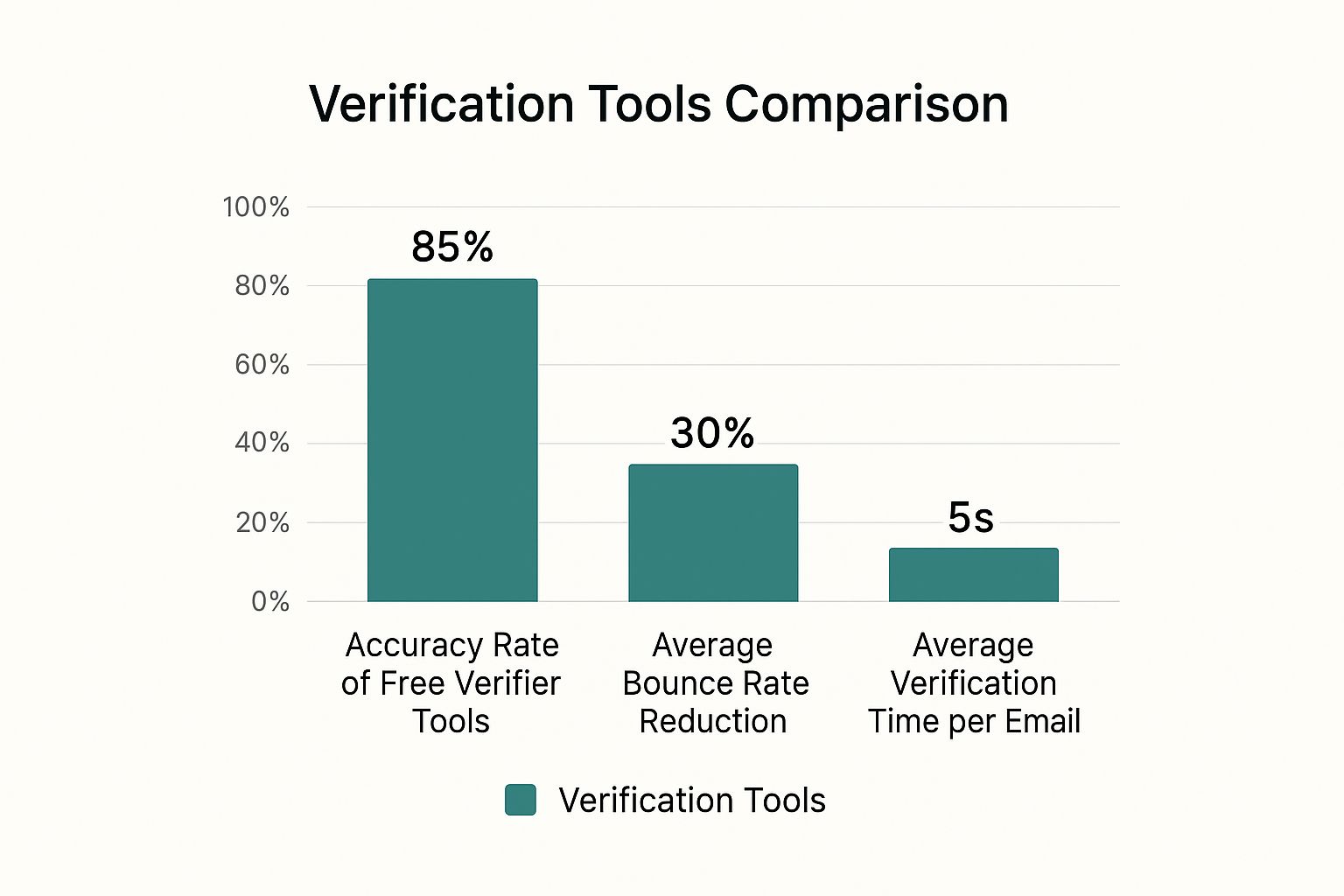
As you can see, even the free options deliver solid accuracy, slash your bounce rates, and find emails in just a few seconds.
Top Free Email Finder Tools Head-to-Head
So, let's dive into some of the most reliable options on the market. Each one has its own strengths, so the right choice really depends on how you work.
Choosing the right tool is key to maximizing your free prospecting efforts. This table breaks down the essential features of the top free email finders to help you decide which one fits your workflow best.
Top Free Email Finder Tool Comparison
| Tool Name | Free Plan Limit | Primary Use Case | Browser Extension Available |
|---|---|---|---|
| EmailScout | Unlimited | Building lists at scale while browsing | Yes (Chrome) |
| Hunter | 25 searches/month | Finding company-wide email patterns | Yes (Chrome, Firefox) |
| Skrapp | 20 searches/month | LinkedIn-focused prospecting | Yes (Chrome, Firefox) |
Ultimately, your choice depends on your specific needs. For high-volume list building, a tool with an unlimited plan is a game-changer, while for targeted, occasional searches, a limited plan can be perfectly adequate.
Now, let's look a little closer at each one.
EmailScout
EmailScout really stands out with its generous free plan and a super clean Chrome extension. It's built for efficiency, letting you grab emails right from LinkedIn profiles or company sites with a single click. The AutoSave feature is a personal favorite for building lists on the fly as I browse.
- Free Plan: Unlimited free email lookups.
- Best For: Sales pros and marketers who need to build lists quickly without constantly worrying about credit limits.
- Pro Tip: The URL Explorer feature is a beast. You can feed it a list of company websites, and it will pull all available emails for you, saving a massive amount of manual work.
Hunter
Hunter is one of the most well-known names in the game, and for good reason. Its domain search is fantastic for quickly figuring out the common email pattern at any company (like firstname.lastname@company.com). The free plan is a bit tight, but it’s still incredibly valuable for targeted searches.
- Free Plan: 25 free searches per month.
- Best For: Finding the email format for a specific company or running a few high-priority individual searches.
- Pro Tip: Use Hunter’s domain search first to get the company's email pattern. Then, try to construct the email yourself using manual methods. This saves your precious credits for when you truly need them.
Skrapp
Skrapp is another heavy hitter, especially for anyone living on LinkedIn. Its browser extension plugs right into LinkedIn profiles and Sales Navigator, which makes finding and saving prospect info incredibly smooth.
- Free Plan: 20 free searches per month.
- Best For: Sales teams who rely heavily on LinkedIn for their prospecting.
- Pro Tip: Create separate lists inside Skrapp for different campaigns. This helps keep your free lookups organized and focused on your most important outreach.
The right tool really comes down to your primary goal. If you're building bigger lists, a tool with a generous free plan like EmailScout is your best bet. For those occasional, high-stakes lookups, the limited plans from Hunter or Skrapp will get the job done.
A Practical Workflow for Using Free Tools
Knowing how to find email addresses for free is all about having a smart, repeatable process. Don't just click the extension button on every profile you stumble upon. Instead, weave these tools into your manual workflow.
Here’s an approach that has worked well for me:
- Manual First, Always. Start with the simple Google and social media searches we covered earlier. You’ll be surprised how often you find what you need without using a single credit.
- Find the Pattern. If a direct search comes up empty, use a tool like Hunter to find the company's email pattern. This gives you the formula to build the email yourself.
- Use Your Credits Strategically. When all else fails, then you can use a credit from EmailScout or Skrapp on that high-value prospect's LinkedIn profile. Make this your final step.
This tiered approach ensures you never waste your limited free resources. For a deeper dive into comparing different options, check out our guide on the best free email finder tool to see which one aligns perfectly with your needs.
By combining your own ingenuity with the speed of these free tools, you can build a powerful and completely cost-effective system for connecting with just about anyone.
How to Verify Emails Without Sending Anything
Finding what you think is the right email address is only the first part of the puzzle. The real test is whether it actually works. Hitting 'send' on a bad email is more than just a waste of time—it hurts your sender reputation and can get your future messages flagged as spam.
Verification is the step that separates the pros from the amateurs. The great news is you can do it for free without ever sending a single test email and tipping off your prospect. The whole point is to confirm an email is real before you reach out, keeping your strategy clean and your contact list full of high-quality, deliverable addresses.
Using Free Online Email Verifiers
The fastest way to run a quick spot-check is with a free online email verifier. There are tons of them out there. You just pop the email into a search bar, and the tool runs a few instant checks behind the scenes.
Most of these free tools will look at a few key things:
- Syntax Check: Is the format right? It sounds basic, but a quick check for
name@domain.comstructure and illegal characters weeds out simple typos. - Domain Check: It confirms the domain (
@company.com) actually exists and is set up to receive mail. - Role-Based Detection: It flags generic addresses like
info@,support@, orcontact@. These are rarely useful for targeted outreach, so it's good to know upfront.
While these tools won't give you a 100% "deliverable" guarantee, they are perfect for a first pass to get rid of the obvious duds. It takes seconds and costs nothing.
Verification isn't just about avoiding a bounce. It's about protecting your sender reputation. Every bounce tells email providers like Gmail that you might be a spammer, making it more likely your future messages go straight to junk.
The Password Recovery Trick
Here’s a slightly unconventional but incredibly effective trick that works for emails hosted on major platforms like Gmail and Outlook. You're basically using their own account recovery system to see if an address is active.
This method is so powerful because of how many people use these services. Gmail alone holds about 27.76% of the email client market share, with around 1.8 billion active users. Chances are, a good chunk of the emails you find will be hosted there. You can dig deeper into these numbers with these insights on email provider statistics.
Here’s how it works—it's surprisingly simple.
- Head over to the provider's login page (like Gmail.com or Outlook.com).
- Click the "Forgot Password" or "Can't access your account?" link.
- Type in the email address you're trying to verify.
Now, just watch the platform's response.
- If it says something like "Couldn't find your Google Account" or "That Microsoft account doesn't exist," bingo. The email is fake.
- If it moves on to the next step, asking for a recovery phone number or an old password, the account is real.
That’s all you need to know. Just close the window. You’ve just confirmed the email exists without sending a single thing or alerting the owner. You're using the provider's own infrastructure to get a clear yes-or-no answer, making this one of the most reliable free tricks in the book.
Your Questions on Finding Emails Answered
Even with the best tools and a solid game plan, you're going to hit some snags. It’s just part of the process. This section is all about tackling the most common questions that pop up when you're trying to find someone's email for free.
Think of this as your personal cheat sheet for handling those tricky situations, from the legal stuff to what to do when you just can't find that one crucial address.
Is It Legal to Find and Use Someone's Email for Outreach?
This is the big one, and it's a fair question. The short answer is: Yes, it's generally legal, but with some important caveats. You have to be working with publicly available information and, crucially, follow email compliance laws like GDPR and CAN-SPAM.
These rules aren't just red tape; they're there to stop people from getting buried in spam. The key is to be responsible. Your message has to be relevant to their professional role, and you must always give them an obvious, easy way to opt out.
Ethical prospecting is more than just staying on the right side of the law. It’s about respecting that you’re landing in someone’s personal workspace. As long as your intent is genuine professional communication, you're doing it right.
What Should I Do If I Still Cannot Find an Email?
It’s going to happen. Some people are digital ghosts, keeping their email address under lock and key. When all the usual tricks fail, don't just throw in the towel. It's time to get a little creative.
Here are a few moves I make when I hit a dead end:
- Engage on Social Media: Don't just send a bland LinkedIn connection request and hope for the best. Drop a thoughtful comment on their latest post or reply to something they shared. Start a real conversation before you even think about asking for an email.
- Use the Company Contact Form: A lot of people ignore these, but a short, sharp message sent through a company's general contact form can work wonders. They often get routed to exactly the right person.
- Ask for an Introduction: This is the gold standard. Check for mutual connections on LinkedIn. A warm intro from someone you both know is a thousand times more effective than the best cold email you could ever write.
Are Free Email Finder Tools Better Than Manual Methods?
This isn't really an "either/or" question. The smartest prospectors use both. Free email finders and manual sleuthing have their own strengths, and they work beautifully together.
Doing it by hand—like digging through Google search results—is incredible for finding context. It helps you understand the person you’re trying to reach, which is key for writing an email that actually gets a response.
But when you need speed and volume, that's where the tools shine. They can track down and verify emails in seconds, a task that would take ages manually. The best workflow is often to use manual tricks to get started, then bring in a tool to confirm what you've found or to scale up your search.
How Accurate Are the Emails Found with Free Tools?
You might be surprised. The accuracy of good free email finders is actually pretty high, often landing somewhere in the 85-95% range. These tools aren't just guessing; they use smart algorithms to scrape public data, spot common email patterns, and check in real-time if an address is active.
Of course, no tool is foolproof. People switch jobs, companies restructure their email formats, and data gets old. That’s precisely why verification is a non-negotiable final step. Before you send anything, run your list through a verification check to weed out the duds. It protects your sender reputation and makes sure all your hard work doesn't just end up as a bounce-back.
Ready to stop guessing and start finding? EmailScout gives you the power to discover unlimited email addresses for free, directly from your browser. Our intuitive Chrome extension helps you build high-quality contact lists in minutes, not hours. Find your next lead with EmailScout today!