

Finding someone's email address for free isn't as hard as it sounds. With a bit of digital detective work, you can track down direct contact info using tactics like advanced Google searches, digging through LinkedIn profiles, or even making an educated guess based on common company patterns. These methods let you build a solid contact list without paying for pricey tools.
The Hidden Value of a Direct Email Address

Before we get into the how, let's talk about the why. In a world of social media DMs and faceless chatbots, a direct email address is your golden ticket. It's how you bypass the gatekeepers and land your message right in the personal inbox of a decision-maker—where real conversations actually happen.
This one piece of information can turn a generic, cold outreach into a warm, personal dialogue. Instead of just another message lost in the "info@" abyss, you're starting a conversation with a real person, which massively boosts your chances of getting a response.
Why Direct Emails Drive Results
Getting a direct email is the first step toward scalable growth. It doesn't matter if you're building a sales pipeline, networking for your next career move, or hunting for strategic partners; a targeted email list is your most powerful asset. The numbers don't lie.
Email marketing is still king. A whopping 89% of marketers say it's their number one channel for generating leads. And the ROI? It’s incredible, averaging around $42 for every dollar spent.
It all boils down to a few simple truths:
- It’s Personal: You can use their name and talk about their specific role or problems.
- You Own It: Unlike a social media following, your email list is an asset you fully control.
- It’s Professional: Email is the default for serious business communication. It shows you mean business. If you want to dive deeper, you can learn more about what a business email is in our guide.
A targeted email feels like a one-to-one conversation, not a one-to-many broadcast. That’s the magic. It’s what cuts through the noise and gets a genuine reply, making all your outreach efforts worth it.
To help you get started, here's a quick look at the free methods we'll be covering in this guide.
Free Email Finding Methods at a Glance
This table breaks down the different free techniques we'll explore. Each has its own strengths, so you can pick the right tool for the job depending on your needs.
| Method | Best For | Effort Level | Accuracy |
|---|---|---|---|
| Advanced Google Searches | Finding publicly listed or mentioned emails. | Low | Medium |
| LinkedIn & Social Media | Targeting specific professionals and roles. | Medium | High |
| Company Website Exploration | Locating contact info on "About" or "Team" pages. | Low | High |
| Email Permutation & Guessing | When you know the name and company domain. | Medium | Variable |
| Browser Extension Workflow | Scraping and verifying emails at scale. | Low | High |
Now that you have the lay of the land, let's dive into the first technique and put these methods into action.
Uncovering Emails with Manual Search Tactics
Sometimes, the best way to get what you need is to just roll up your sleeves and do some old-fashioned digital detective work. These hands-on methods take a little more patience, but they often produce the most accurate results, especially when you’re only after a few key contacts.
You can often find exactly what you're looking for without fancy tools—just a smart approach to searching. Let's start with the most powerful tool of all: Google.
Mastering Advanced Google Searches
Google is way more than a simple search bar; it's a massive, searchable database. If you know the right commands, you can filter out all the junk and find contact info hidden in plain sight. These special search operators are often called "Google Dorks," and they're incredibly effective for finding emails on websites, in public documents, and online files.
So, instead of a basic "John Doe email" search, you can get way more specific. Try swapping the placeholder info in these examples with your target's details:
"[Name]" + email (or) contactsite:company.com [Name] email"[Name]" filetype:pdf email
That last one is a personal favorite. You'd be surprised how often contact details are buried in press releases, résumés, or company reports uploaded as PDFs.
By combining a person's name with keywords like "email" and limiting the search to their company's website (
site:company.com), you slash through the noise and dramatically increase your odds of a direct hit.
Exploring Company Websites
Before you dive deep into advanced searches, don't overlook the obvious. A company's website can be a goldmine if you just know where to click. A direct email probably won't be on the homepage, but it's often tucked away on a few key pages.
Make these sections your first stop:
- About Us or Team Page: This is the most common spot. These pages often list key people, and you can either find their email directly or figure out the company's email pattern.
- Press or Media Page: Always check here for press releases or media kits. They almost always include an email for a media contact person.
- Blog Section: If your target has ever written a blog post for the company, their author bio at the bottom might have a direct email or a link to a personal site where it's listed.
A few clicks around these pages can often give you exactly what you need. It’s the simplest way to find an email address for free and is usually highly reliable.
Leveraging Social Media Profiles
Professional networks, especially LinkedIn, are invaluable. Many professionals put their email right in the contact info section to make it easier for people to connect. If it’s not there, the hunt isn’t over.
Scan their bio or "About" section carefully. I've seen people write out their email in a way that spam bots can't read it (like jane [at] company [dot] com). Also, take a quick look at their recent posts or comments—they might have shared their details publicly. This kind of manual check adds a human touch that automated tools can easily miss.
When all your manual searches hit a dead end, it’s time to stop being an investigator and start thinking like a strategist. This is where intelligently guessing an email address—also known as email permutation—comes in, and it's a surprisingly effective (and free) method.
This isn’t about taking wild shots in the dark. It’s a calculated process based on one simple fact: most companies use a standard, predictable format for their email addresses. If you have someone's first name, last name, and their company's domain, you've got all the puzzle pieces you need.
Constructing Your List of Guesses
The goal here is to quickly generate a handful of the most logical variations. Start with the most common patterns and work your way down. It's pretty rare for a professional email to be just a first name, so your best bet is to focus on combinations of the first and last name.
Here are the most common patterns you should always start with:
- First Name + Last Name:
john.smith@company.com - First Initial + Last Name:
jsmith@company.com - First Name Only:
john@company.com - Full First Name + Last Initial:
johns@company.com
This systematic approach gives you a short, targeted list to test instead of a random mess of possibilities. Think of it as creating a small set of master keys—one of them is bound to fit the lock.
An educated guess is far more powerful than a blind one. By focusing on the top 4-5 most common email patterns, you drastically increase your chances of hitting the right inbox without having to test dozens of unlikely combinations.
Verifying Your Guesses for Free
Just coming up with a list of potential emails is only half the battle. If you send a message to a nonexistent address, it bounces. Rack up enough bounces, and you’ll start damaging your sender reputation, which is a big problem. You have to verify your guesses.
Fortunately, there are plenty of free online email verifier tools that can check an email's validity for you. These tools work by pinging the mail server to see if the address is active without actually sending a message.
Just copy and paste your list of guesses into one of these tools. They'll quickly tell you which ones are "valid," "invalid," or "risky."
This last step is absolutely crucial. It’s what turns your educated guesses into confirmed contact points, making sure your carefully crafted message actually lands in a real person's inbox. In an email world with 4.37 billion users in 2023 and a projected 4.89 billion by 2027, deliverability is everything. You can dive into more email usage statistics to get a sense of just how massive this landscape is.
Building Your Email Finding Workflow with Free Tools
Manual tactics are great for finding a specific email, but they just don't scale. When you need to build a real list for outreach, you need a repeatable system. This is how you move from one-off searches to efficiently building targeted lists, saving yourself hours in the process. Nailing down a free method to find emails is a core part of any solid Outbound Lead Generation strategies, letting you connect directly with the right people.
This is where a good browser extension completely changes the game. Instead of you doing all the manual detective work, a dedicated email finder tool can integrate right into your browser and turn the whole process into a single click. No more hunting through websites and social profiles—the tool does the heavy lifting for you, right where you're already working.
Streamlining Your Search with EmailScout
Let's walk through a common scenario. You’ve found a great company and identified the Head of Marketing, "Jane Doe," on LinkedIn. Your old process might involve opening new tabs, running Google searches, or trying to guess email patterns.
With a free tool like the EmailScout Chrome extension, you just click a button on Jane's profile. The extension immediately gets to work, scanning for and verifying her professional email address. That one simple action replaces a handful of manual steps, shrinking your entire search down to a few seconds.
The real magic is that the tool meets you where you are, so you don't have to constantly switch between tabs and lose your focus.
The sheer volume of modern communication makes this kind of efficiency essential. By 2025, it's estimated that 376.4 billion emails will be sent and received every single day. With that much noise, making sure your message lands in the right inbox is more critical than ever.
Scaling Up with Advanced Features
A great free tool does more than just find one email at a time. This is where advanced features like bulk extraction can really transform how you build lists. Picture this: you've landed on a company's "Our Team" page or a list of speakers for an upcoming conference.
Instead of clicking on every single person, you could use a feature like EmailScout's URL Explorer. You just paste the webpage's URL into the tool, and it automatically pulls all the email addresses it can find and verify from that one page. This is incredibly powerful for things like:
- Building Department-Specific Lists: Quickly grab all the contacts from a company's marketing or sales team page.
- Event Networking: Scrape the speaker list from a virtual conference to connect with industry experts.
- Competitor Analysis: See who is listed on a competitor’s press or media contact page.
The key is to shift from a "find one email" mindset to a "build a targeted list" strategy. Let automation handle the grunt work so you can focus on writing a great outreach message.
This whole process—whether you do it by hand or with a tool—boils down to a simple, effective logic.
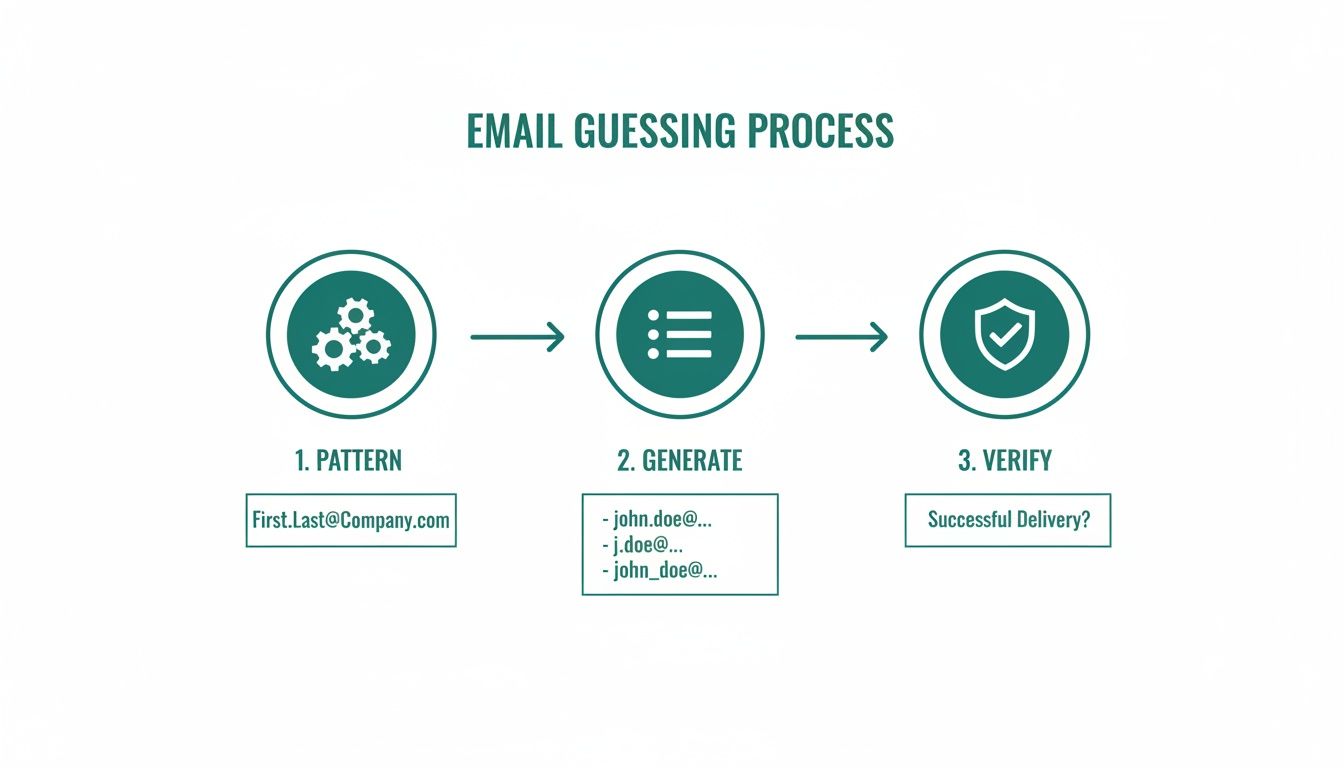
You identify the pattern, generate the possibilities, and verify the correct one. Following this ensures you have a high-quality, deliverable email address before you ever hit "send." If you're ready to automate this, you can check out our list of the https://emailscout.io/best-free-email-finder-tool/ available now. By creating a workflow that works for you, finding contacts becomes predictable and scalable.
Best Practices for Smart and Ethical Outreach
Finding someone's email address is just the first domino. The real skill is using it to build a relationship, not burn a bridge. Your outreach should feel like a welcome handshake, not an intrusive sales pitch that gets instantly deleted.
This all comes down to respecting privacy and knowing the rules of the game. Regulations like GDPR in Europe and the CAN-SPAM Act in the U.S. aren't just legal busywork—they're a blueprint for respectful communication. Following them is non-negotiable; it protects your sender reputation and shows your contacts you actually value their time.
Crafting a Compelling First Impression
That first email you send sets the entire tone. The goal is to be a signal in a sea of noise. The only way to do that is with genuine personalization that goes way beyond just dropping in a [First Name] tag.
Mention something specific. It could be about their work, a recent company win you saw on LinkedIn, or a mutual connection. This tiny bit of effort proves you've done your homework and aren't just spamming a generic template to a list of a thousand people.
Here are a few core principles I stick to for that first email:
- Keep it Short: People are busy. Get to the point in a few tight, scannable paragraphs.
- Provide Obvious Value: Answer the "what's in it for me?" question immediately. Why are you reaching out, and what benefit might they get from responding?
- Have One Clear Call-to-Action (CTA): Don't confuse them with multiple requests. Ask for one simple thing, like a 15-minute call or their thoughts on a single question.
After you find an email address for free, the next challenge is making sure your message actually gets seen. A perfectly written email is worthless if it never gets opened. If you want to dive deeper, it's worth exploring proven tactics to increase your open rates.
A well-crafted email respects the recipient's intelligence and time. It's a conversation starter, not a demand. The difference lies in demonstrating genuine interest before asking for anything in return.
Simple Templates to Get You Started
Templates are a solid starting point, but they should always be customized. Here are two adaptable examples—one for sales and one for networking—that are designed to feel personal and get a response.
For a complete breakdown, check out our guide on how to write cold emails that convert.
Template 1: Sales Inquiry
Subject: Question about [Their Company's recent project/product]
Hi [Name],
I saw your recent launch of [Product Name] and was really impressed with [Specific Feature]. At [Your Company], we help businesses like yours achieve [Specific Goal] by [Your Solution].
Given your focus on [Their Company's Goal], I thought our approach might be a good fit. Would you be open to a brief 15-minute chat next week to explore if we can help you [Achieve a Specific Benefit]?
Template 2: Networking Request
Subject: Loved your work on [Project/Article]
Hi [Name],
I've been following your work on [Topic] for a while and was particularly inspired by your recent article on [Article Title]. Your insights on [Specific Point] were fantastic.
I'm also working in the [Your Industry] space and would love to hear your perspective on [Specific Question]. Would you have a moment for a quick virtual coffee in the coming weeks?
Questions We Hear All the Time About Finding Emails
Even with the slickest tools and smartest tactics, you're going to run into questions. Let's be real—finding contact info is part science, part art, and you need to get the strategy and ethics right. Here are the answers to the questions that pop up most often.
Think of this as your quick guide to clearing up confusion around the legal stuff, boosting your success rate, and walking into your outreach with total confidence.
Am I Going to Get in Trouble for Finding and Emailing Someone?
This is easily the most important question, and the answer isn't a simple yes or no. Generally, finding a publicly listed business email and sending a professional message is perfectly legal. But—and this is a big but—you have to play by the rules set by anti-spam laws like the CAN-SPAM Act in the US and GDPR in Europe.
These regulations aren't just suggestions. They have a few core requirements you absolutely cannot ignore:
- No Deception: Your subject line has to be honest and reflect the content of your email.
- A Clear Way Out: You must include an obvious and easy-to-use opt-out or unsubscribe link.
- Show Who You Are: Your message has to include your valid physical mailing address.
Dropping the ball on any of these can lead to some hefty fines and, just as bad, do serious damage to your brand's reputation.
What's the Single Best Free Way to Find Emails?
Honestly, there's no magic bullet. The "best" method really comes down to what you're trying to accomplish. If you're hunting for a handful of high-value contacts, nothing beats a manual deep dive. We're talking about advanced Google searches and some good old-fashioned LinkedIn profile sleuthing. It’s slow, but it’s surgical.
On the other hand, if you're building a larger, targeted list, that manual approach will burn you out fast. A workflow built around a free browser extension like EmailScout is way more efficient. It handles the heavy lifting of searching and verifying, letting you scale up your efforts without compromising on quality.
The most powerful strategy is almost always a hybrid one. Use automated tools to build your initial list, then switch to manual research to personalize your outreach for the A-list prospects. That mix of machine efficiency and human touch is what gets replies.
I'm Hitting a Wall. How Can I Find More Emails?
If your usual tricks aren't working, don't just keep doing the same thing. It’s time to get creative and start layering your strategies. First, double-check the basics: do you have the exact spelling of the person's name and the company's domain? A simple typo is a common culprit.
Next, start testing different email patterns. Sure, firstname.lastname@company.com is common, but what about flastname@company.com or firstname_l@company.com? Don't stop there. Go look in places most people ignore, like author bios on the company blog, speaker lists from industry conferences, or press releases. These less-obvious spots are often where you'll find what you're looking for.
Ready to stop guessing and start connecting? The EmailScout Chrome extension helps you find verified email addresses in a single click, directly from LinkedIn profiles and company websites. Get started for free and find unlimited emails today.