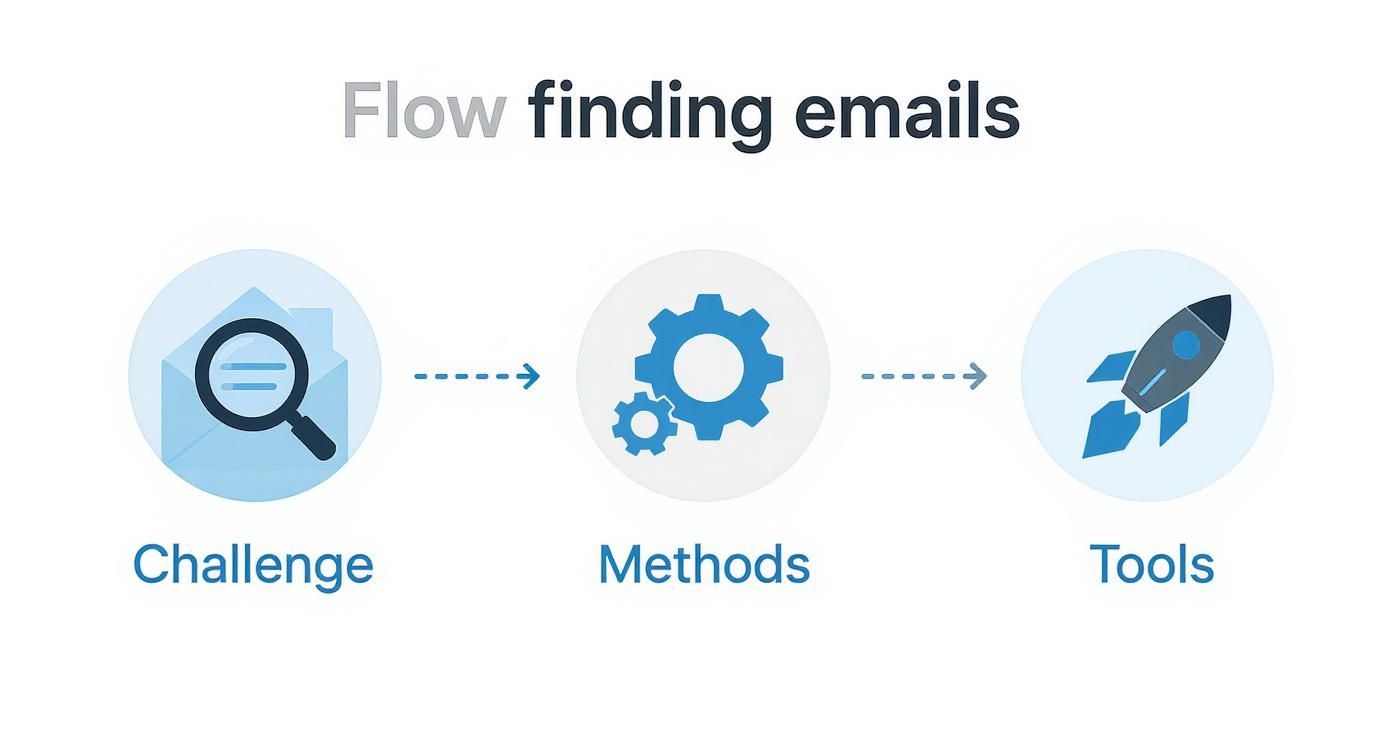
Tag: contact discovery

  • A Modern Guide to Email and Phone Number Search

    A Modern Guide to Email and Phone Number Search

    An effective email and phone number search is so much more than a quick Google query. It's a strategic process for uncovering the accurate contact details you need for sales, marketing, and networking. This skill is the foundation for anyone who needs to connect directly with key decision-makers, bypassing the usual gatekeepers and generic inboxes to make sure your message actually lands.

    Why Mastering Contact Search Is a Game Changer

    In a world overflowing with digital noise, direct communication is a superpower. Every sales pro and marketer knows the sting of a bounced email or a disconnected phone number. These aren't just minor frustrations; they're lost opportunities, wasted time, and a stalled pipeline. That's why mastering the art of the email and phone number search is no longer just a "nice-to-have"—it's a core competency.

    A person works on a laptop at a wooden desk with a notebook, pen, and smartphone.

    The future of outreach isn't about casting the widest net; it’s all about precision. The kind of hyper-personalized communication that actually gets replies starts with one simple thing: having the right contact information. Without it, even the most perfectly crafted message is dead on arrival.

    The Real Cost of Inaccurate Data

    Bad contact information does more than just waste your time. It actively hurts your efforts by damaging your sender reputation, which can get your emails flagged as spam. The pressure on outreach teams is immense, and every failed connection just adds to it. A precise, reliable contact discovery strategy is the bedrock of any successful campaign.

    This guide is built to help you move past those frustrating dead ends and into efficient, effective contact finding. We'll dig into how modern tools can bridge the gap between guessing and knowing.

    The Power of Direct Outreach

    The numbers don't lie. By 2026, the number of global email users is set to hit 4.73 billion, with daily traffic exploding to over 392 billion messages. For marketers and startups, this channel is pure gold.

    Consider this:

    • 99% of consumers check their email every single day.
    • Campaigns using segmentation can boost revenue by a staggering 760%.

    This is exactly where a tool like EmailScout comes in. It offers free, unlimited email finds right in your browser, helping you uncover decision-makers instantly—perfect for cold emailing without the guesswork. You can dive deeper into the latest email statistics to see the full picture.

    The goal isn't just to find an email address. The goal is to find the right email address that opens a conversation, builds a relationship, and drives results.

    Ultimately, this guide will arm you with the workflows you need to succeed. We'll cover everything from foundational manual techniques to powerful automation. You'll learn not just how to find data, but how to verify it, use it ethically, and integrate it into your outreach for maximum impact.

    Effective Manual Techniques for Finding Contacts

    Before you even think about firing up an automated tool, it’s worth mastering the old-school manual email and phone number search. Think of it like being a detective. These skills are your secret weapon when tools come up empty, and they give you a much better feel for the data patterns that lead to a successful find.

    A person types on a laptop with colorful sticky notes and a magnifying glass, illustrating manual search tips.

    When you learn to spot these patterns yourself, you get incredibly good at finding anyone, anywhere. It’s all about knowing where to look and what clues to chase. Honestly, this foundational knowledge makes every other tool in your kit that much more powerful.

    Use Advanced Search Operators

    Google is so much more than a simple search bar. If you know how to talk to it, it's a massive database just waiting to be queried. Advanced search operators are your best friend for slicing through the noise to find contact info that’s public but buried.

    Let's say you're looking for Jane Smith, a marketing manager at a startup called "Innovate Inc." A basic search is going to flood you with junk. Instead, you need to get surgical with it.

    • Site-Specific Searches: Use site:company.com to force Google to only look within a single website. This is perfect for digging through a company’s own digital real estate.
    • Exact Phrases: Wrap names or titles in double quotes ("Jane Smith") to get an exact match and filter out all the random variations.
    • Combining Terms: Use + or AND to make sure multiple keywords show up in the results. This is how you really narrow the focus.

    So, a real-world search for Jane Smith’s email might look like this:
    "Jane Smith" + email site:innovateinc.com

    This query tells Google to only show results from innovateinc.com that contain the exact phrase "Jane Smith" and the word "email." More often than not, this pulls up things like press releases, blog author bios, or team pages where her info is hiding in plain sight. For a deeper dive, check out our guide on how to find email addresses for free.

    Reverse-Engineer Common Email Patterns

    Most companies aren't reinventing the wheel with their email formats. They usually stick to a consistent formula. Once you crack that formula, you can guess almost anyone's email with surprising accuracy. This is a core manual prospecting skill.

    First, find any publicly listed email from the company. It could be info@innovateinc.com or support@innovateinc.com. The part you care about is the domain: @innovateinc.com.

    Next, look for just one example of an actual employee's email. Maybe you find the CEO, John Davis, mentioned in an article with j.davis@innovateinc.com. Boom. That reveals the likely pattern is firstinitial.lastname@company.com.

    Based on this single clue, you can make a highly educated guess for Jane Smith: j.smith@innovateinc.com. This simple guessing game is incredibly effective and a true staple of manual contact finding.

    You'll run into a few common patterns over and over:

    • firstname.lastname@company.com (jane.smith@)
    • firstinitiallastname@company.com (jsmith@)
    • firstname@company.com (jane@)
    • firstname_lastname@company.com (jane_smith@)

    Dig Into Corporate and Social Profiles

    Company websites themselves are goldmines. Your first stops should always be the obvious pages: "About Us," "Our Team," or "Press." These sections often list key players with their contact details or, at the very least, their full names and titles, which is exactly what you need for your pattern guessing.

    Also, don't sleep on press releases or media kits. They almost always include a contact email for a media relations person, which gives you another confirmed address to help you figure out the company's pattern.

    Outside of the corporate site, professional networks like LinkedIn are invaluable. They won't hand you an email on a silver platter, but they will confirm a person's full name, title, and current company—all critical pieces for constructing and verifying your email guess. Business directories and public filings can also be a great source for direct phone numbers for company officers, giving you another way in.

    Accelerating Your Search with a Chrome Extension

    Manual techniques for an email and phone number search are great for building your foundation. You learn to think like a data detective, spotting patterns and knowing exactly where to dig for information. But let's be real—they aren't fast.

    When you need to build a list of 50 or 100 contacts, that manual detective work quickly becomes a massive time-sink. This is where you bring in the firepower.

    A dedicated Chrome extension is your accelerator. It automates the tedious parts of the process so you can focus on strategy, not guesswork. Instead of manually testing email patterns or bouncing between company pages, these tools do the heavy lifting for you in seconds.

    The Power of One-Click Discovery

    Imagine you’re on the LinkedIn profile of a key decision-maker. With a tool like EmailScout, the entire discovery process boils down to a single click. The extension plugs right into your browser, working on the pages you're already on.

    No more switching between a dozen tabs to run Google searches and test email formats. You just activate the extension. It instantly analyzes the page, checks its own massive database, and shows you verified contact information right on the screen. It’s the perfect bridge between manual effort and automated efficiency.

    Here’s what you’ll see when you visit the EmailScout website, giving you a clear path to get it installed.

    The interface is intentionally simple. The goal is a quick, no-fuss installation to get you up and running immediately.

    A Practical Scenario: Finding a Marketing Director

    Let's walk through a real-world example. You’ve found the Marketing Director at a target company through their LinkedIn profile. Manually, you’d have to:

    • Find another employee's email to figure out the company's pattern.
    • Try several variations, like first.last@ or flastname@.
    • Use a separate tool to verify if your guesses are even valid.

    This could easily take five to fifteen minutes for just one contact. With an extension, the workflow is much cleaner. You click the EmailScout icon, and it instantly searches for that person’s professional email and sometimes even a direct phone number.

    The results often come with a confidence score, showing you which email address is most likely to be correct and active. This isn't just about saving time; it's a huge confidence booster. You can start your outreach knowing your message has the best possible shot at landing in the right inbox. You can learn more about how to improve your workflow with an email extractor Chrome extension in our detailed guide.

    The real value of a Chrome extension is turning a multi-step research project into a one-second action. It transforms your browser from a simple viewing tool into an active prospecting machine.

    Unlimited Finds for Every Budget

    One of the biggest hurdles for freelancers, startups, and growing sales teams is the cost of prospecting tools. Many services use a credit-based system where every contact you reveal costs you money. This gets expensive fast, forcing you to be picky about who you can even search for.

    This is where a tool offering unlimited free finds completely changes the game. It removes the budget handcuffs and lets you build comprehensive outreach lists without worrying about your credit balance.

    This kind of accessibility allows anyone, from a solo entrepreneur to a full-fledged business development team, to conduct a thorough email and phone number search at scale. It truly democratizes access to high-quality contact data, leveling the playing field so smaller players can compete. You can finally build your pipeline based on who you need to contact, not just who you can afford to find.

    Scaling Your Lead Generation Efforts

    Finding one person's contact info is a great start, but modern outreach is a numbers game. To build a healthy pipeline, you need to go from finding one-off contacts to building entire lists of qualified leads. This is where you graduate from single-profile searches and start using features built for volume.

    The whole point is to get more done without sinking more hours into the process. The right tools are designed for exactly that, letting you run a broad email and phone number search across dozens of sources at once. Your workflow stops being a manual, one-by-one grind and turns into a powerful, semi-automated system.

    Unlocking Bulk Discovery with URL Explorer

    Let’s say you want to connect with top voices in your industry. A classic move is to find the authors of high-ranking blog posts. The old way? You’d have to visit each article, find the author's name, and then start the whole search process from scratch. It’s a massive time sink.

    EmailScout’s URL Explorer completely flips this on its head. Instead of visiting every page, you just give it a list of the article URLs.

    For instance, you could grab the URLs from 20 different blog posts and paste them into the tool. URL Explorer then goes to work, crawling each link, identifying the author, and pulling their contact information in one single job. It’s perfect for tasks like:

    • Finding podcast guest speakers from episode pages.
    • Identifying journalists from their online articles.
    • Connecting with key contributors on company blogs.

    In just a few minutes, you can have a hyper-targeted list that would have taken hours to build by hand. This kind of bulk capability is a game-changer for any serious outreach strategy. For those looking to streamline this further, it's worth exploring dedicated prospecting tools like Getprospect that specialize in workflow automation.

    The most powerful shift in prospecting is moving from "who can I find?" to "what list do I need to build?" Bulk tools make this transition possible by automating the repetitive discovery work.

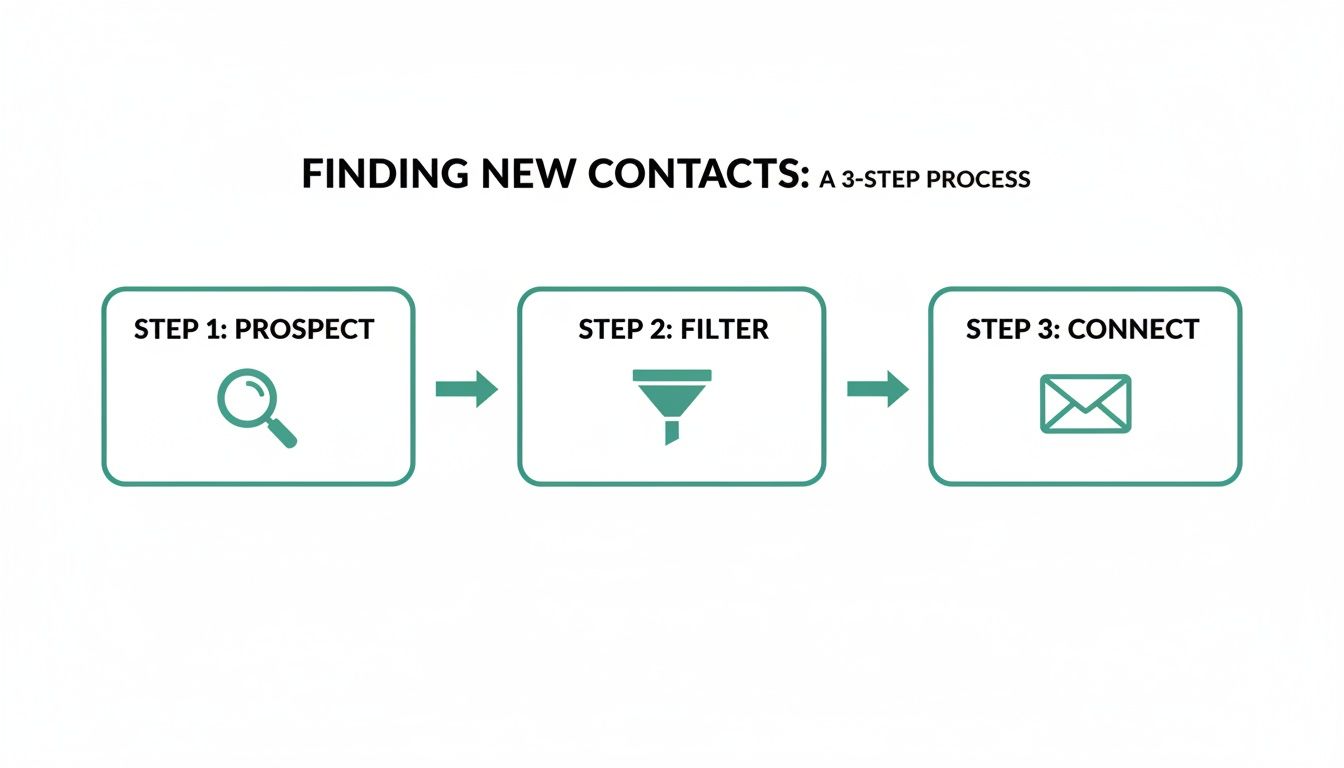
    The process boils down to a few simple actions, as you can see below.

    A simple three-step process flow illustrating how to find contacts: Profile, Click, Contact.

    This workflow shows how modern tools have cut the complexity out of contact discovery, turning tedious searches into a quick, repeatable process.

    Building Lists Passively with AutoSave

    Sometimes the most efficient way to build a list is to not "build" it at all. Think about all the time you spend on routine research, like browsing LinkedIn profiles of potential clients or looking at company team pages. All that valuable contact information is sitting right there.

    This is where AutoSave comes in.

    When you flip it on, EmailScout works quietly in the background. As you click from one profile or page to the next, it automatically finds and saves any discovered email addresses and phone numbers to a list you’ve chosen.

    It's like having a research assistant following you around the web, taking notes for you. You can stay focused on your main task, whether it's account research or competitor analysis, while your lead list literally builds itself. If browsing professional networks is part of your daily routine, this is an incredibly efficient way to work.

    Combining the targeted power of URL Explorer with the passive efficiency of AutoSave gives you a complete system for scaling your email and phone number search. You’re no longer just finding individual contacts; you're strategically building the foundation for high-volume outreach campaigns that drive real results.

    How to Verify Contacts and Protect Your Sender Reputation

    Finding a contact is only half the battle. The real work—and the part most people skip—is making sure that contact information is actually valid.

    Trust me, this is a fatal mistake. Firing off emails to a list full of bad addresses is the fastest way to wreck your sender reputation.

    A desktop with an iMac showing security and email icons, with a 'Verify Before Sending' banner.

    Email providers see high bounce rates as a huge red flag. Before you know it, your perfectly good messages are getting dumped into spam folders, or worse, your entire domain gets blacklisted. Verification isn't just a nice-to-have; it's essential for making sure your outreach actually gets seen.

    Why Verification Is Non-Negotiable

    A clean contact list is everything. Every single invalid email is actively working against you, because providers like Gmail and Outlook are watching your bounce rates like a hawk. Creep above a 2% bounce rate, and their spam filters will start getting very interested in you.

    Think of your sender reputation like a credit score for your domain. Every bounced email is like a late payment, chipping away at your score until inbox providers stop trusting you.

    The Different Layers of Email Verification

    Not all verification is created equal. There are a few different checks that happen behind the scenes, each giving you a different level of confidence.

    • Syntax Check: This is the most basic step. It just makes sure the email looks right (like name@domain.com). It’ll catch obvious typos but won't tell you if the inbox actually exists.
    • Domain & MX Record Check: This confirms the domain is real and has a mail server ready to receive emails. It tells you the company is legit, but not if your specific contact works there.
    • Server Ping (SMTP Verification): This is the gold standard. A verification tool sends a tiny signal to the recipient’s mail server and asks, "Hey, does this email address exist?" without sending an actual email.

    Even though a tool like EmailScout is designed to find high-quality contacts, running a final verification check before a big campaign is always a smart move. If you want to go deeper on this, we've got you covered. You can learn exactly how to verify emails in our in-depth guide.

    Verification transforms your contact list from a collection of guesses into a high-value asset. It's the difference between shouting into the void and starting meaningful conversations that drive results.

    Don't Forget to Verify Phone Numbers

    Phone numbers have their own set of problems. You’re dealing with disconnected lines, typos, and numbers formatted incorrectly. The goal here is simple: confirm a number is active and can be reached before you burn time and money trying to call it. This usually means checking its status with the carrier to see if it's in service.

    If you're scaling up and need to verify numbers for things like service sign-ups without using your personal line, temporary phone numbers can be a game-changer. There's a fantastic resource that covers this called The Ultimate Guide to Temporary Phone Numbers.

    In the end, verifying both emails and phone numbers is about protecting your time, money, and reputation. A clean list ensures your messages land, your brand stays trustworthy, and your outreach campaigns have a real shot at success.

    Navigating the Ethical and Legal Landscape

    Finding emails and phone numbers puts a lot of powerful data in your hands. But how you use that information is governed by a web of laws and ethical standards you absolutely can't afford to ignore.

    This isn't just about sidestepping big fines; it’s about building a brand that people actually trust. The second someone feels like their privacy has been invaded, you haven't just lost a prospect—you've created a detractor.

    Understanding Key Regulations

    You don’t need to be a legal expert, but you do need to get the basics of the major privacy laws. The two big ones to keep on your radar are GDPR and the CAN-SPAM Act. They cover different parts of the world, but their core ideas are pretty universal.

    • GDPR (General Data Protection Regulation): This one applies anytime you’re contacting people in the European Union. The big idea here is consent. You need a legitimate, documented reason for reaching out and you have to be totally transparent about how you got their information.
    • CAN-SPAM Act: This is the main U.S. law for commercial email. It’s all about giving people a clear way to opt out of your messages and making sure you honor those requests immediately.

    These rules aren't just red tape. They’re a blueprint for communicating with respect.

    Think of it this way: Compliance isn't a restriction; it's a guide to building a more sustainable and trustworthy outreach strategy. Following the rules forces you to be a better marketer.

    Practical Steps for Compliant Outreach

    Putting these principles into action is pretty straightforward. The key is to shift your mindset from "what can I get away with?" to "what's the most respectful way to start this conversation?" This approach not only protects you legally but also makes your outreach way more effective.

    First up, transparency is non-negotiable. Never hide who you are or why you’re reaching out. Your first message needs to clearly state your name, your company, and your reason for getting in touch. Using deceptive subject lines is a direct violation of CAN-SPAM and the fastest way to get your domain flagged.

    Next, relevance is everything. Make sure your message actually offers something of value to the person you're contacting. A generic email blasted to a poorly researched list isn’t just ineffective, it’s intrusive. Your email and phone number search should be step one of a highly personalized process, not the start of a mass email dump.

    Finally, always provide a clear exit. Every single email you send must have a simple, one-click unsubscribe link. For phone calls, you need a system to immediately add someone to a "Do Not Call" list if they ask. Honoring these requests protects your reputation and keeps your contact lists clean and engaged.

    Troubleshooting & Common Questions

    Even with the best tools, you're bound to hit a few roadblocks. Let's walk through some of the most common questions that pop up when you're hunting for contact details.

    What if My Search Comes Up Empty?

    It happens. Not every person has a big digital footprint, and sometimes an automated search just won't find what you need. Don't see it as a dead end—see it as a cue to switch gears.

    This is when you put on your detective hat. Go back to manual techniques. Try piecing together the company's email format by looking at colleagues. For example, if you find jane.doe@company.com, it's a safe bet that your target is john.smith@company.com.

    You can also broaden your search. Instead of just digging for an email, look for your prospect's LinkedIn profile. A connection request or a thoughtful message there can be a perfect way to open the door.

    Key Takeaway: An empty search isn't a failure. It's just a signal to get creative. Blending automated tools with some old-fashioned manual digging will always get you the best results.

    Is It Legal to Contact People This Way?

    This is the big one, and it’s smart to ask. The short answer is: it depends on your location, your prospect's location, and how you use the information. Generally, for B2B (business-to-business) outreach, you're in the clear as long as your message is relevant and you give them an easy way to opt out.

    There are a couple of key regulations you absolutely need to know:

    • GDPR: The big one for EU citizens. It requires you to have a "legitimate interest" for making contact.
    • CAN-SPAM: This is a U.S. law that's all about transparency. It mandates clear opt-out options and forbids deceptive subject lines.

    Think of it this way: the golden rule is relevance and respect. Always be upfront about who you are and why you're reaching out. And most importantly, make unsubscribing painless. This isn't just about staying compliant; it's about building trust from the very first interaction.


    Ready to stop guessing and start connecting? With EmailScout, you can find unlimited emails for free and build powerful lead lists in minutes. Install the free Chrome extension and accelerate your outreach today!

  • Instagram Mastery: instagram search email to find verified contacts

    Instagram Mastery: instagram search email to find verified contacts

    If you still think of Instagram as just a place for pretty pictures, you’re leaving a massive opportunity on the table. For anyone in sales or marketing, the platform has evolved into a visual search engine where your next big client is actively looking for solutions. Learning how to run an effective Instagram search for an email is the key to turning those profiles into real, actionable leads.

    Why Instagram Is a Goldmine for Finding Emails

    Person using a smartphone and laptop at a desk, with a green overlay stating 'Instagram Email Gold', suggesting digital marketing.

    It’s time to see Instagram for what it truly is: a gigantic, searchable database of businesses and the people who run them. The sheer scale is hard to ignore. We're talking about a platform with over 200 million business profiles and 3 billion monthly users—a staggering 90% of whom follow at least one business account.

    But here’s what really matters for outreach: user intent. An incredible 80% of users are on Instagram specifically to search for products or services. They’re not just scrolling; they're in discovery mode, making the platform a powerful rival to Google for finding businesses.

    This active search behavior creates a rich environment for anyone in a growth role. To see how finding emails on Instagram fits into a bigger picture, it helps to understand modern lead generation social media strategies.

    Why Instagram Is a Powerful Lead Source in 2026

    The numbers speak for themselves. This isn't just a social app; it's a core channel for B2B and B2C prospecting.

    Metric Statistic What This Means for Outreach
    Business Presence Over 200 million business accounts Your target audience is almost certainly on the platform and using it for work.
    User Discovery 83% of users discover new products/services Prospects are actively looking for solutions, making your outreach timely and relevant.
    Purchase Intent 44% of users shop on Instagram weekly The platform drives commercial activity, not just passive engagement.
    Brand Interaction 90% of users follow a business People want to connect with brands, creating an opening for professional communication.

    These stats paint a clear picture: your prospects are on Instagram, they're looking for what you offer, and they're ready to engage with businesses.

    The Core Challenge and Opportunity

    Of course, there’s always been a hurdle. You find the perfect prospect, but how do you connect? Sliding into their DMs can feel unprofessional and get lost in the noise. The real goal is to get a professional email address for proper outreach.

    This is exactly where the opportunity lies. We used to spend hours manually digging through profiles and websites. Now, tools like EmailScout have turned that frustrating hunt into a simple, one-click process.

    The real value isn't just in the number of users, but in their behavior. When 83% of users discover new products on the platform, every business profile becomes a potential lead waiting for a professional connection. This transforms the platform into a key channel for modern social selling.

    This shift in user behavior is a game-changer. These aren't just passive followers; they're engaged prospects looking for answers. You can learn more about how to approach this by reading our guide on what is social selling.

    The evolution is clear:

    • From Photo App to Search Engine: People now treat Instagram like a visual Google to find brands, freelancers, and experts.
    • From DMs to Emails: Serious business requires a more formal channel than a direct message.
    • From Manual to Automated: Technology now lets you pull emails directly from profiles, saving countless hours of grunt work.

    By plugging into this ecosystem with the right approach, your Instagram search email efforts can go from a guessing game to a reliable lead generation engine.

    Grab Emails Straight from Instagram Profiles in One Click

    Alright, let's get to the fastest method. Forget poking around for bio links or contact pages. With a tool like the EmailScout Chrome extension, you can pull an email directly from an Instagram profile with a single click. It’s about being smart with your time.

    First, you’ll need a quick, one-time setup. Just install the EmailScout extension from the Chrome Web Store, and it’s good to go. No complicated settings to mess with—it adds an icon to your browser and is ready to work.

    Here’s How It Works in Practice

    Imagine you’re a sales rep targeting SaaS startups. You find a really promising company on Instagram and want to reach their Head of Marketing. You land on their official profile, and this is where the magic happens.

    With EmailScout running, you just click the extension's icon. The tool instantly scans the profile to find any associated email addresses.

    As you can see, it pulls the email right up. It even gives you a confidence score, so you know how likely it is to be a good address.

    What would normally be a 10-minute hunt across their website and LinkedIn just became a 2-second click. You get the contact you need without ever leaving the Instagram page.

    The real power here is keeping your prospecting flow uninterrupted. You find a lead, grab their email, and move on to the next one, all within the same tab.

    This approach is a game-changer if speed and volume are part of your job, especially for:

    • Sales Development Reps building out targeted lead lists.
    • Marketers looking for influencer or brand collaborations.
    • Recruiters trying to source candidates from company pages.
    • Founders hunting for potential partners or investors.

    Turn Profiles into Contacts Instantly

    This one-click process does more than just find an email—it turns Instagram from a place you just browse into an active source for leads.

    Every profile you visit is a potential contact you can capture on the spot. You see a good fit, click the button, save the email, and you're already prospecting the next profile. It’s a simple, repeatable system that lets you build a solid contact list without getting bogged down in manual data entry. That’s how you scale your outreach without burning out.

    Build Targeted Email Lists at Scale

    Finding a single email is a good start, but the real power for any serious sales or marketing team comes from building a whole list of qualified leads. This is how you shift from one-off prospecting to creating a lead generation machine that actually scales. An effective instagram search email strategy isn't about finding one or two contacts; it's about using tools built for volume.

    You've probably been there—you find the perfect brand on Instagram and want to send a real pitch, but you're stuck sending a DM that will likely get ignored. It's a huge missed opportunity. By 2026, the number of business accounts on the platform skyrocketed to over 350 million, marking a huge 17% increase from the year before. And get this: 65% of them are small businesses. These profiles are pure gold for outreach, but you need the email address.

    Automate Your Browsing with AutoSave

    Let's kick things off with the easiest way to build a list: EmailScout's AutoSave feature. Think about it—you're researching dozens of competitors or potential partners for a new campaign. Instead of having to click the extension on every single profile, you can just let it do the work for you.

    All you have to do is toggle on the AutoSave feature inside the EmailScout extension. Once that's active, just browse Instagram like you normally would. As you click from one profile to another, EmailScout quietly finds, verifies, and adds any public email address to your list in the background.

    This approach is perfect for:

    • Market Research: Effortlessly collect contact info from all the key players in a niche you're exploring.
    • Competitor Analysis: Quickly build a list of your competitors' key contacts.
    • Influencer Sourcing: Compile a running list of potential creators as you dig through hashtags and communities.

    When you're doing this kind of heavy-duty searching on Instagram, using residential proxies for Instagram can be a lifesaver for avoiding blocks and staying under the radar.

    Bulk Extraction with the URL Explorer

    But what if you already have a list of profiles you want to target? Maybe you’ve got a spreadsheet of Instagram accounts or a list exported from another tool. That’s exactly what the URL Explorer was made for.

    Instead of visiting each profile manually, you can just paste a list of Instagram profile URLs right into the URL Explorer.

    This simple three-step process is all it takes to go from finding a profile to grabbing the email.

    An infographic showing the three-step email discovery process: install browser extension, profile social network, and get email.

    This visual shows just how efficient the workflow is—install, find the profile, and get the email. Simple as that.

    With just one click, the tool gets to work, processing your entire list and pulling every available email. It then packages them all up for you in a neat CSV file. This turns what would have been hours of mind-numbing work into a task that takes just a few seconds. If you like the sound of bulk extraction, you might want to check out our guide on the best email extractor Chrome extension.

    Key Takeaway: Scaling your outreach isn't about working harder; it's about working smarter with the right automation. Tools like AutoSave and URL Explorer transform a tedious manual task into a fast, repeatable process, giving you more time to actually write great emails.

    Smart Manual Search Techniques for Tough Finds

    Automated tools are workhorses, but they can't find everything. When your initial instagram search email comes up empty, it doesn't mean you've hit a dead end. It just means it's time to roll up your sleeves and apply some of the clever manual tactics that separate the pros from the amateurs.

    Sometimes the answer is hiding in plain sight. Before you go on a digital scavenger hunt, take a second to carefully inspect the Instagram profile itself. You’d be surprised how many businesses drop their contact email directly into their bio text to encourage inquiries.

    Also, keep an eye out for the "Email" button. If the account is set up as a business profile, Instagram often includes a dedicated contact button right under the bio. Tapping it will open your phone’s mail client with their address already populated. It’s a dead-simple way to get a verified business email.

    Digging Deeper: Beyond the Bio

    If the profile itself is a no-go, your next clue is almost always the link in their bio. This link, which typically points to the company’s official website, is your gateway to a ton of potential contact information.

    Once you land on their site, head straight for the usual suspects: "Contact Us," "About Us," or "Meet the Team" pages. An "info@" or "contact@" email is a good starting point, but finding a direct email for the right person is always the goal. If you already know their name from the Instagram profile, a team page is your best bet.

    A prospect's digital footprint rarely begins and ends with Instagram. Cross-referencing their name and company on other professional networks is the single most effective manual trick for finding an elusive email.

    Let's say you're trying to find "Jane Doe" from "Acme Corp." A quick Google search for "Jane Doe Acme Corp LinkedIn" will almost certainly lead you to her professional profile. Since LinkedIn is built for business networking, people are far more likely to list their direct work email there.

    Making Educated Guesses With Permutators

    What happens when you have a name and a company domain (like jane.doe and acme.com) but still can't find a complete email address? It's time to make an educated guess. Most companies use a standard, predictable format for their email addresses.

    This is where an email permutator tool saves the day. These handy tools take the fragments you have and generate a list of the most common email combinations.

    Once you have this list of possibilities, you don't have to send a dozen emails hoping one doesn't bounce. Instead, run the list through an email verification tool. Many free options are available online that can confirm which addresses are valid, completing your instagram search email mission without ever hitting "send."

    Writing Outreach Emails That Actually Get Replies

    Hands typing on a laptop with 'GeT Replies' banner while holding a smartphone displaying a social media feed.

    So you’ve run an Instagram search email and have a verified address in hand—that’s a huge win. But finding the contact is only half the job. Now for the part that really counts: writing an email that someone actually wants to open and reply to.

    A great email can kickstart a valuable professional relationship. A bad one can get you ignored, or worse, permanently flagged as spam.

    Before you even write a single word, think about your sender reputation. Sending to unverified addresses is a recipe for high bounce rates, which email providers see as a massive red flag. Always use a tool like EmailScout to ensure your emails are deliverable—it's the first step to protecting your domain.

    Personalize Your Pitch with Instagram Insights

    Let's be honest: generic emails are deleted on sight. The only way to cut through the noise is to prove you've done a little homework. Since you found them on Instagram, you’ve got a goldmine of personalization right in front of you.

    Reference something specific from their recent activity. Did they just launch a new product, celebrate a milestone, or share an interesting Reel? Mentioning it in your first sentence is the fastest way to show you aren't just another automated message.

    Here are a couple of ways this looks in practice:

    • For a brand collaboration: "Hi [Name], I saw your recent Reel about [Topic] and was seriously impressed by the engagement you got. I work with [Your Company], and it sparked an idea for a collaboration that I think would be a perfect fit for your audience."

    • For a B2B service: "Hi [Name], congrats on the launch of [Product Name] you featured on Instagram this week! It looks fantastic. As you scale up, you might be looking at new marketing channels, and I had a thought on how we could help."

    These openers prove you're paying attention and have a genuine reason for reaching out.

    Your outreach should feel like the start of a conversation, not a sales blast. One well-researched sentence about their Instagram activity is more powerful than paragraphs of generic fluff.

    Stay Compliant and Build Trust

    Writing a solid email also means being responsible. Your outreach has to comply with regulations like CAN-SPAM in the U.S. and GDPR in Europe. That means being transparent about who you are and always including a clear, simple way for them to opt out.

    Remember, the goal here is to build professional connections. Instagram data shows that video content generates 21.2% higher engagement and Reels can drive 55% higher brand conversions. The contacts you find are incredibly valuable. By using a professional email instead of a crowded DM, you're respecting their time and using a channel designed for business.

    For a deeper dive into crafting messages that truly resonate, you should check out our guide on how to write cold emails that get results.

    Common Questions About Finding Emails on Instagram

    Even with the best tools, you're going to have questions pop up while you're digging for emails on Instagram. Let's walk through some of the most common ones so your prospecting stays professional and, more importantly, successful.

    Is It Legal to Email Contacts Found on Instagram?

    Yes, but only if you do it the right way. Finding publicly posted business information for B2B outreach is a standard, accepted practice. The absolute key is to make sure your outreach is nothing like spam.

    Your first email has to be personalized, relevant, and offer real value to the person you're contacting. You also need to follow regulations like CAN-SPAM and GDPR, which means having a legitimate reason to reach out and giving them a clear way to opt out. The goal is to start a professional conversation, not just blast a generic message to a list.

    What if I Can't Find an Email for a Profile?

    It’s going to happen. Not every Instagram profile, even with the slickest tools, will have an email just sitting there. When you hit a dead end, it’s time to put on your detective hat.

    First, click the website in their bio. Check for a "Contact" or "Team" page. You can often find a general inbox like contact@ or info@, which is better than nothing. A smarter move is to cross-reference the person or company on LinkedIn, which is almost always a better source for direct business contacts. A polite, professional DM can work as a last resort, but a direct email is always the gold standard for business.

    How Do I Know the Emails I Find Are Valid?

    Verifying emails is a non-negotiable step in this process. Firing off emails to bad addresses will crank up your bounce rate, wreck your sender reputation, and get you flagged by providers like Gmail and Outlook.

    A high bounce rate is the fastest way to land your domain in the spam folder. Verifying every single email before you send protects your domain's health and makes sure your messages actually get delivered.

    While tools like EmailScout have verification built-in to improve accuracy, it's always a good idea to run your final list through a dedicated email verification service. This is especially true for larger campaigns. These services check if an inbox is active without ever sending a message, protecting your entire outreach operation.

    Does This Work Better for Business or Personal Accounts?

    This strategy is overwhelmingly more effective for business, brand, and professional creator accounts. It’s simple: these users are on Instagram to do business. They want you to contact them for professional opportunities, so they're far more likely to make a business email public.

    You might find an email on a personal profile here and there, especially for freelancers or public figures, but that's the exception. For B2B sales and marketing, focusing your Instagram email search on business profiles will give you much higher-quality leads and keep your outreach in the right professional context.


    Ready to turn Instagram profiles into a powerful lead-generation engine? Stop wasting time on manual searches and start building targeted email lists with a single click. EmailScout gives you the tools you need to find verified contacts, automate your workflow, and scale your outreach.

    Start finding unlimited emails for free today at https://emailscout.io

  • Where to Find a Publisher on a Website The Ultimate Guide

    Where to Find a Publisher on a Website The Ultimate Guide

    So, you need to figure out who’s behind a website. Maybe you're looking for a contact for a press inquiry, a partnership, or just trying to verify the source of the information. Whatever the reason, finding the publisher can sometimes feel like a digital scavenger hunt.

    But it doesn't have to be.

    Most of the time, the publisher's details are hiding in plain sight. You just need to know where to look. Let's walk through the quickest ways to unmask the people behind the curtain.

    Your Quick Guide to Finding Publisher Details

    A laptop showing 'Publisher Info' next to books, a plant, and a wooden block saying 'About Contact'.

    Before you start digging into a site’s source code or running complex searches, let’s cover the basics. The goal here is speed and efficiency. Most websites, especially professional ones, want to be transparent about who they are. They often place their details in a few predictable spots.

    This first pass should take you less than a minute. You're looking for the "low-hanging fruit"—a company name, a person, or an official contact that tells you who runs the show.

    The Most Common Hiding Spots

    The first place I always check is the website footer. Just scroll all the way to the bottom of the page. You’re looking for a copyright line, which usually looks something like "© 2024 [Publisher Name]." This is often the fastest way to identify the legal entity that owns the content.

    No luck in the footer? The next logical stop is the "About Us" or "About" page. This section is designed to tell the organization's story, and it almost always names the company or individuals in charge. A "Contact Us" page is another goldmine, as it provides direct ways to get in touch and might list a corporate name or department.

    Pro Tip: Don't overthink it. It’s amazing how often people dive straight into complicated tools when the publisher's name is sitting right there in the footer or on the "About" page. Always check these spots first.

    Of course, once you find a name, you might need an email. Understanding the proven strategies for finding business email addresses can be a huge help here.

    Quick Publisher Location Checklist

    To make it even simpler, here’s a quick rundown of where to look and what you’re likely to find. This checklist covers the most common places publisher information is stored on a website.

    Website Location What to Look For Typical Success Rate
    Footer Copyright notices, company name, "Published by" text Very High
    About Us Page Corporate identity, mission statement, team info High
    Contact Us Page Physical address, contact forms, general inquiry emails Medium

    Running through these key areas gives you the best shot at finding what you need without wasting time. If you strike out, don’t worry—it just means it's time to move on to some more advanced techniques. For a deeper dive into contact discovery, you might also want to read our guide on how to find an email address from a website.

    Uncovering Clues in Legal and Technical Pages

    Magnifying glass examining a laptop screen displaying 'Privacy Policy' and 'Developer view'. 'Legal Clues' on another screen.

    When the footer and "About Us" page come up empty, don't give up. This is where the real detective work begins, and it usually pays off. Your next stop should be the pages most visitors skim over: the legal and technical fine print.

    These pages aren't just filler; they’re often packed with legally required information. You’re no longer just looking for a casual mention—you’re hunting for official, mandated disclosures about who owns and operates the site.

    Digging into Legal Disclosures

    First, look for links like "Terms of Service," "Terms & Conditions," or "Privacy Policy," which are almost always tucked away in the website's footer. These aren't just walls of text; they are legally binding documents that must identify the responsible entity. For instance, a site’s privacy policy will almost always name the company or individual in charge of your data.

    If you suspect the website is based in Europe—especially Germany, Austria, or Switzerland—scan the footer for an "Impressum" or "Legal Notice." This is a goldmine. European law requires these pages to contain detailed publisher information, including:

    • The full name of the company or owner
    • A physical mailing address
    • Direct contact details (email or phone)
    • Company registration or VAT numbers

    An Impressum is basically a cheat code for finding a publisher. If you spot one, your search is almost certainly over. It's one of the most reliable and direct sources out there.

    A Peek into the Source Code

    Still no luck? Time for a slightly more technical trick that anyone can do. You're going to take a quick look at the website's source code to find hidden metadata. Don't worry, you don't need to know how to code.

    Just right-click anywhere on the page and select "View Page Source" from the menu.

    A new tab will open, filled with the site's HTML. It looks intimidating, but you can ignore almost all of it. Simply use your browser's search function (Ctrl+F on Windows or Cmd+F on a Mac) and look for these terms:

    • publisher
    • author
    • og:site_name

    You're looking for meta tags—bits of information left for search engines and social media platforms. Oftentimes, you'll find the publisher's name sitting right there in plain sight, even though it’s not visible on the actual webpage. It’s a simple move that can instantly solve the puzzle.

    Using Smart Tools to Automate Contact Discovery

    A tablet displaying a 'SCAN Contacts' app on a wooden desk with office supplies.

    Let's be realistic—manual searching is a great start, but it just doesn't scale. When you need to find publisher details for dozens or even hundreds of websites, you have to bring in the tech. This is where you shift from being a detective to an efficient prospector, letting smart tools do the heavy lifting.

    Automated tools and browser extensions are built to scan websites and pull out contact information that isn't always obvious. They can spot email addresses, names, and job titles in seconds, turning a tedious task into a one-click process. For anyone building outreach lists, this is an absolute game-changer.

    How Automated Tools Work Their Magic

    So, how do they do it? These tools crawl a webpage's code and content, hunting for patterns that signal contact information. Instead of you having to dig through the source code or legal pages, the software does it for you in a flash.

    They're programmed to look for things like:

    • Email addresses listed in plain text or buried in code
    • Author names linked to articles or hidden in site metadata
    • Social media profiles that can point you to the right people

    Automating this search frees you up to focus on what really matters: crafting a great outreach message.

    Putting Tools into Practice

    Imagine you have a list of 50 target websites. Manually checking each one could easily eat up your afternoon. With a good email extractor, you can run that entire list in a fraction of the time. You feed it the URLs, and it hands you back a clean list of potential contacts.

    These tools don’t just save time; they often unearth information you would have missed entirely. Think generic but valuable emails like press@domain.com or editor@domain.com, which are perfect starting points for an inquiry.

    For example, a dedicated tool can scan a website and present all discoverable email addresses almost instantly. The interface usually displays every contact found on a single domain, saving you the hassle of clicking through page after page.

    If you want to build your lists efficiently, it's worth learning how to use an email extractor from a website.

    Go Off-Site to Follow the Digital Breadcrumbs

    A smartphone displaying website publisher information (Whois) on green and brown notebooks, with 'OFF-SITE LEADS' text.

    Sometimes the most valuable clues aren't on the website at all. When you’ve hit a dead end trying to find contact info on the site itself, it’s time to expand your search and follow the digital trail the publisher leaves across the web.

    The easiest place to start is with the site's social media profiles. Most websites have those little LinkedIn, X (formerly Twitter), or Facebook icons tucked away in the header or footer. These are direct links to the people behind the curtain. A company’s LinkedIn page, for example, is a goldmine—it often lists key employees like editors, content managers, or marketing directors who could be exactly who you’re looking for.

    Follow the Social Media Clues

    Social media accounts are almost always managed by the publisher or someone close to them, which makes these profiles incredibly useful for tracking down a contact. Once you land on a company's profile, don't just stop at the main account. Pay attention to who is frequently posting or engaging on the brand's behalf.

    Got a name? Great. Now a platform like LinkedIn becomes your best friend. You can see their job title, get details on the company, and start to understand the internal structure. That context is everything when it comes to crafting a message that gets a reply. If you want to take it a step further, you can even learn how to find emails on LinkedIn and turn that name into a direct line of communication.

    A social media bio or a pinned post can sometimes give you the exact publisher name or a link to a parent company's website. It’s a quick check that often provides the missing link in your search.

    Use a WHOIS Lookup

    For a more technical approach, a WHOIS lookup is a classic but powerful tool. Every single domain name has to be registered to a person or an organization. A WHOIS search simply queries a public database to pull up that registration info.

    This search can reveal:

    • The name of the person or company that registered the domain.
    • Their contact email and sometimes even a phone number.
    • The domain's registration and expiration dates.

    Now, it's true that a lot of domain owners use privacy services to hide their details, but running a WHOIS search is still a non-negotiable step. Sometimes the privacy guard fails, or the information is old but still points you in the right direction. It's an old-school technique that remains an essential part of any thorough publisher search.

    From Finding a Contact to Making a Connection

    Finding the publisher's email is just the first step. The real work starts now.

    Before you even think about hitting 'send,' you have to verify that contact information. Firing off emails to dead addresses is a surefire way to wreck your sender reputation. Do it too often, and you'll find your messages getting flagged as spam.

    An email verification tool makes this a non-issue. It’s a quick check that confirms the address is live and ready to receive your message. This tiny step prevents bounce-backs and makes sure your hard work doesn't go to waste.

    Crafting an Unforgettable First Impression

    Once you know the email is good, it’s time to stand out. Let's be honest, nobody likes getting generic, templated emails. Personalization is what gets you a reply.

    A message that proves you’ve actually looked at their site stands a much, much higher chance of getting a response.

    Here are a few simple ways to make your first email count:

    • Mention a specific article. Point out something you genuinely found useful. For example, "I really appreciated the data you shared in your recent post on Q3 marketing trends." It shows you're not just blasting out emails.
    • Compliment a recent project. Did they just relaunch their site or publish a big report? Acknowledging their work proves you're paying attention.
    • Find some common ground. A quick peek at their LinkedIn profile might show you went to the same school, share a connection, or have a mutual professional interest.

    The goal is to start a conversation, not just make a request. A personalized, thoughtful approach shows respect for their time and positions you as a collaborator rather than just another person in their inbox.

    This whole strategy is about turning a cold outreach into a warm introduction. It shows you see them as a person, not just a name on a list. By investing a few extra minutes in research, you dramatically improve your odds of getting that positive reply and building a real professional connection.

    Common Roadblocks and Quick Solutions

    Even with a solid game plan, you're bound to run into a few dead ends when hunting for publisher details. Here are some of the most common questions that pop up when the easy-to-find info just isn't there.

    What if a Website Has No Contact Page or Footer Info?

    It happens. When the usual spots are a ghost town, your first detour should be the Privacy Policy or Terms of Service. These legal pages are often required to list the company or legal entity behind the site, giving you a name to work with.

    If that doesn't pan out, a WHOIS lookup is a great next step to see who registered the domain. Still coming up empty? It's time to bring in an automated tool. They're designed to dig up email addresses that aren't publicly listed, saving you from a frustrating manual search.

    Keep in mind, sometimes the "publisher" is just one person, not a big company. In those cases, legal pages might not exist, which makes off-site tools and social media your best bet for tracking them down.

    Is It Legal to Use WHOIS Data for Outreach?

    Absolutely. The information in a WHOIS lookup is public record, so using it to identify a domain owner is perfectly legal.

    The real question is how you use that information. Your outreach needs to be on the right side of anti-spam laws like CAN-SPAM and GDPR. That just means your message should be professional and relevant, and you must give the person an easy way to opt out of future emails.

    I Found a Name but No Email Address. What Now?

    Finding a name and the website's domain is more than half the battle—you've got the two most important puzzle pieces.

    This is the perfect time to fire up an email finder tool. These platforms are brilliant at connecting the dots. They'll run through common email patterns (like firstname.lastname@domain.com or firstinitial.lastname@domain.com) and check them against databases to find the correct, verified email for your contact. It's the fastest way to bridge that final gap.


    Stop digging and let technology do the heavy lifting. EmailScout's Chrome extension uncovers publisher contacts with a single click, so you can spend your time making connections, not hunting for them. Find unlimited emails for free at https://emailscout.io.

  • Find Email Address for Free Your Guide to Locating Contacts Fast

    Find Email Address for Free Your Guide to Locating Contacts Fast

    Finding someone's email address for free isn't as hard as it sounds. With a bit of digital detective work, you can track down direct contact info using tactics like advanced Google searches, digging through LinkedIn profiles, or even making an educated guess based on common company patterns. These methods let you build a solid contact list without paying for pricey tools.

    The Hidden Value of a Direct Email Address

    A man works on a laptop at a desk with stacked papers, a green folder, and a 'Direct Email' banner.

    Before we get into the how, let's talk about the why. In a world of social media DMs and faceless chatbots, a direct email address is your golden ticket. It's how you bypass the gatekeepers and land your message right in the personal inbox of a decision-maker—where real conversations actually happen.

    This one piece of information can turn a generic, cold outreach into a warm, personal dialogue. Instead of just another message lost in the "info@" abyss, you're starting a conversation with a real person, which massively boosts your chances of getting a response.

    Why Direct Emails Drive Results

    Getting a direct email is the first step toward scalable growth. It doesn't matter if you're building a sales pipeline, networking for your next career move, or hunting for strategic partners; a targeted email list is your most powerful asset. The numbers don't lie.

    Email marketing is still king. A whopping 89% of marketers say it's their number one channel for generating leads. And the ROI? It’s incredible, averaging around $42 for every dollar spent.

    It all boils down to a few simple truths:

    • It’s Personal: You can use their name and talk about their specific role or problems.
    • You Own It: Unlike a social media following, your email list is an asset you fully control.
    • It’s Professional: Email is the default for serious business communication. It shows you mean business. If you want to dive deeper, you can learn more about what a business email is in our guide.

    A targeted email feels like a one-to-one conversation, not a one-to-many broadcast. That’s the magic. It’s what cuts through the noise and gets a genuine reply, making all your outreach efforts worth it.

    To help you get started, here's a quick look at the free methods we'll be covering in this guide.

    Free Email Finding Methods at a Glance

    This table breaks down the different free techniques we'll explore. Each has its own strengths, so you can pick the right tool for the job depending on your needs.

    Method Best For Effort Level Accuracy
    Advanced Google Searches Finding publicly listed or mentioned emails. Low Medium
    LinkedIn & Social Media Targeting specific professionals and roles. Medium High
    Company Website Exploration Locating contact info on "About" or "Team" pages. Low High
    Email Permutation & Guessing When you know the name and company domain. Medium Variable
    Browser Extension Workflow Scraping and verifying emails at scale. Low High

    Now that you have the lay of the land, let's dive into the first technique and put these methods into action.

    Uncovering Emails with Manual Search Tactics

    Magnifying glass on laptop, pen, and notebook on a wooden desk with 'FIND EMAILS' banner.

    Sometimes, the best way to get what you need is to just roll up your sleeves and do some old-fashioned digital detective work. These hands-on methods take a little more patience, but they often produce the most accurate results, especially when you’re only after a few key contacts.

    You can often find exactly what you're looking for without fancy tools—just a smart approach to searching. Let's start with the most powerful tool of all: Google.

    Mastering Advanced Google Searches

    Google is way more than a simple search bar; it's a massive, searchable database. If you know the right commands, you can filter out all the junk and find contact info hidden in plain sight. These special search operators are often called "Google Dorks," and they're incredibly effective for finding emails on websites, in public documents, and online files.

    So, instead of a basic "John Doe email" search, you can get way more specific. Try swapping the placeholder info in these examples with your target's details:

    • "[Name]" + email (or) contact
    • site:company.com [Name] email
    • "[Name]" filetype:pdf email

    That last one is a personal favorite. You'd be surprised how often contact details are buried in press releases, résumés, or company reports uploaded as PDFs.

    By combining a person's name with keywords like "email" and limiting the search to their company's website (site:company.com), you slash through the noise and dramatically increase your odds of a direct hit.

    Exploring Company Websites

    Before you dive deep into advanced searches, don't overlook the obvious. A company's website can be a goldmine if you just know where to click. A direct email probably won't be on the homepage, but it's often tucked away on a few key pages.

    Make these sections your first stop:

    • About Us or Team Page: This is the most common spot. These pages often list key people, and you can either find their email directly or figure out the company's email pattern.
    • Press or Media Page: Always check here for press releases or media kits. They almost always include an email for a media contact person.
    • Blog Section: If your target has ever written a blog post for the company, their author bio at the bottom might have a direct email or a link to a personal site where it's listed.

    A few clicks around these pages can often give you exactly what you need. It’s the simplest way to find an email address for free and is usually highly reliable.

    Leveraging Social Media Profiles

    Professional networks, especially LinkedIn, are invaluable. Many professionals put their email right in the contact info section to make it easier for people to connect. If it’s not there, the hunt isn’t over.

    Scan their bio or "About" section carefully. I've seen people write out their email in a way that spam bots can't read it (like jane [at] company [dot] com). Also, take a quick look at their recent posts or comments—they might have shared their details publicly. This kind of manual check adds a human touch that automated tools can easily miss.

    When all your manual searches hit a dead end, it’s time to stop being an investigator and start thinking like a strategist. This is where intelligently guessing an email address—also known as email permutation—comes in, and it's a surprisingly effective (and free) method.

    This isn’t about taking wild shots in the dark. It’s a calculated process based on one simple fact: most companies use a standard, predictable format for their email addresses. If you have someone's first name, last name, and their company's domain, you've got all the puzzle pieces you need.

    Constructing Your List of Guesses

    The goal here is to quickly generate a handful of the most logical variations. Start with the most common patterns and work your way down. It's pretty rare for a professional email to be just a first name, so your best bet is to focus on combinations of the first and last name.

    Here are the most common patterns you should always start with:

    • First Name + Last Name: john.smith@company.com
    • First Initial + Last Name: jsmith@company.com
    • First Name Only: john@company.com
    • Full First Name + Last Initial: johns@company.com

    This systematic approach gives you a short, targeted list to test instead of a random mess of possibilities. Think of it as creating a small set of master keys—one of them is bound to fit the lock.

    An educated guess is far more powerful than a blind one. By focusing on the top 4-5 most common email patterns, you drastically increase your chances of hitting the right inbox without having to test dozens of unlikely combinations.

    Verifying Your Guesses for Free

    Just coming up with a list of potential emails is only half the battle. If you send a message to a nonexistent address, it bounces. Rack up enough bounces, and you’ll start damaging your sender reputation, which is a big problem. You have to verify your guesses.

    Fortunately, there are plenty of free online email verifier tools that can check an email's validity for you. These tools work by pinging the mail server to see if the address is active without actually sending a message.

    Just copy and paste your list of guesses into one of these tools. They'll quickly tell you which ones are "valid," "invalid," or "risky."

    This last step is absolutely crucial. It’s what turns your educated guesses into confirmed contact points, making sure your carefully crafted message actually lands in a real person's inbox. In an email world with 4.37 billion users in 2023 and a projected 4.89 billion by 2027, deliverability is everything. You can dive into more email usage statistics to get a sense of just how massive this landscape is.

    Building Your Email Finding Workflow with Free Tools

    Manual tactics are great for finding a specific email, but they just don't scale. When you need to build a real list for outreach, you need a repeatable system. This is how you move from one-off searches to efficiently building targeted lists, saving yourself hours in the process. Nailing down a free method to find emails is a core part of any solid Outbound Lead Generation strategies, letting you connect directly with the right people.

    This is where a good browser extension completely changes the game. Instead of you doing all the manual detective work, a dedicated email finder tool can integrate right into your browser and turn the whole process into a single click. No more hunting through websites and social profiles—the tool does the heavy lifting for you, right where you're already working.

    Streamlining Your Search with EmailScout

    Let's walk through a common scenario. You’ve found a great company and identified the Head of Marketing, "Jane Doe," on LinkedIn. Your old process might involve opening new tabs, running Google searches, or trying to guess email patterns.

    With a free tool like the EmailScout Chrome extension, you just click a button on Jane's profile. The extension immediately gets to work, scanning for and verifying her professional email address. That one simple action replaces a handful of manual steps, shrinking your entire search down to a few seconds.

    The real magic is that the tool meets you where you are, so you don't have to constantly switch between tabs and lose your focus.

    The sheer volume of modern communication makes this kind of efficiency essential. By 2025, it's estimated that 376.4 billion emails will be sent and received every single day. With that much noise, making sure your message lands in the right inbox is more critical than ever.

    Scaling Up with Advanced Features

    A great free tool does more than just find one email at a time. This is where advanced features like bulk extraction can really transform how you build lists. Picture this: you've landed on a company's "Our Team" page or a list of speakers for an upcoming conference.

    Instead of clicking on every single person, you could use a feature like EmailScout's URL Explorer. You just paste the webpage's URL into the tool, and it automatically pulls all the email addresses it can find and verify from that one page. This is incredibly powerful for things like:

    • Building Department-Specific Lists: Quickly grab all the contacts from a company's marketing or sales team page.
    • Event Networking: Scrape the speaker list from a virtual conference to connect with industry experts.
    • Competitor Analysis: See who is listed on a competitor’s press or media contact page.

    The key is to shift from a "find one email" mindset to a "build a targeted list" strategy. Let automation handle the grunt work so you can focus on writing a great outreach message.

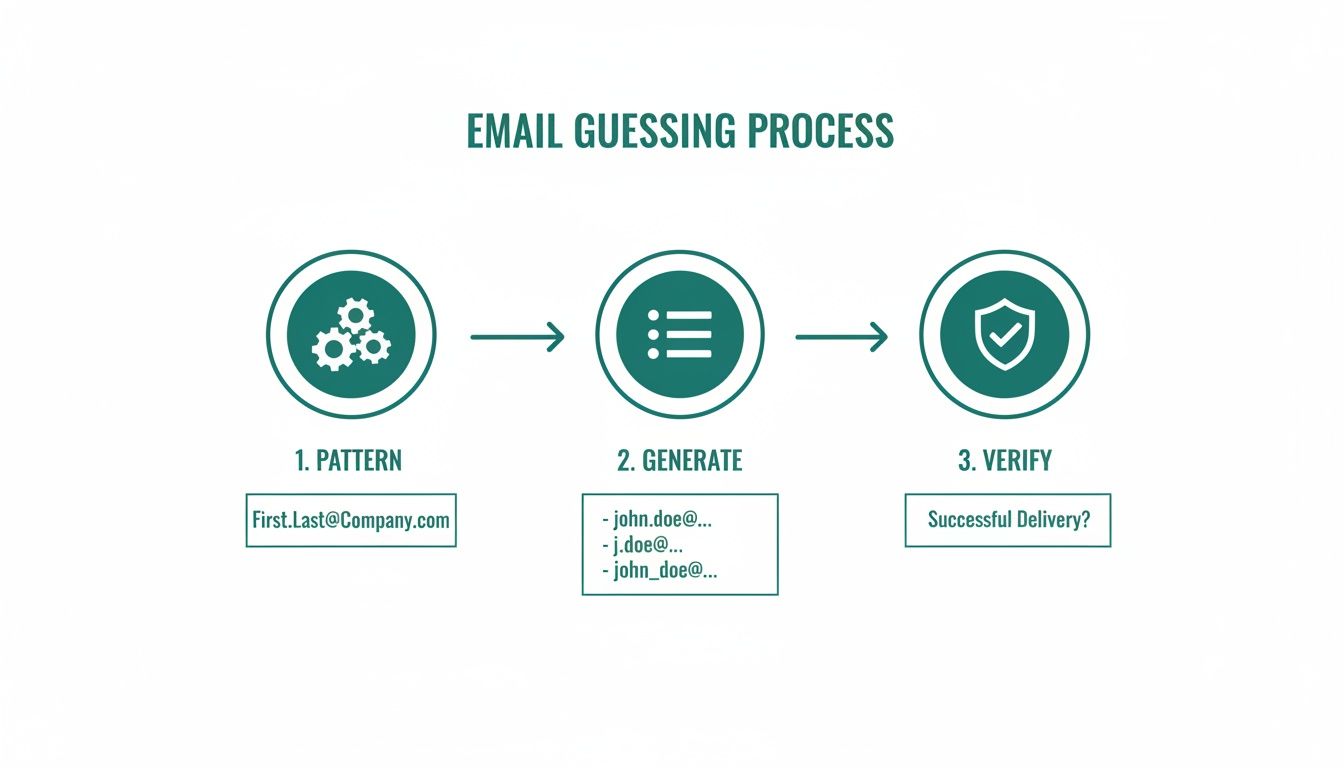
    This whole process—whether you do it by hand or with a tool—boils down to a simple, effective logic.

    Infographic illustrating the three-step email guessing process: pattern, generate, and verify for successful delivery.

    You identify the pattern, generate the possibilities, and verify the correct one. Following this ensures you have a high-quality, deliverable email address before you ever hit "send." If you're ready to automate this, you can check out our list of the https://emailscout.io/best-free-email-finder-tool/ available now. By creating a workflow that works for you, finding contacts becomes predictable and scalable.

    Best Practices for Smart and Ethical Outreach

    Finding someone's email address is just the first domino. The real skill is using it to build a relationship, not burn a bridge. Your outreach should feel like a welcome handshake, not an intrusive sales pitch that gets instantly deleted.

    This all comes down to respecting privacy and knowing the rules of the game. Regulations like GDPR in Europe and the CAN-SPAM Act in the U.S. aren't just legal busywork—they're a blueprint for respectful communication. Following them is non-negotiable; it protects your sender reputation and shows your contacts you actually value their time.

    Crafting a Compelling First Impression

    That first email you send sets the entire tone. The goal is to be a signal in a sea of noise. The only way to do that is with genuine personalization that goes way beyond just dropping in a [First Name] tag.

    Mention something specific. It could be about their work, a recent company win you saw on LinkedIn, or a mutual connection. This tiny bit of effort proves you've done your homework and aren't just spamming a generic template to a list of a thousand people.

    Here are a few core principles I stick to for that first email:

    • Keep it Short: People are busy. Get to the point in a few tight, scannable paragraphs.
    • Provide Obvious Value: Answer the "what's in it for me?" question immediately. Why are you reaching out, and what benefit might they get from responding?
    • Have One Clear Call-to-Action (CTA): Don't confuse them with multiple requests. Ask for one simple thing, like a 15-minute call or their thoughts on a single question.

    After you find an email address for free, the next challenge is making sure your message actually gets seen. A perfectly written email is worthless if it never gets opened. If you want to dive deeper, it's worth exploring proven tactics to increase your open rates.

    A well-crafted email respects the recipient's intelligence and time. It's a conversation starter, not a demand. The difference lies in demonstrating genuine interest before asking for anything in return.

    Simple Templates to Get You Started

    Templates are a solid starting point, but they should always be customized. Here are two adaptable examples—one for sales and one for networking—that are designed to feel personal and get a response.

    For a complete breakdown, check out our guide on how to write cold emails that convert.

    Template 1: Sales Inquiry
    Subject: Question about [Their Company's recent project/product]

    Hi [Name],

    I saw your recent launch of [Product Name] and was really impressed with [Specific Feature]. At [Your Company], we help businesses like yours achieve [Specific Goal] by [Your Solution].

    Given your focus on [Their Company's Goal], I thought our approach might be a good fit. Would you be open to a brief 15-minute chat next week to explore if we can help you [Achieve a Specific Benefit]?

    Template 2: Networking Request
    Subject: Loved your work on [Project/Article]

    Hi [Name],

    I've been following your work on [Topic] for a while and was particularly inspired by your recent article on [Article Title]. Your insights on [Specific Point] were fantastic.

    I'm also working in the [Your Industry] space and would love to hear your perspective on [Specific Question]. Would you have a moment for a quick virtual coffee in the coming weeks?

    Questions We Hear All the Time About Finding Emails

    Even with the slickest tools and smartest tactics, you're going to run into questions. Let's be real—finding contact info is part science, part art, and you need to get the strategy and ethics right. Here are the answers to the questions that pop up most often.

    Think of this as your quick guide to clearing up confusion around the legal stuff, boosting your success rate, and walking into your outreach with total confidence.

    Am I Going to Get in Trouble for Finding and Emailing Someone?

    This is easily the most important question, and the answer isn't a simple yes or no. Generally, finding a publicly listed business email and sending a professional message is perfectly legal. But—and this is a big but—you have to play by the rules set by anti-spam laws like the CAN-SPAM Act in the US and GDPR in Europe.

    These regulations aren't just suggestions. They have a few core requirements you absolutely cannot ignore:

    • No Deception: Your subject line has to be honest and reflect the content of your email.
    • A Clear Way Out: You must include an obvious and easy-to-use opt-out or unsubscribe link.
    • Show Who You Are: Your message has to include your valid physical mailing address.

    Dropping the ball on any of these can lead to some hefty fines and, just as bad, do serious damage to your brand's reputation.

    What's the Single Best Free Way to Find Emails?

    Honestly, there's no magic bullet. The "best" method really comes down to what you're trying to accomplish. If you're hunting for a handful of high-value contacts, nothing beats a manual deep dive. We're talking about advanced Google searches and some good old-fashioned LinkedIn profile sleuthing. It’s slow, but it’s surgical.

    On the other hand, if you're building a larger, targeted list, that manual approach will burn you out fast. A workflow built around a free browser extension like EmailScout is way more efficient. It handles the heavy lifting of searching and verifying, letting you scale up your efforts without compromising on quality.

    The most powerful strategy is almost always a hybrid one. Use automated tools to build your initial list, then switch to manual research to personalize your outreach for the A-list prospects. That mix of machine efficiency and human touch is what gets replies.

    I'm Hitting a Wall. How Can I Find More Emails?

    If your usual tricks aren't working, don't just keep doing the same thing. It’s time to get creative and start layering your strategies. First, double-check the basics: do you have the exact spelling of the person's name and the company's domain? A simple typo is a common culprit.

    Next, start testing different email patterns. Sure, firstname.lastname@company.com is common, but what about flastname@company.com or firstname_l@company.com? Don't stop there. Go look in places most people ignore, like author bios on the company blog, speaker lists from industry conferences, or press releases. These less-obvious spots are often where you'll find what you're looking for.


    Ready to stop guessing and start connecting? The EmailScout Chrome extension helps you find verified email addresses in a single click, directly from LinkedIn profiles and company websites. Get started for free and find unlimited emails today.

  • How to Find Someone’s Email with 7 Proven Methods

    How to Find Someone’s Email with 7 Proven Methods

    You can try to find someone’s email the old-fashioned way—digging through company websites, social media profiles, and guessing common email patterns. Or, you can use a dedicated email finder tool to get verified results instantly.

    Honestly, the best approach is usually a mix of both. A little bit of manual detective work combined with the speed of automation gets you connected to the right person without wasting hours.

    Why Finding the Right Email Is a Game Changer

    Before we get into the "how," let's talk about the "why." Why is this one skill so important? In a world overflowing with digital noise, firing off a message to a generic "info@" address is pretty much the same as shouting into the void. It’s going to get lost, ignored, or filtered into oblivion long before it ever reaches a real person.

    Nailing down a specific person’s email address is your all-access pass to bypass the gatekeepers. It lets you drop a personalized message right into the inbox of a decision-maker—a potential client, a future business partner, or a key influencer. That direct line is where successful outreach begins.

    The Power of Precision Targeting

    Think about it in practical terms. A cold email sent to a generic inbox might get a 1% response rate, if you’re lucky. But a well-crafted message sent directly to the right person? I’ve seen those response rates jump to 10-20% or even higher. That’s not a small improvement; it's the kind of difference that can completely reshape a sales or marketing campaign.

    A targeted email does more than just deliver a message; it signals respect for the recipient's time by showing you’ve done your homework. It’s the first step in building a genuine professional relationship rather than just being another name in a crowded inbox.

    Once you see just how powerful direct email outreach is, you'll want to build a solid pipeline of contacts. You can discover top marketing lead sources to keep your campaigns fueled with fresh opportunities.

    Cutting Through the Digital Clutter

    Every single day, an mind-boggling 376.4 billion emails fly across the internet. That number is expected to hit 392.5 billion by 2026.

    This isn't just a fun fact; it's your competition. Your message is fighting for attention against an unprecedented amount of content. The people who master the art of finding direct emails will always, always outperform those who just spray and pray with mass, untargeted email blasts. Learning more about these email industry trends can give you a serious edge.

    Mastering the Manual Search: Your Inner Detective

    Before you even think about firing up an automated tool, it pays to roll up your sleeves and do a little old-fashioned digital detective work. Honestly, some of the best finds come from a few clever manual searches. It costs nothing but a few minutes of your time and builds a skill set you'll use constantly.

    The first, and most obvious, place to look is the company's website. I always head straight for the 'About Us,' 'Team,' or 'Contact' pages. You’d be surprised how often key employees are listed right there with their direct email addresses.

    This whole process is about finding the right person, not just any generic inbox.

    Infographic about find someone's email

    As you can see, getting your message directly to the decision-maker is what separates a successful outreach campaign from one that falls flat.

    Getting More Out of Google Search

    When the company website doesn't give you what you need, Google is your next stop. But don't just type in their name and hope for the best. You need to use specific search operators to tell Google exactly what you're looking for.

    Try a search string like this: site:company.com "Jane Doe" email. This simple command forces Google to search only on that company’s domain for Jane Doe’s name mentioned alongside the word “email.” You can swap "email" for "contact" or "reach" to see if that shakes anything loose.

    I’ve found this trick unearths contact info buried deep in old press releases, blog author bios, or forgotten team pages that aren't even in the main site navigation. It's a simple move, but it's incredibly effective.

    How to Make an Educated Guess (And Be Right)

    Okay, so direct searches came up empty. It’s time to make some smart, educated guesses. Most companies—especially larger ones—use a standardized format for their email addresses. Once you figure out the pattern, you can often predict anyone's email.

    Before you start guessing randomly, it helps to know which patterns are the most common. I've found that 90% of the time, a company will use one of the formats in this table.

    Common Email Address Patterns to Test

    Pattern Format Example (for John Smith at acme.com) Commonality
    First Name + Last Name johnsmith@acme.com Very High
    First Initial + Last Name jsmith@acme.com Very High
    First Name john@acme.com High
    First Name . Last Name john.smith@acme.com High
    First Name + Last Initial johns@acme.com Medium
    First Initial + Last Initial js@acme.com Low

    Once you have a few likely combinations, you need a way to verify them without just sending an email and praying it doesn't bounce. A quick hack is to use the compose window in Gmail. Type an address in the "To" field and just hover over it. If a Google profile pops up, you've almost certainly got a match.

    For a much deeper look into this, check out our full guide on finding email addresses by name, where we cover even more advanced strategies. Getting these manual techniques down gives you a massive advantage before you ever need an automated tool.

    Tapping into Social and Professional Networks

    Sometimes, the quickest way to an email address isn't a clever Google search—it's by going directly to where people hang out online.

    Professional and social networks are goldmines for contact info if you know where to look. Unsurprisingly, LinkedIn is the first place you should check. It sounds obvious, but you'd be surprised how many people forget to check the "Contact Info" section on a person's profile.

    If that’s a dead end, don't give up. The real gems are often hidden in plain sight. I've found emails buried in someone's bio, in their recent posts, or even in the comments section where they've told someone to "shoot me a note at [email]." You just have to be willing to do a little digging.

    Beyond the LinkedIn Profile

    Think of a LinkedIn profile as just the starting point. The real opportunities often show up in the content someone creates and shares.

    Keep an eye out for these:

    • Personal Websites: Does their profile link out to a personal blog or portfolio? Almost every single one has a contact page.
    • Published Articles: If they've written for places like Medium or other industry sites, their author bio at the bottom is a prime spot for an email address.
    • SlideShare Decks: Professionals love to upload their conference presentations. The last slide is almost always a "Thank You" or "Questions?" page, complete with their contact details.

    This kind of hands-on searching turns you from a passive browser into an active prospector. And if you're doing this for business, formalizing your approach with proven LinkedIn B2B lead generation strategies can seriously scale your efforts.

    Here's a pro tip: when you finally reach out, mention that specific article or presentation you found. It instantly shows you've done your homework and aren't just sending another generic spam message.

    Using Twitter's Advanced Search

    Don't sleep on Twitter, either. Its advanced search is surprisingly powerful for this.

    You can actually search for tweets from a specific user that contain words like "email" or "contact." Just pop (from:username) email into the search bar. You can even filter by date to make sure the information is recent and likely still valid.

    People often try to trick bots by writing out their email address—think "jane at company dot com" instead of the real thing. Make sure you search for those variations, too. It’s a simple trick, but it often uncovers emails that a standard search would miss entirely.

    Automating Your Search with an Email Finder

    Manual methods have their place, but let’s be real—your time is too valuable to spend hours playing digital detective when a machine can do the job in seconds. When you need to work efficiently, automation is the only way to go. This is where a good email finder tool completely changes the game.

    Imagine landing on a LinkedIn profile or a company’s team page and pulling a verified email address with a single click. No more guessing different name combinations or digging through endless Google searches. That's the real power of an email finder extension; it’s not just a shortcut, it’s a smarter and faster way to work.

    A laptop screen outdoors displaying a webpage titled 'One-Click Email' with a smiling man's photo.

    The image above gives you a glimpse of just how simple this can be. A tool like EmailScout overlays the contact info you need right on top of the websites you’re already using.

    Why Automation Beats Manual Searching

    While manual techniques are great for those tricky, one-off searches, they just don't scale. If your goal is to build a targeted list of 50 potential clients or 100 outreach prospects, trying to do it all by hand quickly becomes a massive bottleneck.

    Here’s where an automated tool gives you a clear edge:

    • Speed: What might take you an hour of manual digging can be done in just a few minutes. This frees you up to focus on what actually matters—crafting a great message and building relationships.
    • Accuracy: Reputable email finders don't just guess. They cross-reference massive databases and run real-time verification checks to confirm an address is active, which drastically cuts down your bounce rate and protects your sender reputation.
    • Integration: The best tools, like EmailScout, work as a browser extension. This means the functionality is baked right into your workflow, popping up on LinkedIn profiles and company sites exactly when you need it most.

    Using an email finder shifts your focus from the tedious task of searching to the strategic work of outreach. You can even explore a comparison of the best email finder tools to see how different options stack up.

    Practical Scenarios for Email Finders

    Let's move past the theory and look at how this plays out in the real world. The applications are pretty much endless, but a couple of key examples really highlight the power of these tools.

    An email finder isn't just about collecting addresses; it’s about creating opportunities at scale. It gives you the power to connect with the right people faster than your competitors can.

    For a sales rep, this kind of tech is a goldmine. They can browse the LinkedIn profiles of decision-makers at target companies and instantly grab their verified email addresses. Instead of burning half their day on prospecting, they can spend that time actually selling.

    In the same way, a marketer looking for collaboration opportunities can jump on the websites of potential partners and quickly pull contact info for the Head of Marketing or Partnerships Manager. This efficiency allows them to build a solid pipeline of potential collaborators without the manual grind. In both scenarios, the time saved translates directly into more opportunities and better results.

    Unlocking Advanced Email Finder Features

    Once you've got the hang of finding a single email, it's time to think bigger. The real power comes from scaling your efforts—moving from one-off searches to building entire prospect lists in minutes. This is where you graduate from the basic click-to-find function and dig into the features that separate the good tools from the great ones.

    Advanced features are built for one thing: efficiency at scale. We'll use EmailScout as our example to break down a couple of functions that can completely change how you work. These aren't just small add-ons; they're strategic tools for anyone serious about outreach.

    Build Lists Automatically with AutoSave

    Picture this: you're browsing through dozens of LinkedIn profiles for potential leads. Instead of clicking the EmailScout button on every single profile, what if you could just browse while the tool works silently in the background, building a lead list for you?

    That’s exactly what the AutoSave feature does.

    When you flip it on, EmailScout automatically grabs and saves the contact info from every profile you visit. You can scroll through a list of conference attendees or a company’s employee directory on LinkedIn, and the tool will quietly compile a list of verified emails. This is an incredibly powerful way to find someone's email without breaking your research rhythm.

    This isn't just a time-saver; it’s a fundamental shift in how you prospect. It turns passive browsing into an active, automated lead generation activity, allowing you to build a rich contact list with almost zero manual effort.

    By the time you're done looking around, a ready-made list is waiting for you, complete with names, job titles, and verified email addresses. A task that used to take hours is now just a background process.

    Extract Emails in Bulk with URL Explorer

    Now, let's take this a step further. What if you already have a list of target companies but need to find the right people inside them? Visiting each website one by one would be a massive time sink. This is where a bulk search feature like URL Explorer becomes your best friend.

    This tool lets you paste a list of company website URLs directly into EmailScout. It then gets to work, crawling each site to find and pull out all the public email addresses it can find.

    The process is incredibly straightforward:

    • Get your URLs ready: First, compile a list of the company websites you want to target (e.g., company-a.com, company-b.net, company-c.org).
    • Paste and go: Drop the entire list into the URL Explorer.
    • Export your contacts: In just a few minutes, you’ll have a comprehensive list of all the emails found, neatly organized and ready for your outreach campaign.

    This feature is a game-changer for marketers building media lists or sales teams targeting specific industries. Instead of hunting for individual contacts, you gather intelligence on entire organizations at once. It scales your ability to find someone's email from a single person to hundreds in one simple operation.

    Validating Emails and Practicing Ethical Outreach

    So you’ve found a potential email address. Awesome. But hitting "send" right away is a rookie mistake that can do more harm than good.

    Firing off an email to an unverified address is just asking for a bounce. A bounced email isn't just a failed attempt—it's a black mark against you. Email providers see those bounces and start thinking you're a spammer, which can torpedo your sender reputation and send all your future emails straight to the junk folder.

    This is why email verification is an absolute must. Before you even think about writing your first sentence, you need to confirm the inbox is live and can actually receive your message. It’s a simple check that protects your domain and gives your outreach a fighting chance.

    A laptop screen outdoors displaying 'Verify Emails' with green and red checkmarks.

    Don't underestimate the power of a valid email. When done right, email marketing can generate an incredible $36 for every $1 spent, making it one of the highest-ROI channels out there. And with mobile open rates hitting between 78-80%, you want to make sure your message lands in a real inbox. If you want to dive deeper into the numbers, you can discover more about these email statistics and see the full potential.

    Crafting a Respectful First Impression

    Once you have a verified email, the real work begins: ethical outreach. The goal isn't just to get a reply; it's to start a real conversation. Cold outreach gets a bad rap because too many people send lazy, generic, self-serving blasts. You can immediately set yourself apart by being respectful, personalized, and genuinely helpful.

    Your first email should feel like the start of a professional relationship, not a sales pitch. It needs to show you've done your homework and believe you can offer something genuinely useful to the recipient.

    If you're interested in the nuts and bolts, we have a detailed guide to validate an email address on our blog that walks you through the technical side of things.

    A Simple Template for Starting Conversations

    Forget those long, complicated templates you see online. The best first emails are often short, clear, and focused entirely on the other person. Your only goal is to see if there's interest and earn a reply.

    Here's a simple structure I've seen work time and time again:

    • Personalized Subject Line: Make it about them, not you. Mention a recent project, a mutual connection, or an article they wrote. Something like, "Loved your recent article on project management," works wonders.
    • Quick, Relevant Intro: Briefly say who you are and connect the dots for them. Why are you emailing them?
    • Offer Clear Value: In a sentence or two, what's in it for them? How can you help solve a problem they actually have?
    • Simple Call-to-Action: Keep it low-pressure. A simple question like, "Is this something you’re currently focused on?" is much better than asking for a 30-minute call.

    This approach shows you respect their time, proves you've done your research, and opens the door for a real dialogue.

    Common Questions About Finding Emails

    Let's be honest, diving into email outreach can feel a bit like the wild west. You've got questions, especially around the rules and what actually works. It's smart to get these sorted out before you start sending.

    Is This Actually Legal?

    Yes, but you absolutely have to play by the rules. It's not a free-for-all.

    In the U.S., the CAN-SPAM Act is the law of the land. The big takeaways are that your message can't be deceptive, and you must give people a clear and easy way to opt-out. Over in the E.U., GDPR is the main regulation, which means you need a "legitimate interest" to contact someone.

    The bottom line for both? Always be transparent and lead with genuine value.

    How Good Are These Email Finder Tools, Really?

    The good ones are surprisingly accurate. Top-tier tools don't just guess; they pull from multiple data sources and often run a real-time check to make sure the email address is live.

    No tool is perfect, of course, but you're looking at a 70-90% success rate for finding a verified email. That's a massive improvement over stumbling around in the dark.

    A reliable tool doesn’t just find an email; it validates it. This simple step protects your sender reputation and ensures your carefully crafted message actually has a chance to be read.

    How Do I Keep My Cold Emails from Landing in Spam?

    Landing in the inbox is half the battle. Here’s how you win it:

    • Start with a verified email. This is non-negotiable. Sending to dead addresses is a one-way ticket to the spam folder.
    • Personalize your subject line and message. Generic blasts scream "spam." Show you've done at least a little homework.
    • Ditch the spammy words. Avoid obvious triggers like "free," "guarantee," or using ALL CAPS.
    • Never send attachments on the first outreach. It’s a huge red flag for email providers.
    • Warm up your email account. If you're new to outreach, send emails slowly at first to build a good sender reputation over time. It's a marathon, not a sprint.

    Ready to stop guessing and start connecting? With EmailScout, you can find verified email addresses in a single click, directly from LinkedIn profiles and company websites. Try it today and build your ideal prospect list faster than ever. Get EmailScout for free.

  • A Guide to Search Engines for Emails to Find Key Contacts

    A Guide to Search Engines for Emails to Find Key Contacts

    Specialized tools designed to find email addresses are a complete game-changer for anyone in sales or marketing. Unlike a general Google search that casts a wide net across the entire internet, these tools are built to zero in on professional contact information by digging through public data, figuring out company email patterns, and checking against professional networks.

    What Are Email Search Engines and Why Do They Matter?

    Ever tried to find a specific book in a massive library without a catalog? That’s what prospecting feels like without the right tools. You could wander the aisles for hours, hoping to get lucky, but it's a slow, frustrating grind. Using a general search engine like Google is like asking the librarian for "a book on business"—you'll get a million results, but not the exact one you need.

    An email search engine is your specialized digital catalog. It's a focused tool built for one thing: finding the direct contact info of key professionals. Think of it as a digital detective that knows exactly where to look for clues, piecing together the right email address from company websites, social profiles, and public databases.

    To put it in perspective, let's look at how these specialized tools differ from your everyday web search.

    Email Search Engines vs General Web Search

    Feature Search Engines for Emails General Web Search (e.g., Google)
    Purpose Find specific, verified professional email addresses. Index and retrieve information from the public web.
    Scope Narrow and deep: focused on contact and company data. Broad and wide: covers all types of web content.
    Output A direct email address, often with verification status. A list of web pages that may or may not contain an email.

    This table shows why a targeted approach is so much more effective. You're not just searching; you're discovering.

    The Power of a Direct Connection in a Crowded Inbox

    In a world drowning in digital noise, these tools aren't just a nice-to-have; they're a strategic must. Their value comes from the sheer power of email as a business channel. With an estimated 376 billion emails flying around the globe every day, getting your message seen by a real decision-maker is everything.

    The payoff is huge. Email marketing continues to deliver one of the best returns on investment out there. Some reports show an average ROI of up to 4,200%, and 89% of marketers count on email as their main source for lead generation.

    This is where search engines for emails really shine. They give you a direct line to the people who matter, letting you:

    • Bypass Gatekeepers: Forget generic inboxes like info@company.com and connect straight with the person who can say "yes."
    • Accelerate Sales Cycles: Slash the time it takes to get a response and book that critical first meeting.
    • Improve Outreach Personalization: Craft a message for a specific person, leading to way higher engagement.

    By turning a tedious manual chore into a quick, automated process, these tools free you up to do what you do best: build relationships and close deals.

    At the end of the day, these specialized search tools transform prospecting from a game of guesswork into a precise, data-driven strategy. They hand you the keys to unlock direct conversations and make email your most powerful tool for growth. To get a better handle on how these systems work under the hood, check out our full guide on email search engines.

    How These Tools Uncover Contact Information

    Ever wonder how an email search engine pulls the right contact out of a digital hat? It’s not magic, but it’s close. Think of these tools as tireless digital investigators, piecing together clues scattered all over the web to find a direct line to your prospect.

    They don’t just take a wild guess. Instead, they use a clever, multi-step approach that combines data scraping, pattern analysis, and verification to deliver a solid result.

    This diagram breaks down the basic process of turning a name and a company into a verified email address you can actually use.

    A diagram illustrating a 3-step process for finding new contacts: Prospect, Filter, and Connect.

    It’s a simple flow that shows how a broad search gets systematically narrowed down to a single, actionable contact. Let's break down what's happening behind the scenes.

    Following Digital Footprints Across the Web

    The whole process usually kicks off with data scraping. It sounds technical, but the concept is simple. Imagine a bot that can read millions of public web pages—company "About Us" pages, press releases, or author bios on blogs—in seconds, looking for any mention of a name alongside an email address.

    This information is then collected and stored. For tools focused on professional contacts, this often means understanding how to source data from platforms like LinkedIn, with some using methods for scraping LinkedIn data ethically to build their databases. This ensures the information is both relevant and responsibly sourced.

    An effective email finder doesn’t just look in one place. It pulls together data from dozens of public channels to build a complete profile, which dramatically increases the odds of finding the correct, up-to-date contact info.

    This first step casts a wide net, gathering all the raw data needed for the more refined steps that follow.

    Cracking the Code with Pattern Matching

    Here’s where it gets interesting. Once a tool knows a person's name and the company they work for, it can use pattern matching to make a very educated guess. Most companies use a standard format for their email addresses. Just think about your own company—chances are, everyone’s email follows a predictable structure.

    The tool then tests all the common corporate email patterns, like:

    • First Name: john@company.com
    • First Initial + Last Name: jdoe@company.com
    • First Name + Last Name: johndoe@company.com
    • First Name . Last Name: john.doe@company.com

    It quickly generates these potential combinations and gets them ready for testing. If you’re ever curious about a specific company, you can run an email lookup by domain to see these patterns in action for yourself.

    Verifying and Validating the Findings

    Coming up with a list of possible emails is only half the battle. The final, and most critical, step is verification. An unverified email is just a bounce waiting to happen, and too many of those will wreck your sender reputation.

    To make sure an address is the real deal, email search engines perform a quick check with the company's mail server. It’s like a technical handshake that confirms whether the server recognizes the email address as a valid recipient, all without actually sending a message. Only after an email passes this test is it handed over to you with a high confidence score, giving you peace of mind that your outreach will actually land in the right inbox.

    Diving Into the Different Types of Email Search Tools

    Not all email search engines are built the same. They come in all shapes and sizes, each designed for a specific job. Think of them like different kinds of fishing gear—you wouldn't use a massive net to catch one specific fish, and you definitely wouldn't use a simple rod and reel to supply a whole restaurant. The right tool always depends on your goal.

    Picking the best email finder really comes down to matching its format to how your team works. Whether you're a sales rep needing a quick contact on the fly or a marketing team building a massive campaign list, understanding these differences is the key to working smarter, not harder.

    Browser Extensions for On-the-Fly Prospecting

    Browser extensions are the nimble speedboats of email discovery. They live right in your web browser (like Chrome or Firefox) and spring into action when you're on a prospect's website or LinkedIn profile. With just a click, they scan the page and public data sources for any associated email addresses, serving them up instantly.

    This type is perfect for:

    • Sales Development Reps: Instantly find a decision-maker's contact info while you're researching their company online.
    • Recruiters: Quickly grab a candidate's professional email directly from their social media profile.
    • Freelancers: Snag a potential client's email from their company site without breaking your research flow.

    The big win here is speed and convenience, making extensions the go-to for high-volume, targeted prospecting.

    Web Applications for Bulk List Building

    If extensions are the speedboats, then web applications are the big fishing trawlers. These are powerful, dashboard-based platforms built to find hundreds or even thousands of emails at once. You just upload a list of names and company domains, and the app chugs away in the background to find and verify all the matching emails.

    These platforms are built for scale. They shift the focus from finding one email at a time to building comprehensive, campaign-ready contact lists with minimal manual effort.

    Web apps are best for large-scale operations. For example, a marketing team getting ready for a new product launch can upload a list of 500 target companies and get back verified contact lists for their entire outreach in just a few hours.

    API Services for Custom Integrations

    Finally, API services are the most flexible and technical option of the bunch. An API (Application Programming Interface) lets you plug an email search engine’s core power directly into your own software, like a CRM or a custom-built sales tool. This creates a completely seamless workflow where finding an email is just another feature inside the system you already use every day.

    And for those times when you already have an email and need to find out more about its owner, learning how to reverse search an email address can be a huge help. Some of the more advanced APIs even offer this reverse-lookup function.

    The Strategic Advantage of Finding Direct Emails

    Knowing how a tool works is one thing. Seeing what it does for your bottom line is another story entirely. Let’s move past the technical "how" and get straight to the tangible results that a good search engine for emails can deliver. The core benefit is simple but incredibly powerful: they open up direct, relevant lines of communication that fuel real growth.

    A person views an email or calendar app on a smartphone at a busy office desk.

    Think about a sales rep trying to reach a VP of Marketing at a major tech company. The old way meant navigating a maze of gatekeepers, generic contact forms, and dead-end info@ inboxes. That process could drag on for weeks with nothing to show for it. With an email finder, that same rep can get the VP's direct email in minutes, write a personalized message, and maybe even book a demo within a couple of days.

    Real-World Scenarios and Business Impact

    This ability to cut through the noise creates a serious competitive advantage across the board. It’s not just about finding an address; it’s about opening a direct line to opportunity.

    Here’s how that plays out in the real world:

    • Accelerated Sales Cycles: Sales teams can go straight to the decision-makers, cutting out the middlemen who gum up the works. This means faster responses, quicker demos, and shorter sales cycles.
    • Boosted Marketing ROI: Marketers can build hyper-targeted lists for account-based marketing (ABM) or personalized campaigns. They can be sure their message is landing in front of the right people, which dramatically improves engagement rates and ROI.
    • Streamlined Recruitment Efforts: Recruiters can find and contact top-tier candidates who aren't even looking for a new job. This gives them access to a passive talent pool their competitors will likely miss.

    The real value of these tools comes from shifting your outreach from a volume game to a precision one. When you can ensure your message reaches the right person every time, you make every communication count. You save time and see drastically better results.

    The Proven Power of Direct Email

    This whole emphasis on finding direct emails isn't just a hunch; it's backed by cold, hard data. Email remains one of the most effective channels for actually driving revenue, which is why these tools are in such high demand.

    Research shows that email traffic converts to sales at a much higher clip than other channels. For instance, about 4.24% of visitors from email make a purchase. Compare that to just 2.49% from search engines and a tiny 0.59% from social media. On top of that, customers who buy something through an email offer tend to spend 138% more.

    For sales teams, this makes email a high-leverage channel that is 40 times more effective than social media for acquiring new customers. If you want to dive deeper, you can explore more of the compelling statistics behind email marketing on Porch Group Media. At the end of the day, a great email search tool simply acts as the key to unlocking this powerful, high-ROI system.

    How to Choose the Right Email Search Engine

    Picking the right search engine for emails feels a lot like choosing a critical tool for a big job. Get it right, and your work flows smoothly. Get it wrong, and you're in for a world of frustration. With so many options out there, it’s easy to get lost in the marketing noise.

    To cut through it all, you need to focus on a few core things that actually impact your results. The goal isn’t just to find a tool that spits out data, but one that delivers accurate contacts and fits right into how your team already works.

    Evaluate Data Accuracy and Verification

    Let’s be clear: the single most important factor is accuracy. An email finder that gives you bad or old information isn't just a waste of money—it's actively working against you. Every single bounced email hurts your sender reputation, making it tougher for your future messages to even land in an inbox.

    Look for tools that offer these essentials:

    • Real-Time Verification: This is a non-negotiable. The best email search engines don’t just pull from a dusty old database. They actively check if an email is valid in real time, right before they give it to you.
    • Confidence Scores: Some tools will give you a percentage score showing how sure they are that an email is correct. This is a huge help for prioritizing your outreach to the most solid contacts first.
    • Diverse Data Sources: A platform that cross-references info from multiple public sources—think company websites, professional networks, and public records—is always going to be more reliable.

    Don’t get fooled by a tool that brags about a massive database without proving the data is fresh. A smaller, highly accurate list of contacts is infinitely more valuable than a giant list of unverified junk.

    Consider Workflow Integration and Usability

    Even the most powerful tool is worthless if your team finds it too clunky to use. The best solution should feel like a natural part of your sales or marketing process, not another complicated platform you have to wrestle with.

    Think about how it plugs into your current setup. Does it have a simple browser extension so you can grab emails on the fly? Can it connect directly with your CRM, like Salesforce or HubSpot, and sync new contacts automatically?

    Finally, take a look at the price. Some work on pay-as-you-go credits, while others are a monthly subscription. Find a plan that matches how much outreach you actually do, so you get the best return on your investment without paying for a bunch of features you’ll never touch.

    Navigating Privacy and Compliance

    Let's be clear: using a powerful email finder tool comes with a responsibility to be smart and ethical about it. While these search engines are designed to find business information that's already out there, how you use that data is what really counts. Getting this right is crucial for protecting your brand's reputation.

    A laptop displaying a shield with an open padlock icon on a green screen, emphasizing privacy first.

    You’ve probably heard of regulations like GDPR in Europe and the CAN-SPAM Act in the U.S. These laws aren’t there to kill B2B communication; they exist to stop spam and protect people's data. It’s all about finding professional data the right way, something we cover in our guide on how to responsibly scrape email from LinkedIn.

    Best Practices for Responsible Outreach

    The secret is to approach your outreach with respect and a genuine offer of value. Think of it less like a cold blast and more like starting a professional conversation.

    To stay on the right side of the rules and build trust from the get-go, stick to these core principles:

    • Provide an Easy Opt-Out: Every single email needs a clear, one-click way for people to unsubscribe. No exceptions.
    • Be Transparent: Say who you are. Your company's name and physical address should be right there in your email footer.
    • Ensure Relevance: Make sure your message actually relates to the person's professional role or industry. Random pitches are just spam.

    The most effective—and ethical—outreach is always rooted in personalization and respect. When you focus on delivering real value to a relevant audience, you’re not just following the rules; you’re building a stronger, more trusted brand.

    At the end of the day, using an email finder ethically just means respecting the person on the other end. Treat the contact information you find as an opportunity to start a real professional dialogue. Do that, and you'll sidestep privacy issues while getting far better results.

    Still Have Questions?

    Even with the best tools in hand, a few questions always pop up. Let's tackle some of the most common ones about using a search engine for emails to clear up any lingering confusion.

    How Accurate Are These Email Finders, Really?

    This is the big one, and the answer varies a lot. The best tools on the market consistently hit an accuracy rate between 85% and 95%. They pull this off by running real-time verifications and checking an address against multiple public data sources to make sure it's not just valid, but actively in use.

    You absolutely want to stick with a tool that has a proven track record for accuracy. It’s not just about minimizing bounced emails—it’s about protecting your sender reputation, which is gold.

    Is It Legal to Use These Tools for Cold Outreach?

    Yes, for B2B outreach, you're generally in the clear. Regulations like the CAN-SPAM Act in the U.S. and GDPR in Europe allow for professional communication, but you have to do it responsibly. It's not a free-for-all.

    The secret is staying compliant. Your email has to be relevant to their job, you need to say who you are, and you must give them an easy, no-hassle way to opt out.

    Can I Find Personal Emails With an Email Search Engine?

    The reputable tools are built specifically to find professional email addresses—the kind that looks like first.last@company.com. They intentionally avoid personal emails from providers like Gmail or Yahoo. This keeps your outreach squarely in a professional context and respects privacy norms.

    Trying to hunt down personal emails with these platforms is a bad idea. You'll likely violate the tool's terms of service and run into data privacy laws. Just don't do it.


    Ready to stop guessing and start connecting? With EmailScout, you can find unlimited verified email addresses for free and build your outreach lists in minutes. Try the powerful Chrome extension today and see the difference for yourself. Get started for free at https://emailscout.io.

  • Discover email address reverse search to boost outreach

    Discover email address reverse search to boost outreach

    A reverse email search is how you figure out who’s really behind an email address. It’s like turning over a business card you found on the street. That string of characters becomes a real person with a name, job title, company, and even social media profiles. In short, it turns a question mark into a genuine opportunity.

    What Is a Reverse Email Search and Why It Matters

    Ever get an email from a potential lead and your first thought is, "Who is this person?" That’s the exact moment a reverse email search becomes your best friend. It’s not just about running a quick Google search; it’s about digging into professional data to get a real edge. This is your first move to turn a cold, anonymous contact into a warm, informed conversation.

    Over-the-shoulder view of a person wearing glasses and a green sweater, typing on a laptop for reverse email search.

    This isn't just for satisfying your curiosity. For anyone in sales or marketing, this is a core tactic. When you uncover the professional context behind an email, you can customize your pitch, qualify leads with way more accuracy, and start building a real business relationship from the get-go.

    The Growing Importance of Email Intelligence

    Email isn’t going anywhere. It’s still the main way we do business. With the global email user base expected to reach 4.73 billion by 2026, its role in the professional world is rock solid. But that also means your prospect's inbox is more crowded than ever. Generic, uninformed outreach just gets deleted.

    A reverse search gives you the intel you need to break through that noise. To really see how powerful this is, it helps to understand different strategies for finding business email addresses and how this piece fits into the larger puzzle.

    A successful reverse email search provides more than just a name. It delivers actionable intelligence that informs your entire outreach strategy, from the opening line of your email to the specific pain points you address.

    What You Can Uncover with a Reverse Search

    The real magic happens when you use the information you find. Instead of a generic "Hello," you can mention a mutual LinkedIn connection, congratulate them on their company’s recent funding round, or tailor your solution to their exact role. That’s how a simple email becomes a strategic tool.

    Here’s a quick rundown of the kind of intel a good reverse email search can dig up.

    What You Can Uncover with a Reverse Email Search

    Information Type Description Value for Outreach
    Full Name & Job Title The person's complete name and their current role. Instantly personalize your greeting and tailor your message to their professional responsibilities.
    Company Information Details about their employer, like industry, size, and location. Provides context for their needs and helps you align your pitch with their company's goals.
    Social Media Profiles Links to professional networks, most often LinkedIn. Offers deep insights into their career history, recent activity, and professional connections.

    The data you gather allows you to approach outreach from multiple angles, making your communication far more relevant and likely to get a response.

    Finding People with Manual Search Techniques

    Before you jump to an automated tool, it’s worth spending a little time on the old-school manual methods for an email address reverse search. Think of it as digital sleuthing. You’d be surprised how effective these techniques are—they’re almost always free and help you build the kind of investigative instincts that pay off big time.

    Your best friend here is a good old-fashioned search engine, but with a few tricks up your sleeve. Using advanced search operators can dig up mentions of an email address buried in websites, forums, or old press releases that a basic search would completely miss. The simplest and most powerful operator is just putting the email in quotation marks.

    For instance, searching for "j.smith@corporatecorp.com" forces Google to find that exact string. This can instantly pull up a conference speaker page, a comment they left on a blog post, or a citation in an article, giving you immediate context about who you're dealing with.

    Tapping into Professional Networks

    Social media is another goldmine, especially professional hubs like LinkedIn. It's common for people to link their work email to their public profiles, which gives you a direct line to their entire professional background, current job, and network.

    A quick search on LinkedIn for that email address can connect all the dots in seconds. Suddenly, that generic email address transforms into a real person with a face, a job title, and a work history.

    Pro Tip: If you have an email like "first.last@company.com," just search LinkedIn for people with that first and last name who list that company as their employer. Cross-referencing an email pattern with a public profile is one of the fastest ways to get a positive ID.

    A Real-World Scenario

    Let's say you get an email from "sales@startupx.com" asking about your services. It's a generic address, but the domain startupx.com is your clue. A quick trip to their website shows a small team, but no direct contacts are listed for the sales folks.

    This is where you get clever. Hop over to LinkedIn and search for people with "sales" in their title who work at "StartupX." You'll probably find two or three people. From there, it’s an educated guess based on common email patterns to figure out their direct address. For a more detailed breakdown of this, check out our guide on how to find anyone's email address, which dives deep into these pattern-finding strategies.

    This entire process—domain to website, website to LinkedIn, LinkedIn to a specific person—lets you piece together the puzzle without spending a penny. Getting good at these manual skills gives you a powerful, free alternative for any email address reverse search.

    Using Automated Tools for Faster Results

    Let’s be honest, manual searching is a great skill to have, but it just doesn’t scale. When you’re staring down a list of dozens of leads, the manual approach hits a brick wall fast. This is where automated tools come in and completely change the game. They turn a painstaking investigation into a one-click action that serves up rich, actionable data in seconds.

    Platforms built for email address reverse search are designed for one thing: efficiency. They instantly check an email against massive databases, pulling together professional data points far faster than any human could. It's the difference between researching one lead in ten minutes and enriching an entire list in that same amount of time.

    This is what the old way looks like—a multi-step process that requires jumping between different sites.

    A three-step manual search process: email initial query, search engine web search, and social media profile discovery.

    As you can see, a dedicated tool compresses this entire workflow into a single, almost instantaneous step.

    How Reverse Search Platforms Work

    So, how do you tap into this power? Dedicated platforms and browser extensions are your best bet. A tool like EmailScout, for instance, plugs directly into your workflow as a simple Chrome extension. Once it’s installed, running an email address reverse search is as easy as clicking a button whenever you come across an email online.

    These tools are built to surface the exact information you need to personalize your outreach and have a real conversation:

    • Full Name and Job Title: Know exactly who you're talking to and their role in the company.
    • Company Details: Get the context you need, like industry, size, and location.
    • Social and Professional Profiles: A link to their LinkedIn profile is almost always included, offering a goldmine of extra insight.

    This immediate access to data is a huge productivity boost. Instead of wasting your day digging for info, you can focus on what actually moves the needle—crafting a compelling message and building relationships. For a deeper look at the top options, our guide on the best email lookup tools can help you find the right fit.

    The Advantage of Accuracy and Speed

    It’s not just about being faster; it’s about being better. The data quality from top-tier automated tools is often far superior to what you can find on your own. Professional platforms are constantly updating their databases, so the information you get is fresh and reliable.

    The real win with automated tools isn’t just saving time—it’s getting more accurate, verified data that improves the quality of every single interaction. You're not just faster; you're smarter.

    Leading platforms have some seriously impressive stats to back this up. Independent tests have shown some tools achieve around a 74% deliverability rate, which has a direct impact on your campaign’s success. Higher accuracy means lower bounce rates and a much better chance your message actually gets read. You can find more benchmarks and see why they matter for sales teams over at Snov.io.

    Ultimately, adding a dedicated email address reverse search tool to your daily routine is a no-brainer. It takes the manual grind out of the equation and gives you the high-quality data needed to make every outreach effort count.

    How to Validate Your Search Results

    Finding a name and job title is a great start, but it's only half the battle. The real value comes from knowing that information is accurate. Trust me, inaccurate data leads to embarrassing outreach mistakes and bounces that can seriously damage your sender reputation.

    Verifying your findings is the non-negotiable step that separates the amateurs from the pros.

    Two businessmen review contact information on a tablet in a modern office environment.

    The first thing I always do is cross-reference. If a tool tells me an email belongs to "John Doe, Marketing Director at Acme Inc.," I immediately pop open two new tabs: John's LinkedIn profile and Acme Inc.'s official website. I'm looking for consistency across all three sources.

    This simple check helps you avoid common pitfalls. Does the LinkedIn profile picture match other online photos? Is the job title the same as what the company website lists on its team page? Any mismatch is a major red flag that the data might be outdated or just plain wrong.

    A Practical Verification Checklist

    Think of yourself as a detective piecing together clues. Your goal is to build a confident profile before you ever hit "send." Here’s a quick checklist I run through to spot inconsistencies and confirm I've got the right person:

    • Social Media Consistency: Does the name and company on LinkedIn line up with their activity on other professional platforms like X (formerly Twitter)?
    • Company Website Confirmation: Can you find the person on the company's official team page or in recent press releases? This is a huge positive signal.
    • Digital Footprint Analysis: Does a quick search for their name and company reveal recent articles, conference speaker lists, or interviews that confirm their role?

    The goal of validation isn't to find a single, perfect source of truth. It's about gathering multiple data points that all point in the same direction, giving you the confidence to move forward.

    Using Email Verification for Final Confirmation

    Okay, the final and most crucial step is making sure the email address itself is active and can receive mail. Sending emails to invalid addresses is the fastest way to get your domain flagged as spam, and that's a hole that's tough to dig out of.

    The potential return from email is massive—it can deliver a 36:1 ROI—so protecting your ability to actually land in the inbox is paramount.

    Many dedicated reverse search platforms, including EmailScout, have built-in verification. This service basically pings the mail server to check if the address is valid without actually sending an email. It’s a clean, safe way to confirm deliverability and protect your sender score.

    If you want to get into the weeds of how this works, you can learn more about how to validate an email address and see why it’s a non-negotiable part of any serious outreach workflow. This simple check ensures your carefully crafted message actually has a chance of being read.

    Staying Compliant with Legal and Ethical Rules

    Finding someone's information with a reverse email search is a powerful tool, but it comes with real responsibility. What you do with that data is just as critical as how you found it. Getting a handle on the legal side of things isn't just about dodging fines—it’s about building trust and protecting your brand's reputation from the get-go.

    The main rules of the road are set by regulations like Europe's GDPR (General Data Protection Regulation) and California's CCPA (California Consumer Privacy Act). They might seem complicated, but their core ideas are pretty simple: be open, have a good reason to reach out, and always respect a person’s right to say "no."

    Understanding Legitimate Interest

    For anyone doing B2B sales or marketing, the concept of legitimate interest is your North Star. This legal basis generally gives you the green light to contact a professional if your product or service is truly relevant to their job.

    For instance, if your search reveals an email belongs to a Head of Marketing and you sell marketing automation software, you're likely covered by legitimate interest.

    But this isn't a free-for-all. Your outreach still needs to be reasonable and not overly intrusive. Relevance is everything. Blasting a generic pitch to every email you uncover is not only bad form—it completely undermines your legal justification.

    Always ask yourself this one simple question: "Would this person reasonably expect to hear from a business like mine about this topic in their professional capacity?" If the answer is a fuzzy "maybe" or a flat-out "no," you're on shaky ground.

    Ethical Guidelines for Responsible Outreach

    Beyond the black-and-white letter of the law, sticking to high ethical standards is what separates the pros from the spammers. Responsible outreach builds relationships. Irresponsible tactics burn bridges and can even get your domain blacklisted.

    Here are a few non-negotiable rules our team lives by:

    • Never, Ever Use Purchased Lists: These lists are notoriously full of old, unconsented contacts. They're a one-way ticket to spam folders, legal headaches, and a trashed sender reputation.
    • Provide a Clear Opt-Out: Every single email you send must have a dead-simple, impossible-to-miss way for someone to unsubscribe. This is a must-have under laws like the CAN-SPAM Act, not a suggestion.
    • Be Transparent: Don't try to be clever or hide who you are. Be upfront about your name, your company, and why you're reaching out. Authenticity wins every time.
    • Add Value, Don't Just Ask: Your first message should offer something useful or insightful that's tailored to their role. A generic "Got 15 minutes?" gets deleted. An email that shows you've done your homework gets a reply.

    When you treat the data you find with respect, you empower your team to build high-quality lead lists and conduct outreach with confidence. It all starts with building trust from that very first interaction.

    Advanced Strategies for Sales and Marketing Teams

    Okay, finding a single person's contact info is useful. But a reverse email search can be the engine that powers your entire outreach machine if you think bigger.

    Instead of just one-off lookups, imagine enriching entire lead lists at scale. Let's say you just hosted a webinar. You can run that whole list of attendee emails through a tool and transform them from anonymous sign-ups into complete professional profiles.

    Suddenly, you have job titles, company sizes, and LinkedIn profiles. Your sales team can immediately see who the high-value leads are and prioritize them. It’s all about working smarter, not just harder.

    Personalization Beyond the First Name

    With this rich data in hand, your outreach can get incredibly personal and, more importantly, relevant. Generic templates are dead on arrival; they get deleted instantly. But a message that shows you’ve done your homework? That gets opened.

    Properly using this information is the secret to unlocking business growth with customer data.

    Instead of another generic pitch, you can lead with something that shows you're paying attention:

    • Reference their work: "Saw the article you published on content marketing—your point about video engagement was spot on."
    • Acknowledge company news: "Congratulations on the recent Series B funding. It must be an exciting time for the team."
    • Connect to their role: "As the Head of Sales, I imagine improving lead conversion rates is a big focus for you this quarter."

    This isn't just flattery; it’s strategy. This level of detail shows genuine interest and immediately separates you from the noise. You go from being "just another salesperson" to a helpful resource who understands their world.

    Troubleshooting Common Roadblocks

    Even with the best tools, you're going to hit dead ends. Sometimes a search comes up completely empty, or you only find a generic info@company.com address. Don't throw in the towel.

    If you can't find an individual, pivot to the company domain. Hunt for a team page on their website or run a search on LinkedIn for employees with the right kind of job title.

    For those generic "info" or "contact" addresses, just send a polite, quick message asking to be pointed in the right direction. You'd be surprised how often the person managing that inbox is happy to forward your note to the right person.

    Still Have Questions? Let's Clear a Few Things Up

    You've got the methods down, but it's natural to have a few lingering questions. Here are some of the most common ones I hear, with straight-to-the-point answers to help you move forward.

    Is This Whole Reverse Email Search Thing Even Legal?

    Yes, for B2B outreach, it's generally above board. You're almost always pulling information that's already publicly available. The real legal tripwire isn't finding the data, but how you use it.

    Regulations like GDPR and the CCPA are all about the proper handling of personal information. The key is to operate under "legitimate business interest." Just make sure your outreach is relevant to their professional role and always, always give them a clear and easy way to opt out.

    How Accurate Are These Search Tools, Really?

    Honestly, it varies. But the top-tier tools are impressively reliable. We've seen industry benchmarks showing some of the best platforms hitting around a 74% deliverability rate, which is pretty solid. They work by cross-referencing a ton of different data points behind the scenes.

    My best advice is to always use a tool that includes an email verification feature. This confirms an address is active before you send anything, protecting your sender reputation.

    What If My Search Comes Up Completely Empty?

    Don't throw in the towel just yet. If a tool strikes out, it's time to go manual. Try a few different search engine operators, like wrapping the email address in quotes to look for an exact match.

    Also, take a look at the email's domain. Does it lead to a company website? You might find a staff directory or an "About Us" page with the contact you need. If you're still hitting a wall, it could mean the email is private, brand new, or not tied to any public accounts. Your best bet then is to pivot and try to find an alternative contact at the same company.


    Ready to stop guessing and start connecting? EmailScout gives you the power to find and verify professional email addresses in a single click, turning anonymous contacts into valuable leads. Try EmailScout for free today and see the difference for yourself.

  • Mastering Domain Email Lookup in 2024

    Mastering Domain Email Lookup in 2024

    A domain email lookup is pretty straightforward: it's the process of finding professional email addresses connected to a company's specific domain name. This skill is a game-changer for anyone in sales, marketing, or networking who needs to get in touch with key decision-makers directly, skipping those generic "contact us" forms.

    What Is Domain Email Lookup and Why It Matters

    A laptop on a wooden desk displays an email interface, with office supplies and text 'Find Professional Emails'.

    Ever tried to reach a key person at a company you're targeting, only to hit a dead end because you can't find their email? It’s a classic roadblock. It slows down your outreach and can kill an opportunity before it even gets started. A domain email lookup is the practical skill you need to find those crucial contacts tied to a specific company domain.

    But it’s about more than just finding an address—it’s about opening doors to real conversations. This guide isn't about theory; it's a roadmap full of actionable strategies you can start using today. We'll cover everything from quick, one-off lookups with browser extensions to scaling up with batch searches. You'll also learn how to make sure your emails actually get delivered and how to handle the ethical side of professional outreach.

    The Core Benefits of This Strategy

    Getting good at this gives you a direct line to the people who can actually make things happen, which is vital for any growth-focused role. Here are the main advantages:

    • Accelerated Sales Cycles: When you can contact decision-makers directly, you cut through the noise and get your proposal in front of the right person much faster.
    • Improved Outreach Personalization: A direct email lets you send a highly personalized message, which boosts response rates way beyond what a generic "info@" address can achieve.
    • Enhanced Networking Opportunities: You can easily connect with industry leaders, potential partners, or even mentors just by finding their professional contact info.

    To really get the most out of your efforts, it helps to understand the full range of sales prospecting tools out there. They can seriously upgrade your entire strategy.

    A targeted email is often the first step in building a meaningful business relationship. A domain email lookup isn't just a technical process; it's the key that unlocks that initial conversation, turning a cold lead into a warm prospect.

    Ultimately, this process changes how you connect with prospects and partners. It gives you the data you need to build solid, targeted lists for any campaign you can dream up. For a deeper dive into finding specific contacts, check out our guide to a complete email address lookup. It's packed with everything you need to make every outreach effort count.

    Finding Single Emails with Precision and Speed

    When you need just one specific email, and you need it now, you can’t afford to wait. The good news is there are a few solid techniques that can get you that single contact in minutes, whether you prefer automated tools or a more hands-on approach.

    The fastest way is almost always a specialized browser extension.

    Let's say you've landed on a prospect's company website or maybe their LinkedIn profile. If you have an extension like Hunter or EmailScout installed, you just click its icon in your browser bar. The tool instantly gets to work, pulling up known email addresses associated with that domain. You'll typically see a list of names, job titles, and the emails it has found, often with a handy confidence score to show how certain it is.

    From there, it's as simple as scanning the list for your target, copying the address, and you're good to go. It’s a completely seamless way to perform a domain email lookup without ever breaking your workflow or leaving the page.

    The Art of Manual Pattern Guessing

    But what happens if a tool comes up empty, or you just prefer to do things yourself? This is where a bit of clever detective work comes in, using the repeatable skill of manual pattern guessing.

    It's simpler than it sounds. Most companies use a consistent, predictable formula for their email addresses. Your first job is to figure out what that formula is. You can often find a clue—just one employee's email—on the company's "About Us" page, buried in a press release, or even in the author bio of a blog post.

    Once you have a confirmed email, like j.smith@company.com, you've cracked the code. You can now apply that same pattern to your target's name and build their email address from scratch.

    A single known email address is like a Rosetta Stone for a company's entire communication structure. Once you decipher that one pattern, you can often deduce the email address for anyone in the organization, a powerful skill that costs nothing but a few moments of your time.

    Verifying Your Educated Guess

    Now that you've put together a likely email address, there's one final, crucial step: verification.

    Never, ever send a message to a guessed address without confirming it's legit first. A high bounce rate doesn't just mean your email didn't get delivered; it can seriously damage your sender reputation and get your domain flagged as spam.

    Thankfully, this is easy. Just use a free, single-email verifier tool. You paste your guess—let's say f.jones@company.com—into the search bar and run the check. Within seconds, it will ping the server and tell you if the address is valid and can receive mail. This simple check is what turns a hopeful guess into a confident outreach opportunity.

    This is especially important given the sheer variety of email clients people use today. Apple’s email client, for example, holds a dominant 51.52% market share, mostly on iOS devices, while Gmail is massive with around 1.8 billion accounts globally. Making sure your email is valid is the only way to ensure it has a chance of landing in the right inbox. Discover more stats about popular email providers.

    Comparing Quick Email Lookup Methods

    So, which one-off method should you use? Both browser extensions and manual guessing have their place. This table breaks down the key differences to help you decide which is right for the situation.

    Method Speed Typical Accuracy Cost
    Browser Extension Very Fast (seconds) High (often includes a confidence score) Freemium (free searches are usually limited)
    Manual Guessing Fast (minutes) Variable (highly dependent on verification) Free (requires a free verifier tool)

    Ultimately, both approaches are incredibly effective for a precise domain email lookup. The key is knowing which tool—or which technique—to pull out of your toolbox to fit the immediate need and keep your workflow moving.

    Scaling Your Outreach with Batch Lookups

    Finding a single email is one thing, but finding hundreds or thousands is how you build a real engine for lead generation. This is where batch domain email lookups come in. They take a tedious, manual task and turn it into a massive strategic advantage, saving you an incredible amount of time.

    Instead of hunting for contacts one by one, you can feed a tool an entire list of target companies and get results for all of them at once. Honestly, this approach is the foundation of any serious sales, marketing, or PR campaign running at scale.

    Preparing Your Domain List for Success

    The quality of your results depends entirely on the quality of your input list. A clean, properly formatted list of company domains is the most critical part of the process. I always recommend starting with a simple CSV file with just one column for the domains.

    To get the best possible results, follow these simple rules:

    • Keep it clean: Each entry needs to be a root domain like company.com, not a full URL like https://www.company.com/about-us.
    • Remove duplicates: A quick check for duplicate domains saves you time and credits. It also keeps your final export nice and tidy.
    • Verify domain validity: Typos or fake domains will just cause errors and slow things down. A quick once-over is worth it.

    A little bit of prep work here goes a long, long way. A clean list lets the tool do its job efficiently without getting stuck on formatting problems or bad data. If you're new to this, getting a feel for how a free email scraping tool works can give you some good background on data collection principles.

    The real power of batch processing isn't just about speed. It's the ability to build a rich, targeted prospect list from nothing more than a list of companies you want to reach. You’re turning raw market research directly into actionable outreach data.

    Once your CSV is ready, the rest is pretty straightforward. You just upload the file to your batch lookup tool, tweak any search parameters if needed, and let it run. The tool then works its way down your list, systematically performing a domain email lookup for every single entry.

    From Raw Data to Actionable Intelligence

    What you get back is so much more than a simple list of email addresses. A good tool will enrich this data, often giving you names, job titles, and even confidence scores for each contact. This transforms a basic list into a detailed prospecting database you can actually use.

    At its core, any batch tool is just automating a simple, repeatable process at a massive scale. It's doing what you would do manually, just hundreds of times per minute.

    A three-step process for email lookup: find email from website, guess, then verify.

    This simple three-part sequence—find what you can on the website, guess common patterns, and verify the result—is the magic behind it all.

    The demand for this kind of data is exploding. The email lookup tool market is on track to hit $2.5 billion by 2025 and is expected to grow at 15% annually through 2033. This growth is all driven by the need for more efficient ways to generate leads as more and more businesses move their outreach online.

    Why Email Verification Is Non-Negotiable

    Modern computer screen showing "Email Verification" with three green checkmarks on an office desk.

    Finding what looks like a perfect email address is just the starting line. The real test is what happens after you hit "send." A brilliant domain email lookup is completely useless if the address is a dead end, and sending messages to invalid accounts is way more damaging than just a waste of time.

    Every single email that bounces back sends a bad signal to Internet Service Providers (ISPs) like Gmail and Outlook. Once you rack up enough bounces, your entire domain can get flagged. Suddenly, even your perfectly good emails—the ones going to real, interested contacts—start getting routed to the spam folder. Your whole outreach effort becomes invisible.

    This is exactly why email verification isn't just a "nice-to-have." It's a critical, non-negotiable step in your workflow.

    Demystifying the Verification Process

    So, what actually happens when an email gets "verified"? It's not just a simple ping. It’s a multi-layered process designed to confirm that an inbox is real, active, and ready to receive your message. The tech behind it is complex, but the goal is simple: protect your sender score and get your emails delivered.

    Here's a quick look under the hood of a typical verification check:

    • Syntax Validation: This is the most basic check. The tool ensures the email follows the right format (name@domain.com) and doesn't have any weird, illegal characters.
    • Domain and SMTP Check: Next, it confirms the domain actually exists and is set up to receive email in the first place. This involves a sort of digital handshake with their mail server.
    • Mailbox Ping: This is the clever part. The service talks directly to the server to see if a specific mailbox (like jane.doe@company.com) is real, all without actually sending an email.

    A lot of domain lookup tools have verification built right in these days, which is handy. But if you're running any kind of large-scale campaign, investing in a dedicated service to do a final scrub of your list is always a smart move. For anyone serious about getting their messages seen, it pays to explore proven strategies for mastering email deliverability.

    Sending an unverified email is like mailing a letter to an address you aren't sure exists. You're not just risking it won't arrive; you're basically telling the post office you don't care about your mailing list's quality, which has real consequences down the road.

    The Real-World Impact of Clean Lists

    Keeping your email list clean has a direct impact on your bottom line. High bounce rates—and anything over 2% is usually seen as a problem—can get your account suspended by email marketing platforms. Even worse, it slowly chips away at the trust ISPs have in your domain, making every future campaign that much harder.

    This entire system of professional communication is built on a massive technological foundation. The global email hosting market was valued at a staggering USD 27.04 billion in 2024 and is on track to hit USD 108.73 billion by 2032. That growth tells you everything you need to know about how vital reliable email—and the tools that support it—has become.

    Ultimately, verification is what turns the raw data from your domain email lookup into a dependable asset. Taking this extra step ensures your messages land where they're supposed to, protects your sender reputation, and maximizes the return on all your hard work. To dig into the technical side of things, our guide on email address verification breaks it all down.

    Navigating Compliance and Ethical Outreach

    So, you've successfully found a list of emails. That’s a powerful starting point, but it also comes with some serious responsibility. Just because you can find an email doesn't mean you have a free pass to send whatever you want. Getting this wrong can kill your reputation and even land you in legal trouble.

    Before you hit "send" on any campaign, you need to understand the rules of the road. Key regulations like the CAN-SPAM Act in the U.S. and Europe’s General Data Protection Regulation (GDPR) set the standards. While they have their differences, the core idea is the same: protect people from unwanted and irrelevant emails.

    It's time to shift your thinking from "Can I find this email?" to "Should I be using this email?"

    The Line Between Prospecting and Spamming

    The difference really comes down to legitimate interest and relevance.

    Think about it: finding a publicly listed business email to pitch a B2B partnership is worlds away from scraping personal data for a generic marketing blast. Ethical outreach always, always starts with a good reason to believe your message offers real value to the person you're contacting in their professional capacity.

    Here are the non-negotiables for responsible outreach:

    • Legitimate Interest: Only reach out if your product or service is a logical fit for their job and industry. No exceptions.
    • Transparency: Be upfront. Clearly state who you are and why you're emailing. Tricky or deceptive subject lines are a huge red flag and a direct violation of CAN-SPAM.
    • Easy Opt-Out: Every single email must have a simple, obvious way for them to unsubscribe. Don't hide it or make them jump through hoops.
    • Prompt Removal: When someone opts out, you must remove them from your list immediately. Delaying this isn't just bad practice; it’s a violation that can result in hefty fines.

    A domain email lookup should be the first step in a potential professional conversation, not a ticket to dump someone into a generic marketing funnel. If you don't respect their inbox, you've already lost.

    Practical Steps for Ethical Campaigns

    Before launching any outreach, take a minute and ask yourself a few simple questions:

    • Does this person’s job title actually align with what I’m offering?
    • Is my message clear, professional, and respectful of their time?
    • Am I making it incredibly easy for them to say, "No, thanks"?

    This isn't just about dodging fines; it's about being effective. People are flooded with emails every day. The ones that get a positive response are the ones that feel thoughtful and relevant. By putting ethics first, you're not only staying compliant but also dramatically increasing your odds of building real business relationships. Your professional reputation is built on it.

    Your Top Domain Email Lookup Questions, Answered

    Even with the best tools in your arsenal, you're bound to have questions when you start digging for domain emails. It's totally normal. From practical "how-to" queries to the slightly fuzzy legal stuff, it can feel like a lot to navigate.

    I've rounded up the most common questions that pop up and laid out some clear, no-nonsense answers to help you move forward with confidence.

    Is It Legal to Use These Tools?

    Yes, it's generally legal to use a tool to find business contact information that's already publicly available. The real question isn’t about finding the information—it's about how you use it.

    Once you have that email, your outreach falls under regulations like GDPR in Europe or the CAN-SPAM Act in the U.S. The golden rules are simple: have a legitimate business reason for contacting someone, give them a dead-simple way to opt out, and always respect their privacy. This is about building connections, not just hoarding data.

    How Accurate Are Email Finders, Really?

    This is the million-dollar question, and the answer is: it varies. A lot. The top-tier tools, however, consistently hit an accuracy rate between 70% and 98%. They achieve this by cross-referencing multiple data sources and, most importantly, running real-time verification checks to make sure an inbox is live before giving you the green light.

    But here’s a pro tip: even with a great tool, always run your final list through a dedicated email verification service before launching a big campaign. That one extra step is your best insurance policy against a high bounce rate, which can seriously damage your sender reputation.

    No tool is perfect, 100% of the time. Think of an email finder's output as a high-probability lead, not a guarantee. Verification is what turns that probability into a reliable asset.

    Can I Find Emails for Any Domain?

    You can certainly try, but you won't get a hit every single time. You'll have the most luck with established businesses that have a solid digital footprint, as their contact info is more likely to be indexed somewhere online.

    Where you might run into trouble is with a few specific types of domains:

    • Tiny Businesses: A solo operation or a company with just a couple of employees might not have its email patterns logged by major lookup tools.
    • Brand-New Websites: If a domain was just registered yesterday, it's a ghost. No tool has had the chance to crawl it yet.
    • Catch-All Servers: Some domains use a "catch-all" setting, meaning they accept mail sent to any address at that domain (like anything@example.com). This makes it impossible for verification tools to confirm if a specific inbox actually exists, so you'll often get an "unknown" or risky result.

    These tools are built for B2B prospecting, where professional contact details are just part of doing business.


    Ready to stop guessing and start connecting? EmailScout gives you an effortless way to perform a domain email lookup with our powerful Chrome extension. Find verified emails, build targeted lists, and supercharge your outreach in a single click. Find unlimited emails for free with EmailScout.

  • How to Find a Person Email Proven Strategies

    How to Find a Person Email Proven Strategies

    Finding someone’s email address is way easier than you might think. Just about every professional has a digital footprint, and email is almost always at the center of it. The real trick isn't if the email exists, but knowing where to look and what patterns to search for.

    Why Finding Someone's Email Is Actually Possible

    A person using a laptop with icons representing communication and networking floating around them, symbolizing the digital footprint left by emails.

    Before you even start, you need to get one thing straight: you're not looking for a needle in a haystack. Email has grown far beyond a simple messaging tool. It’s now a universal digital ID—the key that unlocks professional networks, social media profiles, and countless online services.

    Because it’s so widely used, the contact you’re after is almost certainly out there. Your success comes down to using the right techniques and tools, not just dumb luck.

    The Numbers Don't Lie

    The massive number of email accounts in use is exactly why a strategic search works. By 2025, there are expected to be around 4.59 billion email users worldwide. On top of that, the average person has about 1.86 email accounts, giving you multiple potential ways to connect.

    This digital saturation is the foundation of modern sales and outreach. In fact, understanding the basics of lead generation best practices makes it clear why snagging an email is such a critical first step.

    Your goal isn't just to find an address; it's to find the right address—the one they actually check for professional messages. This simple shift in mindset turns a passive hunt into a focused investigation.

    When you think about it this way, you can feel confident your effort will pay off. With a systematic approach, what seems like a daunting task becomes a reliable, repeatable process.

    Getting Your Hands Dirty: Manual Search Techniques

    Before you even think about pulling out the automated tools, it's worth knowing that you can often find exactly what you're looking for without spending a single cent. These hands-on methods are the bread and butter of digital prospecting. They rely on freely available resources and just a bit of clever detective work.

    Honestly, they’re surprisingly effective for those one-off searches where you need a specific contact and you need it now.

    Your first stop should almost always be the company’s website. Don’t just skim the homepage. Dig a little deeper into the 'About Us' or 'Team' pages. These sections are a goldmine and often list key people along with their direct contact info. Another pro tip? Check the company blog. Authors are frequently credited with a bio that includes an email address or a link to a social profile where you can find more clues.

    Unleash the Power of Advanced Search Operators

    A basic Google search is a good start, but using advanced operators turns it into a high-precision tool. By adding a few simple commands to your search query, you can slice through the noise and zero in on what you actually need. This little trick forces Google to search within a specific website or look for exact phrases, which dramatically cleans up your results.

    Here are a couple of my go-to examples:

    • "John Doe" + "email" site:company.com – This tells Google to only search that specific company's website for the person's name next to the word "email."
    • "John Doe" + "contact" filetype:pdf – This one is great for uncovering public PDFs, like old conference speaker lists or press releases, that might have the contact details you’re after.

    These commands are simple, but they’re incredibly powerful. They help you find information that’s already out there but buried deep within a site’s architecture, saving you from clicking through dozens of irrelevant pages.

    The key is to think like a database. You're not just asking a question; you're giving a specific command to retrieve a piece of data hidden in plain sight.

    Scour Professional and Social Networks

    Professional networks like LinkedIn are treasure troves, but not always in the most obvious way. Most people keep their email addresses hidden from their public profiles, but the information they do share can give you some serious clues. Check out their bio, recent posts, or even their comments—they might mention a personal blog or a side project where their contact info is listed publicly.

    Sure, this approach takes a bit more patience, but it helps you build a more complete picture of the person you're trying to reach. It’s also a great way to deepen your understanding by finding email addresses by name through common patterns, a technique that works perfectly alongside social media research. When you start combining clues from different platforms, you can often piece together exactly what you need.

    Using Email Finder Tools for Efficiency

    When you need to find an email address right now, digging around manually just doesn't cut it. It’s a huge time sink. This is exactly where a dedicated email finder tool completely changes the game, turning what could be hours of digital detective work into a few seconds of clicking.

    These platforms are built to work smarter, not harder. They scan massive public databases, cross-reference information, and predict corporate email patterns with startling accuracy. So, instead of you having to guess between firstname.lastname@company.com or f.lastname@company.com, the tool does all that heavy lifting for you.

    How To Run An Effective Search

    The whole process is refreshingly simple. With a tool like EmailScout, all you really need is a person's full name and the company they work for. Just plug in those two details, and the platform gets to work, pulling up potential email addresses almost instantly.

    Most top-tier tools follow a similar, straightforward workflow:

    • Enter Your Target's Details: Start with the basics—first name, last name, and their company’s website (like Jane Doe and emailscout.io).
    • Run the Search: The tool queries its database and uses its algorithms to find or predict the most likely email address.
    • Analyze the Results: You’ll get one or more email options, usually with a confidence score attached.

    This simple visual guide can help you figure out where to start your search, depending on what info you already have.

    Infographic about how to find a person email

    As the chart shows, knowing the company is your most direct path to success—and that’s precisely where email finders are at their best.

    Pay close attention to that confidence score. It’s a crucial piece of the puzzle, telling you the probability that an email is correct and deliverable. A score of 95% or higher means you can feel pretty good about hitting "send." A lower score might suggest it’s a solid guess, but one you might want to double-check.

    If you're curious how different platforms stack up, you can dive deeper into this guide on the best email finder tools.

    Comparing Manual vs. Automated Email Finding

    It helps to see the trade-offs side-by-side. Here’s a quick look at how searching on your own compares to using a dedicated tool.

    Feature Manual Search Email Finder Tool (e.g., EmailScout)
    Speed Slow; can take minutes or hours per contact Fast; results in seconds
    Accuracy Variable; relies on guesswork and luck High; uses data and algorithms for predictions
    Scalability Very low; not practical for large lists High; bulk search features for hundreds of leads
    Verification Requires a separate step or tool Often built-in or includes confidence scores
    Effort High; requires significant detective work Low; just input a name and company

    While manual methods have their place, it's clear that for anyone who values their time, an automated tool is the way to go for efficiency and scale.

    Scaling Your Outreach With Bulk Features

    Finding one person's email is useful, but the real power of these tools comes from their ability to work at scale. Let's say you need to build a contact list for an entire department or for a new marketing campaign. Doing that by hand would be a nightmare.

    A bulk search feature lets you upload a whole list of names and companies. The tool then crunches through the list and finds all the corresponding email addresses in a single operation. This transforms list-building from a painstaking chore into an efficient, automated process.

    This feature alone is a massive time-saver for sales and marketing pros who need to build targeted prospect lists without wasting their entire day on it.

    Creative Strategies for Hard-to-Find Contacts

    A magnifying glass hovering over a complex network of digital connections, highlighting a single, hard-to-find contact point.

    Okay, so you've tried the usual methods, and you're still coming up empty. It happens. You're likely trying to reach someone who keeps a low digital profile—think busy C-level executives, in-demand freelancers, or key decision-makers who get a million emails a day.

    When the standard tools hit a wall, it doesn't mean you've hit a dead end. It just means it's time to get a little more creative with your approach.

    One of the most effective tactics is to play detective and figure out the company's email pattern. Most businesses use a consistent format for their email addresses. If you can find just one or two emails from that company, you've likely found the key to unlock your contact's address.

    Common Company Email Patterns to Test

    Start by looking for patterns from anyone else at the company. For example, if you find jane.doe@company.com and john.smith@company.com, it's a safe bet that your target, "Robert Jones," has the email robert.jones@company.com.

    Here are the most common formats I see in the wild:

    • First Name: robert@company.com
    • First Initial + Last Name: rjones@company.com
    • First Name + Last Initial: robertj@company.com
    • First Name . Last Name: robert.jones@company.com

    Once you have a few good guesses, you can use a tool like EmailScout to verify the address. This saves you from sending a risky test email that could bounce and get your domain flagged.

    Look Beyond the Obvious Social Platforms

    Everyone checks LinkedIn first, but it’s far from the only game in town. Sometimes the contact info you need is hiding in plain sight on other platforms. I've found professional emails listed directly in a Twitter (now X) bio, especially for journalists or collaborators who want to be reachable.

    Don’t just glance at their main profile page. Dig a little deeper. Check their pinned posts, personal websites linked in their bio, or even their comments on niche industry forums. People often share information more freely in smaller, trusted communities.

    Here’s another insider trick: subscribe to the company's newsletter or download one of their free ebooks. The automated welcome email sometimes comes from a real person's address or, at the very least, reveals a different email format you hadn't considered. It’s a small step, but it can give you the exact clue you need to finally connect.

    Ethical Outreach and Best Practices

    Finding an email address is just the first part of the puzzle. How you use that email is what truly defines your professional reputation and the success of your outreach. It’s about more than just checking boxes for GDPR compliance; it’s about remembering there's a real person on the other end of that inbox.

    That first message you send sets the entire tone. The goal isn’t to blast out a request but to start a genuine conversation. Always personalize your message, get straight to the point, and be upfront about how you found their contact info. A little transparency goes a long way.

    Your Ethical Outreach Checklist

    Respecting someone's inbox is non-negotiable. It’s the only way to protect your reputation and give your message a fighting chance of being read.

    • Never Add Without Permission: Do not dump a new contact into your marketing or newsletter list without their explicit consent. That’s the fastest ticket to the spam folder.
    • Provide a Clear "Why": Explain exactly why you’re reaching out to them. A generic, copied-and-pasted template is an instant red flag and usually gets deleted on sight.
    • Verify Before Sending: Always run the email through a verification tool to make sure it’s active. This simple step protects your sender reputation by keeping your bounce rate low.

    Once you have a valid email, the next critical step is ensuring your communication is both effective and respectful by mastering professional email etiquette.

    The email marketing industry is massive for a reason—it works. But with companies sending an estimated 23 billion promotional emails in 2023, you have to earn trust to cut through the noise. Ethical, responsible practices are no longer optional.

    Ultimately, how you approach that first contact matters more than anything. If you want to send cold emails that people actually open and reply to, check out our guide on how to write cold emails.

    Common Questions About Finding Emails

    When you're digging for emails, a few questions always pop up, especially around the legal side of things and what to do with the contacts you find. Let's clear the air so you can move forward with confidence.

    The big one is always: is this legal? Finding a publicly listed work email is generally fine. The tricky part is how you use it. Regulations like GDPR in Europe and the CAN-SPAM Act in the US are clear: you need a legitimate business reason to reach out. Crucially, you can't just dump these contacts into a marketing newsletter—that requires their explicit permission.

    What To Do with Unverified Emails

    Another common roadblock is what to do when your tool spits back an email with a low confidence score. Think of that score as a guess. Sending to it is a gamble that could easily end in a bounce, and enough of those will get your domain flagged by email providers.

    Never send a cold email to an address with a low confidence score. Your best move is to run it through a separate email verification service. If it still comes back as a dud, don't risk it. Find another contact at the company and ask for an introduction.

    Finally, a lot of people wonder if free email finder tools are worth the trouble. They can be tempting, but you get what you pay for. While okay for a one-off search here and there, they often pull from outdated databases and can have some sketchy privacy practices.

    If you're doing any kind of serious sales or marketing, investing in a solid, reputable tool is always the smarter play. You’ll get better accuracy, more security, and protect your long-term sender reputation.


    Ready to find the right contacts without the guesswork? With EmailScout, you can build accurate outreach lists and supercharge your sales pipeline in a single click. Start finding unlimited emails for free.

  • Finding Email Addresses by Name The Smart Way

    Finding Email Addresses by Name The Smart Way

    Connecting with the right person often hinges on a single email. But let's be honest, finding that email address can feel like searching for a needle in a digital haystack. It’s a make-or-break task for anyone in sales, marketing, or networking, and it’s only getting tougher.

    This guide gives you a playbook of real, actionable methods to find email addresses starting with just a name, so you can connect more effectively.

    Why Finding the Right Email Is Harder Than Ever

    You’d think in an age of non-stop digital communication, an email address would be easy to find. The reality is quite the opposite. The job has become a frustrating puzzle for anyone whose success depends on solid outreach.

    It’s not just one thing, either. The sheer volume of online noise makes it hard to cut through and find accurate info. At the same time, a growing focus on privacy means people are much more guarded with their contact details. Poking around on company websites or LinkedIn profiles often leads to a dead end or, even worse, an email address that’s been out of commission for years.

    The Rise of Specialized Solutions

    This very challenge has created a massive industry. The global email lookup tool market was valued at $2.5 billion in 2025 and is projected to grow by 15% annually through 2033. This isn't just a random statistic; it highlights a critical shift. Successful outreach now requires more than just a lucky guess.

    Today’s challenge isn’t just about finding an email address—it’s about finding the right one and making sure it's actually deliverable. A bad email wastes your time and can seriously ding your sender reputation.

    To win this game, you need a smart, multi-faceted strategy. That means combining clever manual techniques with powerful, specialized tools.

    This guide will walk you through the most effective methods out there, including:

    • Using dedicated finders like EmailScout for quick, accurate results.
    • Mastering the art of the educated guess with common email patterns.
    • Digging deep with advanced search operators to uncover hidden contact details.

    Finding email addresses by name is a skill, plain and simple. Once you master these strategies and understand the importance of proper email address verification, you’ll spend less time digging and more time building the connections that matter.

    Using Email Finders for Fast and Accurate Results

    Sure, you can sometimes find an email address with a bit of manual digging, but let’s be real—when you need speed and accuracy, nothing beats a dedicated email lookup tool. These platforms are built for one thing: finding and verifying professional contact information. They can turn a frustrating, time-sucking task into a simple click.

    Think about it. You need to connect with a new product manager at a key tech company. Instead of spending the next hour hunting through their website or sifting through social media profiles, an email finder like EmailScout does all the heavy lifting for you. Just plug in their full name and company domain, and let the tool work its magic.

    These tools are much more than just fancy search engines. They scan a massive web of public records, social profiles, and their own proprietary data to pull potential email addresses. More importantly, they run real-time verification checks to make sure the address is active and deliverable. This is absolutely critical for protecting your sender reputation.

    Interpreting the Results

    After a quick search, you'll usually see a list of possible emails. The best tools will include a confidence score—a percentage that tells you how likely it is that an email is correct. If you see a score of 95% or higher, you can feel pretty confident that your message will hit the right inbox.

    If you get a few different results, here’s how I’d approach it:

    • Trust the Confidence Score: Always start with the email that has the highest percentage. It’s your best bet.
    • Look for a Pattern: Does the email format (firstname.lastname@company.com, for example) match other known emails from that company? Consistency is a great sign.
    • Double-Check the Domain: Make sure the email uses the company's current, official domain, not an old one or a subsidiary's.

    For anyone doing serious outreach, finding someone's email on LinkedIn is another great skill to have, and it often works hand-in-hand with what you find using a dedicated tool.

    This visual gives you a quick breakdown of the whole process, from identifying the target to using the right tools to get the contact info you need.

    Infographic about finding email addresses by name

    As you can see, while the challenge can seem complicated, a smart combination of methods and powerful tools will almost always get you the results you’re looking for.

    Choosing the Right Email Finder

    Not all email finders are the same. Some are packed with features, while others are laser-focused on speed or data accuracy. The trick is finding one that fits your specific needs and budget.

    The real value of an email finder isn't just the time it saves you. It’s the confidence of knowing your outreach is built on a solid foundation of accurate, verified data. That leads directly to better engagement and more replies.

    A solid tool helps you build clean, effective contact lists and makes your prospecting so much smoother. If you want to get a better sense of what's out there, I'd recommend checking out a comparison of the best email finder tools. It's a great way to make an informed decision based on features, accuracy, and pricing, ensuring you pick a solution that actually helps you hit your goals.

    The Art of the Educated Guess

    A person working on a laptop, illustrating the process of finding email addresses by name.

    Sometimes, the best tool for the job isn't a tool at all—it's your own intuition. When email finders come up empty, mastering the educated guess can be your most valuable skill. Think of it like being a detective, piecing together small clues to crack the email puzzle.

    This hands-on approach works surprisingly well because most companies stick to a standard formula for their email addresses. Once you figure out that company's specific pattern, you can predict almost anyone's email with a high degree of confidence. The trick is knowing which patterns are most common and how to test your theories.

    Decoding Common Corporate Email Formulas

    Your first move is to get familiar with the most popular email address structures out there. While there are countless variations, a small handful pop up over and over again. Your goal is to create a short list of likely candidates based on these go-to formats.

    Let's say you're trying to find Jane Doe at "acmecorp.com." You'd start by testing a few logical combinations:

    • First Initial + Last Name: jdoe@acmecorp.com
    • First Name . Last Name: jane.doe@acmecorp.com
    • First Name Only: jane@acmecorp.com
    • Full Name (No Separator): janedoe@acmecorp.com

    This method’s real power is its simplicity. You’re not scouring the entire web; you’re just testing a few logical guesses against a domain you already know. It’s a focused, efficient play for when other tactics fall short.

    The sheer number of emails flying around the globe actually forces companies into these predictable patterns. It’s estimated that in 2025, over 376.4 billion emails will be sent and received daily. With that kind of volume, organizations need simple, repeatable structures to manage it all.

    To help you get started, here's a look at the top corporate email formats I see most often in the wild.

    Top 5 Common Corporate Email Formats

    This table breaks down the most frequent email patterns used by businesses, giving you a solid starting point for your educated guesses.

    Format Type Example (Name John Smith) Common Use Case
    First Initial, Last Name jsmith@company.com Extremely common in large corporations to keep addresses short and uniform.
    First Name . Last Name john.smith@company.com Popular in mid-sized to large companies, especially in Europe. Very readable.
    First Name john@company.com Often found in smaller companies or startups where name overlap is rare.
    First Name, Last Initial johns@company.com A solid alternative to the "first initial, last name" format.
    Full Name johnsmith@company.com Simple and direct, frequently used by tech companies and smaller businesses.

    Memorizing these five patterns will give you a massive head start. More often than not, one of them will be the right one.

    Verifying Your Guesses Without Getting Blacklisted

    Okay, you've got your list of potential emails. The absolute worst thing you can do now is just blast a message to all of them. This is a surefire way to get a bunch of bounces, which torpedoes your sender reputation and can get you flagged as a spammer.

    So, the final, critical step is verification.

    Before you even think about hitting "send," run your guesses through a free email verification tool. These services ping the mail server to check if an address is valid without actually sending an email. Just paste in your list, and the tool will tell you which ones are good to go.

    Here's another great trick: perform an email lookup by domain for your target company. If you can find just one other employee's email—maybe on a press release or their LinkedIn profile—you've likely found the company's format. Apply that same pattern to your contact's name, and you can turn a wild guess into a near-certainty.

    Advanced Search Hacks for Digital Sleuths

    A magnifying glass over a computer screen, symbolizing advanced searching for contact details.

    While dedicated tools are great for speed, sometimes the email you need is hiding in plain sight. With a few smart techniques, you can turn Google into a powerful, free email-finding machine. This isn't about basic searching; it's about using specific operators to cut through the noise online.

    Think of Google search operators as special commands that give your search superpowers. They tell Google exactly how to look for information, filtering out all the irrelevant junk. For finding emails, the most useful operators are easily quotation marks (" ") and the site: command.

    Using quotation marks tells Google to search for that exact phrase—perfect for a person's full name. The site: operator is just as crucial, as it limits your search to a single website, like a specific company's domain.

    Mastering Search Operator Combinations

    The real magic happens when you start combining these operators. Let's say you're looking for Jane Doe, a marketing manager at Acme Corporation, whose website is acmecorp.com. Just Googling her name is a shot in the dark. A smarter query is what you need.

    A highly effective search string would be:

    "Jane Doe" email site:acmecorp.com

    This command tells Google to look only on the acmecorp.com website for pages that contain the exact phrase "Jane Doe" and the word "email." This simple string can instantly pull up contact pages, staff directories, or press releases where her email is listed.

    The goal isn't just to search harder; it's to search smarter. A well-crafted query with the right operators can deliver in seconds what might take an hour of manual digging.

    Don't be afraid to get creative, either. Try swapping "email" with "contact" or even just the "@" symbol to see if you get different results. The key is to experiment. For a more complete look at professional contact discovery, check out this guide on how to find business email addresses.

    Uncovering Emails on Social Platforms

    Professional networks like LinkedIn and Twitter are also goldmines for information, but you have to be strategic. LinkedIn often hides direct contact info behind connections, but many pros link to their personal blogs or portfolio sites right on their profiles. These external sites almost always have a contact page.

    Twitter can be even more direct. It's common for consultants, freelancers, and even executives to put their email right in their Twitter bio to encourage people to reach out. You can also use Twitter's advanced search to look for words like "email" or "contact" within a specific user's past tweets.

    Here are a few actionable tips I always follow:

    • Check Twitter Bios First: Always start with the person's Twitter bio. It's the most common place to find a direct email address.
    • Dig into LinkedIn "Contact Info": It sounds basic, but always click the "Contact Info" link on a LinkedIn profile. You might get lucky.
    • Follow the Breadcrumbs: Look for personal website or portfolio links on any social profile. Those links are often your best path to an email address.

    By adding these digital sleuthing hacks to your process, you build a much more complete toolkit. It’s all about persistence and knowing which strategy to pull out for the situation.

    Using Your Newfound Power Responsibly

    Okay, so you've learned how to find just about anyone's email address. That's a powerful skill. But what you do next is what really counts.

    These techniques are incredibly effective, but they come with a huge responsibility to be respectful, ethical, and legally compliant. Misusing this information isn't just annoying for the person on the receiving end—it can seriously tarnish your reputation and even get you into legal hot water.

    The line between professional outreach and spam is a lot thinner than most people realize. It all boils down to your intent and how relevant your message is. Finding a corporate email to send a personalized, well-researched business proposal is one thing. Scraping a huge list of personal emails for a generic marketing blast? That’s something else entirely.

    Regulations like GDPR in Europe and the CAN-SPAM Act in the U.S. have laid down some very clear rules for commercial emails. These aren't just polite suggestions; they're laws with steep penalties. At their core, they’re designed to protect an individual’s right to privacy and give them control over who gets to land in their inbox.

    Respecting Privacy and Building Trust

    Your goal should always be to start a conversation, not just to blast your message into the void. This means adopting a mindset that puts respect and value first.

    Before you ever hit "send," ask yourself: is this message actually helpful to them? Is it tailored to their specific role and their company’s challenges? Or is it a cookie-cutter pitch you could send to anyone?

    A great outreach email feels like a helpful suggestion, not an interruption. When you prove you’ve done your homework and genuinely believe you can offer value, people are much more likely to listen.

    Just think about the sheer volume of email we all get. With services like Gmail now serving around 1.8 billion active users, inboxes are more crowded than ever. This massive user base, which includes 90% of startups, makes finding emails by name a bit trickier, but it also highlights just how critical responsible communication is. Your message has to stand out for the right reasons. You can learn more about the impact of Gmail’s massive market share to see just how competitive the inbox has become.

    Key Guidelines for Ethical Outreach

    To make sure your efforts stay on the right side of that line, stick to a few core principles. Following these guidelines will not only keep you out of trouble but will also help you build real trust and get far better results.

    • Prioritize Business Emails: For any kind of commercial outreach, stick to professional, corporate email addresses. Personal emails are off-limits unless you have explicit permission.
    • Personalize Your Message: This is non-negotiable. Address the person by name and reference something specific—their role, their company, or a recent achievement. Show them you’ve put in the effort.
    • Provide Clear Value: Get straight to the point. What’s in it for them? How does your message help them solve a problem or reach a goal? Don't make them guess.
    • Offer an Easy Opt-Out: Every single commercial email you send must include a clear, simple way for the recipient to unsubscribe from future messages. No exceptions.

    By following these simple rules, you can ensure that all your hard work finding the right contact leads to positive interactions and meaningful connections—not just another trip to their trash folder.

    Got Questions? We've Got Answers

    Even the slickest email-finding strategies can hit a snag. Let's tackle some of the most common questions that come up. Here are a few practical answers to keep you on track.

    Are Email Finders Legal? And How Accurate Are They Anyway?

    Yes, using an email finder is perfectly legal. These tools work by collecting publicly available data from across the web, which is a totally legitimate practice. The real responsibility falls on you to use that information correctly—in line with privacy laws like GDPR and the CAN-SPAM Act. Think legitimate business outreach, not spam.

    Accuracy is the other big question, and it really depends on the service. A solid tool like EmailScout consistently hits accuracy rates over 95%. This isn't luck; it's the result of cross-referencing multiple data sources and running real-time verification checks. My advice? Always go with a tool that gives you a "confidence score" so you can gauge how reliable an email is before hitting send.

    What if I Find Multiple Emails for the Same Person?

    This happens all the time, especially with people at bigger companies. Whatever you do, don't just blast an email to all of them. That's a quick way to get bounces and tank your sender reputation.

    Instead, here’s a smarter approach:

    1. Focus on the Current Company: Start with the email address tied to their current employer's domain. It's usually the most up-to-date.
    2. Check for Company Patterns: If you have other contacts at that company, look at the email format. Does one of your options match the standard firstname.lastname@ or f.lastname@ structure?
    3. Verify Before You Send: Run your top choice through a free email verification tool. This confirms it's deliverable without you having to risk a bounce.

    How Can I Find an Email for a Freelancer or Solopreneur?

    Tracking down an email for someone who isn't part of a large organization takes a slightly different tack. Without a corporate domain to guide you, you have to look at their personal brand and online footprint.

    Here are your best bets:

    • Their Personal Website: Most freelancers have a portfolio site. Check the contact page or the footer—the email is often right there.
    • LinkedIn Profile: Don't just glance at it. Click the "Contact Info" section. Many self-employed pros list their business email publicly.
    • Social Media Bios: Professionals on platforms like Twitter often put their email directly in their bio to invite collaboration.

    If you strike out, sending a polite direct message on LinkedIn is a great backup plan. Just explain why you want to connect and ask for their best business email. It's professional and often gets a quick response.

    What’s the Best Way to Write That First Outreach Email?

    You’ve done the hard work and found the right email. Don't mess it up now. A sloppy first email can waste all that effort.

    The goal of your first message is to be a welcome guest, not an unwanted intruder. Personalization, brevity, and a clear focus on providing value are what separate a successful outreach from one that gets instantly deleted.

    Keep it short and sweet. Start by stating why you're reaching out, but quickly make it about them. Mention a recent project, a post they wrote, or a challenge their company might be facing. Offer a helpful insight or resource—give before you ask.

    Finish with a simple, no-pressure call to action. Something like, "Are you open to a brief chat next week?" works wonders.


    Ready to stop guessing and start connecting? EmailScout gives you the power to find verified email addresses in a single click, so you can focus on building relationships that grow your business. Try EmailScout for free today!