

Let's be honest, most sales reps didn't get into this business to do paperwork. They got into it to connect with people, solve problems, and close deals. So what if you could give your team a crew of digital assistants to handle all the tedious, repetitive stuff?
That's the big idea behind sales automation: using smart technology to take over the manual tasks that eat up your team's day. We're not talking about replacing salespeople with robots. It's about empowering them by automating things like data entry, sending basic follow-up emails, and keeping the CRM updated.
The Shift From Manual Effort To Automated Power
For any sales pro, the daily grind can feel more like being an administrator than a strategic closer. Sales automation completely flips that dynamic. By offloading the tasks that take up the most time but bring in the least direct revenue, your team gets to focus their energy where it actually counts—building relationships, understanding a customer's real needs, and navigating those tricky negotiations.

This shift is why the market is exploding. The global sales automation market was already valued at around $9.3 billion in the early 2020s and is on track to more than double by 2033. It's clear businesses are catching on, especially with predictions that digital channels will handle 80% of B2B sales interactions by 2025.
What Does This Look Like In Practice?
Instead of spending an hour every afternoon logging calls and emails, an automated system just does it for you, instantly. Instead of that nagging feeling you forgot to follow up with a warm lead, an automated email sequence keeps the conversation going without you lifting a finger.
This strategic use of technology builds a sales engine that's more efficient, scalable, and ultimately, more successful. This whole ecosystem is often referred to as SaaS for sales, which includes a whole suite of tools designed to sharpen every single part of your sales process.
The goal is simple: let technology handle the repeatable tasks so your sales team can focus on the human connections that drive revenue. Automation provides the consistency and scale, while your team provides the expertise and personality.
A Day in the Life Before and After Sales Automation
To really see the difference, just look at the daily to-do list of a typical salesperson. The table below shows just how dramatic the change is when you move from clunky manual processes to a smooth, automated workflow.
| Manual Sales Task | Automated Workflow | Primary Benefit |
|---|---|---|
| Manually sending welcome emails to new leads | An automated sequence sends an email the moment a lead enters the CRM. | Immediate engagement and a consistent first impression. |
| Updating CRM records after every call | The system automatically logs call details, duration, and outcomes. | Saves a ton of time and ensures 100% data accuracy. |
| Setting calendar reminders for follow-ups | A smart sequence sends follow-ups based on prospect engagement. | Prevents valuable leads from falling through the cracks. |
| Researching lead data one by one | Lead enrichment tools automatically populate contact and company info. | Gives reps crucial context right when they need it. |
As you can see, it's not about working harder; it's about working smarter. Automation frees up your team's most valuable asset—their time—to do what they do best: sell.
The Core Parts of a Sales Automation System
Thinking about sales automation can feel a bit overwhelming, but it’s really just a high-performance engine for your sales team. Each part has a specific job, and when they all work together, they create a smooth, powerful machine that drives revenue. Once you understand these core components, you’ll see exactly how the technology turns manual work into real momentum.
Let's pop the hood and look at the essential gears and pistons. While different platforms have their own bells and whistles, almost every effective sales automation system is built around a few key functions that handle everything from finding new leads to analyzing what works.
Lead Capture and Enrichment
The first part of any sales engine is the fuel intake—how you get potential customers into your pipeline. This starts with lead capture, which automatically pulls in leads from places like your website forms, webinars, or social media. No more copy-pasting names from a spreadsheet.
As soon as a lead is captured, lead enrichment kicks in. Instead of your reps spending hours digging through Google and LinkedIn for details, automation tools instantly go to work, finding and adding valuable data. This could be anything from a person's job title and company size to their industry or even recent company news.
- Here's how it works: Someone downloads an ebook from your website. The system instantly creates a new contact record for them.
- Then, the magic happens: An enrichment tool automatically adds their title ("Marketing Manager"), their company's employee count (250), and its location (New York).
Just like that, your salesperson has critical context before they even think about picking up the phone.
Automated Outreach and Sequencing
With enriched leads in the system, the engine's pistons start firing. Automated outreach sequences are a series of pre-written emails, social media messages, or even texts that are sent to prospects over time. This guarantees consistent, timely follow-up without anyone having to set a reminder.
And these aren't just generic email blasts. Modern sequences are smart. They can be programmed with "if/then" logic. For example, if a prospect clicks a link in the first email, they might get a completely different follow-up than someone who didn't open it at all.
The real power here is consistency. A study found it can take an average of eight touchpoints to even get an initial meeting. Automation makes sure those touches happen, every single time, so no lead ever falls through the cracks.
CRM Integration and Data Management
The central computer running this whole operation is your Customer Relationship Management (CRM) platform. Any sales automation tool worth its salt has to integrate seamlessly with your CRM, making it the single source of truth for every customer interaction.
This integration automatically logs every activity—every email sent, every call made, every meeting booked. This doesn't just eliminate one of the most hated tasks for salespeople (manual data entry); it ensures your customer data is always accurate and up-to-date. Clean data is everything when it comes to making good decisions and forecasting. For a deeper look at keeping this data organized, exploring the best contact management software can give you some great ideas.
Analytics and Reporting Dashboards
Finally, every engine needs a dashboard with all the gauges. Analytics and reporting dashboards give you a clear, real-time view of what’s working and what isn’t. They track key performance indicators (KPIs) so you can understand the health of your entire sales pipeline at a glance.
You can instantly see metrics like:
- Email open and reply rates for different outreach sequences.
- Conversion rates at each stage of your sales funnel.
- Which lead sources are actually bringing in the most revenue.
This data-driven feedback loop is what lets you tune your sales process. You can double down on strategies that are crushing it and fix bottlenecks before they become serious problems, keeping your sales engine running at peak performance.
Why Sales Automation Is a Game Changer for Growth
It’s one thing to understand the moving parts of sales automation, but it’s another thing entirely to see how they come together to fuel real business growth. This isn't just about convenience; it's about building a powerful engine to scale your sales, ramp up efficiency, and directly fatten your bottom line. Automation turns vague ideas into hard, measurable results that everyone in the company can see.
The most immediate win? A huge boost in team productivity. Think about all the tedious, soul-crushing tasks that eat up a salesperson's day—logging calls, updating the CRM, sending the fifth follow-up email. Automation takes all of that off their plate, freeing them up to do what they do best: build relationships, understand customer problems, and actually close deals.
Maximizing Efficiency and Shortening Sales Cycles
When your team can offload all that manual grunt work, their capacity to sell just explodes. It’s no surprise that organizations using modern sales automation see productivity jump by an average of 14–15%. That efficiency means more calls, faster deals, and better win rates. It's proof that working smarter really does pay off. You can discover more insights about automation statistics to see just how big these gains can be.
This diagram shows how all the core pieces of a sales automation system click together to get these kinds of results.
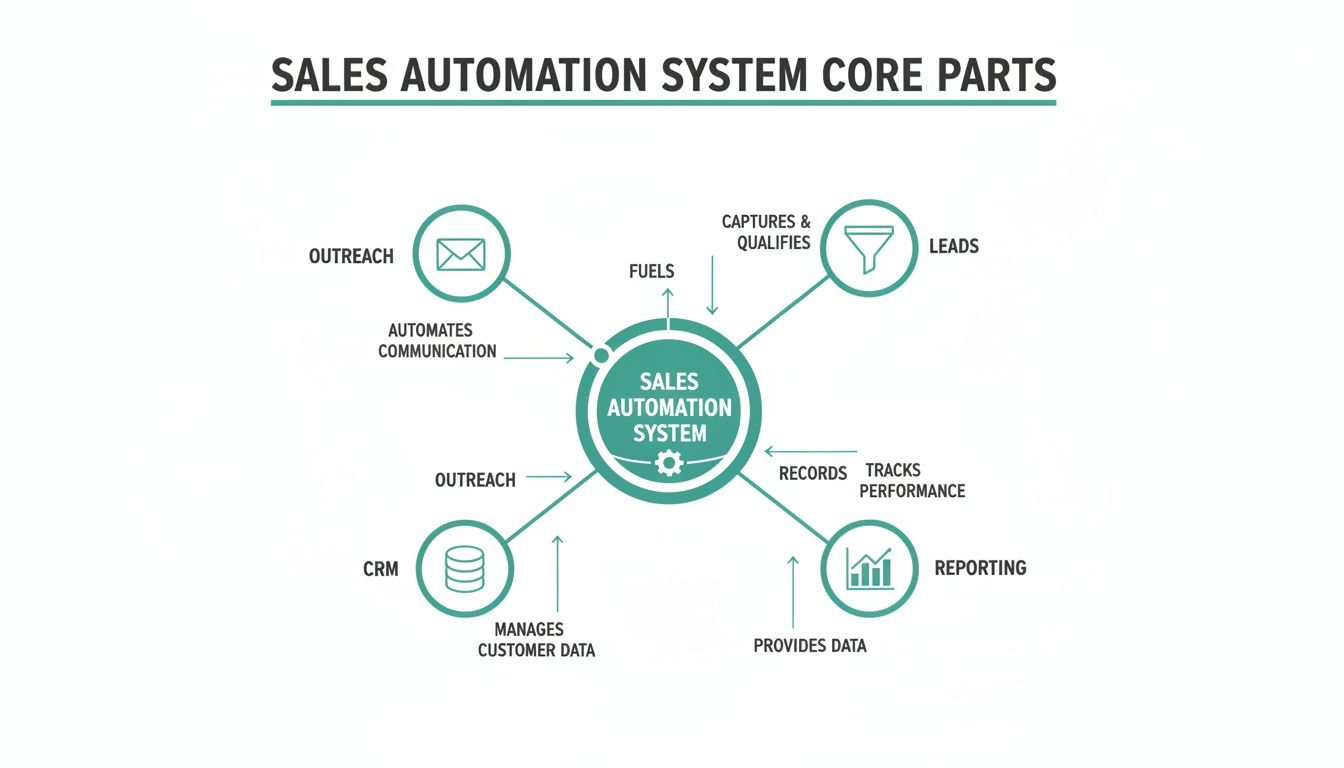
As you can see, leads, outreach, CRM data, and reporting all feed into each other. It’s a self-improving cycle where every automated step makes the next one stronger, lifting the whole system's performance.
Another massive advantage is a much shorter sales cycle. With instant, consistent follow-up sequences running in the background, no lead ever goes cold because someone simply forgot. Automation guarantees every prospect gets the right touchpoint at the right time, keeping the momentum going and moving them through the funnel way faster.
Achieving Scalable Growth with Data-Driven Decisions
Beyond making individual reps more productive, sales automation builds a rock-solid foundation for growth. As your business gets bigger, you can't just keep hiring more people to do more manual work—that's a recipe for bloated costs and inefficiency. Automation lets your sales process handle a much higher volume of leads without needing a bigger headcount to match.
The secret sauce here is the mountain of clean, accurate data that automation creates.
- Improved Data Quality: By automatically logging every single interaction, you get rid of human error. Your CRM becomes a trusted source of truth for every customer relationship.
- Actionable Insights: When your data is solid, your analytics dashboards become your superpower. You can see exactly which outreach strategies are killing it, find the bottlenecks in your process, and make smart, informed decisions to get better.
- Predictable Forecasting: Clean data leads to sales forecasts you can actually count on. This lets leadership plan resources, set realistic targets, and steer the ship with confidence.
Ultimately, sales automation is a game changer because it creates a repeatable, predictable, and scalable sales machine. It turns your sales process from a series of disjointed manual tasks into a cohesive system that consistently drives revenue and supports sustainable business growth.
This systematic approach doesn't just bump up this quarter's numbers; it builds a more resilient and adaptable sales organization that’s ready for whatever comes next.
High-Impact Automation Workflows You Can Build Now
Knowing the theory behind sales automation is great, but putting it into practice is where you’ll actually see results. Let’s get into a practical playbook of proven workflows that can deliver value right away.
We'll break down a few common scenarios using a simple "Trigger > Action" format. This approach makes automation feel a lot less intimidating and gives you clear, actionable strategies you can copy and paste. Think of them as simple recipes for success.
The Inbound Lead Welcome Sequence
When someone fills out a form on your website, speed is everything. A fast, relevant response can be the difference between a conversation and a lost opportunity. This workflow makes sure no inbound lead is left hanging.
- Trigger: A prospect submits a "Contact Us" or "Download Ebook" form on your website.
- Action 1: Your system instantly creates a new lead in your CRM, then enriches it with public data like job title and company size.
- Action 2: At the same time, it fires off a personalized "welcome" email from the assigned sales rep confirming their request.
- Action 3: A task is automatically created in the CRM, reminding the rep to make a follow-up call within 24 hours.
This simple sequence guarantees a professional first impression, every single time. Hot leads get the immediate attention they deserve without anyone lifting a finger.
The Post-Demo Follow-Up Series
The hours and days right after a product demo are critical. You have momentum on your side, but it can fade fast without a solid follow-up plan. This automated workflow keeps the conversation warm and gently guides the prospect toward a decision.
Trigger: A sales rep marks a meeting as "Completed Demo" in the CRM.
Action Sequence:
- Immediately: Send a thank-you email with a quick summary of what you discussed and links to a few relevant case studies.
- 2 Days Later: Follow up with a short email asking if they have any initial questions.
- 5 Days Later: If you haven’t heard back, send another email that touches on a common pain point from your demo, maybe with a link to a helpful blog post.
- 10 Days Later: Send one final, gentle nudge offering to jump on a quick call to answer any final questions.
This takes the burden of manual follow-up off your rep’s plate and ensures the prospect gets timely, valuable information that keeps the deal moving.
The High-Intent Visitor Alert
Some actions are just clear buying signals. When a prospect keeps coming back to your pricing page or re-watching a case study video, they’re deep in the evaluation phase. This workflow flags these moments so your team can strike while the iron is hot.
This type of behavioral trigger is a perfect example of sales automation acting as a digital scout for your team. It flags opportunities that would otherwise be invisible, allowing reps to engage at the exact moment of peak interest.
- Trigger: A known lead in your CRM visits your pricing page for the third time in a week.
- Action 1: The system pings the assigned sales rep with a real-time notification via Slack or email.
- Action 2: The lead's score in the CRM is automatically bumped up, pushing them higher on the priority list.
- Action 3: An hour later, an automated but highly personalized email is sent from the rep. Something casual like, "Noticed you were checking out our plans—happy to walk you through which option might be the best fit for your team."
By automating these alerts and outreach, you give your team the power to act on strong buying signals the second they happen.
To take it a step further, exploring the best cold email software can give you tools that plug right into these workflows. Something as simple as automating email scheduling in Outlook can be a foundational piece of the puzzle, ensuring your communication always lands at the right time.
A Smart Approach to Implementing Sales Automation
Jumping into sales automation without a plan is like buying a high-performance engine without a car to put it in. Success comes from a smart strategy, not just powerful software. A thoughtful implementation roadmap helps you sidestep common headaches and ensures your team actually embraces the new tools.
The right approach begins not with technology, but with your current process. Before you even look at any platforms, you need to map out your existing sales workflow from start to finish. This exercise reveals the real bottlenecks and biggest time-wasters your team faces every day.
The goal is to automate a good process, not to simply make a broken one move faster. Identifying where reps lose the most time on manual tasks points you directly to where automation will have the biggest and most immediate impact.
Start with a Clear Blueprint
Once you’ve pinpointed the problem areas, the next step is to define what success looks like. Setting clear, measurable goals is essential. Don’t just aim to "improve efficiency"; set a specific target, like "reduce time spent on CRM data entry by 50%" or "increase outbound meeting bookings by 15%."
With these goals in hand, you can start evaluating tools. Look for solutions that integrate smoothly with your existing tech stack, especially your CRM. A clunky integration will only create more work for your team, defeating the entire purpose of automation. Your new tool should feel like a natural extension of your current systems, not a frustrating add-on.
Build Momentum with a Pilot Program
Instead of a company-wide rollout that can feel disruptive, start small with a pilot project. Select a few tech-savvy reps and one specific workflow to automate. This controlled test allows you to work out the kinks, gather valuable feedback, and prove the tool's value on a smaller scale.
For instance, you could pilot a lead routing system or a post-demo follow-up sequence. This approach helps you build an internal case for the technology, armed with real data and success stories. It's much easier to get buy-in from the rest of the team when they can see the tangible benefits their colleagues are experiencing.
Train for Adoption, Not Just for Usage
Finally, focus your training on the "why" behind the change, not just the "how." Show your team how automation will free them up to focus on higher-value activities—like building relationships and closing bigger deals. When they understand that the goal is to make their jobs easier and more rewarding, they’re more likely to become advocates rather than skeptics.
This strategic rollout also strengthens your overall process. A well-implemented automation plan is a key component when learning how to build a sales pipeline that is both efficient and scalable. By mapping, testing, and training with purpose, you transform sales automation from a simple software purchase into a true strategic advantage for your entire organization.
Frequently Asked Questions About Sales Automation
It's natural to have questions when you're thinking about a big shift like sales automation. It changes how a team works, and it’s smart to get a few things cleared up before jumping in. We get asked the same handful of questions all the time, so let's tackle them head-on.
Getting into any new technology can feel like a leap, but once you cut through the noise, it's a lot less intimidating. Let's dig into the most common concerns we hear.
Will Sales Automation Replace My Sales Team?
This is, without a doubt, the number one fear. But the reality is actually the complete opposite. Sales automation doesn't replace great salespeople; it makes them even better.
Think about all the tedious, time-sucking tasks that bog down a rep's day—manually logging calls, scheduling follow-ups, typing out the same "just checking in" email for the tenth time. Automation takes care of all that grunt work.
This frees your team up to do what they do best: sell. They can spend their time building real relationships, solving tricky customer problems, and navigating complex negotiations. Those are the things that actually close deals.
Think of sales automation as the elite support crew for your star players. It handles the background noise so they can stay focused on the high-stakes conversations that drive revenue.
It’s not about replacing people. It’s about letting your best people shine.
How Much Does Sales Automation Software Cost?
The price tag on sales automation software is all over the map, which is why you have to think about value, not just cost. There are solid options out there for just about any budget.
For example, many popular CRMs like HubSpot or Zoho bundle basic automation features into their standard plans, which might run you anywhere from $20 to $50 per user, per month. If you need something more powerful, dedicated sales automation platforms usually land in the $100 to $500 per month range, based on your contact list size and feature needs. And of course, enterprise-level systems with all the bells and whistles can get into the thousands.
But here’s the right way to frame it: think in terms of ROI. If a $150/month tool helps your team close just one extra deal they would have otherwise missed, it’s already paid for itself for the entire year, and then some. Always, always use the free trials to make sure a tool actually fits your team’s workflow before you sign a contract.
What Are the Biggest Mistakes to Avoid When Starting Out?
You can save yourself a ton of headaches by learning from the mistakes others have made. Getting sales automation right usually means sidestepping a few common pitfalls right from the start.
Here are the three biggest tripwires we see:
-
Automating a Broken Process: If your current sales process is a disorganized mess, automating it will just help you make the same mistakes, only faster and on a much bigger scale. Before you touch any software, map out your existing process. Find the bottlenecks and broken steps, and fix them first.
-
Forgetting There's a Human on the Other End: It's easy to get carried away and over-automate your outreach until it feels cold and robotic. Use automation for scale and consistency, but always leave room for genuine human interaction, especially at key moments. Personalization has to feel real, not like a mail merge.
-
"Set It and Forget It" Mentality: Sales automation isn't a slow cooker. You can't just set it up and walk away. You have to constantly check your analytics, A/B test your email copy, and tweak your sequences to make sure they’re still hitting the mark with your audience.
Dodge these traps, and you'll be on the right track to building an automation strategy that actually helps your team win more deals.
Ready to supercharge your outreach and find the right contacts in a single click? EmailScout is the powerful email finder extension designed to build your marketing lists and accelerate your sales outreach effortlessly. Start finding unlimited emails for free and connect with decision-makers today. Visit us at https://emailscout.io to learn more.