

If you've ever felt like your sales team is chasing every lead with the same level of urgency, you know how inefficient that can be. Lead scoring is the system that fixes this. It’s a method for ranking your potential customers based on their value to your company, essentially creating a priority list so your sales team can focus on the hottest prospects first. It turns guesswork into a data-backed strategy.
Grasping Lead Scoring Fundamentals
Think of your sales pipeline like a heat map. Instead of a long, flat list of names, lead scoring assigns points to each person based on who they are (job title, company size) and what they do (download a whitepaper, visit your pricing page). Suddenly, that messy list transforms into a clearly prioritized queue.
This process highlights the leads that are most engaged and best fit your ideal customer profile, guiding your sales team to the prospects most likely to convert.
Of course, the whole system hinges on good data. If your information is inaccurate, your priorities will be misplaced.
It's a powerful tool when done right. In fact, 73% of teams report that lead scoring boosted their sales efficiency within just three months.
Key Data Pillars
A solid lead scoring model is built on three main pillars of data. Each one gives you a different piece of the puzzle about a lead's quality and intent.
- Demographics: This is all about who the lead is. Think job title, location, or level of experience.
- Firmographics: This focuses on the company they work for. Are they in the right industry? Is their company the right size?
- Behavioral Signals: These are the actions the lead takes. They're the digital footprints they leave behind, like visiting your website, opening your emails, or downloading a case study.
To make this crystal clear, here's a quick breakdown of how these components work together.
Lead Scoring At a Glance
This table summarizes the fundamental components that make up a typical lead scoring system.
| Component | Description | Example |
|---|---|---|
| Demographics | Information about the individual lead. | Title: VP of Sales |
| Firmographics | Details about the lead’s organization. | Company size: 100 to 500 |
| Behavioral | Actions taken on your website or in emails. | Downloaded pricing guide |
Using these building blocks, you can start to translate raw data and online interactions into a simple, powerful numeric score. We'll get into how to assign specific point values a little later.
A Heat Map in Action
The image below gives you a great visual of what this looks like in practice. It's a typical lead scoring dashboard where different colors represent different score ranges.

You can immediately see how leads in that 70 to 100 point range—colored in red—are flagged for immediate follow-up. That's the power of visual prioritization.
A Simple Scoring Analogy
Still trying to wrap your head around it? Think of lead scoring like grading an exam.
Every correct answer (a positive signal) adds points to the final grade. A lead with the right job title and company size gets points, just like answering the first few questions correctly. Behavioral signals, like requesting a demo, are like bonus questions that can seriously boost their score.
Only the top-scoring "students" get an 'A' and are sent straight to the sales team. Leads with lower scores might just need a little more study time—in other words, more marketing nurture.
The upcoming sections will walk you through exactly how to choose the right signals and build your first scoring model from the ground up. If you want to see how this works inside a specific tool, this What Is Lead Scoring in HubSpot? A Practical Guide is a great resource.
Just remember a few key things as you get started:
- Keep your initial scoring criteria simple. You can always add complexity later.
- Review and adjust your point values based on what's actually closing.
- Get sales and marketing in a room together. This only works if everyone agrees on what makes a "good" lead.
With this foundation, you're ready to dive deeper. Let's get to it.
Why Prioritizing Leads Is a Game Changer for Sales
Without a smart way to prioritize leads, most sales teams are just spinning their wheels. It's organized chaos. They jump on every new inquiry with the same urgency, sinking hours into prospects who were never going to buy in the first place. This "first in, first out" mentality doesn't just waste time and kill morale; it lets your best deals go cold.
Think about it. A sales rep could spend all morning chasing a student who downloaded a whitepaper for a school project. Meanwhile, a C-level exec from a perfect-fit company just checked out your pricing page and gets completely ignored. That’s not just inefficient—it’s a straight line to missed quotas and lost revenue.
Lead scoring cuts through the noise. It installs a strategic filter that turns that chaotic process into a focused, data-driven machine. It’s the ultimate bridge between marketing and sales, finally putting an end to the endless arguments over lead quality.
From Volume to Value
The real magic of lead scoring is how it shifts the team’s entire mindset from the quantity of leads to the value of each one. Instead of chasing down every name that fills out a form, reps can pour their energy into prospects who show they're a great fit and are actively showing interest.
This targeted approach creates a massive ripple effect. When your sales team trusts that the leads hitting their desk are actually qualified, their productivity skyrockets. They stop wasting time on dead-end calls and start building real relationships with people who are already warmed up and ready to talk.
This isn't a new concept—it became a go-to tool in the early 2000s, and the results speak for themselves. By 2010, companies using lead scoring were 22% more likely to hit their sales targets, all because their teams weren't stuck chasing ghosts. The system is simple: you assign points for key attributes—say, +15 for a director-level title and +10 for downloading a case study—to create a clear ranking of who's ready for a sales call.
Shortening the Sales Cycle
Another huge win is a much shorter sales cycle. By engaging leads right when their score hits a certain threshold, you're catching them at the peak of their interest. Timing is everything.
A well-implemented lead scoring system doesn't just tell you who to talk to; it tells you when. This precision can slash nurturing time by up to 33%, accelerating deals through the pipeline.
This efficiency means sales teams can close more deals in the same amount of time, giving a direct boost to the bottom line. You end up with a predictable, repeatable engine for growth instead of just relying on brute force and a bit of luck. For a deeper dive into this, check out our guide on how to qualify sales leads effectively.
Enabling Hyper-Personalized Outreach
Finally, knowing a lead's score gives your team priceless context for personalization. When a rep sees that a prospect has visited the pricing page three times and downloaded a specific case study, they can craft an outreach message that's instantly relevant.
The conversation immediately moves past a generic pitch and becomes a helpful discussion about the prospect's actual interests and pain points.
- For high-scoring leads: Reps can kick off the conversation by referencing their activity (e.g., "I saw you were interested in our enterprise features…") to show they've done their homework.
- For mid-scoring leads: Marketing can step in with targeted content designed to answer their questions, boost their score, and get them ready for a sales call.
This isn't just about improving conversion rates. It creates a far better customer experience from the very first touchpoint, setting the stage for a strong, long-term relationship.
Decoding the Signals: Key Lead Scoring Criteria
A great lead scoring model is built on great data. Think of it like a detective gathering clues—some are obvious, others are subtle, but they all help build a complete picture of a suspect's intent. In lead scoring, these clues are signals that tell you how closely a lead matches your ideal customer and how interested they are in what you’re selling.
These signals typically fall into three buckets: demographics, firmographics, and behavior. By understanding and assigning weight to each, you can turn a flat contact list into a dynamic, prioritized pipeline that points your sales team directly to the hottest opportunities.
Demographic Data: Who the Lead Is
Demographic information tells you about the individual. It helps you answer a crucial question: is this the right person to talk to? This data provides essential context and often serves as the first filter.
- Job Title/Seniority: A "VP of Sales" or "Chief Technology Officer" is likely a decision-maker and should get a high score. An "Intern," on the other hand, might even get negative points.
- Role/Function: A lead working in a department you sell to (like marketing or IT) is a much better fit than someone in an unrelated field like HR.
- Location: If you only serve specific regions, a lead's country, state, or city is a non-negotiable qualifying factor.
This kind of explicit data is foundational. It tells you if the lead even fits the basic profile of your best customers. For a deeper dive into building these profiles, check out our guide on how to create detailed buyer personas.
Firmographic Data: The Company They Work For
While demographics look at the person, firmographics zoom out to look at their company. This is especially important in B2B, where the organization's profile is just as critical as the individual's role.
- Company Size: Do you sell to scrappy startups or huge enterprises? Assign points based on employee count or annual revenue to match your ideal customer profile.
- Industry: A lead from an industry you specialize in (like SaaS or healthcare) is far more valuable than one from a sector you don’t serve.
- Technology Stack: If your product integrates with specific software (like Salesforce or HubSpot), knowing a lead’s company already uses it is a massive green flag.
Firmographic data ensures you’re not just talking to the right person but to the right person at the right company.
Behavioral Data: What the Lead Does
This is where the real story unfolds. While demographic and firmographic data show fit, behavioral data reveals intent. It’s the digital body language that tells you a lead is actively thinking about making a purchase. These actions should carry the most weight in your model.
In fact, engagement frequency is the number one criterion for lead scoring for nearly 73% of companies. It’s not just a hunch—highly engaged leads are proven to convert 47% better. Why? Because their actions, like repeatedly visiting your pricing page or requesting a demo, are clear buying signals. This focus on behavior has helped some businesses achieve a baseline conversion rate of 14%, just by paying attention to what leads do. You can find more of these lead generation benchmarks on Databox.com.
Key Takeaway: A lead's actions often speak louder than their job title. A manager who has downloaded three case studies and attended a webinar is likely a hotter prospect than a CEO who only subscribed to your newsletter.
Common behavioral signals include:
- Website Activity: Visiting high-value pages like pricing, case studies, or product features.
- Content Engagement: Downloading whitepapers, ebooks, or attending webinars.
- Email Interaction: Opening emails and clicking on links within them.
- Direct Engagement: Filling out a "Contact Us" form or requesting a product demo.
Here's a quick look at how you might assign points to these different signals.
Common Scoring Signals and Sample Point Values
| Scoring Category | Signal Example | Sample Score |
|---|---|---|
| Demographic | Job Title: C-Level/VP | +20 |
| Job Title: Manager | +10 | |
| Job Title: Intern/Student | -10 | |
| Firmographic | Industry: Target Industry | +15 |
| Company Size: Ideal Range | +10 | |
| Uses a Key Integration Partner | +15 | |
| Behavioral | Requested a Demo | +25 |
| Visited Pricing Page | +10 | |
| Downloaded a Whitepaper | +5 | |
| Unsubscribed from Email | -25 | |
| Negative | Visited Careers Page | -15 |
| Used a Free Email Provider | -5 | |
| Inactive for 90 Days | -20 |
Remember, these are just examples. The right values depend entirely on what signals have historically led to closed deals for your business.
The Role of Negative Scoring
It’s just as important to subtract points for red flags as it is to add them for positive signals. Negative scoring is your pipeline’s immune system—it filters out poor-fit leads and keeps things clean.
Common red flags that should deduct points include:
- Visiting your careers page (they’re probably looking for a job, not a solution).
- Using a personal email address (e.g., Gmail, Yahoo).
- Listing their industry as "student" or "unemployed."
- Long periods of inactivity (this is often called "score decay").
By using negative scoring, you prevent scores from getting artificially inflated and make sure your sales team only spends time on prospects who are genuinely qualified.
How to Build Your First Lead Scoring Model
Turning the theory of lead scoring into a working system might feel like a huge leap, but it’s actually pretty straightforward when you break it down. Building your first model is less about fancy algorithms and more about getting your teams on the same page. It all starts with a simple, honest conversation between marketing and sales.
The whole point is to create a unified definition of a "hot" lead. When everyone agrees on what that means, marketing can stop guessing and start delivering a steady stream of prospects that sales is genuinely excited to call.
Let’s walk through how to build a basic model, using a B2B software company as our example.
Define Your Sales-Ready Lead
Before you can assign a single point, you have to define the finish line. What does a sales-ready lead actually look like for your business? This is the most important step, and it absolutely requires a partnership between your marketing and sales departments.
Get both teams in a room and hammer out the specific traits of leads who have turned into your best customers.
Take a look at your happiest clients. What do they have in common?
- Job Titles: Are they typically VPs, Directors, or Managers?
- Company Size: Do you do best with scrappy startups of 20 people or enterprises with over 1,000?
- Industry: Which sectors get the most value out of what you sell?
- Behaviors: What did they do right before they signed on? Did they request a demo, visit the pricing page three times, or download a specific case study?
This single conversation can end the classic tug-of-war over lead quality. By agreeing on these criteria upfront, you’re basically creating a Service Level Agreement (SLA) that aligns both teams around one goal.
For our B2B software company, they might agree that a sales-ready lead is a Marketing Director at a SaaS company with 50-250 employees who has requested a product demo. Simple, clear, and actionable.
The diagram below shows how these different data points—demographics, firmographics, and behavior—all come together to build a complete picture of a lead.
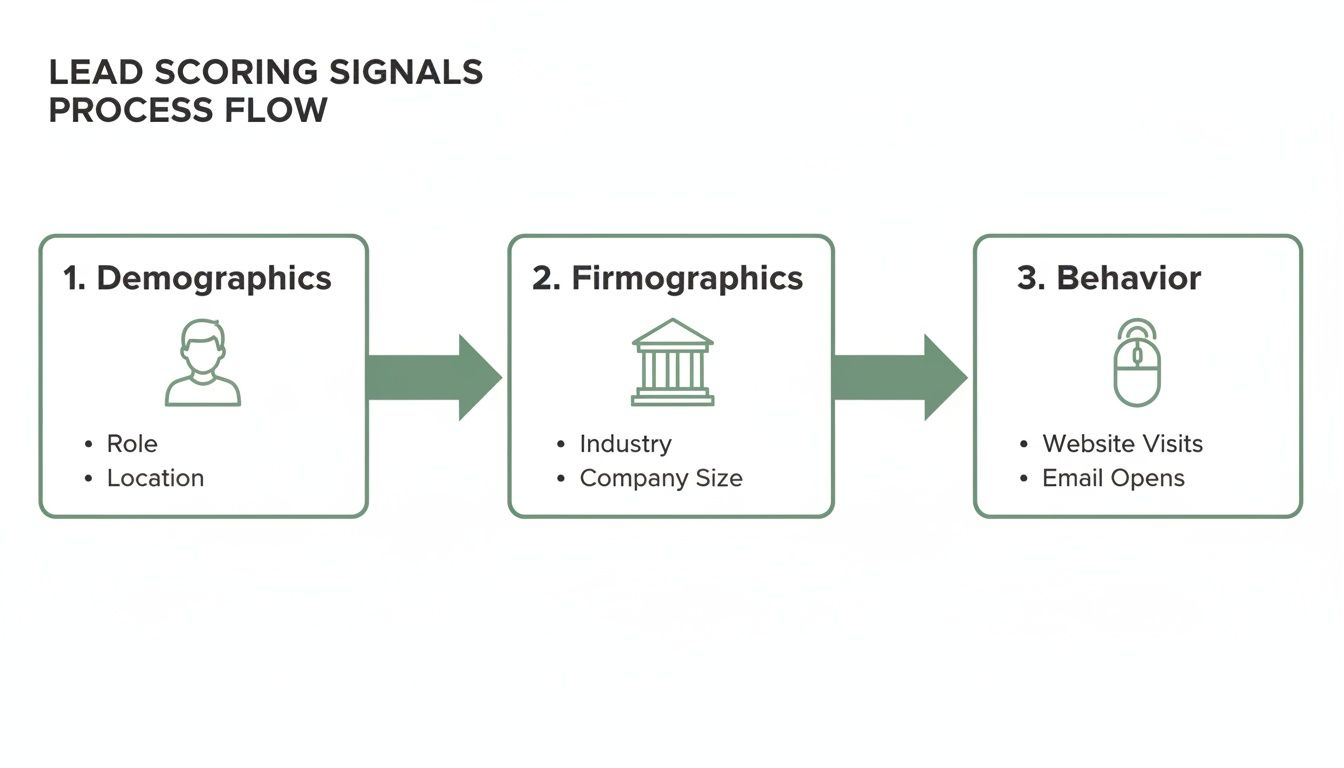
This shows how information about the person, their company, and their actions all feed into the model.
Assign Point Values to Key Criteria
Once you have your ideal profile sketched out, it’s time to assign points. The key here is to give more weight to signals that show someone is ready to buy. A good rule of thumb? Actions should almost always be worth more than static attributes.
Here’s a simple framework our B2B software company could start with:
1. Firmographic & Demographic Points (The "Fit" Score):
- Industry is SaaS: +15 points
- Company Size is 50-250 employees: +10 points
- Job Title is Director or above: +20 points
- Job Title is Manager: +10 points
2. Behavioral Points (The "Interest" Score):
- Requested a Demo: +30 points (This is a huge buying signal!)
- Visited Pricing Page: +15 points
- Attended a Webinar: +10 points
- Downloaded a Whitepaper: +5 points
3. Negative Points (The "Red Flags"):
- Visited Careers Page: -15 points (Probably a job seeker, not a buyer.)
- Used a personal email (e.g., Gmail): -5 points
- Inactive for over 60 days: -10 points (This is called score decay.)
Pro Tip: Don't get hung up on perfection with your first model. Start with a simple system that makes sense. You can—and should—tweak these values later on based on which leads actually convert into customers.
Set Your Score Thresholds
The final piece of the puzzle is deciding what happens when a lead hits a certain score. These thresholds are the triggers that automate your workflow, telling your system when to pass a lead from marketing to sales.
A common approach is to create two main tiers: the Marketing Qualified Lead (MQL) and the Sales Qualified Lead (SQL).
Using our software company's model:
- MQL Threshold (50+ points): Any lead scoring 50 points or more becomes an MQL. They're a good fit and they’re showing interest, but they might not be ready for a sales call just yet. Marketing will keep nurturing them.
- SQL Threshold (80+ points): A lead scoring 80 points or more graduates to an SQL. Their high score flags them as a hot prospect. The system should automatically assign this lead to a sales rep for immediate follow-up.
Let's see it in action. A Marketing Director (+20) at a 100-employee SaaS company (+10, +15) downloads a whitepaper (+5). Their score is now 50, making them an MQL.
A week later, they visit the pricing page (+15) and attend a webinar (+10), bumping their score to 75. Then, they finally request a demo (+30), and their score jumps to 105. Boom—they instantly become an SQL and land in a sales rep's queue.
This structured process moves you from a reactive guessing game to a proactive, data-driven strategy.
How EmailScout Supercharges Your Lead Scoring Efforts
A lead scoring model is only as smart as the data it’s built on. If you’re feeding it incomplete or inaccurate information, you’ll get unreliable scores—a classic case of "garbage in, garbage out." The entire system’s success really hinges on high-quality, verified contact data. Think of it as the bedrock for every point you assign.
This is where the right tools make all the difference. Accurate demographic and firmographic data are crucial for the first part of your scoring equation, which is all about establishing whether a lead is a good fit for your business. Without knowing a prospect’s job title, company size, or industry, your model is basically flying blind.

Fueling Your Model with Accurate Data
EmailScout provides the essential fuel you need to kickstart a powerful lead scoring workflow. It’s designed to give you instant access to the exact data points that earn a lead their initial score, making sure your pipeline is filled with qualified prospects from the jump.
Imagine you land on the LinkedIn profile of a promising contact. Instead of guessing, the EmailScout Chrome extension lets you find their verified email and key details in a single click. This isn't just about finding an email; it's about qualifying a lead right on the spot.
With verified data, you can immediately assign points based on reliable criteria. This means a lead enters your system with an accurate baseline score, not a zero, giving them a head start in the qualification process.
This simple step completely changes how you build your sales pipeline. Instead of importing a long list of unvetted contacts and just hoping for the best, you’re adding pre-qualified, high-potential individuals who already fit your ideal customer profile.
Scoring Leads at the Point of Discovery
The real power comes from weaving this data collection directly into your prospecting. When your team can find and qualify decision-makers right from a company website or social profile, they are essentially doing the first step of lead scoring in real-time.
Here’s how this gives your efforts a serious boost:
- Instant Qualification: Find a VP of Sales at a 200-person tech company? With EmailScout, you can grab their email and immediately apply your scoring rules (+20 for title, +15 for industry, +10 for company size) inside your CRM.
- Clean Data Foundation: By starting with verified emails, you drastically cut down on bounce rates. This ensures your behavioral scoring (opens, clicks) is based on real engagement, not dead ends.
- Increased Sales Velocity: Sales reps can build targeted lists of high-scoring prospects without ever leaving their browser. It dramatically shortens the time from discovery to outreach.
At the end of the day, effective lead scoring isn’t just about having a model; it's about having a reliable way to feed it. By providing the critical firmographic and demographic data needed for that first score, EmailScout acts as the crucial first step in a smarter, data-driven funnel. If you want to see how it works, you can learn more about how to find business emails quickly and accurately. This helps your sales team start with a list of valuable prospects from day one.
Common Lead Scoring Mistakes and How to Avoid Them

Putting a lead scoring system in place is a smart move, but it’s easy to stumble into common traps that can completely derail your efforts. Even the best-laid plans can fall flat if the model isn't built and maintained with a bit of foresight.
Knowing these pitfalls ahead of time is your best defense. It's the key to building a system that actually cleans up your pipeline and makes your sales team more effective.
One of the most common mistakes is trying to build a monster model right out of the gate. Teams get excited and want to track dozens of different attributes, leading to a system so complicated that nobody can manage it, let alone understand it. The whole point is to create clarity, not confusion. If sales can't make sense of it, they'll just ignore it.
Instead, start simple. Pinpoint the 5-10 key signals that your sales team agrees are the strongest signs of a good lead. You can always add more complexity later, once you’ve proven the basic framework actually works.
Setting It and Forgetting It
Maybe the biggest mistake of all is treating lead scoring like a one-and-done project. Your business, your market, and your customers are always in motion. A model you built last year is already becoming obsolete, which means your scores will get less accurate and you'll start missing opportunities.
A "set it and forget it" mindset is a recipe for a useless system. Think of your model as a living thing that needs regular check-ups to stay healthy.
Solution: Schedule a mandatory quarterly review with people from both marketing and sales. In these meetings, dig into which high-scoring leads actually became customers and which ones went nowhere. That feedback loop is absolutely critical for tweaking point values and making sure the model reflects who you're successfully selling to today.
This ongoing maintenance keeps your scoring system tied to actual sales results.
Poor Sales and Marketing Alignment
A lead scoring model built by marketing alone is doomed from the start. If the sales team doesn’t trust the scores or understand how they’re calculated, they won’t use the system. Period.
This disconnect is why a staggering 61% of marketers send every single lead straight to sales, even though only 27% of those leads are qualified.
To sidestep this disaster, you have to build the model together from day one.
- Co-create the Definitions: Sales and marketing need to sit down and agree on the exact definition of a Marketing Qualified Lead (MQL) and a Sales Qualified Lead (SQL).
- Agree on Point Values: Get direct feedback from sales on which actions and attributes they see as most valuable. Their real-world experience is what makes the model work.
- Establish a Handoff Process: Get specific about what happens when a lead hits the SQL threshold. Who gets the notification? What’s the expected follow-up time?
When you make sales an equal partner in building the system, you create shared ownership and trust. The goal is to build a single, unified engine for growth—not to have two departments pointing fingers at each other.
Frequently Asked Questions About Lead Scoring
Even with a great model built, you're bound to have questions once you start putting lead scoring into practice. Let's tackle some of the most common ones that pop up.
How Often Should I Update My Lead Scoring Model?
Your lead scoring model isn't something you can just set and forget. To keep it sharp and effective, you should get into a rhythm of reviewing it regularly—a quarterly basis is a great place to start.
That said, some business events should trigger an immediate review, no matter where you are in the cycle. Watch out for these:
- A new product launch: The signals that define a perfect lead for your new offering might look completely different from your existing ones.
- A shift in your ideal customer profile (ICP): If you suddenly start targeting a new industry or company size, your scoring has to change with it.
- Changes in marketing campaigns: That big industry report you just launched? It's a high-value piece of content and needs a score that reflects its importance.
What Is the Difference Between an MQL and an SQL?
Think of MQLs and SQLs as two crucial milestones in a lead's journey. Your score thresholds are what separate them, essentially "graduating" a lead from one stage to the next.
A Marketing Qualified Lead (MQL) is a prospect who’s raised their hand. They’ve shown some interest and tick a few of the basic boxes, landing them in the "warm" category. They're a good fit, but they aren't quite ready for a sales call.
A Sales Qualified Lead (SQL), on the other hand, is someone who has hit a much higher score. Their combined demographics, company profile, and recent actions scream "buying intent." They are primed and ready for a direct conversation with a salesperson.
Can a Small Business Benefit from Lead Scoring?
Absolutely. You don't need a massive enterprise software suite to see the benefits. Even a simple scoring system built in a spreadsheet can be a total game-changer for startups and small teams.
For a small business, the biggest win is focus. When you only have a few people, you can't afford to waste time. By assigning points to leads, you can instantly see the top 5-10 opportunities that deserve your team's immediate attention, making sure every minute is spent on deals most likely to close.
What Tools Do I Need to Implement Lead Scoring?
Most companies run their lead scoring through a Customer Relationship Management (CRM) platform or a dedicated marketing automation tool like HubSpot or Marketo. These systems are brilliant at tracking behaviors and updating scores automatically.
But here's the catch: those platforms are only as good as the data you put into them. Foundational tools that provide clean, accurate contact information are non-negotiable. For instance, a tool like EmailScout can supply the verified demographic and firmographic data you need to assign that crucial initial score, making sure your entire system is built on a solid foundation.
Ready to fuel your lead scoring model with accurate, verified contact data? EmailScout helps you find decision-maker emails in a single click, providing the essential information to qualify leads and build a high-quality sales pipeline from day one. Get started with EmailScout for free.