Tag: lead qualification

  • Sales Qualification Process: Boost Your 2026 Sales

    Sales Qualification Process: Boost Your 2026 Sales

    A lot of reps are sitting on the same problem right now. The CRM looks healthy, the pipeline report has plenty of names in it, and activity is high. But the meetings don't turn into real opportunities, proposals stall, and forecast calls get awkward fast.

    That usually isn't a volume problem. It's a qualification problem.

    A strong sales qualification process starts before the first call, not during it. If you target the wrong account, the wrong contact, or the wrong timing, no framework is going to rescue the deal later. The job is to identify fit early, test for buying intent quickly, and make sure your CRM reflects what's true, not what a hopeful rep wants to believe.

    Why Your Sales Pipeline Is Full of Dead Ends

    Most weak pipelines don't fail because reps aren't working hard enough. They fail because too much activity gets mistaken for progress.

    A rep sends emails, books intro calls, logs follow-ups, and moves deals forward because the prospect was polite. Weeks later, nothing closes. The product gets blamed, pricing gets blamed, and marketing gets blamed. In many teams, the underlying issue showed up much earlier.

    A widely cited benchmark is that 67% of lost sales happen because of poor lead qualification (phantombuster.com). That's why qualification deserves more respect than it usually gets. It isn't admin work. It's the filter that protects your calendar, your pipeline, and your forecast.

    Pipeline size is not pipeline quality

    New reps often think a full pipeline is a safe pipeline. It isn't. A bloated pipeline creates false confidence and hides risk until late in the quarter.

    What works is a tighter list of accounts and contacts that show real fit and real urgency. That means you need to get stricter earlier.

    • Check account fit first: Industry, company size, growth stage, and role should match your ideal customer profile before you spend time on custom outreach.
    • Treat curiosity carefully: A reply isn't intent. A meeting isn't pain. A demo request isn't authority.
    • Disqualify faster: If the problem is vague, the buyer is noncommittal, or the process is unclear, keep the deal out of the active pipeline.

    Teams working on optimizing your sales funnel usually discover the same thing. More leads don't fix weak qualification. Better gates do.

    Qualification starts before discovery

    The first qualification mistake usually happens before the first conversation. Reps prospect into an account, find one reachable contact, and assume they've found the right person. Then they spend two weeks trying to turn an interested bystander into a buying committee.

    That's avoidable if you tighten the front end of prospecting. Before outreach starts, build the account list, identify likely buying roles, and decide what evidence a lead needs before it can enter the pipeline. This practical guide to building a sales pipeline is useful if your team still treats pipeline creation as “add names and hope.”

    Practical rule: If you can't explain why this account, why this contact, and why now, the lead isn't qualified enough to deserve selling time.

    The point of the sales qualification process is simple. Stop treating every response as an opportunity. Build a smaller pipeline with stronger evidence behind each deal.

    BANT MEDDIC and CHAMP The Right Framework for You

    Frameworks help when they make reps more consistent. They hurt when reps use them like a script and forget to think.

    BANT, MEDDIC, and CHAMP all work. The right choice depends on deal complexity, buying committee size, and how much proof you need before moving a deal forward. If you sell a straightforward product with a short cycle, you don't need the same structure as a team selling into layered enterprise procurement.

    A diagram comparing three popular sales qualification frameworks: BANT, MEDDIC, and CHAMP for business professionals.

    How each framework thinks

    BANT is the classic screen. Budget, authority, need, and timeline. It's useful when reps need a fast read on whether the buyer is viable at all.

    MEDDIC is deeper. It pushes reps to understand measurable business value, the economic buyer, the buyer's criteria, the decision process, the pain driving the purchase, and whether you have an internal champion.

    CHAMP starts from the buyer's challenges. That shift matters. It encourages reps to understand the problem before rushing into money questions.

    Sales Qualification Framework Comparison

    Framework Best For Complexity Key Focus
    BANT High-velocity sales, fast qualification, early screening Low Basic viability
    MEDDIC Enterprise sales, multi-stakeholder deals, long cycles High Decision structure and deal control
    CHAMP Consultative selling, mid-market conversations, pain-led discovery Medium Buyer challenges and urgency

    Pick the framework that matches the sale

    If your average deal is simple and transactional, BANT keeps reps from overcomplicating early conversations. It's clean, fast, and easy to coach. The downside is that inexperienced reps can turn it into a checklist and ask blunt questions too early.

    CHAMP is often easier for newer reps who need to sound more consultative. Leading with challenges makes conversations feel less like an interrogation. The risk is that reps get good discovery notes but never lock down authority or budget.

    MEDDIC is the right call when a deal can die in procurement, legal, or executive review. It forces discipline. It also requires real manager coaching. Without that, reps fill in CRM fields with guesses.

    Use BANT to screen, CHAMP to open up the problem, and MEDDIC to control complex deals. Many teams end up using a hybrid, even if they officially name only one framework.

    One rule matters more than framework choice. Don't let reps “complete” qualification through assumptions. If the buyer hasn't confirmed it, or behavior hasn't supported it, the field should stay incomplete.

    Go Beyond the Script with Smart Discovery Questions

    A weak discovery call sounds like a survey. The rep asks the same sequence every time, the buyer gives short answers, and nothing new gets uncovered. The rep leaves with notes, but not with real advantage.

    That approach fails even faster with today's buyer. A frequently underexplored angle in qualification is how to handle prospects who already researched vendors through AI tools and self-serve content before the first conversation (weflow.ai). If the rep asks obvious questions the buyer has heard a dozen times, trust drops immediately.

    Ask questions that reveal consequences

    Closed questions have a place, but they rarely uncover urgency on their own.

    “Do you have a budget for this?”

    That question often produces a guarded answer. It also tells the buyer you're trying to qualify them for your process, not understand theirs.

    Try this instead:

    “How is this problem showing up in your team's work right now, and what happens if it stays that way for another planning cycle?”

    That question does two jobs. It surfaces pain, and it tests priority.

    Here are better discovery patterns to use:

    • Start with operational impact: Ask how the issue affects execution, speed, quality, or coordination.
    • Move into business stakes: Ask what internal goals, commitments, or deadlines are getting pressure from the problem.
    • Then test urgency: Ask why this is being addressed now instead of later.
    • Map decision ownership: Ask who needs to agree before any change happens.

    Adapt to buyers who already know the market

    Pre-educated buyers don't want a rep to recite features they've already seen online. They want help making sense of trade-offs.

    That changes the tone of qualification. Instead of asking, “Are you looking for a solution like ours?” ask what they've already evaluated and what they haven't been able to verify.

    A few examples:

    “You've probably seen several ways to solve this already. What still feels unresolved?”

    “What have you learned so far that you're confident about, and what still looks risky from your side?”

    Discovery move: Ask what they're comparing, then ask what internal constraint matters most. That's usually where the real qualification signal lives.

    Don't interrogate. Diagnose.

    Good reps don't ask more questions just to be thorough. They ask the next question that sharpens the deal.

    That means listening for three things during discovery:

    1. Specific pain, not generic dissatisfaction
    2. Buying motion, not vague interest
    3. Internal ownership, not just one friendly contact

    If a buyer says the current process is “frustrating,” that's not enough. Ask what breaks, who feels it, and what happens if nothing changes. If they say they're “exploring options,” ask what event triggered the search. If they say they'll “bring others in later,” ask who controls evaluation, approval, and implementation.

    The best qualification calls feel less scripted because they're more structured. The structure sits underneath the conversation. The buyer shouldn't feel it, but the rep should.

    Turn Qualification into a Repeatable System

    Qualification breaks when it lives only in rep notes. One rep calls a lead qualified because the prospect sounded interested. Another rep won't move the same lead forward without proof of need, authority, and buying process. That inconsistency wrecks pipeline reviews.

    The fix is simple in principle and harder in practice. Turn your sales qualification process into a system with rules, fields, and stage requirements.

    A five-step infographic illustrating a strategic sales qualification system flow with icons and descriptive text labels.

    Reps with the strongest qualification effectiveness were 2.5x more likely to win deals, 70% more likely to progress past proposal, and achieved a 23% higher win rate than peers (mysalescoach.com). That's the payoff for operational discipline.

    Build the score before you build the sequence

    Start with two categories of signals:

    • Fit signals: Industry, company size, growth stage, geography, and role
    • Intent signals: Repeat site visits, content engagement, return visits to pricing or product pages, and direct replies that mention a business problem

    Don't overengineer the model. You need enough structure to prioritize, not a science project. This explainer on what lead scoring is is a practical reference if your team hasn't formalized scoring yet.

    What matters is the logic behind the score. A target account with the right persona but no evidence of urgency should not rank above a strong-fit account showing clear buying behavior.

    Put qualification fields inside the CRM

    Pick the framework you use, then turn it into required CRM fields. If you use MEDDIC, create fields for pain, economic buyer, decision criteria, decision process, and champion. If you use CHAMP, create fields around challenge, authority, money, and prioritization.

    Then add stage exit rules.

    For example, don't allow a deal to move from discovery to solution discussion unless the rep has captured:

    • Problem statement: Written in the customer's language
    • Primary stakeholder: The person driving evaluation
    • Decision path: How the purchase gets approved
    • Commercial viability: A realistic path to budget or spend approval

    A pipeline stage should mean something. If a deal can move forward without evidence, the stage is decoration.

    Coach to evidence, not optimism

    In deal reviews, managers should ask, “What do we know?” and “How do we know it?” Those two questions expose weak qualification fast.

    Many teams slip at this point. They create fields, but they don't inspect them. Reps learn they can type vague summaries and still advance the deal. Once that happens, the CRM stops reflecting reality.

    The sales qualification process becomes repeatable only when reps know that every stage requires proof, not enthusiasm.

    Key Metrics to Monitor Your Qualification Process

    If qualification isn't measured, it drifts. Reps loosen standards when they're behind target. Managers approve shaky opportunities because the pipeline looks thin. Then everyone acts surprised when late-stage conversion drops.

    The fix is to monitor a short list of metrics that show whether your qualification rules are working or just creating activity.

    A visual chart displaying five key performance metrics for the sales qualification process with their respective values.

    A useful benchmark is that a good average qualification rate falls between 13% and 25%, and when SQL-to-opportunity conversion falls significantly below 50%, it's a warning sign that qualification criteria are too loose (salesso.com).

    The metrics that actually diagnose the problem

    Qualification rate tells you how many incoming leads become qualified. If it's too high, your standards may be soft. If it's too low, your sourcing or targeting may be off.

    SQL-to-opportunity conversion is one of the clearest tests of qualification quality. If too many SQLs fail to become real opportunities, reps are promoting leads based on interest instead of buying readiness.

    Stage progression quality matters as much as raw conversion. Watch whether deals that leave discovery continue moving or die after proposal. That pattern usually points to incomplete qualification earlier in the cycle.

    How to read the numbers correctly

    Don't diagnose everything from one metric. Read them together.

    • Low qualification rate: Often points to weak lead sources, loose ICP targeting, or poor initial contact selection.
    • Low SQL-to-opportunity conversion: Usually means reps are qualifying too early or failing to confirm process and authority.
    • Late-stage drop-off: Often means discovery captured pain, but not decision criteria or internal consensus.

    One warning on the infographic above. The values shown there are visual placeholders, not benchmarks to manage by. Your operating thresholds should come from your CRM definitions and the cited qualification benchmarks, not from generic dashboard art.

    Use metrics to tighten behavior

    The strongest qualification dashboards don't just report conversion. They help managers coach.

    If a rep's qualification rate looks fine but their opportunities collapse after proposal, inspect what they captured about decision process and buying stakeholders.

    That's the point of measurement. Not to admire funnel charts. To spot where reps are advancing deals without enough evidence and correct it before the quarter slips.

    Find the Right Decision-Makers Faster

    Authority problems usually get discovered too late. A rep has a good conversation, sends follow-up material, maybe even runs a demo, then learns the contact can't sponsor the purchase. Now the deal has to restart with the actual decision-maker, if that person is even willing to engage.

    That's why contact selection belongs inside the sales qualification process, not outside it.

    A professional business team having a collaborative strategy meeting in a modern office boardroom.

    Start with the buying role, not the easiest contact

    Say you've identified a strong-fit account. The company matches your ICP, the timing looks promising, and there are visible signs that the problem you solve matters there. The next mistake would be reaching out to the first person you can find.

    Instead, map likely buying roles first:

    • Economic owner: The person who can approve spend
    • Functional owner: The leader who feels the pain day to day
    • Technical or operational evaluator: The person who will judge fit and implementation risk
    • Internal champion candidate: The contact most likely to carry your case when you're not in the room

    If you need help with that first step, this guide on how to find decision-makers in a company gives a useful process for role mapping before outreach.

    A practical workflow for contact finding

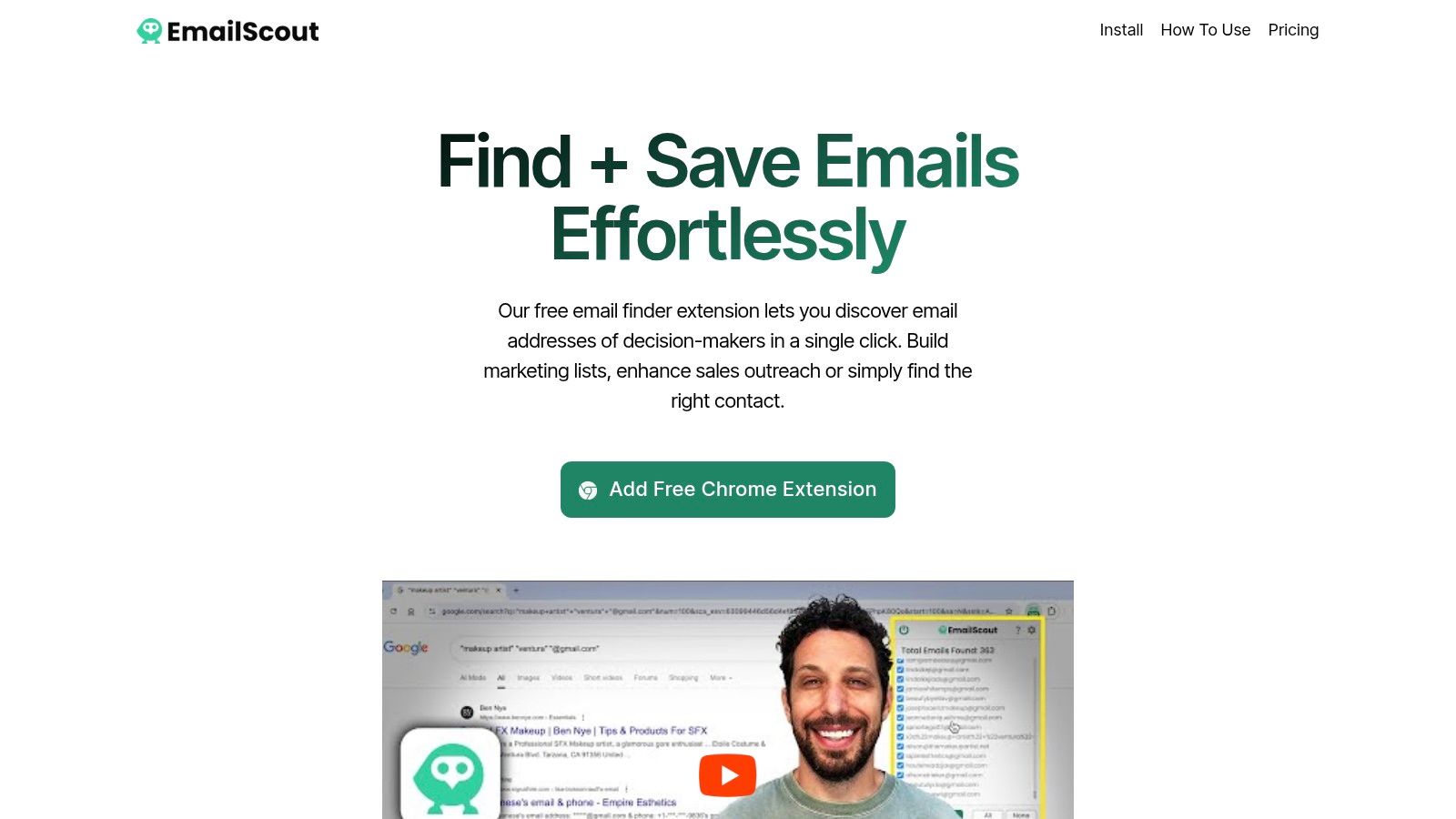
    During this process, a tool can save a lot of wasted effort. In a typical outbound workflow, a rep identifies the target account, pinpoints the likely role, and then uses a contact-finding tool to get a verified work email before outreach starts. EmailScout is one option for that. It's a Chrome extension built to find decision-maker email addresses while you browse company pages and LinkedIn-style profiles.

    That matters because qualification improves when outreach starts with the right person. “Authority” is much easier to validate when your first message lands with a head of function instead of an uninvolved coordinator.

    After you've identified the right role and contact path, it helps to see the workflow in action:

    What this changes downstream

    Finding the right contact earlier does more than improve reply rates. It changes discovery quality.

    When a rep speaks with someone who owns the problem or influences the decision, the conversation becomes sharper. You get cleaner answers on process, urgency, stakeholders, and constraints. You spend less time translating through someone who lacks context and less time chasing internal introductions.

    That's the hidden advantage of starting your sales qualification process before the first call. Better targeting produces better discovery. Better discovery produces cleaner CRM data. Cleaner CRM data produces a pipeline you can trust.


    If your team is still guessing who the decision-maker is, start fixing qualification at the source. EmailScout helps reps find decision-maker emails quickly so outreach begins with the right contact, not just the easiest one to reach.

  • Prospects and Leads: Qualify & Convert for Sales Growth

    Prospects and Leads: Qualify & Convert for Sales Growth

    You open a spreadsheet that should feel like progress. Instead, it feels like debt.

    There are names from LinkedIn searches, webinar signups, scraped directories, referrals, old conference lists, and a few inbound form fills mixed together. Some contacts are real buyers. Some are students. Some left the company months ago. A few might be perfect customers, but they’re buried in rows beside people who will never reply.

    That’s where most pipeline problems start. Not with weak outreach. Not with bad messaging. With a messy definition of who belongs in the funnel at all.

    A lot of teams still work this way. Only 28% of sales reps use formal lead scoring, according to Kasmo Digital’s summary of 2025 HubSpot data. The result is familiar. Reps spend as much time figuring out who matters as they do engaging people.

    If you’re a solo founder, freelancer, SDR, or small business team, that problem hits harder. You don’t have extra headcount to clean lists, run deep research, and chase weak contacts for weeks. You need a working way to sort prospects and leads fast, then move the right people into conversations that can become revenue.

    The good news is you don’t need an enterprise CRM rollout to do it. You need a clean qualification habit, a lightweight scoring model, and a repeatable workflow that turns raw contact lists into a real sales pipeline.

    From Contact List Chaos to Pipeline Clarity

    A raw contact list creates false momentum. The file looks full, so the pipeline feels healthy. Then reps start calling and emailing, and the truth shows up quickly. Many contacts don’t fit the market, don’t own the problem, or don’t have any reason to respond now.

    That’s why the distinction between prospects and leads matters so much in practice. A lead list is inventory. A prospect list is workload. If you mix those two together, every next step gets slower.

    A common early-stage mistake is treating contact collection as pipeline building. It isn’t. Pulling names from company sites, LinkedIn, event rosters, or industry directories only gives you a starting pool. The pipeline starts after you decide who deserves direct sales attention, who needs nurturing, and who should be removed.

    What the mess usually looks like

    Small teams usually inherit some version of this:

    • Mixed source quality: Inbound contacts sit beside cold outbound targets and old database entries.
    • No fit check: Titles, industries, and company types haven’t been compared against an ideal customer profile.
    • No engagement signal: A contact who visited pricing gets treated the same as someone who never interacted.
    • No stage ownership: Marketing, founder-led sales, and outbound activity all feed one list with no clear handoff.

    Practical rule: If a rep has to read five tabs and three notes just to decide whether to send a first email, the list isn’t a pipeline yet.

    The fix is simpler than people expect. You don’t need a heavy process. You need clear labels, a basic qualification standard, and one place to track movement from contact to conversation.

    The shift that changes everything

    The fastest improvement usually comes from asking one question before any outreach begins:

    Is this person just known to us, or have they earned attention from sales?

    That one distinction changes who gets researched, who gets nurtured, and who gets ignored. It also helps small teams avoid the classic trap of spending prime selling time on low-fit names because they were easy to find.

    When that sorting habit becomes consistent, the spreadsheet stops being a graveyard of contacts and starts becoming a ranked queue. That’s when outreach gets sharper, follow-up gets easier, and forecasting becomes possible.

    Defining the Difference Between a Lead and a Prospect

    A lot of sales teams use these words loosely. That creates sloppy follow-up and bad reporting. If everyone means something different by “prospect,” nobody knows which contacts merit time.

    The cleanest way to think about it is this:

    A lead is a contact you know about.
    A prospect is a contact you’ve qualified enough to pursue.

    That’s the operational difference. Not theory. Not semantics. A lead sits at the top of the funnel. A prospect has moved far enough down that a sales conversation makes sense.

    The fishbowl test

    Think of a conference fishbowl full of business cards.

    Every card in that bowl is a lead. They’re real people. They expressed some degree of awareness. But you don’t know whether they fit your market, whether they have authority, or whether they care about the problem you solve.

    Now pull out the cards from people in your target industry who mentioned a challenge your service addresses and seem connected to the buying process. Those are prospects.

    That filter matters because not every contact deserves the same next action.

    Lead vs Prospect at a Glance

    Attribute Lead Prospect
    Qualification status Unqualified or lightly qualified Qualified enough for direct sales attention
    Fit to ICP Unknown or assumed Checked against target industry, role, company type, and use case
    Intent level Limited or unclear Demonstrated through actions, replies, or relevant context
    Communication flow Often one-way outreach or marketing nurture Usually moving toward two-way interaction
    Best next action Research, segment, nurture Start or continue direct qualification
    Funnel position Top of funnel Mid-funnel, closer to opportunity
    Data confidence Partial Strong enough to prioritize

    Why teams confuse them

    The confusion usually comes from tools and list-building methods. If a contact was found on LinkedIn, imported from a CSV, or captured through a form, teams often assign value too early. But list inclusion is not qualification.

    A name with an email address is still just a lead if you haven’t answered basic questions like:

    • Do they match the type of company we sell to?
    • Does their role connect to the problem or budget?
    • Have they shown any reason to engage now?
    • Would a personalized message to them make sense today?

    If those answers are missing, the contact belongs in lead management, not active pursuit.

    A lead becomes a prospect when you can explain, in one sentence, why this specific person at this specific company is worth a seller’s time.

    The practical consequence

    Once teams separate leads from prospects, message quality improves fast. Leads get educational content, broader outreach, and light-touch follow-up. Prospects get sharper messages tied to role, business pain, and likely buying context.

    That also prevents a damaging habit. Reps stop mistaking silence for rejection when the underlying issue was timing or fit. Many “bad prospects” were never prospects to begin with. They were unqualified leads pushed too early into direct outreach.

    Clear definitions don’t just improve reporting. They protect selling time.

    The Art of Qualification How to Know Who Is a Prospect

    A small team pulls 200 contacts from LinkedIn, a webinar signup list, and a scraped directory. By Friday, the spreadsheet is fuller, but pipeline still feels random. The fix is qualification. Done well, it gives a solo founder or lean SDR team a repeatable way to decide who deserves direct outreach now and who should stay in research or nurture.

    Qualification does not need a heavyweight CRM, a six-stage scoring model, or long discovery calls. It needs a simple process your team will follow every day.

    A young man sitting at a desk and qualifying prospects while viewing a flow chart on his monitor.

    Start with a lightweight BANT check

    BANT is still useful if you treat it as a screening tool, not a gate that requires perfect information.

    The goal is straightforward. Decide whether this contact belongs in active sales outreach.

    Use four quick checks:

    • Budget: Does the company look capable of buying this type of solution?
    • Authority: Does this person own the problem, influence the decision, or control budget?
    • Need: Is there visible evidence that your offer solves a real issue for them?
    • Timeline: Is there a reason to believe the problem is current?

    You will not confirm every point from public data alone. That is normal. Early qualification starts with informed judgment, then gets sharper through replies, meetings, and follow-up questions.

    Run a fast research pass before outreach

    Start with the company. Then move to the contact.

    On the company side, review the homepage, product pages, pricing, hiring page, and recent announcements. Those pages usually tell you enough to judge size, complexity, target customer, and whether your offer fits their current setup.

    On the contact side, check title, function, seniority, and recent activity. A founder at a 10-person agency and a revenue operations manager at a 200-person SaaS company might both be worth contacting, but they will enter different buying motions and need different messaging.

    A practical pass looks like this:

    1. Check ICP fit
      Industry, company type, customer segment, and operating complexity carry more weight than vanity signals.

    2. Check role relevance
      Tie the person to the problem you solve. If your product fixes reporting bottlenecks, start with operations or RevOps before you start with a generic marketing contact.

    3. Check for a live trigger
      Hiring, a new product launch, expansion into a new market, recent funding, or visible workflow gaps all create better reasons to reach out.

    4. Write a one-line reason for contact
      If the reason sounds vague, the lead needs more work before it becomes a prospect.

    That last step is where weak records usually fail. If a rep cannot explain why the contact belongs in the queue, the contact should not be there yet.

    Use a simple scoring rule your team can maintain

    Small teams get more value from a basic score they use than from an advanced model nobody trusts.

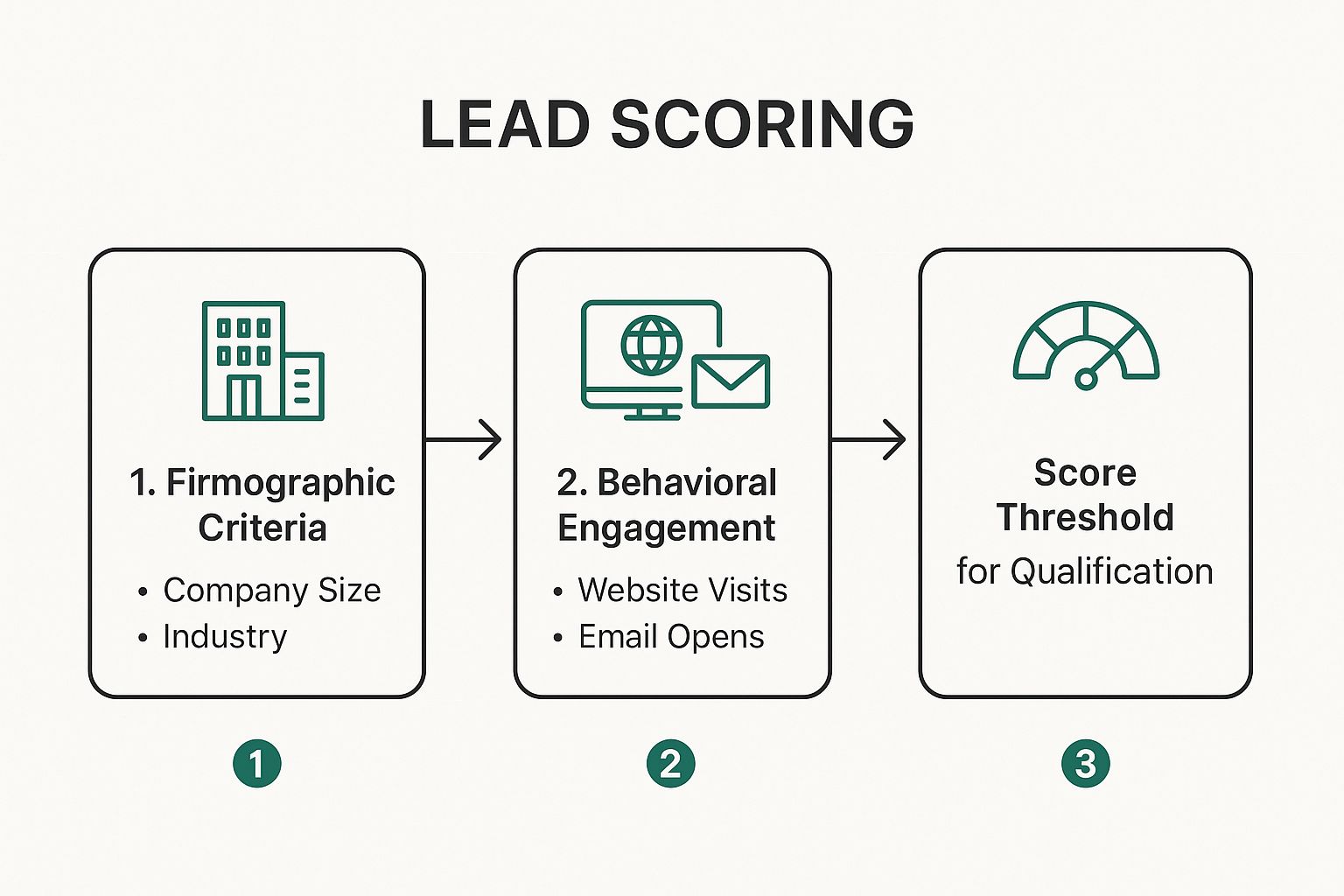
    Start with two buckets. Fit and intent. Fit covers company type, role, and likely use case. Intent covers behavioral signals such as a reply, a demo request, a pricing page visit, or repeated engagement with your content. Keep the rules visible in a shared sheet, Airtable base, or lightweight CRM so everyone qualifies the same way.

    A good scoring model should help reps prioritize. It should not create false confidence.

    Activity without fit is noise. Fit without any sign of timing belongs in nurture, not urgent outreach.

    If you want a practical outside framework, this guide on how to qualify sales leads is a useful companion because it stays focused on observable buying signals.

    Where AI helps and where it wastes time

    AI can speed up qualification if it summarizes websites, extracts firmographic details, drafts account notes, or ranks contacts based on rules you already trust. That saves time for small teams that cannot afford dedicated ops support.

    It becomes a problem when reps treat the score as truth without checking the underlying record. A polished number on top of bad data still produces bad outreach.

    monday CRM’s sales prospecting guide notes that AI-based scoring can improve targeting when teams use real intent signals and clean criteria. Analysts at monday CRM also warn that poor scoring sends reps toward low-fit accounts and burns selling time.

    For small teams, the issue is usually prioritization, not raw lead volume. Build a short list of signals first. Then use software to sort, tag, and rank contacts inside a simple workflow. If you need a low-cost setup, this walkthrough on qualifying sales leads in a simple workflow shows how to do it without enterprise tooling.

    A working standard for small teams

    Treat a contact as a prospect when three conditions are true:

    • The company fits the kind of customer you can help
    • The person is close enough to the problem or purchase decision
    • You have a credible reason to believe the timing is active

    That standard is strict enough to protect rep time and simple enough to use in a spreadsheet. For solopreneurs and small teams, that is usually all you need to turn a raw list into a pipeline you can manage.

    Mapping the Lifecycle From First Contact to Conversion

    A healthy funnel doesn’t move people forward because you want it to. It moves them forward because each stage has a clear trigger.

    That’s where many teams lose control. They collect leads, send outreach, book the occasional meeting, and call the whole thing pipeline. But a predictable system needs stage definitions that match buyer behavior, not just internal hope.

    A funnel diagram illustrating the five stages of a B2B marketing and sales customer journey.

    The five-stage view

    Most small B2B teams can keep this simple:

    Stage What it means What should happen next
    Lead You have a contact, but fit and intent are still unclear Segment, research, or place into initial outreach
    MQL Marketing signals suggest rising interest Check fit and prepare role-specific outreach
    SQL or Prospect Sales has enough evidence to engage directly Run qualification, seek conversation, confirm buying context
    Opportunity A real potential deal exists Advance through discovery, solution fit, and next-step commitments
    Customer The deal is closed Onboard well and create expansion potential

    The stages matter less than the triggers between them. That’s where discipline shows up.

    What moves someone from one stage to the next

    A lead becomes an MQL when behavior suggests more than passive awareness. That could be repeated website engagement, a resource download, or an inbound inquiry.

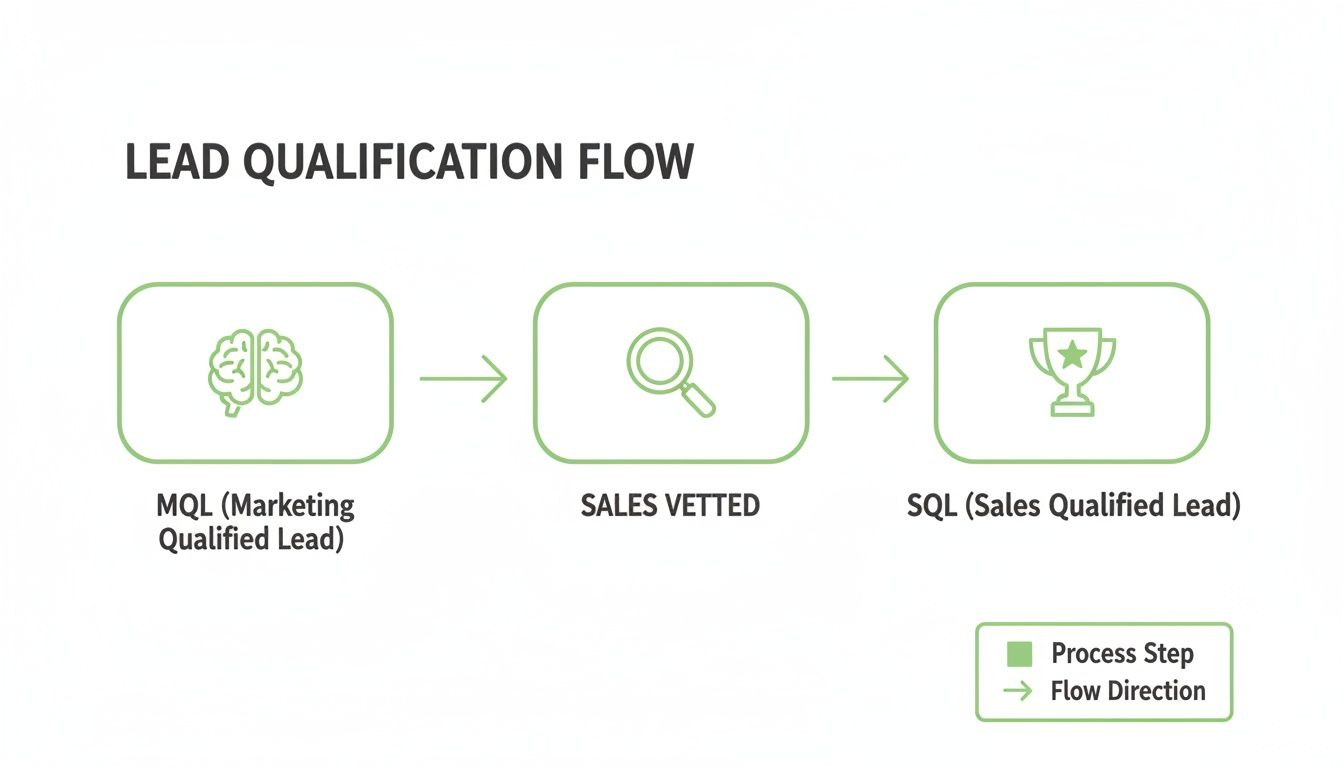
    An MQL becomes an SQL, or prospect, when fit is confirmed and sales can justify direct attention. That’s not “they opened an email.” It’s “they match our market, and there’s a credible reason to talk.”

    An SQL becomes an opportunity when there is a concrete business problem, a viable path to action, and mutual engagement around next steps.

    If a contact can’t answer “why change” or “why now,” they might still be a good lead. They’re just not a real opportunity yet.

    Why nurturing is the middle layer teams skip

    Most deals don’t fail because the first message was terrible. They fail because nobody managed the middle.

    That middle is nurturing. It’s the work between first awareness and direct sales readiness. Teams that handle it well create more qualified conversations at lower cost. According to Salesgenie’s sales prospecting statistics roundup, companies that excel at lead nurturing generate 50% more sales-ready leads at 33% lower cost. The same source says 79% of marketing leads never convert into sales, primarily because they aren’t nurtured.

    That lines up with what most reps see in the field. Buyers often aren’t ignoring you forever. They’re unconvinced, underinformed, or not ready when you first reach out.

    What nurturing should look like in real life

    Nurturing doesn’t mean sending generic newsletters and hoping for the best. It means giving contacts the next piece of relevance.

    For top-of-funnel leads, that might be educational content tied to a role problem. For emerging prospects, it might be a short note tied to a trigger event, a use case, or a proof point. For active opportunities, nurturing looks more like deal progression: answers, stakeholder alignment, and confidence-building.

    A practical funnel for small teams usually includes:

    • Awareness touches: Short educational emails, useful posts, and simple pain-point framing
    • Qualification touches: Direct questions about process, role ownership, or current priorities
    • Conversion touches: Meeting asks, solution framing, and clear next steps

    If you need a simple model for structuring those stages, this guide on building a sales funnel that matches buyer movement is a useful reference.

    The operational view

    The lifecycle becomes manageable when each contact has one clear status and one next action.

    That means no more “follow up later” as a stage. Use statuses that describe buyer reality. Then pair each status with a next step your team can execute without debate.

    Examples:

    • Lead: needs fit check
    • MQL: send role-specific resource
    • Prospect: ask qualification question
    • Opportunity: confirm decision process
    • Dormant: schedule re-engagement with a trigger-based message

    That’s how a list turns into a pipeline. Not through more contacts, but through cleaner movement.

    Practical Strategies to Turn Leads into Prospects

    A small team usually feels the break point fast. You have a spreadsheet full of names, a few people opening emails, and no clear rule for who deserves real follow-up. Without a simple process, everyone gets treated the same, and the pipeline stays noisy.

    The fix is not a bigger CRM or a complicated scoring model. It is a repeatable outreach sequence that creates engagement and gives you enough evidence to decide who is ready for a sales conversation.

    A close-up view of a person using a laptop with text on screen about converting business leads.

    A three-touch sequence that qualifies while it sells

    I like a three-touch structure for small teams because it is easy to run without automation bloat, and it forces message discipline. Each touch should answer one question: does this person have enough fit and intent to move from lead to prospect?

    Touch one with value first

    The first email should show relevance to the role and give the contact a low-effort reason to respond.

    Keep it tight. Mention one real observation about the company, team, or function. Connect that observation to a problem you solve, then offer one useful angle they can react to.

    A practical structure looks like this:

    • Opening line tied to something specific
    • One problem statement
    • One useful idea or asset
    • Soft close that invites a reply

    For example, instead of saying, “We help companies grow,” say, “Noticed your team is hiring SDRs. If reply handling and list quality are slowing handoff, I can send a simple workflow lean teams use to clean that up.”

    That message earns attention because it is concrete.

    Touch two with narrower relevance

    If the first message gets no reply, the second touch should add specificity, not repeat the ask.

    Send something matched to the buyer’s context. For an agency, that might be a short note on client prospecting bottlenecks. For a SaaS sales leader, it might be an observation about territory coverage, outbound list quality, or demo conversion. The point is to test relevance with a sharper angle than the first email.

    For teams improving list-building and segmentation, this roundup of modern B2B lead generation strategies is useful because it connects channel choices to qualification, not just volume.

    Watch for behavior here. A click, a forward, a short reply, or a question about process is more useful than an open rate report. Those are the signals that tell you the contact may be turning into a prospect.

    Add lightweight scoring to every touch

    Small teams do not need enterprise scoring. They need a short set of rules that everyone applies the same way.

    Use a simple point model tied to buying intent and fit. As noted earlier, engagement-based scoring works well when the signals are tied to commercial interest instead of vanity activity. A reply with context should matter more than a generic open. A visit to a pricing or service page should matter more than a blog click.

    A workable model might look like this:

    • Role fit confirmed: add points
    • Company matches ICP: add points
    • Replied with business context: add points
    • Visited pricing or service page: add points
    • Asked about timing, budget, or process: add points

    Set a threshold your team can defend. For a solo operator, that might mean “fit plus one intent signal.” For a small team, it could mean “fit plus two intent signals.” Keep it simple enough that you will use it.

    That is the trade-off. A basic model will miss some nuance, but it gives you faster decisions and cleaner follow-up than treating every contact as equally important.

    Touch three with a low-friction question

    The third touch should make qualification easy for the buyer and useful for you.

    Ask one question that reveals ownership, urgency, or timing without turning the email into a form. Good examples:

    • Is this something your team is actively trying to improve?
    • Are you the right person to review this, or does someone else handle it?
    • Is this a priority now, or something you plan to address later?

    These questions work because they lower reply effort and raise signal quality.

    A strong follow-up asks something the buyer can answer in one line.

    Here’s a short walkthrough worth watching if you want to tighten the outreach side of the process:

    Tools that make the workflow lighter

    For solopreneurs and small teams, the fastest win usually comes from connecting list-building to outreach without adding a heavy system. A Chrome-based email finder can pull contact details from company sites, role pages, or niche directories, then save them into a working list for follow-up. URL-based extraction and autosave features cut out the manual copy-paste work that slows prospecting down.

    EmailScout supports that workflow. It helps collect decision-maker emails and organize them for follow-up, which is useful when you want a low-cost setup instead of a full sales stack.

    Use the tool to support the process, not replace it. Build from a clear ICP. Send messages that test fit and intent. Promote contacts to prospect status only after they show evidence that a sales conversation makes sense.

    Reviving Cold Contacts and Nurturing Dormant Prospects

    Some of the best opportunities in a pipeline are the ones that went quiet for reasons that had nothing to do with fit.

    Budget froze. Priorities shifted. A stakeholder left. The team liked the conversation but couldn’t move. Then the record gets labeled “cold,” and everyone moves on.

    That’s a mistake, especially for small teams. Warm context is expensive to create. You shouldn’t throw it away because timing slipped.

    A small green seedling growing out of dry cracked earth under a bright blue sky.

    Why re-engagement matters

    Mid-funnel stall is common, and it carries a real cost. According to MyMedLeads’ discussion of lead and prospect conversion, a 2025 Gartner report found that 65% of deals stall in the middle of the funnel, costing some startups up to 30% of potential revenue. Effective re-engagement can recover a meaningful portion of that lost value.

    That tracks with real pipeline behavior. Once a contact has replied, taken a call, or discussed a need, the hard part is already done. You have context. You have language. You usually know the pain point. Starting over with a brand-new cold lead is often less efficient than reopening the old thread properly.

    Segment dormant contacts before you contact them again

    Not every silent contact belongs in the same campaign.

    Break them into simple groups:

    • Timing stalled: Good fit, but the project wasn’t active yet
    • Stakeholder change: Your contact moved, went quiet, or lost ownership
    • Priority drift: Interest existed, but another project took over
    • Proposal fade: A live deal slowed after pricing, demo, or internal review

    These groups need different messages. A single “just checking in” email is too lazy for all of them.

    Three re-engagement plays that work

    The value-add restart

    Send something tied to the problem they already acknowledged. A new tactic, relevant resource, short audit note, or role-specific observation works better than re-sending your old pitch.

    Reference the prior conversation briefly, then lead with the new value.

    The breakup email

    This works when a thread has gone stale after multiple real attempts. Keep it polite and direct.

    A useful version sounds like this: “I may be off on timing, so I’ll close the loop for now. If this becomes a priority again, I’m happy to pick it back up.”

    That message often earns a response because it removes pressure and gives the buyer an easy way to clarify status.

    The trigger-based re-entry

    Watch for company changes. Hiring, funding, product launches, expansion into a new market, or leadership changes often reopen a dormant need. When that happens, don’t restart with a generic intro. Re-enter with context from the last conversation and connect it to the new trigger.

    Dormant doesn’t mean dead. It usually means “not under the same conditions as before.”

    What to do when the original contact is gone

    This happens constantly. The champion leaves, and the opportunity looks lost. It often isn’t.

    Go back to the account, identify adjacent stakeholders, and reopen the conversation with continuity. Reference the business issue, not the lost person. That keeps the thread focused on company need instead of internal turnover.

    A practical message might say that you had been discussing a specific workflow issue with the team earlier, noticed recent changes, and wanted to confirm who owns that area now.

    Keep dormant prospects in a real system

    Don’t throw these contacts into a generic newsletter and hope. Put them in a separate re-engagement queue with clear labels:

    • last meaningful interaction
    • original pain point
    • reason for stall
    • next trigger to watch
    • next reactivation date

    That makes follow-up intentional. It also helps you protect the work already invested in getting someone from lead to prospect in the first place.

    Measuring Success KPIs for Your Sales Funnel

    A small team pulls 300 names into a spreadsheet, sends outreach for two weeks, books a few calls, and still cannot answer a basic question. Which part of the funnel is working?

    That is the point of KPI tracking. It gives you a way to spot where contacts are progressing, where they are getting stuck, and where your team is spending time on the wrong accounts.

    Closed revenue matters, but it is a lagging result. To manage the funnel week to week, track the stage changes that happen before the deal closes. For a solo operator or lean sales team, a simple spreadsheet or lightweight CRM is enough if the stage definitions are tight and everyone uses them the same way.

    Four KPIs that matter most

    Lead-to-Prospect Rate

    This metric shows whether your list quality and qualification rules are producing contacts worth pursuing.

    Formula:
    Qualified prospects ÷ total leads

    A low rate usually points to one of three problems. The list is too broad. The ICP is too vague. The outreach is not drawing out enough buying signals to separate curiosity from fit.

    MQL-to-SQL Conversion Rate

    This metric shows whether marketing engagement is turning into real sales conversations.

    If this number stays weak, inspect the handoff first. Marketing may be passing over contacts based on light engagement, while sales expects clear fit, timing, and problem awareness. Small teams run into this often because the same person is doing both jobs and still using two different standards.

    Sales Cycle Length

    Track the time from qualified prospect to customer, or at least to a real opportunity with a defined next step.

    Cycle length needs context. A longer cycle can be normal for multi-stakeholder deals or budgeted purchases. A cycle that keeps stretching usually means something is slowing the process down, such as weak discovery, poor follow-up habits, or no access to the actual decision-maker.

    Customer Acquisition Cost

    A busy funnel can still lose money.

    Formula:
    Total sales and marketing spend ÷ number of new customers

    Keep this simple. Include the tools, list costs, contractor spend, ad spend, and the hours that go into outbound if you want a more honest view. For small teams, CAC is often the fastest check on whether the funnel is efficient or just active.

    What these KPIs should help you decide

    Track metrics to make operating decisions, not to fill a dashboard.

    Use them to answer questions like:

    • Are we feeding the funnel with low-fit contacts?
    • Are we calling someone a prospect before they have shown real buying potential?
    • Are qualified opportunities slowing down at the same stage every month?
    • Is our time going to accounts that can close?

    One practical habit helps here. Keep your stage rules and scoring criteria visible inside the system your team already uses. If you want a simple framework, this guide to lead scoring and how teams apply it in practice connects scoring to actual funnel decisions without pushing you into a heavy CRM setup.

    The best KPI review is simple. One screen, clean definitions, and a clear action tied to each number.

    When the metrics are stable and the stages are used consistently, weak spots show up fast. You can tighten list criteria, change qualification thresholds, or fix a broken follow-up step before the pipeline starts missing target.

    If you want a simpler way to build contact lists and move faster from raw names to qualified outreach, EmailScout can help with email discovery, list building, and lightweight prospecting workflows. For solo operators and small teams, that setup is often enough to create a cleaner top of funnel without adding enterprise software overhead.

  • Master the Difference Between Lead, Prospect, and Customer

    Master the Difference Between Lead, Prospect, and Customer

    Your CRM looks full, but your pipeline feels empty.

    That usually means the team is treating every contact like a potential deal. Marketing hands over a list. Sales starts calling. Reps burn hours on people who downloaded a guide, opened one email, or filled out a form with no buying intent. Then leadership asks for more leads, which makes the problem worse.

    The difference between lead, prospect, and customer isn't a vocabulary issue. It's a workflow issue. If you don't separate those stages clearly, your reps chase noise, your follow-up gets inconsistent, and your real opportunities slow down.

    Why Most Sales Funnels Are Broken (And How to Fix Yours)

    Most sales funnels break at the handoff between attention and qualification. Teams generate names, emails, and company records, but they don't apply different rules to different contact stages. Everything gets dumped into one pipeline bucket labeled "lead."

    A woman working on a laptop displaying a complex CRM interface representing business workflow management challenges.

    That isn't just messy. It's expensive. Salesforce's 2025 State of Sales report says 68% of leads never convert due to poor qualification, and teams misallocate 40% of sales time to unqualified leads, resulting in 25% lower close rates according to Adobe's breakdown of sales lead vs prospect basics.

    More contacts doesn't mean more pipeline

    A large top of funnel can help, but only if your team can sort signal from clutter fast. If you can't, every extra contact adds review time, follow-up load, and CRM bloat. Reps start skipping notes, managers lose forecasting accuracy, and good accounts get buried under weak ones.

    This problem shows up in e-commerce too. If you're working across both outbound and on-site conversion, this practical guide on how to increase your e-commerce conversion rate is useful because it forces the same discipline. Diagnose where buyers drop, then fix the stage instead of blindly adding volume.

    Practical rule: If sales and marketing use the same label for everyone who entered the database, your funnel isn't segmented enough to move quickly.

    What a working funnel looks like

    A healthy process does three things well:

    • Separates stages clearly: A new contact isn't treated like an active buyer.
    • Assigns the right owner: Marketing nurtures early interest. Sales works qualified intent.
    • Changes the next action: Leads get education. Prospects get direct outreach. Customers get retention and expansion plays.

    If your current process doesn't do that, rebuild it around stage-specific actions. This guide on how to create a sales funnel is a useful reference point if you're mapping handoffs, lifecycle stages, and follow-up logic from scratch.

    The Three Core Identities in Your Sales Pipeline

    Teams move faster when everyone agrees on what a contact is. Not in theory. In the CRM, in the queue, and in the rep workflow.

    Here’s the simplest working model.

    Stage What it means Typical signal Team response
    Lead An unqualified contact with early interest or discovered relevance Form fill, email signup, list add, website visit, sourced account contact Research, nurture, score, qualify
    Prospect A qualified lead that fits your ideal customer profile and shows active interest Reply, call, demo request, repeat site activity, confirmed fit Personalized outreach, discovery, objection handling
    Customer A buyer who completed a purchase Signed agreement, completed transaction, activated service Onboarding, support, expansion, renewal

    Lead means possible, not probable

    A lead is someone you know about, but don't know enough about yet. They may have touched your brand, or your team may have identified them as a relevant contact at a company that fits your market.

    Think of a lead like someone who walked past your store and glanced through the window. They're not ignored, but they aren't ready for a sales conversation just because they exist in your database.

    What works at this stage is lightweight qualification. Check company fit, role relevance, and whether there is any visible signal of interest. What doesn't work is dropping every lead into an aggressive call sequence on day one.

    Prospect means qualified and engaged

    A prospect is a lead that has earned more attention. They fit your ideal customer profile, and there's enough evidence that a real buying conversation could happen.

    The store analogy changes here. This person didn't just glance through the window. They came inside, asked a question, compared options, and stayed long enough to show intent.

    A prospect doesn't need to be ready to buy immediately. But they do need enough fit and engagement to justify direct rep time.

    Prospects sit in the part of the pipeline where rep attention has leverage. That's why qualification quality matters more than list size.

    Customer means the deal is closed, not the work

    A customer is the contact or account that has already purchased. At this point, the company has crossed from potential revenue to actual revenue.

    Too many teams stop thinking once a deal closes. That creates a second efficiency problem. Customers need onboarding, support, adoption, and expansion planning. If that handoff breaks, retention suffers and referrals disappear.

    The practical distinction matters because each identity needs a different playbook:

    • Leads need context
    • Prospects need conversation
    • Customers need outcomes

    If you blur those categories, your pipeline slows down because every person gets the wrong message at the wrong time.

    Comparing Leads Prospects and Customers Across Key Metrics

    Definitions help, but reps need a faster filter. When a name appears in the CRM, you should be able to identify the stage by behavior, fit, and next action.

    A comparison chart outlining the differences between leads, prospects, and customers across five key business metrics.

    The side by side view

    Metric Lead Prospect Customer
    Qualification status Not yet qualified Qualified against fit and buying criteria Fully converted
    Intent level Unclear or early Active and visible Purchase completed
    Engagement type Mostly one-way Two-way Ongoing relationship
    Information known Basic contact or firmographic data Fit, need, role, likely use case Purchase history, product usage, account context
    Sales action required Research and nurture Discovery and solution selling Retain, support, expand

    Engagement is the clearest dividing line

    One of the easiest ways to tell the difference between lead prospect and customer is by looking at the direction of communication.

    Prospects actively communicate back through phone calls, email replies, website exploration, and demo requests, whereas leads typically exhibit one-directional communication only, like a form fill. Advanced sales teams track these behavioral signals to classify contacts and prioritize high-intent prospects for immediate sales conversation, as described in Trellus' explanation of prospect and lead behavior.

    That matters operationally. A form submit tells you someone noticed you. A reply tells you they're participating.

    A lead consumes information. A prospect exchanges information.

    What sales should know at each stage

    The amount of usable information should increase as the contact moves down the pipeline.

    For a lead, you usually know things like company name, email, job title, source, and maybe industry. That's enough to decide whether to keep researching or move them into nurture.

    For a prospect, the record should get sharper. You want to know the role they play in the decision, the problem they're trying to solve, whether your product fits their environment, and what kind of next step makes sense.

    For a customer, your focus changes again. The CRM should reflect what they bought, who owns the relationship, what onboarding status looks like, and where expansion could happen later.

    The wrong move at the wrong stage kills velocity

    A lot of funnel drag comes from stage mismatch. Reps call leads as if they're prospects. Marketers nurture prospects as if they're still cold. Customer success inherits accounts with poor notes and no context.

    Here are the common mistakes:

    • Pushing too early: Sales asks for a meeting before the contact has shown enough intent.
    • Waiting too long: A qualified prospect sits in automation when a rep should be calling.
    • Treating customers like net-new buyers: Post-sale communication starts over from zero instead of building on purchase context.

    A simple operating test

    If you want a fast diagnostic, ask these three questions about any contact:

    1. Do they fit the kind of account we sell to?
    2. Have they shown enough engagement to justify rep time?
    3. Have they already bought from us?

    If the answer is only fit or only early interest, they're a lead. If fit and engagement are both present, they're a prospect. If the purchase already happened, they're a customer.

    The label matters because the next action changes. Good sales ops doesn't just name stages. It routes work correctly.

    The Art of Qualification Turning Raw Leads into Viable Prospects

    The biggest speed gain in most pipelines doesn't come from better closing. It comes from better filtering before reps spend serious time.

    A person sorting through colorful glass gems and small dark pebbles, symbolizing the lead qualification process.

    The handoff from lead to prospect is where funnels usually clog. GMass notes that the greatest attrition happens during qualification, and a business might generate 100 leads in a quarter but advance only 15 highly qualified prospects after assessing budget, authority, need, and timeline in its discussion of lead vs prospect qualification.

    Use a first-pass screen before outreach

    You don't need a full discovery call to qualify a contact enough for prioritization. You need a fast first pass.

    A practical screen includes:

    • Fit: Does the company match your target market by industry, size, geography, or operating model?
    • Role: Is the contact close enough to the problem or purchase decision to matter?
    • Need signal: Is there any evidence of pain, initiative, or interest?
    • Timing clue: Are they just browsing, or is there a reason this matters now?

    If those signals are weak, keep the contact in nurture. If they're strong, move them toward direct outreach.

    Apply BANT without turning it into a script

    BANT works when teams use it as a lens, not a robotic checklist.

    • Budget: Can this account realistically buy?
    • Authority: Is this person the decision-maker, a recommender, or an end user?
    • Need: Is there a problem your offer can solve?
    • Timeline: Is there momentum behind a decision?

    Not every answer needs to be complete before outreach starts. The point is to know whether the rep should spend more time here than elsewhere.

    A short walkthrough can help the team standardize how that looks in practice.

    Build a qualification workflow your reps will actually use

    The best qualification process is the one your team can run every day without friction. Keep it simple:

    1. Capture and enrich the contact
      Add the basic record, then attach company and role context.

    2. Score for fit before intent
      A contact can be active and still be a poor account. Fit comes first.

    3. Check for engagement signals
      Replies, repeat visits, and direct questions move a lead closer to prospect status.

    4. Route by readiness
      High-fit, engaged contacts go to reps. Others stay in nurture with clear review dates.

    If your current system relies on reps manually hunting this information across tabs, it won't scale. That's why many teams use enrichment and outreach tools to tighten this step. If you want a practical reference for the criteria and process, this guide on how to qualify sales leads is worth reviewing.

    Qualification isn't about rejecting people. It's about protecting rep time for the contacts most likely to move.

    From Conversation to Conversion Activating Your Prospects

    Once a contact becomes a prospect, the job changes. You're no longer trying to determine whether they belong in the pipeline. You're trying to help them make a decision.

    That means generic nurture usually stops working. Prospects need specific answers, relevant examples, and a path to action that matches where they are in the buying process.

    What moves a prospect forward

    The most reliable prospect activation has three traits.

    • It reflects their situation: Messaging ties directly to the role, problem, and account context.
    • It reduces decision friction: Reps answer implementation, pricing, risk, and timing questions early.
    • It creates momentum: Every touch has a clear next step, whether that's a call, demo, stakeholder meeting, or proposal review.

    A lot of teams lose momentum because they keep sending broad educational content after the buyer has already signaled intent. At that point, the prospect usually wants direct conversation, not another top-of-funnel asset.

    Personalization beats pressure

    Prospects don't convert because sales follows up more often. They convert when follow-up becomes more relevant.

    That means ditching vague messages like "just checking in" and replacing them with something useful. Bring a recommendation. Reference a known pain point. Show the trade-off between doing nothing and solving the issue now.

    If a prospect has already engaged, your outreach should help them decide. It shouldn't remind them that you exist.

    For teams building nurture sequences around this stage, Mastering Automated Lead Nurturing is a useful resource because it focuses on how automation can support timing and relevance instead of replacing thoughtful sales work.

    Don't ignore dormant prospects

    One of the most overlooked parts of the difference between lead prospect and customer is what happens when a qualified prospect goes quiet. Most pipelines treat silence as loss. That's a mistake.

    Gartner's 2025 Pipeline Health study shows 52% of prospects go dormant within 30 days, but re-engagement via automated multi-channel sequences can recover 22% as customers, compared with the 5% industry average, based on Revenue.io's discussion of prospect stages and re-engagement.

    That should change how you manage stalled deals.

    A practical reactivation sequence

    When a prospect goes dormant, use a short, structured reset:

    1. Acknowledge the pause
      Keep the tone direct. Reference the last conversation and the reason timing may have slipped.

    2. Add one new piece of value
      Share a use case, product update, implementation insight, or concise answer to a known objection.

    3. Offer a smaller next step
      Don't force a full demo if the buyer isn't there. Suggest a brief review, async answer, or stakeholder check-in.

    4. Use more than one channel
      Email alone often isn't enough. Pair it with a call, LinkedIn touch, or another relevant channel your team already uses.

    Dormant doesn't always mean dead. Often it means priorities shifted, approvals stalled, or internal alignment broke. Those deals can still close if your re-entry is timely and useful.

    Building an Efficient Pipeline with EmailScout

    Pipeline efficiency comes from execution discipline. You need clean inputs, clear segmentation, and a repeatable way to move contacts from research to outreach without wasting rep hours.

    Screenshot from https://emailscout.io/general-google-scraping-edited-2/

    A lot of teams fail here because their process is split across too many manual steps. They find accounts in one place, gather contact data in another, score fit in a spreadsheet, and push partial records into the CRM later. That lag hurts speed and data quality.

    Segment first, then assign the play

    Organizations that implement CRM segmentation to separate leads from prospects achieve better resource allocation, as sales reps can optimize their approach by identifying which contacts require research versus those ready for consultative selling, improving conversion rates and reducing wasted effort, according to Crunchbase's overview of lead and prospect segmentation.

    That principle should drive your workflow:

    • Lead lane: New contacts, basic firmographic review, nurture or enrichment
    • Prospect lane: Qualified fit, active engagement, direct rep ownership
    • Customer lane: Closed accounts, onboarding, adoption, upsell monitoring

    If your CRM doesn't make those lanes obvious, reps will improvise. Improvised pipelines always get slower over time.

    Where a contact discovery tool fits

    EmailScout functions effectively within a practical stack. It helps teams find business emails and build contact lists while researching accounts, which is useful at the top and middle of the funnel when you're identifying decision-makers, filling missing contact data, and preparing outreach lists. Features like AutoSave and URL Explorer are especially relevant when reps are moving through many accounts and need a cleaner way to collect and organize records before sending sequences.

    Used well, a tool like that supports pipeline velocity in three places:

    • During list building: Reps can collect target contacts without pausing research momentum.
    • During qualification: Role and employer context help determine whether a contact belongs in the lead or prospect lane.
    • During activation: Focused account lists make personalized outreach easier to operationalize.

    If you're sourcing contacts as part of outbound prospecting, the simplest starting point is to find business emails for accounts that already match your ICP, then push only the records with clear fit into qualification review.

    The workflow that keeps reps fast

    A high-velocity pipeline usually runs best with a simple operating rhythm:

    1. Source accounts intentionally
      Start from target companies, not random names.

    2. Collect the right contacts
      Focus on relevant roles tied to the buying problem.

    3. Segment before sequencing
      Separate raw leads from active prospects before any automation goes live.

    4. Hand off with context
      A rep should see role, company, likely use case, and recent engagement in one view.

    5. Close the loop after purchase
      Once the deal is won, hand the account to post-sale with usable notes and expectations.

    The difference between lead prospect and customer only matters if the team operationalizes it. Once those labels drive routing, outreach style, and ownership, pipeline speed gets better because each person works the right contacts at the right depth.


    If your team is spending too much time sorting contacts instead of working real opportunities, EmailScout can help tighten the front half of the pipeline. Use it to collect business contact data, organize account research, and give reps cleaner records for qualification and outreach.

  • What Is Lead Scoring and How Does It Drive Sales Growth

    What Is Lead Scoring and How Does It Drive Sales Growth

    If you've ever felt like your sales team is chasing every lead with the same level of urgency, you know how inefficient that can be. Lead scoring is the system that fixes this. It’s a method for ranking your potential customers based on their value to your company, essentially creating a priority list so your sales team can focus on the hottest prospects first. It turns guesswork into a data-backed strategy.

    Grasping Lead Scoring Fundamentals

    Think of your sales pipeline like a heat map. Instead of a long, flat list of names, lead scoring assigns points to each person based on who they are (job title, company size) and what they do (download a whitepaper, visit your pricing page). Suddenly, that messy list transforms into a clearly prioritized queue.

    This process highlights the leads that are most engaged and best fit your ideal customer profile, guiding your sales team to the prospects most likely to convert.

    Of course, the whole system hinges on good data. If your information is inaccurate, your priorities will be misplaced.

    It's a powerful tool when done right. In fact, 73% of teams report that lead scoring boosted their sales efficiency within just three months.

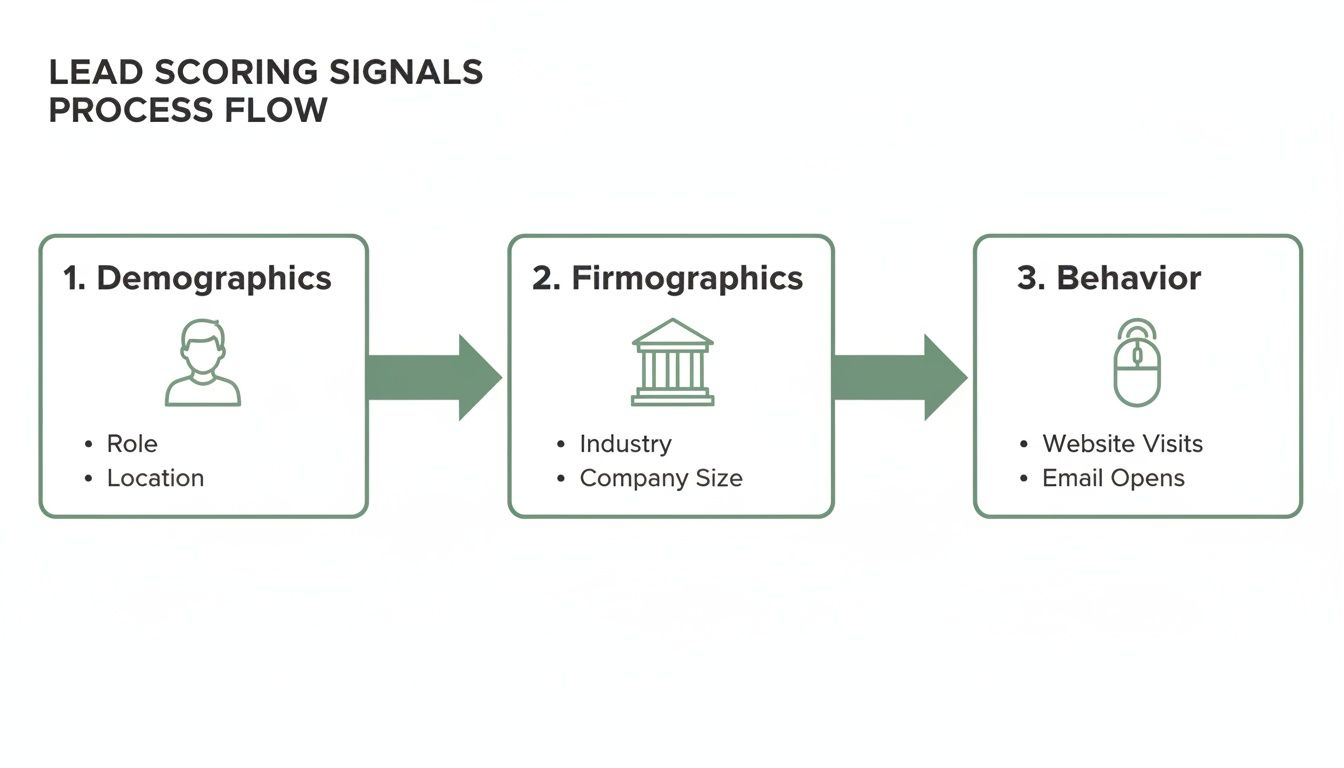
    Key Data Pillars

    A solid lead scoring model is built on three main pillars of data. Each one gives you a different piece of the puzzle about a lead's quality and intent.

    • Demographics: This is all about who the lead is. Think job title, location, or level of experience.
    • Firmographics: This focuses on the company they work for. Are they in the right industry? Is their company the right size?
    • Behavioral Signals: These are the actions the lead takes. They're the digital footprints they leave behind, like visiting your website, opening your emails, or downloading a case study.

    To make this crystal clear, here's a quick breakdown of how these components work together.

    Lead Scoring At a Glance

    This table summarizes the fundamental components that make up a typical lead scoring system.

    Component Description Example
    Demographics Information about the individual lead. Title: VP of Sales
    Firmographics Details about the lead’s organization. Company size: 100 to 500
    Behavioral Actions taken on your website or in emails. Downloaded pricing guide

    Using these building blocks, you can start to translate raw data and online interactions into a simple, powerful numeric score. We'll get into how to assign specific point values a little later.

    A Heat Map in Action

    The image below gives you a great visual of what this looks like in practice. It's a typical lead scoring dashboard where different colors represent different score ranges.

    A person works on a laptop, prioritizing leads on a management software screen, with a pen in hand.

    You can immediately see how leads in that 70 to 100 point range—colored in red—are flagged for immediate follow-up. That's the power of visual prioritization.

    A Simple Scoring Analogy

    Still trying to wrap your head around it? Think of lead scoring like grading an exam.

    Every correct answer (a positive signal) adds points to the final grade. A lead with the right job title and company size gets points, just like answering the first few questions correctly. Behavioral signals, like requesting a demo, are like bonus questions that can seriously boost their score.

    Only the top-scoring "students" get an 'A' and are sent straight to the sales team. Leads with lower scores might just need a little more study time—in other words, more marketing nurture.

    The upcoming sections will walk you through exactly how to choose the right signals and build your first scoring model from the ground up. If you want to see how this works inside a specific tool, this What Is Lead Scoring in HubSpot? A Practical Guide is a great resource.

    Just remember a few key things as you get started:

    • Keep your initial scoring criteria simple. You can always add complexity later.
    • Review and adjust your point values based on what's actually closing.
    • Get sales and marketing in a room together. This only works if everyone agrees on what makes a "good" lead.

    With this foundation, you're ready to dive deeper. Let's get to it.

    Why Prioritizing Leads Is a Game Changer for Sales

    Without a smart way to prioritize leads, most sales teams are just spinning their wheels. It's organized chaos. They jump on every new inquiry with the same urgency, sinking hours into prospects who were never going to buy in the first place. This "first in, first out" mentality doesn't just waste time and kill morale; it lets your best deals go cold.

    Think about it. A sales rep could spend all morning chasing a student who downloaded a whitepaper for a school project. Meanwhile, a C-level exec from a perfect-fit company just checked out your pricing page and gets completely ignored. That’s not just inefficient—it’s a straight line to missed quotas and lost revenue.

    Lead scoring cuts through the noise. It installs a strategic filter that turns that chaotic process into a focused, data-driven machine. It’s the ultimate bridge between marketing and sales, finally putting an end to the endless arguments over lead quality.

    From Volume to Value

    The real magic of lead scoring is how it shifts the team’s entire mindset from the quantity of leads to the value of each one. Instead of chasing down every name that fills out a form, reps can pour their energy into prospects who show they're a great fit and are actively showing interest.

    This targeted approach creates a massive ripple effect. When your sales team trusts that the leads hitting their desk are actually qualified, their productivity skyrockets. They stop wasting time on dead-end calls and start building real relationships with people who are already warmed up and ready to talk.

    This isn't a new concept—it became a go-to tool in the early 2000s, and the results speak for themselves. By 2010, companies using lead scoring were 22% more likely to hit their sales targets, all because their teams weren't stuck chasing ghosts. The system is simple: you assign points for key attributes—say, +15 for a director-level title and +10 for downloading a case study—to create a clear ranking of who's ready for a sales call.

    Shortening the Sales Cycle

    Another huge win is a much shorter sales cycle. By engaging leads right when their score hits a certain threshold, you're catching them at the peak of their interest. Timing is everything.

    A well-implemented lead scoring system doesn't just tell you who to talk to; it tells you when. This precision can slash nurturing time by up to 33%, accelerating deals through the pipeline.

    This efficiency means sales teams can close more deals in the same amount of time, giving a direct boost to the bottom line. You end up with a predictable, repeatable engine for growth instead of just relying on brute force and a bit of luck. For a deeper dive into this, check out our guide on how to qualify sales leads effectively.

    Enabling Hyper-Personalized Outreach

    Finally, knowing a lead's score gives your team priceless context for personalization. When a rep sees that a prospect has visited the pricing page three times and downloaded a specific case study, they can craft an outreach message that's instantly relevant.

    The conversation immediately moves past a generic pitch and becomes a helpful discussion about the prospect's actual interests and pain points.

    • For high-scoring leads: Reps can kick off the conversation by referencing their activity (e.g., "I saw you were interested in our enterprise features…") to show they've done their homework.
    • For mid-scoring leads: Marketing can step in with targeted content designed to answer their questions, boost their score, and get them ready for a sales call.

    This isn't just about improving conversion rates. It creates a far better customer experience from the very first touchpoint, setting the stage for a strong, long-term relationship.

    Decoding the Signals: Key Lead Scoring Criteria

    A great lead scoring model is built on great data. Think of it like a detective gathering clues—some are obvious, others are subtle, but they all help build a complete picture of a suspect's intent. In lead scoring, these clues are signals that tell you how closely a lead matches your ideal customer and how interested they are in what you’re selling.

    These signals typically fall into three buckets: demographics, firmographics, and behavior. By understanding and assigning weight to each, you can turn a flat contact list into a dynamic, prioritized pipeline that points your sales team directly to the hottest opportunities.

    Demographic Data: Who the Lead Is

    Demographic information tells you about the individual. It helps you answer a crucial question: is this the right person to talk to? This data provides essential context and often serves as the first filter.

    • Job Title/Seniority: A "VP of Sales" or "Chief Technology Officer" is likely a decision-maker and should get a high score. An "Intern," on the other hand, might even get negative points.
    • Role/Function: A lead working in a department you sell to (like marketing or IT) is a much better fit than someone in an unrelated field like HR.
    • Location: If you only serve specific regions, a lead's country, state, or city is a non-negotiable qualifying factor.

    This kind of explicit data is foundational. It tells you if the lead even fits the basic profile of your best customers. For a deeper dive into building these profiles, check out our guide on how to create detailed buyer personas.

    Firmographic Data: The Company They Work For

    While demographics look at the person, firmographics zoom out to look at their company. This is especially important in B2B, where the organization's profile is just as critical as the individual's role.

    • Company Size: Do you sell to scrappy startups or huge enterprises? Assign points based on employee count or annual revenue to match your ideal customer profile.
    • Industry: A lead from an industry you specialize in (like SaaS or healthcare) is far more valuable than one from a sector you don’t serve.
    • Technology Stack: If your product integrates with specific software (like Salesforce or HubSpot), knowing a lead’s company already uses it is a massive green flag.

    Firmographic data ensures you’re not just talking to the right person but to the right person at the right company.

    Behavioral Data: What the Lead Does

    This is where the real story unfolds. While demographic and firmographic data show fit, behavioral data reveals intent. It’s the digital body language that tells you a lead is actively thinking about making a purchase. These actions should carry the most weight in your model.

    In fact, engagement frequency is the number one criterion for lead scoring for nearly 73% of companies. It’s not just a hunch—highly engaged leads are proven to convert 47% better. Why? Because their actions, like repeatedly visiting your pricing page or requesting a demo, are clear buying signals. This focus on behavior has helped some businesses achieve a baseline conversion rate of 14%, just by paying attention to what leads do. You can find more of these lead generation benchmarks on Databox.com.

    Key Takeaway: A lead's actions often speak louder than their job title. A manager who has downloaded three case studies and attended a webinar is likely a hotter prospect than a CEO who only subscribed to your newsletter.

    Common behavioral signals include:

    • Website Activity: Visiting high-value pages like pricing, case studies, or product features.
    • Content Engagement: Downloading whitepapers, ebooks, or attending webinars.
    • Email Interaction: Opening emails and clicking on links within them.
    • Direct Engagement: Filling out a "Contact Us" form or requesting a product demo.

    Here's a quick look at how you might assign points to these different signals.

    Common Scoring Signals and Sample Point Values

    Scoring Category Signal Example Sample Score
    Demographic Job Title: C-Level/VP +20
    Job Title: Manager +10
    Job Title: Intern/Student -10
    Firmographic Industry: Target Industry +15
    Company Size: Ideal Range +10
    Uses a Key Integration Partner +15
    Behavioral Requested a Demo +25
    Visited Pricing Page +10
    Downloaded a Whitepaper +5
    Unsubscribed from Email -25
    Negative Visited Careers Page -15
    Used a Free Email Provider -5
    Inactive for 90 Days -20

    Remember, these are just examples. The right values depend entirely on what signals have historically led to closed deals for your business.

    The Role of Negative Scoring

    It’s just as important to subtract points for red flags as it is to add them for positive signals. Negative scoring is your pipeline’s immune system—it filters out poor-fit leads and keeps things clean.

    Common red flags that should deduct points include:

    • Visiting your careers page (they’re probably looking for a job, not a solution).
    • Using a personal email address (e.g., Gmail, Yahoo).
    • Listing their industry as "student" or "unemployed."
    • Long periods of inactivity (this is often called "score decay").

    By using negative scoring, you prevent scores from getting artificially inflated and make sure your sales team only spends time on prospects who are genuinely qualified.

    How to Build Your First Lead Scoring Model

    Turning the theory of lead scoring into a working system might feel like a huge leap, but it’s actually pretty straightforward when you break it down. Building your first model is less about fancy algorithms and more about getting your teams on the same page. It all starts with a simple, honest conversation between marketing and sales.

    The whole point is to create a unified definition of a "hot" lead. When everyone agrees on what that means, marketing can stop guessing and start delivering a steady stream of prospects that sales is genuinely excited to call.

    Let’s walk through how to build a basic model, using a B2B software company as our example.

    Define Your Sales-Ready Lead

    Before you can assign a single point, you have to define the finish line. What does a sales-ready lead actually look like for your business? This is the most important step, and it absolutely requires a partnership between your marketing and sales departments.

    Get both teams in a room and hammer out the specific traits of leads who have turned into your best customers.

    Take a look at your happiest clients. What do they have in common?

    • Job Titles: Are they typically VPs, Directors, or Managers?
    • Company Size: Do you do best with scrappy startups of 20 people or enterprises with over 1,000?
    • Industry: Which sectors get the most value out of what you sell?
    • Behaviors: What did they do right before they signed on? Did they request a demo, visit the pricing page three times, or download a specific case study?

    This single conversation can end the classic tug-of-war over lead quality. By agreeing on these criteria upfront, you’re basically creating a Service Level Agreement (SLA) that aligns both teams around one goal.

    For our B2B software company, they might agree that a sales-ready lead is a Marketing Director at a SaaS company with 50-250 employees who has requested a product demo. Simple, clear, and actionable.

    The diagram below shows how these different data points—demographics, firmographics, and behavior—all come together to build a complete picture of a lead.

    Flowchart illustrating lead scoring signals process flow: Demographics, Firmographics, and Behavior categories.

    This shows how information about the person, their company, and their actions all feed into the model.

    Assign Point Values to Key Criteria

    Once you have your ideal profile sketched out, it’s time to assign points. The key here is to give more weight to signals that show someone is ready to buy. A good rule of thumb? Actions should almost always be worth more than static attributes.

    Here’s a simple framework our B2B software company could start with:

    1. Firmographic & Demographic Points (The "Fit" Score):

    • Industry is SaaS: +15 points
    • Company Size is 50-250 employees: +10 points
    • Job Title is Director or above: +20 points
    • Job Title is Manager: +10 points

    2. Behavioral Points (The "Interest" Score):

    • Requested a Demo: +30 points (This is a huge buying signal!)
    • Visited Pricing Page: +15 points
    • Attended a Webinar: +10 points
    • Downloaded a Whitepaper: +5 points

    3. Negative Points (The "Red Flags"):

    • Visited Careers Page: -15 points (Probably a job seeker, not a buyer.)
    • Used a personal email (e.g., Gmail): -5 points
    • Inactive for over 60 days: -10 points (This is called score decay.)

    Pro Tip: Don't get hung up on perfection with your first model. Start with a simple system that makes sense. You can—and should—tweak these values later on based on which leads actually convert into customers.

    Set Your Score Thresholds

    The final piece of the puzzle is deciding what happens when a lead hits a certain score. These thresholds are the triggers that automate your workflow, telling your system when to pass a lead from marketing to sales.

    A common approach is to create two main tiers: the Marketing Qualified Lead (MQL) and the Sales Qualified Lead (SQL).

    Using our software company's model:

    • MQL Threshold (50+ points): Any lead scoring 50 points or more becomes an MQL. They're a good fit and they’re showing interest, but they might not be ready for a sales call just yet. Marketing will keep nurturing them.
    • SQL Threshold (80+ points): A lead scoring 80 points or more graduates to an SQL. Their high score flags them as a hot prospect. The system should automatically assign this lead to a sales rep for immediate follow-up.

    Let's see it in action. A Marketing Director (+20) at a 100-employee SaaS company (+10, +15) downloads a whitepaper (+5). Their score is now 50, making them an MQL.

    A week later, they visit the pricing page (+15) and attend a webinar (+10), bumping their score to 75. Then, they finally request a demo (+30), and their score jumps to 105. Boom—they instantly become an SQL and land in a sales rep's queue.

    This structured process moves you from a reactive guessing game to a proactive, data-driven strategy.

    How EmailScout Supercharges Your Lead Scoring Efforts

    A lead scoring model is only as smart as the data it’s built on. If you’re feeding it incomplete or inaccurate information, you’ll get unreliable scores—a classic case of "garbage in, garbage out." The entire system’s success really hinges on high-quality, verified contact data. Think of it as the bedrock for every point you assign.

    This is where the right tools make all the difference. Accurate demographic and firmographic data are crucial for the first part of your scoring equation, which is all about establishing whether a lead is a good fit for your business. Without knowing a prospect’s job title, company size, or industry, your model is basically flying blind.

    A person's hand uses a white mouse next to a laptop displaying business profiles and "Find Decision Makers" text.

    Fueling Your Model with Accurate Data

    EmailScout provides the essential fuel you need to kickstart a powerful lead scoring workflow. It’s designed to give you instant access to the exact data points that earn a lead their initial score, making sure your pipeline is filled with qualified prospects from the jump.

    Imagine you land on the LinkedIn profile of a promising contact. Instead of guessing, the EmailScout Chrome extension lets you find their verified email and key details in a single click. This isn't just about finding an email; it's about qualifying a lead right on the spot.

    With verified data, you can immediately assign points based on reliable criteria. This means a lead enters your system with an accurate baseline score, not a zero, giving them a head start in the qualification process.

    This simple step completely changes how you build your sales pipeline. Instead of importing a long list of unvetted contacts and just hoping for the best, you’re adding pre-qualified, high-potential individuals who already fit your ideal customer profile.

    Scoring Leads at the Point of Discovery

    The real power comes from weaving this data collection directly into your prospecting. When your team can find and qualify decision-makers right from a company website or social profile, they are essentially doing the first step of lead scoring in real-time.

    Here’s how this gives your efforts a serious boost:

    • Instant Qualification: Find a VP of Sales at a 200-person tech company? With EmailScout, you can grab their email and immediately apply your scoring rules (+20 for title, +15 for industry, +10 for company size) inside your CRM.
    • Clean Data Foundation: By starting with verified emails, you drastically cut down on bounce rates. This ensures your behavioral scoring (opens, clicks) is based on real engagement, not dead ends.
    • Increased Sales Velocity: Sales reps can build targeted lists of high-scoring prospects without ever leaving their browser. It dramatically shortens the time from discovery to outreach.

    At the end of the day, effective lead scoring isn’t just about having a model; it's about having a reliable way to feed it. By providing the critical firmographic and demographic data needed for that first score, EmailScout acts as the crucial first step in a smarter, data-driven funnel. If you want to see how it works, you can learn more about how to find business emails quickly and accurately. This helps your sales team start with a list of valuable prospects from day one.

    Common Lead Scoring Mistakes and How to Avoid Them

    Laptop showing test results with red X marks, pen, and document, emphasizing avoiding scoring mistakes.

    Putting a lead scoring system in place is a smart move, but it’s easy to stumble into common traps that can completely derail your efforts. Even the best-laid plans can fall flat if the model isn't built and maintained with a bit of foresight.

    Knowing these pitfalls ahead of time is your best defense. It's the key to building a system that actually cleans up your pipeline and makes your sales team more effective.

    One of the most common mistakes is trying to build a monster model right out of the gate. Teams get excited and want to track dozens of different attributes, leading to a system so complicated that nobody can manage it, let alone understand it. The whole point is to create clarity, not confusion. If sales can't make sense of it, they'll just ignore it.

    Instead, start simple. Pinpoint the 5-10 key signals that your sales team agrees are the strongest signs of a good lead. You can always add more complexity later, once you’ve proven the basic framework actually works.

    Setting It and Forgetting It

    Maybe the biggest mistake of all is treating lead scoring like a one-and-done project. Your business, your market, and your customers are always in motion. A model you built last year is already becoming obsolete, which means your scores will get less accurate and you'll start missing opportunities.

    A "set it and forget it" mindset is a recipe for a useless system. Think of your model as a living thing that needs regular check-ups to stay healthy.

    Solution: Schedule a mandatory quarterly review with people from both marketing and sales. In these meetings, dig into which high-scoring leads actually became customers and which ones went nowhere. That feedback loop is absolutely critical for tweaking point values and making sure the model reflects who you're successfully selling to today.

    This ongoing maintenance keeps your scoring system tied to actual sales results.

    Poor Sales and Marketing Alignment

    A lead scoring model built by marketing alone is doomed from the start. If the sales team doesn’t trust the scores or understand how they’re calculated, they won’t use the system. Period.

    This disconnect is why a staggering 61% of marketers send every single lead straight to sales, even though only 27% of those leads are qualified.

    To sidestep this disaster, you have to build the model together from day one.

    • Co-create the Definitions: Sales and marketing need to sit down and agree on the exact definition of a Marketing Qualified Lead (MQL) and a Sales Qualified Lead (SQL).
    • Agree on Point Values: Get direct feedback from sales on which actions and attributes they see as most valuable. Their real-world experience is what makes the model work.
    • Establish a Handoff Process: Get specific about what happens when a lead hits the SQL threshold. Who gets the notification? What’s the expected follow-up time?

    When you make sales an equal partner in building the system, you create shared ownership and trust. The goal is to build a single, unified engine for growth—not to have two departments pointing fingers at each other.

    Frequently Asked Questions About Lead Scoring

    Even with a great model built, you're bound to have questions once you start putting lead scoring into practice. Let's tackle some of the most common ones that pop up.

    How Often Should I Update My Lead Scoring Model?

    Your lead scoring model isn't something you can just set and forget. To keep it sharp and effective, you should get into a rhythm of reviewing it regularly—a quarterly basis is a great place to start.

    That said, some business events should trigger an immediate review, no matter where you are in the cycle. Watch out for these:

    • A new product launch: The signals that define a perfect lead for your new offering might look completely different from your existing ones.
    • A shift in your ideal customer profile (ICP): If you suddenly start targeting a new industry or company size, your scoring has to change with it.
    • Changes in marketing campaigns: That big industry report you just launched? It's a high-value piece of content and needs a score that reflects its importance.

    What Is the Difference Between an MQL and an SQL?

    Think of MQLs and SQLs as two crucial milestones in a lead's journey. Your score thresholds are what separate them, essentially "graduating" a lead from one stage to the next.

    A Marketing Qualified Lead (MQL) is a prospect who’s raised their hand. They’ve shown some interest and tick a few of the basic boxes, landing them in the "warm" category. They're a good fit, but they aren't quite ready for a sales call.

    A Sales Qualified Lead (SQL), on the other hand, is someone who has hit a much higher score. Their combined demographics, company profile, and recent actions scream "buying intent." They are primed and ready for a direct conversation with a salesperson.

    Can a Small Business Benefit from Lead Scoring?

    Absolutely. You don't need a massive enterprise software suite to see the benefits. Even a simple scoring system built in a spreadsheet can be a total game-changer for startups and small teams.

    For a small business, the biggest win is focus. When you only have a few people, you can't afford to waste time. By assigning points to leads, you can instantly see the top 5-10 opportunities that deserve your team's immediate attention, making sure every minute is spent on deals most likely to close.

    What Tools Do I Need to Implement Lead Scoring?

    Most companies run their lead scoring through a Customer Relationship Management (CRM) platform or a dedicated marketing automation tool like HubSpot or Marketo. These systems are brilliant at tracking behaviors and updating scores automatically.

    But here's the catch: those platforms are only as good as the data you put into them. Foundational tools that provide clean, accurate contact information are non-negotiable. For instance, a tool like EmailScout can supply the verified demographic and firmographic data you need to assign that crucial initial score, making sure your entire system is built on a solid foundation.


    Ready to fuel your lead scoring model with accurate, verified contact data? EmailScout helps you find decision-maker emails in a single click, providing the essential information to qualify leads and build a high-quality sales pipeline from day one. Get started with EmailScout for free.

  • What is a sales qualified lead? A Clear Guide to Qualification and Conversion

    What is a sales qualified lead? A Clear Guide to Qualification and Conversion

    Let's cut through the jargon. A Sales Qualified Lead (SQL) is someone who has moved past the "just browsing" phase and is now actively looking for a solution. Think of it like a shopper who goes from casually window-shopping to walking into your store and asking, "Can you tell me more about this specific model?" They're ready for a real conversation.

    Unpacking the Value of a Sales Qualified Lead

    Two smiling colleagues, a man and a woman, collaborate on a laptop with a 'Sales Qualified Lead' sign on the wall.

    Imagine trying to find a needle in a haystack of potential leads every single day. That’s what it feels like without a solid qualification process. This is where understanding the power of an SQL becomes a complete game-changer for any sales team.

    An SQL isn't just another name on a list. They're a prospect who marketing has nurtured and the sales team has personally vetted, confirming they're a genuine opportunity.

    This vetting process is the secret sauce for an efficient sales machine. It makes sure your sales reps spend their valuable time and energy on people who are actually likely to buy, instead of chasing down every single person who downloaded a free whitepaper.

    Why SQLs Are Your Most Valuable Prospects

    Focusing on SQLs isn't just about saving time—it’s about closing more deals and building a predictable pipeline you can count on. These leads are your most valuable because their actions signal they have a real problem that your product or service can solve. They're ready to talk specifics.

    This distinction is also crucial for getting your marketing and sales teams on the same page. When both teams agree on what an SQL looks like, it creates a smooth handoff and stops high-potential leads from slipping through the cracks. It turns a messy process into a strategic one.

    A Sales Qualified Lead represents a critical moment in the customer's journey. It’s that perfect point where their demonstrated interest lines up with a salesperson's expertise, creating the ideal conditions for a successful sale.

    The Numbers Behind Lead Qualification

    The journey from a curious visitor to a sales-ready prospect is a steep one. While the average lead-to-MQL (Marketing Qualified Lead) conversion rate is a decent 31%, the jump from MQL to SQL is much tighter, sitting at a global average of just 13%.

    That means for every 100 initial leads you get, only about four will become truly sales-qualified and ready for a direct conversation.

    However, teams that nail their qualification process see incredible results. Some B2B teams are converting SQLs at rates nearly 4x higher than their unqualified counterparts. That’s a massive difference. You can learn more about these conversion benchmarks and see how you stack up.

    The Real Difference Between MQLs and SQLs

    Knowing the difference between a Marketing Qualified Lead (MQL) and a Sales Qualified Lead (SQL) is where countless growth strategies either hit their stride or fall flat. It's the critical handoff point where a flicker of interest becomes a real sales opportunity. If you get this wrong, you're just burning through leads and wasting everyone's time.

    Think of it like a relay race. Your marketing team is running the first leg, warming up prospects with blog posts, webinars, and other helpful content. An MQL is the runner who grabs the baton by showing some initial engagement—maybe they downloaded an ebook or signed up for your newsletter. They're interested in your ideas.

    An SQL, on the other hand, is the runner who is sprinting toward the finish line, actively looking for a coach to help them win. They've moved past just consuming content and are now signaling a direct interest in your product. This person has asked for a demo, checked out your pricing, or keeps coming back to high-intent pages on your site.

    From Warm Interest to Purchase Intent

    The leap from MQL to SQL doesn't just happen on its own. It’s a deliberate process that demands total alignment between your marketing and sales departments. Without a clear agreement—often called a Service Level Agreement (SLA)—the baton gets dropped. Marketing passes over leads who are still "just browsing," and the sales team gets frustrated trying to talk to people who simply aren't ready to buy.

    This kind of misalignment is expensive. A shocking 87% of MQLs never turn into sales opportunities, usually because they're handed off way too early. But when that handoff is timed just right, the conversion rate can jump dramatically. The secret is creating a shared definition of what makes a lead truly "sales-ready."

    A Sales Qualified Lead isn't just an interested contact. It's a prospect who has been properly vetted and confirmed by the sales team as having a genuine need, the authority to buy, and a timeline that shows they're ready for a direct sales conversation.

    Defining the Handoff Criteria

    To make the transition seamless, both teams need to agree on the specific triggers that promote a lead from MQL to SQL status. These triggers are based on real actions that signal strong buying intent.

    • Behavioral Triggers: Actions like requesting a demo, starting a free trial, or spending a lot of time on your pricing page are dead giveaways.
    • Demographic Fit: The lead has to match your Ideal Customer Profile (ICP). This means they're in the right industry, their company is the right size, and they have a relevant job title.
    • Explicit Interest: This is the most obvious signal. They filled out a "Contact Sales" form or are asking direct questions about features and how to get started.

    Getting this handoff right is everything. When sales and marketing are on the same page, the whole revenue engine runs smoother, turning more quality leads into happy customers. Historically, the SQL has become the gold standard for B2B sales for a reason: qualified leads convert at a rate nearly 4x higher than unqualified ones. You can dive deeper into the history and impact of sales qualified leads to see just how critical this process is.

    How to Reliably Identify a Sales Qualified Lead

    Figuring out when a prospect is ready to talk to sales isn't just a gut feeling. If you want to stop wasting time on dead-end leads, you need a solid process. Without a clear framework, you're just guessing, and that leads to a leaky pipeline and a frustrated sales team.

    The trick is to combine what a prospect does online with what they say in a conversation. You need to read their digital body language and then ask the right questions to confirm their interest. This is where tried-and-true qualification frameworks come in handy—they give you a script to uncover what really matters.

    Using Qualification Frameworks Like BANT

    One of the oldest and most reliable frameworks out there is BANT. It’s incredibly straightforward and forces you to focus on the four pillars that signal a prospect is ready for a real sales conversation.

    BANT stands for:

    • Budget: Do they actually have the money to buy what you're selling?
    • Authority: Are you talking to the person who can sign the check, or just an influencer?
    • Need: Is there a real, nagging business problem that your solution can fix?
    • Timeline: Do they need to solve this problem now, or is it a "some day" project?

    This simple flowchart shows how a lead moves through the funnel, from a marketing-generated spark of interest to a fully vetted sales opportunity.

    A flowchart illustrating the lead qualification process, showing steps from Marketing Qualified Lead to Sales Vetted to Sales Qualified Lead.

    Think of this process as a filter. It ensures that only the leads who meet your specific criteria make it to your sales team's calendar.

    A lead has to check off all four BANT boxes to be considered a true SQL. If they have a burning need and the budget, but no authority to make the final call, they're not an SQL. Not yet, anyway. Your job then is to work with them to get in front of the actual decision-maker.

    For a more detailed look at this, check out our full guide on how to qualify sales leads effectively.

    Modern Alternatives for Complex Sales

    While BANT is a fantastic workhorse, it’s not always the perfect fit for long, complicated sales cycles. When you're dealing with big enterprise deals and a whole committee of decision-makers, you might need something with a bit more horsepower.

    Frameworks like MEDDIC (Metrics, Economic Buyer, Decision Criteria, Decision Process, Identify Pain, Champion) provide a more detailed roadmap. It's especially useful for high-ticket sales where you need to understand every moving part of the buyer's internal process.

    No matter which framework you land on, the mission is always the same: collect enough intel to confidently say, "Yes, this lead has a high chance of becoming a customer."

    The best qualification conversations feel less like an interrogation and more like a consultation. You're not just checking boxes; you're diagnosing a problem and exploring whether you have the right cure.

    Reading Digital Body Language

    Beyond what a lead tells you, their online behavior screams volumes about their intentions. Someone who keeps coming back to your pricing page is sending a much stronger signal than someone who just downloaded a fluffy ebook a few months ago.

    Keep an eye out for these high-intent digital breadcrumbs:

    • Requesting a demo or free trial. This is the digital equivalent of walking into a store and asking to test drive a car. It's a huge buying signal.
    • Visiting high-value pages. If you see them lurking on your pricing, case study, or feature comparison pages, they're in evaluation mode.
    • Asking specific product questions. When a lead hits up your support chat to ask detailed questions about a specific feature, they're well past the initial research phase.

    When you pair a structured qualification framework with a keen eye for a lead's digital behavior, you create a reliable system for identifying true Sales Qualified Leads. This lets your sales team stop chasing ghosts and start focusing their energy where it will make a real impact.

    Your Action Plan After Finding an SQL

    A desk with an 'Immediate Outreach' sign, laptop with a calendar, and mobile phone, symbolizing planning.

    Okay, marketing has just handed you a hot sales qualified lead. The clock is officially ticking, and every single minute matters now. This isn't the time to drop them into your weekly newsletter queue. Nope. You need immediate, personalized, and persistent outreach if you want to turn that initial spark of interest into a real conversation.

    Speed is your number one weapon here. An SQL is screaming, "I'm ready to buy right now." If you don't jump on it, you can bet your competitors will. In fact, research shows that contacting a new SQL within the first hour boosts your odds of actually qualifying them by a staggering 7x. Wait a day, and that opportunity might as well be dust in the wind.

    This sense of urgency is a cornerstone of any high-performing sales machine. If you want to dig deeper into building this kind of system, check out our full guide on how to build a sales pipeline that turns these qualified leads into predictable cash flow.

    Your First 48-Hour Outreach Cadence

    Look, a single email or one missed call isn't going to cut it. You need a simple, multi-touch plan that keeps you on their radar without being annoying. The only goal for the first 48 hours is to make a connection. That's it.

    Here’s a sample cadence you can steal and start using today:

    • Hour 1 (The First Touch): Send a personalized email that directly references what they did. Something like, "Thanks for requesting a demo of our XYZ feature." Keep it short, sweet, and focused on one thing: scheduling a quick call.
    • Hour 4 (The Follow-Up Call): Time to pick up the phone. Don't leave a bland, generic voicemail. Say something that connects the dots: "Hi [Name], I just sent you a quick email about your interest in [Product]. Just wanted to connect briefly."
    • Hour 24 (The LinkedIn Touch): Find them on LinkedIn and send a connection request. Be sure to add a short, custom note: "Hi [Name], saw you were looking into [Solution Area]. Would be great to connect here."
    • Hour 48 (The Second Email): Follow up again, but this time, bring something valuable to the table. A relevant case study or a short video explaining a key benefit works wonders here.

    Tailoring Your Opening Lines

    "Just following up" is the fastest way to get your email deleted. Your first line has to prove you've done at least a little bit of homework. Personalization is what turns a cold outreach into a warm discovery call.

    The best outreach connects the prospect's recent action to a potential solution. It’s not about what you're selling; it's about why they are looking for it right now.

    Here are two quick templates you can adapt based on what they did on your site:

    Example 1: For a Demo Request

    • Subject: Next Steps for Your Demo
    • Body: Hi [Name], I saw you requested a demo to see how we solve [Pain Point]. I have a few spots open tomorrow to walk you through it and answer any questions. Does [Time] or [Time] work for a quick 15-minute call?

    Example 2: For a Pricing Page Visit

    • Subject: Quick Question about [Their Company Name]
    • Body: Hi [Name], I noticed you were checking out our pricing page. Many teams in the [Their Industry] space use our platform to [Achieve Outcome]. Are you facing similar challenges?

    Accelerate Your SQL Outreach with EmailScout

    Identifying a Sales Qualified Lead is a massive win, but it’s only half the battle. You know who you need to talk to—the "Authority" from your BANT analysis—but what happens when you can't find their direct contact info? That red-hot lead starts to cool down. Fast.

    This is where the real friction happens. Without verified contact data, sales reps lose hours digging for the right email address, often ending up with a generic "info@" inbox that gets ignored. Every minute spent searching is a minute you're not selling, giving competitors an open window to swoop in and start the conversation.

    EmailScout slams that window shut. Instead of playing detective, you can turn a promising SQL into a real conversation in seconds.

    Find Decision-Makers in One Click

    Picture this: your marketing team flags an SQL from a target company that just hit your pricing page. You know the decision-maker is probably the VP of Sales, but their contact details are nowhere to be found. With EmailScout, you just find their LinkedIn profile and get their verified email with a single click.

    This screenshot shows just how simple the EmailScout extension is, right on a professional profile.

    The tool slips right into your existing workflow, pulling the exact email you need without you ever having to leave the page. What used to be a research project is now a one-second action.

    Turn SQL Lists into Real Conversations

    Or let's say you just wrapped up a webinar and have a list of attendees who fit your SQL criteria perfectly. The problem? You only have their names and companies. EmailScout's URL Explorer can take that raw list and quickly find the direct emails for each person, turning your data into a ready-to-use outreach list.

    This lets you jump straight from identification to personalization.

    Finding the right person is step one. Reaching them before anyone else is how you win the deal. A sales qualified lead is most valuable in the first hour after they show intent.

    Once you have the right contact information, you can focus on what actually matters—crafting a message that gets a response. For more on that, our guide on how to write cold emails gives you actionable templates and strategies to book more meetings. By pairing a powerful outreach strategy with the right contact data, you build a repeatable system for turning your best SQLs into paying customers.

    Common Lead Qualification Mistakes to Avoid

    Even the most buttoned-up sales orgs stumble when it comes to defining a sales qualified lead. A few common—and costly—mistakes can completely derail your pipeline, leading to wasted effort and missed revenue targets. Getting ahead of these pitfalls is key for consistent growth.

    One of the biggest errors is a blurry line between marketing and sales. When the MQL-to-SQL handoff lacks a crystal-clear, agreed-upon definition, good leads either get passed over too early or sit stagnant for too long. In both cases, they go cold.

    Another frequent misstep? Waiting too long to engage. The moment a prospect signals they're sales-ready—by requesting a demo or hitting your pricing page—the clock starts ticking. Data consistently shows that leads contacted within the first hour are exponentially more likely to convert. Don't let a hot lead cool off.

    Overlooking Personalization and Persistence

    Sending a generic, one-size-fits-all outreach email is a recipe for being ignored. An SQL has already shown you what they care about through their actions. If you don't reference that context in your first email or call, you sound uninformed and waste the rapport marketing already built. Your outreach has one job: connect their problem to your solution.

    A Sales Qualified Lead isn’t a guarantee; it's an opportunity. Treating it like just another name on a list is the fastest way to lose the deal to a competitor who treats it with the urgency it deserves.

    Finally, giving up too early is the silent killer of conversion rates. So many reps abandon a lead after just one or two unanswered attempts. The reality is, persistent, multi-channel follow-up is almost always required to break through the noise. A well-structured cadence with calls, emails, and social touches is essential to capitalize on the opportunity an SQL represents.

    A Few Lingering Questions About SQLs

    To wrap things up, let's tackle a couple of common questions that always seem to pop up when teams start working with sales qualified leads. Think of this as the final polish to help you turn all this knowledge into action.

    How Do You Know If Your SQL Process Is Working?

    Measuring the success of your SQL process is key. Otherwise, you're just guessing. While every business is a little different, there are a few key performance indicators (KPIs) you should absolutely keep an eye on to see what’s hitting the mark.

    • MQL to SQL Conversion Rate: This is your most direct measure of how well marketing and sales are aligned. A healthy rate, often somewhere between 10-20%, is a great sign that marketing is handing over genuinely qualified prospects.
    • SQL to Opportunity Rate: This one tells you how many of your vetted leads actually morph into real, pipeline-worthy sales opportunities. It's a fantastic reflection of your sales team's effectiveness in those first conversations.
    • Lead Response Time: Like we've touched on, speed is everything in this game. Tracking how quickly your team jumps on a new SQL is a powerful leading indicator of future success. You can't close a deal you never got to first.

    Can a Lead Go from SQL Back to MQL?

    Absolutely. In fact, it happens all the time. The customer journey is rarely a straight line from A to B. A prospect might get tagged as an SQL, but during that initial discovery call, it becomes painfully obvious they aren't ready to pull the trigger just yet.

    Maybe their budget got slashed, their project timeline was pushed into the next quarter, or a new company priority just jumped the line. When that happens, the smartest move is to de-qualify them as an SQL and hand them back to the marketing team for more nurturing. This keeps your sales pipeline clean and ensures the lead keeps getting helpful content until they're ready to talk business again.

    A lead's qualification status is fluid, not final. The goal is to engage them at the right stage, whether that's a sales conversation today or a marketing nurture campaign for tomorrow.

    This approach stops you from burning a bridge with a promising—but not-yet-ready—prospect. It also lets your sales reps focus their energy exclusively on deals that have a realistic shot of closing soon.


    Ready to stop searching and start selling? EmailScout finds the verified email addresses of your key decision-makers in a single click, turning your SQLs into real conversations, faster. Find unlimited emails for free today.

  • How to Qualify Sales Leads and Boost Conversions

    How to Qualify Sales Leads and Boost Conversions

    Ever feel like your sales team is spinning its wheels? It’s a common frustration. But the problem usually isn't a lack of effort—it's a lack of focus.

    When your reps are busy chasing down every single lead that comes in, they’re not really selling. They’re just staying busy. Chasing unqualified prospects wastes an incredible amount of time, tanks team morale, and throws your sales forecasts completely out of whack.

    Let's fix that. We'll walk through how to qualify sales leads by defining exactly who you want to talk to, setting up a smart scoring system, and using proven frameworks to guide your sales conversations.

    Why Qualifying Sales Leads Is a Non-Negotiable

    Treating every inbound inquiry or contact form submission as a hot lead feels productive on the surface. In reality, it’s a fast track to burnout and missed quotas.

    When sales reps spend their days calling prospects who have no budget, no authority to make a decision, or no genuine need for your solution, they aren’t closing deals. This inefficiency hits your bottom line hard, driving up what you spend to get each new customer. If you’re not sure how those costs add up, you can check out our handy guide on calculating customer acquisition cost to see just how much unqualified leads can hurt your numbers.

    The data here is pretty stark. A staggering 67% of lost sales can be chalked up to reps not qualifying their leads properly. Let that sink in. Nearly two-thirds of deals that fall apart could have been saved if the right questions were asked from the get-go.

    It doesn’t stop there. Roughly 75% of marketing leads are never a good fit for a sales conversation, and 79% of those will never convert. By simply learning to disqualify these poor-fit leads early, your team can reclaim about 32% of their time. That’s a huge chunk of the week they can now spend on leads that actually have potential.

    Moving Beyond Busy Work

    So, what’s the alternative to the "chase everything" approach? It’s all about creating a strategic filter that separates the real opportunities from the time-wasting distractions. This is what effective lead qualification is all about.

    When you get this right, your sales team can finally prioritize their efforts with precision. They move from a scattergun approach to a focused strategy, dedicating their energy to building relationships with prospects who are a genuinely great fit for what you offer.

    The benefits pop up almost immediately:

    • Faster Sales Cycles: Reps spend less time on dead-end conversations and more time moving real deals through the pipeline.
    • Happier, More Motivated Reps: Nothing kills motivation faster than constant rejection from unqualified prospects. Focusing on winnable deals keeps morale high.
    • Forecasts You Can Actually Trust: When your pipeline is filled with properly vetted opportunities, your revenue predictions become far more reliable.
    • Higher Close Rates: By engaging with prospects who have a clear need and the ability to buy, your team's conversion rate naturally goes up.

    To give you a clearer picture, let's lay out the basic pillars of a solid qualification framework.

    Your Lead Qualification Framework at a Glance

    This table breaks down the core components of an effective lead qualification process, giving you a high-level overview of the strategy before we dive into the details.

    Framework Pillar Key Objective Primary Action
    Ideal Customer Profile (ICP) Define the "perfect" customer company Analyze your best existing customers to identify common attributes (industry, size, revenue).
    Buyer Persona Understand the individual decision-makers Create detailed profiles of the key roles involved in the buying process (e.g., goals, challenges).
    Qualification Framework Standardize the discovery process Implement a proven model like BANT, MEDDIC, or CHAMP to ask consistent, targeted questions.
    Lead Scoring Prioritize leads based on fit and interest Assign points to leads based on their demographic data and their actions (e.g., website visits).

    This framework provides the structure your team needs to stop guessing and start selling with intention.

    The core idea is simple but powerful: stop treating every lead equally. By learning how to qualify sales leads effectively, you empower your team to work smarter, not just harder, transforming your entire sales operation from the ground up.

    Define Your Ideal Customer Profile

    A team collaborating around a whiteboard, mapping out customer profiles with sticky notes and diagrams, illustrating the process of defining an ideal customer.

    Before your team even thinks about picking up the phone, the most critical work has already started. Effective lead qualification isn't just about asking good questions—it's about knowing exactly who you should be talking to in the first place.

    This is where your Ideal Customer Profile (ICP) comes in.

    Think of your ICP as a blueprint for the perfect company for your product. It’s not just a vague idea of your target market. It's a specific, data-driven definition that becomes the north star for your entire sales and marketing operation. Without a clear ICP, your team is flying blind, wasting time on leads that were never going to convert.

    The best way to build this? Look at your existing customers. Who are your happiest, most successful clients? The ones who renew without a fuss and send you glowing testimonials? They hold all the answers.

    Look for Common Threads in Your Best Customers

    Start by listing your top 10-20 customers. Now, it's time to play detective and figure out what makes them so great. You're searching for shared attributes you can use to spot similar companies out in the wild.

    A truly powerful ICP goes way beyond basic demographics. It's multi-dimensional.

    • Firmographics: This is the basic company data. What do they have in common? Look at industry, company size, annual revenue, or location. You might find your sweet spot is B2B SaaS companies with 50-250 employees in North America.
    • Technographics: What's in their tech stack? Do they all use Salesforce, HubSpot, or AWS? This tells you about their technical maturity and whether they can even integrate with your solution.
    • Psychographics: Now you're getting into their heads. What were their biggest headaches before they found you? What goals were they trying to hit? Understanding their pain points helps you craft a message that resonates.

    Analyzing these layers transforms a generic target into a crystal-clear picture of your ideal fit.

    Build a Real-World ICP Example

    Let's say you run a SaaS company that sells project management software to creative agencies. After digging into your best accounts, your ICP might look something like this:

    ICP Criteria Ideal Profile Specification
    Industry Digital Marketing & Advertising Agencies
    Company Size 20-100 employees
    Annual Revenue $2 million – $15 million
    Geography United States, Canada, UK
    Tech Stack Uses Slack for comms, Google Workspace for collaboration, and HubSpot for their CRM.
    Pain Points Struggles with managing client feedback, tracking project profitability, and hitting deadlines.
    Buying Triggers Recently hired a "Head of Operations" or is actively posting jobs for Project Managers.

    This detailed profile becomes an invaluable filter. When a new lead from a 300-person manufacturing firm in Brazil comes in, your team knows instantly it's not a priority. That simple check saves them countless hours.

    Your ICP isn't just a marketing document; it's a strategic sales tool. It empowers your reps to disqualify poor-fit leads confidently and quickly, freeing them to focus their energy where it matters most—on prospects who look just like your best customers.

    Distinguish Between Fit and Intent

    With your ICP defined, you can qualify leads on two critical axes: fit and intent.

    • Fit is how well a lead matches your ICP. Do they check the boxes for industry, size, and tech? This is the first gate.
    • Intent is all about their behavior. Have they visited your pricing page, requested a demo, or downloaded a case study? These actions signal they are actively looking for a solution.

    A lead could be a perfect ICP fit but show zero buying intent. They're a great prospect to nurture for the future, but not a hot lead for today. On the flip side, someone might request a demo (high intent) but work for a company that's a terrible fit. That's a lead to disqualify quickly to avoid a frustrating sales process for everyone.

    The sweet spot is where high fit meets high intent. These are the leads your sales team should jump on immediately. This is the first and most critical step in learning how to qualify sales leads effectively.

    Implement a Practical Lead Scoring System

    Knowing who your ideal customer is only half the battle. The other half is actually finding them in the flood of leads that come in every day. This is exactly where a lead scoring system shines. It’s a simple but powerful method of assigning points to leads, ranking them by how likely they are to actually become customers.

    Instead of your sales team manually digging through every single form submission, a lead scoring model automatically pushes the hottest prospects right to the top. It’s a data-driven way to make sure your team consistently spends their time on leads with the highest chance of converting.

    Think of it as a bouncer for your sales pipeline. A lead has to rack up enough points to get past the velvet rope and earn a conversation with a sales rep. This process is absolutely essential if you want to build a sales pipeline filled with real opportunities instead of just noise.

    Differentiating Explicit and Implicit Data

    A solid lead scoring system needs to balance two kinds of information: what people tell you directly, and what their actions tell you indirectly.

    Explicit Scoring: This is all about the data a lead gives you willingly. It's the firmographic and demographic info that tells you if they're a good fit for your product.

    • Job Title: A "Director of Marketing" might get +15 points, while an "Intern" gets 0.
    • Company Size: If your sweet spot is businesses with 50-200 employees, leads in that range could get +20 points.
    • Industry: A lead from a target industry like "B2B SaaS" could earn +10 points.

    Implicit Scoring: This is all about behavior, which signals a lead's intent to buy. These are the digital breadcrumbs that show how engaged they are with your brand.

    • Website Behavior: Visiting your pricing page is a huge sign of interest, easily worth +20 points.
    • Content Engagement: Requesting a product demo? That's a massive buying signal, worth at least +25 points.
    • Email Interaction: Just opening a marketing email might be worth +2 points, while clicking a link inside is a stronger signal worth +5.

    The infographic below shows how these two types of criteria come together to qualify a lead.

    Infographic showing the lead scoring process from firmographic criteria to behavioral engagement and finally to the qualification threshold.

    This simple flow highlights a powerful truth: the best leads are always a mix of a strong profile fit and active buying signals.

    Let’s look at a concrete example. Here’s a sample model you could adapt for a B2B SaaS company trying to filter its inbound leads.

    Sample Lead Scoring Model for a B2B SaaS Company

    Category Criteria Points Awarded
    Explicit (Fit) Job Title (Manager or above) +15
    Company Size (50-500 employees) +20
    Industry (Technology, Marketing) +10
    Using a competitor's technology +5
    Implicit (Intent) Visited Pricing Page +20
    Requested a Demo +25
    Downloaded a Case Study +10
    Clicked a link in an email +5
    Negative Score Email domain is "gmail.com" or "yahoo.com" -10
    Unsubscribed from email list -50
    Job Title includes "Intern" or "Student" -20

    This table makes it clear how different attributes and actions can be weighted. A "Marketing Manager" from a 100-person tech company who requested a demo would quickly hit a high score, while a student with a Gmail address would be filtered out.

    Setting Your Qualification Threshold

    Once you start assigning points, you need to decide what score makes a lead "sales-ready." This magic number is your qualification threshold. For instance, you might decide that any lead who hits 75 points gets automatically sent to a sales development rep (SDR) for immediate follow-up.

    This number shouldn't be pulled out of thin air. You'll need to analyze your past sales data to find the sweet spot. It's also important to remember that not all qualified leads are the same.

    In fact, surveys show 46.4% of sales pros prefer Product Qualified Leads (PQLs)—people who have actually used the product—over any other type. Sales Qualified Leads (SQLs) come next at 37.5%, with Marketing Qualified Leads (MQLs) trailing at 16.1%. If you have a free trial or freemium model, your scoring should absolutely reflect this by giving more weight to in-product actions.

    Using Negative Scoring to Filter Out the Noise

    Just as you award points for good signs, you should also subtract them for red flags. This is called negative scoring, and it's your secret weapon for automatically disqualifying poor-fit leads before they ever reach your sales team.

    Think of it this way:

    Negative scoring is your system's immune response. It actively identifies and weeds out leads that would otherwise waste your sales team's valuable time, keeping your pipeline healthy and focused.

    Here are a few classic examples where negative scoring is a lifesaver:

    • Student or Personal Emails: A lead using a "gmail.com" or ".edu" email address might get -20 points.
    • Competitor Snooping: If a lead's domain matches a known competitor, you can hit them with -50 points to keep them out of your pipeline.
    • Going Cold: A lead who hasn't opened an email in 90 days could have -15 points applied to lower their priority.
    • Wrong Department: If your software is for engineers, a lead with "Human Resources" in their title could get -10 points.

    By combining positive and negative scores, you create a dynamic system that doesn't just rank leads—it actively cleans your database. This way, when a lead finally hits that qualification score, your sales team can engage with total confidence.

    Master Qualification Frameworks Like BANT and MEDDIC

    Two business professionals in a modern office, using a transparent whiteboard to map out a sales framework like BANT or MEDDIC.

    Once your ideal customer is defined and leads are scored, it’s time to talk. This is where a good qualification framework shifts from a "nice-to-have" to a must-have. Instead of just winging your discovery calls, a framework gives you a structured way to uncover the critical details you need to move a deal forward.

    These aren't meant to be rigid scripts. Think of them more like conversational roadmaps. They guide you toward the right questions, helping you dig deep into a prospect’s world and ensuring you only spend your energy on deals with a real shot at closing.

    The Classic Approach: BANT

    Developed by IBM way back when, BANT is the OG of qualification frameworks. It's still incredibly popular today because it’s simple and it works. It boils everything down to four essential pillars for any successful deal.

    • Budget: Can they actually afford what you're selling?
    • Authority: Are you talking to the person who can sign the check?
    • Need: Do they have a real, painful problem that your product solves?
    • Timeline: How soon do they need to fix this problem?

    The trick with BANT is to avoid sounding like you’re just going down a checklist. Asking a blunt question like, "Do you have the budget?" is a surefire way to kill the conversation. You have to weave these ideas into a natural dialogue.

    For instance, instead of asking about budget directly, try something like, "What have you invested in similar tools before?" or "What kind of financial impact would solving this problem have?" These questions get you the answers you need without putting the prospect on the defensive.

    Going Deeper with MEDDIC

    For those in the trenches of complex, high-ticket B2B sales, a more robust framework like MEDDIC is often the answer. This model pushes you to go much deeper, focusing not just on the prospect's immediate needs but on their entire internal buying machine.

    MEDDIC is an acronym that breaks down like this:

    1. Metrics: What are the hard numbers they want to achieve? Think increased revenue, lower operational costs, or better efficiency.
    2. Economic Buyer: Who holds the ultimate P&L responsibility for this? This is the person who can push a deal through even when others are hesitant.
    3. Decision Criteria: What specific, formal criteria will they use to judge vendors? This could be anything from technical specs to pricing models.
    4. Decision Process: What are the exact, literal steps they take to buy something? This includes the paper-pushing, the legal review, and all the internal sign-offs.
    5. Identify Pain: What business pain is so bad it’s forcing them to act? And, more importantly, what happens if they do nothing?
    6. Champion: Who on the inside is genuinely rooting for you? This is your advocate who will sell on your behalf when you're not in the room.

    MEDDIC forces you to get past the surface-level stuff. It makes you understand the prospect’s world—the politics, the processes, the financial drivers—which is exactly the insight you need to navigate those big, complicated deals.

    Choosing and Adapting Your Framework

    There’s no single "best" framework. The right one for you comes down to your business, how long your sales cycle is, and your average deal size.

    Framework Best For… Key Focus
    BANT Shorter sales cycles, high-velocity teams, and less complex products. Quickly spotting deal-breakers like budget and authority.
    MEDDIC Long, complex enterprise sales with high contract values. Deeply understanding the customer's buying process and proving ROI.

    Here’s the thing: the most successful sales teams don't just pick one and stick to it blindly. They adapt. Start with a model like BANT or MEDDIC and then tweak it to fit your industry and your buyers.

    Maybe "Timeline" in BANT is less critical for you than understanding their current tech stack. Fine. Create a "BANT-T" model where the second "T" is for Technology. The goal is to build a repeatable process that arms your reps with the info they need to qualify sales leads effectively and build a pipeline you can count on. This structure turns every discovery call from a simple chat into a strategic move.

    Use Automation and Tools to Streamline Your Process

    Let’s be honest: manual lead qualification doesn't scale. As you start bringing in more leads, your team will eventually hit a wall. They’ll spend more time sifting through contacts than actually selling.

    This is where technology becomes your secret weapon. The right tools can turn a clunky, inconsistent process into a well-oiled machine, freeing your reps to focus on what they do best: building relationships and closing deals.

    The goal isn’t to replace your sales team’s expertise, but to supercharge it. Automation handles the grunt work—the initial filtering, scoring, and data checks—so every lead that lands on a rep's desk is already warmed up and ready for a real conversation.

    Build an Automated Qualification Engine

    Your CRM is the best place to start. Most modern CRMs let you build simple workflows that trigger actions based on lead data and behavior. You can essentially put your lead scoring and initial qualification on autopilot.

    Imagine a new lead fills out your demo request form. Instantly, an automated workflow can:

    • Assign a score based on their job title, company size, and the high-intent action of requesting a demo.
    • Verify their contact info to make sure the email is valid and deliverable.
    • Route the lead to the right sales rep based on territory, industry, or even current workload.

    This all happens in seconds, not hours. And that speed is everything. Research shows there’s a shocking 10-fold drop in your odds of qualifying a lead if you wait longer than five minutes to follow up. That's a tiny window, and manual processes almost guarantee you’ll miss it. You can see more on the importance of speed in these sales lead statistics.

    Use Tools for Instant Data Verification and Enrichment

    One of the biggest time-sinks in sales is chasing down leads with bad contact information. A lead can look perfect on paper, but if their email bounces, they’re useless. This is where specialized tools are non-negotiable.

    Platforms like EmailScout are built to solve this exact problem before it even pollutes your pipeline. Instead of leaving data validation to chance, you can integrate tools that automatically verify and enrich lead data the moment it arrives.

    This screenshot shows how EmailScout can instantly flag valid email addresses—a crucial first step.

    By automating this check, you guarantee your sales team is working with clean, accurate outreach lists, which dramatically boosts their connect rates.

    Automating data validation isn't just about efficiency; it's about protecting your team's most valuable asset—their time. Every minute spent on a bounced email is a minute not spent with a real buyer.

    This is a fundamental part of building an effective sales process. If you want to explore more options, check out some of the other best lead generation tools that can work alongside your existing stack.

    Let AI Uncover Hidden Patterns

    Beyond simple, rule-based automation, AI can bring a whole new level of intelligence to your qualification process. AI-powered tools can analyze huge amounts of data to find subtle patterns and buying signals that a human would easily miss.

    For instance, an AI model might analyze all your past closed-won deals and discover that prospects who visit your pricing page, a specific case study, and your integrations page are 80% more likely to buy.

    That’s a game-changing insight you can feed right back into your lead scoring model to make it hyper-accurate. AI helps you move from qualifying leads based on what you think is important to what the data proves is important.

    Here’s how AI can be applied:

    • Predictive Lead Scoring: Goes beyond adding up points and instead calculates a lead's actual probability of converting.
    • Sentiment Analysis: Scans email or chat conversations to gauge a lead's interest level and urgency.
    • Lookalike Modeling: Finds new prospects in the market who share the key traits of your absolute best customers.

    When you bring automation and smart tools together, you create a system that's not just faster, but also smarter. This ensures you never let a hot prospect go cold and empowers your sales team to perform at their absolute best.

    Common Lead Qualification Questions Answered

    Even with a solid framework, a few practical questions always pop up once you start digging in. This is your quick-reference guide for those "what if" scenarios that can kill your momentum. We'll tackle some of the most common hurdles I've seen teams face when they're learning how to qualify sales leads.

    So, what do you do with leads that get disqualified? It’s tempting to just hit delete and move on, but that’s a huge mistake. A lead might be a poor fit today but turn into a perfect one in six months when their company lands a new round of funding or brings on a new VP.

    Don't just discard them. Instead, drop them into a long-term nurture sequence. Send them your monthly newsletter or some high-value content that keeps your brand on their radar without being pushy. It's a simple strategy that makes sure you don’t lose out on future opportunities.

    Differentiating MQLs from SQLs

    Another common point of confusion is the whole MQL vs. SQL thing. They sound similar, but they represent completely different stages of the buying journey. Treating them the same is a recipe for wasted effort.

    • An MQL (Marketing Qualified Lead) shows interest based on marketing engagement. Maybe they downloaded an ebook or attended a webinar. They’re curious, but they’re not knocking on your door asking for a sales call.
    • An SQL (Sales Qualified Lead) has been properly vetted and confirmed as a genuine opportunity. They match your ICP, have shown clear buying intent (like requesting a demo), and are actually ready to talk to a sales rep.

    That handoff from MQL to SQL is a make-or-break moment. Marketing’s job is to generate and nurture interest to create MQLs. Sales then has to validate that interest and intent to see if that MQL graduates into a true SQL.

    How Often Should You Update Your Criteria?

    Finally, remember that your qualification criteria should never be set in stone. Markets shift, products evolve, and your ideal customer profile will change right along with them. Your criteria have to keep up.

    So, how often should you revisit your rules?

    A good rule of thumb is to sit down and review everything at least once a quarter. This is your chance to analyze what's working and what's not. Take a hard look at your recent closed-won deals—what did they all have in common? Did a new type of customer start showing up?

    And most importantly, talk to your sales team constantly. They’re on the front lines. They'll be the first to tell you if lead quality is dipping or if the current criteria are accidentally filtering out promising prospects. Keeping that feedback loop wide open is the key to maintaining a sharp, effective qualification process that works in the real world.


    Ready to stop wasting time on bad leads and start automating your qualification process? EmailScout helps you instantly verify contact data and enrich lead profiles, ensuring your sales team only focuses on prospects who are ready to convert. Find your next customer with EmailScout today!