
Validating an email address is simply the process of confirming it’s active, deliverable, and belongs to a real person. What used to be just good practice for marketers is now an absolute must-do to protect your sender reputation, get the most out of your campaigns, and make sure your messages actually land in front of your audience.
The High Cost of a Dirty Email List
Trying to run an email campaign with an unverified list is like building a house on a shaky foundation. Sooner or later, the whole thing is going to come crashing down. A clean email list is the bedrock of any successful digital communication strategy, yet so many businesses completely underestimate the damage that bad emails can cause. We're not just talking about a few bounces here and there; it's a domino effect of negative consequences that can hamstring your marketing and tarnish your brand.
Think about it. Every single invalid email on your list is a sunk cost. You’re paying to store it, spending money to send campaigns to it, and completely skewing your performance metrics, making it impossible to tell what's actually working. But the damage goes far beyond your budget.
Protecting Your Sender Reputation
Internet Service Providers (ISPs) like Gmail and Outlook are always watching. They monitor how recipients interact with your emails, and a high bounce rate—which is exactly what happens when you send to nonexistent addresses—is a massive red flag. It tells them you might be a spammer who isn't bothering with basic list hygiene.
Keep hitting those dead-end addresses, and you'll see your sender score plummet. This is the critical metric that decides whether your emails land in the inbox, get exiled to the spam folder, or are blocked entirely. Once your reputation is shot, even your legitimate emails to real, engaged subscribers might never see the light of day.
A high bounce rate is one of the fastest ways to get your domain blacklisted by the big email providers. Rebuilding that trust is a slow, painful grind—one you can easily avoid with proactive validation.
Real-World Consequences of Neglect
Let's picture an e-commerce brand launching a huge holiday sale. They blast their campaign out to a list of 100,000 subscribers, but here's the kicker: they have no idea that 20% of those addresses are invalid or have been abandoned. Right off the bat, 20,000 potential customers never even get the offer. But it gets worse.
That massive spike in hard bounces puts the ISPs on high alert, and their domain gets flagged. Suddenly, their follow-up emails—including critical order confirmations and shipping notifications for paying customers—start getting routed to spam. The financial loss from the botched campaign is now magnified by a flood of customer service complaints and a long-term deliverability nightmare. This entire disaster could have been prevented with a simple validation check before hitting send.
This isn't just a hypothetical. The sheer volume of email flying around makes this more critical than ever. With an estimated 376.4 billion emails expected to be sent daily in 2025, ISPs are clamping down harder than ever. You can explore the latest email usage trends to see why getting your messages to valid inboxes is non-negotiable for keeping your engagement and ROI healthy.
To really drive this home, let's look at the direct business impact of taking email validation seriously versus ignoring it.
The Impact of Poor vs. Strong Email Validation
| Metric | Consequences of Poor Validation | Benefits of Strong Validation |
|---|---|---|
| Deliverability Rate | Plummets due to high bounces and ISP penalties. | Consistently high, with over 98% of emails reaching the inbox. |
| Sender Reputation | Severely damaged, leading to blacklisting and spam folder placement. | Protected and enhanced, building trust with ISPs. |
| Campaign ROI | Wasted budget on sending to invalid emails, skewed metrics. | Maximized ROI by ensuring messages reach real, interested users. |
| Customer Engagement | Decreased open and click-through rates as fewer emails are seen. | Improved engagement metrics as your audience actually sees your content. |
| Data Accuracy | Unreliable customer data leads to flawed marketing decisions. | Clean, accurate data provides clear insights into campaign performance. |
| Brand Perception | Seen as unprofessional or spammy, eroding customer trust. | Viewed as a credible and trustworthy communicator. |
As you can see, the choice is pretty clear. Investing a small amount of effort in validation upfront prevents a cascade of costly problems down the line, safeguarding your most valuable marketing channel.
Understanding How Email Validation Actually Works

To really get a handle on email validation, you have to look under the hood. It’s not just a single button-press. It's a sequence of checks, with each one digging a little deeper to make sure an address is real and can actually receive your messages.
Think of it like a multi-stage security checkpoint for your email list. Each layer is designed to filter out a different type of bad email, from simple typos to totally fake mailboxes. Stringing these checks together is how you build real confidence in your list and give your emails the best shot at landing in the inbox.
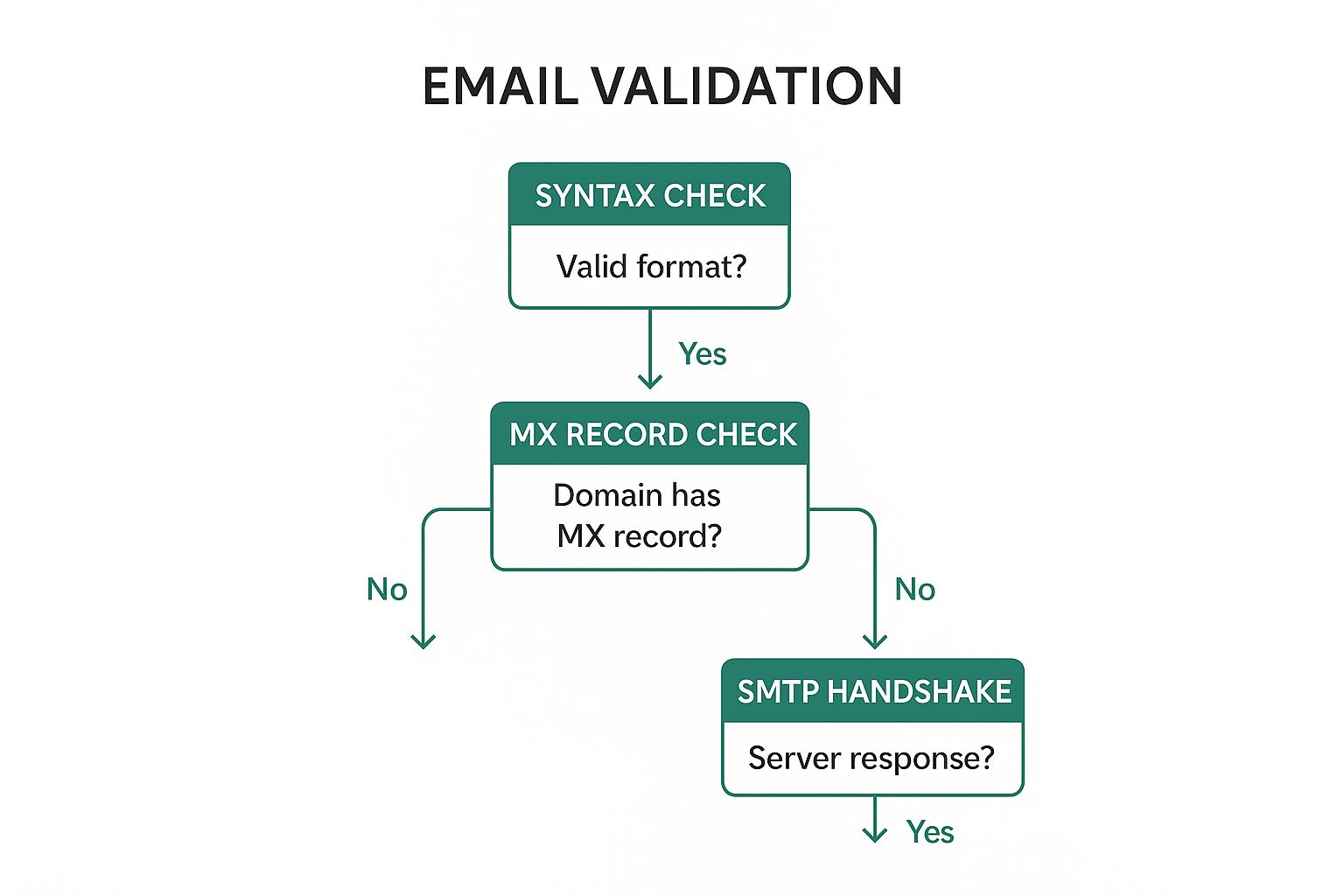
This multi-layered process is pretty much standard for any serious marketer or sales team these days. There are three main technical hurdles an email has to clear: the syntax check, the domain check, and the SMTP test. Each one builds on the last, taking you from a basic format check all the way to a live server confirmation. If you want to dive even deeper, Mailfloss has a great guide on email validation best practices.
The First Line of Defense: Syntax Checks
The first and most basic layer is the syntax check. This is a simple, automated pass to make sure the email address follows the right structural rules. It's your frontline defense for catching obvious mistakes, usually right when a user types their email into a form.
A syntax check is looking for a few simple but critical things:
- The "@" Symbol: Is there one, and only one, "@" sign?
- Local and Domain Parts: Is there something before the "@" (the local part) and something after it (the domain)?
- Forbidden Characters: It flags any no-go characters like spaces, commas, or weird dot placements that just aren't allowed.
An address like "john.doe gmail.com" would instantly fail this check because it’s missing the "@". Same goes for "jane@.com," which has a messed-up domain. This quick scan is incredibly good at knocking out simple human error.
Going Deeper: Domain and MX Record Verification
Once an email gets past the syntax check, it's time to verify its domain. This is where things get a bit more technical. The system needs to confirm two things: first, that the domain itself (everything after the "@") actually exists, and second, that it’s set up to receive email.
This is done by checking the domain's Mail Exchanger (MX) records. An MX record is a setting in the Domain Name System (DNS) that points to the specific mail server in charge of handling that domain's email.
If a domain doesn't have a valid MX record, it's a dead end. No matter how many times you try to send to it, your email will never arrive. This check is crucial for cutting out hard bounces before they happen.
For example, if someone signs up with "[email protected]", the validation tool will look up "fakedomain12345.com". If it comes back with no DNS records—or specifically, no MX records—that email address gets marked as invalid right away.
The Final Confirmation: SMTP Handshake
The deepest and most reliable test is the SMTP handshake, sometimes called an SMTP ping. This process mimics the first few steps of sending an email, but without actually delivering anything. Your validation tool connects directly to the mail server listed in the MX records.
During this brief "conversation," the validator essentially asks the server, "Hey, does this specific mailbox exist?" The server then sends back a code that confirms whether the address is good or not. It's the closest you can get to absolute certainty without clicking "send."
This final step is what catches addresses that look perfect on the surface—like "[email protected]"—but don't actually exist. It’s this powerful technique that separates a basic check from a truly comprehensive verification.
Choosing The Right Email Validation Method
Picking the right way to validate an email address really comes down to your specific needs—what are your technical skills, how big is your list, and what’s your budget? There's no single best answer here. It’s all about finding the right balance between accuracy, effort, and cost.
For a handful of emails, you might be tempted to just eyeball them for obvious typos. But let's be honest, that approach doesn't scale and is riddled with human error. It’s not a serious option for any real business use.
Manual Checks And Basic Regex
A more technical first step is using regular expressions (regex). This is a solid approach for real-time form validation. You can instantly catch common slip-ups like a missing "@" symbol or a funky domain extension right as a user is typing. It’s a great first line of defense.
This image breaks down the official structure of an email address, which is exactly what a regex pattern tries to match.
While regex is a decent starting point, it only tells you if an email looks right. It has no idea if the mailbox actually exists and can receive mail.
That’s the biggest catch. An address like "fake-but-valid-format@example.com" will pass a regex check every time, but it’ll still cause a hard bounce because the mailbox is a dead end. This is where you need to bring in the bigger guns.
Relying only on regex is a classic mistake. It cleans up your data at the entry point but does nothing to solve the real problem: deliverability. Poor deliverability tanks your sender reputation and sinks your campaigns.
Advanced Validation With Third-Party APIs
For any business that relies on email for sales, marketing, or just talking to customers, a dedicated third-party email validation API is the way to go. These services do all the heavy lifting for you—syntax checks, domain/MX record lookups, and the all-important SMTP handshake—all bundled into one simple tool.
These APIs give you insights that regex could never dream of. They can spot things like:
- Catch-All Servers: Domains that accept any email sent to them, which can be risky for your deliverability.
- Disposable Emails: Those temporary addresses people use to get a freebie and disappear.
- Role-Based Accounts: Generic addresses like "info@" or "support@", which almost always have lower engagement.
This is a great little summary of how different validation methods stack up against each other.
Email Validation Method Comparison
| Method | Best For | Pros | Cons |
|---|---|---|---|
| Manual Check | One-off, non-critical checks. | Free and simple. | Not scalable, highly error-prone. |
| Regex | Real-time form validation. | Catches typos instantly, improves initial data quality. | Can't verify deliverability or mailbox existence. |
| DNS/MX Lookup | Basic server-level checks. | Confirms the domain can receive email. | Doesn't confirm the specific mailbox exists. |
| SMTP Ping | Deep deliverability checks. | Most accurate way to confirm mailbox existence. | Complex to implement, can be blocked by servers. |
| Third-Party API | Most business use cases. | Comprehensive, accurate, and easy to use. | Paid service, can be costly at high volumes. |
Ultimately, a multi-layered approach provides the most reliable results, and APIs automate that entire process for you.
When you're serious about list quality, you need to go beyond just surface-level checks. For anyone building a contact list from the ground up, it pays to learn how to find company email addresses properly to make sure you're starting with good data from day one.
Real-Time vs Batch Email Validation Strategies

When it comes to email validation, timing is everything. The whole game boils down to when you decide to run the check. This fork in the road splits your strategy into two distinct paths: real-time validation, which is all about preventing bad data from getting in, and batch validation, which is your go-to for cleaning up the data you already have.
Picking the right strategy for the right situation is key. It lets you keep your data pristine without annoying your users or creating extra work for your team. Both are crucial for good email hygiene, but they’re designed to solve completely different problems.
Proactive Protection with Real-Time Validation
Think of real-time validation as the bouncer at your front door. You integrate a validation API right into your signup forms, checkout pages, and anywhere else you collect emails. The check happens the instant a user hits "submit."
This approach stops bad data dead in its tracks. It never even gets a chance to muddy up your database.
Say someone accidentally types "[email protected]" instead of "[email protected]". A real-time check catches that typo on the spot and asks them to fix it before moving on. That one simple interaction just saved you from a future hard bounce, a potentially lost customer, and a skewed marketing report.
The benefits here are immediate:
- Top-Notch Data Quality: Only valid, deliverable emails make it into your system from day one.
- A Better User Experience: You help users fix their own mistakes, ensuring they get that crucial welcome email or order confirmation.
- Lower Long-Term Costs: You stop wasting money sending campaigns to addresses that don't exist.
Here’s a pro-tip from my own experience: implement real-time checks gently. A friendly "Did you mean [email protected]?" is way better than a harsh "Invalid Email" error. The latter feels accusatory and can make people abandon your form altogether.
Corrective Cleaning with Batch Validation
While real-time is your gatekeeper for new signups, batch validation is the deep-cleaning crew for your existing contact list. This is where you upload an entire list—whether it's a hundred contacts or a few million—and have a service scrub the whole thing at once.
This is the perfect move for a few common scenarios. Always, always run a batch validation before you launch a big email campaign to an older list. Email data decays fast; people leave jobs and abandon old accounts at a staggering rate of over 22% per year. A batch clean clears out the deadwood and protects your sender reputation.
It's also a non-negotiable step when you're migrating data from an old CRM or importing a list you got from a trade show. Those lists are almost always riddled with typos and outdated info. Cleaning them all in one go gives you a solid, healthy foundation to build on.
After the process, you'll get a clean report that sorts your list into categories like valid, invalid, and risky (or "accept-all"). This gives you the confidence to know exactly which contacts to keep and which to toss.
Keeping Your Email List Healthy for the Long Haul
Getting an email address validated isn’t a one-and-done task—it’s a commitment. A clean list today can easily get messy tomorrow as people switch jobs, ditch old email accounts, or just lose interest.
Think of it like tending a garden. You can't just plant seeds and hope for the best. You have to constantly weed, prune, and nurture it to keep it thriving. This kind of ongoing maintenance is what separates a great email program from one that slowly dies and ends up in the spam folder.
Start Strong with Double Opt-In
One of the best habits you can form for list health is using a double opt-in process right from the start. It’s simple: when someone signs up, they get an automated email with a confirmation link they have to click.
This one extra step works wonders:
- It confirms real interest. You know the person actually wants to hear from you.
- It proves they own the inbox. No fake sign-ups.
- It catches typos. If someone misspells their email, the confirmation never arrives, and that bad address never pollutes your list.
Sure, it adds a tiny bit of friction, but the quality of subscribers you get is so much higher. You end up with a list full of engaged people who are far more likely to open your emails.
Make List Cleaning a Regular Habit
No matter how carefully you collect emails, your list will naturally decay over time. People move on, and addresses go stale. That’s why you have to clean your list periodically.
Regularly scrubbing your list gets rid of unengaged subscribers and invalid addresses that are just dead weight, pulling down your performance.
An unengaged subscriber can be just as harmful as a hard bounce. ISPs track user activity, and consistently sending emails that get ignored is a red flag that can damage your sender reputation.
Put it on the calendar. Whether it’s quarterly or twice a year, run your entire list through a batch validation service. This will spot the accounts that have gone bad so you can safely remove them. A smaller, more engaged list almost always delivers better results.
How to Handle Those Gray-Area Results
When you validate an email, the answer isn’t always a clean "valid" or "invalid." You'll run into fuzzy results like "catch-all" or "risky."
A catch-all server is set up to accept mail for any address at that domain, which makes it impossible to know if a specific mailbox actually exists. Sending to these is a bit of a gamble. "Risky" emails might be temporary addresses or belong to people known for marking emails as spam.
Tread carefully with these. I’d recommend segmenting them into their own group and watching their engagement like a hawk. If they don’t open or click your first few emails, it’s probably best to just remove them.
When you're prospecting, try to find a business email address that’s direct and verifiable from the get-go. The quality of your leads at the very beginning has a massive impact on your list's health down the road.
Common Email Validation Questions Answered

Even with a solid email verification process, a few tricky situations always seem to pop up. Let's tackle some of the most common questions I hear, so you can clean your lists with total confidence.
One of the biggest misconceptions is that validation can guarantee 100% deliverability. The short answer? It can't.
While a good validation service dramatically boosts your odds of hitting the inbox by weeding out bad addresses, it can’t see into the future. An address that's perfectly valid today might belong to someone who quits their job tomorrow. Or their inbox could just be full.
What validation does guarantee is that an email address existed, was properly formatted, and could receive mail at the exact moment you checked it. Think of it as a high-quality snapshot, not a crystal ball.
Handling Catch-All Domains
Another wrench in the works is the "catch-all" or "accept-all" domain. These are mail servers set up to accept any email sent to that domain, which means an SMTP check can't tell you if a specific person's inbox actually exists. It’s a classic "maybe."
So, what do you do with them? Tossing them out feels like a waste, but keeping them is risky.
Here’s my approach:
- Segment Them immediately. Create a separate list for catch-all addresses. Don't let them get mixed in with your confirmed, high-quality contacts.
- Test with low-risk emails. Send a welcome email or some of your best-performing content. If they don't open or click, it’s a huge red flag that the address is a ghost town.
- Cut them loose if they're inactive. If you get zero engagement after a campaign or two, it's time to say goodbye. Keeping them on your list just drags down your sender reputation for no good reason.
A catch-all address is a calculated risk. Treating them with caution protects the deliverability of your entire list. The goal is to engage real people, not just get a "delivered" receipt from a server.
How Often Should You Clean Your List?
Finally, how often should you scrub your entire email list? You'd be shocked at how fast email data decays—industry stats show it degrades by over 22% every year. People switch jobs, change providers, or just abandon old accounts.
For most businesses, a deep clean every quarter is a solid baseline. If you're running a high-volume operation or have a ton of new signups, you might want to ramp that up to every other month.
At the absolute minimum, always validate your full list before a major campaign launch. It's a simple step that ensures you’re starting with the best data possible. Of course, sometimes the problem isn't just verifying emails, but finding them in the first place. If you're building a list from the ground up, learning how to find anyone's email address will get you started on the right foot.