

Let's be honest, finding someone's email on Instagram can feel like a bit of a treasure hunt. You're usually dealing with one of three main approaches: a simple profile check for a contact button or clues in the bio, some clever online searching with their username, or bringing in the big guns with an email finder tool.
The best method really depends on your goal. Are you after one specific contact, or are you trying to build a whole list of leads?
Why Instagram Is Your Next Big Lead Source
Instagram is way more than just a place for pretty pictures. It's a massive, living database packed with potential clients, collaborators, and key industry players. For anyone in sales or marketing, it’s a goldmine. The real strategic move is getting those conversations out of the noisy DMs and into a professional email inbox.

But, as you've probably figured out, it's not always a walk in the park. You'll run into a few common roadblocks:
- Hidden Details: A lot of users, even businesses, keep their email private to dodge spam.
- Privacy Settings: Instagram is built to protect user privacy, so contact info isn't just hanging out on every personal profile.
- Time-Consuming Searches: Manually digging for emails one by one across different websites is a massive time sink.
This guide is here to break down those barriers for you. We'll cover everything from the basic profile glance to more advanced digital detective work and even automated tools that do the heavy lifting.
Choosing Your Email Finding Strategy
Not all methods are built the same. The one you choose should match what you're trying to accomplish. Do you need one email for a potential partnership, or hundreds for a marketing campaign? Knowing the trade-offs between speed and success rate is everything.
And remember, to really make Instagram work as a lead source, you need to know how to increase Instagram engagement. It's all connected—more visibility means more opportunities.
Think about it: you find the perfect influencer with 10,000 followers, but their bio is empty. This is where specialized tools shine. They can uncover over 30% of Instagram profile emails on average by scanning the web and linking profiles to company sites or personal blogs, often with over 90% accuracy. It's a game-changer compared to manual searching.
The real power of Instagram outreach lies in moving beyond the noise of DMs. A direct, personalized email lands in a professional space, commands more attention, and sets a serious tone for business communication.
To help you pick the right tool for the job, I've put together a quick comparison of the methods we're about to dive into.
Instagram Email Finding Methods at a Glance
This table gives you a high-level view of what to expect from each strategy. It helps you quickly decide which path to take based on your resources and goals.
| Method | Success Rate (Approx.) | Time Investment | Best For |
|---|---|---|---|
| Manual Profile Check | 10-20% | Low (per profile) | Quickly finding emails from business accounts or creators who share it openly. |
| Advanced Search | 20-40% | Medium | Investigating high-value leads when the email isn't obvious on their profile. |
| Automated Tools | 30-60%+ | Very Low | Building targeted lead lists at scale for sales, marketing, and outreach campaigns. |
As you can see, there's a clear trade-off. Manual checks are fast for one-offs if the info is public, but for anything more, you'll want to look at more powerful options.
Start With a Manual Profile Sweep
Before you even think about firing up advanced tools or running complex searches, your first stop should always be the Instagram profile itself. It’s surprising how often the email you’re looking for is hiding in plain sight. Getting good at this manual check is the foundational skill for finding anyone's email on Instagram.
This might sound obvious, but you need to know exactly where to look. The most direct route is a contact button, but there are plenty of other clues scattered around a profile.
The easiest win is usually with a business or creator account. They often have action buttons like “Email,” “Contact,” or “Book Now” right under their bio. Tapping that “Email” button opens your phone’s mail app with their address pre-filled. It’s the most straightforward method Instagram offers.
But don't give up if you don't see it. Plenty of users don't enable that button. Your next move is to put on your detective hat and dig into their bio.
Scrutinize the Profile Bio
A person’s bio is prime real estate where they cram in the most important info about themselves, and that often includes a way to get in touch. Many creators and professionals put their email right there to make it easy for collaborators and clients to reach out.
Keep an eye out for a few common formats:
- The Straight Shot: Just a plain email address, like
hello@company.com. - The Disguise: To avoid spam bots, people get creative. You'll see things like
hello [at] company [dot] comorhello (at) company.com. - The Invitation: Sometimes it's a direct prompt, like "For collabs, email me at…" followed by the address.
A quick scan of the bio is often all it takes. If you spot an address, you're done. If not, it's time to investigate the link they provide.
Explore the Link in Bio
That one clickable link in an Instagram bio is a goldmine. People use it to point to their personal website, portfolio, or a link aggregator like Linktree or Beacons. Don't just look at the link—click it.
A user’s "link in bio" is often a doorway to their entire professional online presence. Treat it as a hub that connects you to richer sources of information, including dedicated contact pages that aren't visible on Instagram itself.
Once you land on their linked site, your search expands. Look for a “Contact,” “About Us,” or “Work With Me” page. These sections are built specifically to house contact information. On a personal blog, you might even find an email address tucked away in the website’s footer. This simple extra click is a step most people skip, giving you a serious advantage.
For a deeper dive into these methods, you might be interested in our guide to finding contact info on various platforms.
Finally, don't overlook their Story Highlights—those little curated circles just below the bio. Creators often save important information there, like FAQs or contact details. Tapping through these can sometimes reveal a slide with an email address you won’t find anywhere else on their profile.
Think Like a Digital Detective
So, you’ve scoured the Instagram profile, checked the bio, and clicked the link, but still have nothing. Most people give up here. For you, this is where the real work begins. When an email isn't in plain sight, you have to switch from being a passive scroller to a digital detective.
The clues are all there. You already have a name, a username, and maybe even a company. These are the breadcrumbs that will lead you right where you need to go. It's all about connecting the dots across the web.
Master Advanced Google Searches
Your first move outside of Instagram should always be Google, but not just a simple search. You need to use advanced search operators to cut through the noise. These little commands tell Google exactly what to look for.
Think of it as giving Google a very specific set of instructions instead of just tossing a name into the search bar. This is how you turn a generic search into a targeted investigation.
Here are a few of my go-to search strings:
- Find a contact page:
"[Full Name]" + "contact me"or"[Full Name]" + email - Search a specific website:
site:[companywebsite.com] "[First Name]" email - Locate email patterns:
"[Username]" + "@gmail.com"
Let’s say you’re trying to find the email for a designer named "Jane Doe" who runs "Doe Designs." A killer search would be site:doedesigns.com "Jane" email. This forces Google to only search within her website for pages that have both her first name and the word "email." It’s an incredibly effective way to find a hidden contact page or team directory.
Cross-Reference on Professional Networks
Usernames are like a digital fingerprint. People love to use the same handle across different platforms, creating a direct trail from their Instagram to their more professional accounts. Your next logical step is to pop that Instagram username into the search bar on other networks.
LinkedIn is the obvious place to start. Professionals are often much more forthcoming with their contact info on LinkedIn. A quick search for their name or username could take you straight to their profile, where an email might be listed right in their contact section.
Don’t underestimate the power of a consistent username. A handle like
@janedoedesignson Instagram is very likely to be the same on Twitter, Behance, or LinkedIn, creating a direct path to platforms where contact information is more common.
Look beyond LinkedIn, too. Think about industry-specific hubs. For a graphic designer, try searching on Behance or Dribbble. For a writer, it might be a Contently portfolio. These sites are built for showcasing work and attracting clients, so email addresses are usually easy to find.
Investigate Their Personal Website
That "link in bio" is your direct gateway. Even if the homepage doesn't have an email address plastered on it, the website itself almost certainly does if you do a little digging. Most people stop at the homepage, but the good stuff is often tucked away.
Your mission is to explore the site map. Make a beeline for these pages:
- Contact Page: The obvious one, but always worth a serious look.
- About Us Page: Emails are frequently listed next to team member bios.
- Footer: Scroll all the way down. A general contact email often lives here.
- Press or Media Kit: If they have a media kit, a contact for inquiries is practically guaranteed to be inside.
By working through these methods, you're no longer limited by what Instagram shows you. You’re not just looking for an email; you’re piecing together someone's entire digital footprint. This is the detective work that turns a frustrating dead end into a successful new connection.
When you've hit a wall with manual searches, it's time to bring in the pros. For anyone in sales, marketing, or recruiting who needs to find emails consistently, a dedicated email finder is a non-negotiable part of the toolkit. These tools do the digital detective work for you, serving up verified emails in seconds.
Let’s be real. Manual methods are fine for a one-off search here and there, but they just don't scale. An email finder extension, like our tool EmailScout, plugs right into your browser and turns a drawn-out investigation into a single click.
How an Email Finder Extension Works
The beauty of a Chrome extension is its simplicity. It sits quietly in your browser until you need it, overlaying its features directly on the websites you’re already using. This means you can pull an email straight from an Instagram profile without ever leaving the page.
Here’s how that plays out with EmailScout:
- Install the Extension: First, grab the EmailScout extension from the Chrome Web Store. Pin it to your toolbar for easy access.
- Head to an Instagram Profile: Navigate to the Instagram page of the person you're trying to contact.
- Activate the Finder: Click the EmailScout icon. The tool instantly gets to work, scanning public data from the profile and any linked websites.
- Grab the Email: In just a few moments, the extension will pop up with any verified email addresses it uncovers.
This simple workflow turns your browser into a lead-gen powerhouse, cutting out all the tedious copy-pasting and cross-referencing. If you're curious about how different tools stack up, check out our guide on the best email finder tools.
This whole digital investigation process can be broken down into a few core components.
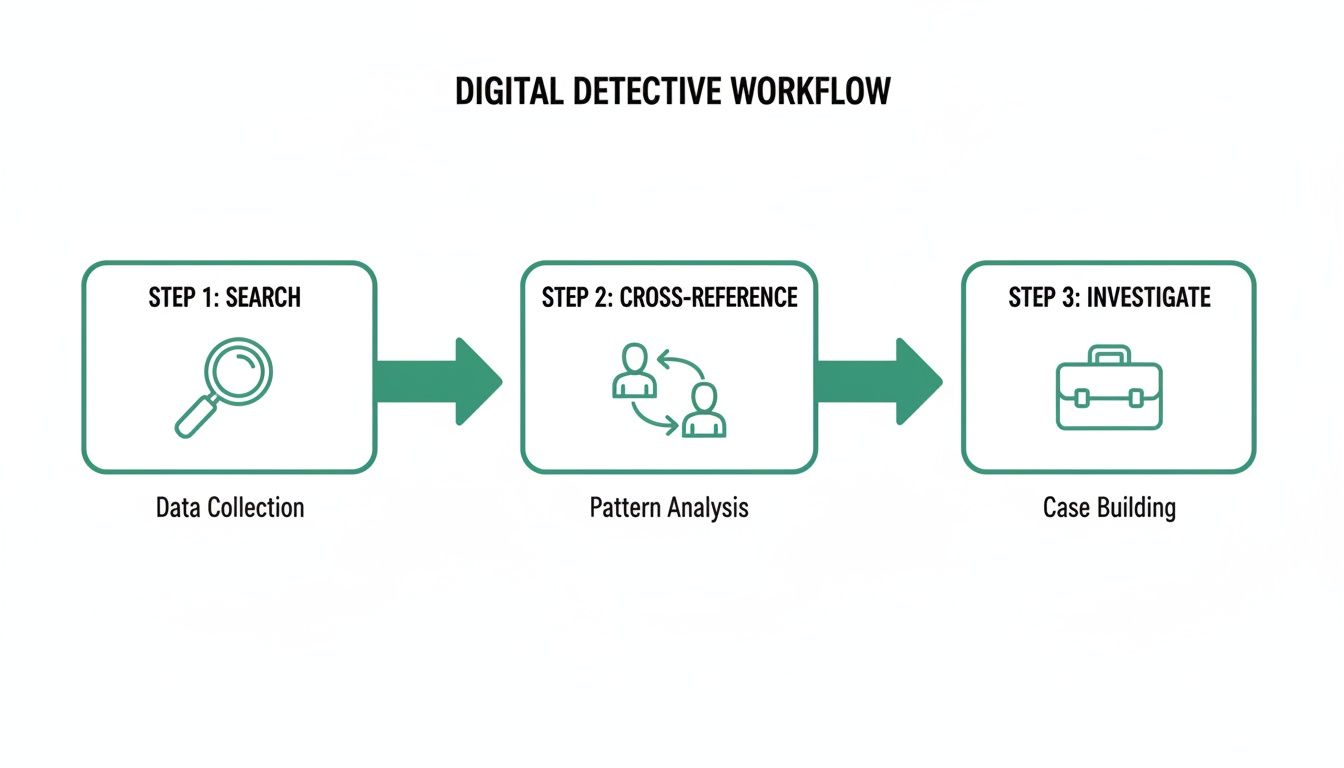
This workflow shows how a structured approach—searching, cross-referencing, and investigating—is the foundation of solid email discovery. The best part? Good tools automate the entire thing.
Beyond Single-Profile Searches
The real magic of a professional tool isn't just finding one email; it's the features built for scaling your efforts. Finding a single contact is great, but building a qualified list of prospects is what really moves the needle.
Look for features like AutoSave, which can passively capture contact info from profiles you visit, building a prospect list for you in the background. It's perfect for compiling leads without any manual effort.
Another game-changer is a URL Explorer. This lets you feed the tool a list of Instagram profile URLs—or even better, their company websites. It then crunches through the entire list in one go, pulling out every available email. This is how you take your outreach from a handful of contacts to hundreds.
The biggest advantage of an email finder isn't just speed—it's accuracy and scale. These tools use smart algorithms to find and verify emails, which dramatically lowers your bounce rate and protects your sender reputation.
The impact here is huge. Instagram is projected to hit 2.35 billion monthly active users by 2026, and with 80% of users using the platform to research products, it’s a goldmine for B2B outreach. A good email finder can slash your email discovery time by nearly 50%, letting you focus on what actually matters.
When to Use an Email Finder
An email finder becomes your go-to in a few key situations, making it more of a necessity than a nice-to-have.
- Building Sales Prospect Lists: When you need a targeted list of potential clients in a specific industry.
- Influencer Outreach: For marketers trying to connect with dozens of creators for a campaign.
- Recruitment: For sourcing top-tier candidates who aren't actively advertising their contact info.
- Link Building: When you need to get in touch with website owners for SEO partnerships.
At the end of the day, using an email finder is about valuing your time. It handles the grunt work of prospecting so you can focus on crafting personalized messages and building real relationships. It’s the smart way to work when efficiency is everything.
Crafting Your Outreach Strategy Ethically
Getting your hands on an email address isn’t the finish line—it’s just the starting block. What you do next is what really counts. A rushed or generic message can burn a bridge before you even get a chance to build it.
First Things First: Verify, Verify, Verify
Your first move, and this is non-negotiable, is to verify the email.
Sending a message to a dead address does more than just hurt your ego; it actively damages your sender reputation with email providers. High bounce rates are a major red flag, and they can get your domain flagged as spam. That cripples all of your future outreach.
Fortunately, many professional tools like EmailScout have built-in verification. They check if an inbox is active before you hit send. Think of it as essential digital hygiene to protect your credibility.
Personalization Always Wins
Once you have a verified email, it’s tempting to just blast out a generic template. This is a huge mistake. Your first message has to prove you’ve done your homework and that you respect the other person's time.
A great cold email offers immediate value and shows you’re genuinely interested. Forget the generic flattery—everyone can spot that a mile away. Instead, reference something specific that caught your eye.
- Mention a recent Instagram post: "I was really impressed with your recent post on sustainable packaging—it sparked a few ideas for a project I'm working on."
- Reference their work: "Your design work on the [Client Name] project, which I saw linked from your Instagram, was fantastic. The color theory was especially effective."
- Connect on a shared interest: "I noticed from your bio that you're also passionate about urban photography. Your shot of the Flatiron Building was excellent."
This level of detail shows you're not just another bot. You’re a real person who took a minute to understand their work. For a more detailed breakdown, you can learn more about how to write cold emails that actually get replies.
Respecting Privacy and Legal Lines
Finding an email comes with the responsibility to act ethically and legally. Just because you have an address doesn't give you a free pass to add someone to a marketing list or spam them with offers.
You have to follow anti-spam regulations like the CAN-SPAM Act in the U.S. and GDPR in Europe. The details might vary, but the core principles don't: be transparent, be relevant, and make it easy to opt out.
Key Takeaway: An email found in public is an invitation for a one-on-one conversation, not a license for mass marketing. Treat every outreach like a personal introduction, not a sales blast.
Adaptable Outreach Templates
While personalization is king, having a solid framework saves time. Use these as starting points, not rigid scripts.
For a Potential Collaboration:
Subject: Loved your [Topic] content on Instagram
"Hi [Name], I've been following your work on Instagram for a while and was particularly impressed by [specific post or project]. I’m [Your Name] from [Your Company], and we're working on a project centered around [shared interest]. I believe your expertise would be a perfect fit. Would you be open to a brief chat next week to explore a potential collaboration?"
For a Sales Inquiry:
Subject: Quick question about [Their Company/Project]
"Hi [Name], I found your profile through your work with [Mention a Project/Company]. Your approach to [specific area] is really impressive. At [Your Company], we help businesses like yours achieve [specific benefit]. I have a quick idea on how you could [achieve a specific outcome] that I can explain in five minutes. Are you available for a brief call sometime next week?"
This kind of personalized, ethical approach is how you turn a cold lead into a warm conversation.
Got Questions? Here Are Some Quick Answers
Even with the best tools and a solid game plan, you're bound to have some questions. It’s smart to think about the legal side of things, what to do when you hit a dead end, and how to get the most out of your tools. Let's clear up a few common concerns.
Is It Legal to Find and Use Someone's Email from Instagram?
This is the big one, and for good reason. Finding an email that’s publicly listed on a business profile or a linked website is perfectly fine. That information is there for a reason—usually for people like you to make professional contact.
The real question isn't about finding the email, it's about how you use it. Your outreach has to comply with anti-spam laws like CAN-SPAM in the U.S. and GDPR in Europe.
What does that mean in practice?
- Be upfront. No deceptive subject lines. Be clear about who you are and why you're reaching out.
- Give them an out. Every message needs a clear, easy way for them to unsubscribe.
- Keep it relevant. Your message should genuinely relate to their professional interests, not just be a generic blast.
Think of it as starting a one-on-one conversation, not as an excuse to dump someone into a mass marketing funnel without their permission.
What Should I Do If I Cannot Find an Email?
Sometimes, you do everything right and still come up empty. You've checked the bio, combed through their website, and run a few clever searches… nothing. This happens, and it's totally normal.
When you hit this wall, the best move is to simply respect their privacy. They’ve likely chosen to keep their email private for a reason. Pushing harder is just going to feel intrusive and probably won’t get you a good response anyway.
The absence of a public email is its own kind of message. Instead of forcing a search that goes nowhere, pivot to the channels they do make available. Respecting those boundaries is how you build professional credibility.
Your next best step is to engage them right there on Instagram. A professional, concise Direct Message (DM) is the way to go. State your purpose, offer some kind of value, and skip the hard sell. The goal is to build a connection first—which often works better than a cold email in the long run.
How Can I Maximize My Success Rate with Email Finder Tools?
To really make tools like EmailScout work for you, you need to be smart about which profiles you target. Not every Instagram account is a good candidate for an email search.
You'll have the best luck focusing on profiles that are almost certain to have a public email:
- Business Accounts: Companies and agencies almost always have a public contact method.
- Professional Creators: Think influencers, consultants, and freelancers who use Instagram to find work.
- Users with Websites: That "link in bio" is your biggest clue. It's a direct path to a larger digital footprint.
These types of accounts are professionally oriented, making it much easier for a tool to connect the dots. The most reliable method is almost always using a tool's ability to scan their linked website, since that’s where professionals keep their primary contact info.
Are Free Email Finder Tools Safe to Use?
It’s always a good idea to be careful with browser extensions, but reputable tools that offer free plans or trials, like EmailScout, are generally safe. They have to pass muster with official sources like the Chrome Web Store and are built to protect user data.
These tools work by scraping publicly available data from the web pages you visit. They aren't looking at your private Instagram info, your DMs, or anything sensitive. Their only job is to find information that’s already out in the open—they just do it a whole lot faster than a human can.
To stay safe, just stick to these simple rules:
- Download from the Source: Only install extensions from the official Chrome Web Store or the tool's own website.
- Check the Reviews: See what other people are saying. Real user feedback is incredibly valuable.
- Read the Privacy Policy: A quick scan will tell you what data the tool collects and why.
If you stick with well-known tools, you can find the emails you need without putting your security at risk.
Ready to stop guessing and start connecting? EmailScout gives you the power to find verified email addresses from Instagram and beyond in a single click. Our Chrome extension is designed for sales professionals and marketers who value speed and accuracy.
Find unlimited emails for free and build your prospect list today with EmailScout.