
When it comes to finding an email address, you've got two main paths: old-fashioned detective work or using a specialized tool. If you're just looking for one person's email, your best bet is often a quick, educated guess. It sounds simple, but you'd be surprised how often it works.
Your Starting Point for Finding Any Email

Before you fire up any software or start stringing together complex search queries, stop. The most effective starting point is often the simplest. Think like a detective—start with the most obvious clues. For email hunting, that means looking at how a company typically structures its email addresses and making a smart guess.
This manual approach is surprisingly effective, particularly for small to medium-sized companies where email formats are usually pretty consistent. The idea isn't to guess randomly but to test a few logical patterns that cover the vast majority of corporate email conventions.
Decoding Common Email Patterns
Most companies don't get creative with their email syntax. They stick to a handful of predictable, easy-to-manage formats. Once you know these, you can generate a short list of potential addresses to test. This is a foundational skill that helps you understand how to find email addresses without needing a tool for every single search.
The real power of this method is its speed for single, high-value contacts. Instead of running a broad search, you can zero in on a few likely candidates and often find the right address in under a minute.
This strategy works because it's based on how businesses actually operate. The global email user base has exploded to around 4.6 billion people, with the average person juggling about 1.86 email accounts. With that many inboxes out there, predictable patterns are essential for any organization trying to manage its communications. You can dig into more insights about global email usage statistics on EmailToolTester.
The Most Frequent Formats to Test
So, what are the most common patterns to try? It all comes down to combining a person's first name, last name, and their company's domain. Your initial list of guesses should always include these high-probability formats.
I've put together a quick reference table with the patterns I always test first. These are the workhorses of corporate email formats and will give you the highest chance of a quick win.
Common Email Patterns to Test First
| Pattern | Example | When It Works Best |
|---|---|---|
firstname.lastname@company.com |
john.smith@acmecorp.com |
Extremely common in large corporations and tech companies. |
flastname@company.com |
jsmith@acmecorp.com |
A popular choice for companies with lots of employees. |
firstname@company.com |
john@acmecorp.com |
Often used in smaller businesses, startups, or for executives. |
firstname_lastname@company.com |
john_smith@acmecorp.com |
Less common, but still used by some established organizations. |
By systematically running through these, you create a solid, repeatable process for that first step of email discovery. Once you have a few good guesses, the next step is to quickly see if they're valid, which we'll get into next. This simple, no-cost technique should always be your first move.
Mastering Advanced Search Engine Techniques

When your first few educated guesses for an email address don't pan out, it's time to dig a little deeper. Search engines like Google are more than just a box for simple questions; they're massive databases you can command with surprising precision. By using advanced search operators, you can slice through the noise and zero in on the exact pages or documents holding the email you need.
This isn't about some complex coding wizardry. It's about learning a few simple commands that tell Google exactly what to look for—and what to ignore. Best of all, this method is completely free and often uncovers contact details hiding in plain sight. It’s a core skill for anyone serious about how to find email addresses without paying for expensive tools.
Combining Operators for Precision Searching
The real magic happens when you start layering these commands together in a single search. Combining operators creates a highly specific instruction that dramatically shrinks your pool of results. It’s the difference between asking a detective to "find John Smith" and telling them to "find John Smith, the accountant, who was mentioned in this company's press release."
Let's say you're trying to track down the email for a Project Manager named "Jane Doe" who works at "Innovate Solutions" (innovatesolutions.com). Here's how you'd combine a few key operators to pinpoint her contact info.
site:This is your most valuable operator. It restricts your search to a single website, so you're only looking in the right place." "(Quotation Marks): Putting a name or phrase in quotes tells Google to search for that exact sequence of words. Absolutely essential for names.intitle:orintext:: These are great for finding keywords within a page’s title or its main body text.filetype:: This one is a gem. It lets you hunt for emails inside specific documents like PDFs or spreadsheets, which are often goldmines for contact lists.
By mixing and matching these, you turn a vague search into a targeted mission.
Actionable Search Strings You Can Use
Theory is fine, but let's get to what actually works. Below are the exact search strings I use all the time. Just copy, paste, and swap the placeholder details with your target's information.
Scenario: Find Jane Doe's email at innovatesolutions.com.
-
Search the company site for her name and the word "email":
site:innovatesolutions.com "Jane Doe" emailThis simple query is often enough to pull up contact pages, team bios, or blog posts where she's mentioned along with her email address.
-
Confirm a guessed email address format:
site:innovatesolutions.com "jane.doe@innovatesolutions.com"If you've already guessed a common pattern, this is a super-fast way to confirm if that exact email appears anywhere on the company's website.
-
Search for her contact details within specific documents:
site:innovatesolutions.com "Jane Doe" filetype:pdfThis is my personal favorite for finding emails hidden in press releases, conference speaker lists, or company whitepapers. These documents are often less guarded with contact info than the main website pages.
This method is about more than just finding an email; it's about finding context. Uncovering an email in a press release about a product launch gives you a perfect, relevant reason to start your outreach message.
Don't be afraid to experiment. By trying different combinations, you can adapt your search to almost any situation. For instance, adding intitle:"contact" or inurl:"team" can further narrow your search to pages that are highly likely to contain the info you need.
Remember, persistence is key here. Your first query might come up empty, but a small tweak to the next one could be the key that cracks the code. These techniques transform you from a passive searcher into an active investigator, giving you the power to find almost any publicly available email address out there.
Uncovering Emails on Professional Networks
When your Google searches hit a dead end, your next move should be the places where professionals hang out online. Platforms like LinkedIn and X (formerly Twitter) are more than just places to network—they're basically public databases, often with contact info shared directly by the users. You just have to know where to look.
Most people barely scratch the surface, but with a little clever digging, you can track down email addresses that people have willingly shared. These self-published emails are often the most accurate ones you'll find, making this a seriously reliable technique.
The Overlooked LinkedIn Contact Info Section
The most direct way to find an email on LinkedIn is also the one most people completely forget. Every profile has a dedicated "Contact info" section, but it’s tucked away. This little link can be a goldmine, holding everything from personal websites and phone numbers to, of course, email addresses.
Here’s how to find this hidden gem:
- Go to your target's LinkedIn profile.
- Look right under their name and headline for a blue link that says "Contact info".
- Click it. A pop-up will show you all the contact details that person has shared with their network.
It’s just one click, but it can end your search right then and there. And since the person provided the info themselves, you can bet it's accurate. For a more detailed walkthrough, check out our guide on how to find emails directly on LinkedIn.
Searching for Obfuscated Emails on X (Twitter)
Over on X, professionals often share their email addresses but try to disguise them from automated bots. They do this by "obfuscating" the email—writing it in a way that people can understand but scrapers can't easily read. This creates a perfect opening for a smart searcher.
Instead of jane.doe@company.com, someone might tweet, "My email is jane dot doe at company dot com." Your job is to spot these patterns.
This technique works because you're thinking like a human, not a machine. You're anticipating how someone would cleverly disguise their email in a public forum and using that insight to find what bots miss.
You can do this using Twitter’s advanced search or by just typing a query into the main search bar. Try searching your prospect’s name or handle along with phrases like:
(at) (dot)"email is""contact me at"
For example, a search like "from:username (at) (dot)" will pull up any tweets from that user where they’ve used this common trick.
Leveraging Personal Websites and Portfolios
A lot of professionals link out to their personal website, blog, or portfolio right from their social media profiles. This is a massive clue that you shouldn't ignore. These sites are usually less formal than a corporate page and are much more likely to have direct contact information.
Once you land on their personal site, head straight for the "Contact" or "About Me" page. That’s the most common spot for an email address. If you come up empty, don't give up just yet. The email could be hiding in the website's footer.
The real power of this method is that you're following a digital trail left by the person you're trying to find. The massive popularity of major email providers helps here, too. For instance, the global user base for Gmail alone is projected to hit over 2.5 billion active users in 2025. This means you'll frequently find personal Gmail addresses on these sites, which can be invaluable for direct communication.
Using Specialized Email Finder Tools
I get it. Manual methods like pattern guessing and fancy Google searches are powerful. They can feel like a superpower. But they have a hard limit. When you need to track down emails for dozens, or even hundreds, of people, doing it by hand just isn't sustainable. It's at this point that specialized email finder tools stop being a "nice-to-have" and become absolutely essential.
These platforms are built to do one thing and do it exceptionally well: deliver accurate, verified contact info at scale. Instead of spending an hour playing detective for a single email, you can get a reliable one in seconds. For anyone in sales, marketing, or recruiting, that time saved translates directly into more outreach and, ultimately, better results.
The Real-World Workflow of an Email Finder
Let's look past the feature list and see how a tool like EmailScout actually works day-to-day. The real magic is how it handles different needs, whether you're zeroing in on one high-value prospect or building out a massive list.
For starters, you have the single search. You've got a key decision-maker in your sights—let's say a marketing director at a specific tech company. You just plug in their first name, last name, and the company domain. The tool then instantly scours its own database and public sources, cross-references everything, and spits out a verified email. It's that combination of speed and confidence you just can't get manually.
But where these tools really earn their keep is with the bulk upload feature. Imagine you have a spreadsheet with 200 potential leads, but all you have are names and company names. You can upload that file directly, and the tool will enrich your list by finding and verifying the email for each person. This automates what would otherwise be days of mind-numbing work.
Why Verification Status Matters (A Lot)
Finding an email is only half the job. If you send a message to a bad address, it doesn't just disappear—it actively hurts your sender reputation. A high bounce rate is a red flag to email providers, making it more likely your future emails will get sent straight to the spam folder. This is why verification isn't optional; it's a critical step.
Good email finders don't just find; they validate. They give you clear, simple statuses that tell you if an address is safe to contact. Think of these as your guide to keeping your sender score healthy.
This image breaks down the complex, multi-step process that a solid verification system uses to confirm an email's deliverability.
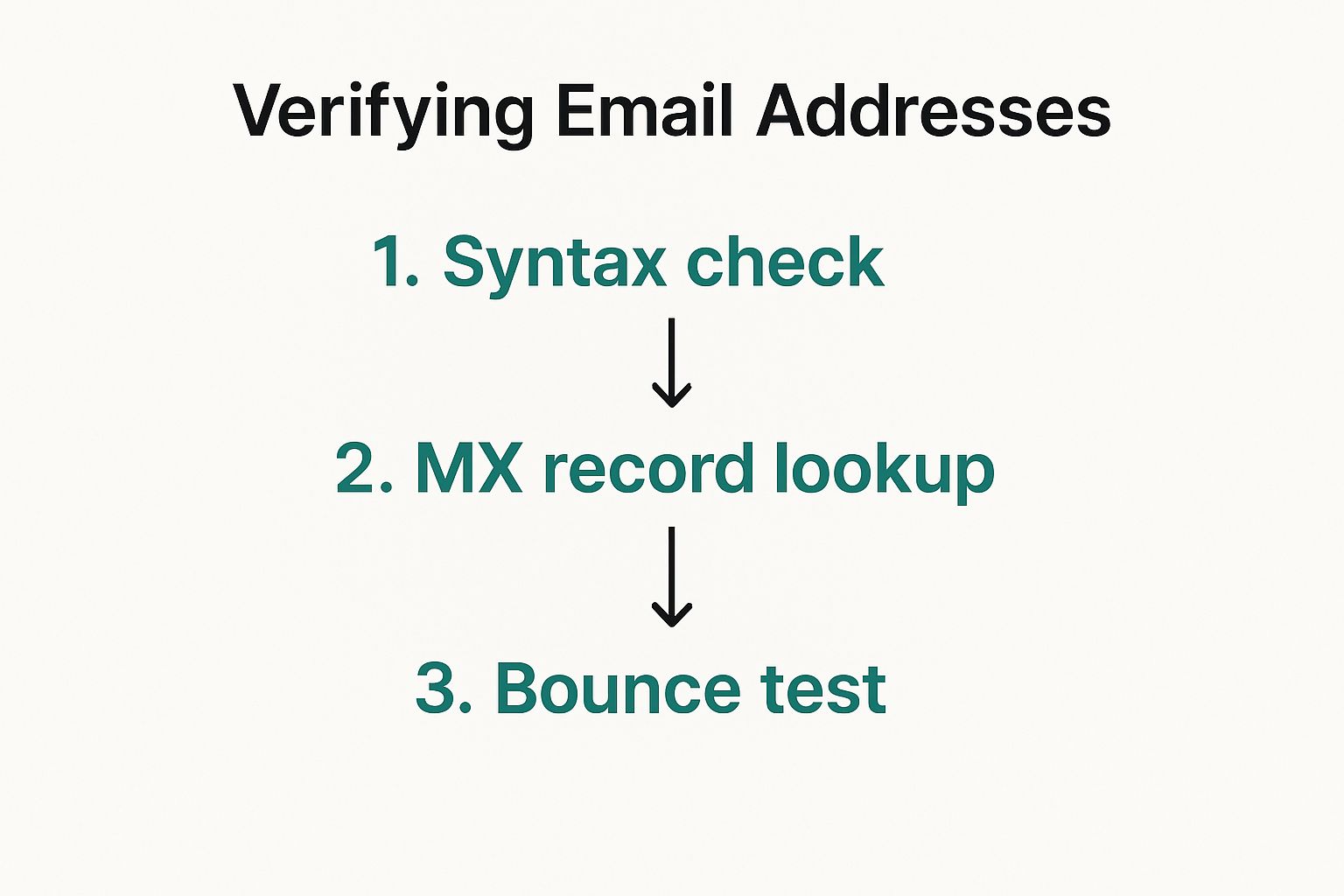
As you can see, it's way more than a simple syntax check. It involves actually pinging servers and running deliverability tests to make sure the inbox is real and active.
You'll typically see statuses like these:
- Valid: The green light. This email address is active and safe to send to.
- Risky or Accept-All: The server is set up to accept all incoming mail, so it’s impossible to be 100% sure the specific user exists. Proceed with caution.
- Invalid: The big red stop sign. The email address doesn't exist. Never send to these—it will cause a hard bounce and damage your reputation.
Understanding these statuses is everything. If you prioritize 'Valid' emails, you’ll see higher deliverability, protect your domain, and make your outreach campaigns far more effective.
Email Finding Methods At a Glance
To put it all into perspective, here's a quick comparison of the different ways you can find emails, from manual guesswork to sophisticated tools.
| Method | Speed | Cost | Accuracy | Best For |
|---|---|---|---|---|
| Manual Guessing | Slow | Free | Low | Finding 1-2 emails when you know the company pattern. |
| Advanced Search | Moderate | Free | Moderate | Uncovering a few hard-to-find public emails. |
| Social Media | Slow | Free | Variable | Finding emails for freelancers or solopreneurs. |
| Email Finder Tool | Fast | Paid | High | Scaling outreach and finding verified emails in bulk. |
While free methods have their place, the table makes it pretty clear: when you need speed and accuracy at scale, nothing beats a dedicated tool.
When Is It Time to Pay for a Tool?
The decision to invest in a paid email finder usually comes down to simple math. While there are some great free plans to get you started, a subscription becomes a no-brainer when outreach is a core function of your role.
Think about it this way: how much is your time worth? If a tool costs $50 per month but saves you 10 hours of manual searching, you've essentially bought back that time for just $5 an hour. For most professionals, the ROI is massive and immediate. If you're just starting out, you can explore some of the best free email finder tool options to test the waters.
The true value of these tools isn't just about finding an email address. It’s about the accuracy, the built-in verification, and the power to scale your efforts without burning out. When your success hinges on connecting with the right people, a specialized tool is one of the smartest investments you can make.
Verifying Emails Before You Hit Send
Finding an email address feels like a win, but don't hit "send" just yet. Firing off a message to a bad address is more than just a waste of your time—it actively hurts your sender reputation.
A high bounce rate is a massive red flag for email providers like Google and Microsoft. It makes you look like a spammer, which can get your future messages sent straight to the junk folder or, worse, get your entire domain blacklisted. Think of verification as essential insurance for your outreach efforts.
Why a Clean Email List Is Non-Negotiable
A clean, verified list is the bedrock of any successful outreach campaign. It's not just about dodging bounces; it’s about making sure your messages land in front of real, active people. This has a direct line to your open rates, reply rates, and overall ROI.
The numbers don't lie. By 2025, an estimated 4.83 billion people were active email users, sending a mind-boggling 392 billion emails every single day. With that much traffic, email providers are getting incredibly strict. You can see more on the growth of global email usage on CloudHQ's blog. A verified list is your proof that you're a legitimate sender, not just adding to the noise.
Practical Ways to Confirm an Email
You have a few options for confirming an email is deliverable, from quick, free tools to the powerful features built into professional platforms. What you choose usually comes down to scale.
If you're just checking one or two high-value contacts, a free online email verifier is a great place to start. These tools run a quick check to see if the address looks valid and if the domain is set up to receive mail. They're not foolproof, but they’ll catch obvious typos and bad formats in a heartbeat.
Verification is about more than just deliverability. It’s a mark of professionalism that shows you've done your due diligence before reaching out, which builds a foundation of trust from the very first interaction.
When you're dealing with a whole list of prospects, checking them one by one is a nightmare. This is where a professional platform makes all the difference. An integrated tool like EmailScout doesn't just find emails; it automatically validates them as part of the process. For a closer look at what goes on behind the scenes, check out our guide on how to validate an email address.
Beyond Deliverability: The Ethics of Outreach
Knowing an email works is the technical part. The human part—how to reach out ethically and effectively—is just as important. Just because you can contact someone doesn't always mean you should, and how you do it matters.
Your first message should never, ever feel like a generic blast. Personalization is everything. Mention a recent article they published, a company win you saw on LinkedIn, or a mutual connection. It shows you've actually done your homework.
Here are a few best practices to keep in mind:
- Be Transparent: Say who you are and why you're emailing. A sketchy subject line or a vague purpose is a one-way ticket to the trash folder.
- Respect Privacy Laws: Always be mindful of rules like GDPR and CAN-SPAM. Make sure your outreach is genuinely relevant to their professional role.
- Provide a Clear Opt-Out: Every single email needs a simple, one-click way for someone to unsubscribe. Don't hide the link—it's a terrible practice that will wreck your reputation.
Following these principles isn't just about staying compliant; it's about building trust. When people feel respected, they're far more likely to actually listen to what you have to say. Combine a verified email with a thoughtful approach, and you'll make sure your outreach is both delivered and well-received.
Common Questions About Finding Emails
Even with the best tools, you're bound to run into a few questions when you're digging for email addresses. It’s a process with plenty of nuances, from the legal stuff to what to do when you just can't find anything.
I've put together answers to the most common questions we hear. Think of this as your go-to guide for those "what if" moments, giving you straightforward advice to keep your outreach moving forward—the right way.
Is It Legal to Find and Use Emails for Outreach?
This is the big one, and the short answer is yes, but you have to play by the rules. Using a publicly available business email for professional outreach is generally fine under regulations like CAN-SPAM in the US and GDPR in the EU.
These laws aren't a free pass, though. To stay compliant, your outreach needs to meet a few key criteria:
- Legitimate Interest: Your message has to be relevant to their job. Pitching a new marketing tool to a marketing director? Perfect. Trying to sell them a personal loan? Not okay.
- Transparency: Be upfront about who you are and why you're reaching out. Don't even think about using misleading subject lines or hiding your identity—that’s a huge red flag.
- Easy Opt-Out: Every single message must have a clear and simple way for them to unsubscribe. No hoops to jump through.
Following these rules isn't just about dodging fines; it’s about building trust and protecting your sender reputation.
What Is the Most Accurate Way to Find an Email?
Honestly, there’s no single "best" way. The right method really depends on the situation. For my money, the most reliable approach is combining a few smart techniques and then verifying the result. A quality paid tool like EmailScout usually gives you the best mix of speed and accuracy, since it checks multiple public and private data sources.
But if you're after a single, high-value contact, you can get just as accurate with a manual approach. Figure out the company's likely email pattern and use a search operator to see if you're right. For instance, if you guess jane.doe@company.com, you can pop site:company.com "jane.doe@company.com" into Google to see if that exact address shows up anywhere on their site.
No matter how you find an address, here’s the golden rule: always run it through an email verification tool before you hit send. This one last check ensures it's deliverable and saves your sender score from getting crushed by bounces.
How Can I Find Email Addresses for an Entire List?
When you’ve got a long list of people, manual methods just won't cut it. You'd be clicking around for days. This is where bulk search software becomes your best friend.
The process is usually pretty simple:
- Get Your List Ready: You’ll need a CSV file with columns for first name, last name, and company name (or their website domain).
- Upload It: Drop your file into the email finder's bulk search or "enrichment" feature.
- Let It Run: The tool takes over from there, scanning its databases to find and verify the email addresses for everyone on your list.
This is, without a doubt, the most efficient way to scale up your sales or marketing outreach. It turns a task that could take weeks of grinding into a job that’s done in minutes.
What If I Still Cannot Find an Email?
It happens. Sometimes an email is deliberately kept under wraps, or maybe the person is new to the company and hasn't shown up in any directories yet. When you’ve tried everything and come up empty, it’s time to stop chasing a ghost and pivot.
Your best move is often to change your point of contact. Send a short, polite message to a general inbox like contact@company.com or info@company.com and ask if they can point you to the right person.
Another great option is to connect with them on a professional network like LinkedIn. A personalized connection request explaining why you want to connect is far more effective than endlessly searching for an email that might not even be public.
Ready to stop guessing and start connecting? EmailScout gives you the power to find verified email addresses in seconds, right from your browser. Start finding unlimited emails for free today with EmailScout and turn your prospects into connections.