

Finding a business email often boils down to a bit of smart guesswork, some clever Google search operators, or using a dedicated tool like EmailScout. These aren't just tricks; they're proven ways to get past the generic info@ inboxes and connect directly with the people who make decisions. Getting this right makes your outreach exponentially more effective.
Why Finding The Right Business Email Still Matters
In a world buzzing with social media DMs and chatbots, a direct email can feel almost old-school. But here’s the truth: it’s still one of the most powerful and professional ways to kick off a real business conversation. This isn’t about blasting out impersonal, spammy messages. It’s about making a genuine connection with a specific person who can actually move the needle for your business.
Think about the last time you used a generic "contact us" form. Where did your message go? Most likely, it landed in a crowded, shared inbox, fighting for attention with hundreds of other requests. Knowing how to find a specific business email lets you skip that line completely.
A targeted email to the right person is the difference between being heard and being ignored. It shows you’ve done your research and respect their time enough to reach out directly.
This is a critical skill for almost any professional, including:
- Sales pros who need to connect with key decision-makers.
- Marketers trying to build relationships for collaborations or guest posts.
- Job seekers looking to get their resume in front of a hiring manager.
- Entrepreneurs hunting for partnerships or pitching investors.
And the numbers don't lie. The financial impact of well-executed email outreach is huge. Email marketing consistently delivers an incredible return, with an average ROI estimated at $36 for every $1 spent. That stat alone shows just how valuable a clean, verified list of contacts is. If you want to dig deeper, check out these B2B email marketing benchmarks to see the full picture.
Mastering the art of finding and verifying emails gives you a direct line to the people who matter. In this guide, we'll walk through both the clever manual search tactics and the efficient automated tools that will help you build those crucial connections.
Mastering Manual Search Techniques

Before you fire up any automated tools, it’s worth putting on your detective hat. I’m a big believer in getting your hands dirty with manual searching first. It’s a powerful and often overlooked skill that can uncover email addresses with surprising accuracy. Best of all? It’s completely free.
The trick is to start with a simple, strategic approach to using search engines like Google. By mastering a few key commands, you can cut through the noise and zero in on the exact information you need.
Harnessing Google Search Operators
Think of search operators as your secret codes for Google. They tell the search engine to perform a much more specific, targeted search, which is exactly what you need when you're hunting for something as precise as an email address.
The site: operator is your best friend here. It’s a game-changer because it restricts your search to a single website, letting you comb through a company's domain without any outside distractions.
Here are a few search strings I use all the time:
site:company.com "Jane Doe": This looks for the name "Jane Doe" only on that specific company’s website.site:company.com "Jane Doe" email: Adding the word "email" tells Google to find pages containing both the name and contact-related terms.site:company.com "Jane Doe" contact: Similar to the above, this query helps find contact pages or bios where an email might be listed.
Pro Tip: Don't forget to try variations of the person's title. A search for
"Jane Doe" "VP of Marketing"can yield different results than"Jane Doe" "Marketing Vice President". Combining specific titles with thesite:operator is a highly effective strategy.
Digging Deeper into Company Websites
While a savvy Google search is a great start, the company’s website itself is a goldmine if you know where to look. Too many people stop at the main contact page, but the real gems are often buried a little deeper.
Key Places to Check on a Website
When I'm trying to find an email manually, these are the first pages I check:
- About Us or Team Page: This is the most obvious first stop. Many companies proudly display their leadership team with bios, and you'll often find direct email addresses included right there.
- Press Releases or Newsroom: I always check the "Media" or "Press" section. Press releases almost always include a contact person's name, title, and email for media inquiries. This is frequently a high-level marketing or communications manager.
- Author Bios on Blog Posts: If your prospect has written for the company blog, their author bio at the top or bottom of the article is a prime spot for an email address. This is incredibly common for subject matter experts within an organization.
- Case Studies and White Papers: Any downloadable PDF is worth a look. These documents are often authored by specific individuals. Look for a byline or a "contact the author" note inside the PDF itself or on the landing page where you downloaded it.
Try Smart Guessing and Permutation Strategies
Sometimes, the simplest tricks are the most effective. Instead of diving down a rabbit hole of complex searches, you can often pinpoint a business email address with a bit of smart guesswork. This works surprisingly well because most companies use a standardized, predictable format for their email addresses to keep things consistent.

The idea is straightforward: find just one confirmed email from the company, and you’ve likely cracked the code for everyone else on the team. If you know the marketing manager's email follows a certain pattern, you can bet the sales director you're trying to reach uses the same one. This turns a wild guess into a calculated move.
Decoding Common Email Patterns
Companies usually stick to one of a handful of common patterns. Your first move is to generate a list of the most likely combinations for your contact. Let’s say you’re trying to reach Jane Doe at a company with the domain AcmeCorp.com.
Your list of potential emails might look something like this:
- First Name:
jane@acmecorp.com - First Initial + Last Name:
jdoe@acmecorp.com - First Name + Last Name Initial:
janed@acmecorp.com - First Name . Last Name:
jane.doe@acmecorp.com - Full Name:
janedoe@acmecorp.com
You can spin these up in a simple spreadsheet in a matter of minutes. Just list the most common formats, plug in your contact’s details, and use a quick formula to combine them. Now you have a targeted list to test instead of just guessing randomly.
Smart guessing isn't about throwing darts in the dark; it's about systematically testing the most probable patterns until you find the one that works. It’s a game of logic, not luck.
The Critical Verification Step
Just because you have a list of potential emails doesn't mean your job is done. Sending a message to every single permutation is a terrible idea—it's inefficient and can seriously damage your sender reputation if too many of your emails bounce.
This is where verification becomes an absolutely essential step. You have to confirm which of your guessed addresses is valid before you hit send.
Verification ensures your outreach actually lands in an inbox. Globally, email continues to deliver an incredible ROI, pulling in between $36 and $40 for every dollar spent. But that return is completely dependent on deliverability. Some large organizations even report inbox placement rates as low as 27%.
You can dig into more of these email marketing statistics and their impact. Using a tool to verify your guessed addresses is a small step that protects this massive potential ROI by preventing bounces and keeping your sender score healthy.
Leveraging Social and Professional Networks

Sometimes your prospect's email is hiding in plain sight. Social and professional networks are way more than just places to connect and share updates—they’re goldmines of information, as long as you know where to look.
Platforms like LinkedIn and Twitter can be surprisingly effective for finding business emails. You just have to move beyond a surface-level search.
The trick is to think like a detective. Pay close attention to the details people share about themselves and their work. This method takes a bit more finesse than a simple search, but the payoff is often a direct, personal contact.
Beyond the LinkedIn Contact Info Button
Everyone knows to check the "Contact Info" button on a LinkedIn profile. But the real pros know the best clues are often found somewhere else entirely. You can uncover some great hints without even being a first-degree connection.
Here are a few spots I always check:
- The "About" Section: You'd be surprised how many professionals drop their email right in their summary. They want recruiters and potential collaborators to find them easily.
- Profile Banner Image: I've seen countless consultants and founders customize their banner image to include their website and email address. It’s prime real estate, after all.
- Recent Posts and Articles: If your contact is active, scan their recent posts. They might have shared their contact info while promoting a project or a webinar.
This kind of manual digging on LinkedIn really works. For a much deeper dive, check out our complete guide on how to find emails on LinkedIn. It's packed with advanced techniques that pick up right where these tips leave off.
Remember, the goal is to find information that is publicly shared, not to breach privacy. If an email is in their bio or a public post, it's generally considered fair game for professional outreach.
Using Twitter's Advanced Search
Twitter (now X) can also be a fantastic source if you know how to use its search features. Lots of users have shared their email address at some point, often using creative spellings to dodge spam bots.
Your strategy here is to fire up Twitter's Advanced Search and look for tweets from a specific user containing keywords like "email" or "contact."
Try searching for phrases like:
(at)or(dot)instead of "@" and "."jane [at] acme [dot] comemail me atreach me at
Just plug these phrases into the search bar along with the person's Twitter handle in the "From these accounts" field. This can quickly surface old tweets where they shared their details. When you reach out, it’s always good practice to mention where you found their email—it adds context and helps build a little trust from the get-go.
Automating Your Search With Email Finder Tools
Manual methods are great when you’re looking for just a handful of contacts, but they simply don’t scale. If you need to find dozens or hundreds of business emails for a sales campaign, you absolutely need automation. This is where email finder tools come in, transforming a painstaking manual chore into something fast and efficient.
These tools are workhorses. They scrape public data, tap into their own proprietary databases, and run all sorts of permutation algorithms in the background to find and verify emails in seconds. Instead of you sitting there guessing between j.doe@ and jane.doe@, the software does it for you at a massive scale. It's a huge time-saver.
This infographic breaks down how to pick and use these tools for whatever you’re trying to accomplish.
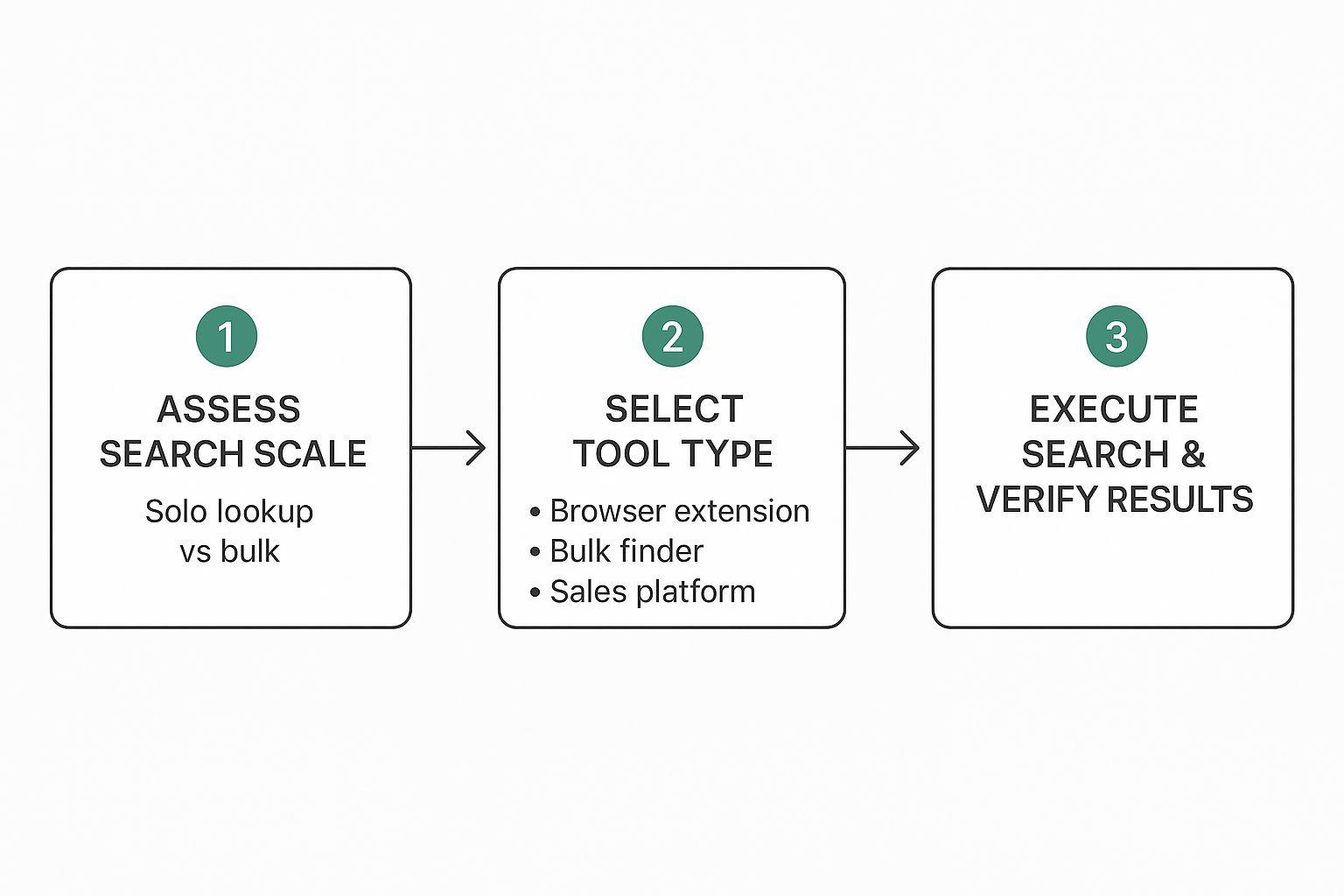
The main takeaway here is to match the tool to the task. Don't grab a bulk finder for a single lookup, and don’t expect a simple browser extension to handle your 1,000-person prospect list.
Choosing the Right Type of Tool
Not all email finders are created equal. I've found they generally fall into three buckets, each built for a different kind of workflow. Figuring out these differences is the first step toward picking the right tool for your goals and budget.
Here’s a look at the different categories and how you can decide which is best for your specific needs.
Comparing Email Finder Tool Types
| Tool Type | Typical Use Case | Pricing Model | Example Tools |
|---|---|---|---|
| Browser Extensions | On-the-fly lookups while browsing LinkedIn or company sites. | Freemium or monthly subscription. | Hunter, Lusha |
| Bulk Finders | Enriching a spreadsheet of names and companies with email addresses. | Credit-based (pay per email) or subscription. | VoilaNorbert, FindThatLead |
| All-in-One Platforms | A complete sales outreach suite with CRM, sequencing, and analytics. | Higher-tier monthly or annual subscription. | SalesLoft, Outreach |
As you can see, the right choice really hinges on how you plan to use it—whether for quick, individual searches or for building massive campaign lists.
Let's dig a bit deeper into these categories:
- Browser Extensions: These are my go-to for on-the-fly prospecting. A tool like EmailScout works as a Chrome extension, letting you pull an email right from a LinkedIn profile or company website with one click. They're perfect for salespeople and recruiters who are actively hunting for leads.
- Bulk Finders: Got a spreadsheet full of names and companies? A bulk email finder is your best friend. You just upload your list (usually a CSV file), and the service spits it back out, enriched with verified emails. This is the engine for marketing teams building large-scale campaign lists.
- All-in-One Sales Platforms: Think of these as the complete ecosystem for sales and outreach teams. They bundle email finding with other critical features like CRM integration, email sequencing, and deep analytics. It’s a bigger investment, but you get a ton of power in one place.
When you're making a choice, it almost always comes down to a trade-off between cost, features, and accuracy. Free tools can be great for occasional use, but I've consistently found that paid options deliver much higher accuracy rates and essential features like real-time verification.
Key Features to Compare
It's easy to get lost in the sea of features when you’re evaluating different email finders. In my experience, you should zero in on the metrics that directly impact your campaign’s success. As you start exploring your options, including looking into some of the best free email finder tools, keep these critical factors top of mind.
Here’s what really moves the needle:
- Accuracy and Verification: How good is the data, really? Look for services that give you a confidence score or, even better, perform real-time verification to confirm an email is deliverable before you use it. A tool that boasts 95% accuracy is far more valuable than one with a giant database of unverified, stale contacts.
- Pricing Model: Most tools run on a credit-based system, where one credit gets you one email lookup or verification. You’ll want to compare the cost per credit and find out if unused credits roll over to the next month. For heavy users, some platforms offer unlimited plans that can be much more cost-effective.
- Integrations: The best tool is one that fits seamlessly into your existing workflow. Check for native integrations with your CRM (like Salesforce or HubSpot), spreadsheet apps (like Google Sheets), and any other sales software you rely on. Good integration saves a ton of time and prevents those annoying manual data entry errors.
The Crucial Step: Verifying Business Email Addresses
Finding what you think is the right business email is only half the job. Without verification, you're essentially launching your carefully crafted message into a black hole and just hoping for the best.
This is a non-negotiable step for any serious outreach campaign. It doesn’t matter if it’s for sales, marketing, or networking—skipping this will sink your efforts.
Sending emails to unverified addresses racks up a high bounce rate, a massive red flag for email providers like Google and Microsoft. A few bounces might seem harmless, but they add up fast and absolutely tank your sender reputation. A poor reputation means more of your future emails—even the ones sent to valid addresses—will land in spam or get rejected outright.
A smaller, verified list is always more valuable than a huge, unverified one. Prioritizing quality over quantity protects your domain's health and ensures your messages are actually seen.
The consequences of skipping verification are severe. Consistently high bounce rates can land your domain on an email blacklist, making it nearly impossible to reach anyone's inbox. That's a nightmare scenario for any business that relies on email.
Why Verification Is About More Than Just Deliverability
Beyond just protecting your sender score, verifying business emails has become a crucial security measure. Today, Business Email Compromise (BEC) attacks account for a staggering 73% of all reported cyber incidents.
Scammers use sophisticated methods to find and exploit business emails for fraudulent activities, like fake wire transfers that average $24,586. Verifying contact information helps ensure you're talking to a real person, not a potential threat. You can dig into more of these business email compromise statistics and their impact on security.
Fortunately, verifying an email is pretty straightforward. You can use free mail tester tools for a quick spot-check on a single address. For anything more serious, professional services and many email finder tools have verification built right in.
For a deeper look at the process, check out our guide on how to validate an email address to protect your outreach efforts.
Common Questions About Finding Business Emails
When you're first learning how to find business emails, a few questions pop up almost immediately. Let's tackle them head-on so you can feel confident in your outreach.
Is This Actually Legal to Do?
Yes, finding and emailing a business address is perfectly legal in most places, including the United States. You just need to play by the rules, like those outlined in the CAN-SPAM Act.
This means your email must:
- Have an honest subject line that isn't misleading.
- Include a clear and simple way for them to opt out.
- Display your physical business address.
Just be mindful of where your recipient is located. If you're reaching out to someone in Europe, for instance, you'll need to consider stricter regulations like GDPR.
What Is the Most Accurate Method?
There's no single method that's 100% foolproof, but high-quality, paid email finders with real-time verification get you the closest. These tools are so effective because they check multiple data sources at once to confirm an email is active and deliverable.
For one-off searches, you can't go wrong with a manual approach. Digging through a company's website and LinkedIn profile is still a very reliable—though definitely slower—way to find what you need.
The best strategy is often a hybrid one. Use automation to build your lists at scale, but double-check your most important, high-value prospects by hand. This mix of speed and precision is what gets the best results.
Ready to stop guessing and start connecting? The EmailScout Chrome extension finds verified email addresses in a single click, right from LinkedIn or company websites. Try EmailScout for free and streamline your outreach today!