Tag: contact finding

  • how to find email addresses for a company: a practical guide

    how to find email addresses for a company: a practical guide

    Getting the right email address is the quickest way to kick off a meaningful conversation. From my experience, the most effective way to do this is by blending some old-school detective work with the power of modern tools like EmailScout. This combo approach is your best bet for finding accurate, verified contact info every single time.

    Your Game Plan for Finding Company Emails

    A person looking at a digital interface with profiles and data points, symbolizing the process of finding email addresses for a company.

    Knowing how to dig up company email addresses is more than just a neat trick—it’s a core skill for any effective outreach. Whether you're in sales, marketing, or biz dev, landing your message in the right inbox is ground zero for hitting your goals. Just guessing or sticking to one method usually ends in bounced emails and a lot of wasted time.

    The real key is having a system. It all starts with the basics, like spotting the common email patterns companies use, and it always finishes with the most crucial step: verification. This guide lays out a reliable framework that will take you from simple guessing games to a repeatable process for uncovering accurate contact information.

    Building Your Foundational Knowledge

    Before we jump into the specific tactics, let’s cover a few core ideas. Getting these down will make your search process way more effective.

    • Common Email Patterns: Most companies stick to a predictable formula for their employee emails. Think firstname.lastname@company.com or f.lastname@company.com. Recognizing these patterns is your first real clue.
    • The Power of a Blended Approach: The best results always come from mixing manual detective work with automated tools. Manual digging is perfect for those high-value targets, while tools give you speed and scale.
    • Verification Is Everything: An email you find is useless until it's verified. Firing off messages to bad addresses hammers your sender reputation and hurts your overall deliverability.

    This is huge, especially when you consider that 86% of business professionals still prefer email for business communication. With billions of inboxes out there, just understanding basic patterns can give you a massive advantage.

    Remember, the goal isn't just to find an email address—it's to find the right one. Your approach has to be both targeted and accurate, making sure your outreach hits the person who can actually make a decision. For more on this, check out our guide on how to identify a target audience.

    Email Finding Methods At a Glance

    To help you decide which strategy to use, here’s a quick rundown of the main approaches, what they're good for, and how they stack up.

    Method Best For Speed Accuracy
    Manual Search High-value, specific targets where accuracy is critical. Slow High
    Pattern Guessing Finding emails at companies with predictable formats. Moderate Varies
    Social Media Sleuthing Uncovering contacts for social-savvy professionals. Moderate Good
    Using EmailScout Scaling up outreach with fast, verified results. Fast Very High

    This table should give you a good starting point. For one-off, super important contacts, a manual search might be worth the time. But when you need to build a list of dozens or hundreds of leads, a dedicated tool is the only way to go. Ultimately, the best system often involves a mix of these methods.

    Mastering the Art of Manual Searches

    Before you even think about spending a dime on tools, a bit of clever detective work can often unearth the exact email address you need. Manual searching is a seriously underrated skill, but it consistently delivers the goods, especially for high-value targets. It's all about knowing where to look and how to connect the dots that most people miss.

    This approach is perfect when you need to find an email for a specific person with pinpoint accuracy. Think of it less like casting a wide net and more like a targeted investigation. You'll be using a combination of advanced search tricks and social media smarts to find that contact info.

    Leveraging Advanced Google Searches

    Your first stop should always be a well-crafted Google search. I'm not talking about basic queries here—advanced search operators are your secret weapon. These are just simple commands you can tack onto your search to filter the noise and find exactly what you're looking for.

    Try plugging these into Google:

    • (name) + email + (company name)
    • site:company.com + (name) + email
    • "(name)" + "contact" + site:company.com

    These searches basically tell Google to hunt for specific word combinations on a particular website. You’d be surprised how often this digs up staff directories, press releases, or author bios containing the exact email you need.

    Decoding Common Email Patterns

    Most companies don't get too creative with their email formats; they stick to a standardized pattern. Once you figure out that pattern, you can accurately guess the email of almost anyone at the company. This is a fundamental technique and a great starting point for anyone trying to find corporate emails.

    Here are the most common formats you'll run into:

    • First Name: john@company.com
    • First Initial, Last Name: jdoe@company.com
    • First Name, Last Initial: johnd@company.com
    • First Name.Last Name: john.doe@company.com

    If you can find just one employee’s email address—maybe from a press release or the "About Us" page—you've likely cracked the code for the entire organization.

    Pro Tip: Don't just guess one pattern and call it a day. I always create a short list of the top three or four most likely combinations. You can then use a simple verification tool to check which one is valid before you bother hitting send.

    Tapping into Professional Networks

    Professional networks are absolute goldmines for contact information. LinkedIn is the obvious heavyweight here and is incredibly valuable for confirming job titles, names, and even just checking the professional spelling of someone's name.

    Here’s a perfect example of a profile that gives you the key information needed to start your search.

    Screenshot from https://www.linkedin.com/

    This profile provides the person's full name and their current company—the two essential puzzle pieces for deducing their corporate email using the pattern-guessing method we just talked about.

    While most people don't list their email directly on their profile anymore, their activity can leave clues. Check out articles they've written or commented on; their contact info might be in an author bio. Combining the name and company from LinkedIn with the Google search techniques from earlier is a seriously effective strategy.

    Use Email Finder Tools to Work Smarter, Not Harder

    A sleek dashboard of an email finder tool on a laptop screen, showing profiles and verified email addresses, illustrating efficiency.

    Manually digging for emails has its place, especially when you need surgical precision for a handful of high-value contacts. But let’s be real—it just doesn't scale.

    When you're tasked with building a sizable contact list for a big sales campaign or a new marketing push, dedicated email finder tools become your secret weapon. They completely automate the discovery process, shrinking a task that could take days down to just a few minutes.

    These platforms are way more than just glorified search engines. They scan millions of public web pages, tap into professional databases, and use smart algorithms to figure out the correct email format for almost anyone at a specific company.

    The real game-changer is efficiency. Imagine finding 50 verified contacts in the time it would take you to manually hunt down maybe one or two. That’s the kind of leverage a tool like EmailScout gives you.

    How These Tools Find Emails at Scale

    The magic behind these platforms is their ability to churn through massive amounts of data and spot patterns with incredible speed. They aren't just guessing; they’re making highly educated predictions based on multiple data points.

    Here’s a quick look under the hood:

    • Public Data Aggregation: The tools crawl the web for publicly available email addresses—think author bios, conference speaker lists, and company "About Us" pages.
    • Pattern Recognition: They analyze a company’s known email formats (like firstname.lastname@company.com or f.lastname@company.com) to predict the right one for your target contact.
    • Real-Time Verification: The best tools don’t just find an address; they ping the server in real-time to confirm it’s actually deliverable, often giving you a confidence score.

    This one-two punch of finding and verifying is what makes them so essential for serious outreach. If you want to see how different platforms compare, you can check out this breakdown of the best email finder tools.

    To help you understand what to look for, I've put together a quick comparison of the features that really matter in a top-tier tool.

    Key Features of Top Email Finder Tools

    This table breaks down the essential features you'll find in leading email finder tools like EmailScout. Knowing what these do can help you pick the right solution for your specific needs.

    Feature What It Does Why It Matters for Finding Emails
    Bulk Email Finder Uploads a list of names and companies to find emails for all of them at once. Saves countless hours compared to finding emails one by one. It's the key to scaling your outreach.
    Real-Time Verification Checks if an email address is active and can receive mail right before you get it. Drastically reduces your bounce rate, protecting your sender reputation and improving deliverability.
    Chrome Extension Finds emails directly from LinkedIn profiles or company websites as you browse. Perfect for grabbing emails on the fly without breaking your workflow. Super efficient for targeted prospecting.
    API Access Integrates email-finding capabilities directly into your own applications or CRM. Allows you to automate lead enrichment within the tools you already use, creating a seamless process.

    Choosing a tool with the right mix of these features can make a huge difference in how quickly and effectively you can build a high-quality contact list.

    Putting It All Together: Finding Emails in Bulk

    Let’s walk through a real-world scenario. You just got back from a trade show with a list of 100 target companies and the names of the key decision-makers. Finding each email manually would be a nightmare.

    With a tool like EmailScout, the process is simple. You just upload a CSV file with two columns: Full Name and Company Domain. The platform takes it from there, returning a list enriched with verified email addresses. Done.

    The bottom line is this: these tools transform email discovery from a mind-numbing chore into a real strategic advantage. You spend less time digging for contacts and more time actually talking to them.

    With over 4.6 billion email users worldwide, the digital footprint out there is massive. Tools that can effectively scan that footprint are incredibly powerful, giving you a direct line to the inboxes that matter. This is how you build a robust, accurate contact list that fuels your entire sales and marketing engine.

    Why Email Verification Is Non-Negotiable

    Discovering a potential email is only half the battle. Seriously. The most critical step in learning how to find email addresses for a company is making sure they’re actually deliverable.

    Without verification, you're just sending your carefully crafted message into a black hole and hoping it lands somewhere useful. It’s a surefire way to waste time and effort.

    Sending emails to bad addresses cranks up your bounce rate. Internet Service Providers (ISPs) watch that number like a hawk; a high rate makes you look like a spammer. Before you know it, your sender reputation is shot, and none of your emails are making it to the inbox—even the ones sent to perfectly valid contacts.

    The Anatomy of a Verified Email

    So, what’s the difference between an email you found and one you can actually deliver to? Verification isn't just a simple ping. It's a multi-step process that confirms an address is legitimate and active, and it all happens behind the scenes.

    • Syntax Check: This is the basic first pass. Does the email even look right? It just makes sure the format is correct (like name@domain.com).
    • Domain Validation: Next, the system checks if the domain (company.com) is real and has active mail servers ready to receive email.
    • SMTP Verification: This is the real magic. The verifier has a quick, technical "handshake" with the recipient's mail server to confirm the specific user mailbox exists, all without actually sending an email.

    This robust process is why tools with built-in validation are such game-changers. For instance, EmailScout gives you a confidence score, letting you know the likelihood of deliverability before you even think about hitting send. You can get the full rundown on how this works in our detailed guide on email address verification.

    Protecting Your Outreach Efforts

    Think of it this way: every bounced email is a missed opportunity and a tiny strike against your domain's credibility. You're playing a long game of reputation management, and clean email lists are your best defense.

    The sheer volume of digital communication today makes this non-negotiable. By 2025, we’re looking at 4.83 billion global email users, with daily traffic hitting a staggering 392 billion emails. With that much noise, you have to ensure your message gets through. It’s especially true when you consider that personalization offers a massive $36 ROI for every $1 spent—a figure that highlights why smart businesses invest so heavily in accurate data.

    The bottom line is simple: finding an email address is just the starting point. Verifying it is what protects your reputation, maximizes your ROI, and ensures your carefully crafted message actually gets read.

    Plenty of great resources can help you pick the right solution for your needs. For example, a helpful roundup lists the 12 Best Email Verification Tools to Use in 2025 that can easily slot into your workflow. This is how you build a clean, effective, and reliable contact list that fuels your outreach with certainty.

    Building an Ethical Email Discovery Workflow

    Finding someone's email isn't just a technical problem to solve—it's the first step in building a real relationship. A truly great outreach strategy is built on a solid, ethical system that respects people's privacy while still keeping your pipeline full. The goal here is to get past just doing one-off searches and build a repeatable workflow that mixes smart manual digging with powerful automation.

    This hybrid approach is all about efficiency. It lets you put in the focused, detective-style work for high-value prospects while using tools to handle the broader outreach at scale. You're being smart with your time and making sure every email you send has the best chance of being delivered and welcomed.

    Combining Manual and Automated Methods

    The most effective workflows I've seen don't just stick to one strategy. They build a two-tiered system that flexes based on how important the prospect is.

    • For High-Value Targets: This is where you roll up your sleeves. For that key decision-maker at a company you've been dying to work with, spending 15-20 minutes doing a deep dive with advanced Google searches and LinkedIn snooping is time well spent. The personal effort pays off in accuracy.
    • For Scaled Outreach: When you're trying to reach dozens or even hundreds of potential leads, automation is your best friend. Tools like EmailScout can chew through lists of names and companies in minutes, freeing you up to work on your messaging instead of mind-numbing data entry.

    It's also helpful to see how this discovery process fits into the bigger picture. For a great breakdown of the entire journey from prospect to lead, this automated lead generation workflow guide offers some fantastic context. An integrated view makes every step, from finding the email to the final follow-up, work together seamlessly.

    Staying Compliant with Privacy Regulations

    Let's be clear: ethical outreach is compliant outreach. Regulations like GDPR in Europe and CCPA in California aren't just annoying legal hoops to jump through; they're a roadmap for respecting people's privacy. In a B2B context, that boils down to being transparent and offering genuine value.

    Always stick to these core principles:

    1. Legitimate Interest: Make sure your reason for contacting someone is actually relevant to their job. A software engineer, for example, probably has a legitimate interest in hearing about a new dev tool.
    2. Transparency: Be upfront about who you are and why you're emailing. Tricky subject lines and misleading sender info aren't just bad form—they can land you in serious trouble.
    3. Easy Opt-Out: Every single email you send must have a dead-simple way for the person to unsubscribe. According to the CAN-SPAM Act, if you ignore an opt-out request, you could face penalties of up to $53,088 per email. Yes, you read that right.

    A good workflow isn't just about how fast you can find emails; it's about sustainability. By building ethical practices and compliance into your process from day one, you protect your sender reputation and build trust, making sure your outreach stays effective for years to come.

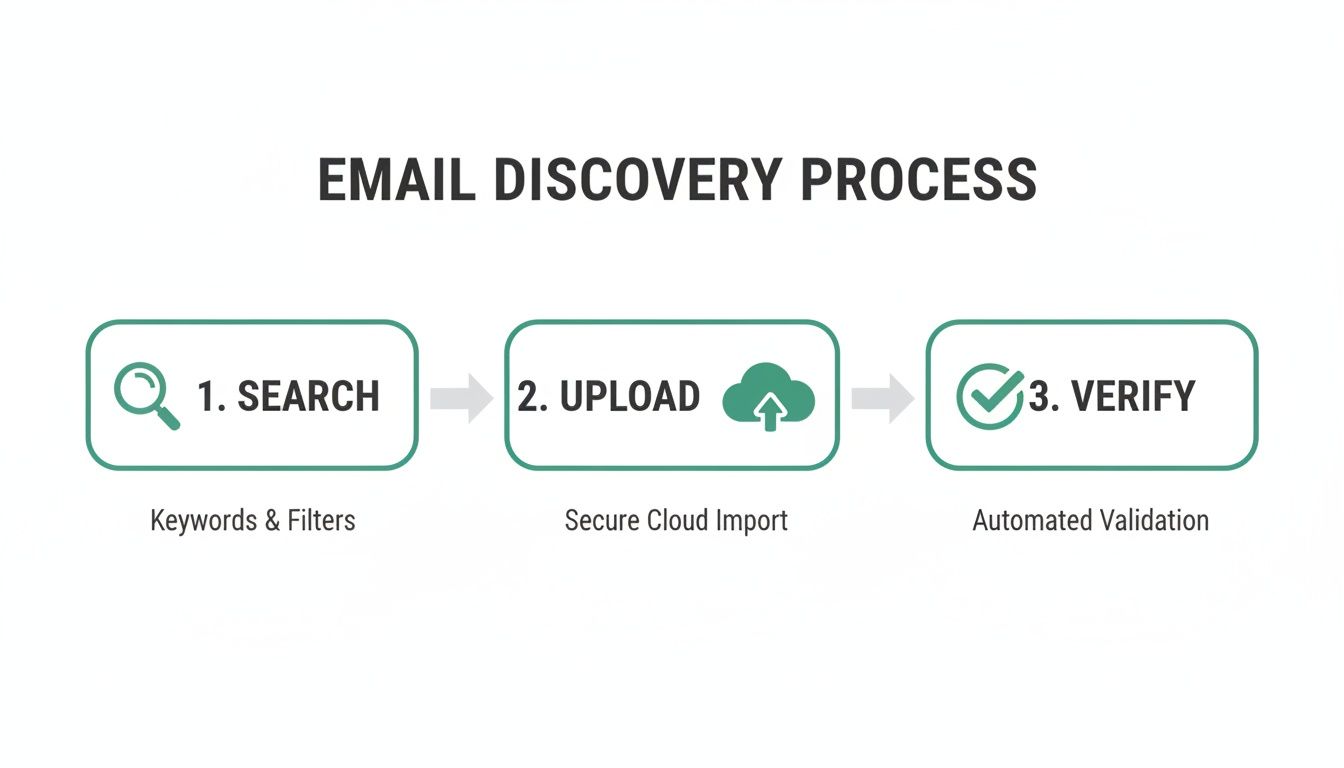
    This flowchart gives you a bird's-eye view of the simple but essential steps in a modern outreach workflow.

    Infographic about how to find email addresses for a company

    As the visual shows, finding the email is just the start. Verifying it's correct and sending a compliant message are just as crucial for any successful and ethical outreach campaign.

    Common Questions About Finding Emails

    When you're digging for email addresses, a few key questions always pop up. Is this even legal? What's the best way to get accurate results? How do I do this without spending all day on it?

    Getting straight answers to these is crucial. It helps you build a process that's not just effective, but also keeps you on the right side of the rules. Let's tackle the big ones.

    Is It Legal to Find Company Emails for Outreach?

    The short answer: yes, for most B2B outreach, it's perfectly legal. But—and this is a big but—you have to follow the rules.

    Laws like the CAN-SPAM Act in the U.S. and GDPR in Europe are built around the idea of "legitimate business interest." That means you can reach out, as long as you’re not just spamming people.

    Compliance isn't optional. You absolutely must:

    • Provide a clear opt-out: Every single email needs an easy way for someone to say "no thanks."
    • Be transparent: Don't hide who you are or that you're sending a commercial message.
    • Keep it relevant: Make sure your pitch actually relates to their job. Sending a sales pitch for forklift parts to a marketing manager isn't going to cut it.

    Drop the ball on these, and you could face some serious fines. CAN-SPAM, for example, can slap you with penalties up to $53,088 per violation. Do your homework and know the laws for the regions you're targeting before you hit send.

    What Is the Most Accurate Discovery Method?

    Honestly, the most reliable method is a mix of human smarts and good tech.

    If you're chasing a whale—a really high-value prospect—nothing beats a bit of manual detective work. You figure out the company's email pattern, make an educated guess, and then use a verification tool to confirm it. It’s slow, but the accuracy is top-notch.

    But who has time for that at scale? For building bigger lists, a quality email finder that includes real-time verification is your best bet. It gives you the perfect balance of speed and precision.

    A "confidence score" is a handy metric many tools use. It tells you how likely it is that an email is correct and won't bounce. A high score means you can feel good about using that address without dinging your sender reputation.

    How Can I Find Emails in Bulk?

    When you need to find hundreds or thousands of emails, you have to turn to a bulk email discovery tool. It’s the only way to do it efficiently.

    This is exactly what platforms like EmailScout were built for.

    You can upload a list of names and company domains, and the software does the heavy lifting, finding and verifying the emails for you. Many of these tools also have browser extensions that let you pull emails right from LinkedIn profiles or company websites while you browse. It’s a game-changer for building targeted lists without derailing your entire workflow.


    Ready to stop guessing and start connecting? With EmailScout, you can find unlimited verified emails for free and build powerful marketing lists with just one click. Get started with EmailScout today and supercharge your outreach.

  • Find Business Email: Locate Any Address Fast

    Find Business Email: Locate Any Address Fast

    So, how do you actually find a business email address? You really have three solid options: you can do it the old-fashioned way by manually digging through company websites and social media, you can try guessing common email patterns like firstname.lastname@company.com, or you can use a dedicated email finder tool to get it done fast.

    The best approach? A mix of all three, capped off with a solid verification step.

    Why Finding the Right Email Is a Game Changer

    A person holding a large golden key with an email '@' symbol on it, representing access to new opportunities.

    Before we jump into the how-to, let's talk about the why. Honestly, this isn't just about ticking a box on your to-do list. Finding the right person's email is your foot in the door for building real professional relationships. It's the key to bypassing gatekeepers and starting conversations that actually go somewhere.

    Sure, LinkedIn is fantastic for making that initial connection, but when it's time for a serious business conversation, email is still king. And it's not going anywhere. The number of emails sent daily is projected to jump from 376.4 billion in 2025 to a massive 408.2 billion by 2027. If you want to see the full picture, check out these email usage trends.

    The Power of a Direct Connection

    Think about it. When was the last time you felt a personal connection to an email sent to "info@" or "sales@"? Probably never.

    Having someone’s direct email address changes everything. It lets you personalize your message—mention their latest project, a recent blog post, or a shared interest. That's what makes the difference between an email that gets an instant reply and one that gets instantly deleted.

    The goal isn’t to build a massive, unverified list of contacts. The real value comes from creating a smaller, highly accurate list that enables genuine, one-to-one communication.

    Nailing this skill pays off in so many ways. You'll see the impact across the board:

    • Sales Prospecting: You can finally talk directly to the person with the authority to say "yes."
    • Networking: It’s your direct line to industry peers, mentors, or future collaborators—no middleman needed.
    • Marketing Outreach: Share your stuff with people who will actually find it useful, not a generic inbox.
    • Career Growth: Want a new job? Contact the hiring manager or team lead directly and stand out from the crowd.

    At the end of the day, every successful outreach campaign, every big sale, and every game-changing partnership starts with one thing: the right email address.

    Before you drop a single dollar on a fancy tool, it's always worth trying some good old-fashioned digital detective work. These manual methods are surprisingly effective, especially when you just need to track down a few key business emails and aren't ready to commit to a paid service.

    It takes a little more legwork, sure, but the payoff can be huge.

    Think of it like a scavenger hunt. Your first stop should always be the company's own website—but don't just glance at the homepage and give up. You need to dig into the pages most people ignore.

    • The "About Us" Page: This is often a goldmine. You can usually find the names and titles of key team members here.
    • A "Meet the Team" Page: Even better. Some companies will list their entire leadership team, sometimes with direct contact info right there.
    • Press Releases or News Section: Scan these for a media contact. Companies often list a specific person's email to prevent journalists from guessing and flooding their inboxes.
    • Blog Author Bios: If your target has written for the company blog, check their bio at the end of the post. It might have an email or a social media link you can follow up on.

    Wielding Advanced Search Like a Pro

    If the website itself is a dead end, your next move is to put Google to work. A standard search isn't going to cut it, but a few advanced search operators can uncover emails that are hiding in plain sight.

    Try this simple but powerful query in the Google search bar: site:company.com "Jane Doe" email

    This little command tells Google to search only within that specific company's website for the person's name alongside the word "email." You can also swap "email" for "contact" to mix things up.

    It's a fantastic trick for digging up contact details buried in old PDF reports, forgotten event pages, or obscure staff directories that aren't linked from the main navigation.

    I’ve found this manual search method works wonders for finding contacts at non-profits, universities, and government organizations. They often publish documents with full staff directories or contact lists that a targeted Google search can easily find.

    The Art of the Educated Guess

    Once you have a name and a company domain, you can often make a highly educated guess. Why? Because most businesses use a standardized pattern for their email addresses to keep things simple. It’s all about finding that pattern.

    Here are the most common formats I always test first:

    But guessing isn’t enough. You need to quickly check if you’re right without sending a test email that might bounce and make you look unprofessional.

    A slick little trick inside Gmail can help you out.

    Just compose a new email and type one of your guessed addresses into the "To" field. Do not hit send. Just hover your mouse over the email address for a second. If a Google profile picture or name pops up, you’ve almost certainly found a valid, active address.

    It’s not 100% foolproof, but it’s a quick, free check that works remarkably well, since so many people link their work email to a Google account these days.

    Using Email Finder Tools to Work Smarter

    Let's be honest, manual detective work is great for a handful of high-value targets, but it just doesn't scale. When you're staring down the barrel of building a prospect list for a new sales campaign or finding dozens of media contacts before a launch, you need to bring in the big guns. This is where technology does the heavy lifting, turning a soul-crushing task into a surprisingly fast one.

    The smartest way to scale your email discovery is with specialized Email Finder tools. These platforms are built for one purpose: finding business email addresses quickly. All they usually need is a name and a company domain. They can save you countless hours, freeing up your team to focus on what actually matters—outreach and building relationships, not tedious data entry.

    How Email Finder Tools Put Your Outreach on Fast-Forward

    Picture this: your sales team needs to target marketing managers at every SaaS company in a specific niche. Searching for each contact one by one could take an entire week. An email finder tool, on the other hand, can knock this out in minutes.

    Take a tool like EmailScout, for example. Its Chrome extension plugs right into your browser. When you're on a prospect's LinkedIn profile, you just click a button to instantly pull their verified business email. No more juggling tabs or playing the guessing game with email patterns. The info you need is delivered right where you're already working. If you're weighing your options, our guide on the best email finder tools breaks down the top players on the market.

    This process essentially automates the manual guesswork and verification steps, giving you a massive boost in both speed and accuracy.

    Infographic about find business email

    Building Lists in Bulk for Maximum Impact

    But the real magic happens when you need to find contacts at scale. Imagine a PR pro who needs a list of every tech journalist covering AI. Instead of hopping from one publication's website to another, they can use a bulk search feature.

    With EmailScout, you can upload a list of company domains (like techcrunch.com or wired.com) and it spits back a list of emails associated with them. This is an absolute game-changer for:

    • Account-Based Marketing: Quickly map out all the key stakeholders at your target accounts.
    • Recruitment: Pinpoint potential candidates across multiple competitor companies.
    • Partnership Building: Find the right people to talk to for business development.

    The interface is dead simple, making it easy for anyone to find business emails without needing a degree in data science.

    The edge you get isn't just about speed; it's about momentum. When your team can build a targeted list in minutes instead of days, they can launch campaigns faster, pounce on leads quicker, and ultimately close more deals.

    By automating the most time-sucking part of outreach, these tools liberate your team. The focus shifts from mind-numbing data collection to the high-value work that actually moves the needle: crafting killer personalized messages and building real professional connections. It's all about working smarter, not just harder.

    The Underrated Power of Email Verification

    A magnifying glass hovering over a computer screen, with a green checkmark appearing on a valid email address.

    Finding what looks like the perfect business email can feel like a win, but it’s only half the battle. If you send a brilliant message to a dead inbox, you’ve wasted your time and—even worse—damaged your sending reputation. This is where so many outreach campaigns quietly fail.

    Think of your sender reputation like a credit score. Every time an email bounces back from an invalid address, your score takes a hit. Email providers like Google and Outlook are watching. If your bounce rate creeps up, their servers start flagging you as a potential spammer.

    Suddenly, your emails start landing in the junk folder, even the ones sent to perfectly good addresses.

    Why Verification Is Non-Negotiable

    A clean email list is the bedrock of any solid outreach strategy. It’s what ensures your messages actually reach real people, giving you a fighting chance at getting a reply. Skip this step, and you’re setting yourself up for problems that will sabotage all your hard work.

    Without verification, you're flying blind and opening yourself up to:

    • High Bounce Rates: Too many hard bounces (from emails that don't exist) can get your email account or even your entire domain blacklisted.
    • Wasted Resources: Every undelivered email is a missed opportunity. It skews your campaign metrics and makes it impossible to know what’s actually working.
    • Inaccurate Data: An unverified list is full of junk data, leading to bad sales forecasts and marketing analytics you can't trust.

    Verification isn't just about avoiding penalties; it's about protecting the integrity of your entire outreach process. A clean list delivers better results, provides clearer data, and preserves your ability to communicate effectively in the long run.

    How To Check If an Email Is Valid

    The good news is you don't have to send a test email and cross your fingers. Modern tools make verification fast and reliable, running multiple checks behind the scenes. For a deeper look, this guide to email address verification breaks down the nitty-gritty.

    To make sure the business emails you find are legit, it’s worth looking at the top email verification tools on the market. These services do more than just a basic check; they perform a multi-point inspection that usually includes:

    • Syntax Check: Makes sure the address is formatted correctly (e.g., name@domain.com).
    • Domain Check: Confirms the domain is real and has active mail servers ready to receive email.
    • Server Ping: Sends a harmless signal to the mail server to ask if a specific user mailbox exists—all without actually sending an email.

    This process gives you a clear "deliverable," "risky," or "invalid" status for every contact. By making this a standard part of your workflow, you ensure every email you find is one you can confidently use.

    Crafting Outreach That Actually Gets a Reply

    You've done the hard part and found a valid business email. Awesome. The temptation now is to blast off a generic template and call it a day, but that's a surefire way to get your message ignored or, worse, marked as spam.

    The real work starts now: crafting a message that feels like it was written by one human for another. One single, thoughtful email will always outperform a hundred generic blasts. And I don’t just mean using {FirstName}. True personalization shows you’ve actually done your homework.

    Personalization That Builds Bridges

    We can all spot a generic, copy-pasted email a mile away, and our first instinct is to hit delete. If you want to stand out, your message has to connect directly to their world. This small act of effort shows you respect their time and signals that you aren't just another number in a sequence.

    Here are a few simple ways I’ve seen work wonders for adding genuine personalization:

    • Reference a recent project: "I was really impressed with the new feature your team launched for [Product Name] last month."
    • Mention a company announcement: "Congratulations on your company's recent series B funding—it's exciting to see your growth in the fintech space."
    • Find a shared connection: "I noticed we both follow [Industry Influencer] on LinkedIn and enjoyed their recent post on AI."
    • Cite their content: "Your latest blog post about cold email strategies really resonated with me, especially your point on subject lines."

    This simple tweak transforms your email from an interruption into the beginning of a relevant conversation.

    A Simple Framework for Authentic Outreach

    Templates are a good starting point, but they should never be the final product. The best outreach emails I've seen all follow a simple, human-centric framework that you can adapt for anything—sales, networking, or link building. For a much deeper dive, our guide on how to write cold emails that work has more advanced techniques.

    A solid, repeatable framework usually includes these four parts:

    1. A Compelling, Specific Subject Line: Ditch the clickbait. Something like "Quick question about your [Project Name]" is far more effective than "A revolutionary idea for you."
    2. A Personalized Opening: This is where you use the research from the previous step. Make that immediate, genuine connection.
    3. A Clear Value Proposition: Get straight to the point. In one or two sentences, explain what’s in it for them. How can you solve a problem or help them hit a goal?
    4. A Simple, Low-Friction Call-to-Action: Don't ask them to book a 30-minute demo right away. Instead, ask a simple yes/no question like, "Is this something you’re currently focused on?"

    The goal is to make replying feel easy and natural. If your email requires them to think too hard or commit too much, it’s destined for the archive folder.

    Staying Professional and Ethical

    Finally, remember that effective outreach is always ethical outreach. Following legal guidelines isn't just about avoiding fines; it's about being a professional who respects people's inboxes. Make sure you're familiar with regulations like CAN-SPAM in the U.S. and GDPR in Europe.

    These laws require transparency, a clear way for people to opt out, and honesty in your messaging. It all comes down to using the access you've gained responsibly and building a foundation of trust from the very first email you send.

    Common Questions About Finding Emails

    Even with the best tools, you're going to run into questions when you start hunting for business emails. It's just part of the process. Let's tackle a few of the most common ones I hear so you can get back to your outreach with confidence.

    Is It Legal to Find and Use a Business Email Address?

    Yes, in most places, it's perfectly legal to find and use a business email for legitimate professional reasons. But—and this is a big but—you must follow anti-spam laws.

    In the United States, for example, the CAN-SPAM Act lays down the law for commercial email. Ignore it, and you could face penalties up to $53,088 per email. The bottom line is to be professional and respectful.

    That means every single email you send should include:

    • Transparency: Be upfront about who you are and who you work for.
    • Value: Make sure your message offers something genuinely relevant to them.
    • An Opt-Out: Give them a dead-simple way to unsubscribe. No hoops to jump through.

    Following these rules isn't just about staying out of trouble; it's how you build trust from the very first hello.

    The moment you treat outreach like a pure numbers game and bend the rules, you're putting your brand's reputation on the line and risking getting your domain blacklisted. Always lead with ethical, respectful communication.

    What Is the Most Accurate Email Finding Method?

    Honestly, there’s no single "best" way. The highest accuracy almost always comes from a hybrid approach—combining the speed of a great tool with the final check of verification.

    I always start with a reliable email finder to get a likely address in seconds. But for those high-value prospects, the ones you absolutely cannot afford to have bounce? I run that email through a separate verification service. This quick two-step process confirms the email is deliverable before I ever hit send, and it slashes my bounce rates.

    How Can I Find Emails for an Entire Company at Once?

    This is exactly what a "Domain Search" or "Bulk Find" feature is for. Most top-tier email finders, including EmailScout, have this built right in.

    You just plug in a company's website (like company.com), and the tool will pull a list of all known or predicted email addresses tied to that domain. It's an incredibly efficient way to build targeted lists for things like account-based marketing or sales prospecting without losing days to manual digging.

    What If I Still Cannot Find Their Email Address?

    It happens. Some people are just tough to track down online. If you've tried everything and are still coming up empty, it's not time to give up—it's time to pivot.

    Change your approach. Try connecting with them on LinkedIn and send a short, personalized message. A great tactic is to engage with their posts for a bit to get on their radar before you slide into their DMs.

    Another option is to try a general company inbox like 'info@' or 'contact@' and politely ask to be pointed in the right direction. Sometimes a creative, indirect approach works just as well as a direct email.


    Ready to stop guessing and start connecting? EmailScout gives you the power to find verified business emails in seconds, directly from your browser. Try EmailScout for free and supercharge your outreach today!

  • How to Find a Business Email for Anyone

    How to Find a Business Email for Anyone

    In a world cluttered with social media DMs and connection requests, a direct business email is still the sharpest tool in the shed for professional communication. It’s your ticket to cut through the noise, bypass the usual gatekeepers, and land your message right where it needs to be—in a decision-maker's inbox. When you take the time to find a business email, you're showing you mean business from the very first click.

    Why Finding the Right Email Is Still a Game Changer

    A professional setting with people collaborating, symbolizing effective business communication.

    It’s easy to get caught up in the hype of newer, faster platforms and think email is old news. But the reality on the ground—and the data—tells a completely different story. A direct email isn't just another message; it's a dedicated space for professional conversation where your outreach is given the serious consideration it deserves.

    Think about it. A social media message can easily get buried under a mountain of notifications. An email, on the other hand, commands a unique kind of attention. It’s still the default channel for sending important documents, laying out serious proposals, and making meaningful follow-ups.

    The Undeniable Reach of Email

    The sheer scale of email use puts its enduring relevance into perspective. By 2025, the number of global email users is expected to hit a massive 4.6 billion people. That’s more than half the world's population. And with a staggering 376 billion emails sent every single day, it’s clear this isn't a channel that's fading away. These are some powerful numbers, which you can dig into deeper with these email marketing statistics on Optinmonster.com.

    What this really means is that your target contact—whether it's a hiring manager, a potential client, or a future partner—almost certainly has an email address they check on the regular. The challenge isn't if they have one, but how you can get your hands on the right one.

    Key Takeaway: Finding a person's direct business email isn't just about sending a message. It's about initiating a professional conversation in a space designed for focus and consideration, away from the distractions of social feeds.

    The Strategic Advantages of Direct Email Outreach

    Once you have that correct email address, you unlock some powerful advantages that other platforms just can't touch. You get a direct line of communication that gives you control and the ability to get personal.

    • Bypassing Gatekeepers: Sending an email directly to a decision-maker means you sidestep receptionists and generic inboxes. Your message lands exactly where you intended.
    • Professionalism and Intent: A well-crafted email shows you’ve put in the effort. It immediately signals a level of seriousness that a casual DM or connect request often can’t match.
    • Higher Return on Investment: Whether you're in sales, networking, or recruitment, email consistently delivers a strong ROI. It’s perfect for detailed proposals and lets you track engagement effectively.

    Using Email Finders for Efficient Prospecting

    While the manual methods we’ve covered have their place, they just can't keep up when you need to find emails at scale. Let's be real—if you're serious about building targeted outreach lists, email finder tools are non-negotiable. They take the hours of mind-numbing searching and condense it into a few clicks.

    Imagine you need to find a business email for a "Senior Product Manager at a growing fintech startup." You've got their name and the company, but that's it. This is exactly where an email finder becomes your best friend.

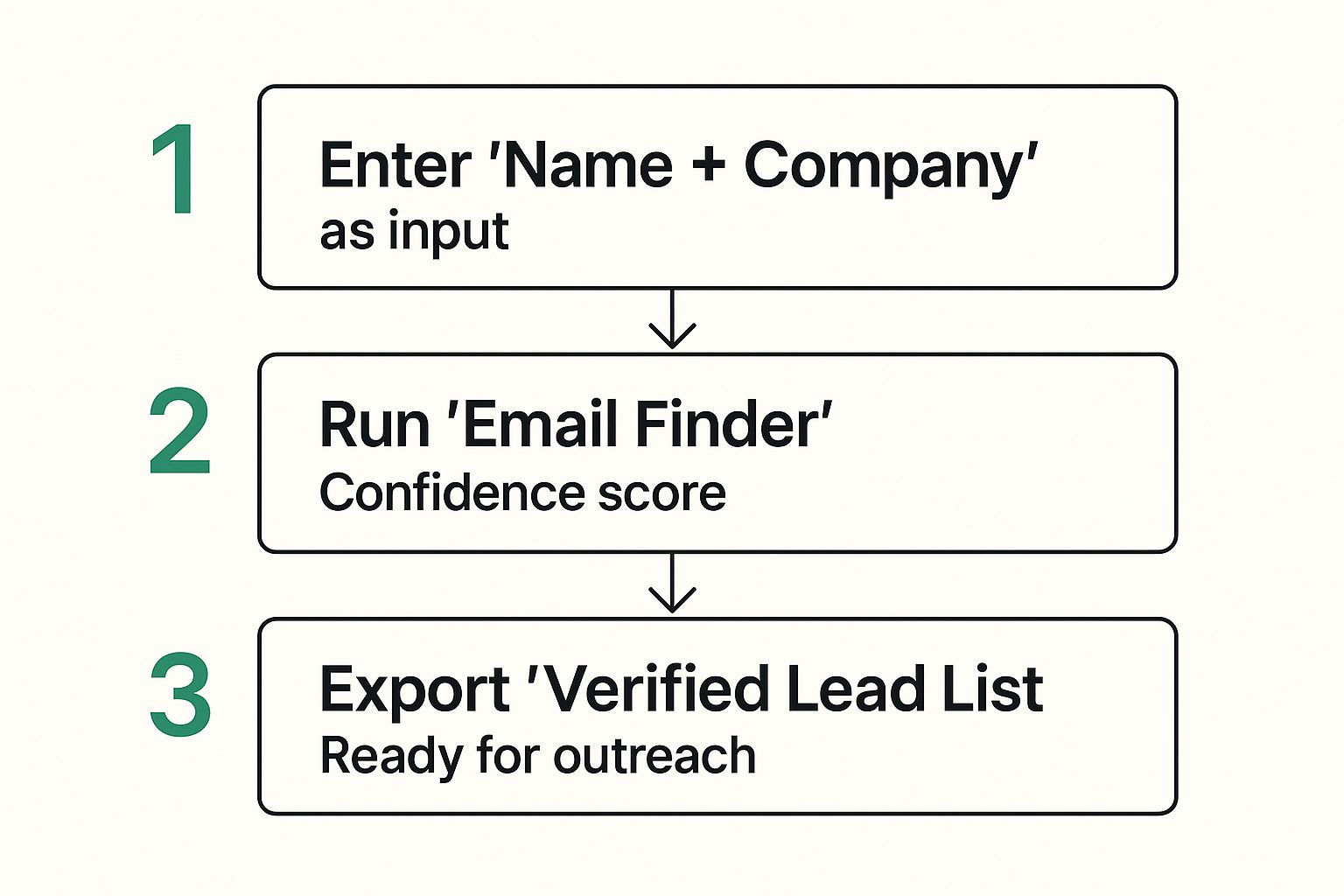
    This infographic lays out the simple but powerful workflow.

    Infographic about find a business email

    It really breaks down how you can turn a couple of data points into a verified lead list that's ready to go.

    From a Name to a Verified Lead

    The process itself is refreshingly direct. You plug in the prospect’s full name and their company domain into the tool. From there, the software goes to work, scanning public data, analyzing common email patterns for that specific company, and cross-referencing everything to deliver one or more likely email addresses.

    Most good tools have a clean interface, letting you jump right into a search without any fuss.

    A critical feature to look for is the confidence score. This is usually a percentage that tells you how certain the tool is that the email is correct and deliverable. A score above 90% is a great sign, meaning you can hit "send" with a high degree of confidence.

    Pro Tip: If a tool gives you a few different email options, always go with the one with the highest confidence score. If the scores are neck-and-neck, see if one format matches other known emails from that company (like first.last@company.com).

    Handling Search Results and Building Lists

    It's common for a search to kick back a few results with different confidence levels. You might see something like this:

    • jane.doe@fintechstartup.com (95% confidence)
    • jdoe@fintechstartup.com (70% confidence)

    In this case, the first option is the clear winner. The second one is worth keeping in your back pocket but is much less of a sure thing. This kind of data is gold because it helps you make smart decisions, slash your bounce rate, and keep your sender reputation safe.

    But the real magic happens when you move beyond single searches. The best tools let you handle bulk requests. You can upload a CSV file with hundreds of names and company domains, and the platform will enrich the entire list with verified emails. For anyone building prospecting lists for sales or recruitment, this is an absolute game-changer.

    If you're ready to dive in, our guide on the best email finder tools breaks down the top platforms to help you pick the right one for your needs.

    Integrating Email Finders into Your Workflow

    The smartest way to use an email finder is to make it a natural part of your daily routine. Many tools, including EmailScout, offer browser extensions that plug right into professional networks like LinkedIn.

    This means you can find a business email for a promising prospect directly from their profile page with a single click. The address is found, verified, and can often be saved to a lead list without you ever leaving the page. This seamless integration turns a clunky, multi-step research process into an instant action.

    By automating the grunt work of discovery, you free up your time and energy to focus on what actually matters: crafting great outreach and building real connections.

    Mastering the Art of the Manual Search

    A person using a magnifying glass to inspect a digital screen, symbolizing a detailed manual search.

    Sometimes, even the best tools come up empty. When that happens, it’s time to roll up your sleeves and put on your detective hat. The manual techniques that seasoned pros rely on can often uncover an email that others completely miss.

    This isn’t about just winging it; it's a systematic process of deduction and verification. This hands-on approach is gold when you're chasing high-value contacts or working with a small, targeted list where every single lead is critical. It’s how you turn a dead end into a real opportunity.

    Unlocking Clues with Advanced Search Operators

    Your first stop should be a search engine, but we're going way beyond a basic name search. Advanced search operators are the secret sauce that turns a broad, messy search into a precision strike, helping you filter out all the noise.

    Let's say you're looking for the email of "Sarah Chen" who works at "Innovate Corp." Here’s how you can zero in on it:

    • "Sarah Chen" email site:innovatecorp.com: This command tells Google to only search for her email on the company’s official website.
    • "Sarah Chen" contact filetype:pdf: This is a great one for hunting down contact info buried in PDFs like press releases, conference brochures, or official reports.
    • "Sarah Chen" @innovatecorp.com: This simple query looks for mentions of her exact email address anywhere on the web.

    These simple but powerful tweaks can reveal email addresses tucked away in author bios on blogs, speaker lists for industry events, or company announcements. For more strategies like this, check out our full guide on how to find an email address from a website.

    Pro Tip: Don’t just look for your target's email. Finding the email address of any colleague is a massive clue, as most companies use a standardized format. That brings us to the next step.

    The Art of the Educated Guess

    Once you have a clue about a company's email pattern—or even if you don't—you can start making some educated guesses. The good news is that most businesses stick to a handful of common formats. Your job is to test the most likely combinations.

    For example, if you found a colleague’s email is j.smith@innovatecorp.com, you can be pretty confident that Sarah Chen’s is s.chen@innovatecorp.com. But what if you're starting from scratch?

    You'll want a systematic approach. Below is a list of the most common email formats I see in the wild, prioritized from most likely to least. Start at the top and work your way down.

    Common Business Email Formats to Test

    Priority Email Format Example When It's Most Common
    High firstname.lastname@company.com Very common in mid-to-large-sized corporations.
    High firstinitiallastname@company.com Popular across businesses of all sizes to keep emails shorter.
    Medium firstname@company.com Frequently used in smaller companies or for senior executives.
    Medium firstname.lastinitial@company.com A less common but still prevalent format, especially in tech.
    Low lastname.firstinitial@company.com Used in more traditional or academic institutions.

    After you've built a short list of potential emails, you can pop them into a free email verifier tool. This lets you check which one is valid without ever having to send a test message. It's the crucial final step that confirms all your detective work paid off.

    Mining Social Networks for Email Clues

    So, you've tried the usual tools and manual searches, but you’re still coming up empty. Don't throw in the towel just yet. Your next move should be to check out professional social networks. Platforms like LinkedIn are way more than just a digital resume; they're a goldmine of contact info if you know where to look.

    This is about more than just clicking the "Contact Info" button and hoping for the best. It’s about being a bit of a detective and spotting the subtle clues people leave all over their professional profiles. A little social sleuthing can often turn up a business email that isn't listed anywhere else.

    Dig Into Their Profile Activity

    Start by looking past the main profile page. The real gems are often hiding in a person's activity feed. Check out the content they're sharing, the articles they’ve written, and the comments they leave on other people's posts.

    For instance, did your prospect just share a link to their personal blog or a guest post they wrote for another site? Nine times out of ten, their author bio on that page will include a direct email address. I’ve also seen people drop their email right into a comment thread when asking for more information on a post. It happens more than you’d think.

    Key Takeaway: A person’s digital footprint is much bigger than just their profile. Their posts, comments, and shared content are often breadcrumbs leading straight to the contact info you need.

    Playing by the Unwritten Rules

    After you've done some digging, you might be tempted to just send a connection request and ask for their email. This can work, but you have to be careful not to make a bad first impression. The "why" behind your outreach really matters here.

    Think about these scenarios:

    • When it's okay to ask directly: If you have a legitimate, high-value reason for getting in touch—like a partnership proposal that would benefit them or a perfectly matched job opportunity—a polite, personalized request explaining your purpose is usually well-received. Just be upfront about why you want to connect and why email is the best next step.
    • When to find it another way: For colder outreach like an initial sales pitch, asking for an email right out of the gate can feel a bit pushy. In these situations, it's much better to use the clues you found on their profile to track down their email elsewhere. This approach shows you respect their space and makes your eventual email feel more professional.

    At the end of the day, the goal is to kick off a positive professional relationship. If you can’t easily find a business email after checking their activity, take it as a sign to tread lightly. A thoughtful approach will always beat a forceful one. Your first interaction sets the tone for everything that follows.

    Why Verifying Your Email List Is Non-Negotiable

    A digital shield icon hovering over an email inbox, symbolizing protection and verification.

    Finding a business email is only half the battle. The part people often skip is making sure that address is actually live and kicking. Neglecting this is like crafting the perfect message, putting it in an envelope, and mailing it to an abandoned building. It's a waste of time, and it can actively hurt you.

    When you send emails to dead addresses, they don't just disappear. Every "bounce" sends a negative signal to Internet Service Providers (ISPs) like Google and Microsoft. Rack up enough of them, and your sender reputation takes a nosedive. Soon, even your perfectly good emails start landing in the spam folder.

    Get sloppy enough, and you could even get your entire domain blacklisted. That means nobody in your company can send emails reliably—crippling sales, support, and everything in between.

    Understanding the Layers of Verification

    Not all verification is the same. It's good to know what’s happening behind the scenes to see why some methods are way better than others. It's more than just a quick spell-check.

    • Syntax Check: This is the most basic pass. It just makes sure the address looks right, like name@example.com. It'll catch a typo but won't tell you if that inbox actually exists.
    • Deep SMTP Verification: This is the gold standard. The tool actually pings the recipient's mail server to confirm the specific mailbox is active and ready to receive mail—all without ever sending an email.

    Key Takeaway: Real email verification doesn't just look for typos; it confirms the inbox is alive. This deep check is what separates amateur outreach from professional campaigns that protect your reputation and actually get delivered.

    Keeping Your Outreach Professional and Effective

    A clean email list is the bedrock of any good outreach strategy. Verification makes sure your messages have a fighting chance to be seen by the right person. Our deep dive on email address verification covers the technical side and best practices for keeping your list healthy. It’s a small step that keeps your bounce rate low and your deliverability high.

    And once you've found and verified that email, think about how it will be opened. By 2025, it's estimated that 60% of all emails will be opened on a mobile device. What’s more, a whopping 42.3% of people admit they’ll just delete an email if it looks weird on their phone.

    As these email marketing statistics on Emailchef show, deliverability is just the first hurdle. Verifying your list ensures your mobile-friendly message gets a chance to be seen in the first place.

    Common Questions About Finding Business Emails

    Even with the best tools and techniques, a few questions always seem to pop up when you're on the hunt for a business email. Let's clear the air on some of the most common hurdles people run into. Getting these right will save you a ton of time and let you do your outreach with confidence.

    Is It Legal to Find and Use a Business Email for Outreach?

    This is the big one, and I get it. The short answer is yes, it's generally legal, but you absolutely have to play by the rules.

    In the United States, the CAN-SPAM Act is what you need to know. It sets the guidelines for commercial emails, and the good news is, it doesn't forbid cold outreach to business addresses.

    But—and this is a big but—the law demands that you're transparent and respectful. Every message you send has to:

    • Clearly state that it's an advertisement.
    • Include your valid physical postal address.
    • Provide a dead-simple way for the recipient to opt out of future emails.

    Don't mess around with these. Failing to comply can bring down some seriously hefty penalties. And remember, laws like GDPR in Europe are way stricter. Always do your homework on the specific laws for the region you're targeting.

    The CAN-SPAM Act isn't just for bulk email; it covers all commercial messages, including B2B. A single email violating the act can trigger penalties of up to $53,088. That's not a typo.

    What Is the Best Free Method to Find a Business Email?

    When you’re working with a zero-dollar budget, the best approach is a bit of smart, manual detective work.

    I always start with advanced Google searches. You'd be surprised what you can find with operators like "[name]" email site:company.com. This simple trick tells Google to search for a name and the word "email" only on a specific company's website.

    If that doesn't turn up anything, dig around the company's website. I've found gold in press releases, team bio pages, or even blog author profiles. Once you spot a potential email pattern (like firstname.lastname@company.com), you can pop it into a free email verifier tool to see if it’s legit without actually sending a message. It takes a bit more elbow grease than a dedicated tool, but for one-off searches, it's surprisingly effective.

    How Can I Improve My Success Rate in Finding Accurate Emails?

    If you want to seriously boost your success rate, you need to think in layers. Relying on a single search is a recipe for frustration.

    First, use a reputable email finder tool as your starting point. It's the fastest way to get results at scale.

    But what if the tool comes up empty or gives you a result with low confidence? That's when you pivot to LinkedIn. Cross-reference the person's current role and company to make sure your info is fresh. People change jobs all the time, and out-of-date information is probably the #1 reason for failed searches.

    Finally, and I can't stress this enough, always verify the email address before you hit send. A quick check with a verification tool confirms the address is active and can actually receive mail. This one step will drastically slash your bounce rate and protect the health of your entire outreach campaign.


    Ready to stop guessing and start connecting? EmailScout takes the manual labor out of the process, letting you find verified emails directly from LinkedIn profiles and company websites with a single click. Get started with EmailScout for free today and build your perfect outreach list in a fraction of the time.

  • How to Find a Business Email Address: Proven Methods

    How to Find a Business Email Address: Proven Methods

    Finding a business email often boils down to a bit of smart guesswork, some clever Google search operators, or using a dedicated tool like EmailScout. These aren't just tricks; they're proven ways to get past the generic info@ inboxes and connect directly with the people who make decisions. Getting this right makes your outreach exponentially more effective.

    Why Finding The Right Business Email Still Matters

    In a world buzzing with social media DMs and chatbots, a direct email can feel almost old-school. But here’s the truth: it’s still one of the most powerful and professional ways to kick off a real business conversation. This isn’t about blasting out impersonal, spammy messages. It’s about making a genuine connection with a specific person who can actually move the needle for your business.

    Think about the last time you used a generic "contact us" form. Where did your message go? Most likely, it landed in a crowded, shared inbox, fighting for attention with hundreds of other requests. Knowing how to find a specific business email lets you skip that line completely.

    A targeted email to the right person is the difference between being heard and being ignored. It shows you’ve done your research and respect their time enough to reach out directly.

    This is a critical skill for almost any professional, including:

    • Sales pros who need to connect with key decision-makers.
    • Marketers trying to build relationships for collaborations or guest posts.
    • Job seekers looking to get their resume in front of a hiring manager.
    • Entrepreneurs hunting for partnerships or pitching investors.

    And the numbers don't lie. The financial impact of well-executed email outreach is huge. Email marketing consistently delivers an incredible return, with an average ROI estimated at $36 for every $1 spent. That stat alone shows just how valuable a clean, verified list of contacts is. If you want to dig deeper, check out these B2B email marketing benchmarks to see the full picture.

    Mastering the art of finding and verifying emails gives you a direct line to the people who matter. In this guide, we'll walk through both the clever manual search tactics and the efficient automated tools that will help you build those crucial connections.

    Mastering Manual Search Techniques

    A magnifying glass hovering over a computer screen, symbolizing a digital search for information.

    Before you fire up any automated tools, it’s worth putting on your detective hat. I’m a big believer in getting your hands dirty with manual searching first. It’s a powerful and often overlooked skill that can uncover email addresses with surprising accuracy. Best of all? It’s completely free.

    The trick is to start with a simple, strategic approach to using search engines like Google. By mastering a few key commands, you can cut through the noise and zero in on the exact information you need.

    Harnessing Google Search Operators

    Think of search operators as your secret codes for Google. They tell the search engine to perform a much more specific, targeted search, which is exactly what you need when you're hunting for something as precise as an email address.

    The site: operator is your best friend here. It’s a game-changer because it restricts your search to a single website, letting you comb through a company's domain without any outside distractions.

    Here are a few search strings I use all the time:

    • site:company.com "Jane Doe": This looks for the name "Jane Doe" only on that specific company’s website.
    • site:company.com "Jane Doe" email: Adding the word "email" tells Google to find pages containing both the name and contact-related terms.
    • site:company.com "Jane Doe" contact: Similar to the above, this query helps find contact pages or bios where an email might be listed.

    Pro Tip: Don't forget to try variations of the person's title. A search for "Jane Doe" "VP of Marketing" can yield different results than "Jane Doe" "Marketing Vice President". Combining specific titles with the site: operator is a highly effective strategy.

    Digging Deeper into Company Websites

    While a savvy Google search is a great start, the company’s website itself is a goldmine if you know where to look. Too many people stop at the main contact page, but the real gems are often buried a little deeper.

    Key Places to Check on a Website

    When I'm trying to find an email manually, these are the first pages I check:

    • About Us or Team Page: This is the most obvious first stop. Many companies proudly display their leadership team with bios, and you'll often find direct email addresses included right there.
    • Press Releases or Newsroom: I always check the "Media" or "Press" section. Press releases almost always include a contact person's name, title, and email for media inquiries. This is frequently a high-level marketing or communications manager.
    • Author Bios on Blog Posts: If your prospect has written for the company blog, their author bio at the top or bottom of the article is a prime spot for an email address. This is incredibly common for subject matter experts within an organization.
    • Case Studies and White Papers: Any downloadable PDF is worth a look. These documents are often authored by specific individuals. Look for a byline or a "contact the author" note inside the PDF itself or on the landing page where you downloaded it.

    Try Smart Guessing and Permutation Strategies

    Sometimes, the simplest tricks are the most effective. Instead of diving down a rabbit hole of complex searches, you can often pinpoint a business email address with a bit of smart guesswork. This works surprisingly well because most companies use a standardized, predictable format for their email addresses to keep things consistent.

    A person's hands typing on a laptop with code-like text on the screen, representing generating email permutations.

    The idea is straightforward: find just one confirmed email from the company, and you’ve likely cracked the code for everyone else on the team. If you know the marketing manager's email follows a certain pattern, you can bet the sales director you're trying to reach uses the same one. This turns a wild guess into a calculated move.

    Decoding Common Email Patterns

    Companies usually stick to one of a handful of common patterns. Your first move is to generate a list of the most likely combinations for your contact. Let’s say you’re trying to reach Jane Doe at a company with the domain AcmeCorp.com.

    Your list of potential emails might look something like this:

    • First Name: jane@acmecorp.com
    • First Initial + Last Name: jdoe@acmecorp.com
    • First Name + Last Name Initial: janed@acmecorp.com
    • First Name . Last Name: jane.doe@acmecorp.com
    • Full Name: janedoe@acmecorp.com

    You can spin these up in a simple spreadsheet in a matter of minutes. Just list the most common formats, plug in your contact’s details, and use a quick formula to combine them. Now you have a targeted list to test instead of just guessing randomly.

    Smart guessing isn't about throwing darts in the dark; it's about systematically testing the most probable patterns until you find the one that works. It’s a game of logic, not luck.

    The Critical Verification Step

    Just because you have a list of potential emails doesn't mean your job is done. Sending a message to every single permutation is a terrible idea—it's inefficient and can seriously damage your sender reputation if too many of your emails bounce.

    This is where verification becomes an absolutely essential step. You have to confirm which of your guessed addresses is valid before you hit send.

    Verification ensures your outreach actually lands in an inbox. Globally, email continues to deliver an incredible ROI, pulling in between $36 and $40 for every dollar spent. But that return is completely dependent on deliverability. Some large organizations even report inbox placement rates as low as 27%.

    You can dig into more of these email marketing statistics and their impact. Using a tool to verify your guessed addresses is a small step that protects this massive potential ROI by preventing bounces and keeping your sender score healthy.

    Leveraging Social and Professional Networks

    An image showing logos of social media platforms like LinkedIn and Twitter with network connection lines between them, symbolizing professional networking to find contacts.

    Sometimes your prospect's email is hiding in plain sight. Social and professional networks are way more than just places to connect and share updates—they’re goldmines of information, as long as you know where to look.

    Platforms like LinkedIn and Twitter can be surprisingly effective for finding business emails. You just have to move beyond a surface-level search.

    The trick is to think like a detective. Pay close attention to the details people share about themselves and their work. This method takes a bit more finesse than a simple search, but the payoff is often a direct, personal contact.

    Beyond the LinkedIn Contact Info Button

    Everyone knows to check the "Contact Info" button on a LinkedIn profile. But the real pros know the best clues are often found somewhere else entirely. You can uncover some great hints without even being a first-degree connection.

    Here are a few spots I always check:

    • The "About" Section: You'd be surprised how many professionals drop their email right in their summary. They want recruiters and potential collaborators to find them easily.
    • Profile Banner Image: I've seen countless consultants and founders customize their banner image to include their website and email address. It’s prime real estate, after all.
    • Recent Posts and Articles: If your contact is active, scan their recent posts. They might have shared their contact info while promoting a project or a webinar.

    This kind of manual digging on LinkedIn really works. For a much deeper dive, check out our complete guide on how to find emails on LinkedIn. It's packed with advanced techniques that pick up right where these tips leave off.

    Remember, the goal is to find information that is publicly shared, not to breach privacy. If an email is in their bio or a public post, it's generally considered fair game for professional outreach.

    Using Twitter's Advanced Search

    Twitter (now X) can also be a fantastic source if you know how to use its search features. Lots of users have shared their email address at some point, often using creative spellings to dodge spam bots.

    Your strategy here is to fire up Twitter's Advanced Search and look for tweets from a specific user containing keywords like "email" or "contact."

    Try searching for phrases like:

    • (at) or (dot) instead of "@" and "."
    • jane [at] acme [dot] com
    • email me at
    • reach me at

    Just plug these phrases into the search bar along with the person's Twitter handle in the "From these accounts" field. This can quickly surface old tweets where they shared their details. When you reach out, it’s always good practice to mention where you found their email—it adds context and helps build a little trust from the get-go.

    Automating Your Search With Email Finder Tools

    Manual methods are great when you’re looking for just a handful of contacts, but they simply don’t scale. If you need to find dozens or hundreds of business emails for a sales campaign, you absolutely need automation. This is where email finder tools come in, transforming a painstaking manual chore into something fast and efficient.

    These tools are workhorses. They scrape public data, tap into their own proprietary databases, and run all sorts of permutation algorithms in the background to find and verify emails in seconds. Instead of you sitting there guessing between j.doe@ and jane.doe@, the software does it for you at a massive scale. It's a huge time-saver.

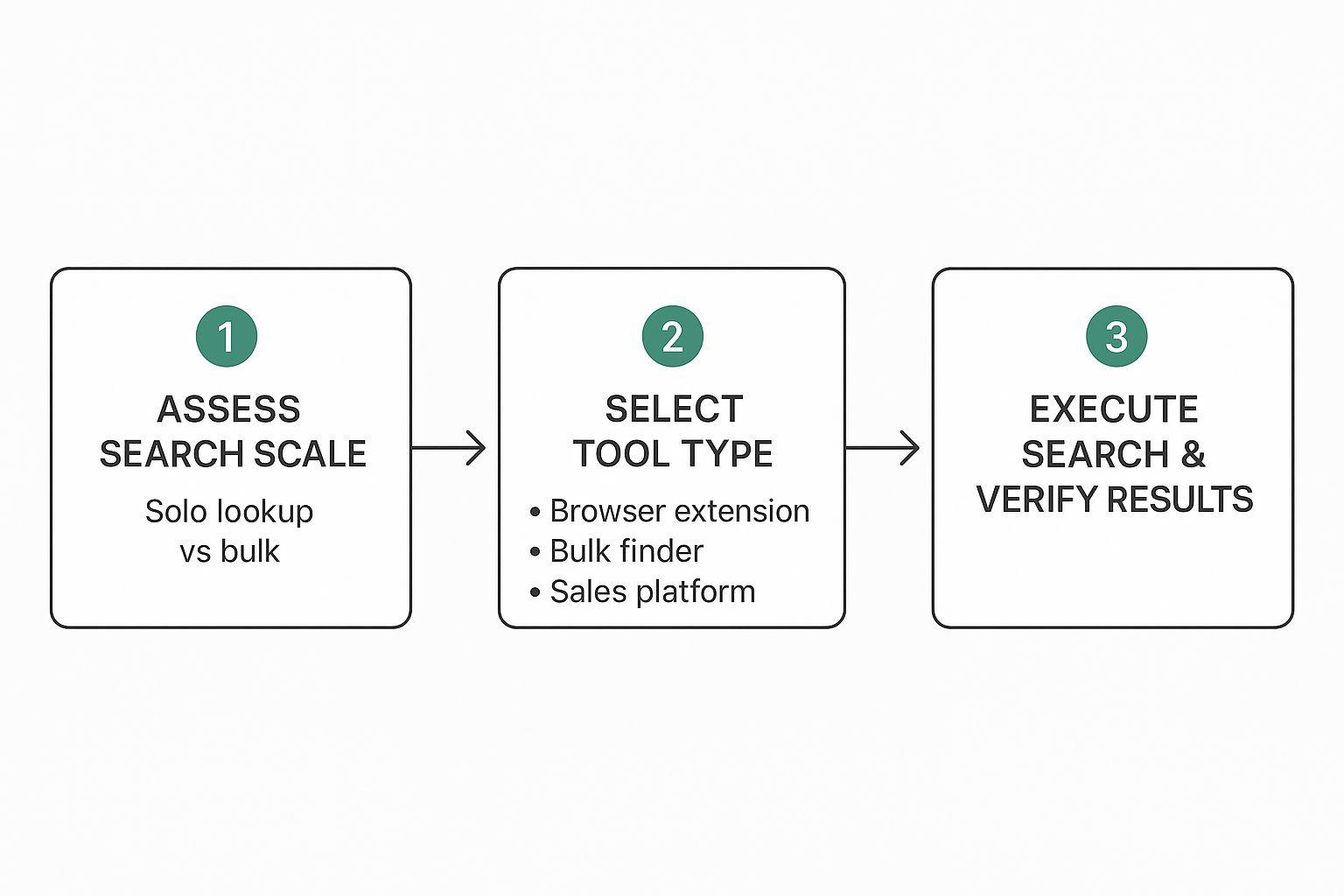
    This infographic breaks down how to pick and use these tools for whatever you’re trying to accomplish.

    Infographic about how to find a business email address

    The main takeaway here is to match the tool to the task. Don't grab a bulk finder for a single lookup, and don’t expect a simple browser extension to handle your 1,000-person prospect list.

    Choosing the Right Type of Tool

    Not all email finders are created equal. I've found they generally fall into three buckets, each built for a different kind of workflow. Figuring out these differences is the first step toward picking the right tool for your goals and budget.

    Here’s a look at the different categories and how you can decide which is best for your specific needs.

    Comparing Email Finder Tool Types

    Tool Type Typical Use Case Pricing Model Example Tools
    Browser Extensions On-the-fly lookups while browsing LinkedIn or company sites. Freemium or monthly subscription. Hunter, Lusha
    Bulk Finders Enriching a spreadsheet of names and companies with email addresses. Credit-based (pay per email) or subscription. VoilaNorbert, FindThatLead
    All-in-One Platforms A complete sales outreach suite with CRM, sequencing, and analytics. Higher-tier monthly or annual subscription. SalesLoft, Outreach

    As you can see, the right choice really hinges on how you plan to use it—whether for quick, individual searches or for building massive campaign lists.

    Let's dig a bit deeper into these categories:

    • Browser Extensions: These are my go-to for on-the-fly prospecting. A tool like EmailScout works as a Chrome extension, letting you pull an email right from a LinkedIn profile or company website with one click. They're perfect for salespeople and recruiters who are actively hunting for leads.
    • Bulk Finders: Got a spreadsheet full of names and companies? A bulk email finder is your best friend. You just upload your list (usually a CSV file), and the service spits it back out, enriched with verified emails. This is the engine for marketing teams building large-scale campaign lists.
    • All-in-One Sales Platforms: Think of these as the complete ecosystem for sales and outreach teams. They bundle email finding with other critical features like CRM integration, email sequencing, and deep analytics. It’s a bigger investment, but you get a ton of power in one place.

    When you're making a choice, it almost always comes down to a trade-off between cost, features, and accuracy. Free tools can be great for occasional use, but I've consistently found that paid options deliver much higher accuracy rates and essential features like real-time verification.

    Key Features to Compare

    It's easy to get lost in the sea of features when you’re evaluating different email finders. In my experience, you should zero in on the metrics that directly impact your campaign’s success. As you start exploring your options, including looking into some of the best free email finder tools, keep these critical factors top of mind.

    Here’s what really moves the needle:

    1. Accuracy and Verification: How good is the data, really? Look for services that give you a confidence score or, even better, perform real-time verification to confirm an email is deliverable before you use it. A tool that boasts 95% accuracy is far more valuable than one with a giant database of unverified, stale contacts.
    2. Pricing Model: Most tools run on a credit-based system, where one credit gets you one email lookup or verification. You’ll want to compare the cost per credit and find out if unused credits roll over to the next month. For heavy users, some platforms offer unlimited plans that can be much more cost-effective.
    3. Integrations: The best tool is one that fits seamlessly into your existing workflow. Check for native integrations with your CRM (like Salesforce or HubSpot), spreadsheet apps (like Google Sheets), and any other sales software you rely on. Good integration saves a ton of time and prevents those annoying manual data entry errors.

    The Crucial Step: Verifying Business Email Addresses

    Finding what you think is the right business email is only half the job. Without verification, you're essentially launching your carefully crafted message into a black hole and just hoping for the best.

    This is a non-negotiable step for any serious outreach campaign. It doesn’t matter if it’s for sales, marketing, or networking—skipping this will sink your efforts.

    Sending emails to unverified addresses racks up a high bounce rate, a massive red flag for email providers like Google and Microsoft. A few bounces might seem harmless, but they add up fast and absolutely tank your sender reputation. A poor reputation means more of your future emails—even the ones sent to valid addresses—will land in spam or get rejected outright.

    A smaller, verified list is always more valuable than a huge, unverified one. Prioritizing quality over quantity protects your domain's health and ensures your messages are actually seen.

    The consequences of skipping verification are severe. Consistently high bounce rates can land your domain on an email blacklist, making it nearly impossible to reach anyone's inbox. That's a nightmare scenario for any business that relies on email.

    Why Verification Is About More Than Just Deliverability

    Beyond just protecting your sender score, verifying business emails has become a crucial security measure. Today, Business Email Compromise (BEC) attacks account for a staggering 73% of all reported cyber incidents.

    Scammers use sophisticated methods to find and exploit business emails for fraudulent activities, like fake wire transfers that average $24,586. Verifying contact information helps ensure you're talking to a real person, not a potential threat. You can dig into more of these business email compromise statistics and their impact on security.

    Fortunately, verifying an email is pretty straightforward. You can use free mail tester tools for a quick spot-check on a single address. For anything more serious, professional services and many email finder tools have verification built right in.

    For a deeper look at the process, check out our guide on how to validate an email address to protect your outreach efforts.

    Common Questions About Finding Business Emails

    When you're first learning how to find business emails, a few questions pop up almost immediately. Let's tackle them head-on so you can feel confident in your outreach.

    Is This Actually Legal to Do?

    Yes, finding and emailing a business address is perfectly legal in most places, including the United States. You just need to play by the rules, like those outlined in the CAN-SPAM Act.

    This means your email must:

    • Have an honest subject line that isn't misleading.
    • Include a clear and simple way for them to opt out.
    • Display your physical business address.

    Just be mindful of where your recipient is located. If you're reaching out to someone in Europe, for instance, you'll need to consider stricter regulations like GDPR.

    What Is the Most Accurate Method?

    There's no single method that's 100% foolproof, but high-quality, paid email finders with real-time verification get you the closest. These tools are so effective because they check multiple data sources at once to confirm an email is active and deliverable.

    For one-off searches, you can't go wrong with a manual approach. Digging through a company's website and LinkedIn profile is still a very reliable—though definitely slower—way to find what you need.

    The best strategy is often a hybrid one. Use automation to build your lists at scale, but double-check your most important, high-value prospects by hand. This mix of speed and precision is what gets the best results.


    Ready to stop guessing and start connecting? The EmailScout Chrome extension finds verified email addresses in a single click, right from LinkedIn or company websites. Try EmailScout for free and streamline your outreach today!

  • Find a Business Email Address Instantly & Easily

    Find a Business Email Address Instantly & Easily

    The goal isn't just to find an email address; it's to find the right one. You want to bypass those generic inboxes like info@company.com and connect directly with a decision-maker.

    This direct line of communication is a game-changer. It can dramatically boost your response rates, shrink your sales cycle, and let you personalize your outreach in a way that actually gets noticed. It’s the difference between shouting into a void and starting a real conversation.

    Why Direct Email Access Transforms Your Outreach

    Sending a cold email to a generic company address is like putting a letter in the mail addressed to "Current Resident." Sure, it might get delivered, but the odds of it landing in the right hands are slim to none.

    I learned this the hard way early in my career. I spent weeks pitching a major client through their 'contact us' form, and all I got was radio silence. Frustrated, I tried a simple pattern-guessing trick to figure out the VP of Marketing’s direct email. One personalized message later, I had a meeting on the books.

    That single experience drove home a critical lesson: direct access is a massive strategic advantage.

    Cut Through the Noise and Get Noticed

    Decision-makers are absolutely flooded with messages every single day. A generic inbox is usually managed by an administrative assistant or, even worse, an automated system designed to filter out anything that looks like a sales pitch.

    By finding a direct business email address, you instantly sidestep all of that. Your message lands exactly where it needs to be, giving you a fair shot at making a genuine first impression with the one person who can actually say "yes."

    Key Takeaway: Bypassing the gatekeepers isn't about being sneaky—it's about being efficient. You respect everyone's time by taking your proposal directly to the person most qualified to evaluate it.

    Enable True Personalization and Build Relationships

    You can't really personalize a message for "info@." A direct email, on the other hand, lets you address someone by name, reference their specific role, or mention a recent company win. That level of detail shows you’ve done your homework and aren't just blasting out a generic template.

    This is more important than ever because email remains a dominant force in business.

    Despite the rise of social media and messaging apps, global email usage is projected to grow from 4.83 billion users in 2025 to 5.61 billion by 2030. That continued reliance on email underscores its power, especially when you consider that personalized campaigns can deliver an average ROI of $36 for every $1 spent.

    When you connect directly, you stop being just another salesperson. You become a potential partner starting a real conversation. You can find more insights on these email trends from cloudhq.net.

    Your Toolkit for Instant Email Discovery

    Let’s be honest: guessing email patterns and manually digging through websites is slow and unreliable. It has its place, but when you need to find a business email address right now, you need a dedicated tool. These platforms are built to do the heavy lifting, pulling from massive databases and using smart algorithms to give you accurate contact info in seconds.

    For anyone in sales, marketing, or biz dev, an email finder like EmailScout is an absolute game-changer. It’s the difference between crossing your fingers and hoping your outreach lands, and knowing it will.

    Putting an Email Finder to the Test

    Let’s walk through a real-world example. Say you need to get in touch with the Head of Marketing at a SaaS company called "Innovate Solutions." You know their name is Jane Doe, but that’s it.

    With a tool like EmailScout, you just plug in her name and the company's domain (innovatesolutions.com). The tool then gets to work, checking common email formats and verifying them against its data sources. In just a few moments, you get a result.

    The platform will likely return an address like jane.doe@innovatesolutions.com, but here’s the important part: it also gives you a confidence score. This little number is gold—it tells you how likely it is that the email is correct and active. A high score (think 95% or more) means you can hit "send" with confidence, knowing you won't get an immediate bounce-back.

    For a more detailed look at the mechanics behind this, check out our guide on how to find company email addresses.

    This is the kind of clean, no-fuss interface you'll be working with to find contacts in seconds.

    Image

    The sheer simplicity of the process is what makes it so powerful. You can build highly targeted lists without spending hours on manual grunt work.

    Choosing the Right Tool for the Job

    While a primary tool like EmailScout is your workhorse, a smart outreach strategy always includes a few complementary options. Different tools have different strengths, so having a couple in your arsenal means you can cross-verify information and track down even the most elusive contacts.

    Pro Tip: Never rely on a single source. If one tool comes up empty or gives a low confidence score, run the same search in another. Cross-verification is the secret to maintaining a high-quality, bounce-free contact list.

    So, with so many tools out there, how do you pick the right one? I've spent countless hours testing these platforms, and here’s a quick breakdown of the top players to help you decide.

    Comparing Top Email Finder Tools

    A head-to-head comparison of popular email-finding tools based on key features, accuracy, and ideal use cases to help you choose the best fit.

    Tool Name Best For Key Feature Accuracy Rate
    EmailScout All-around performance and ease of use Real-time verification and confidence scoring 95%+
    Hunter Finding emails associated with a specific domain Domain search and bulk email finder ~90%
    Voila Norbert Lead enrichment and verification at scale Integrations with CRMs and marketing platforms ~92%
    Snov.io Sales teams needing an all-in-one outreach suite Email drip campaigns and CRM functionality ~88%
    FindThatLead Social media prospecting and finding local leads Prospector tool for LinkedIn and Twitter ~85%

    Ultimately, the best tool depends entirely on your workflow. If you just need quick, accurate lookups, a focused tool like EmailScout is perfect. But if you need a full sales automation suite, something like Snov.io might be a better fit. The key is to find the one that slots seamlessly into how you already work.

    Getting Your Hands Dirty With Manual Search Techniques

    Sometimes, the automated tools just don't cut it. When you hit a wall, it’s time to roll up your sleeves and do some good old-fashioned detective work. Manual searching might feel a bit old school, but trust me, it’s an incredibly effective way to unearth a business email address that the tools might have missed.

    The whole game is about recognizing patterns and knowing exactly where to poke around.

    Image

    Most companies use a predictable formula for their email addresses. All you need is one verified email from the organization, and you can usually decode the pattern for everyone else. This is your first and most powerful manual tactic.

    Decoding Common Email Patterns

    Start by hunting for any publicly available email on the company's website. Press releases or a "Meet the Team" page are often goldmines. Let's say you find an email like j.smith@company.com. It’s a pretty safe bet that your target, Jane Doe, will be j.doe@company.com.

    You'll run into the same few formats over and over again:

    • First Name: jane@company.com
    • First Initial, Last Name: jdoe@company.com
    • First Name, Last Initial: janed@company.com
    • Full Name with a Dot: jane.doe@company.com
    • Full Name with an Underscore: jane_doe@company.com

    Once you have a handful of educated guesses, run them through a free email verifier. This quick check confirms which ones are valid without you having to send a single email and risk a bounce.

    My Experience: I was once trying to reach an elusive CEO whose contact info was completely scrubbed from the web. After digging into their company blog's source code, I found a developer's comment that included their email (first.last@company.com). I applied that same pattern to the CEO's name, sent my pitch, and landed a meeting the very next day. The clues are often hiding in the most unexpected places.

    Using Advanced Search Operators

    Google is more than a search engine; it's a powerful investigative tool if you know the right commands. These "search operators" are simple prefixes that let you narrow down search results with surgical precision.

    For example, you can tell Google to only search a specific website for your target's name along with the word "email." To go even deeper on this, check out our comprehensive guide on how to find anyone's email address.

    Give these powerful search strings a try—just swap out the bracketed info with your own:

    1. Find contact pages or staff directories:
      site:[companywebsite.com] (contact | staff | directory)
    2. Search for a person's name and email:
      "[Jane Doe]" + email site:[companywebsite.com]
    3. Uncover documents containing contact info:
      site:[companywebsite.com] filetype:pdf "Jane Doe"

    Strategic LinkedIn Sleuthing

    LinkedIn is a treasure trove of professional information, but not always in the most obvious way. People rarely list their email address publicly on their profile, but their activity can drop some serious breadcrumbs.

    Always check the "Contact info" section on their profile first. If that comes up empty, look at their recent posts, articles, or comments. A person might mention a personal blog or a side project in their bio, and their contact information is often more accessible there. This kind of indirect approach is frequently the key to finding what you need.

    What To Do When You Can’t Find Their Email

    So, you’ve run through your usual tools, done the manual checks, and still come up empty. It’s easy to throw in the towel here, but don't. The truth is, the most valuable contacts are often the hardest to find for a reason, and a little creative thinking is all you need to get past the roadblocks.

    Image

    This is where we graduate from simple searching to some real strategic sleuthing. The mission? To track down those less-obvious digital breadcrumbs that lead straight to your target's inbox.

    Look Beyond the Company Website

    Your prospect's digital life doesn't start and end on their company's "About Us" page. Professionals are often active participants in their industry, which means they're leaving clues all over the place. You just have to know where to look.

    • Industry Publications: Has your contact ever penned an article for a trade journal or an industry blog? The author bio at the top or bottom of the page is a goldmine. It frequently includes a direct email address for feedback or inquiries.

    • Press Releases: It's worth digging through a company's press releases, especially older ones. The media contact listed on a release from a few years back might just be the very person you're trying to reach now.

    These spots are often overlooked, which makes them incredibly valuable for anyone willing to do a little extra digging.

    Check Out Social Media Bios and Company Newsletters

    Social media is another fantastic resource, but again, you need to know where to poke around. A LinkedIn profile probably won't have an email listed publicly, but a personal Twitter or Mastodon bio just might—especially for founders, marketers, or anyone building a personal brand.

    Here's another trick that works surprisingly well: subscribe to the company's newsletter. I know it sounds a bit counterintuitive, but many of these aren't sent from a generic "no-reply" address.

    When you hit 'reply' on a welcome email or a new campaign, your message can sometimes land directly in the marketing manager's personal inbox. This gives you an incredibly warm and direct entry point.

    This tactic is brilliant because it bypasses the usual gatekeepers and starts a conversation in a context they already own. It also shows you have a genuine interest in their company before you even think about making your pitch.

    Why All This Effort Still Matters

    These creative methods are worth your time because email remains the undisputed king of business communication. Projections show that the number of global email users is set to grow from nearly 4.6 billion in 2025 to over 4.8 billion by 2027.

    And it’s not just about numbers. With 60% of consumers saying they prefer to be contacted by brands via email, it's the channel where people actually expect to receive professional outreach. The engagement rates speak for themselves, with 88% of users checking their inbox multiple times a day. A well-placed email is almost guaranteed to be seen.

    You can dive deeper into these compelling email statistics over at Porch Group Media.

    Using Your Newfound Contacts Ethically

    Okay, so you've got a list of business emails. The hard part is over, right? Not exactly. Finding the contact info is just the first step—how you use it is what separates a successful campaign from a one-way ticket to the spam folder.

    Let's be real: great power comes with great responsibility. Misusing a direct line to someone's inbox is the fastest way to burn a bridge before you've even had a chance to build it.

    The goal isn't just to get a response. It’s to start a meaningful conversation. That means shifting your entire mindset from "What can I get?" to "What can I give?"

    The Golden Rule of Cold Outreach

    Before you even think about hitting 'send,' your email needs to pass one simple test: is it genuinely helpful to the person receiving it?

    Your very first message has to provide immediate value. I don't mean offering a discount or a free trial. I mean sharing a relevant insight, a useful resource, or a thoughtful observation about their company or work.

    Instead of a generic pitch, try sending a link to an interesting case study that applies to their industry. Or, mention a recent project they launched and offer a genuine compliment. This approach respects their time and instantly positions you as a helpful peer, not just another salesperson trying to make a buck. Personalization is everything here.

    The modern inbox is a minefield, and people are rightfully wary. In fact, roughly 25% of all emails in recent years were flagged as malicious or spam. Your outreach has to cut through that noise and immediately signal that it’s legitimate and valuable, or it’s getting deleted.

    The Litmus Test: Read your draft out loud from your prospect's point of view. Would you be annoyed to get this, or would you be a little intrigued? If you hesitate for even a second, go back and inject more value.

    Respecting Privacy and Regulations

    Ethical outreach isn't just a nice idea—it's the law. You have to understand and follow the legal frameworks designed to protect personal data. Rules like GDPR in Europe and the CAN-SPAM Act in the U.S. aren't optional guidelines. They're requirements.

    Here are the core principles you absolutely have to live by:

    • Be Transparent: Clearly state who you are and why you're reaching out. No mystery meat emails.
    • Provide an Opt-Out: Every single email must include a clear, easy-to-find way for the person to unsubscribe.
    • Honor Requests Promptly: If someone asks to be removed, do it immediately. No questions asked.

    Building a solid professional reputation is a long-term game. When you use a business email to offer genuine value, you're doing more than just generating a lead; you're building trust.

    For some more specific strategies, like contacting property managers, check out our guide on finding hundreds of emails from a simple Google search.

    A Few Common Questions About Finding Emails

    Even when you've got the right tools and a solid game plan, a few questions always seem to pop up when you're on the hunt for business emails. Let's walk through some of the most common ones I hear.

    Is It Actually Legal to Email Someone I Don’t Know?

    This is a big one. The short answer is yes, it's generally legal to send cold emails for business purposes, but you absolutely have to play by the rules. In the U.S., the main regulation is the CAN-SPAM Act, and it lays out some clear, non-negotiable guidelines.

    The whole thing boils down to being transparent and respectful. You have to be honest about who you are, include a legitimate physical mailing address, and—this is the most critical part—provide a super simple way for people to opt out. If you ignore these, you're not just being unprofessional; you could be facing some hefty fines.

    The bottom line: The law allows for cold outreach, but it demands accountability. Always, always include an unsubscribe link and make sure you honor those requests immediately. It keeps you compliant and protects your reputation.

    What if I Send an Email to the Wrong Address?

    Mistakes happen. Sending an email to an address that doesn't exist will almost always trigger a "bounce-back" notification. It's just an automated message from the server letting you know the email couldn't be delivered.

    One or two of these isn't a big deal. But if you're getting a lot of them, your email service provider will notice. A high bounce rate is a red flag that can damage your sender reputation, making it more likely that your future emails land in the spam folder. This is exactly why running your list through a verification tool first is a non-negotiable step.

    How Accurate Are These Email Finder Tools, Really?

    Their accuracy can be all over the place, but the top-tier tools are incredibly reliable. A platform like EmailScout, for example, consistently hits an accuracy rate of 95% or even higher. How? They don't just pull data from one place; they check against multiple public sources and run real-time verification checks to confirm an address is active before they give it to you.

    These tools are lightyears ahead of manual guesswork. They use smart algorithms to figure out the most likely email format for a company and then test it on the spot.

    That said, no tool is perfect. People change jobs, and companies restructure their email patterns. A small percentage of emails will always go out of date. That's why it's a good idea to pick a tool that gives you a confidence score along with the email address.

    Should I Actually Pay for an Email Finder?

    If you're serious about sales, marketing, or even just networking, then yes—a paid tool is an investment that pays for itself almost immediately. Free tools might seem tempting, but they're often hobbled by major limitations, like giving you only a handful of searches, serving up old data, or skipping verification entirely.

    Think about the ROI. How much is your time worth? A good paid tool eliminates hours of tedious manual searching and verifying. You can build a clean, targeted list in minutes, which frees you up to focus on the stuff that actually drives results: writing a compelling message and starting a real conversation.

    The monthly cost is usually a drop in the bucket compared to the value of landing just one meeting with a key decision-maker.


    Ready to stop guessing and start connecting? EmailScout gives you the power to find verified business email addresses in a single click. Try EmailScout for free and supercharge your outreach today.
    Article created using Outrank