
Before we get into the how, let’s quickly cover the why. Sending emails to dead-end addresses isn't just a waste of time—it actively torpedoes your outreach campaigns. Every bounced email is a red flag for internet service providers (ISPs) like Gmail and Outlook.
It’s like a credit score for your email account. A hard bounce is a missed payment, dinging your sender reputation. The more it happens, the more likely your future emails will end up in the spam folder, never to be seen by even your warmest prospects.
For anyone in sales or marketing, this is a big deal. Your success literally depends on getting your messages read.

The Real Cost of a Messy Email List
A clean list is much more than a vanity metric; it has a direct impact on your bottom line.
When you send to invalid emails, they don't just bounce. They crush your sender score, which tells spam filters to block an extra 20-25% of your legitimate emails from ever hitting an inbox. It’s a ripple effect.
Contrast that with campaigns sent to lists that are over 95% valid. Those see open rates jump to a healthy 31-34%, a huge leap from the dismal 15% you get with unverified lists.
The bottom line is simple: a valid email address is the absolute first step to starting a real conversation. If you skip this, your carefully crafted messages never even get a chance.
Turning Good Practice into a Strategic Edge
For sales pros and marketers, validating emails isn't a chore. It's a strategic move. A verified contact list guarantees you're investing your time and budget talking to real people who could actually become customers.
Beyond the basics, understanding your domain name reputation and email deliverability is a game-changer for getting the most out of your outreach. This foundational work pays off big time, leading to:
- Higher open and click-through rates because you’re actually reaching real people.
- A better campaign ROI by cutting out the wasted sends and focusing on solid leads.
- A stronger sender reputation, which is your ticket to long-term deliverability success.
If you want to go deeper on this, take a look at our guide on how to improve email deliverability. It's packed with strategies for keeping your sender score in great shape.
Your First Line of Defense: A Manual Syntax Check
Before you even think about firing up any fancy tools, your first move should always be a quick visual scan. This simple, manual syntax check is the fastest, no-cost way to weed out the most obvious duds and save yourself from an instant bounce. It all comes down to knowing the basic anatomy of an email address.
Every valid email has three non-negotiable parts: the local part (the stuff before the @), the @ symbol itself, and the domain name. Take jane.doe@example.com—"jane.doe" is the local part, you have the "@," and "example.com" is the domain. If any one of those is missing, you've got a bad email on your hands.
What to Look For
You’d be surprised how many common mistakes you can catch just by looking. Once you know what to watch for, spotting illegal characters or wonky formatting becomes second nature.
For a complete breakdown of what’s allowed and what’s not, you should check out our detailed guide on email address formats. Spending a few seconds on this can spare you a ton of failed deliveries down the road.
Here are some of the most common syntax errors I see all the time:
- Spaces: An email like
jane doe@example.comis a no-go. - Missing @ Symbol: Without the "@," it's not an email address, period.
- Double Dots: Be on the lookout for things like
jane..doe@example.com. That’s almost always invalid. - Strange Characters: Funky symbols like
!,#, or$in the local part are usually a red flag.
A quick scan is a fantastic starting point, but let’s be real—it’s not a silver bullet. A syntax check is fundamental, but it will only ever catch a small fraction of bad emails.
Think of this initial review as your baseline. It helps you decide if an email is even worth the effort of a deeper check. While it’s a great first step, my experience and industry data show that a syntax check alone only catches about 10-15% of invalid emails. This is exactly why you need more than one trick up your sleeve; layering multiple validation methods is the only way to build a genuinely clean list.
Confirming the Domain with MX Record Lookups
Once you've done a quick visual pass, the real work begins: making sure the email's domain can actually receive mail. This is where an MX record lookup becomes your secret weapon, especially when you're staring down a large list.
Think of a Mail Exchange (MX) record as a digital signpost pointing to a domain's mail server. If that signpost is missing or pointing in the wrong direction, no email is ever going to get through. It’s a simple check, but it’s a massive leap in accuracy from just looking at the syntax.
Why This Check Is So Effective
Performing this check is like asking, "Does this business have a mailbox?" before you bother writing and sending a letter. The real power behind email validation lies in MX record lookups because they confirm if a domain has a valid, functioning mail server.
This one step can validate up to 85% of enterprise emails almost instantly, making it an incredibly efficient way to clean up your lists. You can dive deeper into its impact in recent email statistics reports.
This flowchart breaks down the basic components of a valid email address, and you can see how the domain is the foundation of it all.
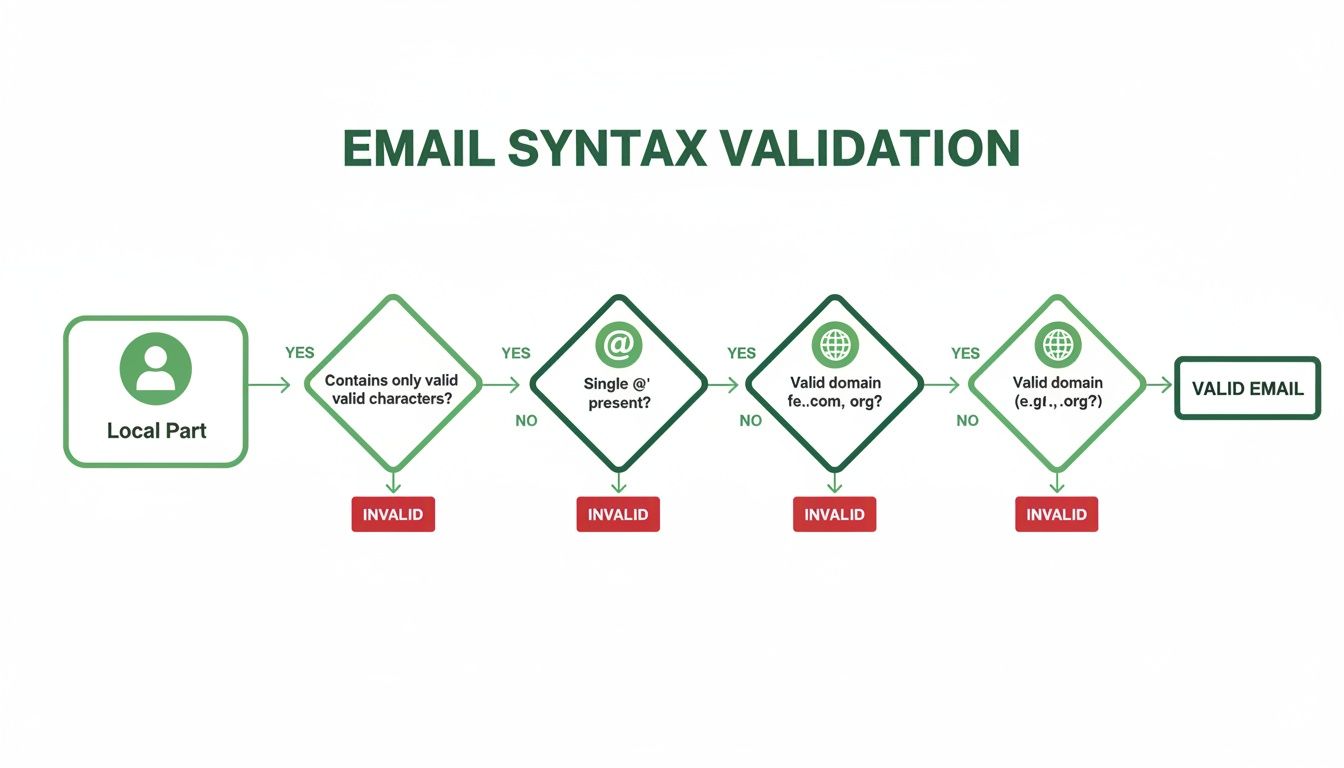
While the syntax and the "@" symbol are essential, the domain's ability to receive mail is the critical final piece.
An MX record check instantly weeds out addresses tied to fake, misspelled, or misconfigured domains. For example, say you have a prospect at jane.doe@acmesolutions.net but the company's real domain is acmesolutions.com. An MX lookup would immediately show that the .net version has no mail servers. Just like that, you’ve saved yourself a bounce and can fix the typo.
A valid MX record doesn't guarantee a specific inbox like
jane.doeexists, but it confirms the most important part: the domain is set up to receive email. This gives you a massive confidence boost in your list quality.
Here's a quick comparison of different manual and semi-automated methods for checking email validity, highlighting their effectiveness and limitations.
Comparing Email Validation Methods
| Validation Method | What It Checks | Effectiveness | Best For |
|---|---|---|---|
| Syntax Check | Format (e.g., name@domain.com) |
Low | Quick, initial cleanup of obvious typos and formatting errors. |
| Domain/MX Check | Domain exists and has mail servers | High | Bulk list cleaning; instantly removes emails at invalid domains. |
| Mailbox Ping | A specific inbox exists | Very High | Final verification for high-value contacts; confirming individual addresses. |
| Verification Service | All of the above, plus more | Highest | Comprehensive, automated validation for all list sizes and types. |
Each method has its place, but the MX record check provides the biggest "bang for your buck" in terms of time spent versus bounces prevented. It’s the foundational check that every other method builds upon.
Pinging the Server to Confirm the Mailbox
Alright, we’ve covered syntax and domain records. Now for the final, most definitive check: directly asking the mail server if an email address actually exists.
This is the digital equivalent of walking up to a building's front desk and asking, "Does Jane Doe have a mailbox here?" This process, often called an SMTP handshake, simulates the start of an email delivery without ever sending a message. You're simply communicating with the recipient’s mail server to get a straight 'yes' or 'no' on whether the inbox is active.
It’s the ultimate test for individual email addresses.
But here’s the catch: trying to do this on your own is playing with fire. Mail servers are built to shut down anything that looks like a spam attack. Sending repeated pings from your IP address is a massive red flag. Make one wrong move, and you could get your entire domain's IP address blacklisted, which means none of your emails will get through.
Why You Need a Pro Service for This
Because the stakes are so high, server pinging is a job best left to the experts. Professional email verification services are built for this. They use a massive, distributed network of different servers to run these checks safely and without drawing negative attention. They handle the tricky communication protocols and give you a simple, clean result.
Using a trusted service for this final check isn't just a good idea—it's essential, especially for your most valuable contacts. You get the highest possible accuracy without risking your entire email outreach operation.
If you're serious about building a clean, high-performing email list, you can't skip this. It’s how you get to be nearly 100% certain an email address is real before you click send. This simple step turns your outreach from a guessing game into a precise, effective strategy that gets results and protects your sender reputation.
Automate and Scale with an Integrated Verifier
The manual checks we’ve gone over are great for spot-checking an address here and there, but they just don't scale. Let’s be real—if you're serious about building a high-quality prospect list, the only way to go is to automate the whole process with a tool that works right where you do. This is how you check if an email address is valid without ever derailing your workflow.
Imagine building a pipeline where every single email you find is instantly verified. That's exactly what an integrated verifier like EmailScout's Chrome extension brings to the table. Features like AutoSave and URL Explorer don't just find contact information; they confirm it’s valid on the spot.
This simple shift ensures your list is clean from day one. For sales teams, it completely flips the script from tedious data entry to high-value outreach.
From Manual Labor to Automated Results
Think about a sales pro building a list of leads from LinkedIn. The old way involves manually copying each email, pasting it into a spreadsheet, and then running separate checks. It’s a grind. An integrated tool, on the other hand, verifies each email in real-time as it's discovered.
This approach saves professionals an estimated 40% of their time on list building alone.
Here’s a quick look at how EmailScout’s auto-verification works in practice.

Those little green checkmarks are your best friend. They confirm that the discovered emails are valid and deliverable, preventing bad data from ever polluting your pipeline in the first place.
Automation isn't just about speed; it's about accuracy at scale. By embedding verification into the discovery process, you eliminate human error and ensure every lead you pursue is a real, reachable person.
It’s also worth noting that many platforms, like Mailchimp, have their own systems for handling invalid addresses to protect your sender reputation. Getting familiar with topics like managing 'cleaned' email lists in Mailchimp can help you get even more out of your automated efforts.
If you’re ready to dive in, exploring the best free email verification tools is a great next step to find a solution that fits perfectly into your existing process.
Answering Your Top Email Validation Questions
Even with the best tools, you're bound to have questions when you're getting serious about email validation. Let's dig into a few of the most common ones I hear from people trying to clean up their lists and boost their outreach.
Is Validation Really Necessary if My List Is Small?
You bet it is. The size of your list doesn't matter to an email service provider—a bad sender reputation is a bad sender reputation. Sending emails to just a handful of invalid addresses can get your messages flagged as spam, which torpedoes your ability to reach anyone at all.
Think of it this way: a small, clean list is always more powerful than a huge, messy one. Quality beats quantity every single time. It's also worth remembering that data decays fast. Some reports estimate that up to 30% of email addresses go bad within a year. You can dig into more of those numbers by checking out these key email statistics and reports.
How Often Should I Be Validating My Email List?
For lists you're actively using for regular campaigns, a quarterly check is a great rule of thumb. If you're running a particularly high-volume campaign or you see your bounce rates starting to creep up, it’s smart to run a verification right before you hit send.
For more static lists that you don't use as often, a yearly check-up is probably enough to clear out the decayed addresses.
The main takeaway here is to treat list hygiene like an ongoing habit, not a one-and-done task. Consistent validation keeps your data accurate, protects your sender score, and makes sure your emails actually get delivered.
Can an Email Address Be Valid but Still Bounce?
Yes, and this is a really important distinction to understand. An email can pass every technical check in the book—correct syntax, valid domain, a positive server ping—and still bounce back. This is what's known as a "soft bounce."
It usually happens for temporary reasons, like:
- A Full Inbox: The recipient's mailbox is maxed out and can't accept new mail.
- Server Is Down: Their mail server might be offline for a bit of maintenance.
- Message Is Too Big: If your email has a huge attachment, it might exceed the server's size limit.
While you can't really prevent these soft bounces, a properly validated list nearly eliminates "hard bounces." Those are the permanent failures from bad addresses, and they’re the ones that do the real, lasting damage to your sender reputation.
Ready to stop guessing and start connecting? EmailScout builds powerful, real-time email verification directly into your workflow, ensuring every prospect you find is a valid one. Try our Chrome extension today and build cleaner, more effective outreach lists from day one. Get started for free at https://emailscout.io.