Category: Uncategorized

  • How to Find Anyone’s Email Address

    How to Find Anyone’s Email Address

    Finding the right email is often the first domino to fall, unlocking a major opportunity. When it comes to the hunt, you really have two paths: old-school manual detective work or firing up a dedicated email finder tool. Which way you go usually depends on whether you're tracking down one VIP contact or building a list of hundreds.

    Why Finding the Right Email Is Still a Game Changer

    Image

    In a world drowning in social media DMs and push notifications, the humble email inbox remains one of the last bastions of direct, focused communication. Sure, other platforms are great for a quick back-and-forth, but a well-crafted email to the right person just hits different. It signals professionalism and serious intent.

    Think of it as the difference between shouting into a crowded room and sitting down for a real, one-on-one conversation.

    Knowing how to find anyone's email address is more than just a party trick; it's a legitimate strategic advantage. It lets you sidestep gatekeepers, bypass clunky contact forms, and escape the dreaded info@company.com black hole. When your message lands directly in the inbox of a decision-maker, your odds of getting a response go through the roof.

    The Strategic Value of a Direct Connection

    A verified email address is your key to unlocking meaningful professional opportunities. It doesn't matter if you're in sales, marketing, recruiting, or just trying to network—direct access is everything.

    Here’s why this skill matters so much:

    • Sky-High Response Rates: An email sent to a specific person is infinitely more likely to be opened and read than one blasted to a generic inbox.
    • Bypassing the Gatekeepers: You get a direct line to founders, hiring managers, or potential partners without getting screened out by assistants or automated filters.
    • Building Real Relationships: A direct email is the start of a personal conversation. It's the foundation for a future partnership, a sales deal, or a career-changing opportunity.

    The inbox is one of the few digital spaces left where you can command someone's undivided attention. Unlike a social media feed designed for distraction, an email invites a focused, thoughtful response.

    Email Is More Relevant Than Ever

    Despite all the new ways we have to communicate, email isn't going anywhere. In fact, it's bigger than ever. The user base is massive and still climbing.

    Projections show that by 2025, there will be 4.59 billion email users globally. That's over half the world's population! This number has exploded from just 10 million users back in 1997, and with an average of 1.86 accounts per user, the total number of inboxes is just staggering. You can dig into more data on global email usage and see for yourself why it remains a critical channel.

    At the end of the day, learning how to find an email address isn't about being sneaky. It’s about being resourceful. It's about valuing the other person's time by making sure your message is relevant, personal, and delivered to the one place it's guaranteed to be seen. It’s the first—and most important—step in making a real connection.

    Mastering Manual Email Discovery Techniques

    Image

    Before you fire up an automated tool, it’s worth trying a bit of old-fashioned digital detective work. Manual email discovery is a solid skill that often gets you the address you need with just some clever thinking. It’s all about piecing together clues that are usually hiding in plain sight.

    The best place to start? Figuring out the company's email pattern. Most organizations use a standard format for their employee emails, which makes them surprisingly predictable. Once you crack the code, you can guess an individual's address with a pretty high degree of accuracy.

    Decode the Company Email Pattern

    Your first stop should be the company's website. The goal here is simple: find just one email address from anyone at that company. That single address will almost always reveal the pattern they use for everyone.

    Common places to look include:

    • The "Contact Us" or "Team" page. Smaller companies, in particular, often list direct emails for key people.
    • Press releases or media kits. These usually have a direct contact email for media inquiries.
    • Blog author bios. If the company has a blog, the author's bio at the end of a post is a great place to check.

    Once you find an example, say j.doe@company.com, you can be pretty confident that firstinitial.lastname@company.com is the format. This simple trick is surprisingly effective and should always be your first move.

    Pro Tip: Don't just look for email addresses. Sometimes, you'll find a person's guest post or an interview on another site. Their author bio in those places often contains the direct contact info you're looking for.

    Use Advanced Google Search Operators

    When a company website comes up empty, Google is your next best friend. But a simple search probably won’t cut it. You need to use search operators—special commands that narrow your search to pinpoint exactly what you need.

    Let's say you're looking for Jane Smith at ExampleCorp. Instead of just typing her name, try these powerful queries:

    • site:examplecorp.com "Jane Smith" email
    • "Jane Smith" contact filetype:pdf
    • intitle:"team" site:examplecorp.com

    The site: operator tells Google to only search that specific website. Putting the name in quotes ensures it searches for that exact phrase. These simple tweaks can uncover resumes, staff directories, or press mentions that a basic search would have buried.

    Sift Through Social and Professional Profiles

    Professional networks are absolute goldmines for contact details. LinkedIn is the obvious starting point; always check the "Contact Info" section on a person's profile. A lot of people keep their email private, but you’d be surprised how many don’t.

    Twitter (now X) is another fantastic resource. Use its advanced search to look for tweets where your target might have shared their email. Try searching for terms like (from:username) "email" or (from:username) "contact". It happens more often than you think.

    Don't forget to check if they have a personal website or portfolio linked from their social media—the email is almost always listed there. For creators, this information is often on their YouTube channel, too. If you’re trying to connect with influencers, our guide on how to get YouTube leads from Google search has more strategies for that. These manual checks only take a few minutes but can quickly get you the direct line you need.

    Using Smart Guesses and Permutation Tools

    Image

    When you've hit a dead end with manual searches, it's time to get a little more strategic. This is where smart guessing—powered up by an email permutation tool—really shines. It’s the perfect middle ground between a simple shot in the dark and full-blown automation.

    The idea here is pretty straightforward. Most companies follow a standard, predictable pattern for their email addresses. Your goal is to crack that pattern.

    Instead of sitting there typing out a dozen different combinations by hand, a free email permutation tool does the heavy lifting for you. All you need is a first name, last name, and the company's domain, and it'll spit out a list of the most common variations instantly.

    Generating Your List of Likely Emails

    Let's run through a quick scenario. Say you’re trying to connect with "Maria Garcia" at a company called nextgen.io.

    An email permutator would generate a list that looks something like this:

    • maria.garcia@nextgen.io
    • mgarcia@nextgen.io
    • maria@nextgen.io
    • mariag@nextgen.io
    • maria_garcia@nextgen.io

    This gives you a solid list of the most probable formats companies use, covering your bases so you don’t miss the right one. It's a fantastic way to turn just a few bits of info into a real list of possibilities. But what you do with that list is what really matters.

    Hold on before you start blasting out messages to every address on that list. That's a one-way ticket to getting your domain flagged as spam, which torpedoes your sender reputation. The whole point is to find the one valid email before you even think about hitting "send."

    Verifying Your Guesses Without Sending an Email

    So, you have your list. Now what?

    There's a slick little trick you can use right inside Gmail to see which address is the real deal—without ever sending a single email. It works by taking advantage of Google's user profile feature.

    Here’s how you do it:

    1. Pop open a "New Message" window in your Gmail account.
    2. Copy and paste one of the email addresses from your list into the "To" field.
    3. Now, just hover your mouse over that address and give it a second.

    If a little pop-up appears with a profile picture and name, you've almost certainly found an active Google account tied to that email. Bingo. If you see nothing, or just a generic grey icon, that address is probably a dud. You can work through your whole list in a minute or two this way to pinpoint the right contact.

    Getting this right is more important than ever. The number of emails sent and received daily is expected to jump from 392 billion in 2025 to a staggering 523 billion by 2030. It’s still the backbone of business communication. To dive deeper into why this channel is so critical, check out the latest trends in email statistics.

    When your manual digging and educated guesses just aren't cutting it, it's time to call in the specialists. Email finder tools are built specifically to automate the discovery process. They'll save you countless hours of grunt work and deliver verified contacts with impressive accuracy.

    These aren't just simple search bots. Think of them as sophisticated platforms that scan public data, proprietary databases, and company websites to pinpoint the right inbox.

    It's a bit like this: searching manually is like panning for gold in a river. Sure, you might find a nugget here and there, but it's slow, tedious work. Using an email finder tool is like having a high-tech scanner that tells you exactly where the gold is buried.

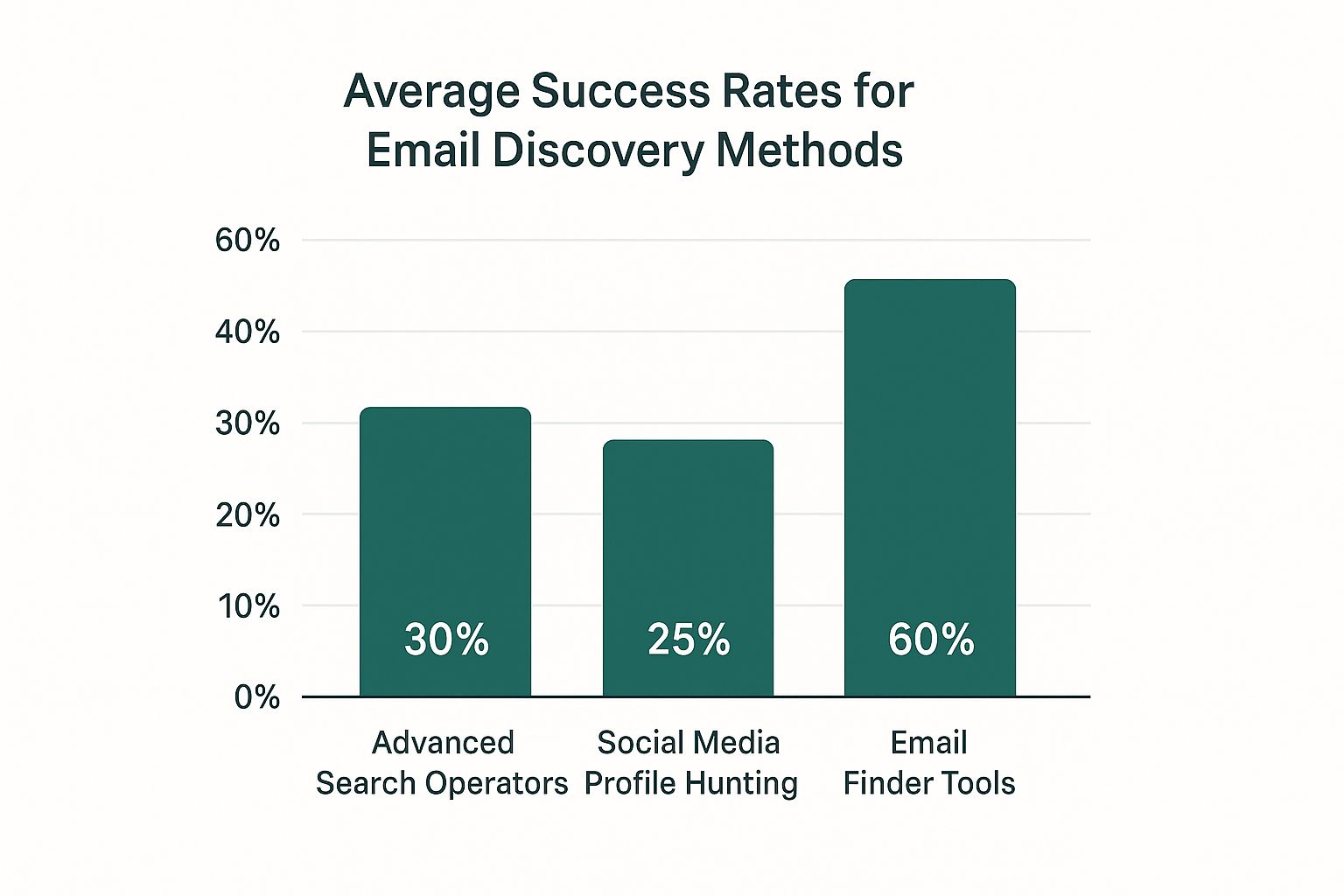
    This chart shows just how much more effective these tools are compared to hunting down emails by hand.
    Image

    The numbers make it pretty clear. While manual techniques have their place for a quick one-off search, dedicated tools give you a dramatically higher success rate. They're an absolute must-have for any serious outreach campaign.

    Types of Email Finder Tools

    Not all email finders are created equal. They generally fall into a few categories, and knowing the difference helps you pick the right tool for the job.

    • Browser Extensions: These are lightweight tools that live right in your browser, often designed to work seamlessly on sites like LinkedIn. They're perfect for on-the-fly searches when you're targeting one or two specific contacts. For instance, a tool like EmailScout lets you find an email with a single click while you're browsing someone's profile.
    • Web Applications: These are more powerful, standalone platforms. They're built for bulk email finding, letting you upload a list of names and company domains to find hundreds—or even thousands—of emails at once.
    • API-Based Services: This one's for the tech-savvy crowd. APIs allow you to plug email-finding capabilities directly into your own apps or CRM, putting your lead generation workflow on autopilot.

    The best approach often involves a combination. I'll use a browser extension for my daily prospecting on LinkedIn, then switch over to a web application when I need to build a big, targeted list for a major campaign.

    How Do These Tools Actually Work?

    At their core, these tools work by combining several techniques to triangulate the correct email address. It starts by identifying a company's email pattern—just like we did manually, but on a massive scale.

    Then, they cross-reference that information with huge databases of publicly available professional data.

    The best tools take it a step further with a real-time verification check. This "ping" confirms that an email address is active and can actually receive mail. This is crucial for protecting your sender reputation and keeping your bounce rate low. If you want to go deeper on this, you can learn more about how to find company email addresses in our detailed guide.

    Choosing the right method can feel overwhelming, so let's break it down.

    Email Finding Methods At a Glance

    This table compares the different approaches we've covered, looking at everything from speed to cost. It's a quick way to see which method best fits your specific needs and resources.

    Method Speed Typical Accuracy Cost Best For
    Manual Guess & Check Slow Low (20-30%) Free Finding a single, high-value contact when you have time.
    Social Media & Web Search Slow to Moderate Low to Medium (30-50%) Free Quick, targeted searches for individuals with a public presence.
    Email Permutator Tools Moderate Medium (50-70%) Free to Low-Cost Generating and testing multiple patterns for a specific company.
    Dedicated Email Finders Fast High (85-98%) Subscription-Based Bulk searches, building large lists, and ensuring high deliverability.

    As you can see, while free methods have their place, nothing beats the speed and accuracy of a dedicated tool when you need reliable results at scale. This efficiency is what makes these platforms indispensable for modern sales and marketing teams.

    Email Outreach Ethics and Best Practices

    Knowing how to find anyone's email is a powerful skill. But as the old saying goes, with great power comes great responsibility.

    Finding an email address is just the starting line. Using it correctly is what separates a professional from a spammer. Before you even think about hitting "send" on that first cold email, you need to understand the ethical and legal lines you should never cross.

    The goal isn't just to get a response; it's to start a real, professional relationship built on respect. That means treating the contact information you've worked so hard to find with care.

    Complying with Email Regulations

    Let's get the legal stuff out of the way first. Regulations like the CAN-SPAM Act in the U.S. and GDPR in Europe aren't just polite suggestions—they're laws with very real penalties.

    While they have their differences, the core principles are all about transparency and consent.

    Here are the non-negotiable rules you have to follow:

    • Be Truthful: Your "From" name, subject line, and the content of your message must be honest. No tricks.
    • Provide a Physical Address: You have to include a valid physical postal address for your business.
    • Offer an Easy Opt-Out: Every single email needs a clear and simple way for the recipient to unsubscribe.

    The golden rule of outreach is simple: if you wouldn't want to receive the email you're about to send, don't send it. Respecting the inbox is the first step to earning a response.

    Best Practices for Professional Cold Outreach

    Beyond the legal minimums, ethical outreach is really about one thing: providing value. Your first email should never, ever be a hard sell. Instead, your job is to show that you've done your homework and have a legitimate reason for getting in touch.

    Personalization is everything. A generic, copy-pasted message is a one-way ticket to the trash folder or, worse, the spam filter.

    Mention a recent project they worked on, a blog post they wrote, or a connection you share. This simple step shows you have a genuine interest and immediately sets you apart from the noise. It’s a common tactic for digital marketers engaging with content creators—and it works because it’s authentic.

    The impact of getting this right is huge. The global email marketing market is on track to grow from $14.8 billion in 2025 to a massive $36.3 billion by 2033. And it's no surprise when you see that 54% of marketers are using personalization to drive engagement. You can find more stats on the growth of email marketing on hostinger.com.

    Ultimately, successful outreach is a long game. Focus on building bridges, not just sending messages.

    Even with the best tools in your arsenal, you're going to hit a few snags when you're learning how to track down anyone's email. Let's walk through some of the most common questions and roadblocks I see people run into.

    Is It Actually Legal to Find and Use Emails for Outreach?

    Yes, it’s generally above board to find and use publicly available business emails for outreach, as long as you play by the rules. The big ones you need to know are the CAN-SPAM Act in the U.S. and GDPR in Europe.

    These laws aren't there to stop you from making legitimate professional connections. They’re really about transparency and being respectful.

    To make sure you're always in the clear, just stick to these core principles:

    • Be Honest: Your "From" name and subject line can't be misleading. They have to accurately represent who you are and what the email is about.
    • Give an Easy Out: Every single email needs a clear, simple way for someone to opt out of future messages. No hoops to jump through.
    • Include Your Address: You have to put a valid physical postal address for your business somewhere in the email.

    Follow these, and your outreach will be professional, ethical, and, most importantly, compliant.

    How Can I Check If an Email Address Is Even Valid?

    Once you think you've found the right email, you absolutely have to verify it before hitting send. Firing off an email to a bad address jacks up your bounce rate, which is a huge red flag for email providers and can wreck your sender reputation.

    An email verification tool is your best bet here. These services ping the server to see if an address can receive mail without actually sending a full message. They usually sort emails into a few buckets:

    • Valid: The green light. This address is active and safe to send to.
    • Risky: This means the server is a "catch-all," so it accepts mail for any address at that domain. These can be a bit of a gamble and have a higher chance of bouncing.
    • Invalid: The address is a dead end. Never send to these.

    I can't stress this enough: verifying an email before you send is non-negotiable. It protects your sender score, boosts your deliverability, and gives your message the best possible shot at actually being seen.

    What Should I Do When I've Tried Everything and Still Can't Find It?

    It happens. Sometimes, no matter how deep you dig, you come up empty. Some people are just really private, or their details aren't floating around on public channels. When you've exhausted all the usual tricks, it’s time to pivot.

    First, try a different channel. A polite, quick message on LinkedIn can work wonders. Just mention you were hoping to connect via email about a specific topic and ask if they'd be open to it.

    Another great move is to try connecting with one of their colleagues. A friendly note to someone in a similar department could get you a warm introduction or at least a nudge in the right direction. Remember, the goal is to make a professional connection. The most direct path isn't always the only one.


    Ready to stop guessing and start connecting? EmailScout is the powerful, easy-to-use Chrome extension that finds verified email addresses in a single click. Build your lists, supercharge your outreach, and connect with decision-makers effortlessly. Find unlimited emails for free and see the difference for yourself. Get started with EmailScout today

    Article created using Outrank
  • How to Find Company Email Addresses Fast and Easily

    How to Find Company Email Addresses Fast and Easily

    Finding the right company email address is what separates a cold outreach campaign that falls flat from one that opens up real, meaningful business conversations.

    The most reliable way to do this? It’s almost always a combination of two things: a little manual digging using free resources like LinkedIn and Google search, paired with a specialized email finder tool to automate the heavy lifting and verify that the address is actually legit. This one-two punch ensures you not only find an address but the right address—one that won't bounce and will land your message in front of the person who matters.

    Why Finding the Right Email Is a Game Changer

    Image

    Before we jump into the nitty-gritty tactics, let’s get the strategy straight. Finding a direct and accurate email isn’t just about dodging a bounce-back notification. It's the first—and most critical—step in building a genuine connection that actually drives results.

    Sending a message to a generic inbox like info@company.com is the modern equivalent of shouting into a crowded room and just hoping the right person hears you. It rarely works. A direct email, on the other hand, puts your message exactly where it needs to be.

    This kind of precision opens doors that would otherwise stay firmly shut. Think about it in real-world terms:

    • For Sales Professionals: A well-crafted email to a VP of Marketing can kickstart a conversation about a major software deal. You get to bypass the usual gatekeepers, potentially shaving weeks off your sales cycle.
    • For Marketers: Reaching out to a specific editor with a personalized pitch is infinitely more effective than chucking it into a general content portal. Your odds of getting a story published skyrocket.
    • For Job Seekers: Contacting a hiring manager directly makes your application leap out from the hundreds of others languishing in an automated applicant tracking system.

    The Tangible Impact on Your Bottom Line

    At the end of the day, effective outreach is a numbers game, and finding the right contact info dramatically stacks the odds in your favor. All the personalization and targeted marketing strategies in the world depend on one thing: accurate data.

    With email marketing delivering an insane ROI of $36 to $42 for every dollar spent, the quality of your contact list has a direct line to your profitability. It's no surprise that by 2025, an estimated 81% of small and medium-sized businesses will be relying on email as their main channel for winning new customers. If you're curious, you can dig into even more email marketing statistics to get the full picture.

    The difference between a generic and a direct email is the difference between being ignored and being heard. One gets lost in the noise; the other starts a conversation that can lead to real business growth.

    Ultimately, mastering how to find company email addresses is so much more than a technical skill. It's a strategic advantage that pays for itself over and over by boosting campaign performance, lowering customer acquisition costs, and helping you build a network of valuable professional contacts.

    Getting Your Hands Dirty with Manual Email Search Techniques

    Image

    While powerful tools can save you a ton of time, you don't always need a paid subscription to get the job done. Honestly, mastering the art of manual email hunting is a skill every good prospector should have. It turns you into a digital detective, piecing together clues from all corners of the web.

    This old-school approach costs nothing but a bit of your time, and it genuinely sharpens your instincts for finding information. It all starts with a simple, targeted Google search—but there's a trick to it.

    Unlocking Google for Email Discovery

    Your first move should be to use specific search strings that dig up contact info buried on a company’s website or in public documents. Just typing a name and a company into Google is a rookie mistake. You need to think like an investigator and use advanced search operators to force Google to show you things that aren't immediately obvious.

    It’s surprisingly effective for finding details that companies have made public, sometimes without even realizing it.

    Here are a few of my go-to search combinations:

    • "John Doe" + "Acme Corp" + email
    • site:acmecorp.com "John Doe" contact
    • "John Doe" "@acmecorp.com"

    For example, a search like site:acmecorp.com filetype:pdf "contact" can unearth old press releases or marketing PDFs that happen to contain direct email addresses. By playing around with different combinations, you can often find a lead's email in places most people never think to look.

    To see this in action, check out our guide on how to find hundreds of property manager emails using a few clever searches.

    Using LinkedIn and Common Email Patterns

    LinkedIn is your next best friend for any manual search. While it won't just hand you an email address on a silver platter, it gives you the two most critical pieces of the puzzle: the person's full name and their company's domain name.

    Once you have those two things, you can start making an educated guess.

    Most companies use a standardized format for their email addresses. Your job is to figure out that pattern and apply it to your target.

    A manual search is like solving a puzzle. You gather pieces from Google and LinkedIn, then assemble them using common email patterns until you find the perfect fit.

    The most common corporate email patterns usually look something like this:

    • First Name: john@acmecorp.com
    • First Name.Last Name: john.doe@acmecorp.com
    • First Initial Last Name: jdoe@acmecorp.com
    • First Name Last Initial: johnd@acmecorp.com

    The trick is to find a confirmed email for anyone at that company. Let's say you find a support email like support.team@acmecorp.com. That's a huge clue that the company probably uses the first.last format. Apply that pattern to your prospect's name—john.doe@acmecorp.com—and you've just made a highly educated guess.

    The final step? Plug that email into a free, single-use email verifier to confirm it’s valid before you hit send.

    Manually digging for emails is a useful skill, no doubt. But it has its limits. If you need more than just a few contacts, you’ll quickly hit a wall.

    Picture a sales team trying to pull together a lead list of 200 prospects for a new campaign. Searching for each one by hand? That's a direct route to burnout and a massive time-sink. This is exactly where dedicated email finder tools come in and completely change the game.

    These platforms automate the entire discovery and verification process, turning what would have been hours of tedious grunt work into a few simple clicks. They're built for one thing: finding accurate company email addresses at scale, quickly and reliably. For anyone in sales, marketing, or recruiting, the value is obvious from day one.

    How Email Finder Tools Work

    Instead of playing a guessing game with email patterns, these tools tap into massive databases and smart algorithms to figure out the correct email format for any given company. They cross-reference data from public sources, historical records, and even perform direct server checks to give you a verified result.

    This is precisely how a tool like EmailScout operates. You can pop in a company's domain, and it gets to work analyzing common patterns and known contacts to pull up valid addresses tied to that business. It’s the difference between being a lone detective and having a full forensics team on the case.

    For instance, a marketing team looking to flesh out its contact database can upload a list of names and company domains. The tool then works its magic, appending the correct, verified email addresses to each contact. This not only saves the team from a soul-crushing data entry project but also ensures their next campaign has a high deliverability rate.

    The process is designed to be dead simple, as you can see below. You're just a company URL away from finding the emails you need.

    Image

    This kind of workflow gets you from prospect to contact in seconds, not hours.

    The Power of Bulk Searching and Verification

    The real magic of these tools is their ability to handle bulk requests. Imagine a recruiter sourcing candidates for multiple roles. They can upload a list of LinkedIn profile URLs and extract hundreds of potential email addresses in a matter of minutes.

    But more importantly, the best tools don't just find emails—they verify them. This step is absolutely critical for protecting your sender reputation. A high bounce rate is a huge red flag for email providers, and it can get your domain flagged as spammy, torpedoing the effectiveness of all your future outreach efforts.

    Using an email finder isn't just about moving fast; it's about being accurate. A verified email list makes sure your messages actually land in the inbox, protecting your sender score and maximizing your campaign's impact.

    Most top-tier verification services use a multi-step check to confirm an address is active and ready to receive mail. They filter out everything from simple typos to defunct inboxes, leaving you with a clean, high-quality list ready for outreach.

    Weighing the Trade-Offs: Cost, Time, and Accuracy

    Sure, premium email finders come with a subscription fee, but it’s a mistake to view it as just another expense. It’s an investment.

    Think about it this way:

    • Time Saved: What's an hour of your sales team's time worth? If a tool saves each rep five hours a week, the productivity boost alone often pays for the subscription many times over.
    • Increased Accuracy: Manual methods are a recipe for bounced emails. High bounce rates can kill a campaign's ROI. Verification tools keep your deliverability high, ensuring your message actually gets read.
    • Scalability: You can spin up targeted lists for new markets or campaigns whenever you need them. This lets your business pivot and grow much faster than the competition.

    Ultimately, deciding how to find company email addresses at scale comes down to this trade-off. For a few one-off searches, you can probably get by with manual methods. But for anyone serious about building a predictable pipeline for sales, marketing, or outreach, an email finder is a non-negotiable part of a modern tech stack.

    Creative Strategies for Hard-to-Find Emails

    Sometimes, the standard playbook for finding company emails just doesn't cut it. You’ve run through the common patterns, plugged the name into your favorite tool, and still come up empty. This is where you have to get creative and start looking for clues where most people don't bother.

    When you hit a dead end, it's time to think like a digital detective. Companies leave breadcrumbs all over the web, and if you know where to look, they can lead you right to the contact you need. The trick is to stop searching for the email directly and start hunting for these hidden clues.

    Mining Unconventional Digital Spaces

    Let's start with social media, but go deeper than a quick glance at a LinkedIn profile. Check a person's bio or recent posts on X (formerly Twitter). Professionals in fields like tech and marketing often drop their work email for networking opportunities or speaking gigs. It's a long shot, but it only takes a few seconds to check.

    Another goldmine is often hiding in plain sight on the company’s own website.

    • Press Releases: These are fantastic. They almost always include a direct email for a media relations contact. This person might not be your target, but they're usually helpful and can forward your message to the right department.
    • Author Bios: If the person you're after has written for the company blog, check their author bio. It’s common for companies to include a mailto: link right there.
    • Website Source Code: This sounds technical, but it’s surprisingly simple. Right-click on any webpage and select "View Page Source." Then, just hit CTRL+F (or CMD+F on a Mac) and search for "@" or "mailto:". You’d be surprised how often developers leave contact emails behind in comments or code snippets.

    The most elusive emails are rarely found with a single search. They’re discovered by piecing together small clues from unexpected sources until a clear picture emerges.

    Strategic Use of Forms and Newsletters

    What about that generic "Contact Us" form on every website? Most people write it off, assuming it goes straight to a digital black hole. But you can use it strategically. Instead of sending a cold pitch, send a clear, concise request asking to be connected with the person handling a specific area (e.g., "the marketing manager responsible for partnerships"). A human operator often routes these, and they'll get your message to the right inbox.

    Signing up for a company’s newsletter can also be a clever move. Sure, the first confirmation email is automated. But any follow-up messages or special announcements might come from a real person's address, instantly revealing the company’s email format. This tactic is especially useful when you're trying to connect with smaller, local businesses. If you're building a local lead list, you might find our guide on how to find thousands of local business emails helpful.

    These creative tactics matter more than ever. By 2025, an estimated 41.6% of emails will be opened on mobile devices, and 75% of users already check email primarily on their smartphones. This means your message not only needs to reach the right person but also has to look good on a small screen to make an impact. You can read more about the latest compelling email statistics and why mobile optimization is so critical.

    How Email Verification Protects Your Reputation

    Image

    Finding what looks like a great email address is only half the battle. If you hit “send” without making sure it’s valid, you're setting yourself up for failure. Sending messages to dead-end addresses isn't just a waste of effort—it actively poisons your sender reputation.

    Every single bounced email sends a bad signal to providers like Google and Microsoft. Once you rack up enough bounces, they’ll start flagging your domain and sending your messages straight to spam, even the ones addressed to perfectly good contacts. It’s a rookie mistake that can completely derail an otherwise solid outreach campaign.

    The Real Cost of a Bad Email List

    A high bounce rate is way more than a minor annoyance; it's a direct threat to your domain's health. The moment your bounce rate creeps above 2%, you’ve entered the danger zone. Your deliverability will plummet, meaning fewer of your carefully written emails will ever even see an inbox.

    And the problem is only getting bigger. With projections showing over 376 billion emails sent and received daily in 2025, inbox providers are more aggressive than ever about filtering what they think is junk. The competition for inbox space is fierce.

    Verification isn't an optional step you take when you have extra time. It's an essential, non-negotiable part of any professional outreach process. Neglecting it is like driving with your eyes closed—sooner or later, you're going to crash.

    How Verification Works and Why It Matters

    So, what exactly happens during verification? It’s a multi-step process designed to confirm an address is real and ready to receive mail. It’s not just one check, but several.

    • Syntax Check: This is the most basic step. It just confirms the address follows the right format, like name@domain.com.
    • Domain/MX Record Check: Next, the system checks that the domain actually exists and has mail servers configured to accept emails.
    • Server Ping (SMTP Handshake): This is the most important part. The verification tool communicates directly with the recipient's mail server to ask if that specific user mailbox exists—all without actually sending an email.

    Tools like EmailScout build this entire verification process right into their workflow. When you find an email, you already know it has passed these critical checks, which is a huge relief for protecting your sender score. For marketers trying to connect with influencers and content creators, that kind of reliability is a game-changer.

    Making verification a standard habit is the best insurance policy for your outreach. It keeps your campaigns looking professional, ensures high deliverability, and most importantly, makes sure your messages actually get seen.

    Frequently Asked Questions

    When you're digging for B2B contacts, a few questions always seem to pop up. Let's tackle the big ones so you can move forward with confidence and build your outreach lists the right way.

    Is Finding Company Emails for Outreach Legal?

    Yes, for the most part. Finding and using publicly available business emails for legitimate B2B outreach is generally legal in most places. But you absolutely have to play by the rules, like the CAN-SPAM Act in the U.S. and GDPR in Europe.

    What does that mean in practice? Your message has to be relevant to their job, you need to say who you are, and you must give them an easy, obvious way to opt out. The line is drawn at genuine business interest versus spammy, unsolicited junk.

    What Is the Most Accurate Email Finding Method?

    There's no single magic bullet. The most reliable approach is always a hybrid one, mixing the best of a few different techniques to get the most accurate results.

    I always recommend starting with a powerful email finder tool to do the heavy lifting and build your initial list quickly. Then, use manual checks—like a quick look at a contact's LinkedIn profile—to confirm their current role and company. Finally, and this is crucial, run your list through an email verification service before you send anything. This mix of automation and a quick human sanity check is the gold standard.

    The most successful outreach strategies don't rely on a single trick. They blend automated tools for scale with manual verification for precision, ensuring every email has the best possible chance of landing in the right inbox.

    How Can I Find Emails for a New Startup?

    New startups can be tough since they don't have a big digital footprint yet. Your best bet is almost always LinkedIn. It's the perfect place to find the names of founders or early hires.

    Once you have a name and the company domain (like newstartup.com), you can test out the most common email patterns. Think firstname@newstartup.com or first.last@newstartup.com. Use a free, single-use email verifier to check your guesses before you hit send.

    What Should I Do If My Emails Keep Bouncing?

    A high bounce rate is a huge red flag that can wreck your sender reputation with email providers. If you start seeing bounces, you need to act fast.

    First, delete those bouncing addresses from your list immediately. Then, run your entire list through a dedicated email verification service to scrub any other dead contacts. For the specific people whose emails bounced, you'll have to go back to square one and find their new, correct address. Proactive list hygiene isn't just a good idea—it's non-negotiable for any serious outreach.


    Ready to stop guessing and start connecting? With EmailScout, you can find verified email addresses for your ideal prospects in seconds. Build targeted lists, enrich your data, and supercharge your outreach with our powerful Chrome extension. Start finding emails for free with EmailScout today.

    Article created using Outrank

  • AI Marketing Automation: Build Your Team with Make.com

    Creating a powerful marketing team used to require significant investment in personnel and resources. Today, automation tools like Make.com allow entrepreneurs and businesses to build sophisticated marketing systems without writing code or hiring multiple team members. This step-by-step guide shows you how to leverage AI-powered automation to transform your content creation and distribution process.

    Key Takeaways

    • Automate YouTube video transcription, description generation, and title optimization using Make.com and Dumpling AI
    • Create SEO-optimized blog posts and social media content automatically from video content
    • Schedule multiple platform-specific social posts through Buffer integration

    Understanding the Automation Workflow

    The automation process begins when you upload a new YouTube video. Make.com detects this upload and triggers a series of actions that transform one piece of content into multiple marketing assets.

    Video Transcription and Processing

    The system uses Dumpling AI, which provides accurate transcripts through its generous free plan. This transcript becomes the foundation for all subsequent content generation.

    Content Generation Through AI

    The workflow utilizes OpenRouter, connecting to various language models via API. The system splits the process into two parallel paths:

    YouTube Optimization

    • Generates SEO-friendly video descriptions
    • Creates compelling video titles
    • Outputs results to Google Docs for review

    Blog Post Creation

    • Converts video transcripts into 1,000-1,500 word articles
    • Generates unique SEO titles and meta descriptions
    • Automatically posts to WordPress

    Social Media Distribution

    The automation continues by creating platform-specific content for social networks using Buffer:

    • Three LinkedIn posts with professional formatting
    • Three X.com (formerly Twitter) posts with platform-appropriate style
    • Automatic scheduling through Buffer’s queue system

    Quality Control and Refinement

    While automation handles the heavy lifting, human oversight remains valuable. Review generated content before publishing to:

    • Adjust tone and voice for brand consistency
    • Verify accuracy of information
    • Fine-tune social media messaging

    FAQs

    What tools do I need to set up this automation?

    You’ll need accounts with Make.com, Dumpling AI, OpenRouter, Buffer, and WordPress. Most offer free tiers or affordable starting plans.

    How much time does this automation save?

    This system can reduce hours of manual content creation and distribution to minutes, requiring only final review and adjustments.

    Can I customize the AI-generated content style?

    Yes, you can modify the prompts given to the AI to match your preferred writing style or brand voice.

    Is technical knowledge required?

    No coding skills are needed. Make.com provides a visual interface for creating automations through simple drag-and-drop actions.

    This automation system transforms a single video into multiple pieces of optimized content across various platforms. By implementing this workflow, you’ll significantly reduce manual effort while maintaining consistent content distribution across your marketing channels. Start small, test the results, and gradually refine the system to match your specific needs and brand voice.

  • How to Find Art Gallery Emails Using EmailScout | Guide

    Key Takeaways

    • EmailScout automatically collects gallery email addresses from Google search results
    • The extension can find 200+ targeted contacts in under 30 minutes
    • Users can export contact lists to CSV files for easy email campaign management

    Getting Started with EmailScout

    The first step is installing the EmailScout Chrome extension from www.ecout.io. Once installed, the tool appears in your browser toolbar, ready to collect email addresses as you browse search results.

    Maximizing Your Gallery Email Search

    Basic Search Strategy

    Begin by searching Google with specific terms like “art gallery [city name] email.” The extension automatically detects and saves email addresses from each page you visit. According to the demonstration, a single search for New York City galleries immediately revealed 25 email addresses from the first page alone.

    Advanced Search Tips

    To optimize results:
    1. Modify Google’s display settings from 10 to 100 results per page by changing “num=10” to “num=100” in the URL
    2. Break down searches by neighborhood (Chelsea, Tribeca, etc.)
    3. Include different variations of location names (Manhattan vs. NYC)

    Managing Your Contact List

    EmailScout offers several export options for your collected emails:
    • Text file (.txt)
    • CSV spreadsheet
    • Direct clipboard copy

    These formats work seamlessly with most email marketing platforms, as noted by Art Business experts.

    Best Practices for Gallery Outreach

    After collecting contacts, follow professional outreach guidelines from the College Art Association. Personalize each message and include relevant portfolio materials.

    FAQs

    Is EmailScout free to use?

    The basic version offers limited searches. Check their website for current pricing and features.

    How accurate are the collected email addresses?

    EmailScout pulls publicly available information from Google search results, but it’s recommended to verify important contacts.

    Can I use EmailScout for other industries?

    Yes, the tool works for any email search on Google, not just art galleries.

    Is this method compliant with spam laws?

    While collecting public email addresses is legal, follow local spam regulations when sending mass emails.

    The EmailScout extension simplifies what used to be a time-consuming process of finding gallery contacts. By following these steps and maintaining professional communication standards, artists can build targeted contact lists for their gallery submissions quickly and efficiently.

  • Email List Building: Pro Google Search Scraping Guide

    Building an email list remains one of the most effective marketing strategies, but finding relevant contacts can be challenging. Google search scraping offers a practical solution for gathering targeted email addresses quickly and efficiently. This guide walks you through a proven method using browser extensions to collect email addresses from search results, helping you build a quality marketing database.

    Key Takeaways

    • Browser extensions can automatically extract email addresses from Google search results
    • Targeting specific locations and email domains increases finding relevant contacts
    • Collected emails tend to be active and verified, reducing bounce rates

    Getting Started with Email Scraping

    The process begins with installing Email Scout from the Chrome web store. This extension identifies email addresses within website source code and search results pages.

    Basic Search Setup

    Start by formatting your Google search to include:
    1. Your target profession or business type
    2. Location specifics
    3. Email domain (e.g., “@gmail.com”)

    Optimization Techniques

    Increase Results Per Page

    According to Google’s guidelines, you can modify search parameters to display more results. Change the “num=10” parameter in your URL to “num=100” to view 100 results per page, accelerating the collection process.

    Geographic Targeting

    Break down large areas into smaller regions:
    • Instead of searching an entire city, target specific neighborhoods
    • Use multiple location variations for comprehensive coverage
    • Combine different email domains (@gmail.com, @yahoo.com, @outlook.com)

    Managing Collected Data

    Export your findings to CSV format for use in spreadsheet applications like Excel or Google Sheets. This allows for:
    • Easy organization of contacts
    • Simple import into email marketing platforms
    • Verification of email addresses

    According to FTC guidelines, proper email list management includes verifying addresses to maintain low bounce rates and avoid spam flags.

    FAQs

    Is email scraping legal?

    Email scraping publicly available addresses is generally acceptable, but always follow local privacy laws and email marketing regulations.

    How can I verify scraped emails?

    Use email verification services to check address validity before sending marketing messages.

    What’s the success rate for scraped emails?

    Scraped emails from active websites typically show higher validity rates compared to purchased lists, with many being currently active accounts.

    How often should I update my email list?

    Regular updates every 3-6 months help maintain list quality and remove inactive addresses.

    This method provides a practical approach to building targeted email lists through Google search scraping. Remember to follow email marketing best practices and respect privacy regulations while implementing these techniques. Start small, test your results, and scale your efforts based on success metrics.

  • Find Local Business Emails Fast: EmailScout Tutorial

    Finding business email addresses can be time-consuming, but modern tools have simplified this process dramatically. EmailScout, a Chrome extension, offers a powerful solution for gathering contact information at scale. Whether you’re conducting market research, building a lead database, or planning outreach campaigns, having access to accurate email addresses is essential for connecting with local businesses effectively.

    Key Takeaways

    • Email Scout’s free Chrome extension can extract hundreds of business emails from Google search results
    • Combine specific search operators with location targeting to find relevant contact information
    • Export collected emails directly to CSV files for immediate use in marketing campaigns

    Getting Started with Email Scout

    Installation and Setup

    Begin by installing EmailScout from emailscout.io through the Chrome Web Store. The extension offers a generous free plan that allows users to capture emails from any webpage. After installation, enable the autosave feature to streamline your collection process.

    Search Strategy for Maximum Results

    Advanced Search Techniques

    Use this proven search formula:
    1. Enter your target business type (e.g., “plumber”)
    2. Add location (e.g., “Atlanta”)
    3. Include email domain operators: “@gmail.com” OR “@yahoo.com” OR “@outlook.com”

    Maximizing Search Results

    A powerful tip from the tutorial: modify the URL parameter “num=10” to “num=100” to display 100 results per page instead of the default 10. This simple change can increase your email collection speed significantly.

    Organizing and Exporting Data

    Email Scout provides three export options:
    • Copy to clipboard
    • Export as text file
    • Export as CSV (recommended for spreadsheet applications)

    According to Campaign Monitor, personalized email campaigns generate higher engagement rates, making targeted local business lists valuable marketing assets.

    Best Practices for Email Collection

    • Rotate between different email domains (@gmail.com, @yahoo.com, @outlook.com)
    • Target specific neighborhoods within larger cities
    • Follow CAN-SPAM Act guidelines for email marketing compliance

    FAQs

    Is EmailScout legal to use?

    Yes, EmailScout collects publicly available information from Google search results. However, users must comply with applicable privacy laws and email marketing regulations.

    How accurate are the collected email addresses?

    Email addresses found through Google search are generally active, but it’s recommended to verify them using email validation tools before sending campaigns.

    Can I use EmailScout for other business types?

    Yes, the tool works for any business category searchable on Google, from restaurants to retail stores.

    Conclusion

    EmailScout provides an efficient method for building targeted business email lists. By following these steps and maintaining ethical marketing practices, you can create valuable contact databases for your outreach efforts. Remember to respect privacy regulations and use collected information responsibly.

  • Find YouTube Email Addresses with Google Search | Lead Gen Guide

    Finding targeted leads from YouTube creators can be challenging, especially when you need their contact information for outreach campaigns. However, there’s a powerful yet simple technique using Google search that lets you extract email addresses from YouTube channels. This method combines strategic search operators with a free Chrome extension to help you build valuable outreach lists quickly and efficiently.

    Key Takeaways

    • Use EmailScout extension with specific Google search operators to find YouTube creator emails
    • Customize searches by industry, profession, or niche to target relevant content creators
    • Scale results by modifying the URL to display 100 search results per page instead of 10

    Getting Started with EmailScout

    The first step is installing the EmailScout Chrome extension from ecout.io. After installation, pin it to your browser toolbar for easy access. This free tool automatically detects email addresses within search results, saving hours of manual scanning.

    The Search Formula

    To find YouTube creator emails, use this search pattern in Google:
    site:youtube.com title:[profession] @gmail.com

    Search Components Explained

    • site:youtube.com – Restricts results to YouTube pages
    • title:[profession] – Targets specific content creator types
    • @gmail.com – Finds pages containing email addresses

    You can substitute @gmail.com with other email domains like @outlook.com or @yahoo.com to expand your search. According to Backlinko’s research, personalized outreach emails receive 32.7% higher response rates, making accurate contact information crucial.

    Maximizing Search Results

    To improve efficiency, modify the search URL parameter “num=10” to “num=100”. This adjustment displays 100 results per page instead of the default 10, allowing EmailScout to scan more potential contacts simultaneously.

    Targeting Specific Niches

    Examples of effective search variations:
    • site:youtube.com title:coach @gmail.com
    • site:youtube.com title:recruiter @gmail.com
    • site:youtube.com title:roofer @gmail.com

    Best Practices for Usage

    According to FTC guidelines, ensure your email outreach complies with CAN-SPAM Act requirements. Keep your contact lists organized and maintain proper documentation of how email addresses were obtained.

    FAQs

    Can I search for multiple email domains simultaneously?

    Yes, combine searches using OR operators: @gmail.com OR @outlook.com

    How accurate are the extracted email addresses?

    EmailScout finds addresses publicly displayed on YouTube channels, ensuring relatively high accuracy.

    Are there daily limits to searches?

    While EmailScout doesn’t impose limits, Google may restrict searches if too many are performed rapidly.

    This method provides a practical solution for building targeted YouTube creator contact lists. Remember to respect privacy guidelines and use the gathered information responsibly for your outreach campaigns. The combination of strategic searching and automated extraction makes this approach both efficient and scalable for various business needs.

  • Find Content Creator Emails: A Guide for Digital Marketers

    Digital marketers understand that connecting with the right content creators can transform their campaigns. However, finding reliable contact information often proves challenging. This guide reveals a straightforward, effective method using EmailScout to locate content creator emails through Google searches, helping marketers build genuine relationships and expand their outreach potential.

    Key Takeaways

    • EmailScout Chrome extension automates email discovery from Google search results
    • Location-specific searches with email domain filters yield targeted creator contacts
    • Modify Google results to display 100 entries per page for more efficient collection

    Getting Started with EmailScout

    The first step involves installing the EmailScout Chrome extension from www.emailcout.io. This tool automatically identifies email addresses within search results, streamlining the discovery process.

    Search Techniques for Maximum Results

    Basic Search Formula

    Use this format in Google:
    “content creator” + [city name] + @gmail.com (or other email domains)

    Optimization Tips

    1. Enable autosave in EmailScout settings
    2. Modify URL parameters to show 100 results per page (change &num=10 to &num=100)
    3. Rotate through different email domains (@yahoo.com, @outlook.com)

    Maximizing Search Results

    According to the demonstration, a single search targeting Los Angeles content creators yielded 49 email addresses from one page. By expanding to nearby areas like Beverly Hills and Van Nuys, the total increased to 154 contacts, showing the method’s effectiveness.

    Best Practices for Contact Management

    • Export options include clipboard copy, text file, or CSV format
    • Sort contacts by location or email domain
    • Create organized lists for different marketing campaigns

    Building Authentic Relationships

    Success in content creator outreach requires respect and professionalism. According to Forbes, personalized outreach generates higher response rates than mass emails. Focus on creating value-based partnerships rather than sending generic pitches.

    FAQs

    Is this method legal and ethical?

    Yes, when used properly. These emails are publicly available information. However, respect privacy laws and anti-spam regulations in your outreach.

    How often should I update my email lists?

    Review and update lists quarterly to maintain accuracy and remove inactive addresses.

    What’s the best way to approach content creators?

    Send personalized messages explaining why you chose them specifically and how a partnership could benefit both parties.

    Can I automate the outreach process?

    While tools exist for automation, personal outreach typically produces better results and helps build lasting relationships.

    This email discovery method provides digital marketers with an efficient way to connect with content creators. Remember to use this information responsibly, focusing on building genuine relationships rather than sending mass communications. By combining smart search techniques with respectful outreach practices, you can develop valuable partnerships that benefit your marketing campaigns.

  • Find Property Manager Emails Fast | Simple Google Search

    Finding property manager contact information can be challenging for home service businesses looking to secure larger contracts. However, with the right tools and search techniques, you can quickly build a targeted email list of property managers in your area. This guide demonstrates a simple yet powerful method using a free Chrome extension that helps collect these valuable leads efficiently.

    Key Takeaways

    • Access hundreds of property manager emails using simple Google search operators and a free Chrome extension
    • Target specific geographic locations to build locally relevant contact lists
    • Export collected emails directly to CSV format for easy integration with email marketing platforms

    Getting Started with Email Collection

    Installing the Required Tool

    First, visit www.emailscout.io to download and install the free Chrome extension. Pin it to your toolbar and enable the autosave feature for seamless email collection during searches.

    Crafting the Perfect Search Query

    Structure your Google search using these components:
    1. “property manager” (in quotes)
    2. City name (e.g., Los Angeles)
    3. Email domain (e.g., @gmail.com, @yahoo.com, @outlook.com)

    Maximizing Search Results

    Optimizing Google Display Settings

    To increase efficiency, modify the number of search results displayed per page:
    1. Locate “num=10” in the search URL
    2. Change it to “num=100”
    3. Press enter to refresh results

    According to the demonstration, this technique helped collect over 200 property manager emails in just minutes by searching different neighborhoods within Los Angeles.

    Advanced Search Strategies

    To expand your results:
    • Try different variations like “property management”
    • Search multiple email domains
    • Include different neighborhoods or districts
    • Use the general term “email” instead of specific domains

    Managing Your Email List

    The EmailScout extension provides several export options:
    • Copy to clipboard
    • Export as text file
    • Export as CSV file

    These formats integrate smoothly with popular email marketing platforms like MailChimp or Constant Contact.

    Best Practices for Outreach

    When contacting property managers:
    • Personalize each email
    • Avoid mass spamming
    • Focus on value proposition
    • Follow CAN-SPAM Act guidelines

    FAQs

    Is this method legal?

    Yes, when collecting publicly available email addresses. However, follow applicable spam laws when sending emails.

    How often should I update my email list?

    Refresh your list quarterly to maintain accuracy and remove outdated contacts.

    What’s the success rate for this method?

    Results vary by location, but the demonstration showed collection of 224 unique emails in one search session.

    Can I use this technique for other professions?

    Yes, modify the search terms to target different professional roles or industries.

    This straightforward approach to finding property manager emails can transform your business development efforts. By following these steps and maintaining professional outreach practices, you can build valuable connections with property managers in your target market. Remember to focus on building genuine relationships rather than sending mass emails for the best results.

  • Find Venture Capital Emails Fast | Startup Funding Guide

    Finding investor emails shouldn’t be a roadblock to startup success. With the right tools and techniques, connecting with venture capitalists becomes surprisingly straightforward. This guide shows you a proven method to gather hundreds of VC email addresses in minutes, helping you take the first step toward securing funding for your venture.

    Key Takeaways

    • Access hundreds of VC email addresses through targeted Google searches
    • Save time with the EmailScout Chrome extension’s automated email gathering
    • Create location-specific investor lists using simple search modifications

    Getting Started with EmailScout

    The first step involves installing the EmailScout Chrome extension from www.ecout.io. This tool streamlines the email collection process by automatically detecting and saving email addresses as you browse.

    The Search Strategy

    Basic Search Formula

    Use this simple format in Google:
    “venture capitalist” + [city name] + [email domain]

    For example: “venture capitalist Las Vegas” + “@gmail.com”

    Maximizing Results

    1. Modify the number of results shown by changing “num=10” to “num=100” in the URL
    2. Rotate through different email domains (@gmail.com, @outlook.com, @yahoo.com)
    3. Include nearby cities or specific neighborhoods to expand your reach

    Optimizing Your Search

    According to the demonstration, combining different email domains can significantly increase results. The example showed:
    • Gmail search: 44 results
    • Outlook search: Added 30 more contacts
    • Yahoo search: Brought total to 96 emails

    Best Practices for Email Outreach

    Once you’ve collected emails, follow these guidelines from professional investor relations experts at the National Venture Capital Association:

    1. Personalize each message
    2. Keep initial contact brief
    3. Include clear value proposition
    4. Follow up respectfully

    Managing Your Contact List

    EmailScout offers three export options:
    • Copy to clipboard
    • Text file export
    • CSV file export

    Consider using a professional CRM system like HubSpot CRM to manage your investor communications effectively.

    FAQs

    Is it legal to collect VC email addresses this way?

    Yes, if the emails are publicly available through Google search. However, always comply with anti-spam laws when sending messages.

    How often should I update my VC contact list?

    Review and update your list quarterly to maintain accuracy and remove outdated contacts.

    What’s the best time to email VCs?

    Research suggests Tuesday through Thursday mornings, between 9 AM and 11 AM local time, typically yield better response rates.

    Should I email multiple VCs from the same firm?

    Focus on one primary contact per firm initially. If you don’t receive a response within two weeks, try another partner.

    Remember, finding email addresses is just the beginning. Your success in securing funding depends on creating meaningful connections through well-crafted outreach. Keep your communications professional, targeted, and respectful while focusing on building genuine relationships with potential investors.