
There are really only three ways to find free email addresses: you can manually search through company websites and social media, you can try pattern-based guessing and then verify your guess, or you can use free browser extensions and tools. The fastest and most efficient path is almost always a tool like the EmailScout Chrome extension, which puts the whole discovery process on autopilot.
Why Free Email Finding Is a Modern Superpower

Forget about paying for expensive, often-outdated lead lists and spending hours on manual prospecting. In a world where a direct connection is everything, knowing how to find the right person's email is a genuine superpower for any scrappy entrepreneur, marketer, or sales rep.
This isn't just a cost-saving tactic; it's a real strategic advantage. It puts you in total control of your outreach.
This guide goes way beyond theory. I'm going to show you exactly how to tap into the web to build high-quality contact lists without the high price tag. With the right techniques and a few powerful tools, anyone can drive growth and build meaningful connections.
The Power of Direct Connection
Let's be honest, in sales and marketing, just getting your message in front of the right decision-maker is half the battle. Gatekeepers, generic info@ inboxes, and even social media DMs are all filters that can water down your message or stop it dead in its tracks.
An email, on the other hand, is a direct line into your prospect's personal workspace.
This direct access is huge. It allows for:
- Personalized Messaging: You can tailor your pitch directly to that individual, referencing their specific role, recent accomplishments, or challenges they're facing.
- Trackable Engagement: Email tools let you see who's opening your messages and clicking your links. That's invaluable feedback for your entire strategy.
- Controlled Follow-Up: You can build a structured follow-up sequence that keeps you top-of-mind without feeling pushy or intrusive.
Of course, to really make free email finding work, it has to be part of thorough prospect research. Knowing who you need to contact is just as crucial as knowing how to find their email.
A Vast and Growing Opportunity
The sheer scale of email usage creates a massive opportunity for anyone willing to look. By 2025, experts predict there will be around 4.6 to 4.8 billion email users across the globe, sending nearly 400 billion emails every single day.
This means millions of new business and personal email addresses are popping up each year. Even a low success rate can translate into thousands of potential leads if you scale your efforts.
Knowing how to find email addresses for free isn't just a budget-friendly tactic; it's a foundational skill for modern outreach. It democratizes lead generation, allowing small teams and solo entrepreneurs to compete with established players by being smarter and more resourceful.
Ultimately, mastering this skill is about creating your own opportunities from scratch instead of waiting for them to find you. By blending clever manual tricks with efficient automation, you can build a predictable pipeline of prospects. For a deeper dive, check out our guide to modern marketing and outreach strategies.
Become an Expert at Manual Email Hunting
Before you let the tools do all the work, it pays to learn the fundamentals. Think of it like a detective learning to spot clues by hand before bringing in the high-tech gadgets. This is where you’ll learn the art of manual email discovery, building an intuitive skill that will make every outreach campaign more effective.
Mastering these manual techniques isn’t just a backup plan; it’s about understanding the logic that powers the best email-finding software. You'll train yourself to think critically about where information lives online and how to piece together the digital breadcrumbs.
Harness Advanced Google Search Operators
Just Googling someone’s name is like casting a massive, messy net. To find email addresses for free with any real precision, you need to use Google Search Operators—often called "Google dorks." These are simple commands that tell Google exactly how to search, narrowing your results with surgical accuracy.
Instead of just searching for "Jane Doe," you can tell Google where to look and what to look for. This approach uncovers emails that are hiding in plain sight on websites, inside documents, and across professional networks.
For instance, a powerful query to find a specific role at a company might look like this: site:linkedin.com/in/ "Head of Marketing" "@companydomain.com". This little snippet tells Google to search only within LinkedIn profiles for someone with the exact title "Head of Marketing" who has their company email listed.
Pro Tip: Don't be afraid to combine multiple operators for even more specific searches. For example, adding
filetype:pdfcan help you find email addresses inside publicly available PDFs, like conference speaker lists or annual reports.
To get started, here’s a quick reference table of some of the most effective operators for finding emails.
Effective Google Search Operators for Email Finding
This quick reference guide covers powerful Google search commands that help narrow down results and uncover contact information more efficiently.
| Operator | Example Usage | What It Does |
|---|---|---|
site: |
site:company.com "jane doe" |
Restricts your search to a specific website, perfect for searching a company's domain. |
" " |
"Jane Doe" email |
Searches for the exact phrase inside the quotes, eliminating irrelevant results. |
OR |
"jane.doe@company.com" OR "j.doe@company.com" |
Searches for either of the specified terms, which is useful when testing multiple email patterns. |
- |
jane doe -jobs -careers |
Excludes specific words from your search results, helping you filter out noise. |
Mastering just these four operators can dramatically cut down the time you spend searching.
Scour Company Websites for Digital Clues
Company websites are goldmines of information if you know where to dig. Most people glance at the "Contact Us" page, see a generic info@ address, and give up. The real clues are usually buried a little deeper.
Start by exploring these pages:
- The 'About Us' or 'Our Team' Page: This is the most obvious first stop. Many companies, especially smaller ones, list key team members and sometimes their direct contact info.
- The Company Blog: Has your prospect ever written a blog post? Check their author bio. Sometimes, clicking their name leads to a profile page with contact details.
- Press Releases or 'News' Section: Press releases almost always include a media contact person's name and email. Even if it’s not your target, that one email is often the key to figuring out the company’s standard email format.
Let's say you find s.jones@company.com in a press release. You can now make a very educated guess that the CEO, Michael Smith, is likely m.smith@company.com. You've just uncovered the pattern.
Decode the Email Pattern
Almost every company has a preferred email structure. Once you crack it, you can accurately guess the email of nearly anyone in the organization. This is a foundational skill for manual email hunting.
Common patterns include:
firstname.lastname@company.com(e.g.,jane.doe@company.com)firstinitiallastname@company.com(e.g.,jdoe@company.com)firstname@company.com(e.g.,jane@company.com)firstname.lastinitial@company.com(e.g.,jane.d@company.com)
The moment you find a single valid email from a company, you hold the key. Apply that same structure to your prospect's name. This kind of educated guesswork is far more effective than taking random shots in the dark and is a crucial step before you move on to verification.
Using Free Tools to Automate Your Search
Mastering the manual hunt for emails is a fantastic skill to have. Think of it like learning to chop wood with a hand axe—it gets the job done, but it’s slow going. If you want to build contact lists at any real scale, you need a chainsaw.
That's where free email finder tools come in. They take the entire discovery process and put it on autopilot, handing you back hours of your day.
These tools, usually browser extensions, slot right into your existing workflow. They mimic the logic you'd use for a manual search—scanning pages, guessing patterns, cross-referencing sources—but they do it all in a matter of seconds. Instead of you playing detective, the software does the sleuthing for you.
From Manual Effort to Automated Results
Let's put this into perspective. Imagine you’re a sales rep who just found a key prospect on LinkedIn. Manually, you'd start opening new tabs, running a few Google searches, and poking around their company's website to figure out their email format. All told, that's probably a five or ten-minute job for just one contact.
Now, picture that same scenario with an email finder extension running. You land on the same LinkedIn profile, but this time a little icon pops up. One click, and boom—a verified email address appears. That’s the real difference between manual grunt work and smart automation.
This isn’t just about raw speed; it’s about maintaining your focus. By offloading the repetitive search, you can dedicate your energy to what actually moves the needle: crafting a personalized message that gets a reply. To take it a step further, you can explore various tools for scraping LinkedIn profiles to complement your email-finding work.
Game-Changing Features in Free Tools
The best free tools do more than just find an email with a click. They’re packed with features designed to build entire prospect lists with almost no active effort on your part. Two of my favorites are 'AutoSave' and 'URL Explorer.'
- AutoSave for Passive List Building: This feature is an absolute game-changer. Once you turn it on, the tool quietly collects contact info in the background while you browse websites or social media. You can research dozens of prospects without ever pausing to manually save a single email.
- URL Explorer for Bulk Extraction: What if you have a list of company 'About Us' pages or conference speaker bios? Instead of visiting each page, you can just paste the whole list of URLs into the tool's explorer feature. It will crawl every single page and pull out all the email addresses it finds, dropping them into a neat, clean list.
Features like these transform email finding from a hands-on chore into a passive, background process.
By automating discovery and verification, free email finders let you build targeted prospect lists at a scale that's flat-out impossible to do by hand. It's the closest you can get to putting lead generation on autopilot without spending a dollar.
A Practical Example with EmailScout
Let's walk through a real-world scenario with a popular tool like the EmailScout Chrome extension. Say a digital marketer is looking to connect with marketing managers at mid-sized tech companies.
First, she uses LinkedIn Sales Navigator to pull up a list of 50 prospects who match her ideal customer profile. Instead of clicking into each profile, she just scrolls down the search results page. With the AutoSave feature running, EmailScout works silently, finding and saving the verified emails of the people on her screen.
In about a minute, she's collected over a dozen verified contacts without ever leaving the search results. She can export that list and get right to her outreach. This workflow is easily 10x more efficient than doing it manually, which shows how the right tool can fundamentally change your prospecting game. It’s no wonder it’s considered one of the best free email finder tools out there.
When you embrace automation, you stop trading your time for contact details and start building a scalable system for outreach. It’s the clear dividing line between the old way of slow, manual hunting and the new way of fast, intelligent prospecting.
The Smart Way to Guess and Verify Emails
Sometimes, a prospect’s email address seems to have vanished into thin air. You've scoured their website, dug through their LinkedIn profile, and still come up empty-handed. This is when you stop being a detective and start thinking like a strategist by making an educated guess.
An educated guess isn’t just a shot in the dark; it’s all about logic. Most companies use a standard format for their email addresses. If you can figure out the pattern for just one employee, you’ve likely cracked the code for the entire organization.
The trick is to find that one anchor point—maybe a media contact listed in a press release or an author bio on the company blog—and then apply that same pattern to your target's name.
This is often the first step before you start using tools to automate and scale up your efforts.
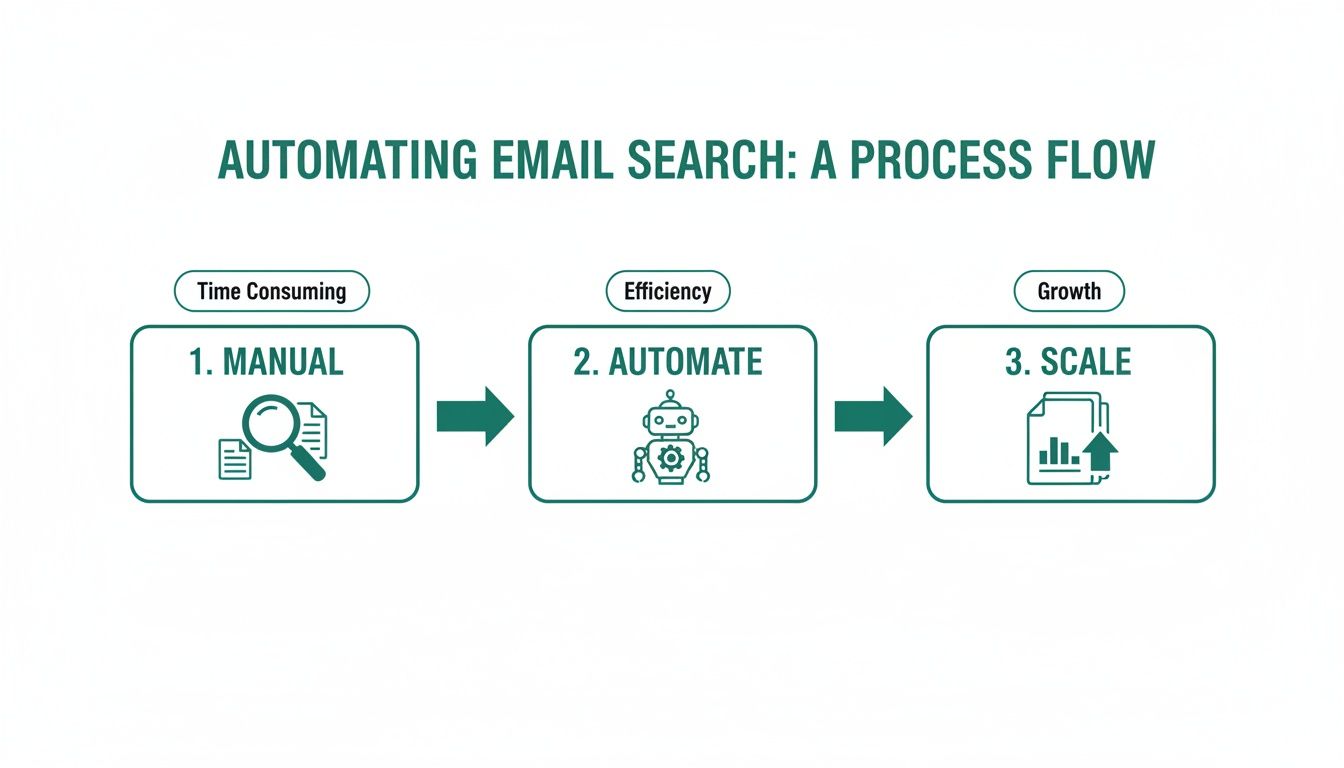
As you can see, the process flows naturally from these manual discovery tactics into more automated tools, and finally, to building out your lists at a much larger scale.
Decoding Common Email Patterns
While some companies get creative, most stick to a handful of predictable email structures. Your goal is to generate a short list of the most probable combinations for your prospect, let's call her "Jane Doe."
Here are the most common patterns I see in the wild:
firstname.lastname@company.com(e.g.,jane.doe@acme.com)firstinitiallastname@company.com(e.g.,jdoe@acme.com)firstname@company.com(e.g.,jane@acme.com)firstname.lastinitial@company.com(e.g.,jane.d@acme.com)
Start with these four. In my experience, one of them will be the right one more than 80% of the time. The next move is to turn that guess into a confirmed contact—without sending a single email that might bounce.
Free Verification Methods That Actually Work
A guess is worthless until it’s verified. Firing off emails to every possible combination is a terrible idea. It not only makes you look unprofessional but can also get your domain flagged and hurt your sender reputation. Instead, you can use a few free methods to confirm which address is the real deal.
One of my favorite low-tech tricks is the 'Gmail Ping Test.' It's clever and surprisingly simple.
- Open a new compose window in Gmail.
- Paste one of your guessed email addresses into the "To" field.
- Just hover your mouse over the address. Don't click it.
If that email is tied to a Google account, a little profile card will often pop up, showing the person’s name and sometimes even their photo. That’s your confirmation. If nothing appears, just move on to the next guess on your list.
Verification is the most critical step. It’s what separates professional outreach from spammy guesswork. Taking an extra 30 seconds to confirm an address can be the difference between starting a conversation and getting a bounce-back.
Another powerful option is using a dedicated online tool. Our guide on how to validate an email address for free walks through several services that can check if an address can receive mail without ever sending a message.
For sales reps who spend hours building lists, this is a game-changer. Think about it: if a team of 10 reps each saves just four hours a week, that's 40 hours reclaimed. That’s an entire workweek that can be spent on actual outreach instead of tedious manual searching. This two-part strategy of smart guessing and immediate verification is a cornerstone of finding email addresses effectively and for free.
Keeping Your Outreach Ethical and Compliant
Finding someone's email address is just the first domino to fall. It’s what you do next that separates a valuable connection from pure spam. Getting this right is what ultimately determines your success and, just as importantly, protects your reputation.
Think of it this way: a thoughtful, relevant message sent to a well-researched contact isn't just spam—it's smart business. But blasting a generic pitch to a list you haven't even looked at is the fastest way to get your domain blacklisted. Your goal here is to build bridges, not burn them down.
Understanding the Rules of the Road
You don't need a law degree to get the basics of email compliance right. The big regulations, like the CAN-SPAM Act in the U.S. and GDPR in Europe, are all built on a handful of common-sense principles: transparency and respect.
These rules aren't just legal hoops to jump through; they're a blueprint for building trust. When you respect someone's inbox, you immediately come across as a credible professional.
Here’s what that looks like in the real world:
- Be Honest About Who You Are: Your "From" name, reply-to address, and other routing info must be accurate and clearly identify you or your business. No games here.
- Write Clear Subject Lines: Your subject line needs to reflect what's actually in the message. Misleading subjects are a massive red flag for spam filters and people alike.
- Provide an Unsubscribe Option: You must include a clear and simple way for people to opt out of future emails. This one is completely non-negotiable.
- Honor Opt-Outs Promptly: When someone clicks unsubscribe, you have to process that request quickly. The general rule is within 10 business days.
Following these rules isn't just about avoiding hefty fines. It's about maintaining a healthy sender reputation, which is the key to making sure your emails actually land in the inbox in the first place.
Personalization Is Your Best Defense
The single best way to stay on the right side of ethical outreach is through genuine personalization. When you prove to a prospect that you’ve actually done your homework, your email transforms from an unwelcome interruption into a potential solution.
And I'm not just talking about using a {{first_name}} merge tag. I mean referencing a specific project they led, a recent company milestone, or a challenge you know is unique to their industry. That's the kind of detail that shows you have a legitimate interest.
An email that says, "I saw your company just launched a new initiative in AI, and I have an idea for how to amplify its reach," is infinitely more ethical—and effective—than a generic, "Can I have 15 minutes of your time?"
When you find email addresses for free, you’re really getting an opportunity to start a conversation. Personalization ensures that conversation starts with mutual respect and relevance, making a positive response far more likely.
Cold Outreach Dos and Don'ts
To keep it simple, here’s a quick-reference table to guide your outreach. Sticking to these principles will help you build a solid pipeline while protecting your brand.
| The 'Do' List | The 'Don't' List |
|---|---|
| Do provide genuine value in every email. | Don't use deceptive or misleading subject lines. |
| Do make your unsubscribe link easy to find. | Don't buy generic, unverified email lists. |
| Do research your prospect and their company. | Don't ignore or delay unsubscribe requests. |
| Do keep your message concise and relevant. | Don't add people to your newsletter without consent. |
Ultimately, successful outreach is a marathon, not a sprint. Every single email you send is a deposit (or a withdrawal) into your sender reputation account. By sticking to these ethical guidelines, you ensure that your ability to connect with prospects stays strong for the long haul, making your free email-finding efforts a truly sustainable strategy.
Frequently Asked Questions
When you're diving into the world of free email finding, a few questions always seem to pop up. Is it legal? Do these free tools actually work? How do I find emails without spending all day on it?
Let's cut through the noise. Here are the straight-up answers to the most common questions we hear, so you can start prospecting with confidence.
Are Free Email Finders Accurate?
Honestly, many of them are surprisingly good. The best free tools aren't just taking wild guesses; they're scraping public data, recognizing common email patterns, and even doing quick server checks to see if an address is real.
No tool is ever 100% perfect, but a solid extension like EmailScout gives you a massive advantage. It's worlds better than relying on outdated lists or just guessing. These tools validate contacts by checking multiple sources, which is key to keeping your bounce rate low and protecting your sender reputation.
How Many Free Emails Can I Actually Find?
This is where you'll see the biggest difference between tools. A lot of services will give you a taste with a monthly credit system, often capping you at just 50 or 100 free searches. After that, you're hitting a paywall.
But the game is changing. EmailScout, for instance, gives you unlimited free email lookups on individual profiles. For anyone on a budget—freelancers, startups, sales reps—that’s huge. While you might need a paid plan for big, bulk searches, the core feature of finding emails one by one is genuinely free and unlimited.
What Is the Fastest Way to Find an Email on LinkedIn?
Hands down, it's a browser extension. Don't even think about doing it manually unless you have tons of time to kill. A good extension turns a five-minute scavenger hunt into a five-second click.
It’s incredibly simple in practice:
- Land on someone's LinkedIn profile.
- The extension gets to work in the background, analyzing the page.
- Click a button, and the verified email appears.
It does all the heavy lifting—guessing patterns, checking public records, and verifying the result—almost instantly. It’s as close to a magic wand for prospecting as you're going to get.
The real power of a browser extension isn't just the speed. It's how it fits right into your workflow. You can find and save contact info without ever leaving the page, keeping you in the zone and productive.
Is Cold Emailing Someone Legally Risky?
It's not, as long as you're smart and ethical about it. Sending cold emails for legitimate business reasons is completely legal under regulations like the CAN-SPAM Act (US) and GDPR (Europe).
These laws are really just based on common sense. Just stick to these simple rules:
- Be transparent. Say who you are and why you're emailing.
- Offer an easy way out. Include a clear unsubscribe link.
- Honor opt-outs immediately. No questions asked.
As long as you’re trying to provide real value and not just spamming, you’re on the right side of the law. A personalized, relevant message to a well-researched contact is effective, compliant, and the right way to start a business conversation.
Can I Get in Trouble for Guessing an Email Address?
Nope. The act of guessing an email isn't the problem. The risk comes from what you do next.
If you send a message to a guessed, unverified email and it bounces, that’s a strike against you. A high bounce rate kills your sender reputation, which means even your valid emails are more likely to land in the spam folder.
This is why verification is a non-negotiable step. Always run a guessed email through a verification tool or use a simple ping test in Gmail to make sure it’s active before you send anything. Guessing is a great strategy, but only when you pair it with diligent verification.
Ready to stop searching and start connecting? The EmailScout Chrome extension gives you unlimited free email lookups, helping you build targeted prospect lists faster than ever. Install EmailScout for free today and transform your outreach.