

You've been there, right? You craft the perfect email, hit send, and then… bounce. It's a gut-punch moment for any marketer or salesperson. But when you take the time to validate an email, you're doing more than just cleaning a list. You're actually protecting your domain, building a solid sender reputation, and giving your message a fighting chance to be seen.
Why You Must Validate an Email Before Sending

Sending emails without validating them first is like throwing marketing dollars out the window. You pour time and creativity into a message that might never even arrive. The fallout is much bigger than a simple "undeliverable" notification—it directly impacts your bottom line and how credible your brand appears.
Think about it from the perspective of an Internet Service Provider (ISP) like Gmail or Yahoo. When they see a ton of your emails bouncing, they don't see a mistake. They see a spammer. This tanks your sender score, the very thing that decides if your next campaign lands in the inbox or gets buried in the spam folder.
Once your reputation is damaged, it's a tough climb back. Consistently sending to bad addresses can even get your domain or IP blacklisted, which is a total shutdown of your outreach efforts.
The Staggering Financial Cost of Bad Data
The sheer volume of email is mind-boggling, with projections hitting over 392.5 billion emails sent daily by 2026. In a world this crowded, bad data isn't just a nuisance; it's a massive financial drain.
In the US alone, businesses lose an unbelievable $59.5 billion yearly just from undelivered emails. That's about $164 million evaporating every single day because invalid addresses made it onto a list.
Every bounced email represents a lost opportunity. It’s a missed connection with a potential lead, a failed update to a loyal customer, or an unheard announcement for a new product.
These aren't just abstract statistics. For a startup hustling for its first 100 customers or a sales team on a deadline, every undelivered message hurts. Skipping email validation is an active choice to burn through your budget and hamstring your revenue potential.
Protecting Your Most Valuable Asset: Your Sender Reputation
The immediate financial loss is bad enough, but the long-term damage to your sender reputation is even worse. A healthy sender score is the bedrock of any successful email strategy. This is why a core reason to validate emails is to implement proven strategies to improve email deliverability and make sure you consistently hit the inbox.
Here’s why validation is non-negotiable today:
- ISP Scrutiny: The big email providers are cracking down. They’re watching your bounce rates and engagement like a hawk to filter mail. Proactive validation proves you’re a sender they can trust.
- Campaign Performance: It's simple math. Clean lists get better results. Better open rates, click-throughs, and conversions all begin with a successful delivery.
- Resource Efficiency: Why pay your email service provider to send messages to addresses that don't exist? Validation focuses your spending on real people who might actually become customers.
At the end of the day, validating an email isn't just a technical task; it's a foundational business practice. It turns your email list from a potential liability into one of your most powerful assets. For a deeper dive, check out our guide on how to improve email deliverability for more practical advice.
The Manual Toolkit for Email Validation
Before you jump straight to automated tools, it’s worth getting your hands dirty with the manual techniques. Understanding how these checks work gives you a much better feel for what’s happening behind the scenes of any professional validation service. Think of these as the foundational skills for making a quick, initial judgment on an email's quality.
The simplest, most immediate way to validate an email is to just look at its structure. Is there an "@" symbol? Does it end with a domain like ".com" or ".org"? This first glance is all about catching obvious typos before you waste time on deeper checks.
Checking Syntax with Regular Expressions
A Regular Expression, better known as Regex, is basically a powerful search pattern made of a specific sequence of characters. It’s the go-to method for confirming an email’s format follows the established rules. While a Regex pattern can look like alphabet soup at first, it's just a set of instructions for a computer to follow.
For example, a typical email validation Regex is looking for a few key things:
- The Local Part: It checks for a valid string of characters (letters, numbers, some symbols) before the "@".
- The Separator: It makes sure there's one—and only one—"@" symbol.
- The Domain: It confirms a domain name follows the "@" and is separated by a dot.
- The Top-Level Domain (TLD): It looks for a TLD like ".com" or ".net" that's at least two characters long.
You don't need to memorize the code, but understanding the logic is key. Proper syntax is the first hurdle any email has to clear. If you want to dive deeper into what makes a valid structure, our guide on email address formats breaks it all down.
Verifying the Domain and MX Records
So, the email's format looks good. The next logical question is: does the domain (company.com) even exist, and can it actually receive mail? This is where a Domain Name System (DNS) lookup comes in. You’re essentially asking the internet if the domain is a real, registered address.
But a real domain doesn't automatically mean it has a functioning email server. For that, you have to check its Mail Exchange (MX) records.
An MX record is a special DNS entry that points to the mail servers set up to handle email for that domain. If a domain has no MX records, it can't receive mail. It's like having a street address but no mailbox.
This two-step process is a huge part of manual validation. First, you confirm the domain is real, then you find its MX records. This alone will weed out a ton of bad addresses from misspelled or completely fake domains.
SMTP Pinging: The Digital Handshake
The final manual trick is the SMTP ping. This is as close as you can get to knowing if a specific mailbox is real without actually sending an email. The whole process is about starting a "conversation" with the recipient's mail server.
Think of it like a digital handshake. Your system connects to their server and starts the standard email protocol (SMTP), but you hang up right before the message is sent.
Here’s a simplified breakdown:
- Connection: Your system connects to the server listed in the MX records.
- Greeting: It introduces itself with a "hello" (HELO command).
- Sender Info: It gives a "from" address (MAIL FROM).
- Recipient Check: It then asks if the specific address you're testing exists (RCPT TO).
That last step is the moment of truth. The server's response tells you what you need to know. A positive reply is a good sign the address is valid, while an error usually means it’s not.
The Limitations of Manual Checks
While these methods are great for learning, they hit a wall pretty quickly in the real world. Manually trying to validate an email one by one is painfully slow and just isn't practical for more than a few addresses.
Even more importantly, most modern mail servers have defenses that can trip you up:
- Blocking: Servers will often block repeated connection attempts from the same IP, thinking your validation checks are a spam attack.
- Catch-All Servers: Some domains are set to accept email for any address, whether it exists or not. This makes the SMTP ping useless because you'll always get a false positive.
- Greylisting: A server might temporarily reject your connection and tell you to try again later—a major headache to manage manually.
These roadblocks are exactly why automated services were created. They use networks of servers and smart logic to get around these issues, giving you a far more accurate and reliable result. Manual checks are fantastic for understanding the "why," but automation is essential for actually getting the job done right.
Using Automated Services for Professional Validation
When you're serious about email outreach, manual checks just don't cut it. They’re fine for spot-checking an address here and there, but they quickly hit a wall when you need to handle real volume or get a truly accurate picture of your list's health. This is the point where you stop working harder and start working smarter.
Automated email validation services—both real-time APIs and bulk upload tools—are the professional standard for a reason. They are specifically designed to bypass the limitations of manual efforts, using sophisticated algorithms and huge networks to get around IP blocks, interpret complex server responses, and deliver a reliable verdict on an email's status.
The Clear Advantages of Automation
The benefits of switching to an automated service go way beyond just saving time. These platforms run a whole battery of tests in seconds—something that would be impossible to replicate by hand. This deeper analysis is what separates a decent, clean list from a truly elite one that boosts your deliverability.
Here’s what you gain:
- Speed and Scale: You can validate an email list with tens of thousands of contacts in the time it would take to manually check a few dozen. This turns list hygiene from a dreaded, one-off project into a practical, repeatable process.
- Advanced Detection: These tools are smart enough to spot risky addresses that manual checks always miss, like the disposable or temporary emails people use to sign up for free trials and then abandon.
- Role-Based Account Identification: They can also flag those generic, role-based accounts like
info@,support@, orsales@. While often valid, these emails usually have low engagement and are best segmented away from your main campaigns to keep your metrics sharp.
A clean email list is the foundation of a strong sender reputation. Automated services are the most effective tools for building and maintaining that foundation, directly impacting your ability to land in the primary inbox.
Think about a startup about to launch its first major campaign to 10,000 prospects. Sending to a raw, unverified list would be a disaster. A high bounce rate right out of the gate could permanently damage their new domain's reputation with giants like Gmail and Outlook. By running the list through a bulk validation service first, they can scrub thousands of bad addresses, protecting their sender score from day one.
Beyond a Simple "Valid or Invalid" Check
Professional services give you a much more nuanced view of your list's health. Instead of a simple pass/fail, you get detailed status codes that help you make smarter decisions about who to email and who to avoid. This is crucial for managing risk and maximizing your inbox placement.
This is especially true when you're collecting leads through online forms. A real-time API can check an email the instant a user types it in, preventing a simple typo from ever polluting your database. When you're collecting data this way, it's always a good idea to follow best practices for creating order forms that convert with robust validation to make sure you’re capturing quality information from the start.
This proactive approach is non-negotiable in today's email landscape. Inbox placement can swing wildly—from a solid 89.1% in Europe to under 30% for some unlucky senders. With global email volume projected to hit 392.5 billion messages daily by 2026, the stakes are higher than ever. It's no surprise the Email Verification Tools sector is expected to more than double, growing from $149.75M to $322.68M by 2035.
Choosing the Right Validation Tool
Not all validation services are built the same. Some are powerhouse tools for cleaning massive lists in bulk, while others specialize in lightning-fast API integrations for real-time checks. Picking the right one really depends on your specific workflow and needs.
To make things clearer, let's compare the manual techniques we've discussed with professional automated services.
Manual vs Automated Validation Methods
The difference becomes obvious when you see them side-by-side. Manual methods are a good learning exercise, but automated tools are built for business results.
| Feature | Manual Validation | Automated API/Service |
|---|---|---|
| Speed | Extremely slow, one by one | Extremely fast, thousands per minute |
| Accuracy | Low to moderate; blocked by many servers | High; uses advanced logic and networks |
| Checks Performed | Basic syntax, MX, simple SMTP | Syntax, DNS/MX, deep SMTP, catch-all, disposable, role-based |
| Best For | Quick spot-checks, educational purposes | Bulk list cleaning, real-time verification, ongoing hygiene |
Ultimately, for most businesses, a hybrid approach is the most effective strategy. You might use a bulk service to scrub your entire database every quarter and rely on a real-time API to instantly verify all new sign-ups as they happen.
To help you get started without a big upfront cost, we've put together a list of the best free email verification tools. They offer a fantastic way to test the waters and see the immediate impact on your data quality.
Integrating Validation Into Your Daily Workflow
Let's be honest, list cleaning is a chore nobody looks forward to. But what if you never had to do a massive cleanup project again?
Truly effective list hygiene isn't a massive task you tackle once a quarter. It’s a continuous, proactive habit you build directly into how you find and capture leads. Instead of letting bad emails pile up, the goal is to stop them from ever getting on your list in the first place.
This is a fundamental shift from a reactive mindset to a proactive one. It means you validate an email the moment you find it, ensuring every new contact is vetted before it can contaminate your lists or hurt your sender reputation. This approach saves countless hours down the road and keeps your data quality consistently high.
Building Pre-Vetted Lists From the Start
Think about the old way of building a prospect list. You'd find a bunch of contacts, dump them in a spreadsheet, and maybe—weeks later—run that list through a bulk validator. It’s inefficient. A much better workflow integrates validation right into the discovery phase.
This is exactly what tools like EmailScout are designed for. They don’t just find emails; they make validation an immediate, almost unconscious step in your process.
For instance, you might be browsing a company’s website or a LinkedIn profile. When you find a decision-maker's email, you can verify it on the spot. This creates a powerful feedback loop where you're only spending time and energy on leads you know are deliverable.
The most successful outreach teams don't just clean their lists; they build clean lists from day one. Integrating real-time validation into your prospecting workflow is the single biggest step you can take to ensure high deliverability and protect your domain.
Automating Validation During Lead Generation
The secret to making this stick is automation. Manually checking every single email is a recipe for boredom and mistakes. By using features designed to handle this for you, validation becomes a seamless part of your daily routine.
Consider a couple of practical ways this works:
- AutoSave with Immediate Checks: Imagine enabling an 'AutoSave' feature while you browse. Every email you uncover is automatically captured and validated in the background. You can focus on your research, confident that the data being saved is already clean.
- Exploring URLs for Valid Contacts: With a 'URL Explorer' feature, you can drop in a list of company websites. The tool then scours these sites for contacts and validates them at the same time. What you get back is a list of verified, deliverable emails, not just raw data that needs another round of cleaning.
This flow turns what used to be a multi-step chore into a simple, automated process.
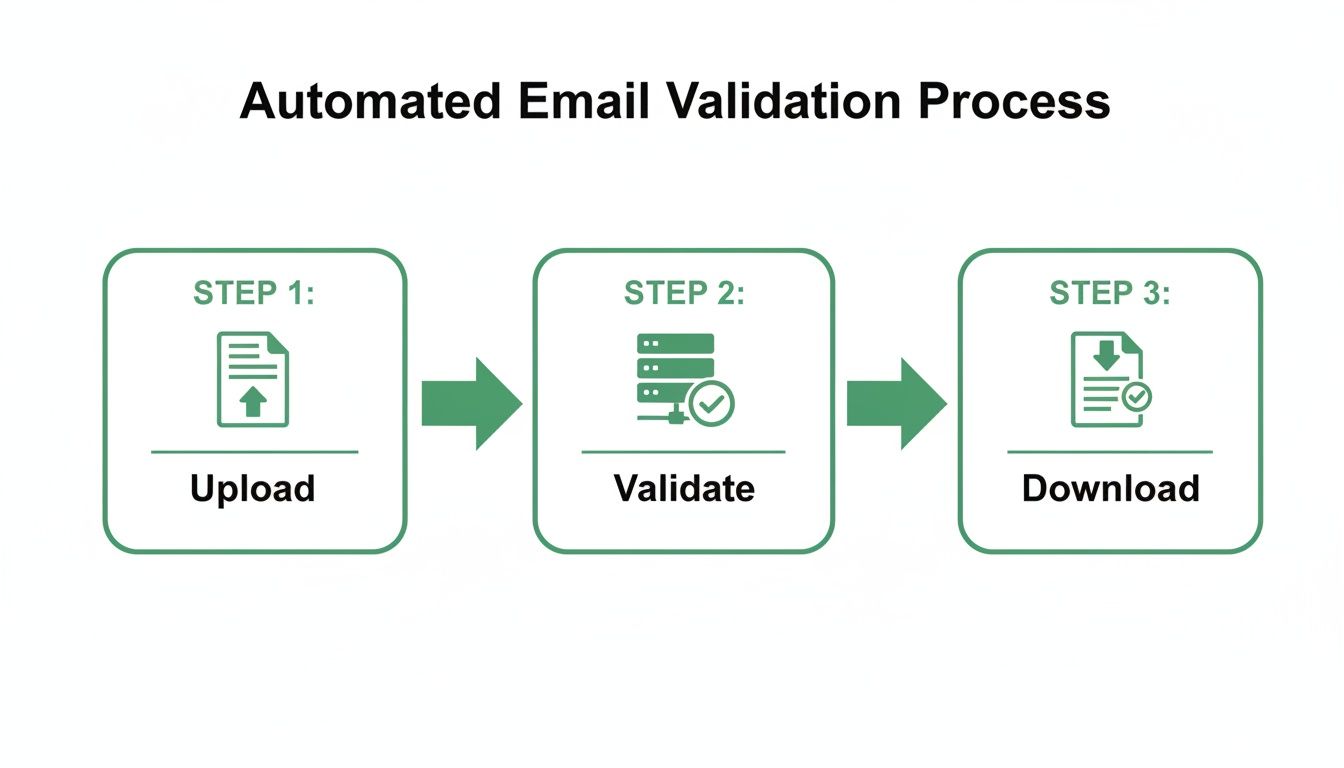
As the diagram shows, a high-quality list is just a few automated steps away. You go from raw data to a campaign-ready asset with minimal manual effort. When you build your workflow around tools that give you this immediate feedback, you completely change your relationship with data quality.
Ultimately, integrating validation isn't about adding another task to your to-do list. It's about using smarter tools and processes that do the heavy lifting for you. This proactive strategy ensures every lead has the highest possible chance of delivery, protecting your sender score and maximizing the impact of every single email you send.
Understanding Your Validation Results

So you've run your email list through a validator. Now what? Getting a file back full of different status codes can feel a bit overwhelming, but this is where the real work begins. Learning to interpret these results is what turns a simple list into a powerful outreach strategy.
It's about more than just a simple "valid" or "invalid" verdict. The nuances are where you get a real edge. Each status tells a story about that email address, and knowing how to read that story is absolutely critical for protecting your sender score and making your campaigns pop.
The Clear-Cut Cases: Valid and Invalid
Let's start with the easy ones. A valid status is the green light you’ve been hoping for. It’s your validator’s way of saying the syntax is correct, the domain is real, and the mailbox is active and ready to receive your email. These are your gold-star contacts.
An invalid status is just as straightforward, but it's a hard stop. This means the email failed a fundamental check—maybe a typo, a domain that no longer exists, or a mailbox that’s been shut down. These are dead ends. Get them off your list immediately to avoid damaging bounces.
The Ambiguity of Catch-All Addresses
This is where things get a bit more interesting. A catch-all (or accept-all) status is one of the most common—and debated—results you'll see. It means the company's mail server is set up to accept email for any address at that domain, even if the specific mailbox doesn’t exist.
Because of this setup, a standard check can't confirm if jane.doe@company.com is a real person. The server will accept the message either way, but it could still bounce later if the mailbox is fake. That's a huge risk to your deliverability.
So, how do you handle them?
- Segment Carefully: Never, ever mix catch-all addresses with your clean, "valid" contacts. Create a completely separate segment for them.
- Use for Lower-Priority Campaigns: Test the waters by sending to your catch-all segment only when a campaign isn't mission-critical. This lets you see the real bounce rate without torpedoing your sender score during a major launch.
- Monitor Bounces Aggressively: If you do email a list of catch-alls, watch your bounce reports like a hawk. Any address that hard bounces needs to be removed from all future sends, no exceptions.
Sending to catch-all addresses is always a calculated risk. By isolating them, you can still attempt outreach while shielding your primary sender reputation from any potential fallout.
Decoding Risky and Unknown Statuses
The "risky" and "unknown" categories add another layer of complexity. Think of these as yellow flags from your validation service—warnings about potential issues that aren't quite an "invalid" death sentence.
A risky email might be a temporary or disposable address, the kind people use for sign-ups and then abandon. It could also be a role-based address like info@ or support@. While technically valid, these often have terrible engagement and are more likely to get your emails marked as spam.
An unknown result usually just means the recipient's mail server was down or didn't respond during the validation check. The service simply couldn't get a clear yes or no.
Here’s my practical playbook for these:
- Isolate Risky Emails: Just like with catch-alls, pull your risky addresses into their own segment. Frankly, they're often not worth emailing unless you have a very high tolerance for low engagement.
- Re-Validate Unknowns: The issue with "unknown" emails is often temporary. It’s a good practice to run them through your validator again in a day or two. You’ll often get a more definitive status the second time around.
- Prioritize Your Best Leads: At the end of the day, focus your primary efforts on your "valid" segment. This is how you guarantee you're starting with the highest quality list possible, giving every campaign the best shot at success.
Answering Your Top Email Validation Questions
Even with the best tools, you're bound to have questions as you dive into email validation. That's completely normal. Let's tackle some of the most common ones I hear, so you can clean your lists with confidence.
Think of this as your go-to cheat sheet for the tricky parts of email hygiene.
How Often Should I Validate My Email List?
This is a big one, and there are really two parts to the answer. First, you absolutely need to validate new emails the second you get them. Using a real-time validation API on your signup forms is the best way to stop bad data from ever polluting your database.
For the emails you already have, a good rule of thumb is to re-validate your entire list every 3-6 months. Why so often? Email lists degrade faster than you'd think—industry data shows they can decay by over 20% every year. People change jobs, ditch old providers, or just abandon accounts. Regular cleaning is the only way to fight that "list rot" and keep your sender reputation safe.
Can Email Validation Guarantee 100% Deliverability?
In a word: no. It's really important to get this straight. No service on earth can guarantee 100% deliverability, and you should run from any company that claims it can. Validation is all about stacking the odds in your favor, not about achieving a perfect outcome.
Here’s what a validation service actually does: it confirms an email address is technically able to receive mail at that moment. It checks the syntax, confirms the domain is real, and pings the server to see if the mailbox exists. What it can't do is see into the future. It can't predict if a recipient's inbox will be full tomorrow, if their server will have a temporary outage, or if your specific email gets flagged by a spam filter.
Think of email validation like getting a green light before a road trip. It confirms the car works and the highway is open, but it can’t stop you from hitting unexpected traffic or a sudden rainstorm. It just makes a successful journey far more likely.
What Is a Catch-All Email Address?
A "catch-all" is a mail server set up to accept email for any address at its domain, even if that specific mailbox doesn't actually exist. This is a problem because it makes a standard SMTP check useless—the server just says "yes" to everything, so you can't tell if the user is real.
Sending to these is a gamble. You're flying blind, and they often hide invalid addresses that will eventually bounce back at you. The smart move is to segment them. Keep them separate from your A-list of verified contacts and maybe use them for lower-priority campaigns where a few bounces won't tank your core sender reputation.
Are There Privacy Concerns with Email Validation?
This is a totally fair question. The short answer is that responsible email validation is fully compliant with privacy laws like GDPR. The real issue isn't the validation itself, but how you got the email in the first place. As long as you collected that contact legally with their consent, validation is just a routine part of good data hygiene.
The process is purely technical. You're checking the integrity and accuracy of your data, not sending marketing messages or digging into personal info. In fact, most privacy laws require you to maintain accurate data, so you could argue that regular validation is a responsible step toward compliance.
Understanding these details helps you move from just "cleaning a list" to building a truly strategic outreach program.
Ready to build clean, pre-vetted lists from day one? Stop cleaning lists and start building them right with EmailScout. Integrate powerful, real-time validation directly into your prospecting workflow. Try it today and see the difference. Find unlimited emails for free with EmailScout.