Tag: sales productivity

  • How to Improve Sales Productivity: Actionable Strategies for Fast Growth

    How to Improve Sales Productivity: Actionable Strategies for Fast Growth

    Improving sales productivity isn't about cracking a whip. It's about trading "busy" for "effective." The fastest path there is to first figure out where your team’s time is really going, then systematically cut the fat with smarter processes and technology.

    Finding the Real Time Sinks in Your Sales Day

    Does your sales team seem perpetually swamped, yet quotas feel just out of reach? That’s a classic sign of a major disconnect between activity and results. The brutal truth is that most reps are buried in tasks that have nothing to do with actually selling.

    This isn't just a hunch; the data backs it up. Most sales professionals spend only 25% of their time actually selling. The rest of the day is eaten up by admin work, manual data entry, and clunky workflows that kill momentum.

    Insights from a 2025 technology report on AI by Bain & Company show just how big this opportunity is, suggesting AI could double that selling time to 50% or more. Before you can fix the problem, you have to get an honest look at where the hours truly disappear.

    The Hidden Costs of a Fragmented Workday

    Picture a rep’s typical morning. It starts with 45 minutes of manually logging notes from yesterday's calls into the CRM. Then, they burn an hour digging through websites and social media, just trying to find contact info for a handful of new prospects.

    Next, maybe they spend 30 minutes crafting a single personalized email to a key target. By the time they finally get someone on a call, half the morning is already gone—spent entirely on tasks that don’t generate revenue.

    This constant context-switching is a productivity nightmare. It drains focus and makes it impossible to build real momentum.

    The problem isn't that your team is lazy; it’s that their workflow is riddled with friction. Every minute spent hunting for an email address or updating a CRM field is a minute they aren't building relationships and closing deals.

    To start, you need to understand exactly what activities are consuming your team's day. A quick audit can reveal some shocking truths about where time is being misallocated.

    Diagnosing Sales Productivity Killers

    This table breaks down some of the most common time-wasters that plague sales teams. Use it to spot the low-hanging fruit in your own process.

    Activity Typical Time Spent (Weekly) Impact on Productivity Solution Category
    Manual Prospecting & Research 5-10 hours Delays outreach, leads to poor targeting Prospecting Automation
    CRM Data Entry & Updates 4-8 hours Reduces selling time, leads to incomplete data CRM Integration & Automation
    Internal Meetings & Admin 3-6 hours Creates context-switching, breaks sales flow Process Optimization
    Crafting Emails from Scratch 3-5 hours Inconsistent messaging, slow response times Sales Playbooks & Templates
    Switching Between Tools 2-4 hours Wastes time, causes mental fatigue Tech Stack Consolidation

    Looking at this breakdown, it becomes clear how "non-selling" tasks can quietly consume more than half of a rep's work week. Identifying your top one or two culprits is the first step toward reclaiming that valuable time.

    Moving from Assumptions to Data

    Guessing where time is lost is a recipe for failure. To get a real diagnosis, you need to track it. A simple "time audit" for one week can be incredibly eye-opening. Just ask your team to log their daily tasks into two simple buckets:

    • Selling Activities: Demos, client calls, negotiations, proposal writing.
    • Non-Selling Activities: Internal meetings, CRM updates, prospecting research, travel.

    The results are often a wake-up call, proving that "busy work" can easily gobble up 70% of a rep's week. This data gives you an undeniable baseline to work from. It pinpoints the exact bottlenecks—whether it’s clunky prospecting or endless admin—so you can finally apply the right fix and start building a genuinely productive sales engine.

    Building a Sales Process That Actually Works

    Once you've figured out where all the time is going, you can start winning it back. A messy, undefined sales process is a huge productivity killer, forcing reps to reinvent the wheel for every single lead. The fix is to build a standardized, repeatable workflow that guides reps from prospect to customer.

    A solid process gets rid of the guesswork. It makes it crystal clear what needs to happen at each stage, who's responsible, and what "done" actually means. This isn't about creating rigid, bureaucratic rules. It's about building a reliable framework that helps your team move faster and more effectively.

    Think of it as paving a highway instead of letting every rep hack their own path through the jungle.

    This simple flow shows how to find those time sinks and boost your team's output.

    A 3-step process infographic for finding and conquering time sinks: diagnose, streamline, and leverage time.

    As you can see, improving sales productivity is a cycle. First, you Diagnose the problem, then Streamline your process, and finally, bring in the right Technology to make it all run smoothly.

    Defining Your Sales Cycle Stages

    Your first move is to map out the real stages of your sales journey. Vague labels like "Working" or "Contacted" are pretty much useless. You need concrete, action-based stages that show a real change in the deal's status.

    These stages become the backbone of your sales pipeline, giving you a clear snapshot of your sales health. A well-defined pipeline is a mission-critical asset, and if you're building one from the ground up, you can check out our guide on how to build a sales pipeline for more detail.

    For a B2B SaaS company, your stages might look something like this:

    • New Lead: A potential customer has been identified but not contacted yet.
    • Attempting Contact: The first outreach sequence is in motion.
    • Connected & Qualified: A conversation has happened, and the lead meets your basic criteria (like budget, authority, and need).
    • Discovery Call Completed: A deeper needs-analysis call has taken place.
    • Demo Scheduled: The prospect agreed to see a product demonstration.
    • Proposal Sent: A formal quote or proposal has been delivered.
    • Negotiation: You're actively discussing terms, pricing, or contract details.

    Every stage needs a clear exit criterion—a specific action that has to be completed before a deal can move forward. This simple rule stops deals from stalling and makes forecasting a whole lot more accurate.

    Creating a Sales Playbook That Gets Used

    A sales playbook is your process in a box. It's a living, breathing resource with all the scripts, templates, and strategies your team needs to execute your sales process flawlessly. A good playbook doesn't just collect dust on a digital shelf; it's part of the daily grind.

    A sales playbook isn't just a training manual; it's a performance tool. It ensures that every rep, from your newest hire to your seasoned veteran, is equipped with the best practices of your top performers.

    Keep your playbook simple, scannable, and actionable. Don't create a 100-page PDF nobody will ever open. Instead, build a resource hub—a shared drive or an internal wiki works great—with materials that are easy to find and use.

    Essential Components of an Actionable Sales Playbook

    You don't need to build the entire playbook on day one. Start with the essentials that will make the biggest immediate impact on your team's day-to-day work.

    1. Buyer Personas and ICP

    • Who are you selling to? Create detailed profiles of your Ideal Customer Profile (ICP) and the key buyer personas you interact with.
    • What are their pain points? List the specific challenges and goals that your product solves for each persona.
    • Key Talking Points: Give your team a cheat sheet of value props that hit home with each persona.

    2. Outreach Templates and Scripts

    • Email Sequences: Provide proven multi-touch email templates for prospecting, follow-ups, and post-demo nurturing.
    • Call Scripts: Offer flexible outlines for discovery and qualification calls. Focus on key questions to ask, not a word-for-word script.
    • Voicemail Scripts: Give reps concise, impactful scripts for when a call goes to voicemail.

    3. Objection Handling Guide

    • Common Objections: List the top 5-10 objections your team always hears (e.g., "It costs too much," "We're happy with what we have").
    • Proven Responses: For each one, provide a simple framework for an empathetic and effective response that steers the conversation back to value.

    By standardizing these core pieces, you reduce the mental load on your reps. This frees them up to focus their energy on what really matters: building relationships and closing deals.

    Using Technology to Amplify Your Sales Team

    In sales, the right tech stack isn't just a nice-to-have; it's a force multiplier. But simply throwing more tools at your team often creates more problems than it solves, bogging everyone down in complexity. The real key to boosting sales productivity is being strategic—choosing tech that actually solves a specific problem and automates the most mind-numbing, repetitive tasks.

    The goal here is simple: reclaim the hours your reps lose to manual work. Think about all the time wasted on data entry, scheduling follow-ups, and the endless hunt for a prospect’s contact info. By automating these chores, you give your team back their most valuable asset: time to build relationships and have meaningful conversations.

    Automate Prospecting to Accelerate Outreach

    If you ask any sales rep, they'll tell you that prospecting is often the biggest time sink in the entire sales process. It's not uncommon for reps to burn hours every single day just searching for the correct email addresses and phone numbers. That manual grind isn't just inefficient; it's flat-out demoralizing.

    This is exactly where targeted prospecting automation can make a massive difference. Instead of having your reps manually scour social profiles and company websites, a good tool can do all the heavy lifting for them.

    Take a tool like the EmailScout Chrome extension, for example. A rep can be on a prospect's social profile, and with a single click, find their verified email address. That simple action transforms what used to be a 15-minute research task into a 5-second click. It’s this kind of focused automation that delivers immediate, noticeable productivity gains.

    Features like AutoSave can automatically build targeted lead lists while your reps browse, and URL Explorer can pull every available email from a list of company websites in minutes. This isn't just a small tweak; it fundamentally changes the prospecting workflow from a manual chore into a rapid, automated machine.

    Choose Tools That Solve Problems, Not Create Them

    The market is flooded with sales tools, and every single one promises to be a game-changer. The real danger is creating a "Frankenstack"—a clunky, disconnected mess of apps that require more management than they're worth. A truly productive tech stack is an integrated one.

    Before you bring any new software into your workflow, you need to ask some hard questions:

    • What specific bottleneck does this solve? If a tool doesn't fix a clear pain point—like manual data entry or painfully slow prospecting—you don’t need it.
    • Does it integrate with our CRM? Your CRM needs to be the single source of truth. Any new tool has to feed data into it automatically, eliminating the need for reps to update multiple systems.
    • Is it simple for my team to actually use? A complex tool with a steep learning curve will get ignored and become expensive shelfware. The best tools feel intuitive and fit naturally into a rep's existing day.

    Your contact management system is the heart of your entire operation. When evaluating a new tool, make sure it complements and enhances that core system. You can explore some of the best contact management software options to see how different platforms stack up on features and integration.

    The most impactful technology doesn't just offer more features; it removes friction. The ultimate test of a tool is whether it gives your salespeople more time to actually sell.

    The Measurable Impact of a Smart Tech Stack

    Adopting the right technology has a direct, measurable impact on sales productivity. The data on this is crystal clear. In fact, high-performing sales teams use nearly three times more sales technology than underperforming teams.

    This isn't just about having a lot of tools; it's about using them effectively. Organizations that truly master their sales tech are 57% more efficient in their sales development efforts.

    Even just one piece of the puzzle, like marketing automation, can drive a 14.5% increase in sales productivity while simultaneously cutting overhead by 12.2%. The proof is everywhere. You can discover more sales productivity statistics that highlight these advantages. All this evidence makes a compelling case for investing in tools that get rid of tedious work and empower your team to focus on what they do best—generating revenue.

    Measuring What Matters for Sales Performance

    Man analyzing key metrics on laptop and smartphone, showcasing data for business productivity.

    If you’re trying to boost sales productivity without measuring the right things, you’re flying blind. Tracking the wrong metrics is just as bad as tracking nothing—it creates a false sense of progress. To get real results, you have to look past vanity stats like call volume and dial in on the Key Performance Indicators (KPIs) that actually drive revenue.

    Let's be clear: busy isn't the same as productive. One rep might blast out 100 generic emails with zero replies, while another sends 10 targeted, well-researched messages and books three demos. The difference is effectiveness, and the right KPIs tell you that story. They show you exactly where your process is humming along and where it's hitting a wall.

    From Activity Metrics to Impactful KPIs

    The real turning point comes when you shift your team’s focus from just doing things to achieving outcomes. Knowing a rep made 50 calls is interesting. Knowing their call-to-meeting conversion rate is powerful.

    That shift requires getting honest about which numbers truly matter. You're looking for the data that signals efficiency, effectiveness, and a pipeline that’s not just full, but healthy.

    To get started, here are the essential KPIs every sales leader I know watches like a hawk.

    Essential KPIs for Sales Productivity

    A cluttered dashboard is just noise. The goal is to isolate the few metrics that give you a true signal on your team's productivity and the health of your pipeline. This table breaks down the KPIs that matter most.

    KPI What It Measures Why It Matters for Productivity Improvement Goal
    Lead Response Time Average time to follow up with a new inbound lead. Speed is everything. A fast response drastically increases the odds of connecting and qualifying a lead. Decrease time to under 5 minutes.
    Sales Cycle Length Average time from initial contact to a closed deal. A shorter cycle means reps are moving deals efficiently and forecasting is more accurate. Shorten the overall cycle length.
    Activity-to-Meeting Ratio Number of calls or emails needed to book one qualified meeting. This is a direct measure of outreach quality and effectiveness. A high ratio signals weak messaging or targeting. Decrease the number of touches per meeting.
    Pipeline Conversion Rates Percentage of deals moving from one sales stage to the next. This pinpoints bottlenecks where deals are stalling or falling out of the pipeline. Increase the percentage at each stage.

    By zeroing in on these metrics, you can spot problems before they derail a quarter. For example, a poor activity-to-meeting ratio might mean your team needs better prospecting lists—a perfect spot to use a tool like EmailScout to ensure they’re reaching verified contacts.

    Don’t drown in data. Pick the 3-5 core KPIs that tie directly to your revenue goals. These are your north stars for every coaching session and process change.

    The Ultimate Metric: Win Rate

    While all those KPIs are crucial health indicators, they all funnel into the one that matters most: your win rate. This is the percentage of qualified opportunities your team successfully turns into paying customers. It’s the ultimate report card on your sales process, messaging, and team skill.

    A low win rate, even with a ton of opportunities, is a massive red flag. It points to a serious breakdown somewhere in the back half of your sales cycle. Improving your win rate is the most direct path to boosting productivity because it means you’re making more money from the exact same lead flow.

    According to HubSpot’s 2025 State of Sales Report, 91% of teams have stable or improving win rates, with the best performers hitting 28-29% by using tech to personalize their approach. This just proves that focusing on quality closes pays off. You can read the full HubSpot report on sales strategy for more insights.

    This focus also directly influences other core business numbers. To see how it all connects, you can use our calculator to determine your customer acquisition cost.

    Building a Performance Dashboard

    Data that lives in a spreadsheet might as well not exist. A solid sales dashboard visualizes your key metrics, giving you and your team an instant, real-time pulse on performance.

    A simple but powerful dashboard should answer these questions at a glance:

    • Lead Flow: Are we generating enough new opportunities to hit our target?
    • Pipeline Velocity: How fast are deals moving from stage to stage?
    • Win/Loss Analysis: Why are we winning, and more importantly, why are we losing?
    • Individual Performance: Who is crushing their numbers, and who needs a bit of extra coaching?

    This data-first approach takes the guesswork out of management. You can celebrate wins backed by hard numbers and offer specific, targeted support where it's actually needed. This ensures every move you make is tied to a measurable outcome.

    Coaching Your Team for Consistent Success

    A male trainee with headphones and a female coach collaborate at a desk with a laptop and notebook.

    Even the slickest process and the best tech stack can’t make up for an unmotivated team. At the end of the day, sales productivity comes down to human performance. This is where consistent coaching stops being a chore and becomes your biggest strategic advantage, turning individual reps into a high-octane sales engine.

    Real coaching isn't about staring at dashboards or micromanaging your team's every move. It’s about developing the specific behaviors that get results. When you shift from managing outcomes to coaching activities, you give your team the skills to build sustainable success, not just hit a number for the month.

    Moving Beyond Micromanagement

    Forget top-down directives. Great coaching is a partnership. It’s about regular one-on-ones that are less "checking in" and more "let's solve this together." These conversations need to be collaborative, zeroing in on specific roadblocks in a rep's pipeline and finding real opportunities for them to grow.

    This approach builds a foundation of trust. It shows your team you’re genuinely invested in their careers, and when people feel supported, they're far more motivated to bring their A-game.

    A manager tracks numbers; a coach develops people. The goal isn't to ask, "Why did you miss your number?" but rather, "Let's walk through the deals you lost and see what behaviors we can improve for next time."

    Using Data to Pinpoint Skill Gaps

    Think of your KPI dashboard as a coaching roadmap. The data you’re tracking doesn’t just show you what happened; it diagnoses why it happened. It takes the guesswork out of your feedback, making it objective and immediately actionable.

    Instead of hitting them with generic advice like "You need to prospect more," data lets you get specific.

    • Low Activity-to-Meeting Ratio: This is a big red flag. It could mean they need coaching on their prospecting scripts or email copy. Maybe their core message just isn't landing with the right persona.
    • Long Sales Cycle: If a rep's deals consistently drag on, they might need help creating urgency or learning how to navigate those tricky internal buying committees.
    • Low Win Rate on Proposals: This points directly to a skill gap in negotiation, value demonstration, or handling those tough, late-stage objections.

    By tying performance data directly to behaviors, you can create personalized coaching plans that actually fix the root of the problem. It's way more effective than a generic, one-size-fits-all training day.

    Implementing Practical Coaching Sessions

    To really build a culture of continuous improvement, you need to mix different coaching formats into your regular team rhythm. Each one plays a different role in creating a well-rounded and productive sales team.

    One-on-One Pipeline Reviews
    These weekly or bi-weekly meetings are the backbone of good coaching. Keep them forward-looking. Instead of just rehashing the past, focus on strategy for active deals. Ask questions like, "What's our next play with this account?" or "Who are the key players we still need to get on our side?"

    Live Call Coaching and Film Review
    Listening to call recordings with your reps is one of the most powerful things you can do. It's like watching game tape with an athlete. Just focus on one or two specific things to improve in each session—like how they handled a price objection or the quality of their discovery questions. Always start by celebrating what they did well before offering feedback.

    Skill-Building Workshops
    Use your KPI analysis to identify common struggles, then organize short, focused workshops to address them. This could be a quick session on crafting better value props or running role-playing drills on negotiation tactics. These workshops build collective skill and reinforce your best practices across the whole team.

    On top of that, putting in place an impactful lead training program ensures your team is ready to convert prospects efficiently from the very first touchpoint. In the end, consistent coaching creates a virtuous cycle: better skills lead to better results, which builds confidence and motivation, driving your team's sales productivity to a whole new level.

    Frequently Asked Questions About Sales Productivity

    Even the best-laid plans run into questions once you start putting them into practice. Let's tackle some of the common hurdles sales leaders face when trying to boost productivity.

    What Is the First Step to Improve Sales Productivity?

    Before you spend a dime on new software or rewrite a single line of your playbook, you need to run a time audit.

    Seriously. You have to know where your team’s time is actually going. This isn't about looking over their shoulder—it’s about getting a clear, data-driven picture of your starting point.

    For one week, have each rep track their day in 30-minute blocks. The goal is to sort everything into two simple buckets:

    • Selling Activities: Live calls, product demos, negotiations, and building proposals.
    • Non-Selling Activities: Admin work, manual data entry, prospecting research, and internal meetings.

    The results are almost always an eye-opener. It’s not uncommon to find that less than 30% of a rep's day is spent on actual selling. This data becomes your roadmap, pointing you directly to the biggest bottlenecks, whether it's too much admin or inefficient prospecting.

    How Can AI Realistically Help My Sales Team Today?

    Forget the futuristic hype. AI can help you right now in two very practical areas: prospecting and communication. Think of it as a super-efficient assistant for the tasks your team hates doing.

    For prospecting, tools like EmailScout use AI to find verified contact information in seconds, eliminating hours of manual searching. This is a day-one quick win that immediately gives time back to your reps.

    When it comes to communication, AI can draft initial outreach emails or help personalize follow-ups using data from your CRM. Start with one specific, time-sucking task. For instance, instead of reps writing every follow-up from scratch, an AI tool can create a solid first draft they just need to review and tweak. This frees up their brainpower for the real strategy.

    We Have a CRM, but Productivity Is Still Low. Why?

    Just having a CRM doesn’t magically make your team more productive. How you use it is what matters. If your CRM feels more like a data-entry chore than a helpful tool, productivity will always suffer.

    This usually boils down to a few common culprits: bad data, zero integration, or workflows that are just too complicated.

    If reps have to manually log every single interaction, they'll see the CRM as an obstacle. The fix is to automate data entry wherever you can. Connect your CRM to other core tools, like email and prospecting software, so information flows between them without anyone lifting a finger.

    A CRM should guide a rep through the sales process, not get in their way. If it takes 15 clicks to log a single call, your team will find workarounds, and your data integrity will suffer.

    Take an honest look at your CRM setup. Are there useless fields or convoluted steps? Sit down with your team and simplify the process. Make the CRM a tool they want to use because it genuinely makes their job easier.

    How Do I Get My Sales Team to Adopt New Processes and Tools?

    Getting your team on board comes down to two things: showing them the personal benefit and offering solid support. Their first question is always going to be, "What's in it for me?"

    Don’t just announce a new tool. Launch it with a powerful answer to that question.

    Show them exactly how this new process or software helps them hit their own goals. Frame it in their terms: "This new tool saves you five hours of prospecting each week, giving you time for 10 more calls to hit your quarterly bonus."

    Get your top performers involved early in the selection and rollout. When they become internal champions, their peers will follow their lead. Finally, training can't just be a one-off meeting. Offer hands-on training upfront, then follow up with regular tips, Q&A sessions, and cheat sheets. When your reps see a new tool as a direct path to their own success, adoption is a natural next step. For a deeper dive into optimizing your operations and discovering more actionable strategies to improve sales productivity, these foundational principles are key.


    Ready to stop wasting time on manual prospecting and give your team more hours to sell? EmailScout finds verified email addresses in a single click, directly from social profiles and websites. Start finding unlimited emails for free today with EmailScout.

  • Email Extractor Extension Your Guide to Smarter Outreach

    Email Extractor Extension Your Guide to Smarter Outreach

    An email extractor extension is a simple but powerful tool that lives in your web browser. It's designed to do one thing incredibly well: automatically find and pull email addresses from any webpage you visit.

    This turns the painful, manual process of hunting for contacts into a quick, automated workflow. For anyone in sales, marketing, or recruiting, it’s a way to build targeted outreach lists in minutes, not hours.

    What Is an Email Extractor Extension?

    Imagine you’re a detective trying to find a specific clue—a single name—written somewhere inside a massive library. You could spend days pulling books off shelves and flipping through every page. It would be exhausting.

    Now, what if you had a special scanner that could instantly highlight every mention of that name in the entire library? That's exactly what an email extractor does for contact information.

    It’s a small piece of software you add to your browser, usually appearing as a little icon next to the address bar. As you browse a company’s website, a professional’s blog, or a list of conference speakers, the extension is ready to work. With a single click, it scans the page's code and gives you a clean list of every email address it found.

    From Manual Drudgery to Automated Power

    Without a tool like this, building a contact list is a grind. A salesperson might burn 20-30 minutes just to find one or two good emails on a single corporate site. The old way involves:

    • Manually clicking through "Contact Us" or "About" pages.
    • Searching employee directories.
    • Guessing email formats like first.last@company.com.
    • Copying and pasting every single discovery into a spreadsheet.

    This isn't just slow—it's also riddled with human error. An email extractor extension gets rid of that friction completely. It performs a smart type of email scraping that uses intelligent patterns to spot and collect addresses for you. If you want a deeper dive, you can learn more about how to get emails from a website in our detailed guide.

    Who Benefits From This Technology?

    This kind of automation is a genuine game-changer across several roles. It isn’t just about saving time; it’s about freeing up that time for high-value work like personalizing your outreach, building real relationships, and actually closing deals.

    The real value of an email extractor isn't just finding emails—it's reclaiming the hundreds of hours typically lost to manual prospecting. That reclaimed time is what leads to more opportunities, shorter sales cycles, and better client conversations.

    Let's look at how this plays out for different professionals. The table below breaks down how an email extractor helps various roles streamline their work and achieve better results.

    How Email Extractors Empower Different Professionals

    Professional Role Primary Benefit Key Outcome
    Sales Representatives Quickly build targeted lead lists from company websites and industry blogs. Increased pipeline velocity and more time spent on actual selling.
    Digital Marketers Source contacts for PR outreach, influencer collaborations, or link-building campaigns. Expanded brand reach and more effective content promotion.
    Recruiters & HR Identify potential candidates from competitor team pages or professional networks. Faster talent acquisition and a stronger pool of qualified candidates.
    Entrepreneurs Gather contacts for networking, partnership opportunities, and initial customer feedback. Accelerated business growth and stronger industry connections.

    As you can see, the impact goes far beyond simple data collection. An email extractor extension acts as a productivity engine, automating the very first step of any outreach campaign. It empowers you to find and connect with the right people, faster and more effectively than ever before.

    How These Extensions Find Emails Automatically

    Ever wonder how an email extractor extension can pluck a specific email address out of a cluttered webpage in the blink of an eye? It’s not magic. It’s a smart, lightning-fast process of scanning, pattern matching, and verification that happens behind the scenes.

    Think of the extension as a super-librarian. If you asked them to find a specific phrase in a library with millions of books, they wouldn't read every single page. They'd use a system—checking the catalog, scanning indexes, and looking for keywords. An email extractor does the same thing, but for the internet.

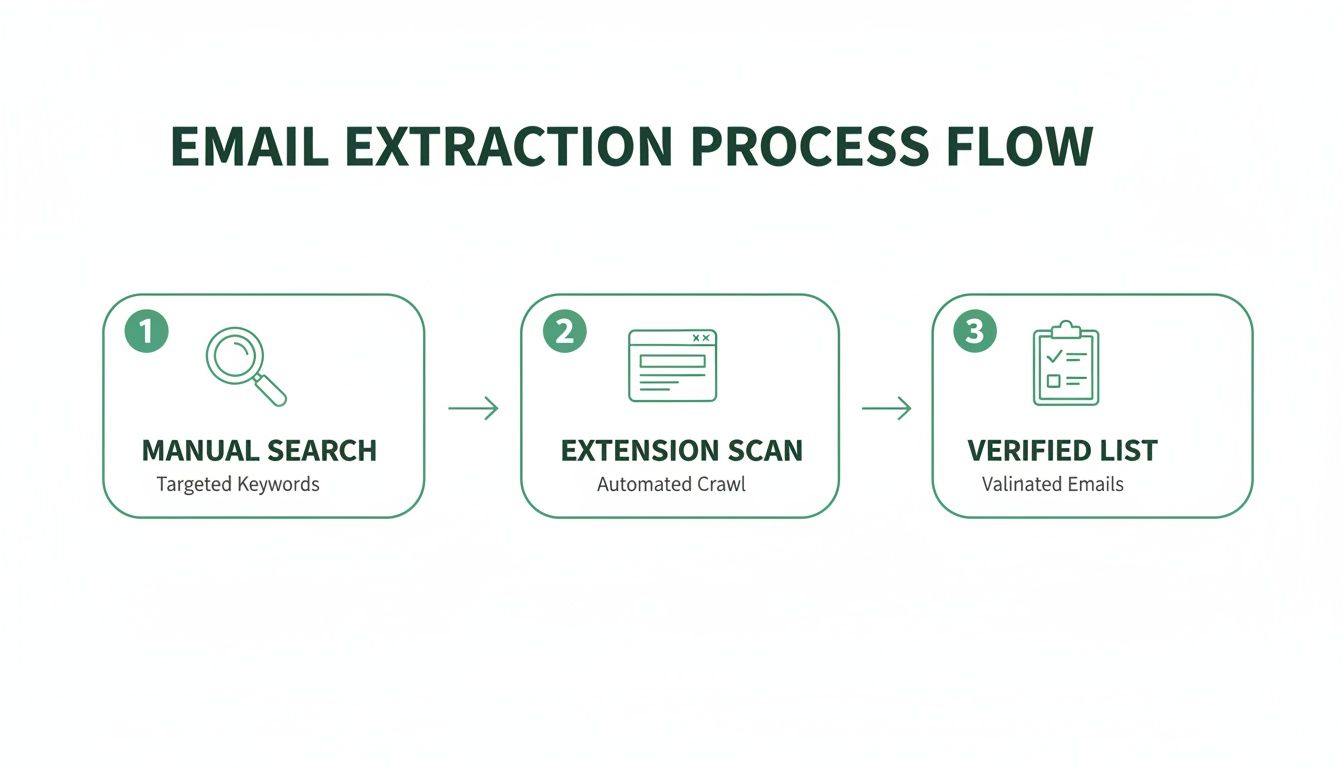
    This automated approach is worlds away from hunting for emails by hand. The diagram below shows just how much simpler the workflow becomes, turning a manual chore into a quick, automated process that gives you a verified list.

    Email extraction process flow diagram showing three steps: manual search, extension scan, and verified list.

    As you can see, it’s a clear upgrade from slow, manual work to an efficient system that delivers a clean list you can actually use.

    Decoding the Page Structure

    The moment you click the extension's button, it gets to work. But it doesn't "look" at the website like we do. Instead, it reads the source code—the HTML (HyperText Markup Language)—that acts as the blueprint for the entire page.

    This code contains every piece of text, every link, and every script, whether you can see it on your screen or not. By analyzing these blueprints directly, the extension gets an unfiltered look at everything on the page.

    Identifying Email Patterns

    With the raw code in hand, the real hunt begins. The tool uses a powerful technique called pattern recognition, typically relying on something called Regular Expressions (RegEx). A RegEx is simply a special sequence of characters that defines a search pattern.

    For any email address, the pattern is universal and easy to recognize:

    • A string of characters (the username)
    • The "@" symbol
    • Another string of characters (the domain)
    • A top-level domain like ".com" or ".org"

    The extension scans the entire HTML for any text that matches this exact structure. It’s an incredibly efficient way to sift through thousands of lines of code and pinpoint potential email addresses. At their core, email extractor extensions act as a specialized type of instant data scraper, zeroing in on contact information to fuel your outreach.

    Key Takeaway: An email extractor doesn't just scrape what you can see. It dives deep into a website's code, using sophisticated pattern matching to find anything that fits the structure of a valid email address.

    The Crucial Step of Verification

    Finding text that looks like an email is only the first step. A lot of addresses buried in a site's code might be old, generic (info@), or just plain wrong. This is where top-tier tools like EmailScout really shine by adding real-time verification.

    After flagging a potential email, an advanced extension sends a harmless, invisible ping to the email server tied to that domain. It's a quick check to see if the inbox actually exists and can receive mail—all without ever sending an actual email.

    This step is absolutely critical for maintaining good data hygiene. A smaller, verified list is always more valuable than a huge list full of emails that will just bounce. High bounce rates can tank your sender reputation and get your account flagged as spam.

    Accuracy is the biggest difference-maker here. The best extensions deliver incredible precision. In fact, our testing shows leading tools can hit a 95% accuracy rate, while weaker options might only be 55-70% accurate. That gap matters—teams using unverified lists often see up to 21% more bounces, which can completely derail a campaign's momentum.

    Alright, let's move from theory to practice. You get what an email extractor can do and how it works—now it's time to actually put that power into your browser. This quick walkthrough will get you set up in minutes, using EmailScout as our example.

    The whole process is designed to be painless. We'll get you from installation to your first successful extraction without hitting any technical roadblocks. We'll find the extension, add it to your browser, and make it dead simple to access with a single click.

    Person typing on a laptop, likely using an email extractor extension on a wooden desk.

    Installing the Extension in 3 Easy Steps

    Getting your first email extractor extension installed is a quick, three-step deal. It's no different than adding a new app to your phone and takes less than a minute.

    1. Head to the Chrome Web Store: This is the official and safest spot for browser add-ons. A quick Google search for "Chrome Web Store" will get you there.
    2. Search for Your Extractor: Type "EmailScout" into the search bar. The official extension will pop right up. Just double-check the name and logo to make sure you've got the right tool.
    3. Click 'Add to Chrome': You can't miss the big blue "Add to Chrome" button on the EmailScout page. Click it. A small pop-up will ask for permissions—just click "Add extension" to finish things up.

    And that's it. The extension is now officially part of your browser, ready to go to work.

    Pinning the Extension for Quick Access

    Right after you install it, the extension’s icon might be tucked away in a menu. To make your workflow as smooth as possible, you’ll want to "pin" it to your toolbar so it's always one click away.

    Just click the puzzle piece icon (🧩) in the top-right of your Chrome browser. This shows you all your installed extensions. Find EmailScout in the list and click the little thumbtack icon next to it. The pin will turn blue, and the EmailScout icon will now stay put in your toolbar.

    Pinning the extension turns a few clicks into just one. It's a simple move, but it's key to making email extraction a seamless part of your daily browsing and prospecting. Those seconds you save on every search really add up.

    Running Your First Email Extraction

    With the extension installed and pinned, you're ready for the fun part. Let's run a quick test on a common target for lead gen: a company's team or "About Us" page. These pages are often a goldmine for contacts.

    Go to a company's website and find their team page. Once it’s fully loaded, just click the pinned EmailScout icon in your toolbar.

    The extension gets to work instantly, scanning the page. In a few seconds, a pop-up appears with a clean, organized list of every email address it found. You can then copy the emails with a click or, if you're using a feature like EmailScout's AutoSave, they'll be automatically added to a running list for you. It’s that simple—you’ve just built a prospect list in seconds.

    Key Features of a Top-Tier Email Extractor

    So, you're looking for an email finder. It’s easy to assume they all do the same thing, but that’s not quite right. While plenty of free tools can scrape the obvious emails from a webpage, a top-tier email extractor extension is a different beast altogether. It’s the difference between casting a simple net off a pier and using a high-tech sonar to find where the real prize-winning fish are hiding.

    Choosing the right tool isn't just about grabbing emails; it's about investing in efficiency, accuracy, and the success of your outreach. Let's break down the features that separate a hobbyist gadget from a professional-grade tool that will genuinely level up your workflow.

    A tablet with a green keyboard case displays 'Key Features' on a wooden desk with notebooks and pens.

    Go Beyond Single-Page Scraping

    Most basic extractors work on the one page you have open. That’s fine for a quick one-off task, but what if you need to build a real list? A powerful tool thinks bigger, turning hours of mind-numbing manual work into a few clicks.

    Here are the capabilities you should be looking for:

    • Bulk URL Extraction: This is a massive time-saver. Instead of visiting hundreds of websites one by one, you just paste a list of URLs. The tool then does the heavy lifting, crawling and extracting emails from all of them at once.
    • Auto-Saving and List Building: The best extensions don’t just flash a list of emails at you and disappear. Features like EmailScout's AutoSave automatically add every email you find to a running list, so you’re constantly building your prospect database without even trying.

    If you’re serious about building a solid outreach list without spending your entire week on it, these features are non-negotiable.

    Prioritize Data Accuracy and Hygiene

    Here's a hard truth: an email list is worthless if the addresses are bad. Sending campaigns to invalid or dead emails cranks up your bounce rate, which is a huge red flag for email providers. Do it too often, and your domain could get blacklisted, making it nearly impossible to reach anyone's inbox.

    A good email extractor acts as a gatekeeper for your sender reputation.

    The single most critical feature separating premium tools from the free ones is built-in email verification. It’s an instant quality check, making sure the emails you collect are actually active and deliverable before you add them to a campaign.

    This isn't just a nice-to-have; it's a strategic must. The numbers don't lie. 82% of digital marketers count on email marketing, and with 4.73 billion users worldwide, the ROI is huge. We also know that 80% of sales take at least five follow-ups, yet 44% of sales reps give up after the first try. An extractor can slash the time spent hunting for contacts from 40 hours a week to just 40 minutes, freeing you up for that persistent follow-up that actually closes deals.

    Seamless Workflow and Integration

    Finally, a great tool should slide right into your existing process. It shouldn't feel like another clunky piece of software you have to manage; it should feel like it was always meant to be there.

    Look for these key integrations:

    • CRM Integrations: The ability to push contacts directly into your CRM, like Salesforce or HubSpot, is a game-changer. It cuts out manual data entry, prevents typos, and keeps your pipeline fresh.
    • Flexible Export Options: At a bare minimum, you need to be able to export your lists as a CSV or Excel file. This gives you the freedom to use your data in any other platform or tool you need.

    Comparing Basic vs Advanced Email Extractors

    The table below really puts the differences into perspective. While a free email extractor online can handle simple, one-off tasks, a professional tool is built for serious, scalable results.

    Feature Basic Free Extractor Advanced Tool (e.g., EmailScout)
    Extraction Scope Single active webpage only. Bulk URL processing and domain-level search.
    Email Verification Not included; high risk of bounces. Built-in, real-time verification for high deliverability.
    List Management Manual copy-paste required. Auto-saving to persistent lists and projects.
    Data Export Limited to basic text copy. Multiple formats (CSV, Excel) and direct CRM integrations.
    Support & Updates Minimal to none. Dedicated customer support and regular updates.

    Ultimately, choosing an advanced email extractor isn't just about getting more features. It's about making a smart investment in your most valuable resource: your time.

    Best Practices for Ethical Email Extraction

    An email extractor extension is a powerful tool, no doubt. It puts a ton of automation right at your fingertips. But how you use that power is what really separates a pro from a spammer. Success isn't just about how many emails you can collect; it's about the quality of your outreach and the trust you manage to build along the way. Ignoring the ethical side of things isn't just bad form—it's genuinely bad for business.

    Think of privacy laws like GDPR in Europe and the CAN-SPAM Act in the U.S. not as annoying roadblocks, but as a clear framework for building a solid brand reputation. These regulations exist for a reason: to protect people from getting spammed with irrelevant junk. When you follow these rules, you position yourself as a trustworthy professional, and you make sure your messages actually land in the inbox and get read.

    The massive growth of these tools tells a bigger story about the digital outreach economy. The global web scraper software market was valued at USD 718.86 million and is expected to climb to USD 2,209.88 million by 2033. This boom is fueled by sales pros who need efficient ways to find leads, pushing top tools to include features that help them stay on the right side of the law.

    Shift Your Mindset From Blasting to Connecting

    Here’s the fundamental rule of ethical outreach, and it’s pretty simple: your goal is to start a conversation, not just blast out a promotion. Every single email you send should be grounded in legitimate interest, which means the person on the receiving end could actually benefit from what you have to say.

    Before you add a freshly extracted email to your next campaign, just ask yourself this one question: "Is my message helpful and relevant to this specific person?" If you hesitate or the answer is no, just don't send it. That single filter can dramatically improve your results and safeguard your reputation.

    An email address is more than just data; it's a direct line to a person. Ethical extraction respects that connection by prioritizing relevance and value over sheer volume. This approach builds trust and ensures your brand is welcomed, not blocked.

    Actionable Rules for Ethical Outreach

    To keep your campaigns effective and compliant, you need to bake these non-negotiable best practices right into your workflow. They are the pillars of responsible and successful email outreach.

    • Always Provide a Clear Opt-Out: Every single email you send must include an easy-to-find unsubscribe link. Hiding this option is a direct violation of laws like CAN-SPAM and is a surefire way to get your emails marked as spam.
    • Be Honest and Transparent: Never, ever use misleading subject lines or "From" names. Your message should be an accurate reflection of who you are and what you're offering. Deception is the fastest way to destroy trust.
    • Focus on Personalization and Value: Use what you know to tailor your message. Mention their company, their role, or a recent post they made to show you've done your homework. A generic blast is the very definition of spam. If you're building lists from professional networks, you can also check out our guide on scraping emails from LinkedIn ethically.
    • Maintain Excellent Data Hygiene: Clean your email lists regularly. Get rid of inactive or incorrect addresses. Using a tool with built-in verification is a great start, as it helps protect your sender reputation and improves your overall deliverability.

    By sticking to these guidelines, you turn your email extractor extension from a simple scraping tool into a strategic asset for building meaningful professional relationships. This responsible approach is what drives long-term success and keeps your outreach effective and welcome.

    How Sales and Marketing Teams Use Extractors

    Alright, let's move beyond the technical "how" and into the practical "why." How does an email extractor extension actually make a difference in the day-to-day grind? For sales and marketing pros, these tools aren't just for gathering data—they’re for creating opportunities, collapsing timelines, and getting real results.

    Think about a sales team trying to crack a new market. The old way involved weeks of mind-numbing manual searches. With a tool like EmailScout, that entire process gets supercharged. This is where the magic happens: you're swapping grunt work for smart automation and turning tedious prospecting into a genuine competitive edge.

    Three business professionals, a man and two women, collaborate on a laptop under a 'SALES USE CASES' banner.

    Accelerating Sales Prospecting

    Let’s put ourselves in the shoes of a B2B sales development representative (SDR) who needs to find contacts at mid-sized tech companies. Their specific goal is to book meetings with engineering managers.

    Here’s what their workflow looks like with an extractor:

    1. Identify Target Companies: First, the SDR pulls a list of 50 target company websites from a few industry reports.
    2. Run a Bulk Extraction: Instead of clicking through each site one by one, they drop the whole list into EmailScout's bulk URL feature and let it run.
    3. Refine and Verify: The tool spits back a few hundred emails. The SDR quickly filters them for titles like "Engineering Manager" or "Head of Engineering" and trusts the built-in verification to weed out bad addresses.

    The result? In about an hour, the SDR has a hyper-targeted, verified list of over 150 solid prospects. Manually, that would've been days of work. Now, they can spend their time actually crafting personalized emails that will get a response.

    Powering Marketing and PR Outreach

    Now, let's switch gears to a marketer gearing up for a big product launch. They need to get the word out, and that means getting coverage from tech bloggers and journalists.

    They start by listing the top tech blogs and publications in their niche. As they visit each site, they pop open the extension on the "About Us" or "Contributors" page. Instantly, the tool grabs the direct email addresses of editors and writers, letting them bypass those generic contact@ inboxes that are basically black holes.

    Using an email extractor for PR is about building direct lines of communication. It's the difference between blindly sending a press release and putting your story right in front of the person who can actually tell it.

    This gives them a curated list of real people with influence. Now the marketer can send out personalized pitches that are far more likely to land press coverage and build some serious buzz. And the numbers back this up: 82% of global digital marketers rely on email, and 65% automate it because the ROI is just that good. Using verified data from a quality extractor can slash bounce rates by 21%—a massive win for any campaign. You can dig into more digital marketing stats to see just how critical these strategies are.

    Streamlining Recruitment and Talent Sourcing

    Finally, imagine a recruiter on the hunt for a specialized software developer. They know the best candidates are probably already working for their top competitors.

    So, the recruiter browses the "Team" or "Engineering Blog" pages on those competitor websites. With one click, the email extractor extension scans the page and pulls the professional emails of potential candidates. This helps the recruiter build a solid pipeline of passive candidates—talented people who aren't actively job hunting but would listen to the right offer. It’s a direct, discreet way to connect, and it’s way more effective than just throwing a job posting online and hoping for the best.

    Common Questions About Email Extractors

    When you start digging into automated outreach, a few questions always pop up. It's only natural to wonder about the legal side, how effective these tools really are, and whether they're worth it. Let's clear the air and tackle the most common questions we hear about email extractor extensions.

    My goal here is to give you the straight answers so you can move forward with confidence and get the best results possible.

    Are Email Extractor Extensions Legal?

    Yes, using an email extractor extension to find and gather publicly available information is perfectly legal. The important thing isn't how you find the emails, but how you use them afterwards. Your outreach has to play by the rules of anti-spam and privacy regulations like GDPR and the CAN-SPAM Act.

    This means you should always:

    • Make sure your message is genuinely relevant and offers real value to the person you're contacting.
    • Never, ever use deceptive or misleading subject lines.
    • Include a clear and easy way for people to opt-out of hearing from you again.

    Honestly, ethical use is just good strategy. It's the foundation of any outreach that actually gets results.

    Can Extractors Find Any Email on Any Website?

    While these extensions are incredibly powerful, they aren't magic. They can only find email addresses that are present somewhere in a website's code or text. If an email address isn't listed publicly on the page, the tool can't just invent it.

    That said, the best tools do more than just scan for what's visible. They can spot common email patterns for a specific company (like firstname.lastname@company.com) and then use verification tech to check if that predicted address is live. This trick dramatically boosts the odds of finding the right contact, even when their email isn't spelled out for everyone to see.

    Why Use an Extension Instead of Searching by Hand?

    It really boils down to three things: speed, scale, and accuracy. Manually hunting for just a few emails on a single website can easily eat up 20 minutes or more of your time. An extension can do the same job in a couple of seconds.

    But the real game-changer is scale. An extension lets you build a targeted list of hundreds of contacts in the time it would take to find a handful manually. This isn't just a small time-saver; it frees you up for what really matters, like crafting a killer outreach message.

    On top of that, top-tier extensions like EmailScout have email verification built right in. This is a critical step that checks if an email is active, which slashes your bounce rates and protects your sender reputation—something that’s nearly impossible to do efficiently by hand.


    Ready to stop searching and start connecting? The EmailScout extension delivers the speed, accuracy, and automation you need to build high-quality contact lists in minutes. Try EmailScout for free today!

  • What Is Contact Management A Guide to Building Better Connections

    What Is Contact Management A Guide to Building Better Connections

    Contact management is the practice of systematically collecting, storing, and organizing information about the people who matter to your business. It's less like a dusty, old Rolodex and more like a dynamic digital playbook for your entire network. This system ensures every important detail—from emails to past conversations—is always at your fingertips.

    Understanding What Contact Management Actually Is

    Laptop displaying contact management software, notebook, and phone on a desk with 'Organize Your Network' text.

    Think of your professional network as a library. Each person is a unique book filled with valuable information. Without a system, those books are just a disorganized pile on the floor. You might remember a few titles, but finding a specific fact or story is next to impossible.

    That’s what happens when you try to manage business relationships with scattered spreadsheets, sticky notes, and pure memory. Contact management is the digital card catalog for that library. It’s a methodical approach that guarantees no valuable connection or conversation ever gets lost.

    At its core, contact management empowers you to build meaningful relationships, track every touchpoint, and ensure no valuable connection falls through the cracks. It's the foundational layer of any successful sales, marketing, or business development strategy.

    More Than Just a List of Names

    It’s easy to think contact management is just about storing names and phone numbers, but that's selling it way short. A proper system consolidates all relevant data into a single, easy-to-access profile for each person.

    This includes things like:

    • Basic Details: Name, email, phone number, and company.
    • Interaction History: Logs of calls, emails, and meetings.
    • Contextual Notes: Key details from conversations, personal preferences, or important dates.
    • Relationship Status: Where they are in your pipeline, from a new lead to a loyal customer.

    The Financial Cost of Disorganization

    Failing to organize this data has real consequences. When your team works from outdated or incomplete information, opportunities slip away, and customer experiences suffer. In fact, poor data hygiene can cause businesses to lose up to 19% of their revenue annually.

    A solid contact management system tackles this risk head-on by creating a single source of truth for everyone.

    Organized contact data is also a critical first step for any outreach campaign. For example, having accurate, well-segmented contacts is non-negotiable if you’re trying to generate new leads. This organized approach prevents embarrassing mistakes and empowers personalized communication that builds trust and drives results.

    The Journey from Rolodex to Smart Systems

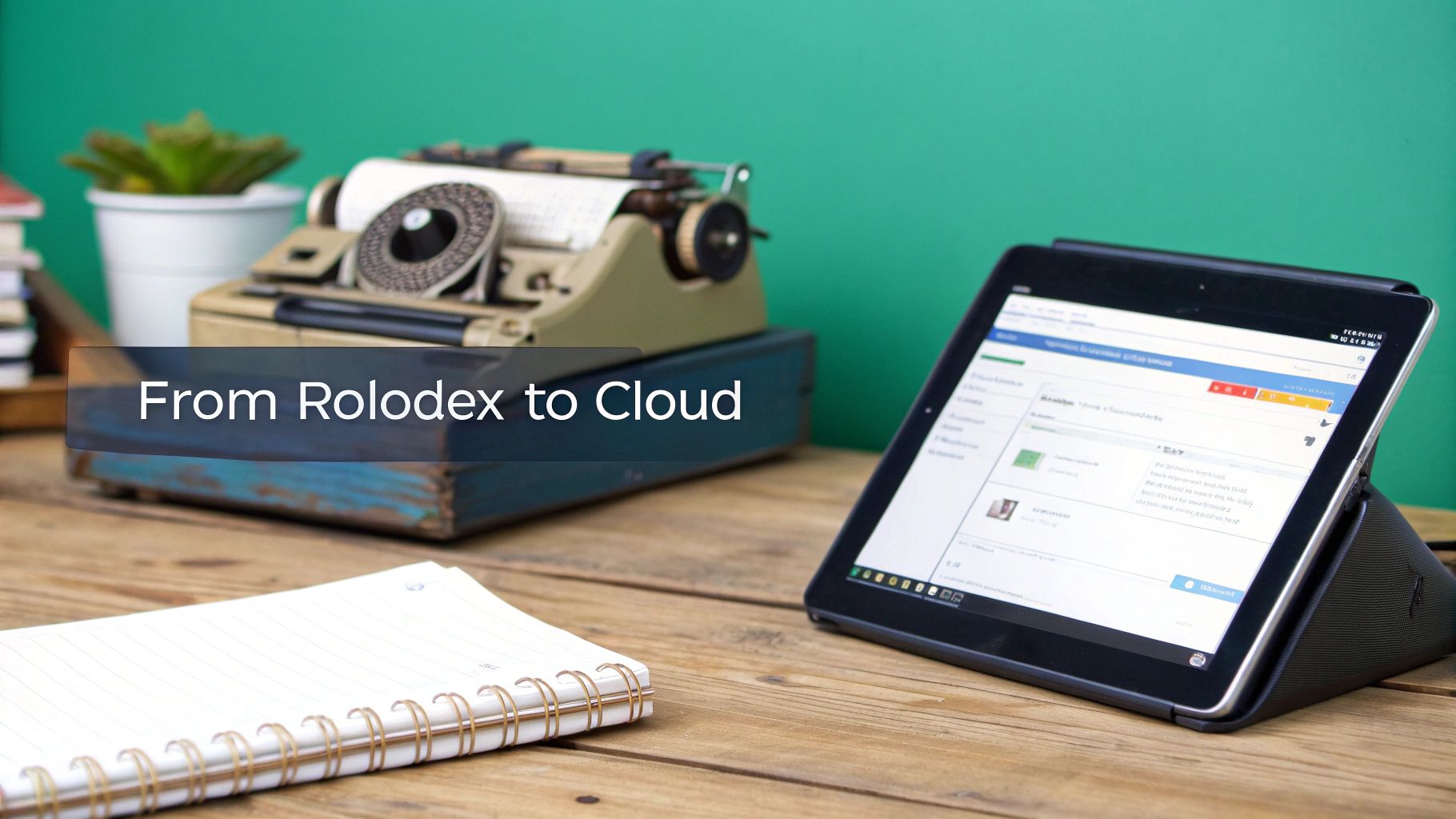
    A vintage typewriter and a modern tablet on a wooden desk, symbolizing the evolution of contact management.

    To really get why today’s tools are so powerful, it helps to look back at how we got here. Believe it or not, organizing contacts started long before computers with the humble Rolodex. That spinning wheel of business cards was once the height of professional efficiency, a physical database sitting on every desk.

    Each card was a connection, but the whole system was manual, static, and totally siloed. Sharing information was a pain, real-time updates were impossible, and you had zero context beyond what was printed on a tiny piece of cardstock. This was contact management at its most basic: just simple storage.

    From Spreadsheets to Shared Systems

    The first big leap forward came with personal computers and the rise of digital spreadsheets. All of a sudden, you could search and edit contact lists—a massive upgrade from paper. Still, they were far from perfect.

    Spreadsheets were notorious for human error, had no version control, and created frustrating information silos. Different team members would often work from separate, outdated files, leading to mix-ups and lost opportunities. It became obvious that a shared, central system was needed.

    This shift from isolated files to networked databases was the most important development in the history of contact management. It transformed the practice from a personal productivity hack into a collaborative business strategy.

    This very need led to the first Customer Relationship Management (CRM) systems. Early CRMs were a revelation because they created a central hub where entire teams could see and update customer information. For the first time, a salesperson could pull up a support ticket logged by a colleague, giving them a much clearer picture of the customer. This interconnected approach laid the groundwork for the intelligent platforms we rely on today.

    The global CRM market, which is the engine behind modern contact management, hit $58.82 billion in 2022. It's expected to grow at a 13.9% CAGR through 2030, thanks to things like AI and the move to the cloud. You can find more CRM market trends on bigcontacts.com.

    The Cloud and AI Revolution

    The final piece of the puzzle was the cloud. Cloud-based platforms made contact management accessible from anywhere, on any device. This untethered professionals from their desks and enabled real-time sync, making sure everyone was looking at the same, up-to-date information.

    Now, AI and automation are adding another layer of smarts. Modern systems can log your interactions automatically, pull in public data to enrich contact profiles, and even tell you the best time to reach out. What started as a simple file of business cards has evolved into a proactive, intelligent system for building and nurturing valuable relationships.

    The Real-World Benefits of Organizing Your Network

    Knowing what contact management is all about is one thing, but the real question is, what can it actually do for you? Let's get practical. A well-organized network delivers real, tangible results that hit your bottom line and make everyone’s job easier.

    It’s the difference between reactive chaos—scrambling for a phone number—and proactive, strategic relationship building.

    Imagine your sales team never missing a critical follow-up because smart reminders keep them on track. Think about your marketing campaigns getting way more engagement because you can segment your audience based on what they actually care about. This isn't just about being tidy; it's about creating a smarter way to work.

    A strong contact management strategy transforms your network from a passive list of names into an active asset. It’s the engine that powers personalization, team synergy, and sustainable growth.

    When all your contact data lives in one central place, everyone on your team gets the full picture. A support agent can see a customer's entire purchase history, and a salesperson knows about their recent support tickets. That leads to smarter, more empathetic conversations every single time.

    Boosted Productivity and Sales Growth

    One of the first things you'll notice is a huge jump in productivity. Instead of digging through old emails, spreadsheets, or sticky notes to find a phone number, your team can pull up any detail in seconds. All that saved time goes right back into high-value work, like nurturing leads and closing deals.

    That efficiency pays off—literally. Companies that get contact management and CRM right see an average sales bump of 29%. When your data is organized, your team can spot opportunities, personalize their outreach, and guide prospects through the sales funnel without missing a beat. You can discover more CRM statistics on bigcontacts.com.

    Ultimately, getting organized creates a domino effect of good things:

    • Enhanced Personalization: You can craft messages based on a contact's history, making them feel like a valued partner, not just another number on a list.
    • Seamless Team Collaboration: With a single source of truth, your sales, marketing, and support teams can finally work in sync, delivering a consistent and professional customer experience.
    • Improved Customer Retention: By tracking interactions and key dates, you can anticipate what your clients need and proactively engage with them, building loyalty that lasts.

    You stop being a collector of contacts and start becoming a builder of a powerful, interconnected network. Each organized profile is another brick in the foundation of a stronger, more profitable business relationship—ensuring no opportunity ever falls through the cracks again.

    Must-Have Features in a Modern Contact Management Tool

    Choosing the right contact management tool can feel like a chore, but it really just boils down to finding a system that solves your actual problems without overcomplicating things. Not all platforms are built the same, so focusing on a core set of features ensures you get something that helps your workflow instead of just adding another login to remember.

    The absolute foundation of any good system is a unified contact database. Think of it as a central command center where every single piece of information about your contacts lives. It should pull data from all over the place—your email, social media, web forms—and organize it into one clean, complete profile for each person. No more scattered info or duplicate records.

    This single source of truth is what makes everything else work. Without it, your team is just staring at an incomplete puzzle.

    Core Functionality for Daily Efficiency

    Once you've got that central database sorted, the next layer of features is all about making your day-to-day tasks easier and way more effective. These aren't just "nice-to-haves" anymore; they're essentials for any team that's serious about building relationships at scale.

    Here are the key features to look for:

    • Automated Interaction Logging: The tool should automatically log your emails, calls, and meetings. This saves a ton of time on manual data entry and makes sure every team member sees the full history of a relationship at a glance.
    • Robust Segmentation: You need the ability to filter and group contacts with tags or custom fields. This is how you create super-targeted lists for marketing campaigns or sales outreach, making sure your message actually connects with the right people.
    • Task Management and Reminders: A good tool lets you create tasks, set deadlines, and assign them to team members right inside a contact’s profile. This simple function is a lifesaver for making sure no follow-up ever slips through the cracks.

    The real goal here is to shift your team from just reacting and entering data to proactively building relationships. When you automate the boring stuff, you free up brainpower for real conversations and smart strategy.

    For digital marketers, the priorities are crystal clear. Research shows that a whopping 45% prioritize automation in their tools, with integration coming in a close second at 36%.

    Integrations and Accessibility

    A modern contact management tool can't live on an island. It has to connect smoothly with the other apps you use every single day. This is where integrations are critical. Look for a system that plays nice with your email client, calendar, and other key business software.

    If you’re already living in Google’s world, adding a dedicated CRM for Google Contacts can transform a basic address book into a seriously powerful sales machine. By checking out the best contact management software, you can find options designed to work perfectly with the tools you already know, creating a workflow that’s truly connected and efficient.

    How to Supercharge Your Contact Gathering Workflow

    Let's be honest: your contact management system is only as good as the data you feed it. That old saying, "garbage in, garbage out," isn't just a cliché—it’s a massive business risk. You can have the most powerful system on the planet, but it's completely useless if it’s full of outdated, wrong, or incomplete info.

    That’s why the very first step—gathering high-quality contacts—is everything.

    Think of your system like a high-performance engine and your contact data as its fuel. Shovel in low-grade, dirty fuel, and that engine will choke and sputter. But give it clean, premium fuel, and it will run exactly how it was designed. This means you need to stop just collecting names and start strategically acquiring accurate, relevant data for the actual decision-makers.

    Automating Your Data Acquisition

    Manual data entry is the arch-nemesis of efficiency. It's painfully slow, mind-numbingly tedious, and a perfect recipe for typos and other mistakes. The real secret to kicking your workflow into high gear is automating data acquisition whenever you can. It cuts down on the grunt work and ensures you’re starting with much more accurate information.

    Tools like EmailScout essentially act as a smart front door for your entire system. Instead of manually copying and pasting names and emails from websites or social media profiles, you can find and save verified contact details with a single click.

    • One-Click Email Discovery: Instantly find the email addresses of key people while you’re on their company website or LinkedIn profile.
    • Automated List Building: Effortlessly build targeted prospect lists without chaining yourself to your desk for hours of manual research.

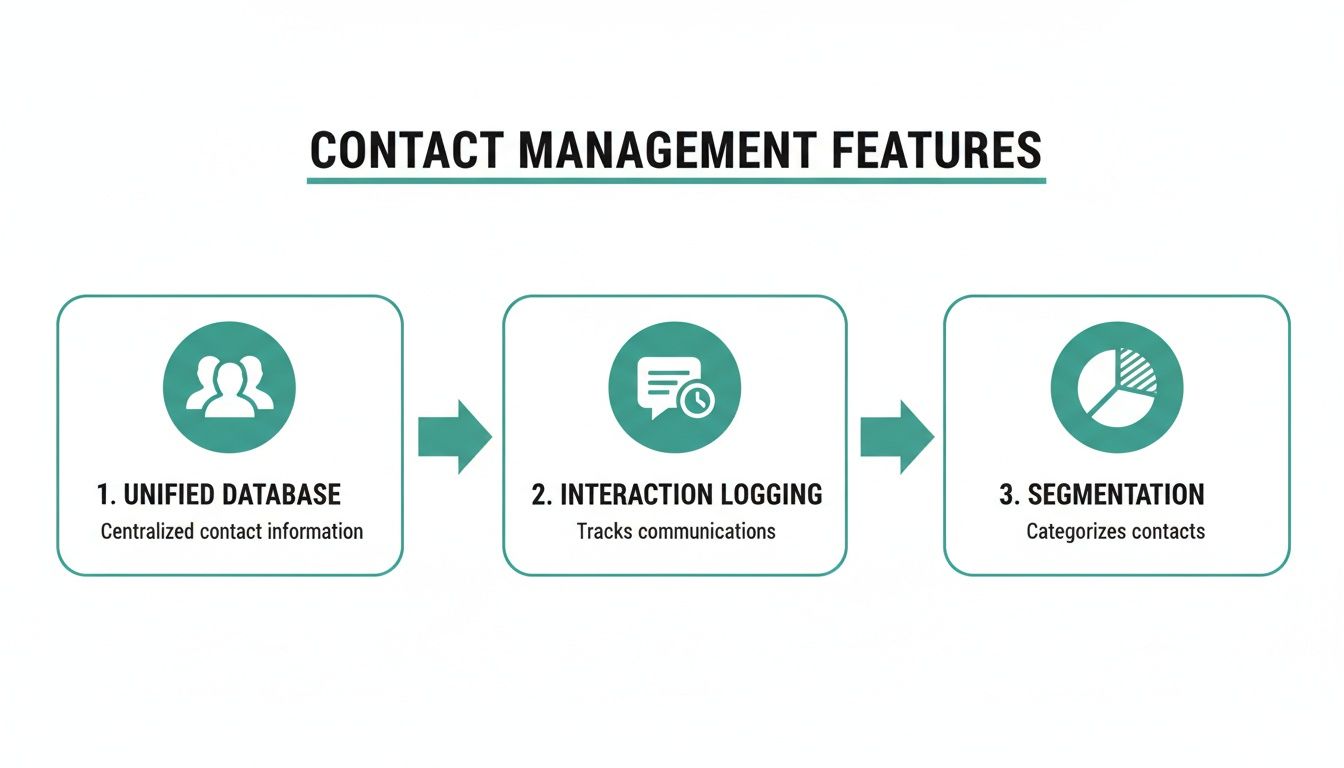
    This diagram breaks down the core process that solid contact data makes possible.

    Diagram illustrating key contact management features: unified database, interaction logging, and segmentation.

    As you can see, everything from having a unified database to logging interactions and segmenting your audience hinges on the quality of the contact info you gathered in the first place.

    Turning Browsing into a Lead Generation Engine

    Modern tools can turn something you do every day—browsing the web—into a powerhouse for gathering leads. For example, using an email extractor from websites lets you automatically pull contact information from multiple pages at once. You can populate your database with valuable leads while you're busy with other things.

    This isn't just a small tweak; it's a fundamental shift in your workflow. You stop being a data entry clerk and become a strategic prospector. Technology does the heavy lifting, freeing you up to focus on building relationships and closing deals.

    The move to mobile makes this even more powerful. The mobile CRM market is expected to explode from $28.4 billion in 2024 to $55.9 billion by 2029. This growth means sales pros can manage their networks from anywhere, using simple tools like browser extensions to grab leads on the fly.

    If you really want to level up, look into more advanced methods like AI-powered lead generation. This approach helps you pinpoint high-potential contacts with even more speed and precision, making sure your pipeline never runs dry. By focusing on a smarter way to acquire contacts, you're fueling every single sales and marketing activity that follows with the high-octane data needed to win.

    Frequently Asked Questions About Contact Management

    Diving into contact management usually brings up a few good questions. Let’s clear the air and tackle some of the most common ones so you can get a better handle on how it all works in the real world.

    What Is the Main Difference Between Contact Management and a CRM?

    The simplest way to look at it is that contact management is a core feature, while a Customer Relationship Management (CRM) system is a complete platform. A contact management tool is laser-focused on one thing: neatly organizing all the information you have about people.

    A full-blown CRM does that, but then it adds a ton of other powerful tools on top. It helps you manage the entire customer journey with things like sales pipelines, marketing automation, and deep analytics. For a lot of startups and small businesses, a dedicated contact management system is the perfect starting point before they need the horsepower of a full CRM.

    Think of it like a kitchen. Contact management is your perfectly organized pantry, with every ingredient labeled and easy to find. A CRM is the entire kitchen—the oven, the stove, and all the gear you need to cook a five-course meal.

    Can I Just Use a Spreadsheet to Manage Contacts?

    Sure, you can start with a spreadsheet. It’s certainly better than nothing, and it’s where most people begin. The problem is, you’ll hit a wall fast as your network grows. Spreadsheets are completely manual, which makes them a breeding ground for human error.

    They also don't have the automation or collaboration features you get with a dedicated tool. Trying to share a spreadsheet with a team almost always ends in version-control nightmares and people working off old, outdated information. A real contact management system is built to scale with you, keeping your data clean and making it easy to build relationships over time.

    How Does This Help with Sales and Cold Outreach?

    It’s the absolute bedrock of any successful outreach. A well-organized system is what separates a strategic, personal campaign from a generic email blast that just gets ignored. It lets your sales team build hyper-targeted prospect lists and slice them up by key details like industry, job title, or location.

    More importantly, it keeps a perfect record of every single interaction. This is huge for preventing those embarrassing slip-ups, like sending the same pitch twice or forgetting a key detail from a previous chat. It gives your team the context they need to send personalized follow-ups that actually connect with people. And it all starts with tools that help you find accurate contact info in the first place.

    When Should My Business Start Using a Contact Management System?

    Honestly, the best time to start is right now. As soon as you begin talking to customers, partners, or potential leads, you should have a system in place. Starting early builds good data habits from day one. It's a proactive approach that ensures no valuable connection ever gets lost in a messy inbox or a forgotten spreadsheet.

    If you wait until your network is a huge, disorganized mess, you’re just creating a massive cleanup project for yourself down the road. With so many affordable (and even free) options out there today, there’s really no good reason to put it off. The sooner you get organized, the sooner you can start using your network to drive real growth.


    Ready to supercharge your contact gathering and build pristine marketing lists from the start? EmailScout is a powerful Chrome extension that finds verified email addresses with a single click, allowing you to populate your new contact management system with high-quality leads effortlessly. Start building your network the smart way by visiting https://emailscout.io.

  • What is Sales Automation? what is sales automation explained

    What is Sales Automation? what is sales automation explained

    Let's be honest, most sales reps didn't get into this business to do paperwork. They got into it to connect with people, solve problems, and close deals. So what if you could give your team a crew of digital assistants to handle all the tedious, repetitive stuff?

    That's the big idea behind sales automation: using smart technology to take over the manual tasks that eat up your team's day. We're not talking about replacing salespeople with robots. It's about empowering them by automating things like data entry, sending basic follow-up emails, and keeping the CRM updated.

    The Shift From Manual Effort To Automated Power

    For any sales pro, the daily grind can feel more like being an administrator than a strategic closer. Sales automation completely flips that dynamic. By offloading the tasks that take up the most time but bring in the least direct revenue, your team gets to focus their energy where it actually counts—building relationships, understanding a customer's real needs, and navigating those tricky negotiations.

    A man working on a laptop at a desk with 'Digital Sales Assistants' text and sales-related icons.

    This shift is why the market is exploding. The global sales automation market was already valued at around $9.3 billion in the early 2020s and is on track to more than double by 2033. It's clear businesses are catching on, especially with predictions that digital channels will handle 80% of B2B sales interactions by 2025.

    What Does This Look Like In Practice?

    Instead of spending an hour every afternoon logging calls and emails, an automated system just does it for you, instantly. Instead of that nagging feeling you forgot to follow up with a warm lead, an automated email sequence keeps the conversation going without you lifting a finger.

    This strategic use of technology builds a sales engine that's more efficient, scalable, and ultimately, more successful. This whole ecosystem is often referred to as SaaS for sales, which includes a whole suite of tools designed to sharpen every single part of your sales process.

    The goal is simple: let technology handle the repeatable tasks so your sales team can focus on the human connections that drive revenue. Automation provides the consistency and scale, while your team provides the expertise and personality.

    A Day in the Life Before and After Sales Automation

    To really see the difference, just look at the daily to-do list of a typical salesperson. The table below shows just how dramatic the change is when you move from clunky manual processes to a smooth, automated workflow.

    Manual Sales Task Automated Workflow Primary Benefit
    Manually sending welcome emails to new leads An automated sequence sends an email the moment a lead enters the CRM. Immediate engagement and a consistent first impression.
    Updating CRM records after every call The system automatically logs call details, duration, and outcomes. Saves a ton of time and ensures 100% data accuracy.
    Setting calendar reminders for follow-ups A smart sequence sends follow-ups based on prospect engagement. Prevents valuable leads from falling through the cracks.
    Researching lead data one by one Lead enrichment tools automatically populate contact and company info. Gives reps crucial context right when they need it.

    As you can see, it's not about working harder; it's about working smarter. Automation frees up your team's most valuable asset—their time—to do what they do best: sell.

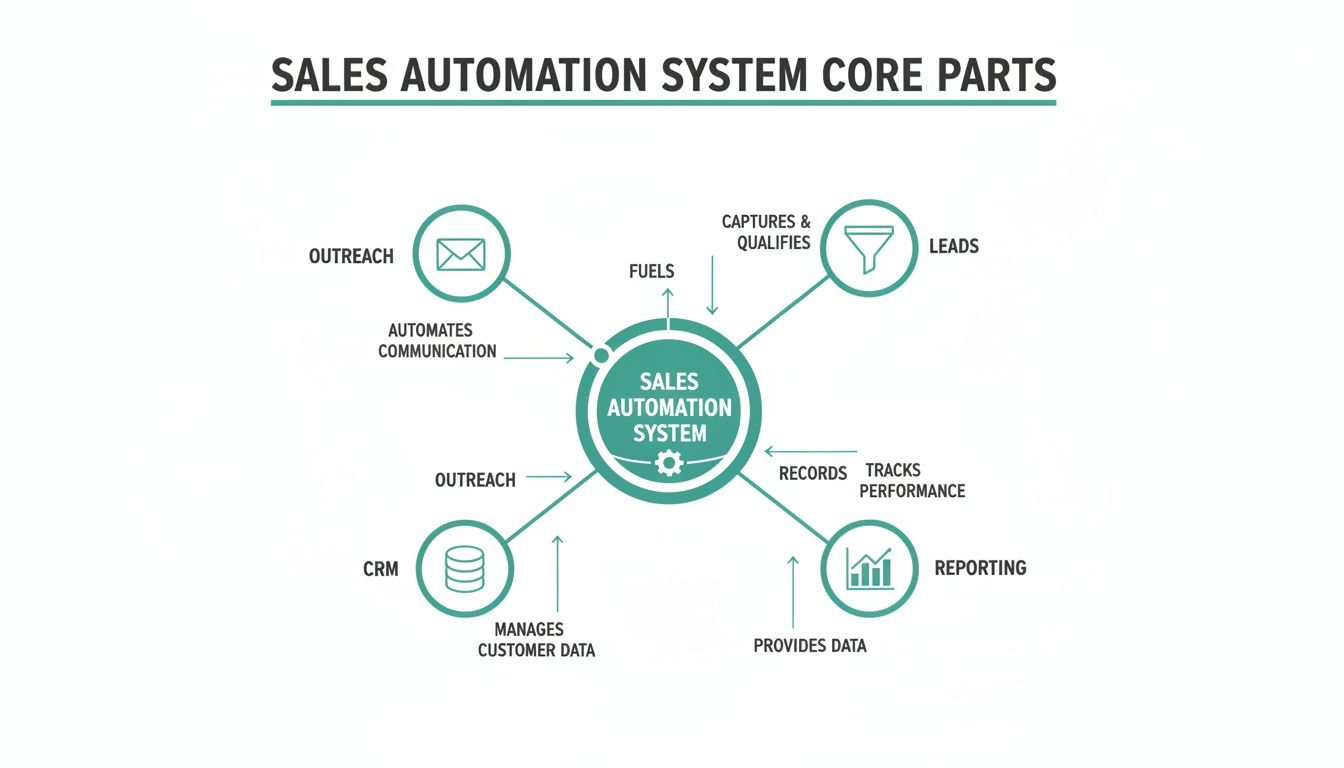
    The Core Parts of a Sales Automation System

    Thinking about sales automation can feel a bit overwhelming, but it’s really just a high-performance engine for your sales team. Each part has a specific job, and when they all work together, they create a smooth, powerful machine that drives revenue. Once you understand these core components, you’ll see exactly how the technology turns manual work into real momentum.

    Let's pop the hood and look at the essential gears and pistons. While different platforms have their own bells and whistles, almost every effective sales automation system is built around a few key functions that handle everything from finding new leads to analyzing what works.

    Lead Capture and Enrichment

    The first part of any sales engine is the fuel intake—how you get potential customers into your pipeline. This starts with lead capture, which automatically pulls in leads from places like your website forms, webinars, or social media. No more copy-pasting names from a spreadsheet.

    As soon as a lead is captured, lead enrichment kicks in. Instead of your reps spending hours digging through Google and LinkedIn for details, automation tools instantly go to work, finding and adding valuable data. This could be anything from a person's job title and company size to their industry or even recent company news.

    • Here's how it works: Someone downloads an ebook from your website. The system instantly creates a new contact record for them.
    • Then, the magic happens: An enrichment tool automatically adds their title ("Marketing Manager"), their company's employee count (250), and its location (New York).

    Just like that, your salesperson has critical context before they even think about picking up the phone.

    Automated Outreach and Sequencing

    With enriched leads in the system, the engine's pistons start firing. Automated outreach sequences are a series of pre-written emails, social media messages, or even texts that are sent to prospects over time. This guarantees consistent, timely follow-up without anyone having to set a reminder.

    And these aren't just generic email blasts. Modern sequences are smart. They can be programmed with "if/then" logic. For example, if a prospect clicks a link in the first email, they might get a completely different follow-up than someone who didn't open it at all.

    The real power here is consistency. A study found it can take an average of eight touchpoints to even get an initial meeting. Automation makes sure those touches happen, every single time, so no lead ever falls through the cracks.

    CRM Integration and Data Management

    The central computer running this whole operation is your Customer Relationship Management (CRM) platform. Any sales automation tool worth its salt has to integrate seamlessly with your CRM, making it the single source of truth for every customer interaction.

    This integration automatically logs every activity—every email sent, every call made, every meeting booked. This doesn't just eliminate one of the most hated tasks for salespeople (manual data entry); it ensures your customer data is always accurate and up-to-date. Clean data is everything when it comes to making good decisions and forecasting. For a deeper look at keeping this data organized, exploring the best contact management software can give you some great ideas.

    Analytics and Reporting Dashboards

    Finally, every engine needs a dashboard with all the gauges. Analytics and reporting dashboards give you a clear, real-time view of what’s working and what isn’t. They track key performance indicators (KPIs) so you can understand the health of your entire sales pipeline at a glance.

    You can instantly see metrics like:

    • Email open and reply rates for different outreach sequences.
    • Conversion rates at each stage of your sales funnel.
    • Which lead sources are actually bringing in the most revenue.

    This data-driven feedback loop is what lets you tune your sales process. You can double down on strategies that are crushing it and fix bottlenecks before they become serious problems, keeping your sales engine running at peak performance.

    Why Sales Automation Is a Game Changer for Growth

    It’s one thing to understand the moving parts of sales automation, but it’s another thing entirely to see how they come together to fuel real business growth. This isn't just about convenience; it's about building a powerful engine to scale your sales, ramp up efficiency, and directly fatten your bottom line. Automation turns vague ideas into hard, measurable results that everyone in the company can see.

    The most immediate win? A huge boost in team productivity. Think about all the tedious, soul-crushing tasks that eat up a salesperson's day—logging calls, updating the CRM, sending the fifth follow-up email. Automation takes all of that off their plate, freeing them up to do what they do best: build relationships, understand customer problems, and actually close deals.

    Maximizing Efficiency and Shortening Sales Cycles

    When your team can offload all that manual grunt work, their capacity to sell just explodes. It’s no surprise that organizations using modern sales automation see productivity jump by an average of 14–15%. That efficiency means more calls, faster deals, and better win rates. It's proof that working smarter really does pay off. You can discover more insights about automation statistics to see just how big these gains can be.

    This diagram shows how all the core pieces of a sales automation system click together to get these kinds of results.

    Diagram illustrating the core parts of a sales automation system, including outreach, leads, CRM, and reporting.

    As you can see, leads, outreach, CRM data, and reporting all feed into each other. It’s a self-improving cycle where every automated step makes the next one stronger, lifting the whole system's performance.

    Another massive advantage is a much shorter sales cycle. With instant, consistent follow-up sequences running in the background, no lead ever goes cold because someone simply forgot. Automation guarantees every prospect gets the right touchpoint at the right time, keeping the momentum going and moving them through the funnel way faster.

    Achieving Scalable Growth with Data-Driven Decisions

    Beyond making individual reps more productive, sales automation builds a rock-solid foundation for growth. As your business gets bigger, you can't just keep hiring more people to do more manual work—that's a recipe for bloated costs and inefficiency. Automation lets your sales process handle a much higher volume of leads without needing a bigger headcount to match.

    The secret sauce here is the mountain of clean, accurate data that automation creates.

    • Improved Data Quality: By automatically logging every single interaction, you get rid of human error. Your CRM becomes a trusted source of truth for every customer relationship.
    • Actionable Insights: When your data is solid, your analytics dashboards become your superpower. You can see exactly which outreach strategies are killing it, find the bottlenecks in your process, and make smart, informed decisions to get better.
    • Predictable Forecasting: Clean data leads to sales forecasts you can actually count on. This lets leadership plan resources, set realistic targets, and steer the ship with confidence.

    Ultimately, sales automation is a game changer because it creates a repeatable, predictable, and scalable sales machine. It turns your sales process from a series of disjointed manual tasks into a cohesive system that consistently drives revenue and supports sustainable business growth.

    This systematic approach doesn't just bump up this quarter's numbers; it builds a more resilient and adaptable sales organization that’s ready for whatever comes next.

    High-Impact Automation Workflows You Can Build Now

    Knowing the theory behind sales automation is great, but putting it into practice is where you’ll actually see results. Let’s get into a practical playbook of proven workflows that can deliver value right away.

    We'll break down a few common scenarios using a simple "Trigger > Action" format. This approach makes automation feel a lot less intimidating and gives you clear, actionable strategies you can copy and paste. Think of them as simple recipes for success.

    Digital tablet displaying 'ACTION' in an automation playbook next to a notebook and pen on a desk.

    The Inbound Lead Welcome Sequence

    When someone fills out a form on your website, speed is everything. A fast, relevant response can be the difference between a conversation and a lost opportunity. This workflow makes sure no inbound lead is left hanging.

    • Trigger: A prospect submits a "Contact Us" or "Download Ebook" form on your website.
    • Action 1: Your system instantly creates a new lead in your CRM, then enriches it with public data like job title and company size.
    • Action 2: At the same time, it fires off a personalized "welcome" email from the assigned sales rep confirming their request.
    • Action 3: A task is automatically created in the CRM, reminding the rep to make a follow-up call within 24 hours.

    This simple sequence guarantees a professional first impression, every single time. Hot leads get the immediate attention they deserve without anyone lifting a finger.

    The Post-Demo Follow-Up Series

    The hours and days right after a product demo are critical. You have momentum on your side, but it can fade fast without a solid follow-up plan. This automated workflow keeps the conversation warm and gently guides the prospect toward a decision.

    Trigger: A sales rep marks a meeting as "Completed Demo" in the CRM.

    Action Sequence:

    1. Immediately: Send a thank-you email with a quick summary of what you discussed and links to a few relevant case studies.
    2. 2 Days Later: Follow up with a short email asking if they have any initial questions.
    3. 5 Days Later: If you haven’t heard back, send another email that touches on a common pain point from your demo, maybe with a link to a helpful blog post.
    4. 10 Days Later: Send one final, gentle nudge offering to jump on a quick call to answer any final questions.

    This takes the burden of manual follow-up off your rep’s plate and ensures the prospect gets timely, valuable information that keeps the deal moving.

    The High-Intent Visitor Alert

    Some actions are just clear buying signals. When a prospect keeps coming back to your pricing page or re-watching a case study video, they’re deep in the evaluation phase. This workflow flags these moments so your team can strike while the iron is hot.

    This type of behavioral trigger is a perfect example of sales automation acting as a digital scout for your team. It flags opportunities that would otherwise be invisible, allowing reps to engage at the exact moment of peak interest.

    • Trigger: A known lead in your CRM visits your pricing page for the third time in a week.
    • Action 1: The system pings the assigned sales rep with a real-time notification via Slack or email.
    • Action 2: The lead's score in the CRM is automatically bumped up, pushing them higher on the priority list.
    • Action 3: An hour later, an automated but highly personalized email is sent from the rep. Something casual like, "Noticed you were checking out our plans—happy to walk you through which option might be the best fit for your team."

    By automating these alerts and outreach, you give your team the power to act on strong buying signals the second they happen.

    To take it a step further, exploring the best cold email software can give you tools that plug right into these workflows. Something as simple as automating email scheduling in Outlook can be a foundational piece of the puzzle, ensuring your communication always lands at the right time.

    A Smart Approach to Implementing Sales Automation

    Jumping into sales automation without a plan is like buying a high-performance engine without a car to put it in. Success comes from a smart strategy, not just powerful software. A thoughtful implementation roadmap helps you sidestep common headaches and ensures your team actually embraces the new tools.

    The right approach begins not with technology, but with your current process. Before you even look at any platforms, you need to map out your existing sales workflow from start to finish. This exercise reveals the real bottlenecks and biggest time-wasters your team faces every day.

    The goal is to automate a good process, not to simply make a broken one move faster. Identifying where reps lose the most time on manual tasks points you directly to where automation will have the biggest and most immediate impact.

    Start with a Clear Blueprint

    Once you’ve pinpointed the problem areas, the next step is to define what success looks like. Setting clear, measurable goals is essential. Don’t just aim to "improve efficiency"; set a specific target, like "reduce time spent on CRM data entry by 50%" or "increase outbound meeting bookings by 15%."

    With these goals in hand, you can start evaluating tools. Look for solutions that integrate smoothly with your existing tech stack, especially your CRM. A clunky integration will only create more work for your team, defeating the entire purpose of automation. Your new tool should feel like a natural extension of your current systems, not a frustrating add-on.

    Build Momentum with a Pilot Program

    Instead of a company-wide rollout that can feel disruptive, start small with a pilot project. Select a few tech-savvy reps and one specific workflow to automate. This controlled test allows you to work out the kinks, gather valuable feedback, and prove the tool's value on a smaller scale.

    For instance, you could pilot a lead routing system or a post-demo follow-up sequence. This approach helps you build an internal case for the technology, armed with real data and success stories. It's much easier to get buy-in from the rest of the team when they can see the tangible benefits their colleagues are experiencing.

    Train for Adoption, Not Just for Usage

    Finally, focus your training on the "why" behind the change, not just the "how." Show your team how automation will free them up to focus on higher-value activities—like building relationships and closing bigger deals. When they understand that the goal is to make their jobs easier and more rewarding, they’re more likely to become advocates rather than skeptics.

    This strategic rollout also strengthens your overall process. A well-implemented automation plan is a key component when learning how to build a sales pipeline that is both efficient and scalable. By mapping, testing, and training with purpose, you transform sales automation from a simple software purchase into a true strategic advantage for your entire organization.

    Frequently Asked Questions About Sales Automation

    It's natural to have questions when you're thinking about a big shift like sales automation. It changes how a team works, and it’s smart to get a few things cleared up before jumping in. We get asked the same handful of questions all the time, so let's tackle them head-on.

    Getting into any new technology can feel like a leap, but once you cut through the noise, it's a lot less intimidating. Let's dig into the most common concerns we hear.

    Will Sales Automation Replace My Sales Team?

    This is, without a doubt, the number one fear. But the reality is actually the complete opposite. Sales automation doesn't replace great salespeople; it makes them even better.

    Think about all the tedious, time-sucking tasks that bog down a rep's day—manually logging calls, scheduling follow-ups, typing out the same "just checking in" email for the tenth time. Automation takes care of all that grunt work.

    This frees your team up to do what they do best: sell. They can spend their time building real relationships, solving tricky customer problems, and navigating complex negotiations. Those are the things that actually close deals.

    Think of sales automation as the elite support crew for your star players. It handles the background noise so they can stay focused on the high-stakes conversations that drive revenue.

    It’s not about replacing people. It’s about letting your best people shine.

    How Much Does Sales Automation Software Cost?

    The price tag on sales automation software is all over the map, which is why you have to think about value, not just cost. There are solid options out there for just about any budget.

    For example, many popular CRMs like HubSpot or Zoho bundle basic automation features into their standard plans, which might run you anywhere from $20 to $50 per user, per month. If you need something more powerful, dedicated sales automation platforms usually land in the $100 to $500 per month range, based on your contact list size and feature needs. And of course, enterprise-level systems with all the bells and whistles can get into the thousands.

    But here’s the right way to frame it: think in terms of ROI. If a $150/month tool helps your team close just one extra deal they would have otherwise missed, it’s already paid for itself for the entire year, and then some. Always, always use the free trials to make sure a tool actually fits your team’s workflow before you sign a contract.

    What Are the Biggest Mistakes to Avoid When Starting Out?

    You can save yourself a ton of headaches by learning from the mistakes others have made. Getting sales automation right usually means sidestepping a few common pitfalls right from the start.

    Here are the three biggest tripwires we see:

    1. Automating a Broken Process: If your current sales process is a disorganized mess, automating it will just help you make the same mistakes, only faster and on a much bigger scale. Before you touch any software, map out your existing process. Find the bottlenecks and broken steps, and fix them first.

    2. Forgetting There's a Human on the Other End: It's easy to get carried away and over-automate your outreach until it feels cold and robotic. Use automation for scale and consistency, but always leave room for genuine human interaction, especially at key moments. Personalization has to feel real, not like a mail merge.

    3. "Set It and Forget It" Mentality: Sales automation isn't a slow cooker. You can't just set it up and walk away. You have to constantly check your analytics, A/B test your email copy, and tweak your sequences to make sure they’re still hitting the mark with your audience.

    Dodge these traps, and you'll be on the right track to building an automation strategy that actually helps your team win more deals.


    Ready to supercharge your outreach and find the right contacts in a single click? EmailScout is the powerful email finder extension designed to build your marketing lists and accelerate your sales outreach effortlessly. Start finding unlimited emails for free and connect with decision-makers today. Visit us at https://emailscout.io to learn more.