Tag: email finder

  • 12 Best Chrome Extensions for Productivity in 2025: Sales & Marketing Tools

    12 Best Chrome Extensions for Productivity in 2025: Sales & Marketing Tools

    Chrome extensions can transform routine sales, marketing, and biz-dev tasks into powerful automated workflows. From capturing leads on the fly to managing dozens of tabs without losing context, the right toolkit helps outreach teams do more with less effort.

    In this guide we’ve hand-picked the 12 best chrome extensions for productivity. Each tool includes real-world use cases, honest pros and cons, pricing details, integration tips, and direct links. You’ll learn to skip trial and error by choosing platforms proven in sales, marketing, and biz-dev workflows.

    • Automate cold email campaigns with EmailScout for faster follow ups
    • Organize research and assets across campaigns with tab managers
    • Secure and auto-fill credentials in one click
    • Record quick video demos for async collaboration
    • Pin important tabs with Workona for focused project sessions

    Every entry includes screenshots and direct links for quick access. We also highlight practical implementation notes so you can:

    1. Identify extensions that fit your workflow
    2. Balance free features versus paid plans
    3. Integrate tools into CRMs and project boards

    Whether you’re a sales professional chasing quotas, a marketer juggling campaigns, or a founder flying solo, this list will point you to the best chrome extensions for productivity. Let’s dive in and supercharge your outreach.

    1. EmailScout

    EmailScout is a lightweight, one-click Chrome extension that turns any website or Google search into a lead generation source for sales teams, marketers, and entrepreneurs. Its Zero-config setup and intuitive interface position it as one of the best chrome extensions for productivity in outreach workflows. Its minimal learning curve and responsive support team reduce onboarding friction. Support is available via live chat or email.

    EmailScout

    Key Features

    • AutoSave background captures emails as you browse
    • URL Explorer scans batches of URLs (up to 1,500)
    • One-click extraction directly from page source or search results
    • Export options: CSV or TXT with unlimited free-tier exports

    Typical Use Cases

    1. Building targeted B2B contact lists during market research
    2. Automating bulk lead collection for cold email campaigns

    Pricing & Plans

    Feature Free Tier Premium ($9/mo)
    URL Explorer Manual Bulk up to 1,500 URLs
    AutoSave Not available Background capture
    Monthly Exports Unlimited 5,000 emails

    Pros and Cons

    • Pros
      • Free, unlimited email finding and exports
      • Easy setup, click-and-go interface
      • Affordable scaling to 1M emails per month
    • Cons
      • No built-in verification; results depend on public data
      • Users must manage GDPR and CAN-SPAM compliance

    Quick Tip

    Pin the extension to your toolbar and activate AutoSave before hitting industry directories to streamline lead capture.

    Learn more about EmailScout on emailscout.io

    2. Chrome Web Store – Productivity Collection

    The Chrome Web Store is Google’s official marketplace for discovering and installing browser add-ons. Its “Your productivity toolkit” collection features top-rated extensions vetted by Google’s editorial team. Automatic updates and detailed permissions make it a trusted hub for sales and marketing professionals.

    Chrome Web Store – Productivity Collection

    Navigating the productivity collection gives real user reviews, install counts, and enterprise controls. A Google account and Chrome browser suffice for access. Pricing is free for most extensions; some premium tools offer paid tiers.

    Key Features

    • One-click install to Chrome with automatic updates
    • Curated productivity collections edited by Google’s team
    • Granular permissions and user rating transparency
    • Enterprise controls for managed users in Chrome Enterprise

    Pricing and Access

    • Free to use for most extensions; paid tiers for advanced features
    • Accessible via Chrome browser and Google account
    • Enterprise licensing required for managed controls

    Pros and Cons

    Pros

    • Safest direct source for Chrome extensions
    • Automatic updates and permission prompts

    Cons

    • Overwhelming selection may hinder discovery
    • Extensions can change ownership over time

    Quick Tip

    Use starred collections to save high-value extensions and monitor update notes for best performance.

    Learn more about Chrome Web Store – Productivity Collection on emailscout.io.

    3. Product Hunt – Chrome Extensions Category

    Product Hunt is a product-discovery platform with a dedicated Chrome Extensions category that surfaces recent launches and top-reviewed productivity tools. Community rankings and discussion threads help sales and marketing teams evaluate emerging extensions before they hit mainstream lists.

    Product Hunt – Chrome Extensions Category

    Browsing this category lets you filter by “Top reviewed” and “Newest” to find cutting-edge tools. Each listing links directly to vendor sites and the Chrome Web Store, while user comments and upvotes reveal real usage insights.

    Key Features

    • Community upvotes and aggregate review scores
    • Filters for Top reviewed, Trending, and New launches
    • Direct links to Chrome Web Store and developer websites
    • Comment threads for hands-on feedback and use cases

    Pricing and Access

    • Completely free to browse and use
    • Requires a Product Hunt account for upvoting and commenting
    • No premium tiers; extensions may include paid features separately

    Pros and Cons

    Pros

    • Great for discovering early-stage, innovative tools
    • Honest community feedback highlights strengths and pain points

    Cons

    • Quality varies; some launches may be experimental
    • Fewer enterprise controls compared to official marketplaces

    Quick Tip

    Follow the Chrome Extensions category and enable email alerts to spot high-potential productivity tools before competitors do.

    Learn more on Product Hunt – Chrome Extensions Category.

    4. G2 – Best Chrome Extensions Roundup

    G2 is a leading B2B review and editorial platform that curates top Chrome extensions by productivity use case. Its “Best Chrome Extensions Roundup” offers contextual summaries, buyer guidance, and real user ratings to help sales, marketing, and business development pros discover tools that match their workflows.

    G2 – Best Chrome Extensions Roundup

    The roundup groups extensions by function – task management, ad-blocking, email automation – with pros, cons, and installation links. G2’s verified reviews and scoring system provide honest insights, while detailed buyer guides explain which features matter most for your team’s goals.

    Key Features

    • Curated lists organized by productivity use cases
    • In-depth editorial summaries and buyer guidance
    • Verified user reviews with star ratings and comments
    • Direct links to Chrome Web Store for each extension
    • Comparison tables highlighting feature differences

    Pricing and Access

    • Free access to all articles and roundups
    • No account required for browsing reviews
    • Installations occur via Chrome Web Store links

    Pros and Cons

    Pros

    • Trusted community reviews for workplace adoption
    • Clear buyer guidance streamlines decision making
    • Easy primer for newcomers to extension ecosystems

    Cons

    • Not a direct storefront – redirects to Chrome Web Store
    • May not cover niche or very new extensions

    Quick Tip

    Bookmark G2’s roundup and subscribe to update alerts so you never miss newly published productivity extension reviews.

    Learn more about G2 – Best Chrome Extensions Roundup on G2.

    5. Zapier Blog – “Best Productivity Extensions for Chrome”

    Zapier’s annual guide to the best chrome extensions for productivity offers a vendor-neutral, workflow-focused roundup of proven tools. It highlights clear “best for” labels, up-to-date pricing snapshots, and direct links to official extension pages, making it ideal for sales professionals and digital marketers.

    Zapier Blog – “Best Productivity Extensions for Chrome”

    Each entry is organized by use case, from task management to ad-blocking, with annual refreshes that keep recommendations current. No login or subscription is required to access the full guide, and readers can click through to vendors’ pages for detailed feature and pricing information.

    Key Features

    • “Best for” labels categorizing each extension by workflow need
    • Annual update cycle with fresh insights on new releases
    • Pricing callouts for popular free and paid tools
    • Direct links to official extension pages for quick install

    Pricing and Access

    • Free to read on Zapier Blog, no account needed
    • Vendor pricing varies; links direct to latest plans
    • Bookmark or subscribe to RSS feed for update alerts

    Pros and Cons

    Pros

    • Credible, vendor-neutral editorial perspective
    • Workflow-focused recommendations tailored to roles

    Cons

    • Not exhaustive; prioritizes widely used tools
    • Pricing and features may change between updates

    Quick Tip

    Subscribe to Zapier’s RSS feed or email alerts to catch new extension reviews as they publish each year.

    Learn more about Zapier Blog – “Best Productivity Extensions for Chrome” on emailscout.io.

    6. Android Police – “Essential Chrome Productivity Extensions”

    Android Police is a trusted tech publication delivering hands-on picks for the best chrome extensions for productivity with practical usage notes and real world tips. You get clear, tested recommendations tailored to both desktop and mobile Chromebook users.

    Android Police – “Essential Chrome Productivity Extensions”

    Navigating this curated guide links directly to official listings. Each extension is tested in plain English with performance observations on page load, resource use, and UI. Free access, no sign-up required, works in any Chrome or Chromium based browser.

    Key Features

    • Practical usage notes based on hands-on testing
    • Mobile and Chromebook perspective for on-the-go workflows
    • Direct links to Chrome Web Store entries
    • Plain-English explanations of setup and best practices

    Pricing and Access

    • Completely free to read and implement
    • No account or subscription needed
    • Compatible with Chrome, Edge, Brave, and other Chromium browsers

    Pros and Cons

    Pros

    • Real-world performance insights
    • Advice on when each tool shines on mobile or desktop

    Cons

    • Selections may update over time
    • Not a full extension marketplace

    Quick Tip

    Bookmark key extension notes as a cheat sheet, then test alongside your cold email and outreach tools for smooth integration.

    Learn more about Android Police – “Essential Chrome Productivity Extensions” on Android Police.

    7. SlashGear – “Best Chrome Extensions to Boost Productivity”

    SlashGear curates concise collections of leading Chrome add-ons for productivity, perfect for sales reps and marketers needing a quick shortlist of high-impact tools. Its editorial picks include top-rated options with direct install links and brief pros for swift decision making. SlashGear’s interface is minimalist and easy to scan on the go, helping busy entrepreneurs find tools in seconds.

    SlashGear – “Best Chrome Extensions to Boost Productivity”

    Key Features

    • Short lists of popular extensions with clear pros and pricing context
    • Direct links to Chrome Web Store for one-click install
    • Editor notes on use cases for sales, marketing, ecommerce
    • Mobile-friendly summaries optimized for quick reading
    • Regular updates reflecting newest and top-rated tools

    Pricing and Access

    • Free to browse and read on SlashGear
    • Extensions may offer free or paid tiers on the Web Store
    • No registration required to access lists
    • Compatible with any desktop or mobile Chrome browser
    • Accessible worldwide without geo restrictions

    Pros and Cons

    Pros

    • Fast insight into best chrome extensions for productivity
    • Clear pricing and usage takeaways
    • Editorial curation reduces decision fatigue

    Cons

    • Not a purchase portal – must click through to install
    • Editorial bias may skip emerging niche tools

    Quick Tip

    Bookmark the SlashGear list and enable Chrome sync to keep your productivity toolkit consistent across all devices.

    Learn more on SlashGear: https://www.slashgear.com/1621931/best-chrome-extensions-productivity-boost/

    8. The Keyword (Google Blog) – “5 Chrome extensions to increase productivity”

    The Keyword is Google’s official blog highlighting a select group of Chrome extensions that streamline everyday workflows. Each post offers detailed examples of how to integrate tools like tab managers or grammar checkers directly into your browser.

    The Keyword (Google Blog) – “5 Chrome extensions to increase productivity”

    With clear screenshots and direct links you can install recommended extensions in seconds. Posts include real world scenarios such as using a screenshot tool for sales demos or a time tracker for freelance billing. No third party marketing fluff, just hands on advice that aligns with Chrome features.

    Key Features

    • Official curation by Google’s editorial team
    • Practical use case scenarios for each extension
    • Direct links with install and permission details
    • In-post screenshots showing real interface steps

    Pricing and Access

    • Free to read with no login required
    • Extensions often free or freemium via Chrome Web Store
    • Requires Chrome browser for direct install

    Pros and Cons

    Pros

    • Trusted source with deep UX insights
    • Examples tailored to common sales and marketing tasks

    Cons

    • Limited to five extensions per post
    • Not a marketplace for paid tier tools

    Quick Tip

    Subscribe to The Keyword RSS feed to catch new extension roundups as soon as they publish.

    Learn more about The Keyword (Google Blog) – “5 Chrome extensions to increase productivity” on The Keyword.

    9. Workona – Tab Manager & Workspaces (official site)

    Workona is the official site for a leading tab and workspace manager with a Chrome extension that helps sales and marketing teams keep projects organized. With its intuitive interface users can group tabs into workspaces, suspend idle tabs to reduce memory usage, and search across sessions from any new tab.

    Workona – Tab Manager & Workspaces (official site)

    On the Workona platform teams can share workspaces, assign tasks, and sync context across devices. Its powerful search engine surfaces open tabs, pinned resources, and saved projects in seconds. A clean dashboard offers quick access to current workflows without clutter.

    Key Features

    • Spaces and workspaces for project-based tab organization
    • Tab suspension to free up RAM and speed up Chrome
    • Cross-tab search and new-tab integration for rapid retrieval
    • Collaboration options for shared team workspaces

    Pricing and Access

    • Free plan includes 10 workspaces and up to 20 tabs synced
    • Paid plans start at $10 per user per month for unlimited workspaces
    • Requires Chrome browser and a free Workona account

    Pros and Cons

    Pros

    • Noticeable performance and focus gains for heavy tab users
    • Business-friendly features enabling team collaboration

    Cons

    • Advanced collaboration features are locked behind a paid plan
    • Some users may face a learning curve with complex workspace setups

    Quick Tip

    Pin your most critical workspaces to the sidebar and use custom labels to switch contexts quickly between client outreach and content research.

    Learn more about Workona – Tab Manager & Workspaces on workona.com.

    10. Todoist – Official Plans (Todoist for Chrome extension)

    Todoist’s official pricing page outlines everything you need to maximize the Todoist for Chrome extension, a top-rated task manager that captures to-dos on any webpage and syncs seamlessly across devices. You can compare plan levels to unlock features like labels, filters, and project templates.

    Todoist – Official Plans (Todoist for Chrome extension)

    Browsing the pricing table presents side-by-side comparisons of the Free, Premium, and Business tiers, with clear notes on user limits. A Todoist account and Chrome installation are all you need to get started and adjust your plan at any time.

    Key Features

    • Quick-add tasks from web pages or email with a single click
    • Labels, filters, priorities, and project sections for granular organization
    • Real-time cross-platform sync with desktop, mobile, and calendar apps
    • Integration with tools like Google Calendar, Slack, and Zapier

    Pricing and Access

    • Free plan with core task creation and basic labels
    • Premium starts at $4 per user per month billed annually
    • Business plan with team administration, projects, and priority support
    • Requires registration on Todoist and Chrome browser

    Pros and Cons

    Pros

    • Polished interface optimized for both solo users and teams
    • Extensive integration ecosystem boosts productivity
      Cons
    • Key power features such as reminders require paid tiers
    • Pricing tiers and renewal terms may change without notice

    Quick Tip

    Enable keyboard shortcuts (Ctrl+Shift+A) to add tasks instantly from any tab.

    Learn more about Todoist – Official Plans on Todoist Pricing.

    11. 1Password – Official Pricing (Chrome extension included)

    The 1Password pricing page lays out subscription tiers and features for its award-winning password manager with a Chrome extension included. Users get autofill for passwords, passkeys, and 2FA codes alongside secure item storage and cross-device sync. This resource centralizes details to help teams and individuals boost productivity by speeding logins and credential management.

    1Password – Official Pricing (Chrome extension included)

    Browsing plans on 1Password.com is intuitive; each tier lists user seats, shared vault options, and enterprise controls. Clear comparisons help decision makers evaluate cost against features like automated security alerts, dedicated support, and custom role assignments. Its polished interface and responsive customer service set it apart from open-source alternatives.

    Key Features

    • Autofill for passwords, passkeys, and 2FA codes
    • Cross-device sync and shared vaults for teams and families
    • Security alerts (Watchtower) for weak or compromised credentials

    Pricing and Access

    • Subscription plans start at $2.99 per user per month (billed annually)
    • Team and Business tiers include activity logs and custom roles
    • Chrome extension free with any paid plan

    Pros and Cons

    Pros

    • Highly regarded security model and independent audits
    • Streamlines daily logins and account switching

    Cons

    • Subscription-based pricing, no free open-source option
    • Exact pricing varies by plan and region—confirm at checkout

    Quick Tip

    Enable Watchtower notifications in browser settings to receive real-time alerts on compromised credentials.

    Learn more about 1Password – Official Pricing on 1Password.

    12. Loom – Official Pricing (Chrome recorder for async collaboration)

    Loom’s pricing page offers transparent subscription layers for its Chrome recorder, enabling users to assess which plan meets their async video messaging needs. From single-click screen captures to AI summarization, it breaks down feature access by tier.

    Loom – Official Pricing (Chrome recorder for async collaboration)

    Navigating loom.com/pricing, you can compare Free, Business, and Enterprise plans, review team management tools, and upgrade within the browser. The intuitive interface and clear feature matrix ensure sales and marketing teams invest in relevant capabilities.

    Key Features

    • One-click screen, camera, and audio capture directly in Chrome
    • Auto-generated titles, summaries, and chapters powered by AI
    • Shared video libraries with timestamped comments for collaboration
    • Inline embed options for emails and documentation

    Pricing and Access

    • Free tier includes 5-minute recordings with basic editing
    • Business plan unlocks unlimited recordings and AI enhancements
    • Enterprise tier adds advanced security, SSO, and dedicated support

    Pros and Cons

    Pros

    • Speeds up explanations compared to long emails or calls
    • Robust AI features enhance clarity and accessibility
    • Browser-based updates ensure newest features immediately

    Cons

    • Free tier imposes recording length limits
    • Advanced AI and team features require higher-tier plans

    Quick Tip

    Embed Loom videos in cold email campaigns to boost engagement and clarify product demos without leaving your inbox.

    Learn more about Loom – Official Pricing on loom.com/pricing.

    Top 12 Chrome Productivity Resources — Quick Comparison

    Product Core features UX & Quality Price & Value Best for Standout point
    EmailScout (recommended) One‑click email finder; AutoSave; URL Explorer; CSV/TXT export Easy Chrome install; instant results; browser‑based workflow Free unlimited find/exports; Premium from $9/mo (5K/mo) – plans to 1M; 200‑email trial Sales, marketers, founders, freelancers, biz‑dev AutoSave + bulk URL scanning for automated list building
    Chrome Web Store – Productivity Collection One‑click install; auto‑updates; ratings & reviews Trusted, secure source; granular permissions shown Free marketplace; extensions may be free or paid General users & IT admins Official storefront with enterprise controls
    Product Hunt – Chrome Extensions Category Rankings; community reviews; filters Good discovery UX for new launches Free to browse Early adopters, makers, product hunters Spot emerging tools and early traction
    G2 – Best Chrome Extensions Roundup Curated lists by use case; buyer guidance B2B review ecosystem; contextual summaries Free editorial content Teams evaluating tools for work use Review‑driven buyer guidance for workplace adoption
    Zapier Blog – “Best Productivity Extensions” “Best for” labels; pricing snapshots; links Workflow‑focused editorial; practical guidance Free editorial content Workflow/automation focused users Vendor‑neutral, task‑oriented recommendations
    Android Police – “Essential Chrome Productivity Extensions” Hands‑on picks; mobile/Chromebook notes Practical, tested reviews and tips Free editorial content Chromebook and mobile users Mobile/Chromebook perspective with real‑world tips
    SlashGear – “Best Chrome Extensions to Boost Productivity” Concise lists; quick pros & pricing Consumer‑friendly, easy scanning Free editorial content Casual users making a quick shortlist Fast shortlist creation with pricing context
    The Keyword (Google Blog) – “5 Chrome extensions…” Official Google picks; practical examples High trust; aligned with Chrome features Free editorial content General users seeking starter tools Google‑endorsed selection and examples
    Workona – Tab Manager & Workspaces Spaces/workspaces; tab suspension; search Improves focus & memory usage; team features Freemium; advanced features paid Heavy tab users, teams, project managers Workspace organization + tab suspension for performance
    Todoist – Official Plans (Chrome extension) Quick‑add tasks; labels, filters; sync Polished UX; cross‑platform sync Freemium; paid tiers for advanced features Personal productivity and small teams Deep integrations and powerful task organization
    1Password – Official Pricing (Chrome extension) Autofill, passkeys, shared vaults; alerts Secure, audited; smooth autofill UX Subscription plans; team/family tiers Security‑conscious individuals & teams Strong security model and team vaults
    Loom – Official Pricing (Chrome recorder) One‑click screen/camera recording; AI summaries Fast async communication; shareable libraries Freemium with recording limits; paid AI/team tiers Remote teams, support, product demos Rapid async video with AI enhancements

    Ready to Supercharge Your Workflow?

    You have just explored a curated list of the best chrome extensions for productivity that address every stage of your sales and marketing funnel. From email automation with EmailScout to advanced tab management with Workona, these tools are designed to streamline outreach and free you to focus on closing deals.

    Key Takeaways

    • EmailScout – Automate follow-ups, track opens, and sync with your CRM for consistent engagement
    • Chrome Web Store Productivity Collection – Discover community-rated tools for time tracking, focus modes, and more
    • G2 Roundup – Use peer insights to compare features and user satisfaction before committing
    • Zapier Blog Picks – Integrate Chrome extensions with your favorite apps for seamless automation
    • Android Police & SlashGear Guides – Find niche enhancers like quick note clipping and Pomodoro timers
    • Google Blog Recommendations – Leverage Chrome team tips on shortcuts and built-in features
    • Official Extensions (Workona, Todoist, 1Password, Loom) – Rely on vendor support, security updates, and direct integrations

    Choosing the Right Extension

    1. Define your primary goal – lead generation, task organization, or secure credential management
    2. Map features to your workflow – prioritize email templates for outreach, workspaces for client research, or video messaging for demos
    3. Align team size and budget – mix free tiers with premium plans based on usage and value
    4. Test compatibility – ensure extensions integrate smoothly with your CRM, project boards, and browser settings

    Implementing Extensions Effectively

    • Audit daily routines that can be automated or simplified
    • Pilot two or three extensions at a time to prevent overload
    • Customize permissions, shortcuts, and notification settings for faster execution
    • Monitor performance – track time saved, error reduction, and team satisfaction
    • Iterate – gather feedback, refine workflows, and swap out underperforming tools

    Next Steps

    • Schedule a 30-minute kickoff to train your team on newly adopted extensions and share productivity best practices
    • Set quarterly review sessions to analyze usage metrics and refine your Chrome extension toolkit

    Important Considerations

    • Security and Permissions – Review data access requests to protect client information
    • Browser Performance – Disable or remove extensions that cause lags or conflicts
    • Team Onboarding – Provide quick reference guides and live demos
    • Cost Management – Evaluate ROI periodically and adjust subscription levels

    By applying these insights, you can unlock the full potential of the best chrome extensions for productivity. Start small, measure impact, and scale your toolkit as your needs evolve. Every optimized click brings you closer to higher conversion rates and a more efficient workflow.


    Boost your sales productivity with EmailScout. EmailScout integrates seamlessly with your Chrome browser to automate outreach, track engagement, and enhance your existing productivity extensions. Try it today to watch your email campaigns convert at a higher rate.

  • Your Practical Guide to a Free Email Finder Tool

    Your Practical Guide to a Free Email Finder Tool

    Let's be honest, building a solid outreach list when you're on a tight budget can feel like an uphill battle. But this is where a free email finder tool completely changes the game for sales teams, marketers, and founders. These tools are the great equalizer, giving you a way to do smart, effective prospecting without the enterprise-level price tag.

    How to Start Finding Leads for Free

    The biggest headache in modern outreach isn't a lack of potential customers. It's figuring out how to actually get in touch with them. We've all been there—spending hours digging for an email address, only to have it bounce back because the information was outdated. Those bounces don't just waste time; they actively hurt your sender reputation. This is the exact problem free email finders were built to solve.

    A laptop, notebook, pen, and blue book on a wooden desk with a 'Find Leads Free' speech bubble.

    This guide is all about practical, real-world workflows. I'm going to show you how to weave a free email finder tool into your daily routine, turning a mind-numbing task into a real strategic advantage. The goal is simple: save time, get better data, and connect with the people who matter.

    The Rise of Accessible Prospecting Tools

    The need for smarter B2B prospecting has caused this space to explode. Think about it: back in 2020, you had a handful of options. By 2025, the market had at least 20 widely used tools, marking a nearly 66% increase in just five years. It's now standard for major providers to offer anywhere from 25 to 200 free searches a month, making them a no-brainer for any small-sales tech stack.

    Of course, finding the email is just the first step. For a deeper dive into the overall strategy, this guide on mastering outbound lead generation is a fantastic resource.

    This shift has been a massive win for small teams and solo entrepreneurs. It gives you access to the same kind of critical contact data that was once locked behind expensive subscriptions. Instead of guessing email patterns or manually scouring websites, you can spot a prospect on LinkedIn and have their verified email in seconds.

    If you're looking for more ways to track down contact info, we've covered a ton of different approaches in our guide on how to find email addresses for free. It all comes down to spending less time searching and more time building relationships that actually lead to deals.

    To really nail down why these tools are so essential, let's break down the core benefits.

    Core Benefits of Using a Free Email Finder

    This table summarizes the main advantages you'll see when you start using a free email finder tool in your prospecting workflow.

    Benefit Impact on Your Workflow
    Cost-Effective Lead Gen Build a quality prospect list without touching your marketing budget.
    Increased Efficiency Automate the tedious task of manual email hunting, freeing up hours per week.
    Improved Data Accuracy Reduce bounce rates and protect your sender reputation with verified emails.
    Scalable Outreach Quickly gather contacts in bulk to support larger, more ambitious campaigns.
    Competitive Advantage Access the same level of contact data as larger companies, leveling the playing field.

    Essentially, these tools take one of the biggest bottlenecks in sales and marketing and turn it into a streamlined, efficient process.

    Setting Up Your Email Finder Chrome Extension

    The absolute fastest way to get started with a free email finder tool is by using a browser extension. If you're like me and spend half your day bouncing between LinkedIn profiles and company websites, a Chrome extension is a game-changer. It puts your prospecting tools right inside your browser, saving you from the endless cycle of clicking and switching tabs.

    Let's walk through getting your first one up and running.

    Your first stop is the Chrome Web Store, the official marketplace for all things Chrome. A quick search for "email finder" will bring back a ton of options. My advice? Don't just grab the first one you see. Look for tools with a high user count and plenty of positive, recent reviews. This is your best indicator of a reliable and effective tool that people are actually using right now.

    Here's what you'll see when you search—pay attention to the star rating and user numbers.

    See how each one clearly shows its rating and how many people use it? These are the vital signs of a healthy, trustworthy tool.

    From Installation to First Use

    Once you've picked a winner, getting it installed is a breeze. Just hit the "Add to Chrome" button, and the browser does all the heavy lifting. A confirmation will pop up, and you'll spot the tool's new icon in your browser toolbar, right up by the address bar.

    Next, nearly every tool will ask you to create a free account. This usually just means connecting your work email (like a Google or Microsoft account) and picking a password. This isn't just for show—it's how the tool keeps track of your monthly free credits. Your account dashboard is where you'll manage your lists, see your usage, and tweak settings.

    Pro Tip: The very first thing you should do after installing is pin the extension to your toolbar. Click the little puzzle piece icon in Chrome, find your new email finder, and click the pin icon next to it. This keeps it visible and ready to go with a single click.

    With your account set up and the extension pinned, you're officially ready to start prospecting.

    The next time you land on a juicy LinkedIn profile or a company's "About Us" page, just click that little icon. The extension will automatically get to work, scanning the page for any contact info it can find. This simple workflow is what turns your browser from a passive tool into a lead-gen powerhouse.

    If you want to check out a few solid options, our roundup of the best email extractor Chrome extensions is a great place to start your search.

    Finding and Verifying Emails That Actually Deliver

    Okay, so you've got a free email finder tool installed. That's a great start, but it's only half the battle. Now comes the real work: using it to build a clean, reliable contact list that actually gets your emails delivered.

    Your day-to-day prospecting will probably boil down to two main activities. First, there's the precision strike—finding a single email for a key decision-maker you've spotted on LinkedIn. Then there's the wider net—running a bulk search on a list of promising companies.

    The Two Primary Prospecting Workflows

    Let's walk through a real-world scenario. You're a B2B marketer trying to line up sponsors for an upcoming virtual summit, and LinkedIn is your primary hunting ground. With your email finder extension pinned to your browser, you head over to the profile of a "VP of Marketing" at a company on your target list.

    You click the extension icon, and it gets to work. The tool scans public data linked to that person and their company domain, and within seconds, it serves up a verified email. This surgical approach is perfect for high-value, targeted outreach.

    Now for the bulk approach. Let's say your team came back from a trade show with a spreadsheet of 100 promising companies. Instead of looking them up one by one (what a time sink!), you use the tool’s bulk finder. Just upload the list of names and company domains, and the system finds and verifies the emails for you in the background. It's a massive time-saver for scaling your campaigns.

    This visual guide shows just how simple it is to get set up for these workflows in minutes.

    Three-step guide for email finder extension setup: find, install, and pin.

    It really is that easy: find the tool on the web store, install it, and pin it to your browser so it's always ready to go.

    Why Verification Is Non-Negotiable

    Here’s a hard truth: finding an email is only the first step. If you send a message to an invalid address, it results in a hard bounce. This is a huge red flag for email providers like Google and Outlook.

    Rack up too many bounces, and your sender reputation gets torched. Soon enough, even your legitimate emails will start landing in spam folders. This is where email verification becomes your best friend. Any good free email finder tool should have this built right in. It checks if an address is active and can receive mail before you hit send.

    Key Takeaway: Never, ever skip the verification step. A slightly smaller list of verified, deliverable emails is infinitely more valuable than a huge list riddled with bounces. It protects your domain and makes sure your message actually gets seen.

    Industry benchmarks show that finder tools can have accuracy rates anywhere from ~74% to ~91%. By running every email through a verification pass, you can slash your campaign bounce rates from over 10% down to a much healthier 2–5%.

    This simple find-then-verify process is the foundation of clean list building. It turns raw prospect data into a reliable asset for any outreach campaign. For a deeper dive, check out our comprehensive guide on email address verification to really master the process.

    Building and Organizing Your Prospect Lists

    Grabbing a bunch of emails with a free email finder tool is a good start, but let's be honest—a random list of contacts is not a sales strategy. The real magic happens when you turn that raw data into an organized, actionable asset. This is where you graduate from simply collecting data to building a strategic pipeline.

    Flat lay of a desk with notebooks, a pen, a plant, and a tablet displaying a prospects organization interface.

    Most email finders come with built-in list management features. Seriously, don't sleep on these. Instead of dumping every email you find into one giant, messy spreadsheet, get into the habit of segmenting your contacts right from the get-go. This one simple move will make your outreach so much more effective later on.

    Imagine you're targeting two completely different industries. You’d never send them the same message, right? So, create separate lists to keep your outreach sharp and relevant.

    • Q4 SaaS Prospects: A list just for decision-makers at software companies you want to hit up before the year ends.
    • HR Manager Outreach: A dedicated list for contacts in human resources, letting you craft a pitch that speaks directly to their unique headaches.

    This kind of segmentation is the difference between a personalized message that gets a reply and a generic, one-size-fits-all email that goes straight to the trash.

    Maintaining Data Hygiene and Quality

    As you build your lists, keeping them clean is non-negotiable. Not every email you scrape will be a winner, and that's perfectly fine. Your tool will probably flag some contacts as "risky" or "unverifiable." It's tempting to just keep them on the list, but trust me on this: separate them.

    Key Insight: A clean list is a powerful list. It's way better to have 100 solid, deliverable contacts than 200 questionable ones that cause your emails to bounce. A high bounce rate absolutely tanks your sender reputation, making it harder for any of your emails to land in the inbox.

    I always recommend creating a separate list or tag for these unverified contacts. You can always circle back later and try to find better info for them, but for now, keep them far away from your main outreach campaigns to protect your domain.

    And while you're at it, think beyond just verification. A list of emails is okay, but a list of emails with names, job titles, and company info is where the money is. Many tools pull this data automatically, but if yours doesn't, take the extra five minutes to add it manually or run it through an enrichment tool. A little context goes a long, long way when it's time to personalize.

    Exporting for Your Outreach Workflow

    Once your lists are segmented and squeaky clean, the final step is to get them into whatever outreach platform you're using. Pretty much every free email finder tool worth its salt lets you export your lists as a CSV (Comma-Separated Values) file. This is the universal format that plays nice with virtually every CRM and email marketing platform out there, from HubSpot to Mailchimp.

    The export process is usually dead simple. Just select the list you want, hit "Export," and choose the CSV format. That simple file is the bridge connecting all your hard prospecting work to your sales or marketing engine, setting you up for a targeted and effective campaign.

    When to Upgrade from a Free Plan

    A free email finder tool is a fantastic way to get your outreach engine running without spending a dime. Most of these tools work on a simple credit system—think of one credit as one email lookup. It's the perfect setup when you're just dipping your toes in the water. But what happens when you start trying to swim?

    That tipping point usually shows up faster than you'd expect.

    Let's say you're a freelancer trying to land 20 solid prospects every week. If your free plan only gives you 50 credits a month, you'll be out of gas in under three weeks. Just like that, your prospecting comes to a screeching halt until your credits refresh. This is the classic sign that your outreach ambition has outgrown your free plan's constraints.

    You're not just "testing things out" anymore; you're building a real pipeline. When you find yourself hoarding credits or stopping your prospecting mid-month, the free plan has officially become a bottleneck.

    Recognizing the Limits of Free Tiers

    It's not just about the credit count, either. The real limitations of a free plan are the features they intentionally leave out—the very tools designed to make you more efficient as you scale. Free tiers are great for surgical, one-off searches, but they're not built for volume or automation.

    The real cost of staying on a free plan too long isn't money—it's lost opportunity. Every week you delay scaling your outreach is a week a competitor is connecting with prospects you can't reach.

    Think about it: when you're manually hunting for each contact and then exporting them one by one, you're spending more time on tedious admin work than on actually connecting with people. That manual grind is the second major red flag telling you it's time to look at an upgrade.

    What a Paid Plan Actually Unlocks

    Upgrading isn't just about getting more credits; it's about unlocking a smarter, faster workflow. Entry-level paid plans are designed to remove the friction that’s slowing you down. For a small monthly investment, you get access to features that directly boost your productivity and, ultimately, your results.

    A typical free email finder might offer you 25–200 credits per month. But for around $24–$59 a month, paid plans open up a whole new world with bulk lookups, API access, and slick CRM integrations. If you're serious about growth, that small monthly fee can pay for itself almost immediately. You can dig deeper into email finder pricing and features on Topo.io to see how different tools stack up.

    Here’s a practical look at what that upgrade gets you:

    • Bulk Search Capabilities: Forget one-by-one lookups. You can upload an entire spreadsheet of names and company domains and get back a list of verified emails in minutes.
    • CRM Integrations: This is a huge time-saver. New leads and all their contact info can be automatically synced right into your CRM, cutting out manual data entry for good.
    • Advanced Data Enrichment: You get more than just an email. Paid plans often pull in job titles, company info, and social profiles, giving you the context you need for truly personalized outreach.

    Free vs. Entry-Level Paid Plan Features

    To really see the difference, it helps to put the features side-by-side. Free plans get you started, but paid plans are built to help you grow.

    Feature Typical Free Tier Typical Paid Plan ($24-$59/mo)
    Monthly Credits 25–200 1,000–5,000+
    Bulk Email Finder Not included or very limited Yes, upload CSVs of prospects
    CRM Integrations Not included Yes (HubSpot, Salesforce, etc.)
    API Access No Yes, for custom workflows
    Data Enrichment Basic (email only) Advanced (job title, social, etc.)
    Export Options Manual copy/paste or basic CSV Full CSV export with all data points
    Support Email/Community only Priority email and chat support

    At the end of the day, the decision to upgrade is simple math. Calculate how much time you'd save with automation and how many more deals you could close with a bigger pipeline. If that value is higher than the small monthly fee, then making the leap isn't an expense—it's a strategic investment in your growth.

    Once you get the hang of finding and organizing contacts with a free email finder, the real fun begins: building a scalable outreach engine. This is all about moving past manual exports and creating an automated workflow that saves a ton of time and stops good leads from slipping through the cracks.

    This is where integrations come into play.

    Hooking your tool directly into a CRM like HubSpot or Salesforce is a total game-changer. Forget about messy CSV files and manual uploads. With a solid integration, new leads sync automatically. Find a promising prospect on LinkedIn, click a button, and their verified email and profile data get zapped straight into your CRM. It's that simple.

    Upholding Ethical Outreach and Compliance

    As you start to scale up, it's critical to be responsible. Grabbing emails is just step one; how you use them is what really defines your outreach. You absolutely have to understand and follow data privacy regulations.

    Two of the big ones you need to know are:

    • GDPR (General Data Protection Regulation): This is the major one for anyone contacting people in the European Union. It lays down strict rules on getting consent and handling personal data.
    • CAN-SPAM Act: This is a U.S. law that governs all commercial emails. It requires you to be transparent about who you are, include a physical address, and give people a dead-simple way to opt out.

    Key Takeaway: Compliance isn't a "nice-to-have." Always include a clear unsubscribe link in every single outreach email and make sure you honor those opt-out requests instantly. This protects your sender reputation and keeps your outreach both ethical and sustainable for the long haul.

    Troubleshooting Common Finder Issues

    Look, even the best tools aren't perfect. You’re going to run into situations where an email just can't be found or, worse, it gets flagged as "risky."

    A risky status usually means the company’s email server has a catch-all setting, which makes it nearly impossible to verify a specific address. My advice? Just avoid sending to these. It’s not worth the hit to your bounce rate.

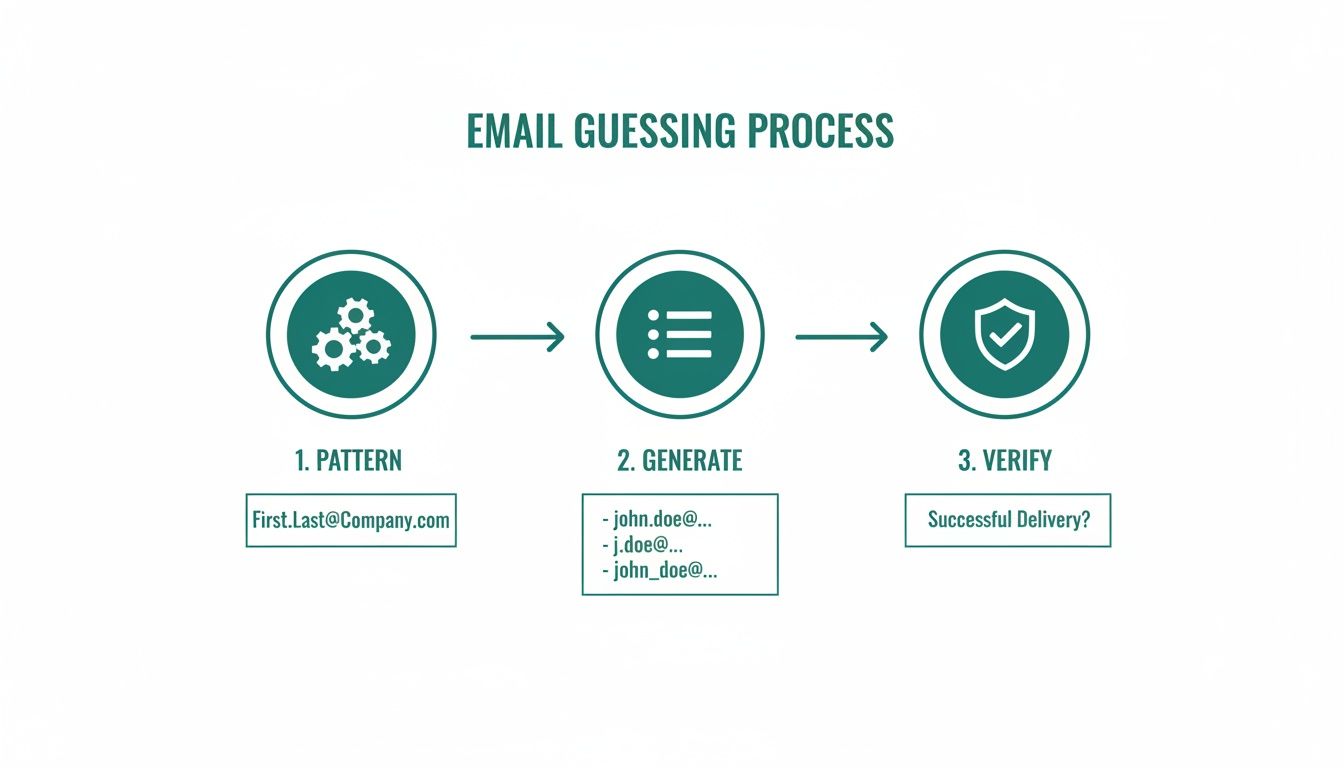
    If you can't find a contact at all, get creative. Try a few different name variations or find another employee at the same company. Once you see their email format, you can often figure out the pattern and deduce the right address for your prospect.

    Common Questions About Free Email Finders

    Even with a solid workflow, you're bound to run into a few questions. When you're working with a new piece of tech like a free email finder tool, it’s always smart to get ahead of the common hurdles. Let's clear up some of the things people ask me about most often.

    One of the first questions is always about the legal side of things. Are these tools legit? Absolutely. They work by pulling publicly available data from the web, so using them is perfectly legal. The real question is how you use that information. Your outreach needs to follow the rules, like the GDPR in Europe and the CAN-SPAM Act in the U.S.

    Crucial Reminder: Always, always include a clear, one-click way for people to opt out of your emails. This isn't just about staying on the right side of the law; it's about building a trustworthy brand and keeping your sender reputation in good shape.

    Accuracy and Dealing with Limits

    "How accurate are these free tools, really?" is a question I get all the time. The honest answer is that it varies, but most of the reputable services will get you somewhere in the 70% to 90% accuracy range. Many will even give you a confidence score for each email they find, which is a huge help. To be safe, always run your list through the built-in email verification feature. It's your best defense against a high bounce rate.

    So, what happens when you inevitably hit your monthly credit limit? You've got a few options:

    • Wait it out: Your free credits will reset at the start of the next cycle. A little patience goes a long way.
    • Try another tool: There's a whole world of these tools out there, and most have their own free plans you can hop onto.
    • Think about an upgrade: If you're consistently hitting that limit and seeing good results, that's a pretty strong signal. It might be time to invest a small amount into a paid plan to really scale up your outreach without any interruptions.

    Ready to stop guessing and start connecting? EmailScout gives you the power to find unlimited verified emails for free. Install the free Chrome extension and start building your outreach list in minutes!

  • How to Find Emails from LinkedIn Proven Methods That Work

    How to Find Emails from LinkedIn Proven Methods That Work

    If you're looking for the fastest way to find emails from LinkedIn, a dedicated browser extension is your best bet. Tools like EmailScout plug right into LinkedIn's interface, letting you find a prospect's verified email address with a single click. It's a massive time-saver compared to digging around manually.

    The Smart Way to Find Emails from LinkedIn

    A laptop on a wooden desk displays a profile, surrounded by a plant, office supplies, and notebooks.

    Let's be real: cutting through the noise on LinkedIn requires a direct line of communication. While it's an incredible platform for spotting prospects, the real business conversations often happen in the inbox. Shifting your outreach from a crowded social feed to a professional email thread gives you their undivided attention and a much better shot at getting a reply.

    This guide gives you a clear, no-fluff framework for pulling emails from LinkedIn. We're moving past the generic advice to focus on a workflow that actually gets results. You'll see how to blend smart automation with a bit of manual groundwork to build a high-quality contact list that can genuinely fuel your sales and marketing.

    Why Direct Emails Still Reign Supreme

    Relying on InMail alone can be a dead end. High-level decision-makers get flooded with messages and just don't have the bandwidth to respond to every pitch. A direct email, on the other hand, lands right in their primary workspace. It's your best chance to make a solid first impression.

    The goal isn't just to hoard emails; it's to find the right emails. A small, targeted list of verified contacts is infinitely more valuable than a huge, unverified database that tanks your sender reputation with bounce-backs.

    A Smarter Approach to Email Discovery

    A truly effective strategy is more than just clicking a "find email" button—it's about building a process you can rely on. Think of it as a system. To get the full picture, it helps to understand how this fits into the broader world of attracting prospects on the platform. These proven LinkedIn lead generation strategies are a great starting point for that.

    Our approach boils down to a few key pillars:

    • Pinpoint Prospecting: First, learn to master LinkedIn's search tools to identify the perfect contacts before you even think about finding their email.
    • Efficient Tooling: Use smart extensions to automate the grunt work without breaking any platform rules.
    • Data You Can Trust: Always prioritize email verification. It’s the only way to make sure your messages actually get delivered. We cover this in-depth in our guide on how to find anyone's email.
    • Ethical Outreach: Understand the rules of the road. Your goal is to build relationships, not burn bridges with spammy tactics.

    Comparing LinkedIn Email Finding Methods

    Before we dive into the step-by-step, it helps to see how different methods stack up. Each has its place, depending on your goals and resources.

    Method Best For Typical Accuracy Time Investment
    Manual Search Finding a handful of high-value contacts or when on a tight budget. Variable (30-60%) High (5-15 mins per contact)
    LinkedIn Export Getting emails from your existing 1st-degree connections. High (for allowed emails) Low
    Email Permutators Guessing common email patterns for a specific company. Low (10-30%) Medium
    Browser Extensions Scaling up email discovery for sales and marketing outreach. High (70-95% with verification) Very Low (seconds per contact)

    As you can see, for any kind of volume, automation is the clear winner. Browser extensions give you that perfect blend of speed, accuracy, and scalability that manual methods just can't match.

    Mastering LinkedIn Search to Find the Right People

    Before you can find an email, you need to find the right person. A great email list always starts with a highly targeted search, and there’s no better place to build that foundation than LinkedIn. Just typing a job title into the search bar is barely scratching the surface—the real magic happens when you use filters and operators to zero in on exactly who you need.

    Think of it like fishing. You wouldn't just throw a giant net into the ocean and hope for the best. You'd go to the right spot, use the right bait, and focus your efforts. The same logic applies here. Nailing this step ensures every email you find belongs to a genuinely relevant prospect, which makes your entire outreach process way more effective.

    Beyond Basic Keywords Using Filters

    LinkedIn’s built-in search filters are surprisingly powerful for refining your audience. You can stack multiple criteria on top of each other to build an incredibly precise list of contacts. So, instead of a generic search for "Marketing Manager," you can carve out a much more specific segment.

    Let's say your goal is to connect with marketing decision-makers in the booming North American SaaS world. Here's a quick example of how you could structure that search:

    • Job Title: "Marketing Director" OR "Head of Marketing"
    • Industry: Computer Software, IT Services and IT Consulting
    • Geography: United States, Canada
    • Company Headcount: 51-200 employees

    This layered approach instantly filters out all the noise, leaving you with a clean, high-quality list of people who actually fit your ideal customer profile.

    Unlocking Precision with Boolean Search

    If you want even more control, you can use Boolean operators right in the LinkedIn search bar. These simple commands—AND, OR, NOT, parentheses, and quotes—are like a secret language that tells the search algorithm exactly what you’re looking for.

    Using Boolean logic transforms a vague search into a surgical strike. It’s the difference between browsing aimlessly and actively building a list of your most valuable potential customers.

    Let's tighten up our previous search using Boolean logic for maximum precision:

    ("Marketing Director" OR "VP of Marketing") AND (SaaS OR "Software as a Service") NOT (intern OR assistant)

    This single query accomplishes three things at once:

    1. It searches for profiles containing either "Marketing Director" or "VP of Marketing."
    2. It makes sure the profile is connected to a SaaS company.
    3. It kicks out anyone with "intern" or "assistant" in their title.

    Getting these search techniques down is the first and most critical step. For those who need even more firepower for lead generation, powerful tools like LinkedIn Sales Navigator can streamline the process even further. By investing a little time upfront to build a killer prospect list, you guarantee your email discovery efforts are focused, efficient, and far more likely to get results.

    Using Browser Extensions for Fast Email Discovery

    Look, manual methods have their place. But when you need to find emails from LinkedIn at any kind of scale, browser extensions are an absolute game-changer. These tools plug right into your browser and let you find and save verified contact info without ever leaving a LinkedIn profile or search page.

    Instead of spending minutes playing detective for just one contact, an extension does all the heavy lifting in seconds. This flips the script entirely. You can stop wasting time on tedious data entry and start focusing on what actually gets replies: writing personalized outreach. It's simply the smartest way to build a quality email list without burning out.

    This is the basic flow for any targeted search you'll run on LinkedIn.

    A diagram showing three steps for finding prospects: Industry, Title, and Location, connected by arrows.

    By stacking filters like industry, job title, and location, you're creating a super-relevant list of people before you even think about finding their email.

    Your Daily Workflow with an Email Finder Extension

    Getting up and running is dead simple. Most tools, including EmailScout, install from the Chrome Web Store in a couple of clicks. Pin it to your browser, and you're good to go. The real magic happens when you fire it up on a LinkedIn search results page.

    Once you’ve built a solid, targeted search list using the methods we've covered, just activate the extension. It immediately starts working its way down the page, automatically looking for and verifying the email addresses for each person in your results.

    Many of the best tools now come with an AutoSave feature. This is huge. As you scroll through results or click on profiles, the extension just quietly works in the background, finding and saving emails to a list you've designated. It’s a passive way to collect leads and a massive productivity win. You can learn more about how to set up an email extractor Chrome extension on our dedicated page.

    Staying Safe and Productive

    The speed of these tools is awesome, but you have to be smart about how you use them to protect your LinkedIn account. Good extensions are built to mimic human behavior, but going overboard can still get you flagged by the platform.

    The key is to work smarter, not faster. The goal isn't to scrape thousands of profiles in a day. It's to consistently build a clean, targeted list of relevant contacts you can actually have a conversation with.

    Most modern LinkedIn email extractors are incredibly accurate, typically hitting 80% to 95% success rates. To stay on the right side of LinkedIn's rules and avoid any account issues, the widely accepted best practice is to keep your daily extractions between 50 to 150 profiles. This approach lets you build a significant list over time without putting your account at risk.

    Just follow a few simple rules to get the best results safely:

    • Work in Batches: Don't leave the extension running all day. Set aside specific blocks of time for prospecting and then turn it off.
    • Respect the Limits: Stay well within that daily recommendation. Quality always beats quantity here.
    • Trust the Verification: Only save emails that the tool confirms are "verified" or "valid." This is crucial for protecting your sender reputation and avoiding high bounce rates.

    This balanced approach lets you tap into the power of automation to find emails from LinkedIn efficiently while keeping your account healthy for the long haul.

    Manual Techniques for Your High-Value Targets

    Automation is fantastic for scaling your outreach, but it’s not always the right tool for the job. When you're targeting those must-win accounts or trying to reach a specific C-suite executive, you need certainty. A hands-on, manual approach gives you the precision that automated tools sometimes miss.

    This is all about quality over quantity. If you absolutely have to find a specific person's email and can't afford a bounce, a little old-fashioned detective work is your best bet.

    Scouring the Profile for Clues

    Your first stop should always be the person's LinkedIn profile. It sounds obvious, but you'd be surprised how many people skip this simple step. Professionals often share their contact details willingly—you just need to know where to look.

    Go beyond their headline and dig a little deeper.

    • The Contact Info Section: This is the most direct route. Click the "Contact info" link right under their name. It’s often private, but you might just get lucky.
    • The About Section: Many people use their summary to give a call to action or list a preferred way to get in touch.
    • The Experience Section: Check their current and past job descriptions. People in sales, business development, or consulting sometimes list a direct email to encourage new business inquiries.

    Even with all the new tools out there, a quick manual check is still incredibly effective for top-tier leads. It's estimated that around 15-30% of LinkedIn profiles still have an email address listed somewhere in the ‘About’ or ‘Experience’ sections. Finding one of these is a guaranteed 100% accurate hit. For more on this, check out this guide from SalesRobot.co.

    The Art of the Educated Guess

    What if the profile is a dead end? Don't give up. Your next move is to make an educated guess based on common corporate email patterns. This works far more often than you'd think because most companies use a standard format for their entire team.

    An educated guess isn't a random shot in the dark. It’s a logical deduction based on the company's established email structure, dramatically increasing your chances of success.

    First, you need the company's domain (like company.com). From there, you can start testing common variations using the prospect’s first and last name.

    Here are a few of the most popular formats to try:

    Once you have a list of likely candidates, pop them into a free email verification tool to see which one is valid. This methodical process gives you real confidence that the message you spent time crafting for that key decision-maker will actually land in their inbox.

    How to Verify and Export Your Email List

    Overhead shot of a laptop displaying a spreadsheet, next to a pen and paper. Green background with 'VERIFY EMAILS' and a checkmark.

    Finding a prospect's email is a great start, but it’s only half the battle. The real work is making sure that email is actually good.

    Every time you send a message to a dead address, you get a bounce. A high bounce rate is a massive red flag for email providers like Gmail and Outlook. It tanks your sender reputation and can get your entire domain blacklisted. Seriously.

    This is why email verification isn't just a "nice-to-have" step—it's absolutely essential. It’s the quality control that gives your carefully written messages a fighting chance of being seen. Skipping it is like building a pipeline that leads straight to a brick wall.

    Making Sense of Verification Statuses

    When you use a tool like EmailScout to find emails from LinkedIn, you'll see that every address is tagged with a status. This isn't just a random label; it's the result of a real-time check to see if the recipient's email server is ready to accept mail for that specific address.

    The goal here isn't just to dodge bounces. It's to build a clean, high-quality list that protects your ability to do outreach for the long haul. Every verified email makes the foundation of your sales and marketing efforts that much stronger.

    These statuses usually break down into three simple categories, telling you exactly which emails are safe to use.

    • Valid: This is your green light. The tool has confirmed the email address exists and is active. These are the contacts you want to hit first.
    • Risky: This status pops up for "catch-all" servers, which are configured to accept mail for any address at that domain. The specific person might not actually have an inbox there, so the bounce risk is higher. Proceed with caution.
    • Invalid: Full stop. The server has flat-out said this email address doesn't exist. Sending to it guarantees a hard bounce. Delete these from your list immediately.

    If you want to get into the technical nitty-gritty, our guide on how to validate an email address breaks down exactly how these checks work behind the scenes.

    Exporting Your Clean List for Action

    Once you've filtered your list down to the good stuff, it's time to put that data to work. Getting your contacts out of the extension and into your workflow couldn't be easier.

    Most tools, EmailScout included, let you export your saved lists directly as a CSV (Comma-Separated Values) file.

    This humble file format is the universal adapter for sales and marketing tech. You can take that clean CSV and import it seamlessly into just about any platform you can think of:

    • CRMs like HubSpot or Salesforce.
    • Outreach tools like Lemlist or Mailchimp.
    • Spreadsheets like Google Sheets or Excel for simple tracking.

    This is the final step that connects your prospecting on LinkedIn to your actual outreach campaigns, turning all that discovery work into real conversations.

    Best Practices for Ethical and Effective Outreach

    Getting someone's email from LinkedIn is just the first step. Now you have a direct line to their professional inbox, and that comes with some serious responsibility. Smart outreach isn't just about blasting out a message—it’s about starting a real conversation the right way.

    That means respecting people's privacy and following the rules, like the CAN-SPAM Act in the U.S. and GDPR over in Europe. The legal stuff can sound intimidating, but the core ideas are pretty simple and boil down to good, professional communication. Think of it less like a rulebook and more like a guide to not being that person in someone's inbox.

    Staying Compliant is Non-Negotiable

    First things first, you need to understand your legal obligations. Getting this wrong can lead to some eye-watering fines and, just as bad, can wreck your company's reputation. This isn't a "nice-to-have"; it's a fundamental part of any outreach strategy.

    Here are the absolute must-haves for any initial cold email you send out:

    • Be Upfront: Don't be mysterious. Clearly state who you are and why you're reaching out. Your message needs to have a legitimate business purpose that's actually relevant to their job.
    • Give Them an Easy Out: Every single email needs a clear, simple way for the person to unsubscribe. No hoops, no tricks. This is a non-negotiable requirement under pretty much every anti-spam law on the planet.
    • Include Your Address: You have to include a valid physical postal address in your email. The footer is the standard spot for this.

    Here's the golden rule I always follow: send the kind of email you wouldn't mind getting yourself. A personalized, value-first message will always crush a generic, mass-blasted template. It's better for compliance, and it gets way more replies.

    From Following Rules to Building Connections

    Staying compliant keeps you out of trouble, but the real goal is to get replies and build relationships. The most successful outreach campaigns I've ever seen always prioritize genuine value over a hard sales pitch.

    You went through the effort to find their email, so don't blow it with a generic, copy-paste message.

    Instead, craft an email that proves you did a bit of homework. Mention a recent company win you saw on their feed, a post they shared that you found interesting, or a common connection. That little bit of personalization shows you respect their time and instantly separates you from all the automated noise. It’s the single best way to dramatically boost your chances of starting a real dialogue.

    Common Questions About Finding LinkedIn Emails

    Jumping into email discovery tools can bring up some fair questions. When you're pulling emails from a platform like LinkedIn, it’s smart to think about account safety, how good the data is, and the rules of the road for outreach. Getting this right is key to making sure your hard work pays off.

    Is It Safe to Use These Tools on LinkedIn?

    Yes, as long as you're smart about it. Reputable tools are designed to fly under the radar by acting more like a human than a bot.

    The biggest mistake you can make is trying to extract hundreds of profiles in a huge, fast batch. That’s a surefire way to get your account flagged. A good rule of thumb is to stick to a daily limit, usually around 80-150 profiles. This keeps your activity looking natural and your account in good standing.

    How Accurate Are the Emails You Find?

    The quality of your tool makes all the difference here. Top-tier platforms, like EmailScout, don't just guess at emails; they run them through a multi-step verification process to confirm they're active before you even see them.

    While no tool is 100% perfect, you can realistically expect accuracy rates between 80% and 95%. This high level of accuracy is what keeps your bounce rate low and your sender reputation intact.

    Quick Tip: Protecting your sender reputation is non-negotiable. Using verified, high-accuracy emails is the single most important thing you can do to ensure your messages land in the inbox, not the spam folder.

    Is It Legal to Email People Found on LinkedIn?

    Absolutely, provided you play by the rules. In most places, it's perfectly legal as long as you comply with anti-spam regulations like CAN-SPAM in the U.S. and GDPR in Europe.

    This really boils down to a few common-sense principles:

    • Be Relevant: Your message should genuinely relate to the person's professional role.
    • Be Transparent: Clearly state who you are and include a physical address for your business.
    • Be Respectful: Always provide a simple, one-click way for them to opt out.

    What’s not compliant? Sending generic marketing blasts or messages that have nothing to do with their job. Stick to professional, relevant outreach, and you'll be fine.


    Ready to find verified emails from LinkedIn in seconds? Give EmailScout a try and get started for free. You can install the Chrome extension right here.

  • A Guide to LinkedIn Find Email Strategies

    A Guide to LinkedIn Find Email Strategies

    Trying to get a prospect's email from their LinkedIn profile can feel like the first, and biggest, hurdle in any outreach campaign. I've been there. This guide is my playbook for getting it done, covering everything from powerful one-click browser extensions to the old-school detective work that still pays off.

    Your Modern Playbook for Finding Emails on LinkedIn

    A laptop on a wooden desk displays 'Find Emails Fast' on its screen, surrounded by office items.

    Guesswork doesn't cut it in serious prospecting. Whether you're a salesperson building a pipeline, a marketer kicking off a campaign, or a recruiter hunting for that perfect candidate, knowing how to reliably pull an email from a LinkedIn profile is a fundamental skill.

    This guide will walk you through the whole process. We'll cover the fast and easy ways, but also the manual tricks for those tough-to-find contacts.

    You'll learn a few key strategies:

    • Automated Tools: How to use browser extensions like EmailScout to find an email in seconds, right on someone's profile.
    • Manual Sleuthing: The art of picking up clues from a profile and figuring out common company email patterns.
    • Verification: Why you absolutely must confirm an email is valid before you hit send—it's all about protecting your sender score and making sure your message actually lands.

    Why This Skill Matters

    Getting good at finding emails is a huge part of effective LinkedIn Lead Generation Strategies that open doors to real opportunities. Let's face it, LinkedIn is the center of the B2B universe.

    The numbers don't lie. Over half of all B2B marketers (53%) use LinkedIn to find prospects, and 40% say it's their single most effective channel for finding high-quality leads. It's where the action is.

    The real magic happens when you mix and match these techniques. A great tool might get you 80% of the emails you need, but those manual skills will help you track down that final 20%—and that's often where the highest-value prospects are hiding.

    To give you a clearer picture, here’s a quick breakdown of the different approaches.

    Email Finding Methods At a Glance

    Method Speed Typical Accuracy Best For
    Browser Extensions Instant High (with verification) Quickly finding emails for individuals or small batches.
    Manual Search Slow Varies High-value, hard-to-find prospects.
    Company Patterns Moderate Moderate to High Finding emails when you know the company format.

    This playbook gives you a clear roadmap, showing you when to lean on automation and when to roll up your sleeves and do some digging. Once you've got those emails, you can put them to good use with some smart marketing and outreach strategies.

    Let's be honest: spending hours hunting for emails is a massive time sink. Why play detective when you can let technology do the heavy lifting in seconds? This is exactly where a LinkedIn email finder like EmailScout completely changes the game.

    These tools, usually simple browser extensions, plug right into your workflow. What was once a tedious, manual task becomes a simple one-click action.

    Think about it. Say you're an SDR who needs to build a list of 50 marketing managers in the SaaS world. Doing that by hand could easily eat up your entire afternoon. With an email finder, you just land on a profile, click a button, and boom—you’ve got a verified email. All that time you save can be poured back into what really matters: writing great outreach.

    Getting Your Finder Tool Set Up

    Getting started is usually dead simple. Most of these tools are browser extensions you can grab from the Chrome Web Store in just a couple of clicks. Once it's installed, a little icon will pop up in your browser's toolbar.

    Just pin the icon so it's always visible, then head over to any LinkedIn profile. You'll notice the tool's icon light up or a small widget will appear on the page. That's your signal that it's ready to go to work. This seamless integration is what makes these tools so valuable for daily prospecting.

    The accuracy of these tools has gotten seriously impressive lately. In one test, a top-tier finder hit a 91% email find rate when searching with just a name and company website. That's a huge leap from the old days of guesswork and bounced emails.

    The One-Click Find on a Profile

    This is the bread and butter of any good LinkedIn email finder. You’ve landed on the profile of your ideal prospect—let's call her Jane Doe, the VP of Marketing at a target company. The EmailScout widget will be right there on the page. Just click "Find Email," and the search begins in real time.

    The tool instantly gets to work, checking multiple data sources, figuring out the company's email pattern, and running a quick verification. In a matter of moments, it serves up a professional email address, often with a confidence score to show how likely it is to be valid.

    Pro Tip: Don't just find and forget. Get in the habit of using features like 'AutoSave.' This will automatically add any contacts you find to a specific list, keeping your prospecting organized and ensuring you don't lose track of great leads while browsing.

    Many tools also offer bulk-finding right from a LinkedIn search results page. This lets you pull contact info from a whole page of prospects at once, making list-building incredibly fast. To see how different options stack up, check out our guide on the best email finder tools.

    This chart gives you a quick look at how some of the top tools perform on accuracy, which is probably the most important factor when you're picking one.

    As you can tell, the accuracy rates are pretty high across the board. For you, this means fewer bounced emails and more time spent actually connecting with people. That kind of precision is critical for keeping your sender reputation healthy and making sure your outreach campaigns hit their mark.

    Mastering the Manual Art of Finding LinkedIn Emails

    Sometimes, the automated tools just hit a wall. Maybe the person you're trying to reach just started at a new company, or maybe their digital footprint is unusually small. This is where a little old-fashioned detective work comes in, turning what looks like a dead end into a genuine opportunity.

    It takes a bit more patience, but these hands-on tactics are surprisingly effective for tracking down those really tough-to-find contacts.

    First, let's get one thing straight: you need to look beyond the obvious "Contact Info" button on a LinkedIn profile. People leave breadcrumbs all over the place, often in plain sight.

    The process diagram below shows how a typical automated tool works. We're about to dig into what you do when that simple process fails.

    Process diagram illustrating installation, data finding, and information export using blue icons.

    While the tools focus on installation and extraction, our manual approach is all about investigation.

    Scouring the Profile for Hidden Clues

    Your first move should be a thorough read-through of their About section. You'd be amazed how many people, especially founders and consultants, drop their email address right at the bottom with a call to action. It’s a direct invitation to connect, and it gets missed all the time.

    Next, look for a personal website or portfolio link in their profile header. This is a potential goldmine. A quick click often takes you straight to a contact page with the exact email you're looking for.

    Don't forget to check their recent activity, either. Have they published a LinkedIn article or newsletter? Their email might be tucked away in the author bio. It’s all about thinking one step beyond the main profile page.

    Decoding the Company Email Pattern

    This is a classic technique, and for good reason—it works. Most companies use a standard format for all their employee emails. If you can crack the code for one person, you can pretty much guess anyone's email at that organization.

    The most common patterns are usually some variation of:

    • firstname.lastname@company.com
    • firstinitial.lastname@company.com (like j.doe@company.com)
    • firstname@company.com

    So, how do you find the pattern? Easy. You just need to find one employee's email address from that company. A great place to start is the company’s press or media page, where they often list a contact for media inquiries. Once you have one confirmed email, you've got the key.

    For instance, if you find a press contact is jane.smith@abccorp.com, you can bet your target, John Doe, is almost certainly john.doe@abccorp.com.

    Cross-Referencing with a Smart Google Search

    Once you have a name and a company, Google is your best friend. But a lazy, simple search probably won't get you there. You need to use advanced search operators to filter out all the noise.

    Try a search string that looks something like this:

    "John Doe" AND "ABC Corp" AND email

    The quotation marks are critical—they tell Google to search for that exact phrase, which makes your results way more accurate. You can even get more specific and search for the patterns you suspect:

    "j.doe@abccorp.com"

    This trick can sometimes pull up an email if it was listed on a conference speaker list, a guest blog post, or some other public directory. By combining these manual techniques, you'll have a powerful toolkit to linkedin find email addresses that even the best automated systems might have missed.

    Validating Emails and Crafting Your First Message

    A green card with 'VERIFY EMAILS FIRST' on a laptop screen displaying checkmarks.

    Finding an email on a LinkedIn profile is a great first step, but it’s definitely not the end of the road. What you do next—verifying the address and writing a message that actually gets opened—is what separates a successful outreach campaign from a quick trip to their spam folder.

    Don't even think about sending a message to an unverified email. It's a gamble you just can't afford. A high bounce rate screams "spam" to email providers like Google and Microsoft, tanking your sender reputation and potentially getting your whole domain blacklisted.

    Why Email Verification Is Non-Negotiable

    Think of verification as a quick quality check for your outreach list. It's an automated process that confirms an email address is live and can receive messages. Skipping this is like paying for a billboard without checking if it’s even on a real road.

    Most verification tools give you one of three results:

    • Valid: Green light. The email is confirmed and safe to contact.
    • Risky (or Accept-All): The server is set up to accept any email, so the tool can't be 100% sure this specific address works. These can be a bit of a coin toss.
    • Invalid: Red light. The address doesn't exist. Sending to this will guarantee a hard bounce.

    My rule of thumb? Ditch the invalid emails immediately. For the risky ones, it's your call, but I’d tread carefully. Protecting your sender score is the most important thing for any long-term outreach strategy.

    If you want to get into the weeds of how these tools work, you can learn more about how to validate an email address and the tech behind it.

    Crafting a Compelling First Message

    Once your email is verified, it’s time to write something that earns a reply. While the process of finding the email was technical, your outreach needs to be all human. Generic, robotic templates get deleted in a heartbeat. The magic formula is personalization, brevity, and value.

    It's also worth noting the power of the platform where you found them. Recent data shows LinkedIn direct messages rock a reply rate of 10.3%—that's more than double the average cold email response rate of 5.1%. This makes a one-two punch of email and LinkedIn follow-ups incredibly powerful. You can check out the full State of LinkedIn Outreach report to see how the trends are shaping up.

    Here are a couple of field-tested templates I've had success with. Use them as a starting point, but always swap in the specific details you found on their profile.

    Networking Outreach Template

    Subject: Connecting from the [Your Industry] world

    Hi [FirstName],

    I saw your recent post on LinkedIn about [Specific Topic] and was really impressed with your take on [Mention a Specific Point]. Your work at [CompanyName] in that area is exactly what our industry needs more of.

    I’m also working on [Related Project/Field] and would love to connect with other sharp minds in the space. No sales pitch, just a genuine interest in your perspective.

    Best,
    [Your Name]

    Sales Outreach Template

    Subject: Idea for [Prospect's Company]’s [Specific Goal]

    Hi [FirstName],

    I noticed on your LinkedIn profile that you’re leading the charge on [Project or Responsibility] at [CompanyName]. I imagine that improving [Metric like 'user onboarding' or 'lead conversion'] is a constant focus.

    We recently helped [Similar Company] achieve [Specific Result, e.g., a 15% lift in signups] by implementing a strategy around [Your Solution Area].

    I have a specific idea for how [Prospect's Company] could do something similar. Do you have 10 minutes next week to hear it?

    Regards,
    [Your Name]

    Navigating Privacy and Legal Considerations

    Finding a professional email is standard practice, but it's absolutely critical to play by the rules. This isn't just about finding contact information; it’s about starting conversations the right way—ethically, legally, and respectfully.

    First off, let's talk about LinkedIn itself. Their terms of service are crystal clear: they strictly prohibit scraping or using unauthorized automation to hoover up user data. This is exactly why you should always use a reputable, well-integrated tool instead of some sketchy script that could get your account flagged or banned.

    Beyond the platform's own rules, you've got global data privacy regulations to think about. You don't need a law degree, but you do need to be smart about how you conduct your outreach.

    Key Regulations to Know

    Two major regulations really set the tone for commercial email: GDPR in Europe and the CAN-SPAM Act in the U.S. They're different, but they share the same core principles: be transparent and give people an easy way out.

    • GDPR (General Data Protection Regulation): If you're reaching out to folks in the EU, you need a "legitimate interest" to process their data. For B2B outreach, this often fits the bill, but only if your message is directly relevant to their professional role. Most importantly, you must give them a clear way to opt-out.

    • CAN-SPAM Act: In the United States, this law demands that your commercial emails are clearly marked as ads, include your valid physical postal address, and feature a dead-simple, functional unsubscribe link.

    This isn't about jumping through legal hoops. It's about building trust. That little opt-out link isn't just a requirement—it shows you respect the other person's time and inbox, which is just good business.

    Ultimately, your entire approach should be guided by respect. Before you start finding emails, take a moment to understand the landscape. A thorough read of our Privacy Policy can offer a clear picture of responsible data handling practices.

    Always be upfront about who you are, why you're reaching out, and how they can easily say "no thanks." This ethical foundation is what makes your outreach effective, compliant, and professional.

    Frequently Asked Questions About Finding Emails

    Even with the best tools, you’re bound to have questions when you start pulling emails from LinkedIn. This whole process lives at the intersection of tech, sales strategy, and privacy rules. Getting clear answers is key to building a confident, effective outreach process.

    Let's dig into the questions I hear most often.

    Is It Legal to Find and Use LinkedIn Emails for Outreach?

    The short answer is yes, using business emails for commercial outreach is generally legal—but you have to follow the rules. Regulations like the CAN-SPAM Act in the U.S. and GDPR in Europe don't ban cold outreach, but they have strict requirements.

    You always need to:

    • Give people a dead-simple way to opt out of future emails.
    • Be upfront about who you are and avoid shady subject lines.
    • Clearly state if the message is an advertisement.

    The real takeaway here is to be ethical. Sending a relevant, valuable message to a work email you found is standard practice. But aggressively scraping data in a way that breaks LinkedIn's terms of service could get your account flagged.

    What Is the Most Accurate Method?

    There's no single silver bullet, but a hybrid approach gets you the closest to 100% accuracy. A top-tier email finder like EmailScout is a fantastic starting point, giving you speed and precision. Many of these tools boast accuracy rates over 90% because they check multiple public sources and run verifications in real-time.

    That said, the undisputed champ for accuracy is finding the email yourself—listed right on a company's official website or in a press release.

    A smart workflow looks like this:

    1. Use a finder tool to grab a likely email address in seconds.
    2. Pop that email into a verification tool to confirm it’s active.
    3. For a really important prospect, do a quick manual search as a final check.

    This layered approach gives you the most reliable data to work with.

    What Should I Do if an Email Bounces Back?

    A bounce is a hard no—the address is bad. The very first thing you need to do is delete it from your list immediately. Email providers see a high bounce rate as a huge red flag. It tanks your sender reputation and sends your future emails straight to the spam folder.

    Once it's removed, check for any obvious typos. If you don't spot any, try a different common email pattern for that company. For instance, if firstname.lastname@ bounced, give firstinitial.lastname@ a shot. If that fails too, it's time to change your approach. A personalized LinkedIn connection request or an InMail is a great plan B.

    Can I Find Personal Email Addresses?

    Sometimes you might stumble upon a personal email (like a Gmail or Yahoo address) in someone's contact details, but professional tools are built to find corporate emails. I strongly recommend you keep all your commercial outreach focused on those professional addresses.

    Hitting someone's personal inbox for work feels intrusive and, frankly, it’s just not as effective. It can also land you in hot water with privacy laws like GDPR, which are way stricter about using personal data. Stick to their work identity—it’s just better business.


    Ready to stop guessing and start connecting? EmailScout lets you find verified email addresses from any LinkedIn profile with a single click. You can finally streamline your prospecting, build clean lists, and get hours back in your day. Try it for free and see how easy it is to find unlimited emails.

  • 12 Best Free Email Lookup Tool Options for 2025

    12 Best Free Email Lookup Tool Options for 2025

    In today's fast-paced business environment, connecting with the right people is more critical than ever. Whether you're a sales professional building a pipeline, a marketer launching an outreach campaign, or a founder seeking partnerships, the ability to find accurate email addresses is a superpower. However, manually searching for contact information is time-consuming and often fruitless. This is where a free email lookup tool becomes an indispensable asset, transforming how you approach lead generation. These platforms automate the discovery process, saving you hours of work and providing direct lines of communication to key decision-makers.

    This guide breaks down the 12 best options available, analyzing their strengths, weaknesses, and ideal use cases to help you choose the perfect tool for your needs. We move beyond generic feature lists to provide a practical, hands-on comparison. You'll find detailed reviews, screenshots, and direct links for each platform, including EmailScout, Hunter.io, Snov.io, and Apollo.io. To understand the broader landscape of available solutions and how they master modern outreach, you can explore the 11 Best Email Address Lookup Tools for 2025 from PlusVibe, which offers additional perspectives on mastering this essential task.

    Our goal is to give you a clear, comprehensive resource to make an informed decision without the guesswork. We'll examine the limitations of each free plan, from credit caps to feature restrictions, ensuring you know exactly what you’re getting. By the end of this article, you will be equipped to select a free email lookup tool that aligns perfectly with your workflow, budget, and strategic objectives, allowing you to focus on what truly matters: building meaningful professional connections.

    1. EmailScout

    EmailScout stands out as a powerful and uniquely efficient free email lookup tool, operating directly within your browser as a one-click Chrome extension. It transforms passive web browsing into an active lead-generation engine, instantly scraping and revealing email addresses embedded in a website's source code. This approach makes it an exceptionally fast solution for sales professionals, marketers, and founders who need to quickly build contact lists without navigating away from their target websites or search results.

    The extension’s core strength lies in its simplicity and immediacy. While visiting a potential client’s website or reviewing Google search results, a single click on the EmailScout icon populates a list of all discoverable emails. This workflow eliminates the friction of traditional lookup tools, integrating seamlessly into existing research and prospecting habits.

    EmailScout

    Key Features and Workflow

    EmailScout’s feature set is designed for both casual use and high-volume data collection. The free version is remarkably generous, offering unlimited email finding and manual exports directly from any site you visit.

    • Instant Scraping: Finds emails from a page's source code with one click.
    • Simple Exports: Easily copy contacts to your clipboard or export them as CSV/TXT files to upload into your CRM or outreach platform.
    • Google Search Integration: Works on Google search result pages to gather contacts from multiple domains at once.

    For users needing to scale their efforts, EmailScout's premium features, AutoSave and URL Explorer, provide significant automation. AutoSave passively collects emails in the background as you browse, while URL Explorer allows you to paste a list of up to 1,500 URLs for bulk extraction.

    Pricing and Limitations

    While the core functionality is free, the automation features are reserved for paid plans. A no-credit-card premium trial is available, providing 200 emails per month and limited access to AutoSave and URL Explorer.

    Plan Price (Approx.) Emails/Month Key Features
    Free $0 Unlimited Manual finding & export per site
    Starter ~$9/month 5,000 AutoSave, URL Explorer, Bulk Export
    Growth Varies 25,000+ Higher volume limits
    Business Varies Up to 1M Enterprise-scale collection

    The primary trade-off is the lack of built-in verification, as it pulls whatever is publicly available. This means accuracy can vary, and some emails may be outdated.

    Best for: Sales teams, marketers, and freelancers who prioritize speed and want to integrate lead generation directly into their browsing workflow.

    Website: https://emailscout.io

    2. Hunter.io

    Hunter.io is a prominent B2B platform and a strong contender for anyone needing a reliable, credit-based free email lookup tool. It's particularly effective for sales and marketing professionals who need to find professional email addresses associated with a specific company domain. The user interface is clean and straightforward, making it easy to jump right into your search.

    Hunter's Domain Search feature allows you to enter a company's website, and it returns a list of publicly available email addresses associated with that domain, complete with confidence scores and sources. This transparency is a key differentiator, as it helps you gauge the reliability of the contact information before you use it. The platform also offers a robust email verifier to ensure your outreach lists are clean and deliverable.

    Hunter.io

    Key Features & Limitations

    The permanent free plan is a major draw, although its limitations are important to understand. You get 25 monthly searches and 50 monthly verifications, which is suitable for occasional or low-volume prospecting. Unlike some tools, Hunter.io’s credit system is very clear: one search equals one credit.

    • Free Plan: 25 searches/month, 50 verifications/month
    • Paid Plans: Start at $49/month for 500 searches and 1,000 verifications.
    • Integrations: A handy Chrome extension and Google Sheets add-on streamline workflow.
    • API Access: Available even on the free plan for custom integrations.

    Best Use Case

    Hunter.io is ideal for B2B prospectors and sales teams who prioritize data accuracy and need a transparent, easy-to-use tool for finding contacts at specific companies. While the free credits can be used up quickly, they provide a great way to test the platform's quality. You can explore a detailed comparison and find out more about Hunter.io's place among the best email lookup tools.

    3. Snov.io

    Snov.io positions itself as more than just a lookup service; it's a comprehensive cold outreach automation platform. This makes it an excellent free email lookup tool for users who want an all-in-one solution for finding, verifying, and nurturing leads. The platform integrates an Email Finder, an Email Verifier, and an email drip campaign sender, allowing you to manage your entire prospecting workflow without switching tools.

    The platform's strength lies in its integrated toolset. You can find emails by domain, company profile, or individual name, then immediately add them to a verification list and slot them into an automated outreach sequence. This seamless transition from discovery to engagement is a significant time-saver for sales and marketing teams. The user interface is clean, though the breadth of features means there's a slight learning curve compared to simpler tools.

    Snov.io

    Key Features & Limitations

    Snov.io's free plan provides a good taste of its capabilities, offering monthly credits that can be used across its suite of tools. The credit system is straightforward: one search or one verification costs one credit. This flexibility allows you to test the entire workflow from start to finish.

    • Free Plan: 50 credits/month and 100 recipients for email campaigns.
    • Paid Plans: Start at $39/month for 1,000 credits and 5,000 unique recipients.
    • Integrations: Chrome extension for finding emails on websites and LinkedIn, plus a robust API.
    • Unique Features: Includes an email warmer and a drip campaign tool even in lower-tier plans.

    Best Use Case

    Snov.io is the ideal choice for sales professionals, marketers, and business development teams who need a unified platform to manage the entire outreach process. Its generous feature set makes it perfect for those looking to scale their prospecting efforts beyond simple email lookups. You can discover more about its capabilities in this list of the best free email finder tools.

    4. Apollo.io

    Apollo.io is a comprehensive sales intelligence platform that goes beyond a simple free email lookup tool, offering a massive B2B database and integrated sales engagement features. It's best known for its powerful Chrome extension, which allows users to find contact information directly on LinkedIn profiles and company websites, streamlining the prospecting workflow significantly.

    The platform positions itself as an all-in-one solution by combining lead discovery with tools for outreach, such as basic email sequences and analytics, even on its free tier. This integrated approach is a major differentiator, allowing users not just to find emails but to act on them immediately within the same ecosystem. Apollo’s database is extensive, providing not just emails but also direct-dial phone numbers and other company insights.

    Key Features & Limitations

    Apollo's free plan is notably generous, though it comes with specific credit types that can be confusing. You get a set number of mobile number credits and export credits, which are separate from the general email reveal credits, and the policies can sometimes change.

    • Free Plan: 60 mobile credits/year and 120 export credits/year (email reveals are more generous).
    • Paid Plans: Start at $49/user/month for significantly more credits and advanced features.
    • Integrations: Robust Chrome extension for LinkedIn and web scraping; integrates with CRMs like Salesforce and HubSpot.
    • Extra Features: Includes basic email sequencing and analytics on the free plan.

    Best Use Case

    Apollo.io is the ideal tool for sales professionals and startup teams who want a free solution that combines email lookup with basic sales engagement features. Its popular Chrome extension makes it a go-to for anyone who spends significant time prospecting on LinkedIn. Find out more about Apollo.io at their official website.

    5. Lusha

    Lusha is a powerful B2B intelligence platform known for its highly accurate contact data, including direct dials and work emails. While it offers more than just email lookups, its functionality as a free email lookup tool is robust, particularly through its widely-used browser extension. The tool integrates seamlessly into workflows on platforms like LinkedIn and company websites, allowing users to enrich contact profiles with a single click.

    The platform's strength lies in its high data accuracy and the inclusion of both email addresses and phone numbers. Lusha's credit system is straightforward, though it differentiates between contact details: revealing an email address costs one credit, while a phone number costs more. This makes it an effective, albeit potentially costly, tool for sales and recruiting professionals who need verified, multi-channel contact information.

    Lusha

    Key Features & Limitations

    Lusha’s free plan is designed for individual users with light prospecting needs. A key limitation is that more expensive data, like phone numbers, consumes credits much faster than simple email lookups. Advanced features such as CRM integrations and team management are reserved for paid tiers.

    • Free Plan: 5 credits/month (1 credit per email reveal).
    • Paid Plans: Start at $29/user/month (billed annually) for 480 credits/year.
    • Integrations: A popular browser extension for Chrome, Firefox, and Edge. CRM integrations are available on paid plans.
    • Data Types: Provides both email addresses and direct dial phone numbers.

    Best Use Case

    Lusha is best suited for sales professionals, recruiters, and B2B marketers who value data accuracy and need both email and phone numbers for their outreach. Its free plan is perfect for occasional users who need to find a few key contacts each month. For those prioritizing direct dials alongside emails, Lusha offers a significant advantage over many competitors. You can visit the official website to learn more at lusha.com.

    6. Voila Norbert

    Voila Norbert positions itself as a friendly yet powerful assistant for your outreach needs, and it stands out as an excellent free email lookup tool, especially for those who value a pay-per-result model. The platform is designed to find professional email addresses through single or bulk searches, and it prides itself on its accuracy. Its interface is clean and minimalist, ensuring users can quickly find the information they need without a steep learning curve.

    A significant advantage of Voila Norbert is its credit policy. The platform provides a generous starting bonus of 50 free credits upon signup, allowing for a thorough evaluation. Crucially, it only deducts a credit when it successfully finds a valid email, which builds user trust and ensures you’re only paying for tangible results. This makes it a cost-effective choice for validating the tool's performance before committing to a paid plan.

    Voila Norbert

    Key Features & Limitations

    The 50 free "leads" (credits) are a great starting point, but the platform’s real strength lies in its fair usage policy and flexible add-ons. You can enrich contacts with company, role, and social media data on a pay-as-you-go basis, providing flexibility for different campaign needs. The primary limitation is its focus solely on email data, as it does not provide phone numbers.

    • Free Plan: 50 free search credits on signup.
    • Paid Plans: Start at $49/month for 1,000 leads. Pay-as-you-go options are available for verification and enrichment.
    • Integrations: Chrome extension for finding emails on the go, plus an API for custom workflows.
    • Credit Policy: Credits are only charged for successful finds, maximizing your free trial value.

    Best Use Case

    Voila Norbert is ideal for freelancers, startups, and sales teams who need a reliable email finder with a transparent pricing model. The "pay only for success" approach removes the risk of wasting credits on fruitless searches, making it perfect for users who prioritize accuracy and a high return on their investment. The initial 50 credits offer a substantial, risk-free way to test its capabilities for your specific prospecting lists.

    7. Skrapp.io

    Skrapp.io is a popular B2B platform highly regarded for its integration with LinkedIn, making it a powerful free email lookup tool for sales and recruitment professionals. Its core strength lies in its ability to find professional email addresses directly from LinkedIn profiles and company websites via its Chrome extension. The platform is designed to streamline the process of building targeted prospect lists with minimal friction.

    The tool provides verified or likely email patterns for individuals, along with data points like their job title and company. Skrapp.io’s Domain Search also allows users to find emails in bulk by uploading a list of names and company domains, which is a significant time-saver for large-scale outreach campaigns. Its user-friendly interface makes it accessible for both beginners and experienced prospectors.

    Skrapp.io

    Key Features & Limitations

    Skrapp.io's free plan is quite generous, offering 100 credits that refill monthly, which is more than many competitors provide. This allows for consistent, low-volume prospecting without a paid subscription. However, it's important to note that the accuracy can sometimes vary depending on the industry or company size.

    • Free Plan: 100 email lookups/month.
    • Paid Plans: Start at $49/month for 1,000 emails and 2,000 verifications.
    • Integrations: A robust Chrome extension is its primary integration tool.
    • Bulk Tools: Includes features for bulk email finding and verification.

    Best Use Case

    Skrapp.io is best suited for individuals and teams who heavily rely on LinkedIn for their prospecting and lead generation efforts. The generous monthly free credits make it an excellent choice for freelancers, startups, or sales reps who need a consistent, no-cost tool to build their contact lists. You can get started and explore its features at skrapp.io.

    8. RocketReach

    RocketReach is a comprehensive contact lookup platform widely used by recruiters and sales professionals for its extensive database. It serves as a powerful free email lookup tool by allowing users to find contact details, including emails and sometimes phone numbers, by searching for a name and company. Its strength lies in the sheer volume of its data, claiming to have real-time information on hundreds of millions of professionals across numerous industries.

    The platform functions as a search engine for people, making it highly effective for targeted outreach. You can look up individuals directly or explore company profiles to uncover key contacts. While its most powerful features, like bulk lookups and advanced integrations, are reserved for paid tiers, the free plan provides a valuable glimpse into its data accuracy and coverage, helping you decide if it fits your prospecting needs.

    Key Features & Limitations

    RocketReach’s free offering is designed as a trial, giving you a small taste of its capabilities. The five free lookups per month are just enough to test its database for your target industry or specific high-value prospects. A key limitation is that comprehensive data and features like CSV exports are locked behind a paywall.

    • Free Plan: 5 lookups/month (email and phone reveals may vary).
    • Paid Plans: Start at $53/month for 80 lookups/month.
    • Integrations: Connects with various CRMs and sales tools on paid plans.
    • Data Export: CSV export is a premium feature for managing contact lists.

    Best Use Case

    RocketReach is best suited for recruiters and sales teams who need a high-volume, broad-reaching contact database and are willing to invest in a paid plan. The free version works well for very occasional, high-priority lookups or for evaluating the tool’s data quality before committing to a subscription. Its extensive reach makes it a go-to for finding contacts in diverse or niche industries. You can sign up and test its coverage at RocketReach.

    9. GetProspect

    GetProspect is a highly capable B2B platform that combines a free email lookup tool with a rich contact database, making it a favorite for sales teams and recruiters. Its key strength lies in its deep integration with LinkedIn, allowing users to extract verified professional email addresses directly from profiles, saving significant time on manual research. The interface is clean and centered around building and managing prospect lists.

    The platform provides more than just an email; it enriches each contact with data like position, company size, and location, providing valuable context for outreach campaigns. Its focus on providing "valid" emails means each credit is spent on a contact that has passed their multi-step verification process, which improves the quality of leads generated.

    GetProspect

    Key Features & Limitations

    GetProspect’s free plan is quite generous, offering credits specifically for valid email discoveries. It's a great starting point for those building targeted lists from LinkedIn or its internal B2B database. The distinction between "valid emails" and "verifications" is important; the former finds new contacts, while the latter checks an existing list.

    • Free Plan: 50 valid emails/month, 100 verifications/month
    • Paid Plans: Start at $49/month for 1,000 valid emails and 2,000 verifications.
    • Integrations: Offers a popular Chrome extension for LinkedIn, a Google Sheets add-on, and API access.
    • Data Export: Easily export enriched contact lists to CSV or XLSX formats.

    Best Use Case

    GetProspect is ideal for sales professionals and recruiters who heavily rely on LinkedIn for prospecting. Its ability to build rich, verified contact lists directly from the social network is a powerful workflow enhancement. The free plan provides enough credits to build a small, high-quality list each month, making it perfect for targeted, low-volume outreach efforts. You can learn more at GetProspect.

    10. Anymail Finder

    Anymail Finder stands out with a unique "pay only for verified" model, making it a cost-effective free email lookup tool for those who prioritize deliverability. It allows users to find emails by name, domain, company, or even a LinkedIn URL, and its core strength lies in its real-time verification process. This ensures you are only charged credits for email addresses with a high probability of being valid and deliverable, which is a major advantage for maintaining a healthy sender reputation.

    The platform is designed for precision and guarantees the quality of its results. When you perform a search, whether individually or in bulk, any emails that are not found, are duplicates, or are identified as risky will not be billed against your credit balance. This transparent, value-first approach is appealing for sales teams and marketers who need to maximize their outreach budget without compromising on data quality.

    Anymail Finder

    Key Features & Limitations

    The trial offers a set number of free verified credits to test the platform's accuracy, although it does require a card authorization for activation. It's a great way to confirm the tool’s effectiveness before committing to a paid plan. The pricing can sometimes display in GBP or EUR depending on your location, so be mindful of currency conversion.

    • Free Plan: 90 verified emails (trial)
    • Paid Plans: Start at $49/month for 1,000 verified emails.
    • Credit Policy: Credits for unverified or risky emails are not deducted.
    • API Access: A robust API is available for developers to integrate email finding into custom applications.

    Best Use Case

    Anymail Finder is best suited for users who value accuracy and deliverability above all else. Its "pay for success" model makes it a financially sound choice for startups and sales professionals running targeted campaigns where every email sent must count. The real-time verification helps you understand how to validate an email address on the fly, ensuring clean and effective outreach lists.

    11. ContactOut

    ContactOut is a powerful, Chrome extension-driven platform that excels as a free email lookup tool for recruiters and sales professionals. It integrates directly with LinkedIn profiles, revealing personal and work emails, and often phone numbers, making it a favorite for those who spend a lot of time on the social network. The tool's primary strength is its ability to find both professional and personal contact details, which can be crucial for reaching decision-makers who are less responsive to their work inboxes.

    The platform operates seamlessly on standard LinkedIn profiles, with higher-tier plans offering compatibility with Sales Navigator and Recruiter Lite. This direct integration streamlines the prospecting workflow, allowing users to find contact information without switching between tabs. The interface is clean, overlaying a simple sidebar on LinkedIn pages to display the discovered contact data.

    ContactOut

    Key Features & Limitations

    ContactOut’s free plan is quite generous for sourcing on a small scale. It offers a solid number of monthly credits that reset, providing ongoing value without a subscription. A notable limitation is that self-service plans are restricted to a single user per company; larger teams must engage with the sales department for a custom plan.

    • Free Plan: 40 emails/month, 3 phone numbers/month
    • Paid Plans: Start at $29/month for 1,800 emails/year and 180 phone numbers/year.
    • Integrations: Primarily a Chrome extension for LinkedIn, but also offers integrations with various ATS and CRM platforms.
    • Data Export: Allows for exporting discovered contacts to a CSV file.

    Best Use Case

    ContactOut is ideal for recruiters, talent sourcers, and sales development representatives who rely heavily on LinkedIn for prospecting. Its ability to uncover personal email addresses gives it an edge for reaching out to candidates or B2B contacts who might otherwise be hard to engage. The free plan is perfect for individuals with moderate, consistent sourcing needs. Learn more at ContactOut's website.

    12. SignalHire

    SignalHire is a versatile platform that functions as both a web app and a powerful browser extension, making it a useful free email lookup tool for recruiters and sales professionals who source contacts from social platforms. It integrates directly with sites like LinkedIn, GitHub, and X (formerly Twitter), allowing users to find email addresses and phone numbers with a single click while browsing profiles.

    The platform's main strength lies in its real-time search capabilities and its integration into existing workflows. Beyond individual lookups, SignalHire supports bulk processing through CSV enrichment, offers team management features, and provides API access for deeper CRM or ATS integrations. This scalability makes it a practical choice for teams looking to centralize their contact discovery efforts.

    SignalHire

    Key Features & Limitations

    The free plan is quite limited but provides a good starting point for testing the tool's accuracy. A key perk is that installing the browser extension doubles your free monthly credits. One of SignalHire's unique selling points is that many of its paid plans do not charge on a per-user basis, making it cost-effective for growing teams.

    • Free Plan: 5 email credits/month (increases to 10/month with the browser extension installed).
    • Paid Plans: Start at $49/month for 100 email and 100 phone credits.
    • Integrations: Browser extension for LinkedIn, GitHub, X, and more; API and ATS/CRM integrations available.
    • Data Quality: Users should validate the data quality with the free credits before committing to a larger plan, as marketing claims can sometimes differ from real-world results.

    Best Use Case

    SignalHire is best suited for recruiters and B2B sales professionals who frequently source leads from social platforms like LinkedIn. Its limited free plan is ideal for low-volume users or for those wanting to test its data accuracy before scaling up with a team-friendly paid subscription. You can get started and explore its features at SignalHire.

    Top 12 Free Email Lookup Tools Comparison

    Tool Key features UX & data quality Pricing / Value Best for Unique selling point
    EmailScout One-click Chrome extension; AutoSave; URL Explorer; CSV/TXT export Fast, simple UI; scrapes page source (accuracy varies); no built-in verifier Free core (manual); premium trial (200/mo); entry ≈ $9/mo for 5K; plans up to 1M Marketers, sales teams, founders, freelancers AutoSave + bulk URL scanning; unlimited free manual finds
    Hunter.io Domain & bulk finder; verifier; Chrome & Sheets add-on; API Good reputation for data quality; verification available Credit-based free tier; transparent credit rules Sales, marketing, integrators Strong verification and API transparency
    Snov.io Finder, verifier, drip campaigns, extensions, API Integrated outreach; moderate learning curve Free/trial credits; rollover credits on paid plans Teams needing all-in-one prospecting + outreach End-to-end prospecting + campaign tools
    Apollo.io Chrome extension, sequences, CRM integrations, intent filters Broad coverage via large B2B DB; mixed free limits Free reveal + limited exports; paid tiers vary Sales teams wanting discovery + sequences Database + extension with CRM workflow
    Lusha Email & phone reveal; team controls; CRM integrations Simple UX; phone data higher cost; decent accuracy Credit-based (distinct email/phone costs); free 70 credits/mo Recruiters, small teams needing phones Email + phone reveals in one extension
    Voila Norbert Single/bulk finder, verifier, enrichment Pay-for-result focus; simple workflow 50 free signup credits; pay only for successful finds Users wanting pay-as-you-go verification Credits charged only for correct emails
    Skrapp.io LinkedIn/domain finder; verification; bulk lists Simple UI; LinkedIn-focused accuracy varies by niche 100 free credits/month; paid tiers for volume LinkedIn-driven prospecting Monthly free credits for LinkedIn lists
    RocketReach Name/company lookup; email & phone on paid plans; CSV export Widely used by recruiters; limited free allow. 5 free lookups/mo; paid plans for volume Recruiters, enterprise sales Broad industry coverage and phone reveals
    GetProspect LinkedIn extension; B2B DB; built-in verification Focused on verified emails; contextual lead fields Free 50 valid emails + 100 verifications/mo LinkedIn prospectors needing verified emails Verification included with LinkedIn workflow
    Anymail Finder Finder by name/domain/LinkedIn; real-time verification High-deliverability focus; verified-only billing Pay only for verified emails; trial credits (card required) Users prioritizing deliverability & pay-per-valid Charges only for valid emails (refunds for not found)
    ContactOut Email & some phone reveals on LinkedIn; CSV export Good for personal/work emails; free monthly allowance Free monthly reveals; team plans via sales Recruiters and sourcers Reveals personal work emails on LinkedIn
    SignalHire Extension for LinkedIn/GitHub/X; CSV export; team tools Multi-site coverage; small free allowance 5 free credits/mo (10 with extension); paid team plans Teams needing multi-source contact data Multi-platform extension (LinkedIn, GitHub, X)

    Making Your Final Choice: Which Email Finder Fits Your Workflow?

    Navigating the landscape of free email lookup tools can feel overwhelming, but after exploring the top contenders, a clear picture emerges. We've dissected everything from the all-in-one sales intelligence platforms like Apollo.io and RocketReach to the focused, credit-based services of Hunter.io and Snov.io. Each tool presents a unique trade-off between features, data accuracy, and the generosity of its free plan.

    Your ideal tool isn't necessarily the one with the most features; it's the one that seamlessly integrates into your existing process and removes the most friction from your daily tasks. The central decision often boils down to a few key questions about your specific needs and workflow priorities.

    Key Takeaways and Decision-Making Framework

    To make the right choice, start by evaluating your primary objective. Are you a sales professional needing deep B2B intelligence, or a freelancer looking for a quick contact for a single project? Your answer will guide you toward the right category of tool.

    Consider these critical factors as you weigh your options:

    • Credit Limits vs. Unlimited Access: Do you perform a high volume of lookups daily? If so, a tool with strict monthly credit limits like Lusha or ContactOut might become restrictive. In contrast, a tool like EmailScout offers unlimited scraping, which is a significant advantage for users with high-volume needs who don't require built-in verification on the free tier.
    • Simple Scraper vs. All-in-One Platform: If your goal is purely to find emails from web pages or LinkedIn profiles, a lightweight browser extension is your most efficient option. If you need a comprehensive solution that includes CRM integration, sequence automation, and advanced data enrichment, then platforms like GetProspect or Apollo.io are better suited, though they come with a steeper learning curve.
    • Data Accuracy and Verification: A "found" email is useless if it bounces. Tools like Voila Norbert and Anymail Finder place a strong emphasis on real-time verification, charging credits only for validated contacts. This "pay-for-what-you-get" model can be more cost-effective than burning through a free quota on unverified emails.

    Actionable Next Steps for Implementation

    Armed with this information, your next step is to get hands-on. Don't just pick one based on its feature list; actively test the free versions of your top two or three candidates in real-world scenarios.

    1. Define a Test Project: Identify a list of 10-15 target prospects. Run this same list through each tool you're considering.
    2. Compare the Results: How many emails did each tool find? How many were accurate? Pay attention to the user experience. Was the process fast and intuitive, or clunky and slow?
    3. Evaluate Workflow Integration: Does the browser extension work smoothly on the sites you use most, like LinkedIn or company websites? For platforms with more features, explore how they might connect with your existing tools, such as your CRM.

    Remember that a free email lookup tool is just one component of a larger outreach strategy. As you build your contact lists, think about how you'll manage engagement across different channels. For a holistic approach, your direct email outreach can be powerfully supplemented by a strong social media presence. Exploring resources on the best social media management tools for 2025 can provide valuable insights into streamlining your multi-channel marketing efforts.

    Ultimately, the best free email lookup tool is the one that empowers you to connect with the right people more efficiently, freeing up your time to focus on what truly matters: building relationships and closing deals. Choose the tool that best aligns with your goals, test its limits, and integrate it into your workflow to turn prospecting from a chore into a strategic advantage.


    Ready to stop worrying about monthly credits and start finding emails instantly? As the only truly unlimited free email lookup tool featured, EmailScout is designed for speed and simplicity, allowing you to scrape contacts directly from any website with a single click. Install the EmailScout Chrome extension today and experience the freedom of limitless email discovery.

  • email search engines: Uncover Verified Contacts Responsibly

    email search engines: Uncover Verified Contacts Responsibly

    Think of an email search engine as a digital private investigator for contact information. It’s a specialized tool built to find professional email addresses that a simple Google search would miss. For anyone in sales, marketing, or recruiting, it’s a total game-changer.

    What Are Email Search Engines and How Do They Work?

    Imagine you need to find a specific person's business card in a city with a million offices. You could spend days wandering around, hoping to get lucky. Or, you could hire an expert who knows exactly which buildings to check and who to ask.

    Email search engines are that expert. They were created to solve one massive headache: the ridiculously time-consuming and often frustrating manual hunt for accurate email addresses.

    This process, often called an email lookup, is the lifeblood of modern outreach. Instead of guessing email patterns (first.last@company.com? f.last@company.com?) or digging through countless web pages, these tools do the heavy lifting for you. They can turn a task that used to take days into a few seconds. If you want a deeper dive into how this works on a practical level, our guide on how to perform an email address lookup has you covered.

    The Technology Behind the Curtain

    At their core, most email search engines are basically super-focused web crawlers. A web crawler is just an internet bot that methodically browses the web, following links from one page to another to index information. An email finder points this technology at public web pages, social media profiles, and company directories with a single mission: find names, companies, and any associated email addresses.

    Here’s a simple visual of how a crawler maps out a website to pull information.

    A diagram illustrating the process of a web crawler, showing how it starts from seed URLs and follows links to discover and index new pages.

    Email search tools just tweak this process to zero in on contact details. It's a surprisingly powerful way to generate leads.

    Why Everyone Needs One Now

    It’s no surprise that the demand for these tools has absolutely skyrocketed. The global search engine market, which includes these niche finders, is on a tear. Projections show it growing from USD 252.5 billion in 2025 to a massive USD 440.6 billion by 2030. That kind of growth tells you just how much businesses now rely on specialized search tools.

    An email search engine doesn't just find an email; it opens a door to a new opportunity. It automates the most mind-numbing part of outreach, giving you back precious time to actually build relationships and close deals.

    Bottom line? These platforms are no longer a "nice-to-have"—they're essential. They offer a scalable way to build highly targeted contact lists, making sure your message actually lands in the right inbox from the get-go.

    How These Tools Uncover Accurate Contact Data

    A magnifying glass hovering over a network of interconnected profiles, symbolizing the search and discovery of contact information.

    Ever wonder how email search engines seem to pull a contact out of thin air? It’s not magic—it's more like digital detective work. These tools don't rely on a single source. Instead, they piece together clues from all over the internet to build a complete, accurate picture of someone's contact information. This multi-layered approach is what separates a professional tool from a simple guess.

    Think of it like putting together a puzzle. One piece doesn’t tell you much, but the image becomes crystal clear as you connect more and more of them. These tools gather those puzzle pieces from various public and private sources, cross-referencing everything until they’re confident they have a match.

    The whole point is to move beyond a plausible guess to a highly probable, verifiable contact. It’s how you turn a cold lead into a real person you can actually reach.

    The Detective Work of Data Sourcing

    The first and most common technique is public web scraping. Specialized bots, a lot like the ones Google uses to index the internet, crawl millions of public web pages. They’re programmed to scan company "About Us" pages, press releases, and author bios, looking for anything formatted like a corporate email address.

    Next up is pattern recognition. Most companies use a standard email format, like firstname.lastname@company.com or f.last@company.com. By analyzing a few known email addresses from a company, an email finder can make a highly educated guess about the right pattern for anyone else who works there.

    The final layer involves tapping into proprietary databases. Over time, these platforms build up massive, private libraries of contact data from their own research and partnerships. This historical data is a powerful reference, allowing them to confirm or deny what they found using other methods.

    • Scraping: Gathers the raw, publicly available data from websites.
    • Pattern Matching: Figures out the most likely email structure for a specific company domain.
    • Database Cross-Referencing: Checks those findings against a huge library of known contacts to be sure.

    By layering these three methods, an email search engine builds a strong case for every email it finds. If you want to see how this works in the real world, check out reviews of tools like the Wiza email extraction tool to see these principles in action.

    Understanding Confidence Scores and Verification

    A key feature you'll see in any quality email search engine is a confidence score. This is usually a percentage that tells you how certain the tool is that an email is legit and deliverable. A high score, often 95% or more, means the email was likely confirmed by multiple independent sources.

    A confidence score isn't just a number; it's a measure of data quality. It tells you whether the email was a quick guess based on a common pattern or a verified result confirmed by multiple data points.

    A low score might mean the tool found a likely pattern but couldn't actually confirm the email exists. A top-tier score, on the other hand, suggests the system not only found the address but also successfully "pinged" the email server to make sure it's ready to receive mail.

    This multi-step verification process is where the real value is. It typically includes:

    1. Syntax Check: Makes sure the email format is correct (e.g., has an "@" symbol and a valid domain).
    2. Domain Check: Confirms the company's domain is active and set up to receive emails.
    3. Server Ping: Sends a technical handshake to the mail server to see if that specific user account exists—all without sending an actual email.

    This meticulous process ensures the data you get is reliable. Of course, before you launch any campaign, it's always a good idea to double-check your list. To get a better handle on this critical step, you can learn more about how to validate an email address properly. It’s the best way to protect your sender reputation and give your campaign the best shot at success.

    Once you understand how email search engines work, it's time to put that knowledge into practice. Choosing the right tool isn't just about finding emails—it's about picking one that slides right into your team's workflow, fits your budget, and helps you hit your goals. The market is packed with options, so you need a clear way to cut through the noise.

    You have to look past the flashy marketing and focus on what actually drives results. Think about data accuracy, how it connects with your other tools, and whether it’s easy for your team to pick up and run with. What works for a high-volume sales team might be total overkill for a small startup just getting its footing.

    The real goal is finding a solution that gives you accurate data and a solid return on your investment by saving time and making your outreach more effective.

    Evaluate Data Accuracy and Verification Methods

    Let's be blunt: the single most important thing is data accuracy. An email finder is completely useless if it’s constantly spitting out bad addresses. That just leads to high bounce rates, which wrecks your sender reputation. Anything over a 2-3% bounce rate is a big red flag for email providers like Gmail and Outlook.

    When you're looking at a tool, see how open they are about their verification process. Do they explain how they check emails? Do they give you a confidence score for each contact? The best tools use a multi-step check that includes syntax, domain verification, and server pings to make sure the emails are live and ready to go.

    Your outreach campaign is only as good as your contact list. Prioritizing a tool with a proven track record of high accuracy and transparent verification is non-negotiable for long-term success.

    Consider Integration and Workflow Compatibility

    An email finder should feel like a natural part of your toolkit, not another app you have to juggle. Before you commit, think about how it will play with the software your team already lives in every day.

    • CRM Integration: Can it connect directly to your CRM, like Salesforce, HubSpot, or Pipedrive? A smooth integration means your team can find and sync new contacts without any mind-numbing manual data entry.
    • Browser Extensions: A good Chrome or Firefox extension is a game-changer. It lets your team grab email addresses right from LinkedIn profiles or company websites with a single click. It’s a massive workflow booster.
    • API Access: If you have developers on your team or custom software, API access is key. It lets you build the email-finding power directly into your own applications for a truly custom setup.

    Choosing a tool that fits your current process makes it way easier for your team to actually use it.

    Analyze Pricing Models and Scalability

    Pricing for these tools is all over the map, so you need to find a model that lines up with how you’ll actually use it. Most platforms run on a credit system, where one credit usually gets you one email lookup or verification.

    You'll typically see a few common pricing structures:

    1. Monthly Subscriptions: You get a set number of credits each month for a flat fee. This is great for teams with consistent, predictable needs.
    2. Pay-As-You-Go: Buy a block of credits that don't expire. This gives you tons of flexibility if your usage is sporadic or project-based.
    3. Freemium Plans: A lot of tools will give you a handful of free credits every month. This is the perfect way to test drive a platform's accuracy and features before you pull out your wallet.

    As you compare, think about the future. Will the pricing still make sense as your team and your needs grow? To make this easier, check out this detailed breakdown of the best email finder tools on the market. It compares them side-by-side, so you can pick a partner for the long haul, not just a tool for today.

    To give you a clearer picture, here's a quick rundown of what to look for when comparing features.

    Email Search Engine Feature Comparison

    Feature What to Look For Why It Matters for Your Team
    Data Accuracy Published accuracy rates (95%+), real-time verification, confidence scores. Reduces bounce rates, protects your sender reputation, and ensures your messages actually land in the inbox.
    Integrations Native connections to your CRM (Salesforce, HubSpot), outreach tools, and browser extensions (Chrome, Firefox). A well-integrated tool saves countless hours by automating data entry and making email finding a seamless part of the workflow.
    Search Types Individual lookup, bulk domain search, social media profile finder (e.g., LinkedIn). Different team members have different needs. Sales might need individual lookups, while marketing might need bulk searches for campaigns.
    API Access Well-documented, flexible API for custom development. Crucial for teams that want to embed email-finding capabilities directly into their own proprietary software or workflows.
    Pricing Model Flexible options like monthly subscriptions, pay-as-you-go credits, and a free trial or freemium plan. Allows you to choose a plan that matches your budget and usage patterns, ensuring you don't overpay for credits you won't use.

    Ultimately, choosing the right email finder comes down to matching its strengths with your team's specific needs. A bit of research upfront will pay off big time in saved hours and more successful outreach campaigns down the road.

    A Practical Workflow for Finding Verifiable Leads

    Theory is great, but let's be honest—the real "aha!" moment comes when you see a tool in action. So, let's walk through a super common scenario to see how an email search engine can turn a manual, soul-crushing task into something quick and efficient.

    We'll follow a B2B salesperson named Alex. He needs to find contact info for key people at a few target companies, and he needs those emails to be legit.

    This whole process is about taking the abstract idea of an "email search engine" and turning it into a repeatable workflow you can use today. The goal is to make your prospecting more accurate, more targeted, and way more successful.

    Step 1: Identify the Target Prospect

    First things first, Alex needs to know who he's trying to reach. He’s targeting mid-sized tech companies and wants to chat with their Head of Marketing. After a bit of digging on LinkedIn, he finds the perfect prospect: Jane Doe at a company called "Innovate Solutions."

    Now, he could start guessing her email or spend the next hour scouring the web. Instead, he uses an email finder browser extension, like EmailScout, which just sits in his browser, ready to go.

    Step 2: Initiate the Email Search

    With the extension installed, a little icon now lives in Alex's browser toolbar. While he's looking at Jane Doe's LinkedIn profile, he just gives that icon a click. The tool instantly gets to work, automatically grabbing the public data from the page—her name, company, and title—and starts its digital detective work.

    Behind the scenes, the search engine is cross-referencing this info against its massive databases and public data. It's looking for known email patterns for Innovate Solutions and is actively verifying any potential hits in real-time. The best part? It all happens in a few seconds.

    The screenshot below shows a pretty typical interface. You get the results for a specific domain, plus those all-important confidence scores.

    This gives Alex everything he needs: a potential email address and, crucially, a score telling him how likely it is to be the right one.

    Step 3: Interpret the Results and Verify

    The extension comes back with a result: jane.doe@innovatesolutions.com, along with a 98% confidence score. For Alex, that's a green light. A score that high means the tool didn't just guess based on a common pattern; it almost certainly confirmed the address through multiple sources, maybe even by pinging the company's mail server to see if the inbox actually exists.

    A high confidence score is your assurance that you’re working with quality data. It dramatically lowers the risk of email bounces, which helps protect your sender reputation and ensures your carefully crafted message actually gets delivered.

    What if the score was lower, like 65%? That would be a signal for Alex to proceed with caution. It might mean the tool found a likely pattern but couldn't get a solid confirmation. In that case, he might run it through a separate, dedicated email verification tool before adding Jane to his outreach sequence.

    Step 4: Scale the Process with Bulk Searches

    Finding one email is great, but the real magic of an email search engine is doing this at scale. Alex has a list of 50 other companies he wants to prospect. Instead of repeating this one by one, he can use the tool’s bulk search feature.

    He just uploads a simple CSV file with the names of his prospects and their company domains. The tool takes over from there, processing the entire list and spitting out a new spreadsheet enriched with verified email addresses.

    A task that could've eaten up his entire day is now done in minutes. This frees Alex up to focus on what he's actually good at—building relationships and closing deals. To see how this fits into a bigger strategy, checking out some powerful lead generation examples can help you build an even more robust growth engine.

    Navigating Data Privacy and Ethical Outreach

    Using an email search engine is about more than just finding data—it’s about handling that data with respect. The ability to find almost anyone's professional email comes with a serious responsibility to protect their privacy and communicate ethically. Getting this wrong can do real damage to your brand’s reputation and even land you in legal hot water.

    Navigating this space means you have to know the rules of the road. Major data privacy laws like the General Data Protection Regulation (GDPR) in Europe and the California Consumer Privacy Act (CCPA) have set clear standards. These regulations give people rights over how their personal information is gathered and used, even in a professional setting.

    A solid outreach strategy has to be built on a foundation of respect. The goal is to see the contacts you find not as targets on a list, but as people you could build a professional relationship with.

    The Line Between Public and Private Data

    It's absolutely critical to understand the difference between public and private information. Professional email search engines are built to find publicly available corporate data—the kind of information someone might share on their LinkedIn profile or a company’s team page.

    These tools should never be used to hunt for personal email addresses like @gmail.com or @yahoo.com. The focus is squarely on B2B communication, which operates under a completely different set of guidelines than contacting someone in their personal life.

    At its core, ethical outreach is about demonstrating that you've done your homework. It’s the difference between a thoughtful introduction and an intrusive interruption. You're using data to build a bridge, not to break down a door.

    For B2B outreach, the idea of "legitimate interest" under GDPR is often key. It allows for processing personal data without explicit consent, but only if you have a genuine business reason for it—like a relevant offer—and it doesn’t infringe on the individual's rights.

    Best Practices for Ethical Communication

    Just because you have a valid email doesn't give you a license to spam. Your outreach has to deliver real value from the very first sentence. How you use the data you find will directly impact your brand’s reputation.

    • Personalize Your Message: Don't just drop in their name. Mention their company, a recent project they worked on, or an article they wrote. Show them this isn't a copy-paste job.
    • Provide Immediate Value: Get straight to the point. Clearly explain why you're reaching out and what's in it for them. Offer a helpful resource, a relevant insight, or a solution to a problem you know they're facing.
    • Always Respect Opt-Outs: Make it incredibly easy for people to unsubscribe. Every single email needs a clear and simple opt-out link, and you have to honor those requests instantly.

    This simple workflow visualization breaks down what ethical lead generation looks like in practice.

    Infographic about email search engines

    The process always starts with careful identification and ends with verification, making sure every step is deliberate and accurate. To put this in perspective, the search engine market in the United States alone was projected to generate a staggering $316.8 billion in revenue in 2025. This massive market, led by giants like Google's parent company Alphabet Inc., shows just how much value is placed on finding and organizing information. You can discover more about the search engine market from IBISWorld.

    When you use an email search engine responsibly, it stops being a simple data scraper and becomes a powerful tool for building real, meaningful professional connections.

    Improving Your Email Deliverability and Response Rates

    An open envelope with an arrow pointing upwards, symbolizing high deliverability and response rates for an email campaign.

    Using a powerful email search engine to find a contact is just the first step. Honestly, a verified email address is totally useless if your message lands in their spam folder or just gets ignored. Your real success comes down to two things: deliverability (did it even get there?) and response rate (did they actually care?).

    Think of your sender reputation like a credit score for your email address. Every time you send to a bad address and get a bounce, it's like missing a payment—your score takes a hit. Get enough dings, and email providers like Gmail will send your messages straight to the junk pile. This is exactly why you must verify your list before ever hitting "send." It's non-negotiable.

    Building a Strong Sender Reputation

    If you just registered a new domain, you can't just blast out a few hundred emails on day one. That's a massive red flag for email services and a one-way ticket to the spam folder. You have to "warm up" your domain first.

    Warming up just means you start small, sending a handful of emails daily and slowly ramping up the volume over a few weeks. This shows providers like Gmail and Outlook that you're a legitimate sender, not some spammer who just popped up overnight. A solid warm-up routine is the foundation for long-term deliverability.

    Your sender reputation is one of your most valuable assets in outreach. Every bounced email chips away at it, while every positive interaction builds it up. Protect it by prioritizing data quality and thoughtful sending practices.

    You really can't overstate how much a single provider can influence this game. For example, Google dominates with up to 90.06% of the global search market as of October 2025, and that influence extends directly to Gmail. If you aren't playing by Gmail's rules, you're missing out on a huge chunk of your audience. You can read more about search engine market share on Proceed Innovative.

    Crafting Messages That Connect

    Okay, so your email landed in the inbox. Great. Now for the hard part: getting someone to open it, read it, and actually reply. This all comes down to writing a message that offers real value and doesn't scream "SPAM!"

    Here are a few simple rules I live by:

    • Write a Compelling Subject Line: Be specific, relevant, and a little intriguing—but don't drift into clickbait. Absolutely no ALL CAPS, strings of exclamation points, or spammy words like "free" or "guarantee."
    • Personalize Beyond the Name: Anyone can merge Hi {FirstName}. Real personalization is mentioning their company's recent award, a mutual connection you found on LinkedIn, or a great point they made in their latest blog post. It shows you did your homework.
    • Focus on Their Needs: Your email should be about solving their problem, not just pitching your product. Keep it short, clear, and laser-focused on the value you bring to them.

    When you combine a clean, verified list from an email search engine with a strong sender reputation and a message that actually connects, you've got a winning formula. This is how you turn a simple list of contacts into real conversations and better business.

    Common Questions About Email Search Engines

    As you dive into the world of email search engines, a few questions are bound to pop up. It's totally normal to wonder about how they work, how accurate they are, and how to use them the right way.

    Think of this section as your go-to guide for those nagging questions. Getting these fundamentals straight is the key to building an outreach strategy that’s not just effective, but also ethical and professional.

    Are Email Search Engines Legal to Use?

    Yes, they are—when used correctly for B2B communication. These tools are built to find publicly available corporate contact information, not private, personal data. They're designed for professional networking.

    But your responsibility doesn't stop at just using the tool. You still have to play by the rules of data privacy regulations like GDPR and the CCPA. That means using the data for a legitimate business reason, offering real value, and always giving people a clear way to opt out. The goal is to build professional relationships, not to spam inboxes.

    How Accurate Are the Emails They Find?

    This is a big one, and the answer is: it really depends on the provider. Accuracy can vary wildly, so it’s a crucial factor to check before you commit. The best-in-class tools can hit 90-98% accuracy because they use sophisticated, multi-step verification that cross-references data from tons of different sources.

    A high accuracy rate isn't just a nice-to-have; it's everything. It protects your sender reputation from getting torched by high bounce rates and makes sure your messages actually land in front of a real person.

    You'll notice many top-tier email finders also provide a "confidence score" with each result. This little feature is incredibly useful, giving you a transparent look at how certain the tool is about an email's validity so you can focus your energy on the highest-quality leads first.

    Can These Tools Find Personal Email Addresses?

    No, and that's by design. Reputable email search engines are built specifically to find professional, corporate email addresses (think jane.doe@company.com). They are engineered to actively avoid scraping personal emails from domains like @gmail.com or @yahoo.com.

    This distinction is critical for staying on the right side of the law and ethics. The entire focus is on B2B contexts where you're reaching out based on someone's professional role, not intruding on their personal life. It keeps your outreach respectful and compliant.

    What Is the Difference Between an Email Finder and a Verifier?

    They're often packaged together, but they do two very different jobs.

    • An Email Finder: This is the detective. It discovers potential email addresses linked to a specific person and company.
    • An Email Verifier: This is the fact-checker. It confirms if an existing email address is active and can actually receive mail.

    While many finders have a verification step built-in, they are fundamentally separate technologies. It's always a smart move to run any list—whether you found it yourself or got it elsewhere—through a dedicated verifier before you hit "send" on a campaign. That final check is your best defense against a high bounce rate.


    Ready to find verified email addresses in a single click? EmailScout is a powerful Chrome extension that helps you build targeted lists directly from LinkedIn and company websites. Start finding unlimited emails for free and supercharge your outreach today. Visit https://emailscout.io to get started.

  • How to Look Up Emails and Find Anyone Fast

    How to Look Up Emails and Find Anyone Fast

    Knowing how to track down an email isn't just a technical skill—it's your direct line to real opportunities. When you can bypass a generic contact form and land your message directly in a decision-maker's inbox, you accelerate everything. Sales deals, job interviews, career-changing mentorships… they all start with a direct connection.

    This is about creating meaningful conversations that truly open doors.

    Why Finding the Right Email Is a Superpower

    In a world filled with digital noise, a direct email cuts through. It sidesteps gatekeepers and automated systems, placing your message right in front of the one person who needs to see it.

    Think of it this way: you can either leave a note on a company’s public bulletin board or you can slide a personalized letter under their office door. One gets lost in the crowd; the other commands attention. This skill is the foundation of any effective outreach, whether you're a sales pro chasing a lead, a marketer building partnerships, or a job seeker targeting your dream role.

    The Power of a Direct Connection

    A direct email feels personal because it is. It shows you’ve done your homework and value the recipient's time enough to seek them out. This simple act of preparation can make a huge difference in your response rates. It’s not just about finding an address; it’s about earning the right to start a conversation.

    This is a core component of broader initiatives, like building out effective strategies for business lead generation.

    A targeted email to the right person is infinitely more powerful than a hundred emails to the wrong ones. It’s the foundation of every successful outreach campaign I've ever run.

    To understand why this is so critical, let's look at a quick comparison.

    Direct Email vs Generic Contact Form: A Quick Comparison

    Metric Direct Email Generic Contact Form
    Recipient Directly reaches the intended person. Routed through a general inbox or CRM.
    Personalization High. Tailored to a specific individual. Low. Generic and impersonal.
    Response Rate Significantly higher. Often very low or non-existent.
    Delivery Speed Instant. Can be delayed by hours or days.
    Follow-Up Easy to track and follow up directly. Difficult or impossible to follow up.
    Impression Shows initiative and professionalism. Seen as low-effort and automated.

    The takeaway is clear: for any communication that matters, a direct email is non-negotiable. It’s the difference between a real conversation and a message in a bottle.

    Navigating a World of Digital Communication

    The scale of email is just staggering. The global user base is on track to hit 4.83 billion people by 2025. On any given day, an estimated 376.4 billion messages are sent and received.

    This massive volume cements email as the undisputed center of the professional world. It also means your ability to find the right address is more valuable than ever. If you want to dive deeper into the numbers, you can explore more data on global email usage in this detailed statistics report.

    Alright, let's move from theory into practice. Your main weapon in the hunt for emails is going to be a dedicated finder tool. I'm not just talking about a piece of software with a bunch of features; I'm talking about building a fast, efficient workflow. The whole point is to go from "I need this person's contact info" to having their verified email in just a few seconds.

    The first move is simple: install the EmailScout Chrome extension. Once it's living in your browser, it becomes part of your natural prospecting rhythm, whether you're browsing a company's website or scrolling through LinkedIn.

    Finding Contacts Directly on a Website

    Let's say you're trying to reach the Head of Marketing at a company you're targeting. Forget digging around for a generic "contact us" form. This is where your new tool proves its worth right away.

    Just head over to the company's homepage. With the extension running, you can fire off a domain search. It'll immediately get to work, scanning for any publicly available emails and figuring out the common email patterns for that company.

    Suddenly, a simple website visit becomes an active lead-gen session. The tool will pop up a list of potential contacts—names, job titles, and, of course, their likely email addresses. It's a world away from the old-school method of just guessing.

    This simple flow—find an email, send your message, create an opportunity—is the absolute core of effective outreach.

    Infographic about how to look up emails

    As you can see, locking down the right contact is the first and most critical domino to fall. It's what kicks off the entire process of outreach and building a real business relationship.

    Using Social Profiles for Targeted Searches

    Now, let's get more specific. You’ve zeroed in on one particular person on LinkedIn—maybe it's the VP of Sales you've been wanting to pitch. This is where a good extension is truly magical.

    When you're on their LinkedIn profile, the extension will light up, ready to find that person's email with a single click. It instantly cross-references their name and company with its database to pull the most probable address.

    That immediate access is a massive time-saver. No more juggling a dozen tabs or bouncing between different services just to track down one person's contact info.

    The real game-changer with a dedicated email finder is how fast and integrated it is. It lives right where you're already working—on websites and professional profiles—and turns passive browsing into active opportunity hunting.

    Of course, not every tool is built the same. If you're weighing your options, our guide on choosing the https://emailscout.io/best-email-lookup-tool/ breaks down exactly what you should be looking for.

    Interpreting Confidence Scores and Verification Status

    Finding an email is only half the job. Knowing if it will actually land in their inbox is what really counts. EmailScout gives you confidence scores with simple color-coding to help you make the right call.

    Here’s a quick rundown of what you’ll see:

    • Green (Verified): This is the go-ahead. The tool has confirmed the email is active and receiving mail. These contacts should be your top priority.
    • Yellow (Risky/Accept-All): This means you're dealing with a "catch-all" server. The domain accepts any email sent to it, so the tool can't be 100% sure this specific inbox exists. Handle with care.
    • Red (Invalid): Stop. Do not send an email to this address. It's confirmed to be invalid and will bounce, which is bad news for your sender reputation.

    Once you’ve found a high-confidence email, you can save it directly to a prospecting list inside the tool. This keeps all your contacts organized and prepped for your next campaign. After you've built a solid list, the next step is reaching out effectively. To get your messaging and campaigns dialed in, you might want to explore some of the top email outreach tools available.

    Even with the best tools, sometimes you need to go old-school. Think of it as your backup plan—a little manual detective work for those hard-to-find contacts when automated searches hit a wall.

    It's surprising how often the simplest approach works. We'll start with the art of the educated guess, which is way more science than you'd think once you learn the common email patterns companies rely on.

    A person using a magnifying glass on a computer screen, representing a manual search for information.

    Master Common Email Patterns

    Most companies don't get creative with their email addresses; they follow a predictable formula. If you've got a contact's first name, last name, and their company's domain, you can often pinpoint their email just by testing a few standard variations.

    I've seen these patterns work time and time again:

    • First Initial + Last Name: jdoe@company.com (for Jane Doe)
    • First Name . Last Name: jane.doe@company.com
    • First Name Only: jane@company.com (This is more common in smaller startups)
    • Full Name, No Separator: janedoe@company.com

    You can quickly test these combinations with an email verifier or even just by sending a simple, well-written email and seeing if it bounces. For a deeper dive, our guide on how to look up email addresses for free covers even more patterns and tricks.

    Use Advanced Google Searches

    Google is way more than a search engine; it's a powerful reconnaissance tool if you know the right commands. Using advanced search operators helps you cut through the digital noise and zero in on email addresses that are technically public but buried deep online.

    These little commands, often called "dorks," let you narrow your search to specific websites or even file types where contact info loves to hide.

    By combining operators, you're essentially telling Google, "Don't just search the web; search this specific corner of it for this exact piece of information." It turns a broad search into a precision strike.

    For example, you could hunt for a PDF on a company's site that might list contacts, like a press kit or an old conference agenda.

    • site:company.com filetype:pdf "jane doe"
    • "jane doe" "head of marketing" email OR contact

    Another fantastic trick is to search professional networks where people often drop their contact details.

    site:linkedin.com/in "Jane Doe" "Company Name" email

    This tells Google to search only within LinkedIn profiles for your prospect's name, their company, and the word "email." It’s a great way to find a link to a personal portfolio or bio where they might list their address directly.

    Explore Less Obvious Digital Footprints

    Beyond the corporate website and LinkedIn, professionals leave breadcrumbs all over the internet. You just need to know where to look.

    Here are a few often-overlooked goldmines:

    1. Twitter Bios and Posts: Professionals, especially in marketing and tech, frequently put their email or a link to a personal site right in their Twitter bio. You can also use Twitter's advanced search to look for their name alongside terms like (at) or (dot), as people often write out their email this way to fool spam bots.
    2. Personal Blogs or Portfolios: A personal website is your best friend. Head straight for the "About" or "Contact" page. Most people who run their own site are happy to share their email for collaboration or inquiries.
    3. Author Pages: Has your prospect ever written for an industry publication? Check their author bio at the top or bottom of the article. Guest contributors almost always include an email or a link to their personal site to build their network.

    Verify Emails to Protect Your Sender Reputation

    Finding someone's email feels like a win, but it's really just the first play of the game. If you send a message to a bad address, it's not just a wasted effort—it actively damages your ability to reach anyone.

    Internet Service Providers (ISPs) are always watching. They track how many of your emails bounce, and a high bounce rate is a massive red flag.

    When your bounce rate starts to climb, ISPs label you as a low-quality sender. This tanks your sender reputation, making it much more likely that all your future emails, even the ones to perfectly good addresses, will end up in spam or get blocked completely. In the worst-case scenario, your entire domain gets blacklisted, effectively shutting down your email outreach.

    Understanding Verification Statuses

    Email verification is your insurance policy against this. It goes way beyond just checking for an "@" symbol; a proper verification tool confirms that an inbox is real, active, and ready to receive mail.

    When you check an address, you'll usually get one of these results:

    • Valid: This is your green light. The email server has confirmed the address exists. These are the contacts you should prioritize immediately.
    • Invalid: Stop right here. The server confirmed this address doesn't exist. Sending to it will cause a hard bounce, the most damaging kind for your reputation. Delete these from your list.
    • Accept-All (or Catch-All): This one's a bit of a gamble. The company’s server is set up to "catch" all emails sent to their domain, which means a verifier can't be 100% sure if the specific inbox is real. These are risky and have a higher chance of bouncing.

    Think of email verification as quality control for your outreach list. A clean, verified list ensures your messages actually get delivered, protects your reputation, and ultimately leads to better engagement.

    Why Verification Is Non-Negotiable

    The average person gets hammered with 100 to 120 emails every single day, and an astonishing 99% of users check their inbox daily. Your message is already fighting for a sliver of attention. Sending to unverified addresses is like trying to compete with one arm tied behind your back.

    The best strategy is to focus all your initial energy on the 'Valid' emails. For the 'Accept-All' addresses, you could try sending a small, highly personalized test campaign to see how they perform before adding them to a larger send.

    To get started, it's helpful to see how you can validate an email address with a reliable tool. This simple step protects your most valuable asset in email outreach: your ability to consistently reach the inbox.

    Ethical Outreach After You Find the Email

    A person writing a thoughtful email on a laptop, with a warm and professional office setting in the background.

    Okay, you've found the email address. That's the easy part. Now comes the real work: turning that contact information into a meaningful conversation.

    Getting someone's email gives you a direct line, but it doesn't automatically grant you their attention. The goal here isn't to just fire off messages and hope for the best; it's about starting a professional relationship on the right foot.

    Your first email is a critical moment that sets the tone for everything that follows. A lazy, generic message gets you ignored, marked as spam, or worse—it can burn a bridge with a valuable contact for good.

    Crafting a Compelling First Impression

    Your subject line is everything. It's the gatekeeper that decides whether your email gets opened or immediately trashed. Forget the generic, clickbait-style phrases and get straight to providing context and value.

    Instead of a vague subject like "Quick Question," try something that shows you've actually done your homework. For instance, "Loved your recent talk on SaaS growth" or "Idea regarding your new project management feature" instantly tells the recipient this isn't a blast email. It's personalized and relevant to them.

    The best cold emails don't feel cold at all. They feel like the start of a genuine conversation, sparked by shared interests or mutual professional respect. Personalization is the key that unlocks that feeling.

    Once they open it, respect their time. Keep it brief. A good rule of thumb is to write your email, then figure out how to cut it in half. Get to the point quickly, say who you are, why you're reaching out, and what's in it for them. A long, rambling email is a one-way ticket to the trash folder.

    Do's and Don'ts for Ethical Emailing

    Building a solid reputation, one email at a time, requires discipline. The line between being persistent and just being annoying is incredibly thin. Here’s a quick guide to staying on the right side of it.

    What to Do:

    • Mention a real connection. Reference a mutual acquaintance, a recent company win, or an article they wrote. This builds instant rapport.
    • Focus on their needs. Frame your message around a problem you can solve for them, not just a product you're trying to sell.
    • Have a clear, simple call to action. End with a single, easy-to-answer question like, "Is this something you’re currently focused on?"

    What to Avoid:

    • Using a fake name or misleading subject. This kills trust on arrival and runs afoul of regulations like the CAN-SPAM Act.
    • Sending rapid-fire follow-ups. Give people a few business days to respond before sending a gentle nudge. Anything more is just pushy.
    • Attaching unsolicited files. Never send attachments out of the blue. If you need to share something, provide a link instead.

    Ultimately, you want to be a welcome guest in their inbox, not an intruder.

    Still Have Questions About Finding Emails?

    Even with the best tools in hand, a few questions always pop up when you're digging for email addresses. Let's tackle the most common ones so you can move forward with confidence.

    Is It Actually Legal to Look Up Someone's Work Email?

    Yes, it's generally fine to find and use a professional email address you found publicly, as long as it's for legitimate business outreach. The act of finding the email isn't the problem.

    Where people get into trouble is how they use it. Your outreach has to comply with anti-spam laws, like CAN-SPAM in the US or GDPR in Europe. That just means you need to be transparent, offer something of value, and give them a clear, easy way to opt out of hearing from you again.

    How Accurate Are These Email Finder Tools, Really?

    The top-tier email finders are impressively accurate, but no tool is ever going to be perfect. Most of the leading services claim an accuracy rate somewhere between 85% and 98% for the emails they flag as 'verified' or 'valid'.

    That accuracy all comes down to the quality of their data and how smart their prediction algorithms are. This is exactly why you need a tool with a built-in, real-time verification feature. It lets you double-check an email's deliverability right before you send your message, which is crucial for protecting your sender reputation.

    An email finder suggests a probable address. A verifier confirms it's a deliverable one. If you care about your emails actually landing in the inbox, you can't skip that second step.

    What's an "Accept-All" Email Anyway?

    You've probably seen this one before. An "accept-all" or "catch-all" server is set up to receive any email sent to its domain, even if the specific user doesn't exist. For example, it will accept mail for random.name@company.com just in case. This setup makes it impossible for verification tools to know for sure if an inbox is real.

    Sending to these is a gamble because they have a much higher chance of bouncing later. I always recommend prioritizing contacts with a confirmed ‘valid’ status. It’s the best way to maximize your deliverability and make sure your outreach efforts aren't going to waste.


    Ready to stop guessing and start connecting? EmailScout gives you the power to find verified email addresses in seconds, right from your browser. Try EmailScout for free and supercharge your outreach today!

  • How to Look Up Email Addresses for Anyone

    How to Look Up Email Addresses for Anyone

    Whether you need a direct line for sales, networking, or a crucial introduction, you can either use a specialized tool like EmailScout for a quick find or roll up your sleeves with some clever manual detective work. Both methods will get you to the right inbox.

    Why Finding the Right Email Still Matters

    A professional woman typing on her laptop, focused on finding an email address

    In a world filled with social media DMs and chat pings, you might think email is old news. It's not. A direct email is still the gold standard for any serious professional conversation. It’s the difference between shouting into a crowded room and having a focused, one-on-one discussion.

    This is especially true when you're trying to reach someone specific. Sending a proposal or a networking request to a generic info@company.com address is like dropping it into a black hole. Finding the right person's email address dramatically increases the odds of getting a real response and starting a genuine conversation.

    The Power of a Direct Line

    Knowing how to look up email addresses isn't just a technical trick; it's a massive strategic advantage. The numbers don't lie. By 2025, the world will have around 4.83 billion email users, sending an estimated 392 billion emails every single day—and that figure keeps climbing.

    That incredible volume is precisely why a direct, personal email cuts through the noise. It bypasses gatekeepers and signals to the recipient that your message is worth their time.

    A well-crafted email sent to the right person is one of the most powerful tools you have. It shows you've done your homework, respect their time, and have a clear purpose—something other platforms just can't match.

    Choosing Your Approach

    I'm going to walk you through the two main ways to hunt down the emails you need. Each one is useful for different situations, and knowing both will make your outreach way more effective.

    • Automated Tools: First, we'll look at powerful platforms like EmailScout that can find verified email addresses in seconds. This is your go-to for building lists and scaling up your efforts.
    • Manual Techniques: Then, for those really tough-to-find contacts, we'll get into some old-school detective work. These are the clever strategies that rely on sharp observation and a bit of logic, not software.

    Of course, once you find that email, you need to use it effectively. Learning how to schedule your emails in Outlook for perfect timing is a great next step. Mastering these methods is a must for anyone serious about growing their network or their business.

    Using Email Finder Tools for Instant Results

    When you need an accurate email right now and don't have time to play guessing games, dedicated tools are the fastest way to get into the right inbox. Manual methods have their place, but email finders are built for one thing: speed. They can turn a tedious, hours-long search into a few simple clicks.

    Let's walk through a real-world scenario. Imagine you want to pitch a collaboration to the Head of Partnerships at a buzzy new tech company. Instead of digging through social media profiles or trying every possible name combination, you could use a tool like EmailScout to get a direct line in seconds.

    Finding a Single Email Address

    Most email finders work off a simple search. All you typically need are two things: the person's full name and the company they work for.

    So, for our example, you'd pop in "Jane Doe" and "TechCompany.com." The tool then scours its own massive database and public web data, cross-referencing everything it finds to deliver the most likely email address. Most will even give you a confidence score to show how certain they are about the result.

    Here's a quick look at what that process looks like inside a typical email finder.

    As you can see, the tool doesn't just give you an email—it shows you it's verified, saving you from a potential bounce. That instant feedback is what makes these tools so valuable for targeted outreach.

    Building Lists with Bulk Searches

    The real magic, though, happens with bulk searches. If you needed to contact the entire partnership team—not just Jane—you wouldn't look them up one by one. That would defeat the whole purpose.

    Instead, you’d use a bulk domain search.

    By just entering "TechCompany.com," the tool can pull a list of all known email addresses associated with that domain. From there, you can filter by job title or department to build a laser-focused outreach list in no time. For sales and marketing teams, this is a total game-changer.

    The core value of an email finder is its ability to compress time. What could take hours of manual research is often accomplished in under a minute, freeing you up to focus on crafting a compelling message instead of just finding the recipient.

    These tools have completely changed how we find professional contact info. With the global email user base projected to hit 4.6 billion by 2025, the need for efficient contact discovery is only growing. Platforms like EmailScout have become essential for anyone who needs to connect with the right people, fast.

    If you're trying to improve your own process for finding professional contacts, you might also want to look into the best AI recruiting software tools, as many of them offer advanced sourcing features.

    Choosing the right platform really depends on your specific needs, so it’s worth exploring our guide on the best email finder tools to see which one fits your workflow. A good tool integrates right into your daily tasks, making "how to look up an email" a problem you no longer have to solve.

    Mastering Manual Search Techniques

    When your automated tools come up empty, it’s time to roll up your sleeves and do a little digital detective work. Manual search techniques are the clever, no-cost strategies that often unearth the emails that software just can't find. It's less about brute force and more about smart, focused investigation.

    Think of it as piecing together a puzzle. You’ll be using advanced search operators, digging into company websites, and cracking common corporate email patterns. These methods take a bit more elbow grease, but they can be incredibly effective for tracking down those hard-to-reach contacts.

    Harnessing Advanced Search Operators

    Your first move should be a supercharged Google search. A standard query often won’t cut it, but by using specific operators, you can tell Google exactly what to look for and where. This is a foundational skill for anyone learning how to look up email addresses.

    A few powerful operators can narrow your search in a big way:

    • site: This little command restricts your search to a single website. For example, “John Doe” email site:company.com tells Google to only search for John Doe’s email on that specific company's domain.
    • filetype: You can hunt for specific file types, like PDFs or Word documents, which often contain contact info in press releases or annual reports. Try “Jane Smith” email filetype:pdf to see if her email is buried in any public documents.
    • " " (Quotes): Always put a name in quotes. This ensures Google searches for that exact phrase, which is crucial when you’re looking for a specific person.

    This simple infographic gives you a visual for the manual search process, from your first clue to the final result.

    Infographic about how to look up email

    The real takeaway here is that a structured process, where you combine different clues and search methods, is always going to beat random guessing.

    Decoding Corporate Email Patterns

    Most companies stick to a predictable formula for their email addresses. Once you figure out the pattern for one person, you can usually guess the email for anyone else on the team. It's a classic manual lookup tactic for a reason—it works.

    Start by looking for any publicly available email on their website, maybe for a press or sales contact. What kind of structure does it follow?

    Pro Tip: Keep an eye out for common formats. You'll find that over 70% of business emails fall into just a handful of patterns, making this an incredibly reliable manual technique.

    Here are some of the most common patterns you’ll run into:

    If you find an email like media@techcompany.com and you know an employee named Jane Smith works there, you can make an educated guess that her email is probably jane.smith@techcompany.com or jsmith@techcompany.com. This approach is surprisingly effective, especially with small to medium-sized businesses. For a deeper dive, check out our complete guide on finding email addresses by name.

    Leveraging Social and Professional Networks

    Sometimes the best clues aren't on the company website but on social media. Platforms like LinkedIn and even Twitter can be absolute goldmines if you know where to look.

    On LinkedIn, the first place to check is the "Contact Info" section on a person's profile—you'd be surprised how often their email is listed publicly. If not, look at their recent activity. Have they published an article or a document? These often include contact details.

    Over on Twitter, people sometimes write out their email in their bio like john at company dot com to trick spam bots. It’s a simple move, but one that plenty of people still use. When you combine these social media clues with the pattern-guessing method, you’ve got a powerful toolkit for finding almost any email without spending a dime.

    Email Lookup Ethics and Best Practices

    Knowing how to find an email address is one thing, but knowing what to do with it is what really counts. It’s easy to get caught up in the hunt for contact info, but the real skill lies in how you use it. Your approach determines whether you build a bridge or burn it down before you even get a reply.

    At the end of the day, it's about being a good human. That means respecting privacy and understanding the ground rules, like GDPR in Europe and the CAN-SPAM Act here in the States. These regulations aren't just bureaucratic red tape; they exist to keep communication professional and stop people from spamming each other into oblivion. The core idea is simple: be relevant, be respectful, and always give people an easy way out.

    Moving Beyond Spam

    Let's be honest, the average inbox is a warzone. Another generic, thoughtless email is just going to get deleted on sight. The goal here isn't to just fire another message into the digital void and hope for the best. It's to start a real, professional conversation.

    This is where the magic happens. Ethical outreach is effective outreach. It’s a complete shift in mindset from "what can I get from you?" to "what can I offer you?" A great first email is never about your needs; it’s about delivering immediate value to the person you're contacting.

    The most successful cold outreach feels warm. It achieves this by being personal, relevant, and respectful of the recipient's time and inbox. The aim isn't just to get a reply but to earn the right to have a conversation.

    Crafting a Professional First Contact

    So, what does a good first email actually look like? It has nothing to do with flashy templates or those aggressive, multi-day follow-up sequences. It's about being concise, personal, and genuinely helpful.

    Here are a few practices I swear by:

    • Lead with Value: Don't open by asking for a favor. Offer a genuine compliment on their latest project, share a relevant piece of data, or point them to a resource they might find useful. Show them you're not just another bot.
    • Personalize Your Message: Mention something specific. Did they write a blog post you enjoyed? Share an interesting take on LinkedIn? A quick, specific reference shows you've actually done your homework.
    • Keep It Concise: Nobody has time to read an essay from a stranger. Get straight to the point, be clear about what you're asking for, and make it incredibly easy for them to respond. Respect their time, always.

    The hard truth is that an estimated 3.4 billion fake or spam emails fly around the internet every single day. That's a lot of noise, and it's made people rightly skeptical of any unsolicited message.

    But when you get it right, email is still one of the most powerful tools out there. By 2025, email marketing is projected to pull in an incredible $36 for every $1 spent. This just goes to show how much value there is in building real, ethical connections. You can dig into more stats on email marketing ROI and security at Inboxally.com.

    Of course, none of this matters if your email never arrives. Before you even think about hitting send, you have to be sure the address is legit. A crucial final step is always running it through a verification tool. You can learn more about how our email address verification process works to make sure your thoughtfully crafted messages actually land in the right inbox, protecting your reputation and making all your effort worthwhile.

    Troubleshooting Common Lookup Challenges

    A person looking at a laptop screen with a frustrated expression, symbolizing an email lookup dead end.

    Even with the best tools and your sharpest detective skills, you're going to hit a wall sometimes. Learning how to look up email addresses isn't just about finding them; it's also about knowing what to do when you come up empty. Hitting a dead end isn't a failure—it's just part of the hunt.

    One of the most common hurdles? Finding only generic addresses like info@company.com or support@company.com. These are great for general questions, but for personal outreach, they're basically black holes. When this happens, it's a signal to pivot your strategy, not throw in the towel.

    Another classic challenge is looking for someone with a common name. Trying to pinpoint the right "John Smith" at a massive corporation can feel like searching for a needle in a haystack. This is where getting creative with cross-referencing becomes your secret weapon.

    Navigating Generic Email Addresses

    So you've only found a generic inbox. Your next move is to find a direct contact for anyone else at that company. Seriously, anyone will do. That one piece of information is often the key to cracking the company's email pattern, just like we talked about earlier.

    Once you have a solid guess at the pattern, you can build an educated guess for your target's email. But don't even think about hitting "send" yet. Guessing is risky without one crucial last step: verification.

    An unverified email is a shot in the dark. Sending to a bad address doesn't just get you a bounce-back. Over time, it can actually damage your domain's reputation, making it harder for all your emails to get through.

    Handling Common Names and Verifying Your Finds

    If you're after a "Sarah Chen" in a company of thousands, you need more than just her name. This is where LinkedIn becomes your best friend. Look for a unique detail, like her specific job title ("Head of Product Marketing") or her department. Adding that to your search makes it exponentially more targeted.

    Once you have what you think is the right email, you absolutely have to verify it. This is non-negotiable.

    Here’s how you can do it:

    • Use a Free Verification Tool: Plenty of online tools will let you check a few emails for free. They work by pinging the server to see if the address is real, all without sending an actual email.
    • Check Social Profiles Again: Go back and double-check their professional profiles. You'd be surprised how often people list their direct email right in their bio.

    For instance, if you've pieced together sarah.chen@company.com, pop it into a verification tool. If you get a green light, your odds of reaching the right person just went through the roof. This simple check is what separates the amateurs from the pros, ensuring your carefully crafted message actually has a fighting chance of being read.

    Have Questions About Email Lookups? We've Got Answers.

    Even with the best tools, you're going to run into questions when looking up email addresses. It's a common task, but it definitely has its nuances. Let's clear up some of the most frequent ones we hear.

    My goal here is to give you the confidence to track down the contacts you need, all while staying effective and on the right side of the rules. Think of this as your go-to guide for those moments you're not quite sure what to do next.

    Is It Legal to Look Up Someone's Email Address?

    In a word, yes. Finding a publicly available email address is perfectly legal. The real question isn't about finding it, but about what you do with it. How you use that email falls under regulations like the GDPR in Europe and the CAN-SPAM Act in the U.S.

    The bottom line? Stick to legitimate, professional outreach. Make sure your message is relevant, and always, always give people an easy way to opt out. As long as you’re not blasting out unsolicited spam, you're in the clear.

    What's the Most Accurate Way to Find an Email?

    Honestly, the most reliable method isn't a single trick—it's a hybrid approach.

    For speed and accuracy, especially with corporate contacts, a solid paid tool is your best first move. These platforms have huge, verified databases that give you a massive head start.

    But don't stop there. I always cross-reference what the tool gives me with the person’s LinkedIn profile or the company website. The final, non-negotiable step? Run the address through an email verification service. This confirms it’s deliverable before you hit send, which is crucial for protecting your sender reputation.

    How Can I Find an Email Address for Free?

    You can absolutely find emails without spending a dime—it just requires a little more manual effort and creativity. It's all about piecing together the clues.

    Here are a few free methods that work surprisingly well:

    • Advanced Google Searches: Get familiar with search operators. For example, using site: lets you hunt within a specific website (e.g., "John Smith" email site:somecompany.com).
    • Social Profile Sleuthing: Check LinkedIn's "Contact Info" sections and Twitter bios. People often list their email publicly or in a bot-proof format like john at somecompany dot com.
    • Educated Guessing: Most companies use a standard format. Try common patterns like firstname.lastname@company.com or f.lastname@company.com. Once you have a guess, pop it into a free online verification tool to see if it pings as valid.

    The secret to successful free lookups is a mix of patience and verification. An educated guess is a powerful starting point, but only if you confirm it’s correct before sending your message.

    What Should I Do If I Can't Find an Email?

    Hit a dead end? Don't sweat it. If you've tried everything and still come up empty, it's time to pivot your strategy. This isn't a failure; it's just a signal to connect a different way.

    Instead of focusing on email, try sending a brief, professional message on LinkedIn. Another great move is to engage with their content on Twitter to get on their radar. If all else fails, a polite message through a general company contact form asking to be directed to the right person can work wonders.


    Ready to stop guessing and start connecting? EmailScout is a powerful email finder that streamlines your outreach, helping you build marketing lists and connect with key decision-makers in a single click. Find unlimited emails for free and supercharge your outreach with EmailScout today!

  • Top free email finder tools for 2025: Boost Outreach

    Top free email finder tools for 2025: Boost Outreach

    In the world of sales, marketing, and business development, a strong contact list is the foundation of any successful outreach campaign. Manually searching for professional email addresses is a time-consuming task that drains valuable resources. This is precisely the problem that email finders solve, automating the discovery of crucial contact information and allowing you to focus on building relationships.

    The good news is that you don't need a significant budget to access this powerful technology. We have thoroughly tested and analyzed the most effective free email finder tools available today to help you select the right platform for your specific goals. This guide moves beyond generic feature lists, offering a practical deep dive into each tool's free tier limitations, ideal use-case scenarios, and overall data accuracy. For a deeper dive into modern approaches, including artificial intelligence, in building effective outreach lists, consider reading about AI-Powered Lead Generation.

    Whether you're a freelancer building your first client list, a startup founder seeking investors, or a sales professional trying to hit your quota, this comprehensive breakdown will equip you to start prospecting effectively without any initial investment. Each entry includes detailed analysis, screenshots, and direct links so you can get started immediately.

    1. EmailScout

    EmailScout distinguishes itself among free email finder tools with its exceptionally generous free tier and streamlined, one-click Chrome extension workflow. It provides an immediate, no-cost solution for users who need to quickly gather publicly available email addresses directly from websites. Simply visit a site, click the extension icon, and export the discovered emails as a CSV or TXT file.

    This tool’s core strength lies in its simplicity and accessibility. Unlike many competitors that gate their core functionality behind paid plans or restrictive credit systems, EmailScout’s free version allows for unlimited manual email searches and exports. This makes it an ideal starting point for freelancers, startups, and small sales teams building their initial outreach lists without any financial commitment.

    EmailScout

    Key Features and Use Cases

    • One-Click Email Extraction: Instantly find and collect emails from any website’s public source code, perfect for quick lead generation.
    • Unlimited Free Tier: Its standout feature is offering unlimited manual searches and exports, providing significant value without a subscription.
    • AutoSave (Premium): This feature automatically captures emails in the background as you browse, eliminating manual clicks and accelerating lead collection.
    • URL Explorer (Premium): A powerful bulk scraping tool that processes up to 1,500 URLs at once, ideal for high-volume prospecting campaigns.

    Pricing and Tiers

    EmailScout offers a clear path for users to scale their efforts. While the free tier is robust, the premium plans unlock powerful automation features. A no-credit-card trial is available, offering a risk-free way to test the AutoSave and URL Explorer capabilities with a 200 email per month limit. Premium plans start at an accessible $9/month for 5,000 emails, scaling up to 1,000,000 emails per month for enterprise-level needs.

    • Best for: Freelancers, sales professionals, and small teams needing a powerful, cost-effective tool to build initial lead lists quickly.
    • Website: https://emailscout.io

    2. Hunter

    Hunter is a dominant player in the B2B prospecting space and earns its spot as one of the best free email finder tools due to its generous free tier and transparent credit system. It’s an ideal starting point for anyone new to email outreach or needing to verify a small list of contacts without a financial commitment. The platform’s user interface is clean and straightforward, making it easy to jump right in.

    Hunter

    Its "Domain Search" feature is particularly effective for mapping out key contacts within a target company. You simply enter a company's domain, and Hunter returns all publicly indexed email addresses associated with it, complete with confidence scores. This is a powerful tool for building initial prospect lists for cold email campaigns.

    Key Features & Limitations

    What We Like:

    • Generous Free Plan: Offers 25 free searches and 50 free verifications per month.
    • Transparent Credits: Credits are typically only consumed when a verifiable email is found, which is a fair and user-friendly policy.
    • Integrations: A robust Chrome extension and Google Sheets add-on streamline the prospecting workflow significantly.

    Where It Could Improve:

    • Email-Only Focus: The platform does not provide phone numbers or other direct-dial data.
    • Limited Free Filters: Advanced search filters and bulk tasks are reserved for paid tiers.

    Hunter provides a solid foundation for email prospecting. For a deeper analysis of how its features compare, you can learn more about Hunter's capabilities in various email lookup scenarios.

    Website: https://hunter.io/pricing

    3. Snov.io

    Snov.io positions itself as more than just an email finder; it's an all-in-one cold outreach automation platform. This makes it one of the most versatile free email finder tools available, as its free "Trial" plan provides recurring monthly credits not just for finding emails, but for verifying them and even launching drip campaigns. It’s an excellent choice for users looking to manage a lightweight, end-to-end prospecting workflow from a single dashboard.

    Snov.io

    The platform's strength lies in its integrated toolset. You can use the Chrome extension to find emails on company websites or LinkedIn profiles, add them to a prospect list, verify their deliverability, and immediately enroll them into a multi-step email sequence. This seamless integration saves significant time compared to using separate tools for each step.

    Key Features & Limitations

    What We Like:

    • Recurring Free Credits: The free plan resets with 50 credits each month, allowing for continuous, low-volume prospecting.
    • All-in-One Platform: Includes an email finder, verifier, and drip campaign functionality even in the free tier.
    • Flexible Credits: Unused paid credits roll over to the next month, preventing waste.

    Where It Could Improve:

    • Gated Features: Advanced bulk search and export capabilities are reserved for paid subscriptions.
    • Add-On Costs: LinkedIn automation features require separate add-on purchases, which can increase the overall cost.

    Snov.io is a powerful suite for those who need more than just email discovery. To ensure your outreach is effective, you can explore how Snov.io helps validate email addresses.

    Website: https://snov.io/pricing

    4. Apollo.io

    Apollo.io is more than just an email finder; it's a comprehensive sales intelligence platform with one of the largest B2B contact databases available. It secures a top spot among free email finder tools because its free plan provides access to this vast dataset, integrating email finding, enrichment, and basic engagement features into a single workflow. The platform is designed for users who want to not only find contacts but also manage initial outreach within the same system.

    Apollo.io

    Its strength lies in its all-in-one approach. Users can leverage its powerful Chrome extension directly on LinkedIn to find verified emails and mobile numbers for prospects. This seamless integration allows for quick list-building and a more efficient prospecting process, making it ideal for sales professionals who need a robust tool without an initial investment.

    Key Features & Limitations

    What We Like:

    • Robust Dataset: Provides access to a massive database for finding both verified emails and direct-dial mobile numbers.
    • Clear Credit Logic: Credits are typically only consumed when a verified email is successfully revealed, ensuring you don’t waste your free allotment.
    • Workflow Integrations: The powerful Chrome and LinkedIn extension creates a smooth and efficient prospecting workflow.

    Where It Could Improve:

    • Variable Free Credits: The exact number of free credits offered can change, making it slightly less predictable than competitors with fixed plans.
    • Complex for Beginners: With features like sequencing and a dialer, the platform can be overwhelming for users who only need a simple email finder.

    Apollo.io is an excellent free option for users who anticipate needing a full suite of sales engagement tools in the future.

    Website: https://www.apollo.io/pricing/about-credits

    5. Lusha

    Lusha is a well-known B2B contact finder favored by sales development teams, and its inclusion in a list of free email finder tools is well-earned thanks to a generous free tier. The platform stands out by offering both email addresses and direct-dial phone numbers, all managed through a unified credit system that works across its web app, browser extension, and API. This makes it a versatile tool for multi-channel outreach.

    Lusha

    The user experience is smooth, particularly with its browser extension, which seamlessly overlays contact data on platforms like LinkedIn and company websites. Lusha’s unified credit system simplifies resource management, as you don't have to track different allowances for different features. A single credit reveals an email, making it straightforward to budget your free allowance for prospecting activities.

    Key Features & Limitations

    What We Like:

    • Generous Free Plan: Provides a notable monthly credit allotment for finding emails and phone numbers.
    • Unified Credit System: Credits work across the app, extension, and API, simplifying usage.
    • Credits Roll Over: Unused credits on monthly plans can roll over to the next month, up to a certain cap.

    Where It Could Improve:

    • Costly Phone Numbers: Revealing phone numbers consumes significantly more credits than emails.
    • Gated Features: API access and bulk data exporting capabilities are reserved for higher-tier paid plans.

    Lusha provides an excellent free starting point for teams that need both email and phone contact information for their outreach efforts.

    Website: https://www.lusha.com/pricing/

    6. RocketReach

    RocketReach is a well-established contact lookup platform known for its extensive database covering a wide range of industries and professional roles. It secures its place on this list of free email finder tools by offering a small but consistent monthly allowance of free lookups, making it a reliable option for users who need to find a few key contacts without any upfront cost. Its browser extension is a notable feature, allowing for quick profile lookups on social platforms like LinkedIn.

    RocketReach

    The platform provides both personal and professional email addresses, which can be valuable for multi-channel outreach strategies. While its free tier is primarily for testing its data accuracy and coverage, it's sufficient for entrepreneurs or freelancers with very low-volume prospecting needs. The interface is straightforward, focusing on quick searches and contact retrieval.

    Key Features & Limitations

    What We Like:

    • Broad Data Coverage: Offers access to a large database of professional and personal emails across various sectors.
    • Simple Free Trial: The recurring free monthly quota provides a simple way to test its accuracy and find a handful of contacts.
    • Browser Extension: The extension simplifies finding contact information directly from professional networking sites.

    Where It Could Improve:

    • Limited Free Tier: The number of free lookups is very restrictive and intended more as a trial than a functional free plan.
    • Pricing Confusion: Paid plans and credit policies can sometimes be unclear, with some users reporting variations in quotas.

    Website: https://rocketreach.co/

    7. Skrapp

    Skrapp carves out its niche by focusing heavily on LinkedIn integration, making it one of the most practical free email finder tools for sales professionals and recruiters. Its generous free plan and fair credit policy make it an attractive option for users who need a consistent monthly allowance of email lookups without an upfront investment. The platform is designed to seamlessly integrate into a LinkedIn-based prospecting workflow.

    Skrapp

    The core strength of Skrapp lies in its powerful browser extensions for LinkedIn Basic, Sales Navigator, and Recruiter. These tools allow users to find verified email addresses directly from profiles, saving significant time. The platform also includes a domain search feature to uncover emails associated with a specific company, broadening its utility beyond just social media prospecting.

    Key Features & Limitations

    What We Like:

    • Generous Free Plan: Provides 100 free email credits per month, which roll over if unused.
    • Fair-Credit Policy: Credits are only deducted for emails found with a "deliverable" status, not for invalid or unknown results.
    • Strong LinkedIn Integration: Excellent extensions make it a top choice for sourcing contacts directly from LinkedIn.

    Where It Could Improve:

    • Email-Only Focus: Does not provide direct-dial phone numbers or other contact data.
    • Limited Advanced Features: Deeper verification checks and automation capabilities are reserved for higher-tier paid plans.

    Skrapp is an excellent starting point for anyone whose prospecting is centered around LinkedIn. Its straightforward credit system and generous free tier offer substantial value for building targeted email lists.

    Website: https://skrapp.io/pricing

    8. Voila Norbert

    Voila Norbert positions itself as a straightforward and highly accurate email finder, earning its place among the best free email finder tools with a simple, results-oriented trial. The platform grants every new user their first 50 email finder credits completely free, allowing for a robust test drive of its core functionality. It operates on a "pay for results" model, which builds trust right from the start.

    Voila Norbert

    The user experience is clean and focused on a single task: finding the correct email address. You input a person's full name and their company domain, and Norbert gets to work. This simplicity is its strength, making it ideal for sales professionals or recruiters who need reliable contact data quickly without navigating complex dashboards or features they don't need.

    Key Features & Limitations

    What We Like:

    • Free Trial Credits: The initial 50 free search credits offer a genuine opportunity to test the tool's accuracy and workflow.
    • Pay-for-Success Model: Credits are only deducted for successful, verifiable email finds, which is a fair and transparent system.
    • Scalability: Supports bulk CSV uploads, API access, and integrations for users who decide to upgrade to a paid plan.

    Where It Could Improve:

    • One-Time Freebie: The 50 free credits are a one-time grant upon signup and do not refresh monthly like some competitors.
    • Paid-Only Features: Key tools for scaling outreach, such as bulk finding and verification, require a paid subscription.

    Voila Norbert is an excellent choice for users who value accuracy and want a no-risk trial to confirm a platform's effectiveness before committing.

    Website: https://www.voilanorbert.com/pricing/

    9. Seamless.AI

    Seamless.AI positions itself as a real-time search engine for B2B contacts, making it a powerful addition to our list of free email finder tools. Its AI-driven platform provides not only emails but also direct-dial phone numbers, offering a more comprehensive contact profile than many competitors. The free plan provides a set number of credits, allowing users to test its core search and enrichment capabilities before committing.

    Seamless.AI

    The platform’s strength lies in its real-time data verification, which aims to reduce bounce rates by checking contact information at the moment of search. Its Chrome extension is also highly effective for finding contact details directly from LinkedIn profiles or company websites, streamlining the prospecting workflow for sales and marketing professionals.

    Key Features & Limitations

    What We Like:

    • Multi-Channel Data: Provides both verified emails and direct-dial phone numbers, even on the free testing tier.
    • Real-Time Verification: The AI-powered engine verifies contact information in real-time to ensure accuracy.
    • Robust Chrome Extension: Enables easy prospecting directly from LinkedIn and corporate websites.

    Where It Could Improve:

    • Complex Credit System: The credit system and pricing can be confusing, often requiring a sales call for clarity.
    • Limited Free Tier: The free credits are primarily for evaluation and are quickly exhausted with active use.

    Website: https://seamless.ai/pricing

    10. GetProspect

    GetProspect is a powerful B2B platform that earns its spot by tightly integrating with LinkedIn, making it a go-to choice for sales and marketing professionals who source leads primarily from the social network. As one of the top free email finder tools, its free plan is a standout for offering recurring monthly credits that also roll over, providing excellent long-term value for users with modest, ongoing needs.

    GetProspect

    Its core strength lies in its LinkedIn extension, which allows users to find and save verified email addresses directly from LinkedIn profiles and search results. The platform follows a "pay only for valid emails" logic, ensuring you don't waste your limited credits on bad data. This transparent approach, combined with advanced filters and data export options, makes it a robust tool for building targeted lead lists.

    Key Features & Limitations

    What We Like:

    • Renewing & Rollover Credits: The free plan offers 50 monthly credits, and unused credits can roll over, which is a rare and valuable feature.
    • Transparent Credit Rules: The platform clearly defines how credits are used, charging only for successfully found and verified emails.
    • API Access: Even the free tier includes API access, allowing for custom integrations and automated workflows.

    Where It Could Improve:

    • Complex Interface: The UI and help documentation are geared more toward experienced users and can be less intuitive for beginners.
    • Limited Phone Credits: Finding phone numbers requires separate credits, which are very limited on lower-tier plans.

    GetProspect is an excellent free option for users who need a reliable LinkedIn-based email finder with fair credit policies.

    Website: https://getprospect.com/pricing

    11. SignalHire

    SignalHire is a recruitment-focused platform that doubles as a powerful free email finder tool for sales and marketing professionals. It provides a small but recurring free monthly credit allowance, making it suitable for users with very targeted, low-volume prospecting needs. The platform's standout feature is its versatile browser extension, which seamlessly integrates with professional networks like LinkedIn to find contact information directly on a prospect's profile page.

    SignalHire

    The user experience is straightforward, and the simple credit system applies across its entire suite of tools, including the main platform, extension, and API. This consistency makes it easy to understand and manage your usage without having to learn different rules for different features. While its primary audience is recruiters, the tool is equally effective for SDRs building highly specific contact lists.

    Key Features & Limitations

    What We Like:

    • Browser Extension: Works effectively across LinkedIn and other social networks to find emails and phone numbers in-context.
    • Simple Credit Model: A single credit type is used for finding emails, whether through the site, extension, or API.
    • Team-Friendly Paid Plans: Many paid plans have no per-seat limits, making them scalable for growing teams.

    Where It Could Improve:

    • Limited Free Tier: Only 5 free credits per month (10 if the extension is installed) is very restrictive.
    • Aggressive Upsells: Users may encounter prominent upsells, and phone numbers require purchasing separate credit packs.

    Website: https://www.signalhire.com/pricing

    12. ContactOut

    ContactOut is a powerful recruiting and sales intelligence platform that has carved out a niche as one of the most effective free email finder tools for LinkedIn-based prospecting. It excels at uncovering both work and personal emails, along with phone numbers, directly from social profiles, making it a favorite among recruiters and B2B sales professionals who need deep contact data. The recurring daily credits on its free plan provide a great way to test its capabilities or handle light, ongoing prospecting needs.

    ContactOut

    Its primary strength lies in its Chrome extension, which seamlessly integrates with LinkedIn, Sales Navigator, and Recruiter Lite. This allows users to find contact information for profiles with a single click, streamlining the process of building highly targeted outreach lists without ever leaving the LinkedIn ecosystem. The interface is clean and presents data clearly, which is a major plus.

    Key Features & Limitations

    What We Like:

    • Recurring Free Credits: The free plan offers a daily allowance of credits, which is great for consistent, low-volume use and testing.
    • LinkedIn Integration: The Chrome extension is robust and works across various LinkedIn platforms, making it highly efficient.
    • Rich Data: Often provides both work and personal emails, plus mobile phone numbers, offering multiple contact points.

    Where It Could Improve:

    • Limited Free Tier: Advanced features like CRM integrations and bulk exports are gated behind paid plans.
    • Pricing Variations: Pricing information can sometimes vary across different sections of their site, which can be confusing.

    ContactOut is a fantastic tool for users who live on LinkedIn. For a more detailed guide on leveraging such tools, you can discover different methods to find emails on LinkedIn.

    Website: https://contactout.com/

    Top 12 Free Email Finder Tools Comparison

    Product Key Features UX & Accuracy Value / Pricing Best For / USP
    EmailScout Chrome extension, one‑click finder, AutoSave, URL Explorer, CSV/TXT export Fast, simple workflow; finds publicly exposed addresses (verify deliverability) Unlimited free manual finds/exports; premium 5K–1M/mo from $9; trial 200/mo Freelancers/startups & small sales teams; instant list-building and bulk URL scrape
    Hunter Email Finder, Domain Search, Verifier, Chrome & Sheets add‑on Clear UI; reliable verification; transparent credit use Generous free plan; credits often charged only on success Verification-focused users; easy credit logic
    Snov.io Finder, Verifier, Bulk tools, Drip campaigns, trackers Multichannel sequencing; decent accuracy; Google integrations Recurring trial credits; paid plans for bulk & automation Teams needing outreach + sequencing
    Apollo.io Verified email & mobile reveals, enrichment, sequences, extensions Large dataset; robust integrations; charged for verified reveals Free testing credits; paid tiers for advanced engagement Scaling sales orgs needing enrichment + engagement
    Lusha Email & phone reveals, CRM integrations, unified credits Very simple UX; generous monthly credit allotment High free credits; phones cost more credits SDRs/recruiters needing phone + email lookups
    RocketReach Email & phone lookup, browser extension, bulk/API Wide coverage across roles/companies; testable with free quota Small recurring free allowance; paid plans vary Broad coverage and cross-checking contacts
    Skrapp LinkedIn & domain finder, verifier, LinkedIn extensions LinkedIn‑focused; fair credit policy; rollovers Free 100 credits/mo; affordable entry plans LinkedIn prospecting with fair credit rules
    Voila Norbert Pay‑for‑results finder, bulk CSV, API, Chrome Simple flow; only pay for successful finds 50 free one‑time credits; pay per valid result Pay‑per-result simplicity; good for ad‑hoc lookups
    Seamless.AI Email & phone, real‑time enrichment, Chrome extension Fast enrichment; includes phone data even on free tier Free test credits; paid pricing less transparent Teams wanting phone + email enrichment in real time
    GetProspect LinkedIn extension, database search, API, exports Power‑user UI; transparent per‑feature credit rules Recurring free credits; rollovers and team sharing LinkedIn-heavy prospecting with API/export needs
    SignalHire Email & phone finder, extension, team features, CSV export Recruiter-friendly; small free quota; team tools on paid tiers Free 5 (10 with extension); phones sold separately Recruiters and SDR teams needing team access
    ContactOut LinkedIn Chrome extension, daily free credits, exports Simple UI; mixture of work & personal emails Recurring daily free credits; paid for integrations Recruiters focused on LinkedIn sourcing and light daily use

    Choosing the Right Free Tool for Your Growth

    Navigating the landscape of free email finder tools can feel overwhelming, but as we've explored, the right choice ultimately hinges on your specific, day-to-day workflow. The "best" tool isn't a one-size-fits-all solution; it's the one that integrates seamlessly into your prospecting process and provides the most value within its free-tier limitations.

    By now, you should have a clear picture of the different models available. From the generous monthly credits offered by platforms like Hunter and Snov.io, ideal for structured, periodic outreach campaigns, to the robust, all-in-one CRM and engagement features of Apollo.io, perfect for teams looking to centralize their sales stack without an initial investment. Each tool offers a unique pathway to connecting with your ideal prospects.

    How to Make Your Final Decision

    To select the right tool, move beyond feature lists and focus on your operational needs. Ask yourself these critical questions:

    • What is my search volume? If you only need a handful of verified emails each month, a tool like Lusha or Voila Norbert might suffice. If you perform frequent, one-off searches, a tool with unlimited manual lookups like EmailScout offers unparalleled long-term value.
    • Where do I do my prospecting? Do you live on LinkedIn? A tool with a powerful Chrome extension, such as Skrapp or GetProspect, is non-negotiable. If you work from company websites, a domain search feature is your priority.
    • Do I need more than just emails? For roles that require direct-dial phone numbers and broader company intelligence, platforms like RocketReach, SignalHire, and ContactOut provide more comprehensive data, though their free credits are often more limited.
    • What is my long-term strategy? Consider the scalability of the tool. A free plan is a great entry point, but if you anticipate your needs growing, evaluate the paid tiers of your top contenders to ensure they align with your future budget and feature requirements.

    Final Takeaways and Next Steps

    The most powerful takeaway is that you don't have to rely on a single solution. A savvy professional can build a cost-effective "prospecting stack" by combining the strengths of multiple free email finder tools. Use one for its LinkedIn integration, another for its data accuracy, and a third for its generous credit allowance.

    Your immediate next step is to choose two or three tools from this list that best match your profile and sign up for their free plans. Spend a week actively using them in your real-world tasks. This hands-on experience is the only true way to gauge their accuracy, user-friendliness, and overall impact on your productivity. By testing them head-to-head, you'll quickly discover which free email finder tool will become an indispensable part of your growth engine.


    Ready to start finding verified emails without credit limits holding you back? While many tools restrict your monthly searches, EmailScout provides unlimited manual searches for free, forever. Get started with EmailScout today and experience the freedom of limitless, on-demand email lookups.

  • How to Find Email Address Fast: Proven Tips & Tools

    How to Find Email Address Fast: Proven Tips & Tools

    Before you even think about paying for a fancy tool, let's talk about the old-school way of finding an email address. It often comes down to smart guesswork, not expensive software.

    The most reliable, cost-free method is learning to predict common email patterns and then using a few simple search tricks to see if you're right. This is a foundational skill that sharpens your intuition and often works where automated tools give up.

    Mastering Manual Email Discovery Techniques

    Think of this as digital detective work. It’s a skill that pays off big time when you're going after high-value contacts or when the automated systems inevitably come up empty. These aren’t just backup plans; they're the bedrock of effective outreach.

    A person using a laptop with code on the screen, representing digital detective work

    The core idea is surprisingly simple: most companies use a standardized format for their email addresses. Your first job is to figure out what that pattern is.

    Predicting Common Email Formats

    Start by jotting down a list of the most likely email combinations for your target. Let’s say you’re trying to reach someone named Jane Doe who works at company.com.

    Your list of educated guesses should look something like this:

    • jane.doe@company.com (First.Last)
    • jdoe@company.com (First Initial + Last)
    • janed@company.com (First + Last Initial)
    • jane@company.com (First Name Only)
    • j.doe@company.com (First Initial.Last)

    This simple, methodical approach gives you a handful of strong possibilities. Now, the trick is to figure out which one is correct without sending a blind email that just bounces back.

    Use Advanced Google Searches

    Google is your best friend here. With a few advanced search operators, you can uncover publicly available emails that confirm a company's pattern. These are just simple commands you add to your search to get laser-focused results.

    For instance, you could try to find an email for another employee at the same company. A search like ("john smith" AND "email") site:company.com might pull up a press release or a blog post mentioning his contact details. Once you find a single valid email, you’ve probably cracked the code for everyone else.

    Another powerful technique is to search for your specific guesses. Try putting one of your predicted emails in quotes, like this: "jane.doe@company.com". If that exact email appears anywhere online—maybe in an author bio, on a conference speaker list, or a personal blog—you've got a direct hit.

    Key Takeaway: The goal isn't just to guess an email address but to find digital proof. A single confirmed email from a company often reveals the pattern for the entire organization, turning a difficult search into a simple one.

    Digging into Websites and Social Profiles

    Sometimes, the answer is hiding in plain sight. Don’t overlook these obvious—but often fruitful—sources:

    • Company 'About Us' or 'Team' Page: You'd be surprised how often key personnel have their contact info listed right here.
    • Author Bios on Blogs: If your contact has written articles for their company or another site, their email might be in their author bio.
    • Personal Websites or Portfolios: Many professionals have a personal site with a contact page. A quick search for their name plus "portfolio" or "website" can lead you straight to their inbox.

    These manual techniques build a powerful foundation. They take a bit of patience, but they are incredibly effective and cost you nothing, making them the perfect first step in any outreach campaign.

    Using Social Networks for Contact Clues

    Professional networks are the obvious first stop when you’re looking up someone’s career history, but they’re also a goldmine for contact information—if you know where to dig. You have to go beyond a simple profile glance to uncover the breadcrumbs people leave behind.

    A person's hand holding a phone displaying social network icons.

    This kind of digital detective work has become a vital skill. Back in 1997, finding an email was a simpler task with only about 10 million users out there. Fast forward to today, and with a projected 4.6 billion users globally by 2025, the sheer volume of online activity actually creates more chances to find what you're looking for.

    Uncovering Emails on LinkedIn

    LinkedIn is where most of us start, but it's easy to miss the hidden gems. Of course, the first place you should check is the "Contact Info" section on a person's profile. You might get lucky and find a direct email, but more often than not, it's either private or completely outdated.

    When that well is dry, it’s time to start looking at their activity. Pay close attention to:

    • Recent Posts and Articles: Professionals sometimes drop their contact details in their long-form posts or while replying to comments.
    • Group Discussions: Check the groups they’re active in. I’ve seen people share their email in a comment thread to move a conversation offline.
    • The Profile 'About' Section: A lot of people put a direct call-to-action right in their summary, something like, "Feel free to reach out to me at myemail@domain.com for collaborations."

    For a much deeper dive, you should check out our guide on https://emailscout.io/find-emails-on-linkedin/.

    Using Twitter for Contact Clues

    Twitter (or X, as it's now called) can be surprisingly useful for finding an email, especially if your target is active on the platform. The bio is your first port of call. Users often put their email right there, sometimes disguised to throw off spam bots (e.g., jane [at] company [dot] com).

    If their bio comes up empty, Twitter's advanced search is your next best friend. You can filter a specific user's entire tweet history for keywords that might give you what you need.

    Pro Tip: Try running search queries like (from:username) "email" or (from:username) "contact me". This is a quick-and-dirty way to sift through thousands of tweets and pinpoint any time they might have shared their contact info. It cuts through all the noise.

    This method takes a bit of patience, but it’s a great way to find publicly available information without being intrusive. It’s about being a smart researcher, not a spammy scraper.

    Look, manual searching is a fantastic skill to have in your back pocket. It's perfect when you're targeting that one C-level executive or a hard-to-find decision-maker. But let's be real—it has a ceiling.

    If your goal is to connect with dozens, or even hundreds, of potential leads, that manual detective work quickly becomes a massive time sink. It’s just not scalable. This is the exact moment you need to pivot and bring in an email finder tool.

    An illustration of a browser extension icon next to a contact list, symbolizing automation.

    These tools are built for one thing: speed and efficiency at scale. Instead of spending hours piecing together clues, you can pull a list of verified contacts in seconds. It’s the difference between trying to chop down a tree with a pocketknife and firing up a chainsaw.

    How Email Finders Completely Change Your Workflow

    Imagine you’re building a prospect list for a new sales campaign. Doing it by hand, you might find five to ten emails in an hour if you're really on a roll.

    Now, picture this: with an email finder extension like EmailScout, the process is totally different. You land on a target company’s website, click the extension icon, and it instantly scans the site and pulls up a list of employee emails tied to that domain.

    What just took you an hour now takes less than a minute.

    This shift from manual grunt work to automated discovery frees you up to focus on what actually matters—crafting personalized outreach that gets replies, instead of getting lost down a research rabbit hole.

    The Real-World Impact: An efficient tool doesn't just save you time; it multiplies your opportunities. Finding emails quickly means you can build bigger, more targeted lists, which directly leads to more conversations and, you guessed it, more conversions.

    The Tech Behind the Magic

    So how do these tools work? They aren’t just pulling names out of a hat. They use a sophisticated, multi-layered approach to find and confirm contact info with impressive accuracy. Behind the scenes, a few key things are happening.

    First, the tool scrapes publicly available data from across the web, looking for any mention of emails connected to a company's domain. Then, it uses pattern matching algorithms to figure out the most common email format the company uses (like first.last@company.com or f.last@company.com).

    The final step is the most important: a server verification check. The tool essentially pings the company's mail server to confirm a specific email address can receive mail, all without actually sending anything. This validation is what helps keep your bounce rate low and protects your sender reputation. If you want to see what's out there, you can check out a detailed breakdown of the best email finder tools on the market today.

    Manual vs. Automated: Which One Should You Use?

    Choosing the right approach comes down to your immediate goals. Neither method is better than the other; they're just different tools for different jobs. Knowing when to use each one is key to an effective outreach strategy.

    Here’s a practical comparison to help you decide which method is right for your situation, weighing the pros, cons, and ideal scenarios for each approach.

    Manual Search vs Email Finder Tools

    Attribute Manual Search Email Finder Tool (e.g., EmailScout)
    Speed Slow and methodical; best for individual targets. Extremely fast; ideal for building lists at scale.
    Scalability Very low; not feasible for hundreds of contacts. High; can find thousands of emails efficiently.
    Cost Free (requires only your time). Typically a subscription, with free tiers available.
    Accuracy Can be very high but requires manual verification. High, with built-in verification to reduce bounce rates.
    Best For Reaching a few high-value, hard-to-find individuals. Sales prospecting, marketing campaigns, and recruitment.

    Ultimately, a smart strategy often involves a mix of both. Use manual techniques for your top-tier, "whale" prospects and lean on an email finder tool to build out the rest of your pipeline with speed and efficiency.

    Navigating the Ethics of Email Outreach

    Finding a valid email address is just the first domino to fall. How you actually use that information is what separates a genuine connection from a one-way ticket to the spam folder—and a damaged brand reputation. It's time to shift your mindset from just collecting contacts to actually starting conversations.

    Responsible outreach isn't just a "nice-to-have" anymore; it's a core business necessity. Get it wrong, and you risk hurting your domain's sending authority, making it harder for any of your messages to get through. The goal is to be a welcome guest in someone's inbox, not an uninvited pest.

    Respecting Boundaries and Regulations

    You don’t need a law degree to navigate regulations like GDPR and the CAN-SPAM Act. At their heart, they boil down to basic principles of respect and transparency. The spirit of these laws is simple: protect people from communication they don't want.

    This infographic breaks down a simple, ethical workflow for your outreach.

    Infographic about how to find email address

    Following a process like this keeps your outreach respectful, compliant, and far more likely to get a positive response.

    From Collection to Conversation

    Here’s the real secret to ethical outreach: personalization. A generic, copy-pasted message blasted to a hundred people feels impersonal because, well, it is. Before you even think about hitting "send," ask yourself: what value am I offering this specific person?

    Mention something about their work, a recent project you admired, or a shared interest you noticed. It's a small step that proves you’ve done your homework and value their time.

    A personalized, value-driven first message is non-negotiable. It proves you see the recipient as a potential partner, not just another name on a list, which dramatically increases your chances of getting a reply.

    This human approach is more critical than ever, especially when you consider the sheer volume of digital noise. Projections estimate we'll see roughly 376.4 billion daily emails by 2025. And with spam making up 46% of all emails in 2023, your first impression has to immediately signal that you're legitimate and relevant. You can discover more email usage trends and projections to get a better sense of the landscape.

    Finally, always—always—provide a clear and easy way for people to opt out. Hiding the unsubscribe link is a shortsighted tactic that only leads to frustration and spam complaints. Making it simple to unsubscribe shows confidence and respects the recipient’s control over their own inbox. It's a simple courtesy that goes a long way in building long-term trust.

    Alright, let's put this into practice. Theory is great, but a repeatable workflow is what gets results.

    Imagine you need to connect with Sarah Jenkins, the Head of Marketing at a hot new tech startup called "Innovate Solutions." Your goal is to find her real email address so you can start a genuine conversation.

    https://www.youtube.com/embed/ZtN5a9s9lFQ

    I always recommend starting with the most direct, manual methods before jumping to any tool. It’s a layered approach that maximizes your chances of a quick win without wasting time.

    Starting With Smart Reconnaissance

    Your first move isn't guessing email patterns—it's gathering intel. A few minutes of strategic Googling can often give you everything you need right away.

    Try a few targeted searches for Sarah's name and her company:

    • "Sarah Jenkins" Innovate Solutions email
    • "S. Jenkins" contact site:innovatesolutions.com
    • "Sarah Jenkins" marketing "press release"

    These kinds of queries can turn up an author bio on the company blog or a mention in a news article where her contact details are listed outright. Seriously, this simple step can solve the puzzle in less than a minute.

    Next, I'd pivot over to LinkedIn for a bit of deeper digging. First, check Sarah’s profile and click on the "Contact Info" section. If that’s a dead end, scan her "About" summary—I’ve found that a surprising number of professionals just list their email right there.

    Still nothing? Take a look at her recent activity. Has she commented on a post or shared an article where she might have dropped her email to take a conversation offline? It happens more often than you think.

    Pivoting to Automated Tools

    If you’ve spent 10-15 minutes on your manual search and come up empty, it's time to work smarter, not harder. This is the perfect moment to bring in an email finder tool like the EmailScout Chrome extension.

    Instead of continuing the hunt yourself, you’d just navigate to the Innovate Solutions website and click the EmailScout icon in your browser.

    The tool instantly gets to work, scanning the domain, checking its own massive database, and running real-time verification checks. Within seconds, it will likely show you a list of employees, including "sarah.jenkins@innovatesolutions.com," conveniently marked as verified.

    This one click transforms a potentially long and frustrating search into a quick, decisive action. And knowing how to find the right email address this efficiently is a game-changer because of just how powerful this channel is.

    With a reported $36 return for every $1 spent, email marketing delivers an incredible 3,500% ROI. Your ability to locate the correct address directly fuels the success of your outreach. You can discover more email engagement statistics to really see its impact.

    Verification and Outreach Prep

    Once you have a promising email, the final step is to make sure it's valid and get your message ready.

    Even if a tool says an email is verified, I always suggest running it through a secondary verification service. It’s an extra layer of confidence that protects your sender reputation from bounces.

    With a confirmed email in hand, your focus shifts to crafting a compelling, personalized message. This is critical. Never send a generic template. Mention a recent company achievement you saw on LinkedIn or reference a blog post she wrote. It shows you’ve done your homework and are genuinely interested in starting a conversation, not just blasting out a sales pitch.

    This thoughtful approach is what turns a cold email into a warm introduction.

    Common Questions About Finding Emails

    Even with the best tools and a solid strategy, you're going to run into questions when you start hunting for email addresses. It just comes with the territory. Let's tackle some of the most common ones I hear so you can keep moving forward with confidence.

    Is It Actually Legal to Find and Email Someone?

    This is easily the number one question, and the answer isn't a simple yes or no—it's all about context. For most business-to-business outreach, finding a publicly listed email and sending a professional, relevant message is completely fine. Laws like CAN-SPAM in the US and GDPR in Europe are really designed to shut down shady, large-scale spam operations, not legitimate business communication.

    The whole game boils down to intent and respect. Is your message genuinely valuable to the person based on their professional role? If so, you're likely in the clear. Just make sure you always give them a dead-simple, one-click way to opt out. Good, ethical outreach isn't just about staying on the right side of the law; it's about building a reputation people trust.

    What Should I Do If I Just Can’t Find an Email Address?

    Hitting a brick wall is frustrating, but it’s definitely not the end of the road. When the usual methods come up empty, it's time to pivot.

    • Switch Up the Channel: A polite, professional message on LinkedIn or even Twitter can work wonders. You're not pitching them right there; you're just asking if they'd be open to a quick email.
    • Find a Colleague: Try to locate an email for someone else in the same department. A brief, respectful note asking if they could point you to the right person (or forward your message) is often very effective.
    • Engage with Their Work: Leave a thoughtful comment on their company's latest blog post or one of their LinkedIn articles. This gets your name on their radar in a natural, non-pushy way.

    Sometimes the best way in is the indirect route. Building a little bit of rapport on another platform can make your email feel a lot warmer and more welcome when you finally do find their address.

    How Accurate Are Email Finder Tools, Really?

    This varies a lot, but top-tier tools like EmailScout often hit accuracy rates well above 95% on their verified emails. They don’t just guess. The process involves cross-referencing public data, spotting common email patterns for that company, and even pinging the server to see if an address is live.

    That said, no tool is infallible. People change jobs, and companies restructure their email formats. A small margin of error is always possible. This is exactly why running your final list through a dedicated verification service is such a crucial last step. To see how that works, check out our guide on how you can validate an email address and keep your sender score high.


    Ready to stop guessing and find verified emails in seconds? EmailScout lets you pull contacts directly from company websites and LinkedIn profiles with a single click. It's time to connect with the right people.

    Find Unlimited Emails for Free with EmailScout