So, what exactly is email address verification?
Think of it as a quality control check for your contact list. It's the process of making sure an email address is not only real and active but also capable of actually receiving your messages. It’s about ensuring you're talking to real people.
Why Email Verification Matters
Imagine you printed thousands of flyers for a big promotion and paid to have them delivered. Later, you find out that a huge chunk of them were just dumped in vacant lots or mailed to non-existent buildings. That's exactly what happens when you send emails to an unverified list.
Email address verification is your digital postal inspector. It filters out all the junk—the typos, the fakes, and the old, abandoned addresses—before you ever click "send."
This isn't just about keeping a tidy list. It’s a core business strategy.
Every single time an email bounces (meaning it's returned as undeliverable), it sends a bad signal to Internet Service Providers (ISPs) like Gmail and Outlook. Rack up too many bounces, and your sender reputation gets damaged. That's the score ISPs use to decide if you're a trustworthy sender. A low score sends your campaigns straight to the spam folder, where they'll never be seen.
Protecting Your Marketing Investment
Email marketing is a powerhouse. When it works, it really works, delivering an average ROI of $36 for every $1 spent. But there's a catch: around 20% of marketing emails never even make it to the inbox. That's a massive amount of lost revenue from missed sales and ignored offers.
Email verification closes that gap, pushing your deliverability up and making sure your hard work actually reaches real customers.
Running a clean email list solves some of the most persistent problems in email marketing. Here’s a quick breakdown of the issues it tackles head-on.
Core Problems Solved by Email Verification
| Problem | Impact on Your Business | How Email Verification Helps |
|---|---|---|
| High Bounce Rates | Damages your sender reputation, causing more emails to land in spam folders. | Removes invalid, fake, and inactive addresses that cause hard bounces. |
| Wasted Marketing Budget | You pay to send emails to addresses that will never be seen. | Focuses your spend on real, reachable contacts, maximizing your ROI. |
| Inaccurate Campaign Data | Skewed metrics (open/click rates) give you a false picture of campaign performance. | Provides a clean baseline, so your analytics reflect genuine user engagement. |
| Low Engagement | Sending to a mix of good and bad emails dilutes your overall engagement rates. | Ensures your messages reach an active audience, naturally boosting opens and clicks. |
| Risk of Blacklisting | Repeatedly sending to bad addresses can get your domain or IP blacklisted by ISPs. | Maintains a healthy sender profile, keeping you in the good graces of email providers. |
Ultimately, a clean list ensures your efforts connect with a genuine audience. This leads to some powerful benefits that directly pad your bottom line:
- Improved Campaign Performance: When emails hit real inboxes, your open rates, click-through rates, and other engagement metrics climb. It’s that simple.
- Reduced Marketing Costs: You stop throwing money away on dead-end addresses. Every dollar is spent trying to reach a real person.
- Enhanced Sender Reputation: A low bounce rate is a huge green flag for ISPs. It tells them you’re a legitimate sender, which is crucial for long-term deliverability.
- Better Data Accuracy: A clean list gives you a much clearer picture of who your audience is and how they behave, leading to smarter segmentation and personalization.
In essence, email address verification isn't an expense—it's an investment in the health and effectiveness of your entire email marketing program. It protects your brand's credibility and maximizes the ROI of every campaign you launch.
By taking the time to manage your email quality, you're building a much stronger foundation for all your customer communications. If you want to dive deeper, you can learn more in our guide on how to validate an email address effectively. It’s a simple step that makes a world of difference for anyone using email to grow their business.
How Email Verification Works Behind the Scenes
Ever wonder what actually happens when you verify an email address? It might seem like a black box, but the process is a surprisingly clever, multi-step check that filters out bad data before it can infect your contact list.
Think of it like a bouncer at an exclusive club. First, they glance at your ID to make sure it’s a real, properly formatted driver's license—not a library card. That's the first quick check. Then, they look you up on the guest list. Finally, they might radio inside to confirm the person who invited you is actually there.
Email verification works the same way, using a layered approach to separate the good contacts from the digital dead ends.
The Initial Syntax Check
The very first thing a verification tool does is a simple syntax check. This isn't about whether the email is real, but whether it looks like a proper email address in the first place. It's like proofreading a sentence for basic grammar.
An automated system scans each address for a few key things:
- The "@" Symbol: Is there one—and only one—"@" symbol?
- A Valid Domain Format: Does the part after the "@" look like a real domain (
company.com)? Or does it have obvious errors like spaces or multiple dots in a row? - Illegal Characters: Are there any weird characters that just don't belong in an email address?
This basic step is the first line of defense. It instantly catches common typos and formatting mistakes, like john.doe@gmail com (missing a dot) or jane doe@yahoo.com (contains a space), cleaning up the most obvious errors from sloppy data entry.
Verifying the Domain and Mail Server
Once an email passes the syntax test, it’s time for a deeper look: domain verification. Just because an address is formatted correctly doesn't mean the domain actually exists or is set up to receive mail. This step is like checking if the street address on a letter corresponds to a real building.
The system pings the domain (gmail.com, outlook.com, etc.) to confirm it’s a legitimate, registered domain. More importantly, it checks for special records that tell the world, "Hey, we have a mail server here, and it’s open for business!" If those records are missing or broken, any email sent to that domain will just vanish into the void.
This is a critical filter. It weeds out addresses from defunct companies, misspelled domains, or fake ones made up on the spot. It confirms the email’s "destination" is a real, working mail system.
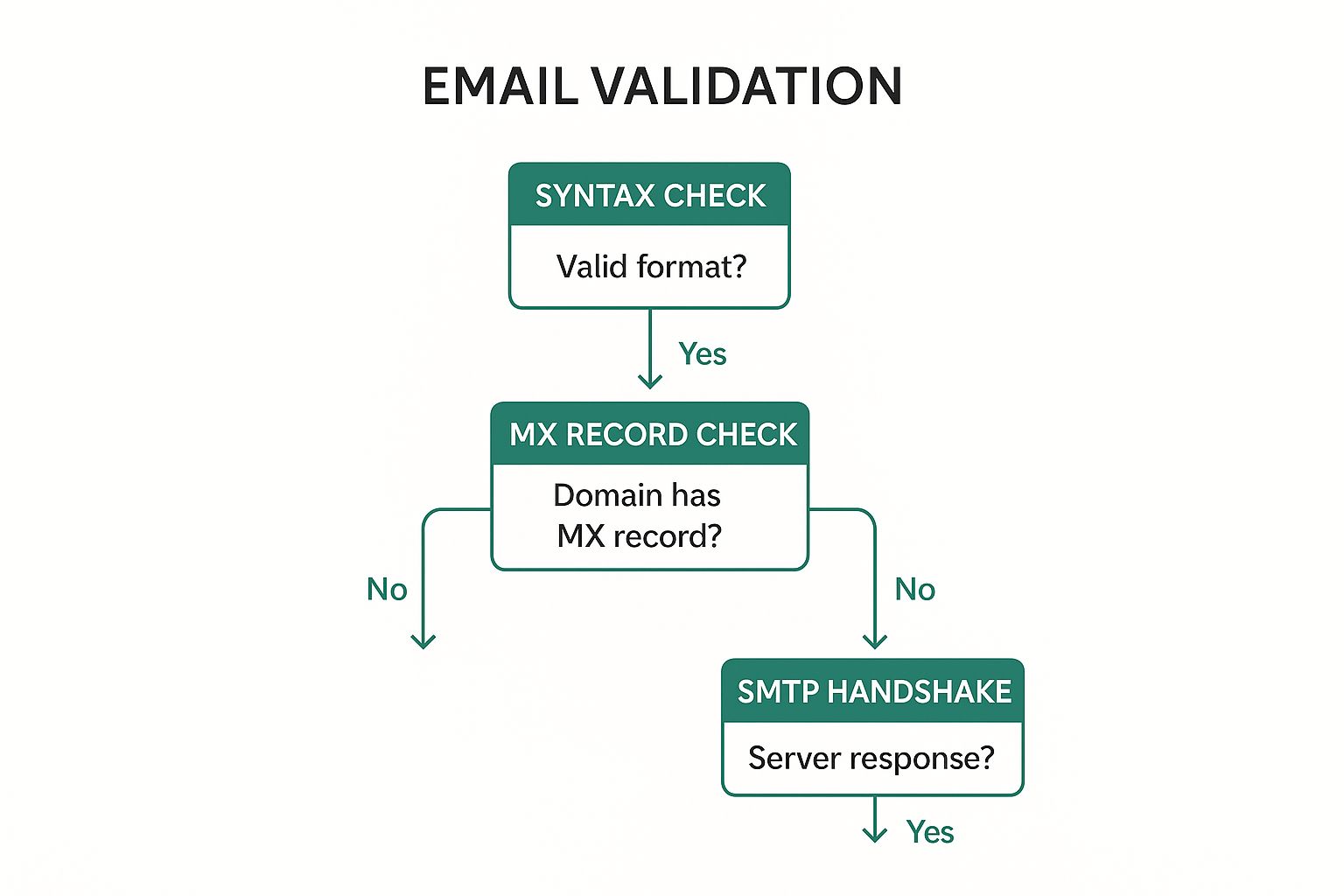
The infographic below shows how these steps fit together to protect your email deliverability.
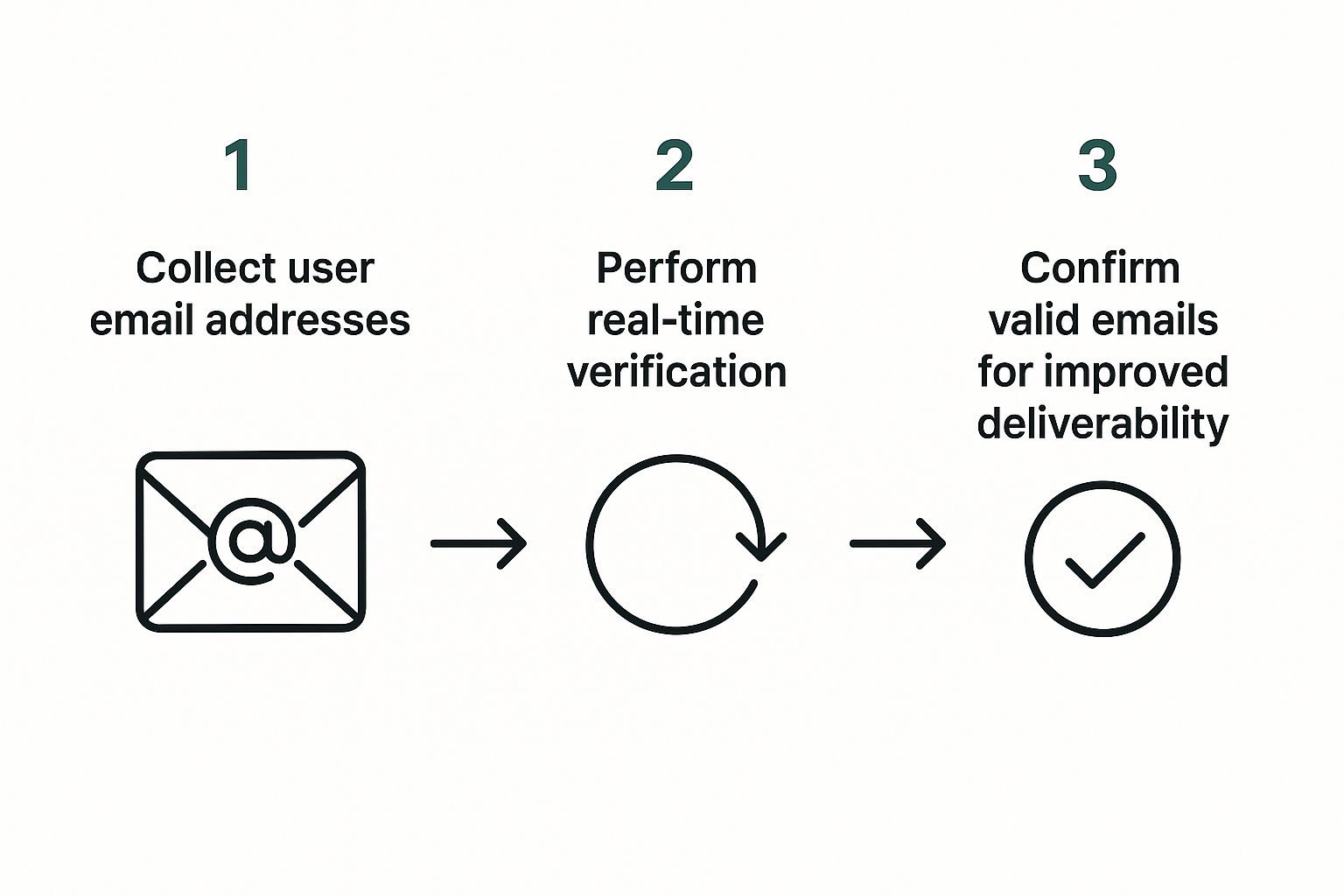
This simple flow—collect, verify, confirm—is the backbone of a healthy list, stopping bad data before it ever gets a foothold in your system.
The SMTP Handshake: The Final Check
The last and most powerful step is the SMTP (Simple Mail Transfer Protocol) handshake. This is the real magic of email verification. It’s a live, direct communication with the recipient's mail server to see if a specific mailbox actually exists.
Think of it as calling a company's main phone line and asking the operator, "Do you have a Jane Doe working here?" without ever being connected to Jane herself. The verification tool essentially does the same thing.
- The tool connects to the mail server for
company.com. - It politely says hello.
- It then asks the server, "Are you able to deliver a message to
jane.doe@company.com?"
The server’s response is a simple "yes" or "no." A "yes" means the mailbox is active and ready to go. A "no" means that specific user doesn't exist. The best part? No email is ever actually sent, so the check happens without cluttering anyone's inbox or letting them know you checked.
This final handshake offers the highest level of accuracy, confirming not just that the domain is real, but that the individual mailbox exists and is waiting to receive your message.
The Business Impact of a Clean Email List
It’s one thing to understand the mechanics of email verification, but the real power comes from its direct impact on your business. A clean, verified email list isn't just a "nice to have" or some administrative chore. It’s a powerful asset that directly fuels profitability, protects your brand, and sharpens your marketing intelligence.
Think of your list hygiene as the foundation of your entire email marketing strategy.
If that foundation is weak—riddled with invalid or risky addresses—everything you build on top of it will start to crumble. But a strong, clean foundation ensures every campaign you launch has the best possible chance to succeed.
Protect Your Sender Reputation
Your sender reputation is basically a credit score for your email domain. Internet Service Providers (ISPs) like Gmail, Outlook, and Yahoo are always watching. When you send messages to invalid addresses that hard bounce, it flags your sending behavior as sloppy, or worse, spammy.
Every bounce chips away at your reputation. A damaged score makes it far more likely that ISPs will just route your emails straight to the spam folder, where they’ll almost certainly be ignored. An email address verification process acts as a security guard for your reputation, filtering out these harmful addresses before they ever cause damage.
The consequences of a poor reputation are serious and can take months to repair.
By proactively cleaning your list, you send a clear signal to ISPs that you are a legitimate, trustworthy sender. This single practice is one of the most effective ways to secure a direct path to your audience's inbox.
Maximize Your Campaign ROI
Every single email sent to a non-existent address is wasted money. It doesn't matter if you pay per send or per contact; you’re pouring resources into a dead end. Verifying your list ensures your marketing budget is spent targeting real, reachable people.
This focus on quality over quantity has a direct effect on your return on investment (ROI). With better deliverability, more of your carefully crafted messages actually reach their intended audience.
This naturally leads to higher open rates, more click-throughs, and, ultimately, more conversions. When your analytics reflect genuine engagement from a valid audience, you can make smarter decisions about future campaigns, further optimizing your spend. Accurate data from a clean list is essential for anyone serious about growth, and our guide on how to find company email addresses can help you start with quality contacts from day one.
Reduce Costs and Improve Metrics
Maintaining a clean list gives you immediate financial and analytical wins that ripple across your marketing operations. The impact is both direct and indirect, creating a more efficient and effective system.
- Lower Service Costs: Most email marketing platforms charge based on subscriber count or send volume. Removing thousands of useless contacts can significantly lower your monthly bill.
- Enhanced Engagement Metrics: When you stop sending to unengaged or invalid addresses, your open and click-through rates instantly improve. This gives you a much clearer picture of how your content is really performing.
- Avoid Blacklisting: Repeatedly sending to bad addresses can land your domain on an email blacklist—a digital "do not send" list that can cripple your marketing efforts. Regular verification is your best defense.
The digital world is flooded with junk. With roughly 160 billion spam emails sent daily—making up 46% of all email traffic—ISPs are more aggressive than ever in filtering content. Proper email verification ensures your legitimate communications don't get caught in the crossfire. Ultimately, a commitment to list hygiene translates directly into a healthier, more profitable email program.
How to Choose the Right Email Verification Method
Not all email verification strategies are built the same, and picking the right one comes down to what you need to accomplish. You wouldn't use a sledgehammer to hang a picture frame, right? In the same way, you shouldn't use a bulk cleaning tool when all you need is a quick check on a single, important email.
Understanding the three main methods—single, bulk, and real-time—is the key to building an efficient and cost-effective system. Each one serves a different purpose, from getting an instant green light at signup to deep cleaning a massive, aging database.
Making the right choice means you can apply the perfect amount of precision exactly when you need it most. This helps you stop problems before they start and fix the ones that have already crept in, which directly impacts your data quality and marketing success. Let's break down each option so you can figure out which is the right fit.
Single Email Verification for Quick Checks
Think of single email verification as your go-to spot-check. It’s designed to validate just one email address on the fly. This is perfect for a sales pro who just got a hot new lead or a support team member who needs to confirm a customer's contact details before sending over critical info.
The biggest plus here is speed and simplicity. You just copy and paste an email into a tool and get an instant verdict: valid, invalid, or risky. It’s incredibly handy for those one-off situations where you need immediate confidence in an address without the hassle of processing a whole list.
- Best Use Case: Verifying a single, high-priority contact before you send a personalized outreach email or an important document.
- Example: A B2B salesperson meets a promising lead at a conference. Before adding them to the CRM, they use a single verification tool to instantly confirm the address is good to go.
Bulk Email List Cleaning for Database Hygiene
When you're sitting on a list of hundreds, thousands, or even millions of subscribers, bulk email list cleaning is your best friend. This process involves uploading your entire contact database to a verification service, which then scrubs the whole thing from top to bottom.
It sniffs out and flags all sorts of problems, like invalid addresses, duplicates, typos, and those pesky temporary or "disposable" emails. The whole point is to give your database a refresh, making sure it's clean and healthy before you launch a big campaign. This is more important than you might think—industry data shows that email lists naturally decay by about 22.5% every year as people switch jobs or abandon old accounts.
Think of regular bulk cleaning as a deep clean for your house. You don’t do it every day, but it’s absolutely essential for keeping things healthy and hygienic in the long run.
This method is perfect for quarterly or semi-annual maintenance or for cleaning up a newly acquired list before you ever hit "send."
Real-Time API Verification for Proactive Quality Control
The most proactive approach you can take is real-time API verification. An API (Application Programming Interface) wires a verification service directly into your tools—like your website signup forms, checkout pages, or CRM.
Instead of cleaning up bad data after it's already in your system, this method stops it from ever getting in. When a user types their email into a form, the API checks it in milliseconds, before they even click submit. If it spots a typo like john@gmil.com, it can instantly prompt the user to fix it.
This is the gold standard for maintaining a pristine list because it nips errors in the bud, right at the source.
Choosing Your Verification Method
To make things even clearer, here’s a quick comparison to help you choose the best method for your needs.
| Method | Best For | Pros | Cons |
|---|---|---|---|
| Single Verification | Immediate, one-off checks of high-value contacts. | Fast, simple, and perfect for quick validation. | Not scalable for large lists; inefficient for bulk tasks. |
| Bulk List Cleaning | Periodically refreshing an existing, large email database. | Comprehensive cleaning; improves overall list health. | A reactive process; doesn't prevent new bad data. |
| Real-Time API | Preventing bad data from entering your system at capture points. | Proactive and automated; maintains a constantly clean list. | Requires technical integration into forms and apps. |
In the end, many businesses find a hybrid approach works best. They use a real-time API to keep new signups clean while running periodic bulk cleanings to catch anything that might have slipped through. This one-two punch offers the most robust defense for your email strategy.
How to Select the Best Email Verification Tool
Choosing the right email verification service can feel like a shot in the dark. With so many providers all making the same big promises, how do you actually pick one that fits your business? It really boils down to looking past the marketing fluff and focusing on a few core things that directly impact your results, security, and wallet.
Think of it like hiring a key employee. You wouldn't just look at a flashy resume and call it a day. You'd check their references, see how they vibe with your team, and make sure their skills are the real deal. Applying that same mindset here will help you land a tool that delivers solid results and actually works with your existing setup.
Focus on Accuracy and Detection Methods
The single most important metric for any email address verification tool is accuracy. A service that misses bad addresses—or even worse, incorrectly flags your good contacts—is just creating more problems. Look for providers who are upfront about their accuracy rates, ideally claiming 98% or higher.
But don't just take their word for it. Dig into how they get that number. Modern tools do way more than basic syntax and SMTP checks. They use some pretty sophisticated logic to spot the trickier threats.
- Spam Trap Detection: This is huge. It identifies addresses used by internet service providers to catch spammers in the act.
- Catch-All Server Identification: This flags domains that accept any and all emails sent to them, which makes it impossible to know if a specific mailbox is real.
- Disposable Email Recognition: This weeds out all those temporary, throwaway addresses from services like Mailinator that people use to sign up for things they don't care about.
A tool that nails these more nuanced issues offers a much deeper layer of protection for your sender reputation.
Evaluate Integrations and Workflow Compatibility
An email verification tool shouldn't be a lonely island. To be truly useful, it has to plug right into your current marketing and sales stack. Before you sign up, double-check that it offers solid integrations with the platforms you already rely on, like your CRM, email marketing service, or lead capture forms.
A powerful API is a great sign of a tool’s flexibility. It lets you build verification right into your processes, like checking emails in real-time as someone types them into your website forms. That proactive approach is so much better than cleaning up a messy database after the fact. If you're building a list from scratch, our guide on how to find a business email address can help you start with quality contacts from day one.
The goal is automation. A great tool works quietly in the background, keeping your data clean without you or your team having to constantly mess with it.
Scrutinize Security and Pricing Transparency
You’re handing over your customer data, and that’s a big deal. Make sure any provider you're looking at is compliant with privacy rules like GDPR and is crystal clear about its security measures. Your customer list is a massive asset, and your verification partner needs to treat it that way.
Finally, look for pricing that’s straightforward and predictable. Stay away from services with confusing credit systems or sneaky hidden fees. The best providers have clear, scalable plans that grow with you, whether you're paying per check or on a monthly plan. This transparency saves you from surprise bills and helps you budget properly for this essential service. With the market valued at around USD 0.8 billion in 2023, it's clear that businesses are investing heavily in these tools, especially as AI continues to boost accuracy and efficiency.
Integrating Verification Into Your Daily Workflow
Truly successful email verification isn't a project you just check off a list. It’s a habit. It’s about shifting from reactive, one-off cleanups to a proactive workflow that protects your marketing day in and day out.
Think of it as routine maintenance for your single most valuable communication channel. This ongoing practice keeps your list healthy, your sender reputation safe, and your campaign data razor-sharp. The goal is simple: bake list hygiene directly into your daily operations so that clean data is the default, not a chore you dread.
Start Verification at the Point of Capture
The single most effective way to keep a clean list is to stop bad data from getting on it in the first place. Your first line of defense is right at the source: your website forms, landing pages, and checkout process.
Implementing a real-time email address verification API is the gold standard here. This tech works in milliseconds, checking an email for validity the moment a user types it. It instantly catches typos (like user@gmil.com) and flags them, prompting the user for a correction before they can even hit "submit."
This proactive approach nails several key goals at once:
- Reduces Entry Errors: It immediately stops common human errors from polluting your database.
- Improves User Experience: It helps legitimate users fix simple mistakes, ensuring they actually get your confirmation emails and newsletters.
- Blocks Bad Actors: It acts as a bouncer, filtering out fake or disposable addresses before they ever make it onto your list.
Schedule Regular List Cleaning
Even with perfect real-time verification, email lists naturally decay. People switch jobs, abandon old accounts, or just move on. This is precisely why scheduling regular, full-list scrubs is a non-negotiable part of a healthy workflow.
For most businesses, a quarterly deep clean is a solid starting point. If you have a high-volume list that grows at a rapid pace, you might even want to bump that up to monthly.
Think of this as a regular health checkup for your database. By proactively finding and removing decayed contacts, you prevent your deliverability and engagement metrics from slowly bleeding out without you even noticing. This simple, scheduled task is your best defense against long-term list degradation.
Segment Based on Verification Status
Here’s a powerful strategy that often gets overlooked: segmenting your contacts based on their verification results. After you run a bulk cleaning, your verification service will categorize each address into different buckets. Don't let that data go to waste—use it.
Here’s a practical way to break it down:
- Valid: These are your keepers. Continue sending to them as you normally would.
- Risky or Unknown: These are often "catch-all" addresses where the tool couldn't get a definitive answer. Don't delete them, but don't treat them like your valid contacts either. Isolate this group and maybe send a low-risk re-engagement campaign to see who bites.
- Invalid: These addresses are confirmed dead ends. Get them off your active sending list immediately. No questions asked. Keeping them around only hurts your sender reputation.
By weaving these practices into your workflow, email verification stops being a task and becomes a seamless part of your marketing engine—one that consistently protects your deliverability and maximizes your ROI.
Common Questions About Email Verification
Even when you've got the hang of the basics, some practical questions always pop up when you start putting an email verification strategy into action. Let's tackle a few of the most common ones to help you keep your email list clean and effective.
How Often Should I Verify My Email List?
There’s no magic number here. The best frequency for cleaning your email list really depends on how fast it’s growing. Think of it like a garden—a small, slow-growing herb patch needs weeding a lot less often than a huge vegetable garden that’s expanding every week.
For most businesses, doing a deep clean once a quarter is a great rule of thumb. It's often enough to catch bad emails before they do real damage to your sender reputation. But if you're in a high-growth mode and pulling in thousands of new subscribers every month, you’ll want to bump that up to a monthly bulk verification to stay ahead of trouble.
Can Email Verification Guarantee 100 Percent Deliverability?
Not quite. While email verification is a massive step in the right direction, it can't guarantee 100% deliverability all by itself. It’s a critical piece of the puzzle, but it's not the whole puzzle.
Imagine you're sending physical mail. Verification is like making sure the address is correct and the building actually exists. That's huge, but it doesn't control whether the mail carrier likes the look of your envelope or what they think of all the other mail you've sent in the past.
Email verification gives you a major advantage by getting rid of the biggest roadblock: invalid addresses. But other things—like your email content, sender reputation, and how engaged your audience is—also play a big part in whether your message hits the inbox or gets tossed in the spam folder.
Is Email Verification Compliant With GDPR?
Yes, it absolutely supports GDPR compliance, but it doesn't do the whole job for you. Regulations like GDPR are big on data accuracy, and that’s exactly what verification helps you with. By regularly cleaning your list, you’re taking a clear, proactive step to make sure the personal data you’re holding is correct.
However, verification just confirms an email address is valid—it doesn't confirm the user actually gave you permission to email them. That responsibility for getting and managing consent is still squarely on your shoulders. Using an email address verification tool is a best practice that works hand-in-hand with your consent management to build a marketing program that's both compliant and respectful.
Ready to stop guessing and start connecting with real customers? EmailScout provides powerful, easy-to-use tools to find and verify email addresses, ensuring your outreach hits the mark every time. Start finding unlimited emails for free today.