Tag: email deliverability

  • 12 Best Free Email Verification Tools (2025 Review)

    12 Best Free Email Verification Tools (2025 Review)

    Every bounced email damages your sender reputation, wastes resources, and costs you potential revenue. Maintaining a clean email list is not just a technical chore; it is the cornerstone of effective outreach, ensuring your carefully crafted messages actually reach their intended recipients. Invalid addresses, typos, and temporary inboxes clog your marketing funnel, leading to lower engagement and potential blacklisting by email service providers.

    Fortunately, you don't need a significant budget to solve this problem. Many powerful platforms offer free plans or generous initial credits to help you scrub your lists and improve deliverability from day one. This guide cuts through the marketing noise to provide a detailed comparison of the best free email verification tools available today. We will analyze their real-world accuracy, feature sets, limitations, and ideal use cases to help you make an informed decision.

    Whether you're a sales professional running cold outreach, a digital marketer optimizing campaign ROI, or an entrepreneur building a contact list, this resource is for you. We provide a hands-on look at each tool, complete with screenshots and direct links, so you can find the perfect solution to fit your specific workflow and business goals. Let's dive into the options that will help you connect with more prospects and protect your sender score.

    1. ZeroBounce

    ZeroBounce is a premium player in the email verification space, renowned for its high accuracy and comprehensive deliverability toolkit. It stands out by offering a full suite of services beyond simple validation, making it an excellent choice for marketers and sales teams who need to not only clean their lists but also monitor their sender reputation. For those just starting out, it’s one of the best free email verification tools available, thanks to its generous monthly credit allowance.

    ZeroBounce

    Key Features & User Experience

    The platform boasts a 99% accuracy rate, effectively catching spam-traps, abuse, disposable, and catch-all email addresses that can harm your domain’s health. Its user interface is clean and intuitive, making bulk list uploads and real-time API integration straightforward. With over 40 integrations, including popular platforms like HubSpot, Mailchimp, and Zapier, connecting it to your existing workflow is seamless.

    Pricing and Free Tier

    ZeroBounce provides a free plan that gives users 100 free email verifications every month. This is a recurring offer, not a one-time trial, which is a significant advantage for users with ongoing, low-volume needs. For larger projects, credits can be purchased on a pay-as-you-go basis, and they never expire.

    • Pros:
      • 100 free credits refreshed monthly.
      • Excellent documentation and API for developers.
      • High accuracy with detailed status codes.
    • Cons:
      • The minimum purchase for pay-as-you-go is 2,000 credits.
      • Can become more expensive than competitors at very high volumes.

    Website: https://www.zerobounce.net/

    2. NeverBounce

    NeverBounce is an established and highly-regarded player in the email verification industry, known for its reliability and robust feature set. It caters primarily to marketing and sales teams that require dependable list cleaning through bulk uploads, real-time API checks, and single verifications. While not offering recurring free credits, it provides a substantial one-time credit package for users willing to explore its platform via a demo, making it one of the best free email verification tools for an initial, large-scale cleanup.

    NeverBounce

    Key Features & User Experience

    NeverBounce guarantees up to 99.9% deliverability on verified emails and offers a clean, user-friendly dashboard for managing lists and integrations. The platform provides detailed result codes, helping users understand why an email is valid, invalid, or risky. Its API is well-documented and easy to implement, with numerous native integrations for platforms like Marketo, Drip, and Mailchimp. The ability to find emails in addition to verifying them is a valuable feature, a topic we explore further in our review of the best free email finder tools.

    Pricing and Free Tier

    The free offering from NeverBounce is unique: users can get 1,000 free credits after booking and attending a sales demo. This is ideal for a one-off list cleaning project. After using the free credits, the pricing shifts to a flexible pay-as-you-go model where you purchase credits that never expire, allowing for sporadic or high-volume usage without a subscription commitment.

    • Pros:
      • A large one-time grant of 1,000 free credits.
      • Mature ecosystem with comprehensive documentation and integrations.
      • Pay-as-you-go credits never expire.
    • Cons:
      • Free credits are not recurring and require booking a demo.
      • You may need to provide card details to activate the free offer.

    Website: https://www.neverbounce.com/

    3. Kickbox

    Kickbox is a popular and trusted email verifier offering a straightforward approach with both bulk list cleaning and a real-time verification API. It's an excellent choice for businesses that value transparent, pay-as-you-go pricing and need a reliable service to test before committing. Its reputation for good deliverability insights makes it a solid contender among the best free email verification tools, especially for those just starting to clean their lists.

    Kickbox

    Key Features & User Experience

    Kickbox is known for its user-friendly interface that simplifies the process of uploading lists for bulk verification. The platform provides clear results and its real-time API is easy for developers to integrate into forms and applications to prevent bad emails from entering your system. A standout feature is that they often don't charge for "unknown" or "risky" results, crediting them back to your account.

    Pricing and Free Tier

    Upon signing up, Kickbox provides 100 free verification credits to let you test the service thoroughly. This is a one-time offer, perfect for a trial run on a small list segment. After the free credits are used, pricing is based on a simple pay-as-you-go model that becomes more cost-effective with larger volumes.

    • Pros:
      • 100 free credits make it easy to test the platform's accuracy.
      • Transparent pricing with volume discounts.
      • Credits are often refunded for "unknown" email results.
    • Cons:
      • Free credits are a one-time offer, not a monthly recurring plan.
      • Per-email costs can be higher than budget competitors for very large lists.

    Website: https://kickbox.com/

    4. Hunter Email Verifier

    Hunter is a widely recognized name in B2B lead generation, and its Email Verifier is a core part of that suite. It's particularly effective for sales and marketing professionals who need to validate prospects found through Hunter’s other tools. The platform stands out by offering a permanent free plan with credits that can be used flexibly for both email finding and verification, making it a versatile asset for outreach campaigns.

    Hunter Email Verifier

    Key Features & User Experience

    Hunter’s verifier performs multiple checks, including format, domain information, and mail server response. The user experience is straightforward, with options for single email verification, bulk list cleaning, or API integration. It integrates seamlessly with Google Sheets, HubSpot, and Zapier, allowing users to build automated workflows. Its approach to email address verification is designed to fit naturally into existing B2B prospecting processes.

    Pricing and Free Tier

    Hunter provides a lasting free plan that offers 50 free credits per month. It's important to note that a single email verification costs 0.5 credits, meaning you effectively get 100 verifications monthly. These credits can also be used for Hunter's other services, like the Email Finder, and are sharable across team members.

    • Pros:
      • True long-term free plan that resets monthly.
      • Credits are sharable across team members.
      • Simple and transparent pricing structure.
    • Cons:
      • The 0.5 credit cost halves the effective number of checks.
      • Best suited for B2B use cases rather than general list cleaning.

    Website: https://hunter.io/

    5. DeBounce

    DeBounce offers a simple, no-frills approach to email list cleaning, making it an excellent option for users who need a reliable service without a long-term commitment. Its standout feature is its straightforward, pay-as-you-go model combined with a one-time free credit bonus. This makes it one of the best free email verification tools for users with occasional list-cleaning needs or those looking for an economical way to validate a small to medium-sized list.

    DeBounce

    Key Features & User Experience

    The platform is designed for efficiency, with a clean dashboard that makes uploading lists and interpreting results easy. DeBounce provides essential validation features, including syntax checks, domain checks, and bounce detection. A key benefit is that it doesn't charge credits for unknown or duplicate emails it finds in your list, ensuring you only pay for definitive results. All plans, including the free tier, get access to its API for real-time verification.

    Pricing and Free Tier

    Upon signing up, DeBounce provides a one-time bonus of 100 free verification credits. Unlike some competitors, these credits never expire, giving you the flexibility to use them whenever you need them. Once the free credits are used, you can purchase more on a flexible pay-as-you-go basis, with discounts available for larger volumes.

    • Pros:
      • 100 free one-time credits that never expire.
      • Does not charge for unknown or duplicate emails.
      • Cost-effective for occasional or one-off list cleaning.
    • Cons:
      • The free credits are a one-time offer, not a monthly recurring plan.
      • Lacks some of the advanced deliverability tools found in premium platforms.

    Website: https://debounce.io/

    6. Verifalia

    Verifalia is a robust email verification service that stands out with its unique daily free credit model, making it ideal for businesses and developers with consistent, low-volume validation needs. Instead of a one-time or monthly credit bundle, Verifalia offers a recurring daily allowance, positioning it as one of the best free email verification tools for ongoing, light-touch list maintenance or real-time form validation without any financial commitment.

    Verifalia

    Key Features & User Experience

    The platform supports both bulk email list cleaning and a real-time verification API, catering to different use cases. Its system checks for syntax errors, domain and MX record validity, and mailbox availability. The user experience is developer-friendly, with comprehensive documentation that makes API integration straightforward for tasks like verifying sign-up forms. The dashboard is clean, allowing users to easily track their daily credit usage and manage their verification tasks.

    Pricing and Free Tier

    Verifalia's free plan provides 25 free email verifications every day. These credits renew daily, which is a significant advantage for users needing continuous, small-scale validation. For larger needs, users can purchase pay-as-you-go credit packs that never expire or opt for monthly subscriptions, offering excellent flexibility to scale up as required. This model supports both small startups and growing enterprises effectively.

    • Pros:
      • Truly free ongoing use with 25 credits that renew daily.
      • Flexible scaling with non-expiring credit packs and subscriptions.
      • Strong and well-documented API for easy integration.
    • Cons:
      • The daily limit may not be sufficient for large, one-time list cleaning campaigns.
      • The interface is more functional than visually polished.

    Website: https://verifalia.com/

    7. Emailable

    Emailable is a fast and efficient email verifier designed for both bulk list cleaning and real-time API verification. It stands out for its straightforward approach and a generous one-time credit offering, making it an excellent platform for users who need to quickly evaluate a service or clean a medium-sized list without any initial investment. Its flexibility in payment options caters to a wide range of users, from startups to established businesses.

    Emailable

    Key Features & User Experience

    The platform is built for speed and simplicity, allowing users to quickly upload lists and receive detailed results. Emailable’s API is well-documented, making it easy for developers to integrate real-time verification into forms and applications. The user experience is smooth, prioritizing a no-frills, function-first interface that gets the job done without unnecessary complexity.

    Pricing and Free Tier

    Emailable provides a free account that comes with a one-time bonus of 250 free starter credits. A key advantage is that these credits never expire, allowing you to use them whenever needed. Once the free credits are used, you can choose between pay-as-you-go plans and monthly subscriptions, with flexible payment methods including credit card, PayPal, or wire transfer.

    • Pros:
      • 250 free credits upon signup for a meaningful evaluation.
      • Credits do not expire, offering great flexibility.
      • Supports multiple payment methods for convenience.
    • Cons:
      • The free credits are a one-time offer, not a monthly recurring plan.
      • Detailed pricing is primarily shown during the checkout process.

    Website: https://emailable.com/

    8. Bouncer

    Bouncer is a fast and accurate email verification platform that has gained popularity for its user-friendly approach and transparent pricing model. It's designed for businesses of all sizes, from startups to enterprises, focusing on providing a reliable service without complex commitments. For those looking to test the waters, it positions itself as one of the best free email verification tools by offering a straightforward starting credit package.

    Bouncer

    Key Features & User Experience

    Bouncer emphasizes simplicity and efficiency. Its clean dashboard allows for easy list uploads and quick analysis, while its API provides seamless integration for real-time verification needs. A key differentiator is its "toxicity check," which helps identify email addresses that are widely circulated, breached, or belong to complainers. This provides an extra layer of protection for sender reputation.

    Pricing and Free Tier

    Bouncer offers a one-time welcome bonus of 100 free email verification credits for new users to try the service. Its pay-as-you-go model is particularly attractive because credits never expire, and there are no charges for duplicate emails or results categorized as "unknown." The low minimum purchase requirement makes it accessible for cost-conscious users with smaller, infrequent needs.

    • Pros:
      • 100 free credits for new users to start.
      • Credits never expire and have a low minimum purchase.
      • Does not charge for duplicates or unknown results.
    • Cons:
      • The free offer is a one-time bonus, not a recurring monthly credit.
      • Smaller brand presence compared to enterprise incumbents.

    Website: https://www.usebouncer.com/

    9. Clearout

    Clearout is a powerful and multifaceted platform that extends beyond simple email validation, incorporating email finding and lead enrichment features. It distinguishes itself with a user-friendly approach to billing and credits, making it an excellent choice for businesses that need both list cleaning and prospecting tools. Its commitment to not charging for uncertain results positions it as one of the best free email verification tools for users who prioritize cost control and transparency.

    Key Features & User Experience

    The platform delivers a comprehensive verification process that checks for syntax errors, disposable emails, and catch-all servers with high accuracy. Clearout's standout feature is its fair billing policy; it doesn't deduct credits for "unknown" or duplicate email addresses, ensuring you only pay for definitive results. The user interface is straightforward, allowing for easy bulk list uploads and management, while its API and multiple integrations, including Apollo, make it adaptable to various marketing and sales stacks.

    Pricing and Free Tier

    Clearout offers a one-time bonus of 100 free credits upon signup. While these credits don't refresh monthly like some competitors, they never expire, giving you flexibility for a one-off list cleaning. This free offering is a great way to test the platform’s accuracy and features without any commitment. Pay-as-you-go credit packs are available for larger needs.

    • Pros:
      • No charge for unknown or duplicate emails, maximizing credit value.
      • Feature-rich platform with email prospecting and form protection tools.
      • 100 free credits at signup that never expire.
    • Cons:
      • Free credits are a one-time offer, not a monthly recurring plan.
      • Minimum purchase for paid plans may be a hurdle for very small-scale users.

    Website: https://clearout.io/

    10. MailerCheck (by MailerLite)

    MailerCheck, a product from the team behind MailerLite, offers a straightforward approach to email verification, combining it with valuable deliverability diagnostics. It’s designed for users who want more than just list cleaning, providing insights into inbox placement and blocklist monitoring. For those looking to test the waters, it provides a solid one-time credit bonus, making it a worthy contender among free email verification tools.

    MailerCheck (by MailerLite)

    Key Features & User Experience

    The platform’s strength lies in its simplicity and integrated toolset. Users can easily upload a list for bulk verification and receive a clear report on valid, invalid, and risky emails. Beyond standard verification, its deliverability features test how your emails will perform with major inbox providers, which is a significant plus for marketers focused on campaign performance. The interface is clean, aligning with MailerLite's user-friendly design philosophy.

    Pricing and Free Tier

    New users are welcomed with 200 free credits upon signup to test the service. This is a one-time offer, but the platform’s pay-as-you-go credits never expire, offering great flexibility. The pricing is transparent and starts as low as $0.01 per verification, making it an affordable option after the free credits are used.

    • Pros:
      • 200 free credits for new accounts to test the platform.
      • Credits never expire, providing long-term value.
      • Includes deliverability insights and inbox placement testing.
    • Cons:
      • The free offer is a one-time bonus, not a recurring monthly credit.
      • Requires a minimum purchase of 1,000 credits for pay-as-you-go.

    Website: https://www.mailercheck.com/

    11. Snov.io Email Verifier

    Snov.io is a powerful all-in-one platform for sales and marketing outreach, and its integrated email verifier is a key part of that suite. It's an excellent option for users who need more than just verification, offering tools for finding leads, verifying contacts, and launching automated drip campaigns from a single dashboard. For those looking for a free email verification tool that's part of a broader ecosystem, Snov.io provides a solid entry point.

    Snov.io Email Verifier

    Key Features & User Experience

    The platform performs a multi-step verification process, making it a reliable way to validate an email address before adding it to a campaign. Snov.io’s strength lies in its integration; you can find a prospect, verify their email, and add them to an outreach sequence without ever leaving the platform. The user experience is streamlined for a sales workflow, with both bulk list cleaning and real-time API verification available.

    Pricing and Free Tier

    Snov.io's free forever plan includes 50 monthly credits that can be used for verification. New users also receive an additional 50 credits upon signup. The credit system is transparent, with one verification costing one credit. While the free allotment is modest, it’s ideal for small-scale, consistent list hygiene or verifying leads as you find them.

    • Pros:
      • Part of an all-in-one sales and outreach platform.
      • Transparent credit usage (1 credit = 1 verification).
      • Seamlessly integrates with lead generation and campaign tools.
    • Cons:
      • The free credit allowance is relatively small for bulk list cleaning.
      • May be overly complex if you only need a standalone verifier.

    Website: https://snov.io/

    12. Mailgun (Optimize)

    Mailgun is a powerful email sending and deliverability platform primarily designed for developers, but its Optimize plan includes a robust email validation API. While not a permanently free service, its initial trial offers significant value, making it one of the best free email verification tools for a one-time, large-scale list cleaning or for developers testing an integration. It's an excellent choice for those who want to bundle validation with a comprehensive email sending infrastructure.

    Mailgun (Optimize)

    Key Features & User Experience

    The service provides a modern, well-documented API that makes real-time email verification simple to integrate into applications and signup forms. The validation checks for syntax, DNS records, and mailbox existence. Because Mailgun is an email service provider, its validation tool integrates seamlessly into its broader suite of deliverability tools, including inbox placement tests and reputation monitoring, providing a holistic view of email health.

    Pricing and Free Tier

    Mailgun's Optimize plan offers a one-month free trial that includes a set number of email validation credits (typically 5,000). This is a one-time offer, and ongoing use requires a paid subscription. This makes it ideal for a startup's initial list cleanup but less suitable for users needing continuous, low-volume free verification.

    • Pros:
      • Generous one-time credit allowance during the first month.
      • Strong developer documentation and a modern API.
      • Integrates directly with a powerful email sending platform.
    • Cons:
      • The free tier is time-limited to the first month.
      • Requires a paid subscription for ongoing access after the trial.

    Website: https://www.mailgun.com/

    Top 12 Free Email Verification Tools Comparison

    Service Core Features User Experience & Quality Value Proposition Target Audience Pricing Highlights
    ZeroBounce Bulk & real-time validation, 40+ integrations 99% accuracy, spam & abuse detection Pay-as-you-go & subscriptions, credits never expire Marketers, enterprises 100 free verifications/month, min 2,000 credits purchase
    NeverBounce Bulk uploads, single checks, API Mature ecosystem, flexible use Free credits via demo booking SaaS, marketing teams Pay-as-you-go, free credits need demo
    Kickbox Bulk & real-time API Credited unknown results 100 free credits on signup, volume discounts Users needing straightforward pricing Low entry pricing, higher costs at scale
    Hunter Email Verifier API with Google Sheets & Zapier Transparent pricing, credit sharing Permanent free plan, credits shared team-wide B2B outreach users 50 free credits/month, 0.5 credit/use
    DeBounce API included, no charge for duplicates Simple & low commitment 100 free credits never expire Occasional users Pay-as-you-go, tier discounts
    Verifalia Bulk & API, daily 25 free credits Daily renewing free credits Credits never expire, flexible scaling Light daily users Daily free 25 checks, pay-as-you-go
    Emailable Bulk & API, multiple payment options Fast verification 250 free credits, flexible payments Evaluators, flexible pay users Pay-as-you-go & monthly plans
    Bouncer No charge for duplicates, volume tiers Fast & accurate 100 free credits, clear pricing Cost-conscious users Low minimum purchase, credits never expire
    Clearout Verification + prospecting, form guard Multiple integrations 100 free credits, no unknown/duplicate fees Users needing extra features Pay-as-you-go pack minimum varies
    MailerCheck Deliverability insights, API Clear pricing, diagnostics 200 free credits, inbox placement tools Deliverability-focused users Min 1,000 credits purchase, pay-as-you-go
    Snov.io Email Verifier Bulk & API, multi-step verification Integrates outreach & verification 50 free credits + 50/month free plan Small teams, combined tools Credit system, modest free allotment
    Mailgun (Optimize) Validation API + deliverability Developer-friendly API First month free credits, integrated sending Developers, US senders Free trial month, paid subscription after

    Choosing Your Best Fit: A Final Recommendation

    Navigating the landscape of the best free email verification tools can feel overwhelming, but the journey ends with a powerful realization: the perfect tool is the one that aligns seamlessly with your specific needs, volume, and workflow. We've dissected twelve of the top contenders, from comprehensive platforms like ZeroBounce and NeverBounce to ecosystem-specific solutions like Hunter and Snov.io. Each offers a unique blend of free credits, accuracy, and advanced features.

    The key takeaway is that "free" isn't a one-size-fits-all category. Your decision should be strategic. A tool with a large one-time credit bonus might be ideal for an initial list scrub, while a service offering daily free checks is better suited for ongoing, low-volume verification needs.

    How to Select the Right Tool for Your Use Case

    To make the best choice, evaluate your needs against the strengths of the tools we've covered. Consider the following scenarios:

    • For One-Time List Cleaning: If you have an existing list that needs a thorough, one-time audit, prioritize tools with generous sign-up credits. Emailable, ZeroBounce, and Clearout are excellent starting points, providing enough free verifications to clean a small-to-medium list without any initial investment.
    • For Daily, Low-Volume Checks: Sales professionals and freelancers who add a few new contacts daily will benefit most from tools with recurring free credits. Verifalia stands out here, offering a daily allowance that’s perfect for maintaining list hygiene without needing a paid plan for small-scale operations.
    • For Integration-Heavy Workflows: If you live inside a CRM or a specific sales or marketing platform, an integrated tool is your best bet. The convenience of verifying emails directly within your existing workflow with Hunter's or Snov.io's verifier cannot be overstated. Similarly, if you are a MailerLite user, MailerCheck is the logical and most efficient choice.
    • For High-Accuracy Demands: When every email counts and deliverability is paramount, focus on tools known for their multi-layered verification processes and high accuracy guarantees. Bouncer and Kickbox are strong contenders here, offering detailed reports and a focus on minimizing bounce rates to protect your sender reputation.

    Final Thoughts: From Reactive Cleaning to Proactive Hygiene

    Ultimately, using one of these free email verification tools is a crucial, proactive step toward better marketing and sales outcomes. It's about shifting from reactively cleaning a damaged list to proactively maintaining a healthy one. A clean email list is the foundation of successful outreach, ensuring your carefully crafted messages land in the inbox, not the spam folder or a bounce-back notification.

    Don’t let poor data quality undermine your hard work. By selecting the right tool from this list, you empower your campaigns, protect your sender reputation, and significantly improve your connection rate. Take the next step, validate your contacts, and watch your engagement, deliverability, and overall results soar.


    Ready to stop cleaning lists and start building them with verified emails from the get-go? The EmailScout Chrome extension finds and verifies emails in real-time as you browse LinkedIn and company websites. Try EmailScout today to build a clean, high-quality contact list from day one.

  • Boosting Your Cold Email Response Rate

    Boosting Your Cold Email Response Rate

    So, what’s a “good” cold email response rate?

    Honestly, it’s not as simple as picking one magic number. A solid benchmark to aim for is anything over 10%, with most campaigns landing somewhere around the 5% mark.

    Think of it like this: if you’re just starting out, even a 1% response rate is a foothold. It’s data. It tells you something is happening, but your targeting or messaging probably needs a serious tune-up. On the flip side, if you're consistently hitting 20% or more, you're in elite territory. That means your personalization, offer, and timing are all working in perfect harmony.

    A low rate isn’t a failure—it’s a diagnostic tool. It’s your campaign telling you, "Hey, let's fix this!"

    What Do the Numbers Really Mean?

    To get a better handle on where you stand, it helps to think in tiers. This gives you a realistic snapshot of your campaign’s health and shows you what to aim for next. Analyzing different email response rates is the fastest way to understand what's working and what isn't.

    Here’s a quick reference guide to see how your campaigns stack up against industry standards.

    Cold Email Response Rate Benchmarks

    Performance Tier Response Rate What This Means
    Needs Work 1-4% You're getting started, but something's off. Your targeting might be too wide, or your message just isn't connecting. This is a common starting point with lots of room to grow.
    Average 5-9% You're hitting the industry standard. Your campaign has a decent foundation, but you can definitely boost results by tweaking your subject lines, personalizing more, or strengthening your CTA.
    Excellent 10-19% Now we're talking! Your outreach is sharp and effective. You know your audience, your offer is compelling, and your emails are grabbing attention.
    Elite Performer 20%+ You've cracked the code. Your emails feel like they were written just for the recipient. They're valuable, perfectly timed, and start real conversations.

    Keep in mind, the game is getting tougher.

    Recent B2B data shows the average reply rate has dipped to about 5.1%, down from the 7-8% we saw just a few years ago. With around 95% of all cold emails getting completely ignored, a generic, spray-and-pray approach just doesn't cut it anymore.

    How to Accurately Measure Your Response Rate

    Image

    Before you can start improving your numbers, you have to know what they actually are. It's a common trap to use a flawed calculation, which gives you a false sense of either security or failure. You end up trying to fix things that aren't even broken.

    The good news? The formula for this is dead simple. There's only one right way to do it.

    To figure out your true cold email response rate, you just need three pieces of information: the total number of emails you sent, how many of those bounced back, and the number of unique replies you got.

    The Essential Calculation

    This is the only formula you should ever use. It’s simple, but every single part is crucial for getting an honest look at your campaign's performance.

    (Unique Replies / (Total Emails Sent – Bounced Emails)) * 100 = Your Response Rate

    So, why is subtracting those bounced emails so important?

    Think of it like sending physical mail. If you send out 100 letters but 20 come back stamped "wrong address," you didn't really try to reach 100 people—you only actually reached 80. The exact same logic applies here.

    Your campaign’s success should only be judged by the emails that actually landed in a real inbox. Bounces are a deliverability problem, not a messaging problem. With roughly 17% of emails bouncing on average, ignoring them will seriously skew your results and hide how well your message is really connecting. You can learn more about how bounces impact your metrics at infraforge.ai.

    Measuring What Truly Matters

    Let’s be honest, just getting a reply isn’t the goal. Getting the right kind of reply is. A high response rate packed with "unsubscribe" or "not interested" messages isn't a win. It's just noise.

    This is why you have to segment your replies to understand what’s actually working.

    Start tracking different types of responses:

    • Positive Replies: These are the gold. Prospects showing interest, asking for more info, or booking a meeting.
    • Neutral Replies: This could be someone saying, "I'm not the right person, but try my colleague Jane Doe."
    • Negative Replies: These are the straightforward "no thanks" or requests to be removed from your list.

    When you separate them out, you get a much clearer picture of your campaign's health. A 5% positive response rate is worlds better than a 10% overall rate that’s mostly rejections.

    Why Your Cold Emails Are Getting Ignored

    Image

    So, you’ve built your list, crafted what you thought was the perfect message, and hit “send.” And now… crickets.

    It’s one of the most frustrating feelings in sales and marketing. But here’s the thing: the reason your emails are disappearing into a void almost always comes down to a few fundamental mistakes. You’re not just sending a message; you’re interrupting someone’s day. To get a response, you have to earn it.

    Think of their inbox like a crowded, noisy party. A generic, self-serving opener is like shouting into the void—you’ll be ignored. But a thoughtful, relevant comment can start a genuine conversation. If your response rate is in the gutter, your approach is failing that crucial first-impression test.

    Most of the time, it boils down to one of these three core issues.

    Your Message Is Irrelevant

    This is, by far, the biggest killer of cold email campaigns. An irrelevant email isn’t just about offering the wrong product. It’s a message that screams, "I haven't done my homework."

    It feels like junk mail because it’s completely disconnected from the recipient's world—their role, their challenges, and their goals.

    Research backs this up. A 2024 analysis of over 11 million emails found that while decision-makers actually prefer cold email, a staggering 95.9% of messages go unanswered. The main culprit? A whopping 71% of people cited a lack of relevancy as the number one reason they hit delete. You can read the full research on the state of cold email at hunter.io.

    An email only becomes relevant when it solves a problem the recipient is actually thinking about. Pitching social media management to a CFO worried about quarterly financial reporting is a complete waste of everyone’s time.

    The Email Feels Impersonal and Automated

    Personalization is so much more than just dropping in a {{first_name}} tag. Real personalization shows you’ve invested a moment to understand who you’re actually talking to. It’s the difference between a mass-produced flyer and a handwritten note.

    When an email is clearly a generic template blasted to hundreds of people, it triggers an immediate mental spam filter. Prospects can spot these a mile away.

    • Generic Compliments: "I love what your company is doing." (Doing what, exactly?)
    • Vague Openings: "I came across your profile and was impressed." (Impressive how?)
    • No Real Context: The message has zero reference to their recent work, a company announcement, or a shared connection.

    This lack of specific detail signals that the sender is just playing a numbers game. It tells the recipient you don't actually care about starting a conversation—you just want to make a sale.

    You Haven't Established Any Trust

    Let's be honest, you’re a stranger asking for someone's time and attention. In the world of communication, trust is everything. If your email looks unprofessional or even a little sketchy, you’ll never earn it.

    Your domain, your email signature, and the clarity of your ask all build your credibility. A message from a generic Gmail account with a fuzzy call-to-action is an immediate red flag. You have to present yourself as a legitimate professional who has a clear, valuable reason for reaching out.

    Proven Strategies to Get More Replies

    Okay, so you know why your emails might be getting ignored. That’s the first step. Now, let's get into the good stuff—the actionable strategies that turn that silence into actual conversations.

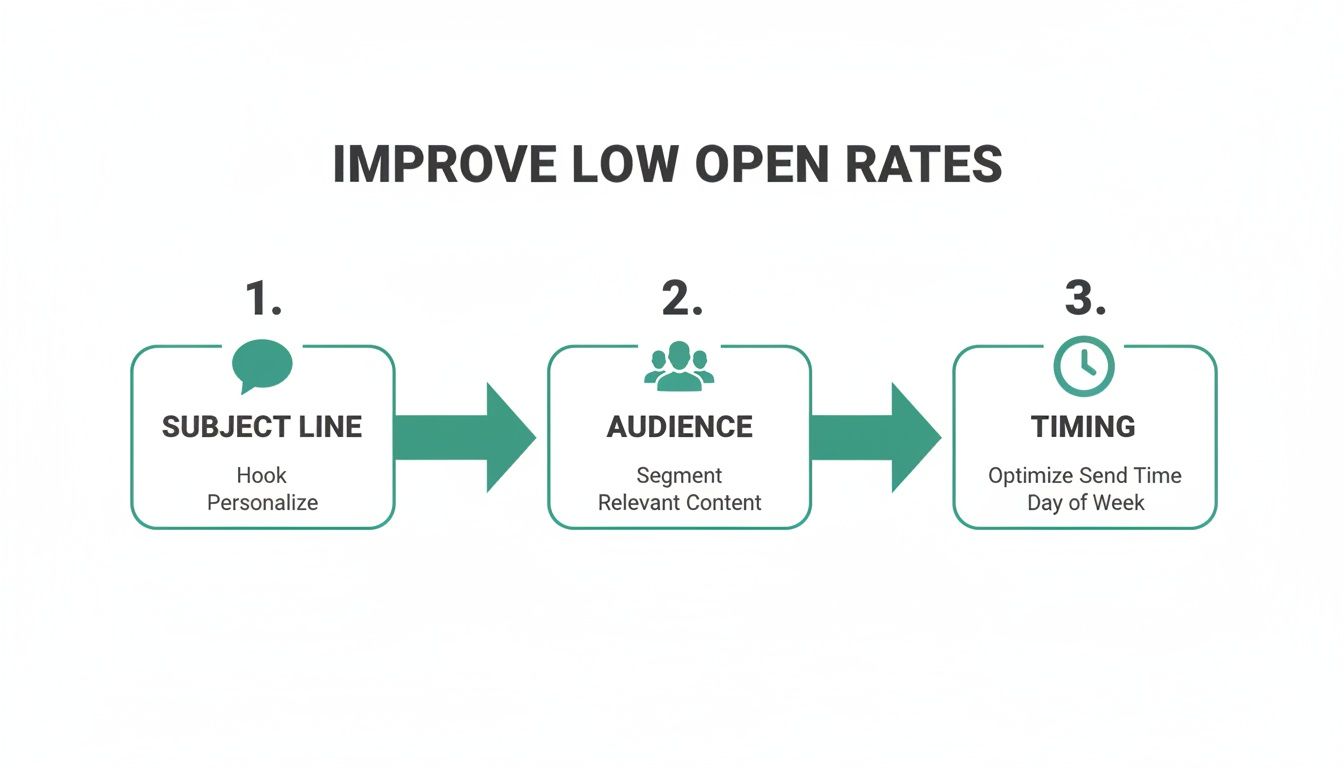
    Boosting your cold email response rate isn’t about a single magic bullet. It's about methodically tuning up every single piece of your outreach.

    From the second your email hits their inbox to the final call-to-action, every word counts. The goal is to make opening, reading, and replying feel like the most natural thing in the world for your prospect. We'll break down exactly how to do that.

    Craft an Irresistible Subject Line

    Your subject line has one job and one job only: get the open. Think of it as the bouncer at the club. If it's boring, generic, or looks spammy, your email is getting kicked to the curb (or the archive folder) instantly.

    To make your subject line pop, you need to either spark curiosity or show immediate relevance. Forget the clickbait. Just give a tiny hint of the value waiting inside.

    • Weak: "Quick Question" (Vague, overused, and immediately forgettable.)
    • Strong: "Question about [Recipient's Company] podcast" (Specific, relevant, and shows you've done some homework.)
    • Weak: "Introduction from [Your Name]" (No one cares. It's all about them, not you.)
    • Strong: "[Mutual Connection] suggested I reach out" (Boom. Instant trust and social proof.)

    A great subject line feels personal and professional all at once. It tells the reader that giving you a few seconds of their time won't be a waste.

    Personalize Beyond the First Name

    Look, true personalization is so much more than just dropping a {{first_name}} tag in your template. It's about proving you have a legitimate, specific reason for contacting them—and not the other 100 people on your list. This is easily the most powerful lever you can pull to jack up your response rate.

    Sending a highly personalized message shows you've invested time and respect their position. It instantly changes your email from an annoying interruption into a potential opportunity.

    This is where you bring in the "custom snippets"—those specific, recent, and relevant details that make each email feel unique. It proves you're a human, not a robot blasting out emails. The payoff for this effort is huge.

    Image

    The numbers don't lie. A little bit of genuine personalization can easily double your response rate compared to a generic message.

    To make this crystal clear, here’s how different levels of effort play out.

    Personalization Levels and Expected Impact

    Personalization Level Example Expected Response Rate Impact
    Basic (Low Effort) Using their first name and company name. Low. Better than nothing, but barely.
    Intermediate Referencing their job title or industry. Moderate. Shows you're targeting the right role.
    Advanced (High Effort) Mentioning a recent LinkedIn post, a quote from a podcast they were on, or a recent company award. High. This is the gold standard and gets replies.

    Dedicating a few extra minutes to find that advanced, high-effort snippet is almost always worth the return you'll get in replies.

    Write a Compelling Email Body

    You got the open. Congrats! Now the body of your email has to deliver on the promise your subject line made. This is where you connect their world to your solution. The biggest mistake people make here is talking endlessly about themselves, their company, and their list of features.

    Don't do that. Frame the entire message around the recipient.

    Start by showing you get it—you understand their world. You can learn a lot more about this in our full guide on how to write cold emails that people actually look forward to reading.

    Here's a simple, effective framework:

    1. The Hook: Kick things off with your personalized snippet. "Saw your LinkedIn post on scaling sales teams…"
    2. The Problem: Touch on a relevant pain point. "…and it made me think about how tough it is to keep lead quality high during a growth spurt."
    3. The Value Prop: Gently introduce your solution without a hard sell. "We help B2B tech companies like yours solve this by…"
    4. The Call-to-Action (CTA): Make the next step incredibly easy and low-friction.

    This structure keeps the focus squarely on them and builds a natural bridge from their problem to your solution.

    Use a Smart Follow-Up Strategy

    Here's a hard truth: most replies don't come from the first email. Not even close.

    Campaigns with 4-7 emails in a sequence see a reply rate that is three times higher than campaigns that give up after 1-3 emails. A polite, persistent follow-up strategy isn't optional; it's essential for a healthy response rate.

    But "following up" does not mean sending the same email again with "Just checking in" tacked on top. Gross. Each follow-up needs to add a little more value or offer a new angle.

    • Follow-Up 1 (2-3 days later): A simple, polite bump. That's it.
    • Follow-Up 2 (4-5 days later): Share a relevant case study, blog post, or a surprising stat.
    • Follow-Up 3 (1 week later): Reframe your value prop. Try a different angle that might resonate more.

    Put these strategies into practice—a killer subject line, deep personalization, a recipient-focused body, and a smart follow-up sequence—and you’ll stop being an annoyance in their inbox and start becoming a powerful conversation starter.

    Mastering the Technical Side of Email Deliverability

    Image

    Here's a hard truth: even the most persuasive, perfectly written email is worthless if it lands in the spam folder. Boosting your cold email response rate isn't just about clever copy. It’s about getting the technical stuff right—the behind-the-scenes setup that trips up most outreach campaigns before they even get a chance to start.

    Think of your email domain like a person trying to get through airport security. To get past the gate, they need a passport and an official ID. Technical email settings are your domain’s passport. They prove to email providers like Gmail and Outlook that you are who you say you are.

    Without that authentication, your emails look sketchy. They get flagged as suspicious and sent straight to the junk pile. Nailing these fundamentals ensures your messages actually hit the inbox, giving them a fighting chance to get read.

    Setting Up Your Domain's Passport

    You don’t need to be a developer to get this right. There are three key records that work together to build trust with mail servers and protect your reputation as a sender.

    • SPF (Sender Policy Framework): This is like a public list of authorized senders for your domain. It tells the world, "Only these specific mail servers are allowed to send emails on my behalf."
    • DKIM (DomainKeys Identified Mail): Think of this as a tamper-proof seal on a physical letter. DKIM adds a unique digital signature to every email, proving that the message wasn't faked or altered on its way to the recipient.
    • DMARC (Domain-based Message Authentication, Reporting & Conformance): This is the security guard that checks both the sender list (SPF) and the seal (DKIM). DMARC gives instructions to receiving servers on what to do if an email fails these checks, which protects your domain from being used by spammers.

    Setting these up is a one-time task, but it makes a massive difference in your deliverability.

    Building Your Sender Reputation

    Just like a person has to build up their credit score over time, a new email account needs to establish its sender reputation. You can’t just fire up a brand-new email and blast out 500 messages on day one. That’s exactly what spammers do, and it’s a surefire way to get your account flagged immediately.

    The process of gradually increasing your sending volume is called "warming up." It shows ISPs that you're a legitimate user, not a spam bot, by mimicking human behavior over time.

    This means starting with just a handful of emails each day and slowly increasing that number over several weeks. A solid warm-up routine is non-negotiable if you're serious about your emails actually landing in front of people.

    On top of that, keeping a clean email list is critical for your reputation. You need to get in the habit of using a tool to validate an email address before you hit send. This weeds out the bad or risky contacts, which keeps your bounce rate low and signals to email providers that you're a responsible sender.

    Moving Beyond Email with Multi-Channel Outreach

    A killer cold email strategy is a fantastic engine for growth, but it works even better when it’s not flying solo. If you really want to crank up your cold email response rate, you have to start thinking beyond the inbox and embrace a multi-channel game plan.

    This just means blending your emails with smart, timely touchpoints on other platforms—and for most of us, that means LinkedIn.

    Think about it like this: if you meet someone once at a big conference, they’ll probably forget you by the time they get home. But if you run into them a few times over the course of the event, a bit of familiarity starts to set in. You’re not a stranger anymore.

    The same principle applies here. By engaging with a prospect’s content or connecting with them on LinkedIn before your first email even hits their inbox, you stop being a random name. This one move can turn a cold outreach into a much warmer one, seriously boosting the odds they’ll actually open and reply to your message.

    A Simple Multi-Channel Sequence That Works

    Getting this all set up doesn't have to be some complex, over-engineered process. The real goal is just to create a series of light, professional interactions that build recognition without coming across as pushy or desperate.

    Here’s a proven sequence you can steal and adapt right away:

    • Day 1: The LinkedIn Touchpoint. Kick things off by simply viewing their LinkedIn profile. After that, find a recent post they shared and leave a genuine, thoughtful comment or give it a like. This is your first, no-pressure signal that you exist.

    • Day 3: The First Email. Two days later, it’s time to send your highly personalized cold email. Now, when they see your name, there’s a flicker of recognition, making your subject line infinitely more compelling.

    • Day 5: The Connection Request. Finally, send a LinkedIn connection request. Keep the note short and sweet: "Really enjoyed your recent post on [Topic]. Thought it would be great to connect."

    This approach flips the script, turning your outreach from a single shot in the dark into a well-timed, thoughtful campaign.

    A multi-channel strategy is built on a simple truth: your prospects don't just live in their inbox. By meeting them where they are, you build the kind of rapport and trust that every real business relationship is founded on.

    This layered approach does more than just boost your immediate response rate. It helps you build a stronger, more engaged network for the long haul. You’ll find yourself shifting from a mindset of just "sending emails" to one of genuinely starting conversations.

    Common Questions About Cold Emailing

    When you're fine-tuning your cold email game, a few questions always seem to pop up. Getting them answered is the key to breaking through the roadblocks that keep your campaigns from really taking off.

    How Long Should I Wait Between Follow-Ups?

    This is the big one, and the answer is all about finding that sweet spot. Timing is everything. If you follow up too quickly, you come across as pushy and aggressive. But if you wait too long, you lose all the momentum you built.

    The best approach is to create slightly irregular intervals—it just feels more human. A good rule of thumb is to wait 2-3 days after your first email. After that, start stretching it out. Send the next one 4-5 days later, and then maybe wait a full week for the one after that. This keeps you on their radar without clogging up their inbox.

    The goal of a follow-up isn't to demand a reply. It's a gentle, professional reminder that adds a bit more value with each touchpoint, showing persistence without being a pest.

    The real key here is sticking with it. The data doesn't lie: campaigns that include 4-7 emails in a sequence can see triple the reply rate compared to campaigns that give up after just one or two messages. Don't quit too early, because most of your best replies are hiding in those later follow-ups.


    Ready to find the right contacts and build your outreach lists in seconds? EmailScout is a powerful email finder that helps you connect with decision-makers effortlessly. Find unlimited emails for free and streamline your sales outreach. Learn more at emailscout.io.
  • A Guide to Email Address Verification

    A Guide to Email Address Verification

    So, what exactly is email address verification?

    Think of it as a quality control check for your contact list. It's the process of making sure an email address is not only real and active but also capable of actually receiving your messages. It’s about ensuring you're talking to real people.

    Why Email Verification Matters

    Image

    Imagine you printed thousands of flyers for a big promotion and paid to have them delivered. Later, you find out that a huge chunk of them were just dumped in vacant lots or mailed to non-existent buildings. That's exactly what happens when you send emails to an unverified list.

    Email address verification is your digital postal inspector. It filters out all the junk—the typos, the fakes, and the old, abandoned addresses—before you ever click "send."

    This isn't just about keeping a tidy list. It’s a core business strategy.

    Every single time an email bounces (meaning it's returned as undeliverable), it sends a bad signal to Internet Service Providers (ISPs) like Gmail and Outlook. Rack up too many bounces, and your sender reputation gets damaged. That's the score ISPs use to decide if you're a trustworthy sender. A low score sends your campaigns straight to the spam folder, where they'll never be seen.

    Protecting Your Marketing Investment

    Email marketing is a powerhouse. When it works, it really works, delivering an average ROI of $36 for every $1 spent. But there's a catch: around 20% of marketing emails never even make it to the inbox. That's a massive amount of lost revenue from missed sales and ignored offers.

    Email verification closes that gap, pushing your deliverability up and making sure your hard work actually reaches real customers.

    Running a clean email list solves some of the most persistent problems in email marketing. Here’s a quick breakdown of the issues it tackles head-on.

    Core Problems Solved by Email Verification

    Problem Impact on Your Business How Email Verification Helps
    High Bounce Rates Damages your sender reputation, causing more emails to land in spam folders. Removes invalid, fake, and inactive addresses that cause hard bounces.
    Wasted Marketing Budget You pay to send emails to addresses that will never be seen. Focuses your spend on real, reachable contacts, maximizing your ROI.
    Inaccurate Campaign Data Skewed metrics (open/click rates) give you a false picture of campaign performance. Provides a clean baseline, so your analytics reflect genuine user engagement.
    Low Engagement Sending to a mix of good and bad emails dilutes your overall engagement rates. Ensures your messages reach an active audience, naturally boosting opens and clicks.
    Risk of Blacklisting Repeatedly sending to bad addresses can get your domain or IP blacklisted by ISPs. Maintains a healthy sender profile, keeping you in the good graces of email providers.

    Ultimately, a clean list ensures your efforts connect with a genuine audience. This leads to some powerful benefits that directly pad your bottom line:

    • Improved Campaign Performance: When emails hit real inboxes, your open rates, click-through rates, and other engagement metrics climb. It’s that simple.
    • Reduced Marketing Costs: You stop throwing money away on dead-end addresses. Every dollar is spent trying to reach a real person.
    • Enhanced Sender Reputation: A low bounce rate is a huge green flag for ISPs. It tells them you’re a legitimate sender, which is crucial for long-term deliverability.
    • Better Data Accuracy: A clean list gives you a much clearer picture of who your audience is and how they behave, leading to smarter segmentation and personalization.

    In essence, email address verification isn't an expense—it's an investment in the health and effectiveness of your entire email marketing program. It protects your brand's credibility and maximizes the ROI of every campaign you launch.

    By taking the time to manage your email quality, you're building a much stronger foundation for all your customer communications. If you want to dive deeper, you can learn more in our guide on how to validate an email address effectively. It’s a simple step that makes a world of difference for anyone using email to grow their business.

    How Email Verification Works Behind the Scenes

    Ever wonder what actually happens when you verify an email address? It might seem like a black box, but the process is a surprisingly clever, multi-step check that filters out bad data before it can infect your contact list.

    Think of it like a bouncer at an exclusive club. First, they glance at your ID to make sure it’s a real, properly formatted driver's license—not a library card. That's the first quick check. Then, they look you up on the guest list. Finally, they might radio inside to confirm the person who invited you is actually there.

    Email verification works the same way, using a layered approach to separate the good contacts from the digital dead ends.

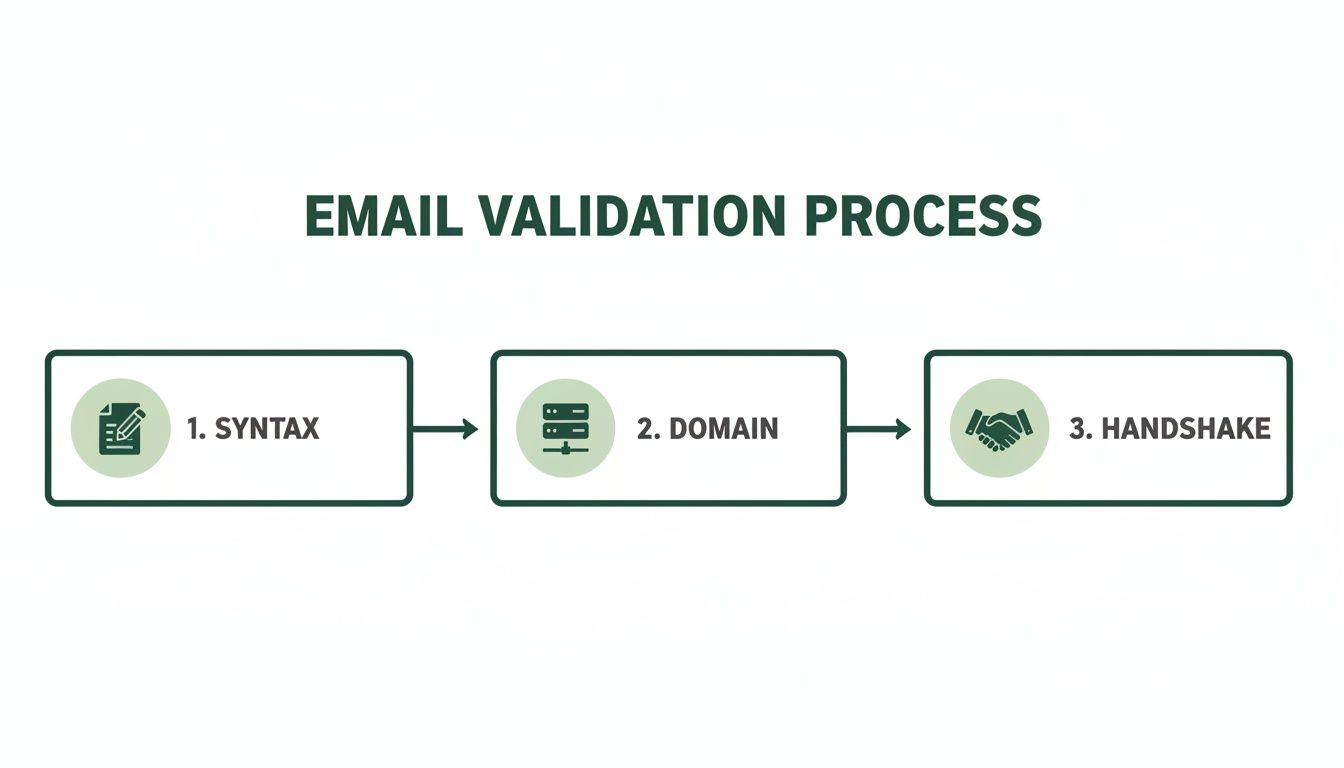
    The Initial Syntax Check

    The very first thing a verification tool does is a simple syntax check. This isn't about whether the email is real, but whether it looks like a proper email address in the first place. It's like proofreading a sentence for basic grammar.

    An automated system scans each address for a few key things:

    • The "@" Symbol: Is there one—and only one—"@" symbol?
    • A Valid Domain Format: Does the part after the "@" look like a real domain (company.com)? Or does it have obvious errors like spaces or multiple dots in a row?
    • Illegal Characters: Are there any weird characters that just don't belong in an email address?

    This basic step is the first line of defense. It instantly catches common typos and formatting mistakes, like john.doe@gmail com (missing a dot) or jane doe@yahoo.com (contains a space), cleaning up the most obvious errors from sloppy data entry.

    Verifying the Domain and Mail Server

    Once an email passes the syntax test, it’s time for a deeper look: domain verification. Just because an address is formatted correctly doesn't mean the domain actually exists or is set up to receive mail. This step is like checking if the street address on a letter corresponds to a real building.

    The system pings the domain (gmail.com, outlook.com, etc.) to confirm it’s a legitimate, registered domain. More importantly, it checks for special records that tell the world, "Hey, we have a mail server here, and it’s open for business!" If those records are missing or broken, any email sent to that domain will just vanish into the void.

    This is a critical filter. It weeds out addresses from defunct companies, misspelled domains, or fake ones made up on the spot. It confirms the email’s "destination" is a real, working mail system.

    The infographic below shows how these steps fit together to protect your email deliverability.

    Image

    This simple flow—collect, verify, confirm—is the backbone of a healthy list, stopping bad data before it ever gets a foothold in your system.

    The SMTP Handshake: The Final Check

    The last and most powerful step is the SMTP (Simple Mail Transfer Protocol) handshake. This is the real magic of email verification. It’s a live, direct communication with the recipient's mail server to see if a specific mailbox actually exists.

    Think of it as calling a company's main phone line and asking the operator, "Do you have a Jane Doe working here?" without ever being connected to Jane herself. The verification tool essentially does the same thing.

    1. The tool connects to the mail server for company.com.
    2. It politely says hello.
    3. It then asks the server, "Are you able to deliver a message to jane.doe@company.com?"
    The server’s response is a simple "yes" or "no." A "yes" means the mailbox is active and ready to go. A "no" means that specific user doesn't exist. The best part? No email is ever actually sent, so the check happens without cluttering anyone's inbox or letting them know you checked.

    This final handshake offers the highest level of accuracy, confirming not just that the domain is real, but that the individual mailbox exists and is waiting to receive your message.

    The Business Impact of a Clean Email List

    Image

    It’s one thing to understand the mechanics of email verification, but the real power comes from its direct impact on your business. A clean, verified email list isn't just a "nice to have" or some administrative chore. It’s a powerful asset that directly fuels profitability, protects your brand, and sharpens your marketing intelligence.

    Think of your list hygiene as the foundation of your entire email marketing strategy.

    If that foundation is weak—riddled with invalid or risky addresses—everything you build on top of it will start to crumble. But a strong, clean foundation ensures every campaign you launch has the best possible chance to succeed.

    Protect Your Sender Reputation

    Your sender reputation is basically a credit score for your email domain. Internet Service Providers (ISPs) like Gmail, Outlook, and Yahoo are always watching. When you send messages to invalid addresses that hard bounce, it flags your sending behavior as sloppy, or worse, spammy.

    Every bounce chips away at your reputation. A damaged score makes it far more likely that ISPs will just route your emails straight to the spam folder, where they’ll almost certainly be ignored. An email address verification process acts as a security guard for your reputation, filtering out these harmful addresses before they ever cause damage.

    The consequences of a poor reputation are serious and can take months to repair.

    By proactively cleaning your list, you send a clear signal to ISPs that you are a legitimate, trustworthy sender. This single practice is one of the most effective ways to secure a direct path to your audience's inbox.

    Maximize Your Campaign ROI

    Every single email sent to a non-existent address is wasted money. It doesn't matter if you pay per send or per contact; you’re pouring resources into a dead end. Verifying your list ensures your marketing budget is spent targeting real, reachable people.

    This focus on quality over quantity has a direct effect on your return on investment (ROI). With better deliverability, more of your carefully crafted messages actually reach their intended audience.

    This naturally leads to higher open rates, more click-throughs, and, ultimately, more conversions. When your analytics reflect genuine engagement from a valid audience, you can make smarter decisions about future campaigns, further optimizing your spend. Accurate data from a clean list is essential for anyone serious about growth, and our guide on how to find company email addresses can help you start with quality contacts from day one.

    Reduce Costs and Improve Metrics

    Maintaining a clean list gives you immediate financial and analytical wins that ripple across your marketing operations. The impact is both direct and indirect, creating a more efficient and effective system.

    • Lower Service Costs: Most email marketing platforms charge based on subscriber count or send volume. Removing thousands of useless contacts can significantly lower your monthly bill.
    • Enhanced Engagement Metrics: When you stop sending to unengaged or invalid addresses, your open and click-through rates instantly improve. This gives you a much clearer picture of how your content is really performing.
    • Avoid Blacklisting: Repeatedly sending to bad addresses can land your domain on an email blacklist—a digital "do not send" list that can cripple your marketing efforts. Regular verification is your best defense.

    The digital world is flooded with junk. With roughly 160 billion spam emails sent daily—making up 46% of all email traffic—ISPs are more aggressive than ever in filtering content. Proper email verification ensures your legitimate communications don't get caught in the crossfire. Ultimately, a commitment to list hygiene translates directly into a healthier, more profitable email program.

    How to Choose the Right Email Verification Method

    Not all email verification strategies are built the same, and picking the right one comes down to what you need to accomplish. You wouldn't use a sledgehammer to hang a picture frame, right? In the same way, you shouldn't use a bulk cleaning tool when all you need is a quick check on a single, important email.

    Understanding the three main methods—single, bulk, and real-time—is the key to building an efficient and cost-effective system. Each one serves a different purpose, from getting an instant green light at signup to deep cleaning a massive, aging database.

    Making the right choice means you can apply the perfect amount of precision exactly when you need it most. This helps you stop problems before they start and fix the ones that have already crept in, which directly impacts your data quality and marketing success. Let's break down each option so you can figure out which is the right fit.

    Single Email Verification for Quick Checks

    Think of single email verification as your go-to spot-check. It’s designed to validate just one email address on the fly. This is perfect for a sales pro who just got a hot new lead or a support team member who needs to confirm a customer's contact details before sending over critical info.

    The biggest plus here is speed and simplicity. You just copy and paste an email into a tool and get an instant verdict: valid, invalid, or risky. It’s incredibly handy for those one-off situations where you need immediate confidence in an address without the hassle of processing a whole list.

    • Best Use Case: Verifying a single, high-priority contact before you send a personalized outreach email or an important document.
    • Example: A B2B salesperson meets a promising lead at a conference. Before adding them to the CRM, they use a single verification tool to instantly confirm the address is good to go.

    Bulk Email List Cleaning for Database Hygiene

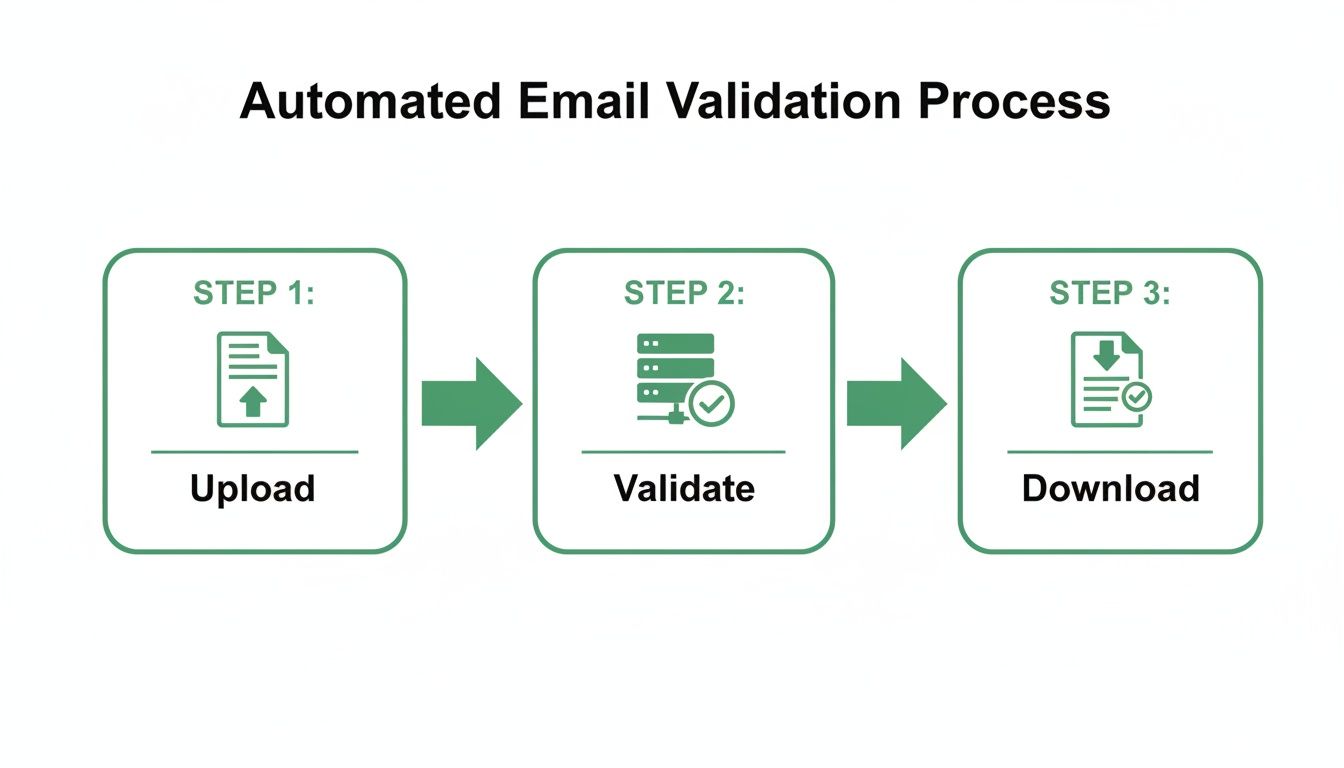
    When you're sitting on a list of hundreds, thousands, or even millions of subscribers, bulk email list cleaning is your best friend. This process involves uploading your entire contact database to a verification service, which then scrubs the whole thing from top to bottom.

    It sniffs out and flags all sorts of problems, like invalid addresses, duplicates, typos, and those pesky temporary or "disposable" emails. The whole point is to give your database a refresh, making sure it's clean and healthy before you launch a big campaign. This is more important than you might think—industry data shows that email lists naturally decay by about 22.5% every year as people switch jobs or abandon old accounts.

    Think of regular bulk cleaning as a deep clean for your house. You don’t do it every day, but it’s absolutely essential for keeping things healthy and hygienic in the long run.

    This method is perfect for quarterly or semi-annual maintenance or for cleaning up a newly acquired list before you ever hit "send."

    Real-Time API Verification for Proactive Quality Control

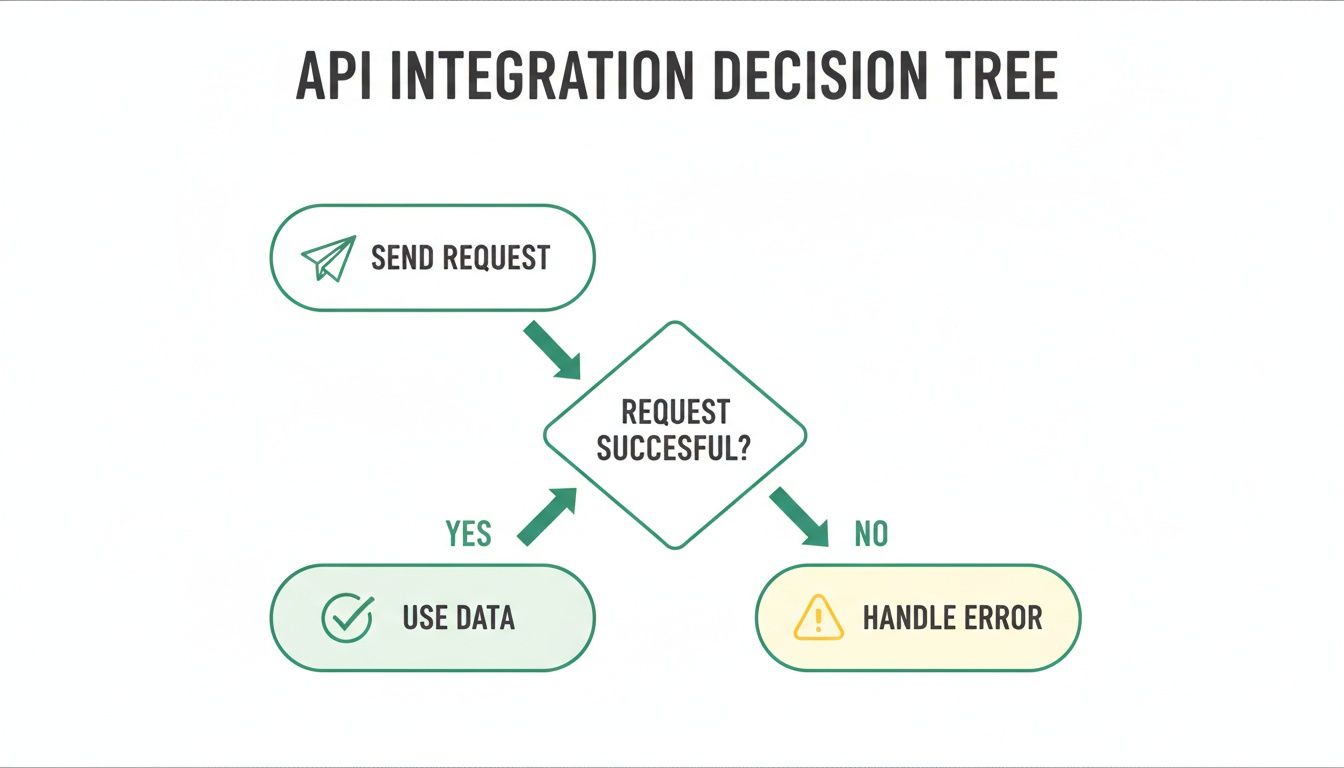
    The most proactive approach you can take is real-time API verification. An API (Application Programming Interface) wires a verification service directly into your tools—like your website signup forms, checkout pages, or CRM.

    Instead of cleaning up bad data after it's already in your system, this method stops it from ever getting in. When a user types their email into a form, the API checks it in milliseconds, before they even click submit. If it spots a typo like john@gmil.com, it can instantly prompt the user to fix it.

    This is the gold standard for maintaining a pristine list because it nips errors in the bud, right at the source.

    Choosing Your Verification Method

    To make things even clearer, here’s a quick comparison to help you choose the best method for your needs.

    Method Best For Pros Cons
    Single Verification Immediate, one-off checks of high-value contacts. Fast, simple, and perfect for quick validation. Not scalable for large lists; inefficient for bulk tasks.
    Bulk List Cleaning Periodically refreshing an existing, large email database. Comprehensive cleaning; improves overall list health. A reactive process; doesn't prevent new bad data.
    Real-Time API Preventing bad data from entering your system at capture points. Proactive and automated; maintains a constantly clean list. Requires technical integration into forms and apps.

    In the end, many businesses find a hybrid approach works best. They use a real-time API to keep new signups clean while running periodic bulk cleanings to catch anything that might have slipped through. This one-two punch offers the most robust defense for your email strategy.

    How to Select the Best Email Verification Tool

    Image

    Choosing the right email verification service can feel like a shot in the dark. With so many providers all making the same big promises, how do you actually pick one that fits your business? It really boils down to looking past the marketing fluff and focusing on a few core things that directly impact your results, security, and wallet.

    Think of it like hiring a key employee. You wouldn't just look at a flashy resume and call it a day. You'd check their references, see how they vibe with your team, and make sure their skills are the real deal. Applying that same mindset here will help you land a tool that delivers solid results and actually works with your existing setup.

    Focus on Accuracy and Detection Methods

    The single most important metric for any email address verification tool is accuracy. A service that misses bad addresses—or even worse, incorrectly flags your good contacts—is just creating more problems. Look for providers who are upfront about their accuracy rates, ideally claiming 98% or higher.

    But don't just take their word for it. Dig into how they get that number. Modern tools do way more than basic syntax and SMTP checks. They use some pretty sophisticated logic to spot the trickier threats.

    • Spam Trap Detection: This is huge. It identifies addresses used by internet service providers to catch spammers in the act.
    • Catch-All Server Identification: This flags domains that accept any and all emails sent to them, which makes it impossible to know if a specific mailbox is real.
    • Disposable Email Recognition: This weeds out all those temporary, throwaway addresses from services like Mailinator that people use to sign up for things they don't care about.

    A tool that nails these more nuanced issues offers a much deeper layer of protection for your sender reputation.

    Evaluate Integrations and Workflow Compatibility

    An email verification tool shouldn't be a lonely island. To be truly useful, it has to plug right into your current marketing and sales stack. Before you sign up, double-check that it offers solid integrations with the platforms you already rely on, like your CRM, email marketing service, or lead capture forms.

    A powerful API is a great sign of a tool’s flexibility. It lets you build verification right into your processes, like checking emails in real-time as someone types them into your website forms. That proactive approach is so much better than cleaning up a messy database after the fact. If you're building a list from scratch, our guide on how to find a business email address can help you start with quality contacts from day one.

    The goal is automation. A great tool works quietly in the background, keeping your data clean without you or your team having to constantly mess with it.

    Scrutinize Security and Pricing Transparency

    You’re handing over your customer data, and that’s a big deal. Make sure any provider you're looking at is compliant with privacy rules like GDPR and is crystal clear about its security measures. Your customer list is a massive asset, and your verification partner needs to treat it that way.

    Finally, look for pricing that’s straightforward and predictable. Stay away from services with confusing credit systems or sneaky hidden fees. The best providers have clear, scalable plans that grow with you, whether you're paying per check or on a monthly plan. This transparency saves you from surprise bills and helps you budget properly for this essential service. With the market valued at around USD 0.8 billion in 2023, it's clear that businesses are investing heavily in these tools, especially as AI continues to boost accuracy and efficiency.

    Integrating Verification Into Your Daily Workflow

    Truly successful email verification isn't a project you just check off a list. It’s a habit. It’s about shifting from reactive, one-off cleanups to a proactive workflow that protects your marketing day in and day out.

    Think of it as routine maintenance for your single most valuable communication channel. This ongoing practice keeps your list healthy, your sender reputation safe, and your campaign data razor-sharp. The goal is simple: bake list hygiene directly into your daily operations so that clean data is the default, not a chore you dread.

    Start Verification at the Point of Capture

    The single most effective way to keep a clean list is to stop bad data from getting on it in the first place. Your first line of defense is right at the source: your website forms, landing pages, and checkout process.

    Implementing a real-time email address verification API is the gold standard here. This tech works in milliseconds, checking an email for validity the moment a user types it. It instantly catches typos (like user@gmil.com) and flags them, prompting the user for a correction before they can even hit "submit."

    This proactive approach nails several key goals at once:

    • Reduces Entry Errors: It immediately stops common human errors from polluting your database.
    • Improves User Experience: It helps legitimate users fix simple mistakes, ensuring they actually get your confirmation emails and newsletters.
    • Blocks Bad Actors: It acts as a bouncer, filtering out fake or disposable addresses before they ever make it onto your list.

    Schedule Regular List Cleaning

    Even with perfect real-time verification, email lists naturally decay. People switch jobs, abandon old accounts, or just move on. This is precisely why scheduling regular, full-list scrubs is a non-negotiable part of a healthy workflow.

    For most businesses, a quarterly deep clean is a solid starting point. If you have a high-volume list that grows at a rapid pace, you might even want to bump that up to monthly.

    Think of this as a regular health checkup for your database. By proactively finding and removing decayed contacts, you prevent your deliverability and engagement metrics from slowly bleeding out without you even noticing. This simple, scheduled task is your best defense against long-term list degradation.

    Segment Based on Verification Status

    Here’s a powerful strategy that often gets overlooked: segmenting your contacts based on their verification results. After you run a bulk cleaning, your verification service will categorize each address into different buckets. Don't let that data go to waste—use it.

    Here’s a practical way to break it down:

    1. Valid: These are your keepers. Continue sending to them as you normally would.
    2. Risky or Unknown: These are often "catch-all" addresses where the tool couldn't get a definitive answer. Don't delete them, but don't treat them like your valid contacts either. Isolate this group and maybe send a low-risk re-engagement campaign to see who bites.
    3. Invalid: These addresses are confirmed dead ends. Get them off your active sending list immediately. No questions asked. Keeping them around only hurts your sender reputation.

    By weaving these practices into your workflow, email verification stops being a task and becomes a seamless part of your marketing engine—one that consistently protects your deliverability and maximizes your ROI.

    Common Questions About Email Verification

    Even when you've got the hang of the basics, some practical questions always pop up when you start putting an email verification strategy into action. Let's tackle a few of the most common ones to help you keep your email list clean and effective.

    How Often Should I Verify My Email List?

    There’s no magic number here. The best frequency for cleaning your email list really depends on how fast it’s growing. Think of it like a garden—a small, slow-growing herb patch needs weeding a lot less often than a huge vegetable garden that’s expanding every week.

    For most businesses, doing a deep clean once a quarter is a great rule of thumb. It's often enough to catch bad emails before they do real damage to your sender reputation. But if you're in a high-growth mode and pulling in thousands of new subscribers every month, you’ll want to bump that up to a monthly bulk verification to stay ahead of trouble.

    Can Email Verification Guarantee 100 Percent Deliverability?

    Not quite. While email verification is a massive step in the right direction, it can't guarantee 100% deliverability all by itself. It’s a critical piece of the puzzle, but it's not the whole puzzle.

    Imagine you're sending physical mail. Verification is like making sure the address is correct and the building actually exists. That's huge, but it doesn't control whether the mail carrier likes the look of your envelope or what they think of all the other mail you've sent in the past.

    Email verification gives you a major advantage by getting rid of the biggest roadblock: invalid addresses. But other things—like your email content, sender reputation, and how engaged your audience is—also play a big part in whether your message hits the inbox or gets tossed in the spam folder.

    Is Email Verification Compliant With GDPR?

    Yes, it absolutely supports GDPR compliance, but it doesn't do the whole job for you. Regulations like GDPR are big on data accuracy, and that’s exactly what verification helps you with. By regularly cleaning your list, you’re taking a clear, proactive step to make sure the personal data you’re holding is correct.

    However, verification just confirms an email address is valid—it doesn't confirm the user actually gave you permission to email them. That responsibility for getting and managing consent is still squarely on your shoulders. Using an email address verification tool is a best practice that works hand-in-hand with your consent management to build a marketing program that's both compliant and respectful.


    Ready to stop guessing and start connecting with real customers? EmailScout provides powerful, easy-to-use tools to find and verify email addresses, ensuring your outreach hits the mark every time. Start finding unlimited emails for free today.

  • How to Validate an Email Address Effectively

    How to Validate an Email Address Effectively

    Validating an email address is simply the process of confirming it’s active, deliverable, and belongs to a real person. What used to be just good practice for marketers is now an absolute must-do to protect your sender reputation, get the most out of your campaigns, and make sure your messages actually land in front of your audience.

    The High Cost of a Dirty Email List

    Trying to run an email campaign with an unverified list is like building a house on a shaky foundation. Sooner or later, the whole thing is going to come crashing down. A clean email list is the bedrock of any successful digital communication strategy, yet so many businesses completely underestimate the damage that bad emails can cause. We're not just talking about a few bounces here and there; it's a domino effect of negative consequences that can hamstring your marketing and tarnish your brand.

    Think about it. Every single invalid email on your list is a sunk cost. You’re paying to store it, spending money to send campaigns to it, and completely skewing your performance metrics, making it impossible to tell what's actually working. But the damage goes far beyond your budget.

    Protecting Your Sender Reputation

    Internet Service Providers (ISPs) like Gmail and Outlook are always watching. They monitor how recipients interact with your emails, and a high bounce rate—which is exactly what happens when you send to nonexistent addresses—is a massive red flag. It tells them you might be a spammer who isn't bothering with basic list hygiene.

    Keep hitting those dead-end addresses, and you'll see your sender score plummet. This is the critical metric that decides whether your emails land in the inbox, get exiled to the spam folder, or are blocked entirely. Once your reputation is shot, even your legitimate emails to real, engaged subscribers might never see the light of day.

    A high bounce rate is one of the fastest ways to get your domain blacklisted by the big email providers. Rebuilding that trust is a slow, painful grind—one you can easily avoid with proactive validation.

    Real-World Consequences of Neglect

    Let's picture an e-commerce brand launching a huge holiday sale. They blast their campaign out to a list of 100,000 subscribers, but here's the kicker: they have no idea that 20% of those addresses are invalid or have been abandoned. Right off the bat, 20,000 potential customers never even get the offer. But it gets worse.

    That massive spike in hard bounces puts the ISPs on high alert, and their domain gets flagged. Suddenly, their follow-up emails—including critical order confirmations and shipping notifications for paying customers—start getting routed to spam. The financial loss from the botched campaign is now magnified by a flood of customer service complaints and a long-term deliverability nightmare. This entire disaster could have been prevented with a simple validation check before hitting send.

    This isn't just a hypothetical. The sheer volume of email flying around makes this more critical than ever. With an estimated 376.4 billion emails expected to be sent daily in 2025, ISPs are clamping down harder than ever. You can explore the latest email usage trends to see why getting your messages to valid inboxes is non-negotiable for keeping your engagement and ROI healthy.

    To really drive this home, let's look at the direct business impact of taking email validation seriously versus ignoring it.

    The Impact of Poor vs. Strong Email Validation

    Metric Consequences of Poor Validation Benefits of Strong Validation
    Deliverability Rate Plummets due to high bounces and ISP penalties. Consistently high, with over 98% of emails reaching the inbox.
    Sender Reputation Severely damaged, leading to blacklisting and spam folder placement. Protected and enhanced, building trust with ISPs.
    Campaign ROI Wasted budget on sending to invalid emails, skewed metrics. Maximized ROI by ensuring messages reach real, interested users.
    Customer Engagement Decreased open and click-through rates as fewer emails are seen. Improved engagement metrics as your audience actually sees your content.
    Data Accuracy Unreliable customer data leads to flawed marketing decisions. Clean, accurate data provides clear insights into campaign performance.
    Brand Perception Seen as unprofessional or spammy, eroding customer trust. Viewed as a credible and trustworthy communicator.

    As you can see, the choice is pretty clear. Investing a small amount of effort in validation upfront prevents a cascade of costly problems down the line, safeguarding your most valuable marketing channel.

    Understanding How Email Validation Actually Works

    Image

    To really get a handle on email validation, you have to look under the hood. It’s not just a single button-press. It's a sequence of checks, with each one digging a little deeper to make sure an address is real and can actually receive your messages.

    Think of it like a multi-stage security checkpoint for your email list. Each layer is designed to filter out a different type of bad email, from simple typos to totally fake mailboxes. Stringing these checks together is how you build real confidence in your list and give your emails the best shot at landing in the inbox.

    This multi-layered process is pretty much standard for any serious marketer or sales team these days. There are three main technical hurdles an email has to clear: the syntax check, the domain check, and the SMTP test. Each one builds on the last, taking you from a basic format check all the way to a live server confirmation. If you want to dive even deeper, Mailfloss has a great guide on email validation best practices.

    The First Line of Defense: Syntax Checks

    The first and most basic layer is the syntax check. This is a simple, automated pass to make sure the email address follows the right structural rules. It's your frontline defense for catching obvious mistakes, usually right when a user types their email into a form.

    A syntax check is looking for a few simple but critical things:

    • The "@" Symbol: Is there one, and only one, "@" sign?
    • Local and Domain Parts: Is there something before the "@" (the local part) and something after it (the domain)?
    • Forbidden Characters: It flags any no-go characters like spaces, commas, or weird dot placements that just aren't allowed.

    An address like "john.doe gmail.com" would instantly fail this check because it’s missing the "@". Same goes for "jane@.com," which has a messed-up domain. This quick scan is incredibly good at knocking out simple human error.

    Going Deeper: Domain and MX Record Verification

    Once an email gets past the syntax check, it's time to verify its domain. This is where things get a bit more technical. The system needs to confirm two things: first, that the domain itself (everything after the "@") actually exists, and second, that it’s set up to receive email.

    This is done by checking the domain's Mail Exchanger (MX) records. An MX record is a setting in the Domain Name System (DNS) that points to the specific mail server in charge of handling that domain's email.

    If a domain doesn't have a valid MX record, it's a dead end. No matter how many times you try to send to it, your email will never arrive. This check is crucial for cutting out hard bounces before they happen.

    For example, if someone signs up with "[email protected]", the validation tool will look up "fakedomain12345.com". If it comes back with no DNS records—or specifically, no MX records—that email address gets marked as invalid right away.

    The Final Confirmation: SMTP Handshake

    The deepest and most reliable test is the SMTP handshake, sometimes called an SMTP ping. This process mimics the first few steps of sending an email, but without actually delivering anything. Your validation tool connects directly to the mail server listed in the MX records.

    During this brief "conversation," the validator essentially asks the server, "Hey, does this specific mailbox exist?" The server then sends back a code that confirms whether the address is good or not. It's the closest you can get to absolute certainty without clicking "send."

    This final step is what catches addresses that look perfect on the surface—like "[email protected]"—but don't actually exist. It’s this powerful technique that separates a basic check from a truly comprehensive verification.

    Choosing The Right Email Validation Method

    Picking the right way to validate an email address really comes down to your specific needs—what are your technical skills, how big is your list, and what’s your budget? There's no single best answer here. It’s all about finding the right balance between accuracy, effort, and cost.

    For a handful of emails, you might be tempted to just eyeball them for obvious typos. But let's be honest, that approach doesn't scale and is riddled with human error. It’s not a serious option for any real business use.

    Manual Checks And Basic Regex

    A more technical first step is using regular expressions (regex). This is a solid approach for real-time form validation. You can instantly catch common slip-ups like a missing "@" symbol or a funky domain extension right as a user is typing. It’s a great first line of defense.

    This image breaks down the official structure of an email address, which is exactly what a regex pattern tries to match.

    Image

    While regex is a decent starting point, it only tells you if an email looks right. It has no idea if the mailbox actually exists and can receive mail.

    That’s the biggest catch. An address like "fake-but-valid-format@example.com" will pass a regex check every time, but it’ll still cause a hard bounce because the mailbox is a dead end. This is where you need to bring in the bigger guns.

    Relying only on regex is a classic mistake. It cleans up your data at the entry point but does nothing to solve the real problem: deliverability. Poor deliverability tanks your sender reputation and sinks your campaigns.

    Advanced Validation With Third-Party APIs

    For any business that relies on email for sales, marketing, or just talking to customers, a dedicated third-party email validation API is the way to go. These services do all the heavy lifting for you—syntax checks, domain/MX record lookups, and the all-important SMTP handshake—all bundled into one simple tool.

    These APIs give you insights that regex could never dream of. They can spot things like:

    • Catch-All Servers: Domains that accept any email sent to them, which can be risky for your deliverability.
    • Disposable Emails: Those temporary addresses people use to get a freebie and disappear.
    • Role-Based Accounts: Generic addresses like "info@" or "support@", which almost always have lower engagement.

    This is a great little summary of how different validation methods stack up against each other.

    Email Validation Method Comparison

    Method Best For Pros Cons
    Manual Check One-off, non-critical checks. Free and simple. Not scalable, highly error-prone.
    Regex Real-time form validation. Catches typos instantly, improves initial data quality. Can't verify deliverability or mailbox existence.
    DNS/MX Lookup Basic server-level checks. Confirms the domain can receive email. Doesn't confirm the specific mailbox exists.
    SMTP Ping Deep deliverability checks. Most accurate way to confirm mailbox existence. Complex to implement, can be blocked by servers.
    Third-Party API Most business use cases. Comprehensive, accurate, and easy to use. Paid service, can be costly at high volumes.

    Ultimately, a multi-layered approach provides the most reliable results, and APIs automate that entire process for you.

    When you're serious about list quality, you need to go beyond just surface-level checks. For anyone building a contact list from the ground up, it pays to learn how to find company email addresses properly to make sure you're starting with good data from day one.

    Real-Time vs Batch Email Validation Strategies

    Image

    When it comes to email validation, timing is everything. The whole game boils down to when you decide to run the check. This fork in the road splits your strategy into two distinct paths: real-time validation, which is all about preventing bad data from getting in, and batch validation, which is your go-to for cleaning up the data you already have.

    Picking the right strategy for the right situation is key. It lets you keep your data pristine without annoying your users or creating extra work for your team. Both are crucial for good email hygiene, but they’re designed to solve completely different problems.

    Proactive Protection with Real-Time Validation

    Think of real-time validation as the bouncer at your front door. You integrate a validation API right into your signup forms, checkout pages, and anywhere else you collect emails. The check happens the instant a user hits "submit."

    This approach stops bad data dead in its tracks. It never even gets a chance to muddy up your database.

    Say someone accidentally types "[email protected]" instead of "[email protected]". A real-time check catches that typo on the spot and asks them to fix it before moving on. That one simple interaction just saved you from a future hard bounce, a potentially lost customer, and a skewed marketing report.

    The benefits here are immediate:

    • Top-Notch Data Quality: Only valid, deliverable emails make it into your system from day one.
    • A Better User Experience: You help users fix their own mistakes, ensuring they get that crucial welcome email or order confirmation.
    • Lower Long-Term Costs: You stop wasting money sending campaigns to addresses that don't exist.

    Here’s a pro-tip from my own experience: implement real-time checks gently. A friendly "Did you mean [email protected]?" is way better than a harsh "Invalid Email" error. The latter feels accusatory and can make people abandon your form altogether.

    Corrective Cleaning with Batch Validation

    While real-time is your gatekeeper for new signups, batch validation is the deep-cleaning crew for your existing contact list. This is where you upload an entire list—whether it's a hundred contacts or a few million—and have a service scrub the whole thing at once.

    This is the perfect move for a few common scenarios. Always, always run a batch validation before you launch a big email campaign to an older list. Email data decays fast; people leave jobs and abandon old accounts at a staggering rate of over 22% per year. A batch clean clears out the deadwood and protects your sender reputation.

    It's also a non-negotiable step when you're migrating data from an old CRM or importing a list you got from a trade show. Those lists are almost always riddled with typos and outdated info. Cleaning them all in one go gives you a solid, healthy foundation to build on.

    After the process, you'll get a clean report that sorts your list into categories like valid, invalid, and risky (or "accept-all"). This gives you the confidence to know exactly which contacts to keep and which to toss.

    Keeping Your Email List Healthy for the Long Haul

    Getting an email address validated isn’t a one-and-done task—it’s a commitment. A clean list today can easily get messy tomorrow as people switch jobs, ditch old email accounts, or just lose interest.

    Think of it like tending a garden. You can't just plant seeds and hope for the best. You have to constantly weed, prune, and nurture it to keep it thriving. This kind of ongoing maintenance is what separates a great email program from one that slowly dies and ends up in the spam folder.

    Start Strong with Double Opt-In

    One of the best habits you can form for list health is using a double opt-in process right from the start. It’s simple: when someone signs up, they get an automated email with a confirmation link they have to click.

    This one extra step works wonders:

    • It confirms real interest. You know the person actually wants to hear from you.
    • It proves they own the inbox. No fake sign-ups.
    • It catches typos. If someone misspells their email, the confirmation never arrives, and that bad address never pollutes your list.

    Sure, it adds a tiny bit of friction, but the quality of subscribers you get is so much higher. You end up with a list full of engaged people who are far more likely to open your emails.

    Make List Cleaning a Regular Habit

    No matter how carefully you collect emails, your list will naturally decay over time. People move on, and addresses go stale. That’s why you have to clean your list periodically.

    Regularly scrubbing your list gets rid of unengaged subscribers and invalid addresses that are just dead weight, pulling down your performance.

    An unengaged subscriber can be just as harmful as a hard bounce. ISPs track user activity, and consistently sending emails that get ignored is a red flag that can damage your sender reputation.

    Put it on the calendar. Whether it’s quarterly or twice a year, run your entire list through a batch validation service. This will spot the accounts that have gone bad so you can safely remove them. A smaller, more engaged list almost always delivers better results.

    How to Handle Those Gray-Area Results

    When you validate an email, the answer isn’t always a clean "valid" or "invalid." You'll run into fuzzy results like "catch-all" or "risky."

    A catch-all server is set up to accept mail for any address at that domain, which makes it impossible to know if a specific mailbox actually exists. Sending to these is a bit of a gamble. "Risky" emails might be temporary addresses or belong to people known for marking emails as spam.

    Tread carefully with these. I’d recommend segmenting them into their own group and watching their engagement like a hawk. If they don’t open or click your first few emails, it’s probably best to just remove them.

    When you're prospecting, try to find a business email address that’s direct and verifiable from the get-go. The quality of your leads at the very beginning has a massive impact on your list's health down the road.

    Common Email Validation Questions Answered

    Image

    Even with a solid email verification process, a few tricky situations always seem to pop up. Let's tackle some of the most common questions I hear, so you can clean your lists with total confidence.

    One of the biggest misconceptions is that validation can guarantee 100% deliverability. The short answer? It can't.

    While a good validation service dramatically boosts your odds of hitting the inbox by weeding out bad addresses, it can’t see into the future. An address that's perfectly valid today might belong to someone who quits their job tomorrow. Or their inbox could just be full.

    What validation does guarantee is that an email address existed, was properly formatted, and could receive mail at the exact moment you checked it. Think of it as a high-quality snapshot, not a crystal ball.

    Handling Catch-All Domains

    Another wrench in the works is the "catch-all" or "accept-all" domain. These are mail servers set up to accept any email sent to that domain, which means an SMTP check can't tell you if a specific person's inbox actually exists. It’s a classic "maybe."

    So, what do you do with them? Tossing them out feels like a waste, but keeping them is risky.

    Here’s my approach:

    • Segment Them immediately. Create a separate list for catch-all addresses. Don't let them get mixed in with your confirmed, high-quality contacts.
    • Test with low-risk emails. Send a welcome email or some of your best-performing content. If they don't open or click, it’s a huge red flag that the address is a ghost town.
    • Cut them loose if they're inactive. If you get zero engagement after a campaign or two, it's time to say goodbye. Keeping them on your list just drags down your sender reputation for no good reason.

    A catch-all address is a calculated risk. Treating them with caution protects the deliverability of your entire list. The goal is to engage real people, not just get a "delivered" receipt from a server.

    How Often Should You Clean Your List?

    Finally, how often should you scrub your entire email list? You'd be shocked at how fast email data decays—industry stats show it degrades by over 22% every year. People switch jobs, change providers, or just abandon old accounts.

    For most businesses, a deep clean every quarter is a solid baseline. If you're running a high-volume operation or have a ton of new signups, you might want to ramp that up to every other month.

    At the absolute minimum, always validate your full list before a major campaign launch. It's a simple step that ensures you’re starting with the best data possible. Of course, sometimes the problem isn't just verifying emails, but finding them in the first place. If you're building a list from the ground up, learning how to find anyone's email address will get you started on the right foot.