

Finding someone's email on LinkedIn isn't about some secret trick. It's really a mix of clever detective work, educated guessing, and knowing which tools can do the heavy lifting for you. While emails aren't always just sitting there in plain sight, you can often uncover them by looking for clues in profiles, trying out common patterns, or using a smart extension to handle the search and verification automatically.
Why LinkedIn Is a Goldmine for Professional Emails
LinkedIn has grown far beyond its roots as a simple digital resume site. Today, it’s the undisputed center of the universe for B2B prospecting and professional networking. Sure, you can send a connection request or an InMail, and they have their place, but a direct email just hits differently. It carries more weight, allows for better formatting, and gives you a direct, professional line of communication that cuts through the noise of a packed LinkedIn inbox.
Learning how to find someone's email from LinkedIn: A Practical Guide is more than just a neat party trick—it's a core skill for anyone in sales, marketing, or business development. It’s what opens the door to real conversations with key decision-makers you might not be able to reach otherwise. The platform's massive scale and purely professional focus make it an incredible resource for anyone doing targeted outreach.
LinkedIn's Dominance by the Numbers
The data speaks for itself. LinkedIn is an absolute powerhouse for B2B lead generation. Its global user base is on track to blow past 1.3 billion users by 2026. But the sheer size isn't even the most impressive part.
It’s all about effectiveness. Traffic coming from LinkedIn has a visitor-to-lead conversion rate of 2.74%. That might not sound huge, but it completely eclipses Facebook (0.77%) and Twitter (0.69%). Even more telling, LinkedIn is responsible for driving a staggering 46% of all social media traffic to B2B company websites, cementing its status as the top channel for professional engagement.
LinkedIn vs Other Social Platforms for B2B Leads
To put its power into perspective, here's a quick comparison of how LinkedIn stacks up against other major platforms when it comes to generating B2B leads.
| Platform | Visitor-to-Lead Conversion Rate | Effectiveness for B2B |
|---|---|---|
| 2.74% | Extremely High: The primary platform for professionals. | |
| 0.77% | Low: Primarily social, less effective for B2B outreach. | |
| 0.69% | Very Low: More suited for brand updates, not direct leads. |
The difference is stark. For every 100 visitors, LinkedIn consistently delivers nearly four times as many leads as its social media competitors. This data makes a clear case for prioritizing LinkedIn in any B2B outreach strategy.
This chart really drives the point home, showing the massive gap in lead conversion rates.
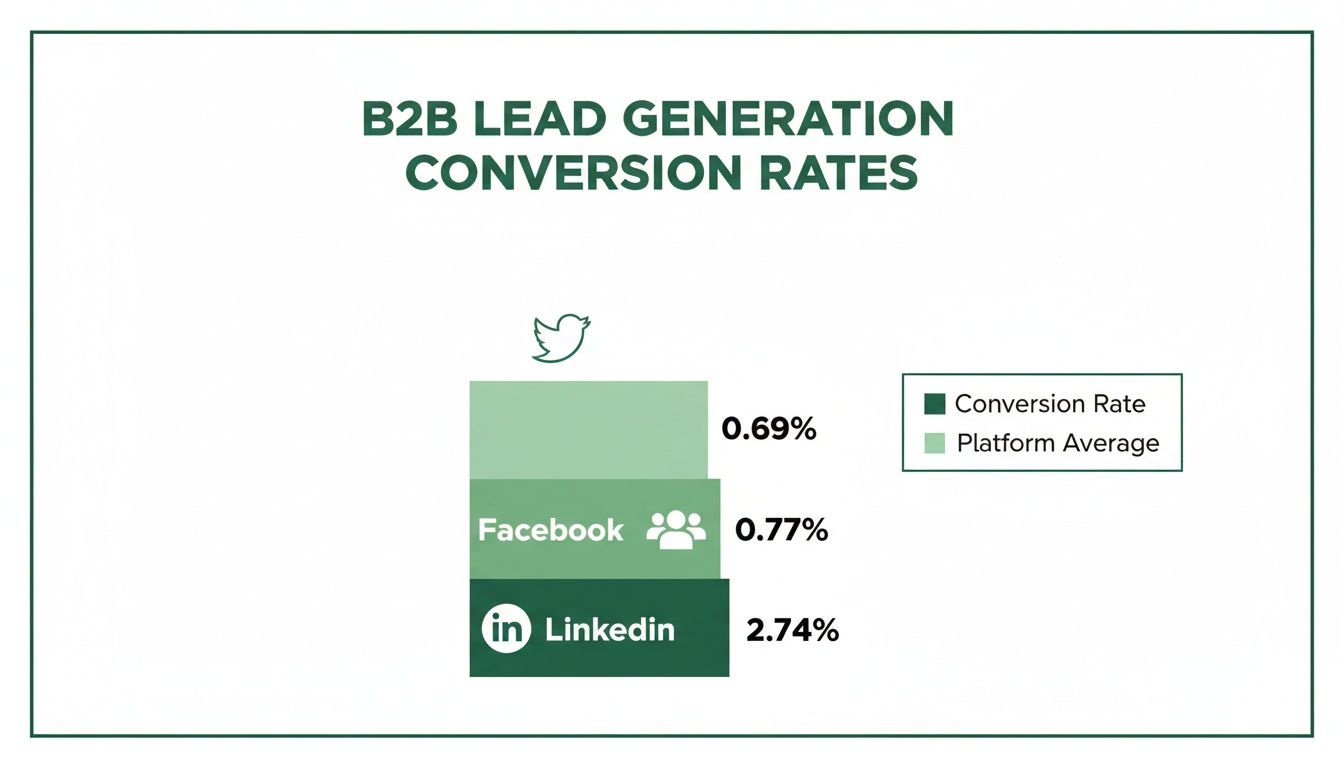
It’s clear that when it comes to turning professional connections into actual business opportunities, no other platform even comes close.
Why a Direct Email Beats an InMail Every Time
InMail is a built-in feature, but it’s got its downsides. Think about it: high-level executives get swamped with InMail messages every single day, making it all too easy for yours to get buried. A direct email, on the other hand, lands right in their primary professional workspace—their inbox.
The real power of finding an email is that it allows you to control the conversation. You're not limited by character counts or platform restrictions, giving you the freedom to present your value proposition clearly and professionally.
Ultimately, having a verified email address is like having a direct key to a prospect's office. You get to bypass the gatekeepers and skip the line in a very crowded digital lobby.
Finding Emails Manually Without Any Tools

Before you jump to the fancy tools, it's worth getting your hands dirty with a little old-school detective work. Mastering the manual search is a core skill, and you’d be surprised how often it turns up the exact email you need without costing a penny.
The first, and most obvious, place to check is the "Contact info" link right on their profile. If you're a 1st-degree connection, this is your best shot. Just click the link under their name.
If they’ve shared it publicly, you’ll see it right there. Just be aware that this is often the personal email they used to sign up for LinkedIn, not necessarily their work one. Still, it's the lowest-hanging fruit and always worth a look.
Scouring the Profile for Clues
No luck in the contact section? Don't give up. Many people intentionally tuck their contact details elsewhere on their profile, hoping the right people will find them.
Your next stop is the About section. A lot of pros drop a direct call-to-action at the end, something like, "For speaking engagements, contact me at jane.doe@company.com."
And don't forget to look up! The custom LinkedIn cover photo is prime real estate. Consultants, founders, and savvy marketers often use this space like a digital business card, displaying their email address for everyone to see.
Pro Tip: While you're scanning their profile, look for links to personal websites, blogs, or portfolios in their experience or featured sections. These external sites often have a dedicated contact page with a direct email address, giving you an easy win.
The Art of the Educated Guess
When the obvious clues have run dry, it’s time to stop searching and start deducing. Most companies follow a standardized pattern for their email addresses, which makes guessing someone's email surprisingly effective.
All you need is their first name, last name, and the company's domain (e.g., @emailscout.io). From there, you just have to test the most common formats.
Here are the patterns I see most often in the wild:
- First Name + Last Name:
jane.doe@company.com - First Initial + Last Name:
jdoe@company.com - First Name Only:
jane@company.com - First Name + Last Initial:
janed@company.com
Let's say you're looking for John Smith at Acme Corp. You'd try john.smith@acmecorp.com, jsmith@acmecorp.com, and john@acmecorp.com. Odds are, one of those will hit. As we dive into these manual techniques, it's interesting to consider the broader debate, including the claim that manual LinkedIn outreach is dead.
Validating Your Guessed Email
Guessing is one thing, but you can't just start firing off emails into the dark. That's a surefire way to rack up bounces and trash your sender reputation. Thankfully, you can verify your guesses for free.
The easiest way is to use a free email verification tool. Services like Hunter or ZeroBounce offer a few free checks that will tell you if an email address is valid without you having to send anything.
There's also a low-tech trick you can do right from your own inbox.
- Open a new email draft in Gmail or Outlook.
- Paste one of your guesses into the "To" field.
- Now, just hover your cursor over the address.
If it's tied to a Google or Microsoft account, you'll often see a profile picture and name pop up. That’s a fantastic sign you've found the right person and a live email address.
Using Automated Email Finder Tools
Sure, you can play detective and manually hunt down an email. It works for a contact or two. But when you need to build a real prospect list, that whole process grinds to a halt. The time you burn guessing patterns and verifying addresses one by one is time you’re not spending on what actually matters: crafting great outreach and starting conversations.
This is exactly where automated email finder tools come in. They completely change the game, turning a tedious chore into an efficient, scalable workflow.
The best tools aren't just simple scrapers; they're more like sophisticated search engines for people. They dig through massive databases, analyze company-wide email patterns, and—most importantly—run real-time checks to make sure the email address is live and ready to receive.
Why Accuracy Is Non-Negotiable
Trying to run outreach with unverified or guessed emails is a recipe for disaster. Every time you send a message to a bad address, you get a bounce. Too many bounces act like a giant red flag to email providers like Google and Microsoft.
Before you know it, your sender reputation is in the gutter, and even your perfectly valid emails start landing straight in the spam folder.
In essence, a bad email list doesn't just waste your time; it actively undermines your ability to connect with anyone. This is why investing in a tool that prioritizes accuracy isn't a luxury; it's a fundamental requirement for successful outreach.
An email finder with solid, built-in verification is your quality control. It makes sure every campaign you launch starts on solid ground and your messages actually get delivered.
The Power of Automation and Precision
When you use a reliable tool, the guesswork is gone. The top-tier email finders have transformed the process of finding someone's email on LinkedIn, consistently hitting accuracy rates between 85-95%. They achieve this by combining SMTP verification with intelligent pattern matching.
One extensive test of 2,500 LinkedIn contacts showed some tools finding thousands of valid emails with stunning precision—something that would be completely impossible to do by hand. This is huge, especially when you consider that LinkedIn drives nearly half of all B2B social traffic.
This precision saves you an incredible amount of time. Instead of spending hours hunting for one person, you can build a qualified list of dozens, or even hundreds, of prospects in minutes. It frees up sales and marketing teams to focus their energy on strategy, personalization, and building real relationships.
Choosing the Right Email Finder
Let’s be clear: not all email finders are created equal. As you look at different options, don't just settle for basic email discovery. The best solutions fit right into your workflow, often as a browser extension that works directly on LinkedIn profiles.
Here are a few key features to look for:
- Real-Time Verification: The tool must check if an email is deliverable right now, not just pull from a stale, outdated database.
- Bulk Finding Capabilities: If you're building serious lists, you need the ability to find emails from a list of LinkedIn profile URLs or a Sales Navigator search.
- Integration with Your Workflow: Look for tools that let you export to a CSV or connect directly with your CRM or outreach platform.
Choosing the right tool isn't just about finding emails; it's about the quality and reliability of those emails.
Email Finder Tool Accuracy Benchmarks
The accuracy of an email finder tool can make or break your outreach campaigns. While many tools claim high success rates, independent testing often reveals a different story. Here's a look at how some of the popular options stack up in real-world benchmarks.
| Tool/Method | Reported Accuracy Rate | Notes |
|---|---|---|
| EmailScout | ~95% | Focuses on multi-source verification for higher deliverability. |
| Hunter.io | ~81% | Strong for pattern-based company searches. |
| Snov.io | ~78% | Offers a suite of tools, accuracy can vary by source. |
| Manual Guessing | <50% | Highly time-consuming with a very high risk of bounces. |
These numbers highlight why it's so important to do your homework. A tool with a higher verified accuracy rate means fewer bounces, a better sender reputation, and ultimately, more conversations started.
Investing in a powerful tool saves countless hours and protects your sender reputation. If you're ready to find the perfect fit for your needs, check out our in-depth guide on the best email finder tools available today.
Alright, let's ditch the theory. Knowing how to find an email is one thing, but actually getting it done quickly with the right tool is where the magic happens. We'll go through a hands-on walkthrough using the EmailScout Chrome extension to show you how to move from finding a single email to building entire lists without breaking a sweat.
What’s great about a tool like EmailScout is how seamlessly it slips into your LinkedIn workflow. There's no flipping between tabs or second-guessing email patterns. Once you install it, a small, clean widget just appears on LinkedIn profiles, ready when you need it.
This little widget does all the heavy lifting in the background the moment you land on a prospect's profile.
Your First Email Find in a Single Click
Let's say you're a sales rep and you’ve just found the perfect contact: "Sarah Chen," the VP of Marketing at a company you've been trying to break into. You land on her LinkedIn profile. Instead of starting the manual detective work, you just look for the EmailScout widget.
You click the "Find Email" button. That's it. In the background, the extension is already checking multiple sources and running a real-time verification. A few seconds later, Sarah’s verified work email pops up, ready to be copied into your outreach sequence.
Here’s a look at the widget in action on a profile—it's designed to be simple and fast.
The verified email appears right there on the page, so you don't lose your focus or momentum.
This one-click process completely changes the prospecting game. It cuts out all the friction and guesswork, letting you put your energy into crafting a great email instead of just trying to find the address in the first place.
Scaling Up with the AutoSave Feature
Finding one email is a good start, but what if you need to build a whole list? That's where AutoSave becomes your best friend.
Imagine you're a biz-dev manager who needs to pull a list of 50 potential partners in a new industry. Clicking "Find Email" on every single profile would get old, fast. With AutoSave, you can automate that entire process.
Just toggle the AutoSave feature on inside the extension. Now, you’ve told it to automatically find and save the email for every single profile you visit. Your new workflow is simple:
- Start browsing through the LinkedIn profiles of your ideal prospects.
- As you click into each profile, EmailScout quietly gets to work.
- It finds, verifies, and adds their email and profile data to a list in your dashboard.
You can spend an hour researching and qualifying people on LinkedIn, and when you're done, you'll have a ready-made, verified contact list waiting for you. No extra clicks needed. This feature alone can easily save you hours every single week.
Bulk Discovery with the URL Explorer
Now, what if you're working on an even bigger scale? Let's say your marketing team has a list of 200 LinkedIn profile URLs from attendees of a recent virtual conference. You need all their emails, and you need them now.
This is exactly what the URL Explorer was built for. Instead of visiting each profile one by one—even with AutoSave on—you can process the whole batch at once.
The URL Explorer is pure efficiency. You feed it a list of LinkedIn profile URLs, and it gives you back a list of verified email addresses. It turns what would be a full day of mind-numbing work into a job you can knock out in minutes.
Just head over to the URL Explorer in your EmailScout dashboard, paste your list of URLs, and hit go. The tool will systematically churn through the list, finding and verifying the email for each person.
Once it's done, you can export everything as a CSV file—names, titles, companies, and of course, their verified emails. It's ready to be uploaded straight into your CRM or outreach tool. If you're looking to polish your outreach strategy, you might find our guide on how to find business emails for your campaigns useful.
Why This Approach Is So Effective
Teams that use LinkedIn email finders get a massive leg up on efficiency. A simple tool like EmailScout can turn casual browsing into an instant lead-gen machine. This is huge, especially when you consider LinkedIn's visitor-to-lead conversion rate is 2.74%—more than three times higher than other platforms.
Not all tools are created equal, though. Benchmark tests show huge differences in performance. One analysis found a top-tier tool successfully found 91% of emails from a Sales Navigator search, while others barely hit 79%. EmailScout is a standout option, especially for cold emailers and entrepreneurs, because of its free unlimited finds, one-click discovery, and bulk features. You can explore detailed findings on email finder tools to see how different platforms stack up.
By combining the convenience of single-click finds with powerful automation, you create a prospecting system that's both fast and reliable. You'll spend way less time hunting for information and a lot more time actually connecting with people.
Ethical Outreach and Legal Compliance
Knowing how to find someone's email on LinkedIn is a huge advantage, but it comes with real responsibility. The end goal isn't just to build a massive list of addresses; it's to start genuine conversations that lead to professional relationships.
How you use that email is everything. It's the thin line between being a welcomed colleague and just another piece of spam clogging up an inbox. The moment you hit "send," you're playing by a set of rules—some legal, some simply good practice. Frameworks like GDPR and CAN-SPAM are the bare minimum, but your ethics will determine the quality of your outreach and, ultimately, your success.
The Golden Rule: Personalization Over Volume
Let’s be honest, cold outreach has a bad reputation for a reason. Too many people blast generic, self-serving templates to anyone and everyone, hoping something sticks. That spray-and-pray method is dead.
Decision-makers today are flooded with messages. Their mental and digital spam filters are working overtime. Your first email needs to cut through that noise by proving you’ve actually done your homework.
- Reference Their Work: Did they share an interesting post on LinkedIn? Write a blog post you found insightful? Mention it. It shows you see them as more than just a name on a list.
- Offer a Relevant Insight: Share a quick stat, a mini-case study, or a bit of advice that’s directly useful to someone in their role.
- Keep It About Them: Frame your entire message around how you can help them solve a problem or hit a goal. Avoid the long-winded pitch about your company.
The most successful outreach feels less like a sales pitch and more like the beginning of a helpful, professional dialogue. Your goal is to be a resource, not just another vendor.
Navigating Key Legal Frameworks
Getting a handle on the legal side of things is non-negotiable. While the details can get complex, the core idea behind major regulations is simple: respect the recipient's rights. Messing this up can lead to some seriously hefty fines and wreck your brand's reputation.
You have to know where your contacts are located because the rules change dramatically from one region to another. For example, the laws for contacting someone in the European Union are far stricter than in the United States.
Understanding GDPR and CAN-SPAM
If you're doing professional outreach, these are the two big ones you absolutely must know.
- GDPR (General Data Protection Regulation): This EU law is one of the toughest out there. For B2B outreach, you need a "legitimate interest" to use someone's data (like their email). In plain English, this means your message must be highly relevant to their professional role. You also have to identify yourself clearly and give them an easy way to opt out.
- CAN-SPAM Act: This is the U.S. law. It’s a bit more relaxed but still has clear rules you can't ignore. Your subject line can't be misleading, you have to include a physical address, and you must provide a clear, obvious way for them to unsubscribe.
Honestly, no matter where your targets are, just following these best practices is the smartest move.
Best Practices for Compliant Outreach
Staying compliant is about more than just dodging penalties; it's about building an outreach strategy that actually works for the long haul. A clean process ensures your emails land in the inbox and your sender reputation stays solid.
Here are a few habits to bake into your workflow:
- Maintain List Hygiene: Regularly clean your email lists. Get rid of invalid addresses, bounced contacts, and anyone who has unsubscribed. A high bounce rate is a huge red flag to email providers like Google and Microsoft.
- Always Include an Unsubscribe Link: Make it painfully easy for people to opt out. Hiding the unsubscribe button is a rookie move that violates both law and trust.
- Focus on Legitimate Business Interest: Before you contact someone, ask yourself if your reason is directly related to their professional responsibilities. If not, don't send the email.
By making these practices second nature, you show respect for your contacts' time and privacy. If you want to go even deeper, our guide on how to ethically scrape email from LinkedIn provides more advanced strategies while keeping compliance front and center.
Frequently Asked Questions
Digging into LinkedIn email discovery always brings up a few key questions. Let's get them answered so you can move forward with confidence.
Is It Legal to Find and Use Someone's Email from LinkedIn for Outreach?
Yes, finding a business email is generally fine, but how you use it is what really counts. The crucial part is staying compliant with data privacy laws like Europe's GDPR and the CAN-SPAM Act in the United States. These rules don't forbid finding professional contact info; they're all about how you conduct your outreach.
Your message needs to be relevant to the person's job, give them an easy way to opt-out, and never use sneaky subject lines. It all comes down to legitimate business interest—not spam. Always take a minute to research the specific rules for your recipient's location to make sure you're playing by the book.
How Accurate Are LinkedIn Email Finder Tools, Really?
The accuracy of these tools is all over the map. The best ones, like EmailScout, cross-reference multiple data sources and run real-time verification checks, hitting accuracy rates of 85-95%. That level of precision is absolutely vital for protecting your sender reputation.
On the flip side, simpler tools that just guess patterns or pull from old databases can have pretty dismal success rates. High bounce rates are a surefire way to get your domain flagged as spam. That’s why you should always go with a tool that explicitly includes a verification feature. It ensures your emails actually have a fighting chance of landing in the inbox.
A high-quality email finder isn't just about finding an address; it's about finding a deliverable address. The difference is critical for the long-term health of your outreach campaigns.
What Should I Do If I Still Can't Find an Email Address?
If you've tried everything and still come up empty, don't throw in the towel. It's just a signal to switch gears from direct outreach to a more organic, relationship-building approach.
Here are a few other paths you can take:
- Connect on LinkedIn: Shoot over a personalized connection request. Don't just use the default message—mention a shared interest, a mutual connection, or a recent post of theirs to explain why you want to connect.
- Engage with Their Content: Become a familiar face in their feed. Leaving thoughtful comments on their posts shows you're genuinely interested in their work and helps build name recognition.
- Ask for an Introduction: If you can find a colleague's email at the same company, a polite, short email asking for a warm introduction can be incredibly effective.
Sometimes the best connections aren't the ones you force with a cold email, but the ones you build over time.
Can I Find Unlimited Emails for Free?
It really depends on the tool. A lot of email finders use a freemium model, giving you a handful of free credits each month before you have to pull out your credit card. They're fine for one-off searches but won't cut it for anyone building lists at scale.
Some tools are more generous, though. For example, EmailScout offers a robust free plan that allows you to find unlimited emails, making it a fantastic starting point for freelancers, startups, and sales pros on a tight budget. While the free plan gives you everything you need to get started, paid plans typically unlock advanced features like bulk exports and deep integrations that are essential for scaling up.
Ready to stop guessing and start connecting with verified emails in seconds? EmailScout gives you the power to find unlimited contacts, build prospect lists automatically, and streamline your outreach, all directly from LinkedIn.