Tag: linkedin email finder

  • How to Find Someones Email on LinkedIn: A Practical Guide

    How to Find Someones Email on LinkedIn: A Practical Guide

    Finding someone's email on LinkedIn isn't about some secret trick. It's really a mix of clever detective work, educated guessing, and knowing which tools can do the heavy lifting for you. While emails aren't always just sitting there in plain sight, you can often uncover them by looking for clues in profiles, trying out common patterns, or using a smart extension to handle the search and verification automatically.

    Why LinkedIn Is a Goldmine for Professional Emails

    LinkedIn has grown far beyond its roots as a simple digital resume site. Today, it’s the undisputed center of the universe for B2B prospecting and professional networking. Sure, you can send a connection request or an InMail, and they have their place, but a direct email just hits differently. It carries more weight, allows for better formatting, and gives you a direct, professional line of communication that cuts through the noise of a packed LinkedIn inbox.

    Learning how to find someone's email from LinkedIn: A Practical Guide is more than just a neat party trick—it's a core skill for anyone in sales, marketing, or business development. It’s what opens the door to real conversations with key decision-makers you might not be able to reach otherwise. The platform's massive scale and purely professional focus make it an incredible resource for anyone doing targeted outreach.

    LinkedIn's Dominance by the Numbers

    The data speaks for itself. LinkedIn is an absolute powerhouse for B2B lead generation. Its global user base is on track to blow past 1.3 billion users by 2026. But the sheer size isn't even the most impressive part.

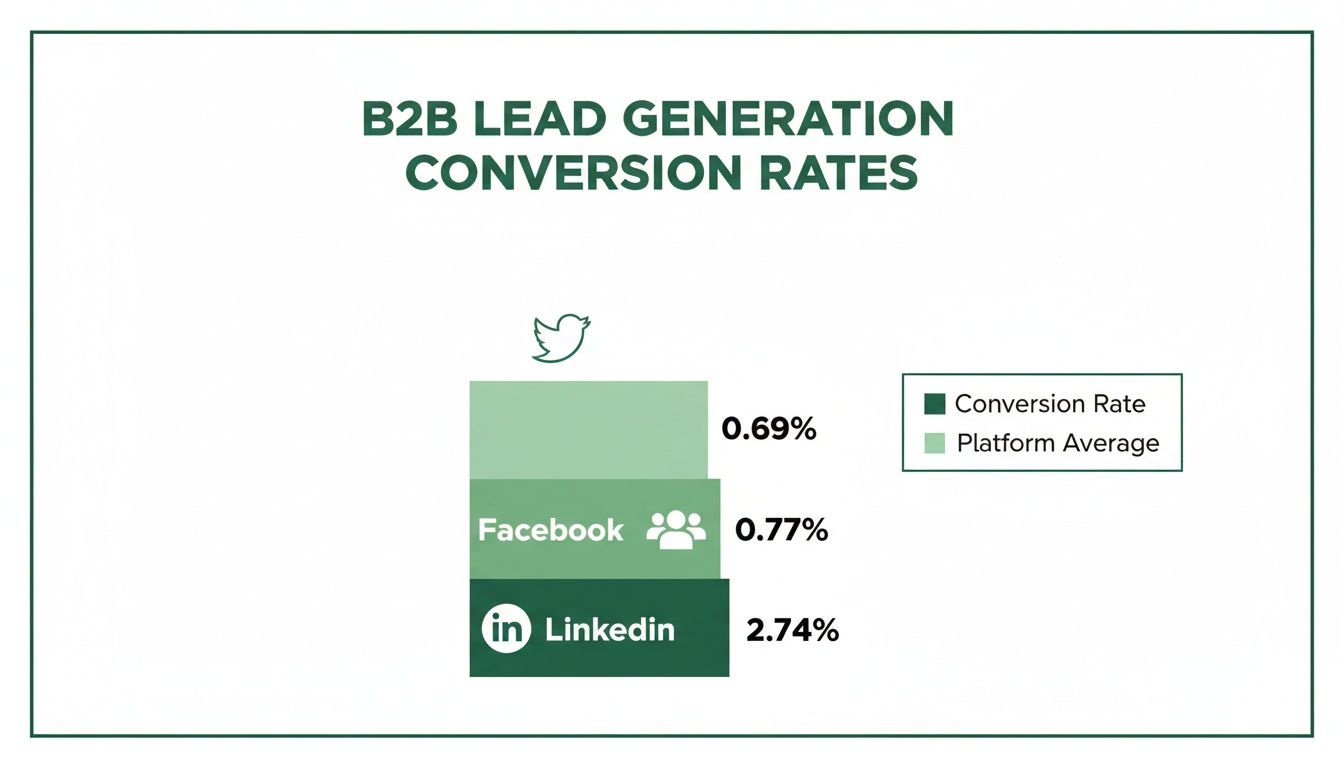
    It’s all about effectiveness. Traffic coming from LinkedIn has a visitor-to-lead conversion rate of 2.74%. That might not sound huge, but it completely eclipses Facebook (0.77%) and Twitter (0.69%). Even more telling, LinkedIn is responsible for driving a staggering 46% of all social media traffic to B2B company websites, cementing its status as the top channel for professional engagement.

    LinkedIn vs Other Social Platforms for B2B Leads

    To put its power into perspective, here's a quick comparison of how LinkedIn stacks up against other major platforms when it comes to generating B2B leads.

    Platform Visitor-to-Lead Conversion Rate Effectiveness for B2B
    LinkedIn 2.74% Extremely High: The primary platform for professionals.
    Facebook 0.77% Low: Primarily social, less effective for B2B outreach.
    Twitter 0.69% Very Low: More suited for brand updates, not direct leads.

    The difference is stark. For every 100 visitors, LinkedIn consistently delivers nearly four times as many leads as its social media competitors. This data makes a clear case for prioritizing LinkedIn in any B2B outreach strategy.

    This chart really drives the point home, showing the massive gap in lead conversion rates.

    Bar chart illustrating B2B lead generation conversion rates across Twitter, Facebook, and LinkedIn.

    It’s clear that when it comes to turning professional connections into actual business opportunities, no other platform even comes close.

    Why a Direct Email Beats an InMail Every Time

    InMail is a built-in feature, but it’s got its downsides. Think about it: high-level executives get swamped with InMail messages every single day, making it all too easy for yours to get buried. A direct email, on the other hand, lands right in their primary professional workspace—their inbox.

    The real power of finding an email is that it allows you to control the conversation. You're not limited by character counts or platform restrictions, giving you the freedom to present your value proposition clearly and professionally.

    Ultimately, having a verified email address is like having a direct key to a prospect's office. You get to bypass the gatekeepers and skip the line in a very crowded digital lobby.

    Finding Emails Manually Without Any Tools

    Laptop and smartphone showing LinkedIn profiles, with a 'LinkedIn Goldmine' banner.

    Before you jump to the fancy tools, it's worth getting your hands dirty with a little old-school detective work. Mastering the manual search is a core skill, and you’d be surprised how often it turns up the exact email you need without costing a penny.

    The first, and most obvious, place to check is the "Contact info" link right on their profile. If you're a 1st-degree connection, this is your best shot. Just click the link under their name.

    If they’ve shared it publicly, you’ll see it right there. Just be aware that this is often the personal email they used to sign up for LinkedIn, not necessarily their work one. Still, it's the lowest-hanging fruit and always worth a look.

    Scouring the Profile for Clues

    No luck in the contact section? Don't give up. Many people intentionally tuck their contact details elsewhere on their profile, hoping the right people will find them.

    Your next stop is the About section. A lot of pros drop a direct call-to-action at the end, something like, "For speaking engagements, contact me at jane.doe@company.com."

    And don't forget to look up! The custom LinkedIn cover photo is prime real estate. Consultants, founders, and savvy marketers often use this space like a digital business card, displaying their email address for everyone to see.

    Pro Tip: While you're scanning their profile, look for links to personal websites, blogs, or portfolios in their experience or featured sections. These external sites often have a dedicated contact page with a direct email address, giving you an easy win.

    The Art of the Educated Guess

    When the obvious clues have run dry, it’s time to stop searching and start deducing. Most companies follow a standardized pattern for their email addresses, which makes guessing someone's email surprisingly effective.

    All you need is their first name, last name, and the company's domain (e.g., @emailscout.io). From there, you just have to test the most common formats.

    Here are the patterns I see most often in the wild:

    • First Name + Last Name: jane.doe@company.com
    • First Initial + Last Name: jdoe@company.com
    • First Name Only: jane@company.com
    • First Name + Last Initial: janed@company.com

    Let's say you're looking for John Smith at Acme Corp. You'd try john.smith@acmecorp.com, jsmith@acmecorp.com, and john@acmecorp.com. Odds are, one of those will hit. As we dive into these manual techniques, it's interesting to consider the broader debate, including the claim that manual LinkedIn outreach is dead.

    Validating Your Guessed Email

    Guessing is one thing, but you can't just start firing off emails into the dark. That's a surefire way to rack up bounces and trash your sender reputation. Thankfully, you can verify your guesses for free.

    The easiest way is to use a free email verification tool. Services like Hunter or ZeroBounce offer a few free checks that will tell you if an email address is valid without you having to send anything.

    There's also a low-tech trick you can do right from your own inbox.

    1. Open a new email draft in Gmail or Outlook.
    2. Paste one of your guesses into the "To" field.
    3. Now, just hover your cursor over the address.

    If it's tied to a Google or Microsoft account, you'll often see a profile picture and name pop up. That’s a fantastic sign you've found the right person and a live email address.

    Using Automated Email Finder Tools

    A flat lay of a desk with a laptop showing 'MANUAL EMAIL SEARCH', magnifying glass, and notebooks.

    Sure, you can play detective and manually hunt down an email. It works for a contact or two. But when you need to build a real prospect list, that whole process grinds to a halt. The time you burn guessing patterns and verifying addresses one by one is time you’re not spending on what actually matters: crafting great outreach and starting conversations.

    This is exactly where automated email finder tools come in. They completely change the game, turning a tedious chore into an efficient, scalable workflow.

    The best tools aren't just simple scrapers; they're more like sophisticated search engines for people. They dig through massive databases, analyze company-wide email patterns, and—most importantly—run real-time checks to make sure the email address is live and ready to receive.

    Why Accuracy Is Non-Negotiable

    Trying to run outreach with unverified or guessed emails is a recipe for disaster. Every time you send a message to a bad address, you get a bounce. Too many bounces act like a giant red flag to email providers like Google and Microsoft.

    Before you know it, your sender reputation is in the gutter, and even your perfectly valid emails start landing straight in the spam folder.

    In essence, a bad email list doesn't just waste your time; it actively undermines your ability to connect with anyone. This is why investing in a tool that prioritizes accuracy isn't a luxury; it's a fundamental requirement for successful outreach.

    An email finder with solid, built-in verification is your quality control. It makes sure every campaign you launch starts on solid ground and your messages actually get delivered.

    The Power of Automation and Precision

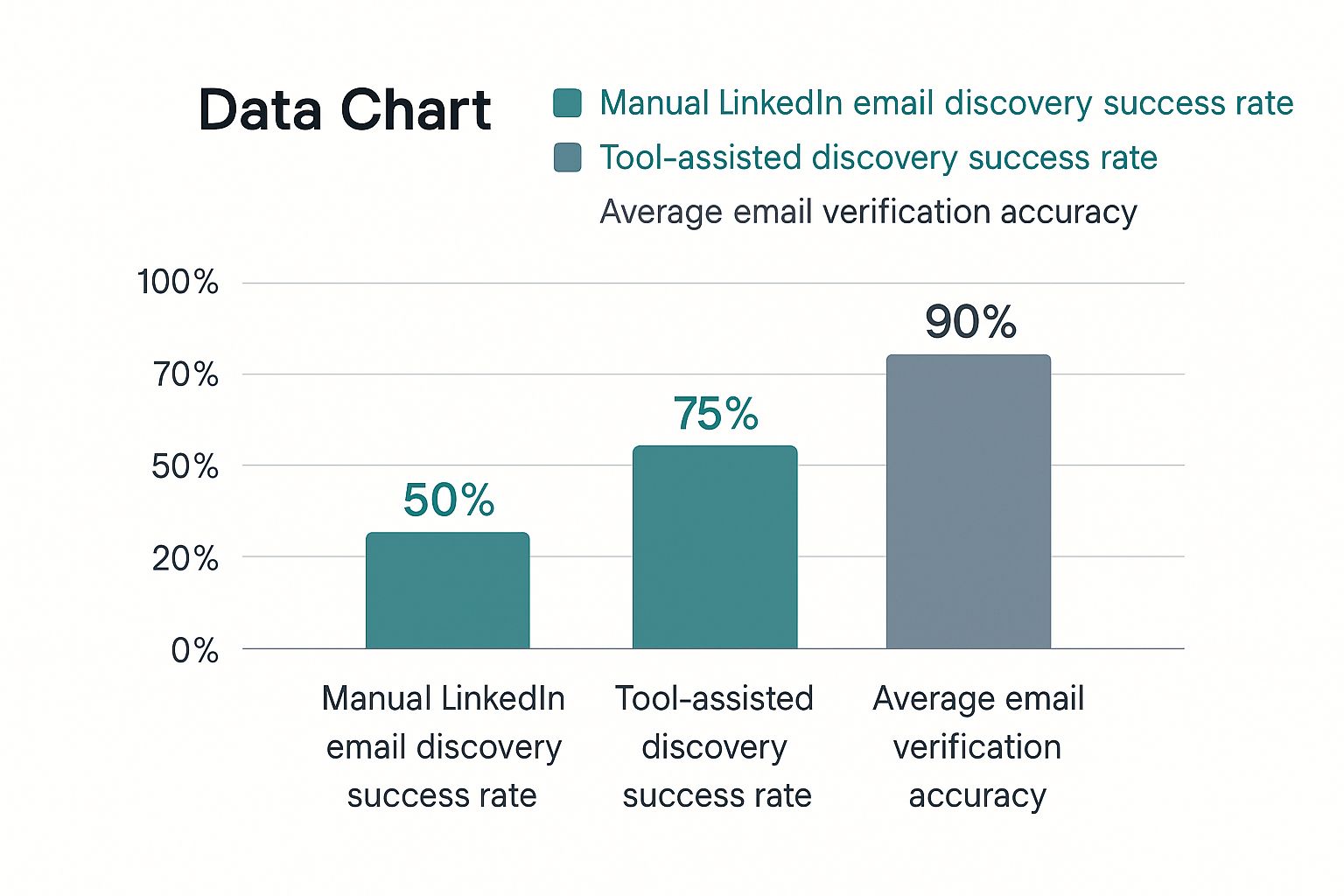
    When you use a reliable tool, the guesswork is gone. The top-tier email finders have transformed the process of finding someone's email on LinkedIn, consistently hitting accuracy rates between 85-95%. They achieve this by combining SMTP verification with intelligent pattern matching.

    One extensive test of 2,500 LinkedIn contacts showed some tools finding thousands of valid emails with stunning precision—something that would be completely impossible to do by hand. This is huge, especially when you consider that LinkedIn drives nearly half of all B2B social traffic.

    This precision saves you an incredible amount of time. Instead of spending hours hunting for one person, you can build a qualified list of dozens, or even hundreds, of prospects in minutes. It frees up sales and marketing teams to focus their energy on strategy, personalization, and building real relationships.

    Choosing the Right Email Finder

    Let’s be clear: not all email finders are created equal. As you look at different options, don't just settle for basic email discovery. The best solutions fit right into your workflow, often as a browser extension that works directly on LinkedIn profiles.

    Here are a few key features to look for:

    • Real-Time Verification: The tool must check if an email is deliverable right now, not just pull from a stale, outdated database.
    • Bulk Finding Capabilities: If you're building serious lists, you need the ability to find emails from a list of LinkedIn profile URLs or a Sales Navigator search.
    • Integration with Your Workflow: Look for tools that let you export to a CSV or connect directly with your CRM or outreach platform.

    Choosing the right tool isn't just about finding emails; it's about the quality and reliability of those emails.

    Email Finder Tool Accuracy Benchmarks

    The accuracy of an email finder tool can make or break your outreach campaigns. While many tools claim high success rates, independent testing often reveals a different story. Here's a look at how some of the popular options stack up in real-world benchmarks.

    Tool/Method Reported Accuracy Rate Notes
    EmailScout ~95% Focuses on multi-source verification for higher deliverability.
    Hunter.io ~81% Strong for pattern-based company searches.
    Snov.io ~78% Offers a suite of tools, accuracy can vary by source.
    Manual Guessing <50% Highly time-consuming with a very high risk of bounces.

    These numbers highlight why it's so important to do your homework. A tool with a higher verified accuracy rate means fewer bounces, a better sender reputation, and ultimately, more conversations started.

    Investing in a powerful tool saves countless hours and protects your sender reputation. If you're ready to find the perfect fit for your needs, check out our in-depth guide on the best email finder tools available today.

    Alright, let's ditch the theory. Knowing how to find an email is one thing, but actually getting it done quickly with the right tool is where the magic happens. We'll go through a hands-on walkthrough using the EmailScout Chrome extension to show you how to move from finding a single email to building entire lists without breaking a sweat.

    What’s great about a tool like EmailScout is how seamlessly it slips into your LinkedIn workflow. There's no flipping between tabs or second-guessing email patterns. Once you install it, a small, clean widget just appears on LinkedIn profiles, ready when you need it.

    This little widget does all the heavy lifting in the background the moment you land on a prospect's profile.

    Your First Email Find in a Single Click

    Let's say you're a sales rep and you’ve just found the perfect contact: "Sarah Chen," the VP of Marketing at a company you've been trying to break into. You land on her LinkedIn profile. Instead of starting the manual detective work, you just look for the EmailScout widget.

    You click the "Find Email" button. That's it. In the background, the extension is already checking multiple sources and running a real-time verification. A few seconds later, Sarah’s verified work email pops up, ready to be copied into your outreach sequence.

    Here’s a look at the widget in action on a profile—it's designed to be simple and fast.
    The verified email appears right there on the page, so you don't lose your focus or momentum.

    This one-click process completely changes the prospecting game. It cuts out all the friction and guesswork, letting you put your energy into crafting a great email instead of just trying to find the address in the first place.

    Scaling Up with the AutoSave Feature

    Finding one email is a good start, but what if you need to build a whole list? That's where AutoSave becomes your best friend.

    Imagine you're a biz-dev manager who needs to pull a list of 50 potential partners in a new industry. Clicking "Find Email" on every single profile would get old, fast. With AutoSave, you can automate that entire process.

    Just toggle the AutoSave feature on inside the extension. Now, you’ve told it to automatically find and save the email for every single profile you visit. Your new workflow is simple:

    • Start browsing through the LinkedIn profiles of your ideal prospects.
    • As you click into each profile, EmailScout quietly gets to work.
    • It finds, verifies, and adds their email and profile data to a list in your dashboard.

    You can spend an hour researching and qualifying people on LinkedIn, and when you're done, you'll have a ready-made, verified contact list waiting for you. No extra clicks needed. This feature alone can easily save you hours every single week.

    Bulk Discovery with the URL Explorer

    Now, what if you're working on an even bigger scale? Let's say your marketing team has a list of 200 LinkedIn profile URLs from attendees of a recent virtual conference. You need all their emails, and you need them now.

    This is exactly what the URL Explorer was built for. Instead of visiting each profile one by one—even with AutoSave on—you can process the whole batch at once.

    The URL Explorer is pure efficiency. You feed it a list of LinkedIn profile URLs, and it gives you back a list of verified email addresses. It turns what would be a full day of mind-numbing work into a job you can knock out in minutes.

    Just head over to the URL Explorer in your EmailScout dashboard, paste your list of URLs, and hit go. The tool will systematically churn through the list, finding and verifying the email for each person.

    Once it's done, you can export everything as a CSV file—names, titles, companies, and of course, their verified emails. It's ready to be uploaded straight into your CRM or outreach tool. If you're looking to polish your outreach strategy, you might find our guide on how to find business emails for your campaigns useful.

    Why This Approach Is So Effective

    Teams that use LinkedIn email finders get a massive leg up on efficiency. A simple tool like EmailScout can turn casual browsing into an instant lead-gen machine. This is huge, especially when you consider LinkedIn's visitor-to-lead conversion rate is 2.74%—more than three times higher than other platforms.

    Not all tools are created equal, though. Benchmark tests show huge differences in performance. One analysis found a top-tier tool successfully found 91% of emails from a Sales Navigator search, while others barely hit 79%. EmailScout is a standout option, especially for cold emailers and entrepreneurs, because of its free unlimited finds, one-click discovery, and bulk features. You can explore detailed findings on email finder tools to see how different platforms stack up.

    By combining the convenience of single-click finds with powerful automation, you create a prospecting system that's both fast and reliable. You'll spend way less time hunting for information and a lot more time actually connecting with people.

    Ethical Outreach and Legal Compliance

    Laptop on a wooden desk with a professional profile screen, promoting finding emails fast.

    Knowing how to find someone's email on LinkedIn is a huge advantage, but it comes with real responsibility. The end goal isn't just to build a massive list of addresses; it's to start genuine conversations that lead to professional relationships.

    How you use that email is everything. It's the thin line between being a welcomed colleague and just another piece of spam clogging up an inbox. The moment you hit "send," you're playing by a set of rules—some legal, some simply good practice. Frameworks like GDPR and CAN-SPAM are the bare minimum, but your ethics will determine the quality of your outreach and, ultimately, your success.

    The Golden Rule: Personalization Over Volume

    Let’s be honest, cold outreach has a bad reputation for a reason. Too many people blast generic, self-serving templates to anyone and everyone, hoping something sticks. That spray-and-pray method is dead.

    Decision-makers today are flooded with messages. Their mental and digital spam filters are working overtime. Your first email needs to cut through that noise by proving you’ve actually done your homework.

    • Reference Their Work: Did they share an interesting post on LinkedIn? Write a blog post you found insightful? Mention it. It shows you see them as more than just a name on a list.
    • Offer a Relevant Insight: Share a quick stat, a mini-case study, or a bit of advice that’s directly useful to someone in their role.
    • Keep It About Them: Frame your entire message around how you can help them solve a problem or hit a goal. Avoid the long-winded pitch about your company.

    The most successful outreach feels less like a sales pitch and more like the beginning of a helpful, professional dialogue. Your goal is to be a resource, not just another vendor.

    Navigating Key Legal Frameworks

    Getting a handle on the legal side of things is non-negotiable. While the details can get complex, the core idea behind major regulations is simple: respect the recipient's rights. Messing this up can lead to some seriously hefty fines and wreck your brand's reputation.

    You have to know where your contacts are located because the rules change dramatically from one region to another. For example, the laws for contacting someone in the European Union are far stricter than in the United States.

    Understanding GDPR and CAN-SPAM

    If you're doing professional outreach, these are the two big ones you absolutely must know.

    • GDPR (General Data Protection Regulation): This EU law is one of the toughest out there. For B2B outreach, you need a "legitimate interest" to use someone's data (like their email). In plain English, this means your message must be highly relevant to their professional role. You also have to identify yourself clearly and give them an easy way to opt out.
    • CAN-SPAM Act: This is the U.S. law. It’s a bit more relaxed but still has clear rules you can't ignore. Your subject line can't be misleading, you have to include a physical address, and you must provide a clear, obvious way for them to unsubscribe.

    Honestly, no matter where your targets are, just following these best practices is the smartest move.

    Best Practices for Compliant Outreach

    Staying compliant is about more than just dodging penalties; it's about building an outreach strategy that actually works for the long haul. A clean process ensures your emails land in the inbox and your sender reputation stays solid.

    Here are a few habits to bake into your workflow:

    • Maintain List Hygiene: Regularly clean your email lists. Get rid of invalid addresses, bounced contacts, and anyone who has unsubscribed. A high bounce rate is a huge red flag to email providers like Google and Microsoft.
    • Always Include an Unsubscribe Link: Make it painfully easy for people to opt out. Hiding the unsubscribe button is a rookie move that violates both law and trust.
    • Focus on Legitimate Business Interest: Before you contact someone, ask yourself if your reason is directly related to their professional responsibilities. If not, don't send the email.

    By making these practices second nature, you show respect for your contacts' time and privacy. If you want to go even deeper, our guide on how to ethically scrape email from LinkedIn provides more advanced strategies while keeping compliance front and center.

    Frequently Asked Questions

    Digging into LinkedIn email discovery always brings up a few key questions. Let's get them answered so you can move forward with confidence.

    Is It Legal to Find and Use Someone's Email from LinkedIn for Outreach?

    Yes, finding a business email is generally fine, but how you use it is what really counts. The crucial part is staying compliant with data privacy laws like Europe's GDPR and the CAN-SPAM Act in the United States. These rules don't forbid finding professional contact info; they're all about how you conduct your outreach.

    Your message needs to be relevant to the person's job, give them an easy way to opt-out, and never use sneaky subject lines. It all comes down to legitimate business interest—not spam. Always take a minute to research the specific rules for your recipient's location to make sure you're playing by the book.

    How Accurate Are LinkedIn Email Finder Tools, Really?

    The accuracy of these tools is all over the map. The best ones, like EmailScout, cross-reference multiple data sources and run real-time verification checks, hitting accuracy rates of 85-95%. That level of precision is absolutely vital for protecting your sender reputation.

    On the flip side, simpler tools that just guess patterns or pull from old databases can have pretty dismal success rates. High bounce rates are a surefire way to get your domain flagged as spam. That’s why you should always go with a tool that explicitly includes a verification feature. It ensures your emails actually have a fighting chance of landing in the inbox.

    A high-quality email finder isn't just about finding an address; it's about finding a deliverable address. The difference is critical for the long-term health of your outreach campaigns.

    What Should I Do If I Still Can't Find an Email Address?

    If you've tried everything and still come up empty, don't throw in the towel. It's just a signal to switch gears from direct outreach to a more organic, relationship-building approach.

    Here are a few other paths you can take:

    • Connect on LinkedIn: Shoot over a personalized connection request. Don't just use the default message—mention a shared interest, a mutual connection, or a recent post of theirs to explain why you want to connect.
    • Engage with Their Content: Become a familiar face in their feed. Leaving thoughtful comments on their posts shows you're genuinely interested in their work and helps build name recognition.
    • Ask for an Introduction: If you can find a colleague's email at the same company, a polite, short email asking for a warm introduction can be incredibly effective.

    Sometimes the best connections aren't the ones you force with a cold email, but the ones you build over time.

    Can I Find Unlimited Emails for Free?

    It really depends on the tool. A lot of email finders use a freemium model, giving you a handful of free credits each month before you have to pull out your credit card. They're fine for one-off searches but won't cut it for anyone building lists at scale.

    Some tools are more generous, though. For example, EmailScout offers a robust free plan that allows you to find unlimited emails, making it a fantastic starting point for freelancers, startups, and sales pros on a tight budget. While the free plan gives you everything you need to get started, paid plans typically unlock advanced features like bulk exports and deep integrations that are essential for scaling up.


    Ready to stop guessing and start connecting with verified emails in seconds? EmailScout gives you the power to find unlimited contacts, build prospect lists automatically, and streamline your outreach, all directly from LinkedIn.

    Try EmailScout for Free and Find Your First Email Today!

  • Find email in linkedin: A Complete Playbook to Harvest LinkedIn Contacts

    Find email in linkedin: A Complete Playbook to Harvest LinkedIn Contacts

    If you want to find someone's professional email, you need to think of LinkedIn as more than just another social network. It's the world's biggest professional directory, hands down. The smartest approach is to blend a bit of old-school detective work with a powerful tool like EmailScout, which can pull a verified business email right from a LinkedIn profile in seconds. This combo turns LinkedIn from a place you just scroll through into a serious machine for generating high-quality leads.

    Why LinkedIn Is a Goldmine for Professional Emails

    Person viewing LinkedIn leads data dashboards on a laptop, with a smartphone displaying similar charts nearby.

    In the B2B game, context is king. Other social platforms are a chaotic mix of personal updates and professional posts, but LinkedIn was built specifically for business. People on the platform expect to be contacted about job opportunities, industry partnerships, and business solutions that can help them. This makes it the absolute best place for professional outreach.

    When you find an email through LinkedIn, you're getting more than just a contact detail. You're getting a direct line to a professional who is already engaged in their industry. The whole environment is set up for business, so your outreach feels less like a cold interruption and more like a relevant, professional conversation starter. That difference is what gets you replies.

    The Power of Professional Context

    The real value of an email found on LinkedIn is its direct link to a person’s professional life. You can immediately see their job title, their company, their entire work history, and even what they've been posting about. All this information lets you write incredibly personalized messages that speak directly to their role and what they care about.

    This is exactly why LinkedIn works so well for business development. Modern buyers are savvy—a staggering 82% of B2B decision-makers will check out a salesperson’s LinkedIn profile before they even think about taking a meeting. This shows a clear expectation that business conversations will start on the platform.

    Professionals on LinkedIn aren't just scrolling; they're actively participating. They share articles, join groups, and follow industry leaders, leaving behind a trail of intent data that is pure gold for anyone doing targeted outreach.

    Backed by Unbeatable Conversion Data

    The numbers don't lie. With over a billion members, LinkedIn is the undisputed champ for B2B engagement. It's not even close.

    When it comes to turning visitors into actual leads, LinkedIn's conversion rate is 2.74%. That’s almost four times higher than Facebook or Twitter. This massive difference is why figuring out how to find an email on LinkedIn is a must-have skill for anyone in sales or marketing today.

    On top of that, an incredible 46% of all social media traffic to B2B company websites comes straight from LinkedIn. It proves that users are actively looking for business solutions. If you want to dive deeper into why the platform is so dominant, check out the latest 2026 LinkedIn statistics report.

    Here’s a quick look at how LinkedIn stacks up against other major platforms when it comes to the quality of B2B leads.

    LinkedIn vs Other Platforms for B2B Lead Quality

    Metric LinkedIn Facebook Twitter
    Primary User Intent Professional networking, career growth, industry news Social connection, entertainment, personal updates Real-time news, public conversation, brand updates
    Lead Quality Very High (professional context, accurate job data) Low to Medium (less reliable professional data) Low (demographics are broad, intent is unclear)
    Data Richness High (job history, skills, connections, company info) Medium (interests, demographics, some job data) Low (interests, public comments, follows)
    Visitor-to-Lead Rate 2.74% 0.77% 0.69%
    B2B Website Traffic 46% of all social media-driven B2B traffic Significantly lower Significantly lower

    As you can see, the data speaks for itself. For anyone serious about B2B outreach, LinkedIn isn't just an option—it's the main event. The platform's professional focus and high-intent user base make it the most reliable source for finding emails that lead to real business conversations.

    Finding Emails Manually with Digital Detective Work

    Person typing on a laptop showing a LinkedIn profile, next to a 'Find Email' notebook.

    Before you let the fancy tools do all the work, it pays to learn the old-school manual techniques. Think of it as digital detective work—it builds a solid foundation and honestly, makes you appreciate the power of automation that much more.

    These hands-on methods are surprisingly effective and can often unearth an email when automated systems hit a dead end.

    The first place you should always check is the "Contact Info" section on a person's profile. It sounds basic, I know, but you’d be surprised how many people just list their email right there. It’s a quick win and should always be your first move.

    If that comes up empty, don't give up. The real detective work starts now. Scan their profile bio, read their "About" section, and scroll through their recent posts. Professionals often drop their contact details when promoting a webinar, a side project, or something they’re passionate about.

    Decoding Company Email Patterns

    One of the most reliable manual tricks is figuring out a company's email format. Most businesses use a consistent pattern, and once you crack the code, you can guess just about anyone's email with a high degree of accuracy.

    All you need is the person's full name and their company's domain (like company.com). From there, you just test the most common combinations.

    Here are the patterns I see most often:

    • First Name: john@company.com
    • First Name.Last Name: john.smith@company.com
    • First Initial Last Name: jsmith@company.com
    • First Name Last Initial: johns@company.com

    So, if you're looking for Jane Doe at Acme Corp (acmecorp.com), you'd start by testing jane.doe@acmecorp.com and jdoe@acmecorp.com. It feels like a bit of a guessing game at first, but you'll quickly develop an intuition for which formats are most common in certain industries.

    Verifying Your Educated Guesses

    Guessing an email is only half the battle. Sending a message to a bad address is a waste of time and, worse, it hurts your sender reputation. You need a way to check if your guess is right before you hit send.

    This is where free verification tools are a lifesaver. Services like MailTester let you plug in a potential email address, and they’ll do a quick check to see if an active inbox exists on that server. It’s fast and free.

    This simple verification step is crucial. It keeps your bounce rate low, which is a major signal email providers look at to identify spammers. A high bounce rate can get your entire domain blacklisted.

    Another slick trick is to just use Google. Wrap one of your guessed emails in quotation marks (e.g., "jane.doe@acmecorp.com") and search for it. If that exact email has ever appeared on a company website, press release, or conference speaker list, Google will usually find it. This not only verifies the address but also confirms it’s one they use publicly.

    Using Advanced Google Searches

    Beyond simple verification, Google can be a seriously powerful discovery tool if you know how to use it. With a few specific search operators—sometimes called "Google Dorking"—you can uncover contact info that’s hidden in plain sight.

    Try running these searches for your next high-value prospect:

    1. (“Jane Doe” AND email) site:acmecorp.com
      • This tells Google to search for the person's name and the word "email" but only on their company's website.
    2. “Jane Doe” “contact” “Acme Corp”
      • This looks for their name, the word "contact," and their company name anywhere on the web. It's great for finding directory listings or press mentions.
    3. “Jane Doe” filetype:pdf
      • This is a sneaky one. It often uncovers résumés, white papers, or academic articles where people list their contact info.

    These manual techniques take a bit more elbow grease, but they give you a much deeper understanding of the whole process. They're especially valuable when you're targeting a really important contact and need to be 100% sure you have the right info before reaching out.

    Automating Your Search with an Email Finder

    Look, manual methods are great for getting your feet wet, but they just don't scale. If you're trying to find emails for dozens—or even hundreds—of prospects on LinkedIn, the detective work quickly becomes a massive bottleneck. This is where automation, specifically a good email finder tool, completely changes the game. It turns a slow, manual grind into a fast, efficient process.

    An email finder is usually a Chrome extension that plugs right into your LinkedIn workflow. As you browse profiles, the tool hums along in the background, scanning data sources and using its own algorithms to pinpoint a person's business email. It’s a one-click fix that takes the guesswork out of the equation, letting you focus on what actually matters: building relationships and starting conversations.

    Getting Started with a LinkedIn Email Finder

    The first step is a breeze—just add the extension to your browser. It usually takes less than a minute. Once it's installed, you'll see a new icon or button pop up directly on LinkedIn profiles. There's no complicated setup; these tools are built to work right out of the box.

    When you land on a prospect's profile, the tool gets to work. You'll spot a new button, typically right near the person's name and headline. A single click on "Find Email" sends the extension off to its databases to retrieve the most likely business email for that contact.

    Here’s how cleanly an extension like EmailScout fits into a standard LinkedIn profile.

    Notice how the "Find Email" button is positioned right where you'd expect it. This intuitive design makes finding contact info a natural part of your prospecting routine, not some clunky, separate task.

    Understanding the Results

    After you click, the magic happens in seconds. The tool doesn't just spit out an email; it also gives you a verification status. This is the critical feature that separates a professional-grade tool from a basic scraper.

    • Valid: The system has confirmed the email address exists and is safe to send to.
    • Risky: This might be a "catch-all" server, meaning you can't be 100% sure it's valid without actually sending a message.
    • Invalid: The email is dead. Sending to it will get you a hard bounce.

    This immediate feedback is invaluable. It doesn’t just give you a contact detail—it protects your sender reputation by helping you avoid bad addresses. Once you have a valid email, you can save it directly to a prospecting list inside the tool's dashboard, keeping your lead gen efforts organized and moving. If you're looking to streamline even more of your LinkedIn activity, exploring the best LinkedIn schedulers can add another layer of efficiency to your outreach.

    The real power of an email finder isn't just speed; it's the combination of speed and accuracy. By finding and verifying emails at the same time, you eliminate wasted effort and give every email you send the best possible chance of landing.

    The data backs this up. The average LinkedIn message response rate is a solid 10.3%, which is about double the typical cold email response rate of 5.1%. This tells us that professionals on LinkedIn are receptive to outreach, making the emails you find there incredibly valuable. When you use a tool to get a verified email for an active LinkedIn user, you're tapping into a highly engaged audience.

    Ultimately, using a tool to find an email on LinkedIn isn't just a time-saver. It’s about working smarter, improving the quality of your data, and building a more effective outreach engine from the ground up. You can dig into a detailed comparison of the best email finder tools to see how different options stack up.

    Scaling Your Outreach with Bulk Email Lookups

    Finding one email at a time is fine, but it’s not going to fill your pipeline. To really build momentum, you have to move beyond single searches and start building large, targeted lists. This is where bulk email lookups completely change the game, turning the manual task of finding emails on LinkedIn into a streamlined, automated process.

    Instead of clicking profile by profile, you can use advanced features in tools like EmailScout to grab hundreds of verified contacts in just a few minutes. This frees you up to spend less time digging for data and more time writing personalized messages that actually get responses.

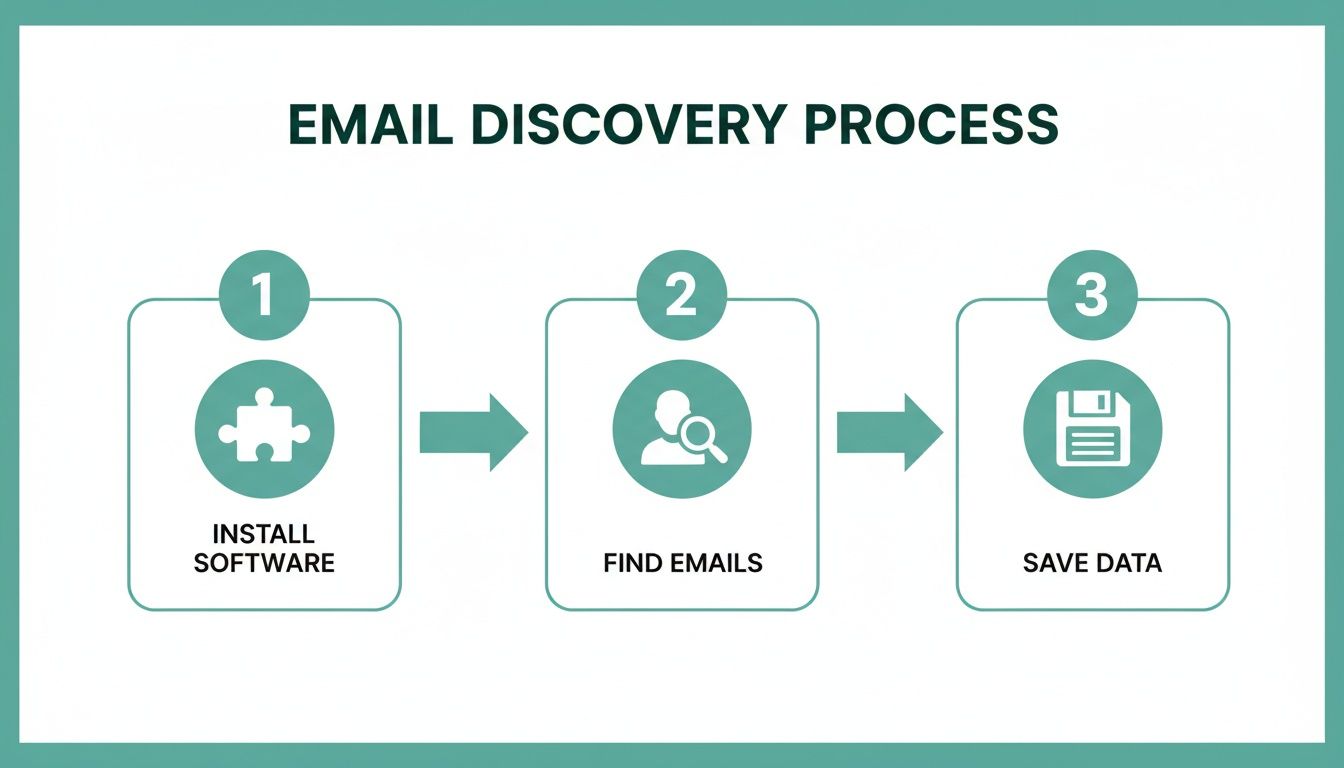
    It boils down to a simple, three-step process: install the tool, find the emails, and save your data.

    A three-step diagram illustrates the email discovery process: install software, find emails, save data.

    This workflow really shows the power of automation—it takes what used to be a tedious manual job and turns it into a few quick, repeatable clicks.

    Building Lists Passively with AutoSave

    One of the slickest ways to build lists at scale is with an AutoSave feature. Picture this: you're looking at a LinkedIn search results page with 25 perfect prospects. Instead of opening each profile one-by-one, AutoSave just works in the background, quietly finding and saving the verified email for every single person on the page.

    It's a massive time-saver. You can use it in a few really valuable situations:

    • LinkedIn Search Results: Run a super-specific search (like "Marketing Directors in the SaaS industry in California") and let AutoSave grab contact info while you scroll.
    • Company Employee Pages: Go to a target company's "People" tab on LinkedIn and turn on AutoSave to collect emails for their entire team. Perfect for account-based marketing.
    • Group Members: Find a LinkedIn group where your ideal customers hang out and pull member details to create a hyper-relevant outreach list.

    This turns your everyday LinkedIn browsing into a constant lead-gen activity, building you powerful lists with almost no extra effort.

    The key takeaway is that you're no longer actively hunting for each email. Instead, you're setting the criteria for your ideal prospect on LinkedIn, and the tool gathers the data for you as you explore.

    Processing Lists with the URL Explorer

    So, what if you already have a list of LinkedIn profiles? Maybe you got them from a conference attendee list, a CRM export, or some old research. Visiting each URL manually would take forever. This is where a URL Explorer becomes your new best friend.

    A URL Explorer lets you just paste a list of LinkedIn profile URLs directly into the tool. It then churns through the entire list in one go, finding the verified email for each profile and spitting out a clean, downloadable file.

    This is the best way to handle existing lead lists and enrich your data with accurate, verified email addresses. It closes the gap between having a list of names and having an actionable list of contacts ready for outreach. If you want to take your list building even further, you can learn more about using an email extractor for Chrome to really optimize your workflow.

    Pro Tips for Hyper-Targeted Bulk Lookups

    To get the most out of your bulk searches, remember that it’s not just about grabbing as many emails as you can. Quality always beats quantity.

    Before you run a bulk lookup, use LinkedIn's advanced filters—especially in Sales Navigator—to really narrow down your audience. Filter by things like:

    • Company Size: Zero in on businesses that fit your ideal customer profile.
    • Seniority Level: Target the decision-makers, like VPs, Directors, or C-suite execs.
    • Years in Current Role: Find people who are new to a role (and might be open to new ideas) or those with established authority.
    • Recent Activity: Look for people who have posted on LinkedIn in the last 30 days—they're more likely to be active and responsive.

    When you combine precise filtering with the power of bulk lookup tools, you can build huge, high-quality email lists that are ready for a successful outreach campaign. It's a strategic approach that ensures your efforts to find an email on LinkedIn lead directly to real business conversations.

    Keeping Your Outreach Smart and Compliant

    So you've found an email address on LinkedIn. Great. But that’s just the starting line. Simply firing off a message without a second thought is a rookie mistake that can tank your sender reputation for good.

    This is where smart, compliant outreach comes in. It’s the difference between landing in the inbox and getting blacklisted. The first step? Verifying every single email.

    A bounce isn't just a missed connection; it's a strike against you. Email providers like Google and Microsoft track these bounces. Rack up too many, and they'll start sending your messages straight to the spam folder—or worse, blocking you entirely.

    What Do Email Verification Statuses Mean?

    When you find an email, you'll see a status like 'Valid,' 'Risky,' or 'Invalid.' Knowing what these mean is critical for keeping your sender score healthy and your emails delivered.

    • Valid: This is your green light. The system has checked and confirmed the email address is live and ready to receive messages. These are the contacts you want to focus your energy on.
    • Risky: Think of this as a yellow light. It often flags "catch-all" email servers that are set up to accept any email sent to their domain. This makes it impossible to know for sure if jane.doe@company.com actually exists without sending something. Use these with caution, as they're more likely to bounce.
    • Invalid: Stop. This is a dead end. The address is confirmed to be nonexistent. Never, ever send to these addresses. It will trigger a hard bounce, which is the most damaging kind for your sender reputation.

    Staying on the Right Side of the Law

    Beyond the technical stuff, you have to think about anti-spam regulations. The big two are GDPR (for EU citizens) and CAN-SPAM (in the United States). They have different rules, but their core message is the same: be transparent and respect the person you're contacting.

    It all boils down to legitimate interest. You need a solid, business-related reason to be in their inbox. For instance, contacting a VP of Sales about a new CRM tool? That makes sense. Emailing them about a personal loan? That's spam. Once you’ve got your list, the next step is to write professional emails that get replies and start real conversations.

    Today’s B2B buyers are savvy. In fact, data shows that 82% of B2B buyers will look up a professional's LinkedIn profile before even agreeing to a meeting. This just goes to show how crucial it is for your outreach—and your own profile—to be polished and professional. They will be checking you out.

    The Ground Rules of Compliant Outreach

    Stick to these fundamentals to keep your campaigns clean, build a positive brand image, and stay out of trouble.

    1. Be Honest: Make it clear who you are and what your company does. No tricky subject lines or misleading sender names.
    2. Offer an Easy Out: Every single email needs a clear, simple way for someone to unsubscribe from future messages.
    3. Act on Opt-Outs Fast: When someone unsubscribes, you have to remove them from your list immediately. No exceptions.
    4. Include a Physical Address: The CAN-SPAM Act requires you to put a valid physical postal address in your email footer.

    When you pair a solid strategy to find emails on LinkedIn with a serious commitment to verification and compliance, you build an outreach machine that lasts. For more advanced strategies, you can also check out our guide on how to scrape emails from LinkedIn the right way. This approach doesn't just protect your brand; it builds the trust you need to get better response rates and have more meaningful conversations.

    Common Questions About Finding Emails on LinkedIn

    Diving into email discovery on LinkedIn always brings up a few key questions about legality, effectiveness, and staying on the right side of the platform's rules. Getting straight answers is the best way to build a prospecting strategy that actually works and doesn't land you in hot water.

    Let's clear up some of the most common concerns people have before they start. Knowing the landscape helps you move forward with confidence.

    Is It Legal to Find and Use Emails from LinkedIn?

    Yes, for legitimate business-to-business outreach, it's generally fine. The main thing is to comply with anti-spam laws like CAN-SPAM in the U.S. and GDPR in Europe. These rules aren't designed to stop you from doing business; they're there to make sure you do it respectfully.

    Your message needs to be relevant to the person's professional role, you have to say who you are, and every single email needs an easy opt-out link. At its core, compliant outreach is just about sending the right message to the right person.

    What Is a Realistic Success Rate for Finding Emails?

    If you're doing it all by hand, it’s a bit of a guessing game. Even with some solid detective work, you’ll probably only hit a 20-40% success rate, and that's after sinking a fair bit of time into it.

    This is where a dedicated tool completely changes the math.

    • Specialized Tools: A good email finder can boost your success rate to 70-90% for professionals with an active online presence. They do this by checking multiple data sources in an instant.
    • Instant Verification: They also confirm the email works on the spot, so you're not just getting an address—you're getting a working address.

    That jump in efficiency means you can focus on writing great outreach messages instead of just hoping your emails don't bounce.

    The real win with a professional tool isn't just finding more emails; it's finding the right emails. Getting verified, business-specific addresses is what protects your sender reputation and makes sure your messages actually land in the inbox.

    How Do I Avoid Getting My LinkedIn Account Restricted?

    This is a big one. Reputable email finders are built from the ground up to play nice with LinkedIn's terms of service. They mimic natural human behavior—like browsing a profile—instead of firing off aggressive, automated actions that get accounts flagged.

    To keep your account safe, stick with a tool that's laser-focused on one thing: finding contact information. Use it to supercharge your manual prospecting, not to automate your entire engagement strategy. This approach keeps your activity looking natural and your account in good standing.


    Ready to find verified emails on LinkedIn in a single click, safely and efficiently? EmailScout gives you the power to build targeted lists without the guesswork. Start for free and see the difference it makes.

  • How to find someone’s email from linkedin: A practical outreach guide

    How to find someone’s email from linkedin: A practical outreach guide

    If you’re trying to find someone’s professional email, LinkedIn is almost always the best place to start. You just have to know where to look.

    The most common ways are pretty straightforward: check their profile’s Contact Info section, use a smart browser extension like EmailScout, or figure out their company’s email pattern. Usually, it takes a combination of a quick manual search and the right tool to get the job done.

    Why You Should Always Start With LinkedIn

    Before we get into the nitty-gritty, let’s talk about why LinkedIn is the undisputed king of professional directories. It’s not just another social network; it’s a massive, searchable database packed with decision-makers, potential clients, and industry insiders.

    While a LinkedIn InMail has its place, getting a direct email address gives you a serious advantage.

    A laptop on a wooden desk displays 'Start with LinkedIn' with profiles, alongside a notebook and pen.

    A Direct Email Gives You Control

    When you have someone's direct email, you move the conversation off LinkedIn's turf and into a channel you own. This is huge. It lets you build your own marketing lists and create outreach sequences that aren’t capped by connection requests or InMail credits.

    A direct email just feels more personal and professional. It shows you put in the effort to find their contact info, which can make your message stand out from the endless stream of generic connection requests. This personal touch is often a key ingredient in the top LinkedIn lead generation strategies.

    If you’re deciding between sending a direct email and an InMail, here’s a quick breakdown of how they stack up.

    Direct Email vs LinkedIn InMail: A Quick Comparison

    This table breaks down the key differences between using a direct email and LinkedIn's InMail, helping you decide which is right for your outreach goals.

    Outreach Method Best For Ownership of Contact Key Advantage
    Direct Email Personalized outreach, building marketing lists, and multi-channel campaigns. You own the contact info and can use it independently. Higher perceived professionalism and full control over communication.
    LinkedIn InMail Reaching contacts with private emails or when you want to keep the conversation on-platform. Contact is tied to the LinkedIn platform and your account. Easy to send directly from a profile; no need to search for an email.

    Ultimately, having both options is ideal, but the direct email is the real prize for long-term relationship building.

    The Big Problem: Hidden Emails

    Here’s the catch: most people don't list their email publicly. This is where a smart strategy comes into play. You could spend hours searching manually, but modern tools have made this process almost instant.

    Think about it. You find the perfect person to pitch your idea to, but their email is nowhere in sight. It’s a classic roadblock. With over 1 billion members, LinkedIn is a goldmine, driving an estimated 75-85% of all B2B leads from social media. The good news is that top email finder tools now have accuracy rates between 85-95% for verified emails, turning those profiles into real, actionable contacts.

    The real power of finding an email from LinkedIn is converting a passive profile view into an active conversation. It’s the first step in building a relationship outside the confines of the platform's ecosystem.

    This guide will walk you through practical, no-fluff solutions to this problem. We'll cover everything from the simple profile check to powerful tools like EmailScout, built to make this process a breeze for sales pros, marketers, and founders.

    Finding Emails on LinkedIn Without Any Tools

    Before you jump to an automated tool, it’s worth spending a few minutes on the old-school manual methods. You’d be surprised how often these foundational techniques work, uncovering contact details that most people just skim past. It takes a little detective work, but learning these skills makes you a far more resourceful prospector.

    The most obvious place to start is often the one people forget. Head over to your prospect's profile and click the "Contact Info" link right under their name and headline. If you're already a first-degree connection, their email might be sitting right there, plain as day, assuming they've made it visible.

    Scour the Profile for Clues

    Even if the "Contact Info" section is a dead end, the profile itself is a goldmine. Pay close attention to the About section. A lot of professionals—especially consultants, founders, and freelancers—will drop their email directly in their summary as a call to action.

    Look for simple phrases like "You can reach me at…" or just the email address sitting at the end of the text. This is a pretty common move for anyone actively looking for new opportunities.

    Beyond the summary, keep an eye out for other links they’ve shared:

    • Personal Blog or Portfolio: If they link out to their personal site, the contact or about page is your next best bet.
    • Company Website: A link to their company’s site can give you the clues needed to figure out the corporate email pattern.
    • LinkedIn Cover Photo: Some people get creative and use their cover image as a digital business card, complete with contact info.

    The whole point of manual searching is to follow the breadcrumbs someone has already left behind. Every little piece of information—a company name, a personal blog, a past project—is a potential key to finding their direct email.

    Decode the Company Email Pattern

    If the profile itself doesn't give you what you need, it's time to zoom out and look at the company level. Most organizations stick to a standard format for their email addresses, and that consistency is your best friend here.

    Pop over to the company’s official website. The "Contact Us," "About Us," or "Press" pages are often where you’ll strike gold. You might find a general inbox (like info@company.com) or even the email of a specific team member, which is all you need to crack the code.

    Common corporate email formats usually look something like this:

    Once you’ve got a good idea of the pattern, you can make an educated guess for your target. For instance, if you see that John Smith's email is jsmith@acmecorp.com, you can be pretty confident that Jane Doe's is jdoe@acmecorp.com.

    Mastering this manual approach gives you a real feel for the prospecting landscape. LinkedIn is a monster for lead generation, and while InMail response rates can be 300% higher than standard email, a solid cold email to a direct address is still a cornerstone of outreach. While a personalized LinkedIn connection request can hit a 20-25% acceptance rate, relying only on manual hunting is slow and you’re bound to make mistakes, which is exactly why more efficient methods exist. For more on the numbers, check out these LinkedIn outreach stats.

    Using an Email Finder Tool for Instant Results

    Let's be real: the manual methods have their place, but they’re slow and you often hit a dead end. When you need to build a targeted list yesterday, you need a faster, more accurate approach. This is where a good email finder tool—especially one that works as a browser extension—completely changes the game.

    Imagine landing on the perfect LinkedIn profile and getting a verified professional email address with a single click. That's what these tools do. They cut out all the guesswork and hours of digital detective work, essentially turning LinkedIn into your personal, searchable contact database.

    The One-Click Advantage of Browser Extensions

    The single most efficient way to pull an email from a LinkedIn profile is with a dedicated browser extension. Tools like EmailScout plug right into your workflow, usually popping up on the side of a profile as you browse.

    The beauty of this is how seamless it is. You're not flipping between tabs or copy-pasting names into some other app. The info you need shows up right where you are, right when you need it. For anyone in sales, marketing, or recruiting who practically lives on LinkedIn, this is a massive time-saver.

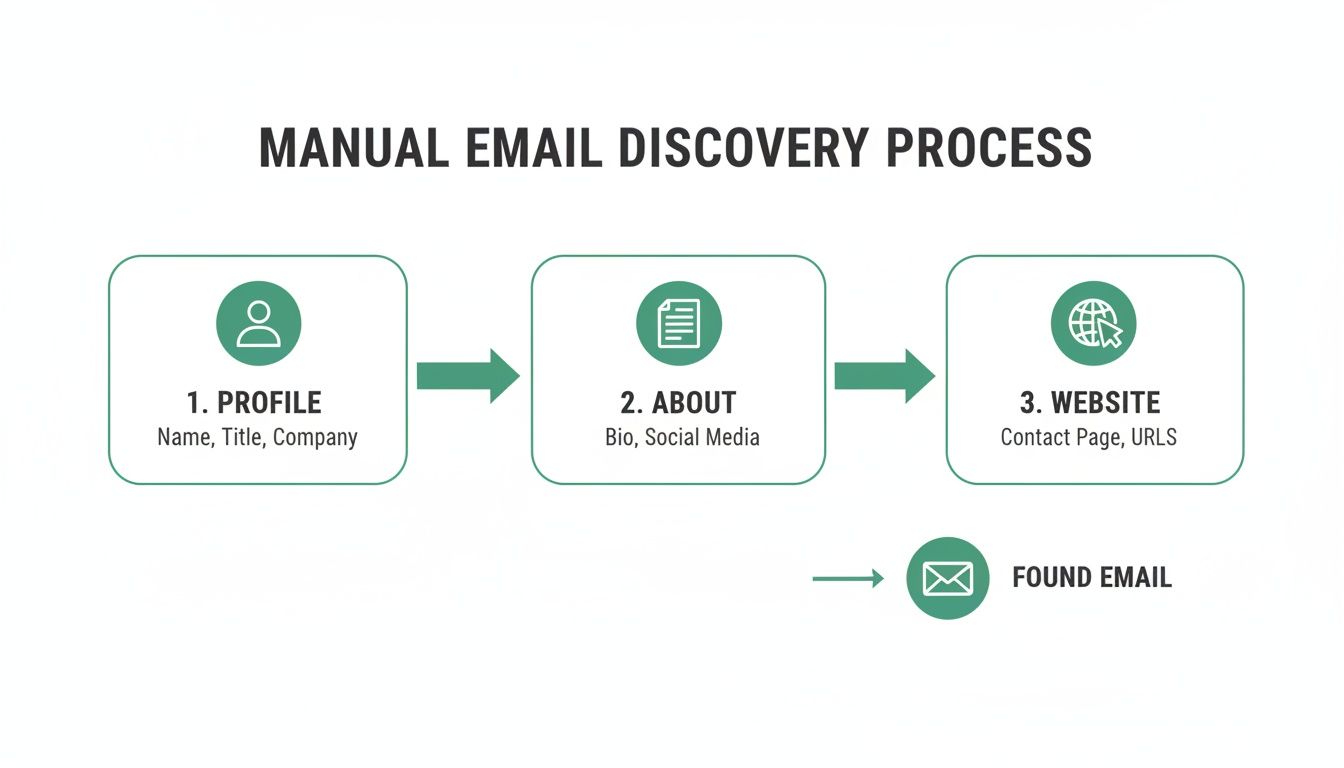
    Flowchart illustrating the manual email discovery process, detailing steps from profile research to finding emails.

    This kind of visual integration means you can qualify a prospect and grab their contact details in one fluid motion. It just makes your list-building so much faster.

    How It Works in a Real-World Scenario

    Let’s walk through a practical example. Say you’re an SDR who needs to build a list of 50 marketing managers in the software industry.

    Doing it manually means a whole lot of steps for every single person. You’re checking their profile, looking for clues, trying to figure out the company email format, and then verifying it. It's a grind.

    Now, let's replay that scenario with an email finder extension running.

    You run your search on LinkedIn and start clicking into profiles. As each page loads, the extension gets to work. You click the "Find Email" button, and the tool scours its databases and runs its algorithms. Seconds later, a verified email appears, ready to go. What could have taken you 10-15 minutes per contact now takes less than 30 seconds.

    The real value here isn't just finding an email; it's the opportunity cost it saves. All those hours you get back can be poured into what actually moves the needle: writing personalized outreach and building real relationships.

    Advanced Features for Power Users

    The best tools go way beyond just finding one email at a time. They have features built for prospecting at scale, designed to solve the common bottlenecks. Knowing what these are can help you pick from the best email finder tools out there.

    Two features are absolute must-haves for anyone serious about prospecting:

    • AutoSave: This is for when you're in research mode. As you browse LinkedIn profiles, the tool can automatically find and save the person's details and verified email to a list in the background. You can stay focused on finding the right people without constantly stopping to save their info.
    • URL Explorer: This is a bulk-finding beast. Instead of visiting profiles one by one, you just paste a whole list of LinkedIn profile URLs into the tool. It processes the entire list at once, finding and verifying emails for everyone on it.

    Putting Advanced Features into Practice

    Think about a founder getting ready for a product launch. They've identified 100 key industry influencers on LinkedIn. Going through each profile manually would take days of mind-numbing work.

    Instead, they can use the URL Explorer. They just need to gather the 100 profile URLs, paste them in, and let the tool do its thing. In a few minutes, they have a clean, verified email list ready for their launch announcement. A project that would have taken a week is now done in less than an hour.

    Or consider a sales manager breaking into a new market. They can use the AutoSave feature while researching key decision-makers on LinkedIn. The tool just quietly builds their prospect list in the background as they work. By the time they're done with the research, a ready-made outreach list is waiting for them. No extra effort required.

    Here’s a quick breakdown of how these features stack up:

    Feature Best Use Case Key Benefit Time Saved (vs. Manual)
    Single Lookup Grabbing a specific contact's email right now. Instant results on individual profiles. High (minutes per contact)
    AutoSave Building a list while actively researching profiles. Seamless, background collection of contacts. Very High (hours per list)
    URL Explorer Processing a pre-existing list of LinkedIn profiles. Bulk enrichment for maximum efficiency. Extremely High (days per large list)

    At the end of the day, a specialized email finder is the most reliable way to get contact info from LinkedIn. Manual skills are good to have as a backup, but the speed, accuracy, and powerful features of a good extension give you a serious edge. You end up spending far less time hunting and a lot more time connecting.

    Crafting Your Outreach Email After Finding the Address

    Okay, you've got a verified email address. That's a huge win, but it’s only half the battle. How you actually approach someone determines whether you get a reply or just get ignored.

    Let’s be honest: a generic, mass-blasted email is the fastest way to burn a good lead. You’ll completely waste all the effort you just put into finding their contact info.

    The real secret to getting a response is showing you’ve done your homework. This isn't about empty flattery; it’s about proving your message is relevant. Your email needs to immediately answer their unspoken question: "Why are you emailing me, and why should I care?"

    A woman personalizing outreach campaigns on a laptop and desktop computer, showing a user profile with a photo.

    The Art of the Personalized Opening

    Your first sentence is everything. Referencing their LinkedIn profile is the perfect way to prove this isn't just another automated blast.

    Instead of a tired opener like, "Hope you're having a great week," get specific. Did they just share an insightful article? Did their company announce a new milestone? Mention it.

    Here are a few examples of strong, personalized openers:

    • "I saw your recent post on LinkedIn about scaling customer success teams and completely agree with your take on proactive onboarding."
    • "Congratulations on the recent launch of [Product Name] at [Company]—the new UI looks incredibly intuitive."
    • "Your comment on the future of AI in marketing really stood out to me, especially your point about data privacy."

    This approach instantly gives you context and shows you’re actually paying attention.

    The goal of personalization is to build a bridge from their world to yours. A quick mention of their recent activity or a shared interest makes your email feel less like a sales pitch and more like the start of a genuine conversation.

    Writing Subject Lines That Earn an Open

    Your subject line is the gatekeeper. It doesn't matter how brilliant your email is if it never gets opened. Generic lines like "Quick Question" or "Following Up" are dead on arrival in a crowded inbox.

    A good subject line needs to be short, specific, and compelling. It should hint at the value inside without giving away the whole story. Think of it as a headline for your email.

    Try one of these formulas that consistently work well:

    • Reference a Connection: "Idea about [Topic from their LinkedIn post]"
    • Intrigue and Relevance: "[Their Company] + [Your Company]"
    • Direct and Value-Driven: "Quick thought on your [Project/Initiative]"

    A subject line like "Thought on your recent article" is far more likely to get a click than "Introduction from [Your Name]." The first one is about them; the second is about you. Always make it about them.

    Keeping Your Message Short and Respectful

    Once they open your email, you have just a few seconds to hold their attention. Decision-makers are busy people, and nobody wants to read a wall of text. Keep your message brief, scannable, and focused on a single call to action.

    A simple, effective structure looks like this:

    1. The Personalized Hook: Your opening line referencing their LinkedIn profile.
    2. The Value Proposition: One sentence explaining what you do and why it matters to them.
    3. The Ask: A clear, low-friction next step. Don't ask for a 30-minute call right away; instead, ask for their thoughts or if they're the right person to talk to.

    Mastering this flow is a core skill. For anyone looking to dive deeper, there are some great guides on how to write cold emails that convert.

    Staying Compliant and Ethical

    Finally, your outreach has to be both ethical and compliant. Regulations like GDPR (in Europe) and the CAN-SPAM Act (in the U.S.) have strict rules for commercial emails. While the details vary, the main principles are the same: be transparent and be respectful.

    Always be clear about who you are and why you're reaching out. Most importantly, provide a clear and easy way to opt out. For a simple one-to-one email, a line like, "If you're not the right person or not interested, just let me know" is often enough. For any scaled campaigns, a clear unsubscribe link is non-negotiable.

    This isn't just about avoiding hefty fines; it's about protecting your brand's reputation and building trust from the very first touchpoint.

    Why Verifying Emails Is a Non-Negotiable Step

    Finding a potential email address is a great start, but it's not the finish line. Firing off your carefully crafted outreach to a dead address is more than just a waste of time—it actively harms your ability to reach anyone else.

    This is why email verification isn't an optional tune-up. It's an absolutely essential step for any serious outreach campaign.

    Your Sender Reputation is Everything

    Think of your domain's sender reputation like a credit score for your email account. Every time you send a message that "bounces" because the address is invalid, your score takes a hit.

    Email providers like Gmail and Outlook are always watching. If your bounce rate creeps too high, their algorithms start flagging you as a potential spammer. That's when things go downhill, fast.

    A high bounce rate, which is usually anything over 2%, is a major red flag. Once you're on their radar, a few damaging things start to happen:

    • Your emails land in spam: Even messages to valid, interested prospects get filtered into the junk folder where they’ll never be seen.
    • Your domain gets blocklisted: In serious cases, ISPs can block your entire domain, making it nearly impossible for any of your emails to get through.
    • Engagement tanks: When fewer emails make it to the primary inbox, your open rates, click-throughs, and replies will inevitably collapse.

    This entire chain reaction starts with one simple, avoidable mistake: sending to an unverified email list. A list full of bad addresses effectively poisons your entire outreach engine from the get-go.

    Your sender reputation is one of your most valuable marketing assets. Protecting it by verifying every single email isn't just a best practice; it's essential for long-term success. A clean list gives your messages the best possible chance of being read.

    How Verification Actually Works

    So, what’s going on behind the scenes during verification? It’s a quick but technical check to confirm an address is active and can receive mail. Modern tools like EmailScout often build this right in, but you can find standalone services to clean older lists, too.

    The process usually involves a few key checks:

    1. Syntax Check: First, the tool makes sure the format is right (e.g., name@domain.com). This catches obvious typos immediately.
    2. Domain Check: Next, it confirms the domain (@company.com) is real and has mail servers ready to accept email.
    3. Server Ping (SMTP Check): Finally, the verifier sends a technical "ping" to the recipient's mail server and asks if the user (name@) actually exists. This happens without sending a real email, confirming the address is deliverable.

    This quick technical handshake confirms deliverability with a high degree of certainty. Building this into your workflow transforms a list of guesses into a list of confirmed, reachable contacts.

    To really get into the weeds, you can learn more about how to verify emails and why each of these steps matters. At the end of the day, a verified email is the only kind worth having.

    Advanced Strategies for Hard-to-Find Contacts

    Sometimes, the usual methods just don't cut it. You're going to run into prospects with common names, confusing corporate email structures, or profiles locked down tighter than Fort Knox. This is where you need to get creative.

    When you hit a wall, it’s time to think beyond the profile page. A great first move is to tap into your mutual connections. Instead of a cold, out-of-the-blue ask, shoot a polite message to a shared contact. Briefly explain why you want to connect and ask if they’d be comfortable making a warm introduction. This approach almost always works better than a direct, unsolicited email.

    Another solid strategy is to look beyond LinkedIn altogether. People leave digital breadcrumbs scattered all over the web.

    • Conference Speaker Lists: Has your prospect ever spoken at an industry event? Conference organizers often publish speaker bios that include direct contact info.
    • Company Press Releases: Dig into the "Media Contacts" section of press releases on their company’s website. You might just find a direct line to someone in their department or a related one.
    • Other Social Platforms: Don't forget about personal blogs, a GitHub profile, or even a professional Twitter bio. You'd be surprised how often an email address is hiding in plain sight.

    Thinking Like a Prospector

    For those truly elusive contacts, you’ll need to put on your detective hat. It’s all about piecing together small clues to solve the bigger puzzle. When you're really stuck, it can be helpful to see how a professional lead prospector virtual assistant handles these challenges, as they often use next-level research techniques.

    The key is persistence without being invasive. Your goal is to find publicly available information, not to dig into private details. Respecting this boundary is crucial for maintaining professional integrity.

    These advanced strategies definitely take more effort, but they're invaluable for connecting with those high-value, hard-to-reach individuals. They turn prospecting from a simple lookup task into a genuine skill of strategic investigation.

    Got Questions About Finding LinkedIn Emails?

    Even with the best tools, a few questions always pop up. Let's clear up some of the most common ones so you can find emails with confidence.

    Is It Legal to Find and Use These Emails?

    This is a big one. Finding a publicly available or professionally derived email address is generally not the issue—it's how you use it that matters. Regulations like the GDPR in Europe and the CAN-SPAM Act in the U.S. set the rules for outreach.

    The bottom line is to keep your communication professional and relevant. Your message should be a one-to-one note related to their professional role, not a mass-market blast. And always, always include a clear way for them to opt out.

    How Accurate Are LinkedIn Email Finder Tools, Really?

    Accuracy definitely varies. The good news is that reputable tools often hit a success rate of over 90%. That’s a world of difference from manual guesswork, which can saddle you with a high bounce rate and hurt your sender reputation over time.

    A tool with real-time verification isn't just a nice-to-have; it's essential. An unverified email is a risk, but a verified one is a solid asset for your outreach and list-building.

    Can Using These Tools Get My Account Restricted?

    This is a valid concern. Well-designed browser extensions are built to be safe and don't violate LinkedIn's terms of service. They work by analyzing public data on the page you're viewing, not by automating actions on the platform itself.

    Where you can get into trouble is with tools that automate a high volume of connection requests, profile views, or messages. That kind of activity looks like a bot and can absolutely get your account flagged. Stick to tools that are designed simply to find and verify contact info.


    Ready to stop guessing and start connecting? EmailScout gives you instant access to verified email addresses directly from any LinkedIn profile. Try it for free and build your outreach list in minutes. Find out more at https://emailscout.io.

  • How to Find Emails on LinkedIn A Practical Guide

    How to Find Emails on LinkedIn A Practical Guide

    When you're trying to find someone's email on LinkedIn, you've really got two paths you can take: the old-fashioned manual detective work or letting smart technology do the heavy lifting. The manual way means digging through their contact info section and maybe their company website. The faster route? Using a tool like the EmailScout Chrome extension to pull it up with a click.

    Why Finding Emails on LinkedIn Is a Game Changer

    Before we get into the how, let's talk about why this is such a valuable skill for any professional today. This isn't about finding new ways to spam people. It's about forging direct, meaningful connections that cut through all the digital noise. LinkedIn's InMail is fine, but a well-written email just feels more personal and almost always gets more attention.

    Shifting a conversation from a busy social platform to a professional inbox is a smart move for a few key reasons:

    • You Bypass the Clutter: Your message lands in their inbox, away from the constant barrage of connection requests, post notifications, and other distractions on LinkedIn.
    • You Own the Connection: An email address is a direct line you control. It's not dependent on LinkedIn's algorithm or platform changes, making it a permanent asset for your network.
    • It Shows Real Intent: Taking that extra step to find an email shows you’re genuinely interested and professional. That alone can make a huge difference in your response rates.

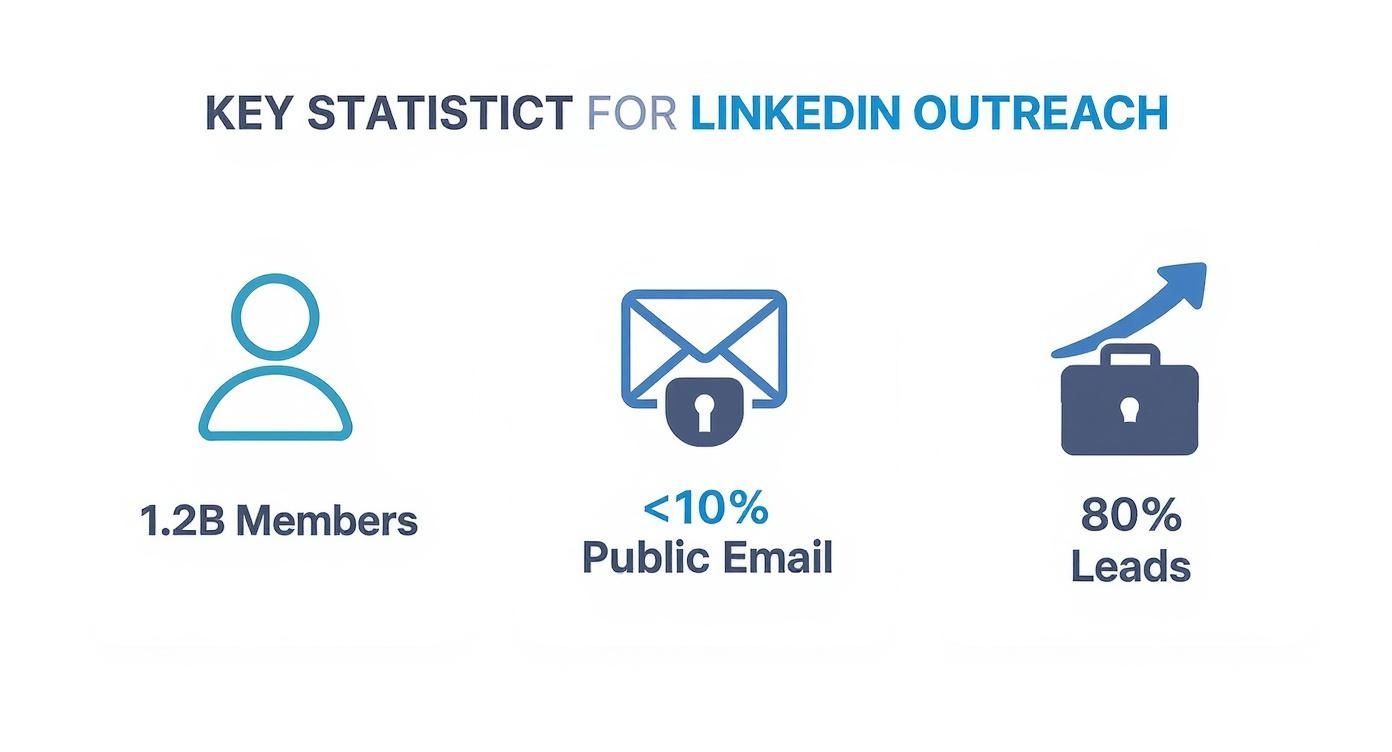
    This infographic really highlights both the challenge and the massive opportunity on the platform.

    Infographic showing LinkedIn has 1.2 billion members, but less than 10% of users display a public email, while 80% of B2B leads come from the platform.

    The data here shows a classic paradox: LinkedIn is the undisputed king of B2B leads, yet the vast majority of its users keep their contact details private.

    The Strategic Advantage of Email

    The numbers don't lie. With over 1.2 billion members, LinkedIn is the biggest professional playground on the planet. But here's the catch: studies show that less than 10% of profiles actually list a public email address. This reality forces us to get a little more creative, and that's where email discovery becomes an essential skill.

    The real magic isn't just in finding the email; it's about combining the rich professional context from LinkedIn with the direct, personal nature of email. You get deep insights and a private channel all in one.

    Even with its privacy focus, LinkedIn is where 80% of all B2B social media leads come from. That’s a staggering number that proves its value. When you successfully connect a LinkedIn profile to a verified email, you unlock a powerful multi-touchpoint strategy that blows single-channel outreach out of the water. If you want to dig deeper, you can learn more about the latest LinkedIn statistics and what they mean for your strategy. This approach turns a cold message into a warm, well-informed conversation.

    Clever Manual Techniques for Finding Emails

    While automated tools are fast, sometimes a little old-fashioned detective work is all you need. These manual tricks are free, surprisingly effective, and can help you track down almost anyone's email on LinkedIn without touching a third-party tool.

    Start with the Obvious: The Contact Info Section

    The first and easiest place to look is right on someone's profile. You'd be surprised how many people openly share their contact details to make networking easier.

    Just head over to their profile and click the "Contact info" link sitting right under their name and headline. A quick click often reveals their email, website, and maybe even a phone number. It’s a simple win that people often forget to check.

    Magnifying glass over a LinkedIn profile, symbolizing a manual search for contact information.

    Go Deeper Than the Profile Basics

    If the "Contact info" section is a dead end, don't give up. Plenty of users hide their email addresses in other spots on their profile. This is often a deliberate move to avoid automated scrapers while keeping the door open for real people who are paying attention.

    Your next stop should be the "About" section. Read through their summary carefully, because people often get creative with how they write out their email to fool the bots.

    Keep an eye out for patterns like:

    • john.doe [at] company [dot] com
    • jane (at) company.com
    • jane dot doe at company dot com

    This little trick works more often than you'd think, especially for consultants, freelancers, and founders who want you to reach out.

    A person's LinkedIn bio is a personal billboard. If they want to be contacted, they'll often leave clues for anyone willing to look closely. The key is to think like a human, not a machine.

    Tap Into Your First-Degree Connections

    One of LinkedIn's most powerful, and often overlooked, features is the data you can get from your direct connections. If your target is already a 1st-degree connection, you might already have their email without even knowing it.

    If you're looking to do a larger outreach campaign, a good first step is to learn how to export your LinkedIn connections. LinkedIn lets you request an archive of your data, which comes with a handy spreadsheet of your network.

    That file often includes the primary email address your connections used to sign up. It may not always be their professional email, but it's a fantastic starting point that costs you nothing.

    Play the Educated Guessing Game

    When the easy methods don't pan out, it's time to make an educated guess. The good news is that most companies use a standard format for their work emails. All you need is your contact's full name and their company's domain (company.com).

    From there, you can test out the most common patterns:

    • First Name: john@company.com
    • First Initial, Last Name: jdoe@company.com
    • First Name, Last Name: johndoe@company.com
    • First Name.Last Name: john.doe@company.com

    Once you have a few solid guesses, you can use an email verifier (we’ll get to that later) to see which one is correct. It takes a little trial and error, but this approach is a proven way to find just about any email on LinkedIn.

    When your manual detective work hits a dead end, it’s time to call in the tech. Email finder tools and browser extensions are designed to automate the whole discovery process, turning a tedious, multi-step search into a single click.

    https://www.youtube.com/embed/7iKvdmoOX6c

    Think of these tools as your personal research assistant. They plug right into your workflow and do the heavy lifting by cross-referencing massive databases and using smart algorithms to predict and verify professional email addresses.

    A perfect example is the EmailScout Chrome extension. When you’re on someone’s LinkedIn profile, the extension wakes up, scours its data for a match, and—if it finds one—serves up a verified email right on the page.

    How These Tools Work Their Magic

    At their core, these tools are masters of pattern recognition and data verification. They take a person’s name and company, then analyze the most likely email formats (like firstname.lastname@company.com or f.lastname@company.com).

    But they don’t stop there. The best tools then ping the company’s mail server to confirm the address is active without actually sending an email. It’s a slick, behind-the-scenes check.

    This process is incredibly efficient and has become a go-to for B2B teams looking for a direct line of communication. In fact, their usage has jumped by over 35% in recent years. With accuracy rates often clearing 70–80% for established companies, it’s easy to see why.

    Installing and Using EmailScout as an Example

    Getting an extension like EmailScout up and running is dead simple. It’s usually a two-click process from the Chrome Web Store.

    Here’s a look at the EmailScout extension page.

    Once it's installed, you’ll see the little EmailScout icon in your browser’s toolbar, ready for action.

    Actually using it is even easier:

    1. Head over to the LinkedIn profile of the person you’re researching.
    2. Click the EmailScout icon.
    3. The tool gets to work, analyzes the profile, and pops up with the email address it found.

    This seamless flow is what makes these extensions so powerful. You can build out an entire prospecting list on the fly without ever having to switch tabs, turning a static profile into a live, actionable lead.

    Choosing the Right Tool for Your Needs

    Of course, not all email finders are the same. The market is packed with options, from simple free tools to massive, enterprise-grade data platforms like ZoomInfo.

    For a deeper look into one of the big players, this a comprehensive guide to ZoomInfo's pricing and features is a great starting point.

    When you’re weighing your options, keep these key factors in mind:

    • Accuracy: How good is the data? Look for tools that offer real-time verification to avoid bounce-backs.
    • Integration: Does it play nice with LinkedIn, Sales Navigator, and your other sales tools?
    • Cost: Do you need a subscription for thousands of searches, or will a pay-as-you-go plan work better?
    • Compliance: Does the tool follow data privacy rules and respect LinkedIn’s terms?

    The best email finder isn’t just about finding an address. It's about finding the right address—one that's verified, actionable, and delivered in a way that fits your workflow. Always prioritize accuracy and ease of use.

    If you’re just getting your feet wet, checking out the best free email finder tool options is a smart move. It gives you a feel for how they work without any financial commitment.

    Ultimately, the right extension should feel like a natural part of your prospecting process—just a whole lot faster.

    Comparing LinkedIn Email Finder Approaches

    To put it all into perspective, let's break down how the manual methods we've discussed stack up against automated tools. Each approach has its place, and knowing when to use which can make all the difference.

    Method Pros Cons Best For
    Manual Search (Guess & Check) Completely free. Time-consuming; high chance of error. Finding a single, high-value contact when you have time.
    Company Website & Contact Page Often provides direct, verified info. Not scalable; many contacts aren't listed publicly. Small businesses or finding general inquiry emails.
    Email Finder Extensions (Automated) Fast and scalable; high accuracy rates. Most have credit limits or subscription costs. Building prospect lists, sales outreach, and recruitment at scale.

    While manual techniques have their moments, especially for a one-off search, nothing beats the efficiency of an automated tool when you need to build lists consistently. They handle the grunt work so you can focus on what really matters: connecting with people.

    You've done the detective work and found what looks like the right email address. But hold on—don't hit "send" just yet.

    Sending an email to a dead address is more than just a waste of time. It actively damages your sender reputation. When your messages bounce, email providers like Gmail and Outlook take notice. A high bounce rate is a huge red flag that you might be a spammer, and it's a fast track to getting all your future emails dumped in the junk folder.

    Verification is the crucial last step that ensures your outreach actually gets where it needs to go.

    An icon showing a checkmark inside an email envelope, symbolizing successful verification.

    Thankfully, you don't have to just cross your fingers and hope for the best. There are a couple of smart, simple ways to confirm an email is legit before you even think about writing your message.

    Use a Free Online Verification Tool

    One of the easiest and most reliable methods is to use a free online email verifier. These web-based tools are surprisingly powerful, running a whole series of background checks to see if an email address is active and can receive mail.

    All you have to do is copy and paste your guessed email into the tool. Within seconds, you'll get a status report, usually labeling the address as "valid," "invalid," or "risky." These tools are a must-have in any professional's outreach toolkit. If you want to dive deeper into the tech behind it, you can learn more about how to validate an email address and what makes these modern checkers so effective.

    A verified email isn't just about deliverability; it's a sign of professionalism. Taking a few extra seconds to check an address shows you respect both the recipient's time and your own sender score.

    Try the Gmail and Outlook Hover Trick

    Here's another great technique that costs nothing and uses the email client you already have open. This little trick is especially effective if your contact's company uses Google Workspace or Microsoft 365.

    It’s incredibly simple:

    1. Open a new email in Gmail or Outlook.
    2. Type the email address you found into the "To:" field.
    3. Now, just hover your mouse over the address. Don't click it.

    If that email is tied to an active Google or Microsoft account, a little contact card will often pop up with the person's name, profile picture, or even their job title. It's a quick, visual confirmation that you've got the right person.

    Watch Out for Catch-All Servers

    Every now and then, a verification tool will give you a "risky" or "accepts all" result. This usually means the company has set up a catch-all server. A catch-all is designed to accept email sent to any address at that domain, which means nothing will ever bounce back.

    While it makes it impossible to be 100% sure a specific inbox exists, it doesn't mean your guess is wrong. The email could still land in a general inbox or even get routed to the right person. It's just a slightly higher risk. You'll have to weigh how important the contact is before deciding to send your message.

    Staying Ethical and Following Best Practices

    Finding an email gives you a direct line to someone's professional life, and that power comes with responsibility. The whole point is to build relationships, not to get yourself blocked. That means respecting the platforms you use and, more importantly, the people you contact.

    For instance, LinkedIn’s terms of service are crystal clear: they strictly prohibit aggressive or large-scale data scraping. Trying to game the system can get your account flagged or even suspended. It's always better to use tools and methods that work with the platform, not against it.

    A person at a desk reviewing ethical guidelines on a computer screen, with icons for GDPR and CAN-SPAM.

    Navigating Data Privacy Laws

    Beyond just playing by LinkedIn's rules, you have to think about data privacy regulations like GDPR in Europe and the CAN-SPAM Act in the U.S. These aren't just polite suggestions—they are laws with serious teeth.

    Here’s a quick rundown of what they demand for professional outreach:

    • Be Transparent: Clearly state who you are and why you're reaching out. No hiding behind a vague subject line or a mysterious company name.
    • Provide Value: Your message needs to offer something relevant to the person you're emailing. A generic, copy-pasted sales pitch just doesn't cut it.
    • Offer an Easy Opt-Out: Every single email must include a clear and simple way for someone to unsubscribe from future messages. No questions asked.

    Getting these fundamentals right is non-negotiable. If you want to dig deeper, our guide on https://emailscout.io/lead-generation-best-practices/ lays out more detailed strategies for staying compliant and effective.

    The core principle of ethical outreach is simple: treat others' inboxes the way you'd want yours to be treated. Respect, relevance, and transparency are your best tools for building trust.

    Tailoring Your Approach

    How effective your outreach is also depends on who you're contacting. For example, professionals aged 25–34 make up a whopping 47% of LinkedIn’s user base—an audience that's generally pretty open to networking.

    But here’s the catch: only about 1% of active users share content weekly, and even fewer list their emails publicly. This means your strategy has to be precise.

    Privacy norms also change depending on where you are in the world. Professionals in North America are often more open to sharing contact details than their counterparts in regions with stricter privacy cultures. This just means what works for a contact in one industry or country might need a little tweaking for another.

    Common Questions About Finding Emails

    When you start digging for emails on LinkedIn, a few questions always pop up. It's totally normal to wonder about the rules, how reliable these tools are, and what to do when you hit a dead end. Let's clear the air so you can move forward with confidence.

    Is It Legal to Find Emails This Way?

    This is the big one, and the answer isn't a simple yes or no—it's layered. Whether it's legal to use an email you found on LinkedIn depends on where you are, where your prospect is, and what you're sending.

    Laws like GDPR in Europe and the CAN-SPAM Act in the U.S. have strict rules about commercial emails. The good news is that B2B outreach for a legitimate business interest is usually fine. The catch? You have to be transparent, offer real value, and give them an easy way to opt out. Always do your homework on the specific rules that apply to you.

    It's also worth noting that using aggressive scraping tools can get you in trouble with LinkedIn's terms of service, which is a separate issue from the law. You could face account penalties for that.

    The bottom line is this: finding the email is just the first step. It's how you use it that matters. Always lead with respect and give people a clear way out.

    How Accurate Are Email Finder Tools?

    A good email finder tool will usually hit an accuracy rate of 70% to 90%. The best ones get there by checking multiple public sources and running a quick verification in real-time to see if the email address is live.

    But nothing's perfect. Accuracy can dip for smaller companies, people with super common names, or businesses that use weird email patterns. That's why it's a smart move to run your list through a separate email verification service, especially before launching a big campaign. It's a simple step that protects your sender reputation by keeping your bounce rate low.

    What if I Still Can't Find an Email?

    So you've tried all the manual tricks and fired up a tool, but you're still coming up empty. Don't give up on the prospect just yet. It's just time to switch gears.

    Forget the email for a minute and go back to the source: LinkedIn itself.

    Send a personalized connection request that gets straight to the point about why you want to connect. If they accept, follow up with a short, value-packed InMail message. The goal is just to start a conversation right there on the platform. More often than not, if you build a little rapport first, they’ll be happy to share their email with you down the line.

    Can an Email Finder Get My Account Banned?

    There’s always a small risk when you use third-party tools, since LinkedIn’s user agreement technically forbids automated data scraping. But top-tier extensions like EmailScout are designed to fly under the radar. They do this by acting more like a human and putting reasonable caps on how many searches you can do at once.

    To play it safe, just follow a few common-sense rules:

    • Steer clear of bots that automate tons of profile visits or connection requests.
    • Don't go crazy with your daily email lookups. Keep it reasonable.
    • Only use trusted, high-quality extensions that are open about how they work.

    Stick with tools that play fair, and you can get the tech advantage without putting your account on the line.


    Ready to stop guessing and start connecting? The EmailScout Chrome extension gives you instant access to verified email addresses right on LinkedIn profiles. Find unlimited emails for free and build your prospect lists in a single click.

    Start Finding Emails for Free with EmailScout

  • find email from linkedin: Pro Guide to LinkedIn Outreach

    find email from linkedin: Pro Guide to LinkedIn Outreach

    Before we get into the how, let's talk about why LinkedIn is the best place to start your search for an email address. It's more than just another social network—it’s a massive, self-updating professional directory. That’s what makes it the most reliable source for accurate contact information.

    This foundation of trust and professional context is exactly what makes your outreach more likely to succeed right from the get-go.

    Why LinkedIn Is the Gold Standard for Contact Discovery

    Forget about those stale, outdated contact lists you buy that are useless within a few months. LinkedIn works because of one simple, powerful idea: people keep their own profiles current.

    Professionals have a real incentive to update their job titles, companies, and accomplishments. This self-service approach creates a living, breathing database that static resources just can't compete with.

    The professional context is the other huge advantage here. When you find an email through LinkedIn, your outreach feels less like a cold interruption and more like a relevant business conversation. You're connecting inside a professional world, which immediately adds a layer of credibility to your message.

    The Power of a Living Database

    Seriously, think about the last time you bought a contact list. How much of it was just plain wrong? The magic of LinkedIn is that it's always changing, driven by its billion-plus members around the globe. People announce promotions, switch jobs, and update their skills in real-time.

    This means the data you find is far more likely to be fresh and actionable. It's why so many pros live on the platform. In fact, 40% of B2B marketers say LinkedIn is their single most effective channel for finding quality leads. It’s proven its worth time and time again.

    Just take a look at the sheer scale of the professional community you're tapping into.

    This graphic really drives home the point: LinkedIn is an massive, active community, making it an unmatched resource for finding contacts and networking.

    Building Credibility Before You Even Connect

    Your LinkedIn profile is your digital handshake. To really make this work, you need to look the part. A quick way to boost your professional image is by using some quality AI generated headshots for LinkedIn. When your own profile looks solid, your connection requests and emails just feel more legitimate.

    Key Takeaway: LinkedIn's value isn't just the data it holds, but the context it provides. A great profile combined with info you've gathered from the platform is a powerful recipe for outreach that actually gets a response.

    By starting your search on LinkedIn, you're not just grabbing an email address. You're gathering the intel needed to build a real connection. And if you want to do this at scale, our guide on how to scrape thousands of LinkedIn contacts from Google Search shows you some advanced tricks to build your lists fast.

    Using Email Finders to Streamline Your Search

    Let’s be honest, the manual tricks are useful in a pinch, but they just don’t scale. When you need to find emails for dozens—or even hundreds—of prospects, you need a real system. This is exactly where dedicated email finder tools come in, turning a mind-numbing task into a quick, efficient process.

    Most of these tools work as browser extensions that plug directly into your workflow. They let you find an email from LinkedIn with a single click, right from a person's profile page. No more guessing email patterns or digging through obscure contact pages. You just get instant access to verified contact information.

    This approach is all about closing the gap between finding a promising lead and actually starting a conversation.

    Infographic about find email from linkedin

    As you can see, the right tech makes the whole sequence faster and far more effective.

    How Email Finder Extensions Work

    Most of the top-tier email finders, like Hunter or Skrapp, operate as simple Chrome extensions. Once you install one, it adds a small button or widget to LinkedIn profiles. When you land on a prospect’s page, the tool cross-references their name, company, and other public data against a massive database to pull up their professional email address.

    But the best tools don't just find emails; they verify them. You’ll often see a little green checkmark or a confidence score next to the email. This one simple feature saves you from the frustration of bounced emails and helps protect your sender's reputation. It's a small detail that makes a huge difference.

    Imagine you’re a sales rep targeting marketing managers at SaaS companies. You can just visit a target's profile, click the extension's icon, and instantly see their verified firstname.lastname@company.com address. The whole thing takes less than 10 seconds per profile.

    Scaling Up Your Search with Bulk Finders

    Finding a single email is great, but the real power comes from extracting contacts in bulk. This is where combining an email finder with LinkedIn Sales Navigator becomes a total game-changer for anyone serious about outreach.

    Sales Navigator is brilliant for building hyper-targeted lead lists based on criteria like industry, company size, job title, and location. Once you have a curated list of, say, 100 ideal prospects, you can use an email finder to enrich that entire list at once.

    Instead of clicking through profiles one by one, you can run a process that pulls verified emails for your entire search result. What used to take a full day of manual work can now be done in just a few minutes.

    This workflow is the secret behind highly efficient sales and marketing teams. They spend their time building targeted lists and crafting great messages, not hunting for contact details. It's how they're able to connect with hundreds of relevant leads every single week.

    Choosing the Right Tool for Your Needs

    Not all email finders are created equal. Some are designed for freelancers with occasional needs, while others are built for enterprise teams running massive campaigns.

    When you’re looking at your options, here are a few things to consider:

    • Accuracy and Verification: How good is the data? A tool with a high bounce rate is worse than no tool at all. Always look for services that provide real-time verification.
    • Integration: Does it play nice with LinkedIn and Sales Navigator? A smooth workflow is non-negotiable for efficiency.
    • Bulk Capabilities: Can you extract emails from entire lists or just individual profiles? This is the key to scaling your efforts.
    • Credit System and Cost: Most tools run on a credit basis, where one credit usually equals one found email. Make sure you understand the pricing model and that it lines up with how much outreach you plan to do.

    Many tools offer a free tier, which is perfect for getting started and finding a handful of emails each month. To dive deeper, you can check out our list of the best free email finder tools to see which one fits your budget and goals. Ultimately, the best tool is the one that saves you the most time while delivering the most accurate data.

    Clever Manual Tricks to Find Any Email for Free

    While automated tools are fantastic for speed, knowing how to manually hunt down an email from LinkedIn is a priceless skill. It's the backup plan that almost always works, letting you find nearly anyone's contact details without spending a dime. These are the crafty, no-cost techniques that seasoned pros rely on every single day.

    It all starts with the most obvious—and most overlooked—step.

    Group of people analyzing data on a computer screen

    Check the Contact Info Section

    Before you dive into any complex detective work, do the simple thing first. Go to your prospect’s LinkedIn profile and click the "Contact info" link right under their name and headline.

    You'd be surprised how many professionals list their work or even personal email address publicly here. It won't work every time, as many users keep this private, but it literally takes two seconds to check. When it does pay off, it's the fastest free method there is.

    Master the Educated Guess

    If the contact info section comes up empty, your next play is to make an educated guess. Most companies use a standard format for their employee emails, so your job is to figure out their pattern.

    To pull this off, you just need two things:

    • The prospect’s first and last name.
    • Their company’s domain name (like company.com).

    With those two pieces of info, you can start testing the most common formats. Let's say you're looking for "Jane Doe" at "Acme Corp" (acme.com). The likely combinations would be:

    • First Initial + Last Name: jdoe@acme.com
    • First Name . Last Name: jane.doe@acme.com
    • First Name Only: jane@acme.com
    • First Name + Last Initial: janed@acme.com
    • Full Name: janedoe@acme.com

    This approach turns the search into a simple logic puzzle instead of a wild goose chase. Once you have a few good guesses, the next step is to see which one is the real deal.

    Pro Tip: Whatever you do, don't just blast an email to every possible address. That’s a surefire way to get a high bounce rate, which can seriously damage your sender reputation. Instead, use a free tool to verify your guesses first.

    Use Free Tools for Validation

    Several free online tools let you check if an email address is valid without actually sending a message. Services like MailTester or the free verifier from Hunter.io are perfect for this.

    Just plug your best guesses in one by one. The tool will ping the server and give you a status, usually a green light for a valid address. This validation step is what turns your guess into a confirmed, deliverable contact.

    This simple, two-step process of guessing and then verifying is one of the most reliable ways to find an email from LinkedIn for free.

    And don't forget to look for a personal website or blog linked in their bio. Many consultants, freelancers, and industry leaders link to their personal projects, which almost always have a contact page with a direct email. It's an often-missed goldmine of information.

    Tool-Based vs Manual Email Finding Methods

    Deciding whether to use an automated tool or stick with manual techniques often comes down to your specific needs—are you looking for one specific contact or trying to build a list of hundreds? Here’s a quick breakdown to help you choose the right approach.

    Method Best For Speed & Scalability Cost Accuracy
    Tool-Based Bulk email finding, lead generation at scale, and fast results. Very high. Can find hundreds of emails in minutes. Typically requires a paid subscription for full features. High, with built-in verification, but not always 100%.
    Manual Finding a few key contacts, zero-budget outreach, or as a backup. Slow. Best for one-off searches. Completely free (just your time). Can be very high if you verify your guesses properly.

    While tools offer undeniable efficiency, manual methods give you complete control and cost nothing but your time. The best prospectors know how to use both, switching between automation for scale and manual digging for those hard-to-find, high-value contacts.

    Crafting Outreach That Actually Gets a Reply

    https://www.youtube.com/embed/D9R9YAsjd_A

    Finding someone’s email on LinkedIn is a great start, but it's only half the battle. Your next move—the outreach itself—is what truly determines whether you build a real connection or just get ignored. This is where you shift from simply finding a contact to starting a meaningful conversation.

    The key is to ditch the generic, templated messages completely. An email that kicks off with "Dear Sir/Madam" or some vague compliment is destined for the trash folder. Your goal is to show you’ve actually done your homework with thoughtful, genuine personalization.

    Personalization Is Non-Negotiable

    Real personalization goes way beyond just slotting a name into a template. It’s about referencing specific details you found right there on their LinkedIn profile. This simple act proves you’re not just blasting out a hundred identical emails.

    Here are a few powerful personalization points to look for:

    • Shared Connections: "I saw we're both connected with Sarah Smith from the marketing world."
    • Recent Posts or Articles: "I really enjoyed your recent post on the future of AI in sales."
    • Company News: "Congratulations on your company's recent funding round I read about."
    • A Past Role or Project: "I noticed you previously worked at XYZ Corp and led their impressive product launch."

    This approach turns a cold email into a warm conversation starter. It immediately tells the recipient they aren't just another name on a massive list. In fact, adding a personalized message to a LinkedIn connection request can boost the reply rate to 9.36%, which is nearly double the 5.44% rate for requests with no message.

    Writing an Effective Cold Email

    Once you've got your personalization points, it's time to craft the message. Your outreach should always be respectful, concise, and focused on providing value, not just asking for something. If you're looking for a solid framework, our detailed guide on how to write cold emails that get responses breaks it all down.

    Key Takeaway: The goal of your first message isn't to make a sale; it's to start a conversation. Offer a resource, share a relevant insight, or ask a thoughtful question related to their work.

    If you’re using AI to help draft your messages, remember that the human touch is what gets replies. Incorporating practical tips to humanize AI content is essential for making sure your outreach actually connects with people.

    Finally, always be mindful of privacy and legal compliance. Professional outreach has to respect regulations like GDPR and CAN-SPAM. This means being transparent about who you are, providing a clear way to opt out, and making sure your message is relevant to their professional role. Ethical outreach isn't just the right thing to do—it's also a lot more effective.

    When to Message on LinkedIn Instead of Emailing

    A professional woman looks at a large screen displaying her LinkedIn network connections and messages.

    After all this talk about hunting down emails, here’s a slightly counterintuitive thought: sometimes, the best move is to not email them at all. At least, not at first.

    Instead of digging for an address, your most effective first touchpoint can happen right inside LinkedIn. It's a subtle but powerful shift in strategy.

    Think about it from their side. A cold email, even a really good one, often lands like an interruption from a total stranger. It’s just another message fighting for attention in an already overflowing inbox, wedged between internal memos, newsletters, and spam. A LinkedIn message, on the other hand, lives in a completely different world.

    It feels less like an unsolicited pitch and more like a conversation between peers, simply because it’s happening within a professional network. That small psychological distinction can be a total game-changer, lowering their guard and opening the door for a real dialogue.

    The Power of In-Platform Communication

    The numbers don't lie. Recent data shows that LinkedIn outreach is blowing traditional email out of the water when it comes to engagement.

    One study found that the average reply rate for cold emails is a pretty dismal 5.1%. Meanwhile, LinkedIn messaging hits a 10.3% reply rate—literally double the effectiveness. That's a massive advantage you can't afford to ignore. You can discover more insights about this outreach data and see how it's shaping modern sales.

    Your message is far less likely to get buried in a spam filter and much more likely to be seen by the right person.

    When you start the conversation on LinkedIn, you're not just sending words into the void. You're bringing the credibility of the entire network with you. Your profile, shared connections, and professional background are all right there, providing instant context and building a baseline of trust that a cold email just can't match.

    Crafting Connection Requests That Actually Start Conversations

    The real goal isn't just to add another connection; it's to kick off a dialogue that can grow into a business relationship. Often, this is what leads to them giving you their email address directly.

    Sending a generic, empty connection request is the LinkedIn equivalent of an email with a blank subject line. It's lazy and easy to ignore.

    To stand out, you absolutely have to add a personalized note. Keep it short, sweet, and focused on them. Here are a few quick ideas for what you can say:

    • Mention a recent win: "Hi [Name], I saw your company was just featured in [Publication] for your work in [Industry Topic]. Really impressive stuff. I'd love to connect and follow what you're doing."
    • Reference a shared interest: "Hello [Name], I noticed from your profile that you're also passionate about sustainable tech. It would be great to connect with a fellow enthusiast."
    • Point to a mutual connection: "Hi [Name], I see we both know [Mutual Connection's Name]. I’m always keen to expand my network with other professionals in their circle."

    This simple, personalized touch turns your request from a passive click into an active conversation starter. You're showing genuine interest and establishing common ground, which makes your next move—whether on LinkedIn or eventually over email—so much more likely to land.

    Common Questions About Finding LinkedIn Emails

    Even with the best tools, you're bound to have a few questions when you start pulling emails from LinkedIn. Getting a handle on the legal and practical sides of things is crucial for building an outreach strategy that actually works—and keeps you on the right side of the rules. Let's tackle some of the most common things people ask.

    One of the first questions that always comes up is about the law. Is it even legal to find and use emails from public profiles? The short answer is yes, but only for legitimate business-to-business (B2B) communication.

    That "yes" comes with a huge string attached: you must follow anti-spam laws like CAN-SPAM in the US and GDPR in Europe. This means your message has to be relevant to their profession, be upfront about who you are, and give them an easy way to opt out. No exceptions.

    Is This Process Legal and Ethical?

    The whole game is about targeted, professional outreach—not blasting out mass spam. When you find an email from someone's LinkedIn, the unwritten rule is that you'll use it to start a relevant business conversation.

    If you start sending generic, unsolicited sales pitches, you're not just being ineffective; you're crossing a line, both ethically and legally.

    The Golden Rule of Outreach: Always provide value and respect the recipient's time and inbox. If you wouldn't want to receive the email you're about to send, it's a giant red flag. Time to rethink your angle.

    Your outreach needs to be based on genuine business interest. Think of it as a professional courtesy, not an invasion of their inbox.

    How Accurate Are Email Finder Tools?

    Another big question is about reliability. Can you actually trust these email finders? While no tool is going to give you a 100% perfect score, the top-tier services usually hit an accuracy rate somewhere between 85% and 98%.

    They pull this off with some pretty smart algorithms and real-time verification checks that confirm an email address is live and deliverable before it even lands in your list.

    Of course, accuracy can sometimes dip for profiles that don't have a lot of public info or for people working at smaller companies with funky email patterns. This is exactly why it’s so important to have a few manual tricks up your sleeve. If a tool comes up empty, a quick educated guess paired with a free validation tool can often get you the right address.

    What's the Best Way to Make First Contact?

    Finally, I get this one all the time: should you just ask for an email in your connection request or InMail? My advice is to play the long game. The most effective approach is to start with a personalized connection request that asks for nothing. Your only goal is to get that first-degree connection based on a shared interest, group, or professional background.

    Once they accept, you can follow up with a real message. Save your InMails for the high-value contacts or people with locked-down profiles, since they're a limited resource. By building a little rapport first, you’ll be surprised how often people are happy to share their email with you directly.


    Ready to stop guessing and start connecting? With EmailScout, you can find unlimited verified emails from LinkedIn profiles in a single click. Try EmailScout for free and streamline your outreach today!

  • How to Find Email by LinkedIn The Smart Way

    How to Find Email by LinkedIn The Smart Way

    Let's be honest: generic cold outreach is a complete waste of time. If you really want to connect with someone, you need to find their email directly from their LinkedIn profile. This one simple move turns a shot-in-the-dark message into a targeted, personal conversation. It's how you get out of the spam folder and start building actual professional relationships.

    Why Finding Emails on LinkedIn Is a Game Changer

    LinkedIn is so much more than a digital resume cabinet. It's a living, breathing ecosystem of professional activity, making it an absolute goldmine for smart prospecting.

    The sheer scale of the platform is staggering. In 2025, LinkedIn is home to over 1.2 billion registered members and saw 1.77 billion website visits in a single month. This isn't just about big numbers; it shows how deeply engaged its user base is. As Sprout Social's LinkedIn statistics confirm, it's the undisputed hub for professional networking.

    This constant activity is the perfect backdrop for your outreach. When you find an email through LinkedIn, you're not just grabbing a contact detail—you're getting critical context.

    The Power of Contextual Outreach

    Imagine sending an email where you can reference a recent article they shared, a project they just completed, or a connection you both have in common. All of a sudden, your message isn't "cold" anymore. It's relevant, timely, and personal.

    This kind of contextual approach has a ridiculously higher chance of getting a response compared to a generic template blasted out to a faceless list. The difference is that your personalization is grounded in real, professional information you found right on their profile.

    The real value isn't just the email address itself, but the context you gain from their profile. This context is what turns a cold email into a warm conversation starter.

    Building Relationships Beyond the Platform

    While LinkedIn messages have their place, they can feel a bit transactional and easily get buried in a sea of notifications. Email is a more direct and professional channel for a real conversation.

    It gives you the space for a more detailed message and quietly signals that you've done your homework. It’s a subtle but powerful way to show you’re genuinely interested.

    Here’s exactly why this strategy works so well:

    • Hyper-Targeted Communication: You can tailor your message based on their specific role, accomplishments, and professional interests you see on their profile.
    • Increased Credibility: Referencing their LinkedIn activity shows you’ve invested time in understanding who they are, which builds immediate trust.
    • Ethical Foundation: This is about quality, not quantity. You're not spamming; you're starting meaningful conversations with the right people for the right reasons.

    Ultimately, using LinkedIn to find emails is a strategic shift. It's about building a foundation for real professional relationships, one thoughtful, context-aware email at a time.

    Your Pre-Search Checklist for Success

    A professional preparing a checklist for a successful project launch, symbolizing readiness for LinkedIn outreach.

    Before you jump in and start hunting for emails, taking a few minutes to prepare can make a massive difference in your results. I’ve seen it time and again: diving into LinkedIn without a clear plan is like sailing without a map. You might find something, but it's rarely what you were actually looking for.

    The most effective outreach always starts with knowing exactly who you're trying to reach. A little bit of prep work here will save you hours of wasted effort and lead to much stronger connections.

    Define Your Ideal Customer Profile

    First things first, you need to lock down your Ideal Customer Profile (ICP). This is way more than just a job title. It's about getting into the nitty-gritty of who gets the most value from what you offer. Without a clear ICP, you’ll burn through credits and time chasing leads who are a poor fit from the start.

    Think about details like:

    • Industry: Which specific sectors are crying out for your solution?
    • Company Size: Are you targeting scrappy startups with 10 employees or enterprise giants with 10,000?
    • Job Title & Seniority: Who's the real decision-maker? A VP of Marketing, a CTO, or a hands-on project manager?
    • Geography: Is your focus local, national, or global?

    Nailing your ICP makes every search sharp and purposeful. It keeps you from getting sidetracked by profiles that seem interesting but don't actually move the needle for your business goals. For those aiming to build large, targeted lists, our guide on how to scrape thousands of LinkedIn contacts from Google search pairs perfectly with a well-defined ICP.

    Polish Your Own LinkedIn Profile

    Think about it: what’s the first thing someone does when they get a cold email from a stranger? They look you up. A half-baked or unprofessional LinkedIn profile can sink your credibility before they even think about hitting "reply."

    Your LinkedIn profile is your digital first impression. Make sure it represents you as a credible, professional, and trustworthy contact. A strong profile supports your outreach efforts and encourages replies.

    Give your own profile a quick audit. Does it have these essentials?

    • Professional Headshot: A clear, friendly photo is non-negotiable. No exceptions.
    • Compelling Headline: Don't just list your job title. Explain the value you bring to the table.
    • Complete "About" Section: This is your chance to tell a story. Highlight your expertise and how you solve problems for people.

    Get Your Toolkit Ready

    Alright, last step before the fun begins. Let's get your primary tool installed and ready to go. The EmailScout Chrome extension is the engine that will power your search, so you'll want it locked and loaded. The good news is it takes less than a minute.

    Just head over to the Chrome Web Store, search for EmailScout, and click "Add to Chrome." Once it's installed, I highly recommend pinning the extension to your browser's toolbar for easy access. That one simple click turns your browser into a serious prospecting machine, ready to find an email from any LinkedIn profile you land on.

    Using EmailScout to Find Emails on LinkedIn

    Alright, you've done the prep work. Now it’s time to put the theory into practice and see just how easy it is to pull an email address right from a LinkedIn profile using a tool built for the job.

    We'll walk through the entire process, starting with snagging a single email and then scaling up to build entire prospect lists without breaking a sweat.

    What I love about using a browser extension like EmailScout is how it slips right into my existing workflow. I don't have to jump over to another tab or manually copy-paste names into a different tool. The contact info I need pops up exactly where I need it, right when I need it.

    Finding an Email on a Single Profile

    Let's kick things off with a classic scenario. You’ve found a key decision-maker you need to talk to—let's say it's the VP of Marketing at a company on your target list. You land on their LinkedIn profile, and your mission is to get their direct professional email to start a real conversation.

    Once EmailScout is installed, this part is almost laughably simple. A small EmailScout button appears directly on their profile page. All it takes is one click.

    The extension immediately gets to work, checking its data sources to find and verify the correct email. In just a few seconds, a verified email appears, ready for you to copy or save.

    Here’s exactly what that looks like in action:

    Screenshot from https://www.emailscout.com/linkedin-email-finder

    As you can see, the tool just becomes part of the LinkedIn interface. It shows you the verified email with a single click, completely killing the guesswork and tedious manual searches.

    This one-click process completely changes the game for prospecting speed. What could have easily eaten up several minutes of searching and guessing email patterns now takes less than five seconds. That means you get to spend your time where it counts: writing a killer outreach message.

    Scaling Up with Bulk Email Finding

    Finding one email is great, but what happens when you need to build a list of 50 or 100 prospects? Clicking into each profile one-by-one would be a nightmare. This is where the bulk-finding feature, used directly on a LinkedIn search results page, becomes an absolute game-changer.

    Imagine you’ve just used LinkedIn’s search filters to build a perfect, hyper-targeted list of leads. Maybe you searched for "Software Engineers" in "Austin, Texas" working at companies with 50-200 employees. Instead of opening every single profile, EmailScout lets you extract the emails from the entire search results page in one go.

    The ability to find emails in bulk directly from a search page is what separates casual prospecting from scalable lead generation. It allows you to build targeted lists in minutes, not hours.

    To get this done, you just run your search on LinkedIn and then click the EmailScout extension icon. It scans all the visible profiles on that page, finding and verifying their emails simultaneously. I've found this feature to be incredibly powerful for:

    • Sales Teams: Quickly building a pipeline of qualified leads for a new campaign.
    • Marketers: Creating a custom audience for a targeted webinar or content promotion.
    • Recruiters: Sourcing a whole slate of potential candidates for a specific role.

    The whole process is built for efficiency. While the tool does its thing in the background, you can keep refining your search or start prepping your outreach sequence. Once it’s done, you have a clean, ready-to-use list of verified emails. This is how you find email addresses on LinkedIn at scale and turn a simple search into a powerful lead-gen asset.

    Comparing Manual Methods to Automated Tools

    So, when it comes to grabbing an email from a LinkedIn profile, you really have two ways to go about it. You can either put on your detective hat and do the legwork yourself, or you can let a specialized tool handle the heavy lifting. Both can get you an email address, but the time, effort, and quality of what you find are worlds apart.

    The Old-School Manual Hunt

    Let's start with the classic, hands-on approach. This usually means clicking into someone's profile, heading straight for the "Contact Info" section, and crossing your fingers. More often than not, it's empty.

    When that fails, you're left playing the guessing game. You start testing common email patterns like first.last@company.com or maybe f.last@company.com. While this method costs nothing but your time, it's a real shot in the dark. It’s a low-odds gamble that gets incredibly frustrating, especially with bigger companies that have unpredictable email formats.

    The Speed and Scale of Automation

    This is where automated tools like EmailScout completely change the game. Instead of a manual treasure hunt that might lead nowhere, you get a direct answer in a single click. These tools tap into massive databases and use smart algorithms to pinpoint the correct professional email address in just a few seconds.

    The biggest win here is scale. Finding ten emails manually could easily eat up an hour of your day. With an automated tool, you could pull a hundred verified emails in a fraction of that time, right from a LinkedIn search results page.

    This infographic lays out the performance gap pretty clearly.

    Infographic comparing the success and accuracy rates of manual vs. tool-assisted LinkedIn email discovery.

    The numbers don't lie. Automation gives you a massive edge, not just in finding an email but in knowing it's actually accurate—which is everything for protecting your sender reputation.

    Why Accuracy is Non-Negotiable

    This is where the two methods really diverge. A manually guessed email is exactly that: a guess. Sending emails to bad addresses racks up your bounce rate, which is a huge red flag for email providers. Do it too often, and your domain's reputation gets torched, landing your future emails in the spam folder.

    Good automated tools, on the other hand, almost always include a verification step. They don't just find a possible email; they confirm it's active and ready to receive messages. This isn't a small detail—it's a critical distinction.

    A quick comparison makes the choice pretty clear.

    Email Finding Methods: Manual vs. Automated

    Factor Manual Methods Automated Tool (EmailScout)
    Speed Slow and tedious; minutes per contact Nearly instant; seconds per contact
    Accuracy Low; based on guesswork and patterns High; uses verification to confirm deliverability
    Scalability Very limited; not practical for large lists Excellent; can find hundreds of emails quickly
    Effort High; requires focused, repetitive work Minimal; often just a single click
    Bounce Rate High risk of bounces, damaging sender score Low risk of bounces, protecting sender score
    Cost Free (in terms of money, not time) Typically requires a subscription, but with high ROI

    Ultimately, using a tool like EmailScout isn't just about saving time; it's about protecting your outreach efforts from the damage that bad data can cause.

    For a single, must-have contact, a manual search might be worth a shot. But if you're serious about building a sales pipeline or running any kind of outreach at scale, an automated tool is essential. If you’re looking at your options, our breakdown of the best free email finder tools is a great place to start. The right tool turns a time-wasting chore into a real strategic advantage.

    Ethical Outreach and Best Practices

    A professional writing a personalized outreach email on a laptop, with a focus on ethical practices and building trust.

    Okay, so you've got the email address. That's the easy part. The real work begins now, and how you use that contact information is what separates a genuine professional from a run-of-the-mill spammer.

    Getting someone's email from their LinkedIn profile is a powerful tool, but it comes with responsibility. Your entire outreach strategy has to be built on a solid foundation of respect, genuine value, and—this is a big one—compliance.

    That means you have to respect privacy and follow the rules of the road, like GDPR and CAN-SPAM. Think of these less as legal hoops to jump through and more as a playbook for building trust. The core principle is simple: don't ever add someone to a marketing list without their explicit permission.

    Crafting Your First Message

    That first email is your one and only shot to make a good impression. If you send a generic, copy-pasted message, you’re practically guaranteeing a one-way trip to their trash folder. Your goal is to show you've actually done your homework.

    Here are a few things that are absolutely non-negotiable:

    • Get Personal (The Right Way): Reference something specific, like an article they just published, a recent promotion you saw, or a connection you have in common. This shows you see them as a person, not just another name on a list.
    • Offer Clear Value: Don't beat around the bush. Tell them what's in it for them, right away. How can you solve a problem they have or help them hit a goal?
    • Keep It Short and Sweet: Nobody has time for a novel. Get straight to the point in a clear, concise, and professional way.

    When you do this, your message stops being an annoying interruption and starts feeling like a welcome opportunity. It's about starting a real conversation, not just firing off a sales pitch.

    Navigating Data Privacy and Reputation

    One of the biggest hurdles in finding emails from LinkedIn is the massive gap between the number of users on the platform and how few of them make their contact info public. In places with strict data protection laws, getting too aggressive with your tactics can seriously damage your reputation. Ethical networking isn't just nice—it's critical for long-term success.

    Protecting your sender reputation is just as crucial as finding the email itself. High bounce rates from unverified addresses can get your domain flagged as spam, making all future outreach efforts invisible.

    This is exactly why you must verify every single email before you hit send. A tool that automatically confirms an address is deliverable is your best friend here. It protects your reputation and makes sure your carefully crafted message actually lands in their inbox.

    For a deeper dive, check out our guide on how to validate an email address. At the end of the day, building trust and protecting your reputation isn't just good ethics—it’s the secret to getting better response rates and building relationships that actually mean something.

    Answering Your Top Questions About Finding Emails on LinkedIn

    Even with a great tool in your corner, you've probably got a few questions. That's a good thing. Let's walk through the most common ones people ask when they start hunting for emails on LinkedIn, so you can move forward feeling completely confident.

    Honestly, knowing the rules of the road is just as important as finding the email itself. Getting these details straight from the beginning ensures your outreach is both effective and professional.

    Is It Actually Legal to Use Emails I Find on LinkedIn?

    This is the big one, and the short answer is yes, as long as you're smart about it. Finding a business email address that’s publicly available isn’t the issue. Where people get into trouble is how they use it.

    Your responsibilities kick in the moment you hit send. You have to comply with regulations like GDPR and CAN-SPAM. This means your outreach must be targeted, professional, and relevant to the person you're contacting. Most importantly, you always have to give them a crystal-clear way to opt out. Never, ever add someone to a marketing newsletter without their direct permission.

    The legality of using a found email really comes down to ethical outreach. Your goal should be to start a one-on-one professional conversation, not to dump someone into a mass-marketing funnel.

    How Accurate Are Tools Like EmailScout, Really?

    Accuracy is everything. Firing off emails to bad addresses racks up your bounce rate, and that’s a fast way to wreck your domain's sending reputation. Before you know it, all your messages are landing in the spam folder.

    Email finders definitely vary in quality, but the top-tier solutions like EmailScout live and die by their accuracy. They don't just take a wild guess based on name patterns. Instead, they cross-reference a ton of different data sources and run real-time verification checks to make sure an email is active before they give it to you. While no tool on earth can promise 100% accuracy on every single search, a quality tool gives you a success rate that blows manual guesswork out of the water and keeps your sender score safe.

    What if I Just Can't Find an Email for Someone?

    It's going to happen. Sometimes an email just isn't out there to be found. But when you hit a dead end, don't just throw in the towel. You've got a few other solid plays you can run.

    • Engage directly on LinkedIn. Send a personalized connection request. If they accept, follow up with a genuine, non-salesy message to build a little rapport before you suggest taking the chat over to email.
    • Look for a colleague. See if you can find the email for someone else in their department. A polite note asking to be pointed in the right direction often works wonders.
    • Use your mutual connections. This is the gold standard. If you know someone in common, ask for a warm introduction. It’s hands-down the most powerful way to get a response.

    Ready to stop guessing and start making real connections? EmailScout lets you find verified email addresses directly from any LinkedIn profile in just one click. Try EmailScout for free today and see what a difference it makes.