

If you’re trying to find someone’s professional email, LinkedIn is almost always the best place to start. You just have to know where to look.
The most common ways are pretty straightforward: check their profile’s Contact Info section, use a smart browser extension like EmailScout, or figure out their company’s email pattern. Usually, it takes a combination of a quick manual search and the right tool to get the job done.
Why You Should Always Start With LinkedIn
Before we get into the nitty-gritty, let’s talk about why LinkedIn is the undisputed king of professional directories. It’s not just another social network; it’s a massive, searchable database packed with decision-makers, potential clients, and industry insiders.
While a LinkedIn InMail has its place, getting a direct email address gives you a serious advantage.

A Direct Email Gives You Control
When you have someone's direct email, you move the conversation off LinkedIn's turf and into a channel you own. This is huge. It lets you build your own marketing lists and create outreach sequences that aren’t capped by connection requests or InMail credits.
A direct email just feels more personal and professional. It shows you put in the effort to find their contact info, which can make your message stand out from the endless stream of generic connection requests. This personal touch is often a key ingredient in the top LinkedIn lead generation strategies.
If you’re deciding between sending a direct email and an InMail, here’s a quick breakdown of how they stack up.
Direct Email vs LinkedIn InMail: A Quick Comparison
This table breaks down the key differences between using a direct email and LinkedIn's InMail, helping you decide which is right for your outreach goals.
| Outreach Method | Best For | Ownership of Contact | Key Advantage |
|---|---|---|---|
| Direct Email | Personalized outreach, building marketing lists, and multi-channel campaigns. | You own the contact info and can use it independently. | Higher perceived professionalism and full control over communication. |
| LinkedIn InMail | Reaching contacts with private emails or when you want to keep the conversation on-platform. | Contact is tied to the LinkedIn platform and your account. | Easy to send directly from a profile; no need to search for an email. |
Ultimately, having both options is ideal, but the direct email is the real prize for long-term relationship building.
The Big Problem: Hidden Emails
Here’s the catch: most people don't list their email publicly. This is where a smart strategy comes into play. You could spend hours searching manually, but modern tools have made this process almost instant.
Think about it. You find the perfect person to pitch your idea to, but their email is nowhere in sight. It’s a classic roadblock. With over 1 billion members, LinkedIn is a goldmine, driving an estimated 75-85% of all B2B leads from social media. The good news is that top email finder tools now have accuracy rates between 85-95% for verified emails, turning those profiles into real, actionable contacts.
The real power of finding an email from LinkedIn is converting a passive profile view into an active conversation. It’s the first step in building a relationship outside the confines of the platform's ecosystem.
This guide will walk you through practical, no-fluff solutions to this problem. We'll cover everything from the simple profile check to powerful tools like EmailScout, built to make this process a breeze for sales pros, marketers, and founders.
Finding Emails on LinkedIn Without Any Tools
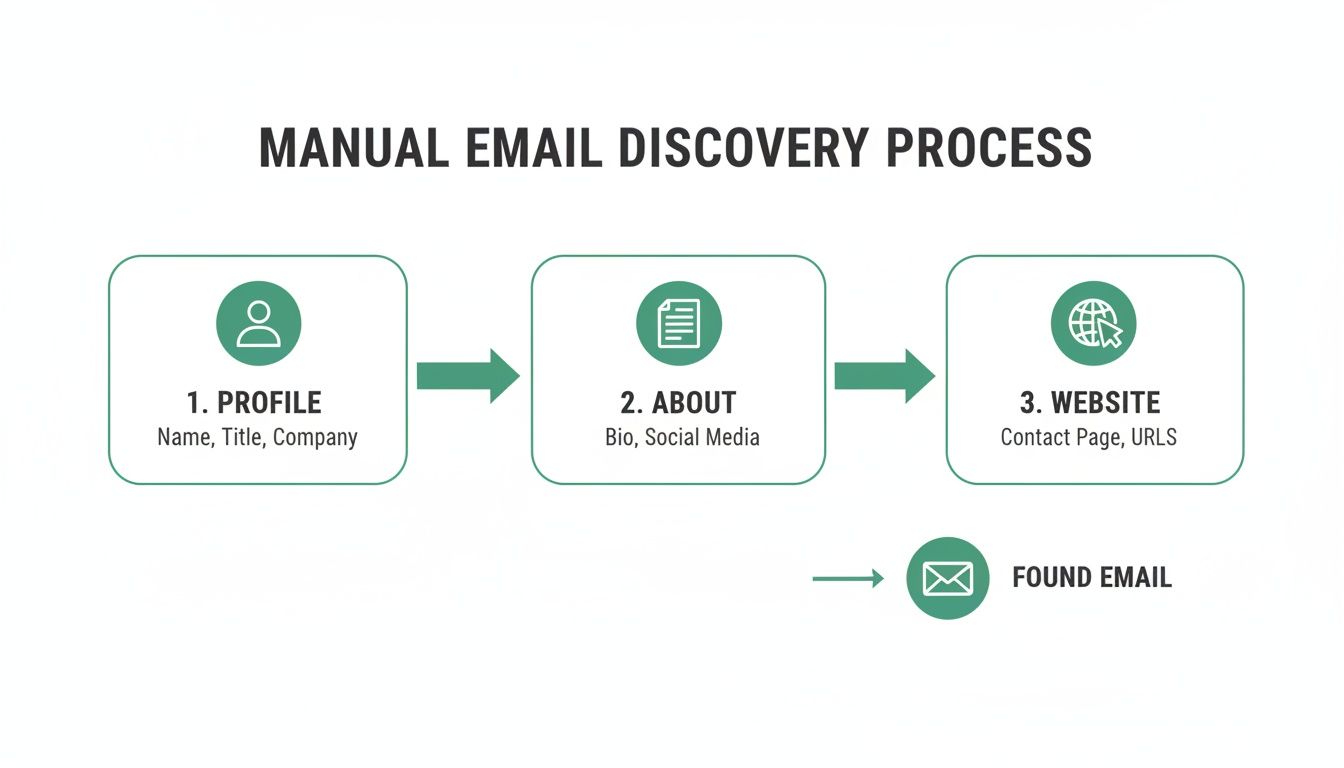
Before you jump to an automated tool, it’s worth spending a few minutes on the old-school manual methods. You’d be surprised how often these foundational techniques work, uncovering contact details that most people just skim past. It takes a little detective work, but learning these skills makes you a far more resourceful prospector.
The most obvious place to start is often the one people forget. Head over to your prospect's profile and click the "Contact Info" link right under their name and headline. If you're already a first-degree connection, their email might be sitting right there, plain as day, assuming they've made it visible.
Scour the Profile for Clues
Even if the "Contact Info" section is a dead end, the profile itself is a goldmine. Pay close attention to the About section. A lot of professionals—especially consultants, founders, and freelancers—will drop their email directly in their summary as a call to action.
Look for simple phrases like "You can reach me at…" or just the email address sitting at the end of the text. This is a pretty common move for anyone actively looking for new opportunities.
Beyond the summary, keep an eye out for other links they’ve shared:
- Personal Blog or Portfolio: If they link out to their personal site, the contact or about page is your next best bet.
- Company Website: A link to their company’s site can give you the clues needed to figure out the corporate email pattern.
- LinkedIn Cover Photo: Some people get creative and use their cover image as a digital business card, complete with contact info.
The whole point of manual searching is to follow the breadcrumbs someone has already left behind. Every little piece of information—a company name, a personal blog, a past project—is a potential key to finding their direct email.
Decode the Company Email Pattern
If the profile itself doesn't give you what you need, it's time to zoom out and look at the company level. Most organizations stick to a standard format for their email addresses, and that consistency is your best friend here.
Pop over to the company’s official website. The "Contact Us," "About Us," or "Press" pages are often where you’ll strike gold. You might find a general inbox (like info@company.com) or even the email of a specific team member, which is all you need to crack the code.
Common corporate email formats usually look something like this:
firstname.lastname@company.com(jane.doe@acmecorp.com)firstinitiallastname@company.com(jdoe@acmecorp.com)firstname@company.com(jane@acmecorp.com)firstname_lastname@company.com(jane_doe@acmecorp.com)
Once you’ve got a good idea of the pattern, you can make an educated guess for your target. For instance, if you see that John Smith's email is jsmith@acmecorp.com, you can be pretty confident that Jane Doe's is jdoe@acmecorp.com.
Mastering this manual approach gives you a real feel for the prospecting landscape. LinkedIn is a monster for lead generation, and while InMail response rates can be 300% higher than standard email, a solid cold email to a direct address is still a cornerstone of outreach. While a personalized LinkedIn connection request can hit a 20-25% acceptance rate, relying only on manual hunting is slow and you’re bound to make mistakes, which is exactly why more efficient methods exist. For more on the numbers, check out these LinkedIn outreach stats.
Using an Email Finder Tool for Instant Results
Let's be real: the manual methods have their place, but they’re slow and you often hit a dead end. When you need to build a targeted list yesterday, you need a faster, more accurate approach. This is where a good email finder tool—especially one that works as a browser extension—completely changes the game.
Imagine landing on the perfect LinkedIn profile and getting a verified professional email address with a single click. That's what these tools do. They cut out all the guesswork and hours of digital detective work, essentially turning LinkedIn into your personal, searchable contact database.
The One-Click Advantage of Browser Extensions
The single most efficient way to pull an email from a LinkedIn profile is with a dedicated browser extension. Tools like EmailScout plug right into your workflow, usually popping up on the side of a profile as you browse.
The beauty of this is how seamless it is. You're not flipping between tabs or copy-pasting names into some other app. The info you need shows up right where you are, right when you need it. For anyone in sales, marketing, or recruiting who practically lives on LinkedIn, this is a massive time-saver.
This kind of visual integration means you can qualify a prospect and grab their contact details in one fluid motion. It just makes your list-building so much faster.
How It Works in a Real-World Scenario
Let’s walk through a practical example. Say you’re an SDR who needs to build a list of 50 marketing managers in the software industry.
Doing it manually means a whole lot of steps for every single person. You’re checking their profile, looking for clues, trying to figure out the company email format, and then verifying it. It's a grind.
Now, let's replay that scenario with an email finder extension running.
You run your search on LinkedIn and start clicking into profiles. As each page loads, the extension gets to work. You click the "Find Email" button, and the tool scours its databases and runs its algorithms. Seconds later, a verified email appears, ready to go. What could have taken you 10-15 minutes per contact now takes less than 30 seconds.
The real value here isn't just finding an email; it's the opportunity cost it saves. All those hours you get back can be poured into what actually moves the needle: writing personalized outreach and building real relationships.
Advanced Features for Power Users
The best tools go way beyond just finding one email at a time. They have features built for prospecting at scale, designed to solve the common bottlenecks. Knowing what these are can help you pick from the best email finder tools out there.
Two features are absolute must-haves for anyone serious about prospecting:
- AutoSave: This is for when you're in research mode. As you browse LinkedIn profiles, the tool can automatically find and save the person's details and verified email to a list in the background. You can stay focused on finding the right people without constantly stopping to save their info.
- URL Explorer: This is a bulk-finding beast. Instead of visiting profiles one by one, you just paste a whole list of LinkedIn profile URLs into the tool. It processes the entire list at once, finding and verifying emails for everyone on it.
Putting Advanced Features into Practice
Think about a founder getting ready for a product launch. They've identified 100 key industry influencers on LinkedIn. Going through each profile manually would take days of mind-numbing work.
Instead, they can use the URL Explorer. They just need to gather the 100 profile URLs, paste them in, and let the tool do its thing. In a few minutes, they have a clean, verified email list ready for their launch announcement. A project that would have taken a week is now done in less than an hour.
Or consider a sales manager breaking into a new market. They can use the AutoSave feature while researching key decision-makers on LinkedIn. The tool just quietly builds their prospect list in the background as they work. By the time they're done with the research, a ready-made outreach list is waiting for them. No extra effort required.
Here’s a quick breakdown of how these features stack up:
| Feature | Best Use Case | Key Benefit | Time Saved (vs. Manual) |
|---|---|---|---|
| Single Lookup | Grabbing a specific contact's email right now. | Instant results on individual profiles. | High (minutes per contact) |
| AutoSave | Building a list while actively researching profiles. | Seamless, background collection of contacts. | Very High (hours per list) |
| URL Explorer | Processing a pre-existing list of LinkedIn profiles. | Bulk enrichment for maximum efficiency. | Extremely High (days per large list) |
At the end of the day, a specialized email finder is the most reliable way to get contact info from LinkedIn. Manual skills are good to have as a backup, but the speed, accuracy, and powerful features of a good extension give you a serious edge. You end up spending far less time hunting and a lot more time connecting.
Crafting Your Outreach Email After Finding the Address
Okay, you've got a verified email address. That's a huge win, but it’s only half the battle. How you actually approach someone determines whether you get a reply or just get ignored.
Let’s be honest: a generic, mass-blasted email is the fastest way to burn a good lead. You’ll completely waste all the effort you just put into finding their contact info.
The real secret to getting a response is showing you’ve done your homework. This isn't about empty flattery; it’s about proving your message is relevant. Your email needs to immediately answer their unspoken question: "Why are you emailing me, and why should I care?"

The Art of the Personalized Opening
Your first sentence is everything. Referencing their LinkedIn profile is the perfect way to prove this isn't just another automated blast.
Instead of a tired opener like, "Hope you're having a great week," get specific. Did they just share an insightful article? Did their company announce a new milestone? Mention it.
Here are a few examples of strong, personalized openers:
- "I saw your recent post on LinkedIn about scaling customer success teams and completely agree with your take on proactive onboarding."
- "Congratulations on the recent launch of [Product Name] at [Company]—the new UI looks incredibly intuitive."
- "Your comment on the future of AI in marketing really stood out to me, especially your point about data privacy."
This approach instantly gives you context and shows you’re actually paying attention.
The goal of personalization is to build a bridge from their world to yours. A quick mention of their recent activity or a shared interest makes your email feel less like a sales pitch and more like the start of a genuine conversation.
Writing Subject Lines That Earn an Open
Your subject line is the gatekeeper. It doesn't matter how brilliant your email is if it never gets opened. Generic lines like "Quick Question" or "Following Up" are dead on arrival in a crowded inbox.
A good subject line needs to be short, specific, and compelling. It should hint at the value inside without giving away the whole story. Think of it as a headline for your email.
Try one of these formulas that consistently work well:
- Reference a Connection: "Idea about [Topic from their LinkedIn post]"
- Intrigue and Relevance: "[Their Company] + [Your Company]"
- Direct and Value-Driven: "Quick thought on your [Project/Initiative]"
A subject line like "Thought on your recent article" is far more likely to get a click than "Introduction from [Your Name]." The first one is about them; the second is about you. Always make it about them.
Keeping Your Message Short and Respectful
Once they open your email, you have just a few seconds to hold their attention. Decision-makers are busy people, and nobody wants to read a wall of text. Keep your message brief, scannable, and focused on a single call to action.
A simple, effective structure looks like this:
- The Personalized Hook: Your opening line referencing their LinkedIn profile.
- The Value Proposition: One sentence explaining what you do and why it matters to them.
- The Ask: A clear, low-friction next step. Don't ask for a 30-minute call right away; instead, ask for their thoughts or if they're the right person to talk to.
Mastering this flow is a core skill. For anyone looking to dive deeper, there are some great guides on how to write cold emails that convert.
Staying Compliant and Ethical
Finally, your outreach has to be both ethical and compliant. Regulations like GDPR (in Europe) and the CAN-SPAM Act (in the U.S.) have strict rules for commercial emails. While the details vary, the main principles are the same: be transparent and be respectful.
Always be clear about who you are and why you're reaching out. Most importantly, provide a clear and easy way to opt out. For a simple one-to-one email, a line like, "If you're not the right person or not interested, just let me know" is often enough. For any scaled campaigns, a clear unsubscribe link is non-negotiable.
This isn't just about avoiding hefty fines; it's about protecting your brand's reputation and building trust from the very first touchpoint.
Why Verifying Emails Is a Non-Negotiable Step
Finding a potential email address is a great start, but it's not the finish line. Firing off your carefully crafted outreach to a dead address is more than just a waste of time—it actively harms your ability to reach anyone else.
This is why email verification isn't an optional tune-up. It's an absolutely essential step for any serious outreach campaign.
Your Sender Reputation is Everything
Think of your domain's sender reputation like a credit score for your email account. Every time you send a message that "bounces" because the address is invalid, your score takes a hit.
Email providers like Gmail and Outlook are always watching. If your bounce rate creeps too high, their algorithms start flagging you as a potential spammer. That's when things go downhill, fast.
A high bounce rate, which is usually anything over 2%, is a major red flag. Once you're on their radar, a few damaging things start to happen:
- Your emails land in spam: Even messages to valid, interested prospects get filtered into the junk folder where they’ll never be seen.
- Your domain gets blocklisted: In serious cases, ISPs can block your entire domain, making it nearly impossible for any of your emails to get through.
- Engagement tanks: When fewer emails make it to the primary inbox, your open rates, click-throughs, and replies will inevitably collapse.
This entire chain reaction starts with one simple, avoidable mistake: sending to an unverified email list. A list full of bad addresses effectively poisons your entire outreach engine from the get-go.
Your sender reputation is one of your most valuable marketing assets. Protecting it by verifying every single email isn't just a best practice; it's essential for long-term success. A clean list gives your messages the best possible chance of being read.
How Verification Actually Works
So, what’s going on behind the scenes during verification? It’s a quick but technical check to confirm an address is active and can receive mail. Modern tools like EmailScout often build this right in, but you can find standalone services to clean older lists, too.
The process usually involves a few key checks:
- Syntax Check: First, the tool makes sure the format is right (e.g.,
name@domain.com). This catches obvious typos immediately. - Domain Check: Next, it confirms the domain (
@company.com) is real and has mail servers ready to accept email. - Server Ping (SMTP Check): Finally, the verifier sends a technical "ping" to the recipient's mail server and asks if the user (
name@) actually exists. This happens without sending a real email, confirming the address is deliverable.
This quick technical handshake confirms deliverability with a high degree of certainty. Building this into your workflow transforms a list of guesses into a list of confirmed, reachable contacts.
To really get into the weeds, you can learn more about how to verify emails and why each of these steps matters. At the end of the day, a verified email is the only kind worth having.
Advanced Strategies for Hard-to-Find Contacts
Sometimes, the usual methods just don't cut it. You're going to run into prospects with common names, confusing corporate email structures, or profiles locked down tighter than Fort Knox. This is where you need to get creative.
When you hit a wall, it’s time to think beyond the profile page. A great first move is to tap into your mutual connections. Instead of a cold, out-of-the-blue ask, shoot a polite message to a shared contact. Briefly explain why you want to connect and ask if they’d be comfortable making a warm introduction. This approach almost always works better than a direct, unsolicited email.
Another solid strategy is to look beyond LinkedIn altogether. People leave digital breadcrumbs scattered all over the web.
- Conference Speaker Lists: Has your prospect ever spoken at an industry event? Conference organizers often publish speaker bios that include direct contact info.
- Company Press Releases: Dig into the "Media Contacts" section of press releases on their company’s website. You might just find a direct line to someone in their department or a related one.
- Other Social Platforms: Don't forget about personal blogs, a GitHub profile, or even a professional Twitter bio. You'd be surprised how often an email address is hiding in plain sight.
Thinking Like a Prospector
For those truly elusive contacts, you’ll need to put on your detective hat. It’s all about piecing together small clues to solve the bigger puzzle. When you're really stuck, it can be helpful to see how a professional lead prospector virtual assistant handles these challenges, as they often use next-level research techniques.
The key is persistence without being invasive. Your goal is to find publicly available information, not to dig into private details. Respecting this boundary is crucial for maintaining professional integrity.
These advanced strategies definitely take more effort, but they're invaluable for connecting with those high-value, hard-to-reach individuals. They turn prospecting from a simple lookup task into a genuine skill of strategic investigation.
Got Questions About Finding LinkedIn Emails?
Even with the best tools, a few questions always pop up. Let's clear up some of the most common ones so you can find emails with confidence.
Is It Legal to Find and Use These Emails?
This is a big one. Finding a publicly available or professionally derived email address is generally not the issue—it's how you use it that matters. Regulations like the GDPR in Europe and the CAN-SPAM Act in the U.S. set the rules for outreach.
The bottom line is to keep your communication professional and relevant. Your message should be a one-to-one note related to their professional role, not a mass-market blast. And always, always include a clear way for them to opt out.
How Accurate Are LinkedIn Email Finder Tools, Really?
Accuracy definitely varies. The good news is that reputable tools often hit a success rate of over 90%. That’s a world of difference from manual guesswork, which can saddle you with a high bounce rate and hurt your sender reputation over time.
A tool with real-time verification isn't just a nice-to-have; it's essential. An unverified email is a risk, but a verified one is a solid asset for your outreach and list-building.
Can Using These Tools Get My Account Restricted?
This is a valid concern. Well-designed browser extensions are built to be safe and don't violate LinkedIn's terms of service. They work by analyzing public data on the page you're viewing, not by automating actions on the platform itself.
Where you can get into trouble is with tools that automate a high volume of connection requests, profile views, or messages. That kind of activity looks like a bot and can absolutely get your account flagged. Stick to tools that are designed simply to find and verify contact info.
Ready to stop guessing and start connecting? EmailScout gives you instant access to verified email addresses directly from any LinkedIn profile. Try it for free and build your outreach list in minutes. Find out more at https://emailscout.io.