
You'd be surprised how easy it can be to find the right email. You can often find someone's email address for free by combining a few clever guesses with some quick social media checks and powerful Google search tricks. It’s a simple process of elimination that turns what seems like a huge task into something you can knock out in a few minutes.
Why a Direct Email Is Still Your Best Opener
In a world overflowing with social media DMs and generic contact forms, a direct email just hits different. It cuts right through the noise. Think of it as the difference between shouting into a crowded room and pulling someone aside for a one-on-one chat.
For a freelance designer, it means your pitch lands directly in the creative director's inbox, not some generic info@ address. For a researcher, it means your collaboration request actually gets seen by the right academic, not an assistant.
That direct line is your best shot at getting noticed. It skips the gatekeepers and automated filters, creating a real, personal connection from the very first hello. A well-crafted email to a specific person shows you’ve done your homework and you respect their time.
The Power of a Personal Connection
Just think about the sheer volume of digital noise we all deal with. By 2025, an estimated 4.83 billion email users will be firing off nearly 392 billion emails daily. In a sea that big, you have to stand out.
A personalized email shows your recipient you see them as a person, not just another name on a spreadsheet. That small act of personalization can be the thing that turns a cold outreach into a warm conversation. You can dig into some detailed email statistics to see just how massive this opportunity really is.
A direct email is more than just a message; it’s a strategic move. It shows you’re proactive, you understand the person's role, and it massively boosts your chances of actually getting a response.
This guide is all about real-world situations, showing you how finding that one key email can unlock new opportunities. This isn't just about collecting addresses; it’s about building genuine connections for:
- Sales and Business Development: Getting straight to the key decision-makers without playing telephone.
- Networking and Collaboration: Connecting with peers, mentors, or future partners directly.
- Job Seeking: Making sure your application lands in front of the actual hiring manager.
Ultimately, the whole point is to start a real dialogue. A direct email is still the most professional and effective way to take that first step and make your effort count.
Mastering the Art of the Educated Guess
Sometimes the simplest method is the best one. Instead of relying on complex tools, you can often find someone's email address free just by making an educated guess. This isn't a shot in the dark; it's a logical process based on how most companies structure their professional email addresses.
Most organizations stick to a predictable format for consistency, which plays right into your hands. All you need are two things: the person’s full name and their company's domain (like company.com). With that, you can start testing the most common combinations.
Identifying Common Email Patterns
The trick is to think like the IT admin who set up the company's email server. They need a scalable, consistent system. Luckily for us, that usually means combining first and last names in a handful of ways.
You'll find that most professional emails follow one of these patterns:
- First Name Initial + Last Name:
jdoe@company.com - Full First Name + Last Name Initial:
janed@company.com - First Name Only:
jane@company.com - First Name + Last Name:
janedoe@company.com - First Name . Last Name:
jane.doe@company.com
To give you a better idea of what to try first, here’s a quick reference table of common formats and how often you're likely to see them.
Common Professional Email Address Formats
| Format Type | Example Pattern | Likelihood of Use |
|---|---|---|
| First Name . Last Name | jane.doe@company.com |
Very High |
| First Initial + Last Name | jdoe@company.com |
High |
| First Name + Last Name | janedoe@company.com |
High |
| First Name Only | jane@company.com |
Medium |
| First Name + Last Initial | janed@company.com |
Medium |
Start by testing the "Very High" and "High" likelihood patterns, as they cover the vast majority of businesses.
It’s surprising how consistent these patterns are once you know what to look for. For a deeper dive, check out our complete guide on how to find company email addresses.
Verifying Your Guesses Without Sending an Email
Okay, so you have a list of potential addresses. Now what? You definitely don't want to send a real email to each one and risk a bunch of bounces, which can hurt your sender reputation.
There’s a simple trick for this using nothing more than Gmail.
Just open a "Compose" window and paste one of your guessed addresses into the "To" field. Now, hover your mouse over it without clicking. If a Google profile pops up with a picture or name, you've almost certainly found a valid, active account. This works because the address is tied to a Google Workspace or personal account.
This Gmail hover trick is your secret weapon. It’s a fast, free way to confirm an email is active without ever hitting "send." No bounces, no risk.
Getting your message into the right inbox from the get-go is critical, and the data below proves it.
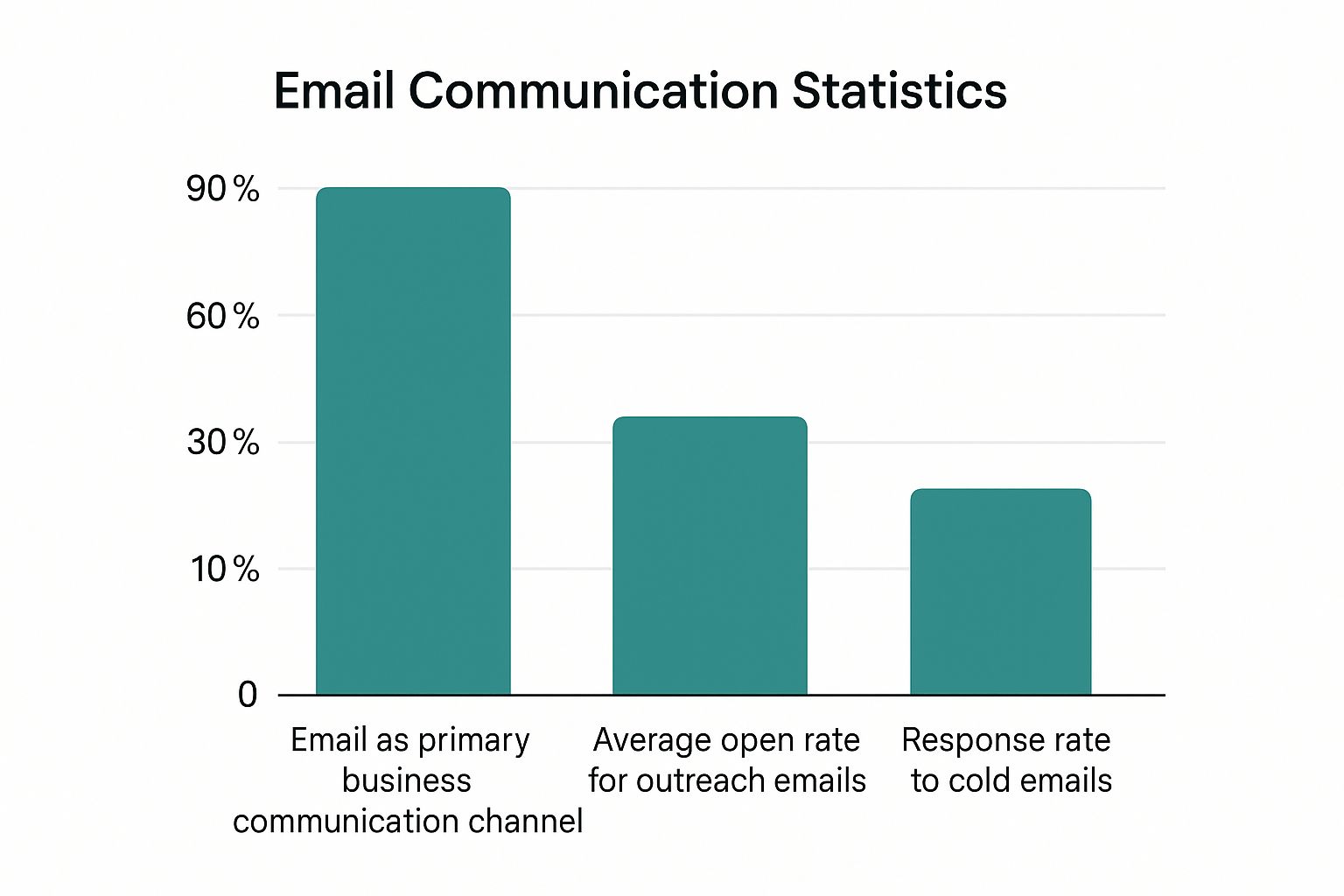
Email is still the king of business communication, but those low average response rates tell a story. They underscore just how important it is to be talking to the right person. This educated guess method is a fantastic starting point, but it does take a little patience and some trial and error to get right.
Using Social and Professional Networks
Sometimes, the best way to find someone's email address for free is to look where they’ve already shared it. Social and professional networks are often goldmines of contact info, but you need to know where to dig beyond the obvious "Contact" button.
This isn't about being a creepy online stalker; it's about smart, ethical intelligence gathering. People often share their details more freely than you'd imagine, especially when they're networking, job hunting, or looking for new projects. The trick is to stop just viewing a profile and start scanning it for clues.
Uncovering Emails on LinkedIn
As the go-to professional network, LinkedIn is naturally the first place most people look. Checking the "Contact Info" section is a good first step, but it’s often empty or just lists an old personal address. The real gems are usually hidden a little deeper.
Plenty of pros, particularly those in sales, marketing, or recruiting, stick their email right in their "About" section to make it easy for people to reach out. It’s a quick win that many people scroll right past.
But don’t stop there. Take a look at your prospect’s recent activity. Have they posted a link to their personal blog, a guest article, or a SlideShare presentation? These external links often land on pages with a direct email address. For a more detailed walkthrough, check out our guide on how to find emails on LinkedIn.
Don't just glance at a profile; analyze it. The "About" section and recent posts are often more revealing than the designated contact area. A person's activity is a trail of breadcrumbs that can lead you straight to their inbox.
Smart Searches on Twitter and Niche Platforms
Twitter (now X) can also be a surprisingly good source. Its advanced search function lets you zero in on specific tweets from a particular user. You can try searching for tweets from their handle that include words like "email," "contact," or "reach out."
A simple search string like (from:username) "email me" can quickly pull up any time they've publicly shared their address. It's a long shot, but it only takes a few seconds to check.
And don't just stick to the big-name networks. Think about where your target hangs out online professionally.
- For developers: Check their GitHub profile. Many developers put a public email in their bio or even in their project commit logs.
- For designers: Their Behance or Dribbble portfolios are prime spots. The "About" or "Contact" sections on these sites are designed to attract clients, so an email is almost always listed.
- For academics: University websites or personal academic blogs are fantastic. Faculty pages and published papers nearly always include contact info for correspondence.
This targeted approach turns a generic hunt into a precise investigation. You're simply using the right platform to find information that's already out there, saving you time and effort.
Unlock Emails with Advanced Google Searches
You’re on Google every day, but its real power is hiding just under the surface. Forget basic keyword searches for a minute. Advanced search operators can turn Google into an incredibly sharp tool to find someone's email address for free. These commands are like special filters, telling Google exactly what to hunt for and where.
This isn't some complicated coding trick. It's about using simple, copy-and-paste search strings to pull out contact details that are hiding in plain sight. Suddenly, information buried in press releases, old company staff pages, or conference speaker bios is right at your fingertips.

Crafting the Perfect Search Query
The secret is to combine a person's name and their company with a few specific operators. Your best friend here is the site: operator, which locks your search into a single website. This is huge for cutting out all the irrelevant noise from the rest of the web.
Let's imagine you need to find Jane Doe, a marketing manager at a company with the domain startupwidgets.com. A simple Google search might get you nowhere, but a targeted one can work wonders.
Here are a few powerful search strings you can try right now:
"Jane Doe" email site:startupwidgets.com"Jane Doe" contact site:startupwidgets.comsite:startupwidgets.com "Jane Doe" "@startupwidgets.com"
The quotation marks are key—they tell Google to look for the exact phrase "Jane Doe," so you don't get results for just "Jane" or "Doe." That last example is especially slick; it searches the company's website for pages that mention Jane Doe’s full name and include an email address with the company's domain.
Real-World Scenarios and Practical Tips
Let's say you're trying to track down a speaker from a recent industry conference. Their email wasn't on the event page, but you know they published a whitepaper a while back.
You could try a search like this: "Speaker Name" filetype:pdf email
This query ignores normal web pages and hunts specifically for PDF documents containing the speaker’s name and the word "email." You'd be surprised how often academics, researchers, and experts include their contact info directly in their published work.
The
filetype:operator is an absolute game-changer. It's perfect for digging up emails in public documents like annual reports, research papers, or even old résumés that people forgot were public.
And don't forget to get creative. If the person has a common name, add their job title or a city to narrow things down. Something like “John Smith” CEO “New York” contact can make all the difference. Small tweaks can turn a frustrating dead-end search into a quick win. It takes a little patience and detective work, but this manual approach can absolutely deliver.
Time to Call in the Tech: Using Free Email Finder Tools
When your educated guesses and manual searches just aren't cutting it, it’s time to bring in the technology. The absolute best way to find someone's email address for free without all the manual grunt work is to use a specialized email finder tool. These platforms are built to automate the whole discovery process, saving you a ton of time and, more importantly, dramatically lowering the odds of a dreaded bounce-back.
So how do they work? Think of them as super-smart digital detectives. They cross-reference massive public databases, analyze common corporate email patterns, and often run real-time checks to see if an address is active. Instead of you sitting there trying out jane.doe@, jdoe@, and jane@ one by one, a good tool does it all in a blink.
The best part? Many of the top services, including our own EmailScout, run on a "freemium" model. This means you get a certain number of free searches or "credits" to use every month, no credit card required. For a lot of freelancers, people on the job hunt, or small business owners, those free plans are often more than enough to get the job done.
The process is usually dead simple: pop in a person's name, their company's website, and let the tool work its magic. It's a game-changer for anyone trying to build a targeted list without wasting hours.
How These Tools Get It Right
The tech behind these tools is getting smarter all the time. With the global number of email users expected to hit 4.8 billion by 2025, the need for fast and accurate discovery tools is pushing the market toward a projected value of $5.6 billion by 2032. These tools intelligently scan sources like LinkedIn and company websites while simultaneously checking if an address can actually receive mail.
This built-in verification is a massive advantage. It helps protect your sender reputation by keeping your bounce rate low, ensuring your messages actually make it to the inbox.
The real power of a free email finder isn't just about speed—it's about confidence. Knowing an email is verified before you hit "send" turns your outreach from a shot in the dark into a targeted strategy.
Know the Limits of a Free Plan
While free plans are fantastic, you have to be realistic. You're almost always going to be working with a monthly credit cap. Once you hit your limit, you either have to wait for the first of next month or think about upgrading.
To squeeze every bit of value out of your free credits, here’s what I recommend:
- Prioritize Your Targets: Don't burn through credits on low-priority contacts. Save them for the key decision-makers who can actually make a difference for you.
- Combine Your Methods: Try the manual guessing and social media tricks first. Only fire up a tool when you're truly stuck or need to confirm a really important address.
- Try Out Different Tools: Lots of services offer free plans. You can check out our breakdown of the best free email finder tools to see which one feels right for your workflow.
If you're strategic about it, you can build a seriously effective outreach list without ever opening your wallet.
Navigating Hurdles and Ethical Outreach
So you’ve found an email. Great! But hold on—that’s just the first step, not the finish line.
When you try to find someone's email address free, you’ll quickly slam into a few real-world roadblocks. I'm talking about outdated info, tricky "catch-all" addresses designed to swat your messages away, and disposable emails that are here today, gone tomorrow. Getting past these is what separates a successful outreach from a failed one.
The digital world is messy. Contact information decays faster than you'd think. People switch jobs, companies rebrand, and email servers get shuffled around. An address that was gold last year might be a hard bounce today, which hurts your sender reputation and wastes all your hard work.
The Challenge of Data Decay
Keeping email data accurate is a constant battle. It’s a bigger problem than most people realize—some reports show that overall email validity rates dropped to as low as 62% in 2024.
Why? A big reason is that at least 28% of email lists go stale every single year thanks to invalid addresses and those pesky catch-all inboxes. If you want to dive deeper, you can explore more data on email list decay to see just how quickly things change.
This constant decay is exactly why just finding an address isn't enough. You need to be confident it’s still active and actually being read.
Just because you found an email doesn’t mean it’s the right email. Always prioritize verified, up-to-date information to ensure your outreach efforts aren’t wasted on dead ends.
The Golden Rule of Ethical Outreach
Beyond all the technical stuff, there’s something way more important: ethics. Just because you can find an email doesn’t give you a free pass to spam it.
Responsible outreach is all about respect, relevance, and consent. Let's be honest, unsolicited, generic messages aren't just ineffective; they're spam. Plain and simple.
To make sure your message is welcomed, not just immediately deleted, stick to these core principles:
- Be Relevant: Personalize your message. It’s not that hard. Show you’ve done a little homework and understand who they are and why your message is genuinely valuable to them.
- Be Respectful: Keep it short, sweet, and professional. Never, ever use a deceptive subject line or misleading info.
- Be Compliant: This is non-negotiable. Always follow regulations like GDPR and CAN-SPAM. That means including a clear and easy way for people to opt out of future emails.
The goal here is to start a real conversation, not just shout into the void. When you focus on quality and ethics, you turn a cold email into a potential relationship. That’s how you make sure all this work actually pays off.
Frequently Asked Questions
Even with the best tools and techniques, a few questions always pop up. Let's tackle some of the most common ones you'll run into when you find someone's email address for free.
Is Finding Someone's Email Legal?
In short, yes. Finding publicly available email addresses is completely above board, as long as you use the information responsibly.
The idea is to gather intelligence that people have already shared on a website, social profile, or another public document. It’s ethical detective work.
Where you have to be careful is in how you use that email. You're on the hook for complying with anti-spam laws like CAN-SPAM in the US and GDPR in Europe. That means your outreach needs to be relevant, honest, and always give them an easy way to opt out.
How Accurate Are Free Methods?
Honestly, it's a mixed bag. The accuracy of free methods can really vary.
When you're making educated guesses about email patterns, it’s a pure numbers game—you're bound to get some bounces if you don't verify the addresses. Social media can be just as tricky, often showing an old personal email instead of a current work one.
Your best bet for accuracy is using an email finder tool that includes a verification step. This process checks if an email address is active and can receive mail, significantly reducing your bounce rate and ensuring your message actually gets delivered.
Simply put, a tool with built-in verification is the most reliable path to quality data.
What Should I Do if an Email Bounces?
First off, don't sweat it. A bounced email isn’t the end of the road.
Before you do anything else, just double-check the address for any obvious typos. You'd be surprised how often a simple mistake is the culprit.
If it still bounces, it's time to circle back to the other methods. Try a different common email pattern, or head back to their LinkedIn profile to see if you missed a clue in their posts or bio. Sometimes, a quick advanced Google search can turn up an alternate address you didn't see the first time around. Persistence is key, just don't cross the line into being a pest.
Ready to stop guessing and start connecting with verified emails in seconds? Try EmailScout for free and discover how easy it is to build your outreach list. Get started today at https://emailscout.io.