Ever felt like you've hit a wall trying to find someone's email on Facebook for a professional opportunity? You're definitely not alone. While Facebook is great for connecting with friends, it's not exactly built for professional outreach, which is why finding a simple email address can feel like a treasure hunt.
The good news is, there are some perfectly legitimate and respectful ways to track down an email for networking or a potential collaboration.
Why Finding Emails on Facebook Is So Tough
Let's be real: Facebook is designed to keep personal information, well, personal. The platform’s entire structure is built around connecting with friends and family, not broadcasting your contact info to the world. This is the main reason why a simple email search often comes up empty.
Facebook’s privacy settings are robust for a reason. Users have granular control over who sees their details, and many people lock down their contact information to "Friends only" or even "Only me." This makes it completely invisible to the public, which is a stark contrast to a platform like LinkedIn, where sharing professional contact info is the norm.
On top of that, Facebook has cracked down on data scraping. They've put measures in place to stop third-party apps and bots from harvesting user information. This means that even if an email is technically public, automated tools will probably miss it.
Success usually comes down to a mix of smart, ethical tactics:
Manual Sleuthing: Carefully combing through the parts of a profile a user has intentionally made public.
Ethical Research: Using clues from their profile to find information that’s publicly available elsewhere online.
Respectful Outreach: Remembering you're on a personal platform and approaching any contact with professionalism.
The goal here isn't to sneak past privacy walls. It's about finding information that's already out there, either directly on Facebook or through clues left in a user's profile. This guide is all about ethical methods that respect people's privacy while helping you make those valuable connections.
Start with Facebook's Own Profile Features
Before you fire up any fancy tools or start Googling, the most obvious place to check is right on the person's Facebook profile. It's almost funny how often people overlook this. You'd be surprised how many times this simple, direct approach gets you what you need, especially if you're looking for someone who uses their profile for professional networking.
A lot of people—think freelancers, consultants, and small business owners—actually want you to find their email. They make their contact info public for a reason. This method is also the most ethical starting point because you’re only looking at information they’ve deliberately chosen to share.
Where to Look on the Profile
So, where is this info hiding? It’s tucked away in the "About" section.
Just head to their main profile page and click the "About" tab. On the next screen, you’ll see a menu on the left; look for the "Contact and Basic Info" section. If they've listed an email, phone number, or personal website, this is where it will be.
Key Takeaway: Whether you see anything here is completely up to the user's privacy settings. If they’ve set their email to "Public" or "Friends," you might be in luck. If it’s set to "Only Me," you won’t see a thing.
What About the Account Recovery Feature?
You might have heard about using Facebook's 'Find Your Account' feature. Let's be crystal clear: this tool is designed for one thing only—helping you get back into your own locked account.
It’s a legitimate process where you can enter your name or phone number if you’ve forgotten the email associated with your profile. You can learn more about how to recover your Facebook account directly from them.
Trying to use this feature to snoop on someone else's account details is a major no-go. It's a direct violation of Facebook's terms of service and a serious privacy breach. Always stick to the ethical high ground and start with what people share openly.
Using Professional Tools for Email Discovery
When a Facebook profile is locked down tight and the "About" section is a dead end, it's time to work smarter, not harder. This is exactly where professional email finder tools come into the picture, especially if you're in sales, marketing, or recruiting.
These aren't hacking tools. Think of them more like powerful search engines that scan publicly available data across the web. They connect the dots you might miss during a manual search, cross-referencing information to find or predict a person's likely email address.
How Email Finders Work
Most of these tools work as simple browser extensions. Once you install one, a little button appears in your browser. When you're on a social media profile—like on Facebook or LinkedIn—you just click it. The tool then gets to work, analyzing public data points like the person’s name and company to generate potential email addresses.
Here’s a quick look at how a tool like EmailScout presents this info right inside your browser.
As you can see, the interface quickly pulls potential contact details, which can be a massive time-saver. If you're trying to figure out what's out there, comparing the best free email finder tools is a great way to see which service fits your specific needs.
The process is usually pretty straightforward:
Install the Extension: Grab a reputable tool from the Chrome Web Store or another official marketplace and add it to your browser.
Navigate to the Profile: Head over to the Facebook profile of the person you're trying to reach.
Activate the Tool: Click the extension’s icon. It will kick off its search based on the public information on the page.
Review the Results: The tool will then show you any verified or predicted email addresses it found, often with a confidence score to tell you how likely it is to be correct.
Important Consideration: The accuracy of these tools can definitely vary. They work best when the person has a clear professional footprint online, like a link to their company or a detailed work history on another platform.
Choosing a Reputable Service
Not all email finders are created equal. It's really important to pick one that respects privacy laws and only uses ethically sourced, public data. A trustworthy tool will be transparent about its methods and comply with regulations like GDPR.
Taking this approach ensures your outreach efforts start on the right foot—both effectively and ethically. When you need to find an email from Facebook for legitimate professional reasons, a well-regarded tool can be a total game-changer.
Connect the Dots Beyond Facebook
Sometimes, a Facebook profile with no public email feels like a dead end. It’s not.
Think of it as the starting point. The best clues for finding someone's email often aren't on Facebook itself, but the profile gives you the breadcrumbs you need to look elsewhere. The trick is to stop trying to find the email on the platform and start using the profile to find it off the platform.
A person’s profile is full of potential leads. Look for a personal blog linked in their bio, the name of their current employer, or even a unique username. A lot of people use the same handle across different social media sites, so a Facebook username can be the key to unlocking their professional presence elsewhere.
As you can see, different tools have different strengths. Some are incredibly fast, while others dig deeper for a higher success rate. Your choice really depends on whether you value speed or accuracy more for a particular search.
From Social Clues to Professional Contact
The whole point is to bridge the gap between their social persona and their professional one, where contact info is usually much easier to find. For example, if you see they work at "Innovate Inc." and have a fairly unique name, your next move shouldn't be to check Instagram—it should be to head over to a professional network.
LinkedIn is the obvious next stop. It’s built for business, so people are far more likely to have their contact details available. Once you have a name and company from their Facebook page, you can almost always find their professional profile in seconds. We actually have a whole guide on how to find emails on LinkedIn that breaks down that exact process.
This is a good time to consider why you're looking for an email in the first place and where you're most likely to find it.
Email Visibility Across Different Platforms
Platform
Likelihood of Public Email
Primary Use Case for Contact
LinkedIn
High
Professional networking, B2B sales, recruitment.
Personal Blog/Website
High
Direct outreach, collaboration inquiries, media requests.
Twitter (X)
Medium
Public conversations, journalist/creator outreach.
Facebook
Low
Personal connections, community groups (not direct contact).
Instagram
Very Low
Primarily for DMs to creators/influencers.
As the table shows, trying to force a professional connection on a personal platform like Facebook is often a waste of time. The information is there to lead you to the right place.
Key Insight: Don't treat each social media platform as an isolated island. Information from one can be the missing piece of the puzzle on another. A simple company name found on Facebook is often all you need to find a professional email on a different network.
This little bit of detective work is way more effective than just randomly searching. You're following a logical trail, turning a casual social hint into a verified, professional way to get in touch.
Finding someone's email is just the first domino. How you choose to reach out is what really defines your professional reputation.
Ultimately, your goal is to be a welcome connection, not an unwanted interruption. The way you use that contact information matters far more than how you got it.
Your first message needs to provide value and context right away. Ditch the generic templates. Personalize your email by mentioning a shared interest, a piece of their work you admired, or a professional achievement you noticed. Get straight to the point: explain why you're reaching out and what you can offer them.
Respecting Privacy and Building Trust
Look, privacy is a huge deal. With the constant threat of account hacks and data breaches, people are more guarded with their information than ever.
Think about it: back in 2021, one incident involved a web scraper trying to sell off the personal data of nearly 1.5 billion Facebook users. That’s the scale of the threats people are up against. You can get a sense of the history of social media security incidents on StationX.net.
This climate of caution means your outreach has to be respectful.
Your first message sets the entire tone. Trust begins with a respectful, transparent, and value-driven interaction.
Always stick to the principles in privacy laws like GDPR and CAN-SPAM. This isn't optional. A big part of that is giving people a clear and easy way to opt out of future messages.
Before you even hit send, it's also a smart move to make sure the email is even deliverable. You can learn more about how to validate an email address to protect your sender reputation and boost your campaign's success rate.
Got Questions? We've Got Answers
Digging for emails on Facebook can feel like a gray area. Let's clear up some of the most common questions that pop up so you can move forward with confidence.
Is This Legal and Ethical?
Yes, finding and using a publicly listed email from a Facebook profile is perfectly legal. The real question is how you plan to use it. If you're reaching out for a legitimate business inquiry or a professional networking opportunity, you're generally in the clear. Just make sure you're respecting anti-spam laws like CAN-SPAM.
Where things get murky is the intent. Using that email to spam, harass, or for any other shady reason is illegal and, frankly, unethical. Always operate with respect for the person's privacy.
The rule of thumb is simple: stick to publicly shared information and be transparent. If you feel like you're having to sneak around to find an email, you're probably crossing an ethical line.
How Reliable Are Third-Party Tools?
Reputable email finders can be surprisingly accurate, but they aren't magic. These tools work by piecing together publicly available data and running it through algorithms to predict the most likely email address patterns.
A good tool will even give you a confidence score to show how certain it is. Still, you should always expect a small percentage of emails to bounce or be out of date. It's just part of the game. Always try to verify an email before sending anything critical.
What if I've Tried Everything and Still Come Up Empty?
If you've hit a wall after trying all the methods, it's a strong signal that the person has made a conscious choice to keep their email private.
At this point, the best move is to respect that. Don't keep digging. Instead, switch gears and try another way to connect. A personalized message on LinkedIn or a thoughtful comment on their public content can often be far more effective than an email they never wanted you to find.
Ready to streamline your outreach? EmailScout helps you find verified emails from social profiles in a single click, saving you time and ensuring your message reaches the right person. Try it for free at https://emailscout.io.
Let's be honest: generic cold outreach is a complete waste of time. If you really want to connect with someone, you need to find their email directly from their LinkedIn profile. This one simple move turns a shot-in-the-dark message into a targeted, personal conversation. It's how you get out of the spam folder and start building actual professional relationships.
Why Finding Emails on LinkedIn Is a Game Changer
LinkedIn is so much more than a digital resume cabinet. It's a living, breathing ecosystem of professional activity, making it an absolute goldmine for smart prospecting.
The sheer scale of the platform is staggering. In 2025, LinkedIn is home to over 1.2 billion registered members and saw 1.77 billion website visits in a single month. This isn't just about big numbers; it shows how deeply engaged its user base is. As Sprout Social's LinkedIn statistics confirm, it's the undisputed hub for professional networking.
This constant activity is the perfect backdrop for your outreach. When you find an email through LinkedIn, you're not just grabbing a contact detail—you're getting critical context.
The Power of Contextual Outreach
Imagine sending an email where you can reference a recent article they shared, a project they just completed, or a connection you both have in common. All of a sudden, your message isn't "cold" anymore. It's relevant, timely, and personal.
This kind of contextual approach has a ridiculously higher chance of getting a response compared to a generic template blasted out to a faceless list. The difference is that your personalization is grounded in real, professional information you found right on their profile.
The real value isn't just the email address itself, but the context you gain from their profile. This context is what turns a cold email into a warm conversation starter.
Building Relationships Beyond the Platform
While LinkedIn messages have their place, they can feel a bit transactional and easily get buried in a sea of notifications. Email is a more direct and professional channel for a real conversation.
It gives you the space for a more detailed message and quietly signals that you've done your homework. It’s a subtle but powerful way to show you’re genuinely interested.
Here’s exactly why this strategy works so well:
Hyper-Targeted Communication: You can tailor your message based on their specific role, accomplishments, and professional interests you see on their profile.
Increased Credibility: Referencing their LinkedIn activity shows you’ve invested time in understanding who they are, which builds immediate trust.
Ethical Foundation: This is about quality, not quantity. You're not spamming; you're starting meaningful conversations with the right people for the right reasons.
Ultimately, using LinkedIn to find emails is a strategic shift. It's about building a foundation for real professional relationships, one thoughtful, context-aware email at a time.
Your Pre-Search Checklist for Success
Before you jump in and start hunting for emails, taking a few minutes to prepare can make a massive difference in your results. I’ve seen it time and again: diving into LinkedIn without a clear plan is like sailing without a map. You might find something, but it's rarely what you were actually looking for.
The most effective outreach always starts with knowing exactly who you're trying to reach. A little bit of prep work here will save you hours of wasted effort and lead to much stronger connections.
Define Your Ideal Customer Profile
First things first, you need to lock down your Ideal Customer Profile (ICP). This is way more than just a job title. It's about getting into the nitty-gritty of who gets the most value from what you offer. Without a clear ICP, you’ll burn through credits and time chasing leads who are a poor fit from the start.
Think about details like:
Industry: Which specific sectors are crying out for your solution?
Company Size: Are you targeting scrappy startups with 10 employees or enterprise giants with 10,000?
Job Title & Seniority: Who's the real decision-maker? A VP of Marketing, a CTO, or a hands-on project manager?
Geography: Is your focus local, national, or global?
Nailing your ICP makes every search sharp and purposeful. It keeps you from getting sidetracked by profiles that seem interesting but don't actually move the needle for your business goals. For those aiming to build large, targeted lists, our guide on how to scrape thousands of LinkedIn contacts from Google search pairs perfectly with a well-defined ICP.
Polish Your Own LinkedIn Profile
Think about it: what’s the first thing someone does when they get a cold email from a stranger? They look you up. A half-baked or unprofessional LinkedIn profile can sink your credibility before they even think about hitting "reply."
Your LinkedIn profile is your digital first impression. Make sure it represents you as a credible, professional, and trustworthy contact. A strong profile supports your outreach efforts and encourages replies.
Give your own profile a quick audit. Does it have these essentials?
Professional Headshot: A clear, friendly photo is non-negotiable. No exceptions.
Compelling Headline: Don't just list your job title. Explain the value you bring to the table.
Complete "About" Section: This is your chance to tell a story. Highlight your expertise and how you solve problems for people.
Get Your Toolkit Ready
Alright, last step before the fun begins. Let's get your primary tool installed and ready to go. The EmailScout Chrome extension is the engine that will power your search, so you'll want it locked and loaded. The good news is it takes less than a minute.
Just head over to the Chrome Web Store, search for EmailScout, and click "Add to Chrome." Once it's installed, I highly recommend pinning the extension to your browser's toolbar for easy access. That one simple click turns your browser into a serious prospecting machine, ready to find an email from any LinkedIn profile you land on.
Using EmailScout to Find Emails on LinkedIn
Alright, you've done the prep work. Now it’s time to put the theory into practice and see just how easy it is to pull an email address right from a LinkedIn profile using a tool built for the job.
We'll walk through the entire process, starting with snagging a single email and then scaling up to build entire prospect lists without breaking a sweat.
What I love about using a browser extension like EmailScout is how it slips right into my existing workflow. I don't have to jump over to another tab or manually copy-paste names into a different tool. The contact info I need pops up exactly where I need it, right when I need it.
Finding an Email on a Single Profile
Let's kick things off with a classic scenario. You’ve found a key decision-maker you need to talk to—let's say it's the VP of Marketing at a company on your target list. You land on their LinkedIn profile, and your mission is to get their direct professional email to start a real conversation.
Once EmailScout is installed, this part is almost laughably simple. A small EmailScout button appears directly on their profile page. All it takes is one click.
The extension immediately gets to work, checking its data sources to find and verify the correct email. In just a few seconds, a verified email appears, ready for you to copy or save.
Here’s exactly what that looks like in action:
As you can see, the tool just becomes part of the LinkedIn interface. It shows you the verified email with a single click, completely killing the guesswork and tedious manual searches.
This one-click process completely changes the game for prospecting speed. What could have easily eaten up several minutes of searching and guessing email patterns now takes less than five seconds. That means you get to spend your time where it counts: writing a killer outreach message.
Scaling Up with Bulk Email Finding
Finding one email is great, but what happens when you need to build a list of 50 or 100 prospects? Clicking into each profile one-by-one would be a nightmare. This is where the bulk-finding feature, used directly on a LinkedIn search results page, becomes an absolute game-changer.
Imagine you’ve just used LinkedIn’s search filters to build a perfect, hyper-targeted list of leads. Maybe you searched for "Software Engineers" in "Austin, Texas" working at companies with 50-200 employees. Instead of opening every single profile, EmailScout lets you extract the emails from the entire search results page in one go.
The ability to find emails in bulk directly from a search page is what separates casual prospecting from scalable lead generation. It allows you to build targeted lists in minutes, not hours.
To get this done, you just run your search on LinkedIn and then click the EmailScout extension icon. It scans all the visible profiles on that page, finding and verifying their emails simultaneously. I've found this feature to be incredibly powerful for:
Sales Teams: Quickly building a pipeline of qualified leads for a new campaign.
Marketers: Creating a custom audience for a targeted webinar or content promotion.
Recruiters: Sourcing a whole slate of potential candidates for a specific role.
The whole process is built for efficiency. While the tool does its thing in the background, you can keep refining your search or start prepping your outreach sequence. Once it’s done, you have a clean, ready-to-use list of verified emails. This is how you find email addresses on LinkedIn at scale and turn a simple search into a powerful lead-gen asset.
Comparing Manual Methods to Automated Tools
So, when it comes to grabbing an email from a LinkedIn profile, you really have two ways to go about it. You can either put on your detective hat and do the legwork yourself, or you can let a specialized tool handle the heavy lifting. Both can get you an email address, but the time, effort, and quality of what you find are worlds apart.
The Old-School Manual Hunt
Let's start with the classic, hands-on approach. This usually means clicking into someone's profile, heading straight for the "Contact Info" section, and crossing your fingers. More often than not, it's empty.
When that fails, you're left playing the guessing game. You start testing common email patterns like first.last@company.com or maybe f.last@company.com. While this method costs nothing but your time, it's a real shot in the dark. It’s a low-odds gamble that gets incredibly frustrating, especially with bigger companies that have unpredictable email formats.
The Speed and Scale of Automation
This is where automated tools like EmailScout completely change the game. Instead of a manual treasure hunt that might lead nowhere, you get a direct answer in a single click. These tools tap into massive databases and use smart algorithms to pinpoint the correct professional email address in just a few seconds.
The biggest win here is scale. Finding ten emails manually could easily eat up an hour of your day. With an automated tool, you could pull a hundred verified emails in a fraction of that time, right from a LinkedIn search results page.
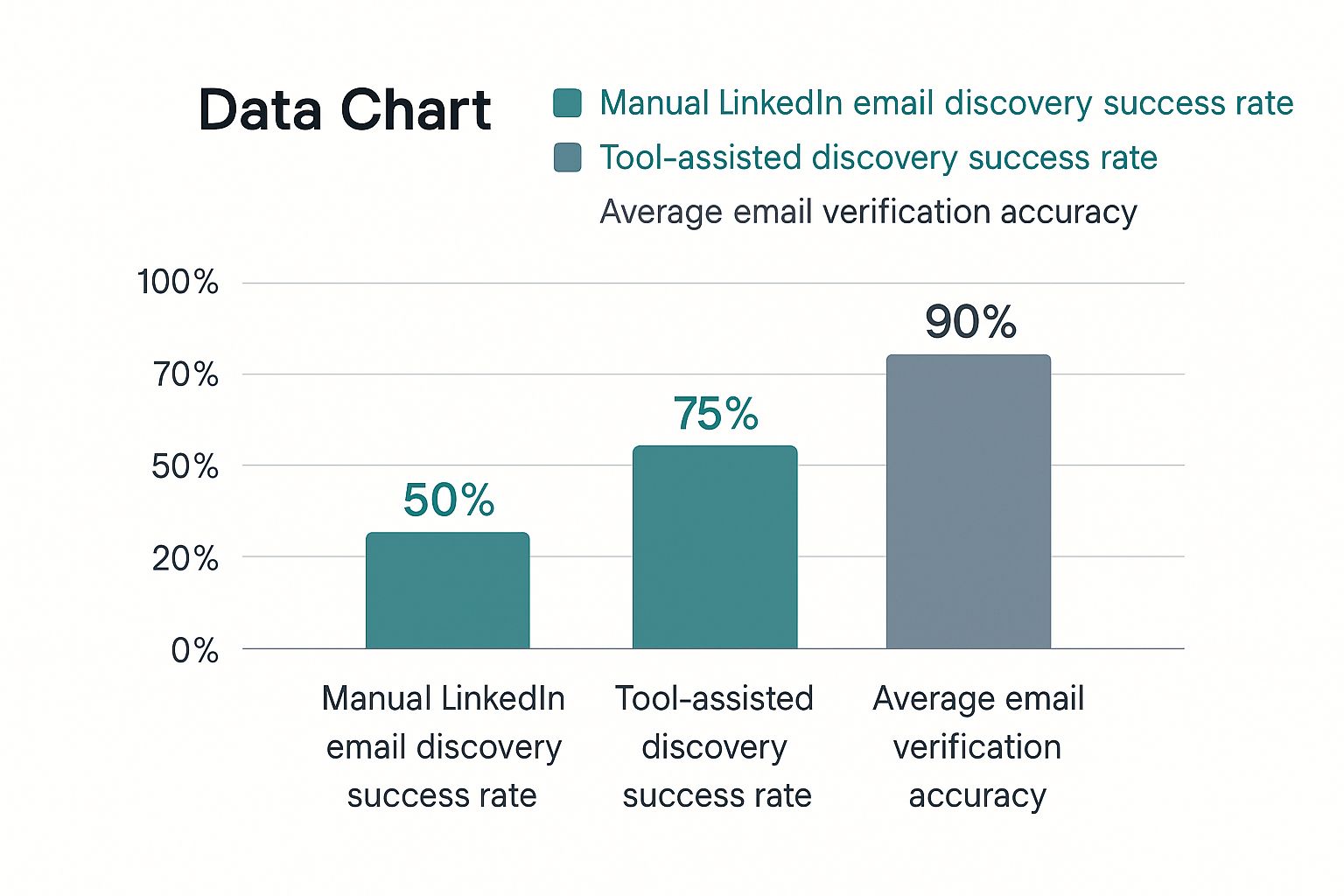
This infographic lays out the performance gap pretty clearly.
The numbers don't lie. Automation gives you a massive edge, not just in finding an email but in knowing it's actually accurate—which is everything for protecting your sender reputation.
Why Accuracy is Non-Negotiable
This is where the two methods really diverge. A manually guessed email is exactly that: a guess. Sending emails to bad addresses racks up your bounce rate, which is a huge red flag for email providers. Do it too often, and your domain's reputation gets torched, landing your future emails in the spam folder.
Good automated tools, on the other hand, almost always include a verification step. They don't just find a possible email; they confirm it's active and ready to receive messages. This isn't a small detail—it's a critical distinction.
A quick comparison makes the choice pretty clear.
Email Finding Methods: Manual vs. Automated
Factor
Manual Methods
Automated Tool (EmailScout)
Speed
Slow and tedious; minutes per contact
Nearly instant; seconds per contact
Accuracy
Low; based on guesswork and patterns
High; uses verification to confirm deliverability
Scalability
Very limited; not practical for large lists
Excellent; can find hundreds of emails quickly
Effort
High; requires focused, repetitive work
Minimal; often just a single click
Bounce Rate
High risk of bounces, damaging sender score
Low risk of bounces, protecting sender score
Cost
Free (in terms of money, not time)
Typically requires a subscription, but with high ROI
Ultimately, using a tool like EmailScout isn't just about saving time; it's about protecting your outreach efforts from the damage that bad data can cause.
For a single, must-have contact, a manual search might be worth a shot. But if you're serious about building a sales pipeline or running any kind of outreach at scale, an automated tool is essential. If you’re looking at your options, our breakdown of the best free email finder tools is a great place to start. The right tool turns a time-wasting chore into a real strategic advantage.
Ethical Outreach and Best Practices
Okay, so you've got the email address. That's the easy part. The real work begins now, and how you use that contact information is what separates a genuine professional from a run-of-the-mill spammer.
Getting someone's email from their LinkedIn profile is a powerful tool, but it comes with responsibility. Your entire outreach strategy has to be built on a solid foundation of respect, genuine value, and—this is a big one—compliance.
That means you have to respect privacy and follow the rules of the road, like GDPR and CAN-SPAM. Think of these less as legal hoops to jump through and more as a playbook for building trust. The core principle is simple: don't ever add someone to a marketing list without their explicit permission.
Crafting Your First Message
That first email is your one and only shot to make a good impression. If you send a generic, copy-pasted message, you’re practically guaranteeing a one-way trip to their trash folder. Your goal is to show you've actually done your homework.
Here are a few things that are absolutely non-negotiable:
Get Personal (The Right Way): Reference something specific, like an article they just published, a recent promotion you saw, or a connection you have in common. This shows you see them as a person, not just another name on a list.
Offer Clear Value: Don't beat around the bush. Tell them what's in it for them, right away. How can you solve a problem they have or help them hit a goal?
Keep It Short and Sweet: Nobody has time for a novel. Get straight to the point in a clear, concise, and professional way.
When you do this, your message stops being an annoying interruption and starts feeling like a welcome opportunity. It's about starting a real conversation, not just firing off a sales pitch.
Navigating Data Privacy and Reputation
One of the biggest hurdles in finding emails from LinkedIn is the massive gap between the number of users on the platform and how few of them make their contact info public. In places with strict data protection laws, getting too aggressive with your tactics can seriously damage your reputation. Ethical networking isn't just nice—it's critical for long-term success.
Protecting your sender reputation is just as crucial as finding the email itself. High bounce rates from unverified addresses can get your domain flagged as spam, making all future outreach efforts invisible.
This is exactly why you must verify every single email before you hit send. A tool that automatically confirms an address is deliverable is your best friend here. It protects your reputation and makes sure your carefully crafted message actually lands in their inbox.
For a deeper dive, check out our guide on how to validate an email address. At the end of the day, building trust and protecting your reputation isn't just good ethics—it’s the secret to getting better response rates and building relationships that actually mean something.
Answering Your Top Questions About Finding Emails on LinkedIn
Even with a great tool in your corner, you've probably got a few questions. That's a good thing. Let's walk through the most common ones people ask when they start hunting for emails on LinkedIn, so you can move forward feeling completely confident.
Honestly, knowing the rules of the road is just as important as finding the email itself. Getting these details straight from the beginning ensures your outreach is both effective and professional.
Is It Actually Legal to Use Emails I Find on LinkedIn?
This is the big one, and the short answer is yes, as long as you're smart about it. Finding a business email address that’s publicly available isn’t the issue. Where people get into trouble is how they use it.
Your responsibilities kick in the moment you hit send. You have to comply with regulations like GDPR and CAN-SPAM. This means your outreach must be targeted, professional, and relevant to the person you're contacting. Most importantly, you always have to give them a crystal-clear way to opt out. Never, ever add someone to a marketing newsletter without their direct permission.
The legality of using a found email really comes down to ethical outreach. Your goal should be to start a one-on-one professional conversation, not to dump someone into a mass-marketing funnel.
How Accurate Are Tools Like EmailScout, Really?
Accuracy is everything. Firing off emails to bad addresses racks up your bounce rate, and that’s a fast way to wreck your domain's sending reputation. Before you know it, all your messages are landing in the spam folder.
Email finders definitely vary in quality, but the top-tier solutions like EmailScout live and die by their accuracy. They don't just take a wild guess based on name patterns. Instead, they cross-reference a ton of different data sources and run real-time verification checks to make sure an email is active before they give it to you. While no tool on earth can promise 100% accuracy on every single search, a quality tool gives you a success rate that blows manual guesswork out of the water and keeps your sender score safe.
What if I Just Can't Find an Email for Someone?
It's going to happen. Sometimes an email just isn't out there to be found. But when you hit a dead end, don't just throw in the towel. You've got a few other solid plays you can run.
Engage directly on LinkedIn. Send a personalized connection request. If they accept, follow up with a genuine, non-salesy message to build a little rapport before you suggest taking the chat over to email.
Look for a colleague. See if you can find the email for someone else in their department. A polite note asking to be pointed in the right direction often works wonders.
Use your mutual connections. This is the gold standard. If you know someone in common, ask for a warm introduction. It’s hands-down the most powerful way to get a response.
Ready to stop guessing and start making real connections? EmailScout lets you find verified email addresses directly from any LinkedIn profile in just one click. Try EmailScout for free today and see what a difference it makes.
Ever feel like your sales team is spinning its wheels? It’s a common frustration. But the problem usually isn't a lack of effort—it's a lack of focus.
When your reps are busy chasing down every single lead that comes in, they’re not really selling. They’re just staying busy. Chasing unqualified prospects wastes an incredible amount of time, tanks team morale, and throws your sales forecasts completely out of whack.
Let's fix that. We'll walk through how to qualify sales leads by defining exactly who you want to talk to, setting up a smart scoring system, and using proven frameworks to guide your sales conversations.
Why Qualifying Sales Leads Is a Non-Negotiable
Treating every inbound inquiry or contact form submission as a hot lead feels productive on the surface. In reality, it’s a fast track to burnout and missed quotas.
When sales reps spend their days calling prospects who have no budget, no authority to make a decision, or no genuine need for your solution, they aren’t closing deals. This inefficiency hits your bottom line hard, driving up what you spend to get each new customer. If you’re not sure how those costs add up, you can check out our handy guide on calculating customer acquisition cost to see just how much unqualified leads can hurt your numbers.
The data here is pretty stark. A staggering 67% of lost sales can be chalked up to reps not qualifying their leads properly. Let that sink in. Nearly two-thirds of deals that fall apart could have been saved if the right questions were asked from the get-go.
It doesn’t stop there. Roughly 75% of marketing leads are never a good fit for a sales conversation, and 79% of those will never convert. By simply learning to disqualify these poor-fit leads early, your team can reclaim about 32% of their time. That’s a huge chunk of the week they can now spend on leads that actually have potential.
Moving Beyond Busy Work
So, what’s the alternative to the "chase everything" approach? It’s all about creating a strategic filter that separates the real opportunities from the time-wasting distractions. This is what effective lead qualification is all about.
When you get this right, your sales team can finally prioritize their efforts with precision. They move from a scattergun approach to a focused strategy, dedicating their energy to building relationships with prospects who are a genuinely great fit for what you offer.
The benefits pop up almost immediately:
Faster Sales Cycles: Reps spend less time on dead-end conversations and more time moving real deals through the pipeline.
Happier, More Motivated Reps: Nothing kills motivation faster than constant rejection from unqualified prospects. Focusing on winnable deals keeps morale high.
Forecasts You Can Actually Trust: When your pipeline is filled with properly vetted opportunities, your revenue predictions become far more reliable.
Higher Close Rates: By engaging with prospects who have a clear need and the ability to buy, your team's conversion rate naturally goes up.
To give you a clearer picture, let's lay out the basic pillars of a solid qualification framework.
Your Lead Qualification Framework at a Glance
This table breaks down the core components of an effective lead qualification process, giving you a high-level overview of the strategy before we dive into the details.
Framework Pillar
Key Objective
Primary Action
Ideal Customer Profile (ICP)
Define the "perfect" customer company
Analyze your best existing customers to identify common attributes (industry, size, revenue).
Buyer Persona
Understand the individual decision-makers
Create detailed profiles of the key roles involved in the buying process (e.g., goals, challenges).
Qualification Framework
Standardize the discovery process
Implement a proven model like BANT, MEDDIC, or CHAMP to ask consistent, targeted questions.
Lead Scoring
Prioritize leads based on fit and interest
Assign points to leads based on their demographic data and their actions (e.g., website visits).
This framework provides the structure your team needs to stop guessing and start selling with intention.
The core idea is simple but powerful: stop treating every lead equally. By learning how to qualify sales leads effectively, you empower your team to work smarter, not just harder, transforming your entire sales operation from the ground up.
Define Your Ideal Customer Profile
Before your team even thinks about picking up the phone, the most critical work has already started. Effective lead qualification isn't just about asking good questions—it's about knowing exactly who you should be talking to in the first place.
This is where your Ideal Customer Profile (ICP) comes in.
Think of your ICP as a blueprint for the perfect company for your product. It’s not just a vague idea of your target market. It's a specific, data-driven definition that becomes the north star for your entire sales and marketing operation. Without a clear ICP, your team is flying blind, wasting time on leads that were never going to convert.
The best way to build this? Look at your existing customers. Who are your happiest, most successful clients? The ones who renew without a fuss and send you glowing testimonials? They hold all the answers.
Look for Common Threads in Your Best Customers
Start by listing your top 10-20 customers. Now, it's time to play detective and figure out what makes them so great. You're searching for shared attributes you can use to spot similar companies out in the wild.
A truly powerful ICP goes way beyond basic demographics. It's multi-dimensional.
Firmographics: This is the basic company data. What do they have in common? Look at industry, company size, annual revenue, or location. You might find your sweet spot is B2B SaaS companies with 50-250 employees in North America.
Technographics: What's in their tech stack? Do they all use Salesforce, HubSpot, or AWS? This tells you about their technical maturity and whether they can even integrate with your solution.
Psychographics: Now you're getting into their heads. What were their biggest headaches before they found you? What goals were they trying to hit? Understanding their pain points helps you craft a message that resonates.
Analyzing these layers transforms a generic target into a crystal-clear picture of your ideal fit.
Build a Real-World ICP Example
Let's say you run a SaaS company that sells project management software to creative agencies. After digging into your best accounts, your ICP might look something like this:
ICP Criteria
Ideal Profile Specification
Industry
Digital Marketing & Advertising Agencies
Company Size
20-100 employees
Annual Revenue
$2 million – $15 million
Geography
United States, Canada, UK
Tech Stack
Uses Slack for comms, Google Workspace for collaboration, and HubSpot for their CRM.
Pain Points
Struggles with managing client feedback, tracking project profitability, and hitting deadlines.
Buying Triggers
Recently hired a "Head of Operations" or is actively posting jobs for Project Managers.
This detailed profile becomes an invaluable filter. When a new lead from a 300-person manufacturing firm in Brazil comes in, your team knows instantly it's not a priority. That simple check saves them countless hours.
Your ICP isn't just a marketing document; it's a strategic sales tool. It empowers your reps to disqualify poor-fit leads confidently and quickly, freeing them to focus their energy where it matters most—on prospects who look just like your best customers.
Distinguish Between Fit and Intent
With your ICP defined, you can qualify leads on two critical axes: fit and intent.
Fit is how well a lead matches your ICP. Do they check the boxes for industry, size, and tech? This is the first gate.
Intent is all about their behavior. Have they visited your pricing page, requested a demo, or downloaded a case study? These actions signal they are actively looking for a solution.
A lead could be a perfect ICP fit but show zero buying intent. They're a great prospect to nurture for the future, but not a hot lead for today. On the flip side, someone might request a demo (high intent) but work for a company that's a terrible fit. That's a lead to disqualify quickly to avoid a frustrating sales process for everyone.
The sweet spot is where high fit meets high intent. These are the leads your sales team should jump on immediately. This is the first and most critical step in learning how to qualify sales leads effectively.
Implement a Practical Lead Scoring System
Knowing who your ideal customer is only half the battle. The other half is actually finding them in the flood of leads that come in every day. This is exactly where a lead scoring system shines. It’s a simple but powerful method of assigning points to leads, ranking them by how likely they are to actually become customers.
Instead of your sales team manually digging through every single form submission, a lead scoring model automatically pushes the hottest prospects right to the top. It’s a data-driven way to make sure your team consistently spends their time on leads with the highest chance of converting.
Think of it as a bouncer for your sales pipeline. A lead has to rack up enough points to get past the velvet rope and earn a conversation with a sales rep. This process is absolutely essential if you want to build a sales pipeline filled with real opportunities instead of just noise.
Differentiating Explicit and Implicit Data
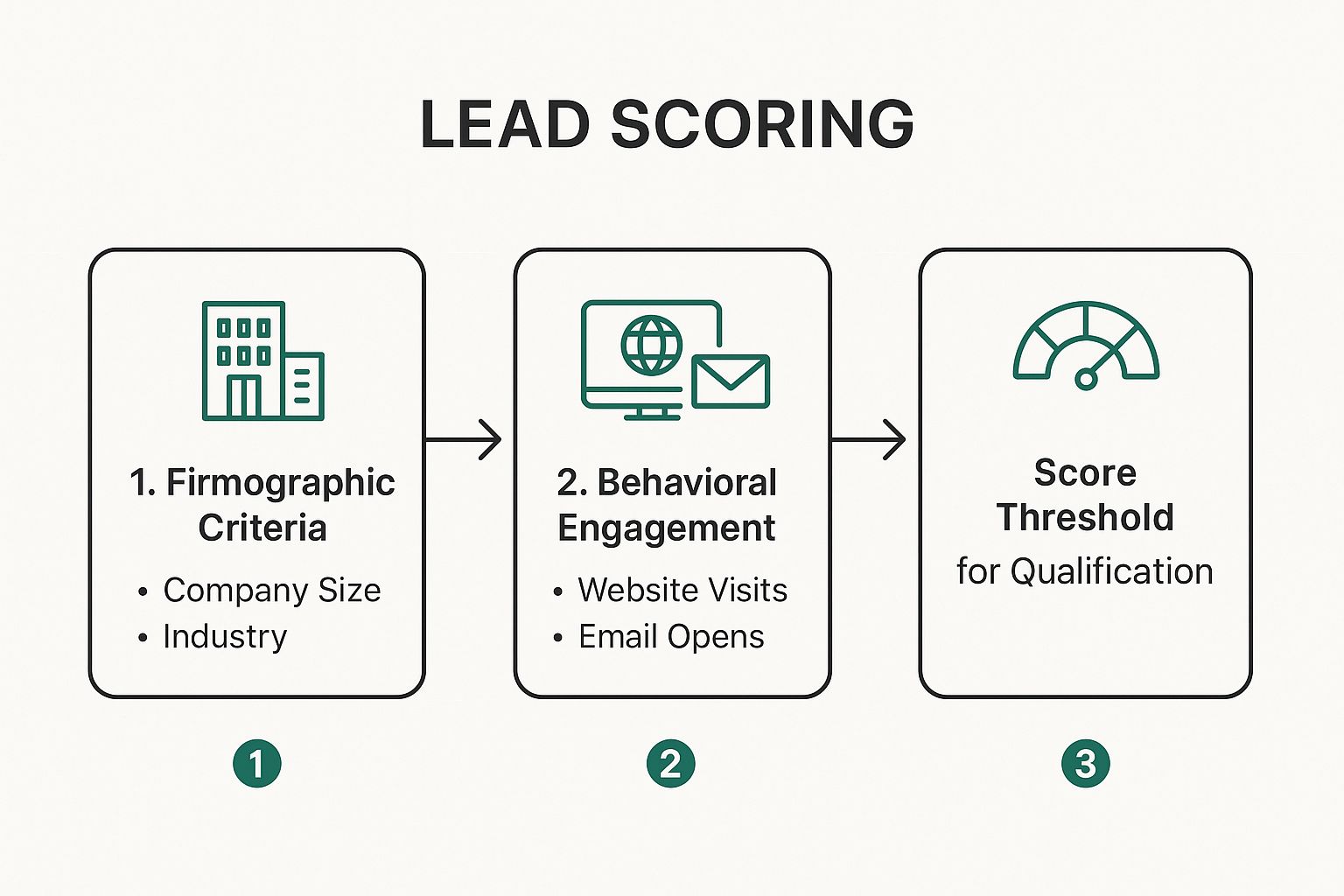
A solid lead scoring system needs to balance two kinds of information: what people tell you directly, and what their actions tell you indirectly.
Explicit Scoring: This is all about the data a lead gives you willingly. It's the firmographic and demographic info that tells you if they're a good fit for your product.
Job Title: A "Director of Marketing" might get +15 points, while an "Intern" gets 0.
Company Size: If your sweet spot is businesses with 50-200 employees, leads in that range could get +20 points.
Industry: A lead from a target industry like "B2B SaaS" could earn +10 points.
Implicit Scoring: This is all about behavior, which signals a lead's intent to buy. These are the digital breadcrumbs that show how engaged they are with your brand.
Website Behavior: Visiting your pricing page is a huge sign of interest, easily worth +20 points.
Content Engagement: Requesting a product demo? That's a massive buying signal, worth at least +25 points.
Email Interaction: Just opening a marketing email might be worth +2 points, while clicking a link inside is a stronger signal worth +5.
The infographic below shows how these two types of criteria come together to qualify a lead.
This simple flow highlights a powerful truth: the best leads are always a mix of a strong profile fit and active buying signals.
Let’s look at a concrete example. Here’s a sample model you could adapt for a B2B SaaS company trying to filter its inbound leads.
Sample Lead Scoring Model for a B2B SaaS Company
Category
Criteria
Points Awarded
Explicit (Fit)
Job Title (Manager or above)
+15
Company Size (50-500 employees)
+20
Industry (Technology, Marketing)
+10
Using a competitor's technology
+5
Implicit (Intent)
Visited Pricing Page
+20
Requested a Demo
+25
Downloaded a Case Study
+10
Clicked a link in an email
+5
Negative Score
Email domain is "gmail.com" or "yahoo.com"
-10
Unsubscribed from email list
-50
Job Title includes "Intern" or "Student"
-20
This table makes it clear how different attributes and actions can be weighted. A "Marketing Manager" from a 100-person tech company who requested a demo would quickly hit a high score, while a student with a Gmail address would be filtered out.
Setting Your Qualification Threshold
Once you start assigning points, you need to decide what score makes a lead "sales-ready." This magic number is your qualification threshold. For instance, you might decide that any lead who hits 75 points gets automatically sent to a sales development rep (SDR) for immediate follow-up.
This number shouldn't be pulled out of thin air. You'll need to analyze your past sales data to find the sweet spot. It's also important to remember that not all qualified leads are the same.
In fact, surveys show 46.4% of sales pros prefer Product Qualified Leads (PQLs)—people who have actually used the product—over any other type. Sales Qualified Leads (SQLs) come next at 37.5%, with Marketing Qualified Leads (MQLs) trailing at 16.1%. If you have a free trial or freemium model, your scoring should absolutely reflect this by giving more weight to in-product actions.
Using Negative Scoring to Filter Out the Noise
Just as you award points for good signs, you should also subtract them for red flags. This is called negative scoring, and it's your secret weapon for automatically disqualifying poor-fit leads before they ever reach your sales team.
Think of it this way:
Negative scoring is your system's immune response. It actively identifies and weeds out leads that would otherwise waste your sales team's valuable time, keeping your pipeline healthy and focused.
Here are a few classic examples where negative scoring is a lifesaver:
Student or Personal Emails: A lead using a "gmail.com" or ".edu" email address might get -20 points.
Competitor Snooping: If a lead's domain matches a known competitor, you can hit them with -50 points to keep them out of your pipeline.
Going Cold: A lead who hasn't opened an email in 90 days could have -15 points applied to lower their priority.
Wrong Department: If your software is for engineers, a lead with "Human Resources" in their title could get -10 points.
By combining positive and negative scores, you create a dynamic system that doesn't just rank leads—it actively cleans your database. This way, when a lead finally hits that qualification score, your sales team can engage with total confidence.
Master Qualification Frameworks Like BANT and MEDDIC
Once your ideal customer is defined and leads are scored, it’s time to talk. This is where a good qualification framework shifts from a "nice-to-have" to a must-have. Instead of just winging your discovery calls, a framework gives you a structured way to uncover the critical details you need to move a deal forward.
These aren't meant to be rigid scripts. Think of them more like conversational roadmaps. They guide you toward the right questions, helping you dig deep into a prospect’s world and ensuring you only spend your energy on deals with a real shot at closing.
The Classic Approach: BANT
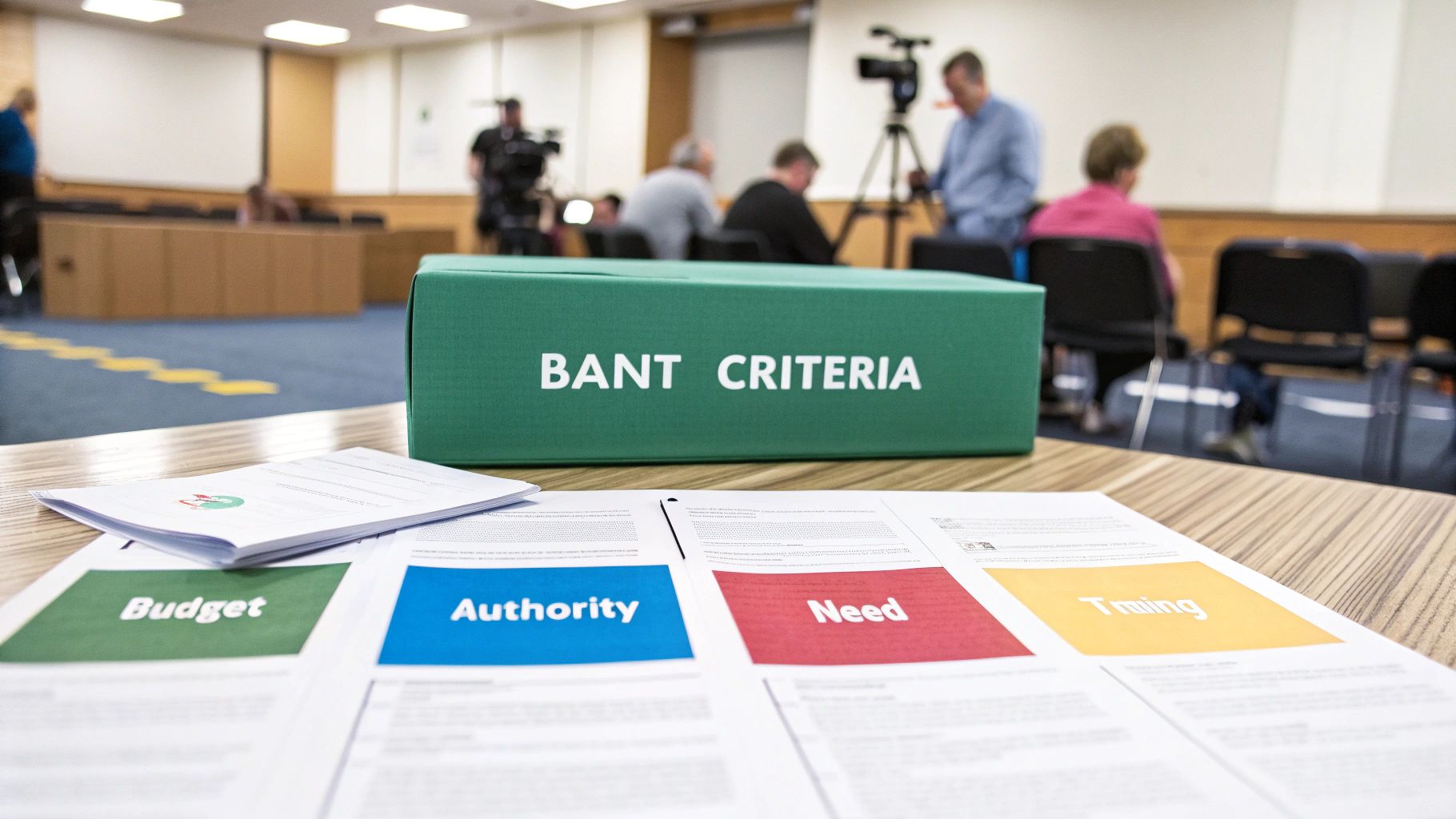
Developed by IBM way back when, BANT is the OG of qualification frameworks. It's still incredibly popular today because it’s simple and it works. It boils everything down to four essential pillars for any successful deal.
Budget: Can they actually afford what you're selling?
Authority: Are you talking to the person who can sign the check?
Need: Do they have a real, painful problem that your product solves?
Timeline: How soon do they need to fix this problem?
The trick with BANT is to avoid sounding like you’re just going down a checklist. Asking a blunt question like, "Do you have the budget?" is a surefire way to kill the conversation. You have to weave these ideas into a natural dialogue.
For instance, instead of asking about budget directly, try something like, "What have you invested in similar tools before?" or "What kind of financial impact would solving this problem have?" These questions get you the answers you need without putting the prospect on the defensive.
Going Deeper with MEDDIC
For those in the trenches of complex, high-ticket B2B sales, a more robust framework like MEDDIC is often the answer. This model pushes you to go much deeper, focusing not just on the prospect's immediate needs but on their entire internal buying machine.
MEDDIC is an acronym that breaks down like this:
Metrics: What are the hard numbers they want to achieve? Think increased revenue, lower operational costs, or better efficiency.
Economic Buyer: Who holds the ultimate P&L responsibility for this? This is the person who can push a deal through even when others are hesitant.
Decision Criteria: What specific, formal criteria will they use to judge vendors? This could be anything from technical specs to pricing models.
Decision Process: What are the exact, literal steps they take to buy something? This includes the paper-pushing, the legal review, and all the internal sign-offs.
Identify Pain: What business pain is so bad it’s forcing them to act? And, more importantly, what happens if they do nothing?
Champion: Who on the inside is genuinely rooting for you? This is your advocate who will sell on your behalf when you're not in the room.
MEDDIC forces you to get past the surface-level stuff. It makes you understand the prospect’s world—the politics, the processes, the financial drivers—which is exactly the insight you need to navigate those big, complicated deals.
Choosing and Adapting Your Framework
There’s no single "best" framework. The right one for you comes down to your business, how long your sales cycle is, and your average deal size.
Framework
Best For…
Key Focus
BANT
Shorter sales cycles, high-velocity teams, and less complex products.
Quickly spotting deal-breakers like budget and authority.
MEDDIC
Long, complex enterprise sales with high contract values.
Deeply understanding the customer's buying process and proving ROI.
Here’s the thing: the most successful sales teams don't just pick one and stick to it blindly. They adapt. Start with a model like BANT or MEDDIC and then tweak it to fit your industry and your buyers.
Maybe "Timeline" in BANT is less critical for you than understanding their current tech stack. Fine. Create a "BANT-T" model where the second "T" is for Technology. The goal is to build a repeatable process that arms your reps with the info they need to qualify sales leads effectively and build a pipeline you can count on. This structure turns every discovery call from a simple chat into a strategic move.
Use Automation and Tools to Streamline Your Process
Let’s be honest: manual lead qualification doesn't scale. As you start bringing in more leads, your team will eventually hit a wall. They’ll spend more time sifting through contacts than actually selling.
This is where technology becomes your secret weapon. The right tools can turn a clunky, inconsistent process into a well-oiled machine, freeing your reps to focus on what they do best: building relationships and closing deals.
The goal isn’t to replace your sales team’s expertise, but to supercharge it. Automation handles the grunt work—the initial filtering, scoring, and data checks—so every lead that lands on a rep's desk is already warmed up and ready for a real conversation.
Build an Automated Qualification Engine
Your CRM is the best place to start. Most modern CRMs let you build simple workflows that trigger actions based on lead data and behavior. You can essentially put your lead scoring and initial qualification on autopilot.
Imagine a new lead fills out your demo request form. Instantly, an automated workflow can:
Assign a score based on their job title, company size, and the high-intent action of requesting a demo.
Verify their contact info to make sure the email is valid and deliverable.
Route the lead to the right sales rep based on territory, industry, or even current workload.
This all happens in seconds, not hours. And that speed is everything. Research shows there’s a shocking 10-fold drop in your odds of qualifying a lead if you wait longer than five minutes to follow up. That's a tiny window, and manual processes almost guarantee you’ll miss it. You can see more on the importance of speed in these sales lead statistics.
Use Tools for Instant Data Verification and Enrichment
One of the biggest time-sinks in sales is chasing down leads with bad contact information. A lead can look perfect on paper, but if their email bounces, they’re useless. This is where specialized tools are non-negotiable.
Platforms like EmailScout are built to solve this exact problem before it even pollutes your pipeline. Instead of leaving data validation to chance, you can integrate tools that automatically verify and enrich lead data the moment it arrives.
This screenshot shows how EmailScout can instantly flag valid email addresses—a crucial first step.
By automating this check, you guarantee your sales team is working with clean, accurate outreach lists, which dramatically boosts their connect rates.
Automating data validation isn't just about efficiency; it's about protecting your team's most valuable asset—their time. Every minute spent on a bounced email is a minute not spent with a real buyer.
This is a fundamental part of building an effective sales process. If you want to explore more options, check out some of the other best lead generation tools that can work alongside your existing stack.
Let AI Uncover Hidden Patterns
Beyond simple, rule-based automation, AI can bring a whole new level of intelligence to your qualification process. AI-powered tools can analyze huge amounts of data to find subtle patterns and buying signals that a human would easily miss.
For instance, an AI model might analyze all your past closed-won deals and discover that prospects who visit your pricing page, a specific case study, and your integrations page are 80% more likely to buy.
That’s a game-changing insight you can feed right back into your lead scoring model to make it hyper-accurate. AI helps you move from qualifying leads based on what you think is important to what the data proves is important.
Here’s how AI can be applied:
Predictive Lead Scoring: Goes beyond adding up points and instead calculates a lead's actual probability of converting.
Sentiment Analysis: Scans email or chat conversations to gauge a lead's interest level and urgency.
Lookalike Modeling: Finds new prospects in the market who share the key traits of your absolute best customers.
When you bring automation and smart tools together, you create a system that's not just faster, but also smarter. This ensures you never let a hot prospect go cold and empowers your sales team to perform at their absolute best.
Common Lead Qualification Questions Answered
Even with a solid framework, a few practical questions always pop up once you start digging in. This is your quick-reference guide for those "what if" scenarios that can kill your momentum. We'll tackle some of the most common hurdles I've seen teams face when they're learning how to qualify sales leads.
So, what do you do with leads that get disqualified? It’s tempting to just hit delete and move on, but that’s a huge mistake. A lead might be a poor fit today but turn into a perfect one in six months when their company lands a new round of funding or brings on a new VP.
Don't just discard them. Instead, drop them into a long-term nurture sequence. Send them your monthly newsletter or some high-value content that keeps your brand on their radar without being pushy. It's a simple strategy that makes sure you don’t lose out on future opportunities.
Differentiating MQLs from SQLs
Another common point of confusion is the whole MQL vs. SQL thing. They sound similar, but they represent completely different stages of the buying journey. Treating them the same is a recipe for wasted effort.
An MQL (Marketing Qualified Lead) shows interest based on marketing engagement. Maybe they downloaded an ebook or attended a webinar. They’re curious, but they’re not knocking on your door asking for a sales call.
An SQL (Sales Qualified Lead) has been properly vetted and confirmed as a genuine opportunity. They match your ICP, have shown clear buying intent (like requesting a demo), and are actually ready to talk to a sales rep.
That handoff from MQL to SQL is a make-or-break moment. Marketing’s job is to generate and nurture interest to create MQLs. Sales then has to validate that interest and intent to see if that MQL graduates into a true SQL.
How Often Should You Update Your Criteria?
Finally, remember that your qualification criteria should never be set in stone. Markets shift, products evolve, and your ideal customer profile will change right along with them. Your criteria have to keep up.
So, how often should you revisit your rules?
A good rule of thumb is to sit down and review everything at least once a quarter. This is your chance to analyze what's working and what's not. Take a hard look at your recent closed-won deals—what did they all have in common? Did a new type of customer start showing up?
And most importantly, talk to your sales team constantly. They’re on the front lines. They'll be the first to tell you if lead quality is dipping or if the current criteria are accidentally filtering out promising prospects. Keeping that feedback loop wide open is the key to maintaining a sharp, effective qualification process that works in the real world.
Ready to stop wasting time on bad leads and start automating your qualification process? EmailScout helps you instantly verify contact data and enrich lead profiles, ensuring your sales team only focuses on prospects who are ready to convert. Find your next customer with EmailScout today!
In a world of overflowing inboxes, the line between a deleted email and a game-changing opportunity is razor-thin. Standard, generic outreach is dead. To succeed, you need more than just a template; you need a strategy. This guide breaks down six battle-tested cold email frameworks designed to cut through the noise and command attention.
We will move beyond just showing you a cold email example; we'll dissect the psychology behind why they work. Each section offers a deep strategic analysis and actionable takeaways you can apply immediately to your own campaigns. Forget the frustration of sending emails into the void. The difference between a 0.5% reply rate and a 15% reply rate isn't luck, it's the framework.
This article is your playbook for turning cold outreach into a predictable source of leads and partnerships. You will learn how to structure your message for maximum impact by exploring proven models, including:
The Problem-Agitation-Solution (PAS) Formula: Tapping into a prospect's core pain points.
The Mutual Connection Referral: Leveraging shared relationships for instant credibility.
The Before-After-Bridge (BAB) Method: Painting a clear picture of transformation.
The Value-First Teaching Email: Offering immediate insight to build trust.
The Personalized Compliment Approach: Using genuine praise to open doors.
The Social Proof and Curiosity Email: Creating intrigue with powerful results.
By the end, you'll have a complete set of tools to craft compelling emails that don't just get opened, they get replies and start meaningful conversations. Let's transform your outreach from a shot in the dark to a predictable pipeline of opportunities.
1. The Problem-Agitation-Solution (PAS) Cold Email
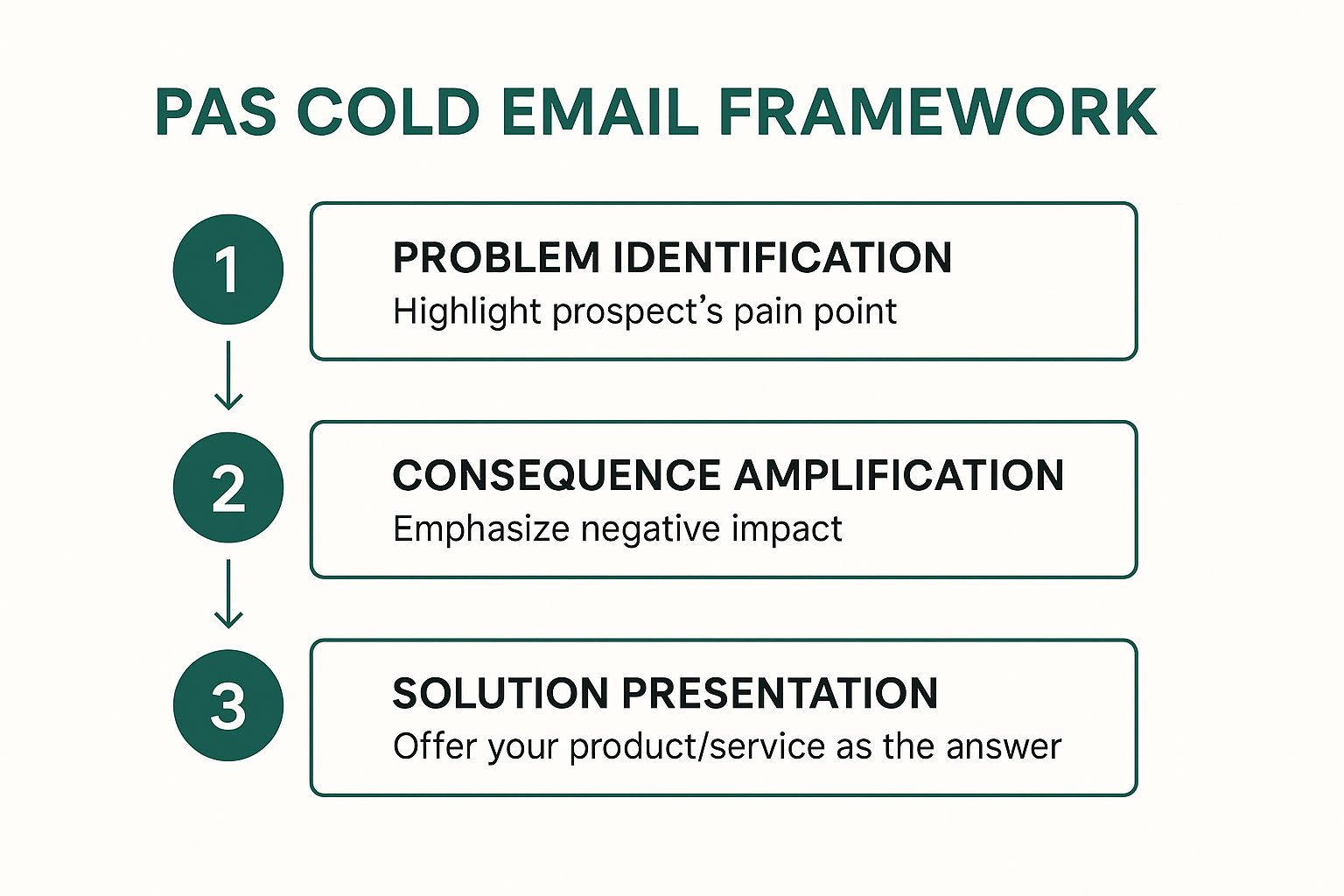
The Problem-Agitation-Solution (PAS) framework is a classic copywriting formula that translates with powerful effect into cold email outreach. Instead of leading with your product or service, this approach focuses entirely on the recipient's world. It works by first identifying a highly relevant pain point, then amplifying the negative consequences of that problem, and finally, presenting your solution as the most logical and effective resolution.
This method is highly effective because it taps into a fundamental psychological trigger: humans are more motivated to avoid pain than to gain pleasure. By first establishing common ground around a shared problem, you build instant rapport and demonstrate that you understand their challenges. This makes your eventual pitch feel less like a sales attempt and more like a helpful suggestion.
The Strategic Breakdown of PAS
The PAS framework is more than a simple template; it's a strategic sequence designed to guide a prospect from a state of passive awareness to active interest. It’s a perfect cold email example for audiences who may not be actively searching for a solution but are definitely experiencing the symptoms of a problem.
Problem: Start by clearly and concisely stating a specific problem you know your target audience faces. This requires diligent research. For instance, instead of saying "trouble with marketing," a more effective problem statement would be, "Noticing that your e-commerce brand's Cost Per Acquisition on Meta ads has increased by over 30% this quarter?"
Agitate: This is where you gently twist the knife. The goal is to connect the problem to real-world, negative business outcomes. This step highlights the consequences of inaction. For example, "This often leads to squeezed profit margins and forces a choice between cutting ad spend or sacrificing profitability, both of which stall growth."
Solution: Now, you introduce your product or service as the clear, simple answer. The focus should be on the outcome, not the features. Instead of listing software capabilities, say, "Our clients use our AI-powered ad tool to cut their CPA by an average of 40% in the first 60 days, letting them scale their ad spend profitably."
Visualizing the PAS Framework
The power of this framework lies in its logical, step-by-step flow, which guides the prospect's thinking from problem to solution. The following infographic illustrates this simple yet highly effective three-step process.
This visualization highlights how each stage builds upon the last, creating a compelling narrative that naturally positions your offer as the hero of the story.
When to Use the PAS Model
This model is exceptionally powerful when you have a deep understanding of your ideal customer's pain points. It is particularly well-suited for:
Targeting niche industries: When you can identify a specific, pervasive challenge within a particular vertical (e.g., supply chain inefficiencies for manufacturers).
Introducing disruptive solutions: If your product solves a problem people have accepted as "the cost of doing business," PAS can reframe it as an urgent, solvable issue.
Audiences with clear performance metrics: Roles like HR managers (employee retention rates), marketing heads (ad performance), or operations leaders (efficiency metrics) are perfect for this data-driven approach.
By focusing on the prospect's pain first, the PAS framework ensures your email earns their attention and positions your solution as an indispensable asset rather than just another product.
2. The Mutual Connection Referral Email
The Mutual Connection Referral Email is one of the most effective ways to bypass the "cold" in cold outreach. This approach leverages a shared professional relationship, a mutual acquaintance, or a common background to immediately establish a foundation of trust and credibility. Instead of appearing as a random stranger in the inbox, you arrive with an implicit endorsement from a trusted source, which dramatically increases your chances of getting a positive response.
This method works because it taps into the power of social proof and referral psychology. A recommendation, even a soft one, from someone the recipient knows and respects, instantly lowers their guard. It’s a powerful strategy that transforms a standard outreach into a warm introduction, making your message feel more like a friendly tip and less like a sales pitch. This makes it an incredibly powerful cold email example for breaking into well-guarded networks.
The Strategic Breakdown of a Referral Email
A referral email's success hinges on its ability to quickly and clearly establish the mutual connection and transition smoothly into your reason for reaching out. It's less about a formula and more about leveraging a human connection authentically. This approach is a cornerstone of effective networking and is central to many modern sales prospecting techniques. You can learn more about how this fits into a broader outreach strategy and explore other sales prospecting techniques on emailscout.io.
The Opener: Lead immediately with the mutual connection's name in the subject line or the first sentence. For example: "Subject: Introduction via [Mutual Connection's Name]" or "Hi [Prospect Name], [Mutual Connection's Name] suggested I get in touch."
Contextualize the Connection: Briefly explain your relationship with the mutual connection. This adds another layer of credibility. A simple line like, "I've been working with Jane on her marketing strategy for the past year," is much more effective than just name-dropping.
The Ask: State your purpose clearly and concisely. Since you've already established trust, you can be more direct. For example, "She mentioned you were looking to improve your team's project management workflow, and I had a few ideas I thought would be helpful."
Visualizing the Referral Framework
The power of this framework comes from its simplicity and its reliance on a trusted third party to bridge the gap. The following infographic breaks down the core components that make this approach so effective.
This visualization shows how the mutual connection acts as a critical bridge, turning a cold outreach into a warm, trusted introduction from the very first line.
When to Use the Referral Model
This model is your go-to strategy whenever a mutual connection exists, no matter how distant it may seem. It is especially powerful for:
High-Value Targets: When trying to reach C-level executives or key decision-makers who have strong gatekeepers and crowded inboxes.
B2B Partnerships and Sales: Ideal for forging strategic alliances or selling high-ticket services where trust is a primary decision-making factor.
Networking and Career Advancement: Leveraging alumni networks or past colleagues is a classic and highly effective way to open doors for new opportunities.
Before using this method, always ask your mutual connection for permission to use their name. This not only shows professional courtesy but also gives them a heads-up, strengthening the referral if the prospect decides to verify.
3. The Before-After-Bridge (BAB) Email
The Before-After-Bridge (BAB) framework is a powerful storytelling technique that leverages the prospect's aspirations. Instead of focusing solely on pain points, this model paints a vivid picture of two distinct worlds: the prospect's current, less-than-ideal reality (Before) and their desired, successful future (After). Your product or service is then introduced as the simple, direct path connecting these two states (the Bridge).
This method excels because it taps into the human desire for transformation and progress. By articulating a future state that aligns with the prospect's goals, you shift the conversation from fixing a problem to achieving an ambition. This makes your outreach feel less like a sales pitch and more like a partnership in their success.
The Strategic Breakdown of BAB
The BAB framework guides a prospect on a journey from their current challenges to a future of desired outcomes. It's a fantastic cold email example for services or products that deliver a clear and measurable transformation, making it ideal for inspiring action rather than just solving an immediate issue.
Before: Start by describing their current situation in a way that shows you understand their world. Use language and metrics they recognize. For example, "Right now, your team likely spends 10+ hours a week manually reconciling project data across Asana, Slack, and your CRM."
After: Paint a picture of what their world could look like. This should be specific, aspirational, and focused on tangible benefits. For instance, "Imagine a world where all that data is automatically synced into a single dashboard, giving you a real-time view of project profitability and freeing up your team to focus on high-value tasks."
Bridge: This is where you concisely introduce your solution as the vehicle for this transformation. The key is to present it as the logical link between Before and After. For example, "That's exactly what our integration platform does. We connect your tools in under an hour, creating the unified workflow you're looking for."
Visualizing the BAB Framework
The strength of this framework is its clear, linear narrative that appeals to a prospect's ambition. It creates a compelling story where the prospect is the hero and your solution is the tool that enables their triumph. The following infographic illustrates this simple yet highly effective three-step process.
This visualization highlights how the framework creates a gap between the prospect's current reality and their potential future, positioning your offer as the essential "bridge" they need to cross it.
When to Use the BAB Model
The BAB model is most effective when your solution provides a clear, demonstrable transformation. It's especially well-suited for:
Consulting and Coaching Services: When you are selling expertise that leads to personal or business transformation (e.g., a fitness coach helping executives improve their health).
SaaS and Technology Products: If your software automates a manual process or provides new capabilities that unlock significant efficiency gains (e.g., workflow optimization).
High-Value B2B Services: For offerings that help businesses scale, increase revenue, or fundamentally change how they operate (e.g., a marketing agency promising to double lead generation).
By focusing on the aspirational 'After' state, the BAB framework turns a simple outreach into an inspiring vision, compelling prospects to learn how you can help them achieve their goals.
4. The Value-First Teaching Email
The Value-First Teaching Email flips the traditional sales model on its head. Instead of asking for a meeting or a sale, this approach focuses on providing genuine, actionable value to the recipient with no immediate expectation of reciprocation. It operates on the principle of generosity, establishing your credibility and authority by teaching the prospect something useful about their own industry or challenges.
This method is highly effective because it immediately changes the dynamic from a sales pitch to a professional consultation. By offering a valuable insight, a new statistic, or a helpful tip, you demonstrate your expertise and build trust before ever mentioning your product or service. The goal is to make the recipient think, "This person really knows what they're talking about."
The Strategic Breakdown of Value-First
The Value-First Teaching email is a long-term play, designed to build a relationship and position you as a go-to resource. This cold email example is perfect for winning over skeptical or high-value prospects who are tired of generic sales pitches. It’s about giving before you ask.
Lead with an Insight: Start by sharing a valuable piece of information. This could be a new industry trend, a surprising statistic from a recent report, or a common mistake you see others in their role making. For example, "Saw a recent report that B2B SaaS companies using interactive demos in their outreach are seeing a 2x increase in meeting booked rates."
Connect it to Their World: Briefly explain why this insight matters specifically to them. Make the connection clear and direct. For example, "Given your role leading sales development at [Company Name], I thought this might be a relevant tactic for hitting your Q4 targets."
Offer Without an Ask: The key is to provide the value freely. Instead of asking for a meeting, you simply offer the information. The call-to-action is subtle, often just your name and title, implying that you are the source of this valuable knowledge. A simple closing like, "Hope this helps," is often all that's needed.
Visualizing the Value-First Framework
The power of this framework lies in its selfless, educational approach, which builds a foundation of trust and authority before any sales conversation begins.
This visualization shows how leading with genuine value creates a positive impression, differentiating you from the competition and making future outreach more welcome.
When to Use the Value-First Model
This model is a powerful strategy when you are playing the long game and want to establish a reputation as a trusted advisor, not just a vendor. It is particularly well-suited for:
Targeting senior executives: High-level decision-makers value their time and appreciate concise, high-impact insights over a hard sell.
Complex or high-ticket sales: When the sales cycle is long and requires significant trust and education, this approach lays the perfect groundwork.
Highly competitive markets: In a crowded inbox, providing pure value is the best way to stand out and earn the recipient's attention for future conversations.
By prioritizing the prospect's education over your own sales agenda, the Value-First Teaching email builds a strong foundation of trust that can lead to more meaningful and successful business relationships.
5. The Personalized Compliment and Insight Email
The Personalized Compliment and Insight approach is a sophisticated cold email strategy that pivots on genuine, well-researched admiration. Instead of starting with a problem or your product, this method opens with a specific and authentic compliment about the prospect's recent work, an award, a company milestone, or even a insightful piece of content they published. This immediately disarms the recipient, creates a positive emotional connection, and proves you’ve invested time in understanding their world.
This technique is effective because it moves beyond generic flattery. It demonstrates a high level of personalization and respect, making the recipient more receptive to the subsequent insight or value proposition. By leading with a sincere compliment, you shift the dynamic from a cold pitch to a peer-to-peer conversation, signaling that you are a thoughtful professional, not just another automated sender.
The Strategic Breakdown of the Compliment and Insight
This framework is less of a rigid formula and more of an art form, requiring diligent research and a knack for connecting dots. It's an excellent cold email example for high-value targets where a standard template would fall flat. The goal is to build rapport first, then seamlessly bridge that goodwill to a relevant business conversation.
Personalized Compliment: Start with a specific, timely, and genuine compliment. Vague praise like "I love your work" is ineffective. Instead, be detailed: "I was impressed with your recent keynote on AI in supply chain management at the XYZ conference, especially your point about predictive analytics reducing spoilage by 15%."
Insightful Bridge: This is the crucial transition. You must connect their achievement to a relevant observation or opportunity that you have unique insight into. For example, "Your point on predictive analytics is spot-on. We've seen companies that implement this struggle with data integration from legacy systems, which often caps the potential savings."
Solution (The Soft Pitch): Introduce your value proposition not as a hard sell, but as a logical extension of the insight you just shared. Frame it as a way to enhance their success. For example, "We developed a lightweight API that helps companies like yours sync legacy data in real-time, unlocking that full 15% in savings you mentioned."
Visualizing the Compliment and Insight Framework
The power of this framework lies in its human-centric, relationship-first approach, which builds a foundation of trust before any business is discussed. The following graphic illustrates how this personalized strategy unfolds.
This visualization shows how a genuine compliment serves as the entry point, leading to a relevant insight that naturally positions your offer as a valuable next step in the prospect's journey. For a deeper dive into the nuances of crafting such messages, you can learn more about how to write effective cold emails on emailscout.io.
When to Use the Compliment and Insight Model
This model is a high-effort, high-reward strategy that is best reserved for your most important prospects. It excels in situations such as:
Account-Based Marketing (ABM): When targeting key decision-makers at high-value accounts, this level of personalization is almost mandatory to break through the noise.
Executive Outreach: C-level executives receive hundreds of emails. A well-researched compliment about a recent funding round, acquisition, or feature in a major publication will stand out.
Building Strategic Partnerships: When the goal is collaboration rather than a direct sale, leading with admiration for a potential partner's work sets a collaborative and respectful tone.
By prioritizing authentic praise and relevant insight, this email strategy shows you're not just trying to sell something; you're trying to build a meaningful business relationship based on mutual respect and value.
6. The Social Proof and Curiosity Email
The Social Proof and Curiosity email is a credibility-driven approach that leverages impressive results, customer success stories, or notable client names to build immediate trust. It then pivots to create powerful curiosity, making the prospect wonder how they could achieve similar outcomes. This method combines the psychological principles of social validation and intrigue, proving your value before you even make a direct pitch.
This technique is effective because it shortcuts the trust-building process. Instead of asking a prospect to believe your claims, you're showing them tangible proof of your success with companies just like theirs. By leading with a specific, impressive result, you frame the conversation around proven value, which dramatically increases the likelihood of getting a response.
The Strategic Breakdown of Social Proof and Curiosity
This framework is more than just name-dropping; it’s a strategic sequence designed to make a prospect feel like they are missing out on a proven advantage. This cold email example is ideal for prospects who are motivated by competitive success and tangible, data-backed results.
Social Proof: Start with your most compelling, relevant piece of social proof. This should be a specific, metric-driven result achieved for a similar company. For example, "We recently helped [Competitor or Similar Company Name] increase their qualified lead flow by 250% in Q2."
Connect and Personalize: Briefly connect this success to the prospect's world. Show them you've done your research and understand their position. A simple line like, "Given your role leading growth at [Prospect's Company], I thought this might be on your radar," works perfectly.
Create Curiosity: This is the crucial step. Instead of explaining how you did it, you create a knowledge gap that entices them to reply. Frame the "how" as a unique process or insight. For example, "We accomplished this using a unique 3-step outreach system we developed for B2B SaaS firms."
Call to Action (CTA): The CTA should be a low-friction offer to close the curiosity gap. Avoid asking for a 30-minute demo. Instead, offer to share the specific strategy, "Happy to share the one-page strategy brief we used if you're interested."
Visualizing the Social Proof and Curiosity Framework
The power of this framework lies in its sequence: prove your value first, then make the prospect curious about the secret behind that value. The following infographic illustrates this effective two-part process.
This visualization highlights how a strong foundation of proof makes the curiosity-driven CTA almost irresistible, directly impacting your cold email response rate.
When to Use the Social Proof and Curiosity Model
This model is exceptionally powerful when you have a library of strong case studies and quantifiable results. It is particularly well-suited for:
Competitive Markets: When targeting companies in a competitive industry, showcasing results you achieved for one of their rivals is a powerful motivator.
B2B SaaS and Agencies: If you have clear, metric-based results (e.g., increased revenue, reduced costs, improved efficiency), this model provides a perfect showcase.
Consulting Services: Consultants can use this to reference successful transformation projects at similar companies, establishing immediate authority and relevance.
By leading with undeniable proof and then creating an information gap, this email strategy shifts the dynamic from a cold pitch to a valuable insider opportunity.
Cold Email Strategies Comparison Table
Email Type
Implementation Complexity
Resource Requirements
Expected Outcomes
Ideal Use Cases
Key Advantages
PAS Cold Email
Medium
Requires problem research
15-25% response rate
B2B sales with known industry problems
Creates emotional urgency, proven high conversion
Mutual Connection Referral Email
Low to Medium
Needs extensive network mapping
30-50% response rate
High-value prospects needing trust
High open rates, builds immediate credibility
Before-After-Bridge (BAB) Email
Medium
Requires understanding goals
18-28% response rate
Growth-focused prospects
Inspires action via positive future vision
Value-First Teaching Email
High
Significant expertise needed
8-15% immediate; higher long-term
Complex B2B sales requiring authority
Builds trust, positions as thought leader
Personalized Compliment & Insight Email
High
Intensive research per prospect
25-40% response rate
High-value accounts justifying personalization
Creates positive emotional response, highly personal
Social Proof and Curiosity Email
Medium
Requires client data and permission
20-35% response rate
Prospects benefiting from demonstrated results
Builds credibility quickly, drives curiosity
From Templates to Triumphs: Your Next Steps in Cold Email Mastery
We have journeyed through a strategic arsenal of six distinct cold email frameworks, moving from the classic Problem-Agitation-Solution model to the curiosity-piquing Social Proof approach. Each cold email example we deconstructed serves not as a rigid script to be copied, but as a flexible blueprint designed for adaptation. The core lesson is this: the most successful outreach is never a one-size-fits-all affair. It’s a calculated, empathetic, and value-driven communication tailored to a specific individual.
The true power of these templates is unleashed when you stop seeing them as templates and start viewing them as strategic conversation starters. The underlying principles of personalization, value, and relevance are the constants that bridge the gap between your inbox and your prospect's attention.
Synthesizing the Strategies: From Theory to Action
The journey from a blank draft to a booked meeting hinges on your ability to internalize the core lessons from each cold email example and apply them dynamically. Let's distill the most critical, cross-functional takeaways that will elevate your entire outreach strategy.
Empathy is Your Engine: Every effective framework, from PAS to the Personalized Compliment, is rooted in understanding the prospect's world. Before writing a single word, you must have a clear hypothesis about their challenges, goals, or recent achievements.
Value is Your Currency: Whether you're teaching a new concept (Value-First), offering a solution (BAB), or providing social validation (Social Proof), your email must give something of value before you ask for something in return. This builds trust and earns you the right to their time.
Specificity is Your Superpower: Vague compliments and generic problem statements are the hallmarks of spam. The difference between an ignored email and a celebrated one often comes down to a single, specific, and well-researched detail that proves you've done your homework.
Mastering these concepts transforms your cold emailing from a numbers game into a strategic discipline. You’re no longer just sending emails; you’re building bridges, solving problems, and initiating valuable business relationships. The ultimate goal is to make your message feel less like an interruption and more like a welcome, relevant, and timely intervention.
Your Action Plan for Implementation
Knowledge without action is merely potential. To turn the insights from each cold email example into tangible results, you need a clear, repeatable process. Here are your next steps to implement what you've learned and start seeing a real impact on your reply rates.
Prospect Persona Deep Dive: Before your next campaign, refine your Ideal Customer Profile (ICP). What are their primary KPIs? What industry news are they reading? What are their biggest professional frustrations right now? Answering these questions is the foundation of effective personalization.
Framework Selection: Review your prospect list. Which framework aligns best with each segment? Is there a strong mutual connection you can leverage? Did their company just achieve something worth complimenting? Match the cold email example to the context for maximum impact.
The "One-Sentence" Personalization Test: For every email you write, challenge yourself to include one sentence that could not possibly apply to any other prospect. This single, hyper-personalized line is often the element that commands a reply.
Track, Test, and Iterate: Don't just send and forget. Track your open rates, reply rates, and conversion rates for each template. A/B test your subject lines and calls to action. Data, not assumptions, should guide the evolution of your outreach strategy.
By systematically applying these steps, you build a powerful feedback loop. Each campaign becomes an opportunity to learn, refine your approach, and get closer to mastering the art and science of cold outreach. You're not just executing a task; you're building a scalable engine for growth, one thoughtful, strategic email at a time.
The most brilliant cold email example is useless if it never reaches the right person's inbox. EmailScout eliminates the guesswork by helping you find the verified email addresses of key decision-makers in seconds, directly from their LinkedIn profile or company website. Stop wasting time on research and start building connections with the people who matter by trying EmailScout today.
Figuring out how to follow up when you get radio silence can feel like walking on eggshells. The trick is to send a short, polite message that adds a little extra value, gives a gentle nudge about your first email, and ends with a crystal-clear, easy-to-do call-to-action.
This simple shift turns a needy "just checking in" email into a smart, strategic conversation starter.
Why Your First Email Went Unanswered
It’s easy to jump to conclusions and think, "They're just too busy." But honestly, the silence is often a sign that something in your original email missed the mark.
Before you can fix it, you have to figure out why it didn't connect. Was your offer confusing? Was your ask too big? Nailing down these potential problems is the first real step to writing a follow-up that actually gets a reply.
Plenty of outreach campaigns fizzle out because they just don't stand out in a sea of other emails. The data is pretty clear: mastering the follow-up is what separates the pros from the amateurs. Response rates for cold emails can be as low as 1% to 8.5%. But campaigns that use smart, targeted follow-ups? They can see incredible response rates of 40% to 50%.
Quick Diagnosis for Unanswered Emails
Sometimes, the problem isn't a lack of interest—it's that your email didn't make a strong enough case for their time and attention. Before you hit send on another message, a quick diagnosis can help you pinpoint what went wrong.
This table breaks down some of the most common reasons for a no-reply and gives you a clear strategy for your next attempt.
Potential Problem
Strategic Fix for Your Follow-Up
Weak or Vague Value Prop
Re-explain the benefit from a new angle or highlight a different specific outcome.
Unclear or High-Effort CTA
Simplify your ask. Instead of a 30-min call, ask a simple yes/no question.
Bad Timing or Irrelevance
Offer a relevant resource (like a case study or blog post) to show you understand their world.
Confusing or Long Message
Get straight to the point. Trim your message down to the absolute essentials.
By thinking through these points, you can turn your follow-up into a much more compelling message that’s easier for them to say "yes" to.
Instead of just bumping your first email back to the top of their inbox, your real goal is to give them a new reason to engage. For a closer look at what makes an initial email work, you can check out some data on average cold email response rates.
Key Takeaway: The silence on the other end isn't personal—it's feedback. Use it to refine your approach, add more value, and make responding feel effortless for the recipient.
Think of your follow-up as a chance to re-pitch your idea from a slightly different angle. Maybe you can share a helpful resource, shine a light on a different benefit, or just make your request a whole lot simpler. This kind of thoughtful persistence shows you’re a professional who genuinely believes in the value you’re bringing to the table.
Writing a Follow-Up That Actually Gets Read
So, your carefully crafted email vanished into the void. No reply. The natural impulse is to fire off a quick "just checking in" message, but that's a huge missed opportunity.
Think of your follow-up as more than just a nudge; it's your second chance to make a real impression and prove your email is worth their time.
A great follow-up really only does three things: it jogs their memory about the original email, offers something new and valuable, and makes hitting "reply" almost effortless. Get that balance right, and you’ll start turning silence into actual conversations.
Crafting a Subject Line That Re-Engages
First things first: the subject line. Your goal here is to be familiar without being boring. Just hitting "forward" and typing "Following up" is lazy, and honestly, it can come across as a little passive-aggressive. You need to aim for clarity and context.
For Sales Outreach: Try something like, "Re: [Original Subject] – Quick Question" or "A thought on [Their Company Goal]." This links back to your first email but hints that you have something new to add.
For Job Applications: Be direct. "Following up on my application for the [Job Title] role" is perfect. It’s professional and makes it dead simple for a busy recruiter to find your file.
For Networking: A friendly touch works best. "Enjoyed our chat at [Event Name]" is personal and instantly reminds them who you are.
The best subject lines are short, specific, and create just enough curiosity to get that open. Keeping it between 30-50 characters is a good rule of thumb, especially since most people will see it on their phone first.
Adding New Value Is Non-Negotiable
This is the part where most follow-ups completely fall flat. Just repeating your original request gives them zero new reasons to respond. People are busy. Their priorities have changed since yesterday. The single best way to master how to follow up on an email with no response is to bring something new to the table.
So, what does "new value" actually look like?
Share a Relevant Resource: Did you stumble upon an article, a case study, or a tool that solves a problem they mentioned? Send it over. A simple "Came across this and thought of our conversation about scaling your team" works wonders.
Offer a New Insight: Maybe you had a fresh idea after you sent the first email. A quick note like, "I was thinking more about your challenge with [X], and it occurred to me that [Y] could be a solution" shows you’re genuinely thinking about their problems.
Provide a Quick Win: Instead of immediately asking for a 30-minute call, offer a small piece of advice they can use right away. For example, "I noticed a small tweak you could make on your website that might boost conversions."
This simple shift changes the entire dynamic. You’re no longer someone asking for something; you're someone offering something. It’s a subtle change, but it shows you respect their time and have real expertise to share. Your first email sets the stage, but the follow-up is where you prove you’re a connection worth having. If you're still dialing in that first message, our guide on how to write cold emails can help.
Design a Low-Friction Call-to-Action
Okay, you’ve reminded them of the context and offered new value. The last step is to make it incredibly easy for them to reply. Vague CTAs like "Let me know your thoughts" feel like work. You need to be specific and make the ask as small as humanly possible.
Just look at the difference between these two:
High-Friction CTA: "Are you free for a 30-minute call next week to discuss this further?" Low-Friction CTA: "Would learning more about this be a priority for you right now?"
The second one is a simple yes/no question. It takes almost no mental energy to answer. If they say "yes," then you can figure out the scheduling. This micro-commitment approach is way more effective at getting that initial reply, which is the only goal that matters for a follow-up email.
Mastering Your Follow-Up Timing and Cadence
Sending a brilliant follow-up at the wrong moment is like telling a great joke to an empty room—it just doesn't land. The art of the follow-up isn't just about what you say; it's about when you say it. Getting this rhythm right is the key to staying persistent without becoming a pest.
The timing of your messages can dramatically change your outcomes. In fact, data shows the first follow-up email can get a reply rate that's 40% higher than later attempts. Speed is also a massive factor in some situations; companies that respond to new leads within just five minutes are 100 times more likely to actually connect and convert them. Delaying even a day can have a huge impact. You can read more about these powerful follow-up statistics to see just how much timing matters.
This infographic gives you a great visual guide on structuring a follow-up to grab your recipient's attention.
As the image highlights, a successful email has to immediately capture attention, which reinforces why a well-timed and well-crafted message is so important.
Finding the Right Cadence
Look, there's no single magic number for how long you should wait, but there are some smart guidelines that work for most situations. Your goal is to build a cadence that respects their inbox while keeping your request top-of-mind.
A solid starting point is what I call the "3-5-7 rule," which you can easily adapt based on your specific needs. It’s a balanced approach that gives you a clear follow-up sequence.
First Follow-Up: Wait 2-3 business days after your initial email. This is the sweet spot—enough time for them to have seen your message, but not so long that they've completely forgotten it.
Second Follow-Up: Give it another 4-5 business days. At this point, you're giving them more space and acknowledging they're likely busy.
Third Follow-Up (and beyond): Extend the gap to 7+ business days. Each message from here on out should be more spaced out to avoid overwhelming their inbox.
Your cadence isn't set in stone. If your request is time-sensitive, like following up after a job interview where they mentioned a decision timeline, you can absolutely shorten these windows. For less urgent networking, feel free to stretch them out.
When to Adjust Your Timing
Context is everything when you're deciding how to follow up on an email with no response. The perfect timing can shift based on who you're talking to and why.
For instance, reaching out to a C-suite executive requires more patience than connecting with a junior team member. Their schedules are slammed, so longer intervals between emails feel more respectful and are often more effective.
Think about these common scenarios:
After a Sales Demo: Following up within 24 hours is pretty standard. You want to capitalize on their interest while the details are still fresh in their mind.
Post-Networking Event: A quick "great to meet you" email or a connection request within 1-2 days is perfect. It solidifies the connection before the memory of your chat fades.
Following Up on a Proposal: Give them a few business days (3-5 days) to review the document with their team before you check in. Rushing them can come across as pushy and might undermine your position.
Ultimately, the best cadence is one that feels natural for the relationship and the context. Listen to the signals. If you've sent three or four well-spaced, value-driven emails with zero response, it’s a strong sign to pause your outreach and try a different approach down the road.
Follow-Up Email Examples for Any Scenario
Knowing the theory behind a good follow-up is one thing, but having battle-tested examples you can adapt makes all the difference. This is your practical toolkit for turning silence into a conversation.
Whether you’re nudging a cold lead, checking in after an interview, or waiting on a proposal, the right words matter. The goal isn't just to remind them you exist; it's to re-engage them with a message that feels helpful, respectful, and easy to act on.
The Gentle Nudge for Cold Outreach
When an initial cold email goes unanswered, your first follow-up is often your best shot at getting a reply. Don't just "bump" the old message. Instead, come at it from a slightly different angle and reframe your value.
Example: The Quick Value-Add Follow-Up
Subject: Re: [Original Subject] – a quick thought
Hi [First Name],
Just wanted to circle back on the email I sent last week about [original topic].
I was thinking about your goal of [mention their company goal] and came across this case study on how [Similar Company] tackled the same challenge. Thought you might find it interesting: [Link]
Is solving [pain point] a priority for your team right now?
Best, [Your Name]
Why It Works: This approach instantly provides fresh value—the case study—and connects it directly to a goal they likely care about. The final question is a simple yes/no, making it far easier to answer than a request for a call. For more ideas on nailing that first message, check out these examples of cold emails from our guide.
Following Up After a Job Interview
The post-interview follow-up is all about showing continued enthusiasm without being pushy. It’s a delicate balance, but a polite check-in can absolutely keep you top of mind.
Example: The Professional Check-In
Subject: Following up on the [Job Title] role
Hi [Hiring Manager Name],
Hope you’re having a great week.
I really enjoyed our conversation on [day of interview] about the [Job Title] position and learning more about the team at [Company Name].
You mentioned a decision might be made around this time, so I just wanted to politely check in on the status of the role. I'm still very interested and confident that my skills in [mention 1-2 key skills] would be a great asset.
Please let me know if there's anything else you need from my end.
All the best, [Your Name]
Why It Works: It’s respectful and references the timeline they provided, which shows you were listening. It also briefly restates your interest and key qualifications without just repeating your resume. You're simply staying engaged in the process.
Checking on a Submitted Proposal or Quote
Once you've sent a proposal, the client is probably reviewing it and discussing it with their team. Your follow-up should be designed to help that conversation along, not pressure them into a decision.
Example: The Helpful Resource Follow-Up
Subject: Re: Proposal for [Project Name]
Hi [Client Name],
Just wanted to follow up on the proposal I sent over last [Day].
I know you’re likely discussing it with your team. To help with that conversation, I’ve attached a brief document outlining the ROI our other clients in the [Their Industry] space have seen.
Do you have any initial questions I can help answer?
Regards, [Your Name]
Why It Works: This email anticipates their internal process and provides a resource to help them make their case. It positions you as a helpful partner, not just another vendor waiting for a signature. It shows them you're thinking one step ahead.
Follow-Up Template Selector
Choosing the right approach depends entirely on your goal and your existing relationship with the person you're emailing. Use this quick guide to match your situation to the most effective follow-up style.
Scenario
Key Objective
Recommended Tone
Core Value Proposition
Cold Outreach
Get a first reply
Helpful & Concise
A new piece of relevant information (case study, article).
Post-Interview
Stay top-of-mind
Professional & Enthusiastic
A reminder of your key skills and continued interest.
Proposal Sent
Facilitate a decision
Supportive & Proactive
A resource to help them make an internal business case.
Networking Event
Re-establish connection
Friendly & Specific
A reminder of your conversation and a clear next step.
Old Client Re-engagement
Restart a conversation
Familiar & Value-Driven
A relevant update or a new idea tailored to them.
Each scenario demands a slightly different touch. The key is to always lead with value and make it incredibly easy for the other person to respond.
Advanced Follow-Up Strategies Beyond Email
When your best emails are met with silence, the gut reaction is to just send another one. But honestly, sometimes the best move is to get out of the inbox altogether. A smart multi-channel approach can get you noticed without making you look desperate.
This requires a bit of finesse, though. The goal is to be present, not a pest. If you've already sent a couple of emails and heard nothing back, a light touch on a different platform can be the nudge that gets you a reply.
Using Social Platforms Strategically
LinkedIn is your best friend here. But please, don't just slide into their DMs with a "Hey, did you see my email?" That's the fastest way to get ignored or blocked. You have to be more subtle.
Engage with their content. A thoughtful comment or even a simple 'like' on a recent post puts your name on their radar in a low-pressure, professional way.
Send a connection request. Keep the note short and to the point. Something like, "Hi [Name], I sent a note over to your team last week about [topic]. Thought it'd be great to connect here, too."
This simple move completely changes the game. You're no longer just another unread email; you're a real person and a professional contact in their network. That small shift is often all it takes.
Knowing When to Send the Breakup Email
Look, persistence pays off. But there's a fine line between being persistent and being annoying. The data doesn't lie: around 80% of sales require five or more follow-ups, but most people give up way too soon. While those first couple of follow-ups give you a nice bump in reply rates, the real magic often happens later in the sequence. You can dig into some more of these insightful sales follow-up statistics if you're curious.
So, what do you do after you've sent a series of emails—say, 4 or 5—and still have nothing? It's time for the "breakup email." This isn't about being dramatic. It's about professionally closing the loop while leaving the door open for the future.
The Breakup Email Example Subject: Closing the loop
Hi [Name],
I've reached out a few times about [your offer] but haven't heard back. I'll assume it's not a priority for you right now, so this will be my last email.
If you ever decide to explore [solving their problem] in the future, please feel free to get in touch.
All the best, [Your Name]
This message works wonders. It’s polite, it respects their time (and their silence), and it cleanly ends your follow-up sequence. You'd be surprised how often this email gets a response. Why? It takes all the pressure off and gives the other person an easy out. It’s a must-have tool for anyone trying to figure out how to follow up when an email gets no response.
Answering Those Awkward Follow-Up Questions
Even with the best templates in hand, you're bound to run into some tricky situations. Knowing how to play these moments can be the difference between getting that reply you've been waiting for and being left on read.
Let's walk through a couple of the most common dilemmas people face when they're figuring out how to follow up. This should help you handle these spots with a lot more confidence.
What If I Spot a Mistake in My First Email?
It happens to the best of us. You hit "send" and your stomach drops as you immediately spot a glaring typo or realize you attached the wrong file.
Don't panic. The best move is to send a quick, polite correction as soon as you notice the mistake.
Just address it directly and keep it short. A simple subject line like "Correction: [Original Subject]" is all you need.
Here's how that might look: "Hi [Name], just a quick correction on my last email—I noticed a typo in the project timeline I sent over. My apologies for any confusion. The correct date for the project kickoff is actually [Correct Date]."
This approach shows you're on top of things and have a good eye for detail. It fixes the error without a lot of drama and, as a bonus, bumps your message right back to the top of their inbox.
How Should I Change My Tone for Different Seniority Levels?
Your tone absolutely has to shift depending on who you're emailing. When you're following up with a C-suite executive or a senior manager, you always want to lean toward being more formal and concise.
For Executives: Get straight to the point. They're incredibly busy, so they value brevity more than anything else.
For Peers or Junior Staff: A slightly more casual and friendly tone is usually fine. In fact, it can help you build a better working relationship.
At the end of the day, it's all about showing respect for their time. For a high-level contact, that means a short, direct message. For a colleague, it might mean a more conversational and collaborative style.
Ready to stop guessing and start connecting? EmailScout helps you find the right email addresses for key decision-makers in a single click, ensuring your perfectly crafted follow-up messages land in the right inbox every time. Find unlimited emails for free.
Sending an email to a dead address is the digital equivalent of mailing a letter to a house that was torn down years ago. It’s a complete waste of time, money, and effort. Before we even get into the how of checking an email address, we need to talk about why.
Getting this right is the difference between actually connecting with your audience and just shouting into the void.
Why You Absolutely Must Validate Every Email Address
Whether you're a startup launching your first product or a nonprofit running a fundraiser, the quality of your email list is everything. Firing off messages to invalid, misspelled, or old addresses doesn't just miss the target—it actively works against you.
Every single failed delivery, known as a bounce, sends a little red flag to email service providers like Gmail and Outlook. It tells them you might not be a legitimate sender.
As your bounce rate creeps up, these providers start seeing you as a potential spammer. This tanks your sender reputation, which is basically an invisible credit score that determines where your emails land. A bad score sends you straight to the promotions tab or, even worse, the spam folder.
When that happens, even your perfectly crafted emails to valid addresses might never see the light of day. Your entire engagement strategy just got crippled.
The Real Cost of a Dirty Email List
Letting a bad email list fester has real, tangible consequences that go way beyond just deliverability. The damage to your finances and operations is no joke, especially when you’re trying to scale.
Wasted Resources: Every email sent to a bad address costs you money, either in platform fees or the time your team spent on it. For a big campaign, this can easily run into thousands of dollars in lost marketing spend.
Skewed Analytics: Bad data leads to bad decisions. High bounce rates mess with your campaign metrics, making it impossible to get a true read on your open rates, click-throughs, and overall ROI.
Brand Damage: Consistently sending emails that bounce is a fast track to getting your domain or IP address blacklisted. Once that happens, reaching anyone becomes an uphill battle.
Here’s a look at the different ways ignoring email validation can come back to bite you.
Risks of Ignoring Email Validation
Risk Area
Impact on Your Business
Real-World Example
Sender Reputation
Email providers (Gmail, Outlook) will flag your domain as spam, sending future emails directly to the junk folder.
A small e-commerce store sees its promotional emails go from a 25% open rate to under 5% after its bounce rate exceeds 10%.
Financial Waste
You pay for every email sent, so sending to invalid addresses is literally throwing money away on your email marketing platform.
A B2B company sending 100,000 emails per month discovers 15% of its list is invalid, wasting over $1,000 annually on platform fees.
Inaccurate Data
High bounce rates distort your campaign metrics, making it impossible to know what’s actually working.
A marketing team thinks a campaign failed due to poor copy, but the real issue was a 20% bounce rate from an outdated contact list.
Blacklisting
Your domain or IP address can be added to global blacklists, blocking all your emails from being delivered across multiple networks.
A nonprofit organization's fundraising appeal is blocked entirely because its IP address was blacklisted due to poor list hygiene.
Failing to validate your email list puts your entire communication strategy at risk. These problems compound over time, making it harder and harder to recover your sender reputation and campaign effectiveness.
The bottom line is this: without a clean list, you're playing with a handicap. Proper email address verification isn't just a "best practice"; it's a foundational step for anyone who’s serious about making their communication count.
There are around 4.6 billion active email users globally, with a mind-boggling 376 billion emails flying around every single day. That massive volume means providers are more aggressive than ever about filtering out senders who look sloppy. Every bad contact on your list is a risk you just can't afford to take.
Before you even think about firing up a fancy validation tool, your first line of defense is a simple, old-fashioned visual inspection. It's surprisingly effective. You can learn how to spot the most obvious fakes in just a few seconds, saving you a ton of time and keeping bad data out of your systems from the get-go.
Think of it this way: every email address needs three things to work. There's the local part (the username before the "@"), the "@" symbol itself, and the domain name (the part after the "@"). A "syntax check" is just a quick scan to make sure all those pieces are present and playing by the rules. If anything looks off, the address is dead on arrival.
I see this all the time with user-submitted forms. Someone types "john.doe gmail.com" and completely forgets the "@" symbol. Or you might find an address riddled with weird characters that email servers will reject instantly.
Common Syntax Red Flags
Keep an eye out for these immediate deal-breakers. If you spot even one of these issues, the address is guaranteed to bounce. Don't waste any more time on it.
Missing "@" Symbol: This is the big one. An email needs one, and only one, "@" symbol. No exceptions.
Illegal Characters: You can't have spaces, commas, or backslashes (/) in an email address. Something like "jane doe"@example.com is a definite no-go.
Consecutive Dots: Two periods in a row (..) aren't allowed anywhere in the address. So, jane..doe@example.com will fail every time.
Invalid Domain Format: The domain name has to include a dot (like gmail.com, not gmailcom). It also can't start or end with a hyphen.
I always tell people to think of a syntax check like proofreading a sentence. If the basic punctuation is a mess, the sentence doesn't make sense. The same goes for an email address—if its basic structure is broken, it’s completely undeliverable.
Getting in the habit of spotting these errors manually is the fastest way to clean up a list, especially after importing new data or right before you launch a small campaign.
Confirming the Domain and Mail Server Actually Exist
An email address can look perfectly fine and still be completely undeliverable. Just because contact@somecompany.com passes a quick visual check doesn't mean the "somecompany.com" domain actually exists or is set up to receive emails.
This is where we go a layer deeper to separate the plausible fakes from the real deal. We need to check if the domain has a Mail Exchange (MX) record.
Think of an MX record as the domain's official postal address for email. It's a public signpost on the internet that essentially says, "Yep, I accept email here. Send it to this specific server." If a domain doesn't have an MX record, no emails can be delivered to it. Period. This check is a powerful way to weed out bad addresses early.
What Is an MX Record Check?
An MX record check is like looking up a business in a directory before you drive there. You’re simply confirming that a mail server is officially listed for that domain. It’s a quick, non-intrusive lookup that gives you a clear "yes" or "no" on whether a domain can even receive mail.
Valid Domain: A domain like gmail.com will have several MX records. This tells you it’s a robust system ready to handle incoming mail.
Invalid Domain: A typo like gmaiil.com (with two 'i's) almost certainly has no MX records. Any email address using this domain is instantly invalid.
This check is fundamental. It's the first real test of deliverability. An email address can’t be valid if its domain isn’t even equipped to catch the message you’re trying to send.
The Polite Knock on the Door
Once you've confirmed an MX record exists, the final step is to see if the specific mailbox is available. This is where a process called an SMTP handshake, or a "ping," comes in.
Imagine you've found an apartment building (the mail server). Now you need to ask the doorman if "John Smith" actually lives there. You're not trying to deliver a package yet—you’re just confirming he has an apartment.
That's exactly what an SMTP ping does. A verification tool communicates with the mail server and politely asks, "Hey, do you have a mailbox for john.smith@example.com?" The server will respond with a yes or no, all without an actual email ever being sent. This confirms the individual mailbox exists, giving you the final piece of the validation puzzle.
Using Automated Tools for Accurate Verification
Manual checks are great for catching obvious typos, but they only scratch the surface. To really know if an email is deliverable, you need to bring in the big guns: automated email validation services. They're the fastest and most reliable way to get high-accuracy results, especially when you're dealing with more than a handful of addresses.
These tools do so much more than a simple syntax check. They run a whole series of tests, like verifying the domain exists, confirming it has valid MX records, and even safely pinging the mail server to see if a specific mailbox is active. The whole process takes a fraction of a second. For anyone relying on email for marketing or sales, this kind of deep-dive verification is non-negotiable.
Imagine an e-commerce store with a real-time validation API on its checkout page. A customer accidentally types john.doe@gamil.com, and the tool instantly flags the typo. It prompts them for a correction before that bad data ever pollutes their database. That proactive approach is a total game-changer for keeping a clean list from day one.
Understanding the Verification Results
When you run a list through a validation service, you don’t just get a simple “good” or “bad” verdict. The results are much more nuanced, which helps you make smarter decisions about who to email and who to remove.
The infographic below gives a high-level look at the first few checks these tools perform to make sure a domain is even capable of receiving mail.
This initial step confirms the mail servers are set up correctly, which is the foundation of any valid address. From there, the tools dig deeper and assign a specific status code to each email.
Here’s a quick rundown of the common statuses you'll encounter:
Valid: This is the gold standard. The address has perfect syntax, a live domain, and an active mailbox waiting to receive your email. Green light to send.
Invalid: This address failed at least one critical check. It could be a typo, a dead domain, or a mailbox that no longer exists. These need to be removed from your list immediately.
Risky or Catch-All: This one's tricky. The domain is set up to accept email for any address, so it’s impossible to confirm if the specific person’s mailbox is real. It’s best to treat these with caution, as they can have a higher bounce rate.
To make it even clearer, here's a quick reference table breaking down what these common verification results mean and how you should handle them.
Email Verification Status Codes Explained
Verification Status
What It Means
Recommended Action
Valid
The email address exists and can safely receive mail.
Keep on your mailing list and send with confidence.
Invalid
The email address does not exist or has a critical error.
Remove from your list immediately to avoid a hard bounce.
Risky (Catch-all)
The server accepts all emails, so the specific address can't be confirmed.
Send with caution or segment them for low-priority campaigns.
Unknown
The tool couldn't get a definitive response from the mail server.
Treat as risky. You can try verifying again later or remove.
Spam Trap
A known spam trap address used to identify spammers.
Remove from your list immediately. This is critical for your sender reputation.
Understanding these codes helps you clean your list with precision, not just a sledgehammer.
The industry is always evolving, and many modern tools now use AI to predict the deliverability of an email based on historical data, going far beyond the basic checks. With an average email bounce rate of just 0.7%, going even slightly above that can land you in the spam folder.
If you’re ready to clean up your list, plenty of great options are out there. Check out our guide on the best free email verification tools to find a service that fits your budget and needs.
Best Practices for Long-Term List Health
Knowing how to spot a valid email address is one thing. But the real secret to great deliverability is shifting from occasional, reactive clean-ups to consistent, proactive list maintenance.
Think of your email list as a powerful business asset. Like any valuable asset, it needs regular care to prevent decay and protect your all-important sender reputation.
The best place to start? Implement a double opt-in process right away. This is where a new subscriber gets an automated email asking them to click a link to confirm their subscription. It’s a simple but incredibly effective step that proves genuine interest and verifies the address is correct from the get-go.
Create a Regular Cleaning Schedule
Don't wait until you start seeing high bounce rates or other deliverability problems. Get ahead of the curve by setting a routine for cleaning your entire list.
Here’s a practical schedule that works for most businesses:
Quarterly Validation: Run your full list through a verification tool every three to four months. This is a solid benchmark for keeping things fresh.
Pre-Campaign Check: Always, always validate any list segment that’s been dormant for a few months before hitting "send" on a big campaign.
Monitor Engagement: Keep a close eye on subscribers who never open your emails. After a set time—say, six months—you can either try a re-engagement campaign or simply remove them.
This kind of disciplined approach ensures you’re constantly weeding out bad or inactive contacts before they can do any damage to your sender score.
Proactive validation is all about future-proofing your deliverability. When your list is pristine, your messages consistently land in front of the people who actually want to hear from you. That’s how you maximize impact and ROI.
It’s also worth remembering that deliverability can vary a lot by location. For example, Europe boasts an impressive 91% average inbox placement rate, while the Asia-Pacific region is closer to 78%. These kinds of regional differences show why a universally clean list is non-negotiable for any global marketing.
Of course, starting with a quality audience is half the battle. Our guide on how to build an email list walks you through the steps to attract engaged and deliverable subscribers from day one.
Common Email Validation Questions Answered
When you're first learning how to check if an email address is valid, a lot of questions pop up. It’s a critical part of email marketing, but the technical details can feel a bit overwhelming and sometimes stop people from doing anything at all.
Let's clear up some of the most common ones I hear.
Clarifying Common Misconceptions
One of the biggest questions is how often you should clean your list. A good rule of thumb is to run a full validation check every three to six months. This keeps your list fresh without becoming a huge chore.
The best strategy, though, is to stop bad emails from getting on your list in the first place. Setting up a real-time validation API on your signup forms is the most effective way to do this. And if you're about to send a major campaign to a list that's been sitting around for a while? Always validate it first.
Another idea I see floated is just sending a test email to see if it bounces. Please don't do this. Sending to even a handful of invalid addresses can tank your sender reputation with email providers like Gmail almost immediately. Automated tools check deliverability without ever sending a message, which is the only safe way to protect your score.
You'll also run into "catch-all" servers. These are set up to accept any email sent to a domain, so they won't hard bounce. The problem is, you have no idea if a real person is on the other end. Your best bet is to segment these addresses and keep a close eye on their engagement.
At the end of the day, consistent and safe validation isn't optional. It’s what keeps your list healthy and ensures your emails actually make it to the inbox.
Ready to build powerful outreach lists with verified emails? EmailScout's Chrome extension helps you find and save decision-maker emails in a single click. Start finding unlimited contacts for free at https://emailscout.io.
When you're trying to find a business email, it really boils down to three main plays: making an educated guess, getting creative with Google searches, and using a dedicated email finder tool. The real magic happens when you blend all three, letting you zip past the generic info@ black holes and land right in a decision-maker's inbox.
Why Finding the Right Email Is a Game Changer
Before we get into the nitty-gritty, let's talk about why this is so important. A direct email isn't just a contact detail; it's your private line to the people who matter. It's how you bypass gatekeepers and avoid those company-wide inboxes that feel like they're managed by no one at all.
This one small step can completely change your outreach game from a shot in the dark to a well-aimed, strategic move.
Think about it. A message you send through a website's contact form? It might get filtered, ignored, or just plain lost. A cold call? Good luck getting past the front desk. But a sharp, well-written email that lands directly in the right person's inbox? That gets attention. That invites a real response.
The Strategic Advantage of Direct Access
Knowing how to hunt down business email addresses gives you a serious leg up, no matter what your role is. Sales, marketing, recruiting, business development—it all starts with direct communication. It’s the only way to build real relationships and get things done.
Bypass Gatekeepers: You're talking straight to the person with the power to say "yes."
Improve Personalization: When you know who you’re writing to, you can craft a message that actually resonates instead of sending a one-size-fits-all template.
Increase Response Rates: It's simple, really. A personalized email sent to the right person is way more likely to be opened and answered.
Boost Campaign ROI: For marketers, a clean, accurate email list is everything. It means fewer bounces and better deliverability.
This is especially critical in the B2B world, where building a solid pipeline is the name of the game. If you want to go deeper on this, we've got a whole guide on effective B2B lead generation strategies.
The goal isn't just to send an email; it's to start a conversation. Finding the correct address is the first and most crucial step in making that happen, turning cold outreach into a warm introduction.
Email's Enduring Importance
Email just isn't going away. In fact, it's as dominant as ever in the professional world, which only makes accuracy more critical. There are over 4.6 billion email users across the globe, a number that proves this isn't some dying platform—it's the very backbone of how business gets done.
This massive user base, as highlighted by The Frank Agency, confirms why getting your targeting right is so vital. When you secure a verified address, your message actually has a chance to be part of the conversation instead of just adding to the noise.
Clever Manual Search Methods That Still Work
While powerful tools can automate the hunt for contact information, some of the most effective techniques are completely free. All they require is a bit of clever detective work.
Before you spend a dime, mastering these manual methods can yield surprising results and give you a solid foundation for any outreach campaign. These hands-on strategies are perfect when you just need to find one or two key contacts. It's all about combining educated guessing with strategic searching, turning a tough task into a solvable puzzle.
The Art of the Educated Guess
Most companies follow a predictable formula for their email addresses. If you know someone's first name, last name, and the company's domain, you can often piece together their email with a few logical attempts. This is where most manual searches begin.
Start by listing out the most common combinations. This simple step is often all it takes.
Some of the most prevalent patterns include:
First Name:john@company.com
First Initial, Last Name:jdoe@company.com
First Name, Last Initial:johnd@company.com
First Name.Last Name:john.doe@company.com
Full Name:johndoe@company.com
Pro Tip: Pay attention to the company's culture. A modern tech startup might favor a simple firstname@ structure, while a more traditional corporation often uses a formal firstname.lastname@ format to avoid duplicates.
Once you have a list of potential emails, don't just start firing off messages. Sending an email to the wrong address results in a hard bounce, which can hurt your sender reputation over time. Instead, use a few discreet methods to test your guesses first.
Unlocking Clues with Advanced Google Searches
Google is your best friend here, but you need to go beyond basic queries. By using advanced search operators, you can command Google to perform highly specific searches that uncover email addresses hidden in plain sight. These operators act like filters, narrowing millions of results down to just the ones that matter.
For instance, if you're trying to find John Doe's email at "Acme Corp," you can combine operators to look for pages that mention his name and potential email patterns—but only on the company's website.
Here’s a smart Google search query that can dig up hidden contact info:
This kind of targeted command tells Google to look only within a specific site for pages containing both the person's name and the "@" symbol. It dramatically increases your chances of finding their email, often on old press releases, author bios, or staff directories you wouldn't find otherwise.
Mining Professional and Social Networks
Professional networking sites like LinkedIn are goldmines of information, even if they often hide direct contact details. You just need to know where to look for clues.
Check the "Contact Info" Section: It sounds obvious, but you'd be surprised how many people forget. Sometimes, users list their professional email publicly right on their profile.
Analyze Their Posts and Articles: Has your target published articles on LinkedIn? People often include their contact info in their author bio or at the end of a piece to encourage follow-up conversations.
Look for Company-Wide Patterns: Find other employees from the same company. If you can find just one person's email address, you've likely discovered the pattern they use for everyone. For example, if you find s.jones@company.com, it’s a safe bet that your target, John Doe, is j.doe@company.com.
This sleuthing work isn't limited to LinkedIn. People sometimes use professional handles on platforms like X (formerly Twitter) and may share their email in their bio. The key is to think like a detective and piece together small clues from multiple sources. It takes more effort than an automated tool, but it’s incredibly effective for precise, high-stakes outreach.
Using Email Finder Tools for Speed and Scale
Manual searching is great when you’re zeroing in on a few high-value contacts. But let’s be real—when you need emails for a bigger campaign or just don’t have hours to play digital detective, it's time to call in the specialists. This is where you trade the sniper rifle for a more strategic, wide-net approach.
Email finder tools are built for one thing: finding accurate business emails, fast. They automate the entire discovery process, using powerful algorithms and massive databases to do in seconds what would take a person ages. For anyone in sales, marketing, or recruiting, these tools aren't just a nice-to-have; they’re a genuine force multiplier.
How Email Finders Deliver Results
So, what’s happening under the hood? These tools cross-reference tons of data points. They scan public web data, figure out common email patterns for specific companies, and check everything against their own databases to give you the most likely address.
This automated approach gives you a few massive advantages:
Speed: You can find an email in an instant that might have taken you 30 minutes of digging.
Scale: Forget finding one email at a time. Now you can process entire lists of hundreds or even thousands of prospects.
Accuracy: Good tools come with built-in verification, which drastically cuts down your bounce rate and protects your sender reputation.
For example, a tool like EmailScout can plug right into your browser. Here’s a look at how a simple interface can turn a name and a company into a verified contact.
This screenshot shows you just how clean and direct modern email finders are. You pop in the details and get a result almost immediately. The real win is turning that scattered info into an actual, usable contact point for your outreach.
Deciding between manual sleuthing and an automated tool often comes down to balancing your time against your budget and needs.
Comparing Manual vs Automated Email Finding
A breakdown of manual search techniques versus automated tools, helping you choose the right approach for your needs.
Method
Best For
Speed
Cost
Accuracy
Manual Searching
High-value, targeted outreach; small lists; budget-conscious users
Slow, can take minutes to hours per contact
Free (but costs you time)
Varies; high potential for error or outdated info
Automated Tools
Large-scale campaigns; building lists quickly; sales & marketing teams
Extremely fast, seconds per contact or bulk processing
Subscription-based (monthly/yearly)
High, often includes real-time verification
Ultimately, the best strategy often involves a mix of both. Use manual methods for your top-tier prospects and automate the rest to build scale.
Choosing the Right Type of Tool
Not all email finder tools are built the same. They usually fall into a few camps, and picking the right one depends entirely on how you work.
Browser Extensions: These are easily the most convenient for day-to-day prospecting. They live in your browser and let you find an email directly from someone’s professional networking profile with a single click. EmailScout is a perfect example of this.
Web Applications: These are more heavy-duty platforms that offer bulk email finding. You can upload a CSV file with names and company domains, and the app will go to work enriching that list with verified emails.
API Integrations: For businesses that need to build email finding directly into their own CRM or other software, an API offers the most flexible and scalable solution.
Your choice really comes down to your goals. A salesperson who needs to find contacts on the fly will love a browser extension. A marketer gearing up for a big campaign needs a bulk-finding web app. If you want a deeper dive, our guide on the best email finder tools breaks down the top players in the market. https://emailscout.io/best-email-finder-tools/
When to Upgrade from Manual to Automated
Knowing when to make the jump from manual methods to a dedicated tool is key to working smarter, not harder. While manual searching has its place, a few tell-tale signs suggest it’s time to invest.
The decision to adopt an email finder tool isn't about replacing manual skills—it's about augmenting them. It's about recognizing that your time is better spent building relationships and crafting compelling messages than on repetitive search tasks.
Think about making the switch if you’re running into these situations:
You need more than 10-15 contacts per week. The time you sink into manual searching starts to deliver diminishing returns pretty quickly.
Your outreach list is growing. Trying to manage and verify a large list by hand is not just slow, it's a recipe for mistakes.
Your bounce rate is too high. Automated tools with built-in verification give you a layer of quality control that guesswork just can't match.
A great email finder doesn't just hand you a contact; it gives you confidence. It ensures your message has the best possible shot at landing in the right inbox, freeing you up to focus on what actually matters: making a connection. That’s how you turn contact discovery from a chore into a core part of your growth engine.
The Non-Negotiable Step of Email Verification
So, you've found a promising email address. That's a great start, but the job isn't done. Not even close.
Sending an email to an unverified address is like shipping a package without confirming the destination exists. It's a gamble that almost never pays off, and it can create a mess of problems for you down the road. This final check is what separates amateur outreach from professional, results-driven communication.
The High Cost of a High Bounce Rate
When you send a message to a non-existent email, it "bounces" back. While a few bounces are inevitable, a high bounce rate is a massive red flag for email providers like Gmail and Outlook. It makes you look like a spammer, and that's when the real trouble starts.
A poor sender reputation isn't just a technical problem—it can cripple your outreach efforts.
Your emails land in spam: Even messages to valid addresses get filtered out before they're ever seen.
Your delivery rates plummet: Fewer of your emails will even make it to the server, let alone the inbox.
You can get blacklisted: In the worst-case scenario, your entire domain can be blocked by providers, shutting down your email campaigns completely.
A clean, verified email list isn't a "nice-to-have"; it's the bedrock of any successful outreach strategy.
Layers of Email Verification
What does it actually mean to verify an email? It’s not just a quick spell-check. A proper verification process involves multiple layers of validation to ensure an inbox is real, active, and ready to receive your message.
Verification isn't just about avoiding a bounce. It’s a fundamental practice of digital hygiene that protects your sender reputation and ensures your carefully crafted messages have a chance to be read.
Think of it like confirming a physical address. First, you check the street name and number, then the city and zip code, and finally, you confirm someone is actually there to get the mail.
Syntax Check: This is the most basic step, just making sure the email follows the standard name@domain.com format.
Domain Check: The next layer confirms the domain (@company.com) is real and has active mail servers configured to receive email.
SMTP Handshake: This is the gold standard. The system "pings" the mail server to ask if a specific inbox exists—all without actually sending an email. It’s the most reliable way to confirm deliverability.
That final handshake gives you the highest level of confidence that your email will land where it's supposed to. If you want to dive deeper into the technical side, check out our complete guide on what email address verification involves.
Manual Checks vs. Automated Services
Sure, you could try to do some of this manually. There are free online tools that will ping an address for you. But these methods are slow, clunky, and simply can't perform the deep-level checks you need, especially when you're dealing with more than a handful of contacts.
This is where automated services, often built directly into tools like EmailScout, are an absolute game-changer. They run through all the necessary checks in seconds, giving you a clear "valid," "invalid," or "risky" status for every contact. It's fast, it's accurate, and it protects your sender reputation from damage.
Verification also plays a crucial role in security. Business email compromise (BEC) attacks are a massive threat, costing companies an average of $4.89 million per incident. These attacks, which accounted for 73% of all reported cyber incidents in a recent year, often start with a fraudulent email. Verifying your contacts is a small but critical step in making sure you’re talking to who you think you're talking to.
At the end of the day, skipping verification to save a few seconds is a classic mistake. The potential damage to your sender score and the wasted time on bounced emails far outweigh the tiny effort it takes to get it right. It's the final, make-or-break step in finding a business email address the right way.
Building a Repeatable Email Finding Workflow
Knowing a few tricks to find an email is one thing. Building a repeatable system that you can rely on is what separates the pros from the amateurs. A solid workflow takes the guesswork out of the equation, saving you a ton of time and dramatically improving your accuracy. It turns a tedious chore into a predictable, almost automatic process.
Let's walk through a workflow that I've seen work time and time again. It starts with the quickest, easiest checks and gradually moves to more advanced tactics, always ending with the most important step: verification.
Start with the Low-Hanging Fruit
Before you dive into any complex searches, always start with the basics. The goal here is pure efficiency—spend no more than a couple of minutes on these first checks.
First, head straight to the company's website. The "About Us" or "Team" page is an absolute goldmine. You'd be surprised how often founders, executives, and other key people have their direct emails listed right there.
Next, pop over to LinkedIn. Find your prospect's profile and look for the "Contact Info" section. It's often locked down, but sometimes you get lucky. These two steps alone can often land you a valid email in under five minutes.
Escalate to Educated Guessing
If the easy wins come up empty, it's time to play detective. Most companies use a standard email format, like firstname.lastname@company.com. If you can find just one person's email address from that company, you've likely cracked the code for everyone else.
A quick Google search using a query like ("john smith" AND "email") site:company.com might pull up an email from an old press release or blog post. Once you find the pattern (e.g., jsmith@company.com or john.s@company.com), you can apply it to your target's name. This educated guess is right more often than not.
My pro tip? Don't just settle for one guess. Come up with the top three to five most common formats. You'll use this short list in the final verification stage, which seriously boosts your chances of getting a hit.
Deploy an Email Finder Tool When Needed
When you've exhausted the manual methods or you need to find contacts at scale, it's time to bring in the heavy hitters. This is where a specialized tool like EmailScout becomes your best friend.
Instead of sinking another 20 minutes into creative Google dorking, a good tool can often find and verify a contact in seconds. This isn't about giving up; it's about being smart with your time. If a quick manual search fails, an automated tool is simply the most efficient path forward.
The Final, Crucial Step: Verification
I can't stress this enough: never skip verification. It doesn't matter how you found the email—off a website, through a clever guess, or from a tool. Sending to unverified addresses is the fastest way to wreck your sender reputation and get your emails sent straight to spam.
A proper verification process isn't just a simple check. It's a multi-stage technical handshake to confirm an email is actually deliverable.
As you can see, a robust check confirms the email format is valid, checks that the domain has active mail servers, and then pings that server to see if the specific inbox actually exists. This is how you get the confidence you need before you hit "send."
Ultimately, a tight workflow like this directly impacts your bottom line. With email marketing generating anywhere from $36 to $40 for every dollar spent, every verified contact counts. Finding the right email ensures your message lands in the right inbox, which is the first step to achieving that incredible ROI. The latest workplace email statistics just confirm how powerful this channel continues to be.
Frequently Asked Questions
When you're digging for email addresses, it’s natural to have questions about the rules, the best methods, and what to do when you hit a dead end. Getting these answers sorted out means you can move forward with confidence, making sure your outreach is both effective and above board. Let's tackle some of the most common questions people ask.
Is It Actually Legal to Find and Use a Business Email?
Yes, it is. In places like the United States, finding and using a publicly available business email for commercial outreach is perfectly legal. The important part isn't finding the email, but how you use it. This is where regulations like the CAN-SPAM Act come into play, setting clear rules for any commercial messages you send.
Your outreach needs to be professional and compliant. That means you absolutely must:
Give people a clear, simple way to opt out of future emails.
Honor any opt-out request within 10 business days.
Include your real physical postal address in your message.
Never use tricky subject lines or misleading header info.
Breaking these rules can bring some hefty penalties, so always make compliance a top priority.
The spirit of these laws is all about transparency and respecting the person on the other end. You're not barred from reaching out; you just have to do it honestly and give them an easy way out if they're not interested.
What's the Most Accurate Way to Find an Email?
Honestly, the most reliable method is a two-step combo: use a great automated tool first, then follow up with a solid verification step. Just guessing patterns might work sometimes, but it's a recipe for a high bounce rate. A quality email finder is your best bet for a starting point, as it scans multiple public sources to pinpoint the most likely address.
But here’s the thing—no tool is 100% perfect. That's why the final, non-negotiable step is to run that email through a verification service. This check confirms in real-time that the inbox exists and can actually receive mail, giving you the highest possible confidence before you click send.
How Do I Find Emails for an Entire Company at Once?
Trying to find emails for a whole company one by one is a massive time-sink. It's just not practical. For a job like that, a dedicated bulk email finder is really the only way to go.
These services are built for scale. You can usually just upload a CSV file with a list of names and their company domains. The platform will then chew through that list and spit back verified email addresses for your contacts. It turns a task that could take you weeks of manual searching into something that takes just a few minutes—an absolute game-changer for any large sales or marketing push.
What if I've Tried Everything and Still Can't Find an Email?
If you've exhausted all your methods and come up empty, there's a good chance that email address is being kept private for a reason. Instead of banging your head against a wall, it's time to switch up your strategy and try a different channel.
LinkedIn is a fantastic alternative. You can connect with the person and send a short, professional message explaining why you want to get in touch. Another smart move is to contact a colleague in the same department. Politely explain what you need and ask if they could either forward your message or point you to the right person.
Ready to stop guessing and start connecting? EmailScout gives you the power to find verified business email addresses in a single click, directly from your browser. Try it for free and streamline your outreach today.
Let’s be real—building a sales pipeline boils down to three core things: finding quality leads, figuring out if they have the intent (and budget) to buy, and finally, closing the deal. This whole process is your roadmap for turning a bit of interest into revenue you can actually count on. It’s what keeps your sales team from chasing ghosts and lets them focus on the opportunities that are most likely to convert.
Your Blueprint for a High-Performing Sales Pipeline
Think of your sales pipeline as more than just a deal tracker. It’s an engineered system for creating consistent, predictable revenue. Without one, you’re stuck with random wins and forecasts that are basically just guesswork. A well-defined pipeline, on the other hand, gives you a clean, visual map of where every single prospect is on their journey, from the first "hello" to the signed contract.
That clarity is everything. It's the difference between reacting to whatever sales come in and proactively managing your entire process.
Once you can see the flow of opportunities, you can spot bottlenecks, predict future income with surprising accuracy, and put your resources where they’ll have the most impact. Flying blind just doesn’t work; your team wastes precious time on leads that were never going to pan out in the first place.
The Core Components of a Pipeline
A great pipeline isn't just a list of names. It’s a living, breathing process built on a few key pillars that guide prospects smoothly from one stage to the next. Nail these, and you've got the foundation for a killer sales strategy.
Here’s a quick overview of what every pipeline needs:
Pipeline Stage
Primary Objective
Key Activity Example
Lead Generation
To identify and attract potential customers.
Running a targeted ad campaign or collecting contacts at a trade show.
Qualification
To determine if a lead fits your ideal customer profile (ICP).
A BDR makes an initial call to assess need, budget, and authority (BANT).
Meeting/Demo
To showcase the value of your product or service.
An Account Executive runs a personalized product demonstration.
Proposal
To present a formal offer outlining the solution and pricing.
Sending a detailed quote that addresses the prospect's specific pain points.
Negotiation & Closing
To finalize terms and secure the signed contract.
Handling objections and agreeing on final pricing and contract details.
Post-Sale
To ensure a smooth handoff and customer satisfaction.
Onboarding the new client and introducing them to their account manager.
These stages aren't set in stone—you should adapt them to your specific sales cycle. The key is to have a clear, repeatable process that everyone on your team understands and follows.
Let's break down the foundational elements that make those stages work.
Clearly Defined Stages
Each stage needs to represent a real step forward in the buyer's journey. Think "Initial Contact," "Discovery Call," "Proposal Sent," and "Negotiation." This gives your team a clear playbook, so they always know what action to take next to move a deal along.
Solid Qualification Criteria
You need a firm set of rules to decide if a lead is even worth pursuing. This is crucial. Without it, your pipeline gets clogged with prospects who don’t have the budget, authority, or genuine need for what you’re selling. It’s the bouncer at the door of your sales process.
Key Metrics for Success
Tracking data is non-negotiable. You have to know your numbers. Metrics like conversion rates between stages, your average deal size, and the length of your sales cycle tell you exactly what’s working and what’s broken.
This diagram gives a great visual of that fundamental flow from finding leads to closing deals.
It’s a simple reminder that a pipeline is a step-by-step process. Each stage flows logically into the next, which is how you make sure no opportunity gets lost in the shuffle.
A pipeline isn't just a sales tool; it's a business intelligence engine. Companies that formally define their sales process achieve nearly 30% higher revenue growth compared to those that don’t.
Getting this structure right provides the framework for everything else. By breaking down the sales journey into these manageable stages, you give your team a repeatable playbook for success. It turns sales from an unpredictable art into a predictable science, which sets the stage for the specific strategies we're about to dive into.
Finding and Engaging Your Ideal Customers
A sales pipeline is only as good as the leads you put into it. Shoveling in a ton of random prospects is a fast track to wasted time and missed quotas. The secret to predictable revenue isn't volume; it's focus. You have to go after the right people from the very start.
This is about ditching the old-school, scattergun approach for a smarter, more strategic way of prospecting. It all begins with a crystal-clear picture of who you're trying to reach.
Define Your Ideal Customer Profile
Before you write a single outreach email, you need to know exactly what your perfect customer looks like. This is your Ideal Customer Profile (ICP)—a detailed snapshot of the company that gets the most out of your product and, in turn, gives the most value back to you.
A good ICP isn't just a hunch. It's a data-backed document that steers your entire sales and marketing ship. Without one, your team is basically flying blind, chasing leads that were never a good fit to begin with.
So, how do you build one? Start by looking at your best existing customers. What do they have in common?
Firmographics: What industry are they in? How big are they, both in revenue and employee count? Where are they located?
Technographics: What other tech are they using? Their current software stack can be a huge tell that they're ready for your solution.
Behavioral Traits: How did they find you in the first place? What did their buying journey look like? What specific problems did you solve for them?
When you spot these common threads, you're essentially creating a blueprint for who you should be targeting. This focused strategy is a core part of modern lead generation best practices and keeps your team aimed at high-potential accounts.
Modern Prospecting for Quality Leads
Once your ICP is locked in, the hunt begins. It’s time to find companies that fit the bill. This is where modern prospecting techniques really shine, moving you away from annoying cold calls and toward targeted, value-driven conversations. The goal isn't to interrupt someone's day but to show up with a relevant solution when they need it most.
Think of it like fishing. You wouldn't just throw a net into a random pond. You’d go to the right lake, use the right bait, and be patient. Sales is no different.
Companies with a well-defined sales process—which always starts with targeted prospecting—achieve 18% faster revenue growth than those without one. That's the real-world impact of focusing on quality over quantity.
Your ICP tells you where to fish. Now, let’s talk about how to cast your line.
Leveraging Professional Networks
Platforms like LinkedIn are a goldmine for B2B sales. It’s where your ideal customers are talking about their challenges, sharing their wins, and connecting with others in their field. It’s not just a digital resume anymore; it’s a living, breathing business community.
Here’s a quick-start guide to using it right:
Tune Up Your Profile: First things first, make sure your profile frames you as a helpful expert, not a pushy salesperson. Your headline should talk about the problems you solve, not just your job title.
Use Advanced Search: LinkedIn Sales Navigator is a beast for filtering millions of users down to the ones who perfectly match your ICP. You can slice and dice by company size, industry, title, seniority—you name it.
Engage Authentically: Don’t just send a bland connection request and launch into a pitch. Follow your targets, leave thoughtful comments on their posts, and share valuable content yourself. When you finally reach out, they'll already know who you are.
This approach builds a little bit of rapport before you ever make an ask, which drastically increases your chances of getting a reply.
Finding Verified Contact Information
You’ve identified the right people at the right companies. The last piece of the puzzle is actually getting in touch. A generic "info@" email just isn't going to get you anywhere. You need the direct line to the decision-makers you've been researching.
This is where tools like EmailScout become essential. Instead of wasting hours guessing email formats or digging through company directories, an email finder can pull a verified email address right from someone's LinkedIn profile or a company website. It’s a simple step that saves a massive amount of time and makes your outreach far more efficient.
By combining a sharp ICP with smart prospecting on platforms like LinkedIn and tools for contact discovery, you create a repeatable system. You'll start filling your pipeline not just with leads, but with genuine opportunities that have a much higher chance of closing.
Qualifying and Prioritizing High-Value Leads
Getting leads to flow into your system is one thing, but what you do next is what really matters. A pipeline stuffed with unqualified prospects is a fast track to missed quotas and a burned-out sales team. The most critical skill in building a sales pipeline that actually closes deals is learning to separate the serious buyers from the casual window-shoppers.
This is where qualification comes in. Think of it as the gatekeeper for your entire sales process. It’s what ensures your team spends their limited time and energy on deals that have a real shot at closing. Skip this, and your forecast becomes pure guesswork.
Using Frameworks to Ask the Right Questions
Qualification isn't about running a prospect through a rigid checklist; it's about having a structured conversation to uncover what's really going on. Proven frameworks give you the guardrails for these conversations, helping your team consistently spot the high-value opportunities.
The BANT framework is a classic for a reason—it’s simple, effective, and perfect for those initial qualification calls. It zeros in on four core areas:
Budget: Do they actually have money set aside for a solution like yours?
Authority: Are you talking to the person who can sign the check, or at least a key influencer?
Need: What’s the specific business pain they're trying to fix? Is it a "nice-to-have" or a "hair-on-fire" problem?
Timeline: When are they looking to get this done? This quarter or sometime next year?
For more complex, big-ticket B2B sales, a more detailed framework like MEDDIC is a game-changer. It forces a much deeper level of discovery, which is essential for navigating those tricky enterprise deals.
A pipeline clogged with unqualified leads is a slow death for a sales team. The top-performing reps aren't the ones with the most deals; they're the ones with the best-qualified deals.
MEDDIC helps you dig into the specifics of a potential deal, so you understand the real dynamics at play. You'll get past the surface-level answers and uncover the internal politics and metrics that truly drive a purchasing decision.
Mastering the MEDDIC Framework
MEDDIC provides a more robust structure for qualifying enterprise-level opportunities where you’re dealing with multiple stakeholders and complex buying processes. It stands for:
Metrics: What measurable results does the prospect need to see? Think increased revenue, cost savings, or better efficiency.
Economic Buyer: Who has the ultimate profit-and-loss responsibility for this purchase? This is the person with the final say.
Decision Criteria: What specific technical, financial, and vendor requirements will they use to judge solutions?
Decision Process: What are the exact steps, timeline, and people involved from evaluation to a signed contract?
Identify Pain: What's the primary business problem, and what are the negative consequences if they do nothing?
Champion: Who inside their organization is fighting for you when you’re not in the room?
By systematically gathering this intel, you can accurately gauge the health of any deal. You'll know if you’re talking to the right people, if the business case is strong enough, and who you need to win over.
Implementing a Lead Scoring Model
While frameworks are great for one-on-one conversations, how do you prioritize inbound leads at scale? This is where a good lead scoring model comes into play. It’s an automated system that ranks prospects based on who they are and how they’re engaging with your company.
The model assigns points for different attributes and actions, giving your sales team a clear, data-driven way to decide who to call first. You can score leads based on two main categories:
Demographic and Firmographic Fit:
Job Title: A C-level executive might get +15 points, while an intern gets 0.
Company Size: Companies in your sweet spot get +10 points.
Industry: Leads from your target industries get +10 points.
Behavioral Signals (Buying Intent):
Website Visits: Visiting your pricing page could be worth +20 points.
Content Downloads: Downloading a detailed case study might add +10 points.
Email Engagement: Clicking a link in a marketing email gets +5 points.
By setting a threshold—for instance, any lead with 75 points or more—you can automatically define who is "sales-qualified." This simple system ensures your reps immediately focus on the hottest leads, dramatically improving their efficiency and the predictability of your sales pipeline.
Moving Deals Forward and Nurturing Key Relationships
So you've qualified a lead. Great. Now the real work begins. The middle stages of your pipeline—nurturing, presenting solutions, and handling objections—are where you either build momentum or watch the deal fizzle out.
It's a delicate dance. You need to guide a prospect from mild interest to a confident decision without being pushy or just plain annoying. This requires a fundamental shift in your mindset, moving from "selling" to genuinely "helping."
Today’s B2B buyers are sharp. They've already done their homework, and a generic sales pitch is the last thing they want to hear. Your job is to become a trusted advisor who adds real value at every single touchpoint.
Crafting a Digital-First Engagement Strategy
Let's face it: modern buyers live online. They expect smooth, on-demand interactions and want to research things on their own time. This isn’t just a passing trend; it's a permanent change in how deals are won.
In fact, recent data shows that a whopping 80% of B2B decision-makers now prefer digital engagement over old-school methods. This stat alone should tell you everything you need to know about building an effective sales pipeline today. A digital-first communication strategy is no longer optional.
A digital-first approach simply means meeting buyers where they are. Think personalized emails, sharing genuinely useful content, and running strategic virtual meetings. Your goal is to make their buying process as easy and informative as possible.
Personalized Follow-Up Sequences That Actually Get Replies
Generic "just checking in" emails are a one-way ticket to your prospect's trash folder. To keep a deal moving, you need a follow-up cadence that is both persistent and valuable, respecting their time while keeping your solution on their radar.
An effective follow-up never feels like a nag. Every single message should offer a new piece of value. This is how you prove your expertise and build the trust required to push the sale forward.
Here’s a simple, value-driven follow-up sequence you can steal:
Touchpoint 1 (Day 3): Share a case study that’s highly relevant to their industry or specific problem. Frame it like this: "Thought you might find this interesting, given our conversation about [specific problem]."
Touchpoint 2 (Day 7): Send a link to a short blog post or webinar recording that directly answers a common question related to their challenge.
Touchpoint 3 (Day 12): Offer something tangible, like a quick, no-strings-attached consultation or a short demo focused on the one key feature that solves their main issue.
This methodical approach keeps you top-of-mind without being a pest. For a deeper dive, check out our guide on https://emailscout.io/how-to-write-cold-emails/. The principles for getting a reply are just as relevant for follow-ups.
A great follow-up isn't about reminding someone you exist. It's about giving them another reason to be glad you do. Each touchpoint should feel less like a sales nudge and more like a helpful resource.
Leveraging Content to Solve Specific Problems
Your content library is one of the most powerful sales tools you have. Stop sending generic product brochures and start thinking like a consultant. Match the perfect piece of content to where your prospect is in their journey. It shows you’re actually listening and are invested in their success.
Picture this: during a discovery call, a prospect mentions they’re struggling to get buy-in from the finance team. The right move isn't to immediately book another demo. It’s to send them your ROI calculator or a whitepaper detailing the financial benefits of your solution.
Here’s a quick way to map content to different pipeline stages:
Pipeline Stage
Prospect's Question
Ideal Content Asset
Discovery
"How have others in my industry solved this?"
Industry-specific case studies
Evaluation
"How does your solution compare to others?"
Competitor comparison sheets or feature guides
Decision
"What will implementation look like for us?"
Onboarding guides or customer testimonials
Using content this way positions you as an invaluable partner, not just another vendor trying to make a sale.
Handling Objections with Confidence
Objections aren't deal-breakers. They're requests for more information. When a prospect brings up a concern about price, timing, or features, it's a golden opportunity to clarify your value and build a stronger case. Getting defensive will kill a deal on the spot.
The secret is to listen carefully, acknowledge their concern, and then reframe the discussion around value, not cost.
For instance, if a prospect says, "Your price is higher than your competitor's," don't jump to offer a discount. A much better response is: "That's a fair point. Could we walk through the specific features that drive a higher ROI for our clients? Many find that our [unique feature] actually saves them more in the long run."
This turns a potential roadblock into a productive conversation, keeping the deal alive and making your relationship with the buyer even stronger.
Fine-Tuning Your Pipeline with Data and Automation
Your sales pipeline isn’t a "set it and forget it" kind of thing. Think of it more like a high-performance engine; it needs constant tuning to run at its best. By digging into the data to see what’s actually working and using automation to handle the grunt work, you can turn a simple deal tracker into a machine that drives predictable growth.
This all starts with knowing your numbers. If you're not tracking the right metrics, you're flying blind. You have no way of spotting the hidden bottlenecks that are killing your momentum. When you can measure performance, you can start managing it.
Identifying the Metrics That Truly Matter
It’s easy to drown in data. The trick is to focus on a handful of metrics that give you a brutally honest look at your pipeline's health. These numbers tell a story, revealing exactly where your deals get stuck and where they sail right through.
Get started by tracking these essentials:
Stage-by-Stage Conversion Rate: What percentage of deals actually move from one stage to the next? If you see a massive drop-off between "Demo" and "Proposal," that's a red flag. It probably means your value prop isn't landing the way you think it is.
Average Deal Size: Knowing the typical value of a closed-won deal is crucial for forecasting revenue. If this number starts to dip, your team might be getting a little too aggressive with discounts.
Sales Velocity: How long does it take for a deal to go from that first conversation to a signed contract? A slow velocity is a sign of friction somewhere in your process that you need to find and fix.
Pipeline Coverage: This is the simple ratio of your total open pipeline value to your sales quota. A healthy ratio—often 3x or 4x—gives you the buffer needed to hit your target even when a few deals inevitably fall through.
Watching these metrics lets you shift from making gut-feel decisions to making smart, data-backed moves. You'll know exactly where to focus your coaching and resources to get the biggest bang for your buck.
Using Data to Uncover Bottlenecks
Once you start tracking, patterns will emerge. You might discover that your team is incredible at booking initial meetings but falls flat when it comes to converting them into qualified opportunities. Boom. You've found a bottleneck.
This is where data becomes your best diagnostic tool. A low conversion rate at a specific stage points directly to a problem. Maybe your team needs better training on handling objections, or perhaps the marketing content you're sending isn't resonating with buyers at that point.
Don't just stare at the numbers—ask what story they're telling. A pipeline report isn't a boring list of deals; it's a treasure map showing you the fastest route to revenue.
This data-first approach also grounds your forecasts in reality. When you know your average close rate, you can look at the total value of your pipeline and predict future revenue with surprising accuracy. It also throws a spotlight on the importance of managing your Customer Acquisition Cost (CAC), which you can dig into with our Customer Acquisition Cost Calculator.
The Power of Smart Automation
Okay, let's talk about getting more done. So many of the tedious tasks in sales—sending follow-up emails, updating the CRM, scheduling meetings—can and should be automated. This frees your reps up to do what they're actually good at: talking to people and closing deals.
Automation isn’t about replacing reps with robots. It’s about making them better. By taking the repetitive busywork off their plates, you give them back the time to focus on high-value activities that actually push deals forward.
A formal sales process is the bedrock for this. In fact, companies that define one see nearly 30% more revenue growth than those that don't. When you layer automation on top of that solid foundation, things really take off. Simply automating lead management can boost revenue by 10% or more in just six to nine months.
Here are a few areas where automation is a no-brainer:
Automated Email Sequences: For leads who aren't quite ready to pull the trigger, a simple nurturing sequence can keep your company top-of-mind with helpful content until the timing is right.
Task Creation: Set up your CRM to automatically create a task for a rep whenever a deal moves to a new stage. No more "I forgot to follow up."
Lead Scoring: Let automation score your inbound leads based on their profile and behavior. This instantly flags the hottest prospects so your team knows exactly who to call first.
When you combine sharp data analysis with smart automation, you create a self-improving system. You use data to find the leaks in your pipeline, then use automation and process tweaks to patch them up. The result is a more efficient, predictable, and high-performing sales machine.
Answering Your Top Sales Pipeline Questions
As you get your hands dirty building out a sales pipeline, questions are going to come up. It's just part of the process. Knowing the answers to a few common sticking points can save you a ton of time and help you get your process dialed in for much better results.
Let’s jump into some of the most frequent hurdles sales teams run into when they get serious about managing their pipeline.
How Many Stages Should My Pipeline Have?
There's no single magic number here, but a solid rule of thumb is somewhere between five and seven stages. The most important thing is that each stage represents a real, meaningful step forward in your sales process and requires a specific action from your sales rep to advance the deal.
A classic mistake is building a pipeline with way too many stages. It just becomes overly complex and a nightmare to manage. On the flip side, too few stages can leave you with a blurry, inaccurate picture of where your deals actually are.
You can't go wrong starting with the basics and then tweaking it over time:
Lead Generation
Qualification
Meeting/Demo
Proposal
Negotiation & Closing
This simple structure gives you enough detail to be genuinely useful without becoming a burden. As your sales process matures, you can always add, combine, or rename stages to better match your customer’s buying journey.
How Do I Keep My Pipeline From Stalling?
Stalled deals are the silent killer of sales forecasts. The absolute best way to keep things moving is to lock in a clear "next step" at the end of every single interaction. Seriously—never leave a call or meeting without agreeing on a specific date and time for the follow-up.
Letting dead deals linger is one of the biggest pipeline mistakes. It clogs your view, wastes valuable selling time, and creates a false sense of security. Top-performing teams are ruthless about disqualifying opportunities that show no signs of life.
Another key tactic is building a consistent follow-up cadence. We know it takes an average of more than 8 touches to close a deal today, yet a shocking 44% of salespeople give up after just one. Use a smart mix of emails, calls, and even some light social media engagement to stay on a prospect’s radar—just make sure you're providing value, not just "checking in."
What's The Difference Between a Pipeline and a Funnel?
This one trips people up all the time. The easiest way to think about it is this: a sales funnel represents the buyer's journey from their point of view. It tracks their path from first becoming aware of you all the way to making a purchase. It's more of a marketing model, focused on volume and conversion rates between each level.
A sales pipeline, on the other hand, is the set of stages a salesperson works through to turn a qualified lead into a closed-won deal. This is a sales-centric tool that's all about the specific actions your team is taking to win. They're two sides of the same coin, but the pipeline is your active, day-to-day playbook for managing opportunities.
Ready to fill the top of your pipeline with verified leads? EmailScout is a powerful Chrome extension that helps you find anyone's email address in a single click, right from their LinkedIn profile or company website. Start building your outreach lists faster and more accurately today. Get started for free at https://emailscout.io.
In today's competitive market, a full pipeline is the lifeblood of any successful business. However, relying on the same old methods is a surefire way to fall behind. The sales prospecting techniques that once guaranteed a steady flow of leads may no longer deliver the results you need. To thrive, sales professionals must master a diverse set of modern strategies designed for today’s discerning buyer. Sticking to a single approach limits your reach and leaves valuable opportunities on the table.
This guide is designed to be your definitive resource for revitalizing your outreach efforts. We will break down nine distinct and powerful sales prospecting techniques, providing a comprehensive toolkit for building a resilient and high-performing pipeline. You will learn how to effectively implement everything from digital-first strategies like social selling and video prospecting to refined traditional methods such as cold calling and referral networking. Each section is packed with actionable steps, practical examples, and expert best practices tailored for the current sales environment.
Forget generic advice and surface-level tips. Our focus is on providing you with the specific, detailed insights required to not just identify potential leads, but to meaningfully engage high-value prospects. By the end of this article, you will have a clear roadmap to diversify your prospecting activities, connect with more decision-makers, and ultimately, convert more opportunities into loyal customers. It's time to move beyond outdated tactics and supercharge your pipeline with strategies that consistently deliver.
1. Cold Email Outreach: The Art of the Scalable First Touch
Cold email remains a cornerstone of B2B sales prospecting techniques, offering a direct and scalable way to connect with high-value decision-makers. The modern approach, however, has evolved far beyond simple mass messaging. Success now hinges on delivering personalized value at scale, transforming a cold touch into a warm conversation. This method involves creating targeted, multi-step sequences that build familiarity and trust over time.
When executed correctly, cold email generates impressive results. Salesforce, for example, reportedly increased its sales pipeline by 40% using personalized campaigns. Similarly, outreach automation platform Outreach.io reports its clients achieving response rates between 8-12% with highly targeted sequences, proving that relevance trumps volume. The key is focusing on the recipient's world, not your own.
How to Implement This Technique
To make cold email work, you need a strategic, not a spammy, mindset. This starts with finding accurate contact details, a task simplified by tools like EmailScout, which allows you to focus your energy on crafting the perfect message. From there, your outreach should be concise, relevant, and centered on the prospect’s potential challenges.
Here are actionable steps to get started:
Research and Personalize: Go beyond the prospect's name and title. Mention a recent company announcement, a shared connection, or a post they published on LinkedIn. This shows you’ve done your homework.
Craft a Compelling Subject Line: Keep it under 50 characters and make it intriguing. Avoid clickbait and focus on curiosity or relevance, such as "Question about [Their Company's Recent Project]" or "Idea for [Their Role]".
Write a Concise Message: Aim for under 150 words. A short, powerful email respects the recipient's time and is more likely to be read. Structure it with a clear opening, a value proposition, and a specific call-to-action (CTA).
Use a Clear, Low-Friction CTA: Instead of "Book a demo," try an interest-based question like, "Would you be open to learning more about how we helped [Similar Company] achieve [Result]?"
Follow Up Systematically: Don't give up after one email. A sequence of 3-5 follow-ups, each adding new value (like a case study or relevant article), is crucial.
This technique is most effective when you need to reach specific decision-makers within a defined ideal customer profile (ICP). It provides a direct line of communication that, when used with precision and respect, can open doors to significant business opportunities. To dive deeper into crafting messages that get replies, you can explore these expert tips on how to write effective cold emails.
2. Social Selling: Building Relationships Before the Pitch
Social selling is a modern prospecting technique that shifts the focus from interruption to interaction. Instead of a cold pitch, it leverages social media platforms like LinkedIn to find, connect with, and nurture prospects. This method is about building genuine relationships by providing value, establishing credibility as an industry expert, and engaging in relevant conversations. It’s a long-term strategy that turns social networks into powerful lead-generation engines.
The impact of this approach is well-documented. LinkedIn reports that social sellers are 51% more likely to achieve their sales quotas. In a landmark case, IBM’s social selling program contributed to a staggering 400% increase in sales. These results highlight a fundamental shift: modern buyers are more informed and prefer to engage with salespeople who add value before asking for a sale.
How to Implement This Technique
Effective social selling requires a strategic and consistent presence, not just random connection requests. The goal is to become a familiar, trusted resource for your target audience. You can start by optimizing your social profiles to speak directly to your ideal customer’s pain points and then consistently share insights that help them.
Here are actionable steps to get started:
Optimize Your LinkedIn Profile: Treat your profile like a landing page. Use a professional photo, a benefit-driven headline, and a summary that addresses your target audience’s challenges.
Share Valuable Content: Regularly post relevant articles, industry insights, and success stories. This establishes you as a thought leader and keeps you top-of-mind.
Engage Authentically: Like, comment on, and share your prospects' posts. Offer thoughtful comments that add to the conversation, showing you’re paying attention.
Use Advanced Search Tools: Leverage platforms like LinkedIn Sales Navigator to identify and monitor key decision-makers who fit your ideal customer profile.
Participate in Relevant Groups: Join and contribute to LinkedIn Groups where your prospects are active. Answer questions and share expertise to build your reputation.
This technique is most effective for B2B sales cycles where trust and relationship-building are paramount. By consistently providing value, you warm up potential leads so that when you do reach out, it’s a natural next step in an existing conversation. For those looking to combine social selling with direct outreach, it's crucial to find the right contact information, and you can explore expert advice on how to find emails on LinkedIn.
3. Cold Calling: The Power of the Direct Conversation
Cold calling is the traditional sales prospecting technique of making unsolicited phone calls to potential customers. Despite the rise of digital channels, it remains one of the most direct and immediate ways to introduce your product, qualify leads, and secure meetings. Modern cold calling isn't about aggressive, high-pressure tactics; it’s a disciplined approach focused on research, relevance, and creating a genuine human connection in a matter of seconds.
This method’s power lies in its immediacy and potential for real-time feedback. Legends in the industry were built on this foundation; Salesforce’s early growth was famously fueled by a relentless cold calling strategy. More recently, ZoomInfo reported that 82% of buyers still accept meetings from cold calls, proving its continued relevance. The key is transforming an interruption into a valuable, well-timed conversation.
How to Implement This Technique
Successful cold calling requires a blend of preparation, confidence, and adaptability. It’s less about a rigid script and more about a flexible framework that guides the conversation toward a specific objective. Your goal is to quickly establish credibility and pivot from your introduction to the prospect's potential pain points.
Here are actionable steps to get started:
Research Before You Dial: Spend five minutes on LinkedIn to understand the prospect’s role, company initiatives, and recent activities. Mentioning a specific detail shows you’ve done your homework.
Use a Proven Call Framework: Don't read a script verbatim. Instead, structure your call with an introduction, a relevance statement (the "why you, why now"), your value proposition, and a clear call-to-action.
Time Your Calls Strategically: Studies show the best times to call are often between 8-10 AM and 4-6 PM in the prospect's time zone, catching them before or after the day's main rush.
Practice Active Listening: Pay close attention to the prospect's tone and responses. The best cold callers adapt their approach based on what they hear, not just what they plan to say.
Have a Clear Objective: Know what you want to achieve with each call. Is it to book a 15-minute discovery meeting, identify the right contact, or simply gather information?
This technique is most effective when you need to break into new accounts quickly or when targeting industries where decision-makers are less active on digital channels. For sales professionals looking to master this skill, resources from experts like Jeb Blount in Fanatical Prospecting offer invaluable frameworks.
4. Referral Prospecting: The Power of Warm Introductions
Referral prospecting is a highly effective technique that leverages your existing network of satisfied customers, partners, and professional contacts to generate warm introductions to qualified leads. This method bypasses the initial friction of cold outreach by capitalizing on the trust and social proof established by a mutual connection, making it one of the most powerful sales prospecting techniques available. It transforms a cold call into a trusted recommendation.
The impact of referrals is undeniable. Dropbox famously grew its user base by 3900% in 15 months through a simple referral program. Similarly, Tesla generates a significant portion of its sales through customer referrals, and American Express attributes 30% of its new customers to this channel. These examples highlight that a referral from a happy customer is often more persuasive than any marketing campaign.
How to Implement This Technique
Building a successful referral system requires a proactive and systematic approach, not a passive hope that clients will send business your way. The goal is to make it incredibly easy for your advocates to connect you with their network. This means being clear about who you want to meet and providing the tools to facilitate the introduction.
Here are actionable steps to get started:
Be Specific with Your Ask: Instead of a generic "Do you know anyone who could use our service?", ask, "Do you know any other marketing managers in the SaaS industry who are focused on lead generation?" This helps your contact identify the right people.
Make Referring Easy: Provide your contacts with a pre-written email template or a short blurb they can easily forward. This removes the friction and effort required on their part.
Time Your Request Perfectly: The best time to ask for a referral is right after a major success or a moment of high satisfaction, such as after a positive quarterly business review or a successful project launch.
Thank and Reward Referrers: Always acknowledge the introduction, whether it leads to a sale or not. A simple thank-you note, a small gift card, or a discount can go a long way in encouraging future referrals.
Create a Formal Process: Don't leave referrals to chance. Integrate the referral ask into your customer lifecycle, making it a standard part of your process for all happy clients.
This technique is most effective when you have a base of satisfied customers or a strong professional network. It's the ideal way to generate high-quality, high-conversion leads with a significantly shorter sales cycle, as the initial trust is already established.
Account-Based Prospecting (ABP) flips the traditional sales funnel on its head. Instead of casting a wide net, this strategic approach focuses on identifying a small number of high-value accounts and treating each as a market of one. It involves creating highly personalized, coordinated campaigns that engage multiple stakeholders within a target organization, turning prospecting into a team sport between sales and marketing.
This targeted focus yields significant results. For example, ABM platform Terminus reported that its customers increased their average deal size by 73% by adopting these strategies. Similarly, 6sense, an account engagement platform, found that practitioners see a 208% increase in marketing-generated revenue. These outcomes highlight ABP's power as one of the most effective sales prospecting techniques for landing large, complex deals.
How to Implement This Technique
Successful ABP requires deep research and tight cross-functional alignment. The goal is to surround an account with relevant, valuable touchpoints across multiple channels, making your outreach feel less like a sales pitch and more like a tailored consultation. This starts with a deep understanding of the account's specific needs and internal structure.
Here are actionable steps to get started:
Define Your Ideal Customer Profile (ICP): Before selecting accounts, clearly define the firmographic and technographic characteristics of your best customers. This ensures you target companies with the highest potential.
Identify and Research Target Accounts: Build a shortlist of high-value companies that fit your ICP. Use data sources to gather intelligence on their challenges, goals, and recent activities.
Map Stakeholders and Influencers: A single decision-maker is rare. Identify everyone involved in the buying process, from champions and influencers to budget holders and legal reviewers.
Coordinate Sales and Marketing Plays: Align both teams on messaging, content, and outreach channels. A unified front ensures a consistent and impactful experience for the prospect.
Create Account-Specific Content: Develop content that speaks directly to the target account's pain points. This could be a custom report, a tailored case study, or a personalized webinar invitation.
Engage Across Multiple Channels: Use a mix of email, social media, targeted ads, and direct mail to reach different stakeholders where they are most active.
This technique is most effective when pursuing large, enterprise-level clients where a longer, more consultative sales cycle is expected. It requires more upfront investment than mass outreach, but the payoff in deal size and customer lifetime value is substantial. For a deeper understanding of building a targeted pipeline, explore these lead generation best practices.
6. Video Prospecting: Building Human Connections in a Digital World
Video prospecting is a modern sales technique that cuts through the noise of text-based communication. Instead of another plain email or message, this method involves sending short, personalized videos to prospects. It's a powerful way to humanize your outreach, build rapport instantly, and make your message memorable in a crowded inbox. This approach leverages the power of face-to-face interaction at scale.
The impact of video is undeniable. Vidyard, a leading video platform, reports that emails with video can see an 8x higher response rate. Similarly, BombBomb users have experienced a 68% increase in click-through rates. The success of this technique lies in its ability to convey tone, personality, and genuine intent, something plain text often fails to do. It shows you're willing to go the extra mile.
How to Implement This Technique
Effective video prospecting is more about authenticity than high production value. A simple, genuine video recorded from your webcam or phone can be far more effective than a slick, corporate production. The goal is to create a one-to-one connection that feels personal and direct.
Here are actionable steps to get started:
Keep it Short and Sweet: Aim for a video length of 60-90 seconds. Prospects are busy, so get straight to the point while maintaining a friendly and engaging tone.
Personalize the Opening: Mention the prospect's name and company within the first 10 seconds. Holding up a small whiteboard with their name on it for the video thumbnail is a popular and effective tactic.
Focus on Them, Not You: Structure your message around a specific challenge they face or a goal they have. Briefly explain how you can provide value, referencing something specific you learned from your research.
Ensure Good Quality: You don't need a professional studio, but clear audio and good lighting are essential. Make sure your face is visible and you're speaking clearly.
End with a Clear CTA: Guide them on what to do next. A simple "Reply to this email if this sounds interesting" or "Click the link below to see an example" works well.
This sales prospecting technique is ideal for high-value accounts where personalization can make a significant difference. It’s perfect for breaking into a new account, re-engaging a cold lead, or following up after an initial conversation. When you need to stand out and build trust quickly, video is one of the most effective tools in your arsenal.
7. Content-Based Prospecting: Becoming a Trusted Advisor
Content-based prospecting is a strategic technique that shifts the sales dynamic from selling to helping. Instead of leading with a product pitch, this approach focuses on providing valuable, educational content that addresses a prospect's pain points and challenges. By sharing relevant insights, industry reports, and thought leadership, you position yourself as a trusted advisor, not just another salesperson.
This method builds credibility and nurtures leads by attracting them with solutions. For example, HubSpot built its entire empire on inbound marketing, using blogs and free tools to draw in potential customers. Similarly, Salesforce generates thousands of leads through its Trailhead platform, which offers free training. The core principle is simple: answer your customers' questions before they even have to ask you directly.
How to Implement This Technique
Successful content-based prospecting involves creating and distributing resources that your ideal customer profile finds genuinely useful. It's about earning attention, not demanding it. The goal is to make your prospect smarter and better equipped to solve their problems, with your solution becoming the logical next step.
Here are actionable steps to get started:
Identify Prospect Pain Points: Create content that directly solves your target audience's most pressing issues. Think blogs, whitepapers, or short video guides addressing common industry challenges.
Use Multiple Content Formats: Cater to different preferences by offering a mix of formats, including articles, webinars, case studies, and infographics. This widens your reach and appeal.
Gate High-Value Assets: Offer your most in-depth content, like comprehensive ebooks or exclusive reports, in exchange for contact information. This is a classic lead-generation tactic.
Share Third-Party Content: You don't have to create everything yourself. Share valuable articles or research from other industry leaders and add your own unique insights to start a conversation.
Track Engagement: Use tools to see who is interacting with your content. A prospect who downloaded a case study on a specific problem is a much warmer lead than a cold contact.
This technique is especially effective for complex B2B sales with long cycles, where building trust and educating the buyer is paramount. It's a long-term play that nurtures relationships and establishes your authority, making it one of the most powerful sales prospecting techniques for sustainable growth.
8. Event-Based Prospecting: Turning Handshakes into Opportunities
Event-based prospecting leverages the concentrated gathering of industry professionals at conferences, trade shows, and webinars to build high-quality connections. This strategy moves beyond digital-only interactions, capitalizing on the natural networking environment events provide to engage prospects in a more personal and memorable context. The goal is to transform fleeting conversations into meaningful pipeline opportunities by being strategic, prepared, and timely.
The power of this sales prospecting technique is evident in major industry gatherings. Salesforce famously generates a significant portion of its sales pipeline from its annual Dreamforce conference, while Adobe has reported creating over $100 million in pipeline from its Adobe Summit. These events demonstrate that a well-executed event strategy can dramatically accelerate the sales cycle by fostering trust and rapport face-to-face or in a shared virtual space.
How to Implement This Technique
Success in event prospecting hinges on preparation before, engagement during, and follow-up after the event. It’s about creating a plan to connect with the right people rather than just showing up and hoping for the best. This proactive approach ensures you maximize your return on the investment of time and resources.
Here are actionable steps to get started:
Research and Plan: Before the event, research the attendee and speaker lists. Identify key prospects and set specific, realistic meeting goals. Use event apps or LinkedIn to schedule brief introductory meetings in advance.
Prepare Your Value Proposition: Craft a concise, compelling "event pitch" that explains who you are and what problem you solve. Focus on asking insightful questions to understand their needs rather than launching into a hard sell.
Engage Meaningfully: During the event, prioritize listening over talking. Attend relevant sessions, ask thoughtful questions, and participate in networking functions. Your goal is to build genuine connections, not just collect business cards.
Follow Up Promptly and Personally: The 48-hour window after an event is critical. Send a personalized follow-up email referencing a specific detail from your conversation. This shows you were paying attention and solidifies the connection.
Host Your Own Session: If possible, position yourself as an authority by hosting a small workshop, a dinner, or a speaking session. This draws qualified prospects directly to you.
This technique is most effective for B2B companies with a clearly defined customer profile whose decision-makers regularly attend industry events. It provides an unparalleled opportunity to build personal relationships, gather market intelligence, and stand out from the competition in a crowded digital landscape.
9. Trigger Event Prospecting: Seizing the Moment of Need
Trigger event prospecting is a powerful, timing-based sales technique that focuses on identifying specific events within a prospect's company that signal an immediate need or an openness to change. Instead of reaching out randomly, you engage when a company is most likely to be receptive to a new solution. These triggers, such as new funding rounds, executive hires, or office relocations, create a compelling reason for your outreach and dramatically increase its relevance.
This approach transforms a cold outreach into a timely, consultative conversation. For instance, a company announcing a major expansion is likely evaluating its operational software, while a new VP of Sales might be looking to overhaul their team's technology stack. According to research popularized by sales experts like Craig Elias, prospects are up to five times more likely to become a customer if you are the first to reach out after a trigger event occurs.
How to Implement This Technique
The key to successful trigger event prospecting is building a system to monitor for these opportunities and acting on them quickly. Your outreach must be fast, relevant, and directly tied to the event that prompted it. This proves you are paying attention and understand the prospect’s current situation, instantly differentiating you from the competition.
Here are actionable steps to get started:
Identify Your Key Triggers: Determine which events are most likely to create a need for your product or service. Examples include new leadership, company acquisitions, poor financial reports, or regulatory changes.
Set Up Monitoring Systems: Use tools like Google Alerts, LinkedIn Sales Navigator, or specialized platforms like Owler to track news, press releases, and job postings related to your target accounts.
Craft a Trigger-Specific Message: Your outreach should directly reference the event. For example, "Congratulations on your recent Series B funding! As you scale your operations, ensuring [your solution's benefit] often becomes a top priority."
Prepare Relevant Content: Have case studies or resources ready that align with the specific trigger. If you're targeting a company that just hired a new CMO, have a guide ready on "Modernizing Your Martech Stack."
Act with Urgency: The window of opportunity after a trigger event is small. Aim to be one of the first vendors to reach out with a relevant, value-driven message.
This sales prospecting technique is most effective for B2B sales where organizational changes directly impact purchasing decisions. By aligning your outreach with a prospect’s moment of need, you position yourself not as a salesperson, but as a timely problem-solver.
Sales Prospecting Techniques Comparison
Prospecting Method
Implementation Complexity
Resource Requirements
Expected Outcomes
Ideal Use Cases
Key Advantages
Cold Email Outreach
Moderate (requires copywriting & tools)
Low to moderate (email platform, CRM)
Low response rates (~1-5%), scalable lead generation
Broad outreach, scalable lead gen
Low cost, scalable, measurable
Social Selling
High (content creation & relationship building)
High (time, content, social media tools)
Higher engagement than cold outreach, builds trust
B2B networking, brand building, long sales cycle
Builds authentic relationships, credible
Cold Calling
Moderate to high (training & call scripts)
Moderate to high (dialing platforms, CRM)
Immediate two-way communication, higher conversion with skill
Higher conversion due to timely and relevant outreach
Timing-sensitive sales opportunities
Perfect timing, increased relevance
Building Your Prospecting Engine: Combining Techniques for Unstoppable Growth
We've explored a comprehensive suite of modern sales prospecting techniques, from the personalized precision of cold email and the relational power of social selling to the direct impact of a well-executed cold call. You’ve seen how to leverage referrals, implement targeted Account-Based Prospecting, and capture attention with dynamic video messages. Each method, whether it's content-driven, event-based, or triggered by a specific company action, is a powerful tool in its own right. However, the true masters of sales don't just pick one tool; they build an entire workshop.
The ultimate takeaway is this: isolated prospecting efforts yield isolated results. A single channel can be easily ignored, but a multi-threaded, strategic approach is impossible to overlook. The goal is to move beyond thinking in terms of "which technique is best?" and instead ask, "which combination of techniques is best for this specific prospect, right now?" This strategic mindset transforms prospecting from a linear checklist into a dynamic, responsive engine that consistently generates high-quality leads.
Synthesizing Your Strategy: From Theory to Pipeline
The path from learning these techniques to implementing them successfully involves a strategic synthesis. It’s about creating a prospecting "playbook" where each method supports the others, creating a seamless and compelling experience for your potential customer.
Imagine this practical workflow:
Initial Connection (Social Selling): You first engage with a prospect on LinkedIn by thoughtfully commenting on a post they shared, establishing a flicker of familiarity.
Precision Outreach (Email): Using a tool to find their verified email, you send a highly personalized message that references your social interaction and a recent company "trigger event," like a new funding round or product launch.
Human Touch (Video Prospecting): Embedded in that email is a short, 30-second video of you, adding a human face to the name and briefly explaining the value you can provide in the context of their recent success.
Strategic Follow-up (Cold Call): Two days later, you place a brief, well-timed call. It's no longer a "cold" call but a warm follow-up, referencing the previous touchpoints and asking for a brief conversation.
In this scenario, no single action carries the full weight of the outreach. Instead, you've created a narrative of engagement that feels organic, respectful, and value-driven. This multi-channel approach demonstrates persistence without being pushy and showcases your genuine interest in their business.
The Power of Continuous Optimization
Building your prospecting engine is not a one-time setup. It's a continuous process of testing, measuring, and refining. Your most valuable asset in this journey is data. Track which sequences generate the highest response rates. Analyze which channels are most effective for different customer segments. Is your video outreach resonating more with tech startups, while referral prospecting works better for established enterprise clients?
Answering these questions allows you to double down on what works and adapt your strategy as market dynamics shift. By embracing this analytical approach, you move from guesswork to data-driven decision-making, ensuring your pipeline remains robust and predictable. Mastering these diverse sales prospecting techniques isn't just about filling your calendar with meetings; it’s about building a resilient, adaptable system that fuels sustainable business growth and solidifies your position as a trusted, strategic advisor.
Ready to power up your outreach? The most effective email and Account-Based Prospecting campaigns start with accurate contact data. EmailScout provides a powerful email finder and verifier to ensure your carefully crafted messages reach the right inbox every time, maximizing your deliverability and response rates. Find any email address you need and build your ideal prospect list with EmailScout.
To figure out if an email address is any good, you need to run it through a gauntlet of checks. It starts simple, with a basic syntax check, but quickly moves to more serious tests like SMTP verification. This whole process confirms that an email is not only formatted correctly but that its domain can actually receive mail and that a specific inbox is real and waiting.
Why Email Verification Is So Important for Growth
Sending an email seems easy, right? But its success is completely tied to the quality of your contact list. Every time you skip verification, you're taking a direct hit to your marketing budget, your sender reputation, and your overall shot at growth. An unverified list is just a minefield of dead ends—typos, old addresses, and throwaway accounts that only hurt your campaigns.
This isn't just about a few minor hiccups; it's about protecting your brand's reputation. When your bounce rate starts climbing, the big players like Google and Microsoft notice. They start to see you as a potential spammer, which is the fast track to getting your messages filtered, blocked, or worse, having your domain blacklisted entirely.
The Real Cost of a Dirty Email List
The fallout from a poorly maintained list goes way beyond a few bounced emails. Every single "undeliverable" message chips away at your sender score—a critical metric that basically decides if your emails land in the inbox or get tossed into the spam folder. A low score means even your most loyal subscribers might never see your messages.
Think about the ripple effect:
Wasted Money: You pay your email service provider for every email you send, whether it gets delivered or not. Sending to bad addresses is literally throwing money in the trash.
Messed-Up Analytics: High bounce rates completely skew your performance metrics. This makes it impossible to know what’s actually working or to make smart, data-driven decisions for your next campaign.
Trashed Sender Reputation: Internet Service Providers (ISPs) are always watching. If you keep sending emails to mailboxes that don't exist, it signals that you don't care about your list hygiene, which tanks your future deliverability across the board.
A clean email list isn't just a 'nice-to-have'—it's the foundation of any email marketing strategy that actually works. Taking the time to verify your list ensures your message has a fighting chance to be heard, protecting both your investment and your brand.
You can see how modern tools are designed to tackle this problem head-on. The screenshot from EmailScout's homepage shows an interface built for one thing: efficiency. It lets you process and clean your lists fast, so you can avoid the pitfalls of bad data.
What Email Verification Means for Your Business Metrics
Let’s take a look at the real-world impact of keeping your email list clean. The table below shows a clear 'before and after'—the risks you run with an unverified list versus the rewards you get from a clean one.
Impact of Email Verification on Key Marketing Metrics
Metric
Without Verification (The Risk)
With Verification (The Reward)
Deliverability Rate
Plummets as bounces and spam complaints rise.
Stays high (98%+), ensuring messages reach the inbox.
Bounce Rate
Climbs above 2%, damaging sender reputation.
Remains low (well below 0.7%), signaling a healthy list.
Sender Reputation
Degrades quickly, leading to blacklisting.
Strengthens, improving inbox placement with major ISPs.
Campaign ROI
Decreases due to wasted sending costs and missed opportunities.
Increases as more emails reach engaged, real customers.
Engagement Rates
Skewed and unreliable due to invalid data.
Accurate and actionable, reflecting genuine user interest.
As you can see, the benefits are immediate and directly tied to performance. All the hard work you put into building your email list deserves to be protected.
If you're already focused on smart tactics like lead magnets and sign-up forms, you need to be just as focused on making sure those addresses are valid. For more on this, check out our detailed guide on how to build an email list.
Ultimately, proactive verification is what fuels the metrics that matter. With over 347 billion emails sent every day and average open rates hovering around 24%, every single send counts. Keeping your bounce rate below the industry benchmark of 0.7% is non-negotiable; go over that, and you're telling email servers you can't be trusted. By making sure your emails reach real people, you create more opportunities for opens, clicks, and sales—turning your list into a reliable engine for growth.
Understanding the Layers of Email Validation
When you want to verify if an email address is valid, it's not a single check. Think of it more like a quality control line in a factory. Each station looks for a different problem, and an email only gets the "valid" stamp after passing every single inspection.
This layered approach is absolutely critical. It systematically weeds out bad emails at different stages, catching everything from obvious typos to much sneakier issues hiding on the server side. If you skip a layer, you’re letting bad data slip through, which will wreck your sender reputation and drain your marketing budget.
The First Filter: Syntax and Formatting Checks
The first and most basic layer is the syntax check. This is your first line of defense, a quick grammar check for the email address format itself. It’s an automated process that spots fundamental mistakes right away.
This initial pass asks a few simple but vital questions:
Is there exactly one "@" symbol?
Are there any illegal characters, like spaces or two dots in a row?
Does it have a local part (before the "@") and a domain part (after the "@")?
Is the domain part followed by a valid top-level domain (TLD) like ".com" or ".org"?
For instance, an address like john.doe@.com or jane doe@company.com would fail this check instantly. Catching these simple errors is the low-hanging fruit of email validation, stopping the most obvious data entry mistakes from ever making it onto your list.
Domain and MX Record Validation
Once an email passes the syntax check, the next job is to see if its digital "street address" is actually real. This is where we check the domain and its Mail Exchange (MX) records. An MX record is just a public directory that tells the internet which mail servers are set up to receive email for that specific domain.
If there's no valid MX record, an email has nowhere to go. It’s like trying to mail a package to a house that doesn't exist. This check confirms two crucial things:
Domain Existence: It makes sure "company.com" is a real, registered domain.
Mail Server Configuration: It verifies that the domain is actually set up to receive mail.
Verifying MX records is a non-negotiable step. A syntactically perfect email like contact@nonexistentdomain123.com is still completely useless if the domain itself isn’t configured to handle mail. This check filters out addresses linked to expired or misspelled domains.
These two foundational checks—syntax and domain validation—work together to knock out a huge chunk of invalid emails. They lay the essential groundwork for more advanced methods, like SMTP verification. By understanding how these layers work, you can see just how thorough you need to be to truly verify if an email address is valid and give your messages the best shot at landing in a real inbox.
Using SMTP Checks for Ultimate Accuracy
After you've weeded out the obvious errors with syntax and domain checks, it's time to bring out the big guns: the SMTP check. This is the most definitive test you can run to verify if an email address is valid.
Think of it like a digital "knock on the door." Your verification tool opens a direct line to the recipient's mail server, but it hangs up before actually sending anything.
This quick conversation, often called an SMTP handshake, is incredibly revealing. It essentially asks the server, "Hey, do you have an inbox for jane.doe@company.com?" The server's response is a straight yes or no. All of this happens without a single email ever being sent, which is why it's the gold standard for accuracy.
How the SMTP Handshake Works
The SMTP check is designed to catch the sneaky problems that other methods miss. A classic example is a correctly formatted email for an employee who no longer works at a company.
An address like john.smith@company.com might look perfect. It would sail through syntax and MX record checks. But the SMTP handshake would get a firm "user unknown" response from the server, instantly telling you it's a dead end.
It’s a discreet but highly effective way to confirm an inbox is active and ready to receive your messages. It simulates the first few steps of an email delivery, then stops just short.
This infographic breaks down the foundational checks that pave the way for an SMTP test, showing how each layer builds on the last.
As you can see, an email has to pass the basic structural tests before a more advanced SMTP verification even makes sense.
Navigating Tricky Server Responses
Things aren't always so black and white, though. Some mail servers are set up with a "catch-all" (or "accept-all") configuration. This means the server is programmed to accept email for any address at that domain, even gibberish like asdfghjkl@company.com.
A catch-all server will give a positive response to an SMTP check for any username you throw at it. This makes it impossible to know if a specific inbox actually exists.
This is where a smart tool like EmailScout really shines. It helps interpret these ambiguous server responses for you:
Valid: The server confirmed the specific user inbox exists. Green light.
Invalid: The server confirmed the specific user inbox does not exist. Dead end.
Risky / Catch-All: The server accepts all emails, so we can't be sure about this specific inbox. Proceed with caution.
A "catch-all" status doesn't mean the email is bad—it just means the server is playing its cards close to its chest. For a high-value lead, it might be worth the risk of sending, but just know it could bounce.
Understanding these nuances is what separates amateurs from pros. If you're blasting out a massive marketing campaign, you’ll probably want to skip the "Risky" addresses to protect your sender reputation. But for a handful of targeted sales emails? The potential reward of reaching the right person might easily outweigh the small risk. It's all about making strategic choices to keep your list clean while still chasing down important opportunities.
How to Automate Verification with Modern Tools
Knowing the theory behind email verification is great, but trying to do it all by hand is a whole different story. Let's be real: attempting to verify if an email address is valid one by one is just not feasible for any list that's big enough to matter.
That's exactly where automated tools like EmailScout come into play. They transform what would be a monumental chore into a quick, almost effortless process.
The workflow is refreshingly simple. You typically start by uploading your entire contact list, usually as a straightforward CSV file, right into the platform. From there, the service does all the heavy lifting. It runs every single address through that multi-layered validation gauntlet we talked about, from basic syntax checks all the way to advanced SMTP handshakes.
Within minutes, you get back a detailed report that neatly segments your list into clear, actionable categories. No more guesswork.
Making Sense of the Results
The real magic of these tools isn't just the verification itself—it's how they translate the raw data. Instead of cryptic server codes, you get plain-English statuses that tell you exactly what to do next. This clarity is everything when it comes to protecting your sender reputation and getting the most out of your campaigns.
Most verification tools use a similar set of statuses. Here's what you need to know:
Understanding EmailScout Verification Results
Interpreting the output from your verification tool is the final, crucial step. This table breaks down the common status codes, what they mean for your list, and the best course of action for each.
Verification Status
What It Means
Recommended Action
Valid
The email address is confirmed to exist and the mailbox is active.
Green light! Send your campaigns to these contacts with confidence.
Invalid
The email address definitively does not exist or was rejected by the server.
Remove immediately. Sending to these will cause a hard bounce.
Risky / Catch-All
The server is set up to accept all mail, so the specific inbox can't be confirmed.
Proceed with caution. These have a higher chance of bouncing or being a spam trap.
Unknown
The server didn't respond or timed out during the verification check.
It's best to treat these like "Risky" emails. Set them aside for now.
By segmenting your list based on these results, you can finally make smart, data-driven decisions.
For a massive marketing blast, sticking to just the 'Valid' group is your safest bet. But for a highly targeted sales email? Sending to a 'Risky' address could be a calculated gamble that pays off.
A Look Ahead at Verification Tech
And this space is only getting smarter. Industry experts predict that by 2025, automated email verification systems will routinely use AI to not just validate an address, but to predict its likelihood of being engaged. These next-gen systems go beyond simple pings and checks by analyzing behavioral patterns and historical data to spot potential problems before they even happen.
Ultimately, automation is the only practical path forward for managing email list hygiene at any kind of scale. While there are plenty of services out there, finding one that clicks with your workflow is key.
If you're just dipping your toes in the water, a great place to start is by exploring the 12 best free email verification tools. It's the perfect entry point for building a cleaner, more powerful contact list from day one.
Making Email Verification Part of Your Daily Grind
Good email hygiene isn't something you do once a year. It's a constant, ongoing process that you bake right into your day-to-day operations. The real goal is to shift from reactive cleanups to proactive, always-on maintenance. This ensures your marketing and sales efforts are always built on a solid foundation of real, deliverable email addresses.
This means looking beyond the occasional scrub of your master list. The real wins come when you embed verification at every single point where you collect an email. The most effective way to do this? A real-time verification API on all your signup forms, lead magnets, and checkout pages.
Think of it as an instant gatekeeper. When someone types in their email, the API does a lightning-fast check behind the scenes. If it's a dud—whether from a simple typo or a bogus domain—it gets rejected on the spot. Bad data never even gets a chance to pollute your system.
Creating a Routine for List Maintenance
Even with real-time checks in place, you still need to do periodic list scrubs. It's just a fact of life: people change jobs, companies merge, and old email addresses get abandoned. Data decay is a real thing, with marketing databases losing around 22.5% of their accuracy every single year.
To fight back, set up a simple, repeatable schedule for cleaning your entire database. For most businesses, a quarterly deep clean is the perfect rhythm.
The Quarterly Scrub: Once a quarter, export your entire contact list and run it through a bulk verification service. This is your chance to catch any addresses that have gone stale since they were first added.
The Pre-Campaign Check: Got a major campaign coming up? Before you hit send, run that specific segment through one last verification. It’s a crucial final step to boost deliverability and protect your sender score when it matters most.
Proactive verification is a mindset. When you build these checks into your daily and quarterly workflows, you stop treating data hygiene as a chore and start seeing it for what it is: a core part of your growth strategy.
Automating How You Find and Clean New Contacts
Your workflow also needs to cover how you source new leads. When you're building lists from professional networks or company websites, you need a smart way to find and validate contacts at the same time. This is where a couple of good tools can really make a difference.
For instance, after you’ve found some promising leads, you can use a free email extractor online to quickly pull any publicly listed addresses from their websites. But here’s the critical part: you immediately run those new emails through a verification tool before they ever touch your CRM.
This simple two-step process—extract, then verify—makes sure every new contact you add is both relevant and reachable from day one. By making this your standard procedure, you consistently verify if an email address is valid as a natural part of your outreach, not as a separate, annoying task you have to deal with later.
Common Questions About Email Verification
Even when you have a solid game plan, a few questions always seem to pop up once you start digging into email verification. Let's clear the air and tackle the most common ones I hear.
Getting these details right is about more than just cleaning a list. It's about making sure your process is effective, compliant, and built to last.
Is Verifying Emails Legal?
Yes, it's not only legal—it's a marketing best practice. Verifying an email address is a technical process of checking public records and communicating with mail servers. It doesn’t involve snooping on private information or sending a single unsolicited message.
In fact, verification helps you stay on the right side of regulations like the CAN-SPAM Act. This law mandates that you handle opt-outs correctly and maintain a clean list. The penalties for non-compliance are no joke, with potential fines reaching up to $53,088 for a single email violation.
How Often Should I Clean My Email List?
This depends on how fast your list is growing, but a good rule of thumb for most businesses is to do a thorough cleaning at least once a quarter. Email data goes stale faster than you'd think. Some studies show that lists lose over 22% of their accuracy every year as people switch jobs, change providers, or just abandon old inboxes.
If you're a high-volume sender or adding new subscribers daily, moving to a monthly verification schedule is an even smarter move. The real secret is consistency.
Don't wait for your bounce rate to shoot through the roof before you act. Think of regular verification as preventative maintenance for your most valuable marketing channel. It’s a proactive habit that protects your sender reputation and keeps your deliverability sky-high.
Can I Verify a Single Email Address?
Absolutely. While bulk verification is your go-to for cleaning entire databases, there are plenty of times when you just need to check one high-value contact before hitting "send." Nearly every quality verification service has a tool for single email checks.
This is a lifesaver for people like:
Sales Reps: Double-checking a key prospect's email before sending that crucial first pitch.
Account Managers: Making sure an important client update actually reaches the right person.
Recruiters: Validating a top candidate’s contact info before an offer goes out.
It’s a small, quick step that prevents embarrassing bounces on communications that really matter.
Will Verification Hurt My Sender Reputation?
This is one of the biggest myths out there. When done correctly, email verification will not harm your sender reputation. The methods we've discussed, like the SMTP handshake, are designed to be non-intrusive. They open a conversation with the mail server but hang up before actually trying to send an email.
The server just sees a quick, harmless query. What really tanks your reputation is repeatedly sending emails to bad addresses and racking up hard bounces. In that light, verification isn't the problem—it's the solution.
Ready to stop guessing and start connecting? EmailScout gives you the tools to clean your lists, find fresh leads, and make sure your message lands in the right inbox, every time. Try our email finder and verification tools for free and see what a difference a clean list makes.