

Sending an email to a bad address isn't just a waste of time—it's actively working against you. Every invalid email you send damages your sender reputation, tanks your deliverability, and poisons your campaign data with junk metrics.
Think of verification as an essential filter. It’s a multi-step process that checks if an email looks right, if its domain can actually receive mail, and finally, if the specific mailbox exists. It's the only way to make sure your messages have a real shot at reaching a real person.
Why Email Verification Is a Must for Modern Marketing

Hitting "send" on an email campaign is like launching a rocket; you need a valid destination for it to land. One of the most common—and costly—mistakes I see businesses make is ignoring the health of their email list. When you send to a list riddled with bad addresses, your bounce rate skyrockets.
Those bounces are more than just failed delivery notices. They’re huge red flags for Internet Service Providers (ISPs) like Gmail and Outlook. A consistently high bounce rate tells them you're not managing your contacts responsibly, and your sender reputation plummets. Once that's damaged, your emails are far more likely to get routed straight to the spam folder, even for the people who actually want to hear from you.
Protecting Your Marketing Investment
Every single email you send costs you something—time, resources, and often, actual money. Sending to addresses that don't exist means you’re paying for clicks that will never happen from leads that aren't real.
This completely skews your analytics, making it impossible to know how your campaigns are really doing. You might scrap a campaign you think is underperforming when the real problem is that a huge chunk of your emails never even made it to a valid inbox.
This is where the nuts and bolts of email address verification become so important. Industry data shows that over 20% of emails people enter into forms have typos, syntax errors, or domain issues. That means for every 100 emails you collect, you can bet at least 20 are dead on arrival.
To get a quick grasp on what's happening under the hood, let's break down the core components of the verification process.
The Core Pillars of Email Verification
| Verification Layer | What It Checks | Why It Matters |
|---|---|---|
| Syntax Check | Verifies the email's format (e.g., name@domain.com). |
Catches obvious typos and formatting errors instantly. |
| Domain/DNS Check | Confirms the domain exists and is configured to receive email. | Stops you from sending to non-existent or misspelled domains. |
| MX Record Lookup | Finds the mail exchange (MX) server responsible for the domain. | Ensures there's an actual mail server ready to accept messages. |
| SMTP Probing | Pings the mail server to see if the specific mailbox exists. | The final, most accurate check to confirm a user is real. |
These checks work together to give you a clear picture of an email's validity before you ever hit send.
The Real-World Consequences
A dirty email list causes real operational headaches, not just poor deliverability. A solid verification strategy is a key part of any robust email communications security policy. Neglecting it leads to a cascade of problems:
- Wasted Resources: Your email provider probably charges you based on list size or send volume. Cleaning your list means you stop paying for contacts that don't exist.
- Inaccurate Data: Bad emails create a ton of noise in your analytics. This leads to bad marketing decisions based on skewed metrics like open and click-through rates.
- Blocked Sender IP: In the worst-case scenarios, ISPs can temporarily or even permanently block your sending IP. This can cripple your entire email marketing operation overnight.
The goal isn't just to send emails; it's to ensure they have the best possible chance of being seen. Verification is the foundational step that makes every subsequent marketing effort more effective and profitable.
Getting Your Hands Dirty: The Fundamentals of Manual Verification
Before you jump into the world of automated tools, it's worth getting a feel for how manual email verification works. Think of it as learning the basics of car maintenance before relying on a mechanic; it gives you a much deeper understanding of what’s happening under the hood. This hands-on approach is perfect for a quick spot-check on a high-value lead or figuring out why a specific email bounced. It’s not built for cleaning a list of thousands, but it’s a foundational skill.
The first, and most obvious, step is a quick visual once-over, what we call a syntax check. This is the low-hanging fruit of email verification. You're simply making sure the email address looks like an email address—that it follows the universal local-part@domain.com format. It's a common-sense check for typos and glaring errors that can save you from an instant bounce.
Spotting the Obvious Typos
You would be shocked at how often a simple typo is the real reason an email is invalid. This initial scan is your first line of defense, and it really just involves looking for a few key things.
- The Missing '@' Symbol: This one’s a no-brainer. If the '@' isn't there, it's not a real email address. End of story.
- Illegal Characters: Things like spaces, commas, or two dots in a row (
..) just aren't allowed. For instance,jane doe@business.comis a guaranteed failure. - A Real Top-Level Domain (TLD): The part after the last dot (
.com,.org,.io, etc.) has to be a legitimate TLD. An address likeinfo@startup.cmois a dead giveaway that something is wrong.
This visual scan takes just a few seconds and can immediately filter out addresses that were messed up by simple human error during data entry. It’s the easiest manual check you can do.
Looking Beyond a Simple Eye Test
Okay, so the email looks right. What's next? You need to confirm that the domain is actually real and has been set up to receive mail. This moves us from a quick visual check to a slightly more technical, but still very straightforward, look at the domain's infrastructure.
You don't need to be a network wizard for this part. There are dozens of free online tools that perform what's called an MX record lookup. An MX (Mail Exchange) record is just a signpost on the internet that tells everyone which mail servers handle emails for a specific domain.
The Bottom Line: If a domain doesn't have an MX record, it's like a house without a mailbox. You can send all the letters you want, but they have nowhere to go. This check confirms the "mailbox" actually exists.
Using a free online MX lookup tool is a piece of cake. You just pop in the domain part of the email (like business.com), and the tool will tell you if it found any MX records. If it spits back one or more mail servers, that’s a great sign the domain is ready for email. If it comes up empty, any email you send to that domain is 100% guaranteed to bounce.
Knowing Where Manual Checks Fall Short
While these manual steps are great for investigating a single email address, they have some pretty clear limits. For example, finding a valid MX record only tells you the domain can receive mail; it does not confirm that the specific person (jane.doe in jane.doe@business.com) actually has an inbox there.
Trying to verify that individual mailbox manually is a whole other beast. It involves a risky process known as an SMTP ping, where you talk directly to the mail server. This is a technique that can easily get your own IP address blocklisted if you don’t know exactly what you’re doing. Honestly, it's a job best left to professional, automated services.
So, manual verification has a very specific, and important, job. It's an awesome diagnostic tool. If a critical lead’s email bounced, a quick syntax and MX record check can often show you the problem—a simple typo or a dead domain—letting you fix it and save that connection. But when it comes to cleaning lists at any kind of scale, this method is just too slow and incomplete to get the job done right.
Choosing the Right Bulk Email Verification Service
When your email list grows beyond a few dozen contacts, checking them one by one just isn't realistic. The time it takes is one thing, but the risk of simple human error is another. This is the exact moment a dedicated bulk email verification service becomes a non-negotiable part of your toolkit.
https://www.youtube.com/embed/oZiwgI3vtiY
Think of it less as a cost and more as an investment in your sender reputation. Sending a single campaign to a big, dirty list can torpedo your sender score, hurting your deliverability for months to come. A good verification service is your insurance policy against that disaster.
Understanding the Bulk Verification Workflow
Using a bulk verifier is designed to be simple and efficient. You’re essentially handing off the complex, multi-step validation process to a platform built to do it at a massive scale.
It usually boils down to a few key actions:
- Upload Your List: You'll export your email list from your CRM or email platform—typically as a CSV or TXT file—and upload it directly to the verification service.
- Let the Service Do Its Thing: Once uploaded, the platform runs a deep analysis on every single address. This goes way beyond a simple syntax check, diving into domain validation, MX record lookups, and even sophisticated SMTP handshakes to see if a mailbox actually exists.
- Analyze the Results: When it’s done, you get a detailed report that segments your list into clear, actionable categories.
The real power of a bulk service is its ability to transform a messy, unpredictable list into a clean, reliable asset. It gives you the confidence to hit "send," knowing you've minimized bounce risks and maximized your chances of actually reaching people.
This infographic lays out the core stages these services automate for you.
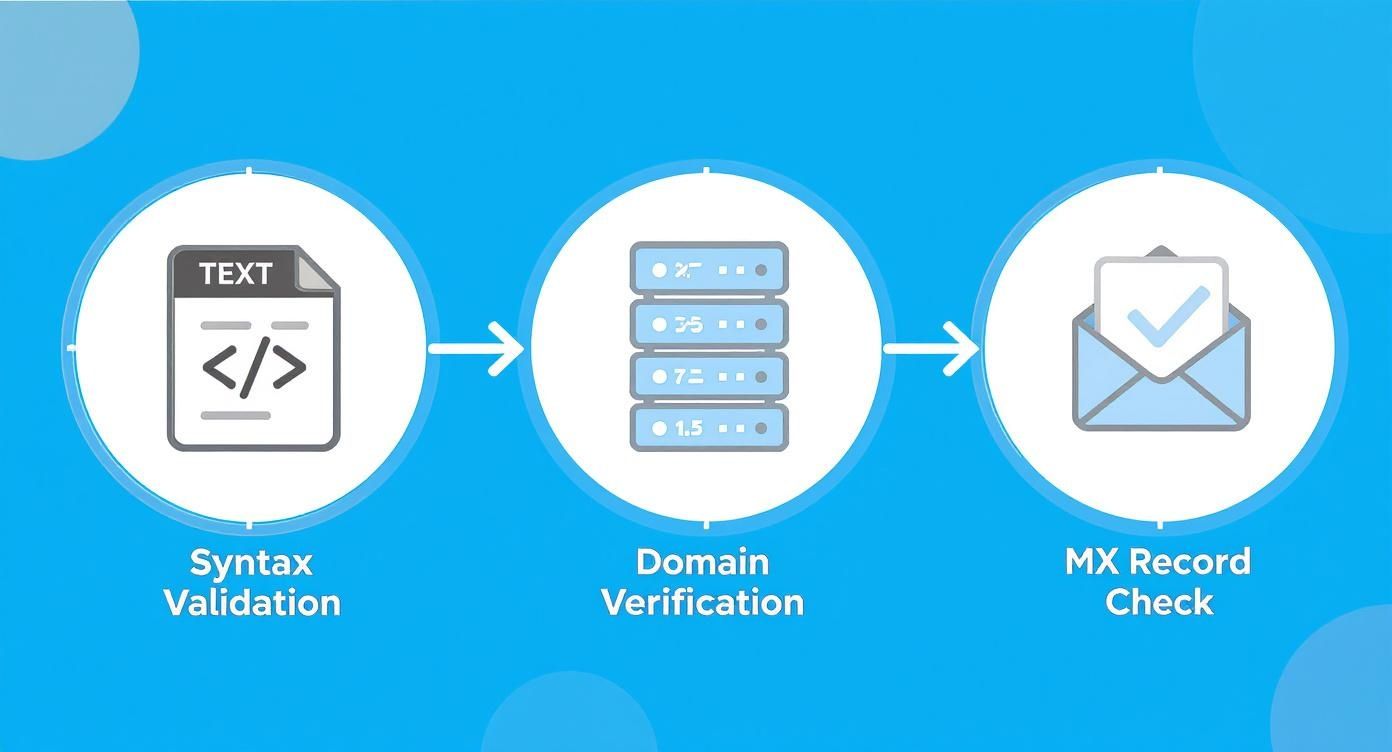
As you can see, each check builds on the last, starting with the basics and moving all the way to confirming the mail server is ready to accept your email.
Comparing Manual vs Bulk Verification Methods
So, when does it make sense to stick with manual checks versus investing in a service? This table breaks it down.
| Feature | Manual Verification | Bulk Verification Service |
|---|---|---|
| Best For | Very small lists (under 50 contacts) | Lists of any size, especially 100+ |
| Speed | Extremely slow; minutes per email | Very fast; thousands of emails per minute |
| Accuracy | Prone to human error; basic checks only | High accuracy (98%+) with multi-layer checks |
| Checks Performed | Syntax and maybe a quick domain check | Syntax, domain, MX, SMTP, catch-all detection |
| Cost | "Free" in terms of money, but high in time | Paid service, but saves significant time and money |
| Scalability | Not scalable at all | Designed for massive scale |
Ultimately, while manual checks can work for a tiny handful of emails, any serious marketing or sales effort needs the power and reliability of a dedicated bulk service.
Key Features to Look For in a Verification Provider
Not all verification services are built the same. As you weigh your options, there are a few critical features that will directly impact your results, workflow, and data security.
The demand for these tools is exploding. The global bulk email verification service market was valued at USD 1,042.9 million and is on track to hit USD 2,500 million by 2035. This growth shows just how vital data quality has become. You can read more about the market trends and what’s driving this demand.
As you look for the right provider, here's what really matters:
- Accuracy Guarantee: Look for services that promise 98% or higher accuracy. This shows they’re confident in their ability to correctly flag good and bad addresses.
- Processing Speed: How fast can it churn through your list? For 100,000 emails, the difference between a few minutes and a few hours is huge, especially when you're up against a campaign deadline.
- Detailed Status Codes: A great service gives you more than just "valid" or "invalid." You want granular results like "risky," "accept-all," and "unknown." These details help you make smarter decisions instead of just deleting potentially good contacts.
- API Integrations: A real-time API is a game-changer. It lets you verify emails right at the point of capture—on your signup forms and pop-ups—stopping bad data from ever getting into your system in the first place.
- Data Security and Compliance: You’re handing over customer data. Make sure the provider is GDPR compliant and has rock-solid security policies. They should never, ever resell or share your lists.
Making Sense of the Verification Results
Once your list is processed, you need to know what to do with the results. The categories are usually straightforward and give you a clear path for cleaning your list.
Common Verification Statuses:
- Deliverable: The green light. These emails are confirmed as valid and safe to send to.
- Undeliverable/Invalid: These are definitely bad. The domain might not exist, the format is wrong, or the mailbox is confirmed as non-existent. Delete them immediately.
- Risky/Accept-All: This is the tricky one. These emails belong to domains that accept all incoming mail, so the service can't be 100% sure the specific mailbox is real. The safest bet is to segment these contacts and send them a low-risk re-engagement campaign before mixing them back into your main list.
- Unknown: Sometimes a server is down or unresponsive, so the tool can't get a clear answer. It’s usually best to set these aside and try verifying them again later.
Picking the right bulk email verification service is a strategic move. By focusing on accuracy, security, and smart integrations, you can find a partner that not only cleans your list but also protects your sender reputation and makes your entire email marketing effort more effective.
Catch Bad Emails at the Source with Real-Time Verification
While cleaning an existing list is a great way to fix problems, the absolute best strategy is to stop bad emails from ever getting on your list in the first place. Think of it as having a bouncer at the door of your database, checking every email before it gets in.
This is where real-time verification comes into play. By plugging an email verification API (Application Programming Interface) directly into your website’s signup forms, pop-ups, and checkout pages, you can validate an email the very instant a user types it. It's a small technical change that has a massive impact on your data quality over time.

How Real-Time APIs Work in Practice
Let’s walk through a common scenario. A potential customer is excited to sign up for your newsletter but accidentally types john.doe@gmial.com instead of @gmail.com. We’ve all done it. Without real-time verification, that junk address goes straight into your CRM, and you've just lost a lead you thought you captured.
But with a real-time API, the system instantly flags that typo the moment they hit "submit." It then pops up a friendly message like, "Did you mean @gmail.com?" This simple, immediate feedback loop lets the user quickly fix their mistake, ensuring you get a valid, deliverable email every single time.
This proactive approach is a game-changer for a few reasons:
- It improves the user experience. You're helping users fix a common mistake without forcing them to fill out the whole form again.
- You maximize every lead. No more losing valuable signups to fat-finger errors.
- It keeps your bounce rate low from day one. By stopping invalid emails at the source, you protect your sender reputation right from the start.
Where to Integrate Real-Time Verification
You can—and should—implement this instant check at any point where you collect email addresses. The goal is to place your "gatekeeper" at every possible entrance. Getting this right means understanding the nuts and bolts of checking if an email address is valid through these API calls.
Here are the highest-impact places to start:
- Newsletter Signup Forms: This is your front line. Verifying here ensures your top-of-funnel leads are solid from the get-go.
- Contact and Demo Request Forms: For any sales-driven business, capturing a valid email is non-negotiable. A bad address here is a lost sale, plain and simple.
- E-commerce Checkout Pages: A typo during checkout means your customer won't get their order confirmation or shipping updates. That's a recipe for a bad customer experience and a support ticket.
- Free Trial or Account Signups: You need a real email for user activation, onboarding sequences, and all future communication.
By verifying emails at the source, you're not just cleaning a list; you're building a fundamentally healthier marketing database from the ground up. This one proactive step will save you countless hours and headaches down the road.
The Business Case for Being Proactive
Putting a real-time verification API in place isn't just a technical tweak; it's a smart business decision with a clear ROI. You spend time and money acquiring every lead, and losing one to a simple typo is like throwing cash away.
When you stop these errors instantly, you protect that investment. More importantly, you ensure that every new subscriber or customer has a smooth experience with your brand from their very first interaction. They get the welcome email they expected, the demo they requested, and the receipt they need. This builds trust and sets the stage for a great long-term relationship. It’s the single most effective way to learn how to verify emails because it automates good data hygiene before a problem ever starts.
Moving Beyond Verification to Sender Authentication

Getting your email list squeaky clean is a huge win, but it only solves one side of the deliverability puzzle. While you’ve been busy checking your recipients, Internet Service Providers (ISPs) like Gmail and Outlook have been checking you.
This is where sender authentication comes in. Think of it as your email's digital passport. It’s what proves to receiving mail servers that your email is legitimate and actually comes from you—not some scammer spoofing your domain. A clean list plus strong authentication is the one-two punch you need to truly crush your deliverability goals.
Your Digital Passport Trio: SPF, DKIM, and DMARC
Sender authentication sounds technical, but it really boils down to three records you set up for your domain: SPF, DKIM, and DMARC. Each plays a distinct role, and they're most powerful when you use them all together.
-
SPF (Sender Policy Framework): This is the foundational check. It’s simply a public list of all the servers and services authorized to send email for your domain. If a message shows up from a server that isn't on your list, ISPs get suspicious. Fast.
-
DKIM (DomainKeys Identified Mail): This adds a tamper-proof digital signature to every email you send. It’s a bit like a wax seal on a letter. Receiving servers use this encrypted signature to verify the message hasn't been messed with on its way to the inbox.
-
DMARC (Domain-based Message Authentication, Reporting, and Conformance): DMARC is the rulebook. It tells ISPs exactly what to do with emails that fail the SPF or DKIM checks—either stick them in spam or reject them completely. It also sends you reports, giving you a clear view of who's trying to send mail using your domain.
By setting up these three records, you're sending a crystal-clear message to inbox providers everywhere: "I take security seriously, and you can trust messages from my domain." In the world of email, that trust is everything.
Why Authentication Matters More Than Ever
Let's be clear: proper sender authentication isn't just a "nice-to-have" anymore. It's a non-negotiable for anyone who wants to reliably reach the inbox. It has a direct impact on your sender reputation and is your single best defense against phishing and spoofing attacks.
In fact, it’s estimated that nearly 89% of phishing attacks rely on faking a sender's identity to fool people. Without authentication, you're leaving your brand's reputation—and your deliverability—up to chance.
For a deeper dive into protecting your reputation, a Practical Guide to Preventing Emails from Going to Spam offers some great strategies. And if you’re ever unsure about an address on your list, you can always run it through an email validity checker.
Your Top Email Verification Questions, Answered
Once you get the hang of email verification, the questions start getting more specific. It's one thing to know what it is, but another to know how to apply it smartly to your own lists and workflows. Let's tackle some of the most common questions that pop up.
Think of this as the practical advice I'd give you over coffee. We'll cover how often you really need to clean your lists, the deal with "100% deliverability" promises, and what to do with those tricky "risky" emails.
How Often Should I Verify My Email List?
This really boils down to how you're getting emails in the first place. If you have a constant stream of new signups, your best bet is to play offense. A real-time verification API on your forms is the gold standard here—it catches bad data before it even has a chance to mess up your database.
For the list you already have, a full-scale bulk verification every three to six months is a solid routine. People switch jobs, ditch old email providers, and let accounts go dormant all the time. This regular check-up stops that natural decay from tanking your sender reputation.
Here's a pro-tip you can't ignore: if you have a segment of your list that hasn't heard from you in over six months, verify it before you hit send. Firing off a campaign to a cold, unverified list is the fastest way to get a huge bounce rate and land your domain on an ISP's naughty list.
Can Email Verification Guarantee 100% Deliverability?
Short answer: no. Be very wary of any service that claims it can. Email verification is a hugely important step, but it's just one piece of the deliverability puzzle.
Here's what a good verification process actually does:
- Confirms the email address has the right format (like
name@domain.com). - Checks that the domain is real and set up to receive email.
- Pings the server to see if that specific mailbox exists and is active right now.
Doing this slashes your bounce rate, which signals to inbox providers that you're a legitimate sender who cares about list hygiene. But getting into the inbox depends on other things, too.
What Else Matters for Deliverability?
- Sender Reputation: Your sending history is like your credit score. Past bounce rates, spam complaints, and engagement all factor in.
- Email Content: Spammy words, shady links, or a wall of images can get you sent straight to the junk folder.
- Recipient Engagement: If people consistently ignore or delete your emails, their provider takes notice and might start filtering you out.
Verification gets you to the right front door. But it's your reputation and great content that actually get you invited inside.
What Is the Difference Between Risky and Undeliverable?
When you get your results back from a verification tool, you’ll see more than just "valid" and "invalid." It's crucial to understand the difference between statuses like undeliverable and risky.
An undeliverable (or invalid) email is a dead end. It’s a guaranteed bounce. The mailbox flat-out doesn't exist, the domain is fake, or there's a fatal typo. These need to be scrubbed from your list immediately. No second chances.
A risky email is more of a gray area. You'll often see these labeled "accept-all" or "unknown." They belong to domains configured to say "yes" to any email sent their way, whether the specific mailbox is real or not. It's a catch-all setup some businesses use to avoid losing legitimate mail. Since the server always gives a green light, a verification tool can't be 100% sure the mailbox is active without actually sending something.
So, what's the move?
Don't delete "risky" emails, but don't keep them with your A-list either. The best play is to segment them out. Send this group a low-stakes, high-value re-engagement campaign. Anyone who opens or clicks can be safely moved back to your main list. The ones who don't engage can be phased out.
Is It Legal to Use an Email Verification Service?
Absolutely. Not only is it legal, but it's also considered a best practice for data hygiene under major privacy laws like GDPR and the CAN-SPAM Act.
These regulations are all about consent and communication. You need permission to email someone, and you have to give them an easy way to opt out. What these laws don't do is stop you from making sure the data you're responsible for is accurate.
Verification services perform purely technical checks with mail servers; they don't send an actual email to the person. It's a responsible way to manage the personal data people have entrusted you with.
Just remember what verification can't do: it can't create consent where there is none. Cleaning a list you bought or scraped doesn't magically make it okay to email those people. Verification is for maintaining the quality of a list you already have permission to contact.
Ready to take the guesswork out of your email outreach? EmailScout helps you find and validate the right contacts in a single click, ensuring your message always lands in the right inbox. Discover verified emails and build powerful marketing lists effortlessly. Get started with EmailScout today and supercharge your outreach.