

To write a professional email that actually gets a reply, you need to nail four key parts: a subject line that sparks curiosity, an opening that builds instant rapport, a body that clearly shows your value, and a call-to-action that’s dead simple to act on.
Getting this simple formula right is what turns your emails from just more noise in a crowded inbox into a compelling message that people feel obligated to answer.
The Anatomy of an Email That Gets Results
Stop thinking of a professional email as a stuffy, formal document. Instead, think of it as a strategic conversation starter. Every single word should gently guide your reader toward the outcome you want, whether that's booking a meeting, getting an answer, or just getting them to consider your idea.
Here's the hard truth: the best emails are almost never the longest or most detailed ones. They're the ones that are the clearest and most respectful of the other person's time.
The real challenge is cutting through the insane amount of inbox clutter. The average professional gets more than 120 emails every single day. That means your email has just a few seconds to prove it's worth their attention. This is why understanding the basic anatomy of a great email is a genuine superpower. It lets you build messages that are both professional and persuasive.
Core Components of a High-Impact Email
No matter why you're writing, every effective email is built on the same foundation. Get these five elements right, and you're already ahead of the game.
- The Subject Line: This is your email's headline. Its one and only job is to get the email opened. Keep it clear, short, and directly relevant to them.
- The Opening Salutation and Hook: Your first line immediately sets the tone. A personalized greeting followed by a strong, relevant hook shows you've actually done your homework.
- The Body Paragraphs: This is where you make your case and deliver value. It absolutely must be scannable, so use short paragraphs and focus entirely on what’s in it for the reader.
- The Call-to-Action (CTA): This might be the most important part. A clear, low-effort CTA tells them exactly what to do next. If you're vague here, you'll get no response.
- The Professional Closing and Signature: A simple "Best regards" or "Cheers" keeps the tone positive. A clean, well-formatted signature provides your key info and reinforces that you're a professional.
For more practical tips on starting these conversations, we've got a whole guide on how to write an introductory email.
And remember, good structure is only half the battle. Mastering proper email etiquette at work is what makes your professional messages truly connect.
A great email isn't just about what you say; it's about how you structure the conversation. Make it easy for them to understand your value and even easier for them to respond.
Anatomy of a Professional Email: Effective vs. Ineffective Approaches
It's often the small details that separate an email that works from one that gets deleted on sight. A generic, self-serving message gets archived instantly, while a personalized, value-first email starts a real conversation.
This table breaks down the practical differences.
| Email Component | Effective Approach (Gets a Reply) | Ineffective Approach (Gets Ignored) | Why It Matters |
|---|---|---|---|
| Subject Line | "Quick Question about your recent LinkedIn post" | "Business Proposal" | Personalization and curiosity get emails opened. Generic labels look like spam. |
| Opening Hook | "Hi Alex, loved the insights you shared on the recent podcast about scaling SaaS teams." | "Dear Sir/Madam, I hope this email finds you well." | A specific, genuine compliment proves you've done your research and builds instant rapport. |
| Body Message | "Based on your team's focus on efficiency, our tool can automate your reporting, saving you ~10 hours a week." | "We are a leading provider of innovative solutions that help businesses succeed." | The focus is on their direct benefit ("saving you 10 hours"), not a generic description of your company. |
| Call-to-Action | "Are you available for a 15-minute call next Tuesday or Thursday afternoon to explore this?" | "Let me know what you think." | A specific, easy request (a short call with options) gets a "yes" far more often than a vague, open-ended question. |
The takeaway is simple: focus on them, not you. Make it personal, make it valuable, and make it easy for them to say yes.
Mastering the Subject Line and Opening Hook

Before anyone reads your email, they have to get past the inbox scan. Your recipient is scrolling through dozens, maybe hundreds, of other messages. Your subject line is the gatekeeper—it’s the one thing that determines whether they click open or just hit archive.
The numbers don't lie. Nearly half of all recipients—a massive 47%—open emails based on the subject line alone. This single line of text is your digital handshake, and it’s your first and often only shot to make an impression.
A great subject line does more than just get an open; it sets the right expectation. It promises value and primes the reader for what's inside. It’s the difference between being a welcome guest and an uninvited pest.
Crafting Subject Lines That Demand a Click
Forget the generic, one-size-fits-all stuff like "Following Up" or "Quick Question." They’re completely invisible in a crowded inbox. To write a professional email that actually gets opened, you need to blend three key ingredients: personalization, relevance, and a dash of curiosity.
Personalization isn’t just about using their name. It's about showing you know their world. Mentioning a recent LinkedIn post, a company milestone, or a mutual connection immediately signals that this isn't some mass email blast.
Relevance makes your message about them. A subject line focused on a challenge they're facing or a goal they're working toward will always beat one that’s all about you. And curiosity, when done right, creates a little itch that opening the email is the only way to scratch.
Here are a few approaches I’ve seen work wonders:
- The Specific Question: "Question about your recent SaaS scaling article"
- The Value Proposition: "Idea for reducing your team's onboarding time"
- The Mutual Connection: "Intro from Jane Doe – potential collaboration"
- The Congratulatory Hook: "Congrats on the new product launch!"
Your subject line should feel like the start of a one-to-one conversation, not a broadcast to a faceless crowd. The more tailored and specific it is, the higher your open rate will be.
And don’t forget the preview text! That’s the little snippet you see right after the subject line in most inboxes. It’s valuable real estate. Use it to expand on your subject line’s promise and add another layer of intrigue. For a deeper dive, check out our guide on email subject line best practices.
Ditching "Hope You're Well" for a Powerful Opening
Once they click open, the first line is your next big test. Openers like "I hope this email finds you well" are the written equivalent of elevator music—bland, forgettable, and a dead giveaway that a generic pitch is coming. They just waste space.
A powerful opening line has to immediately prove that their click was a good decision. It needs to build on the promise of your subject line and show, in seconds, that you’ve done your homework. This is where you build instant rapport.
A strong hook is always grounded in specific context. It shows you respect their time by getting straight to the point in a way that feels both personal and relevant.
Instead of the generic fluff, try one of these impactful alternatives:
- Reference a Recent Achievement: "Hi Sarah, I was so impressed with your team's recent feature launch for Project Atlas. The UI looks incredibly intuitive."
- Mention a Shared Interest or Connection: "Hi Mark, I noticed we both follow Maria Chen's work on product-led growth. Her latest piece on user onboarding was excellent."
- Highlight Their Content: "Hi David, your recent podcast episode on managing remote engineering teams really resonated with me, especially your point about asynchronous communication."
Each one of these examples builds an immediate connection. They prove you're not just another stranger in their inbox—you're a thoughtful professional who took the time to understand who they are and what they care about. This small shift dramatically increases the odds they’ll keep reading and, more importantly, reply.
Nailing Your Message and Call-to-Action
Alright, you got them to open the email. Your subject line and opener did their job. Now, the body of your email has to deliver the goods—fast. This is not the time for long, rambling paragraphs or dense corporate jargon. Your reader is busy, and you're on the clock.
The key to getting a response is making your email scannable. Think short sentences, simple words, and lots of white space. You want the main point to be so obvious they could get it in a three-second glance.
Structure Your Message for Instant Clarity
Get straight to the point. Lead with the most important information, then add just enough context to back it up. Forget everything you learned in English class about building up to a conclusion; here, we start with it.
A framework I've seen work time and time again is "Problem-Solution-Benefit." You briefly show you understand their world, introduce your idea, and then spell out what's in it for them.
- Problem: "I saw your team is hiring aggressively, and onboarding new engineers can be a massive time-drain."
- Solution: "Our platform automates the initial dev environment setup, cutting it down from a full day to about 30 minutes."
- Benefit: "This gets your new hires coding on day one and frees up your senior devs to focus on their actual work."
See how that works? It immediately frames the conversation around their needs, not yours. It proves you've done your homework and aren't just blasting out another generic pitch.
The best professional emails are built on empathy. They show you understand the recipient's challenges before you ask for anything.
Crafting a Call-to-Action That Actually Gets a Click
This is where so many emails fall flat. A weak, passive call-to-action (CTA) like "Let me know your thoughts" or "Looking forward to hearing from you" is a dead end. It puts all the work on the reader to figure out the next step, and—spoiler alert—they won't.
A great CTA is specific, clear, and easy. It tells the reader exactly what to do next and makes it feel like a tiny, low-effort step.
The difference is night and day:
| Weak CTA (Gets Ignored) | Strong CTA (Gets a Reply) |
|---|---|
| "Let me know if you want to chat." | "Are you free for a 15-minute call next Tuesday or Thursday afternoon?" |
| "I'd love to show you a demo." | "Here's a 2-minute video showing how it works. Does this look useful?" |
| "Feel free to check out our website." | "You can book a time that works for you directly on my calendar here." |
The strong CTAs remove all the guesswork. They propose a concrete action, suggest a clear timeframe, and lower the mental barrier to saying yes. This simple change can be the difference between a reply and the archive button.
Getting this right isn't just about good manners; it's about money. Email marketing isn't a cost center; it's a massive revenue driver. We're talking an average ROI of 3600%, which breaks down to $36 for every $1 spent. With 42% of marketers calling email their most effective channel, you can't afford to get lazy on the CTA. You can find more stats on email marketing effectiveness on dyspatch.io.
When you write a professional email, your final ask should feel like a small, logical next step, not a huge commitment. Pair a clear message with a compelling, low-friction CTA, and you make it almost effortless for your reader to say "yes."
Scaling Personalization with Smart Tools
Let’s be honest. Manually researching every single prospect is a noble goal, but it just doesn't scale. On the flip side, blasting out hundreds of generic, templated emails is fast, but it’s a one-way ticket to the spam folder.
The real magic happens in the middle ground: personalization at scale, powered by the right tools.
This isn't about faking a connection; it's about using technology to find real ones, faster. Tools like EmailScout are built for this very purpose, turning a manual, time-sucking chore into a smart, strategic part of your workflow. It’s about working smarter to make sure your email feels like it was written just for them.
The impact here is huge. We're seeing a massive shift in how quickly teams can operate. In 2023, only 21% of marketing teams could get emails out the door within a week. By 2026, that number is expected to jump to 76%. That's a 255% improvement, and it's all thanks to smarter automation and AI. You can read up on these email creation trends to see just how fast things are moving.
Finding the Right Inbox and the Right Hook
Before you do anything else, you have to be sure your email is going to land in the right inbox. An email finder is your first move, quickly verifying a contact so you aren't just shouting into the void.
But getting the address is just step one. The real work is in gathering context. This is where a feature like a URL Explorer becomes your secret weapon. Instead of just grabbing an email, you can pull key insights directly from a prospect’s LinkedIn profile, their company’s "About Us" page, or a recent article they were featured in.
This gives you the raw material you need for genuine personalization:
- Recent Wins: Did their company just launch something new or hit a big milestone?
- Shared Ground: Do you follow the same people on LinkedIn or have a mutual connection?
- Company News: Did they just get a round of funding or win an industry award?
These little details are the hooks that turn a cold email into a warm conversation. You’re no longer just another salesperson—you're someone who’s actually paid attention.
A Smarter Workflow for Personalized Outreach
Let's walk through how this works in the real world. Say you want to connect with a marketing manager at a hot tech startup. The old way involved guessing their email and sending a generic pitch.
Here’s the smarter workflow:
- Discover: Use an email finder on their LinkedIn profile to get their verified work email.
- Research: While you're there, you spot a post they shared about a successful campaign they just ran.
- Personalize: Your opening line goes from "Hope you're having a great week" to "Hi [Name], I was really impressed with the case study you shared on the [Project Name] campaign. Those results were fantastic."
That simple three-part process—Discover, Research, Personalize—is what separates your email from the hundreds of others in their inbox. You've shown you've done your homework, and that earns you a moment of their time.
Once you’ve nailed that personalized opener, the body of your email should follow a few core principles.
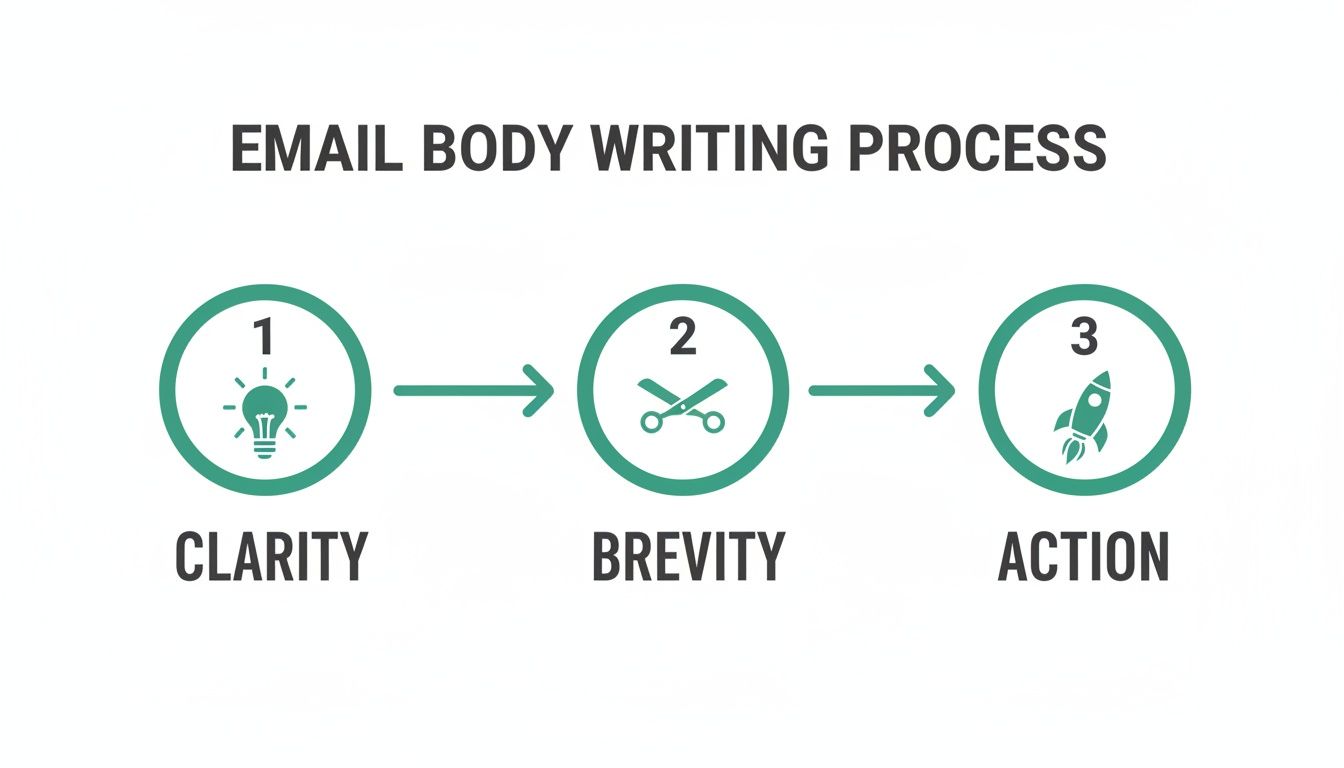
The idea is simple: be clear, be brief, and then guide them to the next step. When you combine this structure with smart automation tools, you build a powerful, repeatable system for outreach that actually works. If you're looking for the right tools to build your stack, our guide on the best cold email software is a great place to start.
Field-Tested Email Examples for Common Scenarios
Theory is great, but seeing these principles in action is where it all clicks. The fastest way to get better at writing emails is to see what works and understand why it works.
Think of these examples less as rigid templates and more as a personal swipe file. We'll break down the most common situations you'll face: the initial cold outreach, the all-important follow-up, and the often-fumbled reply.
The Cold Outreach Email
The point of a cold email isn't to close a deal right away. It's simply to start a conversation. To do that, your message has to be short, ridiculously relevant, and centered on the other person's world. This means you have to kill the generic sales pitch and lead with value.
Here’s a look at an email targeting a marketing leader at a SaaS company, using a recent article they published as the hook.
Subject: Idea for your recent content marketing article
Hi [Prospect Name],
I just read your team's latest article on scaling content marketing, and I was particularly impressed with your points on repurposing webinars into micro-content. It's a strategy we've seen drive huge results.
Based on your focus on efficiency, I had an idea. Our tool helps teams like yours automate the clip-finding and transcription process, saving an average of 8-10 hours per webinar.
Would you be open to a 15-minute call next week to see if this could support your team's goals?
Best regards,
[Your Name]
Why It Works:
- Specific Hook: It kicks off with a genuine compliment about their specific work. This immediately proves it's not a lazy, mass email blast.
- Problem-Centric Value: The message ties directly to a goal they've publicly stated (efficiency) and offers a clear, metric-driven solution.
- Low-Friction CTA: It asks for a small, defined chunk of time—15 minutes—making it a much easier "yes" than a vague "let's connect."
The most effective cold emails don't feel cold at all. They feel like a relevant, helpful suggestion from a peer who's done their homework.
The Follow-Up Email
Let’s be real: most deals don't happen after the first email. The data is pretty clear on this—a staggering 80% of sales require at least five follow-ups. A great follow-up doesn't just "check in"; it delivers fresh value. It’s your chance to provide a new resource or a different angle.
Assuming you got radio silence on the first email, here’s how you could follow up about a week later.
Subject: Re: Idea for your content marketing
Hi [Prospect Name],
Just wanted to follow up on my email from last week. To give you a clearer picture of how this works, here's a quick 90-second video showing how a similar SaaS company automated their webinar repurposing workflow.
Does this look like something that could be useful for your team?
Cheers,
[Your Name]
Why It Works:
- Adds New Value: Instead of a lazy "just bumping this," it offers a new, easy-to-consume asset (a short video).
- Respects Their Time: The email is even shorter than the first, and the 90-second video is an incredibly low time commitment.
- Simple, Yes/No Question: The CTA is a closed-ended question. It makes hitting "reply" and typing a one-word answer feel effortless.
The Reply Email
So, you got a bite! How you handle the reply is just as critical. The goal now is to maintain momentum and guide them to the next step without any friction. You need to be professional, of course, but also direct and crystal clear about what happens next.
Let's imagine they replied positively after seeing the video.
Subject: Re: Idea for your content marketing
Hi [Prospect Name],
Great to hear from you, and thanks for watching the video! I'm glad it resonated.
I'm confident we can help your team streamline its content workflow. To make it easy, you can book a time that works for you directly on my calendar here: [Your Calendar Link]
I've also attached a one-page case study that details the results the team in the video achieved. Looking forward to connecting!
Best,
[Your Name]
Why It Works:
- Removes Friction: The direct calendar link kills the painful back-and-forth of scheduling.
- Adds More Value: It includes another useful resource (a case study) that builds credibility and keeps them engaged before the call.
- Clear Next Steps: There is zero confusion about what they need to do next.
Key Differences in Email Outreach Scenarios
The goals, tone, and asks change dramatically depending on the context of your email. What works for a cold pitch would feel pushy in an internal update, and a follow-up requires a different touch than an initial outreach.
| Email Type | Primary Goal | Recommended Tone | Example CTA |
|---|---|---|---|
| Cold Outreach | Start a conversation | Confident, helpful, concise | "Open to a 15-minute call next week?" |
| Follow-Up | Add new value, stay top-of-mind | Persistent but not pushy, valuable | "Does this resource seem helpful?" |
| Meeting Request | Schedule a specific time | Direct, accommodating, professional | "You can book a time on my calendar here." |
| Information Request | Get a specific piece of data | Polite, clear, respectful of time | "Could you point me to the right person?" |
| Project Update | Inform stakeholders of progress | Transparent, organized, proactive | "Please review by EOD Friday." |
Understanding these nuances is key to getting the response you want.
Applying these core principles to different situations is pretty straightforward once you get the hang of it. For more hands-on practice, looking at specific templates, like these project status update email template examples, can be a huge help.
Your Top Email Questions, Answered
Even when you have a solid strategy, writing professional emails always seems to bring up a few tricky questions. The little things really do matter, and getting them right can be the difference between a great conversation and a one-way ticket to the trash folder.
Let's dive into some of the most common questions we get. Think of this as your quick-reference guide for those moments when you're staring at the screen, wondering what to do next.
How Long Should My Email Be?
The golden rule here is simple: as short as you can make it without losing the point.
For that first cold email, you should be aiming for somewhere between 50 and 125 words. That's just enough space to introduce yourself and show your value, but short enough that someone can read it and get the gist in less than 30 seconds on their phone.
Remember, you're not writing a novel. You're just trying to start a conversation.
- Stick to one core idea. Don't cram three different requests into one message.
- Use short paragraphs and bullets. Anything that makes your email easier to scan is a win.
- Be ruthless when you edit. Read every sentence and ask yourself, "Do I really need this?" If the answer is no, hit delete.
How Many Times Should I Actually Follow Up?
Persistence is key, but there's a fine line between being persistent and just being annoying. I've found the sweet spot is usually three to five follow-ups spread out over a few weeks. It’s easy to give up after one or two tries, but so many deals are closed on the third, fourth, or even fifth touch.
Your follow-up should never be a lazy "just checking in." Each time you reach out again, bring something new to the table. It could be a link to a relevant article, a quick case study, or a different resource. This changes the entire dynamic from "nagging" to "helpful."
Give them some breathing room between your messages. A good cadence could be waiting two days after the first email, then another four days, then a full week. If you've hit that fifth attempt and still hear crickets, it’s probably time to move on.
Is It Ever Okay to Use Emojis or Exclamation Points?
This one is all about knowing your audience. If you're emailing a C-suite executive at a Fortune 500 company for the first time, it’s best to play it safe and leave them out.
But if you’re in a more laid-back industry like tech or marketing, or you've already built some rapport with the person, a well-placed emoji or exclamation point can add a bit of personality and warmth.
- Use exclamation points sparingly. One can show genuine excitement. Three in a row just looks unprofessional.
- Emojis are seasoning, not the main course. Use them to add a bit of tone, not to replace actual words.
- When in doubt, leave it out. Professionalism is always the safest bet.
How Do I Apologize for a Mistake Professionally?
We all mess up. The key is how you handle it. When you need to apologize for an error, do it quickly, clearly, and without a bunch of excuses. A solid professional apology has three simple parts:
- Own the mistake directly. Get straight to the point. "I apologize for the error in the report I sent over this morning."
- Explain the fix. Tell them what you've done to make it right. "I've attached the corrected version with the updated Q3 figures."
- Share your plan to prevent it from happening again. This shows you're proactive and accountable. "I've already tweaked our process to add a final verification step so this won't happen again."
This approach doesn't just fix the problem; it builds trust and shows the other person you have the situation completely under control.
Ready to turn these insights into action? EmailScout helps you find the right contacts and the context you need to write personalized emails that get replies. Discover verified emails in a single click and scale your outreach the smart way. Find your next customer at https://emailscout.io.