

So, what does it actually mean to verify an email address? It’s simply the process of confirming an address is valid, active, and can actually receive messages before you send a single thing. It’s a crucial quality control step that prevents bounced emails, protects your sender reputation, and makes sure your hard work reaches a real person.
Why You Must Verify Emails Before Hitting Send
Let’s be real. Hitting 'send' on a big campaign is nerve-wracking enough. You don’t want the added stress of wondering if half your list is fake. Skipping email verification isn't a minor shortcut; it's a direct threat to your sender reputation and your ability to connect with anyone at all.
Think of your sending domain as having a credit score with Internet Service Providers (ISPs) like Gmail and Outlook. Every time you send to a dead email address, you get a "hard bounce." Racking up too many hard bounces tells ISPs that you're probably a spammer sending out low-quality junk.
Once that happens, your sender score tanks. This isn't just a number on a dashboard. A poor score can land your domain on an ISP blacklist, making you practically invisible. Your carefully written emails start getting funneled to the spam folder or, even worse, rejected outright.
The Real-World Cost of an Unverified List
I saw this happen firsthand with a SaaS startup I worked with. They were launching their first big outreach campaign to 10,000 prospects from a list they’d purchased. To save a little time and money, they skipped verification. It was a complete disaster.
Nearly 30% of the emails bounced. Their brand-new domain was immediately flagged as a source of spam. Open rates were in the gutter, they torched thousands on the list and the campaign, and it took them months of careful, low-volume sending just to repair their reputation.
That painful lesson boils down to a few core truths about why you have to verify every email:
- Protect Your Sender Reputation: High bounce rates are the fastest way to wreck your sending score and get blacklisted by the big email providers.
- Improve Deliverability Rates: A clean list means more of your emails land in the primary inbox, where people actually see them.
- Increase Campaign ROI: Why spend money sending emails that have zero chance of being delivered? Verification ensures you’re only talking to valid contacts and getting the most from your investment.
- Maintain Accurate Data: People change jobs, and old email accounts get abandoned. Regular verification keeps your CRM data clean, reliable, and actually useful.
It's time to reframe your thinking. Email verification isn't just another tedious task on your to-do list. It's the strategic foundation of any successful email marketing or sales outreach program. It's the quality check that keeps your entire strategy from collapsing.
When you have a clean, verified list, you get higher open rates, better engagement, and a healthier sales pipeline. It’s that simple. For anyone in sales or marketing, treating verification as non-negotiable is the only way to build sustainable growth. It turns your email list from a potential liability into your most valuable asset.
Foundational Methods for Verifying Single Emails
When you're dealing with a handful of high-value prospects, you don't need to jump straight to a bulk verification service. There are a few quick, hands-on checks you can do yourself to confirm an email is the real deal.
These foundational methods are perfect for sales reps looking to build better habits and improve the quality of their contact lists without any upfront software costs.
It’s about going beyond a simple format check. Just because an email looks right—like jane.doe@company.com—doesn't mean it actually exists. A couple of minutes of due diligence per lead can slash your bounce rates and make sure your carefully crafted message actually gets delivered.
Start with Syntax and Domain Checks
Your first line of defense when you need to verify an email address is a simple syntax check. This is the most basic step, just making sure the address follows the standard local-part@domain format. It's great for catching obvious typos like a missing "@" symbol or weird characters, but it's really just the starting point.
Next, you need to investigate the domain itself. This is easy. Just pop the domain into your browser and see what comes up. Does it lead to a professional, active website? If the site looks like it was abandoned in 2005 or just throws an error, that email address is probably dead. This is a simple gut check that automated tools often miss.
You can also take a quick look at the domain's MX (Mail Exchange) records. These are public records that tell the internet where to send emails for that domain. It sounds technical, but plenty of free online tools do this for you instantly. This confirms the domain is actually set up to receive email in the first place.
The Gentle Art of the SMTP Ping
An SMTP ping, sometimes called an SMTP handshake, is a more advanced move. It directly communicates with the recipient's mail server to see if a specific inbox exists.
Think of it like knocking on a door to see if someone's home, but without actually going inside. The process simulates sending an email but stops right before the message is delivered. The server's response tells you everything you need to know.
This method is incredibly accurate, but you have to be careful. Firing off too many pings from the same spot can get you temporarily blocked by some mail servers.
Key Takeaway: The SMTP ping is one of the most reliable ways to verify a single email without actually sending anything. It directly asks the server, "Does this mailbox exist?" and gets a straight yes or no, giving you a high degree of confidence.
If you want the power of an SMTP check without the headache, user-friendly tools are the way to go. Many single-email verifiers—including the one we walk through in our guide to validate an email address—use this exact technology behind a simple interface.
A Sales Reps Daily Verification Checklist
To turn these methods into a powerful habit, here's a practical checklist you can follow for each new high-value prospect. This routine takes only a few minutes but pays off big time in deliverability.
- Visual Syntax Check: Does the email look right? No obvious typos or strange characters?
- Domain Viability Test: Visit the company's website. Is it active, professional, and legit?
- MX Record Lookup: Use a free online tool to confirm the domain has active mail servers.
- Perform an SMTP Ping: Use a trusted online verification tool to confirm the mailbox actually exists.
By making this simple, four-step process part of your daily outreach prep, you give every crucial email the best possible chance of landing in the right inbox. This proactive approach prevents the reputation damage that comes from high bounce rates and sets your campaigns up for success from the start.
How to Scale Your Efforts with Bulk Email Verification
Manually checking a handful of high-value emails is a great starting point, but that strategy hits a wall fast. What happens when you've got a list of 5,000 webinar signups or a prospect database with 10,000 contacts? At that kind of scale, you need a completely different approach to verify email address integrity.
This is exactly where bulk email verification services come into play. These platforms are built to churn through thousands, or even millions, of addresses in minutes, not days. They automate the whole nine yards—syntax checks, domain validation, server pings—giving you a clean, deliverable list without the soul-crushing manual grind.
The value here is hard to overstate. A clean list doesn't just cut down on bounces; it directly shores up your bottom line by protecting your sender reputation, which is basically the currency of email marketing.
Choosing the Right Verification Tool
Look, not all bulk verification tools are created equal. When I'm vetting a service, I cut through the marketing fluff and focus on a few core things that actually impact performance. The right tool should feel like a natural part of your workflow, not another clunky platform you have to babysit.
Here are the key factors I always look for:
- Accuracy Guarantees: I don't even consider services that promise less than 98% accuracy. A high guarantee shows they're confident in their multi-layered process, and that's critical for keeping your sender score healthy.
- CRM and API Integrations: The best tools play nice with others. Look for native integrations with your CRM (like Salesforce or HubSpot) or at least a well-documented API. This is what lets you automate verification right when a lead comes in.
- Transparent Pricing: Avoid services with weird credit systems or hidden fees. I always lean towards pay-as-you-go options or super-clear subscription tiers. Budgeting for this shouldn't be a guessing game.
- Detailed Reporting: A simple "valid" or "invalid" isn't enough. A solid service will give you detailed status codes like "accept-all," "risky," or "unknown." This lets you segment your lists with a lot more intelligence.
These are the things that separate the basic checkers from the pro-grade platforms. If you're just dipping your toes in, you can check out our guide on the best free email verification tools to see how different options compare.
Integrating Verification into Your Marketing Funnel
The real magic happens when you stop treating verification as a one-off cleanup project. Instead, build it right into your automated workflows. Make it a proactive step in how you manage every single lead.
Think about a marketing team running a webinar. As people sign up, their info is automatically piped to a verification API.
Workflow Example: A new webinar signup comes in and gets passed through a verification API. If the email is "valid," they drop right into your primary nurture sequence. If it's "risky," maybe they get a plain-text follow-up instead. If it's "invalid," they're flagged in the CRM for a human to review, completely protecting the main campaign's deliverability.
This kind of automated triage ensures your expensive, carefully crafted nurture sequences are only hitting high-quality, deliverable addresses. It stops bad data at the door.
With daily global email volume projected to rocket past 376 billion messages in 2025, this isn't a luxury—it's a survival tactic. In an environment that crowded, invalid emails will crush your bounce rate and decimate your sender reputation before you know what hit you.
A Smarter Approach from the Start
Verification is great for cleaning the list you already have, but what if you could just build a cleaner list from day one? This is where a tool like EmailScout flips the script. By helping you find credible, verified emails for decision-makers at your target companies, you’re starting with a much higher-quality dataset from the get-go.
Combining a powerful email finder with a robust bulk verification process is a one-two punch for any sales or marketing team. You find the right people, confirm their contact info is good to go, and then engage with total confidence, knowing your message will actually land in their inbox.
Integrating Verification into Your Daily Workflows
Knowing why you should verify emails is one thing. Actually turning that knowledge into a consistent, automatic habit is a whole different ballgame. The real magic of email verification isn't in a once-a-year list scrub; it's what happens when you weave it directly into the daily grind of your sales and marketing teams.
When you do this, you stop cleaning up messes and start preventing them from ever happening. By embedding verification at key points in your funnel, you build a quality filter that ensures only deliverable email addresses enter your ecosystem. It's a small process shift with a massive downstream impact on everything from campaign performance to your sender reputation.
A Practical Workflow for Sales Professionals
For any sales rep, time is money. Every minute spent wrestling with bounced emails is a minute they're not engaging with a potential customer. A simple but effective workflow can completely change this dynamic.
Let's picture a sales development rep (SDR) prospecting on LinkedIn. Their entire goal is to find decision-makers and start conversations.
- Find the Contact: Using a tool like the EmailScout Chrome extension, the SDR finds a promising contact's email address in a single click, right from their profile.
- Instant Verification: Before that email is even copied, the SDR uses an integrated or standalone tool to verify the email address on the spot. This takes seconds.
- CRM Entry: Only when the email comes back as "valid" does it get dropped into the CRM and added to an outreach sequence. If it's "invalid," the SDR just moves on, wasting zero time. A "risky" or "accept-all" result might trigger a more cautious, plain-text first touch instead of the full sequence.
This tiny habit prevents the CRM from getting polluted with bad data. It ensures every single email sent in a high-touch sales cadence has the best possible chance of landing, protecting both the SDR's time and the company's domain authority.
Automating Verification for Marketing Teams
Marketing teams dealing with high-volume lead flow simply can't do this manually. For them, automation is the only way forward. The goal is to turn your lead capture and nurture systems into a self-cleaning engine.
Take a common marketing scenario: generating leads from a downloadable e-book.
An automated workflow would look like this: a user fills out a form, and their data zips over to your marketing automation platform. Instantly, an API call is made to a bulk verification service, which returns a status for the email address.
The system then gets to work sorting the new lead. A 'valid' contact flows right into the main welcome series. A 'risky' one might get a simple confirmation email first. An 'invalid' email gets flagged and never receives a marketing email, safeguarding your deliverability.
This is the core idea behind the simple bulk verification flow you see below. It’s all about taking a raw list, running it through the verification process, and getting clean, usable data back.
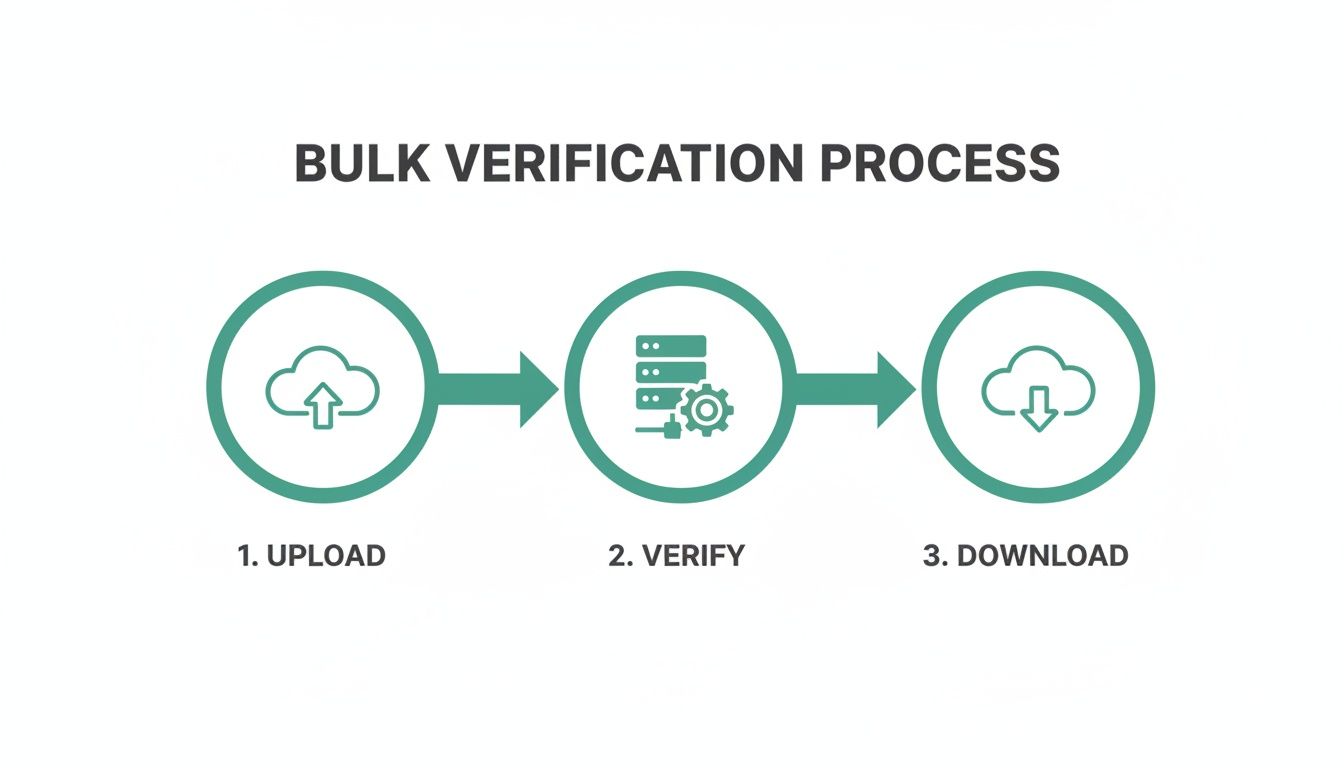
This three-step cycle—upload, verify, download—is the backbone of good list hygiene. It's how you turn a chaotic dataset into a powerful marketing asset.
The Financial Incentive for Clean Workflows
Building these workflows isn't just about good data habits; it's about protecting your bottom line. When you look at the numbers, the payoff is staggering. Email marketing's ROI is projected to hit between $36-$42 for every $1 invested by 2025, a figure that depends entirely on clean lists and high deliverability.
Data from over 30 billion emails shows that personalized campaigns sent to verified lists achieve open rates between 24% and 32.55%. Letting invalid emails sabotage that kind of potential is just a costly, unforced error.
To make this dead simple, consider using a dedicated email verifier tool that plugs right into your daily routine. By making verification a core part of your operations, you stop treating it like a painful cleanup project and start treating it like the continuous, automated asset it is.
Best Practices for Long-Term List Hygiene
Here’s a hard truth: treating email verification as a one-and-done task is a massive, costly mistake. Your email list is a living asset, and it needs constant care to stay effective. If you neglect it, you’ll fall victim to email decay—the natural process where addresses become invalid as people switch jobs, change providers, or just abandon old inboxes.
A list that was 98% clean just six months ago could easily be riddled with bounces today. That's why long-term list hygiene isn't just a suggestion; it's a core strategy for any sustainable email program. Think of it like tending a garden. It needs consistent attention to thrive.
This ongoing maintenance keeps your sender reputation strong and ensures your messages actually land where you want them to. A proactive approach means you’re always working with your most valuable contacts, not shouting into the void.
Implement Double Opt-Ins for New Subscribers
The absolute best way to keep a list clean is to stop bad emails from getting on it in the first place. This is where the double opt-in method becomes your first and most powerful line of defense.
When someone subscribes, the double opt-in process sends them an automated confirmation email. They have to click a link in that message to be officially added to your list. It's a simple step, but it accomplishes several critical goals at once:
- Confirms a real, accessible inbox: It proves the address isn't just valid but is also actively checked by the user.
- Filters out typos and fake emails: Accidental misspellings or throwaway addresses are stopped right at the door.
- Verifies user intent: It’s concrete proof that the subscriber genuinely wants to hear from you, which translates to much higher engagement later on.
This upfront work drastically cuts down on the number of invalid addresses polluting your system, saving you a ton of cleanup headaches down the road. You can dive deeper into the whole process in our complete guide on how to verify emails.
Establish a Regular Cleaning Schedule
Even with a perfect opt-in process, email decay is inevitable. To fight back, you need to get into a consistent rhythm of scrubbing your entire list. For most businesses, running a full bulk verification every quarter is the sweet spot.
Set a recurring event in your calendar—say, the first week of January, April, July, and October. This turns a crucial task into a non-negotiable routine, ensuring you catch decaying emails before they pile up and tank your sender score.
The sheer scale of email communication makes this essential. With businesses sending over 347.3 billion emails every single day, ISPs are more aggressive than ever about penalizing senders with poor list quality. Keeping your list fresh is your best defense.
Prune Inactive Contacts Based on Engagement
True list hygiene goes beyond just deliverability. You also need to weed out subscribers who are no longer engaged. An email address can be perfectly valid but belong to someone who hasn't opened one of your messages in a year. These unengaged contacts drag down your metrics and signal to email providers that your content might be irrelevant.
Start by creating segments based on engagement data, like "no opens in the last 90 days." You can run one last re-engagement campaign for this group, but if they still don't bite, it’s time to let them go. It might feel weird to shrink your list, but this move directly improves your overall engagement rate—a huge factor in deliverability.
Make Unsubscribing Easy
Hiding the unsubscribe link is a classic, self-destructive mistake. When users can't easily opt out, they often reach for the easiest alternative: the "mark as spam" button. A single spam complaint is infinitely more damaging to your sender reputation than an unsubscribe.
A clear, accessible unsubscribe link is a sign of a confident, reputable brand. Ultimately, it’s about respecting user choice. That respect is what protects your ability to reach the people who do want to hear from you, which is fundamental to reducing churn rate and cultivating customer loyalty.
Common Questions About Email Verification
Even with a solid game plan, you're bound to run into specific questions once you start verifying email lists regularly. I've gathered the most common ones I hear and broken them down with direct answers to help you handle the finer points of list hygiene.
Think of this as your quick-reference guide. Getting these details right is what turns a good verification strategy into a great one.
How Often Should I Verify My Email List?
This really comes down to where your emails are coming from. For any new contacts signing up through your forms, you should be verifying them at the point of capture. That's your first and best defense against bad data ever making it into your system.
What about your existing database? A full list cleanup every 3 to 6 months is a smart move. You'd be surprised how fast email addresses go bad—over 22% of them decay every single year as people change jobs, ditch old providers, or just abandon accounts. Regular cleaning stops this natural rot from wrecking your sender reputation.
Can I Verify a Gmail or Yahoo Address?
Yep, you absolutely can, but it’s not always straightforward. Big providers like Gmail, Yahoo, and Outlook are notoriously tricky because they often use "accept-all" (or "catch-all") settings. This means their servers will initially say "yes" to any email sent to that domain, which can make a simple check give you a false positive.
This is where a reputable verification service earns its keep. They use more advanced, layered methods to figure out the real status of these addresses without setting off any alarms. While you can't really do it manually, the professional tools are built specifically to handle the security and quirks of these big-time domains.
Key Insight: Checking emails from major providers like Gmail requires a sophisticated touch. Standard SMTP pings usually won't cut it, but professional verification tools have the tech to get an accurate read and tell you if an inbox is real or just a risky "accept-all."
What Is the Difference Between Verification and Validation?
People tend to throw these terms around interchangeably, but there's a subtle but important difference between them.
- Email Validation is usually the first, simpler step. It's all about making sure an address looks right—it has the correct format (like
name@domain.com) and doesn't have obvious typos. - Email Verification is the whole nine yards. It includes validation, but then it goes deeper to confirm the email address actually exists, the domain is active, and it can truly receive mail. This involves things like checking mail servers and pinging the mailbox to see if anyone's home.
Basically, validation checks the format, while verification confirms the address is real and working.
Will Verifying an Email Send a Message to the Recipient?
No, and this is a huge misconception that stops people from cleaning their lists. A proper email verification process does not send an email to the person's inbox.
Instead, the verification tool has a technical "handshake" directly with the mail server, happening completely behind the scenes. It's like asking the server, "Hey, does this mailbox exist?" and the server gives a simple yes or no answer. Your contacts will never be bothered or even know it happened.
Ready to stop guessing and start sending with confidence? EmailScout helps you find and verify the right decision-makers in a single click, ensuring your outreach always hits the mark. Try it for free and build cleaner, more effective lists from day one.