Tag: sales funnel stages

  • Master the Difference Between Lead, Prospect, and Customer

    Master the Difference Between Lead, Prospect, and Customer

    Your CRM looks full, but your pipeline feels empty.

    That usually means the team is treating every contact like a potential deal. Marketing hands over a list. Sales starts calling. Reps burn hours on people who downloaded a guide, opened one email, or filled out a form with no buying intent. Then leadership asks for more leads, which makes the problem worse.

    The difference between lead, prospect, and customer isn't a vocabulary issue. It's a workflow issue. If you don't separate those stages clearly, your reps chase noise, your follow-up gets inconsistent, and your real opportunities slow down.

    Why Most Sales Funnels Are Broken (And How to Fix Yours)

    Most sales funnels break at the handoff between attention and qualification. Teams generate names, emails, and company records, but they don't apply different rules to different contact stages. Everything gets dumped into one pipeline bucket labeled "lead."

    A woman working on a laptop displaying a complex CRM interface representing business workflow management challenges.

    That isn't just messy. It's expensive. Salesforce's 2025 State of Sales report says 68% of leads never convert due to poor qualification, and teams misallocate 40% of sales time to unqualified leads, resulting in 25% lower close rates according to Adobe's breakdown of sales lead vs prospect basics.

    More contacts doesn't mean more pipeline

    A large top of funnel can help, but only if your team can sort signal from clutter fast. If you can't, every extra contact adds review time, follow-up load, and CRM bloat. Reps start skipping notes, managers lose forecasting accuracy, and good accounts get buried under weak ones.

    This problem shows up in e-commerce too. If you're working across both outbound and on-site conversion, this practical guide on how to increase your e-commerce conversion rate is useful because it forces the same discipline. Diagnose where buyers drop, then fix the stage instead of blindly adding volume.

    Practical rule: If sales and marketing use the same label for everyone who entered the database, your funnel isn't segmented enough to move quickly.

    What a working funnel looks like

    A healthy process does three things well:

    • Separates stages clearly: A new contact isn't treated like an active buyer.
    • Assigns the right owner: Marketing nurtures early interest. Sales works qualified intent.
    • Changes the next action: Leads get education. Prospects get direct outreach. Customers get retention and expansion plays.

    If your current process doesn't do that, rebuild it around stage-specific actions. This guide on how to create a sales funnel is a useful reference point if you're mapping handoffs, lifecycle stages, and follow-up logic from scratch.

    The Three Core Identities in Your Sales Pipeline

    Teams move faster when everyone agrees on what a contact is. Not in theory. In the CRM, in the queue, and in the rep workflow.

    Here’s the simplest working model.

    Stage What it means Typical signal Team response
    Lead An unqualified contact with early interest or discovered relevance Form fill, email signup, list add, website visit, sourced account contact Research, nurture, score, qualify
    Prospect A qualified lead that fits your ideal customer profile and shows active interest Reply, call, demo request, repeat site activity, confirmed fit Personalized outreach, discovery, objection handling
    Customer A buyer who completed a purchase Signed agreement, completed transaction, activated service Onboarding, support, expansion, renewal

    Lead means possible, not probable

    A lead is someone you know about, but don't know enough about yet. They may have touched your brand, or your team may have identified them as a relevant contact at a company that fits your market.

    Think of a lead like someone who walked past your store and glanced through the window. They're not ignored, but they aren't ready for a sales conversation just because they exist in your database.

    What works at this stage is lightweight qualification. Check company fit, role relevance, and whether there is any visible signal of interest. What doesn't work is dropping every lead into an aggressive call sequence on day one.

    Prospect means qualified and engaged

    A prospect is a lead that has earned more attention. They fit your ideal customer profile, and there's enough evidence that a real buying conversation could happen.

    The store analogy changes here. This person didn't just glance through the window. They came inside, asked a question, compared options, and stayed long enough to show intent.

    A prospect doesn't need to be ready to buy immediately. But they do need enough fit and engagement to justify direct rep time.

    Prospects sit in the part of the pipeline where rep attention has leverage. That's why qualification quality matters more than list size.

    Customer means the deal is closed, not the work

    A customer is the contact or account that has already purchased. At this point, the company has crossed from potential revenue to actual revenue.

    Too many teams stop thinking once a deal closes. That creates a second efficiency problem. Customers need onboarding, support, adoption, and expansion planning. If that handoff breaks, retention suffers and referrals disappear.

    The practical distinction matters because each identity needs a different playbook:

    • Leads need context
    • Prospects need conversation
    • Customers need outcomes

    If you blur those categories, your pipeline slows down because every person gets the wrong message at the wrong time.

    Comparing Leads Prospects and Customers Across Key Metrics

    Definitions help, but reps need a faster filter. When a name appears in the CRM, you should be able to identify the stage by behavior, fit, and next action.

    A comparison chart outlining the differences between leads, prospects, and customers across five key business metrics.

    The side by side view

    Metric Lead Prospect Customer
    Qualification status Not yet qualified Qualified against fit and buying criteria Fully converted
    Intent level Unclear or early Active and visible Purchase completed
    Engagement type Mostly one-way Two-way Ongoing relationship
    Information known Basic contact or firmographic data Fit, need, role, likely use case Purchase history, product usage, account context
    Sales action required Research and nurture Discovery and solution selling Retain, support, expand

    Engagement is the clearest dividing line

    One of the easiest ways to tell the difference between lead prospect and customer is by looking at the direction of communication.

    Prospects actively communicate back through phone calls, email replies, website exploration, and demo requests, whereas leads typically exhibit one-directional communication only, like a form fill. Advanced sales teams track these behavioral signals to classify contacts and prioritize high-intent prospects for immediate sales conversation, as described in Trellus' explanation of prospect and lead behavior.

    That matters operationally. A form submit tells you someone noticed you. A reply tells you they're participating.

    A lead consumes information. A prospect exchanges information.

    What sales should know at each stage

    The amount of usable information should increase as the contact moves down the pipeline.

    For a lead, you usually know things like company name, email, job title, source, and maybe industry. That's enough to decide whether to keep researching or move them into nurture.

    For a prospect, the record should get sharper. You want to know the role they play in the decision, the problem they're trying to solve, whether your product fits their environment, and what kind of next step makes sense.

    For a customer, your focus changes again. The CRM should reflect what they bought, who owns the relationship, what onboarding status looks like, and where expansion could happen later.

    The wrong move at the wrong stage kills velocity

    A lot of funnel drag comes from stage mismatch. Reps call leads as if they're prospects. Marketers nurture prospects as if they're still cold. Customer success inherits accounts with poor notes and no context.

    Here are the common mistakes:

    • Pushing too early: Sales asks for a meeting before the contact has shown enough intent.
    • Waiting too long: A qualified prospect sits in automation when a rep should be calling.
    • Treating customers like net-new buyers: Post-sale communication starts over from zero instead of building on purchase context.

    A simple operating test

    If you want a fast diagnostic, ask these three questions about any contact:

    1. Do they fit the kind of account we sell to?
    2. Have they shown enough engagement to justify rep time?
    3. Have they already bought from us?

    If the answer is only fit or only early interest, they're a lead. If fit and engagement are both present, they're a prospect. If the purchase already happened, they're a customer.

    The label matters because the next action changes. Good sales ops doesn't just name stages. It routes work correctly.

    The Art of Qualification Turning Raw Leads into Viable Prospects

    The biggest speed gain in most pipelines doesn't come from better closing. It comes from better filtering before reps spend serious time.

    A person sorting through colorful glass gems and small dark pebbles, symbolizing the lead qualification process.

    The handoff from lead to prospect is where funnels usually clog. GMass notes that the greatest attrition happens during qualification, and a business might generate 100 leads in a quarter but advance only 15 highly qualified prospects after assessing budget, authority, need, and timeline in its discussion of lead vs prospect qualification.

    Use a first-pass screen before outreach

    You don't need a full discovery call to qualify a contact enough for prioritization. You need a fast first pass.

    A practical screen includes:

    • Fit: Does the company match your target market by industry, size, geography, or operating model?
    • Role: Is the contact close enough to the problem or purchase decision to matter?
    • Need signal: Is there any evidence of pain, initiative, or interest?
    • Timing clue: Are they just browsing, or is there a reason this matters now?

    If those signals are weak, keep the contact in nurture. If they're strong, move them toward direct outreach.

    Apply BANT without turning it into a script

    BANT works when teams use it as a lens, not a robotic checklist.

    • Budget: Can this account realistically buy?
    • Authority: Is this person the decision-maker, a recommender, or an end user?
    • Need: Is there a problem your offer can solve?
    • Timeline: Is there momentum behind a decision?

    Not every answer needs to be complete before outreach starts. The point is to know whether the rep should spend more time here than elsewhere.

    A short walkthrough can help the team standardize how that looks in practice.

    Build a qualification workflow your reps will actually use

    The best qualification process is the one your team can run every day without friction. Keep it simple:

    1. Capture and enrich the contact
      Add the basic record, then attach company and role context.

    2. Score for fit before intent
      A contact can be active and still be a poor account. Fit comes first.

    3. Check for engagement signals
      Replies, repeat visits, and direct questions move a lead closer to prospect status.

    4. Route by readiness
      High-fit, engaged contacts go to reps. Others stay in nurture with clear review dates.

    If your current system relies on reps manually hunting this information across tabs, it won't scale. That's why many teams use enrichment and outreach tools to tighten this step. If you want a practical reference for the criteria and process, this guide on how to qualify sales leads is worth reviewing.

    Qualification isn't about rejecting people. It's about protecting rep time for the contacts most likely to move.

    From Conversation to Conversion Activating Your Prospects

    Once a contact becomes a prospect, the job changes. You're no longer trying to determine whether they belong in the pipeline. You're trying to help them make a decision.

    That means generic nurture usually stops working. Prospects need specific answers, relevant examples, and a path to action that matches where they are in the buying process.

    What moves a prospect forward

    The most reliable prospect activation has three traits.

    • It reflects their situation: Messaging ties directly to the role, problem, and account context.
    • It reduces decision friction: Reps answer implementation, pricing, risk, and timing questions early.
    • It creates momentum: Every touch has a clear next step, whether that's a call, demo, stakeholder meeting, or proposal review.

    A lot of teams lose momentum because they keep sending broad educational content after the buyer has already signaled intent. At that point, the prospect usually wants direct conversation, not another top-of-funnel asset.

    Personalization beats pressure

    Prospects don't convert because sales follows up more often. They convert when follow-up becomes more relevant.

    That means ditching vague messages like "just checking in" and replacing them with something useful. Bring a recommendation. Reference a known pain point. Show the trade-off between doing nothing and solving the issue now.

    If a prospect has already engaged, your outreach should help them decide. It shouldn't remind them that you exist.

    For teams building nurture sequences around this stage, Mastering Automated Lead Nurturing is a useful resource because it focuses on how automation can support timing and relevance instead of replacing thoughtful sales work.

    Don't ignore dormant prospects

    One of the most overlooked parts of the difference between lead prospect and customer is what happens when a qualified prospect goes quiet. Most pipelines treat silence as loss. That's a mistake.

    Gartner's 2025 Pipeline Health study shows 52% of prospects go dormant within 30 days, but re-engagement via automated multi-channel sequences can recover 22% as customers, compared with the 5% industry average, based on Revenue.io's discussion of prospect stages and re-engagement.

    That should change how you manage stalled deals.

    A practical reactivation sequence

    When a prospect goes dormant, use a short, structured reset:

    1. Acknowledge the pause
      Keep the tone direct. Reference the last conversation and the reason timing may have slipped.

    2. Add one new piece of value
      Share a use case, product update, implementation insight, or concise answer to a known objection.

    3. Offer a smaller next step
      Don't force a full demo if the buyer isn't there. Suggest a brief review, async answer, or stakeholder check-in.

    4. Use more than one channel
      Email alone often isn't enough. Pair it with a call, LinkedIn touch, or another relevant channel your team already uses.

    Dormant doesn't always mean dead. Often it means priorities shifted, approvals stalled, or internal alignment broke. Those deals can still close if your re-entry is timely and useful.

    Building an Efficient Pipeline with EmailScout

    Pipeline efficiency comes from execution discipline. You need clean inputs, clear segmentation, and a repeatable way to move contacts from research to outreach without wasting rep hours.

    Screenshot from https://emailscout.io/general-google-scraping-edited-2/

    A lot of teams fail here because their process is split across too many manual steps. They find accounts in one place, gather contact data in another, score fit in a spreadsheet, and push partial records into the CRM later. That lag hurts speed and data quality.

    Segment first, then assign the play

    Organizations that implement CRM segmentation to separate leads from prospects achieve better resource allocation, as sales reps can optimize their approach by identifying which contacts require research versus those ready for consultative selling, improving conversion rates and reducing wasted effort, according to Crunchbase's overview of lead and prospect segmentation.

    That principle should drive your workflow:

    • Lead lane: New contacts, basic firmographic review, nurture or enrichment
    • Prospect lane: Qualified fit, active engagement, direct rep ownership
    • Customer lane: Closed accounts, onboarding, adoption, upsell monitoring

    If your CRM doesn't make those lanes obvious, reps will improvise. Improvised pipelines always get slower over time.

    Where a contact discovery tool fits

    EmailScout functions effectively within a practical stack. It helps teams find business emails and build contact lists while researching accounts, which is useful at the top and middle of the funnel when you're identifying decision-makers, filling missing contact data, and preparing outreach lists. Features like AutoSave and URL Explorer are especially relevant when reps are moving through many accounts and need a cleaner way to collect and organize records before sending sequences.

    Used well, a tool like that supports pipeline velocity in three places:

    • During list building: Reps can collect target contacts without pausing research momentum.
    • During qualification: Role and employer context help determine whether a contact belongs in the lead or prospect lane.
    • During activation: Focused account lists make personalized outreach easier to operationalize.

    If you're sourcing contacts as part of outbound prospecting, the simplest starting point is to find business emails for accounts that already match your ICP, then push only the records with clear fit into qualification review.

    The workflow that keeps reps fast

    A high-velocity pipeline usually runs best with a simple operating rhythm:

    1. Source accounts intentionally
      Start from target companies, not random names.

    2. Collect the right contacts
      Focus on relevant roles tied to the buying problem.

    3. Segment before sequencing
      Separate raw leads from active prospects before any automation goes live.

    4. Hand off with context
      A rep should see role, company, likely use case, and recent engagement in one view.

    5. Close the loop after purchase
      Once the deal is won, hand the account to post-sale with usable notes and expectations.

    The difference between lead prospect and customer only matters if the team operationalizes it. Once those labels drive routing, outreach style, and ownership, pipeline speed gets better because each person works the right contacts at the right depth.


    If your team is spending too much time sorting contacts instead of working real opportunities, EmailScout can help tighten the front half of the pipeline. Use it to collect business contact data, organize account research, and give reps cleaner records for qualification and outreach.


  • What is a sales qualified lead? A Clear Guide to Qualification and Conversion

    What is a sales qualified lead? A Clear Guide to Qualification and Conversion

    Let's cut through the jargon. A Sales Qualified Lead (SQL) is someone who has moved past the "just browsing" phase and is now actively looking for a solution. Think of it like a shopper who goes from casually window-shopping to walking into your store and asking, "Can you tell me more about this specific model?" They're ready for a real conversation.

    Unpacking the Value of a Sales Qualified Lead

    Two smiling colleagues, a man and a woman, collaborate on a laptop with a 'Sales Qualified Lead' sign on the wall.

    Imagine trying to find a needle in a haystack of potential leads every single day. That’s what it feels like without a solid qualification process. This is where understanding the power of an SQL becomes a complete game-changer for any sales team.

    An SQL isn't just another name on a list. They're a prospect who marketing has nurtured and the sales team has personally vetted, confirming they're a genuine opportunity.

    This vetting process is the secret sauce for an efficient sales machine. It makes sure your sales reps spend their valuable time and energy on people who are actually likely to buy, instead of chasing down every single person who downloaded a free whitepaper.

    Why SQLs Are Your Most Valuable Prospects

    Focusing on SQLs isn't just about saving time—it’s about closing more deals and building a predictable pipeline you can count on. These leads are your most valuable because their actions signal they have a real problem that your product or service can solve. They're ready to talk specifics.

    This distinction is also crucial for getting your marketing and sales teams on the same page. When both teams agree on what an SQL looks like, it creates a smooth handoff and stops high-potential leads from slipping through the cracks. It turns a messy process into a strategic one.

    A Sales Qualified Lead represents a critical moment in the customer's journey. It’s that perfect point where their demonstrated interest lines up with a salesperson's expertise, creating the ideal conditions for a successful sale.

    The Numbers Behind Lead Qualification

    The journey from a curious visitor to a sales-ready prospect is a steep one. While the average lead-to-MQL (Marketing Qualified Lead) conversion rate is a decent 31%, the jump from MQL to SQL is much tighter, sitting at a global average of just 13%.

    That means for every 100 initial leads you get, only about four will become truly sales-qualified and ready for a direct conversation.

    However, teams that nail their qualification process see incredible results. Some B2B teams are converting SQLs at rates nearly 4x higher than their unqualified counterparts. That’s a massive difference. You can learn more about these conversion benchmarks and see how you stack up.

    The Real Difference Between MQLs and SQLs

    Knowing the difference between a Marketing Qualified Lead (MQL) and a Sales Qualified Lead (SQL) is where countless growth strategies either hit their stride or fall flat. It's the critical handoff point where a flicker of interest becomes a real sales opportunity. If you get this wrong, you're just burning through leads and wasting everyone's time.

    Think of it like a relay race. Your marketing team is running the first leg, warming up prospects with blog posts, webinars, and other helpful content. An MQL is the runner who grabs the baton by showing some initial engagement—maybe they downloaded an ebook or signed up for your newsletter. They're interested in your ideas.

    An SQL, on the other hand, is the runner who is sprinting toward the finish line, actively looking for a coach to help them win. They've moved past just consuming content and are now signaling a direct interest in your product. This person has asked for a demo, checked out your pricing, or keeps coming back to high-intent pages on your site.

    From Warm Interest to Purchase Intent

    The leap from MQL to SQL doesn't just happen on its own. It’s a deliberate process that demands total alignment between your marketing and sales departments. Without a clear agreement—often called a Service Level Agreement (SLA)—the baton gets dropped. Marketing passes over leads who are still "just browsing," and the sales team gets frustrated trying to talk to people who simply aren't ready to buy.

    This kind of misalignment is expensive. A shocking 87% of MQLs never turn into sales opportunities, usually because they're handed off way too early. But when that handoff is timed just right, the conversion rate can jump dramatically. The secret is creating a shared definition of what makes a lead truly "sales-ready."

    A Sales Qualified Lead isn't just an interested contact. It's a prospect who has been properly vetted and confirmed by the sales team as having a genuine need, the authority to buy, and a timeline that shows they're ready for a direct sales conversation.

    Defining the Handoff Criteria

    To make the transition seamless, both teams need to agree on the specific triggers that promote a lead from MQL to SQL status. These triggers are based on real actions that signal strong buying intent.

    • Behavioral Triggers: Actions like requesting a demo, starting a free trial, or spending a lot of time on your pricing page are dead giveaways.
    • Demographic Fit: The lead has to match your Ideal Customer Profile (ICP). This means they're in the right industry, their company is the right size, and they have a relevant job title.
    • Explicit Interest: This is the most obvious signal. They filled out a "Contact Sales" form or are asking direct questions about features and how to get started.

    Getting this handoff right is everything. When sales and marketing are on the same page, the whole revenue engine runs smoother, turning more quality leads into happy customers. Historically, the SQL has become the gold standard for B2B sales for a reason: qualified leads convert at a rate nearly 4x higher than unqualified ones. You can dive deeper into the history and impact of sales qualified leads to see just how critical this process is.

    How to Reliably Identify a Sales Qualified Lead

    Figuring out when a prospect is ready to talk to sales isn't just a gut feeling. If you want to stop wasting time on dead-end leads, you need a solid process. Without a clear framework, you're just guessing, and that leads to a leaky pipeline and a frustrated sales team.

    The trick is to combine what a prospect does online with what they say in a conversation. You need to read their digital body language and then ask the right questions to confirm their interest. This is where tried-and-true qualification frameworks come in handy—they give you a script to uncover what really matters.

    Using Qualification Frameworks Like BANT

    One of the oldest and most reliable frameworks out there is BANT. It’s incredibly straightforward and forces you to focus on the four pillars that signal a prospect is ready for a real sales conversation.

    BANT stands for:

    • Budget: Do they actually have the money to buy what you're selling?
    • Authority: Are you talking to the person who can sign the check, or just an influencer?
    • Need: Is there a real, nagging business problem that your solution can fix?
    • Timeline: Do they need to solve this problem now, or is it a "some day" project?

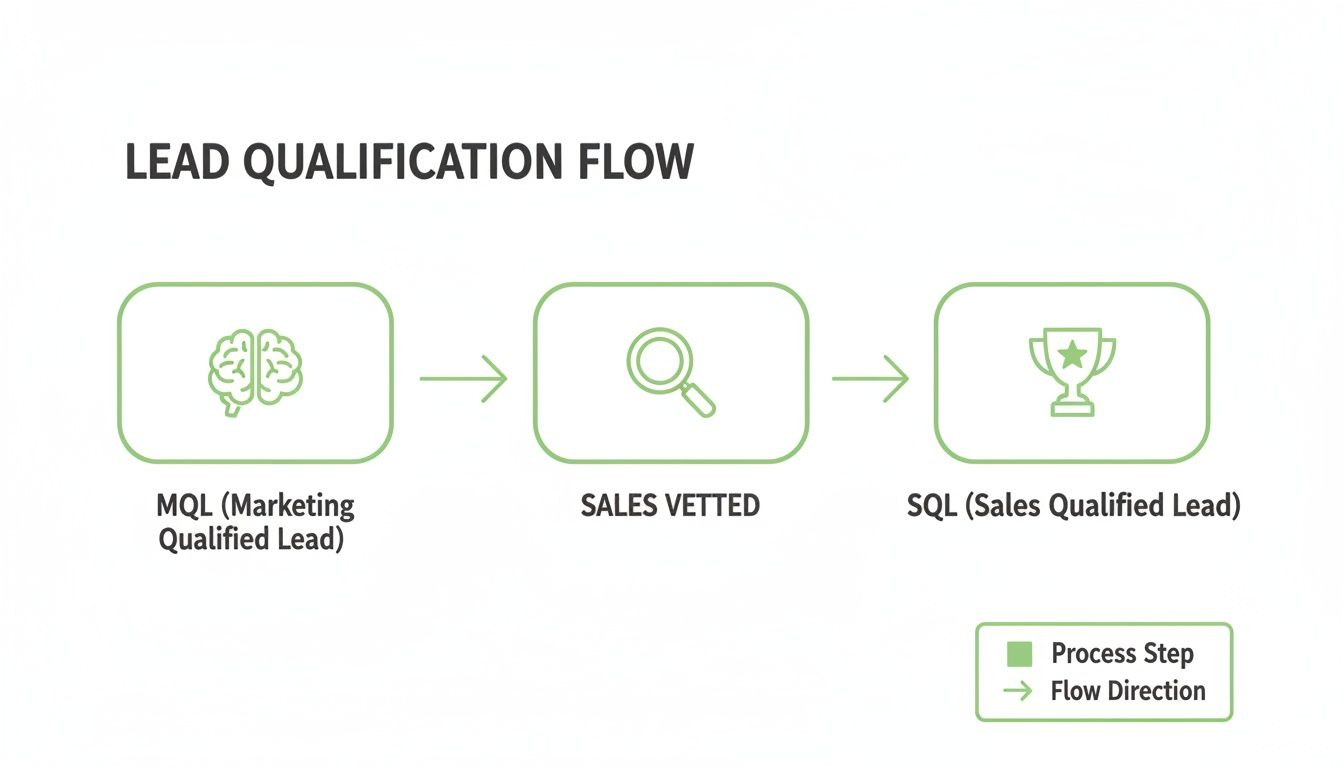
    This simple flowchart shows how a lead moves through the funnel, from a marketing-generated spark of interest to a fully vetted sales opportunity.

    A flowchart illustrating the lead qualification process, showing steps from Marketing Qualified Lead to Sales Vetted to Sales Qualified Lead.

    Think of this process as a filter. It ensures that only the leads who meet your specific criteria make it to your sales team's calendar.

    A lead has to check off all four BANT boxes to be considered a true SQL. If they have a burning need and the budget, but no authority to make the final call, they're not an SQL. Not yet, anyway. Your job then is to work with them to get in front of the actual decision-maker.

    For a more detailed look at this, check out our full guide on how to qualify sales leads effectively.

    Modern Alternatives for Complex Sales

    While BANT is a fantastic workhorse, it’s not always the perfect fit for long, complicated sales cycles. When you're dealing with big enterprise deals and a whole committee of decision-makers, you might need something with a bit more horsepower.

    Frameworks like MEDDIC (Metrics, Economic Buyer, Decision Criteria, Decision Process, Identify Pain, Champion) provide a more detailed roadmap. It's especially useful for high-ticket sales where you need to understand every moving part of the buyer's internal process.

    No matter which framework you land on, the mission is always the same: collect enough intel to confidently say, "Yes, this lead has a high chance of becoming a customer."

    The best qualification conversations feel less like an interrogation and more like a consultation. You're not just checking boxes; you're diagnosing a problem and exploring whether you have the right cure.

    Reading Digital Body Language

    Beyond what a lead tells you, their online behavior screams volumes about their intentions. Someone who keeps coming back to your pricing page is sending a much stronger signal than someone who just downloaded a fluffy ebook a few months ago.

    Keep an eye out for these high-intent digital breadcrumbs:

    • Requesting a demo or free trial. This is the digital equivalent of walking into a store and asking to test drive a car. It's a huge buying signal.
    • Visiting high-value pages. If you see them lurking on your pricing, case study, or feature comparison pages, they're in evaluation mode.
    • Asking specific product questions. When a lead hits up your support chat to ask detailed questions about a specific feature, they're well past the initial research phase.

    When you pair a structured qualification framework with a keen eye for a lead's digital behavior, you create a reliable system for identifying true Sales Qualified Leads. This lets your sales team stop chasing ghosts and start focusing their energy where it will make a real impact.

    Your Action Plan After Finding an SQL

    A desk with an 'Immediate Outreach' sign, laptop with a calendar, and mobile phone, symbolizing planning.

    Okay, marketing has just handed you a hot sales qualified lead. The clock is officially ticking, and every single minute matters now. This isn't the time to drop them into your weekly newsletter queue. Nope. You need immediate, personalized, and persistent outreach if you want to turn that initial spark of interest into a real conversation.

    Speed is your number one weapon here. An SQL is screaming, "I'm ready to buy right now." If you don't jump on it, you can bet your competitors will. In fact, research shows that contacting a new SQL within the first hour boosts your odds of actually qualifying them by a staggering 7x. Wait a day, and that opportunity might as well be dust in the wind.

    This sense of urgency is a cornerstone of any high-performing sales machine. If you want to dig deeper into building this kind of system, check out our full guide on how to build a sales pipeline that turns these qualified leads into predictable cash flow.

    Your First 48-Hour Outreach Cadence

    Look, a single email or one missed call isn't going to cut it. You need a simple, multi-touch plan that keeps you on their radar without being annoying. The only goal for the first 48 hours is to make a connection. That's it.

    Here’s a sample cadence you can steal and start using today:

    • Hour 1 (The First Touch): Send a personalized email that directly references what they did. Something like, "Thanks for requesting a demo of our XYZ feature." Keep it short, sweet, and focused on one thing: scheduling a quick call.
    • Hour 4 (The Follow-Up Call): Time to pick up the phone. Don't leave a bland, generic voicemail. Say something that connects the dots: "Hi [Name], I just sent you a quick email about your interest in [Product]. Just wanted to connect briefly."
    • Hour 24 (The LinkedIn Touch): Find them on LinkedIn and send a connection request. Be sure to add a short, custom note: "Hi [Name], saw you were looking into [Solution Area]. Would be great to connect here."
    • Hour 48 (The Second Email): Follow up again, but this time, bring something valuable to the table. A relevant case study or a short video explaining a key benefit works wonders here.

    Tailoring Your Opening Lines

    "Just following up" is the fastest way to get your email deleted. Your first line has to prove you've done at least a little bit of homework. Personalization is what turns a cold outreach into a warm discovery call.

    The best outreach connects the prospect's recent action to a potential solution. It’s not about what you're selling; it's about why they are looking for it right now.

    Here are two quick templates you can adapt based on what they did on your site:

    Example 1: For a Demo Request

    • Subject: Next Steps for Your Demo
    • Body: Hi [Name], I saw you requested a demo to see how we solve [Pain Point]. I have a few spots open tomorrow to walk you through it and answer any questions. Does [Time] or [Time] work for a quick 15-minute call?

    Example 2: For a Pricing Page Visit

    • Subject: Quick Question about [Their Company Name]
    • Body: Hi [Name], I noticed you were checking out our pricing page. Many teams in the [Their Industry] space use our platform to [Achieve Outcome]. Are you facing similar challenges?

    Accelerate Your SQL Outreach with EmailScout

    Identifying a Sales Qualified Lead is a massive win, but it’s only half the battle. You know who you need to talk to—the "Authority" from your BANT analysis—but what happens when you can't find their direct contact info? That red-hot lead starts to cool down. Fast.

    This is where the real friction happens. Without verified contact data, sales reps lose hours digging for the right email address, often ending up with a generic "info@" inbox that gets ignored. Every minute spent searching is a minute you're not selling, giving competitors an open window to swoop in and start the conversation.

    EmailScout slams that window shut. Instead of playing detective, you can turn a promising SQL into a real conversation in seconds.

    Find Decision-Makers in One Click

    Picture this: your marketing team flags an SQL from a target company that just hit your pricing page. You know the decision-maker is probably the VP of Sales, but their contact details are nowhere to be found. With EmailScout, you just find their LinkedIn profile and get their verified email with a single click.

    This screenshot shows just how simple the EmailScout extension is, right on a professional profile.

    The tool slips right into your existing workflow, pulling the exact email you need without you ever having to leave the page. What used to be a research project is now a one-second action.

    Turn SQL Lists into Real Conversations

    Or let's say you just wrapped up a webinar and have a list of attendees who fit your SQL criteria perfectly. The problem? You only have their names and companies. EmailScout's URL Explorer can take that raw list and quickly find the direct emails for each person, turning your data into a ready-to-use outreach list.

    This lets you jump straight from identification to personalization.

    Finding the right person is step one. Reaching them before anyone else is how you win the deal. A sales qualified lead is most valuable in the first hour after they show intent.

    Once you have the right contact information, you can focus on what actually matters—crafting a message that gets a response. For more on that, our guide on how to write cold emails gives you actionable templates and strategies to book more meetings. By pairing a powerful outreach strategy with the right contact data, you build a repeatable system for turning your best SQLs into paying customers.

    Common Lead Qualification Mistakes to Avoid

    Even the most buttoned-up sales orgs stumble when it comes to defining a sales qualified lead. A few common—and costly—mistakes can completely derail your pipeline, leading to wasted effort and missed revenue targets. Getting ahead of these pitfalls is key for consistent growth.

    One of the biggest errors is a blurry line between marketing and sales. When the MQL-to-SQL handoff lacks a crystal-clear, agreed-upon definition, good leads either get passed over too early or sit stagnant for too long. In both cases, they go cold.

    Another frequent misstep? Waiting too long to engage. The moment a prospect signals they're sales-ready—by requesting a demo or hitting your pricing page—the clock starts ticking. Data consistently shows that leads contacted within the first hour are exponentially more likely to convert. Don't let a hot lead cool off.

    Overlooking Personalization and Persistence

    Sending a generic, one-size-fits-all outreach email is a recipe for being ignored. An SQL has already shown you what they care about through their actions. If you don't reference that context in your first email or call, you sound uninformed and waste the rapport marketing already built. Your outreach has one job: connect their problem to your solution.

    A Sales Qualified Lead isn’t a guarantee; it's an opportunity. Treating it like just another name on a list is the fastest way to lose the deal to a competitor who treats it with the urgency it deserves.

    Finally, giving up too early is the silent killer of conversion rates. So many reps abandon a lead after just one or two unanswered attempts. The reality is, persistent, multi-channel follow-up is almost always required to break through the noise. A well-structured cadence with calls, emails, and social touches is essential to capitalize on the opportunity an SQL represents.

    A Few Lingering Questions About SQLs

    To wrap things up, let's tackle a couple of common questions that always seem to pop up when teams start working with sales qualified leads. Think of this as the final polish to help you turn all this knowledge into action.

    How Do You Know If Your SQL Process Is Working?

    Measuring the success of your SQL process is key. Otherwise, you're just guessing. While every business is a little different, there are a few key performance indicators (KPIs) you should absolutely keep an eye on to see what’s hitting the mark.

    • MQL to SQL Conversion Rate: This is your most direct measure of how well marketing and sales are aligned. A healthy rate, often somewhere between 10-20%, is a great sign that marketing is handing over genuinely qualified prospects.
    • SQL to Opportunity Rate: This one tells you how many of your vetted leads actually morph into real, pipeline-worthy sales opportunities. It's a fantastic reflection of your sales team's effectiveness in those first conversations.
    • Lead Response Time: Like we've touched on, speed is everything in this game. Tracking how quickly your team jumps on a new SQL is a powerful leading indicator of future success. You can't close a deal you never got to first.

    Can a Lead Go from SQL Back to MQL?

    Absolutely. In fact, it happens all the time. The customer journey is rarely a straight line from A to B. A prospect might get tagged as an SQL, but during that initial discovery call, it becomes painfully obvious they aren't ready to pull the trigger just yet.

    Maybe their budget got slashed, their project timeline was pushed into the next quarter, or a new company priority just jumped the line. When that happens, the smartest move is to de-qualify them as an SQL and hand them back to the marketing team for more nurturing. This keeps your sales pipeline clean and ensures the lead keeps getting helpful content until they're ready to talk business again.

    A lead's qualification status is fluid, not final. The goal is to engage them at the right stage, whether that's a sales conversation today or a marketing nurture campaign for tomorrow.

    This approach stops you from burning a bridge with a promising—but not-yet-ready—prospect. It also lets your sales reps focus their energy exclusively on deals that have a realistic shot of closing soon.


    Ready to stop searching and start selling? EmailScout finds the verified email addresses of your key decision-makers in a single click, turning your SQLs into real conversations, faster. Find unlimited emails for free today.