Tag: email list

  • Email Address List for Marketing: A Practical Guide

    Email Address List for Marketing: A Practical Guide

    Roughly 16.9% of legitimate marketing emails fail to reach the inbox, so list quality and verification must be treated as core marketing work from the first address you collect. A smaller, current email address list for marketing is usually more valuable than a larger database filled with stale, risky, or unpermissioned contacts.

    List growth still matters, but subscriber count is a poor proxy for campaign health. The useful question is whether the right people can receive, recognize, and engage with your messages. That requires a system for sourcing contacts, documenting permission, verifying addresses, segmenting audiences, and removing records that no longer deserve a send.

    Why List Quality Matters More Than List Size

    A legitimate campaign can fail before anyone reads the subject line. Industry reporting places the share of legitimate marketing emails that miss the inbox at roughly 16.9%, with average inbox placement around 83.1% across major providers. The same reporting found that only 23.6% of businesses verify their lists before every campaign, while 60.3% identify spam filtering as their top inbox barrier and 27% describe list hygiene as a major challenge. These figures are reported in Sender's email marketing statistics.

    An infographic showing that 16.9% of legitimate marketing emails fail to reach the inbox.

    That gap between collection and maintenance is where many campaigns lose value. A marketer may spend time creating a lead magnet, buying traffic, or prospecting decision-makers, then send to addresses that have become inactive, contain typos, or belong to people who never expected the message. The result isn't just a few failed deliveries. Repeated bounces, spam complaints, and irrelevant sends can weaken the sender's reputation and make future campaigns harder to place.

    Practical rule: Treat every address as a permission and deliverability record, not as a permanent row in a spreadsheet.

    What list size hides

    A purchased database can look productive because it adds contacts quickly. It often lacks reliable information about how the address was collected, whether the person expects your brand, or whether the mailbox is still active. Scraped data has a similar weakness. Public availability doesn't automatically establish marketing permission, relevance, or freshness.

    List decay makes the problem persistent. Reporting cited by Clearout's email data quality benchmark says about 23% of checked emails were invalid or risky in 2025. The same source describes decay as a reason some marketing emails fail to reach the inbox. Your acquisition process therefore needs a refresh process from day one.

    A useful operating dashboard includes inbox placement, hard bounces, spam complaints, unsubscribes, clicks, and engagement by mailbox provider. Don't judge a list by its total records alone. Judge it by the proportion of contacts who are valid, expected, reachable, and still interested.

    For teams that need a deeper operational review, email data quality guidance can help frame the checks that belong between contact collection and campaign launch.

    Building Your Email List with Proven Search Techniques

    Public prospecting works best when the search starts with a defined audience rather than a vague desire for more contacts. Specify the profession, location, company type, and likely business need before opening a search engine. A query such as marketing director Amsterdam "@company.com" narrows the results by role, place, and visible domain context. You can also test a target domain, a company name, or a professional phrase that appears on relevant pages.

    A professional woman working on a laptop, viewing a digital contact list with search functionality.

    A practical search workflow

    1. Define the buying role: Search for the person who owns the problem, such as a demand generation manager, founder, recruiter, or sales operations lead. A job title gives the search a commercial purpose.

    2. Add a location or market: Include a city, country, language, or industry term when geography matters. This reduces irrelevant results and makes later personalization more credible.

    3. Use domain clues carefully: Operators such as "@gmail.com" or "@company.com" can surface pages containing visible addresses, but they don't prove that the address is current or that the person has consented to promotional email.

    4. Capture context with the address: Record the page URL, company, role, name, and reason the contact may be relevant. Context lets you write a useful message and gives your team a basis for reviewing the record later.

    A Chrome extension can support this workflow by identifying addresses on the page, saving selected results, and exporting a file for review. Configure AutoSave only after deciding what fields you need and where the records will be stored. A convenient capture process shouldn't become an uncontrolled database.

    The guide to finding email addresses is useful when you need to compare page-level discovery with a broader prospecting workflow. For more ideas on building a focused outbound audience, review these ways to build outbound lists, then adapt the method to your market and permission requirements.

    Scaling without losing judgment

    If a search results page shows only a small number of entries, changing the URL parameters to display more results can reduce repetitive navigation where the search engine supports that setting. More results don't equal more usable contacts, though. Review each batch, remove obvious personal or irrelevant addresses, and pass the remaining records through verification before importing them into a CRM or email platform.

    Use this embedded walkthrough as a visual reference for the collection workflow:

    The ethical boundary is straightforward. Collect information that is publicly available for a legitimate business purpose, minimize the data you retain, respect opt-outs, and avoid treating a discovered address as blanket permission for every marketing channel. For newsletters and automated campaigns, use a consent-based signup whenever possible. For outbound prospecting, keep the message relevant, identify yourself clearly, offer a simple way to decline future contact, and check the rules that apply to the recipient's location.

    Segmentation Strategies for Higher Engagement Rates

    A raw list becomes useful when every contact receives a message that matches their situation. Start with a small number of meaningful fields rather than building an elaborate taxonomy nobody maintains. In most programs, role, company context, geography, source, and recent engagement provide enough structure to make the first major improvement in relevance.

    Choose segments that change the message

    Segment by job role when the problem differs by responsibility. A sales leader may care about pipeline visibility, while a marketing manager may care about campaign attribution. Segment by company size or operating model when implementation constraints differ. A founder may want a lightweight process, whereas a larger team may need permissions, integrations, and reporting.

    Geography matters when language, working hours, regulation, or market conditions affect the offer. Source matters too. Someone who downloaded a deliverability checklist has a different immediate need from someone who registered for a product demonstration. Engagement history adds another useful layer, but don't confuse an open with genuine intent. Use clicks, replies, site visits, conversions, and recent activity where those signals are available.

    Segmentation Type Best For Expected Impact
    Job role Matching pain points and vocabulary to responsibility More relevant copy and better-quality replies
    Company context Adjusting examples, implementation detail, and offer size Fewer mismatched pitches
    Geographic location Aligning language, timing, and regional requirements More appropriate delivery and follow-up
    Acquisition source Continuing the conversation begun at signup or an event Stronger message continuity
    Engagement history Separating active readers from inactive records Better send decisions and fewer wasted contacts

    A simple decision rule prevents over-segmentation. If a segment changes the subject line, offer, proof, timing, or call to action, keep it. If it only creates another label without changing the campaign, leave it out.

    For teams reviewing how other organizations present their people and operating context, sobre y su equipo offers a useful example of the kind of company information that can inform audience grouping. The principle is more important than the source: collect only attributes that help you communicate with greater relevance.

    Build engagement tiers

    Use an active group for contacts who recently clicked, replied, purchased, or completed a high-intent action. Send this audience your clearest next step. Keep a developing group for contacts who have shown some interest but haven't taken a meaningful action, and give them education or a narrower offer.

    An inactive group needs a different treatment. Send a short re-engagement message that explains what the recipient will receive and gives them a clear choice. If the person remains unresponsive, suppress the address rather than repeatedly trying to manufacture engagement. The mechanics of implementing these groups are covered in this email segmentation workflow.

    Comparing List Building Methods by Risk and ROI

    A large list can produce a smaller return if its addresses are stale, poorly matched, or difficult to verify. Each acquisition method trades speed against context, permission, review time, and deliverability. Compare the source and its maintenance burden before comparing subscriber counts.

    Method Cost List Quality Legal Risk
    Organic signup through content and lead magnets Requires content, promotion, and ongoing optimization Usually strong intent when the offer matches the visitor's need Lower when consent and expectations are documented
    Manual prospecting from public business information Requires research time and verification Can be highly relevant, but quality depends on targeting and review Requires careful assessment of jurisdiction, purpose, and outreach rules
    Purchased contact lists Appears fast and convenient Often uncertain, stale, or poorly matched to the sender High because permission, provenance, and suppression history may be unclear
    Event or webinar registration Requires an event, partner, or registration offer Useful when the follow-up matches the event context Depends on the registration language and how marketing permission was presented

    Organic acquisition grows more slowly, but subscribers have a clear reason to recognize your brand. A useful checklist, template, webinar, or product update can attract people around a defined problem. The trade-off is the work required to create a credible offer, promote it, and verify that new addresses remain deliverable. Strong acquisition followed by weak list maintenance can still reduce inbox placement below the level your campaigns need.

    Manual prospecting can produce strong relevance when the researcher records the contact's role, company, and business context. It also creates a substantial verification burden. Check addresses before sending, and keep prospecting records separate from opted-in subscribers until the sending basis and message type are clear. A carefully reviewed prospect list may support targeted outreach, while the same records can damage deliverability if they are imported into a broad newsletter without permission or freshness checks.

    Purchased lists offer speed without providing a reliable relationship. The seller may not supply collection context, current status, or evidence that recipients expect your company. Apollo's discussion of never buying email lists connects purchased data with compliance concerns and deliverability risk. The apparent saving in acquisition time can disappear through bounces, complaints, suppression work, and weaker inbox placement.

    Event registrations work well when follow-up reflects the promise made on the form. A person who registered for a session on technical SEO should not immediately receive an unrelated sales sequence. Store the event and consent context, verify addresses where appropriate, and let the first message confirm the relationship. This method can offer strong ROI when the campaign uses that context, while generic follow-up wastes the trust created during registration.

    Maintaining List Hygiene and Legal Compliance

    Freshness is an operating discipline, not a repair job after a campaign fails. Validity reported average inbox placement at just under 85% in 2022 and combined bounce rates of about 1.5% for permission-based programs in its Email Deliverability Benchmark. Use those figures as practical guardrails: watch hard bounces closely, keep them well below the commonly accepted 2% threshold, and re-verify records that have gone stale. List freshness and verification often determine whether a carefully built audience reaches the inbox.

    A graphic illustration detailing three essential strategies for maintaining email list hygiene and compliance for successful marketing.

    Use a repeatable hygiene workflow

    Before each important campaign, check newly collected addresses, remove known hard bounces, and confirm that suppressed contacts remain excluded. Remove a double-bounce address from active sending immediately. Repeatedly retrying a mailbox after a permanent delivery failure adds risk without creating reach.

    Re-verify older records before reactivation. Set the interval according to audience turnover, sending frequency, and collection method. A fast-changing prospect database needs closer attention than a stable subscriber file. Define the cadence in advance instead of waiting for rising bounces or spam complaints to force a decision.

    Provider-level reporting can reveal weaknesses hidden by an overall average. Brevo's 2026 benchmark reports inbox placement of 87.2% on Gmail, 75.6% on Microsoft, 86.0% on Yahoo, and 76.3% on Apple. It also reports missing rates as high as 9.8% on Microsoft and 9.4% on Apple, plus spam-folder placement of 14.6% on Microsoft and 14.3% on Apple. Review Brevo's email marketing benchmarks for the provider breakdown, then segment your own reporting by mailbox domain.

    Keep permission evidence with the record

    A deliverable address does not by itself establish a valid marketing relationship. Store the signup source, timestamp, form language, campaign or event context, and each relevant consent choice. Maintain a suppression list covering unsubscribes, complaints, invalid addresses, and contacts your organization must not approach again.

    Requirements vary by audience and jurisdiction. GDPR, CAN-SPAM, CCPA, and CASL can differ on consent, sender identification, commercial messages, data rights, and opt-outs. Gmail and Yahoo bulk-sender requirements also add deliverability expectations for qualifying senders. Make consent understandable, identify the sender clearly, provide an accessible unsubscribe path, and honor suppression requests. Regional compliance and deliverability guidance offers a useful starting point, though legal advice remains necessary for specific markets.

    A monthly checklist keeps the process manageable:

    • Review hard bounces: Suppress permanent failures and investigate sudden increases.
    • Check provider performance: Compare inbox, missing, bounce, complaint, and spam-folder signals by mailbox domain.
    • Re-verify stale records: Validate contacts before reactivation or a major campaign.
    • Audit consent fields: Confirm that source and permission evidence remain attached to each audience.
    • Process disengagement: Run a re-engagement path for inactive contacts, then suppress those who do not respond.

    Putting It All Together, Your Email List Action Plan

    Build the system in the order that protects future sends. Start with a defined audience and a useful reason for someone to join. Add contacts through signup forms, relevant content, events, or carefully reviewed business prospecting. Keep opted-in subscribers and outbound prospects in distinct audiences until the basis for communication is clear.

    Use this implementation sequence:

    1. Create the data model: Store name, role, company, source, date collected, permission context, provider domain, and engagement signals.
    2. Set the intake rule: Reject incomplete or irrelevant records before they enter the active audience.
    3. Verify before sending: Check new addresses and re-check stale records. Remove hard bounces and known suppressions.
    4. Apply useful segments: Begin with role, source, geography, and engagement. Add a field only when it changes the message or send decision.
    5. Launch a controlled campaign: Start with the most relevant audience and review inbox placement, bounces, complaints, clicks, replies, and unsubscribes.
    6. Review by provider: A strong overall result can hide weak performance at a particular mailbox domain, so inspect provider-level results after every meaningful send.
    7. Document the decision: Record what changed, which records were suppressed, and what the next verification or re-engagement action will be.

    A practical search template might combine a role, location, and domain clue, such as "demand generation manager" Dublin "@company.com". Treat the output as research, not as a finished marketing audience. A monthly calendar can then assign one day to suppression review, one to verification, one to provider analysis, and one to segment cleanup.

    Track inbox placement as the controlling health signal, then read bounce rate and complaint rate alongside engagement. If placement declines, stop expanding the audience and inspect freshness, consent, provider concentration, and recent acquisition sources before sending again. List growth is useful only when the contacts remain reachable and expect your messages.


    EmailScout helps marketers discover business email addresses from webpages, save collected contacts, scan multiple URLs, and export reviewed records for CRM or outreach workflows. Use EmailScout to support the research stage, then apply verification, segmentation, permission checks, and suppression controls before adding contacts to an active campaign.

  • How to Build an Email List for Free

    How to Build an Email List for Free

    You've probably done some version of this already. You made a free guide, added a signup form to your site, mentioned it on social once or twice, and watched a few subscribers come in. Then the list stalled. Or worse, it kept growing on paper while replies, clicks, and opens disappeared.

    That's the part most advice skips. Learning how to build an email list for free isn't mainly about finding one more tactic. It's about fixing the points where free acquisition breaks down: weak offer, weak placement, weak traffic match, and no retention system after the signup.

    Email is still a massive channel. A 2026 benchmark put global email usage at 4.73 billion users and 392.5 billion emails sent and received daily, with healthy senders averaging about 2.5% monthly list growth when they sustain it through owned channels like forms, content, and lead magnets, according to Sender's email marketing statistics. That's the good news. The harder truth is that free list growth only works when each step in the funnel does its job.

    Why Most Free List Building Falls Short

    The common failure mode is boring, not dramatic. A business launches a free PDF, sticks a generic “join our newsletter” box in the footer, gets a trickle of opt-ins, then wonders why the list feels dead a month later. The problem usually isn't effort. The problem is that the system leaks at multiple points.

    A free list grows through small compounding gains. Offer relevance gets the click. Form placement captures the email. Traffic intent determines whether that subscriber wanted help or was only mildly curious. Follow-up decides whether that person remembers you next week.
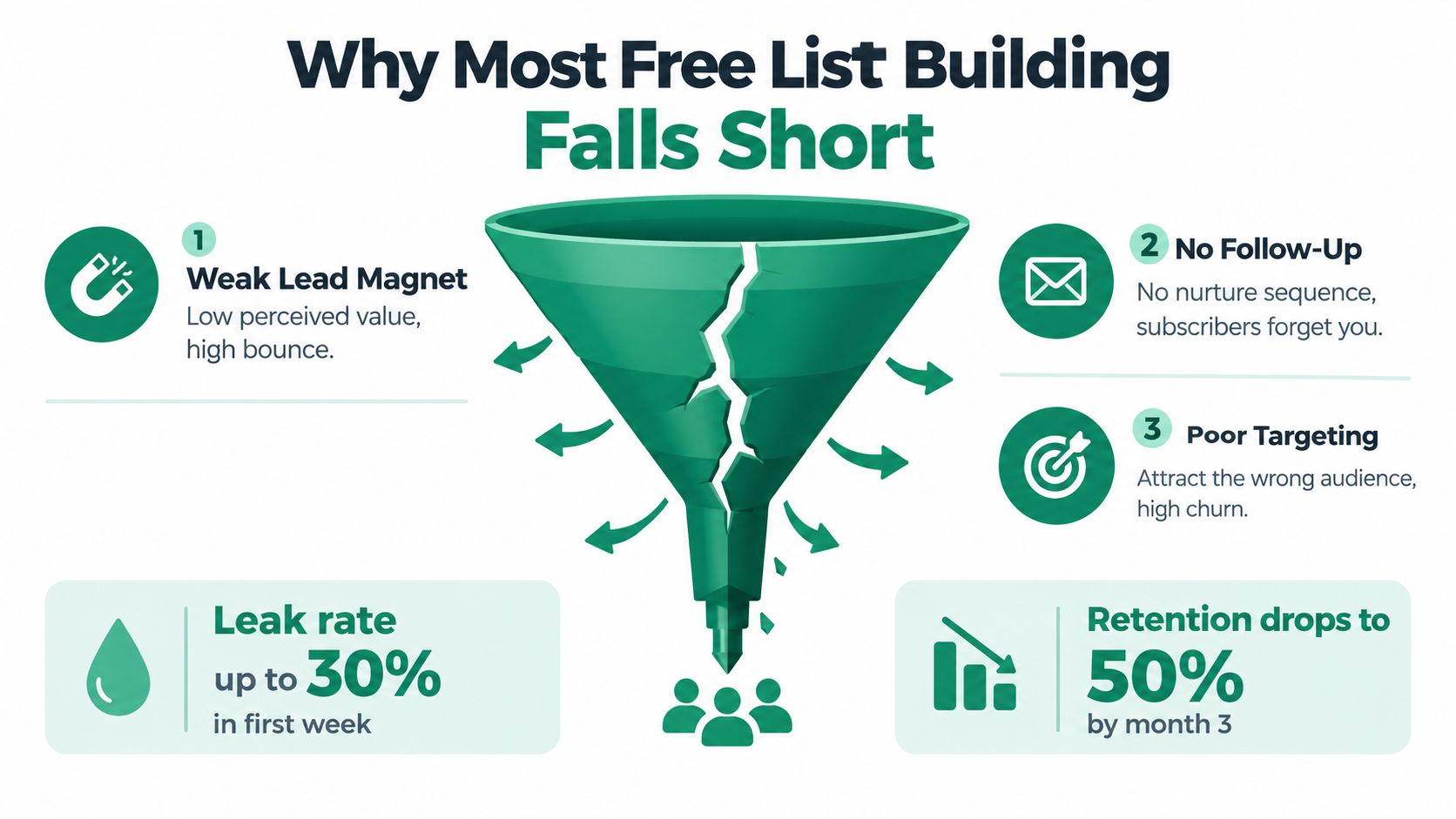
    An infographic illustrating why free email list building efforts often fail due to leaks in the funnel.

    The leak usually starts upstream

    Most underperforming lists don't have a sending problem first. They have an acquisition problem first. If the lead magnet is vague, the page converts weakly. If the page converts well but attracts the wrong person, engagement drops. If the subscriber was a fit but receives nothing useful after opting in, they forget why they signed up.

    Practical rule: Don't judge list growth by signup count alone. Judge it by whether the right people still care two weeks later.

    Free growth has to overcome normal attrition. One 2026 benchmark reports about 22.5% annual list churn and says 45% of email addresses become inactive within 12 months, while mature lists often need to grow at 1% to 3% per month just to stay healthy, according to Digital Applied's 2026 email marketing data points. If you're adding subscribers casually and losing relevance quickly, you're not building an asset. You're refilling a bucket with a hole in it.

    What usually wastes time

    A few patterns show up again and again:

    • Generic newsletters: “Get updates” is not a compelling exchange.
    • One-form thinking: A single homepage form rarely carries the whole system.
    • Traffic mismatch: Broad social traffic often signs up with weak intent.
    • No onboarding: If someone joins and hears nothing meaningful, retention falls fast.
    • Ignoring deliverability basics: A decaying list creates inbox placement problems over time. If that's already happening, tighten your list hygiene and review these email deliverability improvements.

    The businesses that grow lists for free usually do less, but they do it tighter. One lead magnet per audience slice. One page per offer. One clear source path. One welcome sequence that starts immediately.

    Designing a Lead Magnet That Converts

    A lead magnet doesn't need to be big. It needs to be easy to use and tightly matched to one problem. The fastest way to waste time is to create a broad eBook nobody urgently wants.

    Toolkits, templates, and swipe files tend to work better than generic guides because they shorten time to value. A template gives the subscriber something they can open and use today. A swipe file removes blank-page friction. A checklist turns a fuzzy problem into a sequence of actions.
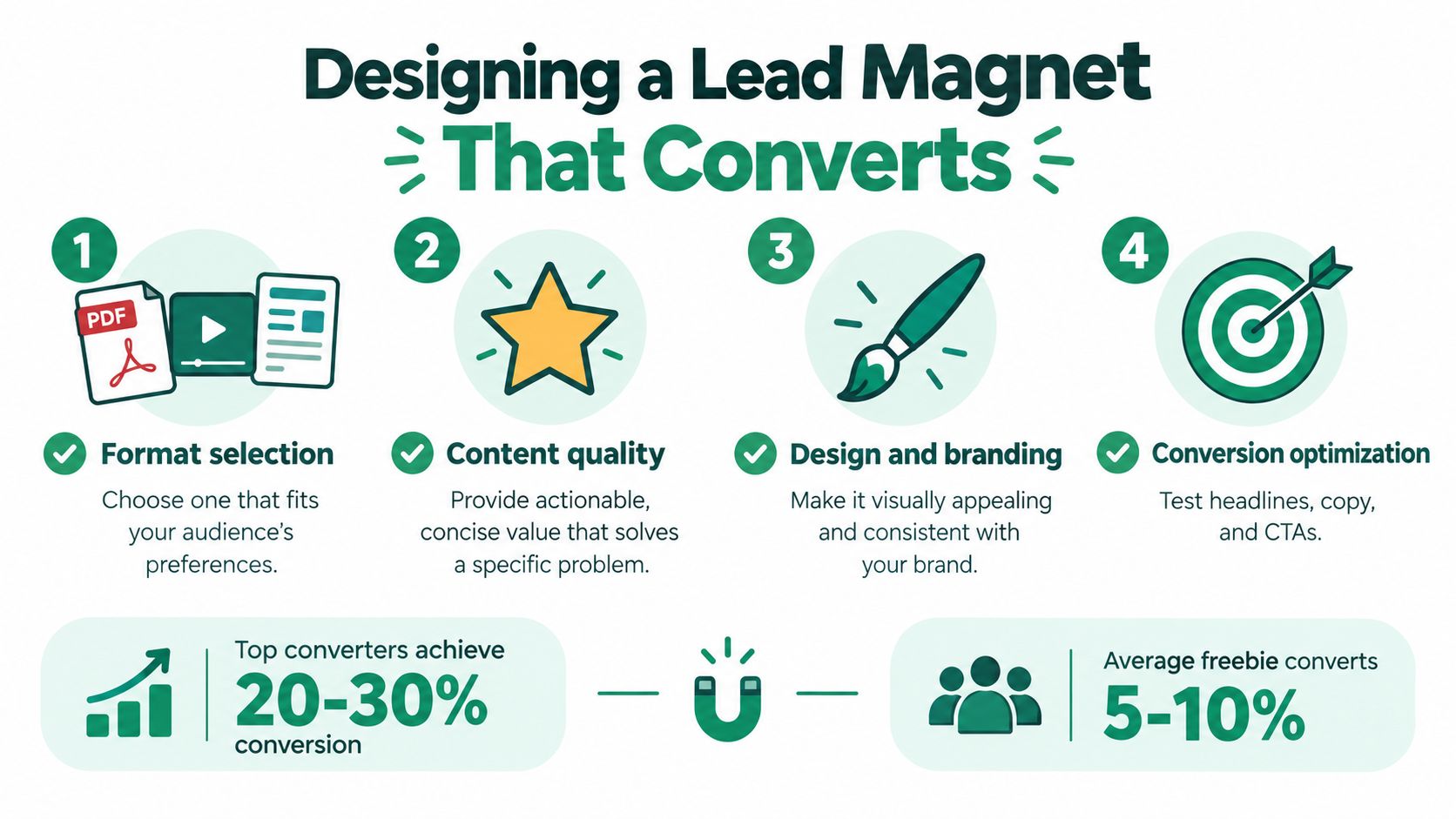
    An infographic showing four steps to design a high-converting lead magnet for building an email list.

    Pick a format that solves a specific job

    Good examples are practical and narrow:

    • Template: Notion CRM template for freelancers tracking leads
    • Swipe file: 30 cold email openers for agency outreach
    • Checklist: 12 local SEO fixes for multi-location businesses
    • Toolkit: onboarding email pack for a SaaS free trial
    • Worksheet: offer positioning prompts for consultants

    Bad lead magnets are usually too broad to create urgency. “Marketing tips” is weak. “Homepage copy prompts for B2B SaaS founders” is stronger because it names the audience and the outcome.

    If you need help getting that audience definition tighter before you build the asset, this guide on how to identify your target audience is a useful place to sharpen the offer around a real buyer problem.

    Use a dedicated page, not a casual embed

    Many free list-building efforts underperform. Benchmark data shows dedicated landing pages convert at roughly 15% to 30% on average, compared with 0.5% to 2% for embedded inline forms and 3% to 6% for immediate welcome popups, based on average email signup conversion benchmarks from Acceleroi. The same benchmark notes that popups with no incentive can convert around 0.5% to 1%, while incentive-based popups often reach 2% to 3% or more.

    That gap changes how you should build. Don't send someone to a generic blog post and hope they notice a form in the sidebar. Send them to a page with one job.

    A solid above-the-fold layout looks like this:

    1. Headline: restates the deliverable clearly
    2. Hero image: shows the actual file, template, or toolkit
    3. Three bullets: explain what the subscriber gets and why it helps
    4. Single-field form: ask for the email and nothing else
    5. Immediate delivery: trigger the asset right away

    A lead magnet converts best when it looks finished before the subscriber asks for it.

    Place the video below after the reader already understands the offer. That keeps the page from feeling like a media dump instead of a conversion asset.

    Pre-launch checklist

    Before publishing, run through these questions:

    • Audience fit: Does this solve one urgent problem for one clear segment?
    • Format fit: Would the subscriber rather get a template, checklist, or swipe file than a long PDF?
    • Promise clarity: Can someone understand the value in one glance?
    • Specificity: Does the title name the audience, asset, or result?
    • Visual proof: Does the page show the actual deliverable?
    • Form friction: Are you asking only for the email?
    • CTA strength: Does the button promise the asset, not “submit”?
    • Traffic match: Does the landing page continue the message from the post, social update, or referral?
    • Delivery speed: Does the first email arrive immediately?
    • Follow-up path: Does the subscriber know what comes next?

    Placing Opt-In Forms Where Signups Actually Happen

    Most sites don't need more forms. They need better form-to-page matching. A popup on a low-intent homepage visitor and a gated form on a high-intent tutorial reader are not the same thing, even if both collect an email.

    The benchmark ranges below are useful because they stop you from expecting one form type to do every job. A dedicated lead magnet page often wins because it concentrates attention, but on-site forms still matter for visitors who land deeper in your content.

    Match the form to the visitor moment

    Form Type Avg Conversion Range Best-Fit Traffic Source
    Embedded inline form 0.5% to 2% Blog readers already consuming the article
    Immediate welcome popup 3% to 6% Warm traffic when the offer is strong
    Incentive popup 2% to 3% or more Visitors shown a clear value exchange
    Dedicated landing page 15% to 30% Traffic from one campaign, post, or link
    Warm dedicated lead magnet page 20% to 35% Readers who already know the topic
    Engaged quiz offer 30% to 40% Audiences willing to interact before opting in

    These ranges come from the benchmark summaries in Shno's email list growth statistics, which also place average website opt-in performance around 1.95%, with 0.8% at the low end and 6.5% among top performers.

    A practical form map

    On content-heavy sites, form density matters less than context. One strong inline offer inside a relevant article will usually outperform several unrelated asks. On service pages, the best signup moment is often near pricing questions, implementation concerns, or a resource section that reduces purchase friction.

    Use placement this way:

    • Inline content forms: Best inside educational posts where the lead magnet extends the article.
    • Popups: Best when delayed, targeted, and tied to a specific incentive.
    • Dedicated pages: Best for all traffic you actively send from social, email signatures, partner mentions, or content repurposing.
    • Gated upgrades: Best when the bonus is concrete, such as a checklist, worksheet, or template connected to that page.

    Three placement rules that keep forms from hurting the page

    • One meaningful ask per scroll depth: Don't stack three forms in one viewport.
    • Don't interrupt instantly: Avoid asking in the first moment before the visitor has seen any value.
    • Offer the asset inside the copy: “Get the checklist” beats “Join our newsletter” nearly every time.

    If a page has traffic but weak signups, change the offer first, then the placement. Most pages don't have a form problem in isolation. They have a message match problem.

    Driving Free Traffic From Search and Content

    Free list building gets easier when the traffic arrives with intent. Search does that better than most channels because the visitor is already trying to solve something.

    Start with the questions your ideal subscriber types before they're ready to buy. Not broad industry terms. Specific problem queries. A consultant might target “sales call follow-up template.” A local agency might target “Google Business Profile mistakes.” A SaaS founder might target “customer onboarding email examples.”

    Build one content cluster around one offer

    The cleanest setup is one lead magnet per topic cluster. If you create a checklist for onboarding emails, build supporting articles around onboarding emails. Don't send those readers to a random social media guide. Tight message match is what makes free traffic convert.

    A simple workflow works well:

    1. Pull query ideas from Search Console, Google Keyword Planner, or another free-tier keyword tool.
    2. Group related searches into one cluster with one main lead magnet.
    3. Publish a pillar article that solves part of the problem.
    4. Place one inline offer for the related asset.
    5. Link every repurposed piece back to the same landing page.
    Traffic Source Typical Opt-in Rate Cost to Acquire Compounding?
    Organic search to dedicated landing page Qualitatively stronger when intent and offer match Free in cash terms, time-heavy upfront Yes
    Organic search to inline content form Usually lower than a dedicated page Free in cash terms, time-heavy upfront Yes
    Repurposed social content to landing page Varies widely by audience intent Free in cash terms, requires consistent distribution Partial
    Community mentions and partner referrals Often quality-driven rather than volume-driven Free in cash terms, relationship-heavy Partial

    The useful thing about SEO is not speed. It's accumulation. One article can keep feeding the same magnet long after the original social post disappears. That's why teams that invest in content marketing for agencies often pair search content with one conversion asset per topic rather than spraying multiple offers across every page.

    Repurpose without splitting attention

    A lot of marketers repurpose content badly. They turn one article into five posts, then send each post to a different offer. That spreads effort and weakens measurement.

    Do the opposite. Turn the same article into a LinkedIn post, a short thread, a YouTube Short, or a simple carousel. Then send each version back to the same landing page. You'll learn faster which surface brings the most qualified subscriber because the conversion point stays constant.

    Track source, not just subscriber count. The signup only matters if you know what brought it in.

    Picking Free Acquisition Channels by Quality Not Just Volume

    Free channels can look productive while damaging list quality. A spike in signups feels good. A month later, those subscribers never open, click, or buy anything, and your list becomes harder to manage.

    The fix is simple. Stop ranking channels by raw volume alone. Rank them by the quality of the subscriber they produce.

    Compare channels by intent

    Channel Avg. Conversion Subscriber Intent 90-Day Retention
    Organic search Qualitatively solid when query and offer align High Typically stronger than low-intent social
    Guest posts Qualitatively moderate but warm High Often stable
    Podcast appearances Lower volume but intent-rich High Often stable
    LinkedIn organic Variable Medium to high depending on topic match Mixed
    Reddit and broad social threads Variable Often curiosity-driven Frequently weaker
    Communities and referrals Variable High when audience trust already exists Often strong

    The benchmark context behind this matters. Mailchimp's opt-in trends report says 66% of U.S. consumers have opted into email communications and 65% have opted into text messaging, so permission itself isn't the scarce resource. Attention is. The same report notes that the newsletter economy grew from 26,911 to 52,809 active newsletters between 2023 and 2024, a 96.2% year-over-year increase. That means more channels can generate signups, but not all of them generate subscribers who stay engaged.

    What to prioritize first

    If you're working with limited time, prioritize channels where the audience already trusts the context:

    • Search traffic: People are already solving a problem.
    • Partner mentions: Borrowed trust improves lead quality.
    • Guest content: Smaller volume, usually warmer attention.
    • Podcasts and webinars: Less scale, stronger intent.

    Broad social channels still have a place. They're useful for testing headlines, validating interest, and occasionally pushing a working magnet further. They're weak as the foundation of a free strategy if the audience clicks out of curiosity and never returns.

    A healthy list isn't the one with the most signups. It's the one where new subscribers still act like subscribers after the novelty wears off.

    Automating Welcome and Retention on a Free Stack

    A signup without a welcome sequence is unfinished work. The subscriber raised a hand. If your system doesn't respond properly, you trained them to ignore you.

    Lists naturally decay. Independent benchmarks report about 22.5% annual loss, roughly 2% per month, and say 30% of subscribers change their email address every year, according to BounceZero's 2026 email marketing statistics. Free list building only holds up when your post-signup system slows that erosion.
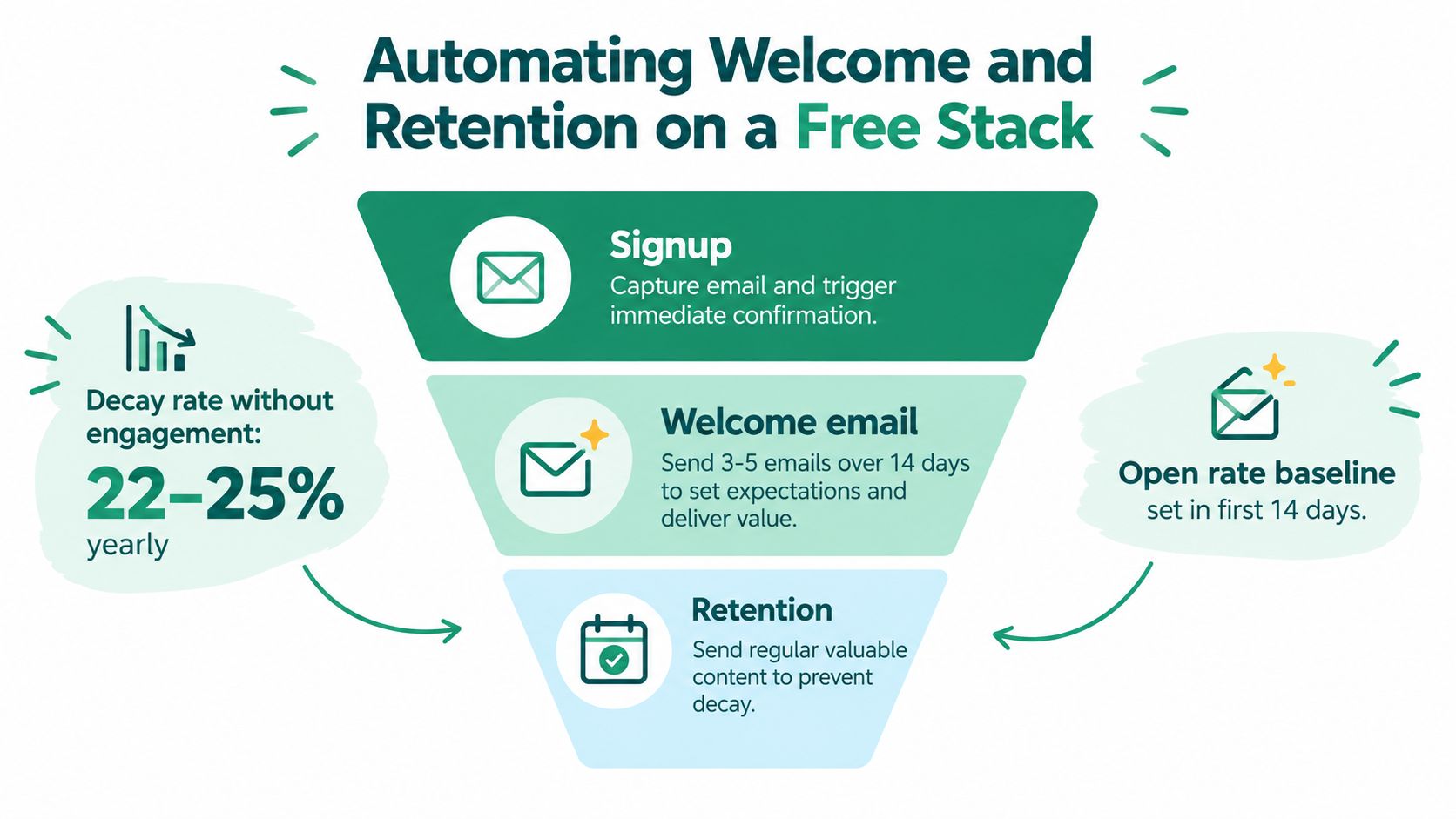
    A funnel diagram illustrating automated welcome and retention strategies for building an effective email list.

    A simple free stack that works

    You don't need a complicated setup. Most solo operators can run this with a free email platform tier, a basic automation tool, and a spreadsheet.

    Use:

    • MailerLite, Brevo, or Mailchimp free tier for forms and autoresponders
    • Make or Zapier for light routing if needed
    • Google Sheets as a manual source dashboard
    • EmailScout if you need to find publicly available contact emails from websites for outreach, partnerships, or list-building support work alongside subscriber capture. It functions as a Chrome extension with manual email search and URL-based extraction.

    If you want examples of what those automations should look like in practice, these email automation workflows are a good reference point.

    The welcome sequence should do five jobs

    A clean sequence across the first week is enough:

    1. Day 0: deliver the lead magnet fast
    2. Day 1: explain who the emails are for
    3. Day 3: give one small win the subscriber can use immediately
    4. Day 5: make a soft next-step offer
    5. Day 7: ask for a reply or preference signal

    The first email is not the relationship. It's the handoff.

    Tag every subscriber by source and lead magnet. That gives you a usable segmentation base later. Someone who joined through an SEO checklist should not receive the same follow-up as someone who joined after a podcast appearance.

    Retention rules that protect the list

    Once the list starts moving, add lightweight rules:

    • Source tags: Track where the subscriber came from.
    • Topic tags: Track what they wanted.
    • Re-engagement trigger: Send a check-in campaign to inactive subscribers.
    • Sunset rule: Stop sending broad broadcasts to people who never re-engage.

    Most “free list building” advice ends at the form. That's incomplete. The list only becomes valuable when the first week teaches the subscriber to expect useful emails from you.

    Your 30-Day Free List Building Plan

    They don't need more tactics. They need a sequence they can finish. One focused month is enough to put a real list-building system in place without paying for traffic.
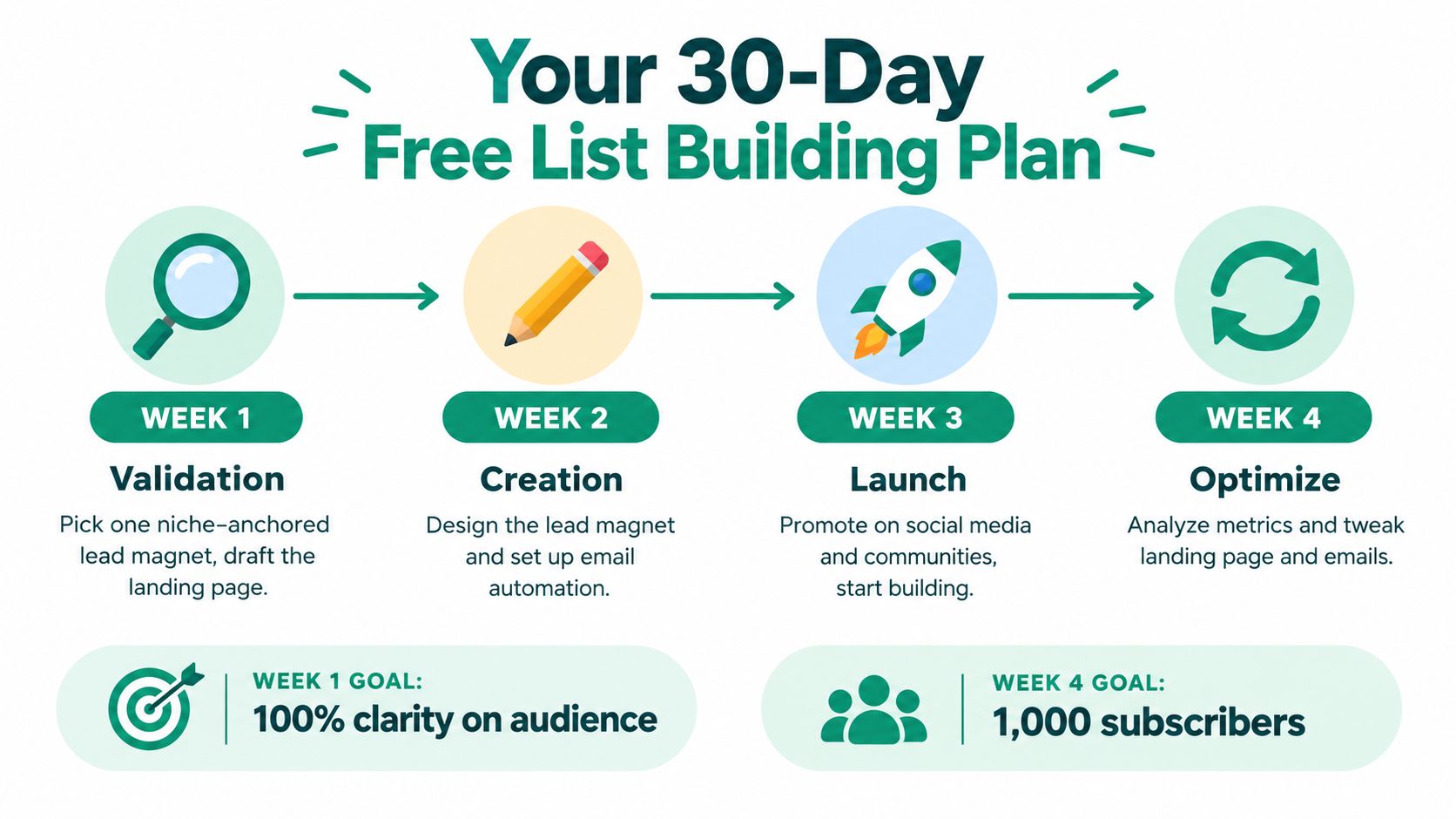
    A 30-day plan infographic illustrating steps to build an email list, from validation to optimization.

    Week 1

    Pick one audience segment and one lead magnet. Write the landing page headline, three benefit bullets, and CTA. Set up one dedicated form and make sure every signup records its source.

    Week 2

    Build the asset and write the welcome sequence. Keep it simple. Publish two search-focused articles tied directly to that magnet, each with one relevant inline opt-in.

    Week 3

    Push distribution. Reach out for one partnership, mention, guest contribution, or community placement each day. Repurpose one existing article or post into a new format and send all versions to the same landing page.

    Week 4

    Review what happened. Look at source by source performance, not just total signups. Keep the channels that send engaged subscribers. Rework the ones that attract the wrong people or create weak handoffs after signup.

    Use this review list:

    • Offer check: Did the magnet attract the right questions and replies?
    • Page check: Did the headline and CTA match the traffic source?
    • Source check: Which channel produced the most engaged subscriber?
    • Sequence check: Did the first emails create clicks or replies?
    • Retention check: Are new subscribers still interacting after the first week?

    By week five, add a second magnet only if the first one is already converting and retaining attention. Then layer in a re-engagement automation so the list stays usable instead of just larger.

    Free list building works when you treat it like a measured system. One focused offer. One clean page. One or two reliable traffic inputs. One welcome sequence that keeps the subscriber warm after the form fill.


    EmailScout helps sales and marketing teams find publicly available email addresses, build contact lists, and support outreach workflows when list growth also depends on partnerships, placements, and direct relationship-building. If you want a simple way to support the acquisition side of that process alongside your opt-in strategy, visit EmailScout.