Tag: email finder tools

  • Rocket Email Finder: A 2026 Cost & Accuracy Comparison

    Rocket Email Finder: A 2026 Cost & Accuracy Comparison

    You’re probably in one of two situations right now. Either your team is paying for a big contact database and still cleaning lists by hand, or you’re hesitating to buy another prospecting tool because the last one burned budget on bad data.

    That’s where the rocket email finder conversation gets practical. RocketReach has real strengths. It’s well known, widely used, and built around a very large contact database. But once a team moves from occasional lookups to daily outbound, the buying criteria change. The question stops being “How many contacts are in the system?” and becomes “How many usable contacts make it into campaigns without wrecking deliverability or wasting rep time?”

    Here’s the short version up front.

    Criteria RocketReach EmailScout
    Core model Large contact database with credit-based lookups Free, unlimited email finding workflow
    Best fit Teams that need broad database coverage and enterprise-style filtering Teams that care about fast list building and lower workflow friction
    Main risk Accuracy can vary in real use, especially outside core markets Requires a workflow built around active browsing and targeted extraction
    Cost behavior Subscription plus lookup limits and possible overages Lower barrier for teams trying to control prospecting spend
    Operational reality Often needs extra validation and cleanup before outreach Better fit for lean teams that want fewer moving parts

    What Is the Rocket Email Finder in 2026

    RocketReach still sits in the top tier of name recognition for contact data. If you ask a sales ops manager, recruiter, or growth marketer to list email finders off the top of their head, RocketReach usually comes up early because it solves a familiar problem. You need a professional contact, you need it quickly, and you don’t want reps guessing email patterns manually.

    A data dashboard for RocketReach showing business metrics like connection counts, user activity, and message performance stats.

    Why teams adopted it

    The appeal starts with scale. RocketReach maintains over 700 million professional profiles across 35 to 60 million companies, and it’s trusted by over 26 million users and 95% of S&P 500 companies according to this RocketReach overview. That kind of coverage matters when a team is selling across multiple industries, geographies, or seniority levels.

    A large database gives sales teams a simple promise. Start with a name, domain, or company. Pull back an email, phone number, title, and sometimes social profile data without switching tools all day.

    For many organizations, that’s enough to justify adoption.

    What makes the workflow attractive

    RocketReach isn’t just a static database. The product is designed around speed.

    Common use cases include:

    • LinkedIn prospecting: Reps browse a profile and try to pull direct contact data without leaving the page.
    • Company research: SDRs move from a target account website into contact discovery quickly.
    • Recruiting workflows: Talent teams use job title and company filters to identify potential candidates.
    • Bulk list building: Ops teams upload CSVs and enrich records in batches.

    The filtering matters more than the headline profile count. RocketReach offers many filters, including role, location, seniority, company size, technographics, and skills, which makes it useful for teams that need narrow targeting rather than broad scraping.

    Practical rule: Big databases are most useful when your ICP is hard to isolate. If your list criteria are simple, workflow speed matters more than total records.

    What buyers should understand before choosing it

    RocketReach is strongest when a team wants a broad prospecting layer, not just an email finder. It’s built for users who want access to a lot of professional records and who are comfortable working inside a paid lookup model.

    That distinction matters. A rep doing occasional searches may see RocketReach as convenient and straightforward. A team doing consistent outbound at volume may experience it differently because the value doesn’t come from one successful lookup. It comes from repeated, usable outputs flowing into campaigns.

    That’s where the conversation shifts from feature depth to operational reality.

    RocketReach has the scale, adoption, and enterprise familiarity many buyers want. It also has the kind of product surface area that looks strong in a demo. But for teams running weekly prospecting sprints, those strengths only matter if the data holds up after export and before send.

    The Hidden Flaws in High-Volume Email Finders

    Big contact databases create a comforting illusion. If a platform indexes enough people and companies, teams assume coverage solves the problem. In practice, coverage and accuracy are different jobs.

    A high-volume email finder can return a lot of records and still leave your team with a cleanup problem.

    A digital graphic featuring colorful 3D glossy spheres floating around a green rectangle labeled Data Flaws.

    Data decay hits faster than teams expect

    Professional contact data ages badly. People switch companies, titles change, domains get restructured, and old inboxes stop accepting mail. The larger the database, the harder it is to keep every record fresh.

    That’s why a huge dataset doesn’t automatically translate into a clean sending list.

    What usually breaks first is not the search experience. It’s downstream execution:

    • Reps trust stale records: They assume a returned email is campaign-ready.
    • Ops spends time validating exports: The “saved” time gets pushed into QA work.
    • Deliverability takes the hit: Bounce-heavy lists damage sender reputation.

    The issue gets worse in fast-moving sectors where contact data changes constantly.

    International prospecting exposes the gaps

    The most overlooked weakness in tools like RocketReach is regional inconsistency. User discussions highlighted in this review summary point to lower accuracy for European and APAC prospects, with anecdotal reports of 30%+ bounce rates on international lists.

    That doesn’t surprise anyone who runs global outbound. Non-US data is harder to maintain, and stricter privacy rules can reduce usable coverage.

    If your pipeline depends on Europe or APAC, don’t buy on headline database size alone. Test list quality by region before you commit process and budget.

    Many teams get trapped here. They buy a platform because it looks complete in North American searches, then find out the same workflow performs much worse when reps target international decision-makers.

    Why bigger often means more operational friction

    When accuracy becomes inconsistent, teams add extra steps. They enrich, verify, dedupe, and re-check. None of that is free, even when the software is already paid for.

    The hidden costs usually show up as:

    Hidden issue What happens in the workflow
    Outdated records Reps waste touches on dead inboxes
    Regional inconsistency International campaigns need extra checking
    Credit sensitivity Users hesitate to test, verify, or re-run searches
    Cleanup overhead Ops teams spend time repairing exported lists

    A lot of buyers frame this as a data problem. It’s also a process problem.

    The minute your reps need a second tool to verify what the first tool found, your prospecting stack gets slower. That slows response time, lowers campaign velocity, and creates tension between SDRs, marketing ops, and deliverability owners.

    The hard lesson is simple. A larger database can expand your search surface while lowering your confidence in what you send. For teams that care about sender health and rep efficiency, that trade-off isn’t minor. It affects every campaign after the first export.

    Accuracy and Workflow A Feature Showdown

    Most email finder comparisons get stuck in feature lists. That’s not how teams feel the difference. They feel it in bounced emails, manual cleanup, and how long it takes to go from “found a prospect” to “launched a usable sequence.”

    Here’s the side-by-side view that matters.

    Area RocketReach EmailScout
    Accuracy picture Claimed high deliverability, but user-reported results are mixed Built around finding and validating emails inside a lighter workflow
    Chrome workflow Lookup-driven and credit-sensitive One-click discovery oriented toward continuous prospecting
    High-volume use Can slow down when teams monitor credit use and validation needs Better aligned with list building during normal browsing
    Follow-up work Often needs extra list cleaning Fewer handoffs if the workflow is already browser-based

    A comparison chart showing RocketReach and EmailScout's verified email accuracy percentages and workflow efficiency.

    What the accuracy debate really means

    RocketReach markets confidence through verification language, but the core question is whether that confidence survives independent scrutiny and user experience. According to this comparison analysis, a 2026 independent test comparing 9 email finder tools did not include RocketReach, while competing tool Tomba.io posted 80.3% verified accuracy. The same analysis says user reports on G2 and Trustpilot document RocketReach bounce rates as low as 56%, well below the platform’s claimed 85% to 98% range.

    That gap is what sales teams need to focus on.

    If a tool claims strong accuracy but your reps still have to verify aggressively, your effective process becomes:

    1. Search for contact
    2. Export contact
    3. Validate contact elsewhere
    4. Remove risky records
    5. Load what survives into outreach

    That isn’t an edge. It’s rework.

    Workflow matters as much as data quality

    A lot of practitioners underestimate workflow friction because they review tools in short test sessions. In production, friction compounds.

    With RocketReach, the credit model changes rep behavior. People don’t explore as freely when every lookup feels metered. That seems minor until you watch an SDR team prospect in real time. They start skipping edge-case accounts, avoiding retests, or exporting early just to keep moving.

    That behavior lowers quality before the campaign even starts.

    A lighter browser-native workflow changes that dynamic. Teams can prospect while researching, save contacts in the moment, and validate closer to point of discovery rather than after a large batch has already gone stale. If your process still depends on list cleaning before launch, adding a dedicated email validation workflow becomes less optional and more like table stakes.

    Field note: The best email finder is the one reps will use during live prospecting, not the one that looks deepest on a pricing page.

    Where each tool fits in the day-to-day motion

    RocketReach still makes sense for certain motions:

    • Broad account coverage: Useful when you need many possible contacts across large target lists.
    • Enterprise-style filtering: Helpful for niche segments and layered search criteria.
    • Multi-role access: Relevant for recruiters, marketers, and sales teams sharing one database style.

    A more efficient tool fits better when the workflow itself is the bottleneck:

    • Live prospecting: Finding contacts while browsing LinkedIn and company pages.
    • Fast list capture: Building lists without pausing to think about credits.
    • Lean outbound teams: Reducing the number of validation and cleanup steps.

    The practical takeaway

    RocketReach is still a serious platform. But serious platforms aren’t automatically efficient platforms.

    If your team values database depth above all else, RocketReach remains a valid option. If your team values usable contacts inside a fast workflow, then the old model starts to look expensive in both time and error rate.

    That’s why many modern teams have moved away from evaluating email finders on record count alone. They look at two harder questions instead:

    • How often does a found contact survive into a real campaign?
    • How many extra steps does the rep need before that contact is safe to send?

    Those are the questions that decide ROI.

    Analyzing the True Cost and ROI

    Teams often compare prospecting tools by monthly subscription price. That’s a weak buying method. The better question is what each usable contact costs once bad data, lookup limits, and cleanup time are included.

    RocketReach is a good example of why sticker price can mislead.

    Subscription price is only the first layer

    RocketReach’s pricing ranges from $80 to $300 per user per month, and the model can include overage fees of $0.30 to $0.45 per lookup according to this pricing comparison. That structure can look manageable for a solo user or a small team running light volume.

    It gets less comfortable when teams prospect every day.

    The same analysis argues that when buyers factor in a 56% real-world accuracy rate, the effective cost per usable email can become over 10x higher than competitors that offer thousands of searches for under $50 per month.

    That’s the number buyers should care about. Not monthly spend. Usable output per dollar.

    How hidden cost shows up inside the funnel

    Most of the extra cost doesn’t land on an invoice line item. It lands in your workflow.

    Here’s where teams usually absorb it:

    • Rep time: SDRs spend time rechecking records instead of sending qualified outreach.
    • Ops labor: Someone has to dedupe and validate before launch.
    • Deliverability risk: Bad addresses create bounce problems that affect future sends.
    • License sprawl: More users means more seats, more credits, and more budget approvals.

    A tool can look affordable in procurement and still be expensive in operations.

    A better way to evaluate ROI

    Use a simple scorecard before you renew any email finder.

    ROI question Why it matters
    How many contacts can reps safely use without a second tool? This measures true workflow efficiency
    What happens after users hit lookup limits? Overage behavior changes rep activity
    How much time does list cleanup take per campaign? Labor cost is part of acquisition cost
    Does the pricing model scale with the team? Per-user licensing can multiply fast

    If you want to pressure-test your math, run the numbers through a customer acquisition cost calculator and include rep time, validation work, and bounce-related waste. That usually exposes whether a “premium” data tool produces premium outcomes.

    The cheapest prospecting tool isn’t the one with the lowest monthly fee. It’s the one that gets the most valid contacts into campaigns with the fewest extra steps.

    Why free and unlimited changes the ROI discussion

    Newer models shift the equation at this point. A free, unlimited workflow removes two common constraints at once: credit anxiety and marginal lookup cost. That matters for startups, freelancers, agencies, and lean outbound teams because experimentation becomes cheaper.

    Reps can search more freely. Teams can refine targeting without worrying that every correction burns paid lookups. Managers can standardize one workflow instead of policing who used how many credits.

    For a sales leader, that’s not just a budget decision. It’s a throughput decision.

    When prospecting tools are evaluated like revenue tools instead of database tools, the winning setup is usually the one that combines acceptable accuracy with low friction and low incremental cost. That’s why ROI often improves when teams move away from paid lookup dependency and toward a simpler operating model.

    Upgrade Your Prospecting with EmailScout

    If your current process is “find contacts, export them, validate them somewhere else, then hope enough survive,” you don’t need a better dashboard. You need a tighter workflow.

    RocketReach’s Chrome extension is widely used and claims real-time SMTP validation for at least 85% of prospects, with integrations for LinkedIn and Crunchbase, but it still runs on a per-lookup credit structure that can slow high-volume prospecting, as described in its Chrome Web Store listing.

    That’s exactly where a lighter model fits.

    A laptop on a wooden desk displaying a sales analytics dashboard with charts and lead information.

    A practical setup for modern prospecting

    EmailScout is one option built around a different operating model. It’s a Chrome extension for finding business emails from websites and LinkedIn profiles, with features such as AutoSave and URL Explorer, and you can see the core workflow on its business email finder page.

    The appeal is straightforward. Instead of treating every contact as a metered lookup, you prospect continuously while you work.

    How to replace the old process

    Start with the browser, not the database.

    1. Install the extension

      Keep the tool available where prospecting already happens. Most reps spend their time on LinkedIn, company sites, directories, and search results.

    2. Turn on AutoSave

      This changes list building from an active task into a passive one. When reps find relevant contacts while researching, they don’t need to stop and manage exports constantly.

    3. Use URL Explorer for batch discovery

      If you already have a list of company pages, team directories, or target sites, scan those URLs in batches instead of opening each page manually.

    4. Review before outreach

      Even with a lighter workflow, quality control still matters. Check role relevance, company fit, and whether the found contact belongs in the sequence you’re planning.

    Where this helps most

    The teams that benefit fastest are usually not giant enterprises. They’re the ones feeling daily friction.

    Examples:

    • Startups: Founders and first SDRs need speed more than complex seat management.
    • Agencies: Researchers often move across many clients and don’t want rigid lookup budgets.
    • Freelancers: They need contact discovery without adding another recurring cost center.
    • Lean demand gen teams: They want to build targeted lists while researching campaigns.

    What to stop doing

    A lot of wasted effort comes from habits teams think are normal.

    Stop relying on this pattern:

    • Search in one tool
    • Export to sheet
    • Upload to verifier
    • Remove dead contacts
    • Rebuild the list
    • Repeat when credits run low

    Use a process where discovery happens closer to where intent and relevance are being evaluated. That keeps contact quality tied to actual research, not just database retrieval.

    Use the finder during account research, not after it. Teams get cleaner lists when contact discovery happens alongside qualification.

    A realistic implementation plan

    Roll it out with one segment first. Don’t change the whole stack in a week.

    Pick a live outbound motion, such as founder-led sales, agency lead generation, or SDR account research. Give the team a simple rule set:

    • Prospect inside the browser
    • Save contacts as they work
    • Review for fit before sequence launch
    • Track how much manual cleanup is still required

    If that process reduces handoffs and list repair, you’ve already improved ROI before looking at any vanity metric.

    The Final Verdict Which Email Finder Is Best for You

    RocketReach still has a place. If you run a larger operation, need broad database coverage, and care about deep filtering across many company and contact attributes, it can fit. Some enterprise teams will accept workflow friction because they value search depth and wide coverage.

    Many teams do not operate that way.

    Sales reps, marketers, founders, recruiters, and freelancers usually need three things more than they need a massive database: usable contacts, fast workflow, and controlled cost. That’s where the traditional rocket email finder model starts to break down. If contact quality varies, if non-core markets perform worse, and if every lookup carries budget pressure, the tool stops feeling like an advantage.

    Choose based on how your team works

    Use this framework.

    If your team needs Better fit
    Broad enterprise filtering and a large contact universe RocketReach
    Daily prospecting with minimal workflow friction EmailScout
    Tight budget control and low incremental lookup cost EmailScout
    Cross-functional database access for recruiting, sales, and marketing RocketReach
    Faster list building during live browsing EmailScout

    The decision most smaller teams should make

    For lean teams, the smarter choice is usually the one that lowers process drag.

    That means:

    • fewer exports
    • fewer validation handoffs
    • fewer lookup constraints
    • fewer surprises after the campaign launches

    If a tool saves time at the top of the funnel but creates cleanup work right before send, it’s not really saving time. It’s shifting labor to another part of the system.

    RocketReach remains relevant for buyers who want a large prospect database and are prepared to manage the trade-offs. For teams tired of paying for inaccurate data and then paying again in cleanup time, a free and unlimited workflow is easier to defend.

    The ultimate winner isn’t the platform with the biggest database. It’s the one your team can use every day without slowing down, overspending, or damaging deliverability.


    If your team wants a simpler way to build prospect lists without getting boxed in by lookup credits, try EmailScout. It gives sales and marketing teams a browser-based email finding workflow with free, unlimited discovery, plus features like AutoSave and URL Explorer for day-to-day prospecting.

  • Mastering Twitter Email Search for Next-Level Lead Gen

    Mastering Twitter Email Search for Next-Level Lead Gen

    Finding the right email on Twitter—or X, as it's now called—is a game of two parts: a bit of old-school detective work and a healthy dose of smart automation. You can get your hands dirty by digging through profiles and using advanced searches, or you can fire up a tool like EmailScout to pull contacts in bulk. Mixing these strategies is what turns a simple social feed into a powerful source for your next best customers.

    Why Twitter Is an Untapped Goldmine for High-Quality Leads

    Laptop on desk with magnifying glass over a social media profile, next to 'Hidden Leads' sign.

    Let's face it, many of the usual lead sources are getting crowded and delivering less and less. Twitter, however, is still a wide-open field packed with decision-makers, industry pros, and potential clients who are actively talking shop and building their networks. It's so much more than just a news ticker; it’s a living, breathing directory of your ideal prospects.

    The trick is to look past the tweets and see the connections hiding in plain sight. Every profile, bio, reply, and like is a clue. This makes it the perfect hunting ground for anyone in sales, marketing, or recruiting who's looking for an edge.

    To give you a quick overview, here are the main methods we'll be covering. Each has its own place, depending on whether you need a few highly targeted leads or a much larger list.

    Twitter Email Search Methods At a Glance

    Method Effort Level Scalability Primary Tool
    Manual Profile Search High Low Your Eyes
    Twitter Advanced Search Medium Medium Twitter
    Google Dorking Medium Medium Google
    Scraping with Tools Low High EmailScout

    We'll dive into the specifics of each of these, but this table should give you a good idea of which approach might fit your immediate needs.

    The Power of an Engaged User Base

    Unlike platforms where users just passively scroll, Twitter’s audience is vocal and active. This is huge for prospecting because engagement signals intent. When someone follows a key player in your industry or jumps into a thread about a problem your product solves, they're essentially raising their hand.

    The numbers don't lie. X currently has a potential ad reach of 557 million, which gives you a shot at 7.1% of the entire world's population. With retweets jumping 35% and replies per post climbing 21%, it's clear the platform is buzzing. And with 82% of B2B marketers using X for content, it's a hotbed for professional activity.

    The best leads almost always come from users who are already part of the conversation. Their engagement is your green light.

    A Hub for B2B Decision-Makers

    Twitter is uniquely built for B2B outreach. A huge slice of its user base is made up of professionals who are there to learn, network, and talk business. The dominant demographic of men aged 25-34 often lines up perfectly with the key decision-makers and tech-savvy buyers you want to reach.

    This is why a twitter email search is more than just grabbing a contact. It's about figuring out who you're talking to and what they care about. Finding the email is just step one—understanding their role and their needs is what turns a cold email into a real conversation. To get this part right, it’s worth learning how to generate leads on social media that actually convert so your hard work pays off.

    Finding Emails Manually With Smart Detective Work

    Before you jump straight to automated tools, it pays to get your hands dirty with a little old-school detective work. Honestly, mastering the manual search is what separates the pros from the amateurs. It sharpens your intuition and helps you find those really tough-to-get emails with pinpoint accuracy. This is a core skill for any serious twitter email search.

    The most obvious place to start is the user’s profile and bio. Many people are happy to be contacted but want to avoid spam bots scraping their info. So, they get creative.

    Instead of the usual name@domain.com, you’ll often find clever workarounds. Keep an eye out for patterns like these:

    • contact [at] domain [dot] com
    • hello (at) domain com
    • name at domain dot dev
    • reachme @ mydomain com

    These are a piece of cake for a human to figure out but often trip up basic scrapers. A quick scan of the bio, the pinned tweet, and even the user's website link can often give you a quick win.

    Digging Deeper with Twitter Advanced Search

    If the bio comes up empty, your next stop should be Twitter’s own Advanced Search. This is an incredibly powerful tool that lets you sift through a user’s entire tweet history to find exactly what you're looking for.

    To really get results, you need to learn how to Twitter search like a pro by using advanced operators. This lets you filter tweets by specific words, date ranges, and even by who was mentioned.

    Let's say you're trying to find the email for a marketing manager named Jane Doe (@JaneDoeMKTG). You could search for tweets specifically from her account that include phrases like "email me" or "my email."

    Here are a few search combinations I use all the time:

    • Words: (email OR contact) (at OR @)
    • From these accounts: @JaneDoeMKTG
    • Date range: I usually stick to the last year to make sure the information is current.

    This strategy helps you find emails shared in replies or casual conversations—goldmines you would completely miss just by scrolling a person's feed.

    A person's tweet history is a digital breadcrumb trail. With the right search query, you can follow that trail directly to their contact information. It’s about knowing what to look for and where.

    Using Google Dorks for Hidden Clues

    Sometimes the best way to find something on Twitter is by leaving Twitter and using Google. This is where Google dorking becomes your secret weapon. It’s just a fancy term for using special search commands to make Google zero in on specific information from a single website.

    For a Twitter email search, your go-to dork is the site: operator. This command tells Google to only show you results from twitter.com. Combine it with a person's name and some contact-related keywords, and you can often find tweets or profiles that Twitter's own search function misses.

    Try running a few of these through Google:

    • site:twitter.com "John Smith" "email"
    • site:twitter.com "Acme Corp" "contact us"
    • site:twitter.com @johnsmithdev "gmail.com"

    You’d be surprised how well this works. Google's indexing is relentless and often picks up emails mentioned in tweet replies, text within images, or even old profile data that’s still cached. While you're at it, you might uncover other useful professional details. For a more exhaustive look at finding contact info, our guide on how to find someone's email covers this and more.

    These manual tricks take a bit of patience, but they build the foundation for any successful outreach campaign. They teach you to think like a prospector, spotting clues and patterns that automated tools alone can easily overlook.

    Sure, let's get that section sounding like a real human expert wrote it. Here is the revised text following all your instructions.


    Automating Your Search With EmailScout

    Manual detective work is a great skill to have, but it just doesn't scale. When you need to build a solid list of targeted leads, digging for each twitter email search by hand is painfully slow. This is where the right tool can completely change your process, turning a chore into a fast, repeatable system.

    This is where EmailScout comes in. It’s built to close the gap between finding a promising Twitter profile and getting a verified email address from it. Because it’s a browser extension, it layers automation right on top of your existing prospecting workflow.

    One-Click Email Discovery on Profiles

    The most immediate win is using the EmailScout Chrome extension directly on a Twitter profile. Say you’ve found a key decision-maker—a VP of Marketing at a company you're targeting. You land on their profile, but instead of starting the manual hunt, you just click the EmailScout icon.

    Within seconds, the tool gets to work. It analyzes public data tied to the profile, checks it against its massive database, and gives you a verified business email.

    This one-click process is a game-changer. It shrinks a 5-10 minute manual search into a 5-second action, massively boosting your prospecting output.

    That instant feedback keeps your momentum going. You can qualify and capture a lead in one fluid motion without getting sidetracked on a tedious quest for contact info.

    This visual shows just how many steps automation helps you skip.

    Infographic showing the manual email search process, including profile scan, advanced search, and Google search.

    As you can see, manual methods force you to jump between different platforms and search tactics. Automation brings all of that into a single, efficient click.

    Bulk Prospecting with the URL Explorer

    Finding one email is great, but what about finding hundreds? This is how you can truly scale up your outreach. Maybe you’ve curated a Twitter List of "SaaS Founders" or found 50 people who engaged with a key tweet from an industry influencer.

    Instead of visiting every single profile, you can use EmailScout’s URL Explorer. It's incredibly straightforward:

    • Gather Your Profile URLs: Collect the links to all the Twitter profiles you want to find emails for.
    • Paste the List: Just copy and paste the entire list of URLs into the URL Explorer.
    • Run the Search: With one click, EmailScout processes the whole batch, running its email-finding engine on every profile at once.

    This bulk feature is a must-have for serious lead generation. It lets you take pre-qualified lists of prospects—people you already know are a good fit—and get their contact info at a scale that’s impossible to match by hand. If you’re hunting for more ways to find contacts, our guide on how to find business emails has even more strategies.

    Passive Lead Generation Using AutoSave

    Perhaps the most powerful feature for busy professionals is AutoSave. This tool is like a personal research assistant working silently in the background. Once you turn it on, it automatically finds and saves emails from the profiles you visit as you browse Twitter normally.

    Think about your daily routine. You're reading threads, seeing who follows industry leaders, and exploring profiles as part of your normal work. With AutoSave running, every relevant profile you look at becomes a potential lead added to your list—with no extra effort.

    Here are a few situations where AutoSave is a huge help:

    • Conference Speaker Research: As you check out the Twitter profiles of speakers for an upcoming event, AutoSave is quietly grabbing their emails for a post-event follow-up.
    • Competitor Analysis: While you’re looking at the team members and key followers of a competitor, you're also passively building a valuable list of industry contacts.
    • Content Research: You see an insightful comment and click on the user’s profile to learn more. AutoSave snags their email, turning a moment of curiosity into a real lead.

    This feature totally changes the game for a Twitter email search. It turns passive browsing into an active, productive lead-gathering session, making sure no opportunity gets missed. You build your prospect list while you work, learn, and engage, making your time on Twitter exponentially more valuable.

    Scaling Lead Generation With Advanced Strategies

    Finding emails one profile at a time is fine, but it won't fill your pipeline. To really make Twitter a lead generation powerhouse, you need to think bigger. It's about shifting from hunting for single contacts to strategically targeting qualified groups and clear buying signals.

    This is where the real magic happens. We'll look at two powerful approaches: tapping into pre-made Twitter Lists and zeroing in on users based on what content they engage with. These methods turn Twitter’s social buzz into a reliable stream of warm leads.

    Tapping into Pre-Qualified Twitter Lists

    Twitter Lists are probably the most overlooked goldmine for prospecting. Anyone can create them, and they're basically curated feeds of specific users. For you, this means finding ready-made collections of your ideal prospects without having to build the list from scratch yourself.

    Just imagine an industry expert has already put together a public list called "Top 100 SaaS VPs." That's not just a list; it's a treasure map. Instead of tracking these folks down individually, you can process the whole group at once.

    Here’s how you can turn a Twitter List into an actionable lead list using EmailScout:

    • Find a Relevant List: Search on Twitter for lists created by influencers or publications in your niche. You're looking for titles like "AI Founders," "Marketing Leaders," or "E-commerce Experts."
    • Open the List: Once you find a good one, just navigate to the list's page on Twitter.
    • Use URL Explorer: From there, you can copy the profile URLs of the members and drop them into EmailScout's URL Explorer.

    This is a bulk process that can pull hundreds of targeted email addresses in just a few minutes. You're effectively leveraging someone else’s hard work in curating a valuable audience and turning it into a lead list for your own outreach. It’s one of the smartest shortcuts to scaling your efforts.

    Turning Engagement into Opportunity

    The second pro-level strategy is all about prospecting based on engagement. Every like, reply, and retweet on Twitter is a public signal of interest. If you monitor the right conversations, you can pinpoint users who are actively thinking about the exact problems your product solves.

    Think about it. A major tech influencer asks their followers, "What's the best tool you've found for reducing customer churn?" Every single person who replies or even just likes that tweet is part of a self-selected group interested in churn-reduction solutions. These aren't cold leads anymore—they’re warm prospects who have literally raised their hands.

    The data backs this up. Engagement on X (formerly Twitter) is soaring. Average replies per post have jumped by a massive 107% year-over-year, and overall engagement is up 19%. For anyone in sales, this is huge. It means decision-makers aren't just lurking; 79% of users actively follow brands, making them highly interactive. You can dive deeper into how X’s environment is ideal for business over at VentureHarbour.com.

    By focusing on who engages with relevant content, you stop looking for just any lead and start finding interested leads. That simple switch dramatically boosts the quality and conversion rate of your outreach.

    To put this into practice, start monitoring the activity on posts from:

    • Industry Influencers: Keep an eye on the engagement when they post about common problems or pain points.
    • Competitors: See who is interacting with their product announcements or content.
    • Conference Hashtags: Track the conversations around industry events to find engaged attendees and speakers.

    Once you spot these engaged users, you can pop over to their profiles and use a tool like EmailScout to quickly find their contact info. This approach is highly targeted and timely, letting you reach out when your solution is top-of-mind.

    Crafting Ethical and Effective Outreach

    A person types on a laptop, with 'Ethical Outreach' on a green board and an email icon on the screen.

    Finding an email after a successful twitter email search is just the starting line. Your next move is what really counts—it determines whether you build a real connection or just become more noise in their inbox. Smart, responsible outreach is what gets replies and protects your brand.

    Before you even think about hitting “send,” there’s one non-negotiable step: verify the email address. Firing off emails to invalid addresses leads to high bounce rates, which is a massive red flag for email providers like Gmail. This will wreck your domain’s sender reputation and land your future emails in the spam folder.

    Protect Your Sender Reputation with Verification

    Think of your sender reputation like a credit score for your email domain. Every bounce is a point against you. A few are inevitable, but a high bounce rate tells email services that you're a low-quality sender.

    Using an email verification service is the easiest way to scrub your list clean. These tools check if an inbox is active without sending a full email. It’s a simple but crucial step for making sure your messages actually get seen.

    From Email to Insight with Data Enrichment

    An email address is a good start, but it doesn’t tell you the full story. This is where data enrichment comes into play, turning a simple j.doe@company.com into a detailed profile you can actually work with.

    Enrichment tools can add critical context to your contacts, including:

    • Job Title and Department: Confirm you’re talking to the right person.
    • Company Information: Get details like industry, size, and location for better personalization.
    • Social Profiles: Linking back to their LinkedIn gives you more context for a genuine conversation.

    This extra data is the secret to great personalization. Instead of a generic template, you can craft a message that speaks directly to their role, their company’s needs, and their industry.

    A personalized message shows you've done your homework. It immediately separates you from the 95% of outreach that feels automated and irrelevant, drastically increasing your chances of getting a reply.

    Battle-Tested Outreach Templates for Twitter Leads

    The context of how you found someone matters. A lead from Twitter is warm—they’re different from a cold contact pulled from a directory. Your outreach needs to reflect that.

    Forget the generic, cringey templates. The key is to be direct, add value, and reference the shared context of Twitter.

    Here's a simple template that works well when responding to a specific tweet:

    Subject: Your tweet about [Topic]

    Hey [First Name],

    I saw your tweet about the challenges of [Pain Point They Mentioned]. It really hit home because we see a lot of [Their Industry] leaders dealing with the exact same thing.

    We actually built a tool that helps with [Specific Solution]. Thought it might be relevant given your post. No pressure at all.

    Cheers,
    [Your Name]

    This approach works because it’s authentic. You're starting a conversation based on their public interests, not just making a blind pitch. For more advanced strategies, you might want to check out our guide on how to write cold emails people actually want to open.

    Navigating Legal and Ethical Waters

    At the end of the day, ethical outreach is smart outreach. Ignoring rules like GDPR in Europe and CAN-SPAM in the U.S. can result in huge fines and blacklisted domains. These regulations aren't just red tape; they provide a blueprint for respectful communication.

    Make sure every email you send follows these core principles:

    • Legitimate Interest (GDPR): Your reason for contacting them must be relevant to their professional role.
    • Clear Identification: Be upfront about who you are and what your company does.
    • Easy Opt-Out: Every single email must include a clear and simple way for them to unsubscribe.

    By following these guidelines, you build trust and ensure your twitter email search efforts lead to sustainable growth, not burned bridges.

    Common Questions About Twitter Email Searching

    Even with the best tools and methods, a few questions always pop up when you're doing a twitter email search. Getting clear on these points from the start will help you prospect confidently and, just as importantly, ethically.

    Let's walk through some of the most common sticking points.

    Is It Legal to Scrape Emails from Twitter?

    This is the big one. The short answer is that it's a bit of a gray area, depending on where you are and what you do with the email. Scraping information that someone has made public—like an email in their Twitter bio—isn't illegal on its own. That said, using automated tools can go against Twitter's terms of service.

    The real legal test comes when you start your outreach. You absolutely must follow anti-spam laws like CAN-SPAM in the US and GDPR in Europe.

    GDPR, for instance, operates on the principle of "legitimate interest." This means your reason for contacting someone must be directly relevant to their professional role. Reaching out to a CTO about a new developer tool? That's likely a legitimate interest. Hitting them up with a consumer product offer? Not so much.

    Your goal should always be responsible prospecting, not just blasting out emails. Offer real value, give people an easy way to opt out, and never be misleading.

    How Accurate Are the Emails Found Through These Methods?

    The accuracy you'll get from a twitter email search really varies. If an email is right there in a user's bio, it's probably correct at that moment. The catch is, it might be a personal address, which isn't always what you want for B2B outreach.

    Emails you find with specialized tools like EmailScout tend to be more reliable. These tools use pattern-matching and verification processes to pinpoint the right business email format, giving you a much better shot at accuracy.

    Still, no method is 100% foolproof.

    • People change jobs, and their old work emails go dead.
    • Companies might switch their domain name or email patterns.
    • Sometimes, it's just a simple typo in a bio.

    This is exactly why verifying your email list is a non-negotiable step before you launch any campaign. Verification tools check if an inbox is active, which cleans your list, slashes your bounce rate, and protects your domain's reputation. A clean list means your hard work actually gets seen.

    Can I Find Emails from Private Twitter Accounts?

    Nope. You can't find emails or any other profile info from private Twitter accounts. Every single strategy in this guide—from manually checking bios to using Google dorks and automated tools—relies on public information.

    Private accounts are locked down. Their tweets and profile details are only visible to followers they've personally approved. For everyone else, including search tools, that information is completely off-limits.

    Always respect user privacy. Focus your efforts on public profiles where people have made a conscious choice to share their information.


    Ready to turn your Twitter browsing into a lead-generation machine? EmailScout makes finding verified emails from Twitter profiles effortless. With features like one-click discovery, bulk URL processing, and automatic background saving, you can build targeted lists faster than ever.

    Start finding unlimited emails for free with EmailScout today!

  • A Guide to Search Engines for Emails to Find Key Contacts

    A Guide to Search Engines for Emails to Find Key Contacts

    Specialized tools designed to find email addresses are a complete game-changer for anyone in sales or marketing. Unlike a general Google search that casts a wide net across the entire internet, these tools are built to zero in on professional contact information by digging through public data, figuring out company email patterns, and checking against professional networks.

    What Are Email Search Engines and Why Do They Matter?

    Ever tried to find a specific book in a massive library without a catalog? That’s what prospecting feels like without the right tools. You could wander the aisles for hours, hoping to get lucky, but it's a slow, frustrating grind. Using a general search engine like Google is like asking the librarian for "a book on business"—you'll get a million results, but not the exact one you need.

    An email search engine is your specialized digital catalog. It's a focused tool built for one thing: finding the direct contact info of key professionals. Think of it as a digital detective that knows exactly where to look for clues, piecing together the right email address from company websites, social profiles, and public databases.

    To put it in perspective, let's look at how these specialized tools differ from your everyday web search.

    Email Search Engines vs General Web Search

    Feature Search Engines for Emails General Web Search (e.g., Google)
    Purpose Find specific, verified professional email addresses. Index and retrieve information from the public web.
    Scope Narrow and deep: focused on contact and company data. Broad and wide: covers all types of web content.
    Output A direct email address, often with verification status. A list of web pages that may or may not contain an email.

    This table shows why a targeted approach is so much more effective. You're not just searching; you're discovering.

    The Power of a Direct Connection in a Crowded Inbox

    In a world drowning in digital noise, these tools aren't just a nice-to-have; they're a strategic must. Their value comes from the sheer power of email as a business channel. With an estimated 376 billion emails flying around the globe every day, getting your message seen by a real decision-maker is everything.

    The payoff is huge. Email marketing continues to deliver one of the best returns on investment out there. Some reports show an average ROI of up to 4,200%, and 89% of marketers count on email as their main source for lead generation.

    This is where search engines for emails really shine. They give you a direct line to the people who matter, letting you:

    • Bypass Gatekeepers: Forget generic inboxes like info@company.com and connect straight with the person who can say "yes."
    • Accelerate Sales Cycles: Slash the time it takes to get a response and book that critical first meeting.
    • Improve Outreach Personalization: Craft a message for a specific person, leading to way higher engagement.

    By turning a tedious manual chore into a quick, automated process, these tools free you up to do what you do best: build relationships and close deals.

    At the end of the day, these specialized search tools transform prospecting from a game of guesswork into a precise, data-driven strategy. They hand you the keys to unlock direct conversations and make email your most powerful tool for growth. To get a better handle on how these systems work under the hood, check out our full guide on email search engines.

    How These Tools Uncover Contact Information

    Ever wonder how an email search engine pulls the right contact out of a digital hat? It’s not magic, but it’s close. Think of these tools as tireless digital investigators, piecing together clues scattered all over the web to find a direct line to your prospect.

    They don’t just take a wild guess. Instead, they use a clever, multi-step approach that combines data scraping, pattern analysis, and verification to deliver a solid result.

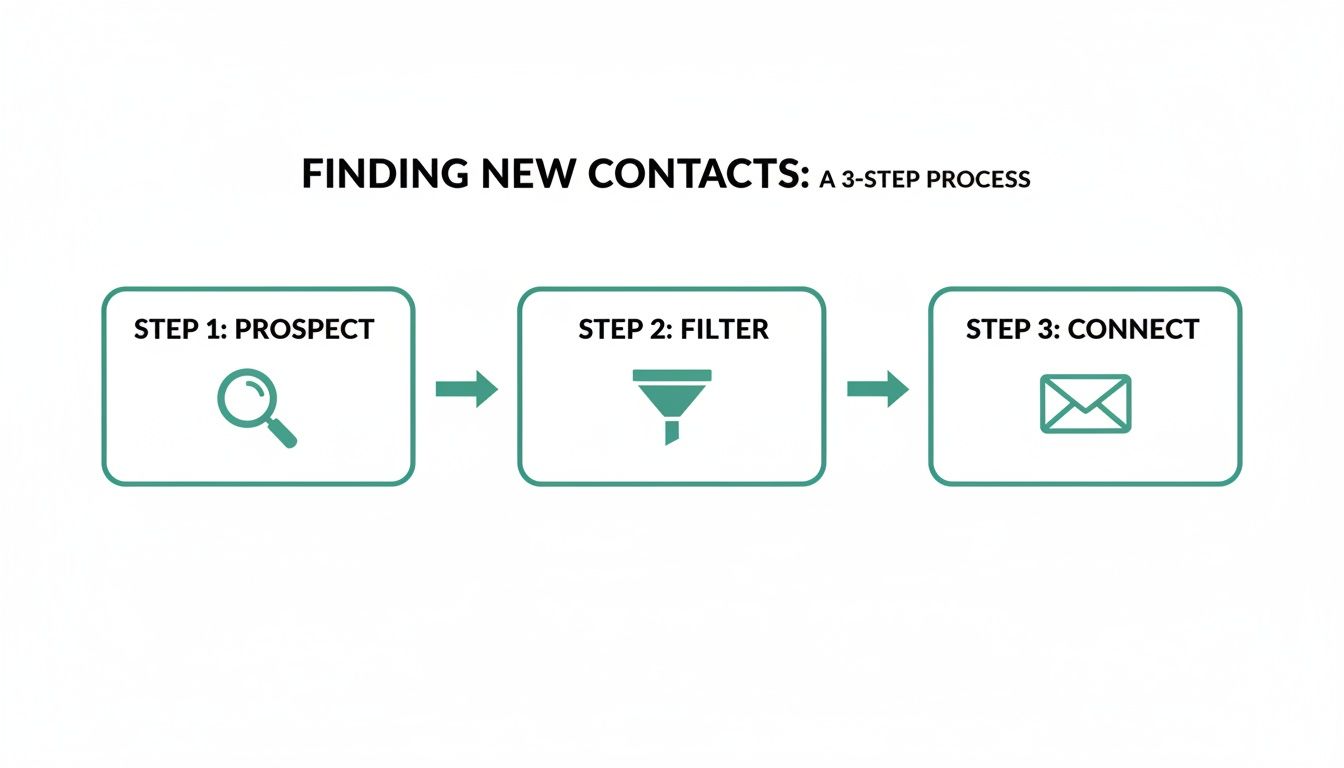
    This diagram breaks down the basic process of turning a name and a company into a verified email address you can actually use.

    A diagram illustrating a 3-step process for finding new contacts: Prospect, Filter, and Connect.

    It’s a simple flow that shows how a broad search gets systematically narrowed down to a single, actionable contact. Let's break down what's happening behind the scenes.

    Following Digital Footprints Across the Web

    The whole process usually kicks off with data scraping. It sounds technical, but the concept is simple. Imagine a bot that can read millions of public web pages—company "About Us" pages, press releases, or author bios on blogs—in seconds, looking for any mention of a name alongside an email address.

    This information is then collected and stored. For tools focused on professional contacts, this often means understanding how to source data from platforms like LinkedIn, with some using methods for scraping LinkedIn data ethically to build their databases. This ensures the information is both relevant and responsibly sourced.

    An effective email finder doesn’t just look in one place. It pulls together data from dozens of public channels to build a complete profile, which dramatically increases the odds of finding the correct, up-to-date contact info.

    This first step casts a wide net, gathering all the raw data needed for the more refined steps that follow.

    Cracking the Code with Pattern Matching

    Here’s where it gets interesting. Once a tool knows a person's name and the company they work for, it can use pattern matching to make a very educated guess. Most companies use a standard format for their email addresses. Just think about your own company—chances are, everyone’s email follows a predictable structure.

    The tool then tests all the common corporate email patterns, like:

    • First Name: john@company.com
    • First Initial + Last Name: jdoe@company.com
    • First Name + Last Name: johndoe@company.com
    • First Name . Last Name: john.doe@company.com

    It quickly generates these potential combinations and gets them ready for testing. If you’re ever curious about a specific company, you can run an email lookup by domain to see these patterns in action for yourself.

    Verifying and Validating the Findings

    Coming up with a list of possible emails is only half the battle. The final, and most critical, step is verification. An unverified email is just a bounce waiting to happen, and too many of those will wreck your sender reputation.

    To make sure an address is the real deal, email search engines perform a quick check with the company's mail server. It’s like a technical handshake that confirms whether the server recognizes the email address as a valid recipient, all without actually sending a message. Only after an email passes this test is it handed over to you with a high confidence score, giving you peace of mind that your outreach will actually land in the right inbox.

    Diving Into the Different Types of Email Search Tools

    Not all email search engines are built the same. They come in all shapes and sizes, each designed for a specific job. Think of them like different kinds of fishing gear—you wouldn't use a massive net to catch one specific fish, and you definitely wouldn't use a simple rod and reel to supply a whole restaurant. The right tool always depends on your goal.

    Picking the best email finder really comes down to matching its format to how your team works. Whether you're a sales rep needing a quick contact on the fly or a marketing team building a massive campaign list, understanding these differences is the key to working smarter, not harder.

    Browser Extensions for On-the-Fly Prospecting

    Browser extensions are the nimble speedboats of email discovery. They live right in your web browser (like Chrome or Firefox) and spring into action when you're on a prospect's website or LinkedIn profile. With just a click, they scan the page and public data sources for any associated email addresses, serving them up instantly.

    This type is perfect for:

    • Sales Development Reps: Instantly find a decision-maker's contact info while you're researching their company online.
    • Recruiters: Quickly grab a candidate's professional email directly from their social media profile.
    • Freelancers: Snag a potential client's email from their company site without breaking your research flow.

    The big win here is speed and convenience, making extensions the go-to for high-volume, targeted prospecting.

    Web Applications for Bulk List Building

    If extensions are the speedboats, then web applications are the big fishing trawlers. These are powerful, dashboard-based platforms built to find hundreds or even thousands of emails at once. You just upload a list of names and company domains, and the app chugs away in the background to find and verify all the matching emails.

    These platforms are built for scale. They shift the focus from finding one email at a time to building comprehensive, campaign-ready contact lists with minimal manual effort.

    Web apps are best for large-scale operations. For example, a marketing team getting ready for a new product launch can upload a list of 500 target companies and get back verified contact lists for their entire outreach in just a few hours.

    API Services for Custom Integrations

    Finally, API services are the most flexible and technical option of the bunch. An API (Application Programming Interface) lets you plug an email search engine’s core power directly into your own software, like a CRM or a custom-built sales tool. This creates a completely seamless workflow where finding an email is just another feature inside the system you already use every day.

    And for those times when you already have an email and need to find out more about its owner, learning how to reverse search an email address can be a huge help. Some of the more advanced APIs even offer this reverse-lookup function.

    The Strategic Advantage of Finding Direct Emails

    Knowing how a tool works is one thing. Seeing what it does for your bottom line is another story entirely. Let’s move past the technical "how" and get straight to the tangible results that a good search engine for emails can deliver. The core benefit is simple but incredibly powerful: they open up direct, relevant lines of communication that fuel real growth.

    A person views an email or calendar app on a smartphone at a busy office desk.

    Think about a sales rep trying to reach a VP of Marketing at a major tech company. The old way meant navigating a maze of gatekeepers, generic contact forms, and dead-end info@ inboxes. That process could drag on for weeks with nothing to show for it. With an email finder, that same rep can get the VP's direct email in minutes, write a personalized message, and maybe even book a demo within a couple of days.

    Real-World Scenarios and Business Impact

    This ability to cut through the noise creates a serious competitive advantage across the board. It’s not just about finding an address; it’s about opening a direct line to opportunity.

    Here’s how that plays out in the real world:

    • Accelerated Sales Cycles: Sales teams can go straight to the decision-makers, cutting out the middlemen who gum up the works. This means faster responses, quicker demos, and shorter sales cycles.
    • Boosted Marketing ROI: Marketers can build hyper-targeted lists for account-based marketing (ABM) or personalized campaigns. They can be sure their message is landing in front of the right people, which dramatically improves engagement rates and ROI.
    • Streamlined Recruitment Efforts: Recruiters can find and contact top-tier candidates who aren't even looking for a new job. This gives them access to a passive talent pool their competitors will likely miss.

    The real value of these tools comes from shifting your outreach from a volume game to a precision one. When you can ensure your message reaches the right person every time, you make every communication count. You save time and see drastically better results.

    The Proven Power of Direct Email

    This whole emphasis on finding direct emails isn't just a hunch; it's backed by cold, hard data. Email remains one of the most effective channels for actually driving revenue, which is why these tools are in such high demand.

    Research shows that email traffic converts to sales at a much higher clip than other channels. For instance, about 4.24% of visitors from email make a purchase. Compare that to just 2.49% from search engines and a tiny 0.59% from social media. On top of that, customers who buy something through an email offer tend to spend 138% more.

    For sales teams, this makes email a high-leverage channel that is 40 times more effective than social media for acquiring new customers. If you want to dive deeper, you can explore more of the compelling statistics behind email marketing on Porch Group Media. At the end of the day, a great email search tool simply acts as the key to unlocking this powerful, high-ROI system.

    How to Choose the Right Email Search Engine

    Picking the right search engine for emails feels a lot like choosing a critical tool for a big job. Get it right, and your work flows smoothly. Get it wrong, and you're in for a world of frustration. With so many options out there, it’s easy to get lost in the marketing noise.

    To cut through it all, you need to focus on a few core things that actually impact your results. The goal isn’t just to find a tool that spits out data, but one that delivers accurate contacts and fits right into how your team already works.

    Evaluate Data Accuracy and Verification

    Let’s be clear: the single most important factor is accuracy. An email finder that gives you bad or old information isn't just a waste of money—it's actively working against you. Every single bounced email hurts your sender reputation, making it tougher for your future messages to even land in an inbox.

    Look for tools that offer these essentials:

    • Real-Time Verification: This is a non-negotiable. The best email search engines don’t just pull from a dusty old database. They actively check if an email is valid in real time, right before they give it to you.
    • Confidence Scores: Some tools will give you a percentage score showing how sure they are that an email is correct. This is a huge help for prioritizing your outreach to the most solid contacts first.
    • Diverse Data Sources: A platform that cross-references info from multiple public sources—think company websites, professional networks, and public records—is always going to be more reliable.

    Don’t get fooled by a tool that brags about a massive database without proving the data is fresh. A smaller, highly accurate list of contacts is infinitely more valuable than a giant list of unverified junk.

    Consider Workflow Integration and Usability

    Even the most powerful tool is worthless if your team finds it too clunky to use. The best solution should feel like a natural part of your sales or marketing process, not another complicated platform you have to wrestle with.

    Think about how it plugs into your current setup. Does it have a simple browser extension so you can grab emails on the fly? Can it connect directly with your CRM, like Salesforce or HubSpot, and sync new contacts automatically?

    Finally, take a look at the price. Some work on pay-as-you-go credits, while others are a monthly subscription. Find a plan that matches how much outreach you actually do, so you get the best return on your investment without paying for a bunch of features you’ll never touch.

    Navigating Privacy and Compliance

    Let's be clear: using a powerful email finder tool comes with a responsibility to be smart and ethical about it. While these search engines are designed to find business information that's already out there, how you use that data is what really counts. Getting this right is crucial for protecting your brand's reputation.

    A laptop displaying a shield with an open padlock icon on a green screen, emphasizing privacy first.

    You’ve probably heard of regulations like GDPR in Europe and the CAN-SPAM Act in the U.S. These laws aren’t there to kill B2B communication; they exist to stop spam and protect people's data. It’s all about finding professional data the right way, something we cover in our guide on how to responsibly scrape email from LinkedIn.

    Best Practices for Responsible Outreach

    The secret is to approach your outreach with respect and a genuine offer of value. Think of it less like a cold blast and more like starting a professional conversation.

    To stay on the right side of the rules and build trust from the get-go, stick to these core principles:

    • Provide an Easy Opt-Out: Every single email needs a clear, one-click way for people to unsubscribe. No exceptions.
    • Be Transparent: Say who you are. Your company's name and physical address should be right there in your email footer.
    • Ensure Relevance: Make sure your message actually relates to the person's professional role or industry. Random pitches are just spam.

    The most effective—and ethical—outreach is always rooted in personalization and respect. When you focus on delivering real value to a relevant audience, you’re not just following the rules; you’re building a stronger, more trusted brand.

    At the end of the day, using an email finder ethically just means respecting the person on the other end. Treat the contact information you find as an opportunity to start a real professional dialogue. Do that, and you'll sidestep privacy issues while getting far better results.

    Still Have Questions?

    Even with the best tools in hand, a few questions always pop up. Let's tackle some of the most common ones about using a search engine for emails to clear up any lingering confusion.

    How Accurate Are These Email Finders, Really?

    This is the big one, and the answer varies a lot. The best tools on the market consistently hit an accuracy rate between 85% and 95%. They pull this off by running real-time verifications and checking an address against multiple public data sources to make sure it's not just valid, but actively in use.

    You absolutely want to stick with a tool that has a proven track record for accuracy. It’s not just about minimizing bounced emails—it’s about protecting your sender reputation, which is gold.

    Is It Legal to Use These Tools for Cold Outreach?

    Yes, for B2B outreach, you're generally in the clear. Regulations like the CAN-SPAM Act in the U.S. and GDPR in Europe allow for professional communication, but you have to do it responsibly. It's not a free-for-all.

    The secret is staying compliant. Your email has to be relevant to their job, you need to say who you are, and you must give them an easy, no-hassle way to opt out.

    Can I Find Personal Emails With an Email Search Engine?

    The reputable tools are built specifically to find professional email addresses—the kind that looks like first.last@company.com. They intentionally avoid personal emails from providers like Gmail or Yahoo. This keeps your outreach squarely in a professional context and respects privacy norms.

    Trying to hunt down personal emails with these platforms is a bad idea. You'll likely violate the tool's terms of service and run into data privacy laws. Just don't do it.


    Ready to stop guessing and start connecting? With EmailScout, you can find unlimited verified email addresses for free and build your outreach lists in minutes. Try the powerful Chrome extension today and see the difference for yourself. Get started for free at https://emailscout.io.

  • Mastering Domain Email Lookup in 2024

    Mastering Domain Email Lookup in 2024

    A domain email lookup is pretty straightforward: it's the process of finding professional email addresses connected to a company's specific domain name. This skill is a game-changer for anyone in sales, marketing, or networking who needs to get in touch with key decision-makers directly, skipping those generic "contact us" forms.

    What Is Domain Email Lookup and Why It Matters

    A laptop on a wooden desk displays an email interface, with office supplies and text 'Find Professional Emails'.

    Ever tried to reach a key person at a company you're targeting, only to hit a dead end because you can't find their email? It’s a classic roadblock. It slows down your outreach and can kill an opportunity before it even gets started. A domain email lookup is the practical skill you need to find those crucial contacts tied to a specific company domain.

    But it’s about more than just finding an address—it’s about opening doors to real conversations. This guide isn't about theory; it's a roadmap full of actionable strategies you can start using today. We'll cover everything from quick, one-off lookups with browser extensions to scaling up with batch searches. You'll also learn how to make sure your emails actually get delivered and how to handle the ethical side of professional outreach.

    The Core Benefits of This Strategy

    Getting good at this gives you a direct line to the people who can actually make things happen, which is vital for any growth-focused role. Here are the main advantages:

    • Accelerated Sales Cycles: When you can contact decision-makers directly, you cut through the noise and get your proposal in front of the right person much faster.
    • Improved Outreach Personalization: A direct email lets you send a highly personalized message, which boosts response rates way beyond what a generic "info@" address can achieve.
    • Enhanced Networking Opportunities: You can easily connect with industry leaders, potential partners, or even mentors just by finding their professional contact info.

    To really get the most out of your efforts, it helps to understand the full range of sales prospecting tools out there. They can seriously upgrade your entire strategy.

    A targeted email is often the first step in building a meaningful business relationship. A domain email lookup isn't just a technical process; it's the key that unlocks that initial conversation, turning a cold lead into a warm prospect.

    Ultimately, this process changes how you connect with prospects and partners. It gives you the data you need to build solid, targeted lists for any campaign you can dream up. For a deeper dive into finding specific contacts, check out our guide to a complete email address lookup. It's packed with everything you need to make every outreach effort count.

    Finding Single Emails with Precision and Speed

    When you need just one specific email, and you need it now, you can’t afford to wait. The good news is there are a few solid techniques that can get you that single contact in minutes, whether you prefer automated tools or a more hands-on approach.

    The fastest way is almost always a specialized browser extension.

    Let's say you've landed on a prospect's company website or maybe their LinkedIn profile. If you have an extension like Hunter or EmailScout installed, you just click its icon in your browser bar. The tool instantly gets to work, pulling up known email addresses associated with that domain. You'll typically see a list of names, job titles, and the emails it has found, often with a handy confidence score to show how certain it is.

    From there, it's as simple as scanning the list for your target, copying the address, and you're good to go. It’s a completely seamless way to perform a domain email lookup without ever breaking your workflow or leaving the page.

    The Art of Manual Pattern Guessing

    But what happens if a tool comes up empty, or you just prefer to do things yourself? This is where a bit of clever detective work comes in, using the repeatable skill of manual pattern guessing.

    It's simpler than it sounds. Most companies use a consistent, predictable formula for their email addresses. Your first job is to figure out what that formula is. You can often find a clue—just one employee's email—on the company's "About Us" page, buried in a press release, or even in the author bio of a blog post.

    Once you have a confirmed email, like j.smith@company.com, you've cracked the code. You can now apply that same pattern to your target's name and build their email address from scratch.

    A single known email address is like a Rosetta Stone for a company's entire communication structure. Once you decipher that one pattern, you can often deduce the email address for anyone in the organization, a powerful skill that costs nothing but a few moments of your time.

    Verifying Your Educated Guess

    Now that you've put together a likely email address, there's one final, crucial step: verification.

    Never, ever send a message to a guessed address without confirming it's legit first. A high bounce rate doesn't just mean your email didn't get delivered; it can seriously damage your sender reputation and get your domain flagged as spam.

    Thankfully, this is easy. Just use a free, single-email verifier tool. You paste your guess—let's say f.jones@company.com—into the search bar and run the check. Within seconds, it will ping the server and tell you if the address is valid and can receive mail. This simple check is what turns a hopeful guess into a confident outreach opportunity.

    This is especially important given the sheer variety of email clients people use today. Apple’s email client, for example, holds a dominant 51.52% market share, mostly on iOS devices, while Gmail is massive with around 1.8 billion accounts globally. Making sure your email is valid is the only way to ensure it has a chance of landing in the right inbox. Discover more stats about popular email providers.

    Comparing Quick Email Lookup Methods

    So, which one-off method should you use? Both browser extensions and manual guessing have their place. This table breaks down the key differences to help you decide which is right for the situation.

    Method Speed Typical Accuracy Cost
    Browser Extension Very Fast (seconds) High (often includes a confidence score) Freemium (free searches are usually limited)
    Manual Guessing Fast (minutes) Variable (highly dependent on verification) Free (requires a free verifier tool)

    Ultimately, both approaches are incredibly effective for a precise domain email lookup. The key is knowing which tool—or which technique—to pull out of your toolbox to fit the immediate need and keep your workflow moving.

    Scaling Your Outreach with Batch Lookups

    Finding a single email is one thing, but finding hundreds or thousands is how you build a real engine for lead generation. This is where batch domain email lookups come in. They take a tedious, manual task and turn it into a massive strategic advantage, saving you an incredible amount of time.

    Instead of hunting for contacts one by one, you can feed a tool an entire list of target companies and get results for all of them at once. Honestly, this approach is the foundation of any serious sales, marketing, or PR campaign running at scale.

    Preparing Your Domain List for Success

    The quality of your results depends entirely on the quality of your input list. A clean, properly formatted list of company domains is the most critical part of the process. I always recommend starting with a simple CSV file with just one column for the domains.

    To get the best possible results, follow these simple rules:

    • Keep it clean: Each entry needs to be a root domain like company.com, not a full URL like https://www.company.com/about-us.
    • Remove duplicates: A quick check for duplicate domains saves you time and credits. It also keeps your final export nice and tidy.
    • Verify domain validity: Typos or fake domains will just cause errors and slow things down. A quick once-over is worth it.

    A little bit of prep work here goes a long, long way. A clean list lets the tool do its job efficiently without getting stuck on formatting problems or bad data. If you're new to this, getting a feel for how a free email scraping tool works can give you some good background on data collection principles.

    The real power of batch processing isn't just about speed. It's the ability to build a rich, targeted prospect list from nothing more than a list of companies you want to reach. You’re turning raw market research directly into actionable outreach data.

    Once your CSV is ready, the rest is pretty straightforward. You just upload the file to your batch lookup tool, tweak any search parameters if needed, and let it run. The tool then works its way down your list, systematically performing a domain email lookup for every single entry.

    From Raw Data to Actionable Intelligence

    What you get back is so much more than a simple list of email addresses. A good tool will enrich this data, often giving you names, job titles, and even confidence scores for each contact. This transforms a basic list into a detailed prospecting database you can actually use.

    At its core, any batch tool is just automating a simple, repeatable process at a massive scale. It's doing what you would do manually, just hundreds of times per minute.

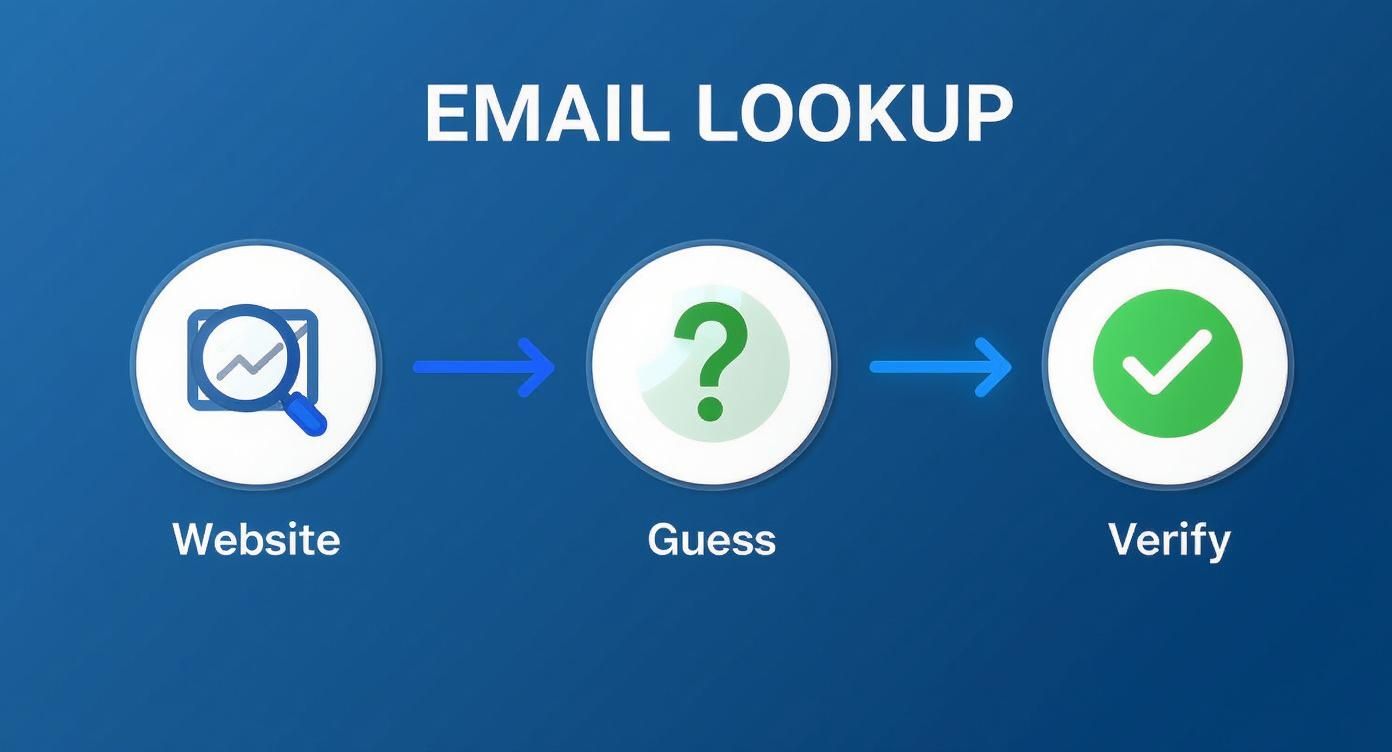
    A three-step process for email lookup: find email from website, guess, then verify.

    This simple three-part sequence—find what you can on the website, guess common patterns, and verify the result—is the magic behind it all.

    The demand for this kind of data is exploding. The email lookup tool market is on track to hit $2.5 billion by 2025 and is expected to grow at 15% annually through 2033. This growth is all driven by the need for more efficient ways to generate leads as more and more businesses move their outreach online.

    Why Email Verification Is Non-Negotiable

    Modern computer screen showing "Email Verification" with three green checkmarks on an office desk.

    Finding what looks like a perfect email address is just the starting line. The real test is what happens after you hit "send." A brilliant domain email lookup is completely useless if the address is a dead end, and sending messages to invalid accounts is way more damaging than just a waste of time.

    Every single email that bounces back sends a bad signal to Internet Service Providers (ISPs) like Gmail and Outlook. Once you rack up enough bounces, your entire domain can get flagged. Suddenly, even your perfectly good emails—the ones going to real, interested contacts—start getting routed to the spam folder. Your whole outreach effort becomes invisible.

    This is exactly why email verification isn't just a "nice-to-have." It's a critical, non-negotiable step in your workflow.

    Demystifying the Verification Process

    So, what actually happens when an email gets "verified"? It's not just a simple ping. It’s a multi-layered process designed to confirm that an inbox is real, active, and ready to receive your message. The tech behind it is complex, but the goal is simple: protect your sender score and get your emails delivered.

    Here's a quick look under the hood of a typical verification check:

    • Syntax Validation: This is the most basic check. The tool ensures the email follows the right format (name@domain.com) and doesn't have any weird, illegal characters.
    • Domain and SMTP Check: Next, it confirms the domain actually exists and is set up to receive email in the first place. This involves a sort of digital handshake with their mail server.
    • Mailbox Ping: This is the clever part. The service talks directly to the server to see if a specific mailbox (like jane.doe@company.com) is real, all without actually sending an email.

    A lot of domain lookup tools have verification built right in these days, which is handy. But if you're running any kind of large-scale campaign, investing in a dedicated service to do a final scrub of your list is always a smart move. For anyone serious about getting their messages seen, it pays to explore proven strategies for mastering email deliverability.

    Sending an unverified email is like mailing a letter to an address you aren't sure exists. You're not just risking it won't arrive; you're basically telling the post office you don't care about your mailing list's quality, which has real consequences down the road.

    The Real-World Impact of Clean Lists

    Keeping your email list clean has a direct impact on your bottom line. High bounce rates—and anything over 2% is usually seen as a problem—can get your account suspended by email marketing platforms. Even worse, it slowly chips away at the trust ISPs have in your domain, making every future campaign that much harder.

    This entire system of professional communication is built on a massive technological foundation. The global email hosting market was valued at a staggering USD 27.04 billion in 2024 and is on track to hit USD 108.73 billion by 2032. That growth tells you everything you need to know about how vital reliable email—and the tools that support it—has become.

    Ultimately, verification is what turns the raw data from your domain email lookup into a dependable asset. Taking this extra step ensures your messages land where they're supposed to, protects your sender reputation, and maximizes the return on all your hard work. To dig into the technical side of things, our guide on email address verification breaks it all down.

    Navigating Compliance and Ethical Outreach

    So, you've successfully found a list of emails. That’s a powerful starting point, but it also comes with some serious responsibility. Just because you can find an email doesn't mean you have a free pass to send whatever you want. Getting this wrong can kill your reputation and even land you in legal trouble.

    Before you hit "send" on any campaign, you need to understand the rules of the road. Key regulations like the CAN-SPAM Act in the U.S. and Europe’s General Data Protection Regulation (GDPR) set the standards. While they have their differences, the core idea is the same: protect people from unwanted and irrelevant emails.

    It's time to shift your thinking from "Can I find this email?" to "Should I be using this email?"

    The Line Between Prospecting and Spamming

    The difference really comes down to legitimate interest and relevance.

    Think about it: finding a publicly listed business email to pitch a B2B partnership is worlds away from scraping personal data for a generic marketing blast. Ethical outreach always, always starts with a good reason to believe your message offers real value to the person you're contacting in their professional capacity.

    Here are the non-negotiables for responsible outreach:

    • Legitimate Interest: Only reach out if your product or service is a logical fit for their job and industry. No exceptions.
    • Transparency: Be upfront. Clearly state who you are and why you're emailing. Tricky or deceptive subject lines are a huge red flag and a direct violation of CAN-SPAM.
    • Easy Opt-Out: Every single email must have a simple, obvious way for them to unsubscribe. Don't hide it or make them jump through hoops.
    • Prompt Removal: When someone opts out, you must remove them from your list immediately. Delaying this isn't just bad practice; it’s a violation that can result in hefty fines.

    A domain email lookup should be the first step in a potential professional conversation, not a ticket to dump someone into a generic marketing funnel. If you don't respect their inbox, you've already lost.

    Practical Steps for Ethical Campaigns

    Before launching any outreach, take a minute and ask yourself a few simple questions:

    • Does this person’s job title actually align with what I’m offering?
    • Is my message clear, professional, and respectful of their time?
    • Am I making it incredibly easy for them to say, "No, thanks"?

    This isn't just about dodging fines; it's about being effective. People are flooded with emails every day. The ones that get a positive response are the ones that feel thoughtful and relevant. By putting ethics first, you're not only staying compliant but also dramatically increasing your odds of building real business relationships. Your professional reputation is built on it.

    Your Top Domain Email Lookup Questions, Answered

    Even with the best tools in your arsenal, you're bound to have questions when you start digging for domain emails. It's totally normal. From practical "how-to" queries to the slightly fuzzy legal stuff, it can feel like a lot to navigate.

    I've rounded up the most common questions that pop up and laid out some clear, no-nonsense answers to help you move forward with confidence.

    Is It Legal to Use These Tools?

    Yes, it's generally legal to use a tool to find business contact information that's already publicly available. The real question isn’t about finding the information—it's about how you use it.

    Once you have that email, your outreach falls under regulations like GDPR in Europe or the CAN-SPAM Act in the U.S. The golden rules are simple: have a legitimate business reason for contacting someone, give them a dead-simple way to opt out, and always respect their privacy. This is about building connections, not just hoarding data.

    How Accurate Are Email Finders, Really?

    This is the million-dollar question, and the answer is: it varies. A lot. The top-tier tools, however, consistently hit an accuracy rate between 70% and 98%. They achieve this by cross-referencing multiple data sources and, most importantly, running real-time verification checks to make sure an inbox is live before giving you the green light.

    But here’s a pro tip: even with a great tool, always run your final list through a dedicated email verification service before launching a big campaign. That one extra step is your best insurance policy against a high bounce rate, which can seriously damage your sender reputation.

    No tool is perfect, 100% of the time. Think of an email finder's output as a high-probability lead, not a guarantee. Verification is what turns that probability into a reliable asset.

    Can I Find Emails for Any Domain?

    You can certainly try, but you won't get a hit every single time. You'll have the most luck with established businesses that have a solid digital footprint, as their contact info is more likely to be indexed somewhere online.

    Where you might run into trouble is with a few specific types of domains:

    • Tiny Businesses: A solo operation or a company with just a couple of employees might not have its email patterns logged by major lookup tools.
    • Brand-New Websites: If a domain was just registered yesterday, it's a ghost. No tool has had the chance to crawl it yet.
    • Catch-All Servers: Some domains use a "catch-all" setting, meaning they accept mail sent to any address at that domain (like anything@example.com). This makes it impossible for verification tools to confirm if a specific inbox actually exists, so you'll often get an "unknown" or risky result.

    These tools are built for B2B prospecting, where professional contact details are just part of doing business.


    Ready to stop guessing and start connecting? EmailScout gives you an effortless way to perform a domain email lookup with our powerful Chrome extension. Find verified emails, build targeted lists, and supercharge your outreach in a single click. Find unlimited emails for free with EmailScout.

  • How to Find a Person Email Proven Strategies

    How to Find a Person Email Proven Strategies

    Finding someone’s email address is way easier than you might think. Just about every professional has a digital footprint, and email is almost always at the center of it. The real trick isn't if the email exists, but knowing where to look and what patterns to search for.

    Why Finding Someone's Email Is Actually Possible

    A person using a laptop with icons representing communication and networking floating around them, symbolizing the digital footprint left by emails.

    Before you even start, you need to get one thing straight: you're not looking for a needle in a haystack. Email has grown far beyond a simple messaging tool. It’s now a universal digital ID—the key that unlocks professional networks, social media profiles, and countless online services.

    Because it’s so widely used, the contact you’re after is almost certainly out there. Your success comes down to using the right techniques and tools, not just dumb luck.

    The Numbers Don't Lie

    The massive number of email accounts in use is exactly why a strategic search works. By 2025, there are expected to be around 4.59 billion email users worldwide. On top of that, the average person has about 1.86 email accounts, giving you multiple potential ways to connect.

    This digital saturation is the foundation of modern sales and outreach. In fact, understanding the basics of lead generation best practices makes it clear why snagging an email is such a critical first step.

    Your goal isn't just to find an address; it's to find the right address—the one they actually check for professional messages. This simple shift in mindset turns a passive hunt into a focused investigation.

    When you think about it this way, you can feel confident your effort will pay off. With a systematic approach, what seems like a daunting task becomes a reliable, repeatable process.

    Getting Your Hands Dirty: Manual Search Techniques

    Before you even think about pulling out the automated tools, it's worth knowing that you can often find exactly what you're looking for without spending a single cent. These hands-on methods are the bread and butter of digital prospecting. They rely on freely available resources and just a bit of clever detective work.

    Honestly, they’re surprisingly effective for those one-off searches where you need a specific contact and you need it now.

    Your first stop should almost always be the company’s website. Don’t just skim the homepage. Dig a little deeper into the 'About Us' or 'Team' pages. These sections are a goldmine and often list key people along with their direct contact info. Another pro tip? Check the company blog. Authors are frequently credited with a bio that includes an email address or a link to a social profile where you can find more clues.

    Unleash the Power of Advanced Search Operators

    A basic Google search is a good start, but using advanced operators turns it into a high-precision tool. By adding a few simple commands to your search query, you can slice through the noise and zero in on what you actually need. This little trick forces Google to search within a specific website or look for exact phrases, which dramatically cleans up your results.

    Here are a couple of my go-to examples:

    • "John Doe" + "email" site:company.com – This tells Google to only search that specific company's website for the person's name next to the word "email."
    • "John Doe" + "contact" filetype:pdf – This one is great for uncovering public PDFs, like old conference speaker lists or press releases, that might have the contact details you’re after.

    These commands are simple, but they’re incredibly powerful. They help you find information that’s already out there but buried deep within a site’s architecture, saving you from clicking through dozens of irrelevant pages.

    The key is to think like a database. You're not just asking a question; you're giving a specific command to retrieve a piece of data hidden in plain sight.

    Scour Professional and Social Networks

    Professional networks like LinkedIn are treasure troves, but not always in the most obvious way. Most people keep their email addresses hidden from their public profiles, but the information they do share can give you some serious clues. Check out their bio, recent posts, or even their comments—they might mention a personal blog or a side project where their contact info is listed publicly.

    Sure, this approach takes a bit more patience, but it helps you build a more complete picture of the person you're trying to reach. It’s also a great way to deepen your understanding by finding email addresses by name through common patterns, a technique that works perfectly alongside social media research. When you start combining clues from different platforms, you can often piece together exactly what you need.

    Using Email Finder Tools for Efficiency

    When you need to find an email address right now, digging around manually just doesn't cut it. It’s a huge time sink. This is exactly where a dedicated email finder tool completely changes the game, turning what could be hours of digital detective work into a few seconds of clicking.

    These platforms are built to work smarter, not harder. They scan massive public databases, cross-reference information, and predict corporate email patterns with startling accuracy. So, instead of you having to guess between firstname.lastname@company.com or f.lastname@company.com, the tool does all that heavy lifting for you.

    How To Run An Effective Search

    The whole process is refreshingly simple. With a tool like EmailScout, all you really need is a person's full name and the company they work for. Just plug in those two details, and the platform gets to work, pulling up potential email addresses almost instantly.

    Most top-tier tools follow a similar, straightforward workflow:

    • Enter Your Target's Details: Start with the basics—first name, last name, and their company’s website (like Jane Doe and emailscout.io).
    • Run the Search: The tool queries its database and uses its algorithms to find or predict the most likely email address.
    • Analyze the Results: You’ll get one or more email options, usually with a confidence score attached.

    This simple visual guide can help you figure out where to start your search, depending on what info you already have.

    Infographic about how to find a person email

    As the chart shows, knowing the company is your most direct path to success—and that’s precisely where email finders are at their best.

    Pay close attention to that confidence score. It’s a crucial piece of the puzzle, telling you the probability that an email is correct and deliverable. A score of 95% or higher means you can feel pretty good about hitting "send." A lower score might suggest it’s a solid guess, but one you might want to double-check.

    If you're curious how different platforms stack up, you can dive deeper into this guide on the best email finder tools.

    Comparing Manual vs. Automated Email Finding

    It helps to see the trade-offs side-by-side. Here’s a quick look at how searching on your own compares to using a dedicated tool.

    Feature Manual Search Email Finder Tool (e.g., EmailScout)
    Speed Slow; can take minutes or hours per contact Fast; results in seconds
    Accuracy Variable; relies on guesswork and luck High; uses data and algorithms for predictions
    Scalability Very low; not practical for large lists High; bulk search features for hundreds of leads
    Verification Requires a separate step or tool Often built-in or includes confidence scores
    Effort High; requires significant detective work Low; just input a name and company

    While manual methods have their place, it's clear that for anyone who values their time, an automated tool is the way to go for efficiency and scale.

    Scaling Your Outreach With Bulk Features

    Finding one person's email is useful, but the real power of these tools comes from their ability to work at scale. Let's say you need to build a contact list for an entire department or for a new marketing campaign. Doing that by hand would be a nightmare.

    A bulk search feature lets you upload a whole list of names and companies. The tool then crunches through the list and finds all the corresponding email addresses in a single operation. This transforms list-building from a painstaking chore into an efficient, automated process.

    This feature alone is a massive time-saver for sales and marketing pros who need to build targeted prospect lists without wasting their entire day on it.

    Creative Strategies for Hard-to-Find Contacts

    A magnifying glass hovering over a complex network of digital connections, highlighting a single, hard-to-find contact point.

    Okay, so you've tried the usual methods, and you're still coming up empty. It happens. You're likely trying to reach someone who keeps a low digital profile—think busy C-level executives, in-demand freelancers, or key decision-makers who get a million emails a day.

    When the standard tools hit a wall, it doesn't mean you've hit a dead end. It just means it's time to get a little more creative with your approach.

    One of the most effective tactics is to play detective and figure out the company's email pattern. Most businesses use a consistent format for their email addresses. If you can find just one or two emails from that company, you've likely found the key to unlock your contact's address.

    Common Company Email Patterns to Test

    Start by looking for patterns from anyone else at the company. For example, if you find jane.doe@company.com and john.smith@company.com, it's a safe bet that your target, "Robert Jones," has the email robert.jones@company.com.

    Here are the most common formats I see in the wild:

    • First Name: robert@company.com
    • First Initial + Last Name: rjones@company.com
    • First Name + Last Initial: robertj@company.com
    • First Name . Last Name: robert.jones@company.com

    Once you have a few good guesses, you can use a tool like EmailScout to verify the address. This saves you from sending a risky test email that could bounce and get your domain flagged.

    Look Beyond the Obvious Social Platforms

    Everyone checks LinkedIn first, but it’s far from the only game in town. Sometimes the contact info you need is hiding in plain sight on other platforms. I've found professional emails listed directly in a Twitter (now X) bio, especially for journalists or collaborators who want to be reachable.

    Don’t just glance at their main profile page. Dig a little deeper. Check their pinned posts, personal websites linked in their bio, or even their comments on niche industry forums. People often share information more freely in smaller, trusted communities.

    Here’s another insider trick: subscribe to the company's newsletter or download one of their free ebooks. The automated welcome email sometimes comes from a real person's address or, at the very least, reveals a different email format you hadn't considered. It’s a small step, but it can give you the exact clue you need to finally connect.

    Ethical Outreach and Best Practices

    Finding an email address is just the first part of the puzzle. How you use that email is what truly defines your professional reputation and the success of your outreach. It’s about more than just checking boxes for GDPR compliance; it’s about remembering there's a real person on the other end of that inbox.

    That first message you send sets the entire tone. The goal isn’t to blast out a request but to start a genuine conversation. Always personalize your message, get straight to the point, and be upfront about how you found their contact info. A little transparency goes a long way.

    Your Ethical Outreach Checklist

    Respecting someone's inbox is non-negotiable. It’s the only way to protect your reputation and give your message a fighting chance of being read.

    • Never Add Without Permission: Do not dump a new contact into your marketing or newsletter list without their explicit consent. That’s the fastest ticket to the spam folder.
    • Provide a Clear "Why": Explain exactly why you’re reaching out to them. A generic, copied-and-pasted template is an instant red flag and usually gets deleted on sight.
    • Verify Before Sending: Always run the email through a verification tool to make sure it’s active. This simple step protects your sender reputation by keeping your bounce rate low.

    Once you have a valid email, the next critical step is ensuring your communication is both effective and respectful by mastering professional email etiquette.

    The email marketing industry is massive for a reason—it works. But with companies sending an estimated 23 billion promotional emails in 2023, you have to earn trust to cut through the noise. Ethical, responsible practices are no longer optional.

    Ultimately, how you approach that first contact matters more than anything. If you want to send cold emails that people actually open and reply to, check out our guide on how to write cold emails.

    Common Questions About Finding Emails

    When you're digging for emails, a few questions always pop up, especially around the legal side of things and what to do with the contacts you find. Let's clear the air so you can move forward with confidence.

    The big one is always: is this legal? Finding a publicly listed work email is generally fine. The tricky part is how you use it. Regulations like GDPR in Europe and the CAN-SPAM Act in the US are clear: you need a legitimate business reason to reach out. Crucially, you can't just dump these contacts into a marketing newsletter—that requires their explicit permission.

    What To Do with Unverified Emails

    Another common roadblock is what to do when your tool spits back an email with a low confidence score. Think of that score as a guess. Sending to it is a gamble that could easily end in a bounce, and enough of those will get your domain flagged by email providers.

    Never send a cold email to an address with a low confidence score. Your best move is to run it through a separate email verification service. If it still comes back as a dud, don't risk it. Find another contact at the company and ask for an introduction.

    Finally, a lot of people wonder if free email finder tools are worth the trouble. They can be tempting, but you get what you pay for. While okay for a one-off search here and there, they often pull from outdated databases and can have some sketchy privacy practices.

    If you're doing any kind of serious sales or marketing, investing in a solid, reputable tool is always the smarter play. You’ll get better accuracy, more security, and protect your long-term sender reputation.


    Ready to find the right contacts without the guesswork? With EmailScout, you can build accurate outreach lists and supercharge your sales pipeline in a single click. Start finding unlimited emails for free.

  • Email Address Lookup Your Complete Guide

    Email Address Lookup Your Complete Guide

    An effective email address lookup isn't just about collecting contact information; it's the first step to starting a real conversation. The goal is to find a specific, direct email that lands your message in the right person's inbox, skipping those generic addresses that rarely get checked. This targeted approach is everything in sales, marketing, and networking.

    Why Accurate Email Lookup Is a Game Changer

    A professional woman analyzing data on a laptop, representing the strategic value of accurate email lookup

    Finding an email is one thing. Finding the right email is something else entirely. It’s the difference between a successful outreach campaign and a complete dud.

    Think about it. Sending a perfectly written proposal to a generic info@company.com address is like shouting into the void. Sure, someone might see it, but the odds are stacked against you.

    Now, imagine sending that same proposal directly to the Head of Marketing. The entire dynamic shifts. You’ve bypassed the gatekeeper, shown you did your homework, and instantly increased your chances of getting a response. That's the real power of a precise email lookup.

    The Hidden Costs of Inaccuracy

    Bad data doesn't just waste your time—it actively sabotages your efforts. Every single bounced email sends a red flag to email providers like Google and Microsoft. Rack up a high bounce rate, and your sender reputation takes a nosedive.

    Before you know it, your future emails—even the ones sent to valid addresses—start getting dumped in the spam folder.

    It’s a nasty cycle where your outreach gets less and less effective, all because you started with a weak foundation. This problem gets even worse when you consider how quickly contact lists go stale.

    Email list degradation is a constant battle. On average, at least 28% of an email list becomes outdated every year, mostly from invalid addresses that trigger bounces. This makes continuous verification essential for keeping your outreach strategy healthy and effective.

    The truth is, contact information is always changing. People switch jobs, companies rebrand, and old email addresses die. One report even found that only 62% of emails submitted for validation were actually valid—and that number is dropping. You can dive deeper into this trend in ZeroBounce's full report on email list decay.

    From Generic to Game-Changing

    Let’s look at a real-world scenario. A B2B sales team is trying to get in front of a key decision-maker.

    • Approach A (Generic): They fire off their pitch to sales@prospect-company.com. It lands in a shared inbox, an intern gives it a quick scan, and it gets archived forever. No response.
    • Approach B (Targeted): They use an email lookup tool to find the direct email for the Vice President of Sales. Their personalized message gets read, understood, and forwarded to the right person, leading to a scheduled demo.

    The second approach shows the real business impact of accuracy. It's not just about getting your email delivered; it's about connecting with the one person who can actually do something with it. Investing in accurate email lookup pays for itself by boosting response rates, protecting your domain, and making sure your hard work actually leads to results.

    Mastering Manual Email Finding Techniques

    A person using a magnifying glass on a computer screen, symbolizing the manual search for an email address.

    Before you jump straight to an automated tool, it’s worth trying a bit of old-fashioned digital detective work. These manual strategies take a little patience, but they’re often surprisingly effective for a targeted email address lookup.

    Think of it like putting a puzzle together. You already have the corner pieces—a name and a company. Now, you just need to find the right clues to fill in the rest of the picture.

    Advanced Search Operator Magic

    Your first stop should be a good old Google search, but with a twist. By using advanced search operators, you can cut through the noise and tell Google exactly what you’re looking for.

    Let's say you want to find Jane Doe, who works at innovatecorp.com. A generic search will pull up a ton of irrelevant results. Instead, get specific with these search strings:

    • For an exact match: "Jane Doe" email innovatecorp.com
    • To search just their website: site:innovatecorp.com "Jane Doe"
    • To combine a few possibilities: ("Jane Doe" OR "J. Doe") AND (email OR contact) site:innovatecorp.com

    These commands force Google to look for those names and keywords only on the company's website. You'd be surprised how often you’ll find emails listed on "About Us," "Team," or even author bio pages for blog posts.

    Pro Tip: Don't overlook press releases or news articles. Journalists often include their source's email directly in their articles, leaving a public breadcrumb trail that’s easy to find with a targeted search.

    Mining Social and Professional Networks

    LinkedIn is an absolute goldmine for this kind of work, though maybe not in the way you’d expect. While emails are often hidden, the platform provides plenty of clues.

    Start by confirming the person's exact name spelling and their official title from their profile. Then, pop over to their company's LinkedIn page. Look at other employees in their "People" section—sometimes, you’ll find a colleague who has their email listed publicly, revealing the company’s standard email format.

    The Educated Guessing Game

    Once you have a name and the company domain, you can start making some smart guesses. Most companies stick to a consistent pattern for their email addresses; your job is to figure out what that pattern is. If you want to dive deeper into this method, our guide on finding email addresses by name has you covered.

    Here's a quick reference table to get you started on the most common formats.

    Common Email Pattern Variations

    This table breaks down the most frequent email patterns I've seen in the wild. Use it as your cheat sheet when you're trying to guess a prospect's address.

    Pattern Type Example Format When to Use
    First Name jane@innovatecorp.com Common in smaller companies or for early hires.
    First Initial, Last Name jdoe@innovatecorp.com A very popular format for mid-to-large businesses.
    First Name, Last Name janedoe@innovatecorp.com Another corporate favorite, easy and straightforward.
    Full Name with Separator jane.doe@innovatecorp.com Often used in tech, academia, or European companies.

    Testing these one by one might sound tedious, but it can pay off quickly. Start with the most likely patterns and work your way down. Once you have a few solid possibilities, you’re ready to move on to verification to see which one hits.

    Using Email Lookup Tools and Services

    When you've exhausted your manual search options—or you just need to find contacts at a much larger scale—it’s time to bring in the specialists: dedicated email address lookup tools. These services are built from the ground up to automate discovery and verification, saving you hours of frustrating digital detective work.

    These platforms are way more sophisticated than just guessing email patterns. They run on powerful algorithms that comb through massive datasets to pinpoint the right contact information. This is only possible because the digital world is swimming in public data. With nearly 4.8 billion email users firing off over 347 billion messages every single day, the digital footprint is enormous. You can see more on these trends over at cloudHQ's blog.

    How Email Lookup Services Work

    So, what’s really happening under the hood? These tools aren’t just pulling emails out of thin air. They rely on a smart combination of methods to get you accurate results.

    • Public Data Aggregation: They are constantly scanning and indexing publicly available info from company websites, social media profiles, press releases, and online publications.
    • Pattern Recognition: The tools analyze a company’s known email formats (like firstname.lastname@company.com) and apply those patterns to the names you’re searching for.
    • Real-Time Verification: This is the most crucial part. The best tools don't just find an email; they test it. They run a quick, non-intrusive check to confirm the address is active and can actually receive mail.

    For even deeper data collection, some platforms also use data scraping techniques to gather publicly accessible information from web pages. This multi-pronged strategy is how they build those huge, searchable databases of professional contacts.

    Navigating the Pros and Cons

    Just like any tool, these services come with their own set of benefits and drawbacks. Knowing what they are helps you pick the right one for your specific needs.

    The biggest win is undeniably speed and efficiency. A search that might take you an hour of manual digging can be over in seconds. For sales and marketing teams needing to build large, targeted lists, this kind of scalability is a complete game-changer.

    Another major pro is accuracy. Reputable services usually provide a confidence score with each result, giving you a good idea of how likely it is that the email is correct. This is key for protecting your sender reputation by keeping your bounce rate low.

    Key Takeaway: The real value of an email lookup service is its ability to deliver verified, high-confidence email addresses at scale. This frees you up to focus on crafting the perfect message instead of the tedious work of finding someone to send it to.

    On the flip side, the main downside is cost. While many tools offer a few free searches, you'll almost always need a paid subscription for bulk lookups or more advanced features. There's also a small margin of error to consider—no tool is 100% perfect, which is why it's so important to pay attention to those confidence scores.

    Using a tool like EmailScout is pretty straightforward. You just plug in a person’s first name, last name, and their company’s website. The tool scans its database and gives you a potential email, often with a green checkmark or a percentage that shows its confidence level. From there, you can save the contact and export it for your next campaign. If you're weighing your options, checking out a guide on the best email lookup tool can offer some helpful comparisons and insights.

    Verifying Emails: The Critical Final Step

    You've done the detective work and found a promising email address. The job's done, right? Not quite.

    Finding an email is only half the battle. The final, non-negotiable step is verification. Sending a message to an unverified email is just a guess, and a bad guess can damage your sender reputation faster than you can say "spam folder."

    This final check is what separates a professional outreach strategy from a shot in the dark. It’s the quality control that ensures your hard work doesn't go to waste. Every bounced email is a red flag for providers like Google and Microsoft, and too many can get your entire domain penalized.

    Beyond a Basic Syntax Check

    Proper email verification is way more than just checking for an "@" symbol. Modern methods are far more sophisticated and can give you a high degree of confidence before you ever hit "send."

    A solid verification process usually involves a few layers:

    • Syntax and Format Check: This is the most basic step, just confirming the address structure looks right (e.g., name@domain.com).
    • Domain and MX Record Check: Next, the system checks if the domain actually exists and is properly configured to receive email.
    • SMTP Ping: This is where the real magic happens. A verification service communicates directly with the recipient's mail server to see if a specific mailbox exists—all without sending an actual email.

    Key Insight: A "found" email is just a possibility. A "verified" email is a genuine asset. Verification turns your raw data into a reliable contact list that protects your domain's health for every campaign you run.

    Practical Verification Methods

    So, how do you actually do this? You have a few great options, from quick manual checks to powerful automated services.

    One simple, low-tech tip I often use is to do a quick Google search for the email address in quotes, like "jane.doe@innovatecorp.com". If it pops up on a company bio, personal blog, or public directory, that’s a fantastic sign of its legitimacy.

    For more reliable and scalable results, dedicated tools are the way to go. Many services offer robust email address verification that performs all these technical checks in seconds. This step is absolutely essential for maintaining a clean list and making your outreach as effective as possible.

    Ultimately, verification is the gatekeeper of your email deliverability. If you're interested in the nitty-gritty, this is a great guide to improving email deliverability that explains why clean lists are so critical. By making verification a mandatory part of your email address lookup process, you ensure your messages have the best possible chance of landing in the right inbox, every single time.

    Building Email Lookups into Your Workflow

    Finding emails is one thing, but turning that activity into a repeatable, efficient system is what really drives results. A solid email address lookup process isn't just a one-off task. It's a core part of your professional routine, whether you're generating leads, networking, or doing media outreach.

    The goal is to create a seamless flow that combines the best of manual research and automated tools, all while respecting data privacy. This means moving beyond just collecting contacts and focusing on a system that is both effective and ethical.

    Structuring Your Process

    A good workflow prevents wasted effort and keeps your data clean. Instead of randomly searching for contacts whenever you need one, it’s far better to establish a clear, repeatable sequence of actions for every prospect.

    This chart visualizes a simple but powerful three-step flow for finding, verifying, and using contact information.

    Infographic about email address lookup

    Adopting a structured approach like this—Find, Verify, Send—ensures every email you add to your list has been properly vetted. This is absolutely critical for protecting your sender reputation.

    Ethical Outreach and Data Privacy

    Whenever you perform an email lookup, you're handling personal data. It’s crucial to operate within legal and ethical boundaries, especially with regulations like GDPR and CAN-SPAM in mind. The guiding principle here should always be legitimate interest.

    This just means you need a valid, business-related reason for contacting someone. Blindly scraping thousands of emails for a mass-blast campaign isn't just ineffective; it's also legally risky. Your outreach should always be targeted, relevant, and provide genuine value to the person you're emailing.

    Important Takeaway: Always prioritize the quality and relevance of your outreach over sheer quantity. A smaller, well-researched list of contacts will always outperform a massive, generic one. Ethical practices protect your brand and the people you're trying to connect with.

    Keeping Your Data Organized

    So you've found and verified an email. Now what? A messy, disorganized list is almost as bad as having no list at all.

    • For simple needs: A well-structured spreadsheet in Google Sheets or Excel can work just fine. Create columns for name, title, company, email, the source where you found it, and a status field (e.g., "verified," "contacted").
    • For larger scale: A Customer Relationship Management (CRM) platform is essential. CRMs are built to help you track interactions, schedule follow-ups, and manage your relationships over the long term.

    Understanding user behavior really drives home the need for this organized approach. With 92% of online adults using email and 61% checking it daily, your message has a great chance of being seen—if it reaches the right inbox. Data also shows that 60% of consumers actually prefer brand communications via email, which underscores its power. You can learn why timing and verification are so critical and explore more consumer email habits to sharpen your strategy.

    Your Top Email Lookup Questions, Answered

    Even the most seasoned sales pros and marketers run into questions when digging for contact info. It’s just part of the process. I’ve heard them all over the years, so I’ve put together this quick-reference guide to tackle the most common ones.

    Getting these details right isn't just about finding an email; it’s about making sure your outreach is effective, professional, and lands on the right side of the rules.

    Is It Actually Legal to Look Up Someone’s Email?

    This is easily the question I get asked most often. The short answer is yes, it's generally legal—if you do it the right way.

    The key is sticking to publicly available information. We're talking about data that people or their companies have already put out there on the web. Professional lookup tools work by pulling together this public data, not by hacking into some private server.

    But here’s the crucial part: the legality really hinges on how you use the email. Regulations like GDPR in Europe and the CAN-SPAM Act in the U.S. have strict rules for commercial outreach. Your reason for contacting someone has to be based on "legitimate interest," which means your message needs to be genuinely relevant to their professional role.

    How Accurate Are These Email Finder Tools, Really?

    Accuracy can be all over the map, which is why you can't just trust any tool you find. The good ones will give you a confidence score for each result—maybe a percentage or a simple green dot. A high score, say 90% or more, means the tool is pretty darn sure the email is deliverable based on its own checks.

    But let's be realistic: no tool is 100% perfect. People change jobs, companies merge, and email data goes stale fast. That's why the absolute best practice is to use a tool that also verifies the email address in real-time. This extra step pings the server to confirm the address is active right before you hit send.

    My Two Cents: Never, ever send to a found email without verifying it first. I don’t care if it has a 95% confidence score. A final verification check is a non-negotiable step that protects your sender reputation from bounces.

    What if I've Tried Everything and Still Can't Find Their Email?

    We've all been there. You hit a dead end, and the email just seems to be off the grid. When that happens, it’s time to get a little creative.

    • Go Sideways: Try finding a colleague in the same department. A polite message asking them to point you to the right person is surprisingly effective.
    • Switch Channels: Don't forget about LinkedIn. A personalized connection request with a short, professional note can be just as good as—and sometimes better than—a cold email.
    • Make an Educated Guess: Remember those common email patterns? If you know the format for others at the company (like first.last@company.com), it’s a totally logical next step to apply that pattern to your contact’s name.

    The goal is to start a conversation. If the front door is locked, check for an open window.

    Can I Find Someone's Personal Email Address?

    Honestly, you shouldn't even try. Professional lookup tools and ethical outreach practices are strictly focused on business contact information (name@company.com).

    Hunting for personal emails (like a Gmail or Yahoo address) for B2B outreach is a huge privacy red flag. It's creepy, it's ineffective, and it can do serious damage to your personal and brand reputation. Keep it professional. It’s the only way to build trust and credibility.


    Ready to stop guessing and start connecting? EmailScout finds verified email addresses in a single click, right from your browser. Try EmailScout for free and build your outreach list today.

  • How to find email on linkedin: The smart way

    How to find email on linkedin: The smart way

    Let's be honest, finding someone's email on LinkedIn is a tough gig. You have to look way beyond what the platform gives you. In fact, a tiny fraction—less than 10% of users—actually list their email publicly. That's why tools like EmailScout are so crucial if you're serious about sales or marketing outreach. It's about skipping the crowded, noisy world of InMail and opening up a direct line of communication.

    Why LinkedIn Emails Are Your Golden Ticket

    A professional holding a golden ticket with a golden ticket with a LinkedIn logo on it, symbolizing access to valuable email contacts.

    In the B2B world, a direct email address is infinitely more valuable than a LinkedIn InMail. While LinkedIn is fantastic for finding the right people, its messaging system is a minefield. It's often ignored, and the response rates can be abysmal. Picture a chaotic networking event where everyone's shouting—it’s nearly impossible to have a real conversation.

    When you move that chat from LinkedIn to their actual email inbox, you're playing a different game. You sidestep all the noise and land in a personal space they check every single day.

    The Power of a Direct Inbox

    A direct email gives you capabilities LinkedIn just can't touch. For starters, you can set up automated follow-up sequences to stay on their radar without doing all the manual work. You can also track opens and clicks, which gives you real-time feedback on how interested they actually are.

    Here’s why a direct email leaves InMail in the dust:

    • Real Personalization: You can craft a message with rich text, images, and attachments—things that are impossible with LinkedIn's stripped-down format.
    • You Own the Relationship: Once you have their email, that connection is yours. You’re no longer at the mercy of a platform's changing rules or algorithms.
    • Better Tracking and Analytics: Email outreach tools give you a ton of data. You know who opened your message, who clicked a link, and who replied. This info is gold for fine-tuning your approach.

    The real win isn't just snagging an email from a LinkedIn profile. It's about building a direct channel that cuts through the clutter and helps you forge a genuine professional connection.

    Bridging the Information Gap

    There's no denying LinkedIn is a beast for B2B lead generation, with over 1 billion members across the globe. But the platform is built to keep you inside its ecosystem. It’s no surprise that industry stats show less than 10% of profiles have a public email address, making a manual search a huge waste of time. You can learn more about these LinkedIn statistics and their impact on prospecting.

    This is exactly where a specialized tool comes in. It bridges that frustrating gap between spotting a perfect prospect on LinkedIn and actually starting a real conversation in their inbox.

    Finding Emails Manually Without Any Tools

    Before you drop any cash on a new tool, it’s worth getting good at the old-school, no-cost ways of digging up an email on LinkedIn. This kind of manual detective work still pays off, especially when you just need to find one person’s contact info, and you need it fast.

    The first place I always check—and you'd be shocked how many people skip this—is the "Contact Info" section. It's right there on their profile page. Just click the link sitting under their name and headline. If they’ve made their email public, boom, there it is.

    Digging Deeper into the Profile

    Okay, so the contact section was a dead end. No worries. Your next move is to scan their entire profile for other breadcrumbs. Lots of professionals will link out to a personal website, a portfolio, or even a blog. Those sites almost always have a dedicated contact page with an email address just waiting for you.

    Also, don't forget to give their "About" section a thorough read. People often drop their email right into their summary, particularly if they’re open to networking or new projects. It’s a quick check that can save you a ton of guesswork.

    My go-to manual technique is combining a prospect's name with their company’s domain. It’s an educated guessing game that pays off more often than not.

    You can actually start testing common email formats by matching their name with their company's website. It takes a bit of trial and error, but most companies follow a predictable pattern.

    • First Name: john@company.com
    • First Initial, Last Name: jdoe@company.com
    • First Name, Last Name: johndoe@company.com
    • First Name.Last Name: john.doe@company.com

    Once you have a few good guesses, pop them into a Google search, making sure to use quotes (like "john.doe@company.com"). If that email has ever been posted publicly, Google will probably find it. This trick works, but it gets tedious when you need to find more than a handful of contacts. If you want to scale this up, you can learn how to scrape thousands of LinkedIn contacts from Google Search and really speed things up.

    Choosing Your LinkedIn Email Finder Tool

    When you've hit a wall with manual detective work, it's time to bring in the big guns. I'm talking about a specialized email finder tool. But picking the right one is less about the flashy marketing and more about what genuinely fits your day-to-day workflow. The market is absolutely flooded with options, so knowing what to look for from the get-go is key to not wasting your time and money.

    The absolute number one factor? Data accuracy. A tool is completely useless if it’s just spitting out emails that bounce. You should be looking for providers that either offer real-time verification or, at the very least, show some kind of confidence score with their results. If they don't, you're just setting yourself up to damage your sender reputation—and that's a headache nobody needs.

    Evaluating Key Features And Pricing

    Next up, you have to think about volume. How many emails are you really going to be looking for? Most of these tools run on a credit-based system, where one credit typically gets you one email lookup. Be honest with yourself here. Are you a solo consultant who just needs a handful of key contacts a week? Or are you running a sales team that needs to find email on LinkedIn for hundreds of leads every month? Your scale will dictate the right plan.

    Another non-negotiable for me is CRM integration. The whole point of these tools is to make your life easier, creating a smooth path from finding a prospect to reaching out. A tool that lets you push a new contact and their email straight into your CRM (think Salesforce or HubSpot) with a single click will save you an unbelievable amount of mind-numbing data entry.

    The best tool isn't just a finder; it's a bridge. It should effortlessly connect LinkedIn prospecting with your existing sales or marketing platforms, making your entire process more efficient.

    This infographic breaks down the high-level decision process pretty well. It shows you when a quick manual search might do the trick versus when a dedicated tool becomes a necessity.

    Infographic about find email on linkedin

    As you can see, while manual checks have their place, automated tools are really the only reliable way to get consistent results, especially when you're doing this at scale.

    It's no surprise that the global demand for these solutions has exploded. The market for LinkedIn email finder tools is projected to rocket to $1.2 billion by 2026. This incredible growth just shows how essential these tools have become for any modern B2B prospecting effort.

    Email Finder Tool Feature Comparison

    To help you sift through the noise, here's a quick comparison of what you can expect from some of the popular tools out there. This table breaks down key features to give you a clearer picture of how they stack up against each other.

    Feature Tool A (e.g., Hunter) Tool B (e.g., Apollo) Tool C (e.g., EmailScout)
    Email Verification Yes (with scores) Yes (Real-time) Yes (Real-time)
    Bulk Finder Yes Yes Yes
    CRM Integration Salesforce, HubSpot Extensive options Zapier integration
    Chrome Extension Yes Yes Yes
    Free Plan 25 credits/month 50 credits/month Generous free tier
    Data Enrichment Limited Extensive Basic

    Ultimately, the "best" tool depends entirely on your specific needs—whether that's robust CRM connections, a higher volume of free credits, or advanced data enrichment features.

    To really dig in, you can check out our detailed breakdown of the best email finder tools available. It's also worth looking into specialized LinkedIn sourcing Chrome extensions, as many of them bundle email discovery features designed specifically for recruiters and SDRs.

    Using an Email Finder Tool in the Real World

    Theory is one thing, but seeing a tool in action is what really counts. Let's walk through a real-world scenario of using a browser extension like EmailScout to pull an email directly from a LinkedIn profile. It all starts with a quick installation of their Chrome extension.

    Once it's installed, the tool just sits quietly in your browser, ready to go. The real magic begins when you land on a prospect's LinkedIn profile. You'll notice a small, clickable icon pop up on the side of the page—that's your signal that it's ready to do its job.

    Activating the Tool and Reading the Results

    A single click on the EmailScout icon is all it takes. The tool instantly gets to work, but it's not just scraping the page. It's actively cross-referencing multiple data sources behind the scenes to pinpoint the most likely professional email for that person. The whole thing usually takes just a couple of seconds.

    The results then pop up in a clean little overlay, right on top of the LinkedIn page. Here’s what you can expect to see.

    Screenshot from https://www.emailscout.com/

    Notice how it gives you more than just an email? That little "verified" checkmark or confidence score is absolutely critical for protecting your sender reputation.

    A high confidence score means the tool has already validated the email, so it has a very low chance of bouncing. Honestly, this is one of the most important features to look for. It ensures your outreach actually gets delivered. Some tools will even give you a few email variations if they find more than one possibility.

    Finding the email is only half the battle. The crucial next step is ensuring that data flows seamlessly into your outreach workflow, turning a simple contact detail into a tangible sales opportunity.

    From Discovery to Outreach

    Finding the email is just the first step. The best tools get that this data needs to be put to work immediately. That's why many, including EmailScout, build in ways to push this new contact info straight into the other systems you're already using.

    You can get that data moving in a few ways:

    • One-Click CRM Push: Send the contact and their verified email directly to your CRM, like Salesforce or HubSpot. This creates a new lead record on the spot.
    • Export to CSV: If you're building out a larger list, you can save contacts as you browse. Later, just export the whole batch as a CSV file to upload into any outreach platform you want.
    • Zapier Integration: This opens up a world of possibilities. You can create automated workflows to connect with thousands of other apps, like adding the new contact to a specific email sequence in a tool like Mailchimp or Outreach.

    This is what elevates a simple email finder from a neat gadget to a core part of your sales or marketing engine. It cuts out the mind-numbing manual data entry, reduces errors, and dramatically shortens the time between finding a prospect and actually starting a conversation.

    Crafting Outreach That Actually Gets Replies

    A person writing an email that is being opened and read with a positive reaction, symbolizing effective outreach.

    Okay, so you managed to find an email on LinkedIn. That’s the easy part. Now comes the critical mindset shift. Having someone's address isn't a free pass to spam their inbox; it’s an opportunity to start a real, professional conversation. The goal here isn't just to blast out emails—it's to get replies, build relationships, and open doors.

    Effective outreach begins long before you hit "send." It all starts with providing genuine value right out of the gate. Your first message should feel more like a helpful handshake and less like a hard pitch.

    So, instead of immediately asking for their time, try offering them a useful resource or a sharp insight you uncovered about their company or industry. This one simple move instantly separates you from 99% of the noise in their inbox.

    The Non-Negotiables of Ethical Outreach

    Beyond what you write, a few rules are absolutely non-negotiable if you want to protect your professional reputation and stay on the right side of the law. Ignoring these is the quickest way to get your emails flagged as spam and your entire domain blacklisted.

    Here’s what you absolutely must do, every single time:

    • Be Transparent: Clearly state who you are and what company you represent. Any hint of deception will destroy trust before it even has a chance to form.
    • Provide a Simple Opt-Out: Every single email needs a clear, one-click unsubscribe link. This isn't just good practice; it's a core requirement of anti-spam laws like CAN-SPAM and GDPR.
    • Respect Privacy Laws: Get familiar with the basics of regulations like GDPR, especially if you're contacting people in the European Union. Ignorance isn't an excuse.

    The single most powerful change you can make is shifting your approach from "what can I get?" to "what can I give?" This one tweak transforms your outreach from a basic sales tactic into a genuine relationship-building tool.

    Writing Emails That Connect

    Your subject line is your first (and maybe only) impression. Ditch the generic stuff like "Quick Question." You need to spark curiosity with something personal, like "Idea for [Company Name]'s Q3 goals."

    Inside the email itself, keep it tight and focused. The real power isn't just finding the email; it's in crafting high-converting lead generation emails that actually connect with a real person on the other end.

    For a much deeper dive into structuring your messages for maximum impact, check out our complete guide on how to write cold emails that actually work. This is where you'll learn to turn a simple contact into a real conversation.

    Answering Your Top Questions About LinkedIn Emails

    Once you start digging for emails on LinkedIn, a few questions always seem to surface. It's totally normal. Getting a handle on the legal, ethical, and practical sides of this is crucial to doing it right and getting results without burning bridges. Let’s clear up some of the most common concerns I hear all the time.

    Probably the biggest question is about legality. Is this even allowed? For B2B outreach, the answer is generally yes, but with some big caveats. You have to play by the rules, like those laid out in CAN-SPAM and GDPR. This isn’t a free-for-all—your outreach needs to be professional, you must be upfront about who you are, and you absolutely have to give them a clear, easy way to opt out.

    How Accurate Are These Emails, Really?

    Another question I get is about how reliable these email-finding tools are. Let's be real: no tool is 100% perfect. But the good ones consistently hit accuracy rates between 80-95%. They do this by running sophisticated checks and cross-referencing multiple data sources on the fly. My best advice? Go with a tool that gives you some kind of verification status or confidence score. It's the best way to protect your sender reputation from getting torched by a high bounce rate.

    That brings up another great point: should you even be looking for personal or professional emails?

    For any kind of B2B prospecting, the rule is simple and non-negotiable: always stick to professional email addresses. Hitting someone up on their personal @gmail.com address for a business pitch is a fast way to come off as intrusive and unprofessional. It pretty much kills your chances of getting a good response.

    What If a Tool Can't Find an Email?

    Finally, what do you do when your fancy tool comes up empty? It’s going to happen. No email finder is a miracle worker. When you hit a wall, it’s time to put on your detective hat and go back to some of the manual methods we talked about.

    • Check their LinkedIn profile again for a link to a personal website or blog.
    • See if they've written any articles or been quoted in publications.
    • Try a few educated guesses using common email patterns at their company’s domain (firstname.lastname@company.com, f.lastname@company.com, etc.).

    Sometimes, the smartest move is to just find another relevant person at the same company. A quick, polite email asking for a referral to the right person can work wonders and often gets you a warm introduction.


    Ready to stop guessing and start connecting? EmailScout pulls unlimited, verified emails right from LinkedIn profiles with a single click. Try EmailScout for free and see how much faster your outreach can be.

  • how to find company email address: fast, reliable ways

    how to find company email address: fast, reliable ways

    Finding a specific company email address is the first, and most important, step to skipping those generic contact forms and getting straight to the decision-makers. It’s all about turning a cold outreach attempt into a warm conversation by landing your message in the right inbox. Get this right, and you're already halfway to unlocking new sales, partnerships, and collaborations.

    Why Finding the Right Email Is a Game Changer

    Before we jump into the "how," let's talk about the "why." It's easy to overlook just how critical finding the right email address is. In a world drowning in digital noise, a direct line of communication is gold. Those generic "info@" or "contact@" inboxes? They're often black holes, watched over by gatekeepers whose job is to filter you out.

    A professional shaking hands with another, symbolizing a successful business connection.

    The Power of a Direct Connection

    When you have someone's direct email, you gain a massive advantage. You can actually tailor your message to them, referencing their specific role, a recent company win, or something they posted on LinkedIn. That level of personalization just isn't possible when you're filling out a generic web form.

    A targeted email shows you’ve done your homework and that you respect their time. That simple act alone dramatically boosts your chances of getting a response and separates your message from the spam pile.

    A verified email address is more than just a contact detail; it’s an invitation to a direct, professional conversation that can bypass corporate layers and accelerate business goals.

    Building Relationships and Shortening Sales Cycles

    At the end of the day, business is all about relationships. A direct email is the modern version of a personal introduction, opening the door for a real conversation. It's no surprise that email is still the top dog for professional communication. In fact, stats show that about 60% of consumers actually prefer email for brand communications, and that preference holds true deep inside the B2B world. You can dig into more of these email engagement statistics over on OptinMonster.com.

    For sales pros, a direct email can mean a much shorter sales cycle. For marketers, it means a higher shot at a collaboration. For anyone doing outreach, it’s about turning a cold lead into a genuinely warm opportunity.

    Uncovering Emails with Smart Manual Tactics

    Before you jump into sophisticated software, some of the best ways to find a company email address involve a little old-fashioned digital detective work. These basic, no-cost methods are surprisingly effective and often get the job done when you only need to find a couple of key contacts.

    A person using a laptop with magnifying glass icons, representing a search.

    The trick is knowing that most companies use a standard format for all their email addresses. If you have someone's name and their company's domain, you can make a few highly educated guesses.

    Predicting Common Email Patterns

    Let's say you want to reach John Smith at example.com. Instead of searching blindly, you can test a handful of common patterns. Most businesses stick to a single format to keep things consistent across the organization.

    Take a look at the most common formats I see out in the wild.

    Common Business Email Formats to Test

    Format Type Example Structure Likelihood of Use
    First Name john@example.com Common in startups
    First Initial, Last Name jsmith@example.com Very Common
    First Name.Last Name john.smith@example.com Very Common
    Full Name johnsmith@example.com Common

    Once you've got your list of potential addresses, a quick check is all you need. You can pop them into a free email verifier or even just the "To" field in a new Gmail message—hovering over a valid address will often reveal a user profile. For a more detailed walkthrough, our guide on how to find email addresses for free covers even more validation techniques.

    Your best bet is often the simplest one. Guessing based on common patterns is a zero-cost strategy that can land you a correct email in less than a minute.

    Leveraging Social and Web Clues

    LinkedIn is your best friend here. It's the perfect place to confirm the exact spelling of someone's name and their official job title—the two key ingredients for making your educated guesses accurate.

    Also, don't overlook the company's own website. A quick scan of the "About Us" or "Team" page can be a goldmine. Decision-makers are often listed right there, sometimes even with their direct email. If not, you can still grab their names and run them through the patterns we just covered.

    These manual tactics might feel basic, but they're the foundation of any good, targeted outreach.

    Using Specialized Tools for Instant Results

    Let's be honest, hunting for emails one by one is fine when you need a handful of contacts, but it just doesn't scale. If you're building a serious list for a sales campaign, a marketing push, or a recruiting drive, you have to bring in the right tools. This is where specialized email finders completely change the game.

    Services like EmailScout were built for this exact purpose: speed and accuracy. Instead of you playing a guessing game with email patterns, these platforms are designed to scan millions of public data points and internal databases almost instantly. The process is dead simple: you give it a name and a company, and the tool serves up a verified email in seconds.

    The Clear ROI of Automation

    Think about the time you get back. Finding just one person's email manually can eat up anywhere from five minutes to a half-hour if they're particularly hard to track down. A good tool can pull dozens of verified contacts in that same amount of time. That frees you up to focus on what actually moves the needle—writing that perfect outreach message.

    The efficiency boost is massive. It empowers teams to:

    • Build highly targeted prospect lists for sales cadences.
    • Gather contacts for PR opportunities and marketing collaborations.
    • Quickly source candidates for open roles without the manual grunt work.

    For anyone in sales, marketing, or recruiting, the return on investment is immediate. All that time once lost to tedious searching is now spent building relationships and closing deals.

    Here's a quick look at how clean and simple the interface is on an email finder like EmailScout. It really is just a few clicks.

    Screenshot from https://www.emailscout.com/

    This screenshot shows exactly how these tools can pull email addresses right from a professional networking profile, turning a static page into a goldmine of actionable leads. It shifts your whole workflow from a frustrating guessing game to a predictable, data-driven process.

    It's More Than Just Finding Emails

    The best platforms don’t just find emails; they validate them. This is a crucial step that manual searching almost always misses. A solid email finder runs real-time checks to confirm an address is active and can actually receive mail. This single feature drastically cuts down your bounce rate and helps protect your sender reputation.

    For instance, when a tool finds "john.smith@example.com," it's not just confirming the format. It's often pinging the mail server to make sure that inbox actually exists. That extra layer of verification is what keeps your email campaigns healthy and effective. Taking a look at the best email finder tools on the market will give you a better idea of which features line up with your specific outreach goals.

    At the end of the day, using a dedicated tool is about putting your outreach engine on steroids. It's hands-down the most reliable way to find a company email address at scale, making sure you connect with the right person, every time.

    Alright, you've hunted down what looks like the perfect company email address. But hold on—the job's not done yet.

    Finding the address is only half the battle. The next step is absolutely critical: you have to confirm it's actually deliverable. Skipping this check is a surefire way to torpedo your outreach efforts before they even get off the ground.

    A shield icon with a checkmark, symbolizing protection and verification.

    Here’s why. When you send a message to an invalid address, it creates a hard bounce. As your bounce rate climbs, email service providers like Google and Microsoft start paying attention. They see those bounces as a huge red flag—a classic sign of a spammer blasting messages to an old, purchased, or scraped list.

    Why Verification Is Non-Negotiable

    A high bounce rate directly poisons your sender reputation, which is basically a credit score for your email domain. If that score drops, your future emails—even the ones sent to perfectly good addresses—are far more likely to get routed straight to the spam folder. Poof. Gone.

    This is exactly why you need to improve email deliverability by making sure your list is clean. It’s a non-negotiable part of any serious outreach strategy.

    Think of email verification as quality control for your outreach. It ensures your messages have the best possible chance of being read, protecting your brand's reputation with every email you send.

    The quality of your list makes a massive difference. Recent stats show that companies sending over a million emails a month can see inbox placement rates as low as 27%. In contrast, smaller-scale senders often hit over 50%. A clean list really matters.

    The good news is that modern tools like EmailScout often build verification right into their process, confirming an email is active before you even think about hitting "send." Our own guide on how to verify an email address gets into the technical weeds, but the takeaway is simple: always, always verify.

    Ethical Outreach and Best Practices

    Knowing how to find a company email address is one thing; knowing what to do with it is another. Let's be clear: finding an email grants you access, not permission to spam.

    Think of every message you send as an invitation to a professional conversation. It's not just another number to blast in a campaign. This isn't just about good manners—it’s about staying on the right side of the law. Regulations like the CAN-SPAM Act in the U.S. and GDPR in Europe have sharp teeth. Violations can get expensive fast, with potential fines reaching up to $53,088 per email under CAN-SPAM alone.

    Crafting Emails People Actually Read

    The secret to successful outreach is ditching the generic templates. A cold email that gets a reply is one that provides real value upfront and proves you've done your homework on the person and their company.

    Here’s what works:

    • Personalize Beyond Their Name: Go deeper than just Hi {first_name}. Reference a recent project they launched, a smart point they made in a LinkedIn post, or a company milestone. It shows you’re actually paying attention.
    • Lead with Value: Don't just ask for something. Offer a useful insight, share a resource you think they'd appreciate, or propose a solution to a problem you know they're facing.
    • Always Include an Opt-Out: This one is non-negotiable. Making it dead simple for someone to unsubscribe is a legal requirement and a basic sign of respect.

    The goal isn't just to get a response; it's to build a bridge. A thoughtful, well-researched message builds relationships, while a spammy one burns them down permanently.

    The inbox is an incredibly crowded space. With an estimated 376 billion emails sent every single day worldwide, your message has to earn its right to be there. (You can find more on that staggering number over at Hostinger.com). Responsible, respectful outreach is how you stand out for all the right reasons.

    Your Top Email-Finding Questions, Answered

    Even with the best tools in your arsenal, you're bound to have questions when you're on the hunt for a company email address. I get it. Let's walk through some of the most common ones I hear to help you fine-tune your outreach.

    Is It Actually Legal to Find and Use a Company Email for Outreach?

    The short answer is yes, as long as it's for legitimate business-to-business purposes. But—and this is a big but—you have to play by the rules. That means complying with anti-spam laws like CAN-SPAM in the U.S. and GDPR in the E.U.

    These regulations aren't just red tape. They mean your message has to be directly relevant to the person's job, you must clearly state it's an ad, include your physical address, and give them a dead-simple way to opt out. The fines for ignoring these rules are no joke, so always prioritize ethical, transparent communication.

    The golden rule here is simple: respect the inbox. Make your outreach a targeted, valuable proposition, not just another piece of unsolicited junk mail. This protects both you and the person you're trying to reach.

    What’s the Most Reliable Way to Find a Company Email?

    For sheer speed and accuracy, nothing beats a dedicated email finder tool. Manual searching definitely has its moments, especially if you only need one or two emails. But when you need results you can count on, and you need them fast, a specialized tool is the way to go.

    These tools tap into massive databases and use real-time verification to give you accurate results in seconds. The whole point is to spend less time digging for contacts and more time actually connecting with them, especially when you're building out a sales or marketing list.

    What Should I Do If I Just Can’t Find Their Email?

    It happens. Sometimes, an email is just too well-hidden. When you've hit a dead end after trying a few methods, it's time to switch gears.

    A fantastic alternative is to connect with them on a professional network like LinkedIn. Don't just send a cold connection request. Engage with their content first, build a little rapport, and then politely ask for their contact details.

    Another tactic that works more often than you'd think is reaching out to a generic company email, like info@company.com or contact@company.com. A simple, polite message explaining who you're trying to reach and asking to be pointed in the right direction can often get you exactly where you need to go.


    Ready to stop guessing and start connecting? EmailScout gives you the power to find verified email addresses in seconds, directly from your browser. Try it for free and supercharge your outreach today.

  • How to Find Someone’s Email in Minutes

    How to Find Someone’s Email in Minutes

    You might think finding someone's email is like searching for a needle in a haystack. It's actually a lot simpler than you'd imagine. The most reliable ways usually involve using a dedicated email finder tool, doing a quick scan of social media profiles (especially LinkedIn), or even just taking an educated guess based on common company email patterns.

    Why Finding the Right Email Is Still a Game Changer

    Image

    Before we jump into the "how," let's talk about the "why." In a world drowning in social media noise and chatbot pop-ups, a direct email is like a professional hotline. It cuts right through the digital clutter and opens a direct line for a real conversation.

    For anyone in sales, marketing, recruitment, or business development, knowing how to find a specific email is a legitimate superpower. Think about it. That LinkedIn InMail you sent to a key decision-maker might be sitting unread, but a sharp, well-written email in their primary inbox? That gets attention.

    The Power of a Direct Connection

    This isn't just about blasting messages into the void; it's about creating opportunities.

    I've seen it firsthand. Finding the direct email of a conference organizer can be the one thing that gets you a speaking slot instead of getting lost in a generic submission form. A salesperson who can track down the VP of Procurement’s direct email has a massive leg up on competitors who are still sending pitches to "info@" addresses.

    A direct email shows a few key things:

    • Professionalism: It proves you’ve done your research and are serious about connecting.
    • Respect: You’re reaching out on their turf, a channel they control, not a public forum.
    • Efficiency: It’s simply the fastest way to get an idea, a question, or an introduction in front of the right pair of eyes.

    The ability to find a specific email address transforms your outreach from a shot in the dark to a targeted, strategic action. It’s the foundational skill for building professional relationships that drive results.

    And email isn't going anywhere. The numbers are staggering. Global email traffic is projected to grow from 392 billion emails sent per day in 2025 to a mind-boggling 523 billion by 2030. It's still the absolute cornerstone of professional communication. If you want to dive deeper, you can read more about these email usage trends to see why mastering these search skills is so critical.

    7. Master the Art of Manual Searching

    Before you pull out your credit card for a fancy tool, it's worth putting on your digital detective hat. You'd be amazed at how often you can find someone's email with just a bit of clever searching and educated guesswork. It really just comes down to knowing where to look and what patterns to spot.

    A lot of companies use a standard format for their employee emails, which makes them surprisingly predictable. If you have the person's first and last name plus their company's domain (like company.com), you're already most of the way there. All you need to do is test a few of the most common combinations.

    Crack the Code of Common Email Patterns

    I always start by jotting down a list of potential email addresses based on the usual corporate structures. This simple trick works more often than you'd think, especially with small to mid-sized companies that don't overcomplicate their email conventions. Once you have a handful of solid guesses, the next step is to verify them.

    This table covers the most common business email patterns I've run into over the years. Keep it handy as a quick reference.

    Common Business Email Address Patterns

    Pattern Example Format Likelihood of Use
    john.smith@company.com firstname.lastname Very High
    jsmith@company.com firstinitial.lastname Very High
    john@company.com firstname High
    johns@company.com firstname.lastinitial Medium
    smith.john@company.com lastname.firstname Medium

    Just remember, while these patterns are common, some companies use unique formats. But starting here gives you a massive head start.

    For a more detailed breakdown, our guide on how to find an email from a website dives even deeper into uncovering company-wide email patterns.

    Think Beyond the Obvious Search

    Your hunt shouldn't end with just pattern-guessing. Most professionals leave a trail of digital breadcrumbs all over the web that can lead you straight to their inbox. You just have to think about where they'd be most likely to share their professional contact details.

    Here are a few goldmines that people often overlook:

    • Company 'About Us' Pages: This is a classic. Senior leaders or department heads are often listed right here with their direct contact info.
    • Blog Author Bios: Has your contact written for their company blog or an industry publication? Check the bio at the bottom of the article. It's a common spot for an email address.
    • Personal Websites or Portfolios: Creatives, consultants, and many executives run their own personal sites. A "Contact Me" page is practically a given and your most direct route to their inbox.

    Image

    LinkedIn is another fantastic resource, but don't just look at the contact info section. Sift through their activity feed. Have they ever dropped their email in a comment? Also, check their "About" summary—many people put their preferred contact method there for professional inquiries.

    When you combine these manual techniques, you create a powerful, no-cost way to find just about anyone's email. Sure, it takes a bit more legwork than an automated tool, but the satisfaction of unearthing that hard-to-find address makes it a skill worth mastering. Just be methodical, check your findings, and always verify an address before you hit send.

    Using Email Finder Tools to Work Smarter

    Image

    When your manual detective work hits a wall, it’s time to bring in the technology. Email finder tools are specifically designed to automate the search process, saving you hours of guesswork and pulling verified contact information in just a few seconds.

    Let’s be honest, these tools aren't just a convenience—they're a necessity for anyone serious about outreach at scale. With around 376.4 billion emails expected to fly around the internet daily by 2025, finding one specific address is like trying to find a particular grain of sand on a beach. Automated tools are what let you cut through all that noise with precision.

    Understanding the Different Types of Tools

    Email finders aren't one-size-fits-all. They generally fall into two categories, each with its own strengths. The right choice really comes down to what you're trying to accomplish: find one specific person's contact info, or build a list of hundreds?

    • Browser Extensions: These are lightweight add-ons that live right in your web browser, often working seamlessly with sites like LinkedIn. Tools like Hunter or EmailScout let you grab an email with a single click while you're looking at someone's social profile or company website. It’s perfect for targeted, on-the-fly prospecting.
    • Web Applications: Think of these as the more heavy-duty, standalone platforms. Tools such as Snov.io or Voila Norbert offer advanced features like bulk email finding. You can literally upload a list of names and company domains and get a corresponding list of emails back. They also usually come bundled with verification services and other campaign features.

    A common misconception is that these tools are only for big sales teams with huge budgets. The reality is, a good email finder is a game-changer for freelancers, job seekers, and marketers who need to make direct, impactful connections without wasting a ton of time.

    A Real-World Workflow Example

    Let's walk through a common scenario. Imagine you need to build a list of every VP of Marketing at SaaS companies in the Pacific Northwest. Doing this manually would take days, easily.

    Here's how an email finder tool speeds things up dramatically:

    1. Build Your Initial List: You'd likely start on LinkedIn Sales Navigator, filtering by job title ("VP of Marketing"), industry ("Computer Software"), and location. In a few minutes, you have a solid list of names and their current companies.
    2. Use the Tool for Bulk Search: Export that list as a CSV file. From there, you just upload it directly into a web app like Snov.io.
    3. Enrich and Verify: The platform gets to work, scanning its database and the web to find verified email addresses for your contacts. The best tools will even give you a confidence score, showing you how likely it is that the email is correct.

    In just a few minutes, you've turned a simple list of names into an actionable outreach list, complete with verified emails. This is exactly what working smarter, not harder, looks like.

    Weighing the Pros and Cons

    While these tools are incredibly powerful, it's important to have a balanced view. They are a strategic investment, not a magic wand.

    Pros:

    • Speed and Efficiency: Find hundreds of emails in the time it would take to track down a handful manually.
    • High Accuracy: The best tools use complex verification algorithms to keep your bounce rates low.
    • Bulk Capabilities: Absolutely essential for building any kind of sales or marketing campaign at scale.

    Cons:

    • Cost: Most premium tools run on a subscription or a credit-based system.
    • Credit Limits: Free and lower-tier plans will often cap how many searches you can do each month.
    • Not Foolproof: No tool is 100% accurate. You should still expect a few unverified or incorrect emails to slip through.

    Deciding when to pay for a tool really comes down to volume and value. If you just need to find a few emails a month, the free plans from many services will probably work just fine. But if outreach is a core part of your job, the time saved and opportunities created by a premium tool deliver a massive return on investment. Our comprehensive guide on the best email finder tools available can help you compare your options and find the perfect fit for your goals.

    Why Verifying Your Emails Is Non-Negotiable

    Image

    Finding what looks like a great email address is only the first step. The real work is making sure it's actually active and can receive your message. If you skip this, it's like designing the perfect flyer and then throwing it into an empty lot. It's more than just wasted effort—it can seriously damage your professional reputation.

    When you send a message to a dead or fake address, you get a hard bounce. This is a permanent delivery failure, and Internet Service Providers (ISPs) like Google and Microsoft are always watching. If they notice your domain is constantly hitting dead ends, their spam filters will start getting suspicious of all your emails, even the ones going to legit contacts.

    The Damage to Your Sender Reputation

    Your sender reputation is basically a credit score for your email domain. Every hard bounce is a big red mark on your record. Once that score drops, your emails are far more likely to get buried in the spam folder, killing your open rates and tanking your entire outreach strategy.

    This is exactly why email verification services are a must-have. These tools don’t just guess; they run a series of technical checks to confirm an email address is valid before you ever hit "send."

    Here's what a good verifier typically looks for:

    • Syntax Errors: Is the format right? It checks for the basic name@domain.com structure.
    • Domain Validity: Does the domain even exist, and is it configured to accept emails?
    • Mailbox Existence: It carefully pings the server to see if that specific user mailbox is active.

    By cleaning your list with a verification tool, you get rid of all the addresses that would have turned into damaging hard bounces.

    Sending emails without verifying them first is a gamble you just can't afford to take. A clean list protects your sender score, boosts deliverability, and makes sure your hard work actually gets seen.

    When to Verify Your Email Lists

    Knowing when to verify is just as important as knowing how. Think of it as a mandatory quality check. With an estimated 3.4 billion fake phishing emails sent every single day, the internet is full of bad addresses. Verification helps you contact real people, not spoofed accounts, which protects your own data and reputation.

    Here are the moments when you absolutely must run a verification check:

    1. Before Launching a Cold Outreach Campaign: This is the big one. Firing off a mass email to an unverified list is the fastest way to get your domain blacklisted.
    2. When Importing New Contacts: Don't pollute your CRM with junk data from the start. A clean import means your sales and marketing teams are working with accurate info.
    3. Periodically for Existing Lists: People change jobs, and their old work emails die. It's smart to clean your existing lists every few months to get rid of the dead weight.

    At the end of the day, this whole process is about making sure your effort pays off. For a deeper dive into the best tools and methods, our complete guide on email address verification has everything you need to maintain a healthy and effective outreach strategy.

    Staying Ethical with Your Outreach

    Once you’ve nailed down someone’s email address, the game changes. Having a direct line to just about anyone is a powerful thing, but it also means you’ve got to be respectful, transparent, and play by the rules. If you misuse that access, you’re not just risking your reputation—you could land in legal hot water.

    The guiding principle here is simple: add value, don't create noise. Every single email you send needs a legitimate purpose, whether you’re networking, making a sales inquiry, or proposing a collaboration. Just blasting out generic, unsolicited messages is spam, plain and simple. It's the fastest way to get your domain blacklisted.

    Navigating the Legal Landscape

    Two big players govern email outreach: GDPR in Europe and the CAN-SPAM Act in the United States. They have their differences, but they both aim to protect people from deceptive and unwanted emails. You don't need a law degree to get the gist.

    Here's what they generally boil down to:

    • Be Honest: Your "From" name, subject line, and the email itself can't be misleading.
    • Identify Your Intent: If it’s an ad, you have to clearly state that it’s an advertisement.
    • Share Your Location: You’re required to include a valid physical postal address for your business.
    • Provide an Out: Every email must have a clear, easy way for people to unsubscribe. And you have to honor those requests fast.

    Following these rules isn't just about dodging fines; it's about building trust. An ethical approach shows you respect the recipient's time and inbox, which makes them far more likely to actually engage with what you have to say.

    Good Outreach vs. Bad Outreach

    The line between a welcome message and an annoying one usually comes down to personalization and transparency. A little bit of homework goes a long way. It shows you're not just firing another template into the void.

    Let's break it down with a real-world example.

    The Spammy Approach (What to Avoid):

    Subject: Quick Question

    Hey,
    I saw your company online and thought you'd be a perfect fit for our revolutionary platform that streamlines synergy. Do you have 15 minutes to chat this week?

    This email is just lazy. It's impersonal, vague, and offers absolutely zero value. The recipient has no clue who you are, what you do, or why on earth they should care. It screams "automated blast sent to 10,000 people."

    The Professional Approach (What to Aim For):

    Subject: Loved your article on content marketing

    Hi Jane,

    My name is Alex, and I’m with EmailScout. I just read your latest blog post on content marketing trends for 2024 and found your insights on AI-driven analytics especially sharp.

    I found your email through your author bio, as I thought you might be interested in how our tool helps marketers like you identify key influencers for collaboration.

    No pressure at all, but if that sounds interesting, I’d be happy to share a brief case study.

    Best,
    Alex

    See the difference? This version works. It’s personalized, transparent about how the email was found, and offers value without a pushy sales pitch. It acknowledges the recipient's expertise and opens the door for a real conversation—which is the whole point of effective, ethical outreach.

    Common Questions About Finding Emails

    When you first dive into finding emails, a few questions always pop up. It's totally normal. Most people are curious about the rules, the best tactics, and whether or not their methods will actually work. Let's clear the air on some of the most common queries I hear.

    Getting these answers straight from the get-go helps make sure your outreach is both effective and on the right side of the law.

    Is It Legal to Find and Use Someone's Email Address?

    This is the big one, and the short answer is yes—finding a publicly listed professional email for legitimate business outreach is generally fine. But here's the crucial part: it’s not finding the email that’s regulated, it’s how you use it.

    Laws like the CAN-SPAM Act in the U.S. and GDPR in Europe are all about the message itself. They don't stop you from discovering an email, but they do set clear rules for contacting people.

    To stay compliant, your outreach needs to tick a few boxes:

    • Your message can't be deceptive. Be honest about who you are and what you're offering.
    • You must give people an easy, obvious way to opt out. No tricks.
    • When someone asks to be unsubscribed, you have to honor that request—and fast.

    So, the act of finding the email? Not the issue. The real responsibility kicks in when you hit "send." Your outreach has to be respectful and follow the legal standards.

    What Is the Most Accurate Way to Find an Email?

    After years of doing this, I can tell you that no single method is 100% perfect every time. But there's a two-step process that gets you as close as possible, and it’s what the pros rely on. The industry gold standard is combining a high-quality finder tool with a separate verification service.

    First, you use a reputable email finder tool to track down the corporate email. These tools are smart—they scan massive databases and use clever algorithms to figure out the right email format for a company.

    Then, you take that email and run it through a dedicated verification tool. This is the magic step. It confirms the mailbox is real, active, and can actually receive your message, which is a lifesaver for your bounce rate. This "find-then-verify" combo is easily the most reliable strategy out there.

    The most accurate method isn't just about finding an email; it's about confirming you've found the right, active email. This simple combination of tools saves time and protects your sender reputation.

    Can I Reliably Find Emails from Social Media Profiles?

    Honestly, it’s a bit of a gamble. Some people will list their email right in their LinkedIn "Contact Info" or pop it in their Twitter bio, but most don't. If you're only looking at social profiles, you're going to miss out on a lot of contacts. It’s just not a reliable primary strategy.

    Think of social media as more of a clue-gathering mission than a direct source. It's fantastic for confirming someone's current company, their exact job title, and their full name. Armed with that intel, you can then jump over to a specialized email finder tool and pinpoint their actual email address with way more accuracy.


    Ready to stop guessing and start connecting? EmailScout gives you the power to find verified email addresses with just one click. Try EmailScout for free today and make your outreach smarter and more effective.