Tag: email bounce rate

  • How to Reduce Email Bounce Rate the Smart Way

    How to Reduce Email Bounce Rate the Smart Way

    In a 2025 B2B cold email dataset covering 7.5 million emails, 128,605 messages bounced, creating a 1.71% bounce rate and an implied 98.29% deliverability rate. That result reframes how to reduce email bounce rate: verification matters, but it isn't the whole job. A bounce spike can come from invalid addresses, temporary mailbox failures, authentication gaps, inconsistent volume, or provider throttling.

    The practical approach is diagnostic first. Measure the failure type before cleaning the list, authenticate before increasing volume, and suppress recipients according to the SMTP response rather than a generic platform label. For most B2B programs, a bounce rate below 2% is a healthy operating target, while rates from 2% to 5% deserve investigation and anything above 5% indicates serious risk, as summarized by Belkins' email deliverability benchmarks.

    Why Email Bounce Rate Is Quietly Costing You

    A single percentage point of bounces represents more than undelivered messages. It means sending capacity was used on addresses that produced no conversation, sales staff may still work dead records, and mailbox providers receive another signal about the quality of your traffic. Over time, repeated failures can weaken inbox placement at Gmail, Microsoft, and Yahoo, even when your copy and offer are strong.

    The damage often remains invisible until inbox placement falls sharply. Teams see a campaign report, notice fewer replies, and blame subject lines or timing. By then, domain reputation may have been deteriorating across several sends. A high bounce rate can also distort campaign analysis because delivered and undelivered recipients are evaluated together.

    Practical rule: Treat bounce rate as an operating control, not a post-campaign vanity metric.

    The financial cost is easy to overlook:

    • Wasted sending capacity: A bounced message consumes campaign resources without creating an opportunity.
    • Sales time on dead records: Reps may research, sequence, and follow up with contacts who can never receive the message.
    • Reputation pressure: Providers can interpret recurring delivery failures as evidence of poor list quality or risky sending behavior.
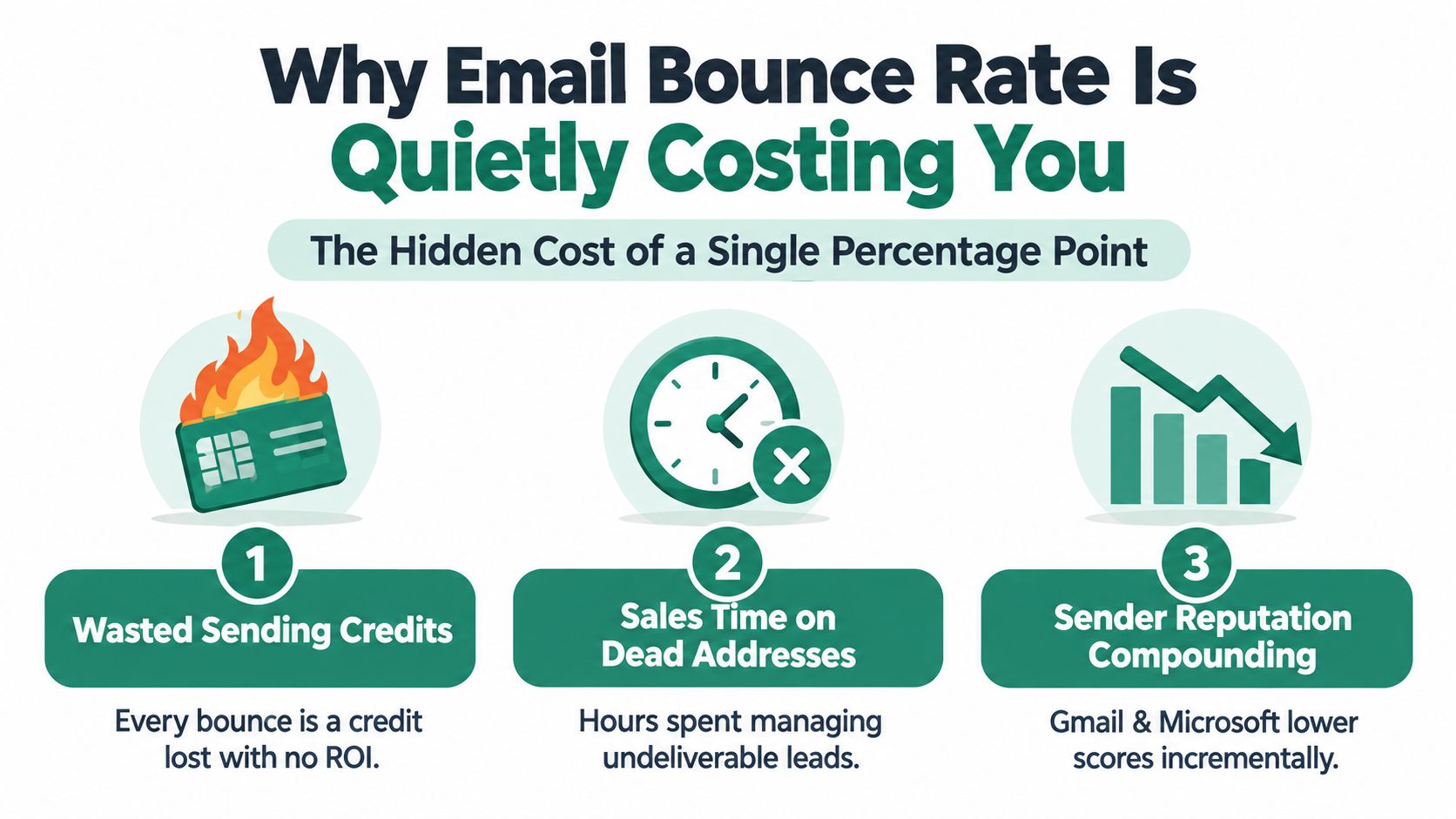
    An infographic showing three hidden costs of high email bounce rates including wasted credits and reputation damage.

    Start with a baseline from the same sending stream, domain, and recipient mix. Don't combine transactional, newsletter, and cold outreach results into one number if their delivery conditions differ. Review the SMTP response, provider, sending time, and authentication result alongside the aggregate rate.

    The goal is straightforward: keep total bounces below 2%, remove permanent failures immediately, and prevent authentication or sending-pattern problems from creating avoidable temporary failures. The exact hard-bounce threshold should be defined from your own historical data and provider feedback, not invented as a universal benchmark.

    Understanding Bounce Types and What a Healthy Rate Looks Like

    A bounce spike is easier to fix when you separate three events that sending platforms often combine. A hard bounce means the address has failed permanently, such as an unknown user or nonexistent mailbox. A soft bounce is usually temporary, caused by a full mailbox, transient server error, or greylisting. Provider throttling is different: the receiving platform delays acceptance because it questions your volume, cadence, reputation, or authentication.

    Read the SMTP response before choosing a remedy. 550 user unknown usually identifies a bad address. 4.2.1 points to a temporary mailbox condition. 4.7.1 can indicate throttling or a provider policy decision, so deleting the recipient will not repair the sending system.

    Bounce Category What It Means Example SMTP Code Target Rate
    Hard bounce Permanent address failure 550 user unknown or 5.1.1 Keep below your internal hard-bounce ceiling and suppress immediately
    Soft bounce Temporary delivery problem 4.2.1 or 4.4.1 Keep low through verification and controlled retries
    Provider throttling Receiving provider delays acceptance 4.7.1 Diagnose volume, reputation, and authentication before retrying

    Use under 2% total bounce rate as a broad operating reference. Rates between 2% and 5% indicate a warning zone, while rates above 5% carry high deliverability risk, according to the Belkins deliverability analysis. That analysis also reports a 1.71% overall bounce rate for a 2025 B2B dataset, which illustrates a low-bounce program rather than a guarantee for every sender.

    Cloudflare documents a hard-bounce target below 2% and delivery rates above 95% in its email deliverability guidance. Use those figures as health checks, then investigate the events behind your own rate.

    Read the failure before choosing the remedy

    Put hard bounces on permanent suppression lists immediately. Apply controlled retries to soft bounces, then review repeated failures. For provider throttling, adjust volume or cadence and check reputation and authentication while keeping the address eligible for later delivery.

    A campaign dominated by hard bounces has a data problem. A campaign producing repeated 4.7.1 responses may have an infrastructure problem. Treating both as list-cleaning tasks wastes time and leaves the cause untouched. The bounce category should determine whether you suppress, retry, or repair the sending setup.

    Building a Clean List Before You Press Send

    List hygiene works best as a continuous control with three layers. The first layer operates when a person submits an address. The second confirms that the person controls the mailbox. The third checks whether older records are still usable before a campaign begins.

    Layer one starts at capture

    Add real-time validation to forms, imports, and CRM workflows. The check should catch syntax errors, suspicious domains, disposable providers, and addresses that fail domain or mailbox verification. If a B2B SaaS visitor types name@gmial.com, the form should identify the likely typo before the record enters the database.

    Role addresses need a policy rather than an automatic assumption. info@, admin@, and support@ may be valid operational inboxes, but they often create shared ownership and lower response quality. Decide whether your campaign is intended for named decision-makers, then block or route role-based records accordingly.

    For teams that collect prospects from multiple sources, EmailScout's clean email list workflow can be considered alongside other verification and CRM processes. The important control is the timing. Verification performed after a bad record has already entered several audiences is less effective than rejecting it at capture.

    Layer two confirms intent

    Use double opt-in for newsletter subscriptions, gated resources, event registrations, and other permission-based acquisition. The confirmation message filters typographical errors and fake signups, while also giving the recipient a clear record of consent.

    Double opt-in has a trade-off. Some legitimate people won't complete the confirmation step, so the list may grow more slowly. That reduction in volume is usually preferable to accepting addresses that are mistyped, abandoned, or collected without meaningful intent.
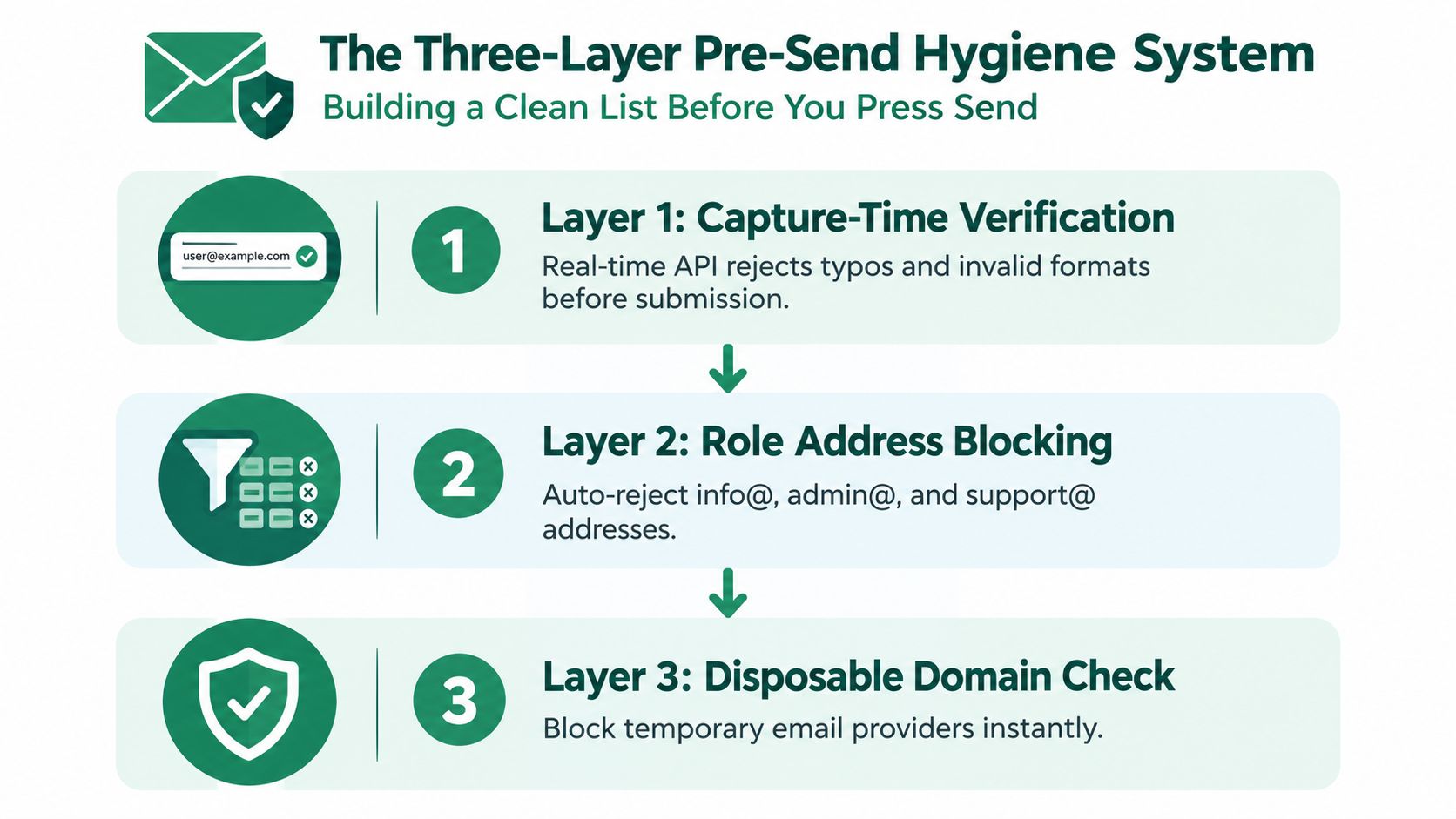
    A diagram illustrating a three-layer pre-send hygiene system to ensure a clean email marketing list.

    Layer three checks for decay

    Re-verify older records before each significant campaign, especially when the data has been sitting for 30 days or more, a timing recommendation discussed in guidance on email verification and bounce prevention. People change employers, domains stop resolving, and mailboxes are deactivated. A list that was acceptable when collected may not be safe to send today.

    Separate verified, risky, unknown, and suppressed records. Don't mix them into one audience because a single aggregate rate can hide a deteriorating segment. A quarterly list that has aged beyond a campaign cycle should be checked again before re-engagement, rather than sent in full and cleaned afterward.

    Setting Up SPF, DKIM, and DMARC the Right Way

    Authentication won't repair a bad list, but missing or misaligned authentication can make a clean list look suspicious. Configure the controls in order, document every sending service, and test the live result rather than trusting a setup screen.

    SPF comes first

    Publish an SPF TXT record that names every authorized sending source for the domain. Keep the record within the DNS lookup limit, and avoid permissive mechanisms such as +all or ?all. An incomplete SPF record can cause legitimate messages to fail, while an overly broad one weakens the control.

    Check the published record with a DNS lookup tool or MXToolbox. Compare the result with your actual ESP, CRM, transactional service, and support platform. Remove services that no longer send, because stale authorization creates both operational confusion and unnecessary exposure.

    DKIM proves message integrity

    Create a separate DKIM selector for each sending service, publish its public key, and enable the selector inside the provider. Send a test message and inspect the authentication results, not just the provider's green status indicator.

    A common failure is a selector that exists in DNS but isn't enabled for the stream using it. Another is reusing one key across unrelated services without a clear rotation and ownership process. Keep a record of selectors, responsible teams, and the systems that depend on them.

    DMARC gives receivers instructions

    Start DMARC with a reporting-only policy so you can identify unauthorized sources and alignment failures. Send aggregate reports to a mailbox that someone actively reviews, then move toward enforcement after the legitimate streams pass consistently. Machine Marketing's guidance on reputation management for industrial marketers provides useful context for treating authentication and sender reputation as an ongoing operational discipline.

    Protocol DNS Record Type Where to Publish Most Common Mistake How to Verify
    SPF TXT Root sending domain Missing a legitimate sender or using an unsafe mechanism DNS lookup or MXToolbox
    DKIM TXT Selector subdomain Publishing a key without enabling the selector in the ESP Test message authentication headers
    DMARC TXT DMARC subdomain Enforcing before alignment is understood Aggregate reports and provider tools

    Use EmailScout's SPF, DKIM, and DMARC explanation as a reference when documenting the records for sales and marketing teams. Authentication should be rechecked whenever a new platform is introduced, a domain changes, or an existing sender is retired.

    A Real Bounce Rate Rescue Story and the Four Fixes Behind It

    A 2026 case study from Bulk Email Checker describes a B2B SaaS company that reduced its bounce rate from 14.2% to 0.6% in 30 days. The reported result followed several changes at once, including bulk verification, real-time form validation, engagement-based suppression, and SPF, DKIM, and DMARC corrections, as documented in the B2B SaaS bounce-rate case study.

    That story matters because the team didn't treat the problem as a single bad export. A rate that high can reflect several failures operating together. The reported reduction was 13.6 percentage points, or roughly a 95.8% relative improvement, but the case shouldn't be read as a promise. It shows how much preventable failure can sit inside list quality and sending infrastructure.

    The sequence is more useful than the headline:

    1. Validate the existing database. The team performed bulk verification and removed addresses that couldn't be trusted before another send.
    2. Validate at capture. New form submissions were checked immediately, preventing the repaired list from decaying through fresh typos and invalid records.
    3. Suppress by engagement. Recipients with repeated delivery or engagement problems were excluded rather than repeatedly retried.
    4. Repair authentication. SPF, DKIM, and DMARC were corrected so receiving providers could evaluate the sender with stronger identity signals.
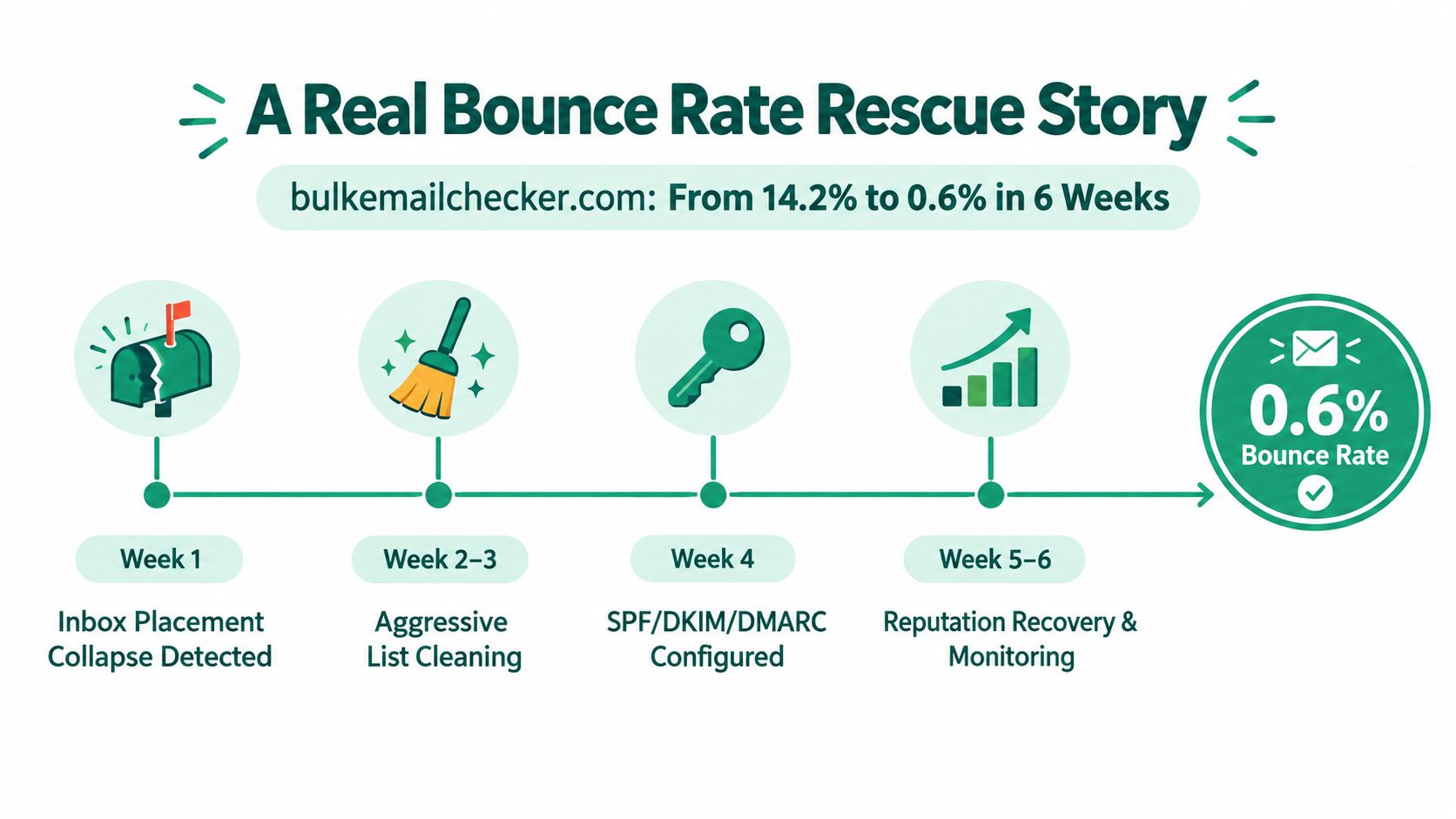
    A timeline graphic showing the steps taken to reduce email bounce rate from 14.2% to 0.6%.

    The lesson is to avoid copying a single tactic and expecting the same outcome. Verification removes address-level risk, suppression prevents repeated damage, and authentication improves the receiving system's confidence in the sender. If the response codes show throttling, add controlled volume and cadence changes instead of deleting valid recipients.

    Reading Bounce Codes and Suppressing the Right Addresses

    Your bounce log should answer two questions: Can this address ever receive mail? and Why did this attempt fail now? The first question determines suppression. The second determines whether the sender, message, or provider needs attention.

    Permanent failures such as 5.1.1, 550 user unknown, or mailbox-not-found responses should move directly to permanent suppression. Don't retry them through another campaign or allow CRM synchronization to re-add them. A suppression record should survive list exports, audience rebuilds, and provider migrations.

    Temporary responses require more nuance:

    • 4.2.1 mailbox full: Allow a controlled retry window, then suppress after repeated consecutive failures.
    • 4.4.1 temporary failure: Retry while checking whether the same domain is failing broadly.
    • 4.7.1 throttling or policy response: Reduce volume and inspect reputation, authentication, cadence, and refusal text before retrying.
    • 5.7.1 content or policy rejection: Investigate the message, links, and sending identity. The address may still be valid.

    Read the exact refusal text. A platform's “soft bounce” label can hide a provider defense mechanism.

    Build the mapping from raw ESP events, Postfix or equivalent mail logs, and Gmail Postmaster data where available. Then send the result to an automated suppression service through webhooks or a scheduled CSV process. The automation should distinguish recipient-level failures from domain-level patterns, because suppressing every address at a throttled domain can destroy a valid audience.

    SMTP Code Meaning Category Suppression Action
    5.1.1 User unknown or mailbox unavailable Hard bounce Permanent suppression
    550 Permanent recipient refusal Hard bounce Permanent suppression
    4.2.1 Mailbox full or temporary mailbox issue Soft bounce Retry, then suppress after repeated failures
    4.4.1 Temporary routing or server failure Soft bounce Retry while monitoring the domain
    4.7.1 Throttling or policy-related deferral Provider throttle Cap volume and investigate sender signals
    5.7.1 Message, policy, or content rejection Policy failure Review content and authentication, don't automatically suppress

    A dedicated email scrubbing service can support the address-validation part of this workflow, but no verifier can diagnose every provider-level throttle. Keep SMTP evidence attached to each event so your operations team can see whether the remedy belongs in the list, the message, or the sending infrastructure.

    A 90-Day Bounce Reduction Plan You Can Actually Run

    A durable bounce reduction program treats each spike as an infrastructure diagnosis. Separate hard bounces, soft bounces, and provider throttling before changing the list. A permanent recipient failure needs suppression, while a temporary domain refusal may require lower volume, corrected authentication, or a pause. The operating cycle should connect contact data, DNS, message headers, sending behavior, and event monitoring.

    Days 1 to 30 focus on control

    Start with a full list audit. Remove permanent failures, isolate unverified or risky records, and pause large sends until the results are clear. Check SPF, DKIM, and DMARC for every active sending source, then compare the live DNS records with the authentication results in message headers. A clean list cannot compensate for a misconfigured sender.

    Days 31 to 60 add prevention

    Add real-time validation to forms and imports. Use double opt-in when the consent and quality gains justify the added friction. Define separate suppression rules for recipient failures, repeated mailbox problems, and provider throttling. Do not suppress an entire domain because one provider is temporarily limiting delivery.

    Use re-engagement selectively. Continuing to mail every inactive record keeps low-value addresses in circulation and can increase exposure without improving list quality. Set a clear stopping condition based on engagement and delivery behavior.

    Days 61 to 90 make the system self-protecting

    Set a consistent warm-up and volume pattern for new domains or streams. Review bounce events weekly, then create an automation trigger that pauses or limits sending when the overall rate reaches your internal review threshold. The threshold should reflect your provider mix, historical baseline, and the type of failures observed, rather than a universal number.

    Track two weekly metrics:

    • Hard bounce rate per send: Shows whether capture, verification, and suppression are working.
    • Authentication pass rate: Shows whether legitimate mail is being recognized as authorized.

    Force a full re-validation when a stable segment shows a sudden spike, a domain produces repeated temporary failures, or authentication results change unexpectedly. Base the trigger on the failure pattern and refusal text, not only a dashboard color.
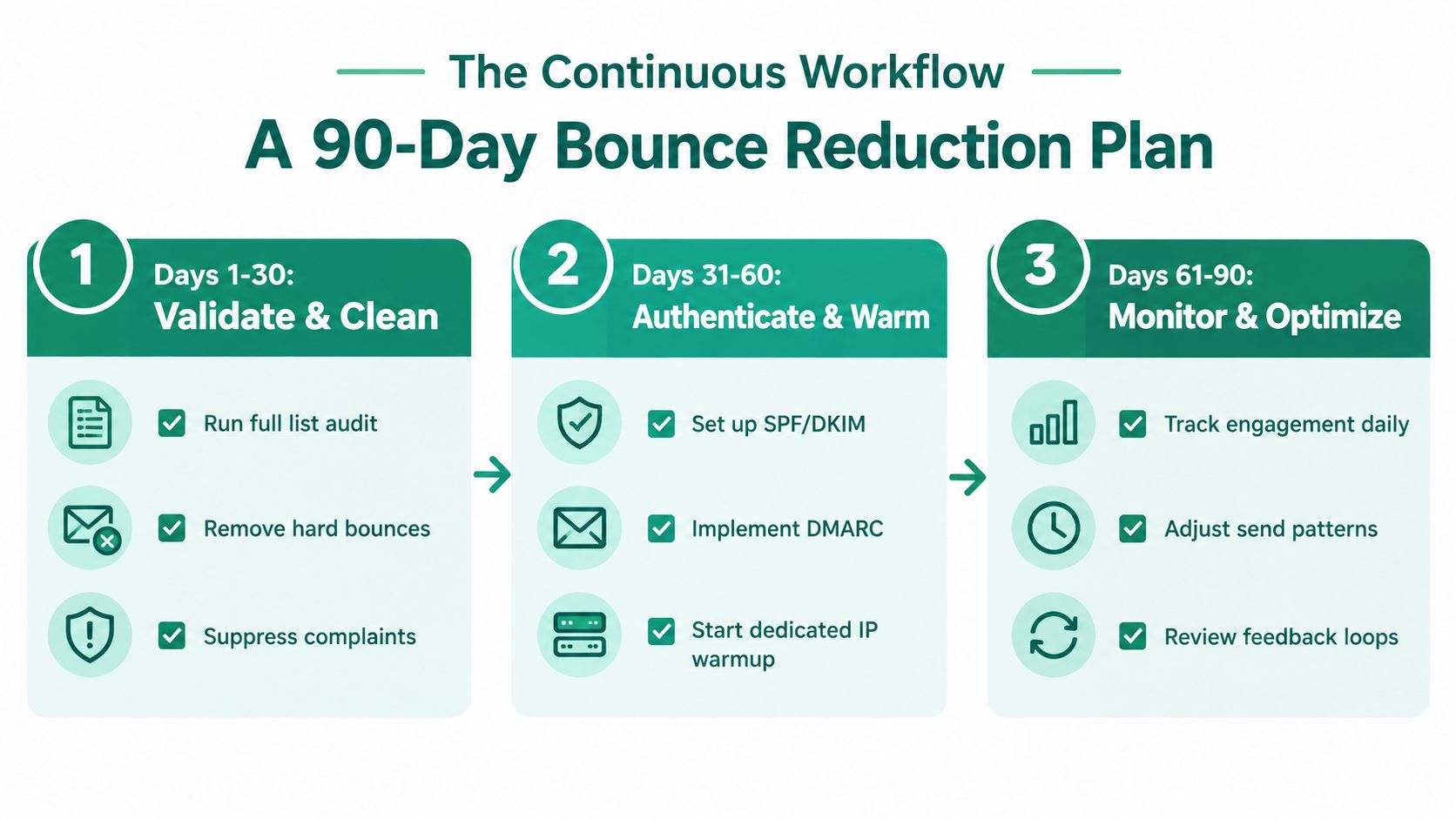
    A 90-day email bounce reduction plan infographic outlining steps for cleaning, authenticating, and optimizing email lists.

    Teams documenting AI-assisted research and outreach workflows can find additional process ideas in a privacy-first ChatGPT alternative blog. Keep deliverability decisions tied to verified SMTP events and your own sending data.

    The result comes from repeated execution: clean capture, accurate suppression, authenticated sending, controlled volume, and review of provider responses. A spreadsheet cleanup starts the process. Monitoring and automatic safeguards keep it working.

    EmailScout helps sales and marketing teams find and verify professional email addresses, clean existing lists, and identify records that may fail before outreach begins. Visit EmailScout to review its verification and list-cleaning workflows, then apply the results to a suppression process that protects your bounce rate.

  • What Is Email Bounce Rate and How to Fix It for Good

    What Is Email Bounce Rate and How to Fix It for Good

    Ever sent a physical letter only to have it returned, stamped with 'Address Unknown'? That's the perfect way to think about an email bounce. It’s an automated kickback from a recipient's email server, letting you know your message simply couldn't be delivered. We measure this as the email bounce rate—a percentage of your total sends that failed to arrive.

    Understanding Email Bounces and Your Sender Reputation

    Think of your bounce rate as a critical health score for your entire email outreach operation. A low number is a great sign; it means your contact list is clean and your messages are getting through. A high number, however, is a red flag telling you there’s a problem that needs your immediate attention.

    Ignoring a high bounce rate is like repeatedly calling a disconnected phone number. It’s a waste of time and, more importantly, it damages your credibility with major email providers like Gmail and Outlook. These providers are always watching your bounce rate to calculate your sender reputation. If your rate stays high, they'll assume your lists are poor quality and start routing your emails straight to the spam folder, making your campaigns practically invisible.

    Hard Bounces vs. Soft Bounces

    It’s important to know that not all bounces are created equal. They break down into two main categories, and knowing the difference is key to fixing the problem.

    A hard bounce is a permanent, dead-end failure. Think of it as a "Return to Sender, No Such Address" stamp. The email address is simply invalid, doesn't exist, or was typed incorrectly. These are the most damaging to your sender reputation and must be removed from your list right away. No exceptions.

    A soft bounce, on the other hand, is a temporary issue. Maybe the person's inbox is completely full, their company's email server is down for maintenance, or your email (with its attachments) was just too large. It’s okay to try sending to these addresses again a few more times, but if they keep bouncing, it's best to remove them as well.

    This infographic gives you a quick visual on the difference between a permanent hard bounce and a temporary soft bounce.

    Infographic explaining email bounce types: hard bounce (permanent, invalid address) and soft bounce (temporary, full inbox).

    To make it even clearer, here’s a simple table breaking down the core differences and what you need to do for each.

    Hard Bounces vs Soft Bounces at a Glance

    Bounce Type What It Means Common Causes Action Required
    Hard Bounce The email address is permanently invalid or gone. Non-existent address, domain typo, server blocked you. Immediately remove the address from your list.
    Soft Bounce The email couldn't be delivered due to a temp issue. Full inbox, server offline, email message too large. Retry a few times. If it persists, treat it like a hard bounce and remove.

    As you can see, the action required is what really sets them apart. Hard bounces are a one-strike-and-you're-out situation, while soft bounces get a few more chances.

    Calculating your bounce rate is simple math: (Total Bounces ÷ Total Emails Sent) × 100. While the global average bounce rate hovers around 2.48%, it’s not the number you should aim for. As some great email benchmark insights on dotdigital.com show, top-tier senders in the Americas achieve rates as low as 0.06%. That’s the level of performance that’s possible with excellent list hygiene.

    Hard Bounces and Soft Bounces Explained

    A laptop displaying an email icon with an exclamation mark, representing hard and soft email bounces.

    Not all bounces are the same. To protect your sender reputation and keep your campaigns effective, you need to know the difference between the two main types. Think of it as permanent versus temporary problems—each one tells you something different about your email list and requires a specific action.

    The most critical one to watch out for is the hard bounce. This is a permanent delivery failure. It’s the digital equivalent of a letter coming back stamped "Address Unknown." Simply put, the email address is bad, and it’s never going to work. These are the bounces that do the most damage because they signal to Internet Service Providers (ISPs) that your contact list is low-quality.

    Hard Bounces: The Permanent Failures

    A hard bounce is a dead end. The recipient's server is telling you loud and clear that the address is invalid, and your message can't be delivered for a permanent reason.

    Here are the most common reasons you'll see a hard bounce:

    • The email address doesn't exist: Usually a typo in the name before the @ symbol.
    • The domain name is invalid: A mistake in the domain itself, like "gamil.com" instead of "gmail.com."
    • Delivery is blocked by the recipient's server: This can happen if your sending domain or IP has been blacklisted.

    Hard bounces are a direct threat to your sender reputation. A high hard bounce rate is one of the quickest ways to get your future emails sent straight to spam or blocked completely. The only move here is to immediately and permanently remove these addresses from your mailing lists.

    Soft Bounces: The Temporary Setbacks

    On the other hand, a soft bounce is just a temporary delivery issue. Think of it like getting a busy signal on a phone call. The number is right, but the person just can't pick up at that moment. The recipient's server recognizes the email address as valid but isn't able to accept your email right now.

    Common causes for a soft bounce include:

    • The recipient's mailbox is full: No room for new messages.
    • The email server is temporarily offline: It might be down for maintenance or simply overloaded.
    • Your email message is too large: Big attachments are a frequent culprit, causing the server to reject the message.

    A single soft bounce isn’t a catastrophe. Most email marketing platforms will even try resending the email a few times over the next day or so. However, you need to keep an eye on them. If an address consistently soft bounces over several campaigns, ISPs start treating it like a hard bounce.

    The best practice is to monitor these addresses and remove any that soft bounce 3-4 consecutive times. This protects your sender score and keeps your campaigns running smoothly.

    Why Your Bounce Rate Is a Critical Business Metric

    A high email bounce rate isn't just some technical glitch. Think of it as a direct threat to your bottom line and a major red flag you're waving at Internet Service Providers (ISPs) like Google and Microsoft.

    Every single bounce sends a signal that your contact list might be old, messy, or just plain low-quality. When ISPs see too many of those flags, they start to treat you like a potential spammer. Their response? They start filtering your emails straight to the spam folder, making all your hard work invisible.

    This tanks your sender reputation, destroys your campaign ROI, and essentially flushes your marketing budget down the drain.

    The Real-World Cost of Bounces

    It's easy to look at a small bounce rate and shrug it off. But the financial hit is real, and it adds up fast. Let's walk through a quick example to see how a few "minor" bounces can turn into a major loss.

    Imagine you're sending a campaign to a list of 10,000 prospects. A 5% bounce rate might not sound too scary, but it means 500 of those people never get your message. If you typically convert just 2% of leads and each sale is worth $250, the math is painful:

    • Lost Opportunities: 500 bounces x 2% conversion rate = 10 lost sales.
    • Immediate Revenue Loss: 10 lost sales x $250 = $2,500 in lost revenue from just one campaign.

    A single email campaign with a 5% bounce rate can cost thousands in lost revenue. If this happens across multiple campaigns throughout the year, the financial damage can quickly escalate into tens of thousands of dollars, silently sabotaging your growth.

    Why Bounce Management Is Non-Negotiable

    This damage isn't a one-time thing. A bad sender reputation has a snowball effect, making it harder and harder for even your best emails to land in a valid inbox. Suddenly, knowing how to improve email deliverability becomes a core part of your business strategy, not just some IT chore.

    The game is changing. Experts at platforms like ExpertSender confirm that the focus has shifted from simply minimizing bounces to fixing the root cause—whether it's bad addresses from list building, old role-based emails, or contacts that never existed in the first place.

    For sales pros and cold emailers who rely on tools like EmailScout, actively managing your bounce rate is no longer optional. It's absolutely essential for survival and growth.

    How to Calculate and Benchmark Your Bounce Rate

    A tablet displaying a formula for email bounce rate on a wooden desk with a laptop and pen.

    Alright, let's get into the numbers. Knowing your bounce rate is the first real step toward fixing it. Most email marketing platforms will flash this metric on your dashboard, but it’s crucial to understand what’s going on behind the scenes.

    The math itself is refreshingly simple.

    (Total Number of Bounces ÷ Total Number of Emails Sent) x 100 = Email Bounce Rate

    So, if you send a campaign to 10,000 people and 150 emails come back as bounced, you’re looking at a 1.5% bounce rate. Easy enough. But here’s the million-dollar question: is that good?

    What Is a Good Email Bounce Rate?

    There's no single magic number for a "good" bounce rate. It really depends on your industry, where you're getting your contacts, and the overall health of your list.

    As a general rule of thumb, keeping your total bounce rate under 2% is a solid goal. But you need to dig deeper. B2B lists, for instance, naturally have a bit more churn because people change jobs. An e-commerce brand with a loyal customer base might see a much lower rate.

    The one number you absolutely have to watch is your hard bounce rate. If that creeps over 1%, you’re waving a major red flag at email providers. That’s when you risk serious damage to your sender reputation, and fast. Your goal here should be to get as close to zero as humanly possible.

    Email Bounce Rate Benchmarks by Industry

    To get a real sense of how you’re doing, you need to compare your numbers against your peers. Benchmarking helps you see if your performance is on par with your industry, lagging behind, or leading the pack.

    Here’s a look at what you can expect across different sectors.

    Email Bounce Rate Benchmarks by Industry (2026)

    Industry Average Bounce Rate
    B2B & SaaS 1.46%
    E-commerce & Retail 0.98%
    Financial Services 1.12%
    Non-Profit 1.65%
    Media & Publishing 0.84%

    Use this table as your guide. If your bounce rate is floating well above your industry’s average, it’s a clear signal that your list hygiene and contact acquisition methods need immediate attention.

    Consistently staying below these benchmarks isn’t just about bragging rights—it’s about protecting your sender reputation and making sure your emails actually land where they’re supposed to.

    Actionable Strategies to Reduce Your Bounce Rate

    Person checks 'Email List Hygiene' on a checklist in a notebook, next to 'REDUCE BOUNCE RATE'.

    Okay, so you know what causes bounces. Now for the important part: what are you going to do about it? The good news is that lowering your bounce rate doesn't require a degree in server administration. It all boils down to one simple, powerful discipline: maintaining a high-quality email list.

    This just means getting serious about who you add to your list and who gets to stay. I'll walk you through a three-part strategy you can put into practice today to build a much healthier, more effective outreach process from the ground up.

    Validate Every New Email at the Door

    The single best way to stop bounces is to prevent bad emails from ever making it into your database in the first place. Think of it like a bouncer at an exclusive club, checking IDs at the door. Real-time email verification is your digital bouncer, standing guard at every signup form, lead capture page, and checkout.

    When someone types in their email, an instant check happens behind the scenes to confirm it's legit. This one simple step shuts down the most common sources of list pollution:

    • Catching Typos: It instantly flags mistakes like "gnail.com" instead of "gmail.com," giving the user a chance to fix it.
    • Blocking Fake Addresses: It filters out the disposable or bogus emails that bots and uninterested people use to get past your forms.
    • Improving Lead Quality: You guarantee every contact you add is a real, reachable person, which is the whole point of building a list.

    Practice Consistent List Hygiene

    Here’s a hard truth: your email list is not a "set it and forget it" asset. It's a living thing that decays over time. People change jobs, abandon old inboxes, and create new accounts. Without regular maintenance, that clean list you built will slowly fill up with dead addresses, and your bounce rate will start to creep up.

    A healthy email list needs ongoing care. On average, around 28% of an email database can become outdated each year. Scheduling routine clean-ups is non-negotiable for protecting your sender reputation and deliverability.

    This is where bulk email verification becomes your best friend. Make it a habit to clean your entire list at regular intervals—at least quarterly if you send emails often, or annually for less frequent campaigns. This process scrubs your database, finding and flagging addresses that are now invalid, inactive, or risky to send to. For a deeper dive, check out our guide on how to verify emails and protect your sender score.

    Adopt Smarter Acquisition Habits

    Finally, how you get emails in the first place has a massive impact on your bounce rate. Taking shortcuts or getting aggressive with list-building is a surefire way to run into deliverability nightmares. If you want a genuinely low-bounce list, you have to prioritize quality over sheer quantity.

    Stick to these two golden rules for email acquisition:

    1. Use Double Opt-In: For marketing newsletters or subscriptions, always require new subscribers to confirm their email by clicking a link in a confirmation message. This proves the address is real and that the owner is actually engaged.
    2. Never, Ever Buy Email Lists: Purchased lists are a toxic cocktail of old, unverified, and uninterested contacts. Sending a campaign to one of these is one of the fastest ways to get your domain blacklisted and destroy the sender reputation you've worked so hard to build.

    By validating new leads, routinely cleaning your database, and using smarter acquisition methods, you create a powerful system that keeps your bounce rate low. This manual approach is a fantastic foundation, and it perfectly sets the stage for how modern tools can automate this entire process for you.

    How to Build Low-Bounce Lists with EmailScout

    Putting all these bounce-reduction strategies into practice by hand works, but let's be honest—it's a massive time sink. This is exactly where the right tool stops being a "nice to have" and becomes essential, helping you get ahead of bounces before they ever hit your sender reputation. We built EmailScout to tackle high bounce rates right from the start of your prospecting.

    Our Email Finder tool is obsessed with accuracy. When you’re finding new people to contact, you need confidence that the emails are actually good. This gives your campaigns a clean, solid foundation from day one. You can see how we approach this and find business emails that are already checked, protecting your sender score right out of the gate.

    Automate Your List Cleaning

    Finding new contacts is just one piece of the puzzle. You also have to keep your existing lists from going stale. This is where our Bulk URL Email Extractor and Verification feature becomes your go-to for automated list hygiene.

    It lets you run thousands of prospects through the verifier at once, scrubbing out the dead-end addresses that lead to those painful hard bounces. It’s the kind of practical workflow that makes a real difference.

    This screenshot shows exactly how it works. You can drop in a list of websites, and the tool extracts and instantly verifies the emails it finds. Those "Valid" and "Invalid" counters give you a quick, clear picture of how healthy your lead sources are.

    It’s also smart to understand how email platforms themselves handle bad addresses. For example, knowing the details of fixing cleaned email Mailchimp lists shows why it’s so critical to get rid of bad contacts before your ESP has to do it for you.

    Another great feature is EmailScout’s AutoSave. It quietly works in the background while you browse, automatically finding and saving verified contact details from websites and LinkedIn profiles. It helps you build high-quality lists without any extra effort, making sure every new contact you add is safe to email from the get-go.

    Frequently Asked Questions About Email Bounce Rate

    Even when you've got your strategy dialed in, a few common questions about email bounce rates always seem to pop up. Let's run through the most frequent ones to help you troubleshoot problems and keep your deliverability sharp.

    What Is a Good Email Bounce Rate to Aim for in 2026?

    While benchmarks can differ across industries, a great universal goal is to keep your overall email bounce rate below 2%.

    What's even more critical is your hard bounce rate. You really want to keep that number under 0.5%. If your hard bounce rate starts creeping over 1%, it’s a major warning sign to ISPs that your list quality is poor, and your sender reputation could take a serious hit.

    Should I Just Delete All Bounced Email Addresses?

    For hard bounces, the answer is an immediate and absolute yes. Don't hesitate—just delete them. A hard bounce means the email address is invalid, and trying to send to it again and again is a huge red flag for providers like Gmail and Outlook.

    With soft bounces, it’s okay to give it another shot. Most email platforms do this automatically. But if an address soft bounces three or four times in a row, it’s time to treat it like a hard bounce and remove it. This is a simple but effective way to protect your sender score.

    It's easy to think of list hygiene as a one-and-done task, but it’s an ongoing process. On average, a staggering 28% of a company's email list can go bad each year. That's why consistent cleaning is non-negotiable.

    How Often Should I Clean My Email List?

    How often you need to scrub your list really comes down to how quickly it's growing and how often you're sending emails.

    • High-Growth/High-Volume Lists: If you're adding new contacts every day or sending campaigns constantly, you should verify new contacts as they come in and do a full list cleaning at least once a quarter.
    • Smaller/Less-Frequent Lists: For smaller lists or if you only send campaigns every so often, cleaning your list once or twice a year should be enough to keep it healthy.

    The main takeaway is to make list hygiene a regular habit, not a reaction to a problem.


    Stop losing revenue to bad data. EmailScout helps you build clean, low-bounce prospect lists from day one with its accurate email finder and automated verification workflows. Find out how to protect your sender reputation and ensure your messages land in the inbox by visiting https://emailscout.io.