Tag: email address search

  • How to Search an Email Address Without Guessing

    How to Search an Email Address Without Guessing

    You've found the right decision-maker, opened a company website, and checked a professional profile. There's still no email address, just a contact form and several plausible guesses. Before one of those guesses enters your prospect list, you need to know what connects it to the person you want to reach.

    Learning how to search an email address means separating evidence from assumptions. A useful workflow doesn't stop at an address-shaped string. It produces a contact record with a source, a confidence level, and a clear next action.

    Start With the Person You Need to Reach

    Suppose you're selling a marketing service and need the person responsible for demand generation at a particular company. A name from an old event agenda isn't enough. Confirm that the person still works there and that their responsibilities match your reason for contacting them.

    Start with a compact search brief, not an email finder. This gives whoever reviews the record a consistent basis for accepting or rejecting a match.

    Build a Search Brief

    • Person: Record the full name, including any publicly used middle initial or alternative name order.
    • Employer and role: Identify the current company and the responsibility relevant to your offer.
    • Location: Include it when it helps distinguish people with similar names.
    • Company domain: Establish the organization's website before considering address patterns.
    • Likely sources: Note company profiles, professional pages, or relevant conference biographies.
    • Business purpose: Explain why this particular person should receive the proposed message.
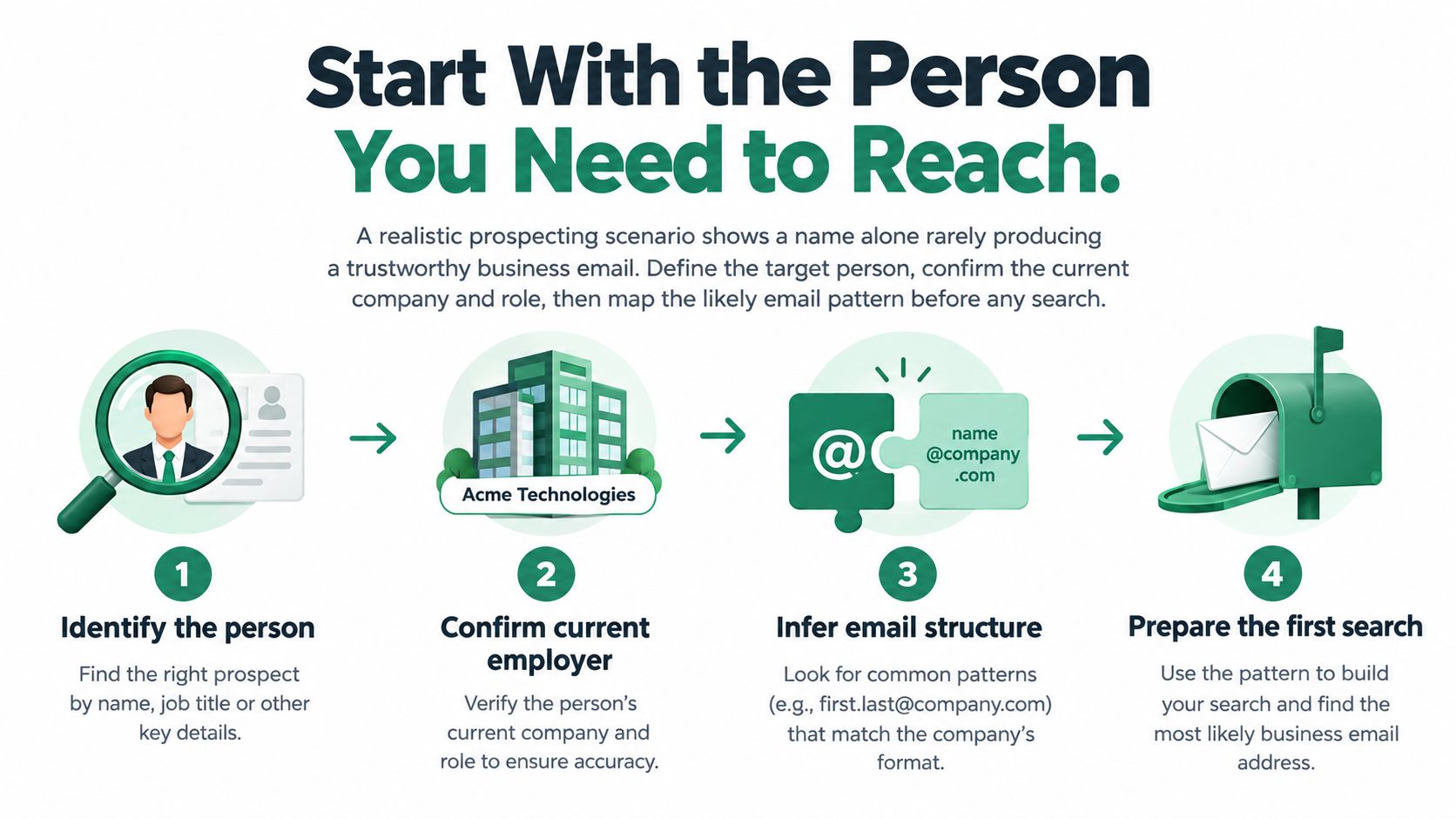
    A four-step infographic illustrating how to find a professional business email address by verifying prospect details.

    Keep separate fields for publication evidence, technical status, and identity evidence. An address might appear publicly without naming its owner, while a technically acceptable mailbox might have no demonstrated connection to your target.

    If you're designing that record structure, SourceLoop's resource on how to organize contacts for revenue tracking provides useful context for keeping contact research connected to downstream sales work.

    Practical rule: Reject the wrong person before spending time verifying the wrong address.

    Don't carry stale candidates forward just because they're easy to find. When the employer or role doesn't match, return to the target definition rather than trying to rescue the record.

    Search Public Sources for Direct Evidence

    Begin where the organization or person has deliberately published business information. The defensible sequence is to confirm the person and employer, establish a documented company convention, and only then generate a limited set of candidates, as outlined in this email discovery and verification workflow.

    Read Each Source for What It Establishes

    A company contact page can establish a business domain and the intended purpose of a published mailbox. If it labels an address for partnership inquiries, preserve that context. Don't reclassify a shared partnership inbox as the head of marketing's personal address.

    A team profile can connect a name to a role and employer. If the page also explicitly assigns an email address to that person, you have stronger identity evidence than an address found elsewhere on the site.
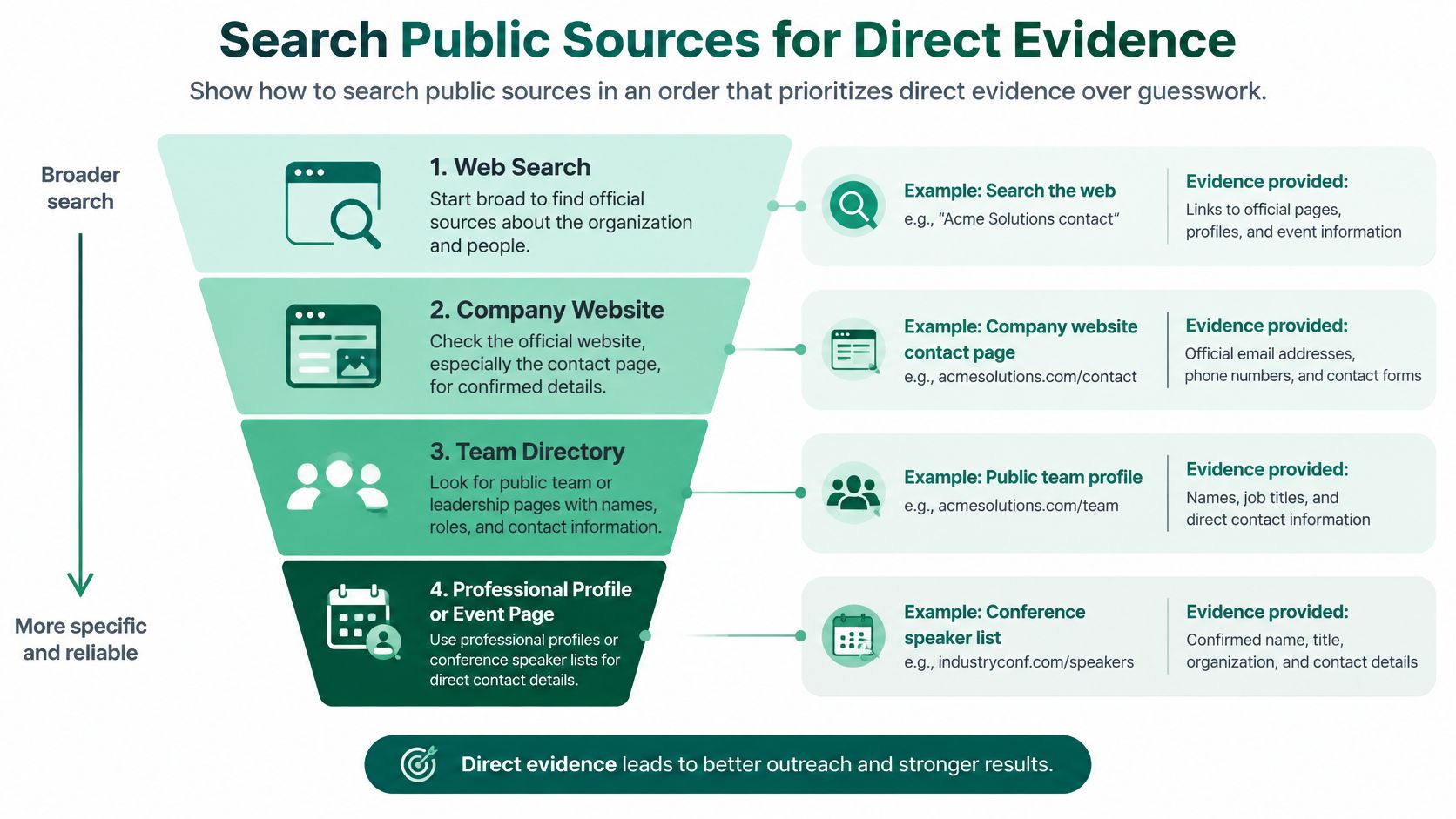
    A funnel diagram illustrating four steps for searching public sources to find direct contact evidence.

    A professional profile, such as LinkedIn, is useful for comparing the person's stated employer and responsibilities with company information. Review publicly available contact details, but don't assume that every displayed address is intended for commercial outreach.

    A conference biography can establish that someone represented an organization in a particular context. Check its timing against current information. An old speaker page is supporting evidence, not a substitute for confirming the present employer.

    Preserve the Evidence, Not Just the Address

    Try searches combining the full name, company, and role. If you need a page-level research routine, this guide to finding an email address from a website provides a useful starting point.

    For each candidate, record:

    • Source page: Save the page address in your research record.
    • Date checked: Make freshness visible to the next reviewer.
    • Observed evidence: Write what the page establishes, such as a named mailbox or current team membership.
    • Unresolved questions: Flag missing ownership, conflicting employers, or unclear publication dates.

    A note saying “listed beside the person's name on the current team page” is more useful than “found online.” It tells the reviewer why the candidate deserves consideration without overstating what was verified.

    Use Search Operators to Narrow the Search

    When ordinary searches produce directories and namesakes, narrow the query instead of collecting more results. Use the following templates with the person's actual details and the organization's established domain. The placeholders illustrate searches, not real contacts or confirmed address conventions.

    Search template Research purpose
    site:<company-domain> "<full name>" Look for the person on the employer's website
    "<full name>" "<company name>" contact Find pages connecting the person, organization, and contact context
    site:<company-domain> "<role>" email Locate relevant departmental or staff pages
    "<full name>" "<company name>" speaker Find event biographies for cross-checking
    "<full name>" "<company name>" Gmail Investigate a publicly disclosed provider address only when professionally relevant

    A search result is a lead to inspect, not a verified contact. Open the underlying page and compare the name, employer, role, and surrounding text. Don't copy an address from a snippet without understanding whose address it is.

    Troubleshoot the Query Before Expanding the List

    If results are too broad, add the company's full name or a distinctive responsibility. If exact-name searches fail, try a publicly used initial or alternative name order. Change a meaningful element rather than repeating nearly identical searches.

    Duplicate results shouldn't become duplicate evidence. Several pages repeating the same old biography don't independently establish that the person still works at the company.

    • Irrelevant directories: Exclude them from consideration when they don't show the origin or context of the address.
    • Stale pages: Compare their employer details with a current authoritative page.
    • Provider addresses: Don't collect personal-looking mailboxes merely because they match a name.
    • No useful result: Stop broadening the search when relevance disappears.

    Keep a candidate because you can explain the match, not because the search returned it.

    The useful output is a short, reviewable set of candidates, each supported by a specific observation.

    Find Candidates Faster With EmailScout

    A rep can finish operator searches with three good pages and still face an hour of copy-paste. EmailScout is a Chrome extension that collects addresses while you browse and across a prepared set of URLs, which fits the collection stage of this workflow.

    Treat the output as candidates tied to pages, not as confirmed people. Start with a company page that has a clear relationship to your target, then compare each returned address with the name, role, and employer you defined before searching.
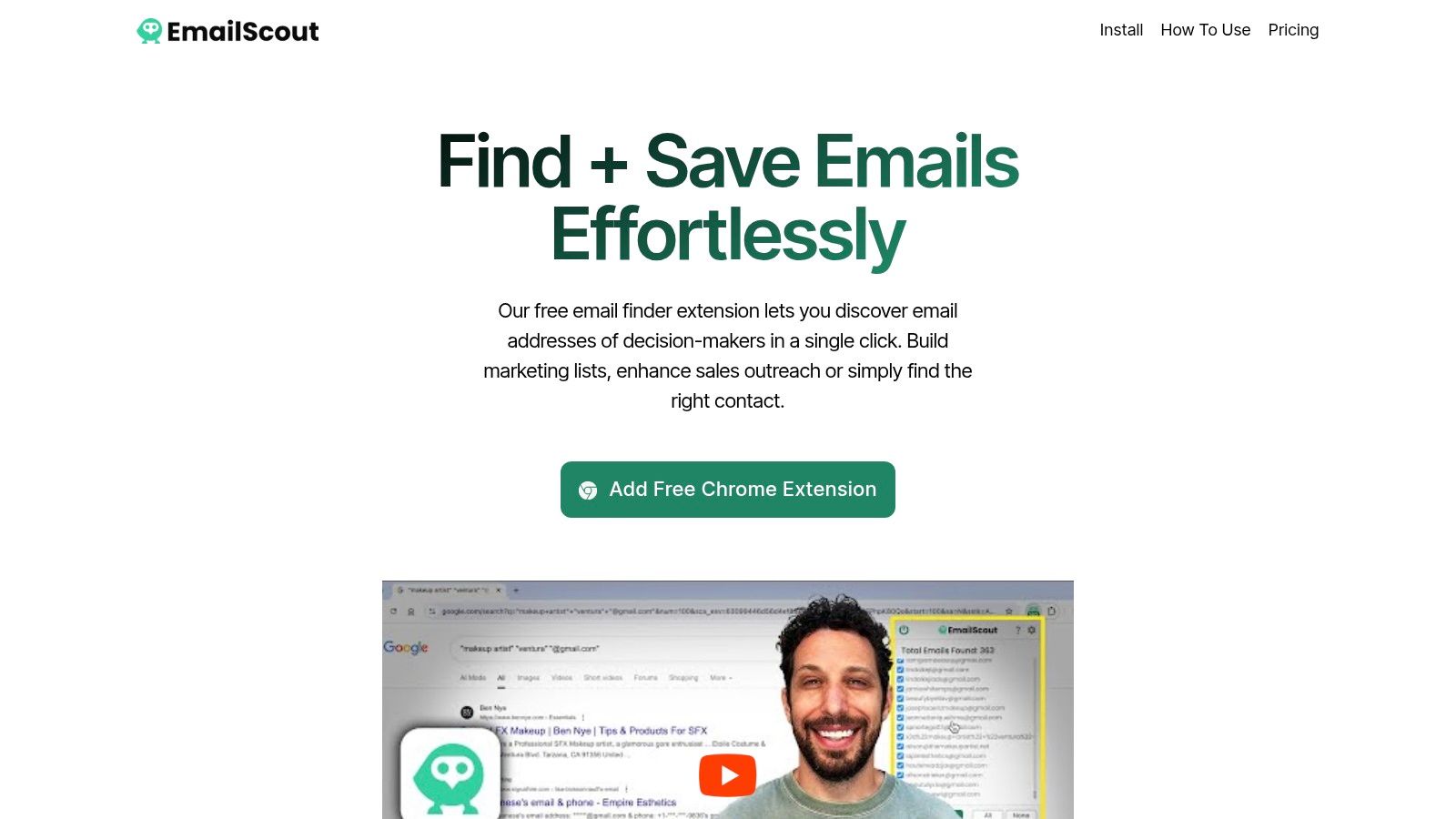
    Screenshot from https://emailscout.io

    Keep Collection Separate From Qualification

    For page-level discovery, ask whether each address belongs to the target person, a department, another employee, or an unrelated organization quoted in the content.

    Review anything saved automatically before it reaches a working prospect list. Automatic collection should reduce repetitive handling while review stays mandatory. When you feed the tool a set of URLs, choose pages you can defend: current team pages, relevant contact pages, or event pages already connected to the account.

    • Retain context: Record the page where each candidate appeared.
    • Explain inclusion: Note why the mailbox matches the business purpose.
    • Separate exceptions: Keep shared, unrelated, and ambiguous addresses out of the person-specific list.

    Pick free or paid usage based on the volume you will review, and check current plan details rather than assuming an allowance. For broader workflow planning, LeadBeast's guide to prospecting tools for SDRs places discovery beside the other prospecting tasks it has to support.

    The trade-off is simple: faster collection creates a larger review queue. Measure how many retained candidates survive qualification; raw collection volume is a weak proxy.

    Test Patterns Without Trusting Them Blindly

    A documented company convention gives you a reason to test a candidate. It doesn't establish that the target has that mailbox. The illustrative format first.last@domain describes a naming pattern, not a verified person-to-address relationship.

    Review common email address formats to understand the possibilities, then use the organization's published evidence to constrain your guesses. Don't generate every conceivable permutation because a verifier can process them.

    Separate Technical Checks From Identity Checks

    Start with syntax, then check the domain's DNS and MX records. Where lawful and technically appropriate, use mailbox-level verification. These layers answer different questions, and none independently establishes who controls the mailbox.

    As the earlier verification workflow explains, catch-all domains can accept messages addressed to nonexistent users. Providers may also block or obscure probing, leaving the result uncertain rather than demonstrably invalid.

    Flag temporary or disposable domains for review, and distinguish role-based addresses such as sales or info mailboxes from individual contacts. A shared mailbox can be relevant to an inquiry without being the decision-maker's address.

    Email Candidate Confidence Guide

    Candidate status What it supports What it does not prove Recommended action
    Confirmed by publication or reply Direct evidence connects the person and address Current permission for every proposed use Enter the qualified prospect list after remaining checks
    Technically deliverable Available technical checks indicate acceptance Identity, inbox access, or permission Review identity evidence before qualification
    Inferred pattern The candidate follows an observed convention That this particular mailbox exists Keep in the research queue pending validation
    Uncertain or unverified Evidence is incomplete, blocked, or ambiguous Reliable delivery or ownership Hold for manual review
    Invalid or permanent failure Validation or delivery evidence indicates failure A safe reason to keep retrying Remove from active outreach and suppress

    Store the confidence tier separately from the technical result. A directly published address can later become invalid, while an inferred address can receive a positive technical result without becoming identity-confirmed.

    Decision boundary: A verifier's positive result isn't evidence that the intended person reads the mailbox.

    When checks conflict, retain the uncertainty. Don't upgrade a record merely to make it eligible for a campaign. Ask for stronger evidence, use an appropriate public contact route, or leave the candidate out.

    Verify Results and Protect Outreach Quality

    Validate candidates immediately after discovery and again shortly before a campaign. Monitor hard-bounce responses after sending, and don't treat an old successful check as permanent clearance.

    Suped's bounce-rate guidance supports a total-bounce operating ceiling below 2% and a stricter internal hard-bounce target below 0.5%, while emphasizing that bounce rate doesn't prove inbox placement. Treat these as operating guardrails, not guarantees.
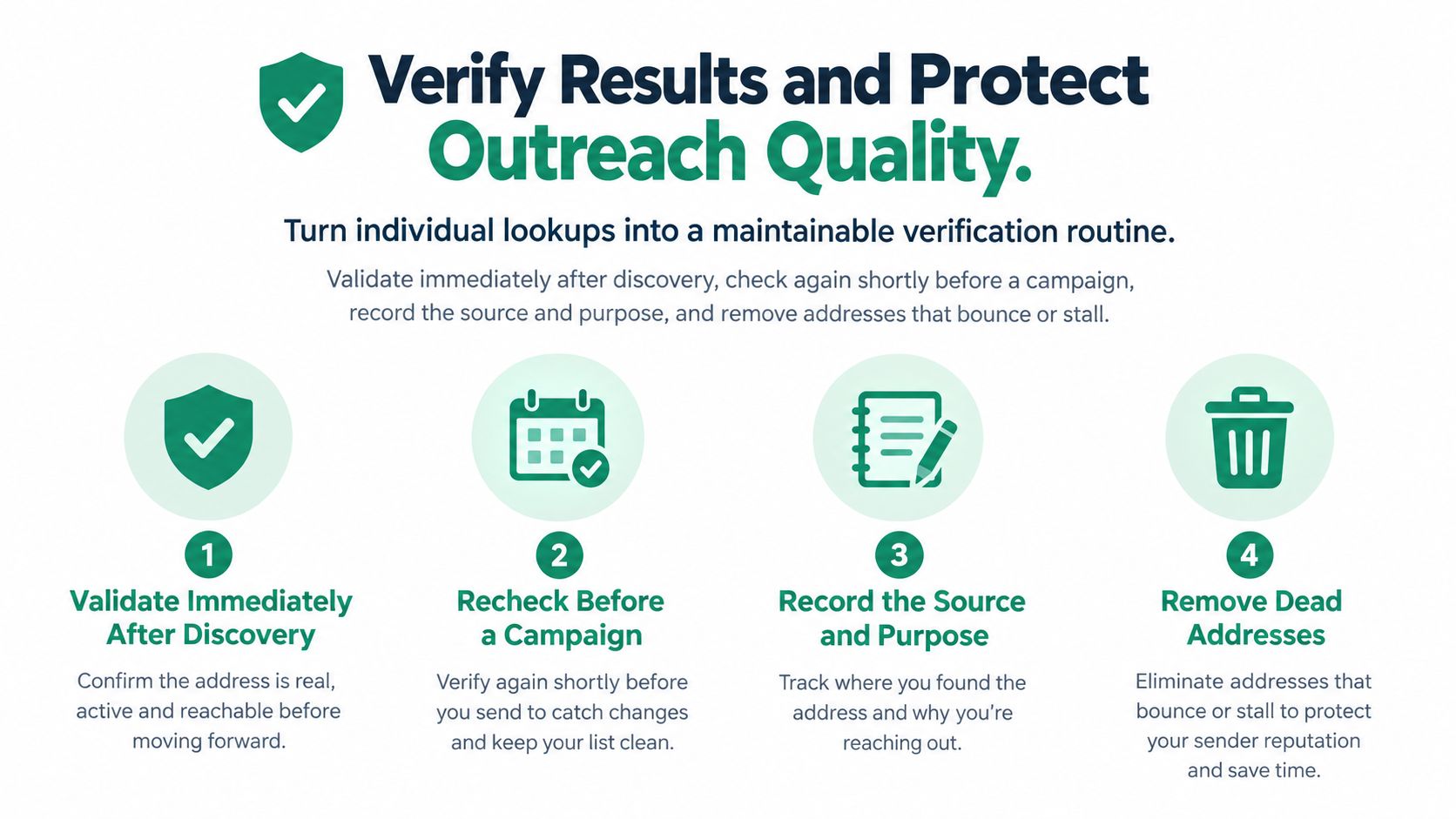
    An infographic showing four steps to verify email results and maintain clean outreach contact lists.

    Apply a Release Checklist

    • Ready: Identity evidence, technical classification, business purpose, and suppression status have been reviewed.
    • Needs review: Catch-all behavior, conflicting sources, missing jurisdiction, or stale employment information remains unresolved.
    • Remove or suppress: The recipient opted out, the address failed permanently, or the contact is irrelevant.

    Use a consistent process to validate an email address, and segment results by acquisition source, country, industry, domain type, and record age. Pause segments exceeding your hard-bounce threshold, inspect response codes, and require stronger evidence before resuming.

    For maintaining these fields across a CRM, MakeAutomation's B2B CRM data quality strategies provide relevant operational context. Don't substitute vendor-wide accuracy claims for your own source-level monitoring.

    Review the Intended Use

    Public availability isn't blanket permission. The FTC's CAN-SPAM compliance guide requires truthful sender information, non-deceptive subject lines, required advertising identification, a valid physical postal address, and clear opt-outs for covered commercial messages.

    For EU-related processing, document the applicable lawful basis and privacy obligations before activation. Keep source, purpose, retention, and opt-out information with the record rather than leaving those decisions to the campaign operator.

    Build a Repeatable Email Search Workflow

    Consider a marketer researching a specific decision-maker. A current team page establishes the role, but the only address candidate comes from a company pattern. That candidate stays in the review queue until the evidence supports a stronger classification.

    Use public research, focused queries, optional browser collection, and limited pattern testing as inputs to a decision, not automatic campaign enrollment. Finding an address doesn't authorize unrestricted emailing: U.S. commercial-email rules cover individual B2B messages, and unsubscribe requests must be honored within 10 business days, according to the FTC's CAN-SPAM implementation document.

    Before assigning the next action, confirm:

    • Target and source: Current person, relevant role, recorded evidence.
    • Identity and technical status: Reviewed separately and classified.
    • Jurisdiction and suppression: Checked before activation.
    • Next action: Outreach, further research, or removal.

    Keep any permitted message professionally relevant, transparent, and easy to decline.


    EmailScout offers browser-based email discovery, AutoSave, and URL Explorer to help you collect candidates from relevant pages. Visit EmailScout to start your next targeted search, then qualify each result with source evidence and a confidence tier before outreach.
  • Finding Who Owns an Email Address: Ultimate Lookup Guide

    Finding Who Owns an Email Address: Ultimate Lookup Guide

    Trying to figure out who owns an email address often feels like detective work. There's no single, magical directory you can look up. Instead, it's about piecing together a person's digital footprint.

    You can often strike gold with reverse email lookup tools, digging through social media platforms like LinkedIn, or even just getting creative with your Google searches. The whole game is about finding where someone has publicly tied their email to their identity.

    Why Finding an Email Owner Is So Challenging

    Before we jump into the "how," it's crucial to understand the "why." Why is this so hard? Honestly, the digital world is designed to be this way. Privacy is a feature, not a bug, and that creates a protective wall around personal data.

    Email giants like Gmail and Outlook aren't in the business of revealing user identities—quite the opposite. They build their entire business on trust and security. You won't find a public phonebook of their users, and their terms of service are iron-clad when it comes to protecting personal information.

    A few big factors are at play here:

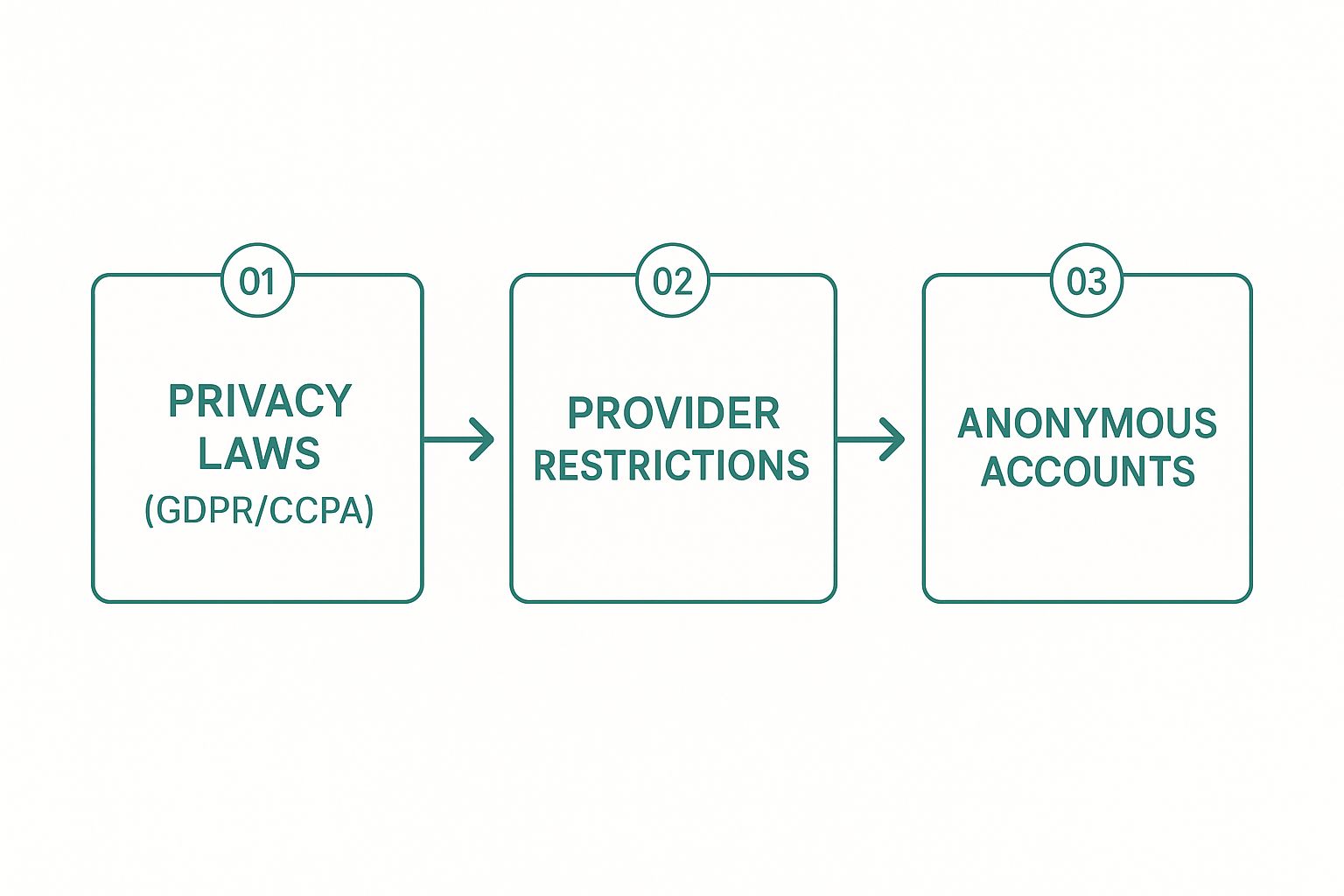
    • Tough Privacy Laws: Regulations like GDPR in Europe and CCPA in California come with massive penalties for companies that play fast and loose with personal data. This forces email providers to keep user information on lockdown.
    • Provider Security Policies: Beyond the law, it’s just good business. The trust of their users is everything, and a key part of that is making sure an email address alone isn't enough to uncover someone's identity.
    • The World of Throwaway Accounts: Let's be real, the internet runs on temporary and anonymous emails. People create them for everything from signing up for a newsletter to posting on a forum, and these are intentionally disconnected from a real person.

    This process flow shows the main obstacles you'll encounter when finding who owns an email address.

    Infographic about finding who owns an email address

    As you can see, the path from an unknown email to a real name is blocked by a combination of legal, technical, and practical hurdles.

    The Scale of the Search

    The sheer number of email accounts out there is staggering. Trying to find one person manually is like looking for a single grain of sand on every beach in the world. By 2025, experts predict there will be 4.6 billion email users with nearly 5.6 billion accounts.

    Think about it: Gmail alone has over 1.8 billion users. That massive scale is exactly why privacy is so critical and why a direct lookup just isn't possible. You can read more about global email usage statistics to get a better sense of the numbers we're up against.

    The real challenge isn't a lack of tools; it's that the entire email system is designed to protect privacy, not to make people easy to find.

    Public Business vs. Private Personal Accounts

    Here’s a distinction that will save you a ton of time: know what kind of email you're dealing with. There's a world of difference between a public-facing business email (like jane.doe@company.com) and a private, personal one (coolsurfer92@gmail.com).

    Business emails are often meant to be found. They're listed on company websites, professional networks, and contact pages. Personal emails, on the other hand, are usually kept under wraps. Understanding which one you have is the first step to setting realistic expectations for your search.

    How to Use Reverse Email Lookup Tools

    Magnifying glass over a digital screen with email icons

    When you need to figure out who's behind an email address, a reverse email lookup tool is often the first thing that comes to mind. These services are essentially search engines for people, scanning public records, social media, and data broker lists to connect an email to a real person.

    The process is straightforward: you pop in the email, and the tool digs through its massive database for a match. The thing is, the results can be a real mixed bag. The success of these tools hinges on two things: the type of email you're looking up and how much of a digital trail its owner has left.

    For example, you'll have much better luck with a professional email like jane.doe@bigcompany.com than a generic one like surferdude92@yahoo.com. Why? Because the corporate address is usually tied to public-facing roles, company directories, and networks like LinkedIn, giving the tools much more to work with.

    Setting Realistic Expectations

    Let's be real: you have to go into this with a bit of healthy skepticism. A lot of these services promise the world but end up delivering outdated or just plain wrong information. They aren't a magic key that unlocks private inboxes at Google or Microsoft.

    A classic trap is the paywall. A tool will dangle the possibility of a match, get you excited, and then hit you with a fee. You might pay up, only to find the "match" is from a forum comment someone left in 2011. To sidestep this, I always recommend starting with services that offer a few free searches or at least show you a solid preview of what they’ve found before asking for your credit card.

    To save you some time and potential frustration, we've gone ahead and put together a list of the best email lookup tools that actually deliver on their promises.

    Key Takeaway: Reverse email lookup services work best on professional or business emails. For private, personal accounts, their success rate drops off a cliff because those users generally don't want to be found.

    Interpreting the Search Results

    Getting a hit from a lookup tool is just the beginning. The next step—verification—is where the real work happens. Never take the initial results as gospel. A good search might give you a name, a social profile, a job title, or even a general location.

    Here’s my simple, go-to process for vetting the information:

    • Check Social Profiles: If the tool points you to a LinkedIn or X (formerly Twitter) account, go check it out. Does the name, picture, and company info line up?
    • Look for Consistency: Does the info from the tool match what you find with a quick Google search of the name and any other details provided?
    • Confirm Timeliness: Is the job title current? An old, un-updated LinkedIn profile can send you chasing a ghost.

    This verification process is non-negotiable. It’s what turns a piece of raw data into confirmed intelligence. By using these tools as a starting point, not the final word, you’ll be far more effective in your search.

    Comparing Reverse Email Lookup Approaches

    Not all methods are created equal. Depending on what you're trying to find, one approach might be a home run while another strikes out completely. Here's a quick breakdown of the different tools and techniques you might encounter.

    Method / Tool Type Best For Potential Information Privacy Considerations
    Specialized Lookup Tools Professional emails, sales leads, and recruitment Name, job title, company, location, social media profiles Uses publicly available data, but some tools may aggregate data from less transparent sources.
    Social Media Search Personal or professional emails tied to active profiles Name, photos, interests, friend/follower lists, location Relies on user's privacy settings. Information is self-reported and can be outdated.
    General Search Engines Emails linked to public websites, forums, or publications Name, associated websites, public comments, online activity Only uncovers information that has been publicly indexed. Respects robots.txt files.
    People Search Engines Personal emails, finding old contacts Name, address history, phone numbers, relatives, public records Can be invasive. Data is compiled from numerous public and private sources. Often requires a fee.

    Ultimately, the right tool depends on your specific goal. For professional outreach, specialized lookup services are your best bet. For reconnecting with an old friend, a people search engine might be more appropriate. Always consider the context and use these tools responsibly.

    Sifting Through Social Media and Professional Networks

    Professional looking at social media profiles on a laptop

    Sometimes the simplest path is the most direct one. People often share their contact details willingly on social media and professional sites—you just need to know where to look.

    This isn't some shady, back-alley tactic. It’s about smart sleuthing, using the search functions these platforms already provide. Users often link emails to their profiles, leaving a trail of digital breadcrumbs that can lead you right to them.

    Your First Stop Should Be LinkedIn

    When you’re trying to pin down a professional contact, LinkedIn is the gold standard. The entire platform is built on professional identity, which makes it an incredibly reliable resource. It’s common for people to list their work email directly in their contact info.

    Here’s a simple trick I use all the time:

    1. Head over to the LinkedIn search bar.
    2. Type in the full email address you're investigating.
    3. If a public profile is tied to that email, LinkedIn will usually serve it up right in the search results.

    This works far more often than you'd think, since most professionals sign up with their primary work email. Even if their address isn't visible on their profile page, LinkedIn's search algorithm can still connect the dots behind the scenes. And if you really want to go deeper, you can also learn how to find an email by LinkedIn profile with a few more targeted steps.

    The real value of LinkedIn is the context it provides. You don’t just get a name; you get a job title, a company, and a professional history that all help confirm you’ve found the right person.

    Expand Your Search to Other Social Platforms

    LinkedIn is the king for B2B, but don't count out other platforms. You can occasionally get a hit from places like Facebook and X (formerly Twitter), though it's less common for personal emails.

    On Facebook, take a look at the "About" section under "Contact and Basic Info." Some people, especially those who use their profiles for business, list their email there.

    Over on X, users sometimes put their email in their bio or even a tweet. To dodge spam bots, they'll often disguise it. Keep an eye out for formats like:

    • name [at] domain [dot] com
    • name@domain(.)com

    Another good move is to search for the username part of the email (everything before the "@"). People love to use the same handle everywhere, so this can help you cross-reference profiles and build a more complete picture of the person.

    It’s definitely a bigger challenge, though. With Gmail alone holding a 33% global market share, providers have to make privacy a top priority, which is why a universal reverse email lookup service just doesn't exist.

    Mastering Advanced Search in Search Engines

    Sometimes, the best tool for the job is one you already use every day. Believe it or not, a simple Google search can turn into a powerful investigative tool if you know how to go beyond basic queries.

    The secret is using advanced search operators. Think of them as special commands that tell Google to get extremely specific with its results. By learning just a few of these, you can cut through all the online noise and find exactly where an email address has popped up publicly.

    Use Quotation Marks to Find Exact Matches

    The easiest and most powerful trick in the book is using double quotation marks (""). When you put an email address inside quotes, you're telling the search engine to only show you pages that contain that exact string of text.

    For example, searching for "jane.doe@company.com" filters out everything except pages where that specific email is written out. This is a fantastic way to instantly uncover staff directories, author bios on blog posts, forum signatures, or old press releases where that person’s contact info was shared.

    I've found this works best for professional email addresses, since they’re far more likely to be published on company websites or other public-facing pages.

    If you don't want to memorize the syntax, you can just use the Google Advanced Search page. It gives you a simple form to fill out.

    Screenshot from https://www.google.com/advanced_search

    As you can see, there’s a field for "this exact word or phrase." It does the heavy lifting for you, automatically applying the quotation marks to your search.

    Break the Email Down and Isolate the Parts

    What if an exact match turns up nothing? Don't give up. The next step is to break the email address into its two main pieces: the username and the domain. Searching for these parts separately can help you piece together someone's digital footprint.

    • Search the Username: Pop just the username (the part before the "@") into the search bar, again using quotes. For an email like jdoe_creative@gmail.com, a quick search for "jdoe_creative" could lead you to their social media profiles, forum handles, or a personal portfolio where they use the same unique ID.

    • Search the Domain: This is where you can get clever. Combine the person’s name with their company’s domain using the site: operator. A search like "Jane Doe" site:company.com tells Google to look for mentions of her name only on that specific website.

    Pro Tip: This is where things get really powerful. You can combine operators to narrow your results even further. For instance, a search like "Jane Doe" AND "Marketing Manager" site:company.com can quickly confirm if a person with that name and title works at that company, even if their email isn't listed anywhere on the site.

    Navigating Ethical and Legal Boundaries

    Knowing how to find information is just one piece of the puzzle. The real question you need to ask yourself is whether you should.

    When you're digging around to find out who owns an email address, you're walking a very fine line. On one side, you have legitimate, professional research. On the other, a serious violation of someone's privacy. The key is to be crystal clear about your intentions and always respect the individual's data.

    Think about it this way: are you trying to verify a public business contact for professional outreach, or are you trying to dig into someone’s private life? The first is just standard business practice. The second crosses a major ethical line and can quickly land you in legal hot water.

    Understanding the Legal Landscape

    Two big pieces of legislation really set the rules for using email for commercial purposes: GDPR and the CAN-SPAM Act. They might sound complicated, but their core ideas are pretty simple. They’re designed to protect people from being spammed.

    • General Data Protection Regulation (GDPR): This is the EU’s gold standard for data privacy, and it has a global impact. It demands that you have a legitimate reason for processing someone's personal data, which absolutely includes their email address. Just finding an email doesn't give you a free pass to add it to a marketing list without their explicit permission.
    • The CAN-SPAM Act: Over in the United States, this law governs commercial emails. It boils down to a few key rules: be honest about who you are, provide a real physical address, and give people an obvious way to opt out of future emails. The penalties for messing this up are no joke—fines can climb over $50,000 for a single email.

    The bottom line is this: your purpose is everything. If you're looking to spam, harass, or mislead someone, you’re breaking the law. But if you're verifying a professional contact for a legitimate business purpose, you’re generally on solid ground.

    Email anonymity is a huge part of our digital lives. While an incredible 92% of adults online use email, most of them do so with a reasonable expectation of privacy. That massive user base isn't a public phone book. If you want to dive deeper into the numbers, these email marketing statistics show just how much usage trends shape our privacy norms.

    A Simple Ethical Framework

    To keep your search on the right side of the line, just stick to a few common-sense principles. Before you even start, run through these questions to make sure your actions are justified.

    1. What Is My Legitimate Interest? Are you trying to connect with a potential client? Verify a job applicant's details? Reconnect with an old colleague? Having a clear, professional goal is your ethical starting point.
    2. Is the Information Publicly Available? Only use information people have already shared willingly. I'm talking about details on professional networks, company websites, or public directories. If you find yourself using methods that feel sneaky, like trying to get into private accounts, you've gone too far. Our guide on how to find an email from a Facebook profile is a perfect example of how to leverage public information responsibly.
    3. How Will I Use This Information? This is the most important question of all. Are you going to send a thoughtful, personalized message? Or are you just going to dump the address into a bulk list for a generic email blast? Always choose respect and personalization. It’s not just ethical—it gets better results.

    By following these guidelines, you can figure out who owns an email address without compromising your integrity or breaking the law.

    As you start digging into how to find who owns an email address, a few questions always seem to come up. Let's run through the most common ones I hear to clear up any confusion and make sure you're doing this the right way.

    Is It Legal to Do a Reverse Email Lookup?

    Generally, yes. It’s perfectly legal to use public information to figure out who owns an email. The tools and methods we've discussed just pull together data that’s already out there—think social media profiles, company websites, and other public records where people have shared their details themselves.

    But here’s the critical part: it all comes down to your intent. If you use that information for anything shady like harassment, stalking, or breaking privacy laws like GDPR, you're crossing a serious legal line. This guide is strictly about ethical and lawful uses, like verifying a new business contact or getting back in touch with an old colleague.

    Why Can’t I Find Anything on an Email Address?

    Hitting a dead end is more common than you'd think. The email could be brand new, a temporary or disposable one, or maybe the owner just keeps a very low-key digital profile. Some people are just really good at keeping their personal data offline.

    Email providers like Google and Microsoft are built to protect their users. So, if someone hasn't publicly tied their email to any other service, your search will come up empty. When that happens, it's a signal to stop. Trying to dig deeper isn't just unethical; it's usually a waste of time.

    Remember, no result is a result. It often means the person values their privacy, and that's a boundary you should respect. Your search should end where public information does.

    What’s the Best Way to Find a Professional Email Address?

    For any professional email, like jane.doe@company.com, your first and best bet is almost always LinkedIn. Professionals link their work emails to their profiles all the time for networking, making it a goldmine for this kind of search.

    Another great trick is a precise Google search. Just wrap the full email address in quotation marks, like "firstname.lastname@company.com". This tells Google to find that exact phrase, which can uncover a company's team page, a press release, or an article where their email was mentioned.

    I usually combine the two—a quick LinkedIn search followed by a targeted Google query. That combo gives you the highest odds of success for professional emails.

    Can I Actually Find Out Who Owns a Gmail Account?

    Honestly, it's incredibly difficult to track down the owner of a private Gmail account. Google puts a huge emphasis on user privacy and doesn't offer any kind of public directory or reverse lookup.

    Your only real shot is if the person has voluntarily used that Gmail address publicly somewhere else online. Maybe they used it to comment on a blog, sign up for a public forum, or list it on a personal website. If they haven't left that digital trail themselves, the identity behind a private Gmail account is going to stay private, and ethical methods won't get you any further.


    Ready to streamline your outreach and connect with the right people? EmailScout makes finding professional email addresses effortless. With our powerful Chrome extension, you can build marketing lists and enhance your sales process with a single click.

    Start finding unlimited emails for free at https://emailscout.io.