Tag: data hygiene

  • How to Check if Email Address is Valid

    How to Check if Email Address is Valid

    Knowing how to check if an email address is valid goes way beyond just looking at the syntax. Real validation means digging deeper. You need to confirm the domain’s mail server actually exists (that’s an MX record lookup) and then ping that server to see if the specific inbox is active—all without actually sending an email.

    Why Validating Emails Is Non-Negotiable

    A person working on a laptop with charts and graphs in the background, symbolizing digital marketing analysis.

    Before we jump into the "how," let's get clear on the "why." A clean email list is the engine of any good marketing campaign, but it's amazing how many people treat it like an afterthought. Letting bad emails pile up isn't a small mistake; it's something that creates real, tangible problems that can sabotage your entire outreach strategy.

    Think about an e-commerce store blasting out a flash sale. If 15% of their list is junk, thousands of people who might have bought something never even get the message. That's lost revenue, plain and simple. Or a B2B company trying to nurture leads with a drip campaign—every email that bounces back is a wasted resource and a missed connection. These aren't just hypotheticals; this is the everyday cost of a dirty list.

    The Hidden Costs of Bad Data

    Every single email that bounces sends a bad signal to providers like Gmail and Outlook. Rack up a high bounce rate, and your sender reputation takes a nosedive. Suddenly, even your emails to loyal, engaged customers start getting flagged as spam. It's a quick way to cripple your ability to land in the inbox.

    The consequences are pretty stark:

    • Wasted Marketing Spend: You’re literally paying to send emails into a black hole.
    • Damaged Sender Reputation: High bounce rates make you look like a spammer to the big email providers.
    • Skewed Engagement Metrics: Bad emails mess up your open and click-through rates, making it impossible to know what’s actually working.
    • Lost Sales Opportunities: Your most important messages—promotions, updates, lead nurturing—never even arrive.

    This isn't just about spring cleaning your list. It's about protecting your marketing ROI and making sure your message actually has a fighting chance to be seen.

    You don't have to take my word for it. The market for these tools is exploding. The global email validation market was valued at USD 1.1 billion in 2023 and is on track to hit USD 2.5 billion by 2032. That kind of growth tells you that smart businesses are taking this very seriously.

    Making sure your recipient addresses are accurate is just a fundamental part of digital communication. For a bigger-picture view, there are great resources on effective business mail management that touch on similar principles. At the end of the day, a solid verification process is the bedrock of any successful campaign. If you want to dive right in, our full guide on https://emailscout.io/how-to-verify-email/ is the perfect place to start.

    Here's a quick look at the core techniques we'll be covering, just to give you an idea of what's involved.

    Quick Guide to Email Validation Methods

    Validation Method What It Checks Complexity Level
    Syntax Check Basic email format (e.g., user@domain.com) Low
    DNS/MX Record Lookup Confirms the domain has a mail server Medium
    SMTP Handshake Pings the server to see if the inbox exists High

    Each of these methods plays a crucial role, from quick and easy format checks to the more complex server-level verifications that provide the highest accuracy.

    The First Line of Defense: Syntax and Format

    An abstract image showing the components of an email address, like a username, the '@' symbol, and a domain name, being assembled.

    Before you get into the weeds with complex server checks, the first and most basic way to check if an email address is valid is to look at its structure. Think of this initial syntax check as a quick proofread. It’s surprisingly good at catching the most common typos and data entry mistakes before they have a chance to become a bounced email.

    Every valid email address is built on a simple foundation: two core parts separated by an "@" symbol. You’ve got the local part (the bit before the "@") and the domain part (everything after). It sounds simple, but there are strict rules for what's allowed in each section. Break one of those rules, and the address is instantly invalid.

    Deconstructing the Local Part

    The local part—basically the username—is actually more flexible than you might think, but it still has its limits. It can contain uppercase and lowercase letters (A-Z, a-z), numbers (0-9), and a handful of special characters.

    The most common characters you'll see are:

    • Periods (.)
    • Hyphens (-)
    • Underscores (_)

    But here’s the catch: you can’t just put them anywhere. For example, an email address can’t start or end with a period, and you can’t have two periods right next to each other. This is exactly why an address like jane..doe@company.com gets flagged as invalid right away. It's a classic formatting mistake that any basic validation tool will catch in a heartbeat.

    Think of syntax validation as the gatekeeper. It doesn't know if the person actually exists, but it makes sure the address is written in a language the email system can understand. An incorrectly formatted address is like a letter with no zip code—it’s going nowhere.

    Analyzing the Domain Part

    The domain part is a bit more straightforward and has stricter rules. It has to be a valid domain name, which means it can only contain letters, numbers, and hyphens. Just like with the local part, it can't start or end with a hyphen.

    For instance, an address like support@-company.com is a no-go because of that leading hyphen in the domain. A less obvious but equally fatal error is something like info@company.co,, where a comma was accidentally typed instead of a period. These tiny typos are incredibly common, especially when people are compiling lists by hand.

    Here are a few real-world examples that a syntax check would immediately kick out:

    • john.smith@.gmail.com (Invalid: Domain starts with a period)
    • contact@company com (Invalid: Missing the top-level domain dot)
    • sales@acme. (Invalid: Incomplete domain)

    This first format check is the crucial first step that all automated tools perform. It’s a simple, fast, and incredibly efficient way to weed out a huge chunk of bad data without ever having to ping a server. By understanding these fundamental rules, you can spot the obvious errors yourself and get a better feel for what a full verification process is built on.

    Confirming the Domain and Mail Server Exist

    A magnifying glass hovering over a stylized network of servers, representing the process of finding a specific mail server.

    So, you've checked that an email address has the right structure. Great. But what good is a perfectly formatted address if it points to a domain that doesn't exist? Or one that isn't set up to receive email at all?

    This is where the real detective work begins. We need to go a level deeper to see if the destination is legitimate.

    Think of the internet’s Domain Name System (DNS) as a colossal, global address book. When we verify an email, we’re essentially looking up the domain to see if it has a valid listing. But we’re not just checking if the company exists; we’re looking for a very specific department: the mail server.

    The Role of MX Records

    This is where Mail Exchange (MX) records come into play. An MX record is a special entry in that global address book that basically says, "Yep, this domain accepts email, and you can send it right over here." If a domain doesn't have a valid MX record, any email you send is going nowhere fast—it'll just bounce right back.

    This check is a powerhouse for knocking out two of the most common invalid email types:

    • Domain Typos: It’s a lifesaver for catching simple mistakes, like an address ending in [email protected] instead of [email protected]. The misspelled "gamil.com" almost certainly won't have an MX record, flagging it as a dead end immediately.
    • Defunct or Fake Domains: It filters out addresses from websites that have shut down or were completely fabricated. If the domain is gone, its MX records are gone with it.

    Verifying the domain and its MX records is like checking a street address to make sure the building exists and has a mailbox. A syntax check confirms the address is written correctly, but the MX lookup confirms there's actually a place to deliver the mail.

    Imagine a marketing agency gets a hot new lead from [email protected]. The syntax is flawless. But a quick MX lookup reveals that the "bigcorp-marketing.com" domain doesn't exist. Instantly, they know the lead is junk without ever having to risk their sender reputation by sending an email.

    Beyond a Simple Domain Check

    This process gives you a much stronger signal of an email's validity than a simple format check ever could. It confirms that a server is actively configured and waiting to accept mail for that specific domain. It’s a non-negotiable step for any serious email verification and a fantastic way to clean up your lists.

    While you can do these lookups manually, understanding the concept is what's most important.

    If you find yourself with a long list of contacts from the same company, you might want to explore tools for an email lookup by domain to identify common patterns and verify addresses in bulk. This DNS-level check gives you the confidence to move on to the final, most definitive test: the SMTP handshake.

    The Ultimate Test: The SMTP Handshake

    After you’ve confirmed an email’s syntax is solid and its domain has a real mail server, it's time for the final, most definitive test. This is how we get as close as possible to proving an inbox exists without actually sending a message.

    Welcome to the SMTP handshake.

    Think of it like walking up to a post office and asking the clerk, "Does a John Doe have a P.O. Box here?" You aren't mailing a letter; you’re just checking if the box is there. The SMTP (Simple Mail Transfer Protocol) handshake operates on the same basic principle. An email verification tool starts a quick, polite chat with the recipient's mail server to ask that exact question.

    The tool connects to the server, says it wants to deliver a message to an address like john.doe@example.com, and then waits for the server’s reply. If the server comes back with a confirmation—basically saying, "Yep, that mailbox is here and ready for mail"—we have our answer. That positive response is the strongest signal you can get to check if an email address is valid and active.

    Navigating Real-World Complexities

    Of course, it’s not always that simple. Mail servers are complicated beasts, often armed with security measures that can get in the way of this simple query. Not every server is willing to give a straight "yes" or "no" to a stranger knocking on its digital door.

    You'll usually run into two main roadblocks:

    • Catch-All Servers: Some domains set up their mail servers to accept email for any address, whether it’s real or not. This is a "catch-all" configuration. In this case, the server will always give a positive response, making it impossible to know if john.doe@example.com is a real inbox or just a digital black hole.
    • Security Protocols: Many servers are designed to block or just ignore these kinds of verification pings. They might see the rapid-fire connection attempts from verification services as sketchy activity and simply refuse to answer, or even temporarily block the connection entirely.

    The SMTP handshake is the gold standard for accuracy, but its results are only as good as the server's response. A definitive 'yes' is great, but a vague or non-committal answer requires intelligent interpretation.

    Interpreting Server Responses

    This is where the quality of your verification tool really shows. A basic script might get a positive response from a catch-all server and wrongly mark the email as "valid." A smarter tool, however, can often identify these catch-all domains. It won't give you a simple "valid"—it'll classify the address as "risky," giving you the context needed to make an informed call.

    Modern email validation has moved way beyond simple pings. The best approaches now blend syntax checks, domain verification, and SMTP testing to paint a complete picture of an email's health. Some cutting-edge systems even use AI to analyze patterns and predict an email's long-term validity, while real-time validation at the point of sign-up is becoming standard practice. You can dive deeper into email validation best practices on Mailfloss.

    Understanding the SMTP handshake shows you how the most accurate verification methods work behind the scenes. It's not just a blind ping; it's a nuanced conversation that separates a genuinely good email from one that just looks right on the surface. This final check is the key to protecting your sender reputation and making sure your messages land in front of real people.

    Automating Your Checks with EmailScout

    After walking through the manual steps, it’s pretty clear they don't scale. Checking more than a handful of emails that way is a non-starter. This is exactly where a dedicated tool becomes your best friend.

    EmailScout rolls all those tedious steps—the syntax checks, the MX lookups, the SMTP handshake—into one slick, automated process. That kind of efficiency is a must-have for anyone who needs to check if an email address is valid in bulk.

    But it’s not just about speed. The real magic is in the extra layer of intelligence these tools provide. For example, EmailScout can spot temporary or disposable "burner" emails. While technically valid, they’re dead ends for any meaningful communication. It also flags generic, role-based accounts like info@ or support@ that rarely lead to good engagement.

    From Simple Pings to Smart Analysis

    One of the biggest headaches in email validation is the dreaded "catch-all" server. These servers are set up to accept mail for any address at that domain, making it impossible to know if an inbox actually exists. A simple script will get a positive response and mark it as valid, which is often wrong.

    This is where EmailScout shines. It can intelligently identify these servers and flag the email as "risky" instead of "valid," giving you the context you need to decide if it's worth the potential bounce.

    The whole process is a multi-layered verification system:

    • Syntax and Formatting: The first pass, instantly catching typos and basic formatting mistakes.
    • Domain and MX Verification: Confirms the domain is real and actually set up to receive email.
    • SMTP Handshake: Simulates sending a message to see if the specific mailbox is live.
    • Advanced Filtering: This is the smart part—sniffing out disposable domains, role accounts, and those tricky catch-all configurations.

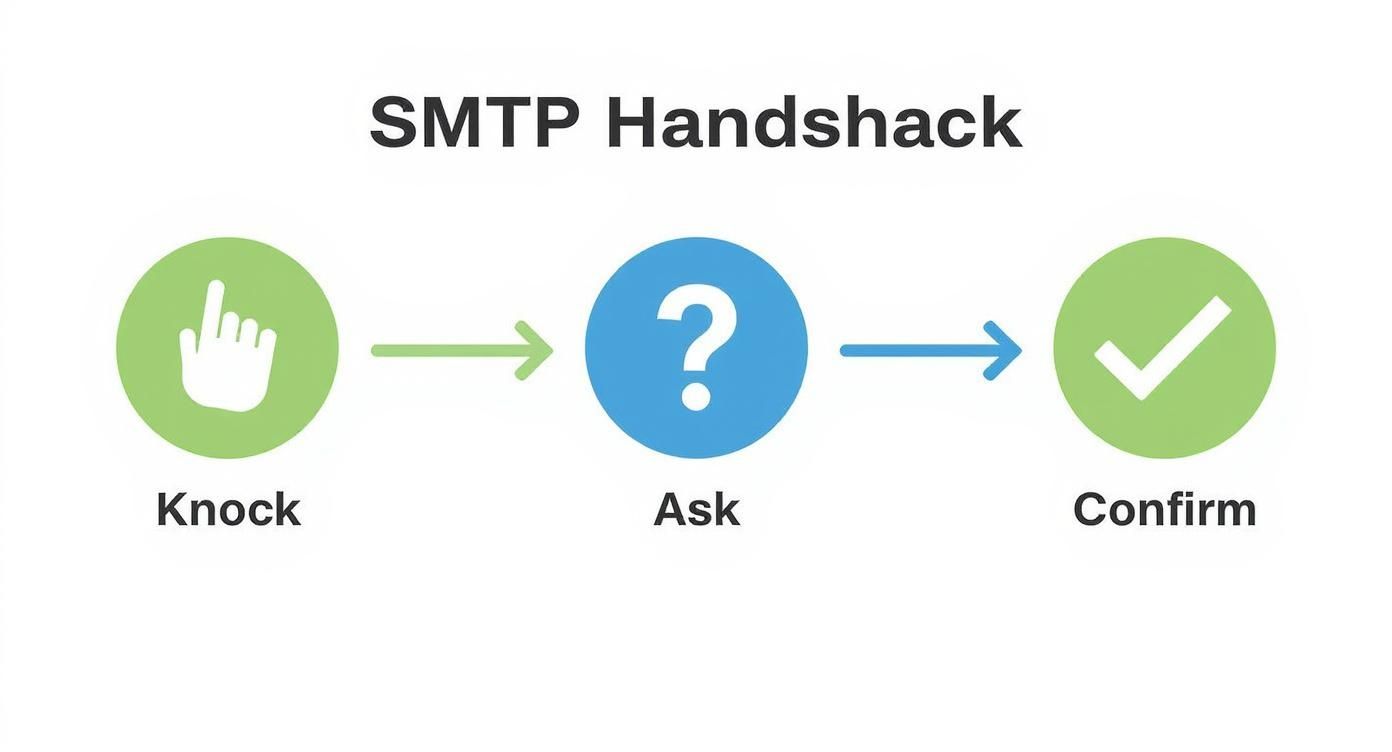
    The SMTP handshake is the heart of it all. Think of it as a quick, three-step "conversation" between servers.

    Infographic about check if email address is valid

    This connect-greet-confirm flow is how a tool can verify an inbox exists without ever sending an actual email. If you want to dive deeper into the different capabilities available, you can explore the email validation features from astonishEmail.

    Understanding the Results

    When you use a tool like EmailScout, you get a clean, simple verdict for every email. No more guesswork. You just pop in the address and get an instant answer that's easy to understand.

    This lets you move from complex server codes to straightforward, color-coded statuses.

    Typically, the results break down into three main categories:

    1. Valid: The green light. The tool has confirmed the syntax, the domain's mail server is online, and the specific inbox exists. Send with confidence.
    2. Invalid: A hard no. The email is undeliverable. This could be from a typo, a dead domain, or the server confirming the mailbox is gone.
    3. Risky: This is the gray area. The address might be a catch-all, from a disposable service, or the server just didn't respond. Sending to these is a gamble.

    By automating these checks, you can scrub your lists in minutes, not hours. This protects your sender reputation, boosts deliverability, and makes sure your campaigns actually land in front of real people. That’s how you maximize your ROI.

    If you’re shopping around for a service, it helps to see how the options compare. For a full breakdown, check out our guide on the best free email verification tools to find the perfect fit for what you need.

    How Global Differences Impact Email Validation

    When you're trying to figure out if an email address is any good, the technical result is only half the story. Just because an address gets a "valid" stamp doesn't mean your email will actually land in their inbox, especially when you're dealing with a global audience.

    The truth is, different parts of the world have their own unique digital quirks—from ISP policies to local infrastructure and even cultural norms around email. Sending a campaign to a list in Western Europe is a completely different ballgame than sending one to certain parts of Asia. These aren't just tiny details; they're big enough to change how you should interpret your validation results.

    Regional Deliverability Rates Matter

    The data doesn't lie: there's a clear divide in how reliably emails get delivered depending on the region. Europe tends to have the highest inbox placement rates, but other areas can be a bit of a minefield. This isn't just theory; it's something you'll see in your campaign stats if you operate internationally.

    Regional deliverability can vary wildly. Europe, for example, boasts an inbox placement rate of around 91%, with North America not far behind at 87%. But the Asia-Pacific region often presents a much bigger challenge, with deliverability hovering closer to 78%. It gets even more specific at the country level. The UK hits a stellar 98.8% deliverability, while India is way down at 69.8%. That's a massive gap, and it makes solid validation non-negotiable for international campaigns. If you want to dive deeper into these numbers, UseBouncer has some great stats on global email marketing.

    An email address that's technically valid in a region with 78% average deliverability carries a higher inherent risk than one in a region with a 91% rate. This context should directly inform your email strategy.

    Practical Steps for Global Campaigns

    So, what do you do with this information? You get smarter. A one-size-fits-all approach to email validation just doesn't work when you're dealing with a global list. You have to adapt your strategy based on where your audience lives.

    Here are a few things you can do right away:

    • Be Extra Cautious with 'Risky' Results: If you're sending to regions with lower deliverability rates, treat any "risky" or "catch-all" emails with suspicion. The chances of them bouncing are just statistically higher there.
    • Segment by Geography: This is a big one. Break your email lists down by country or region. It lets you keep a closer eye on performance and tweak your sending habits for what works best in each market.
    • Use a Tool That Gets It: A good verification tool understands these international nuances. It's better at interpreting server responses from different corners of the globe, giving you a far more accurate verdict on an email's real status.

    At the end of the day, acknowledging these global differences is what separates the pros from the amateurs. It turns validation from a simple technical check into a key part of your international strategy, helping you protect your sender reputation and get more emails where they belong: in the inbox.

    A Few Common Questions About Email Validation

    Even with the best tools, you’re bound to have a few questions when you first dive into validating email addresses. It’s a new process for a lot of people. Here are some of the most common things we get asked by users just starting out.

    How Accurate Is This Stuff, Really?

    This is the big one. With a professional tool that layers syntax checks, MX lookups, and SMTP communication, you can expect up to 98% accuracy. It's incredibly reliable, but it’s important to know that 100% is never truly possible.

    A few things can get in the way of a perfect score:

    • Catch-all servers: These are set up to accept email for any address at a domain, whether the mailbox actually exists or not.
    • Greylisting: Some servers will temporarily reject a connection they don't recognize as a security measure.
    • Network hiccups: Sometimes, a mail server is just temporarily down or unreachable.

    Even with those variables, a multi-step validation process gives you a rock-solid signal of an email's health. You're not aiming for absolute perfection; you're trying to slash your bounce rate and protect your reputation, and this gets you there.

    Will This Send an Email to the Person?

    Nope, and that's the whole point. This is probably the biggest myth out there. The core of email verification—the SMTP handshake—was designed for exactly this scenario.

    Think of it like knocking on a door and asking if "John" is home. The server answers "yes" or "no," but you never actually open the door or go inside. The recipient never gets a notification, and no email ever hits their inbox.

    How Often Should I Clean My List?

    The short answer? More often than you think. As a rule of thumb, you should validate your entire list at least once a quarter. Marketing data consistently shows that email lists decay by over 20% every single year.

    People get new jobs, ditch old email providers, or just stop using an address. If you're running high-stakes campaigns or sending a lot of emails, you should clean your list even more frequently. Better yet, use a real-time verification API to check emails the moment they’re submitted on a form.


    Ready to stop guessing and start sending with confidence? EmailScout automates the entire validation process, giving you clear, actionable results in a single click. Find unlimited valid emails for free with EmailScout.

  • A Guide to checking if email address is valid

    A Guide to checking if email address is valid

    Before we jump into the "how," let's talk about the "why." You might think checking if an email is valid is just a technical chore, but it's one of the most critical things you can do to protect your sender reputation and make sure your messages actually get delivered. A real check goes way beyond just looking for an "@" symbol—it confirms the email format is correct, the domain can receive mail, and the specific inbox actually exists.

    Why Email Validation Is a Business Essential

    A person working on a laptop with charts and graphs in the background, symbolizing business analytics.

    Ignoring the health of your email list is like building a massive marketing campaign on a foundation of quicksand. It's just a matter of time before it all comes crashing down. The damage from a dirty list goes far beyond just a few bounced emails.

    A high bounce rate is a massive red flag for Email Service Providers (ESPs) like Gmail and Outlook. When their servers see you constantly sending emails to addresses that don't exist, they start to see your domain as a potential source of spam. This trashes your sender reputation, making it harder for all your emails—even the legitimate ones—to ever see the light of day in an inbox.

    The Real-World Consequences of a Messy List

    Imagine you've just launched a huge promotional campaign. You blast out 10,000 emails, but 15% of them are invalid. That's 1,500 immediate hard bounces. This is what that looks like in practical terms:

    • Wasted Marketing Spend: Every single email sent to a dead address is a waste of money. You're paying for your email platform, the time it took to write the content, and the design work, all for nothing.
    • Skewed Campaign Analytics: Your open rates, click-throughs, and conversion numbers will all be artificially tanked. This makes it impossible to figure out what's actually working and what's not.
    • Blocked Sending Privileges: In the worst-case scenario, ESPs might just block your domain from sending emails altogether. That can cripple your communication channels overnight.

    Take a quick look at how this impacts core business functions.

    The Business Impact of Invalid Emails

    A quick overview of the negative effects that a high percentage of invalid emails can have on your business operations and marketing efforts.

    Business Metric Negative Impact of Invalid Emails
    Deliverability Rate Plummets as ESPs begin filtering or blocking your emails from reaching the inbox.
    Sender Reputation Severely damaged, making it harder for all future campaigns to succeed.
    Marketing ROI Decreases due to wasted resources on emails that are never delivered.
    Campaign Analytics Skewed data leads to poor decision-making and an inaccurate view of performance.
    Customer Relationships Potential loss of communication with legitimate contacts who never receive your emails.
    List Growth Becomes meaningless if a significant portion of new sign-ups are invalid.

    As you can see, the ripple effects are significant and can undermine your entire marketing strategy.

    A clean email list is the bedrock of successful digital outreach. It ensures your message has the best possible chance of being seen, protects your brand's reputation, and provides a clear picture of your marketing effectiveness.

    With projections showing that over 347 billion emails will fly back and forth daily in 2025, the digital noise is only getting louder. Making sure your message is delivered to a real person is more critical than ever.

    Ultimately, checking if an email address is valid isn't just a technical task; it's a fundamental business strategy. For a deeper look into the mechanics, our guide on comprehensive https://emailscout.io/email-address-verification/ offers more detail. And remember, this is all part of a bigger picture—applying overall B2B email marketing best practices is what leads to sustainable growth.

    The First Layer of Defense: Syntax and Format Checks

    Before you even think about complex verification tools, the very first step is a simple visual check. Think of it as the eyeball test. It’s like being a bouncer for your email list—you’re just looking for the obvious fakes to weed out before they cause any trouble.

    Every single valid email address has to follow a universal structure: the local-part, the @ symbol, and the domain. Anything that breaks this basic local-part@domain.com format is dead on arrival. This initial once-over is surprisingly powerful, catching a ton of errors from typos, manual entry mistakes, or messy data imports.

    A magnifying glass hovering over a computer screen showing email addresses, symbolizing a close inspection of data.

    Spotting Common Format Errors

    After cleaning a few lists, you start to see the same mistakes pop up over and over again. You can often spot a bad email just by scanning down a spreadsheet once you know what to look for.

    Here are the most common red flags I run into:

    • Missing Pieces: An entry like johndoe.com is an instant fail. It's missing the "@" and the local part.
    • Illegal Characters: I often see spaces, commas, or parentheses sneak in. An address like john doe@example.com is completely invalid and will bounce.
    • Misplaced Symbols: An email can't start or end with a period. If you see .johndoe@example.com or johndoe.@example.com, you know it’s no good.
    • Double Dots: Two periods right next to each other, like in john..doe@example.com, is another classic syntax error that invalidates the address.

    Catching these simple errors is the low-hanging fruit of email validation. It’s a quick, easy way to trim the most obvious junk from your database without needing any fancy software.

    Automating the Check-Up with Regex

    Of course, manually scanning thousands of emails is nobody's idea of a good time. That's where Regular Expressions (Regex) come in. At its core, Regex is just a sequence of characters that defines a search pattern. Think of it as a powerful, automated rulebook for what a valid email should look like.

    Instead of just looking for an "@" symbol, a good Regex pattern can enforce much more complex rules. It can instantly confirm that an address doesn't have forbidden characters, that it has a proper domain extension like .com or .org, and that it follows all the structural rules we just talked about.

    Using Regex turns a tedious manual task into an instant, highly accurate process. It's the technical engine that powers the first and most fundamental step of any professional email validation service.

    While writing complex Regex from scratch can look a bit intimidating, just understanding its purpose is what matters. It acts as a meticulous gatekeeper, ensuring that only properly formatted emails get to move on to the next, more advanced stages of verification.

    Verifying the Domain with DNS and MX Records

    A stylized graphic showing a server rack with network cables, representing the technical infrastructure behind email domains.

    Okay, so you've confirmed an email has the right format. That's a great start, but we're not done yet. The next crucial step is checking if the domain—the part after the "@" symbol—is even real. Just because john.doe@example.com looks right doesn't mean "example.com" actually exists or is set up to receive mail.

    This is where a quick domain check saves you from a world of bounced emails. It's a two-part process: checking the DNS and then looking for MX records.

    Think of it like sending a package. First, you need to make sure the street address is real (DNS check). Then, you have to verify that the house has a mailbox to accept the delivery (MX record check). Both have to pass for your email to have any chance of getting delivered.

    Confirming the Domain Exists with DNS

    The Domain Name System (DNS) is basically the internet's giant address book. It translates the domain names we can read (like emailscout.io) into the IP addresses computers use to talk to each other. A DNS check simply asks this system if the domain from an email address is registered and active.

    This is your first line of defense against obvious typos. It instantly weeds out addresses with common mistakes like:

    • jane.smith@gmal.com (instead of gmail.com)
    • support@yahool.com (instead of yahoo.com)
    • contact@outlok.com (instead of outlook.com)

    Catching these guarantees you avoid an immediate hard bounce. It’s a simple but incredibly effective validation layer. If the domain doesn't exist, the email address is 100% invalid, period.

    Checking for a Mailbox with MX Records

    Now for the second part. Just because a domain is real doesn't mean it’s set up for email. Some domains are only used for private servers, redirects, or something else entirely. This is where Mail Exchange (MX) records come in. These are special DNS records that point to the mail servers designated to accept email for that domain.

    An MX record check asks one simple question: "Is there a mail server officially set up to handle mail for this domain?"

    If the answer is yes, you're good to go—the domain is configured for email. If there are no MX records, sending an email is a waste of time. It will bounce. Every. Single. Time.

    A domain without MX records is like a house without a mailbox. Even if the address is correct, there's simply nowhere for the mail carrier to leave the letter. This check is crucial for filtering out domains that aren't email-enabled.

    This two-step domain check is a non-negotiable part of the process. It moves way beyond just checking the format and confirms the most basic requirement for deliverability: a real, email-ready destination.

    The Final Check: Real-Time Mailbox Verification

    So, you’ve confirmed the email format is solid and its domain can accept mail. Now for the moment of truth. This is where we figure out if the specific mailbox, like jane.doe at example.com, actually exists. We do this with what’s called real-time verification, which usually involves the Simple Mail Transfer Protocol (SMTP).

    Think of it like knocking on a digital door. Instead of barging in by sending a full email (which risks a bounce and hurts your reputation), this method starts a brief, polite chat with the recipient's mail server. It’s the equivalent of asking, "Hey, does Jane Doe get mail here?" without actually dropping off a package.

    How the SMTP Handshake Works

    This "conversation" is an SMTP handshake. It's a quick series of automated commands sent from a verification tool to the target email server. The server's replies during this exchange tell us everything we need to know.

    This is, hands down, the most accurate way to check an email's validity because you're talking directly to the source—the mail server itself. You're moving past educated guesses based on syntax and domain records and getting a straight yes-or-no answer.

    The real magic here is confirming an address without ever sending an actual email. This keeps your sender reputation clean while giving you the highest possible confidence in your list's quality.

    This technique is also fantastic at sniffing out temporary or disposable email addresses. You know, the ones people use for one-time sign-ups that go dead almost immediately. An SMTP check can often spot these and flag them as risky, saving you from a ton of future bounces.

    Why You Shouldn't Do This Yourself

    Now, you might be tempted to run these SMTP checks from your own server. Don't. It's a recipe for disaster.

    Mail servers are incredibly sensitive and will quickly mistake a storm of verification attempts for a spam attack or something more malicious. Trying this on your own is one of the fastest ways to get your server's IP address blacklisted, which is basically a death sentence for your email deliverability.

    Professional validation services are built for this. They use a whole network of distributed servers to perform these checks safely and quietly, bypassing all those risks. They handle all the messy details—server quirks, connection timeouts, security rules—so you don't have to.

    When you learn that the average email deliverability rate is only about 83.1%, it means nearly 17% of all emails just vanish into the digital ether. Using a trusted service for real-time verification is how you beat those odds.

    Making Sense of the Server's Response

    The results from a real-time check are incredibly useful. The mail server’s response allows a verification tool to sort each address into a clear category.

    • Valid: The server gives a green light. The mailbox exists and is open for business.
    • Invalid: A hard "no." The server confirms this mailbox doesn't exist.
    • Catch-All: The server is set up to accept mail for any address at that domain, so it's impossible to confirm if your specific user is real. These are usually marked as "risky."
    • Unknown: The server didn't answer the knock, either because it timed out or was unresponsive.

    This is the kind of detailed feedback that makes real-time verification so powerful. If you’re ready to see what's out there, our guide on the best free email verification tools is a great place to start looking.

    Integrating Email Verification into Your Workflow

    Checking emails one by one is fine when you're just starting out, but it's a completely unsustainable model for any business that's serious about growth. To keep your email list healthy at scale, you have to graduate from manual spot-checks to a fully automated solution. This means plugging a dedicated email verification service directly into your daily operations.

    The payoff is almost immediate. Instead of waiting for a campaign to fail and then reacting to a flood of bounce notifications, you're proactively keeping your list clean from the get-go. A big part of making this work is understanding how new tools will fit with your current setup. For any team, a great first step is doing some research on integrating AI solutions with existing systems.

    This is more important than ever as technology gets smarter. Modern AI-driven spam filters have gotten much better at recognizing legitimate mail, which means fewer false positives. A properly validated email today has a much higher chance of landing in the primary inbox instead of getting flagged as junk.

    Proactive List Cleaning with Bulk Verification

    One of the most powerful ways to use an automated service is through bulk verification. This lets you upload your entire email list—whether it’s a few hundred contacts or a few million—and have the service run a deep, comprehensive check on every single address.

    It’s the perfect move for a list you haven’t touched in a while. Think of it as hitting a reset button. You can purge all the old, decayed, and flat-out invalid addresses that have piled up over the months or years. This one move can dramatically slash your bounce rate and protect your sender reputation literally overnight.

    Stopping Bad Emails at the Source with Real-Time APIs

    While cleaning your existing data is great, the best long-term strategy is to stop bad emails from ever making it onto your list in the first place. This is where a real-time API (Application Programming Interface) becomes your best friend.

    By connecting an email verification API directly to your sign-up forms, CRM, or anywhere else you collect data, you can check an email's validity the instant it's submitted. If someone tries to sign up with test@gmal.com, the API flags it as invalid in milliseconds. The form can then prompt the user to fix the typo before they can move forward. This real-time gatekeeper ensures you're only collecting high-quality, deliverable addresses from day one.

    Integrating a real-time API is the single most effective way to maintain a perpetually clean email list. It shifts your strategy from periodic cleanup to continuous prevention, saving countless hours and resources down the line.

    The infographic below shows the simple "knock, ask, confirm" logic that makes the real-time SMTP handshake work.

    Infographic about checking if email address is valid

    It’s this simple three-step conversation with the mail server that gives you a definitive answer on validity without ever having to send an actual email.

    Understanding the Results

    Once your verification process is complete, you’ll get a report that sorts each email into different categories. The exact terminology might change slightly between services, but you'll generally see these common statuses:

    • Valid: The email address is confirmed to exist and is safe to send to. Green light.
    • Invalid: This address doesn't exist. Sending to it will cause a hard bounce, so it should be removed immediately.
    • Catch-All: The domain is configured to accept all emails sent to it, which means the specific mailbox can't be confirmed. These are often considered risky and can have low engagement.
    • Unknown: The server didn't respond or was inconclusive. The status couldn't be determined, so it's best to treat these with caution.

    This kind of detailed feedback is incredibly powerful. It lets you segment your list with confidence, prune the invalid contacts, and make smart decisions about the riskier ones. For a deeper dive into making sense of these results, our complete guide on how to verify email addresses step-by-step covers it all.

    Frequently Asked Questions About Email Validation

    Even with a solid process, a few tricky scenarios always seem to pop up when you're verifying emails. Let's break down some of the most common questions I get asked.

    What Is a Catch-All Email Address?

    You’ll inevitably run into what’s called a “catch-all” email. This is a special server setup that accepts every single email sent to that domain, regardless of whether the specific mailbox (like jane.doe@example.com) actually exists.

    The server basically gives a thumbs-up to everything thrown its way, which makes a definitive yes/no check impossible.

    While you know the domain is real, you can’t be certain the person is. This is why professional validation services will flag these addresses as "risky" or "catch-all," letting you decide if you want to risk sending to them in your high-value campaigns.

    How Often Should I Clean My Email List?

    There’s no one-size-fits-all answer here—it really depends on how fast your list is growing. If you're pulling in hundreds of new contacts every day, your needs are vastly different from a business with slow, organic growth.

    For most people, a good rule of thumb is to run a bulk validation on your entire list every three to six months.

    If your list has a high churn rate or you're capturing leads from real-time sign-up forms, an API is your best friend. A verification API checks each email the instant it’s submitted, stopping bad data from ever poisoning your database in the first place.

    This proactive approach is the single best way to prevent list decay and protect your sender reputation for the long haul.

    Is Sending a Test Email a Good Way to Validate?

    This one seems logical on the surface, but it's actually a terrible, high-risk strategy. Sending a test email to see if it bounces back is a bad idea because it backfires spectacularly when you do it at scale.

    Think about it: sending a blast to a bunch of invalid addresses all at once causes a huge, sudden spike in your bounce rate. This is a massive red flag for email providers like Gmail and Outlook.

    This kind of activity absolutely tanks your sender reputation. The result? Your future, legitimate emails get routed straight to the spam folder or blocked entirely. Using a proper verification service is a much smarter, safer way to check email validity without gambling with your deliverability.


    Ready to stop guessing and start connecting? With EmailScout, you can find and verify email addresses in a single click, ensuring your outreach always hits the mark. Discover unlimited verified emails for free today.