

You've found the perfect prospect. You know they're the one. But their email is nowhere to be found, and your outreach grinds to a halt before it even starts. This is a classic sales roadblock, but there's a modern fix: a reverse find email address strategy.
Instead of guessing, this approach lets you use a person's name and company to uncover their actual professional email. It turns a frustrating game of chance into a precise, data-driven process.
Why Reverse Email Lookups Are a Modern Sales Necessity

Every sales pro knows the feeling. You've identified the ideal decision-maker at a target company, but their contact info is a ghost. You end up wasting time digging through social media profiles or guessing email patterns, which usually just leads to bounced emails and lost momentum.
This manual, hit-or-miss process is a huge bottleneck. Instead of relying on luck, a strategic reverse email lookup turns this headache into a repeatable workflow. It's all about working smarter, not harder.
The Cost of Inefficiency
Manually hunting for a single email can take anywhere from five to twenty minutes. That might not sound like much, but it adds up fast when you're looking at a long prospect list. All that lost time directly eats into productivity and, ultimately, revenue.
Think about these common scenarios where this bottleneck becomes a real problem:
- Targeting Key Accounts: You’ve got a list of 50 high-value companies, but you can only track down contact info for a few junior-level employees.
- Following Up on Leads: A promising lead from a webinar gives their name and company, but no direct email. You're left with no way to follow up.
- Personalized Outreach: You want to send a highly tailored message to a VP of Marketing, but sending it to a generic "info@" address is like throwing it in the trash.
From Guesswork to Precision
The real game-changer here is the shift from unreliable guesswork to data-backed accuracy. Dedicated tools for reverse-finding an email address use massive databases and smart algorithms to find and verify contact information, which dramatically increases your connection rates.
You’re no longer just sending messages into the void. You’re reaching the exact person who matters. This whole process is about acquiring valuable customer data. For a deeper dive into why that's so critical, check out this guide on understanding why your customer data is worth more than your equipment.
By pinpointing the exact contact you need, you're not just finding an email—you're opening a direct line of communication to a potential customer, partner, or influencer. This precision is what separates high-performing sales teams from the rest.
At the end of the day, adopting this strategy means your team spends less time hunting and more time actually selling. And as you'll see in this guide, tools like EmailScout make the whole thing almost effortless. You can learn more about how to reverse search an email address and get started with the right techniques.
Using EmailScout for One-Click Contact Discovery
Sure, manual methods can get the job done, but the fastest way to reverse-find an email is with a tool that does the heavy lifting for you. This is where EmailScout comes in, turning what used to be a tedious research project into a single click inside your browser. You can find exactly who you're looking for without ever leaving their website.
Getting up and running takes less than a minute. Just install the EmailScout Chrome extension, and it’ll work quietly in the background until you need it. That kind of instant access is exactly what you need to keep your workflow moving.
A Real-World Look at One-Click Search
Let's say you land on the website of a high-value target company. You’ve identified their Head of Marketing as the perfect person to connect with, but their email is nowhere to be found. Instead of opening a dozen new tabs to start digging, you just click the EmailScout icon.
The tool immediately scans the page, checks its database, and pulls up a verified email address and other key details in a small pop-up. This one-click process takes all the guesswork out of the equation and saves you critical time on every single prospect.
This shift toward automation is part of a much bigger trend. The global market for email search tools is booming and is expected to hit $2.5 billion by 2025. This growth is all about businesses needing smarter, faster ways to handle lead generation. You can dig into the complete research on the email search tool market growth if you're curious.
Build Your Lists on Autopilot with AutoSave
For anyone in sales who spends their day hopping between potential client sites, EmailScout’s AutoSave feature is a total game-changer. Flip it on, and the extension will passively find and save verified emails from the websites you visit. You end up building a highly targeted lead list without even trying.
- How it works: As you browse from a company’s blog to their pricing page, AutoSave is busy identifying and logging contact info for key people.
- The benefit: You can stay focused on your research while your prospect list grows automatically in the background, ready for your next outreach campaign.
It’s the perfect way to build a pipeline while researching competitors or just keeping up with industry news. Casual browsing suddenly becomes a productive lead-gen activity.
The real power of a tool like EmailScout isn't just finding one email; it's about systematically building a high-quality list of contacts with minimal friction. This automated approach ensures your pipeline is always full.
Scale Your Efforts with URL Explorer
But what if you need to find contacts for a whole list of companies? Visiting each site one by one would be an absolute time sink. EmailScout’s URL Explorer solves this by letting you process a bunch of websites at once. All you have to do is paste a list of company URLs into the tool.
EmailScout then gets to work, visiting each site and pulling all available email addresses into a single, clean list you can download. This feature is incredibly useful for:
- Account-Based Marketing (ABM): Quickly gathering contacts from a predefined list of target accounts.
- Market Research: Building out a contact database for a new industry or vertical.
- Event Follow-Up: Finding emails for attendees you saw listed on a conference website.
This kind of batch processing turns a massive manual task into something you can knock out in just a few minutes, giving your team a huge productivity boost. If you're looking for more ways to track down company contacts, check out our other guide on how to find business emails for some additional strategies.
Advanced Techniques For Finding Elusive Emails
Sometimes, even the best tools hit a wall. You'll run into a contact who seems to be a ghost online, and your automated searches come up empty. When that happens, you need a few manual tricks up your sleeve.
Think of yourself as a detective. These reverse find email address strategies are your secret weapons for digging up details that standard tools often miss.
Master Google Search Operators
A simple name search on Google usually just gives you noise. But with the right commands—what we call search operators—you can tell Google exactly what to look for and where. It’s a bit more hands-on, but it's incredibly powerful for those really tough cases.
Here are a few of my go-to query templates you can copy and adapt:
- To find email mentions on a specific website:
("John Doe" + email) site:company.com - To search for contact pages or documents:
John Doe email filetype:pdf - To look for common email patterns:
"J.Doe" @company.com OR "John.D" @company.com
This flowchart breaks down when to stick with automated tools versus when it's time to roll up your sleeves and go manual.
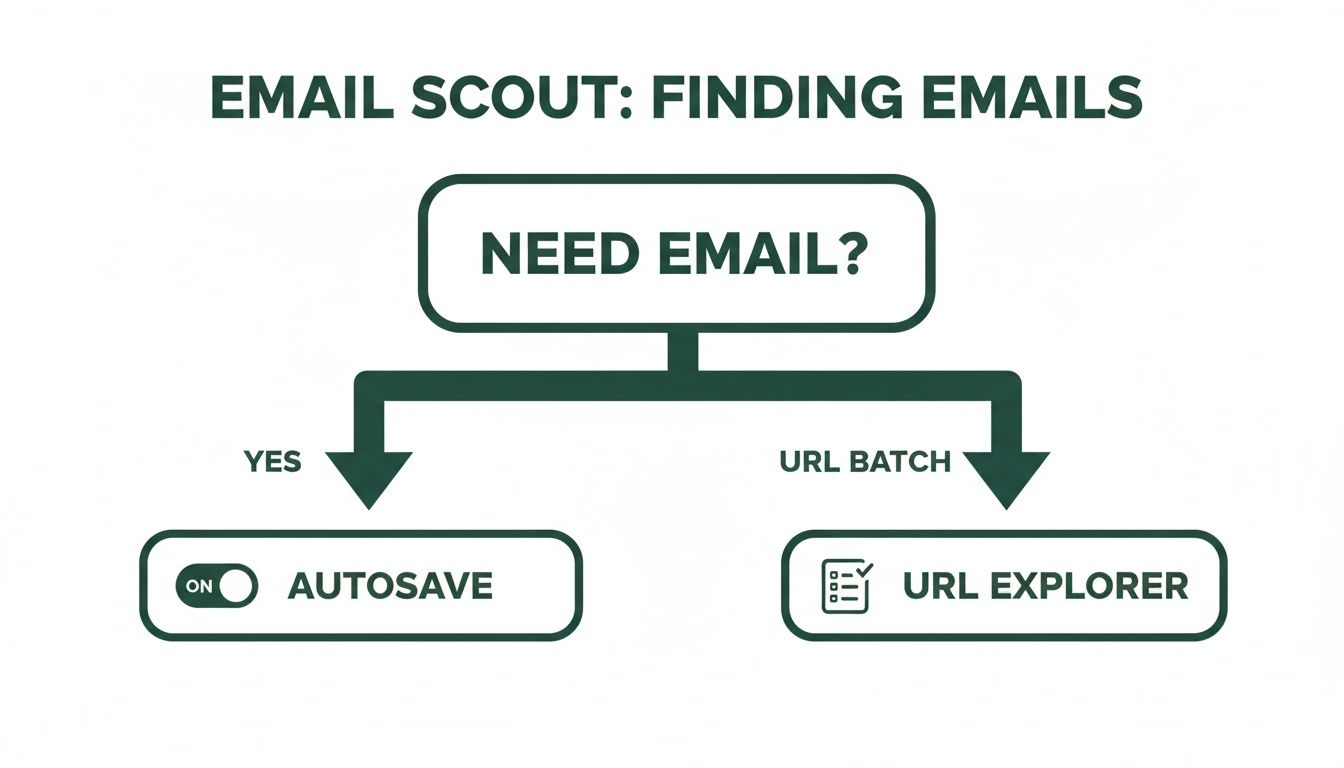
As you can see, tools like AutoSave and URL Explorer are your workhorses for most situations. But for the truly elusive contacts, manual methods are your best bet. If you want to go deeper on this, you can learn more about perfecting your Google reverse email lookup queries for even sharper results.
Leverage Professional And Social Networks
Professional networks like LinkedIn are absolute goldmines, but the best clues aren't always in plain sight. Don't just glance at someone's job title; scan their entire profile for hidden gems.
People often link to personal portfolios, blogs, or side projects right in their bio or "Featured" section. More often than not, these external sites have a "Contact Me" page with a direct email that isn't listed anywhere on their main social profile. Taking that one extra click is usually all it takes.
The key is to look for the digital breadcrumbs people leave behind. A portfolio link, a comment on a niche forum, or an author bio on a guest post can all lead you to the right contact information.
For anyone looking to expand beyond the basics, there are plenty of other strategies out there. You can discover more detailed guidance on how to find business email addresses with a few more advanced tactics.
Use WHOIS Lookups And Data Aggregators
When all else fails, sometimes the most direct path is through a website's registration data. A WHOIS lookup pulls the public record of who owns a domain name.
Sure, many people use privacy services these days, but you'd be surprised how often you can find the owner's direct email, especially for smaller businesses or personal blogs. It’s a long shot, but it can pay off.
Data aggregator platforms are another powerful, albeit often paid, resource. These services compile information from countless public records and social media profiles into one detailed dossier. When you've exhausted every other option, they can give you a comprehensive view of a person's entire digital footprint.
Combining these advanced techniques ensures you’re never truly stuck. You’ll always have a backup plan.
Comparing Reverse Email Lookup Methods
To help you decide which approach to use, here’s a quick comparison of the manual methods we’ve covered.
| Method | Effectiveness | Speed | Best For |
|---|---|---|---|
| Google Search Operators | High | Moderate | Finding specific, hard-to-find individuals or verifying patterns. |
| Social Network Sleuthing | Moderate to High | Slow | Uncovering emails not listed publicly via linked personal sites. |
| WHOIS Lookups | Low to Moderate | Fast | Finding domain owners for small businesses or personal blogs. |
| Data Aggregators | Very High | Fast | Comprehensive searches when other free methods have failed. |
Each method has its place. Your choice depends on how much time you have and how deep you need to dig. Mastering a mix of these techniques will make you incredibly effective at finding almost anyone's email address.
How to Verify and Enrich Your Discovered Contacts

So, you've used a reverse find email address technique and tracked down a contact. Great work, but that’s only half the job.
Now you have to ask: is this email address actually valid?
Firing off a message to a bad email doesn't just get you a bounce-back. It actively hurts your sender reputation, making it more likely your future emails will end up in the spam folder. This is a problem you want to avoid at all costs.
That's why email verification is a non-negotiable next step. Many tools, including EmailScout, come with verification checks baked right in, often giving you a confidence score on the spot. This lets you know instantly which contacts are safe to message.
Beyond a Simple Green Checkmark
Knowing an email is deliverable is the bare minimum. To make your outreach count, you need context. That's where data enrichment comes into play, turning a lonely email address into a full-blown profile.
Enrichment is all about layering on valuable information, like:
- Professional Details: Their job title, department, and seniority.
- Company Information: The industry they work in, company size, and revenue.
- Social Footprint: Links to their LinkedIn, Twitter, or other relevant profiles.
This is the data that powers true personalization. Instead of a generic "Hi," you can craft an opening that proves you've done your homework.
A verified email gets your message to the inbox. An enriched contact profile is what gets your message read and replied to. It’s the difference between cold outreach and a warm introduction.
Choosing the Right Verification and Enrichment Tools
For one-off lookups, a tool with built-in features is perfect. But what if you just pulled a massive list using something like the URL Explorer feature?
In that case, a dedicated bulk verification service is your best bet. These services can chew through thousands of emails in minutes, cleaning your entire list before you launch a major campaign.
With email's incredible global reach, keeping a clean list is more important than ever. The number of email users worldwide is expected to hit 4.59 billion by 2025, with over 376.4 billion emails sent every single day. Sending messages to even a small fraction of bad addresses in that sea of communication can get your domain flagged fast. You can dive deeper into these numbers with these global email trends and predictions.
Ultimately, building verification and enrichment into your process does more than just tidy up your data. It gives you the intelligence to tailor your outreach, build real relationships, and close more deals. It turns a simple contact into a real opportunity.
Best Practices for Ethical and Effective Outreach

So, you’ve managed to reverse find an email address and even enriched the contact data. Great. But that's just the start—the real work begins now. Having accurate information is one thing, but your success really hinges on how you use it. Your outreach has to be personal, strategic, and above all, respectful if you want to stay out of the spam folder and build real connections.
That data you just gathered is your ticket to personalizing your outreach at scale. Instead of blasting out a generic template, you can craft an opening line that actually resonates. Maybe you mention a recent company win you saw on their news page or a shared interest you spotted on their LinkedIn profile. It's a simple step, but it immediately shows you’ve done your homework.
Crafting a Compelling Message
Your first email needs to be sharp and to the point. Ditch the long, rambling introductions and get straight to it. The goal is to deliver a clear, concise value proposition that shows you respect your prospect's time.
Think about the one problem you can solve for them and state it plainly. A powerful outreach email usually has just a few core parts:
- A Personalized Hook: Reference something specific to them or their company to grab their attention.
- A Clear Value Proposition: Explain what’s in it for them in one or two quick sentences.
- A Single Call to Action (CTA): Ask for one specific thing, like a brief 15-minute call next week.
This focused approach makes it easy for the recipient to know exactly what you want and decide on a next step. You're trying to start a conversation, not close a deal in the first email.
Navigating Legal and Ethical Guardrails
Let's be clear: effective outreach is always ethical outreach. Ignoring legal guidelines like GDPR in Europe or the CAN-SPAM Act in the U.S. won't just tarnish your reputation—it can lead to some pretty hefty fines.
Compliance isn't just a legal checkbox; it's a sign of respect for your prospect's inbox and their privacy. Building trust starts with transparent and ethical communication from the very first touchpoint.
Here are the non-negotiables you have to follow:
- Be Transparent: Always identify who you are and what your company does. No hiding behind vague language.
- Provide an Easy Opt-Out: Every single email needs a clear and simple way for people to unsubscribe.
- Honor Opt-Outs Promptly: When someone unsubscribes, get them off your list. Immediately.
Done right, email is an absolute powerhouse. The numbers don't lie—studies show businesses earn an incredible $36 for every $1 spent on email marketing. It's no surprise that 81% of B2B marketers lean on email for their engagement strategies. You can dig into more of these eye-opening email marketing ROI statistics to see the full picture.
By pairing your enriched data with solid, ethical practices, you set yourself up to do more than just generate leads. You start building lasting professional relationships.
Quick Answers to Common Questions
Diving into the world of email finding usually brings up a few key questions. It's smart to have clear answers before you start, so you can be sure your outreach is both effective and on the right side of the line.
Let's clear up some of the most common things people ask when they're trying to reverse find an email address.
Is It Legal to Reverse Find an Email Address?
Yes, for the most part, it's perfectly legal to find professional, publicly available emails for legitimate business outreach. But there's a big "if" attached: you must follow anti-spam laws. In the U.S., that means the CAN-SPAM Act. Over in Europe, the General Data Protection Regulation (GDPR) is the law of the land.
These regulations aren't complicated. They mostly boil down to a few common-sense rules:
- Be Honest: Make it clear who you are and why you're getting in touch. No hiding behind vague identities.
- Provide an Exit: Every single commercial email needs a dead-simple, obvious way for someone to unsubscribe.
- Respect the "No": When someone opts out, you have to honor that request immediately. No questions asked.
The real difference is between legitimate, targeted business communication and just blasting out unsolicited bulk messages (which is spam, plain and simple). As long as your outreach is relevant and you respect people's right to say no, you're almost always operating within legal boundaries.
How Accurate Are Reverse Email Finder Tools?
Accuracy can be all over the place, but a high-quality service like EmailScout is going to deliver a pretty high success rate. These tools don't just pull from a single, dusty database. They're constantly cross-referencing information from multiple public sources, social signals, and their own proprietary data to get a match.
The best tools even give you a confidence score with each result. This tells you how certain the tool is that the email is correct and won't bounce. A "verified" or high-confidence result means the platform has actively pinged the server to confirm the address exists. This is huge for protecting your sender reputation. You'll find accuracy is generally best for professional emails at established companies.
An accurate email finder isn't a guessing machine; it's a validation engine. Always go with tools that provide a confidence score or verification status. It's the single best way to keep your bounce rate low and make sure your messages actually get delivered.
Can I Find a Personal Email Address?
Technically, yes. Sometimes you can dig up a personal email (like a Gmail or Yahoo account) through things like a WHOIS lookup on someone's personal blog. But let’s be honest: modern tools and best practices are all pointed toward finding professional, work-related emails.
For B2B sales, networking, or marketing, contacting someone at their company email is the industry standard. Reaching out to a personal inbox for a commercial reason can feel like an invasion of privacy and often comes across as unprofessional. Stick to business contacts—it’s more effective and helps you start the relationship on the right foot.
Ready to stop guessing and start connecting? EmailScout puts the power of a verified email finder right in your browser. Find the right contacts with a single click and see how much faster you can build your outreach lists.
Give it a try for free and streamline your outreach today at https://emailscout.io.