
Yes, you absolutely can perform a reverse email lookup for free. It's less of a secret trick and more of a core professional skill these days—using just an email address to figure out who's on the other side without paying a dime.
Why a Free Reverse Email Lookup Is a Modern Necessity
Ever get one of those promising but incredibly vague emails from a potential lead? Or maybe you need to do a quick sanity check on a new business contact before a big meeting. This is exactly where reverse email lookup techniques prove their worth.
The ability to confirm an identity or just get a little context about a sender can turn a moment of uncertainty into a genuine opportunity. It's a skill that helps professionals solve real-world problems, letting you sidestep bounced emails, confirm that your contacts are legit, and build more accurate outreach lists from scratch.
Understanding the Growing Demand for Email Intelligence
The need for reliable email intelligence isn't just a hunch; the market data backs it up. The email verification and lookup market hit a value of $620 million in 2024 and is on track to explode to $1.44 billion by 2033.
What’s driving this growth? A desperate need for accuracy. A staggering 62% of email addresses submitted through online forms are actually valid. That means more than one in three are either fake or temporary, leading directly to wasted marketing spend and skewed analytics.
You can dive deeper into these trends and see how they're shaping digital communication by reviewing the full research on email verification market growth. This data paints a clear picture of the challenge sales and marketing teams face. Every single invalid address is a missed connection and a drain on resources.
A reverse email lookup isn’t just about finding a name. It’s about ensuring your communication efforts are directed at real, relevant people, maximizing the impact of every message you send.
When to Use a Free Reverse Email Lookup
The applications for a free reverse email lookup are all over the place in day-to-day business. It’s a go-to tool for getting clarity and building confidence in your professional interactions. For those needing to go deeper, services like Reverse Email Lookup Enrichment can turn a simple email into a full-blown business intelligence profile.
Here are the most common situations where a free reverse email lookup delivers immediate value for your business operations.
| Professional Scenario | Direct Business Benefit |
|---|---|
| Validating Sales Leads | Find the name, company, and role behind a generic email to personalize your follow-up. |
| Screening Potential Partners | Add a layer of security by verifying the identity and background of new contacts before you engage. |
| Recruiting and Vetting Candidates | Use a resume email to find professional profiles (like LinkedIn) and get a fuller picture of their experience. |
| Identifying Unfamiliar Senders | Quickly determine if an unexpected email is from a legitimate person or a potential phishing attempt. |
Ultimately, knowing how to perform a reverse email lookup gives you the context to make smarter, faster, and safer decisions. It’s a foundational skill for anyone trying to work more effectively in our digital-first world.
Uncovering Identities with Manual Search Techniques
Before you even think about specialized tools, you need to master the basics. It's surprising how much you can dig up on your own. Think of it as digital detective work—with the right approach, you can run a reverse email lookup free of charge using resources you already have. Honestly, getting your hands dirty with these manual methods gives you a solid foundation for verifying any contact that comes your way.
The whole point is to build a simple, repeatable workflow for any new inquiry you get. You receive an email, you verify the sender, and only then do you connect.
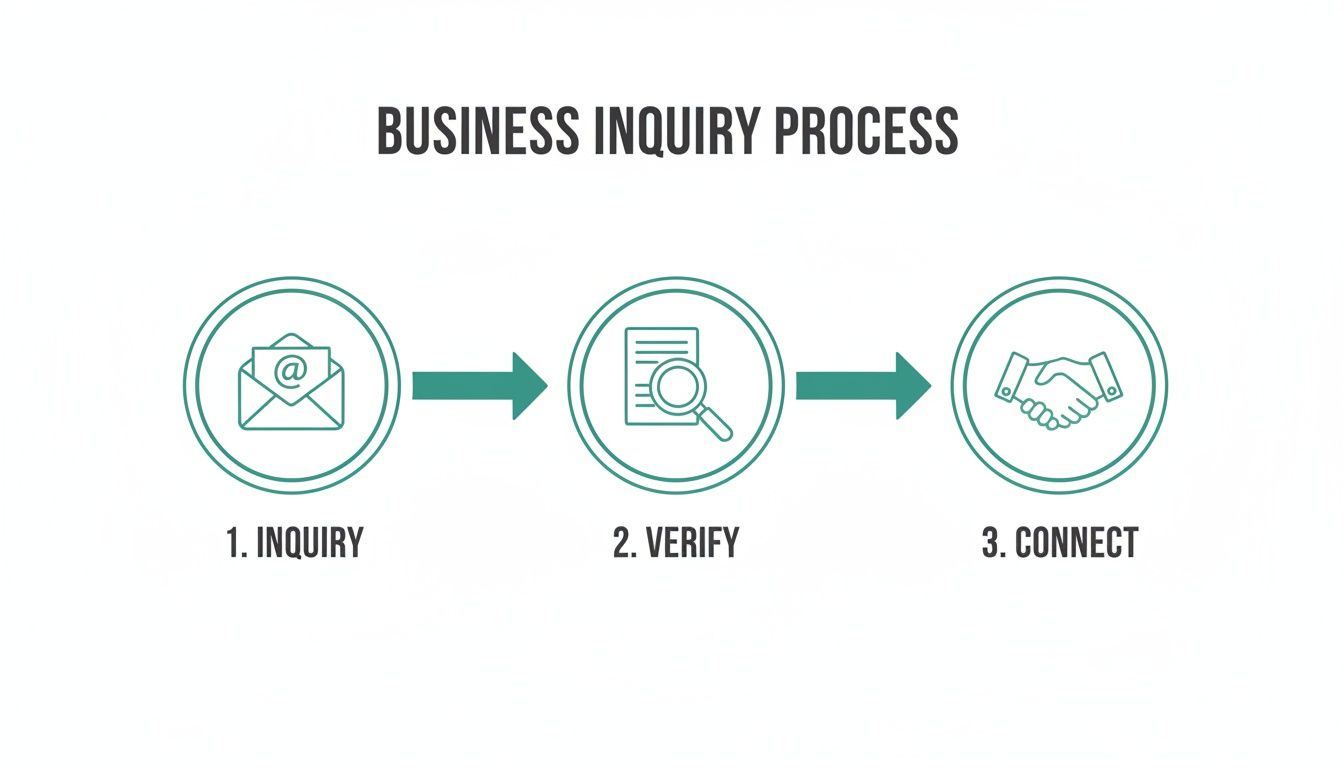
Embedding that verification step is non-negotiable. It ensures you’re not wasting time on dead ends or, worse, walking into a scam.
Harnessing the Power of Search Engines
Your first and best friend in this process is a search engine like Google or DuckDuckGo. The trick isn't just searching; it's searching with surgical precision. The absolute best place to start is by wrapping the entire email address in double quotation marks.
For instance, searching for "jane.doe123@emailprovider.com" forces the search engine to look for that exact string of text. This simple move cuts through all the noise and hones in on public websites, forums, or documents where that specific email has been posted.
You'll often find things like:
- Forum or Blog Comments: People frequently use their email to register for public forums, leaving a clear digital trail.
- Public Documents: I've seen emails pop up in publicly accessible PDFs—think newsletters, conference attendee lists, or old club rosters.
- Personal Websites or Portfolios: Freelancers and creatives almost always list their email address on a personal site.
This technique is way more effective than most people realize. If an email has ever been made public, this is usually the quickest way to find it.
Digging into Social and Professional Networks
Next up, social media. These platforms are basically massive, searchable databases of people. Many users link their email addresses to their profiles, and if their privacy settings are loose, a quick search can give you a direct hit.
LinkedIn is the obvious first stop for anything business-related. Just paste an email address into the LinkedIn search bar. Sometimes, it pulls up the user's profile directly, especially if you share a mutual connection or their profile is set to public.
But don't just stop at LinkedIn. Other platforms can be goldmines:
- Facebook: A lot of users still list a public email in their "About" section. It's worth a look.
- X (formerly Twitter): This is less common, but I've seen users drop their email in their bio or in tweets while trying to network.
Even if you don't find the profile directly, look for usernames that match the first part of the email. If the email is "johndoecreative@email.com," searching for the username "johndoecreative" across Instagram, X, and Facebook might lead you right to them. For a deeper dive, you can learn more about using a Google reverse email lookup to cross-reference what you find on social media.
Analyzing the Email Header
This one feels a bit technical, but trust me, it's not. Every single email you get has a hidden block of data called the header. Think of it as the digital postmark on a letter. You don't need to be a developer to find useful clues here. In most email clients, you can find it under an option like "Show Original" or "View Full Header."
Once you have it open, you're looking for the "Received" fields. These lines trace the path the email took to get to your inbox. While it won't give you a home address, it can reveal the mail server it came from and sometimes even the server's general geographic location.
Key Takeaway: An email header can instantly tell you if an email came from a legitimate company server (like
mail.google.com) or some sketchy, unknown domain. This context is priceless for sniffing out potential phishing scams.
For example, if an email claims to be from Microsoft but the header shows it originated from a generic residential ISP, that’s a massive red flag. This simple analysis adds a critical layer of security to your verification process, and it costs you nothing. By combining these manual tricks, you can build a much clearer picture of who's on the other end of that email.
Diving Into Free Online Tools and Public Databases
Manual searching is a great start, but it's time to bring in the big guns. An entire ecosystem of free online tools exists to speed up your reverse email lookup free of charge. Think of these resources as digital assistants, automating parts of the search to connect the dots way faster than you could on your own.
These tools are your digital toolkit. They cross-reference massive databases in seconds, often digging up details that a simple Google search would completely miss. But a word of caution: treat the results with a healthy dose of skepticism. The accuracy can be all over the place, so verification is still your best friend.
Tapping Into People Search Engines
People search engines are usually the first port of call for good reason. Sites like Spokeo or PeopleFinders are designed to sift through billions of public records and spit out a snapshot of information. Their free, initial searches are often surprisingly revealing.
Drop an email address into one of these, and the free preview might give you:
- A full name or a few known aliases.
- The city and state the person has lived in.
- Direct links to social media profiles tied to that email.
Even this sliver of data can be enough for a quick confirmation. Let's say you got a message from "j.smith@email.com." If a free search links it to a "John Smith" in Chicago and points you to his professional networking profile, you've probably found your match. The key is using this as a solid lead, not the final answer.
Expert Tip: Treat free people-search results as clues, not conclusions. Use the name or social handle you uncover to double-check with the manual search techniques we covered earlier. That two-step process is how you get to the truth.
Of course, these sites operate on a "freemium" model. They dangle a bit of information to get you to buy a full report. Our goal here is to get what we need from that free preview without ever reaching for a wallet.
Getting Creative With Breach and Public Key Databases
Beyond the usual suspects, a few unconventional resources can provide some unique insights. These databases weren't built for reverse lookups, but they can be incredibly good at uncovering usernames and confirming an email's legitimacy.
One of the best is Have I Been Pwned. This site is a massive ledger of data breaches. While it's meant for security checks, searching an email here shows you every known breach it was a part of. This is gold because those breach details often include the username associated with the account. Suddenly, you have a new alias to search for.
Another powerful, if niche, technique is to check PGP (Pretty Good Privacy) key servers. These are public directories where people, often in tech or cybersecurity, upload their encryption keys. These keys are tied directly to an email and, more often than not, a real name. A quick search on a site like the MIT PGP Key Server can give you a direct hit.
This move won't work on your average email, but for anyone in a technical field, it's a fantastic trick to have up your sleeve. And when your goal is to identify anonymous website visitors, piecing together these details can be the breakthrough you need to turn a faceless visitor into a real lead.
If you want to get started without juggling half a dozen browser tabs, our own free email lookup tool is a great way to kick things off.
Choosing the Right Free Lookup Method
With a few different tools at your disposal, picking the right one for the job is crucial. You wouldn't use a hammer to turn a screw. A targeted approach saves time and gets you better results.
To make it easier, I've put together a quick comparison to help you decide where to start based on what you're trying to find.
Choosing the Right Free Lookup Method
| Method | Best For Uncovering | Key Considerations |
|---|---|---|
| People Search Engines | Basic identity details like a name, general location, and potential social media links. | Data can be outdated. Best for getting initial clues to verify elsewhere. |
| Data Breach Checkers | Associated usernames and online aliases from past security breaches. | Success depends on whether the email was part of a known public breach. |
| PGP Key Servers | A direct link between an email and a name, especially for tech-savvy individuals. | This is a niche method and won't work for the average email address. |
By layering these free tools, you build a much more powerful verification process. Start broad with a people search engine, then go deeper with breach databases or PGP servers if the situation calls for it. This methodical approach ensures you're always using the best tool for the job.
Staying Ethical and Respecting Privacy
Having the power to perform a reverse email lookup free of charge is one thing, but using that power responsibly is another. It’s easy to forget that behind every email address is a real person. How you handle the information you uncover says a lot about your professional integrity.
The core principle here is simple: stick to legitimate, professional purposes. Your goal should always be verification and context, never intrusion.
What does that look like in the real world?
- Verifying a sales lead to make sure your outreach is personalized and relevant.
- Confirming a potential business partner's professional background before a big meeting.
- Screening a job applicant by checking out their public professional profiles.
- Identifying an unknown sender to protect yourself from a potential phishing attack.
Think of it as professional due diligence. You're simply gathering publicly available puzzle pieces to build a clearer picture for business decisions, not to peek into someone's private life.
Navigating Data Privacy Laws
You don't need a law degree, but you absolutely need a basic grasp of the rules of the road. Major regulations like the General Data Protection Regulation (GDPR) in Europe and the California Consumer Privacy Act (CCPA) have set the modern standard for handling personal data.
These laws all boil down to consent and transparency. Even when you're dealing with public information, the spirit of these laws should guide your actions. Never sell the information you find, share it without clear consent, or use it for mass-marketing spam.
The golden rule is to treat the contact information you find with the same respect you'd want for your own. If your outreach feels even slightly intrusive or spammy, you’ve probably crossed a line. The goal is to build professional bridges, not burn them.
Messing this up can lead to some serious fallout, from a tarnished reputation to hefty legal fines. For anyone looking to gather contacts ethically—for instance, learning how to scrape email from LinkedIn—it's crucial to work within both the platform's rules and legal boundaries.
Best Practices for Ethical Outreach
Finding the information is just the first step. What you do with it is what really counts. Ethical outreach is all about adding value and showing respect from the very first interaction.
Here are a few practical guidelines to keep you on the right track:
- Be Transparent: Don't be mysterious. When you reach out, clearly state who you are and why you're getting in touch. No deceptive subject lines or vague introductions.
- Personalize, Don't Stalk: It's smart to mention a shared professional interest you saw on their public profile. It's creepy to reference a personal photo from a private account. Know the difference.
- Provide an Opt-Out: Every single professional email you send should give the recipient a dead-simple way to say "no thanks" to future contact.
- Focus on Professional Context: Keep the conversation centered on business. The data you found is for professional insight, not for striking up a personal chat.
Stick to these principles, and you can turn reverse email lookup from a simple data-finding tool into a way to build stronger, more authentic business connections. It’s a powerful technique, but its true value is only unlocked when you use it with integrity.
How EmailScout Automates Your Lookup Workflow
Okay, so you've gotten pretty good at the manual methods for a reverse email lookup free of charge. You can find just about anyone if you dig hard enough. But after a while, you start to hit a wall. One-off searches are one thing, but what happens when you need to check dozens, or even hundreds, of contacts?
That's when the manual approach goes from a neat trick to a soul-crushing grind. It’s a huge time sink that pulls you away from what you should be doing—actually using the information, not just hunting for it.
This is exactly where an automated tool changes the game. It takes all those steps you were doing by hand—the searching, the cross-referencing, the verifying—and boils them down to a single click.
With a tool like EmailScout, this is what your workflow starts to look like. The tool lives right in your browser, turning that tedious detective work into a background process that just happens.
From Manual Grind to One-Click Efficiency
The biggest headache with manual lookups is the constant context switching. You're bouncing between Google, LinkedIn, company websites, and a half-dozen other tabs, trying to piece together clues. It works, but it’s exhausting.
An automated solution like EmailScout is designed to live where you already work, completely eliminating that friction.
The EmailScout Chrome extension, for example, plugs directly into professional networking sites. When you’re on a LinkedIn profile or a corporate "About Us" page, the tool is already working behind the scenes to find and verify a professional email address for that contact.
- No More Tab Juggling: Forget opening ten new tabs. Find emails directly on the page you're already viewing.
- Instant Verification: The tool doesn't just guess email patterns; it validates them in real-time so you know they’re deliverable.
- Seamless Workflow Integration: It feels less like a separate tool and more like a superpower for your browser.
This simple shift turns a reactive, multi-step chore into a proactive, one-click action. You see a promising lead, and within seconds, you have their verified email ready to go.
Solving the Biggest Pain Points of Manual Searching
Manual methods are free, but they come with hidden costs: your time, your effort, and the risk of getting it wrong. A smart tool tackles these pain points head-on with features built for speed and scale. EmailScout, for instance, offers unlimited free lookups to get you started, so you can see the value for yourself without pulling out a credit card.
But the real power isn't just checking single emails; it's about building entire lists.
For anyone in sales or marketing, the goal isn't just to find one email. It's to build a pipeline of hundreds of qualified leads. Automation is what makes this not just possible, but easy.
Think about the most common frustrations with manual lookups and how automation solves them:
- Losing Track of Contacts: The AutoSave feature automatically captures the contacts you find, building your prospect list as you browse without you having to lift a finger.
- Slow, Repetitive Data Entry: Instead of the tedious copy-and-paste routine, your list just grows organically in the background while you work.
- Needing Contacts in Bulk: The URL Explorer lets you feed it a list of company websites, and it will pull all the available professional contacts from them at once.
This is the logical next step for anyone who has felt the limitations of doing everything by hand. It’s about working smarter, not harder. The goal is to spend your energy on outreach and building relationships, not on the grunt work of just finding the right email address. Automation is what gets you there.
Common Questions About Free Email Lookups
Diving into the world of free reverse email lookups can definitely bring up a few questions. Let's clear up some of the most common ones so you can move forward with confidence.
My goal here is to help you gather the information you need for real-world professional use, all while staying well within ethical and legal lines.
How Accurate Are Free Reverse Email Lookup Methods?
The accuracy really boils down to which method you're using.
Manual techniques, like digging with Google search operators or tracking down a public LinkedIn profile, are often dead-on. You're pulling information directly from the source—data the person has shared publicly. If an email is tied to a professional profile, that info is usually pretty fresh.
On the other hand, the free people-search sites can be a bit of a gamble. Some of these platforms pull from databases that don't get updated very often, which means you might get results that are stale or just plain wrong.
My best advice is to always cross-reference what you find. If one free tool gives you a name, spend another sixty seconds confirming it with a quick Google search or a peek at their social media. It's a simple step that makes a world of difference in trusting your results.
What Is the Safest Way to Look Up an Email Address?
The safest bet is to stick with information that's already public and out in the open. Using established search engines, professional networks like LinkedIn, and analyzing email headers are all secure methods. None of them require you to hand over your own data or install sketchy software.
Be wary of any third-party site that wants too much personal information just to run a search. A legitimate tool for professional intelligence shouldn't need your entire life story.
Here’s what you should always prioritize:
- Protecting your own data by steering clear of suspicious sites.
- Respecting the privacy of the person you're researching.
- Operating within legal boundaries like GDPR and CCPA.
Remember, the aim is legitimate business intelligence, not digital snooping.
Can I Find a Location from an Email?
Honestly, it's extremely unlikely you'll find a specific street address from just an email using free and ethical methods. What you might find are general location clues.
For instance, a social media bio connected to the email might mention a city. A custom domain (@abccompany.ny.us) could also hint at a general region. You could even analyze an email header and find the location of a mail server, but that's the server's location, not the sender's home or office.
For professional outreach, you're much better off focusing your reverse email lookup on finding a contact's name, company, and job title. That's the intel you actually need to personalize your outreach and make a real connection.
Ready to stop juggling tabs and automate your lookup process? EmailScout streamlines everything into a single click, finding and verifying professional emails right where you work. Try it free and see how much time you can save. Get started with EmailScout today