
Finding an email on a Facebook profile used to be dead simple. You’d just click over to the "About" section, and there it was. Those days are pretty much gone.
Now, getting that contact info requires a bit more finesse. You have to understand why the game changed and adopt a new strategy—one that starts on Facebook but almost always leads you elsewhere. It's about checking profiles, business pages, and groups, then expanding your search from there.
Why Finding Emails on Facebook Is So Hard Now
Let's be real: grabbing a professional email from someone's Facebook profile isn't the cakewalk it was a decade ago. Back then, people listed contact details openly. Today, seeing a public email on a personal profile is like spotting a rare bird.
There’s a good reason for this. Facebook has rolled out major privacy updates over the years, systematically locking down personal data. This wasn't some accident; it was a direct response to users getting (rightfully) concerned about their privacy and how their data was being used.
Another big piece of the puzzle is Facebook’s own business model. The platform would much rather you pay to reach people. A deep dive into effective Facebook Ad Management shows exactly how they’ve built a system that encourages businesses to use paid channels instead of just scraping contact info for free.
This new reality means you have to be smarter. You can't just land on a profile and expect an email to be waiting for you. Instead, you need to use Facebook as a starting point—a launchpad for some ethical prospecting. Think of it as the first clue in a mystery, not the final answer.
The New Rules of Engagement
Navigating this new environment is all about respecting privacy and playing by the platform's rules. The goal is to find publicly available business contact information, not to dig up someone's private details.
Here’s how to approach it:
- Focus on Business Pages: This is your best first stop. Unlike personal profiles, Facebook Pages are designed for contact. They often list emails, phone numbers, or have a big, friendly link to a company website where you can find what you need.
- Search Groups Strategically: Sometimes, group admins or business owners will share their contact details in a pinned post or the group description. It's often for professional networking, so it’s fair game.
- Treat Profiles as a Starting Point: Use the information you can see—like a person’s full name and their current employer—to track them down on a more business-focused platform like LinkedIn.
The modern way to find an email on Facebook is less about direct discovery and more about intelligence gathering. It's about piecing together clues to find a professional email address that someone has intentionally made public somewhere else.
By setting realistic expectations, you can still use Facebook as an incredibly valuable tool to kick off your outreach without being creepy or crossing any ethical lines. The email you want might not be sitting on their profile, but the path to finding it almost always starts there.
Starting with Manual Search Techniques
Before you even think about firing up a fancy tool, it's always best to start with the basics. The simplest methods are often the most effective, and a quick manual check on a Facebook profile can sometimes give you exactly what you need in minutes. It costs nothing and is the perfect first step.
The most obvious place to start is the person’s “About” section. Just head to their profile, click on “About,” and look for the “Contact and Basic Info” tab. Honestly, with today’s privacy settings, finding a public email here is less common than it used to be. But for freelancers, public figures, or small business owners, you might just get lucky.
This is where you'll find the contact details if they've made them public.

If it’s empty, don’t sweat it. That’s pretty much the norm now, not the exception. Time to move on to the next tactic.
Explore Business Pages and Groups
If their personal profile is a dead end, the next logical move is to see if they’re connected to a business Page. This is a game-changer. People who lock down their personal profiles often have no problem sharing contact info on a professional Page.
Look for a Page they either run or are listed as a team member on. These pages are practically designed to be contact points and often have:
- An email address sitting right in the "About" section.
- A "Contact Us" or "Send Email" button.
- Links to a company website, which is a whole new treasure trove for contact info.
Facebook Groups can also be a surprisingly good resource, especially in professional or niche communities. Group admins or active, influential members sometimes drop their contact details to make networking easier. Check the group's "About" section or look for a pinned "Welcome" post—that’s where this kind of gold is usually shared.
Pro Tip: I've had a lot of success by scanning a group for introduction posts. When people introduce themselves or their business, they often include a contact email to encourage other members to connect. It's a simple, but effective trick.
Sift Through Posts and Comments
Alright, this last one is a bit of a long shot, but it has worked for me in the past. Take a few minutes to quickly scan the person's public posts and any comments they've left. It's rare, but sometimes people share their email in a public conversation without a second thought.
You might find a reply to a comment that says something like, "Awesome idea, shoot the details over to me at myname@company.com." It doesn't happen every day, but this quick manual check can sometimes deliver a win when you least expect it.
When your search on Facebook hits a dead end, don't throw in the towel. Think of a Facebook profile as a launchpad, not the final destination. You can almost always find the essentials—a full name, current employer, and maybe a city—and that's more than enough to start some real detective work.
The goal here is to pivot. You want to move from the social world of Facebook to the professional one, where people actually want you to find their work email addresses. You're simply cross-referencing the clues you’ve gathered to build a complete picture of your contact.
Expanding Your Search to LinkedIn
LinkedIn is your most powerful next step. It's a professional network, so people there are generally more receptive to business outreach. That full name and company you found on Facebook? Those are your golden tickets.
Just pop those two details into the LinkedIn search bar. More often than not, it will lead you straight to their professional profile. In fact, one study of millions of emails found the most common professional email format is firstname@company.com. Once you've confirmed their workplace on LinkedIn, you have a solid, logical guess to start with.
For a deeper dive into this, check out our guide on how to find emails on LinkedIn to really master this process.
Finding their LinkedIn profile does more than just confirm their current role. It unlocks even more clues. You might spot a direct link to their company's website in their bio or see a more specific job title that helps you fine-tune your email guess.
Scouring Company Websites and Beyond
Once you've confirmed the company name, their official website is your next stop. This is a critical verification step.
Head over to the company's site and hunt for these key pages:
- Team or "About Us" Page: Smaller to mid-sized companies especially love to showcase their key team members here. You might strike gold and find their exact email or, at the very least, confirm the company's email pattern (like
first.last@company.com). - Blog or Press Section: Has your contact written a blog post or been quoted in a press release? Check the author bio at the bottom of the page. Contact details often hide in plain sight there.
- Contact Page: Yes, these pages are often home to generic inboxes, but don't dismiss them too quickly. Some sites list departmental emails or even individual contacts for specific types of inquiries.
Think of it as piecing together a puzzle. Facebook gives you the corner pieces—name and company. LinkedIn provides the border, confirming the professional context. The company website helps you fill in the middle, often revealing the exact email pattern you need to complete the picture.
To make this process even clearer, let's break down how to use the information you've found to decide where to look next. This strategy helps you move from one platform to another in a logical way, increasing your chances of success with each step.
Here’s a quick guide to turning Facebook clues into cross-platform search queries:
Facebook Information to Cross-Platform Search Strategy
| Information Found on Facebook | Where to Search Next | Potential Outcome |
|---|---|---|
| Full Name + Company Name | LinkedIn, Company Website | Confirm job title, find professional profile, identify company email pattern. |
| Full Name + University | University Alumni Networks, LinkedIn | Find early career history, connect with mutuals, verify identity. |
| Profile Picture | Google Reverse Image Search | Discover other social profiles (Twitter, personal blog) where an email might be listed. |
| Mutual Friends/Connections | Ask a mutual connection for a warm introduction or email. | |
| Mention of a Personal Project/Blog | Google Search | Find their personal website, which often has a direct contact page or email. |
This table isn't just a list; it's a strategic roadmap. Each piece of information from Facebook is a key that can unlock a door on another platform, bringing you one step closer to finding that verified email address.
Using Email Finder Tools the Right Way
Look, manual searching is great, but it has its limits. When you need to find more than just a few email addresses, specialized tools are a lifesaver. But let’s be clear: using automation to find an email from a Facebook profile needs to be done responsibly. It’s all about being ethical and respecting privacy.
Good email finder tools aren't just scraping private data from Facebook profiles. That's not how they work. Instead, they cleverly cross-reference publicly available information. They’ll take a name and company from a profile and then search the open web—think company websites, professional directories, and public databases—to find a probable business email. This keeps you on the right side of platform terms of service.
This flowchart maps out the typical path these tools (and manual searches) take, starting on a social platform and moving to professional ones to find the prize.
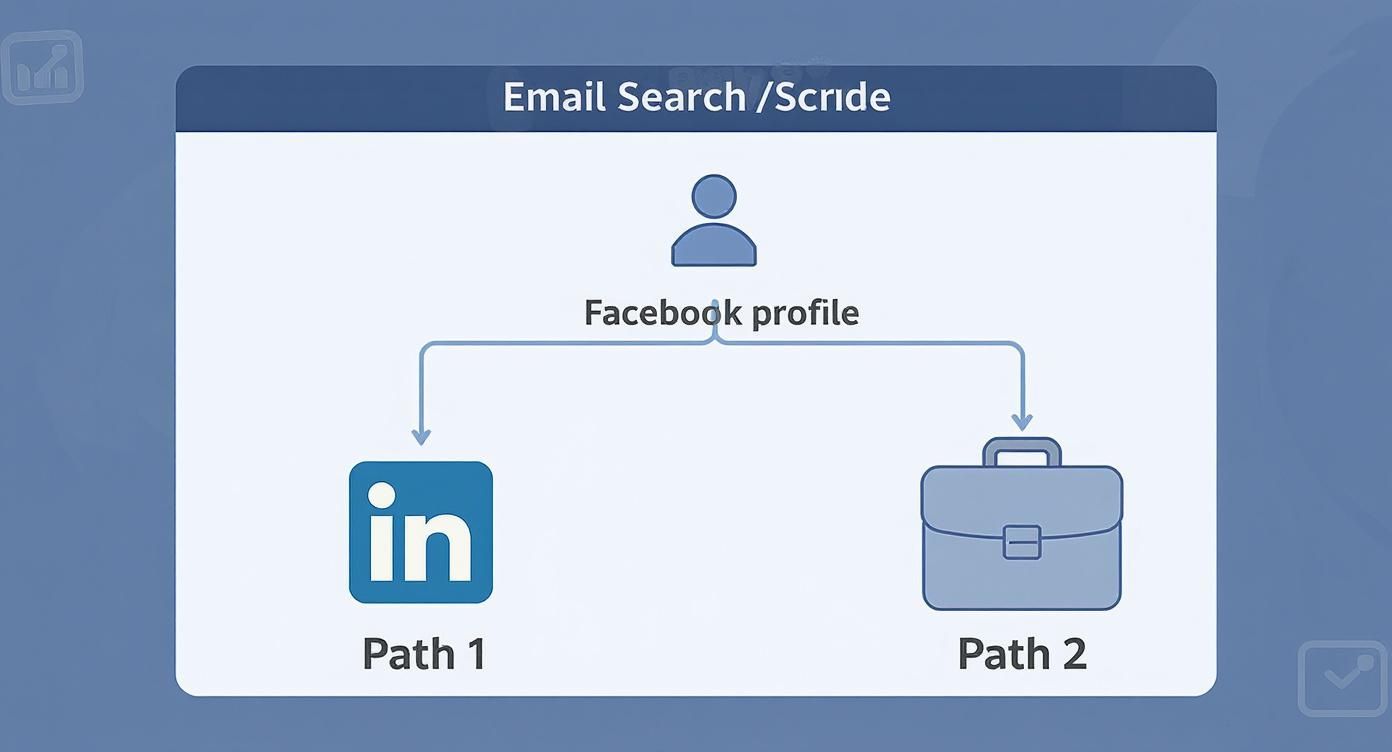
The real insight here is that Facebook is just the starting point, not the source of the email itself. The trail to a valid business email almost always leads you to places like LinkedIn or a corporate website.
Putting a Tool into Practice with EmailScout
Let's see how this plays out in the real world. We'll walk through using a tool like the EmailScout Chrome extension. This is where you can turn a tedious, multi-step process into a single click.
First, you’ll need to grab the extension from the Chrome Web Store. Once you add it, it sits right in your browser, ready to go whenever you need it. The setup is simple, no complicated configuration required.
Okay, so imagine you started on Facebook and found your prospect’s profile on a professional networking site. You head over to their company’s website to confirm their role. With the EmailScout extension installed, you just click its icon. The tool instantly gets to work, analyzing public data tied to that company's domain to find the correct email.
Key Takeaway: The magic of these tools is their ability to quickly find and verify email patterns linked to a company domain. They aren't hacking Facebook; they're just intelligently searching the web for information companies have already made public.
This whole process is compliant with data privacy laws like GDPR because you're sourcing professional contact information that's already out in the open, not digging into protected personal data from a social media account.
Staying Compliant and Ethical
Using these tools the right way isn’t optional. Facebook’s user base is massive—around 3.06 billion monthly active users—making it a huge pond for lead generation, but direct email access is rightly restricted. The tools simply automate the public search process, cross-referencing details to surface likely email addresses without breaching anyone's privacy.
To make sure your process is always above board, stick to these rules:
- Never Scrape Private Profiles: Only use tools that find emails from public sources, like company websites.
- Verify Before You Send: Always run an address through a verifier. This keeps your bounce rate low and protects your sender reputation.
- Personalize Your Outreach: The email you find is for a direct, one-on-one conversation. Don't just dump them into a mass-marketing newsletter without their permission.
As you get comfortable with finding contacts, you might also look into how modern AI marketing tools can help with your broader outreach. These can help you write better emails and manage your campaigns more effectively. By choosing the https://emailscout.io/best-free-email-finder-tool/ and using it properly, you can scale your outreach efficiently while holding yourself to high ethical standards.
Crafting Your First Outreach Email
Getting the email address is just the first step. The real moment of truth is what you do with it. Your first email can either kickstart a great conversation or land you straight in the spam folder, making all that hard work finding it on Facebook a total waste.
A thoughtful, personalized message is everything. You have to make a good first impression.
A generic, copy-paste email is the fastest way to get ignored. People can spot a template from a mile away. Take a few extra minutes to make your message feel like it was written just for them, not for a hundred other people on a list.
Personalization Beyond the First Name
Real personalization goes way deeper than just using [First Name]. It’s about showing you’ve done your homework and have a genuine reason to be in their inbox. A little effort here will do wonders for your response rates.
Here are a few ways to add a personal touch that actually works:
- Mention a recent win. Maybe they just launched a cool project, wrote a great article, or their company won an award. A simple, "I really enjoyed your recent post on LinkedIn about team productivity…" shows you're paying attention.
- Find common ground. Did you notice on their Facebook or LinkedIn that you both support the same charity or went to the same university? Something like, "I saw you're also a fan of sustainable tech…" builds instant rapport.
- Bring up a mutual connection. If you know someone in common, mentioning their name can add a layer of trust right from the start.
The goal is to show you see them as an individual, not just another lead. A single, well-researched sentence can make your email stand out from the dozens of generic messages they receive daily. This simple act of personalization signals respect for their time and expertise.
Structuring Your Message for Success
Once you have your personal touch, it’s time to structure the email for clarity and impact. Keep it brief. Keep it scannable. Busy people appreciate messages that get straight to the point without any fluff.
Your subject line is make-or-break. It needs to be compelling but not clickbaity. Something like "Question about [Their Project]" or "Idea for [Their Company]" is way more effective than a generic "Quick Question."
After your personalized opening, clearly and concisely state why you're writing. Are you looking for advice, proposing a collaboration, or offering a solution to a problem they might have?
Whatever you do, don't go for a hard sales pitch in the first email. That’s a surefire way to get deleted. Focus on starting a conversation and offering value upfront.
End with a clear, simple call to action. Ask a single question or suggest a brief chat. For a deeper dive, our complete guide on how to write cold emails is packed with advanced tips and templates. By keeping your message respectful, personal, and direct, you can turn that email address you just found into a valuable professional connection.
Common Questions About Finding Emails
Even with the best tools and tricks, hunting for emails on Facebook can feel like walking through a minefield of questions about privacy, rules, and what actually works. Let’s clear the air and tackle some of the most common questions people have.
Is It Actually Legal to Find and Use an Email from Facebook?
This is the big one, and the answer is a classic "it depends." Legality hinges on where you are, where your contact is, and what you plan to do with that email.
Laws like GDPR in Europe and the CAN-SPAM Act in the U.S. have very clear rules about sending unsolicited commercial emails. A good rule of thumb is to use a found email for direct, one-on-one outreach—not for dumping someone onto a mass marketing newsletter without their permission.
Crucial Takeaway: It really comes down to consent and intent. Finding a business email to start a professional conversation is a world away from scraping a list for a bulk spam campaign. Always get familiar with the data privacy laws that apply to you before you hit send.
Why Can I Never Find Emails in the "About" Section Anymore?
You're not imagining it. Finding an email directly in a profile's "About" section is like striking gold these days. This is by design.
Facebook has tightened its privacy settings over the years, making personal details like emails and phone numbers hidden by default. The only time you’ll see an email is if a user has intentionally set that information to 'Public,' which is incredibly rare now. This shift is exactly why just poking around profiles manually isn't a scalable or effective strategy anymore.
Could Facebook Ban Me for Using an Email Finder Tool?
Facebook's terms of service are crystal clear: they prohibit automated scraping of private data from profiles. This is where you need to be smart about the tools you use.
A reputable email finder is built to respect these boundaries. It doesn't scrape private Facebook data. Instead, it takes public clues—like a name and a company—and uses that information to search for a matching email address across the wider public web. This approach dramatically lowers the risk to your account.
On the other hand, using cheap bots or scripts that automate actions directly on Facebook's website is a fast track to getting your account flagged or banned. Stick to trusted, ethical tools.
What’s the Most Effective Method Overall?
There’s no single magic trick. The most successful approach is almost always a layered strategy, combining a few different techniques to get the best results.
Here’s a workflow that works time and time again:
- Start with a quick manual check. Always take 30 seconds to look at the person's Facebook profile and any business pages they're linked to. You might just get lucky.
- Cross-reference on professional networks. If you find nothing, take their full name and company over to a platform like LinkedIn. This often helps you confirm their official job title and the company’s likely email format.
- Use a smart tool to find or verify. Finally, use a reliable email finder to either confirm the email pattern you’ve guessed or uncover the correct address if the other methods came up empty.
This multi-pronged approach gives you the highest odds of success while making sure you’re gathering your information responsibly.
Ready to stop guessing and start finding verified emails in a single click? EmailScout is the powerful Chrome extension that streamlines your outreach. Build accurate marketing lists and connect with key decision-makers without leaving your browser.