
When you need to find out who's behind an email address, your first move is often a reverse email lookup tool like EmailScout. These services are designed to scan public records and social media profiles, piecing together a digital footprint that can connect an email to a name, a job title, and other useful details. This isn't about shady snooping—it's about smart, professional diligence.
Why Verifying an Email Owner Matters
Ever get a crucial email and feel that tiny flicker of doubt about who actually sent it? Knowing how to find the owner of an email address is a non-negotiable skill for anyone doing business online. It’s what separates a real connection with a genuine lead from getting tangled in a sophisticated phishing net.
Let's get practical. Say you're in sales and an inquiry from jane.d@megacorp.com lands in your inbox. Before you pour hours into crafting the perfect proposal, you absolutely need to confirm that Jane is a real decision-maker at that company. In the same way, a project manager has to be certain that a new stakeholder's email is legit before sharing a link to sensitive project files.
This isn’t about being nosy. It’s about exercising due diligence to protect your time, your resources, and your company's data.
Beyond Simple Outreach
The need to verify an email goes way beyond sales and project management. The global email system is swimming with security risks. In 2023, about 25% of all fraud reports in the U.S. started with an email, cementing its place as a top channel for cybercrime. You can dig into more of these email security stats on Statista. That number really drives the point home.
Knowing the true identity behind an email address is no longer just a nice-to-have. It’s a core security practice.
This one simple step helps you:
- Avoid Phishing Scams: Confirming that email from a supposed vendor or colleague can stop a costly security breach before it starts.
- Validate Business Contacts: Make sure your outreach is hitting the right people, maximizing your efficiency and impact.
- Build Trust: When you verify contacts before engaging, you’re building professional relationships on a solid foundation of certainty.
Uncovering Email Owners with Reverse Lookup Tools
When you've got an email address but no name, a reverse email lookup tool is your most direct route to an answer. Think of services like EmailScout as a specialized search engine for people. They dig through a massive web of public records, social media data, and professional databases to connect the dots.
In many cases, this process can instantly link an email to a full name, a job title, or even social media profiles. It's often the quickest way to turn a mysterious address into a real, identifiable person. Just keep in mind that the results depend entirely on the individual's public digital footprint—some people are ghosts online, while others are open books.
Making Sense of the Results
After you plug in the email, you'll get a report back. Don't just grab the first name you see and run with it. The real skill is in looking for patterns and corroborating the details.
Does the name you found match the format of the email address (e.g., john.smith@domain.com for John Smith)? Does the company listed in the report match the email's domain? Piecing these clues together helps you build a much more reliable picture of who you're dealing with.
The journey to identify an email owner usually follows a few logical steps, starting broad and then zeroing in. This is a pretty common workflow I've used myself countless times.
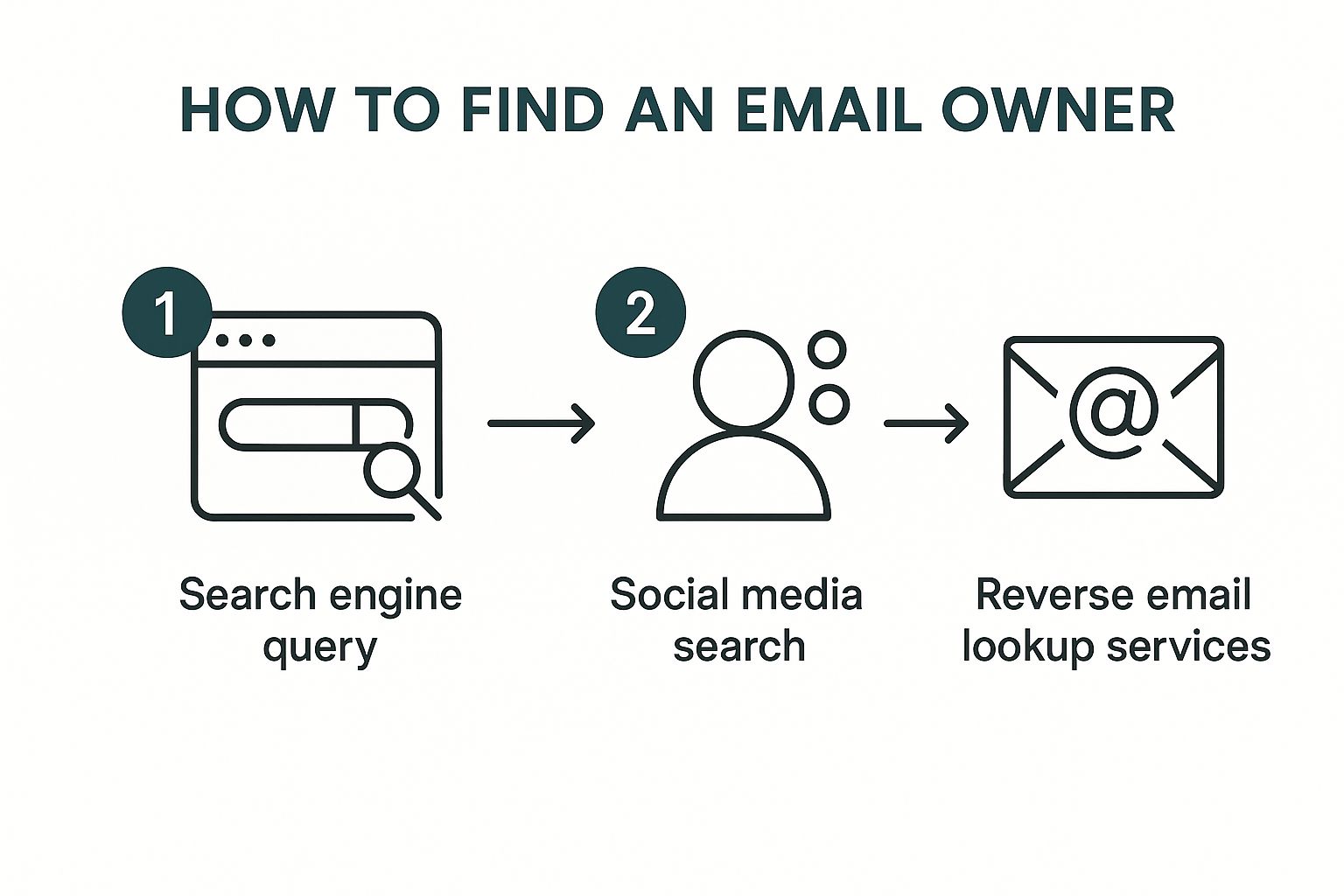
As you can see, after some initial legwork, a dedicated lookup tool is often the final step that ties everything together and confirms an identity. Sticking to a structured approach like this saves a ton of time and prevents you from chasing dead ends.
Key Takeaway: The goal isn't just to find a name; it's to build a confident profile. Treat the data from a lookup tool as your foundation, then use other public information to put a few more bricks on top for verification.
For instance, if a tool tells you the email belongs to "Jane Doe" at "Acme Inc.," your next move should be a quick search on LinkedIn to see if you can find her profile there. The more data points that align, the more certain you can be. This is super valuable in B2B sales or marketing, where you absolutely need to know you're talking to the right person.
If you find yourself doing this at scale, it's also worth learning how to find company email addresses to make the whole process even more efficient.
Information You Can Uncover with Reverse Email Lookup
A good reverse email search tool doesn't just give you a name. It often pulls together a whole profile of publicly available information. Here’s a quick breakdown of what you can typically expect to find and how you can use it.
| Data Type | What It Tells You | Use Case Example |
|---|---|---|
| Full Name | The most direct identifier for the email owner. | Addressing outreach emails personally instead of using "To Whom It May Concern." |
| Job Title & Company | Professional context, including their role and place of work. | Verifying you're contacting a decision-maker for a B2B sales pitch. |
| Location | General geographic area (city/state) of the individual. | Segmenting a marketing list for a location-specific promotion or event. |
| Social Media Profiles | Links to public profiles on platforms like LinkedIn, Twitter, or Facebook. | Gaining insight into their professional background or personal interests for rapport-building. |
| Associated Websites | Personal blogs, portfolios, or company websites linked to the email. | Understanding their expertise or business focus before making contact. |
Putting these pieces together gives you a much richer understanding of the person behind the email, allowing for smarter, more personalized communication. It’s about turning a simple email address into a real connection.
Connecting the Dots on Social and Professional Networks
So, you’ve run an email through a lookup tool and got a name or username back. Great starting point, but the real detective work is just getting started. This is where you connect the dots—cross-referencing that scrap of information across social and professional networks to build a complete, verified picture of who you're trying to reach.
Think of it this way: the tool gave you a clue, not a conclusion. Let's say it links j.doe@techsolutions.com to a "Jane Doe." Your immediate next step should be a quick search on a professional platform like LinkedIn. If a profile for a Jane Doe at TechSolutions pops up, you’ve just added a huge layer of validation.
This kind of cross-checking is non-negotiable, especially when you consider the sheer number of email accounts out there. By 2025, there will be nearly 4.48 billion email users globally, and plenty of them juggle multiple accounts. Trusting a single source is just too risky. You can dig into more email user trends on 99firms.com if you're curious.
Advanced Search Techniques for Confirmation
Instead of just scrolling endlessly through social media feeds, you can use advanced search operators to find the owner with surgical precision. These are simple commands that tell a search engine exactly what to look for and where.
A targeted Google search, for example, can instantly surface profiles where an email address is listed publicly. It’s an incredibly effective way to find professionals who’ve shared their contact details on their profiles or in public posts.
Pro Tip: Try this exact search operator in Google:
"<emailaddress>" site:linkedin.com. Just swap<emailaddress>with the one you're checking. This scans all of LinkedIn for any public mention of that address and often takes you straight to the owner's profile.
From Data to a Complete Profile
This whole process is about much more than just matching a name to an email. It’s about building context and confidence so you know you're reaching out to the right person.
- Confirm Professional Standing: Does the LinkedIn profile show a role that lines up with why you’re contacting them?
- Gauge Expertise: Do their posts on X (formerly Twitter) or other industry forums show they have knowledge in a relevant field?
- Verify the Connection: Does the company domain from their email match the employer listed on their profiles?
When you connect these dots, you move way beyond just knowing a name. You create a verified, multi-dimensional profile that ensures your communication is accurate, professional, and lands exactly where it should.
How to Decode an Email Address for Clues
Before you jump into any tools, take a hard look at the email address itself. It’s surprising how much you can piece together just by breaking it down. This is always my first move when trying to figure out who's behind an email.
Start with everything after the "@" symbol. The domain name is your biggest tell. An address like j.smith@gmail.com doesn't give you much to work with, but j.smith@summitpeakcorp.com is a goldmine. Right away, that domain points to a specific company.
A quick search for summitpeakcorp.com will tell you what the business does. This instantly provides context. You now know their industry and can make some educated guesses about the sender's role. You’ve just narrowed your search from the entire internet down to the employees of one organization.
Unpacking the Username
Once you've got a likely company, the part before the "@" becomes a lot more useful. Most businesses don't get too creative with their email formats; they stick to standardized patterns.
You'll see common formats again and again:
firstname.lastname@company.com(like john.smith)firstinitial.lastname@company.com(like j.smith)firstname@company.com(like john)
So, if your email is j.smith@summitpeakcorp.com, you can be pretty confident the owner’s name is something like "J. Smith." Combine that name with the company, and you have a solid lead to start verifying on professional networks.
This isn't about getting a 100% positive ID right away. It's about building a strong, logical hypothesis. You’re creating a profile based on evidence before you even run a single tool.
This quick manual analysis turns an anonymous string of text into a probable name and workplace. It’s a super-efficient way to gather your initial intel, which makes your next steps with a tool like EmailScout far more effective. You're no longer shooting in the dark—you're working to confirm a theory you've already built.
Navigating Ethical and Legal Boundaries

Knowing how to find the person behind an email address is a powerful skill, but it's one that comes with some serious responsibility. The methods we’ve gone over are meant for legitimate, professional goals—not for prying into someone's personal life. It's absolutely crucial that your actions always stay within legal and ethical lines.
Regulations like the General Data Protection Regulation (GDPR) in Europe and the CAN-SPAM Act in the U.S. have strict rules about how you can collect and use personal data, including email addresses. Breaking these rules can lead to hefty fines and can seriously damage your professional reputation. It all boils down to consent and having a legitimate reason for your search.
Email is a huge part of modern life. A staggering 99% of users check their personal inbox every single day, and 60% of consumers say they prefer getting promotional messages from brands via email. This just goes to show how powerful this channel is when you use it the right way.
Legitimate Use Cases
Your objective should always be to use this information responsibly. Here are a few clear-cut examples of when it's appropriate:
- Fraud Prevention: Verifying a new customer's identity to stop a potential chargeback or fraudulent transaction.
- Lead Verification: Making sure that a new sales lead who signed up on your website is a real person at the company they claim to work for.
- Professional Networking: Identifying the correct contact person at a company before sending a business proposal or partnership request.
Your goal is professional verification, not personal surveillance. Keeping this mindset is crucial for staying on the right side of the law and maintaining your integrity.
Always steer clear of using any uncovered information for harassment, doxxing, or any kind of personal snooping. The tools and techniques we outline in our complete guide to finding the owner of an email address are designed to support ethical business practices, helping you make sure your outreach is both effective and respectful.
Common Questions About Finding Email Owners
Even with the best tools, you'll eventually hit a wall. Let's walk through some of the most common questions that pop up when you're trying to figure out who owns an email address. Getting these right will help you navigate the trickier situations with a bit more confidence.
One I hear all the time is, "What if the reverse lookup tool comes up empty?" It happens more than you'd think, especially with brand-new accounts or emails people keep locked down. When you hit this dead end, it’s your cue to circle back to the fundamentals.
Don't just give up. Start by looking at the email address itself. What clues does it offer? If it's a custom domain, that's your first lead. For generic ones, look at the username pattern. This kind of manual detective work is often what breaks a case open.
Can I Find the Owner of a Generic Email Address?
This is the tough one. Trying to identify the person behind coolsurfer88@gmail.com is a whole different ballgame than a corporate email. These addresses are unmoored from any organization, which strips away your most valuable clues.
A good lookup tool might still find a link to a social media profile, but the odds are definitely lower. Your best bet here is to get back to basics: search for the full email address in quotation marks ("coolsurfer88@gmail.com") across Google and various social media platforms. You might just get lucky and find it listed on an old forum, a personal blog, or a forgotten profile. That’s often all you need to get a name.
Remember, the goal is to find a public connection. If an individual has kept their digital footprint clean, no tool can magically produce information that isn't publicly available. Respecting privacy is paramount.
Another critical question is about trust: "How reliable is the information I find?" The data from lookup tools is usually solid, but you should always treat it as a lead, not a fact. A tool might pull a name from a public record that's five years old. Always cross-reference what you find on a professional network like LinkedIn before you take any action.
If you're looking for more general strategies, our guide on how to find anyone's email address offers additional techniques.
Ultimately, think of it like building a case. Every piece of information is a clue. Your confidence in the result should grow as you find more and more evidence that all points to the same person.
Ready to stop guessing and start connecting? With EmailScout, you can uncover the people behind the emails in a single click. Get started with EmailScout for free.