

A business email is pretty straightforward: it’s a professional email address that uses your company’s own domain, like yourname@yourcompany.com. This is a huge step up from a generic address you'd get from a free service like Gmail or Yahoo.
Think of it as your digital business card. It instantly signals who you are and who you work for, building credibility and brand identity with every single message you send. For anyone trying to build trust with clients or partners, this isn't just a nice-to-have—it's essential.
Understanding Business Email Beyond the Inbox

Let's use an analogy. Your email address is like the sign hanging above a storefront. A personal email like coolsalesdude88@yahoo.com is like a temporary, handwritten sign taped to the door. Sure, it might tell people you're open for business, but it doesn't exactly inspire confidence and might even make them question if you're legit.
On the other hand, an address like mark.reynolds@innovatecorp.com is the equivalent of a professionally designed, permanent sign. It tells customers they've come to the right place and are dealing with a real, established company. That first impression is absolutely critical, especially in sales and marketing where your credibility is your currency.
To really see the difference, let's break it down side-by-side.
Business Email vs Personal Email At a Glance
Here’s a quick comparison to highlight the fundamental differences between a professional business email and your everyday personal account.
| Feature | Business Email (e.g., name@yourcompany.com) | Personal Email (e.g., name@gmail.com) |
|---|---|---|
| First Impression | Professional, credible, and trustworthy. | Casual, sometimes unprofessional or dated. |
| Branding | Reinforces your company's brand with every email. | Promotes the email provider's brand (Google, Yahoo). |
| Credibility | High. Signals legitimacy and a serious business. | Low. Can be seen as spammy or less serious. |
| Memorability | Easy for clients to remember and associate with you. | Can be difficult to recall if not a simple name. |
| Deliverability | Generally higher; less likely to be flagged as spam. | Higher risk of landing in spam or promotions folders. |
| Security & Control | Centralized control, enhanced security, and backups. | Limited control, dependent on provider's security. |
As you can see, the choice goes far beyond just the name after the "@" symbol. It directly impacts how your business is perceived.
The Core Difference: Credibility and Ownership
It all boils down to ownership and branding. When you use a personal email, you're essentially advertising for Google or Microsoft. When you use a business email, every single message you send reinforces your brand, making your company more familiar and trustworthy with each interaction.
This isn't just about looks; it has a real impact on how people react to your messages. It’s so foundational that a staggering 91% of businesses rely on email as their main channel for talking to clients. That dominance comes from email's unmatched reliability and professional acceptance.
A business email isn't just a communication tool; it's a statement of professionalism. It signals to recipients that you are serious, legitimate, and invested in your brand identity, making them far more likely to engage with your message.
The practical benefits are immediate and clear:
- Boosts Credibility: It instantly makes your outreach look more professional and trustworthy.
- Enhances Brand Identity: Your domain name gets seen in every email, acting as constant, subtle marketing for your business.
- Improves Deliverability: Branded emails are taken more seriously by spam filters, meaning more of your messages actually land in the inbox.
For anyone serious about sales or marketing, understanding the power of a custom domain is the first step toward communication that gets results. If you're looking to build on this, you can explore more strategies for effective marketing and outreach in our detailed guide. Simply put, a business email turns a casual chat into a professional conversation.
The Anatomy of a Credible Business Email
Every business email address tells a story about your company before the message is even opened. Understanding its components is the key to crafting a narrative of credibility and professionalism. Think of it like a formal introduction; each part plays a specific role in shaping the recipient's first impression.
At its core, a business email has three simple parts: the username, the "@" symbol, and your custom domain. While the "@" is just a separator, the other two elements are powerful tools for building your brand and earning trust.
The Username: Your Digital Handshake
The username is the first part of your address, right before the "@" symbol. This is your chance to create a clear, professional identity. The format you pick can signal the purpose of the communication and who is sending it.
Common formats include:
- Personalized: Using a person’s name (like
jane.doe@) creates a direct, human connection. This is perfect for sales and client relations. - Role-Based: Using a function (like
support@orinfo@) establishes a clear point of contact for specific departments, making your business look organized and accessible. - Hybrid: A combination like
j.doe@is a common, concise alternative that still feels personal.
The real key here is consistency. A standardized format across your organization presents a unified and polished image, reinforcing your brand's attention to detail.
The Custom Domain: Your Digital Storefront
The custom domain—the part after the "@" symbol—is the most critical component of a business email. It acts as your digital real estate, instantly linking your communication back to your company. An address ending in @yourcompany.com serves as a constant, subtle reminder of your brand, building recognition with every interaction.
This branded domain is the single biggest factor that separates a professional email from a personal one. It shifts the perception from a casual individual to a representative of a legitimate, established entity. This is why a simple contact@innovatesolutions.com carries far more weight than innovatesolutions88@gmail.com.
Your custom domain transforms an email from a simple message into a piece of branded communication. It’s a powerful trust signal that tells recipients you are a serious, professional organization they can rely on.
This structure isn't just about appearances; it’s about building a foundation of trust. Once you have this structure down, the next step is mastering the content of your messages. For a deeper dive into crafting effective messages, learning how to write a business email that truly gets read is an indispensable skill.
Okay, let's get that section sounding like a real person wrote it. Here is the rewritten version, following the specific style and tone from your examples.
So, Why Is a Business Email a Must-Have?
Let's move past the dictionary definition. The real question is why a business email is so important. Think of it less as an operational expense and more as a foundational investment in your company's reputation and security. The value becomes crystal clear when you see how it shapes perception, builds your brand, and protects your communications.
Here’s a simple test. Imagine two sales proposals land in your inbox. One is from coolsalesdude88@yahoo.com, and the other comes from mark.reynolds@innovatecorp.com. Which one are you opening first? Which one feels more legit?
Most of us would instinctively trust Mark’s email more. The address alone signals professionalism and stability before you’ve even read a single word. That small detail makes a huge difference, and it highlights the core reasons a professional email is non-negotiable.
Build Instant Credibility and Trust
Using your own custom domain is probably the single fastest way to look credible. When a potential client sees an email from @yourcompany.com, it tells them you’re a serious, established business.
Free email providers, on the other hand, can make a business feel temporary or less professional. It can even raise spam red flags for some people.
A business email isn't just a way to send messages; it’s a statement. It tells everyone you’re a legitimate operation that’s invested in your brand, making them far more likely to actually engage with you.
That initial trust is the bedrock of any good business relationship, whether you're sending a cold sales email or handling a customer support ticket. It gets you past that first wall of skepticism.
Reinforce Your Brand with Every Message
Every single email you send is a tiny marketing opportunity. A business email address puts your brand name right in front of clients, partners, and prospects—over and over again. This constant, subtle reinforcement builds brand recognition and keeps you top-of-mind.
There's a reason over 82% of marketers worldwide lean on email marketing. It’s a direct and powerful way to build a brand presence. For sales teams and startups trying to get noticed, this consistent branding is invaluable. You can dig deeper into why email marketing remains a dominant force on dyspatch.io.
Enhance Security and Maintain Control
A business email account gives you much more than just a custom domain. It comes with a whole suite of administrative and security tools that you just don't get with a personal account. These features give you total control over your company's digital communications.
A few key advantages include:
- Centralized Administration: You can manage all your team's email accounts from one place. Adding a new hire or removing a former employee takes seconds.
- Data Ownership: You own the data. If an employee leaves, the company keeps control of their inbox, contacts, and communication history.
- Advanced Security: Business email providers offer much better spam filtering, malware protection, and encryption to keep sensitive company info safe.
This level of control isn't just a nice-to-have; it's essential for protecting your intellectual property and making sure all your communications stay secure and professional.
Fueling Your Sales and Marketing Outreach
Once you've got your professional identity sorted, your business email becomes the engine for your growth. It’s the go-to tool for sales and marketing teams to find prospects, warm up leads, and build real customer relationships.
Think of your outreach strategy like a high-performance car. A clean, verified list of business emails is the high-octane fuel that makes it go. Without it, you’re not going anywhere.
Every single successful campaign—whether it's a cold email sequence to a handful of key targets or a big marketing announcement—starts with knowing who you're talking to. The best-written message on the planet is useless if it never reaches the right inbox.
The Power of a Targeted Email List
A targeted email list isn't just a spreadsheet of addresses. It's a hand-picked directory of potential customers who are genuinely likely to be interested in what you offer. Building this list is the absolute foundation of any outreach that gets results.
With billions of people using email, the opportunity for sales and marketing teams is massive. The scale is almost hard to comprehend, but it’s a goldmine for anyone who can tap into it correctly. If you're curious about the numbers, you can explore the latest email usage trends at EmailToolTester.
A generic list gets generic results. A highly targeted list, built with precision, allows you to personalize your messaging, address specific pain points, and dramatically increase your chances of getting a response.
This is where the grind usually starts. Manually digging through company websites and LinkedIn profiles for the right contacts is a slow, soul-crushing process. It burns up valuable time your team should be spending on actually selling.
Finding the Fuel for Your Outreach Engine
So, how do you get that fuel for your campaigns without wasting all those hours? The smartest move is to use tools built for the job. An email finder is a specialized tool that helps you quickly discover and verify the business email addresses of the decision-makers you need to reach.
These tools aren't just a nice-to-have; they’re a strategic advantage. They turn a tedious, manual slog into a fast, automated process.
For instance, check out how EmailScout lets you pull contact information straight from a website you’re visiting.
The interface lets you instantly find verified emails tied to that domain, turning casual browsing into active prospecting. This kind of immediate access lets sales and marketing teams build their lists faster and with way more accuracy, making sure their messages hit the right person from the get-go.
Finding and Verifying Emails the Smart Way
Having a solid list of business emails is the lifeblood of any good outreach campaign. But building that list? That's where the real work begins. It’s the moment your strategy has to get its hands dirty and become a tangible list of contacts—without burning through all your time.
You could always go the manual route. This usually means digging through company websites, scrolling endlessly on LinkedIn, and trying to piece together clues to guess the right email format. While you might find a few addresses this way, it's incredibly slow and riddled with errors. The result is often a high bounce rate, which can seriously damage your sender reputation.
Shifting from Manual Labor to Smart Automation
Let’s be honest: the most effective sales and marketing teams aren't spending their days hunting for emails one by one. They use specialized tools to automate the whole process, turning a tedious chore into a fast and efficient part of their workflow. This is where an email finder becomes an essential piece of your toolkit.
These tools are built to discover and, more importantly, verify the email addresses of key decision-makers in just a few clicks. Instead of guessing, you get accurate, up-to-date contact info. And that means more of your messages actually land in the right inbox.
An email finder does more than just save time; it empowers your outreach with accuracy. By providing verified contact information, it ensures your message reaches its intended audience, maximizing your chances of engagement and protecting your domain's reputation from high bounce rates.
Tools like the EmailScout browser extension slot right into your existing workflow. You can find contact information while browsing company websites or LinkedIn profiles, turning passive research into active list-building. It’s a seamless way to capture valuable leads without ever leaving the page you’re on.
Here’s a quick look at how an email finder can pull contact details right from a website.
This screenshot shows how you can get instant access to verified emails tied to a specific domain, letting you pinpoint key contacts without any manual digging. This approach streamlines your prospecting and ensures your outreach is both targeted and efficient right from the start.
Building Your Outreach List with Confidence
The end goal is to build a high-quality, accurate list that fuels your outreach campaigns. Using an email finder gives you the confidence that you're connecting with real people who can make a difference for your business. For a deeper dive into different techniques, our guide on how to find company email addresses offers even more strategies.
Here are the key benefits of this modern approach:
- Speed and Efficiency: Find hundreds of verified emails in the time it would take to find a handful manually.
- Increased Accuracy: Automated verification drastically reduces your bounce rate, protecting your sender score.
- Better Targeting: Quickly identify the right decision-makers within a company, from department heads to C-level executives.
By shifting from manual hunting to smart automation, you free up your team to focus on what they do best: building relationships and closing deals.
Protecting Your Reputation with Smart Practices
Anyone can send a business email. The real trick is getting it delivered, opened, and actually read. Beyond crafting the perfect message, your outreach comes with technical and legal duties that directly impact your brand’s reputation. Think of it as the crucial behind-the-scenes work that ensures your message even gets a chance to be seen.
If you ignore these rules, you don't just risk a single campaign's performance—you can tank your domain's credibility for years. Every email you send is a direct reflection of your company's professionalism.
Understanding Compliance and Consent
Legal frameworks like CAN-SPAM in the U.S. and GDPR in Europe aren't just bureaucratic headaches. They’re built on a simple, foundational principle: respect. At their core, these regulations demand that you stay transparent and give people control over the messages filling up their inboxes.
This means every single outreach email must include two non-negotiable elements:
- A Clear Opt-Out: You have to give people a straightforward way to unsubscribe. No tricks, no hidden links.
- Honest Identity: Your "From" name and subject line must accurately reflect who you are and what the email is about. No bait-and-switch.
The golden rule of email outreach is consent. Firing off messages to people who never agreed to hear from you is the fastest way to get flagged as spam, which poisons your sender reputation and crushes future deliverability.
Keeping Your Emails Out of the Spam Folder
Email deliverability is simply the measure of how well your emails land in the inbox instead of getting buried in the spam folder. Internet Service Providers (ISPs) like Google and Microsoft are always on the lookout for signals that an email is legitimate. The most critical factor they watch is your sender reputation—an invisible score tied directly to your domain.
High bounce rates from sending to dead or invalid addresses are a massive red flag that drags this score down. This is exactly why starting with a clean, verified list is non-negotiable. You can learn more about how to keep your lists healthy with effective email address verification in our guide.
To truly shield your brand's reputation and make sure your messages consistently hit their mark, mastering essential email deliverability best practices is a must. Smart moves like authenticating your domain aren't just technical details—they're fundamental to proving you're a legitimate sender and keeping your emails where they belong.
Frequently Asked Questions About Business Email
Alright, so we've covered what a business email is and why it matters. But a few practical questions almost always pop up. Let's tackle the most common ones so you can move forward with confidence.
Can I Get a Business Email for Free?
The short answer is no, not a true one. While you might find free trials, a proper business email that uses your custom domain (like sarah@yourbakery.com) is a paid service.
Think of it as an investment in your brand's credibility. That small monthly fee is what separates you from the sea of free, generic accounts and immediately tells clients you're a serious, professional operation.
What Is the Best Format for a Business Email Address?
The best format is one that’s professional, consistent, and easy for people to remember. There’s no single right answer, but here are the most common and effective approaches:
- For individuals: You can't go wrong with
firstname.lastname@domain.comor a shorter version likef.lastname@domain.com. These are classic for a reason. - For departments: Role-based addresses are perfect for managing general inquiries. Think
sales@domain.comfor new leads orsupport@domain.comfor customer questions.
The key is to pick a format and stick with it. It keeps things tidy and scales smoothly as your team grows.
How Does a Business Email Improve Security?
This is a big one. Business email providers build in advanced security features that your personal account just doesn't have. We're talking about much smarter spam filtering, robust malware protection, and powerful admin controls.
From a central dashboard, you can manage who has access, enforce company-wide security policies, and protect sensitive data. It gives you a level of control over your communications that’s essential for any business.
This is all part of a bigger picture. To get your emails delivered, you need to have a good reputation, and that starts with getting consent from your recipients. It’s a virtuous cycle.
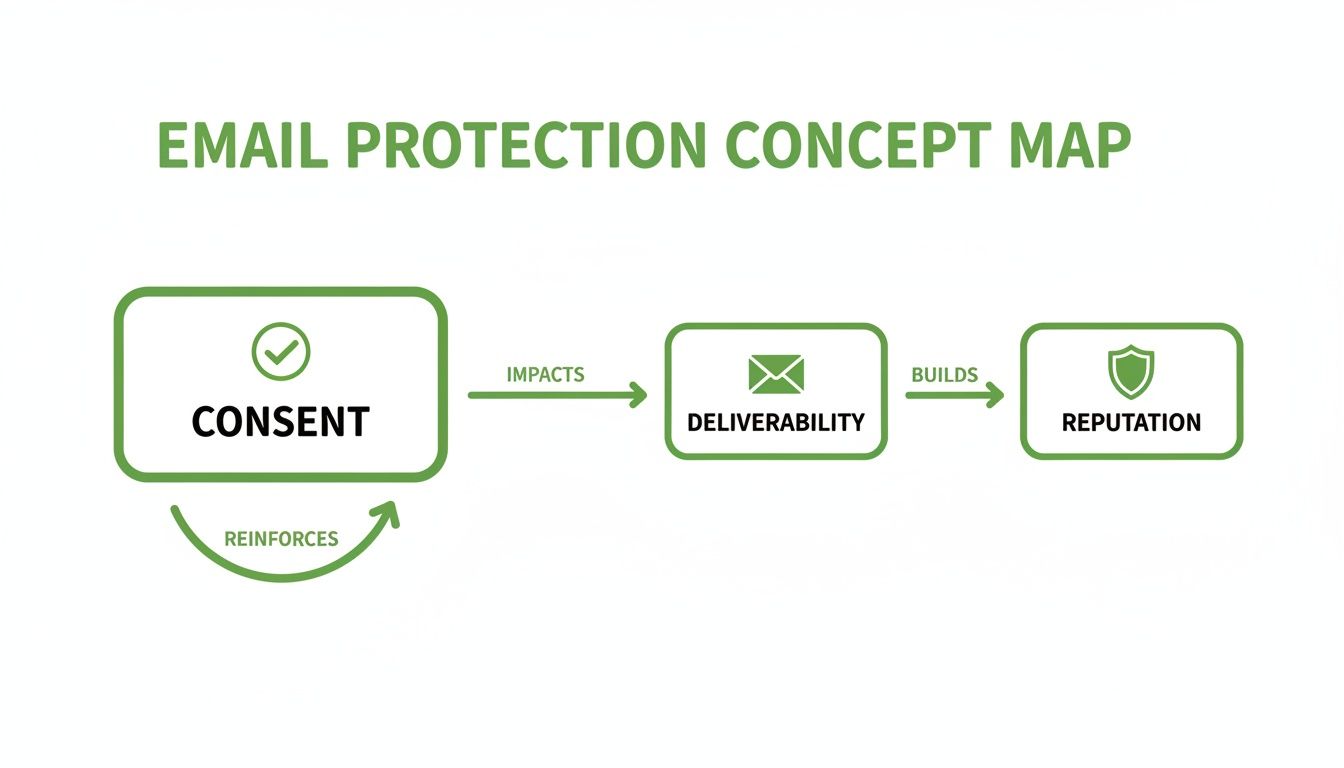
As you can see, it all comes back to respecting the inbox. When you do that, deliverability improves, and you build a strong sender reputation that keeps your messages out of the spam folder.
Ready to build your outreach lists with precision and speed? With EmailScout, you can find verified email addresses in a single click, ensuring your messages reach the right decision-makers every time. Start finding emails for free today.