

Two thousand rows land in your inbox on a Monday morning. The columns read first name, last name, company, email, phone. Nothing says where the records came from, when they were collected, or why any of those people would want the thing you sell. A rep opens the file, scrolls twice, and asks the only sensible question. Where do I start?
The usual answer is row one. That's how a good sending domain gets into trouble inside a week. The first few hundred sends go to people who never had a reason to care, complaints tick up, and the campaign you did target properly lands in a tab nobody opens. A bigger file doesn't fix any of that.
What fixes it is treating the file as a governed dataset: a list you can show you're allowed to use, can rank by fit, and can suppress the moment someone says stop. The rest is mechanics.
What a Prospect List Is and Why It Matters
You've probably met this file already. A prospect list is a set of potential buyers who haven't bought from you yet, where each row carries a name, a role, a company and a way to reach that person. The definition is deliberately plain. What separates a list worth working from a list that wastes a fortnight has nothing to do with row count.
The contrast that matters is with a house list, meaning the existing customers and subscribers who already know you. Picture two phone calls. One is a cold call to a stranger who has never heard of your company. The other is a call to someone you worked with two years ago, who remembers the project went well. Same handset, same words, completely different reception.

The gap shows up in the benchmark data. The Direct Marketing Association's 2017 Response Rate Report, summarized by the American Marketing Association, recorded a 2.9% response rate for prospect lists against 5.1% for house lists in direct mail. Per thousand names, that's roughly 29 responses versus 51, or about 76% more responses from the audience that already had a relationship with the sender. Those are direct-mail figures rather than email figures, so treat them as a historical benchmark, not a forecast for your cold email.
The working rule: relevance, permission and a prior relationship move response far more than size does.
That's why a usable row needs more than an address. It needs the source it came from, the person's role, the date you collected it, and one sentence on why this person fits. Without those four, the rep staring at row one still has no idea whether to send, call or skip.
Types of Prospect Lists Compared
Six sources cover almost every list a team builds. They're ordered here from most control to least, and the order matters: the further you get from a source you defined yourself, the more verification you owe every record.
| List type | Typical source | Best use | Main risk |
|---|---|---|---|
| Ideal customer profile list | Criteria you define for role, company size and sector | Core outbound prospecting | Takes time to define criteria well |
| Event or conference attendee list | Registrations, exhibitor and sponsor pages | Timed follow-up after an event | Attendance does not equal buying interest |
| Industry directory list | Trade association and business directories | Broad coverage of one sector | Often outdated; needs validation |
| Referral or warm introduction list | Clients, partners and their introductions | Highest reply rates when a relationship exists | Small and hard to scale |
| Web-search discovery list | Google results and business pages collected during research | Fast niche discovery in a city or sector | Permission and role fit must be checked |
| Bought or data-provider list | Third-party data vendor | Fast scale with firmographic filters | Provenance, accuracy and consent basis vary |
Where each source wins and where it fails
The ideal customer profile list is the one you build from criteria you wrote down yourself: role, company size, sector, region. It gives you the tightest control and the cleanest story about why each person belongs. Its weakness is time. Teams skip the definition step because it feels like work that doesn't produce rows, then spend three times as long arguing about which rows to send to.
Event lists win on timing. You know the person was thinking about your category in the last month, so a follow-up referencing the session they attended reads as relevant rather than random. Registration for a webinar or a place on the exhibitor floor is not a purchase signal, though. Plenty of attendees collect badge scans for the free coffee.
Directories give you sector coverage in an afternoon and go stale just as fast. Trade association pages and business directories are rarely updated on a schedule, so treat every record as unverified until you've confirmed the role and the address yourself.
Referral lists sit at the other end. A name passed on by a client, with a sentence of context, replies better than anything a database will give you. The trade-off is arithmetic: a happy client might know five relevant people, not five hundred, so referrals can't carry a whole quarter alone.
Web-search discovery is the fastest way into a niche city or sector. Run a search combining a trade and a place, work through the results, and you'll have a real picture of the market in an hour. The failure mode is assuming that a publicly listed business address is automatically fine to email with any message you like.
Bought lists scale instantly with firmographic filters. They also carry the least certainty about how each contact was collected and on what basis. If you sell into licensed professions, where every state publishes its own register, it pays to know which vendors pull from primary sources before you wire money: a comparison of professional licensing data providers sets out where each one sources its records.
The rule that keeps you out of trouble: choose the list type that matches your reason for reaching out, then write the message to fit that reason. A bought list with a generic pitch is the worst of both.
How to Segment a Prospect List by Fit and Intent
Think of segmentation as a stack of nets with different mesh sizes. Each filter lets a different kind of contact through, and the order you stack them decides what ends up in your hand and what falls away.
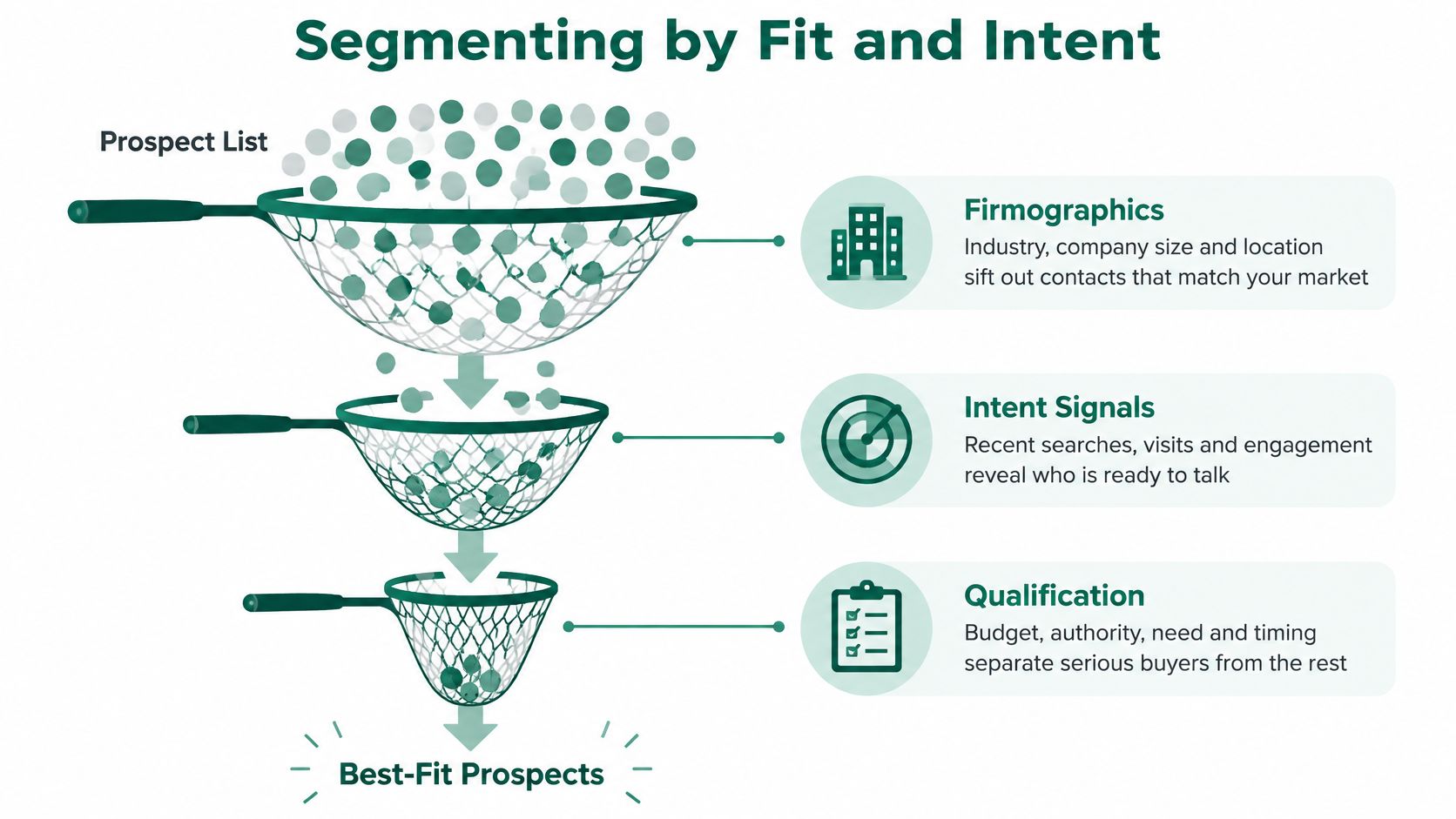
The criteria worth scoring on are consistent across teams:
- Firmographics: industry, company size and location, which decide whether the company is in your market at all.
- Role and seniority: whether this person influences or approves the purchase, or just works nearby.
- Acquisition source: the page, event or referral that produced the record, because it predicts reply rates better than most fields.
- Lifecycle stage: whether they've shown any interest, however small, or are entirely cold.
- Intent signals: recent searches, site visits, content downloads or a public announcement that points to a need.
The three tiers and how a record moves between them
Score every record on six criteria, then sort into three piles: tier A means contact this week, tier B means put them in a nurture sequence, and tier C means keep for research only.
| Criterion | What a high score means | Tier rule |
|---|---|---|
| Role relevance | Person influences or approves the purchase | Required for tier A |
| Company fit | Company matches the ideal customer profile | Required for tier A |
| Business need | Public evidence of a need you can solve | Moves a fitting record from B to A |
| Recency | Record confirmed recently | Stale records drop to tier C |
| Email confidence | Address validated and deliverable | Unvalidated records cannot reach tier A |
| Suppression risk | No opt-out, complaint or withdrawal on file | Any suppression removes the record from all tiers |
The evidence for scoring is stronger than commonly assumed. A 2025 peer-reviewed case study on B2B lead scoring used real CRM lead data collected from January 2020 through April 2024 and evaluated 15 classification algorithms. The Gradient Boosting Classifier beat the alternatives on accuracy and ROC-AUC, and feature-importance analysis flagged lead source and lead status as influential conversion predictors. The same paper cites a review of 44 lead-scoring studies that linked scoring to higher conversion rates, lower conversion costs, revenue, profit and a larger volume of high-quality leads.
That's an argument for a schema, not for a machine-learning project. Store source, timestamp, account, job function, seniority, geography, consent status, lead stage, recent engagement and disposition reason for every row. If your scoring has no way to see lead source, you've deleted the strongest predictor you own.
If the profile behind the score is still fuzzy, start with this explanation of what an ideal customer profile is before you touch the data. And if you'd rather fill a structure than stare at a blank spreadsheet, this guide on how to build a lead scoring template maps the fields first. Once the criteria are stable, test one segment before you scale to the whole file.
Consent, Suppression and Deliverability Rules
A sales rep drops 400 addresses into a sequence on Friday and treats the file as done. On Monday three people unsubscribe, one address hard-bounces, and the domain that sent the mail starts missing the inbox for the rest of the team. The address was a record the moment a commercial message went out: something you can show you are allowed to use, can score, and can suppress.
In the United States, the CAN-SPAM Act was signed on December 16, 2003 and took effect on January 1, 2004. The Federal Trade Commission's text of the CAN-SPAM Act sets out the core requirements: no materially false or misleading header information, no deceptive subject lines, a clear way to opt out, and opt-out requests honored within 10 business days. Opt-out compliance can be measured, and regulators do check whether senders honor those requests. An ignored opt-out works like a missing return label: the carrier stops trusting the sender, and later packages get delayed for everyone.
Outside the US, the test is whether the contact identifies a person. The UK Information Commissioner's Office guidance for small organisations states that data protection rules apply to B2B marketing when contact details identify an individual, including a person's name alongside their employer, and that every marketing email must identify the sender and offer an opt-out. It also recommends recording where the information came from, which marketing methods were permitted, any objections and any consent withdrawals, while keeping the record accurate and not retaining it longer than necessary.
Treat each row as a governed record: who it is, where it came from, what you're allowed to do with it, and what would make you delete it.
Hygiene shows up in placement, not only in a policy folder. Mailgun's deliverability research on list-building hygiene reports that 47.5% of organizations prioritizing hygiene name sender reputation with mailbox providers as its largest benefit, with improved engagement metrics at 19.4% and fewer spam complaints at 17.8%, and that B2B senders were nearly three times as likely as B2C senders to use questionable list-building methods, 12.3% versus 4.3%.
| Metric or control | Target | Why it matters |
|---|---|---|
| Spam complaint rate | Below 0.3% (Gmail and Yahoo bulk-sender requirement) | Complaints drive filtering decisions |
| Best-in-class complaint rate | Below 0.1% | A stricter internal goal for sales teams |
| Email authentication | DMARC in place | Required for bulk senders by Gmail and Yahoo |
| Unsubscribe method | One-click unsubscribe | Required for bulk senders and reduces complaints |
| Address validation | Validated before first send | Prevents hard bounces from invalid addresses |
| Hard bounces | Removed after the first hard bounce | Keeps sender reputation from declining |
Keep sales-prospecting records in a separate table from permission-based marketing audiences, so a withdrawal in one never leaks into the other. Understanding what permission-based email marketing actually requires makes that split easier to draw. A smaller, validated, documented list protects the domain and puts effort on people who have a defensible reason to hear from you.
How to Build a Prospect List Step by Step
The collection part takes an hour. The definition part takes most of a morning, and skipping it is why lists get abandoned.
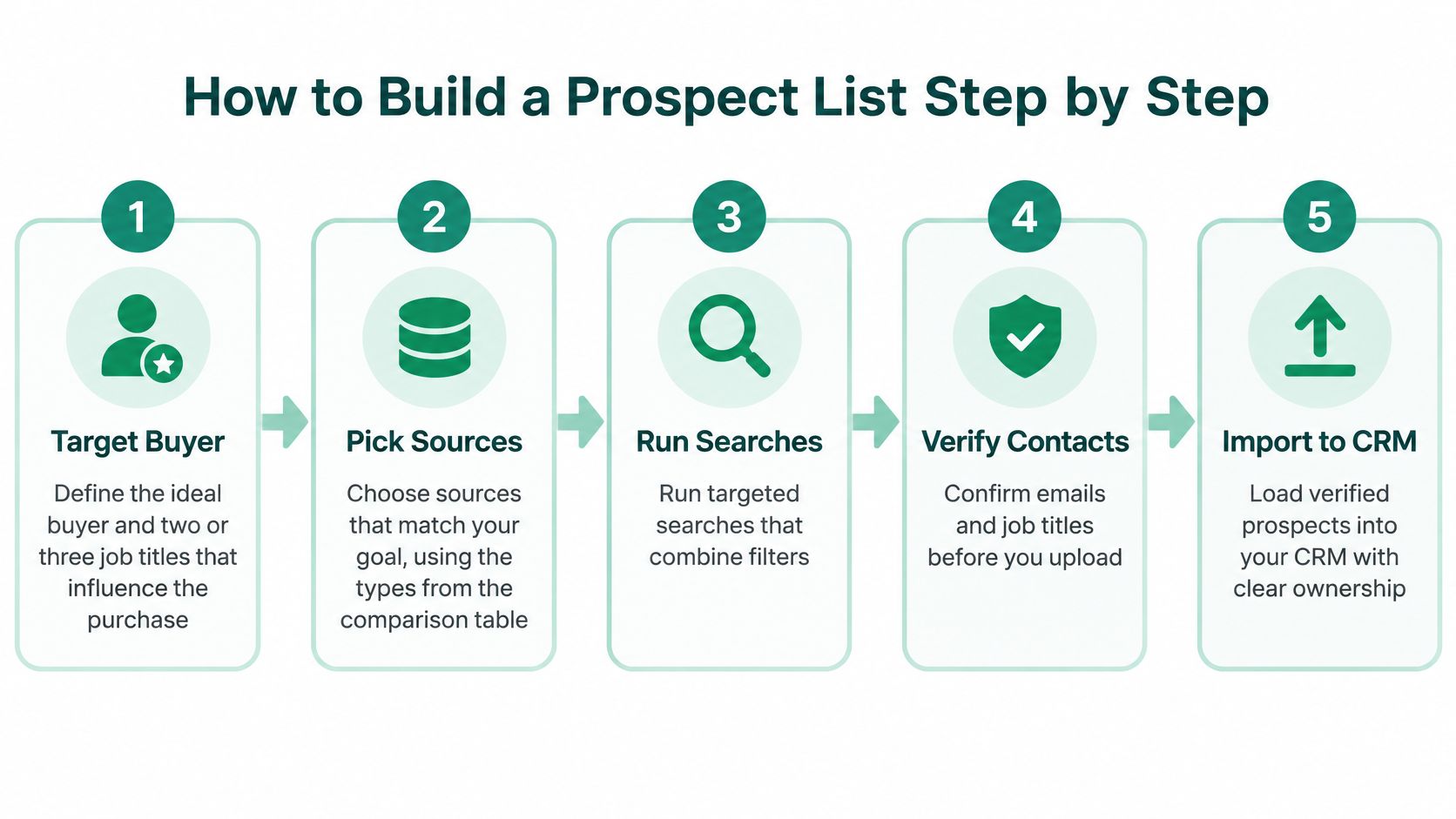
Here's the sequence, with the reason for each step.
- Define the buyer and two or three job titles. Write down the role that feels the problem and the role that signs off on fixing it. If you can't name them, no amount of searching will help, because you won't recognise a good record when it appears.
- Pick sources that match your reason for contact. Following up on a trade show points to the attendee list. Testing whether a new city has demand points to web-search discovery. The source follows the message, not the other way round.
- Run searches that combine role, city and sector. Queries like operations manager, plumber, Atlanta, in whatever order returns the most relevant business pages, surface a niche fast. Add an email-domain term when you want a specific type of business.
- Capture contacts while you browse. With EmailScout, you click the extension icon on a page and it shows the emails it found for that domain. Those addresses are the ones present in the source code of the page you're visiting, so you can see the evidence rather than trusting a black box. Turn on AutoSave and the addresses save themselves as you work, which removes the copy-paste step that can lose half your research.
- Deduplicate and complete the schema. One row per person, and every row gets source, date, role, reason for fit. Duplicates are worse than blanks, because two reps will contact the same person with two different pitches.
- Validate addresses before the first send. Bounce once and you learn nothing. Bounce across a few hundred rows and mailbox providers start treating your domain as a risk.
- Export only when the schema is complete, and date the file name. A file called prospects-atlanta-plumbers-2025-06 tells the next person who opens it when the data was collected and when it needs revalidating.
A finished list has a boring, checkable shape. One row per person, every field filled or deliberately marked as unknown, a tier assigned, and no unexplained blanks. If someone else on your team can open it and know which twenty records to contact first, you've built a list. If they have to ask, you've built a spreadsheet.
Maintaining the List After Launch
Maintenance is a rhythm you run after every campaign round, not a clean-up you do once when a bounce rate gets embarrassing. The whole cycle takes under an hour for a few hundred records.
- Rescore every record. Role relevance, company fit, recency, email confidence and suppression risk, then move rows between the three tiers.
- Revalidate on a fixed interval. Any record whose last confirmation is older than that interval drops out unless fresh evidence of a need turns up.
- Review complaint, unsubscribe and bounce rates by segment after every send. Pull a segment out of outreach the moment its complaint rate approaches the bulk-sender ceiling.
- Process opt-outs the same day. A withdrawal that sits in an inbox for a week is a suppression failure waiting to be reported.
- Delete what you can't document. If you can't point to where a record came from and why you were allowed to contact it, remove it and log the deletion so the list stays auditable.
A list that is rescored, revalidated and pruned on a schedule stays both legal and responsive. Nothing else does.
Retrain the scoring model periodically as messaging, channel mix and market conditions shift, judging it against a defined outcome such as qualified-opportunity creation rather than open rate. For the removal side of the routine, this walkthrough on how to clean an email list covers the checks in order.
A Scored Prospect List Example You Can Copy
Here's one complete record, and it's illustrative rather than drawn from a real campaign. An operations manager at a plumbing company with 12 staff in Atlanta, found through a targeted web search while testing whether the city was worth working.
| Field | Example value | Why it matters |
|---|---|---|
| Company and fit | Plumbing company, 12 staff, Atlanta | Confirms the company matches the target profile |
| Role and seniority | Operations manager, manager level | Confirms the person can influence the purchase |
| Source and date | Targeted web search, collected on a stated date | Shows provenance for audits and follow-up |
| Consent basis | Business contact, relevant offer, opt-out included | Documents the lawful basis for outreach |
| Email validation | Validated, no bounce recorded | Protects sender reputation |
| Engagement recency | No engagement yet | Tells you whether to contact or nurture |
| Score and tier | 4 of 5, tier A | Sets the outreach priority |
| Disposition reason | Strong role fit and clear need | Explains the decision for future review |
The score of 4 out of 5 comes from five things going right: the company fits the profile, the role decides on software, the business shows a need you can name, the record is fresh, and the address validates. That combination puts it in tier A, which means it goes into this week's sends. One missing element, say an unvalidated address, and the same record waits in tier B.
Then watch what happens to volume. A raw list of 2,000 addresses starts to shrink the moment you apply the first filter. Role relevance removes anyone outside the buying decision. Validation removes the addresses that were never going to deliver. Scoring and suppression take another slice. What's left for outreach is often a few hundred records, and it converts better than the full 2,000 would have.
The number worth reporting to your team isn't how many addresses you collected. It's how many reached tier A with a documented reason.
Scoring only works when a 4 means the same thing to everyone reading the sheet. This explanation of the purchase intent scale is a useful model for defining what each point on your own scale stands for. Copy the structure above into a spreadsheet, one row per person and one column per field, and rescore after every campaign round.
Start With One Documented Segment This Week
Pick one segment with an obvious reason to talk. Operations managers at local service firms in a single city is a good first test, because the fit criteria are easy to write and the need is easy to research.
Build 50 to 100 records with the full schema attached to every row, validate the addresses, run the consent and suppression checks, and send only to tier A. Then measure the things that predict next quarter rather than the things that look good in a report: complaint rate, unsubscribe rate, positive replies, meetings per qualified account and conversion by segment. Emails exported is not a result.
Relevance isn't a soft preference. Gartner's 2025 sales survey found that 73% of B2B buyers actively avoid suppliers that send irrelevant outreach, and that 61% prefer a rep-free buying experience. Indiscriminate sending doesn't just underperform. It removes you from consideration.
If you want to run the discovery part of this test before committing to a paid tool, EmailScout's Free plan costs $0 per month and includes unlimited email finding and export, which is more than enough for a hundred-record segment. Expand the list only after the first segment proves the message lands. Size is the last thing you scale, not the first.
EmailScout is a free Chrome extension that finds the email addresses of decision-makers while you browse company sites, search results and profile pages, so the collection step takes minutes instead of an afternoon. Because each address is saved from the page you found it on, you keep the provenance your consent and suppression records need later. Start with one documented segment this week and visit EmailScout to build it.