Tag: lead intelligence

  • Reverse Lookup on Email Address to Find Names and Companies

    Reverse Lookup on Email Address to Find Names and Companies

    So, you have an email address, but that’s it. What can you actually do with it?

    That’s where a reverse lookup on an email address comes in. It's the process of taking that single piece of information and uncovering the details behind it—like the owner’s name, the company they work for, and even their social media profiles.

    This isn't just about satisfying curiosity. For professionals, it's about turning an unknown email into a real, actionable contact you can use for outreach, verification, or qualifying a new lead.

    What a Reverse Email Lookup Actually Reveals

    A laptop showing a profile page with a man, coffee, and a "REVEAL CONTACT" speech bubble on a wooden desk.

    Let's cut through the noise. At its core, a reverse email lookup is about building a more complete picture of the person on the other side of the screen. Think of it as a fundamental first step in modern business communication.

    Imagine you get an inquiry from "sales_inquiry@acmecorp.com." On its own, it’s just another message in your inbox. But with a quick lookup, you might discover it belongs to Jane Doe, the Director of Marketing at Acme Corp. Suddenly, that generic inquiry transforms into a high-value lead.

    From Anonymity to Actionable Insight

    This whole process is about turning anonymity into opportunity. For sales and marketing folks, the benefits are immediate and obvious. When you can find a person's name, role, and professional background, your outreach becomes incredibly personalized and relevant—which is always more effective than a generic blast. We actually dive deep into the specific methods in our guide on performing a detailed email address lookup.

    This simple shift from unknown to known is a game-changer in a few key areas:

    • Sales Prospecting: Pinpoint the key decision-makers you need to talk to.
    • Lead Qualification: Quickly verify if an inbound lead is legit and fits your ideal customer profile.
    • Recruitment: Get a better sense of a candidate’s professional footprint before you even reach out.
    • Risk Assessment: Check if an email is valid to avoid falling for potential scams or phishing attempts.

    The goal here isn't about digging into private lives. It's about gathering publicly available information to make smarter business decisions and build more meaningful professional relationships.

    The Driving Force Behind Modern Outreach

    The need for these tools has exploded. It’s no surprise, considering that around 59% of B2B marketers say email is their top revenue-generating channel. This heavy reliance on email has fueled the demand for tools that can quickly flesh out a contact profile from a single address.

    A good lookup on a business email can instantly give you a prospect’s full name, job title, LinkedIn profile, and current employer. This is the kind of data that powers tools like EmailScout and makes modern outreach possible. It's a trend that's only growing, as detailed in the full OSINT report here.

    Finding Clues with Manual Search Methods

    A desk setup with a laptop, magnifying glass, and notebooks, illustrating a manual search process.

    Before you jump to specialized tools, you can actually uncover a surprising amount of information with just a few clever manual searches. These are the no-cost, foundational steps for any reverse lookup on an email address.

    Think of it as some old-school digital detective work. Your best friend here is a standard search engine, but the real trick is knowing how to use it with precision.

    Leveraging Search Engine Operators

    Simply pasting an email address into Google often returns a messy, useless pile of results. You need to tell the search engine exactly what you're looking for.

    The easiest and most effective first move is to wrap the entire email address in quotation marks. For example, searching for "jane.doe@acmecorp.com" forces the search engine to find that exact string of text. This one simple command can instantly unearth mentions on:

    • Forums and Message Boards: Places where someone might have registered or posted publicly.
    • Conference Speaker Lists: If they've ever presented at an industry event.
    • Publicly Available Documents: Think PDFs of reports or newsletters where they were credited.

    This technique cuts through the noise and zeroes in on the places where the email owner has left a public footprint.

    Exploring Professional and Social Networks

    The next logical place to look is on professional networking sites, but there's a better way than just searching for the email itself. A more discreet—and often more successful—approach is to search for the email's domain on platforms like LinkedIn.

    If the email is jane.doe@acmecorp.com, a quick search for "Acme Corp" on LinkedIn will pull up their company page. From there, you can browse through employee profiles, looking for someone named Jane or anyone in a role that fits the context of why you're searching. This way, you can often connect a name and face to the email without tipping them off.

    Key Takeaway: Manual searches are all about piecing together publicly available clues. You're not breaking into anything; you're just connecting the dots that are already out there on the web.

    It also helps to understand how data brokers aggregate this kind of information. If you're curious about managing your own data, this guide to opting out of people-search sites like FastPeopleSearch is incredibly helpful.

    These manual methods won't always give you the full story, but they provide a fantastic starting point. If you come away with a potential name and company, you've gathered more than enough intel to decide if it's worth using an automated tool for a deeper dive.

    Automating Lookups with Browser Extensions

    Doing a manual search every now and then is fine for a one-off check, but it just doesn't work when you need to scale up. If you need to reverse lookup on an email address often, browser extensions are your best friend. They bake the whole process right into your web browser, turning what used to be a multi-step chore into a single click.

    Think about it. You’re on a company’s website or scrolling through a LinkedIn profile. Normally, you'd have to copy the email, open a new tab, paste it into a search bar, and wait. An extension does all that heavy lifting for you, right on the page you're already on. This is less about data collection and more about making it a natural, real-time part of your workflow.

    The Power of In-Browser Enrichment

    The real magic of using an extension is context. You're already looking at a page full of valuable info—a blog post, a team page, a social media profile. A tool like EmailScout acts like an intelligent layer on top of that page, instantly adding more detail to the contacts you find.

    This isn't just about saving a few minutes here and there; it’s about making smarter decisions, faster. You can qualify a sales lead, pinpoint a key decision-maker, or just verify someone’s role without ever losing your momentum.

    Here’s a peek at what the EmailScout extension looks like when it uncovers contacts on a webpage.

    The whole thing is designed to be powerful but stay out of your way, letting you build lists and gather intel without any friction.

    A Real-World Workflow Example

    Let's run through a scenario I see all the time. Say you're in sales and need to build a list of marketing managers at software companies.

    1. Head to a Target Company's Website: First, you pull up the site of a software company that looks promising.
    2. Fire Up the Extension: You click the EmailScout icon in your browser. It immediately gets to work scanning the page for any contact info it can find.
    3. Reveal Profiles Instantly: The extension might pick up a generic email like contact@company.com, but more importantly, it cross-references public data to find employee profiles, revealing names, job titles, and LinkedIn profiles.
    4. Save to Your List: You spot the "Marketing Manager," see their verified professional details pop up, and add them straight to your prospecting list right inside the extension.

    This whole thing takes seconds, not minutes. When the lookup happens right where you're already browsing, you can build incredibly targeted lists at a speed that just wasn't possible before. If you're looking to get started, checking out an effective email extractor for Chrome is a great first move.

    By automating these lookups, you shift your focus from tedious data entry to high-value activities like crafting personalized outreach and building relationships. The tool handles the "who," so you can focus on the "how."

    The efficiency boost is huge. Instead of spending hours piecing together contact details by hand, you can build a rich, verified list of dozens of prospects in the time it used to take to research just a handful. For anyone in sales, marketing, or recruiting, this kind of automation is a game-changer for working smarter, not harder.

    Going Deeper With Advanced Contact Enrichment

    Finding a name and title is a solid start, but the real magic happens when you turn that one piece of data into a full professional picture. This is where advanced contact enrichment comes in. You're using the initial details from a reverse lookup on an email address to build a profile that gives you a genuine advantage. It's all about connecting the dots to see the bigger picture—who this person is, what they do, and where they fit in their company.

    Once you have a name and a LinkedIn profile, don't stop there. Cross-reference it. LinkedIn might say "Senior Manager," but a quick look at the company's 'About Us' page could show they actually lead a major department. This simple check confirms their role in the company hierarchy and tells you if they're the right person to talk to.

    This quick diagram shows just how simple and automated this process can be with the right tools.
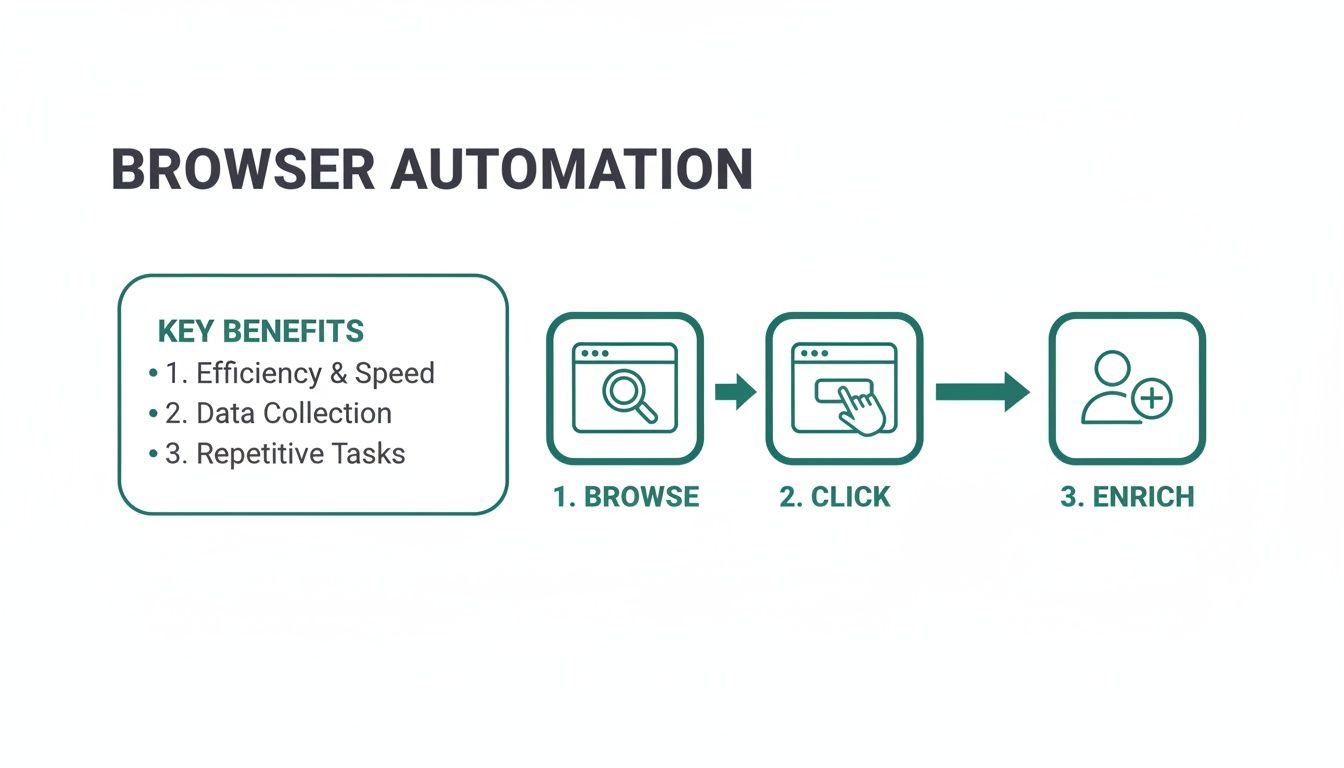
    Diagram illustrating browser automation benefits: efficiency, data collection, and repetitive tasks with a browse, click, and enrich process.

    It perfectly visualizes how you can turn a passive browsing session into an active intelligence-gathering mission.

    Transforming Data Into Conversational Fuel

    Don't forget about the email's domain—it’s a goldmine. If you have jane.doe@techstartup.com, the domain is your next clue. A bit of research on "TechStartup Inc." can uncover critical context:

    • Industry and Niche: Do they operate in a sector you know well?
    • Company Size: Are you dealing with a nimble startup or a massive corporation?
    • Recent News: Have they just landed a huge funding round or launched a new product?

    This isn't just random trivia. It’s the raw material for crafting a message that actually gets read. Mentioning their latest funding round shows you've done your homework and aren't just blasting out another generic email.

    Manual vs Automated Reverse Lookup Methods

    While manual searching has its place, automated tools dramatically speed up the process and often deliver richer data. Here’s a quick comparison.

    Feature Manual Search (e.g., Google, Social Media) Automated Tool (e.g., EmailScout)
    Speed Slow and time-consuming; one contact at a time. Fast and efficient; can process multiple contacts at once.
    Data Quality Variable; depends on public information and search skills. High; aggregates data from multiple sources for accuracy.
    Information Depth Often limited to name, company, and basic social profiles. Comprehensive; provides roles, company details, social links, and more.
    Scalability Not scalable for large lists. Highly scalable; designed for bulk enrichment.
    Ease of Use Requires significant effort and cross-referencing. Simple and user-friendly, often a one-click process.

    Ultimately, while manual methods are free, the time you save and the quality of information you gain from an automated tool often provide a much better return.

    Choosing the Right Tools and Staying Secure

    Automated enrichment tools are powerful, but they often need to connect with your other platforms. Before you jump in, it’s smart to think about security. Taking a few minutes for understanding the safety of connecting third-party apps to your email is a crucial step to keep your data safe and compliant.

    Key Insight: Advanced enrichment is about building a 360-degree view of your contact. It’s the difference between saying, "Hi Jane," and saying, "Hi Jane, congrats on the recent product launch—I saw it featured in TechCrunch."

    This deeper level of research turns a simple email address into a real strategic asset. It gives you the context you need to write messages that resonate, build rapport, and start conversations that actually go somewhere.

    Protecting Your Reputation with Email Verification

    So, you've successfully run a reverse lookup on an email address and found the person you were looking for. Great. But that's only half the battle.

    Figuring out who an email belongs to is useless if sending a message to them tanks your credibility. This is where email verification becomes an absolute must-do.

    Think about it. You spend hours crafting the perfect outreach campaign, hit send, and then watch as a chunk of your messages bounce right back. Every single one of those bounces is a little red flag to email providers like Gmail and Outlook, making you look like a potential spammer.

    Rack up enough of those, and your sender reputation goes down the drain.

    The Hidden Dangers of High Bounce Rates

    Your sender reputation is one of your most valuable assets online. Once it's damaged, even your legitimate emails to real, interested people are far more likely to get buried in the spam folder. In the worst-case scenario, your entire domain can get blacklisted, completely shutting down your email marketing.

    The fallout is more than just poor deliverability:

    • You Get Flagged as Spam: Internet Service Providers (ISPs) watch bounce rates like a hawk. A high rate is one of the fastest ways to get your domain flagged.
    • You Waste Resources: Every bounced email is a sunk cost. It’s time, effort, and money you spent on outreach that never even had a chance to be seen.
    • Your Domain Gets Blacklisted: If you keep sending to bad addresses, you can land on public blacklists, making it almost impossible for anyone to get your emails.

    Verification isn't just a technical chore; it's a strategic move to make sure your messages actually get delivered. It protects your ability to communicate and maximizes the ROI of your entire outreach effort.

    Combining Lookup and Verification for a Clean List

    Thankfully, modern tools get this. They often bundle lookup and verification features into one smooth workflow. This approach makes sure that every contact you find is not only identified but also confirmed to be active and deliverable. You end up with a clean, high-quality list that’s ready for a successful campaign.

    This two-in-one punch is critical for protecting your sender reputation. Fake addresses, invalid emails, and spam traps are everywhere. Major providers like Google and Microsoft have reputation systems that heavily penalize senders who hit these bad addresses. A tool that confirms an email is both real and deliverable helps you dodge these landmines, keep your list clean, and maintain a high sender score.

    This simple practice ensures the intel you gain from a reverse email lookup actually leads to successful conversations, not a trashed reputation. Before you launch anything, you can verify any email address to make sure your list is pristine. It’s the final, crucial step in turning raw data into real opportunities.

    Common Questions About Email Lookups

    When you first dive into the world of a reverse lookup on an email address, a few questions always pop up. It’s smart to get these sorted out before you start, just so you know what’s possible and how to go about it responsibly.

    Let’s clear up some of the most common uncertainties people have.

    Is It Legal to Perform a Reverse Email Lookup?

    The short answer is yes, it's generally legal. The key here is that you're gathering information from publicly available sources. This is a common practice known as Open Source Intelligence (OSINT), which is all about piecing together data that’s already out there on the web.

    Tools like EmailScout work by pulling this public information from places like professional networks, company websites, and online directories. The critical part isn’t the lookup itself, but how you use the information you find.

    Always make sure you’re playing by the rules, especially with privacy regulations like:

    • GDPR (General Data Protection Regulation) if you're dealing with contacts in the EU.
    • CCPA (California Consumer Privacy Act) for anyone based in California.

    As long as you’re using the data for legitimate business reasons—like qualifying a lead or doing professional outreach—and not for harassment or personal snooping, you're in the clear.

    What Information Can I Realistically Find?

    This really depends on the type of email you're looking up. You'll get the most useful professional data from a business email address.

    The main takeaway: You’re aiming to build a professional picture for legitimate communication, not uncover sensitive personal details. Consumer emails from services like Gmail or Yahoo are much more private and will give you far less information.

    For a business address (like jane.doe@company.com), you can often expect to find:

    • The person's full name
    • Their current job title and role
    • The company they work for
    • A direct link to their LinkedIn profile

    Sometimes, you might also find a general location or links to other professional social media accounts, which can be great for adding context to your outreach.

    How Accurate Are Reverse Email Lookup Tools?

    Good tools are highly accurate, especially for business contacts, because they draw from massive, constantly updated databases. But let's be realistic—no tool is 100% infallible. People change jobs, companies rebrand, and roles evolve. The professional world moves fast.

    That's why the best practice is always a two-step process: look up, then verify. The top-tier tools will offer email verification right alongside their lookup features. This final check confirms the email is still active and can receive messages, which protects you from bounces and keeps your sender reputation intact, even if a contact’s job title has changed since the data was last updated.


    Ready to turn anonymous emails into real, actionable leads? EmailScout gives you the tools to perform accurate lookups and enrich your contact data in seconds. Find unlimited emails for free and start building your marketing lists today.
  • Discover email address reverse search to boost outreach

    Discover email address reverse search to boost outreach

    A reverse email search is how you figure out who’s really behind an email address. It’s like turning over a business card you found on the street. That string of characters becomes a real person with a name, job title, company, and even social media profiles. In short, it turns a question mark into a genuine opportunity.

    What Is a Reverse Email Search and Why It Matters

    Ever get an email from a potential lead and your first thought is, "Who is this person?" That’s the exact moment a reverse email search becomes your best friend. It’s not just about running a quick Google search; it’s about digging into professional data to get a real edge. This is your first move to turn a cold, anonymous contact into a warm, informed conversation.

    Over-the-shoulder view of a person wearing glasses and a green sweater, typing on a laptop for reverse email search.

    This isn't just for satisfying your curiosity. For anyone in sales or marketing, this is a core tactic. When you uncover the professional context behind an email, you can customize your pitch, qualify leads with way more accuracy, and start building a real business relationship from the get-go.

    The Growing Importance of Email Intelligence

    Email isn’t going anywhere. It’s still the main way we do business. With the global email user base expected to reach 4.73 billion by 2026, its role in the professional world is rock solid. But that also means your prospect's inbox is more crowded than ever. Generic, uninformed outreach just gets deleted.

    A reverse search gives you the intel you need to break through that noise. To really see how powerful this is, it helps to understand different strategies for finding business email addresses and how this piece fits into the larger puzzle.

    A successful reverse email search provides more than just a name. It delivers actionable intelligence that informs your entire outreach strategy, from the opening line of your email to the specific pain points you address.

    What You Can Uncover with a Reverse Search

    The real magic happens when you use the information you find. Instead of a generic "Hello," you can mention a mutual LinkedIn connection, congratulate them on their company’s recent funding round, or tailor your solution to their exact role. That’s how a simple email becomes a strategic tool.

    Here’s a quick rundown of the kind of intel a good reverse email search can dig up.

    What You Can Uncover with a Reverse Email Search

    Information Type Description Value for Outreach
    Full Name & Job Title The person's complete name and their current role. Instantly personalize your greeting and tailor your message to their professional responsibilities.
    Company Information Details about their employer, like industry, size, and location. Provides context for their needs and helps you align your pitch with their company's goals.
    Social Media Profiles Links to professional networks, most often LinkedIn. Offers deep insights into their career history, recent activity, and professional connections.

    The data you gather allows you to approach outreach from multiple angles, making your communication far more relevant and likely to get a response.

    Finding People with Manual Search Techniques

    Before you jump to an automated tool, it’s worth spending a little time on the old-school manual methods for an email address reverse search. Think of it as digital sleuthing. You’d be surprised how effective these techniques are—they’re almost always free and help you build the kind of investigative instincts that pay off big time.

    Your best friend here is a good old-fashioned search engine, but with a few tricks up your sleeve. Using advanced search operators can dig up mentions of an email address buried in websites, forums, or old press releases that a basic search would completely miss. The simplest and most powerful operator is just putting the email in quotation marks.

    For instance, searching for "j.smith@corporatecorp.com" forces Google to find that exact string. This can instantly pull up a conference speaker page, a comment they left on a blog post, or a citation in an article, giving you immediate context about who you're dealing with.

    Tapping into Professional Networks

    Social media is another goldmine, especially professional hubs like LinkedIn. It's common for people to link their work email to their public profiles, which gives you a direct line to their entire professional background, current job, and network.

    A quick search on LinkedIn for that email address can connect all the dots in seconds. Suddenly, that generic email address transforms into a real person with a face, a job title, and a work history.

    Pro Tip: If you have an email like "first.last@company.com," just search LinkedIn for people with that first and last name who list that company as their employer. Cross-referencing an email pattern with a public profile is one of the fastest ways to get a positive ID.

    A Real-World Scenario

    Let's say you get an email from "sales@startupx.com" asking about your services. It's a generic address, but the domain startupx.com is your clue. A quick trip to their website shows a small team, but no direct contacts are listed for the sales folks.

    This is where you get clever. Hop over to LinkedIn and search for people with "sales" in their title who work at "StartupX." You'll probably find two or three people. From there, it’s an educated guess based on common email patterns to figure out their direct address. For a more detailed breakdown of this, check out our guide on how to find anyone's email address, which dives deep into these pattern-finding strategies.

    This entire process—domain to website, website to LinkedIn, LinkedIn to a specific person—lets you piece together the puzzle without spending a penny. Getting good at these manual skills gives you a powerful, free alternative for any email address reverse search.

    Using Automated Tools for Faster Results

    Let’s be honest, manual searching is a great skill to have, but it just doesn’t scale. When you’re staring down a list of dozens of leads, the manual approach hits a brick wall fast. This is where automated tools come in and completely change the game. They turn a painstaking investigation into a one-click action that serves up rich, actionable data in seconds.

    Platforms built for email address reverse search are designed for one thing: efficiency. They instantly check an email against massive databases, pulling together professional data points far faster than any human could. It's the difference between researching one lead in ten minutes and enriching an entire list in that same amount of time.

    This is what the old way looks like—a multi-step process that requires jumping between different sites.

    A three-step manual search process: email initial query, search engine web search, and social media profile discovery.

    As you can see, a dedicated tool compresses this entire workflow into a single, almost instantaneous step.

    How Reverse Search Platforms Work

    So, how do you tap into this power? Dedicated platforms and browser extensions are your best bet. A tool like EmailScout, for instance, plugs directly into your workflow as a simple Chrome extension. Once it’s installed, running an email address reverse search is as easy as clicking a button whenever you come across an email online.

    These tools are built to surface the exact information you need to personalize your outreach and have a real conversation:

    • Full Name and Job Title: Know exactly who you're talking to and their role in the company.
    • Company Details: Get the context you need, like industry, size, and location.
    • Social and Professional Profiles: A link to their LinkedIn profile is almost always included, offering a goldmine of extra insight.

    This immediate access to data is a huge productivity boost. Instead of wasting your day digging for info, you can focus on what actually moves the needle—crafting a compelling message and building relationships. For a deeper look at the top options, our guide on the best email lookup tools can help you find the right fit.

    The Advantage of Accuracy and Speed

    It’s not just about being faster; it’s about being better. The data quality from top-tier automated tools is often far superior to what you can find on your own. Professional platforms are constantly updating their databases, so the information you get is fresh and reliable.

    The real win with automated tools isn’t just saving time—it’s getting more accurate, verified data that improves the quality of every single interaction. You're not just faster; you're smarter.

    Leading platforms have some seriously impressive stats to back this up. Independent tests have shown some tools achieve around a 74% deliverability rate, which has a direct impact on your campaign’s success. Higher accuracy means lower bounce rates and a much better chance your message actually gets read. You can find more benchmarks and see why they matter for sales teams over at Snov.io.

    Ultimately, adding a dedicated email address reverse search tool to your daily routine is a no-brainer. It takes the manual grind out of the equation and gives you the high-quality data needed to make every outreach effort count.

    How to Validate Your Search Results

    Finding a name and job title is a great start, but it's only half the battle. The real value comes from knowing that information is accurate. Trust me, inaccurate data leads to embarrassing outreach mistakes and bounces that can seriously damage your sender reputation.

    Verifying your findings is the non-negotiable step that separates the amateurs from the pros.

    Two businessmen review contact information on a tablet in a modern office environment.

    The first thing I always do is cross-reference. If a tool tells me an email belongs to "John Doe, Marketing Director at Acme Inc.," I immediately pop open two new tabs: John's LinkedIn profile and Acme Inc.'s official website. I'm looking for consistency across all three sources.

    This simple check helps you avoid common pitfalls. Does the LinkedIn profile picture match other online photos? Is the job title the same as what the company website lists on its team page? Any mismatch is a major red flag that the data might be outdated or just plain wrong.

    A Practical Verification Checklist

    Think of yourself as a detective piecing together clues. Your goal is to build a confident profile before you ever hit "send." Here’s a quick checklist I run through to spot inconsistencies and confirm I've got the right person:

    • Social Media Consistency: Does the name and company on LinkedIn line up with their activity on other professional platforms like X (formerly Twitter)?
    • Company Website Confirmation: Can you find the person on the company's official team page or in recent press releases? This is a huge positive signal.
    • Digital Footprint Analysis: Does a quick search for their name and company reveal recent articles, conference speaker lists, or interviews that confirm their role?

    The goal of validation isn't to find a single, perfect source of truth. It's about gathering multiple data points that all point in the same direction, giving you the confidence to move forward.

    Using Email Verification for Final Confirmation

    Okay, the final and most crucial step is making sure the email address itself is active and can receive mail. Sending emails to invalid addresses is the fastest way to get your domain flagged as spam, and that's a hole that's tough to dig out of.

    The potential return from email is massive—it can deliver a 36:1 ROI—so protecting your ability to actually land in the inbox is paramount.

    Many dedicated reverse search platforms, including EmailScout, have built-in verification. This service basically pings the mail server to check if the address is valid without actually sending an email. It’s a clean, safe way to confirm deliverability and protect your sender score.

    If you want to get into the weeds of how this works, you can learn more about how to validate an email address and see why it’s a non-negotiable part of any serious outreach workflow. This simple check ensures your carefully crafted message actually has a chance of being read.

    Staying Compliant with Legal and Ethical Rules

    Finding someone's information with a reverse email search is a powerful tool, but it comes with real responsibility. What you do with that data is just as critical as how you found it. Getting a handle on the legal side of things isn't just about dodging fines—it’s about building trust and protecting your brand's reputation from the get-go.

    The main rules of the road are set by regulations like Europe's GDPR (General Data Protection Regulation) and California's CCPA (California Consumer Privacy Act). They might seem complicated, but their core ideas are pretty simple: be open, have a good reason to reach out, and always respect a person’s right to say "no."

    Understanding Legitimate Interest

    For anyone doing B2B sales or marketing, the concept of legitimate interest is your North Star. This legal basis generally gives you the green light to contact a professional if your product or service is truly relevant to their job.

    For instance, if your search reveals an email belongs to a Head of Marketing and you sell marketing automation software, you're likely covered by legitimate interest.

    But this isn't a free-for-all. Your outreach still needs to be reasonable and not overly intrusive. Relevance is everything. Blasting a generic pitch to every email you uncover is not only bad form—it completely undermines your legal justification.

    Always ask yourself this one simple question: "Would this person reasonably expect to hear from a business like mine about this topic in their professional capacity?" If the answer is a fuzzy "maybe" or a flat-out "no," you're on shaky ground.

    Ethical Guidelines for Responsible Outreach

    Beyond the black-and-white letter of the law, sticking to high ethical standards is what separates the pros from the spammers. Responsible outreach builds relationships. Irresponsible tactics burn bridges and can even get your domain blacklisted.

    Here are a few non-negotiable rules our team lives by:

    • Never, Ever Use Purchased Lists: These lists are notoriously full of old, unconsented contacts. They're a one-way ticket to spam folders, legal headaches, and a trashed sender reputation.
    • Provide a Clear Opt-Out: Every single email you send must have a dead-simple, impossible-to-miss way for someone to unsubscribe. This is a must-have under laws like the CAN-SPAM Act, not a suggestion.
    • Be Transparent: Don't try to be clever or hide who you are. Be upfront about your name, your company, and why you're reaching out. Authenticity wins every time.
    • Add Value, Don't Just Ask: Your first message should offer something useful or insightful that's tailored to their role. A generic "Got 15 minutes?" gets deleted. An email that shows you've done your homework gets a reply.

    When you treat the data you find with respect, you empower your team to build high-quality lead lists and conduct outreach with confidence. It all starts with building trust from that very first interaction.

    Advanced Strategies for Sales and Marketing Teams

    Okay, finding a single person's contact info is useful. But a reverse email search can be the engine that powers your entire outreach machine if you think bigger.

    Instead of just one-off lookups, imagine enriching entire lead lists at scale. Let's say you just hosted a webinar. You can run that whole list of attendee emails through a tool and transform them from anonymous sign-ups into complete professional profiles.

    Suddenly, you have job titles, company sizes, and LinkedIn profiles. Your sales team can immediately see who the high-value leads are and prioritize them. It’s all about working smarter, not just harder.

    Personalization Beyond the First Name

    With this rich data in hand, your outreach can get incredibly personal and, more importantly, relevant. Generic templates are dead on arrival; they get deleted instantly. But a message that shows you’ve done your homework? That gets opened.

    Properly using this information is the secret to unlocking business growth with customer data.

    Instead of another generic pitch, you can lead with something that shows you're paying attention:

    • Reference their work: "Saw the article you published on content marketing—your point about video engagement was spot on."
    • Acknowledge company news: "Congratulations on the recent Series B funding. It must be an exciting time for the team."
    • Connect to their role: "As the Head of Sales, I imagine improving lead conversion rates is a big focus for you this quarter."

    This isn't just flattery; it’s strategy. This level of detail shows genuine interest and immediately separates you from the noise. You go from being "just another salesperson" to a helpful resource who understands their world.

    Troubleshooting Common Roadblocks

    Even with the best tools, you're going to hit dead ends. Sometimes a search comes up completely empty, or you only find a generic info@company.com address. Don't throw in the towel.

    If you can't find an individual, pivot to the company domain. Hunt for a team page on their website or run a search on LinkedIn for employees with the right kind of job title.

    For those generic "info" or "contact" addresses, just send a polite, quick message asking to be pointed in the right direction. You'd be surprised how often the person managing that inbox is happy to forward your note to the right person.

    Still Have Questions? Let's Clear a Few Things Up

    You've got the methods down, but it's natural to have a few lingering questions. Here are some of the most common ones I hear, with straight-to-the-point answers to help you move forward.

    Is This Whole Reverse Email Search Thing Even Legal?

    Yes, for B2B outreach, it's generally above board. You're almost always pulling information that's already publicly available. The real legal tripwire isn't finding the data, but how you use it.

    Regulations like GDPR and the CCPA are all about the proper handling of personal information. The key is to operate under "legitimate business interest." Just make sure your outreach is relevant to their professional role and always, always give them a clear and easy way to opt out.

    How Accurate Are These Search Tools, Really?

    Honestly, it varies. But the top-tier tools are impressively reliable. We've seen industry benchmarks showing some of the best platforms hitting around a 74% deliverability rate, which is pretty solid. They work by cross-referencing a ton of different data points behind the scenes.

    My best advice is to always use a tool that includes an email verification feature. This confirms an address is active before you send anything, protecting your sender reputation.

    What If My Search Comes Up Completely Empty?

    Don't throw in the towel just yet. If a tool strikes out, it's time to go manual. Try a few different search engine operators, like wrapping the email address in quotes to look for an exact match.

    Also, take a look at the email's domain. Does it lead to a company website? You might find a staff directory or an "About Us" page with the contact you need. If you're still hitting a wall, it could mean the email is private, brand new, or not tied to any public accounts. Your best bet then is to pivot and try to find an alternative contact at the same company.


    Ready to stop guessing and start connecting? EmailScout gives you the power to find and verify professional email addresses in a single click, turning anonymous contacts into valuable leads. Try EmailScout for free today and see the difference for yourself.