

When you need to find someone's email address, it usually comes down to two paths: making a smart guess based on common patterns (think firstname.lastname@company.com) or firing up a specialized email lookup tool. Both are great places to start before you get into more complex tactics.
Your Smart Starting Point to Find Any Email
Before you even think about advanced tools or paid services, it's always best to start with the foundational strategies. These often get you the email you need in just a few minutes.
Think of it as your first line of attack. You're combining a bit of clever guesswork with information that's already out there. The goal here is to solve the puzzle quickly without overcomplicating things. It’s all about efficiency. Most companies use predictable email formats, so a quick search can often confirm your hunch. If you're trying to reach someone at a startup, for instance, they'll often use a simple firstname@company.com structure.
Laying the Groundwork
First things first: gather the basics. You need their first name, last name, and the company they work for. With just these three pieces of info, you can start piecing together the most likely email combinations. This manual approach is surprisingly effective and costs nothing but a little bit of your time.
Don't forget to check professional networks, either. A person's LinkedIn profile or even a company's "About Us" page can give you clues or sometimes the email address itself. People in public-facing roles often list their contact details right out in the open. For more targeted strategies, you can check out our guide on how to find company email addresses.
The truth is, most professional email addresses aren't truly hidden; they're just not listed front and center. Your job is to connect the dots with publicly available data, turning the search into a simple puzzle instead of an impossible mission.
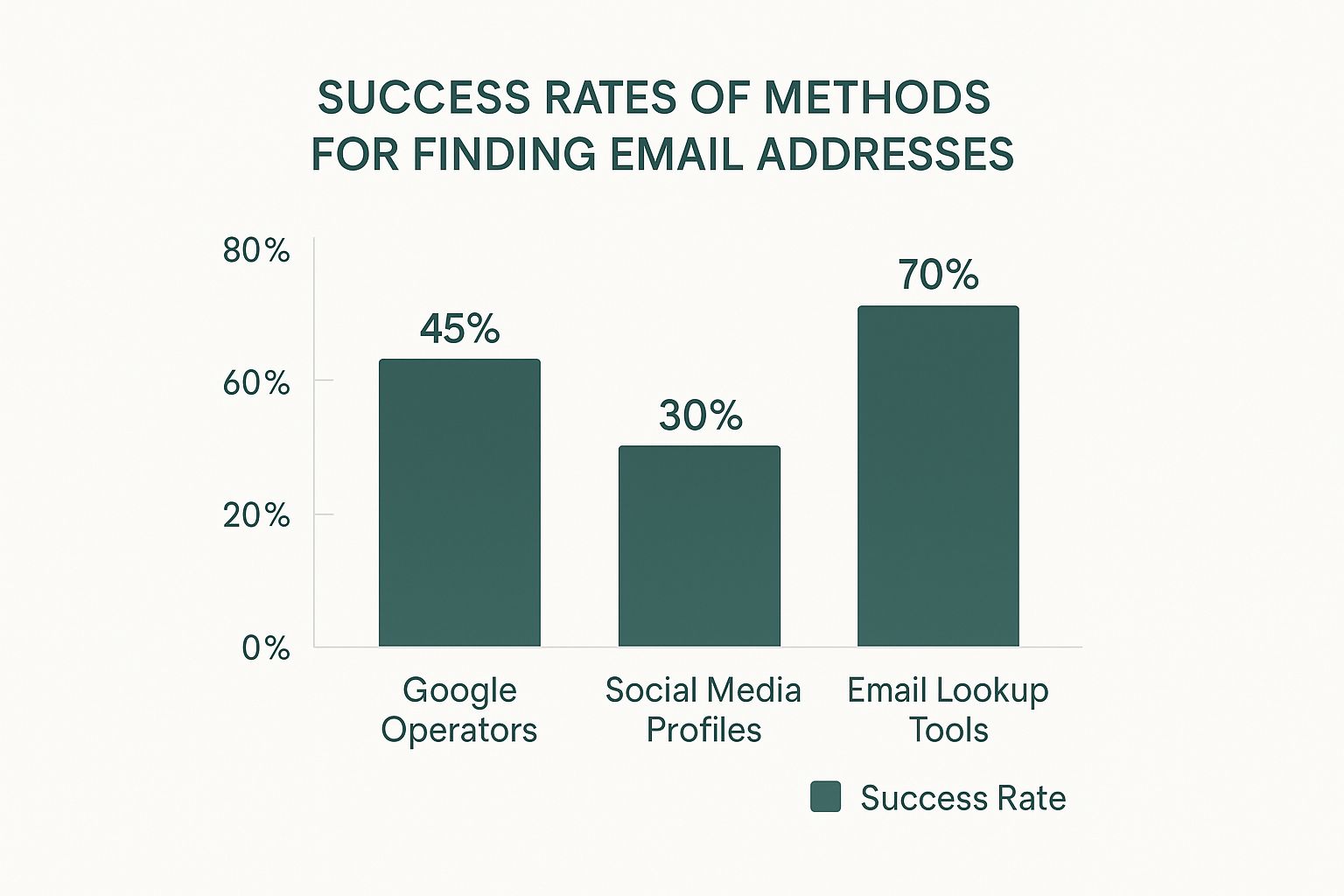
To give you a better idea of where to spend your energy, let's look at how different methods stack up.
Comparing Email Finding Methods
This table offers a quick look at the most common email discovery methods, highlighting their effectiveness, time investment, and potential costs.
| Method | Success Rate | Time Commitment | Cost |
|---|---|---|---|
| Manual Guessing | Low to Medium | Medium | Free |
| Google Search | Medium | Medium | Free |
| LinkedIn Search | Medium | High | Free (Time) |
| Lookup Tools | High | Low | Varies (Free to Paid) |
As you can see, while manual methods are a great start, specialized lookup tools consistently deliver the best results with the least amount of effort.
Why Start Simple
Kicking things off with these basic techniques helps you quickly grab the low-hanging fruit. With an estimated 4.83 billion email users worldwide by 2025, the amount of discoverable data is just massive.
This sheer volume means that simple, pattern-based searches often work because they tap into the predictable structures that organizations use to manage their communications. This foundational approach ensures you only move on to more powerful tools when you really need to, saving you both time and money.
Before you jump to paid tools and automated solutions, it’s worth mastering the art of the manual search. It’s a powerful, cost-free skill that feels a bit like digital detective work, often uncovering contact details that are hiding in plain sight.
This old-school approach is perfect when you need to find that one key contact without burning through credits. Think of it as digital forensics—you're piecing together clues like a name, company, and job title to find what you need. It’s a foundational technique every sales pro or marketer should have in their back pocket.

Go Beyond a Basic Google Search
A simple search for "John Smith Acme Corp email" probably won't get you very far. This is where Google’s advanced search operators come in. These are little commands that let you filter out the noise and narrow your search results with incredible precision.
Using operators, you can pinpoint emails mentioned on company websites, buried in press releases, or even hidden inside public documents.
Here are a few of my go-to operators to get you started:
site:company.com "John Smith"— This is a game-changer. It forces Google to only search that specific company's website."John Smith" + "email"or"contact"— This simple combo tells Google to find pages that contain both the person's name and words like "email" or "contact."filetype:pdf "John Smith" email— You'd be surprised how often contact details show up in PDFs like conference speaker lists or annual reports. This operator finds them.
The secret to effective manual searching isn't just knowing what to look for, but how. Advanced operators transform Google from a blunt instrument into a precision tool for email hunting.
Test Out Common Email Formats
Okay, so you have a name and a company domain. Now what? You can start making some educated guesses. Most companies use a consistent pattern for their email addresses, and your job is to figure out that pattern.
Let's say you're looking for Jane Doe at example.com. You can quickly test a few of the most common combinations.
Common Email Permutations
- First Name:
jane@example.com - First Initial + Last Name:
jdoe@example.com - First Name + Last Name:
janedoe@example.com - First Name . Last Name:
jane.doe@example.com
This permutation process is surprisingly effective. But you can't just start firing off emails—a bounce could hurt your sender reputation. With over 4.2 million emails sent every second in 2024, making sure your outreach actually lands is more critical than ever. (EmailToolTester.com has some wild stats on this).
The Art of Free Verification
Guessing the email is only half the battle; now you have to confirm it’s legit without sending a risky, bounce-prone email.
One of my favorite quick tricks is to use Gmail. Just open a new message, paste a guessed address into the "To" field, and hover your mouse over it. If a Google profile picture or contact card pops up, you’ve likely got a valid, active account. Bingo.
For more certainty, though, a dedicated tool is the way to go. To get the full rundown on this, check out our guide on how to validate an email address for free.
Tap into Public Information Sources
Sometimes, the email you need isn't on the company website at all. It's somewhere else entirely. People often share their contact info on personal platforms or in other public-facing roles. Thinking outside the box here can pay off big time.
Here are a few often-overlooked goldmines:
- Author Bylines: If your prospect writes for industry publications, their bio at the end of an article frequently includes a direct email.
- Personal Blogs or Websites: Many professionals run a personal site for a portfolio or side hustle, and there's almost always a contact page.
- Company "About Us" Pages: Don't just scan the leadership team. Look for press contacts, investor relations, or department heads—these sections often list direct email addresses.
When you combine these manual tactics, you build a methodical process for discovery. Sure, it takes more legwork than an automated tool, but the satisfaction of finding that hard-to-get email for free is totally worth it.
Using Social and Professional Networks
When you're trying to track down someone's email address, social and professional networks are often your most direct path. Platforms like LinkedIn were literally built for professional networking, making them a goldmine for contact info—if you know where to look.
These sites aren't just static digital resumes. They're living, breathing communities where people share updates, post articles, and sometimes, drop their contact details right out in the open. Your job is to approach it like a detective, piecing together the clues that lead to the right inbox.

The trick is to think beyond the obvious. Sure, the "Contact Info" section is the first place everyone checks, but many professionals keep it private or haven't updated it in years. This is where a little creativity goes a long way.
Digging Deeper on LinkedIn
LinkedIn is the undisputed king of B2B prospecting, but just landing on a profile is rarely enough. Always start with the "Contact Info" section, as you might get lucky. If that’s a dead end, it’s time to get resourceful.
A person's activity feed can be incredibly revealing. Take a minute to scroll through their recent posts, articles, and even their comments on other people's content. Did they just share a big project and invite questions? They might have included their email right in the post.
Another spot people often miss is the "About" summary. It's common for consultants, freelancers, and business owners to put a call-to-action right in their bio, complete with an email address for inquiries. This simple manual check can save you a ton of time. For a deeper dive, our comprehensive guide covers more advanced techniques for how to find emails on LinkedIn.
Uncovering Emails on Twitter (X)
While LinkedIn is buttoned-up and professional, Twitter (now X) is all about conversation, and that casual vibe can work in your favor. Over the years, countless users have tweeted their email address, but they often disguise it to throw off spam bots. This is where X's advanced search becomes your secret weapon.
Instead of just searching for their name, pop these specific queries into the search bar:
from:[username] "email me"from:[username] "at domain dot com"from:[username] name [at] domainfrom:[username] contact OR reach
These commands can unearth old tweets where someone shared their email in a bot-proof format like "jane [at] company dot com". It feels like a long shot, but you'd be surprised how often this works, especially for journalists, marketers, and tech folks who are active on the platform.
Remember that people share information differently across platforms. The professional persona on LinkedIn might be more guarded, while the conversational tone on Twitter could lead to a direct share of contact information.
Leveraging Company Pages and Groups
Don't get tunnel vision focusing only on individual profiles. Company pages on LinkedIn are another fantastic resource. Head over to the company's page and click on their "About" section. You'll often find generic but useful contact emails like press@company.com or info@company.com.
These might not be a direct line to your target, but a polite, well-worded request can get you there. A simple message like, "Could you please forward this to the person who handles marketing partnerships?" is often passed along to the right individual.
LinkedIn Groups in your target's industry are also a fantastic, underutilized resource. When you become an active, helpful member of a group, you earn the ability to message other members directly, even if you aren't connected. This gives you a warm entry point to build a little rapport before asking for the best email to continue the conversation. It’s about networking, not just hunting for data.
Putting Free Email Finder Tools to Work
When your manual detective work hits a brick wall, it's time to bring in the machines. Free email finder tools are built to do the grunt work for you, scanning public data sources in seconds to unearth the contact info you need. A good tool can feel like a superpower, turning a frustrating hour-long search into a one-click find.
These tools work by piecing together digital footprints. They analyze company websites, social media profiles, and massive databases to predict and verify email addresses with a surprisingly high degree of accuracy. Instead of you manually trying every possible name combination, the software does it for you—and often verifies it in real-time.
Choosing the Right Free Tool for the Job
Of course, not all free tools are created equal. Some are browser extensions that slide right into your workflow on sites like LinkedIn, while others are web apps where you'll need to plug in data yourself. The trick is finding one that fits how you work, whether you're hunting for a single contact or building out a larger prospect list.
When you're sizing up a tool, here’s what to look for:
- Monthly Credits: Most free plans will cap how many searches you can do each month. This can be anywhere from 5 to 50 credits, so think about your typical outreach volume.
- Verification Accuracy: A great tool doesn't just find emails; it verifies them. You want something that promises a high deliverability rate to protect your sender reputation from bounces.
- Ease of Use: The best tools are just plain intuitive. A browser extension like EmailScout is fantastic because it works right where you're already prospecting, like on a LinkedIn profile.
- Data Provided: Some tools spit out just an email address. Others might give you more context, like job titles, company size, and social media links, which is always a plus.
The goal isn't just to find an email address, but to find the right one. A quality free tool should deliver verified, up-to-date information that saves you time and prevents bounced emails, making your outreach far more effective from the start.
A Practical Walkthrough with EmailScout
Let's see how this works in the real world. Say you want to connect with a marketing manager at a specific tech company. You've tried the manual approach and come up empty. Time to call in a Chrome extension like EmailScout.
The process couldn't be simpler. First, you just add the extension to your browser from the Chrome Web Store. Once it's installed, its little icon will pop up in your toolbar, ready for action.
Next, head over to your prospect's LinkedIn profile. The EmailScout extension is smart enough to know you're on a profile page. Give the icon a single click, and it starts its search, cross-referencing the person’s name, company, and other public data to pinpoint their most likely email address.
In seconds, the tool serves up a verified email. You haven’t had to guess a single format or open another tab. This is how you find an email address with maximum efficiency. With the average user juggling nearly 1.86 email accounts, as noted in these email usage statistics on porchgroupmedia.com, a dedicated tool is invaluable for homing in on the correct professional address.
Comparing Top Free Email Finder Options
While EmailScout is a powerhouse for its seamless LinkedIn integration, other tools have different strengths. Knowing what's out there helps you build a versatile toolkit for any situation that comes your way.
Here’s a quick look at a few popular free options:
| Tool | Best For | Free Plan Limits | Key Feature |
|---|---|---|---|
| EmailScout | LinkedIn Prospecting | Unlimited Free Searches | One-click email finding directly on LinkedIn profiles and websites. |
| Hunter.io | Domain-Based Searches | 25 monthly searches | Finding all emails associated with a specific company domain. |
| FindyMail | Bulk Verification | 10 monthly credits | Uploading a list of names and companies to find emails in bulk. |
This variety means you can use one tool for highly targeted, individual searches and another when you need to build a bigger list for a broad marketing campaign.
Limitations of Free Tools to Keep in Mind
As useful as free email finders are, they do have their limits. The most obvious is the cap on monthly searches. If you're in a high-volume sales or recruiting role, you might torch your free credits in the first week of the month.
Also, while accuracy is generally high, no tool is perfect. You might occasionally get an unverified or outdated email address. That's why it's always a good habit to use the built-in verification features or run a particularly important email through a secondary checker.
Ultimately, these tools are a fantastic starting point. They save countless hours and give you a massive leg up over purely manual methods. By folding a tool like EmailScout into your workflow, you can spend less time on the hunt and more on what really matters: crafting the perfect outreach message.
Outreach Ethics and Best Practices
Finding a valid email is a huge win, but it’s only the first step. How you use that information is what separates successful outreach from spam that gets you blacklisted. Just because you can find anyone's email address doesn’t mean you have an automatic pass to their inbox.
Respectful, ethical outreach is the foundation of building real professional relationships. It’s about creating value, not just making a request. Ignoring this part can seriously damage your personal brand and your company's domain reputation, making all that hard work finding the email completely pointless.
Navigating Email Regulations
Before you hit "send," you need to know the rules of the road. Regulations like the GDPR (General Data Protection Regulation) in Europe and the CAN-SPAM Act in the United States aren't just legal jargon; they're frameworks designed to protect people from a flood of unwanted emails.
Let's break them down simply:
- GDPR: This requires you to have a lawful reason for handling someone's data (like their email). For cold outreach, this usually means having a "legitimate interest" that doesn't override the individual's rights. You also have to clearly identify yourself and provide an easy way to opt out.
- CAN-SPAM Act: While less strict, it still has clear rules. You can't use misleading subject lines, you must include a physical address, and you have to honor opt-out requests quickly.
These laws aren't meant to stop you from doing business. They exist to stop bad actors and make sure communication is transparent and respectful.
Professional Outreach Versus Spam
So, what's the real difference between a thoughtful cold email and a spam message? It all boils down to personalization and value.
Spam is generic, irrelevant, and totally self-serving. Professional outreach is the exact opposite. Your goal is to show the recipient you've done your homework and have a genuine reason for contacting them specifically.
The moment a recipient feels like they're just one name on a massive, impersonal list, you've lost. True outreach starts with seeing the individual, not just the email address.
This is where your initial message becomes absolutely critical.
Crafting a Welcome First Email
Your first email sets the entire tone. It needs to be sharp, respectful of their time, and immediately prove you're not a spammer. A poorly crafted message will get deleted in seconds, but a great one can open doors.
Key Components of a Great First Touch
- A Compelling Subject Line: Make it specific and intriguing, but never clickbait. Instead of "Quick Question," try something like "Idea about [Their Company]'s recent launch."
- A Personalized Opening: Immediately show you know who they are. Mention a recent article they wrote, a project they led, or even a comment they made on LinkedIn.
- A Clear Value Proposition: Get to the point fast. Explain why you're reaching out and what's in it for them. How can you help them solve a problem or hit a goal?
- A Simple Call-to-Action (CTA): Don't ask for a 30-minute meeting right away. That's a huge commitment. Instead, suggest a low-friction next step, like asking if they're the right person to speak with or if they'd be open to a brief follow-up.
Remember, your initial email isn't a sales pitch—it's the start of a conversation. By leading with respect, personalization, and a clear purpose, you honor the effort it took to find their email and dramatically increase your chances of getting a positive response.
Common Questions About Finding Emails
Even with the best tools, you'll eventually hit a wall or run into a gray area. Finding an email address is one thing, but knowing what to do when your search comes up empty—or navigating the legal stuff—is what really separates the pros from the amateurs.
Let's dig into some of the most common questions that pop up.
What If All Methods Fail?
You’ve tried every pattern, scoured LinkedIn, and even used a top-tier email finder, but still nothing. It's a frustrating spot to be in, but it’s definitely not a dead end. When a direct approach fails, it's time to get a little more creative.
Instead of tunneling in on that one specific address, broaden your strategy:
- Go for a General Inbox: An
info@company.comorcontact@company.commight feel like a long shot, but they're always monitored. A clear, concise message asking to be connected with the right person often gets you exactly where you need to go. - Connect on Social: A polite, professional DM on LinkedIn or X (formerly Twitter) can work wonders. The goal isn't to pitch right away, but simply to ask for the best way to get in touch about your topic.
- Find a Colleague: Can't find the director's email? Try their manager or someone else on the team. A friendly note to a colleague in the same department can often get your message forwarded to the right person.
When you can't find a direct email, the game changes. Your new goal isn't to uncover a hidden address—it's to find an open door to the right conversation.
This pivot from a direct to an indirect approach shows you're resourceful and respectful, which honestly makes for a much better first impression.
How Can I Verify an Email for Free?
Finding a potential email is only half the battle. Firing off a message to a bad address tanks your sender reputation and can get you flagged as spam. You have to verify before you send.
The good news? You can do it for free.
One of the oldest tricks in the book is the Gmail hover method. Just pop the email into the "To" field of a new draft in Gmail. Hover your mouse over it. If a Google account profile picture or contact card shows up, you've likely found a valid, active address. It's a fantastic first-pass check.
For a more technical confirmation, free email verification tools are your best bet. Plenty of services offer a handful of free checks each month. These tools run a deeper diagnostic to confirm the address can actually receive mail, which is crucial for keeping your bounce rate low.
Is It Legal to Contact Someone This Way?
This is the big one, and the answer isn't a simple yes or no. Generally speaking, it is legal to use someone's publicly available business email for professional outreach, as long as you play by the rules.
The two main regulations you need to know are:
- GDPR (General Data Protection Regulation): This applies to EU citizens and requires you to have a "legitimate interest" for the contact. In simple terms, your outreach has to be relevant to their professional role.
- CAN-SPAM Act: In the U.S., this law demands that your message isn't misleading, includes your physical address, and provides a clear, simple way for the person to opt out.
Here's the bottom line: don't be a spammer. If your outreach is personalized, relevant to their job, and you respect their right to say "no thanks," you're operating well within ethical and legal boundaries.
Ready to stop guessing and start connecting? The EmailScout Chrome extension finds verified email addresses in a single click, directly on LinkedIn profiles and company websites. Find unlimited emails for free and build your outreach lists faster than ever.