
Ever sent an email campaign and felt like you were just shouting into the void? You’re not alone. Email validation software is the tool that stops you from talking to a wall. It’s a simple, automated check to see if an email address is real, active, and can actually receive your messages.
Think of it as a bouncer for your email list. It checks IDs at the door, ensuring only real, interested people get in, so you don't waste your time (and money) on digital ghosts.
What Is Email Validation Software and Why Does It Matter

Imagine your sales team spends a whole week crafting the perfect cold outreach emails, only to watch them bounce back one by one. It’s more than just a bummer; it’s a huge waste of resources and a direct hit to your sender reputation.
An unvalidated email list is like using a map from 1995 to find new customers. You're going to hit dead ends, run out of gas, and probably give up before you ever reach your destination.
Email validation software is the modern-day GPS for your campaigns. It scrubs your contact lists, flagging addresses that are misspelled, fake, or just plain dead. It’s a preventative measure that’s absolutely critical for any team counting on email to bring in revenue. Without it, you’re just flying blind.
The True Cost of an Unvalidated Email List
The table below breaks down the real-world damage that a "dirty" list can do to your sales and marketing efforts. It's not just about a few bounced emails; the consequences are far-reaching and can undermine your entire outreach strategy.
| Problem Area | Impact on Sales & Marketing | How Validation Helps |
|---|---|---|
| Damaged Sender Reputation | ISPs (like Gmail) see you as a spammer, sending your emails directly to the junk folder. | Protects your sender score by ensuring you only send to valid, active inboxes. |
| High Bounce Rates | A bounce rate over 2% triggers alarms with email providers, hurting future deliverability. | Drastically reduces hard bounces by removing invalid addresses before you send. |
| Wasted Budget & Time | Every bad email costs money (if you pay per send) and wastes your team's valuable time. | Maximizes ROI by focusing resources only on contacts who can actually be reached. |
| Inaccurate Campaign Data | Low open and click rates from undelivered emails make your analytics completely unreliable. | Provides a clean data set for accurate performance measurement and smarter decisions. |
Ultimately, sending emails to a bad list isn't just ineffective—it actively works against you by making it harder to reach the right people down the road. It's a compounding problem that only gets worse with every campaign you launch.
A Foundation for Growth
Clean data is the bedrock of any successful outreach. It’s impossible to overstate how crucial email validation is for effective lead generation in sales, where a valid email is the first step to starting a real conversation.
Think about it: if your contact list is full of typos and dead ends, your entire sales engine is sputtering on bad fuel.
By putting an email validation software in place from the get-go, you ensure every single lead has the potential to turn into a customer. This isn't just a "nice-to-have" tool anymore; it’s a foundational piece of a healthy, predictable revenue pipeline.
How Email Validation Works Under the Hood
Ever wonder what actually happens when you click “validate”? It’s not magic. It’s a lightning-fast, multi-step process that good email validation software runs in the background. Think of it as a digital detective examining every clue to figure out if an email address is real and reachable.
This whole process is designed to be quick, accurate, and completely invisible to you. Each check builds on the last, creating a thorough filter that weeds out bad data before it can ever mess up your outreach campaigns. Let's pull back the curtain and see how it works, step-by-step.
Step 1: The Syntax Check
The first thing any validation tool does is a basic syntax check. This is like a quick proofread of the email address itself, making sure it follows the standard format everyone knows. It’s a simple but crucial first gate that catches obvious typos right away.
The tool inspects the address for a few key things:
- The "@" Symbol: It confirms there is one—and only one—"@" symbol. An address like
johndoe.email.comorjohn@@doe.comwould fail instantly. - The Local Part: This is everything before the "@". The software scans for illegal characters, like spaces or certain symbols that just aren't allowed.
- The Domain Part: This is what comes after the "@". It ensures the domain name (
example.com) looks right and ends with a valid top-level domain like.com,.org, or.net.
This initial scan is super fast and weeds out addresses that are just plain wrong from the start. You can learn more about spotting some of these issues yourself in our guide on how to verify if an email address is valid.
Step 2: The Domain and MX Record Check
Once an email gets the green light on syntax, the software digs a little deeper. It checks if the domain itself is real and, more importantly, if it’s actually set up to receive emails. This is like checking if the city and post office for a letter exist on a map before you send it.
First, the tool looks up the Domain Name System (DNS) records for the domain. If the domain (example.com) doesn't exist or has expired, the email is immediately flagged as bad. No point going any further.
If the domain is live, the software then looks for a specific DNS record called a Mail Exchanger (MX) record.
An MX record is basically the address of the mail server in charge of handling all incoming emails for that domain. If a domain doesn't have a valid MX record, it means there's no "post office" to deliver the email to. The address is undeliverable.
Step 3: The SMTP Handshake
This is the final and most sophisticated part of the process. The SMTP handshake, or ping, is like walking up to someone’s front door and knocking to see if they're home—but without actually opening the door or leaving the package.
The validation software starts a conversation with the recipient's mail server using the Simple Mail Transfer Protocol (SMTP). It mimics the first few steps of sending an email without ever actually sending it. The server’s response tells the software everything it needs to know. If the server says, “Yep, john.doe has an active mailbox here,” the email is marked as valid.
If the server responds with an error saying the user is unknown, the address is flagged as invalid. This real-time check gives you the highest level of confidence that an inbox is active and ready to receive your message.
Detecting Disposable and Role-Based Accounts
Modern email validation software doesn't stop at just "valid" or "invalid." It also flags specific types of emails that, while technically deliverable, might be duds for your sales and marketing efforts.
- Disposable Email Addresses: These are temporary, throwaway inboxes from services like
mailinator.com. People use them to sign up for things without giving away their real email. They’re usually abandoned quickly and are totally useless for building relationships. - Role-Based Email Addresses: These are emails for a job function, not a person—think
info@,support@, orsales@. While they work, they often have low engagement and probably won't reach the specific decision-maker you're looking for.
Spotting these accounts lets you clean up your lists and make sure your personalized messages are actually reaching a real person. This kind of detailed analysis is a big reason the email deliverability tools market, valued at USD 1.2 billion in 2024, is projected to hit USD 1.9 billion by 2030. Businesses everywhere are realizing they need smarter tools to get past spam filters and see a real return on their B2B marketing.
The Tangible ROI of Email Validation
Alright, enough with the technical jargon. Let's talk about what really matters: the bottom-line results. Bringing email validation software into your workflow isn't just another business expense; it's a direct investment in growing your revenue. For any team that lives and breathes by email, a clean list is the fastest way to better performance, healthier pipelines, and a return on investment you can actually predict.
Think of it like this: sending emails to a list you haven't verified is like running a paid ad campaign with no targeting. You're just throwing money and time into the void, hoping you hit someone who cares. A lot of that effort is completely wasted on an audience that will never even see your message. Validation is what sharpens your aim, making sure every dollar and every minute you spend is focused on real people you can actually reach.
This chart breaks down the simple, three-step process that a validation tool uses to protect your outreach.
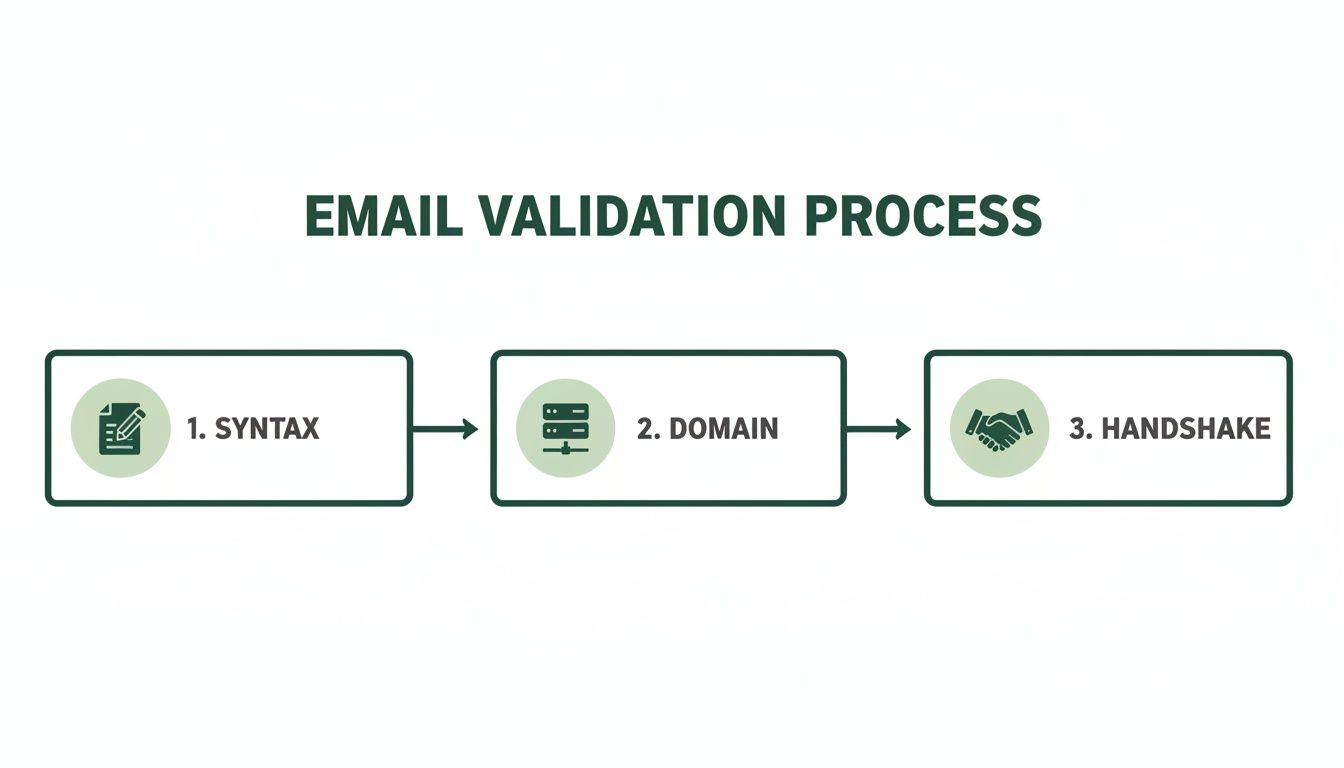
Each of these stages acts as a gatekeeper. It filters out the bad addresses so your messages have the best possible chance of landing in a real person's inbox.
While both sales and marketing see huge benefits, the specific ROI looks a little different for each. Here's a quick comparison of where each team gets the most value.
Email Validation ROI for Sales vs Marketing Teams
| Metric/Benefit | Impact for Marketing Teams | Impact for Sales Teams |
|---|---|---|
| Deliverability & Reputation | Preserves sender score, ensuring emails land in the primary inbox, not spam. | Fewer bounced emails mean their personal or team domain stays in good standing. |
| Engagement Metrics | Provides accurate open, click, and conversion rates for true campaign analysis. | Focuses on leads who are actually reachable, making engagement stats meaningful. |
| Lead Quality | Ensures marketing qualified leads (MQLs) are based on real, contactable people. | Guarantees that sales qualified leads (SQLs) have valid contact points. |
| Productivity & Efficiency | Reduces wasted ad spend and resources on nurturing non-existent leads. | Eliminates wasted time personalizing outreach to prospects who don't exist. |
| Cost Savings | Lowers the cost per lead by ensuring marketing efforts reach their intended audience. | Reduces Customer Acquisition Cost (CAC) by increasing rep efficiency and close rates. |
Ultimately, a clean list is the foundation for a healthy pipeline, whether you're warming up leads with content or sending one-to-one outreach to close a deal.
Better Performance for Marketing Teams
For marketers, the impact of a clean list is almost instant. The moment you stop sending emails to dead addresses, your entire campaign funnel starts to look healthier. High bounce rates are a massive red flag for Internet Service Providers like Gmail and Outlook, and they will absolutely tank your sender reputation, pushing all your future emails straight to spam.
By slashing your bounce rate, you protect that reputation. This directly leads to:
- Higher Deliverability: Way more of your emails actually make it to the inbox.
- Improved Open and Click Rates: When more people see your email, more people engage with it. Simple as that.
- Accurate Campaign Analytics: Your metrics finally start telling the real story of user interest, without all the noise from failed deliveries.
This simple change turns marketing from a guessing game into a data-driven operation. You can finally trust your numbers, make smarter decisions, and prove your team's value to the rest of the company.
When your database is accurate, you can report more reliably on the state of your customer relationships. A validated list means your team can finally measure what truly matters—real engagement from real people.
Increased Efficiency for Sales Teams
If you're in sales, you know time is money. Every minute you spend chasing a bad lead is a minute you could have spent talking to a real prospect and closing a deal. Email validation kills that wasted effort before it even starts.
Imagine a sales rep who spends a few hours personalizing outreach for ten different prospects, only to discover three of the emails bounce back immediately. That's 30% of their time down the drain. With email validation, they know every single person on their list is a real, contactable human being.
This one check gives sales productivity a serious boost:
- More Conversations: Reps connect with more people, which naturally leads to more meaningful sales conversations.
- Healthier Sales Pipeline: The pipeline is filled with qualified, reachable leads instead of digital ghosts.
- Lower Customer Acquisition Cost: When your team is more efficient, you spend less time and money acquiring each new customer. Feel free to play with the numbers using this customer acquisition cost calculator.
You don't just have to take my word for it—the market trends tell the same story. The cloud-based email security software market, which includes these validation tools, is projected to grow from USD 6.24 billion in 2026 to USD 11.22 billion by 2031. It's clear that businesses no longer see validation as a "nice-to-have," but as a fundamental piece of a winning revenue strategy.
How to Choose the Right Email Validation Tool
With a market flooded with options, picking the right email validation software can feel like a chore. The secret is to ignore the flashy marketing and focus on what actually helps your team get its job done. A little homework upfront ensures you end up with a partner, not just another piece of software.
Think of it like hiring a new team member. You’d check their references, see how they play with others (your other software), and make sure they fit the budget. The same logic works here. The right tool will slide right into your workflow, feeding you reliable data without making more work for anyone.
Core Features to Evaluate
Before you sign on any dotted lines, make a checklist of your non-negotiables. While every business is a bit different, some features are universally important if you want to see a real return on your investment. Start here to narrow down the field.
- Accuracy Guarantees: Look for services promising at least 98% accuracy. High accuracy is the whole point—it keeps your bounces low and your sender reputation safe.
- Bulk Processing Speed: If you’re cleaning massive lists, speed is everything. A solid tool should chew through tens of thousands of emails in minutes, not hours. Your team shouldn't be stuck waiting around.
- Integration Capabilities: Your validation tool can't be a lone wolf. Check for native connections to your CRM (like Salesforce or HubSpot), marketing platforms, and sales tools to keep everything running smoothly.
The goal is to find a solution that feels like a natural extension of your existing tech stack. A well-integrated tool automates data hygiene, making clean lists the default standard for your entire organization.
Understanding Security and Compliance
In today's world, data privacy isn’t just a feature—it’s a deal-breaker. A trustworthy email validation software has to handle your customer data with extreme care. This is especially true if you market to people in regions with tough data protection laws.
Make sure any vendor you consider is compliant with rules like GDPR and CCPA. That means they need clear policies on how they handle, encrypt, and store data. Never upload your valuable contact lists to a platform without confirming it meets these critical security standards. If you're not sure where to start, you can check out some of the best free email verification tools known for their reliability.
Finding the Right Pricing Model
Email validation services generally come in two flavors, each built for different needs. Figuring out how you'll use the software is the key to picking the most cost-effective option.
- Pay-As-You-Go (Credits): Perfect for teams with sporadic needs. You buy a chunk of credits (say, for 10,000 verifications) and use them as you go. It’s great for one-off list cleaning or occasional checks without a monthly bill.
- Subscription (Monthly/Annual): If you're constantly pulling in new leads and need real-time validation (like on your website signup forms), a subscription is usually the smarter financial move. These plans give you a set number of validations for a lower per-email cost.
When looking at your options, it helps to see where they fit in the broader world of marketing SaaS companies, since validation is a cornerstone of any good marketing stack. By thinking through how often and how much you’ll be validating, you can choose a plan that saves you money and supports your growth.
Integrating Validation into Your Daily Workflow
Getting email validation software is a great first step, but the real magic happens when it blends seamlessly into your team's everyday routine. The goal isn’t to add another chore to the list; it’s to create a self-cleaning data system that works quietly in the background.
This means moving away from the occasional, massive list-scrubbing project. Instead, you'll adopt a proactive approach where every new contact gets verified the moment it enters your system.
Whether a lead comes from a web form or a prospecting tool, validation should be the first gate it passes through. By making this a standard part of your process, you ensure your sales and marketing teams are always working with the freshest, most accurate data possible.
A Practical Workflow for Sales Teams
For sales reps who live in their lead-finding tools, weaving in a validation step can completely change their prospecting game. Instead of just exporting contacts and hoping for the best, a quick check guarantees every outreach effort has a real chance of landing. This one move saves hours and protects their sender reputation from a high bounce rate.
Here’s a simple, four-step process they can follow:
- Export Your Prospect List: Once you've gathered potential leads with a tool like a Chrome extension, export the whole list as a CSV or Excel file.
- Run a Bulk Validation: Upload that file directly into your email validation software. The tool will churn through the list in minutes, flagging each email as valid, invalid, or risky.
- Filter for Quality: After the analysis, filter the results to show only the contacts marked "valid" or "deliverable." This is your golden list.
- Import Clean Contacts: Finally, import this clean CSV file into your CRM or outreach platform. Now your team can start personalizing campaigns for contacts they know they can actually reach.
This simple workflow turns a messy, unreliable list into a high-potential asset in minutes.
The Power of Real-Time Automation
While bulk cleaning is perfect for fixing old lists, the smartest strategy is to stop bad emails before they even get in. This is where automation comes in, working 24/7 to keep your database pristine with zero manual effort.
By blocking bad emails in real time at the point of capture, you ensure every new lead is a real opportunity. This keeps your data clean from day one, which means your team can report more accurately on everything from customer relationships to campaign performance.
Two key methods make this happen:
- API on Signup Forms: By connecting a validation API to your website’s contact or demo forms, emails are checked the instant someone types them. If a user enters a fake address or makes a typo, they get an immediate prompt to fix it. This stops bad data at the front door.
- Workflow Automation Tools: Platforms like Zapier or Make can act as a bridge between your lead sources (like LinkedIn Lead Gen Forms or webinar signups) and your validation tool. A simple "zap" can automatically send every new lead for validation before adding it to your CRM or email marketing list.
Setting up these automations puts your list hygiene on autopilot, maximizing your team's efficiency and protecting your sender reputation without constant oversight.
Common Mistakes to Avoid with Email Validation
Using email validation software is a huge leap forward for your data quality, but it's not a magic wand. Knowing what not to do is just as important as knowing the right steps. If you steer clear of a few common pitfalls, you’ll get the maximum value from your efforts and avoid accidentally hurting your own deliverability.
One of the biggest mistakes is treating validation as a one-and-done task. Contact data goes stale—it’s a natural process as people change jobs or abandon old accounts. A list you cleaned six months ago is almost certainly collecting bad addresses already.
Data decay isn't a possibility; it's a certainty. A study from MarketingSherpas found B2B data decays at a rate of 2.1% per month, which adds up to a staggering 22.5% per year. Regular re-validation is essential maintenance, not a one-off project.
This means you need to schedule periodic cleanups of your entire database. Every quarter is a good rule of thumb.
Misinterpreting Validation Results
Another frequent error is mishandling the results your software spits out, especially the "risky" or "accept-all" categories. These aren't just junk addresses; they point to a specific server setup. An accept-all server is configured to report every email as valid during a check, making it impossible to confirm if the inbox actually exists without sending a real email.
Simply deleting these contacts or lumping them in with your verified ones are both bad moves. Here’s a better way to handle them:
- Segment Them: Create a separate list just for these "risky" contacts.
- Send Cautiously: Kick off a low-volume, high-value campaign to this segment first.
- Monitor Bounces: Watch the bounce rate like a hawk. Any address that hard bounces gets removed immediately.
This careful approach lets you salvage potentially good leads without wrecking your sender reputation. Ignoring this nuance is a missed opportunity and a big risk to your deliverability.
Believing Validation Is a Cure-All
Finally, it’s a mistake to think email validation is the only thing that matters for deliverability. While it's a critical foundation, it's just one piece of a much bigger puzzle. You can have a 100% valid list and still land in the spam folder if other parts of your strategy are weak.
Think of it this way: validation just confirms the address on the envelope is correct. But the postal service still looks at who sent the letter (your sender reputation) and whether the contents look suspicious (your email content). Top-tier deliverability requires a balanced approach that includes sending engaging content, maintaining a consistent sending schedule, and managing your sender reputation right alongside using email validation software.
Common Questions About Email Validation
Even after you get the hang of it, a few practical questions always pop up when you're rolling out a new tool. I've gathered the most common ones I hear about email validation software to give you some straightforward answers and help you get started confidently.
Nailing down these details is key to making sure your validation strategy actually works and keeps working for you.
How Often Should I Clean My Email List?
This is probably the number one question I get. The short answer? It depends. Are you dealing with brand-new leads or an existing database you've had for a while?
For any new lead, you should validate it immediately. The best way to do this is with a real-time API that checks the email right at the point of capture, like when someone fills out a form on your website.
For your existing lists, you'll want to run a full validation check every three to six months. Why so often? B2B data decays at a staggering rate of over 22% per year as people switch jobs or companies. Regular upkeep is the only way to fight that natural decline.
What's the Difference Between Email Validation and Verification?
You’ll often see these terms used interchangeably, but there's a slight difference that’s good to know.
- Email Validation is the technical, behind-the-scenes process. It's about checking if an address is formatted correctly (syntax), if the domain is real, and if the server is set up to receive mail (SMTP handshake).
- Email Verification is a bit broader. It sometimes includes steps to confirm the person behind the email is real, usually by asking them to click a confirmation link sent to their inbox.
Most tools you'll find on the market perform technical email validation. That's the process that protects your sender reputation and keeps your bounce rate low.
Can Email Validation Guarantee 100% Deliverability?
Nope, and you should be very skeptical of any service that claims it can. Email validation is a critical first step, and it massively improves your chances of landing in the inbox by confirming an address is active and can receive mail. But it's not a silver bullet.
Final deliverability also hinges on other important factors.
Think of it this way: validation makes sure the mailing address on the package is correct. But it doesn't guarantee the mailman will deliver it if your reputation is shot or the package itself looks sketchy. Your sender score and email content are just as important.
What Does an "Accept-All" or "Risky" Status Mean?
You'll run into these eventually. An "accept-all" or "risky" status means the recipient's mail server is playing it coy. It’s set up to tell validation tools that every email address at that domain is valid, even if it’s not. This makes it impossible for email validation software to know for sure if a specific inbox actually exists.
The safest bet here is to segment these contacts. Instead of dumping them into your main campaign, send to them cautiously in smaller batches and keep a close eye on the bounce rate.
Ready to build a clean, high-performing email list from day one? Discover how EmailScout can find and verify the contacts you need to grow your business. Get started for free at EmailScout.io.