
Only 12.8% of domains in a 2026 scan enforced a DMARC policy that blocks spoofed messages, even though 30.4% had published a DMARC record. SPF appeared on 56.0% of domains, which means many organizations have started authentication but still haven't finished the job of stopping forged mail. (2026 email authentication research)
That gap defines how to prevent email spoofing in practice. Publishing SPF, DKIM, and DMARC records is configuration. Moving DMARC from monitoring to quarantine and reject is enforcement. For sales and marketing teams sending cold outreach at scale, the distinction matters because an unauthenticated sequence can damage domain trust, confuse prospects, and give attackers room to impersonate your brand.
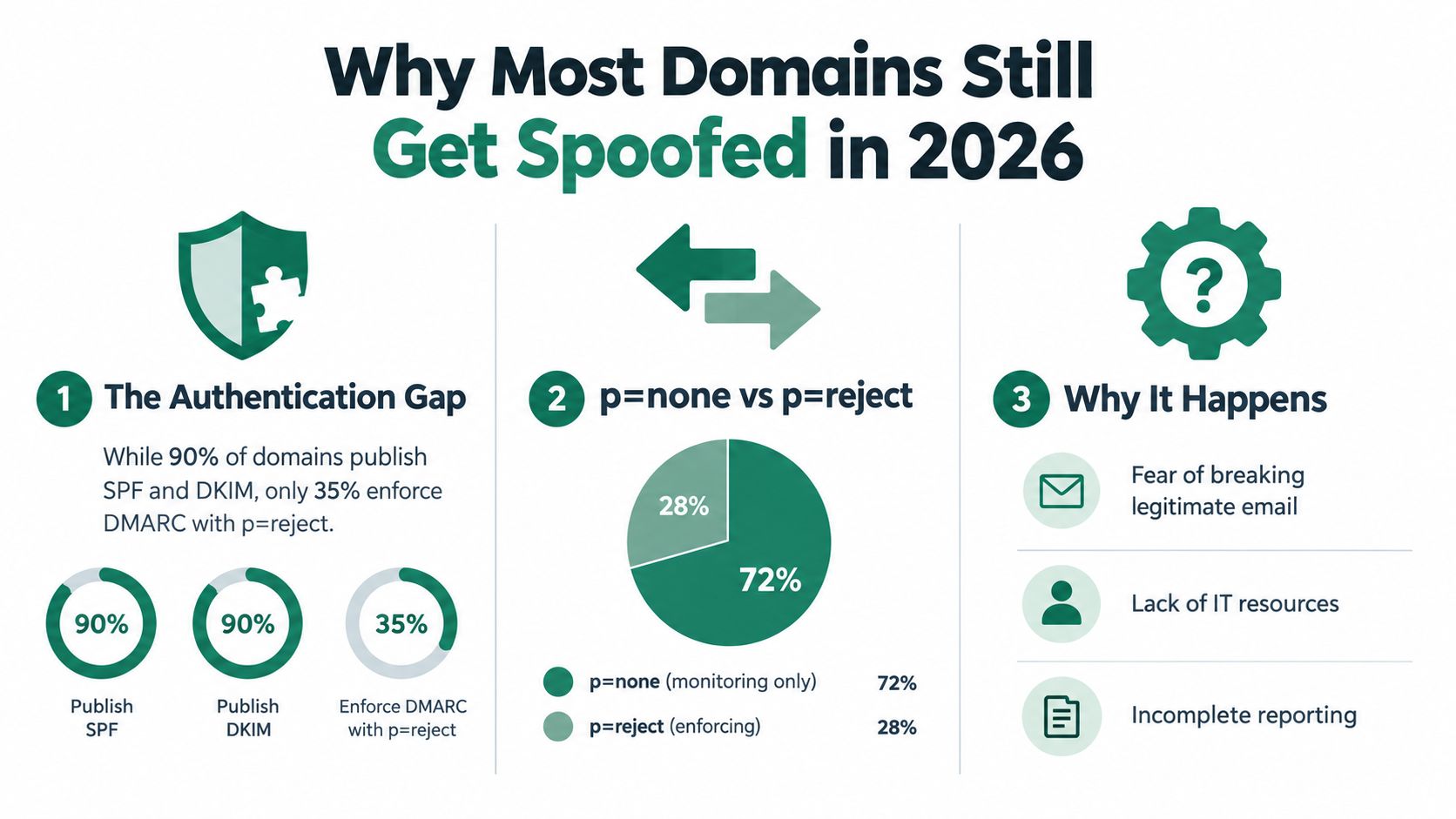
Why Most Domains Still Get Spoofed in 2026
Publishing authentication records does not stop spoofing. Enforcement does. A p=none DMARC policy provides visibility into authentication failures, but it does not tell receiving servers to quarantine or reject those messages.
The 2026 scan of 5.5 million domains found that only 12.8% enforced an anti-spoofing policy, while 57.9% of published DMARC records remained at p=none, according to the DMARC adoption and email authentication analysis. A separate benchmark reported that 77.6% of analyzed domains weren't fully protected, including 25.8% lacking DMARC and 55.5% either missing DMARC or using p=none, as described in the UK government email security guidance.
Publication isn't protection
SPF and DKIM can authenticate legitimate messages while forged mail continues to pass through. Without DMARC alignment and an enforcement policy, attackers can place your visible domain in the From address while sending through infrastructure your records do not authorize.
Mailbox providers also use authentication when assessing sender trust. In 2024, Google and Yahoo announced requirements for bulk senders that included SPF or DKIM and DMARC alignment for domain protection. A 2025 security summary linked those requirements to a 65% reduction in unauthenticated email, according to the Email phishing and DMARC security trends.
Weak enforcement creates two problems. Spoofers get a clearer path to impersonation, while legitimate campaigns can receive weaker trust signals from mailbox providers.
The operational causes
Marketing and sales teams often delay enforcement because they fear blocking legitimate mail. That concern should trigger an inventory, not permanent monitoring. Document every marketing automation platform, CRM, transactional service, sales engagement tool, and internal application. Then align each sender before changing the policy.
Practical rule: Treat
p=noneas an investigation phase, not a finished security posture.
For outreach programs, ownership must be explicit. Each tool needs a documented sending domain, DKIM configuration, and accountable owner before a sequence launches. Monitor alignment, test enforcement in stages, and make rejection the destination. A published record without that operating discipline leaves your domain available for abuse.
How Email Authentication Actually Works
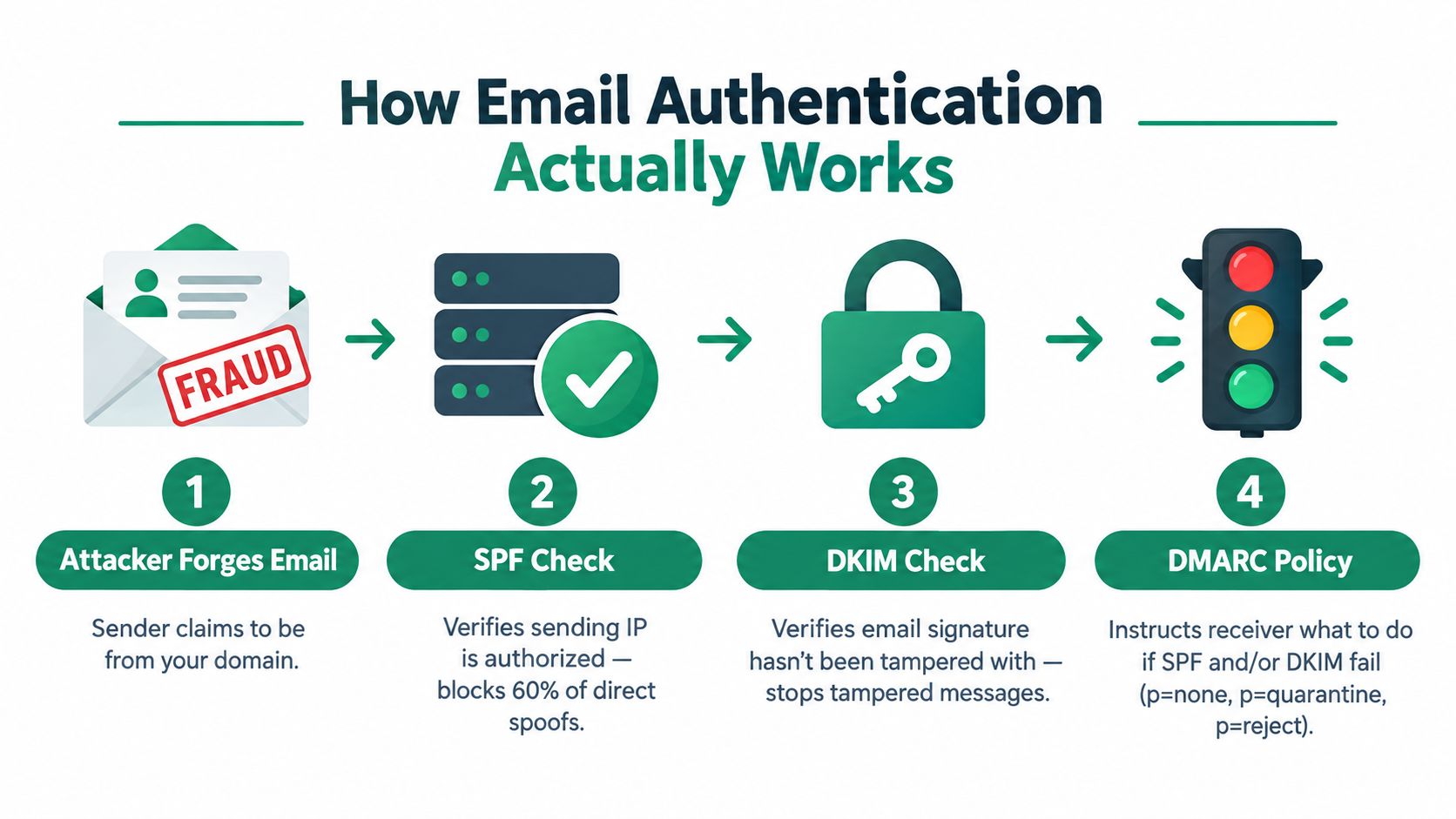
Email authentication uses three complementary controls. SPF answers whether the sending infrastructure is authorized. DKIM proves that an authorized system signed the message and that signed content wasn't altered. DMARC connects those results to the visible From domain and tells the receiving server what to do when authentication fails.
The four-part decision
An attacker can send a message that claims to come from your domain. The receiving server then evaluates the message through several checks:
- SPF check. The server examines the envelope sender domain and looks up its SPF record. That record lists authorized sending services or infrastructure. If the source isn't authorized, SPF fails.
- DKIM check. The receiving server finds the DKIM selector in the message, retrieves the matching public key from DNS, and verifies the cryptographic signature. A valid signature helps show that the message came through a configured sender and wasn't modified after signing.
- DMARC alignment. DMARC compares the authenticated SPF or DKIM domain with the domain visible to the recipient in the
Fromaddress. Authentication that belongs to an unrelated vendor domain may pass SPF or DKIM but still fail DMARC alignment. - Policy decision. The domain owner's DMARC policy determines whether the receiving server should monitor, quarantine, or reject the message. With
p=none, the receiver reports the event without blocking it. Withp=quarantine, the receiver is asked to treat the message as suspicious. Withp=reject, unauthenticated mail is blocked at the mail server, which government guidance identifies as the strongest protection. (Cybersecurity and Infrastructure Security Agency phishing guidance)
SPF and DKIM aren't interchangeable. SPF is tied to the sending path and can be affected by forwarding. DKIM travels with the message, but it doesn't by itself tell the receiving server what to do with a failure. DMARC supplies the enforcement instruction and alignment requirement.
For a practical primer that complements the technical flow, review this email security guidance from Blowfish Technology. Teams responsible for outbound campaigns should also audit how to improve email deliverability before increasing send volume or adding another platform.
The key is the chain. SPF authorizes infrastructure, DKIM authenticates message integrity, and DMARC turns those signals into a receiver-side action.
Setting Up SPF and DKIM the Right Way
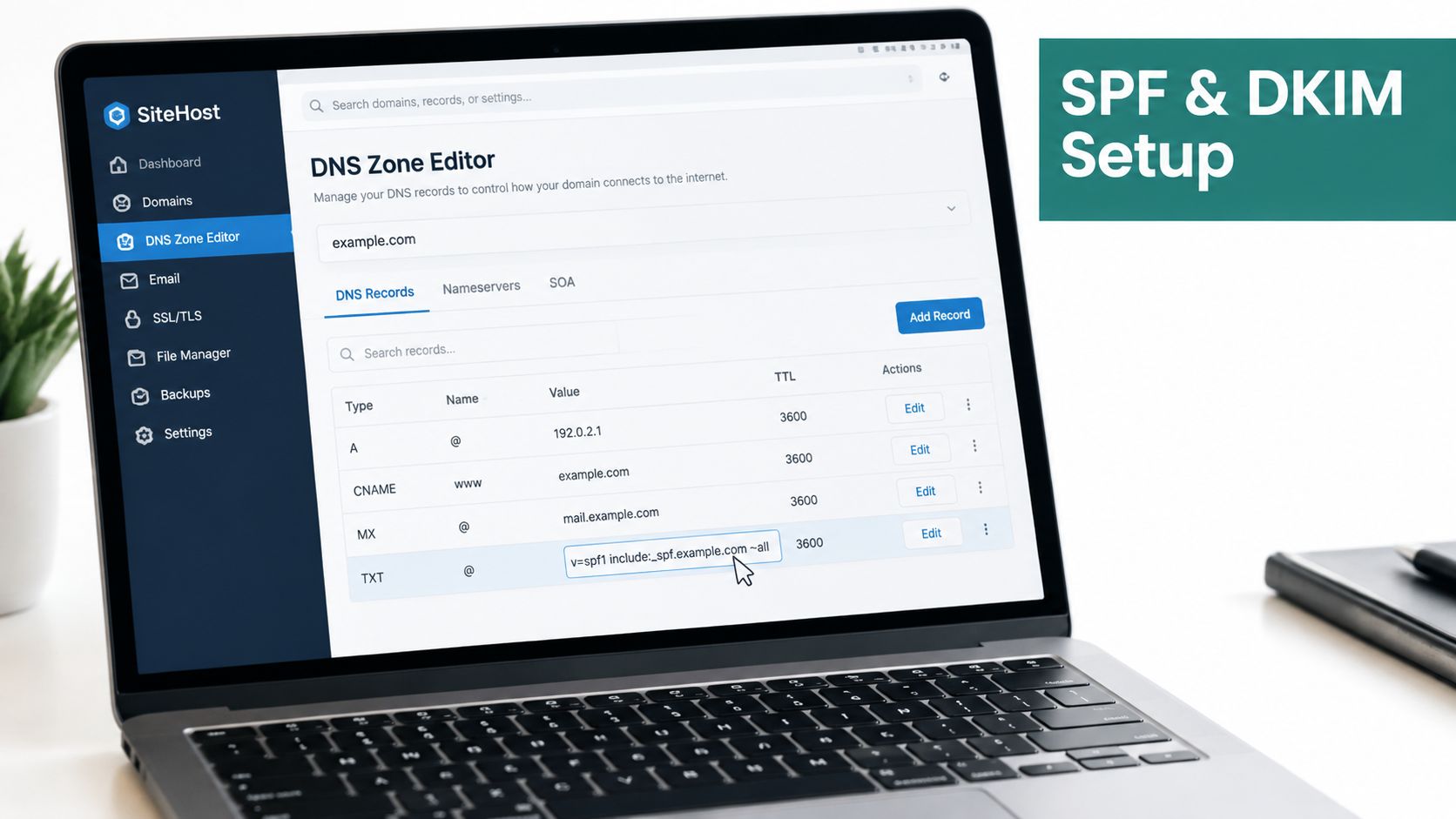
Treat SPF and DKIM as enforcement controls, not DNS housekeeping. Start by listing every system allowed to send as your domain, including Google Workspace, Microsoft 365, marketing automation, transactional email, CRM notifications, Outreach, Salesloft, Instantly, and applications that send password resets or invoices. Your outreach tools belong in this inventory because an untracked sender can undermine DMARC later.
Build the sender inventory first
For each platform, request the current SPF include, DKIM selector, envelope-from domain, and alignment instructions from its documentation page. Do this instead of using a spreadsheet last updated before the vendor migrated to new infrastructure. Record the responsible owner and the campaigns or transactional streams that depend on the connection.
SPF has a 10-DNS-lookup limit, so adding every vendor casually creates a failure point. (Email spoofing prevention guidance) Publish only verified senders, and finish with a hard fail:
v=spf1 include:verified-mail-provider.example include:verified-outreach-provider.example -all
This is a template, not a record to publish unchanged. Replace each placeholder with the vendor's documented mechanism. Do not use +all, which authorizes every sender, or ?all, which provides no useful authorization signal. Remove discontinued vendors promptly. Consolidate overlapping services where possible, and check the final record for lookup limits before saving it.
Configure DKIM per sending platform
Each platform should generate its own DKIM key pair or provide managed signing. Publish the public key at the specified selector, usually under selector._domainkey.yourdomain.com, then enable signing in that platform.
For Google Workspace and Microsoft 365, generate or retrieve the configuration in the administrator console. For Outreach, Salesloft, Instantly, and similar tools, use the custom-domain authentication area. Copy the selector and record value from the service. Never reuse a selector from another account or one key across unrelated sending systems.
Send test messages through every important stream. Inspect the receiving headers and confirm SPF passes, DKIM passes, and the authenticated domains align with the visible From address. One successful platform proves nothing about the others.
Outbound rule: Do not move to DMARC enforcement while a legitimate sender remains unidentified or unaligned.
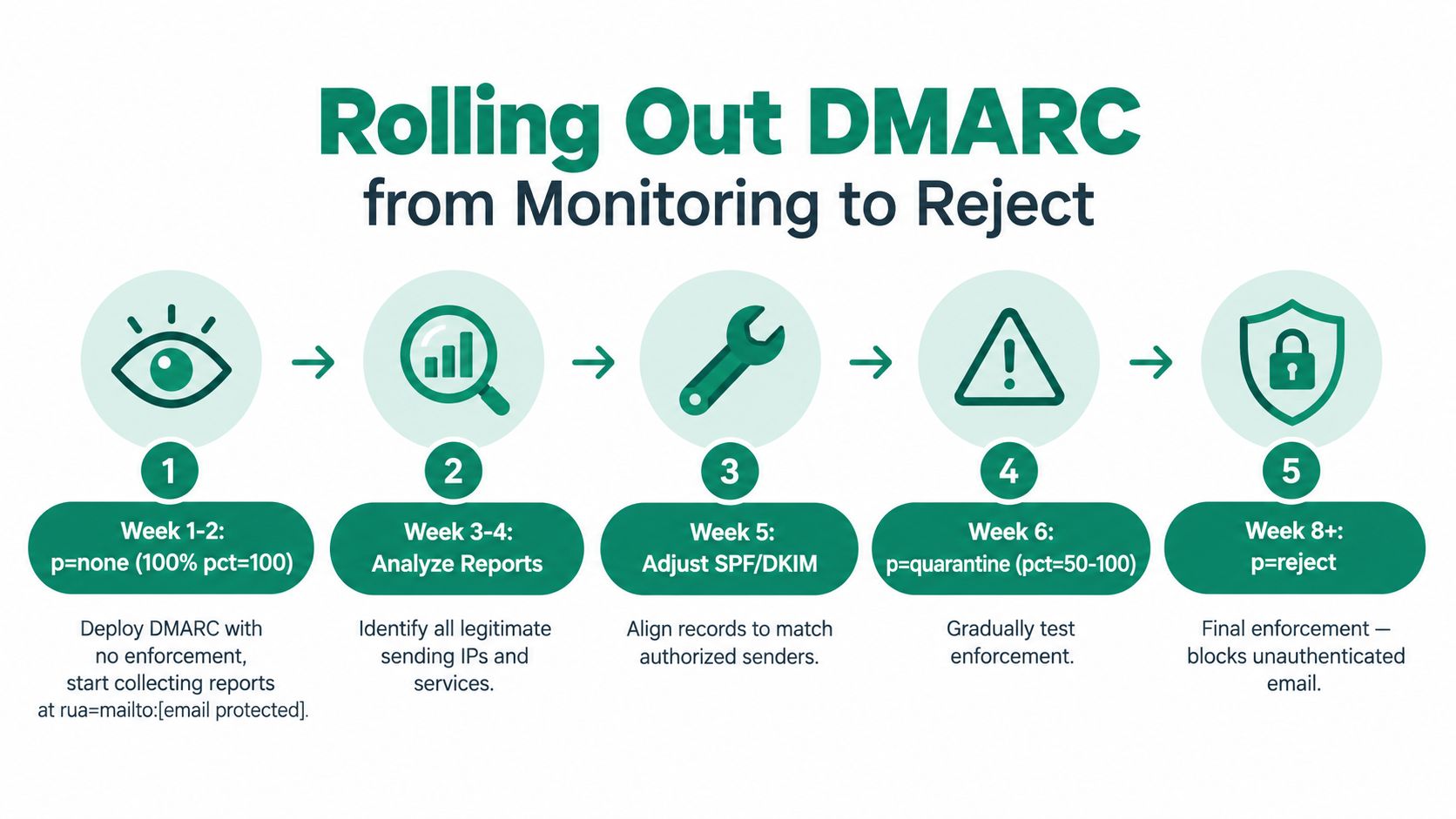
Rolling Out DMARC from Monitoring to Reject
DMARC rollout is an enforcement program, not a DNS checklist. Start by exposing every sender, fix legitimate traffic, then tighten the policy only when reports show that authorized mail will pass.
Phase one: establish visibility
Publish a monitoring policy with an aggregate-report mailbox:
v=DMARC1; p=none; pct=100; rua=mailto:dmarc-reports@yourdomain.com
Use a parser that converts aggregate XML into records your team can review. For each source, track the sending IP, SPF result, DKIM result, alignment status, and reported disposition. Compare those findings with the sender inventory. An unfamiliar source may be a forgotten CRM integration, forwarding path, vendor, or spoofing attempt.
Assign an owner to the report stream. That person should review findings, document decisions, and contact platform administrators when a legitimate stream fails alignment. A mailbox full of reports does not protect the domain.
Phase two: apply controlled pressure
After legitimate sources are authenticated and aligned, move to quarantine with limited coverage:
v=DMARC1; p=quarantine; pct=10; rua=mailto:dmarc-reports@yourdomain.com
Increase the percentage only after validating campaign traffic, transactional messages, replies, and forwarding behavior. Use a staged rollout rather than switching the entire domain at once.
Review these signals daily:
- Alignment rates: Separate SPF alignment from DKIM alignment. Fix any legitimate stream that depends on only one.
- New sources: Investigate newly reported IPs, vendors, and infrastructure before they become permanent exceptions.
- Quarantine effects: Check spam placement and user reports for messages that should reach the inbox.
- Subdomains: Define a policy for outreach subdomains instead of assuming the organizational domain policy is safe for every use.
- Vendor rewriting: Confirm that each outreach platform preserves the envelope sender and signing domain required for alignment.
Sales and marketing teams should test every sending tool under the same policy they will use in production. A sequence that passes in a staging setup can fail once the platform changes its return path or DKIM selector.
Phase three: enforce rejection
Move to:
v=DMARC1; p=reject; pct=100; rua=mailto:dmarc-reports@yourdomain.com; ruf=mailto:dmarc-forensics@yourdomain.com; adkim=s; aspf=s
Use strict alignment only for systems that support it reliably. The trigger for rejection is evidence, not a calendar date. Every legitimate sender must be identified, authenticated, aligned, tested, and monitored.
The CISA phishing guidance identifies p=reject as the strongest DMARC protection because receiving servers can block unauthenticated messages. Keep reports flowing after enforcement. Without monitoring, a newly adopted sales tool or acquisition platform can fail.
Hardening Beyond DMARC for Outreach Teams
DMARC protects the authenticated domain, not the brand around it. Criminals can register lookalike domains, compromise legitimate mailboxes, or abuse trusted services. Barracuda's 2026 analysis reported spoof rates rising from 12.08% in Q2 2025 to 24.30% in Q2 2026, while ARC absence remained above 72%. It recommends layered controls, including MFA, conditional access, risky sign-in monitoring, time-of-click URL analysis, and automated response. (Barracuda 2026 email threats report)
For cold outreach, separate sending from corporate communications. Sales sequences should not send from your primary corporate domain. Use dedicated, authenticated sending domains or subdomains, assign each platform its own DKIM identity, and document ownership. If an outreach stream develops a reputation problem, executive, support, and transactional mail should remain isolated.
| Control | What it blocks | Outreach-team action |
|---|---|---|
| BIMI with a VMC | Prevents unauthenticated messages from receiving the authenticated brand-logo treatment | Meet the enforced DMARC prerequisite, prepare a compliant logo, and obtain the required certificate |
| MTA-STS | Helps prevent downgrade or insecure SMTP transport paths | Publish a policy and move to enforcement only after testing receiving infrastructure |
| TLS-RPT | Reports TLS delivery and negotiation failures | Send reports to a monitored security mailbox |
| Null MX and restrictive SPF | Prevents parked domains from becoming usable mail sources | Set domains that never send or receive mail to reject inbound assumptions and authorize no senders |
| PTR and abuse mailbox hygiene | Reduces ambiguity around outbound ownership and incident contact | Keep reverse-DNS identity and abuse reporting details current |
| Lookalike-domain monitoring | Detects registrations that imitate your brand | Track typo patterns, register strategically, and route abuse reports quickly |
Treat MTA-STS and TLS-RPT as operating controls, not records you publish and forget. Add them to the same register as SPF, DKIM, and DMARC, with an owner, test date, report destination, and escalation path. Keep PTR records and abuse contacts current so receiving providers can identify and report problems.
Give each outreach provider its own SPF authorization and DKIM key. Do not reuse one DKIM key across every platform. Rotate sending subdomains according to governance and reputation policy, never to evade provider controls. Before approving a tool, confirm that it supports aligned authentication, monitored reporting, and a documented shutdown process. If you are assessing managed services, use this guide to choose the right email provider.
EmailScout can help sales and marketing teams discover contact addresses for prospecting. That workflow still requires permission, list hygiene, and authenticated sending infrastructure. Use documented email security best practices to govern access, authentication, campaign approval, and vendor use. A contact-discovery tool does not enforce domain security.
Monitoring, Reporting, and Incident Response
A CFO's name appears on an invoice reminder from a lookalike domain, asking a supplier to change payment details. At the same time, DMARC aggregate reports show a new source that does not align with the company's domain. The security lead has one hour to decide whether the message reflects spoofing, a compromised account, or an undocumented legitimate service.
The first-hour response
Begin by pulling DMARC source IPs, timestamps, and authentication results before reviewing the sender's display name.
- Correlate reports: Compare the DMARC source IP and timestamps with outbound sending logs.
- Classify the path: Establish whether the message came from an unauthorized server, a forwarded route, a lookalike domain, or a compromised approved account.
- Preserve samples: Save the forensic report and complete headers where available.
- Alert providers: Use postmaster and abuse channels for Gmail, Microsoft, and Yahoo, then report malicious infrastructure.
- Protect recipients: Notify affected customers, suppliers, finance staff, and executives through a trusted channel.
- Request takedowns: Submit abuse reports for the impersonating domain, hosting provider, links, and attachments.
Read a DMARC aggregate record in sequence. The source IP identifies the reporting sender. SPF and DKIM show authentication outcomes, alignment indicates whether those results match the visible From domain, and disposition records how the receiving provider handled the message.
Use this SMB email safety guide to support response procedures and access controls. Before sales or marketing staff engage with suspicious contacts, use a workflow for checking whether an email address is associated with spam. EmailScout can support that address-checking workflow, but it does not decide whether a message is authorized or enforce domain policy.
Make review recurring
Review alignment and new sending sources weekly. Triage forensic samples monthly under your privacy and retention rules. Re-audit the authentication posture quarterly, covering parked domains, outreach vendors, subdomains, DKIM selectors, MTA-STS, TLS reporting, and account access.
After a confirmed incident, document the event and notify affected parties. Tighten the domain policy to p=reject when the sender inventory supports enforcement. Add the impersonating domain or infrastructure to your organization's blocklist and threat-intelligence feeds, then assign an owner to verify that the controls remain active.
Your 30/60/90 Anti-Spoofing Plan
The distance between a published DMARC record and enforced spoofing protection is operational, not technical. A team needs ownership, reporting, change control, and a clear point at which monitoring ends.
First 30 days
Complete the sender inventory. Publish SPF and DKIM for every legitimate system, set DMARC to p=none with an aggregate-report address, and confirm that reports reach a parser that someone reviews. Assign one owner in security or infrastructure and one partner in marketing operations.
Days 31 through 60
Tighten SPF with -all after validating every authorized sender. Review BIMI prerequisites, enable MTA-STS and TLS-RPT, and secure parked and typo domains with appropriate DNS and registration controls.
Deliver a short sales-team training session covering display-name impersonation, reply-to manipulation, lookalike domains, and outreach-tool authentication. Salespeople should know that a familiar name isn't proof of a legitimate address and that payment or credential requests require separate verification.
Days 61 through 90
Graduate DMARC to p=quarantine for a controlled period. Escalate to p=reject; pct=100 only when aligned legitimate volume exceeds 95%, as specified in the rollout plan, and the remaining failures have documented owners and decisions. Finalize BIMI with a VMC where it fits your brand and mailbox-provider requirements, then run a tabletop spoofing drill with security, finance, marketing, sales, and customer support.
Keep the operating rule visible in every campaign approval checklist:
If it sends as your domain, it must authenticate, align, and be auditable.
EmailScout helps sales and marketing teams find decision-maker email addresses and build prospecting lists, while your team remains responsible for authenticated, compliant outreach infrastructure. Visit EmailScout to support contact discovery alongside the SPF, DKIM, DMARC, and monitoring controls that protect your sending identity.